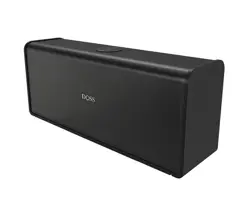
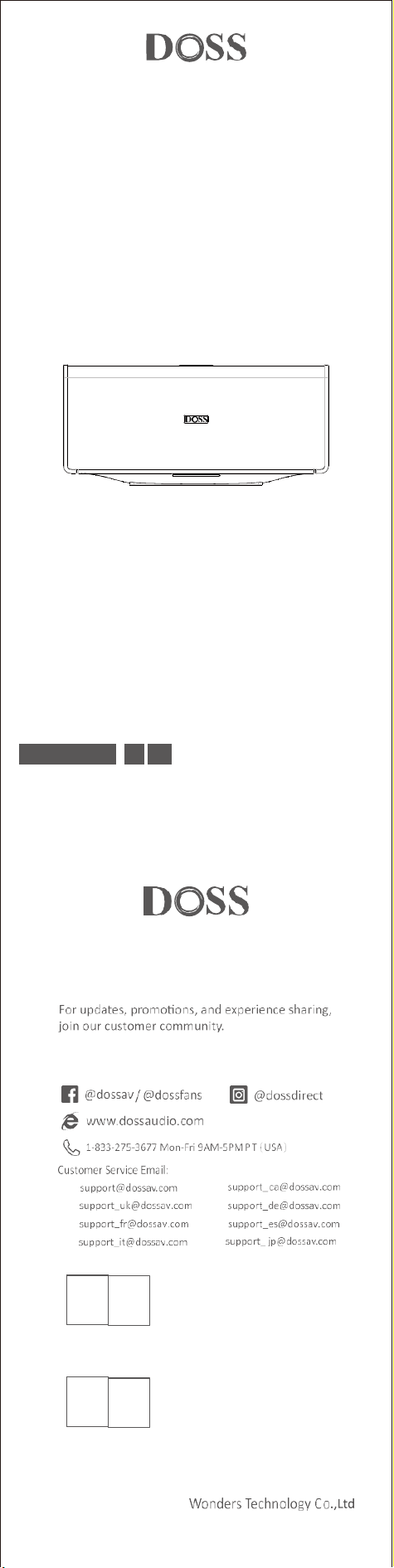
Wireless Home Speaker
EN DE FR IT ES JP
Model No.: SoundBox XL Ultra
Quick Start Guide
US:
UK:
FR:
IT :
CA:
DE:
ES:
JP:
REP
OST_UK _20220119000010
EVATOST CONSULTING LTD
Office 101 32 Threadneedle Street, London,
United Kingdom, EC2R 8AY
contact@evatost.com
We simply act as UK representative for cross-border sellers, and are not manufacturers/importers/dis-
tributors for the product, nor involved in the manufacture/import/sale of the product. Therefore, we are
not responsible for any after-sales service s related to the product. In case of any product quality or
infringement issues, the manufacturer/importer/seller shall be solely held responsible.
eVatmaster Consulting GmbH
REP
OST EU 20220119000015
Bettinastr. 30
60325 Frankfurt am Main,Germany
contact@evatmaster.com
We simply act as EU representative for cross-border sellers, and are not manufactur-
ers/importers/distributors for the product, nor involved in the manufacture/import/sale of the
product. Therefore, we are not responsible for any after-sales services related to the product.
In case of any product quality or infringement issues, the manufacturer/importer/seller shall
be solely held responsible.
UK
EU
EN
1. Packing content
●
1 x SoundBox XL Ultra
●
1 x USB-C charging cable
●
1 x User Manual
2. Specifications
Output power: 20*2W+40W Subwoofer
Frequency response: 35Hz-25kHz
Signal to noise ratio:≥95dB
DC power input: 5V 3A / 9V 2A
Battery: 11.1V/4500mAh
Charge time: 5.6hrs
Playtime: up to 18hrs (at 50% volume-0dB Pink noise)
Bluetooth range: up to 30m/99ft
Unit net weight: ≈5.5lbs/2.5kg
Unit dimension: 13.2*3.6*6.0 inches/335*92*152mm
TF card and USB audio format: MP3/ WAV/ FLAC (Max capacity 256G)
Warranty: One- year limited
3. Important notes before using
●
To prolong the lifetime of the battery, fully charge the speaker before the first
time using it.
●
The battery is at a low level when the front indicator flashes red three times
every five minutes.
●
The speaker will automatically power off after 15 minutes without audio input.
●
The front indicator will be OFF if there is no operation at the speaker within 30
seconds.
●
The USB out is only for playing audio.
●
When all buttons can't be controlled, try to poke the Aux port with a paper clip.
●
If you need any assistance while using this speaker, please feel free to contact
customer service at [email protected].
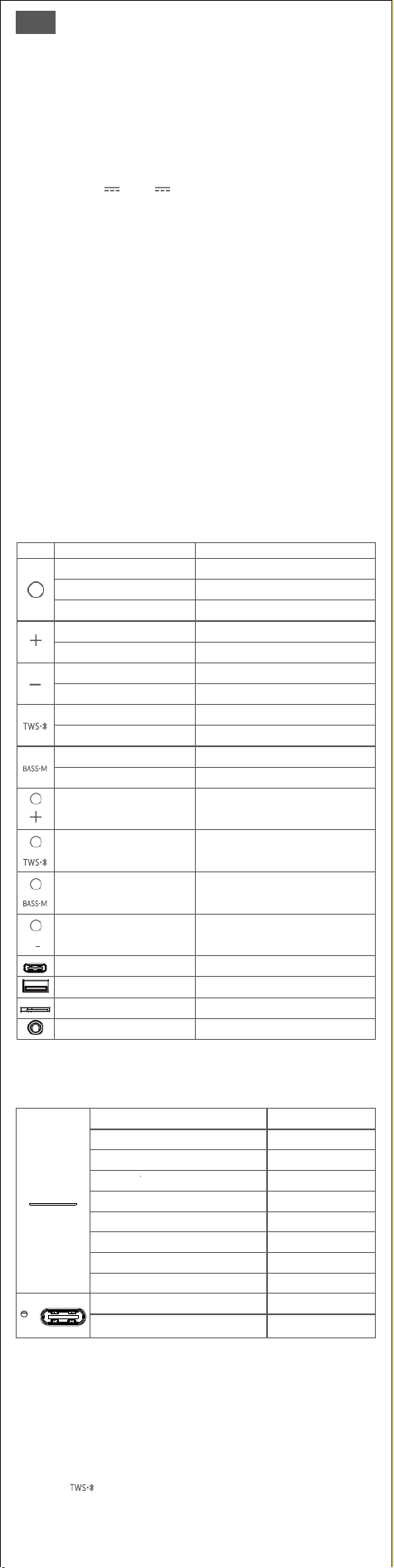
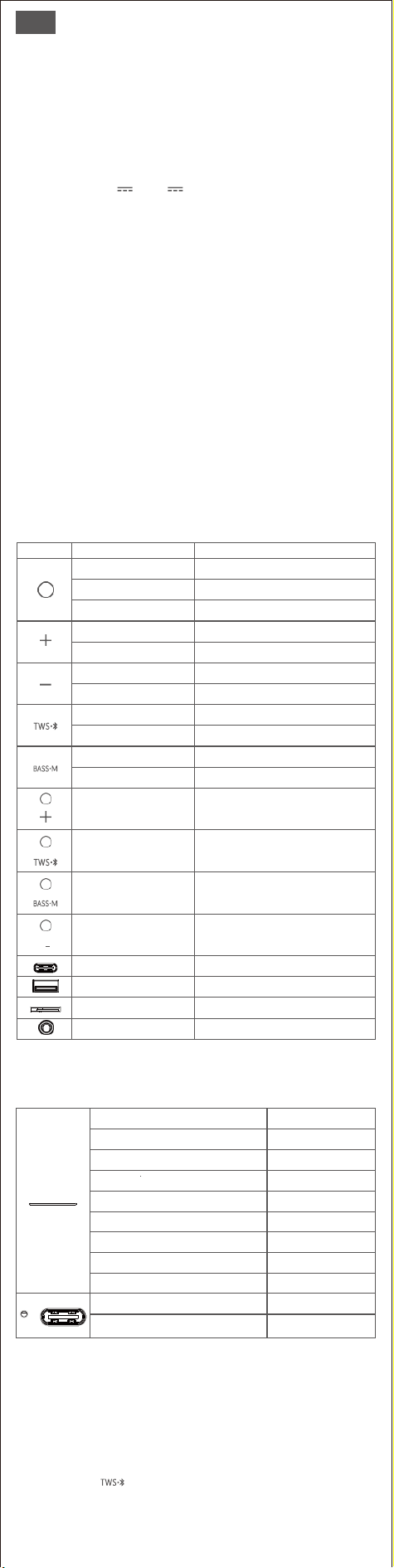
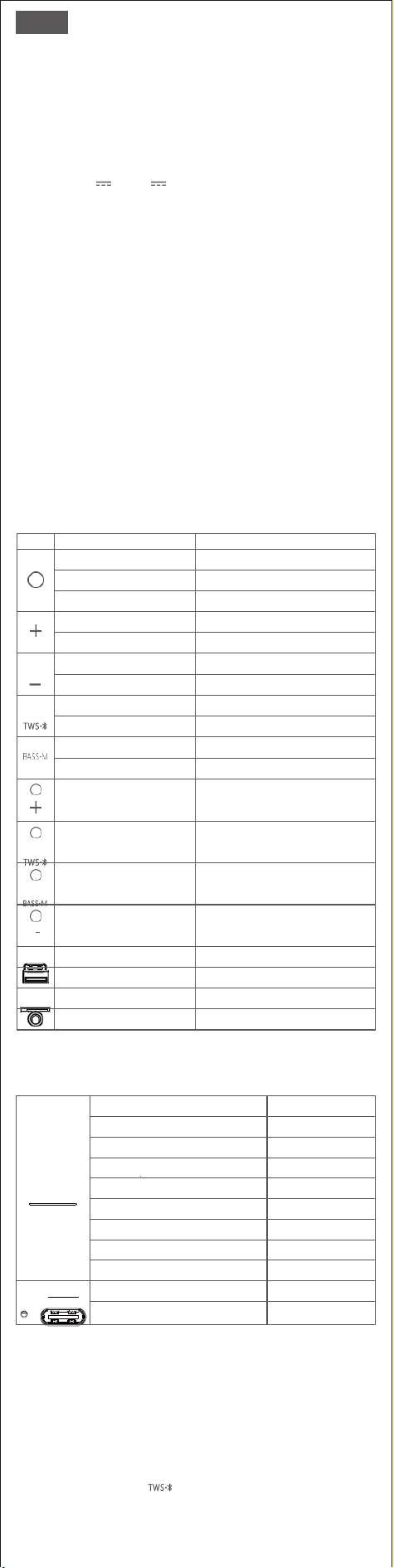
4. Buttons and control
Buttons
How to control
Function
Press and hold 2s
Turn on/off
Press
Play/pause
Press
Reconnect with the last device
Press and hold 2s
Next track
Press
Volume up
Press and hold 2s
Previous track
Press
Volume down
Press and hold 2s
Disconnect Bluetooth
Press
Enter/ Exit TWS pairing
Press and hold 2s
Extra bass on/off
Press
Change modes
Press and hold 2s
simultaneously
Check version ID
(Only Works while Bluetooth disconnecting)
Press and hold 2s
simultaneously
Restore factory setting
Press and hold 2s
simultaneously
Cancel/activate the auto power-off feature
(Only works in Bluetooth mode)
Press and hold 2s
simultaneously
Cancel/active the prompt tone
Insert the charging cable
Charge the speaker
Insert the USB drive
Play via USB drive
Insert the Micro SD card
Play via Micro SD card
Plug in the Line in cable
Play via Line in ( NOT included)
5. LED indication
Flashing blue
Bluetooth pairing
Solid Blue
Bluetooth paired
Solid red
AUX mode
Solid green
TF card mode
Solid white
USB drive mode
Flashing green
Extra bass on
Flashing red
Extra bass off
Flashing green
Max volume
Flashing red every five minutes
Low battery level
Solid red
Charging
Light off
Fully charged
6. Bluetooth mode
1. Enable the Bluetooth feature on your device.
2. Find “SoundBox XL Ultra” on the Bluetooth device and connect it.
3.Once paired, you can see the status “connected” on your device.
7. TWS (True Wireless Stereo) mode
1. Press the on both SoundBox XL Ultra to enter into TWS pairing.
2. Once paired, the LED of the primary speaker turns solid blue, while the
second speaker turns slowly flashing blue.
3. Find " SoundBox XL Ultra " on your Bluetooth device and connect it.

8. Use your speaker with Echo Dot
You can connect the Dot with the speaker by Bluetooth.
Please follow the steps to set up via Bluetooth:
1. Download the Alexa app and follow the standard setup procedure to get the
dot connected to your home Wi-Fi network.
2. Switch the SoundBox XL Ultra to Bluetooth mode.
3. Run the Alexa App, tap Menu, and then tap Settings.
4. Tap the Echo Dot in your list of Alexa devices, then tap Bluetooth.
5. The SoundBox XL Ultra should appear in the list of Bluetooth devices. If not,
please long press the Bluetooth button and try it again.
6. Once listed, tap on the speaker to complete the pairing process.
7. To remove the device, return to Bluetooth > tap the name of speaker > tap
“Forget Device”
Note:
Voice command will not be able to turn on/off the speaker if you connect to it via Bluetooth.
9. Safety instructions
• Avoid dropping or hitting the speaker.
• Avoid exposing to extreme temperature.
• Avoid using the speaker near a microwave.
• Never disassemble or repair the speaker.
• Never use any corrosive cleanser/oil to clean.
• Never leave the speaker in a car parked in the sun.
• Never attempt to charge the speaker while it is wet.
FCC Statement
This equipment has been tested and found to comply with the limits for a Class
B digital device, pursuant to part 15 of the FCC Rules. These limits are designed
to provide reasonable protection against harmful interference in a residential
installation. This equipment generates, uses and can radiate radio frequency
energy and, if not installed and used in accordance with the instructions, may
cause harmful interference to radio communications. However, there is no
guarantee that interference will not occur in a particular installation. If this
equipment does cause harmful interference to radio or television reception,
which can be determined by turning the equipment off and on, the user is
encouraged to try to correct the interference by one or more of the following
measures:
• Reorient or relocate the receiving antenna.
• Increase the separation between the equipment and receiver.
• Connect the equipment into an outlet on a circuit different from that to which
the receiver is connected.
• Consult the dealer or an experienced radio/TV technician for help.
Caution: Any changes or modifications to this device not explicitly approved by
manufacturer could void your authority to operate this equipment.This device
complies with part 15 of the FCC Rules. Operation is subject to the following
two conditions:
(1) This device may not cause harmful interference, and (2) this device must
accept any interference received, including interference that may cause
undesired operation.
RF Exposure Information
The device has been evaluated to meet general RF exposure requirement.
The device can be used in portable exposure condition without restriction.
ISED Statement
This device contains licence-exempt transmitter(s)/receiver(s) that comply with
Innovation, Science and Economic Development Canada’s licence-exempt
RSS(s). Operation is subject to the following two conditions:
1. This device may not cause interference.
2. This device must accept any interference, including interference that may
cause undesired operation of the device.
This equipment should be installed and operated with a minumum distance of
20 cm between the radiator and your body.
Le présent appareil est conforme aux CNR d'Industrie Canada applicables
auxappareils radio exempts de licence. L'exploitation est autorisée aux deux
conditions suivantes : (1)l'appareil ne doit pas produire de brouillage, et (2)
l'utilisateur de l'appareil doit accepter toutbrouillage radioélectrique subi,
même si le brouillage est susceptible d'en compromettre lefonctionnement.
CAN ICES-3(B)/NMB-3(B)
L’appareil a été évalué pour répondre aux exigences générales d’exposition aux
RF. Le dispositif peut être utilisé sans restriction dans des conditions portatives
d’exposition.
Cet équipement doit être installé et utilisé à une distance minimale de 20 cm
entre le radiateur et votre corps
DE
1. Packungsinhalt
●
1 x SoundBox XL Ultra
●
1 x USB-C Ladekabel
●
1 x Benutzerhandbuch
2. Spezifikationen
Ausgangsleistung: 20*2W+40W Subwoofer
Frequenzgang: 35Hz-25kHz
Signal-Rausch-Verhältnis: ≥95dB
DC Stromeingang: 5V 3A / 9V 2A
Akku: 11.1V/4500mAh
Aufladezeit: 5.6Std.
Spielzeit: bis zu 18 Stunden (bei 50% Lautstärke-0dB Rosa Rauschen)
Bluetooth-Reichweite: bis zu 30m/99ft
Nettogewicht des Geräts: ≈5.5lbs/2.5kg
Abmessungen des Geräts: 13,2*3,6*6,0 Zoll/335*92*152mm
TF-Karte und USB-Audioformat: MP3/ WAV/ FLAC (Maximale Kapazität 256G)
Garantie: Ein Jahr beschränkt
3. Wichtige Hinweise vor der Verwendung
●
Um die Lebensdauer des Akkus zu verlängern, laden Sie den Lautsprecher vor
dem ersten Gebrauch vollständig auf.
●
Der Ladezustand des Akkus ist niedrig, wenn die vordere Anzeige alle fünf
Minuten dreimal rot blinkt.
●
Der Lautsprecher schaltet sich nach 15 Minuten ohne Audioeingang
automatisch aus.
●
Die vordere Anzeige leuchtet nicht, wenn innerhalb von 30 Sekunden keine
Bedienung am Lautsprecher erfolgt.
●
Der USB-Ausgang ist nur für die Audiowiedergabe vorgesehen.
●
Wenn alle Tasten nicht bedient werden können, versuchen Sie, den
Line-in-Anschluss mit einer Büroklammer zu öffnen.
●
Wenn Sie bei der Verwendung dieses Lautsprechers Hilfe benötigen, wenden
Sie sich bitte an den Kundendienst unter support_de@dossav.com.
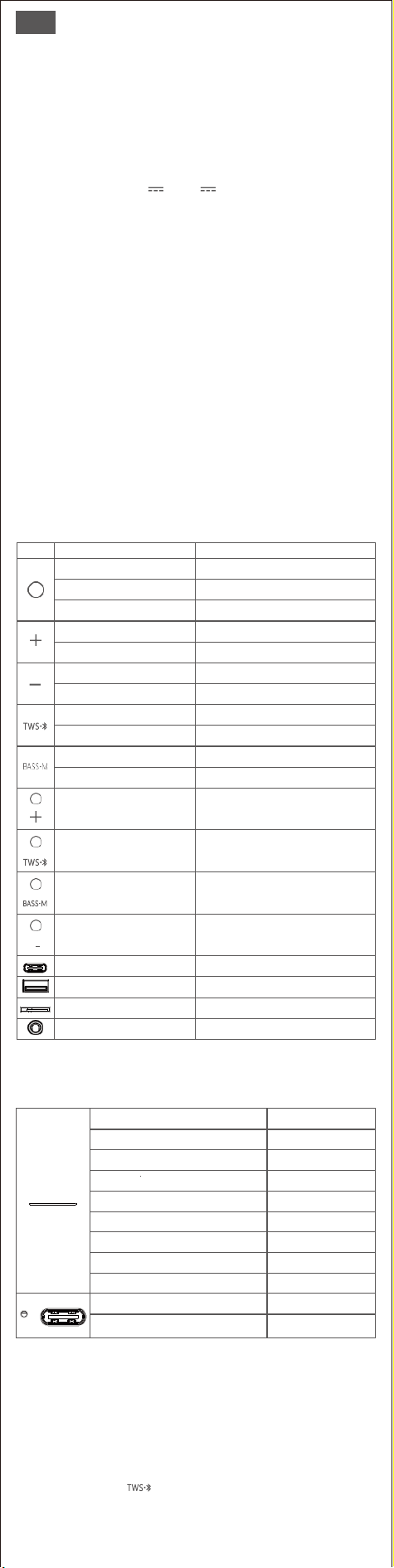
4. Tasten und Steuerung
Schaltfläche
Wie wird gesteuert
Funktion
2s drücken und halten
Einschalten/Ausschalten
Drücken Sie
Wiedergabe/Pause
Drücken Sie
Verbindung mit dem letzten Gerät wiederhers
-tellen
2s drücken und halten
Nächster Titel
Drücken Sie
Lauter
2s drücken und halten
Vorheriger Titel
Drücken Sie
Lautstärke runter
2s drücken und halten
Trennen Sie die Bluetooth-Verbindung
Drücken Sie
TWS-Kopplung eingeben/verlassen
2s drücken und halten
Extra-Bass ein/aus
Drücken Sie
Modi ändern
2s drücken und halten
gleichzeitig
Versions-ID prüfen(Funktioniert nur beim
Trennen der Bluetooth-Verbindung)
2s drücken und halten
gleichzeitig
Werkseinstellung wiederherstellen
2s drücken und halten
gleichzeitig
Abbrechen/Aktivieren der automatischen Abs
chaltfunktion( Nur im Bluetooth-Modus möglich)
2s drücken und halten
gleichzeitig
Abbruch/Aktivierung des Aufforderungstons
Stecken Sie das Ladekabel ein
Laden Sie den Lautsprecher auf
Stecken Sie das USB-Laufwerk ein
Wiedergabe über USB-Laufwerk
Setzen Sie die Micro SD-Karte ein
Wiedergabe über Micro SD-Karte
Einstecken des Line-in-Kabels
Wiedergabe über Line-In (NICHT enthalten)
5. LED-Anzeigens
Blau blinkend
Bluetooth-Kopplung
Einfarbig Blau
Bluetooth gekoppelt
Einfarbig rot
AUX-Modus
Einfarbig grün
TF-Karten-Modus
Einfarbig weiß
USB-Laufwerk-Modus
Grünes Blinken
Extra Bass auf
Rotes Blinken
Extra Bass ab
Blinkt grün
Maximale Lautstärke
Rotes Blinken alle fünf Minuten
Niedriger Batteriestand
Einfarbig rot
Aufladen
Licht aus
Vollständig aufgeladen
6. Bluetooth-Modus
1. Aktivieren Sie die Bluetooth-Funktion auf Ihrem Gerät.
2. Suchen Sie die "SoundBox XL Ultra" auf dem Bluetooth-Gerät und verbinden
Sie sie.
3. Sobald die Verbindung hergestellt ist, wird auf Ihrem Gerät der Status
"verbunden" angezeigt.
7. TWS (True Wireless Stereo) Modus
1. Drücken Sie die -Taste an beiden SoundBox XL Ultra, um das
TWS-Pairing zu aktivieren.
2. Nach dem Pairing leuchtet die LED des ersten Lautsprechers dauerhaft blau,
während die LED des zweiten Lautsprechers langsam blau blinkt.
3. Suchen Sie die "SoundBox XL Ultra" auf Ihrem Bluetooth-Gerät und verbinden
Sie sie.

8.Verwenden des Lautsprechers mit dem Echo Dot
Sie können den Dot über Bluetooth mit dem Lautsprecher verbinden.
Bitte befolgen Sie die Schritte zur Einrichtung über Bluetooth:
1. Laden Sie die Alexa-App herunter und befolgen Sie die Einrichtungsschritte,
um den Dot mit Ihrem Wi-Fi-Heimnetzwerk zu verbinden.
2. Schalten Sie die SoundBox XL Ultra in den Bluetooth-Kopplungsmodus.
3. Starten Sie die Alexa-App, tippen Sie auf Menü und dann auf Einstellungen.
4. Tippen Sie auf den Echo Dot in der Liste der Alexa-Geräte und dann auf
Bluetooth.
5. Die SoundBox XL Ultra sollte in der Liste der Bluetooth-Geräte erscheinen.
Falls nicht, drücken Sie bitte die Einschalttaste und versuchen Sie es erneut.
6. Sobald sie in der Liste erscheint, tippen Sie auf den Lautsprecher, um den
Kopplungsprozess abzuschließen.
7. Um das Gerät zu entfernen, kehren Sie zu Bluetooth zurück>Tippen Sie auf
den Namen des Lautsprechers>Tippen Sie auf "Gerät vergessen".
Hinweis:
VSie können den Lautsprecher nicht per Sprachbefehl ein- und ausschalten, wenn Sie ihn über
Bluetooth verbinden.
9. Sicherheitshinweise
• Vermeiden Sie es, den Lautsprecher fallen zu lassen oder zu stoßen.
• Setzen Sie den Lautsprecher nicht extremen Temperaturen aus.
• Verwenden Sie den Lautsprecher nicht in der Nähe einer Mikrowelle.
• Nehmen Sie den Lautsprecher niemals auseinander oder reparieren Sie ihn.
• Verwenden Sie keine ätzenden Reinigungsmittel/Öle zur Reinigung.
• Lassen Sie den Lautsprecher niemals in einem in der Sonne geparkten Auto
stehen.
• Versuchen Sie niemals, den Lautsprecher zu laden, wenn er nass ist.
FR
1. Contenu de l'emballage
●
1 x SoundBox XL Ultra
●
1 x Câble de charge USB-C
●
1 x Manuel de l'utilisateur
2. Spécifications
Puissance de sortie: 20*2W+40W Subwoofer
Réponse en fréquence: 35Hz-25kHz
Rapport signal/bruit: ≥95dB
Entrée d'alimentation DC: 5V 3A / 9V 2A
Batterie: 11.1V/4500mAh
Temps de charge: 5.6heures
Durée d'écoute: jusqu'à 18 heures (à 50 % du volume - 0 dB de Pink noise)
Portée Bluetooth: jusqu'à 30m/99ft
Poids net de l'appareil: ≈5.5lbs/2.5kg
Dimensions de l'appareil: 13.2*3.6*6.0 inches/335*92*152mm
Format audio de la carte TF et de l'USB: MP3/ WAV/ FLAC (capacité maximale
256G)
Garantie: Limitée à un an
3. Notes importantes avant l'utilisation
●
Pour prolonger la durée de vie de la batterie, chargez complètement le
haut-parleur avant de l'utiliser pour la première fois.
●
La batterie est faible lorsque le voyant avant clignote en rouge trois fois toutes
les cinq minutes.
●
Le haut-parleur s'éteint automatiquement après 15 minutes sans entrée audio.
●
Le voyant avant s'éteint si aucune opération n'est effectuée sur l'enceinte dans
les 30 secondes.
●
La sortie USB ne sert qu'à la lecture audio.
●
Lorsque tous les boutons ne peuvent pas être contrôlés, essayez de percer le
port d'entrée de ligne à l'aide d'un trombone.
●
Si vous avez besoin d'aide lors de l'utilisation de ce haut-parleur, n'hésitez pas à
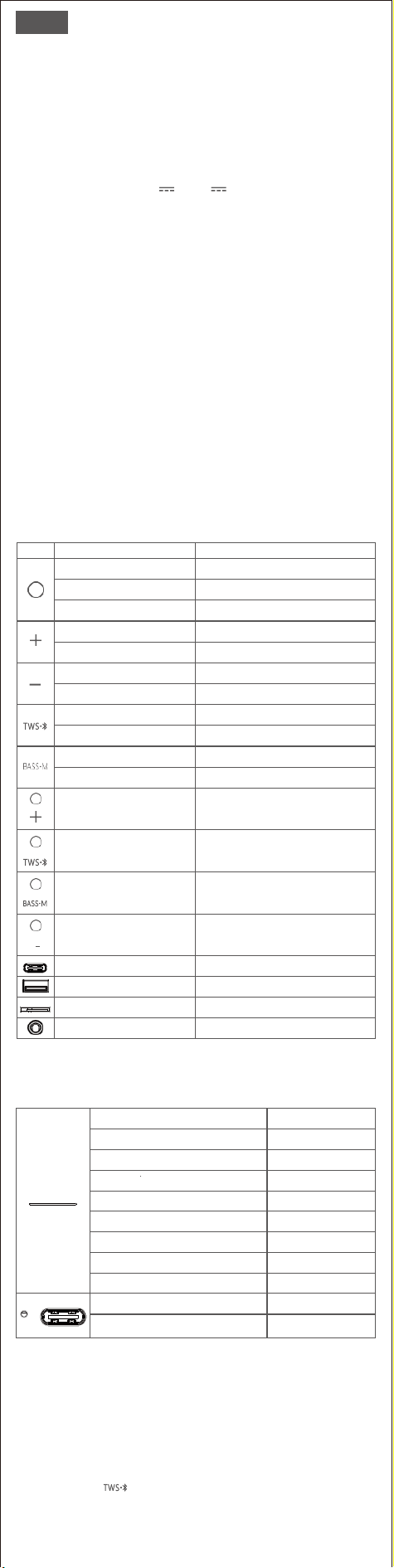
4. Boutons et Commandes
Bouton
Comment contrôler
Fonction
Appuyer et maintenir 2s
Allumer/éteindre
Appuyer
Lecture/pause
Appuyer
Reconnecter avec le dernier appareil
Appuyer et maintenir 2s
Piste Prochaine
Appuyer
Augmentation du volume
Appuyer et maintenir 2s
Piste précédente
Appuyer
Diminution du volume
Appuyer et maintenir 2s
Déconnecter le Bluetooth
Appuyer
Entrer/ Sortir de l'appairage TWS
Appuyer et maintenir 2s
Activation/désactivation des basses supplémentaires
Appuyer
Modifier les modes
Appuyer et maintenir 2s
simultanément
Vérifier l'ID de la version (Ne fonctionne que
lorsque Bluetooth est déconnecté)
Appuyer et maintenir 2s
simultanément
Rétablir les paramètres d'usine
Appuyer et maintenir 2s
simultanément
Annuler/activer la fonction de mise hors t
ension automatique(Ne fonctionne qu'en
mode Bluetooth)
Appuyer et maintenir 2s
simultanément
Annuler/activer la tonalité d'invite
Insérer le câble de chargement
Charger le haut-parleur
Insérer la clé USB
Lecture via une clé USB
Insérer la carte Micro SD
Lecture via carte Micro SD
Branchez le câble d'entrée de ligne
Jouer via l'entrée de ligne (NON incluse)
5. Indications LED
Bleu clignotant
Appairage Bluetooth
Bleu solide
Bluetooth apparié
Rouge solide
Mode AUX
Vert solide
Mode TF carte
Blanc solide
Mode clé USB
Vert clignotant
Extra bass activation
Rouge clignotant
Extra bass désactivation
Vert clignotant
Volume maximal
Clignotement rouge toutes les cinq minutes
Niveau de batterie faible
Rouge solide
Chargement
Lumière éteinte
Entièrement chargé
6. Mode Bluetooth
1. Activer la fonction Bluetooth sur votre appareil.
2. Trouver la «SoundBox XL Ultra» sur l'appareil Bluetooth et la connecter.
3. Une fois jumelé, vous pouvez voir le statut «connecté» sur votre appareil.
7.Mode TWS (Stéréo sans fil)
1 Appuyer sur la touche des deux SoundBox XL Ultra pour entrer dans
l'appairage TWS.
2. Une fois l'appairage effectué, la LED de l'enceinte principale devient bleu fixe,
tandis que la seconde enceinte devient bleu clignotante.
3. Trouver «SoundBox XL Ultra» sur votre appareil Bluetooth et le connecter.

8. Utiliser votre enceinte avec l'Echo Dot
Vous pouvez connecter le Dot à l'enceinte via Bluetooth.
Veuillez suivre les étapes de configuration via Bluetooth:
1. Télécharger l'application Alexa et suivre les étapes de configuration de la
procédure pour que le Dot soit connecté à votre réseau Wi-Fi domestique.
2. Mettre la SoundBox XL Ultra en mode d'appairage Bluetooth.
3. Lancez l'application Alexa, appuyez sur Menu, puis sur Paramètres.
4. Appuyez sur l'Echo Dot dans votre liste d'appareils Alexa, puis appuyez sur
Bluetooth.
5. la SoundBox XL Ultra doit apparaître dans la liste des appareils Bluetooth. Si
ce n'est pas le cas, appuyez sur le bouton d'alimentation et réessayez.
6. Une fois dans la liste, appuyez sur l'enceinte pour terminer le processus
d'appairage.
7. Pour supprimer l'appareil, revenez à Bluetooth>appuyez sur le nom de
l'enceinte>appuyez sur « Oublier l'appareil ».
NB:
La commande vocale ne pourra pas allumer/éteindre l'enceinte si vous vous y connectez via
Bluetooth.
9.Consignes de sécurité
• Évitez de faire tomber ou de frapper l'enceinte.
• Évitez de l'exposer à des températures extrêmes.
• Évitez d'utiliser l'enceinte à proximité d'un micro-ondes.
• Ne démontez ou ne réparez jamais l'enceinte.
• N'utilisez jamais de nettoyant/huile corrosif pour le nettoyer.
• Ne laissez jamais l'enceinte dans une voiture garée au soleil.
• N'essayez jamais de charger l'enceinte lorsqu'elle est mouill.
IT
1. Contenuto della confezione
●
1 x SoundBox XL Ultra
●
1 x Cavo di ricarica USB-C
●
1 x Manuale d'uso
2. Specifiche tecniche
Potenza di uscita: 20*2W+40W Subwoofer
Risposta in frequenza: 35Hz-25kHz
Rapporto segnale/rumore: ≥95dB
Ingresso alimentazione DC: 5V 3A / 9V 2A
Batteria: 11.1V/4500mAh
Tempo di ricarica: 5.6ore
Tempo di riproduzione: fino a 18 ore (al 50% del volume-0dB di rumore rosa)
Portata Bluetooth: fino a 30m/99ft
Peso netto dell'unità: ≈5.5lbs/2.5kg
Dimensioni dell'unità: 13.2*3.6*6.0 pollici/335*92*152 mm
Formato audio su scheda TF e USB: MP3/ WAV/ FLAC (capacità massima 256G)
Garanzia: Limitata di un anno
3. Note importanti prima dell'uso
●
Per prolungare la durata della batteria, caricare completamente il diffusore
prima di utilizzarlo per la prima volta.
●
La batteria è scarica quando l'indicatore frontale lampeggia in rosso tre volte
ogni cinque minuti.
●
Il altoparlante si spegne automaticamente dopo 15 minuti di assenza di audio.
●
L'indicatore frontale si spegne se il diffusore non viene utilizzato entro 30
secondi.
●
L'uscita USB serve solo per la riproduzione audio.
●
Se non è possibile controllare tutti i pulsanti, provare a toccare la porta Line-in
con una graffetta.
●
Se si necessita di assistenza durante l'utilizzo di questo diffusore, contattare il
servizio clienti all'indirizzo support_it@dossav.com.
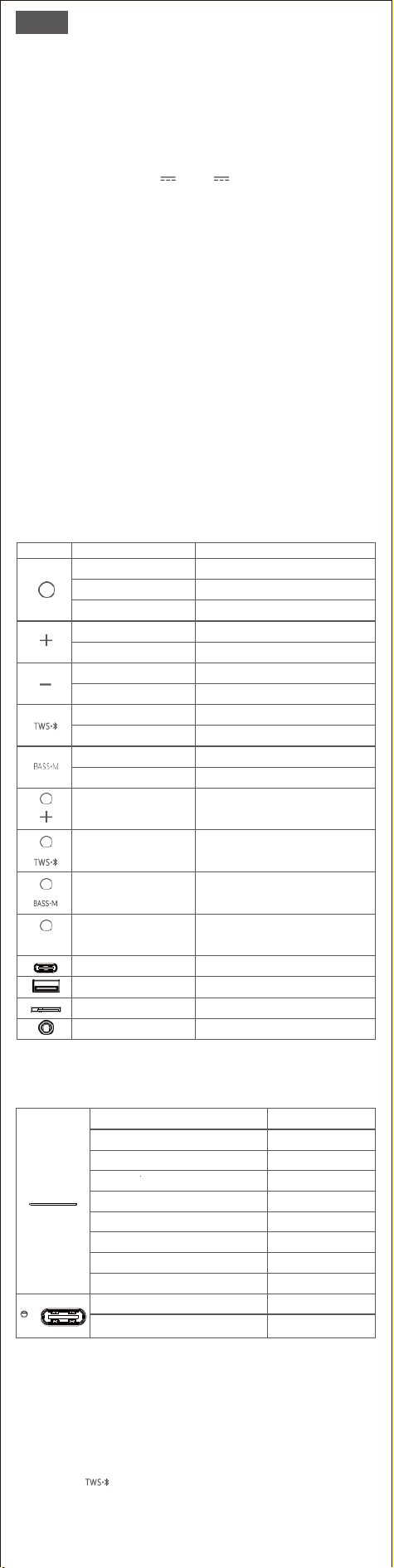
4. Pulsanti e comandi
Pulsante
Come si controlla
Funzione
Tenere premuto 2s
Accensione/spegnimento
Stampa
Riproduzione/pausa
Stampa
Ricollegarsi all'ultimo dispositivo
Tenere premuto 2s
Traccia successiva
Stampa
Volume in alto
Tenere premuto 2s
Traccia precedente
Stampa
Volume ridotto
Tenere premuto 2s
Disconnettere il Bluetooth
Stampa
Entrare/uscire dall'accoppiamento TWS
Tenere premuto 2s
Attivazione/disattivazione dei bassi extra
Stampa
Cambiare modalità
Tenere premuto 2s
contemporaneamente
Controllare l'ID della versione(Funziona solo
durante la disconnessione del Bluetooth)
Tenere premuto 2s
contemporaneamente
Ripristino delle impostazioni di fabbrica
Tenere premuto 2s
contemporaneamente
Annullamento/attivazione della funzione di
spegnimento automatico (funziona solo in
modalità Bluetooth)
Tenere premuto 2s
contemporaneamente
Annullamento/attivazione del segnale acustico
Inserire il cavo di ricarica
Caricare il diffusore
Inserire l'unità USB
Riproduzione tramite unità USB
Inserire la scheda Micro SD
Riproduzione tramite scheda Micro SD
Collegare il cavo di linea
Riproduzione tramite collegamento in linea
(non incluso)
5.Indicazioni dei LED
Blu lampeggiante
Bluetooth pairing
Blu solido
Bluetooth accoppiato
Rosso fisso
Modalità AUX
Verde fisso
Modalità scheda TF
Bianco fisso
Modalità unità USB
Verde lampeggiante
Bassi extra attivati
Lampeggia in rosso
Bassi extra spenti
Verde lampeggiante
Volume massimo
Rosso lampeggiante ogni cinque minuti
Livello di batteria basso
Rosso fisso
In carica
Luce spenta
Completamente carico
6. Modalità Bluetooth
1. Attivare la funzione Bluetooth sul dispositivo.
2. Trovare "SoundBox XL Ultra" sul dispositivo Bluetooth e collegarlo.
3. Una volta accoppiato, è possibile vedere lo stato "connesso" sul dispositivo.
7.Modalità TWS (True Wireless Stereo)
1. Premere il tasto su entrambi i SoundBox XL Ultra per accedere
all'accoppiamento TWS.
2. Una volta accoppiato, il LED del diffusore principale diventa blu fisso, mentre
il secondo altoparlante lampeggia lentamente in blu.
3. Individuare "SoundBox XL Ultra" sul dispositivo Bluetooth e collegarlo.

8.Utilizzare l'altoparlante con Echo Dot
È possibile collegare il Dot all'altoparlante tramite Bluetooth.
Seguire la procedura di configurazione via Bluetooth:
1. Scaricare l'app Alexa e seguire la procedura di impostazione per collegare il
Dot alla rete Wi-Fi domestica.
2. Passare il SoundBox XL Ultra alla modalità di accoppiamento Bluetooth.
3.Avviare l'app Alexa, toccare Menu e quindi Impostazioni.
4. Toccare Echo Dot nell'elenco dei dispositivi Alexa, quindi toccare Bluetooth.
5. SoundBox XL Ultra dovrebbe apparire nell'elenco dei dispositivi Bluetooth. In
caso contrario, premere il pulsante di accensione e riprovare.
6. Una volta inserito nell'elenco, toccare il altoparlante per completare il
processo di accoppiamento.
7. Per rimuovere il dispositivo, tornare a Bluetooth>toccare il nome del
diffusore>toccare "Dimentica dispositivo".
Nota:
Il comando vocale non sarà in grado di accendere/spegnere il altoparlante se lo si collega tramite
Bluetooth.
9. Istruzioni di sicurezza
• Evitare di far cadere o colpire il diffusore.
• Evitare l'esposizione a temperature estreme.
• Evitare di utilizzare il diffusore in prossimità di un forno a microonde.
• Non smontare o riparare il diffusore.
• Non utilizzare mai detergenti/olio corrosivi per la pulizia.
• Non lasciare mai il diffusore in un'auto parcheggiata al sole.
• Non tentare mai di caricare il altoparlante mentre è bagnato.
ES
1. Contenido del paquete
●
1 x SoundBox XL Ultra
●
1 x Cable de carga USB-C
●
1 x Manual de usuario
2. Especificaciones
Potencia de salida: 20*2W+40W Subwoofer
Respuesta de frecuencia: 35Hz-25kHz
Relación señal-ruido: ≥95dB
DC Entrada de alimentación: 5V 3A / 9V 2A
Batería: 11.1V/4500mAh
Tiempo de carga: 5.6horas
Tiempo de reproduce: 18 horas (al 50% de volumen--0dB Ruido Rosado)
Rango de Bluetooth: hasta 30m/99ft
Peso neto:: ≈5.5lbs/2.5kg
Dimensiones unidad: 13,2*3,6*6,0 inches/335*92*152mm
Formato de audio de Tarjetas microSD y USB: MP3/ WAV/ FLAC (Capacidad
máxima 256G)
Garantia: Limitada a un año
3. Notas importantes antes del uso
●
Para prolongar la vida útil de la batería, carga completamente el altavoz antes
de utilizarlo por primera vez.
●
La batería está baja cuando el indicador frontal parpadea en rojo tres veces
cada cinco minutos.
●
El altavoz se apagará automáticamente después de 15 minutos sin entrada de
audio.
●
El indicador frontal se apagará si no se utiliza el altavoz en 30 segundos.
●
El puerto USB sólo sirve para reproducir audio.
●
Cuando no se puedan controlar todos los botones, intenta pinchar el puerto de
Line-in con un clip.
●
Si necesitas ayuda mientras usas este altavoz, no dudes en ponerte en contacto
4. Botones y Mando
Botón
Cómo controlarlo
Función
Mantenga presionado 2s
Encendido/apagado
Presiona
Reproduce/pausa
Presiona
Reconecta al último dispositivo
Mantenga presionado 2s
Siguiente pista
Presiona
Sube el volumen
Mantenga presionado 2s
Anterior pista
Presiona
Baja el volumen
Mantenga presionado 2s
Desconecte Bluetooth
Presiona
Entrada/salida del emparejamiento TWS
Mantenga presionado 2s
Encendido/apagado Bajos extra
Presiona
Cambia de modos
Mantenga presionado 2s
simultáneamente
Compruebe el ID de versión (Sólo funciona
mientras el Bluetooth está desconectado)
Mantenga presionado 2s
simultáneamente
Restaura la configuración de fábrica
Mantenga presionado 2s
simultáneamente
Cancela/activa la función de apagado automático
(Sólo funciona en modo Bluetooth)
Mantenga presionado 2s
simultáneamente
Cancela/activa el tono de aviso
Inserte el cable de carga
Carga el altavoz
Inserte la memoria USB
Reproduce por la memoria USB
Inserte la Tarjeta microSD
Reproduce por la Tarjeta microSD
Conecte el cable Auxiliar
Reproduce por el cable Auxiliar ( NO incluida)
5. Indicaciones LED
Parpadea en azul
Emparejamiento Bluetooth
Azul sólido
Bluetooth emparejado
Rojo sólido
Modo AUX
Verde sólido
Modo Tarjeta microSD
Blanco sólido
Modo Memoria USB
Parpadea en verde
Encendido Bajos extra
Parpadea en rojo
Apagado Bajos extra
Parpadea en verde
Volumen máximo
Parpadea en rojo cada cinco minutos
Nivel de batería bajo
Rojo sólido
Cargando
Luz apagada
Completamente cargada
6. Modo Bluetooth
1. Activa la función Bluetooth en tu dispositivo.
2. Busca "SoundBox XL Ultra" en el dispositivo Bluetooth y conéctalo.
3.Una vez emparejado, podrás ver el estado "conectado" en tu dispositivo.
7. Modo TWS (Verdadero estéreo inalámbrico)
1. Presiona el en ambos SoundBox XL Ultra para entrar en
emparejamiento TWS.
2. Una vez emparejados, el LED del altavoz principal se ilumina en azul fijo,
mientras que el del segundo altavoz se ilumina en azul lentamente.
3. Busca "SoundBox XL Ultra" en tu dispositivo Bluetooth y conéctalo.

8.Utiliza el altavoz con el Echo Dot
Puedes conectar el Dot al altavoz a través de Bluetooth.
Sigue los pasos para configurarlo a través de Bluetooth:
1. Descarga la app Alexa y sigue los pasos para configurar el procedimiento para
que el Dot se conecte a tu red Wi-Fi doméstica.
2. Activa el modo de emparejamiento Bluetooth de SoundBox XL Ultra.
3.Ejecuta la aplicación Alexa, toca Menú y, luego, toca Configuración.
4.Toca el Echo Dot en la lista de dispositivos Alexa y, a continuación, toca
Bluetooth.
5. SoundBox XL Ultra debería aparecer en la lista de dispositivos Bluetooth. Si
no, presiona el botón de encendido y vuelve a intentarlo.
6. Una vez en la lista, toca el altavoz para completar el proceso de empareja-
miento.
7. Para eliminar el dispositivo, vuelva a Bluetooth>toque el nombre del altavoz
>toque "Olvidar dispositivo".
Nota:
El comando de voz no podrá encender/apagar el altavoz si se conecta a él a través de Bluetooth.
9.Instrucciones de seguridad
• Evite que el altavoz se caiga o se golpee.
• Evite exponerlo a temperaturas extremas.
• Evite utilizar el altavoz cerca de un microondas.
• No desmonte ni repare nunca el altavoz.
• Nunca utilice detergentes/aceites fuertes para limpiarlo.
• Nunca dejes el altavoz en un coche aparcado al sol.
• Nunca intentes cargar el altavoz mientras esté mojado.
JP
1. 同梱品
●
1 x SoundBox XL Ultra
●
1 x USB-C充電ケ
ー
ブル
●
1 x 取扱説明書(本書)
2. 基本仕様
実用最大出力: 20*2W+40Wサ
ブウーファー
周波数特性: 35Hz-25kHz
信号対雑音比:≥95dB
DC充電電圧: 5V 3A / 9V
2A
バ
ッ
テ
リー
: 11.1V/4500mAh
充電時間: 5.6hrs
再生時間: up to 18hrs ( 50%ボ
リュー
ム-0dB
ピンクノイ
ズ)
Bluetooth通信距離: 最大30m/99ft
本体重量: =5.5lbs/2.5kg
本体サイズ: 13.2*3.6*6.0 inches/335*92*152mm
TF
カードと
USB
オーディオ
対応
フォーマット
: MP3/ WAV/ FLAC (最大容量
256G)
保証期間: 一年間
3. ご使用になる前の注意事項
●
電池寿命を延長するために、初めてご使用になる前に本機を満充電してお
いて
く
ださい。
●
前面のLEDは5分毎に3回赤く点滅する場合、電池残量が低下の状態と示し
ます。
●
音声入力がない場合
、
15分間の後
スピーカー
は自動的に電源
を
切れ
ま
す
。
●
30秒間内
スピーカー
側に何か操作
もし
ない
と、
前面のLEDは消灯
しま
す
。
●
USB出力はオ
ー
デ
ィ
オ再生のみ対応
しま
す
。
●
全
て
のボ
タン
は
コントロー
ル出来ない時は
、
針な
ど
細い物
を
使
って
「
Line-in
」
ポ
ート
に
差
し
込
んでみて
く
ださい。
●
ス
ピーカー
を使用する
と
き何かご不明な
点
・
ご問題が
ご
ざいま
し
た
ら、
お気
軽にsupport_jp@dossav.comに連絡ください。
4.
ボタンと
操作
ボタン
操作方法
や
り
たい操作
2秒間長押
し
す
る
電源on/off
押す
再生/一時停止
押す
前回接続されたデバイスと再接続
2秒間長押
し
す
る
次の曲
押す
音量+
2秒間長押
し
す
る
前の曲
押す
音量ー
2秒間長押
し
す
る
Bluetooth接続を切る
押す
TWSモードに入れ/切る
2秒間長押
し
す
る
Extra bass on/off
押す
モードを
切
り
替
え
同時に2秒間長押しする
バ
ー
ジョン
ID
をチ
ェッ
ク
(Bluetooth未接続状態のみ有効)
同時に2秒間長押しする
初期設定に戻す
同時に2秒間長押しする
オートパワーオフ
機能
をキャンセル
/起動(Bluetoothモードのみ有効)
同時に2秒間長押しする
提示音を
キャン
セル/起動
充
電ケ
ー
ブルを挿
入
する
スピーカーに
充電
USBメモリーを挿入する
USBメモリーで再生
Micro SD
カードを
挿入す
る
Micro SD
カード
で再生
Line inケ
ー
ブルを挿入する
Line in(別売)で再生
5.
LED
イン
ジ
ケーター
青色に点滅
Bluetooth接続を待っており
青色に点灯
Bluetooth接続完了
赤色に点灯
AUX
モード
緑色に点灯
TF
カードモード
白色に点灯
USB再生モード
緑色に点滅
Extra bass on
赤色に点滅
Extra bass off
緑色に点滅
最大音量
5分毎に赤色に点滅
電池残量が低下
赤色に点灯
充電中
ランプは消灯
充電完了
6.
Bluetoothモード
1.
デバイスのBluetoothを有効にします。
2.
リストにて「
SoundBox XL Ultra
」を
選択
して
ペ
アリングします。
3.
ペア
リ
ングは成功する
と、
デバ
イ
ス
側で接続状態が確認
できます
。
7.TWS(True Wireless Stereo) モード
1.2台のSoundBox XL Ultraの
を押
して
TWSペア
リ
ング
モード
に入れます
。
2.
ペア
リ
ングが完了する
と、
マスタ
ー
ス
ピーカー
のLEDは青
く
に点灯
し、
ス
レー
ブ
スピーカー
のLEDは青
く
に点滅
し
ます
。
3.
デバイス
画面に
て
「
SoundBox XL Ultra
」
を
選択
して
接続
します。

8. Echo Dot
と
本機の接続
Bluetooth
を
通
して
本機
と
Dot
を
接続する
こと
がで
きま
す
。
以下の手順に従
っ
て
Bluetooth経由で設定
してください。
1.Alexa
アプリをダウンロードし
Dotと自宅
の
wi-fiネ
ットワークに
接続
します。
2
.SoundBox XL Ultra
を
Bluetooth
モ
ード
に
切
り
替
えて
く
だ
さ
い
。
3.
Alexa
アプリを
起動
し、
「
Menu
」
をクリックして
か
ら
「
設定
」
ボ
タンをクリッ
クして
設定
します。
4.
Alexaデバイスの
リ
ストでEcho Dotを
クリッ
ク
し
てか
ら、
Bluetoothを
クリッ
ク
し
ます。
5.
「
SoundBox XL Ultra
」が
Bluetooth
リストに
表示
さ
れ
ます。そう
でない場合は
、
電源
ボタンを
長押
ししてからやり直してください。
6.
リストに
表示
さ
れ
ると、「
SoundBox XL Ultra
」をクリックして
ペ
アリングし
ます
。
7.
デバイス
を削除
するに
は
、
Bluetooth
に
戻
り
>
スピーカーの
名前
を
選択
して
>
「デバイスを
削除
」
をクリックします。
ご注意
:
Bluetoothで接続
し
た場合
、
音声機能
を
介
して
Extreme Boom
をオン
/
オフ
す
るこ
とは
コント
ロール
出来
ま
せ
ん。
9.安全上のご注意
•
本機
を
落
とし
た
り、
ぶつけた
り、
揺れた
りし
ないて
く
だ
さ
い
。
•
自分
で本機を
解体
し
た
り、
修理
し
た
り、
改造
し
た
りし
ないて
く
だ
さ
い
。
•
本機
をベンゼン、アルコールなど
の溶剤の入
っ
た洗剤で洗浄
しない
て
く
ださい。
•
本機
を
異常に温度の高い
ところ
や直射日光のあた
るところ
に長
く
置
かない
て
く
ださい。
•
本機を湿気のあたるところやホコリの多いところで保存しないてく
ださ
い。
•
本機の上に重たい物体を置かないでください。
•
本機
を
電子
レン
ジや無線LANデバ
イスに
近付けないで
くださ
い
。