
ENGLISH_index
Copyright © 2026 LG Electronics Inc.
All Rights Reserved.
The model and serial number of the product are
located on the back and on one side of the product.
Record them below in case you ever need service.
Model
Serial No.
www.lg.com
32LX6BWGA
Display
OWNER’S MANUAL
Safety and Reference
Please read this manual carefully
before operating your set and retain it
for future reference.
*MFL058141062604REV00*
Supplier`s Declaration of
Conformity
Trade Name LG
Responsible
Party
LG Electronics USA,
Inc.
Address 111 Sylvan Avenue,
North Building,
Englewood Cliffs,
NJ07632
E-mail lg.environmental@
lge.com
LG Customer Information Center
For inquires or comments, visit www.
lg.com or call;
1-800-243-0000
USA, Consumer
User
1-888-865-3026
USA, Commercial
User
Register your product Online!
www.lg.com

2
Important Safety Instruction
• Readtheseinstructions.
• Keeptheseinstructions.
• Heedallwarnings.
• Followallinstructions.
• Donotusethisapparatusnearwater.
• Cleanonlywithdrycloth.
• Donotblockanyventilationopenings.Installinaccordancewiththemanufacturer’sinstructions.
• Donotinstallnearanyheatsourcessuchasradiators,heatregisters,stoves,orotherapparatus(includingamplifiers)thatproduceheat.
• Donotdefeatthesafetypurposeofthepolarizedorgrounding-typeplug.Apolarizedplughastwobladeswithonewiderthantheother.Agroundingtype
plughastwobladesandathirdgroundingprong.Thewidebladeorthethirdprongareprovidedforyoursafety.Iftheprovidedplugdoesnotfitintoyour
outlet,consultanelectricianforreplacementoftheobsoleteoutlet.
• Protectthepowercordfrombeingwalkedonorpinchedparticularlyatplugs,conveniencereceptacles,andthepointwheretheyexitfromtheapparatus.
• Onlyuseattachments/accessoriesspecifiedbythemanufacturer.
• Useonlywiththecart,stand,tripod,bracket,ortablespecifiedbythemanufacturer,orsoldwiththeapparatus.Whenacartisused,usecautionwhen
movingthecart/apparatuscombinationtoavoidinjuryfromtip-over.
• Unplugthisapparatusduringlightningstormsorwhenunusedforlongperiodsoftime.
• Referallservicingtoqualifiedservicepersonnel.Servicingisrequiredwhentheapparatushasbeendamagedinanyway,suchaspower-supplycordor
plugisdamaged,liquidhasbeenspilledorobjectshavefallenintotheapparatus,theapparatushasbeenexposedtorainormoisture,doesnotoperate
normally,orhasbeendropped.
3
Before reading this manual
• Theusermanualforthisproductconsistsoftwoparts:theOwner'sManualandtheUserGuide.TheOwner'sManualexplainsthestepstoinstalltheproduct
purchased,andtheelectronicUserGuideshowshowtousethevariousfeaturesoftheproduct.
• Owner's Manual:TheOwner'sManualcontainssafetyinstructionsthatmustbefollowedwhenusingtheproduct.Italsoexplainshowtoconnectan
externaldevicetotheproductaswellashowtousetheremotecontrol.Formoreinformationaboutthecomponentsandinstallationinstructions,seethe
separateguideprovidedwiththeproduct.
• User Guide:TheelectronicUserGuidestoredintheproductprovidesmoreinformationabouthowtousevariousfeatures.
- :ThisiconindicatesthatapplicationmaydependuponmodelinQuickSetupGuide.
Note
• LGElectronicsisnotresponsibleforproductfailureorinjurycausedbytheuseofnon-genuineimitationproducts.
• Productcomponentsandaccessoriesaresubjecttochangewithoutpriornoticethroughperformanceupgrades.Themodelnameordesignmaybechanged
dependinguponthemanufacturer’scircumstancesorpolicies.
• Imagesshowninthismanualmaydifferfromtheactualproduct.
Optional Extras
Strap (WS26XA)
Accessoryforwall-mountingtheproduct.
- Besuretousetheincludedaccessoriestohangitonthewall.Pleaseusethestrapwallmountonlyforits
intendedpurpose.
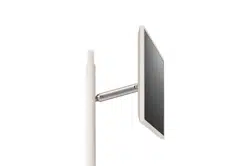
One-Click Stand (HS26XA) Desktopstandaccessorysupportingbothlandscapeandportraitorientationviewing.
Smart Cam (VC25GA) Accessorythatcanbemountedontheproductandusedasacamera.
• Optionalextrasitemscanbechangedormodifiedforqualityimprovementwithoutanynotification.Contactyourdealertobuytheseitems.Thesedevices
onlyworkwithcertainmodels.
• Acabletoconnectexternaldevicesmustbepurchasedseparately.
Warning! Safety instructions
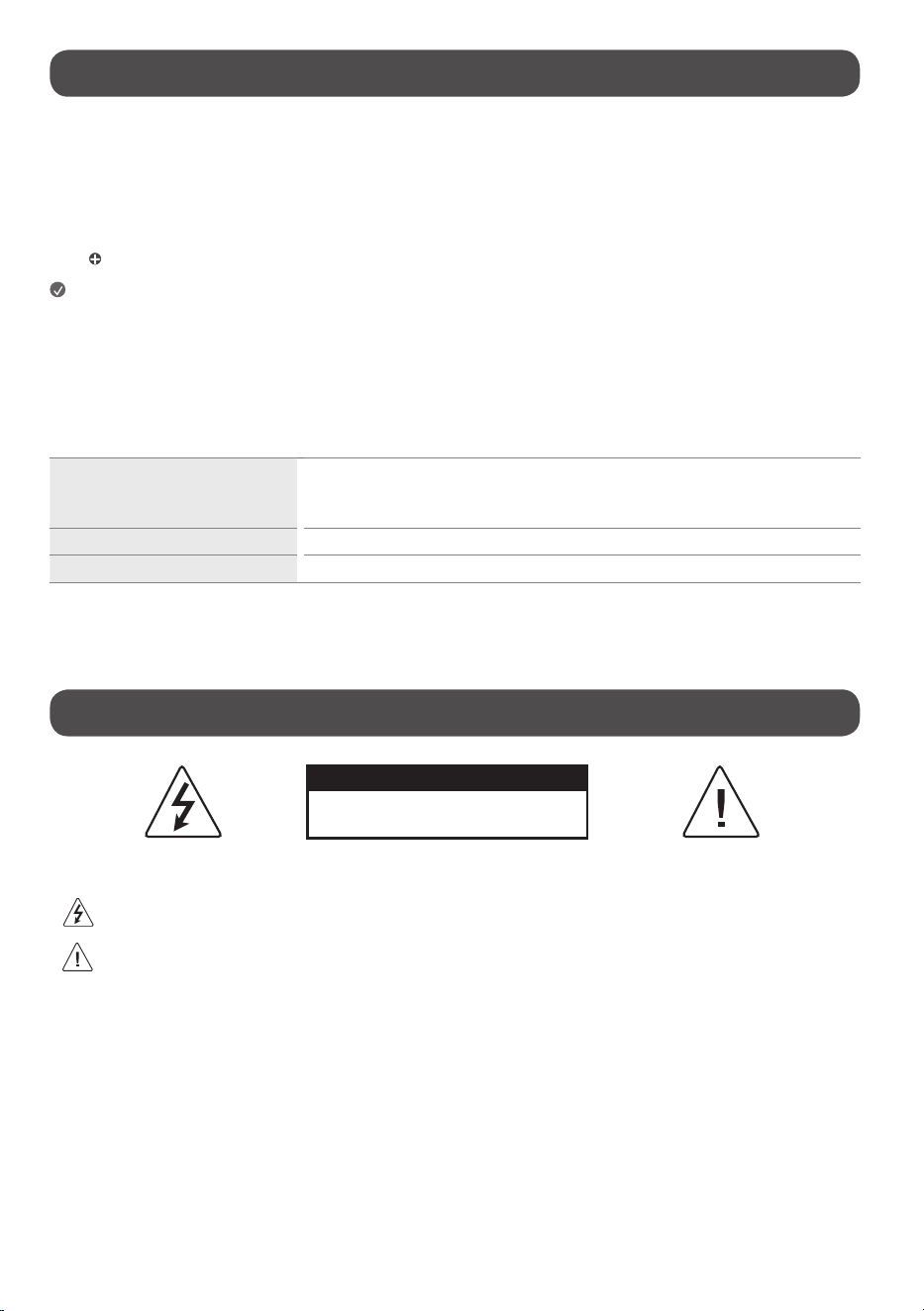
CAUTION
RISKOFELECTRICSHOCK
DONOTOPEN
CAUTION:TOREDUCETHERISKOFELECTRICSHOCK,DONOTREMOVECOVER(ORBACK).NOUSER-SERVICEABLEPARTSINSIDE.REFERTOQUALIFIEDSERVICE
PERSONNEL.
Thissymbolisintendedtoalerttheusertothepresenceofuninsulated“dangerousvoltage”withintheproduct’senclosurethatmaybeofsufficient
magnitudetoconstituteariskofelectricshocktopersons.
Thissymbolisintendedtoalerttheusertothepresenceofimportantoperatingandmaintenance(servicing)instructionsintheliterature
accompanyingthisapparatus.
WARNING:TOREDUCETHERISKOFFIREANDELECTRICSHOCK,DONOTEXPOSETHISPRODUCTTORAINORMOISTURE.

4
• TOPREVENTTHESPREADOFFIRE,KEEPCANDLESOROTHERITEMSWITH
OPENFLAMESAWAYFROMTHISPRODUCTATALLTIMES.
• Do not place the product and/or remote control in the following
environments:
- Keeptheproductawayfromdirectsunlight.
- Anareawithhighhumiditysuchasabathroom.
- Nearanyheatsourcesuchasstovesandotherdevicesthatproduce
heat.
- Nearkitchencountersorhumidifierswheretheycaneasilybeexposed
tosteamoroil.
- Anareaexposedtorainorwind.
- Donotexposetodrippingorsplashinganddonotplaceobjectsfilled
withliquids,suchasvases,cups,etc.onorovertheapparatus(e.g.,on
shelvesabovetheunit).
- Nearflammableobjectssuchasgasolineorcandles,orexposethe
producttodirectairconditioning.
- Donotinstallinexcessivelydustyplaces.
- Onunsecuredorhighfurniture,suchasshelvesorbookshelves.
Otherwise,thismayresultinfire,electricshock,combustion/explosion,
malfunctionorproductdeformation.
• Ventilation
- Installyourproductwherethereisproperventilation.Donotinstallin
aconfinedspacesuchasabookcase.
- Donotinstalltheproductonacarpetorcushion.
- Donotblockorcovertheproductwithclothorothermaterialswhile
unitispluggedin.
• Takecarenottotouchtheventilationopenings.Whenwatchingthe
productforalongperiod,theventilationopeningsmaybecomehot.
• Protectthepowercordfromphysicalormechanicalabuse,suchasbeing
twisted,kinked,pinched,closedinadoor,orwalkedupon.Payparticular
attentiontoplugs,walloutlets,andthepointwherethecordexitsthe
device.
• DonotmovetheproductwhilstthePowercordispluggedin.
• Donotuseadamagedorlooselyfittingpowercord.
• Besuretograsptheplugwhenunpluggingthepowercord.Donotpull
onthepowercordtounplugtheproduct.
• DonotconnecttoomanydevicestothesameACpoweroutletasthis
couldresultinfireorelectricshock.
• Disconnecting the Device from the Main Power
- Thepowerplugisthedisconnectingdevice.Incaseofanemergency,
thepowerplugmustremainreadilyaccessible.
• Donotletyourchildrenclimborclingontotheproduct.Otherwise,the
productmayfallover,whichmaycauseseriousinjury.
• Grounding(Exceptfordeviceswhicharenotgrounded.)
- Theproductwithathree-pronggroundedACplugmustbeconnected
toathree-pronggroundedACoutlet.Ensurethatyouconnectthe
earthgroundwiretopreventpossibleelectricshock.
• Nevertouchthisapparatusorantennaduringalightningstorm.Youmay
beelectrocuted.
• Makesurethepowercordisconnectedsecurelytotheproductandwall
socketifnotsecureddamagetothePlugandsocketmayoccurandin
extremecasesafiremaybreakout.
• Donotinsertmetallicorinflammableobjectsintotheproduct.Ifa
foreignobjectisdroppedintotheproduct,unplugthepowercordand
contactthecustomerservice.
• Donottouchtheendofthepowercordwhileitispluggedin.Youmay
beelectrocuted.
• If any of the following occur, unplug the product immediately
and contact your local customer service.
- Theproducthasbeendamaged.
- Ifwateroranothersubstanceenterstheproduct(likeanACadapter,
powercord,orproduct).
- Ifyousmellsmokeorotherodorscomingfromtheproduct.
- Whenlightningstormsorwhenunusedforlongperiodsoftime.
Eventheproductisturnedoffbyremotecontrolorbutton,ACpower
sourceisconnectedtotheunitifnotunpluggedin.
• Donotusehighvoltageelectricalequipmentneartheproduct(e.g.,a
bugzapper).Thismayresultinproductmalfunction.
• Turningonthepowerwhiletheproductandpowercordarewetmay
causetheproducttomalfunctionorresultinanelectricshock.
• Donotattempttomodifythisproductinanywaywithoutwritten
authorizationfromLGElectronics.Accidentalfireorelectricshock
canoccur.Contactyourlocalcustomerserviceforserviceorrepair.
Unauthorizedmodificationcouldvoidtheuser’sauthoritytooperate
thisproduct.

5
• Useonlyanauthorizedattachments/accessoriesapprovedbyLG
Electronics.Otherwise,thismayresultinfire,electricshock,malfunction,
orproductdamage.
• NeverdisassembletheACadapterorpowercord.Thismayresultinfire
orelectricshock.
• Toreducetheriskoffireorelectricalshock,donottouchtheproduct
withwethands.Ifthepowercordprongsarewetorcoveredwithdust,
drythepowerplugcompletelyorwipedustoff.
• Pleasemakesurethedeviceisinstallednearthewalloutlettowhichitis
connectedandthattheoutletiseasilyaccessible.
• Batteries
- Storetheaccessories(battery,etc.)inasafelocationoutofthereach
ofchildren.
- Donotshortcircuit,disassemble,orallowthebatteriestooverheat.
Donotdisposeofbatteriesinafire.Batteriesshouldnotbeexposed
toexcessiveheat.
- Caution:Usethecorrectbatteriesfortheproduct.Riskoffireor
explosionifthebatteryisreplacedbyanincorrecttype.
- Donotstoreortransporttheproductatpressuresoflessthan11.6kPa
(1.68psi)andaltitudesabove15,000m(49212.5feet).
• Moving
- Whenmoving,makesuretheproductisturnedoff,unplugged,and
allcableshavebeenremoved.Itmaytake2ormorepeopletocarry
largerproducts.Donotpressorputstressonthefrontpanelofthe
product.Otherwise,thismayresultinproductdamage,firehazard
orinjury.
- Securetheproductsafelywhenmovingitafterloading.Impactmay
resultinproductdamage.
• Keepthepackinganti-moisturematerialorvinylpackingoutofthe
reachofchildren.
• Donotallowanimpactshock,anyobjectstofallintotheproduct,anddo
notdropanythingontothescreen.
• Donotpressstronglyuponthepanelwithahandorasharpobjectsuch
asanail,pencil,orpen,ormakeascratchonit.Itmaycausedamage
toscreen.
• Donotholdtheproductscreen,scratchthesurfacewithametalobject,
orapplyimpacttoit.
- Thescreenmaybreak,resultinginpersonalinjuryormalfunctionof
theproduct.
• Donotsubjectthetouchscreentosevereimpact.Doingsomaydamage
thetouchsensors(touchscreen).
• Pleaseuseandchargetheproductbyconnectingittoasocketinits
correctposition.
• Discolorationordamagemayoccurifcosmeticsoroilscomeintocontact
withtheproduct.
• Applyingexcessiveforcewhenadjustingtheheight,tilting,swiveling,or
rotatingthescreenmaydamagetheproduct.
• Prolongedexposuretodirectsunlightmaycausediscolorationofthe
productexterior.
• Exercisecautiontopreventhands,feet,hair,orclothingfrombecoming
caughtinthestandbaseorwheels.
• Donotpushorkicktheproduct.
• Donotplaceheavyobjectsontopoftheproduct.
• Donotridetheproductlikeakickboard.
• Donotforcetheproducttorotateatananglethatexceedsitslimit.
• Donotinsertfingersintoproductgapsormovingparts.Doingsomay
resultininjury.
• Exercisecautionwhendetachingthedisplayheadtopreventdropping.
Donotattemptdetachmentwhilethedisplayheadisinalowered
position,asthestandmayrecoilupwardandcauseinjury.
• Cleaning
Theproductisnotwaterproof.
- Whencleaning,unplugthepowercordandwipegentlywithasoft/
drycloth.Donotspraywaterorotherliquidsdirectlyontheproduct.
Donotcleanyourproductwithchemicalsincludingglasscleaner,
anytypeofairfreshener,insecticide,lubricants,wax(car,industrial),
abrasive,thinner,benzene,alcoholetc.,whichcandamagethe
productand/oritspanel.Otherwise,thismayresultinelectricshock
orproductdamage.

6
• Precautions when using the built-in battery
- Ifliquidleaksfromthebattery,stopusingitimmediatelyandavoid
contactwithyourskinandeyes.Itmaycauseblindnessorburns.If
anyabnormalityisfoundinthebodypartthatcameintocontact
withliquid,washtheareawithsufficientwaterandseekadvicefrom
adoctor.
- Donotdisposeofbatteriesinanincorrectmanner.Doingsocreates
ariskofexplosionorfire.Batterydisposalguidelinesvarybycountry
andregion.Pleasedisposeofbatteriesinthepropermanner.
- Donotsubjecttheproducttoshock(particularlythelithiumbattery).
Donotexposeittofire,electricheaters,ordirectsunlight.Doingso
mayresultinelectricshock,injury,orfire.
- Whenchargingthebattery,ensureitiscorrectlyinserted,anddo
notuseanyotherpowersupplyorcircuit.Thereisariskofbattery
damageorfire.
- Becarefulwhenusingthebatteryasitcontainslithium.Thereisarisk
offireorexplosion.
- Makesuretouseagenuineadaptor/batteryapprovedbyLG
Electronics.Failuretodosomayresultinshorterproductlifeor
malfunctionandmayalsocauseoverheating,fire,explosion,orinjury.
- Cleanthechargingterminalusingasoftcloth.Ifthechargingterminal
isdirtyorhasforeignsubstancesonit,thebatterywillnotcharge
normally.
- Ifthebatteryiscompletelydischargedandnotusedforalongperiod
oftime,itmaynotchargeatallorthebatterylifemaybereduced.
- Donotdisconnect,disassemble,orshortcircuitthebattery.Doingso
mayresultinelectricshock,injury,orfire.Ifyouorathirdpartyhave
disassembled/assembledanypartoftheproductorbatterywithout
contactingtheLGElectronicsServiceCenter,youwillnotbeableto
receiveanyrepairservicesorcompensationintheeventofproduct
failure,safetyaccidentsorinjury.
- Donotremovethebatteryfromtheproduct.Doingsomayresultin
electricshock,injury,orfire.Ifyouorathirdpartyhavedisassembled/
assembledanypartoftheproductwithoutcontactingtheLG
ElectronicsServiceCenter,youwillnotbeabletoreceiveanyrepair
servicesorcompensationintheeventofproductfailure,safety
accidentsorinjury.
- Thebatterymayexplodeifdisposedofinafireorhotoven,orif
mechanicallycrushedorcut.
- Leavingthebatteryinanextremelyhigh-temperatureenvironment
maycauseanexplosionorleakageofflammableliquidsorgases.
- Extremelylowairpressuremaycausethebatterytoexplodeorleak
flammableliquidsorgases.
• Precautions when using the coin battery
- Donotingestthebattery.Chemicalburnhazard.
- Theremotecontrolsuppliedwiththisproductcontainsacoin/button
cellbattery.Ifthecoin/buttoncellbatteryisswallowed,itcancause
severeinternalburnsinjust2hoursandcanleadtodeath.
- Keepnewandusedbatteriesawayfromchildren.
- Ifthebatterycompartmentfailstoclosesecurely,donotusethe
remotecontrolandkeepitawayfromchildren.
- Ifyouthinkbatteriesmighthavebeenswallowedorplacedinsideany
partofthebody,seekimmediatemedicalattention.
- Keeptheremotecontrolawayfrommedicaldevices.Themagnetin
theremotecontrolmayinterferewiththeoperationofpacemakers,
otherimplantablemedicaldevices,andnearbymedicalequipment.
7
Installation
Lifting and moving the Product
Pleasenotethefollowingadvicetopreventtheproductfrombeingscratched
ordamagedandforsafetransportationregardlessofitstypeandsize.
• Itisrecommendedtomovetheproductintheboxorpackingmaterial
thattheproductoriginallycamein.
• Beforemovingorliftingtheproduct,disconnectthepowercordand
allcables.
• Whenholdingtheproduct,thescreenshouldfaceawayfromyouto
avoiddamage.
• Holdthetopandbottomoftheproductframefirmly.Makesurenotto
holdthetransparentpart,speaker,orspeakergrillarea.
• Whentransportingtheproduct,donotexposetheproducttojoltsor
excessivevibration.
• Whentransportingtheproduct,keeptheproductupright,neverturnthe
productonitssideortilttowardstheleftorright.
• Donotapplyexcessivepressuretocauseflexing/bendingofframe
chassisasitmaydamagescreen.
• Whenhandlingtheproduct,becarefulnottodamagetheprotruding
buttons.
• Avoidtouchingthescreenatalltimes,asthismayresultindamageto
thescreen.
Installing the Stand
Wheninstallingthestand,maintainadistanceofatleast10cm(4inches)
betweenthestandandtheceilingandtheleftandrightwalls,andatleast
10cm(4inches)betweenthestandandthebackwall.
• Whenassemblingorremovingthestand,holdthestandwhile
tighteningorlooseningthescrews.Thestandmayfallandcause
productdamageorinjury.
• Donotapplyforeignsubstances(oils,lubricants,etc.)tothescrewparts
whenassemblingtheproduct.(Doingsomaydamagetheproduct.)
• Donotuseanyunapproveditemstoensurethesafetyandproductlife
span.
• Anydamagesorinjuriesbyusingunapproveditemsarenotcoveredby
thewarranty.
• Ifyouinstalltheproductonastand,youneedtotakeactionstoprevent
theproductfromoverturning.Otherwise,theproductmayfallover,
whichmaycauseinjury.
• Whenassemblingthestand,ensurethatalloftheprovidedscrewsare
attached.Ifthescrewsarenotfullytightened,theproductmaytiltor
tipover,resultingindamage.Tighteningthescrewswithexcessiveforce
maycausethemtocomeoffduetoabrasionofthescrewjoint.
How to use Mount rubber bracket
Ifyouaremovingtheproductfromalocationotherthanflatground,besure
toinstallthemountrubberbracket.
1 AttachtheMountrubberbrackettothebottomoftheproduct.
- Tiltthesetandattachthemountrubberbrackets.
2 Pressfirmlythemountrubberbrackettoensurefirmfastening.
Note
• Itcanpreventtheproductfromslipping.
• Pleasedonotfixmountrubberbracketwithexcessiveforce.
Mounting by fixing to the wall
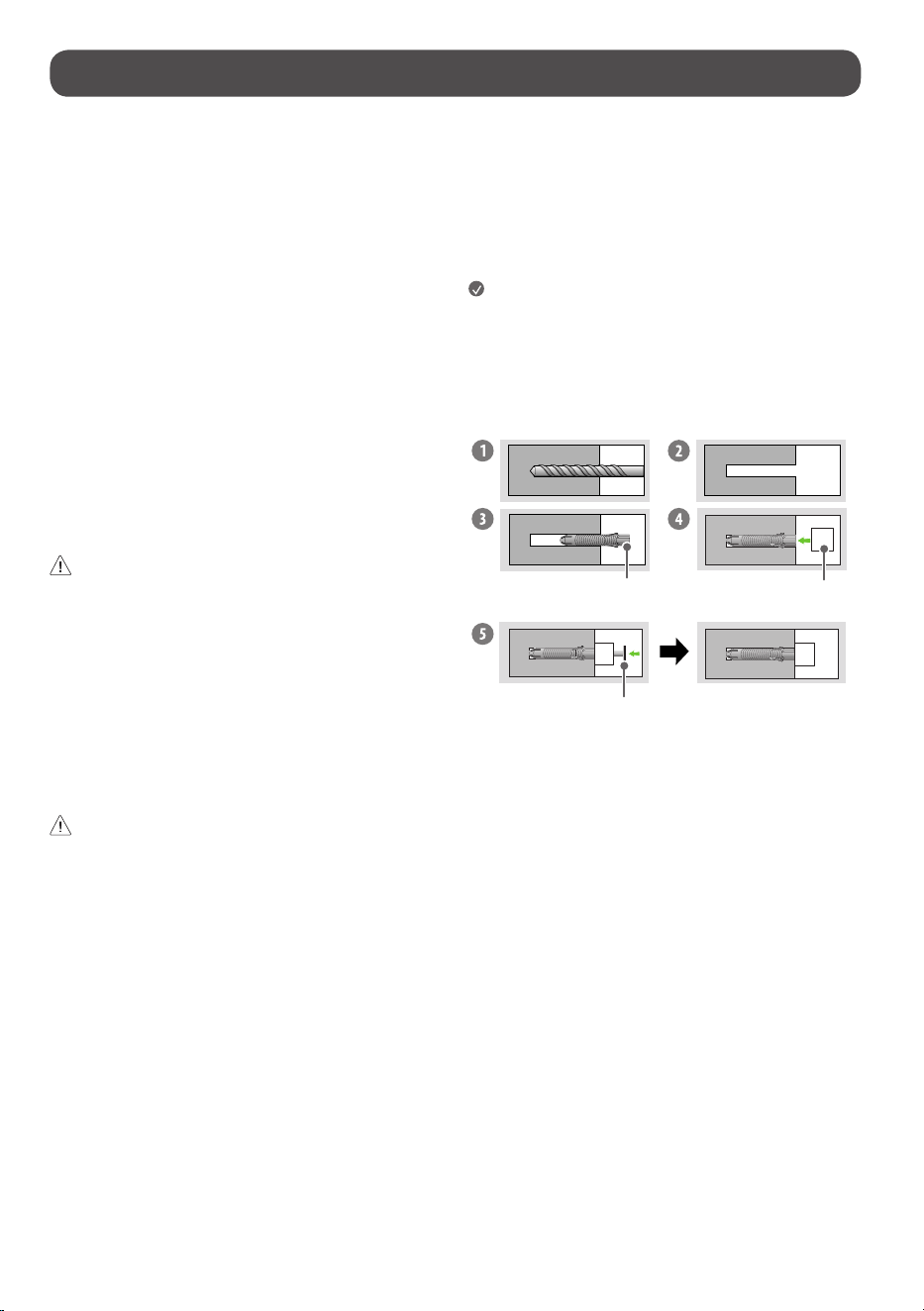
How to fasten anchors and screws
Wallfixingbracketfixinganchor
Wallfixingbracket
Screw
1 DrillholesinanchorlocationswithadrillbitofØ8mmtoadepthof
80mm(3.14inches)to100mm(3.93inches).
2 Cleanthedrilledholes.
3 Inserttheenclosedwallfixingbracketfixinganchorintothehole.(Usea
hammerwheninsertinganchors.)
4 Attachthewallfixingbracketclosetothewall,accordingtothehole
position.
5 Fitthewallfixingbrackettothehole.Atthistime,tightenthescrewstoa
torqueofbetween45kgf/cm(39.06lbf/in)to60kgf/cm(52.08lbf/in).
8
• Checkthematerialofthewallandthethicknessofthefinishing.
• UsetheWallmountanchorforwallmaterialofconcrete,lightconcrete,
strongnaturalstone,softnaturalstonemasonrybrickandhallowblock
thatdonotcrack.
Wall Material Tools Wall Width
Concrete
Wallfixingbracket,
Wallfixingbracket
fixingscrew,wallfixing
bracketfixinganchor,
drillbit
70mm
(2.75inches)
Brick
Naturalstone
MetalPanel
Plywood
Wallfixingbracket,
Wallmountingbracket
fixingscrew,drill
bit(Ø1.8)
30mm
(1.18inches)
EPSPanel Penetratethewall
Plasterboard+
Plywood
30mm
(1.18inches)
Operating the product
Turning on the product
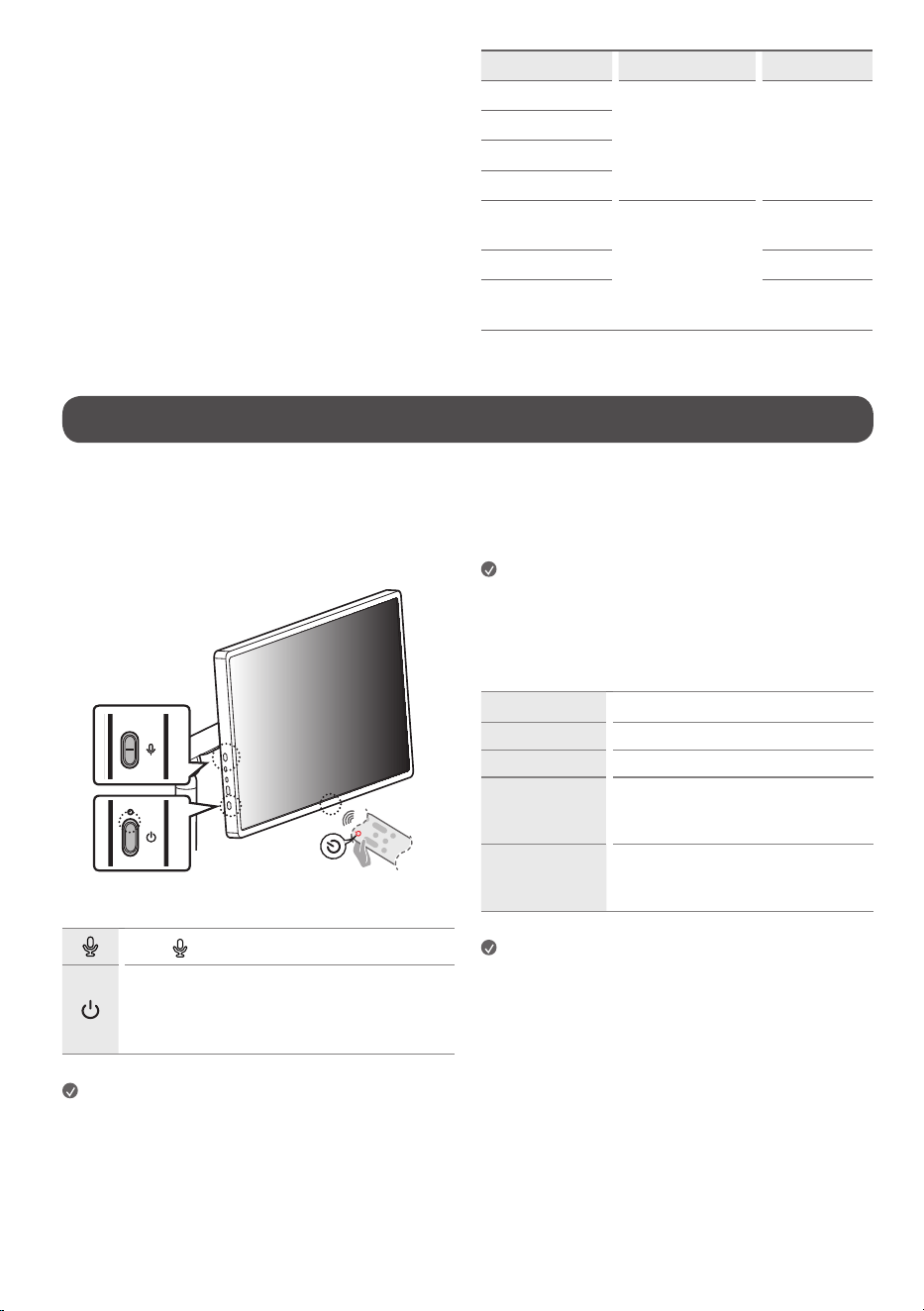
Using the button
Youcansimplyoperatetheproductfunctions,usingthebutton.
Usethe buttontoturnthemicrophonefunctiononandoff.
Turntheproductonandoff.
- Ashortpressturnstheproducton,andalongpressshuts
downallfunctionsandturnsoffthescreen.Pressandhold
formorethan7secondstoforcerestart.
Note
• Theshapeandlocationofthepowerbuttonmayvarydependingupon
theproductmodel.
• Whenthescreenispoweredonforthefirsttime,itmayturnonafter
approximatelyoneminutetocompletetheinitializationoftheproduct.
About LED operation
BatterystatuscanbecheckedviatheLEDindicatorabovethepowerbutton.
Instandbymode,thebatterystatusLEDisonlydisplayedduringcharging.
Note
• TheredLEDisdisplayedduringcharging,andthewhiteLEDisdisplayed
whenfullycharged.
Using the touch screen
Tap Tapthescreenlightly.
Tap and hold Tapthescreenfor2secondsorlonger.
Scroll Scrollthescreenup,down,left,andright.
Drag
Tapandholdtheitemyouwishtomove,such
asanapporwidget,anddragittothedesired
location.
Pinch-Close /
Pinch-Open
Youcanzoominoroutontheappbyplacing
twofingersonthescreenandspreadingthem
apartorbringingthemtogether.
Note
• Touchfunctionssuchaszoominginandoutonthescreenmaynotbe
supported,dependingupontheappused.
• Avoidpressingtoohardonthescreen;instead,taplightlyonthedesired
itemwithyourfingertips.Ifyoutouchthescreenwhilewearinggloves
orwiththetipofyourfingernails,itmaynotworkcorrectly.
• Touchsensorsmaynotworkcorrectlyifthescreenismoistorwet.
9
Connections
Otherdevices,suchasHDMI,canbeconnectedtotheproduct.
Whenconnectingwithanexternaldevice,locateandselectthedevicewith
whichyouwishtoconnectontheHomescreen.
HDMI
• WhenconnectingtheHDMIcable,theproductandexternaldevices
shouldbeturnedoffandunplugged.
Note
• UseacertifiedcablewiththeHDMIlogoattached.
• IfyoudonotuseacertifiedHDMIcable,thescreenmaynotdisplayora
connectionerrormayoccur.
• RecommendedHDMICableTypes
- UltraHighSpeedHDMI®/™cable(3m(9.84feet)orless)
USB
SomeUSBHubsmaynotwork.IfaUSBdeviceconnectedusingaUSBHubis
notdetected,connectittotheUSB-C™portontheproductdirectly.
• UseacertifiedUSB-C™cable.
• UseaUSB-AtoCadapterwhentheproductportanddeviceport(USB-A)
areincompatible.
• TheUSB-C®portcanconnectwithDisplayPortAlternateordevicesthat
supportUSB-PD.
Note
• Foranoptimalconnection,HDMIcablesandUSBdevicesshouldhave
bezelslessthan10mm(0.39inches)thickand18mm(0.7inches)
width.
• Useanextensioncablethatsupports
iftheUSBcableorUSB
memorystickdoesnotfitintoyourproduct’sUSBport.
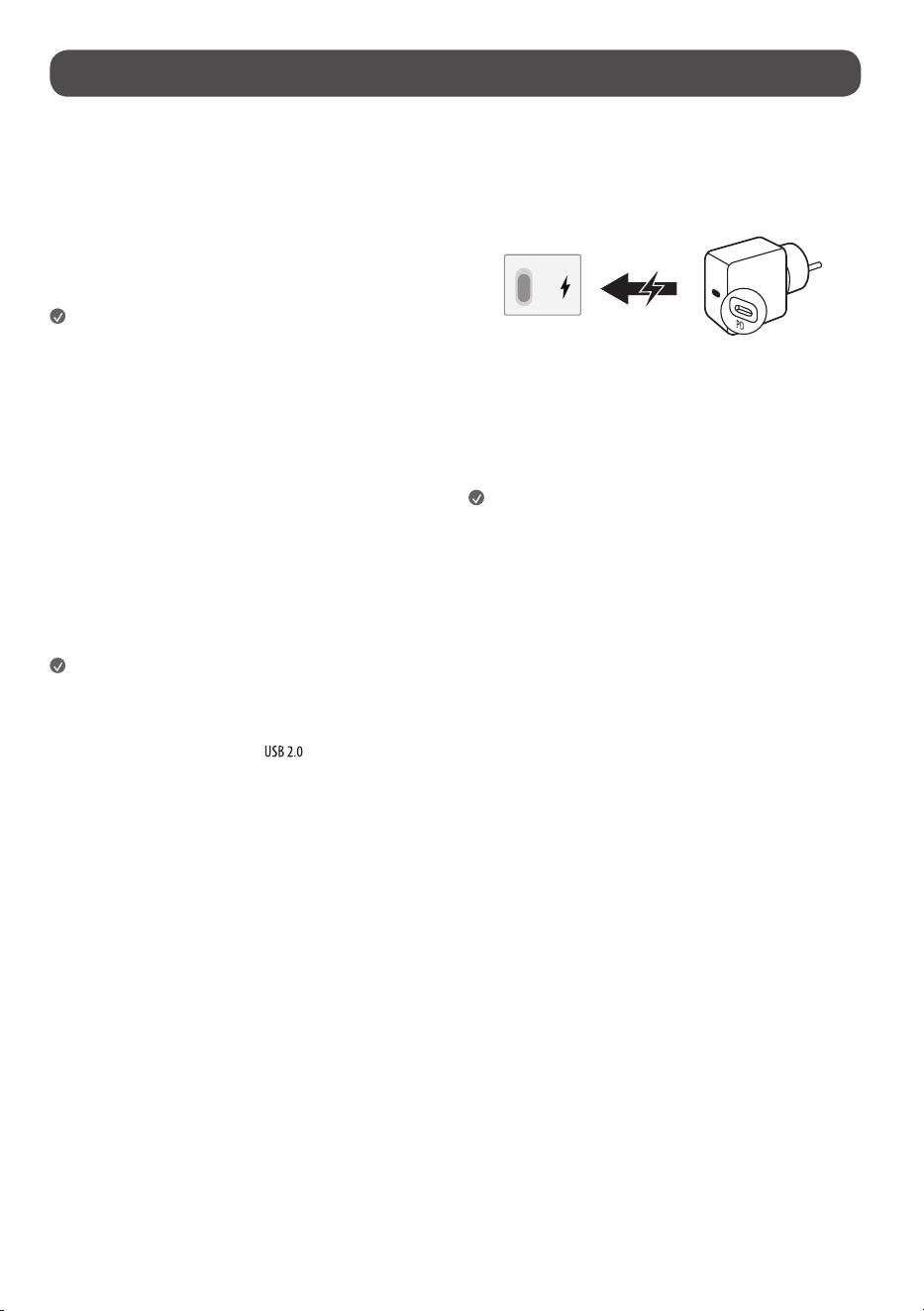
USB PD Charging Function
• Tochargetheproduct,theexternalpowersource(suchasUSBPD
charger)mustsupportUSBPowerDeliverywithoutputspecificationsof
either100W(20V/5A),140W(28V/5A).
External Devices
Supportedexternaldevicesare:Blu-rayplayer,HDreceivers,DVDplayers,
VCRs,audiosystems,USBstoragedevices,PC,gamingdevices,andother
externaldevices.
Note
• Theexternaldeviceconnectionsshownmaydifferslightlyfrom
illustrationsinamanual.
• InPCmode,theremaybenoiseassociatedwiththeresolution,vertical
pattern,contrastorbrightness.Ifnoiseispresent,changethePCoutput
toanotherresolution,changetherefreshratetoanotherrateoradjust
thebrightnessandcontrastonthe[Picture]menuuntilthepictureis
clear.Dependinguponthegraphicscard,someresolutionsettingsmay
notallowtheimagetobepositionedonthescreenproperly.
• USB-C™portchargingandtouchfunctionalitymaynotoperate
dependingupontheconnecteddevice.
• WhenchargingviaUSB-C™type,anadapterof100Worhigheranda
secondarybatteryarerequired,andforfastcharging,anadapterand
cableof140Worhighermustbeused.

10
Using the built-in battery
Thisproducthasabuilt-inbattery,allowingconvenientuseoftheproduct
withonlythebatteryforaperiodoftimewithoutanadditionalpowersupply.
Battery status display
Theremainingbatterylevelisdisplayedas%ontheupperrightcornerofthe
screen.Instandbymode,itisdisplayedasawhite/redLEDwhenconnected
tothepowercord.
Note
• Thebatterytakesabout3hourstofullychargeinstandbymodeand
about3hours30minuteswhileinuse.
• Thebatterylifeandusagetimeafterchargingdecreaseinproportionto
theperiodanddurationofuseoftheproduct.
• Batterychargingmaynotbepossibleattemperaturesbelow0°C(32°F).
• Evenwhennotinuse,theremainingchargeofthebatterywillnaturally
decrease.
• Youcansetbatteryprotectionmodeusingthebaratthetopofthe
screenorthepowerbutton.
• Foralongerbatterylife,chargethebatteryafterusingitforacertain
periodoftimeinsteadofkeepingthebatteryfullycharged.
• Keepingthebatterylevelat50%helpsextendbatterylife.
• Themaximumusagetimeafterchargingis4hours30minutes.
• Thestandardusagetimeshowninthismanualisbasedon
measurementsconductedbyLG.Thus,theactualtimemayvary
dependinguponusage.
• Theusagetimemayvarydependinguponfactorssuchasthedevice
connected,operatingtemperature,periodofuse,andusersettings.
• Whenthebatterytemperaturerises,theproductmayturnoffasa
batteryprotectionaction.
11
Specications
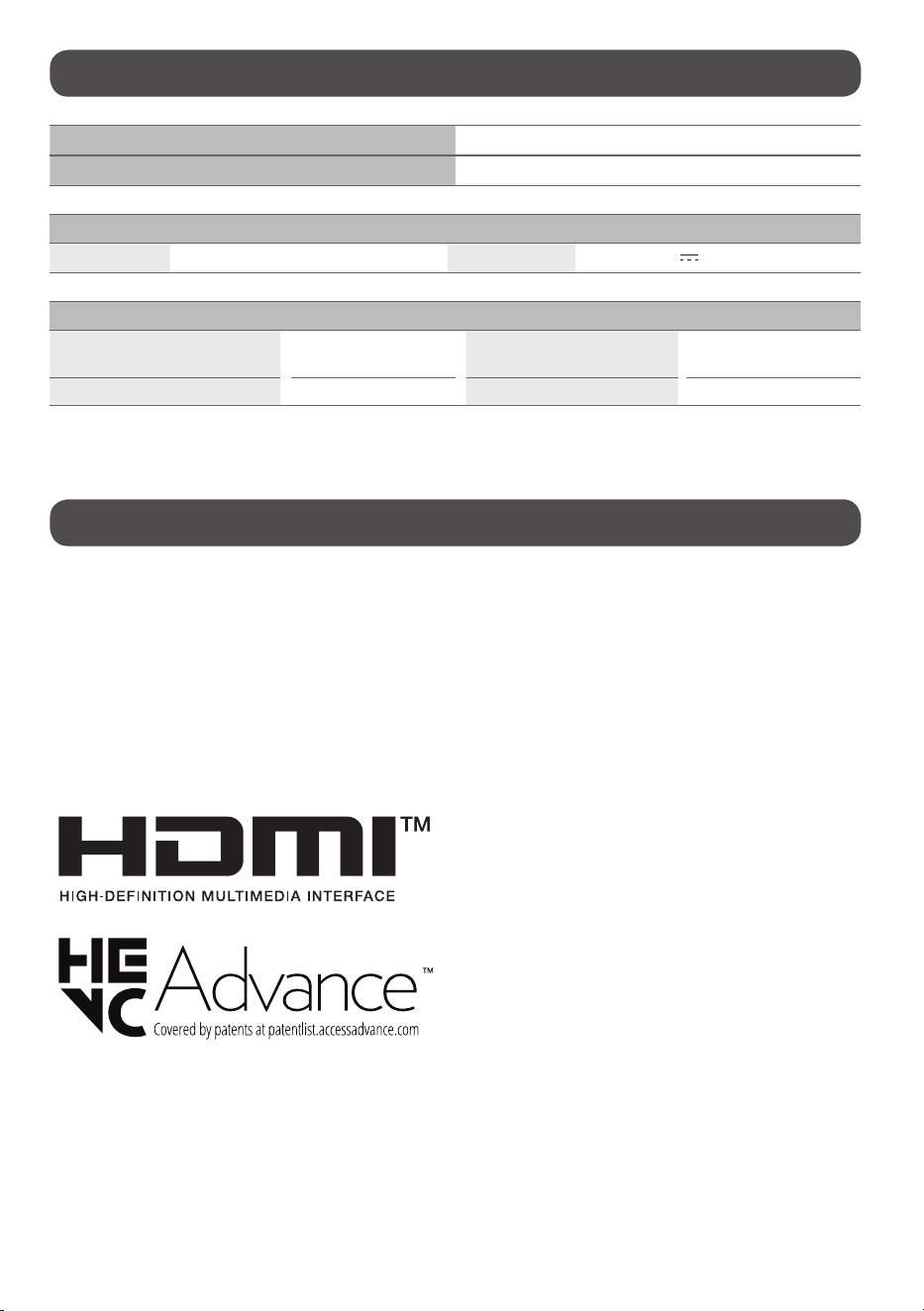
Power requirement AC120V~50/60Hz
Current Value / Power consumption 1.9A/190W
Battery
Type RechargeableLithiumIonBattery Rating DC15.52V
/(9,279mAh)(144Wh)
Environment Condition
OperatingTemperature
0°Cto40°C
(32°Fto104°F)
StorageTemperature
-20°Cto60°C
(-4°Fto140°F)
OperatingHumidity Lessthan80% StorageHumidity Lessthan85%
• Pleaserefertothelabelsontheheadandstandconnectionsurfacesforpowerusage,powerconsumption,andproductinformation.
Product Information
Open Source Software Notice Information
Toobtainthesourcecodethatiscontainedinthisproduct,underGPL,LGPL,MPL,andotheropensourcelicensesthathavetheobligationtodisclosesourcecode,
andtoaccessallreferredlicenseterms,copyrightnotices,pleasevisithttps://opensource.lge.com.
LGElectronicswillalsoprovideopensourcecodetoyouforachargecoveringthecostofperformingsuchdistributionuponemailrequestto
Thisofferisvalidtoanyoneinreceiptofthisinformationforaperiodofthreeyearsafterourlastshipmentofthisproduct.
Licenses
USBType-C®andUSB-C®areregisteredtrademarksofUSBImplementersForum.USB2.0Type-C™isatrademarkofUSBImplementersForum.
12
Troubleshooting
InHDMIinput,pressthe buttonontheremotecontrolthreetimestodisplaythemodelnameandserialnumberonthescreen.
Fordetailedinformationorvideos,visitwww.lg.comforthetroubleshootingpage.
Cannot control the
product with the
remote control.
• Checktheremotecontrolsensorontheproductandtryagain.
• Checkifthereisanyobstaclebetweentheproductandtheremotecontrol.
• Checkifthebatteriesarestillworkingandproperlyinstalled( to , to ).
• Replacedepletedbatterieswithnewones.
• Forremotecontrolsusingcoinbatteries,verifythattheinsulationsheetbetweenthebatteryandterminalshasbeen
removed.
No image display
and no sound is
produced.
• Checkiftheproductisturnedon.
• Checkifthepowercordisconnectedtoawalloutlet.
• Checkifthereisaprobleminthewalloutletbyconnectingotherproducts.
• Thebatterymaybedepleted;tryconnectingthepowercord.
The product turns
off suddenly.
• Checkthepowercontrolsettings.Thepowersupplymaybeinterrupted.
• Checkiftheauto-offfunctionisactivatedonthesettingsrelatedtime.
• Ifthereisnosignalwhiletheproductison,theproductwillturnoffautomaticallyafter4hoursofinactivity.
• Ifthebatteryoverheats,theproductautomaticallyturnsofftoprotectitself.
Abnormal Display • Iftheproductfeelscoldtothetouch,theremaybeasmall“flicker”whenitisturnedon.Thisisnormal,thereisnothing
wrongwithproduct.
• Thispanelisanadvancedproductthatcontainsmillionsofpixels.Youmayseetinyblackdotsand/orbrightlycoloreddots
(red,blueorgreen)atasizeof1ppmonthepanel.Thisdoesnotindicateamalfunctionanddoesnotaffecttheperformance
andreliabilityoftheproduct.Thisphenomenonalsooccursinthird-partyproductsandisnotsubjecttoexchangeorrefund.
• Youmayfinddifferentbrightnessandcolorofthepaneldependinguponyourviewingposition(left/right/top/down).
Thisphenomenonoccursduetothecharacteristicofthepanel.Itisnotrelatedwiththeproductperformance,anditisnot
malfunction.
• Avoidtouchingthescreenorholdingyourfinger(s)againstitforlongperiodsoftime.Doingsomayproducesome
temporarydistortioneffectsonthescreen.
• Displayingastillimageforaprolongedperiodoftimemaycauseimagesticking.Avoiddisplayingafixedimageonthe
productscreenforalongperiodoftime.
Generated Sound • Cracking noiseAcrackingnoisethatoccurswhenwatchingorturningofftheproductisgeneratedbyplasticthermal
contractionduetotemperatureandhumidity.Thisnoiseiscommonforproductswherethermaldeformationisrequired.
• Electrical circuit humming/panel buzzingAlowlevelnoiseisgeneratedfromahigh-speedswitchingcircuit,which
suppliesalargeamountofcurrenttooperateaproduct.Itvariesdependingupontheproduct.Thisgeneratedsounddoes
notaffecttheperformanceandreliabilityoftheproduct.
• Usingtheproductinadustyenvironmentmaycausethescreentobecomedim.
• Inthecaseofabnormaloperation,turnthebatteryswitchoff,unplugthepowercord,andthenplugitbackin.
• Inthecaseofabnormaloperation,eitherdisconnectandreconnectthepowercordorperformaforcerestartbypressingandholdingthepowerbutton.
• Whencleaningtheproduct,becarefulnottoallowanyliquidorforeignobjectstoenterthegapbetweentheupper,leftorrightsideofthepanelandthe
guidepanel.(Dependinguponmodel)
• Makesuretowringanyexcesswaterorcleanerfromthecloth.
• Donotspraywaterorcleanerdirectlyontotheproductscreen.
• Makesuretosprayjustenoughofwaterorcleanerontoadryclothtowipethescreen.
13
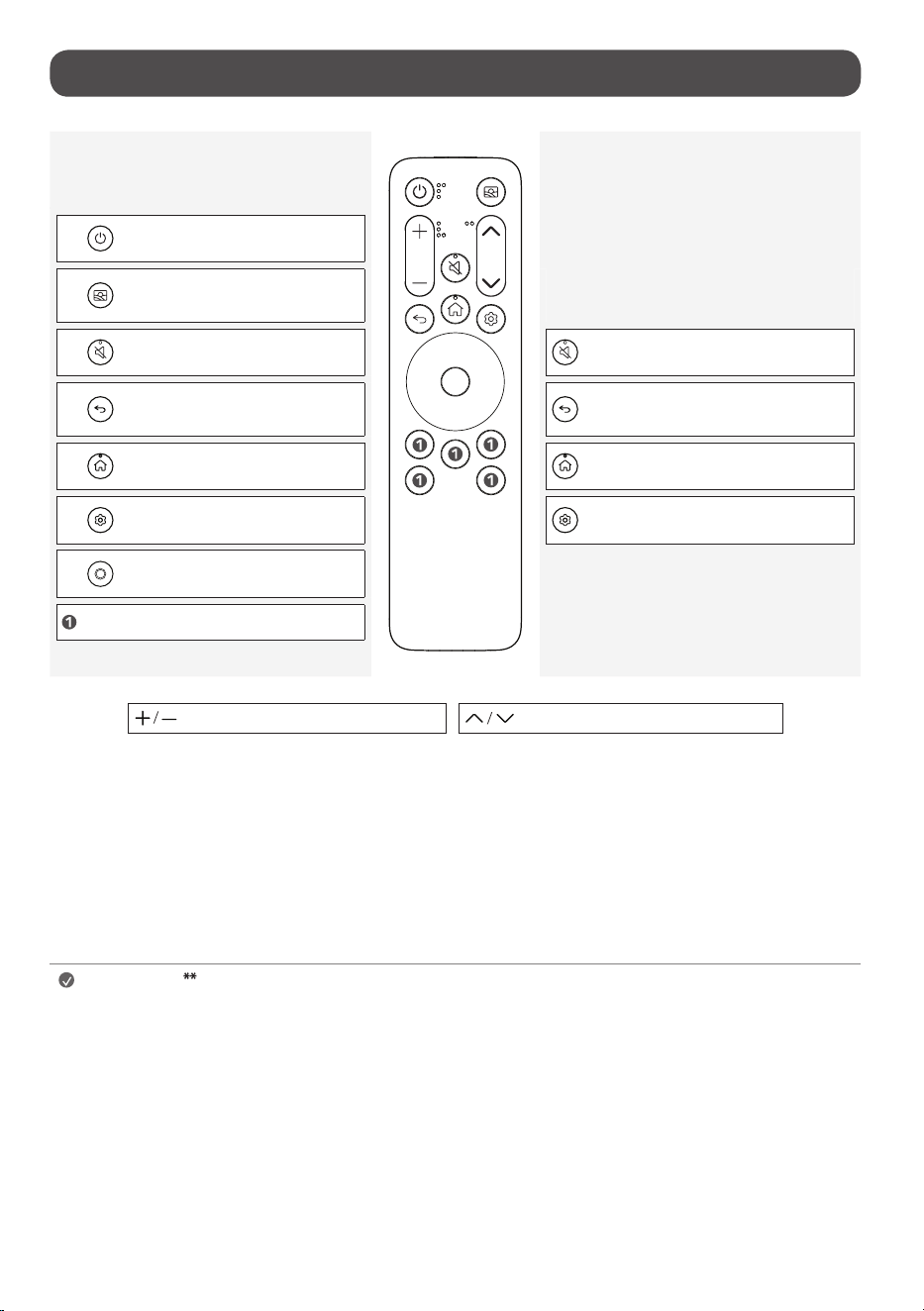
Using Remote Control
Short press
Basic Guide
Long press
Extension Guide
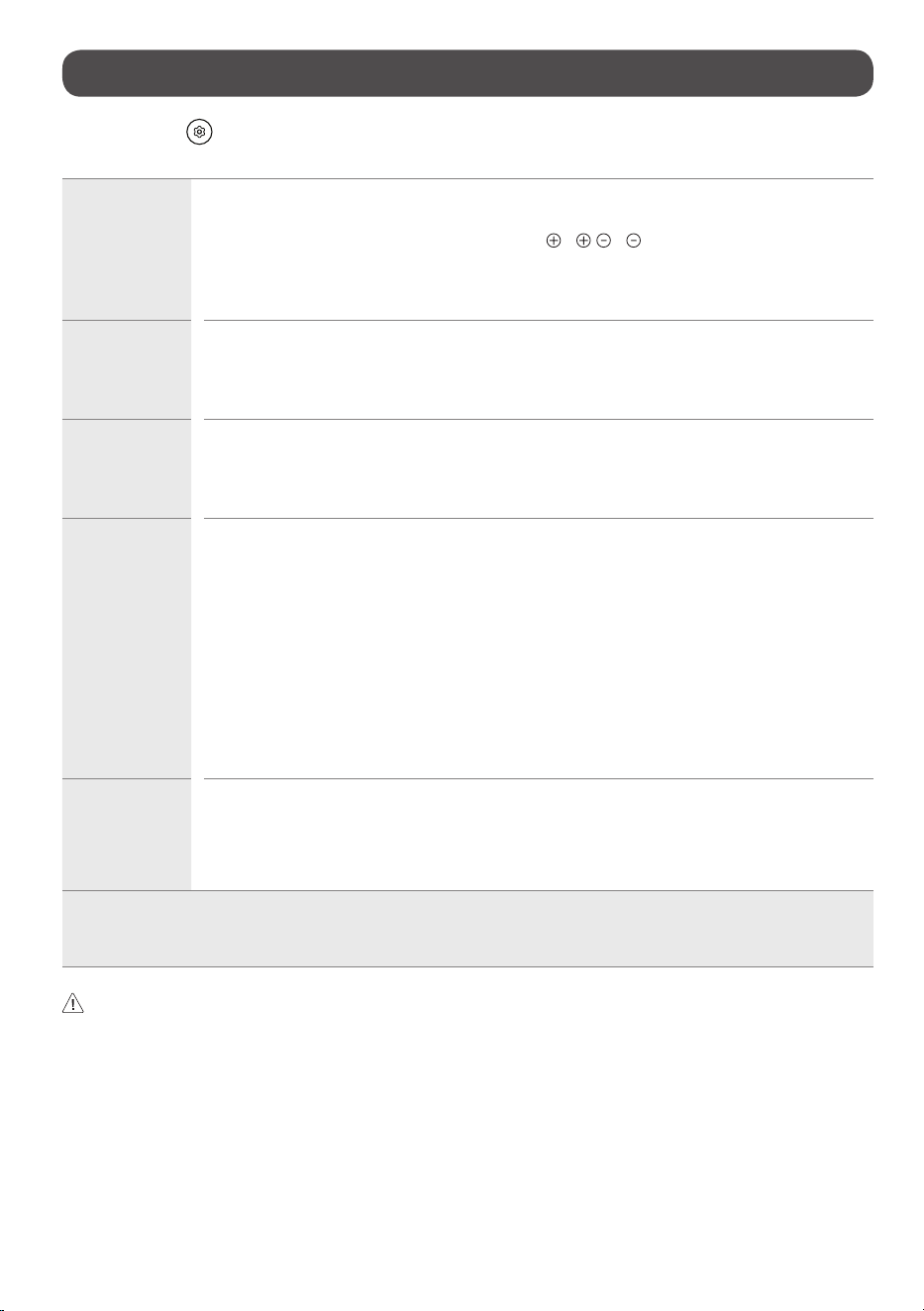
Power:TurnstheproductOnorOff.
Turnsonthemostrecentlysetthemein
Mood Maker.
Mutesallsounds.
AccessestheAccessibility Shortcuts.
MovetothePrevious Step.
ClosesthecurrentappandgoestotheHome
Menu.
DisplaystheHome Menu. ToenabletheScreen Zoom.
DisplaystheQuick Settings Menu. DisplaystheAll Settings Menu.
Up, Down, Left, RightNavigationbuttons.
Variouscontentservicebuttons.
PushupanddowntoAdjust the Volume. PushupanddowntoChange Channels.
(Somebuttonsandservicesmaynotbeprovideddependinguponmodelsorregions.)
Note
To use the button, press and hold for more than 1 second.
• Thefeaturescanbeusedwithouttheremotecontrolbytouchingthescreen.
• Pleasekeepthebatteryoutofthereachofchildren.Itmaycauseinjuryormalfunction.
• Ensurethebatteryisproperlymounted.Thereisariskoffireorexplosion.
• Theremotecontrolusingacoinbatterycanbeattachedtothetopoftheproduct.Theremotecontrolcanbeconveniently
mountedontheproductoranymagneticsurfaceusingitsbuilt-inmagnet.
- Onlyattachtheremotecontroltothetopoftheproduct.Theremotecontrolmayfallifattachedtothesidesorbottom.
- Theremotecontrolusingastandardbatterycannotbemagneticallyattached.
14
Regulatory
-
-
-
-
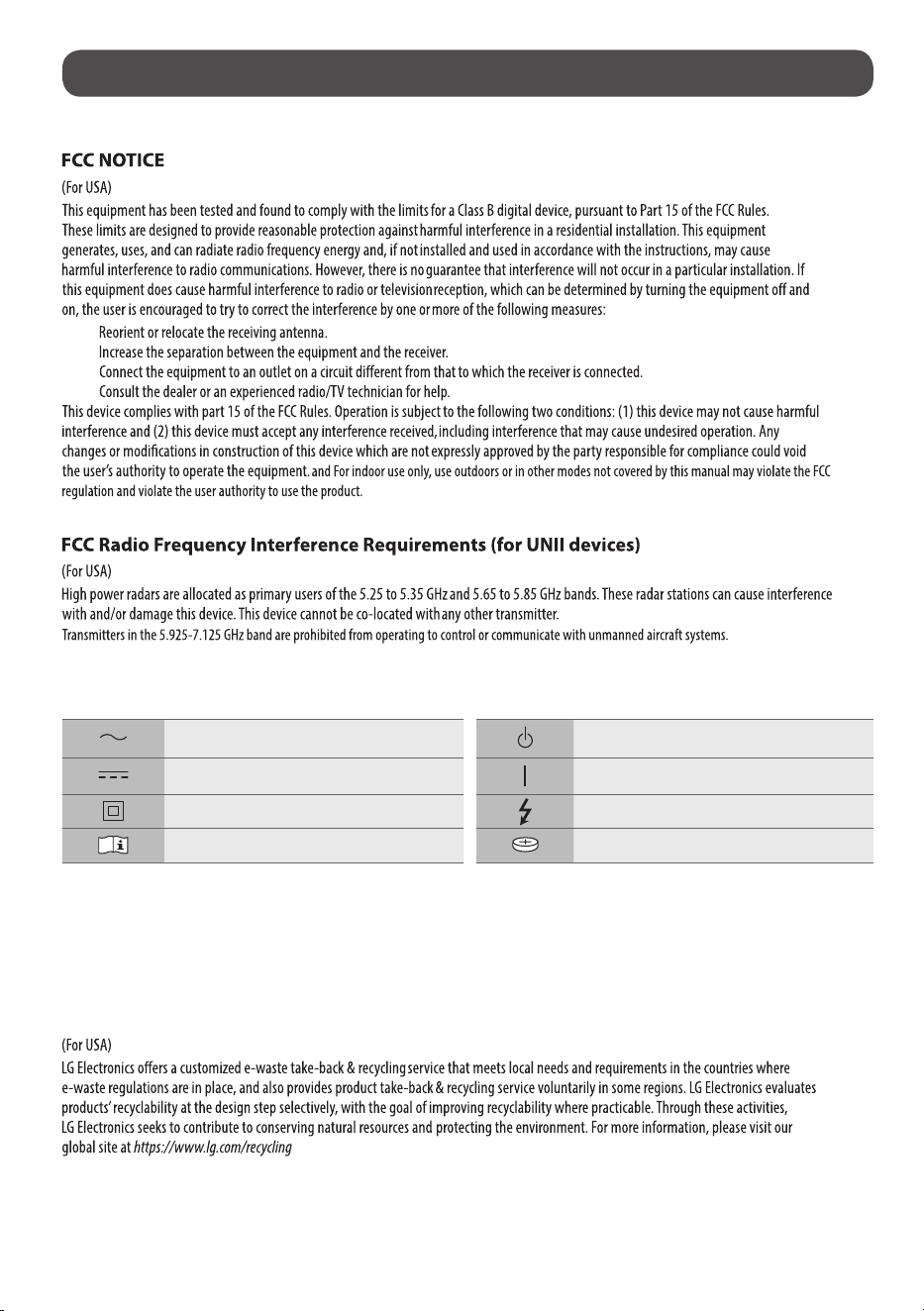
Symbols
Referstoalternatingcurrent(AC). Referstostand-by.
Referstodirectcurrent(DC). Refersto“ON”(power).
ReferstoclassIIequipment. Referstodangerousvoltage.
Referstomanual/instructions. Referstocoin/buttoncellbattery.
Battery take-back information
Incaserechargeablebatteryisincludedinthisproduct,theentiredeviceshouldberecycledincompliancewithrechargeablebatteryrecyclingstandardsbecause
oftheinternalbattery.Todisposeofproperly,call(800)822-8837orvisitwww.call2recycle.org.
LG Take-back & Recycling Policy
15
[For coin battery application]
(ForUSA)
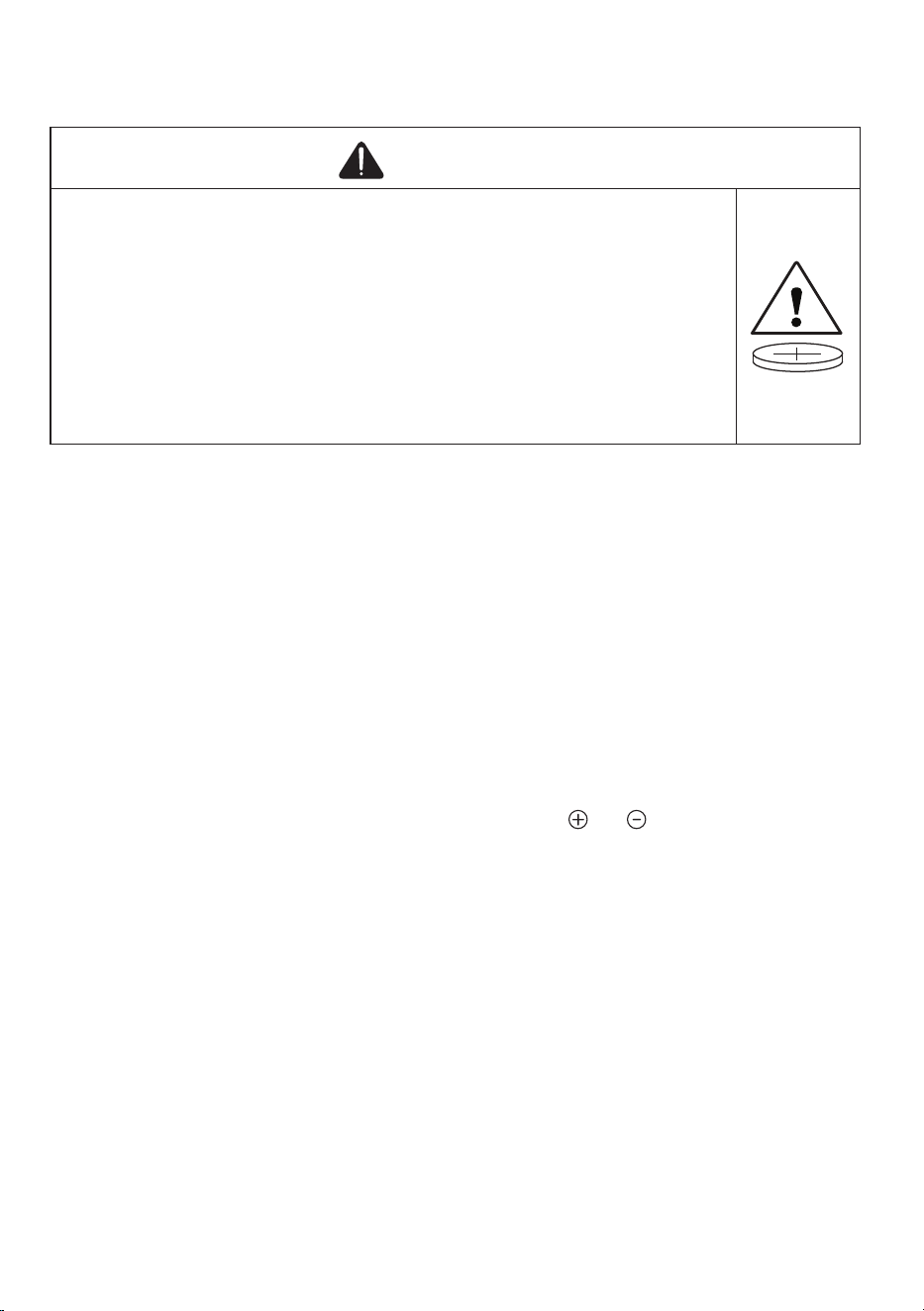
WARNING
•INGESTION HAZARD:Thisproductcontainsabuttoncellorcoinbattery.
•DEATHorseriousinjurycanoccurifingested.
•AswallowedbuttoncellorcoinbatterycancauseInternal ChemicalBurnsin
aslittleas2 hours.
•KEEPnewandusedbatteriesOUT OF REACH of CHILDREN
•Seek immediate medical attentionifabatteryissuspectedtobeswallowed
orinsertedinsideanypartofthebody.
Removeandimmediatelyrecycleordisposeofusedbatteriesaccordingtolocalregulationsandkeep
awayfromchildren.DoNOTdisposeofbatteriesinhouseholdtrashorincinerate.
Evenusedbatteriesmaycausesevereinjuryordeath.
Callalocalpoisoncontrolcenterfortreatmentinformation.
ThecompatiblebatterytypeisCR2032.
Thenominalbatteryvoltageis3V.
Non-rechargeablebatteriesarenottoberecharged.
Donotforcedischarge,recharge,disassemble,heatabove(manufacturer’sspecifiedtemperature
rating)orincinerate.
Doingsomayresultininjuryduetoventing,leakageorexplosionresultinginchemicalburns.
Ensurethebatteriesareinstalledcorrectlyaccordingtopolarity( and ).
Donotmixoldandnewbatteries,differentbrandsortypesofbatteries,suchasalkaline,carbon-
zinc,orrechargeablebatteries.
Removeandimmediatelyrecycleordisposeofbatteriesfromequipmentnotusedforanextended
periodoftimeaccordingtolocalregulations.
Alwayscompletelysecurethebatterycompartment.Ifthebatterycompartmentdoesnotclose
securely,stopusingtheproduct,removethebatteries,andkeepthemawayfromchildren.