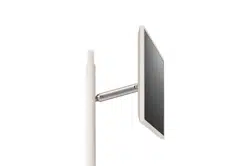
ENGLISH_index
Copyright © 2025 LG Electronics Inc.
All Rights Reserved.
Safety and Reference
OWNER’S MANUAL
Please read this manual carefully before
operating your set and retain it for
future reference.
The model and serial number of the product are
located on the back and on one side of the product.
Record them below in case you ever need service.
Model
Serial No.
Display
Printed in Korea
www.lg.com
*MFL720617612505REV01*
Supplier`s Declaration of
Conformity
Trade Name LG
Responsible
Party
LG Electronics USA,
Inc.
Address 111 Sylvan Avenue,
North Building,
Englewood Cliffs,
NJ07632
E-mail lg.environmental@
lge.com
LG Customer Information Center
For inquires or comments, visit www.
lg.com or call;
1-800-243-0000
USA, Consumer
User
1-888-865-3026
USA, Commercial
User
Register your product Online!
www.lg.com
27LX6TYGA

2
Important Safety Instruction
• Readtheseinstructions.
• Keeptheseinstructions.
• Heedallwarnings.
• Followallinstructions.
• Donotusethisapparatusnearwater.
• Cleanonlywithdrycloth.
• Donotblockanyventilationopenings.Installinaccordancewiththemanufacturer’sinstructions.
• Donotinstallnearanyheatsourcessuchasradiators,heatregisters,stoves,orotherapparatus(includingamplifiers)thatproduceheat.
• Donotdefeatthesafetypurposeofthepolarizedorgrounding-typeplug.Apolarizedplughastwobladeswithonewiderthantheother.Agroundingtype
plughastwobladesandathirdgroundingprong.Thewidebladeorthethirdprongareprovidedforyoursafety.Iftheprovidedplugdoesnotfitintoyour
outlet,consultanelectricianforreplacementoftheobsoleteoutlet.
• Protectthepowercordfrombeingwalkedonorpinchedparticularlyatplugs,conveniencereceptacles,andthepointwheretheyexitfromtheapparatus.
• Onlyuseattachments/accessoriesspecifiedbythemanufacturer.
• Useonlywiththecart,stand,tripod,bracket,ortablespecifiedbythemanufacturer,orsoldwiththeapparatus.Whenacartisused,usecautionwhen
movingthecart/apparatuscombinationtoavoidinjuryfromtip-over.
• Unplugthisapparatusduringlightningstormsorwhenunusedforlongperiodsoftime.
• Referallservicingtoqualifiedservicepersonnel.Servicingisrequiredwhentheapparatushasbeendamagedinanyway,suchaspower-supplycordor
plugisdamaged,liquidhasbeenspilledorobjectshavefallenintotheapparatus,theapparatushasbeenexposedtorainormoisture,doesnotoperate
normally,orhasbeendropped.
Byusingthisproduct,youagreethatalldisputesbetweenyouandLGarisingoutoforrelatinginanywaytothisproduct(includingbutnotlimitedtowarranty
disputes)shallberesolvedexclusivelythroughbindingarbitrationonanindividualbasis.Thetermsofthearbitrationagreement(includingdetailsonthe
procedureforresolvingdisputes)isavailableatwww.lg.com/us/arbitration(USA)orwww.lg.com/ca_en/arbitration(Canada).
3
Before reading this manual
• Theusermanualforthisproductconsistsoftwoparts:theOwner'sManualandtheUserGuide.TheOwner'sManualexplainsthestepstoinstalltheproduct
purchased,andtheelectronicUserGuideshowshowtousethevariousfeaturesoftheproduct.
• Owner's Manual:TheOwner'sManualcontainssafetyinstructionsthatmustbefollowedwhenusingtheproduct.Italsoexplainshowtoconnectan
externaldevicetotheproductaswellashowtousetheremotecontrol.Formoreinformationaboutthecomponentsandinstallationinstructions,seethe
separateguideprovidedwiththeproduct.
• User Guide:TheelectronicUserGuidestoredintheproductprovidesmoreinformationabouthowtousevariousfeatures.
- ToopentheUSERGUIDE → [ ] →[Support]→[UserGuide]
Note
• LGElectronicsisnotresponsibleforproductfailureorinjurycausedbytheuseofnon-genuineimitationproducts.
• Productcomponentsandaccessoriesaresubjecttochangewithoutpriornoticethroughperformanceupgrades.Themodelnameordesignmaybechanged
dependinguponthemanufacturer’scircumstancesorpolicies.
• Imagesshowninthismanualmaydifferfromtheactualproduct.
Optional Extras
Strap (WS25XA)
Accessoryforwall-mountingtheproduct.
- Besuretousetheincludedaccessoriestohangitonthewall.Pleaseusethestrapwallmountonlyforits
intendedpurpose.
Folio Cover (FC25XA) Desktopstandaccessorywithscreenprotectionfeaturefortransport.
One-Click Stand (HS25XA) Desktopstandaccessorysupportingbothlandscapeandportraitorientationviewing.
Smart Cam (VC25GA) Accessorythatcanbeattachedtotheproductforvideoconferencingandvideocalls.
• Separatepurchaseitemscanbechangedormodifiedforqualityimprovementwithoutanynotification.Contactyourdealertobuytheseitems.These
devicesonlyworkwithcertainmodels.
• Acabletoconnectexternaldevicesmustbepurchasedseparately.
Warning! Safety instructions
CAUTION
RISKOFELECTRICSHOCK
DONOTOPEN
CAUTION:TOREDUCETHERISKOFELECTRICSHOCK,DONOTREMOVECOVER(ORBACK).NOUSER-SERVICEABLEPARTSINSIDE.REFERTOQUALIFIEDSERVICE
PERSONNEL.
Thissymbolisintendedtoalerttheusertothepresenceofuninsulated“dangerousvoltage”withintheproduct’senclosurethatmaybeofsufficient
magnitudetoconstituteariskofelectricshocktopersons.
Thissymbolisintendedtoalerttheusertothepresenceofimportantoperatingandmaintenance(servicing)instructionsintheliterature
accompanyingthisapparatus.
WARNING:TOREDUCETHERISKOFFIREANDELECTRICSHOCK,DONOTEXPOSETHISPRODUCTTORAINORMOISTURE.

4
• TOPREVENTTHESPREADOFFIRE,KEEPCANDLESOROTHERITEMSWITH
OPENFLAMESAWAYFROMTHISPRODUCTATALLTIMES.
• Do not place the product and/or remote control in the following
environments:
- Keeptheproductawayfromdirectsunlight.
- Anareawithhighhumiditysuchasabathroom.
- Nearanyheatsourcesuchasstovesandotherdevicesthatproduce
heat.
- Nearkitchencountersorhumidifierswheretheycaneasilybeexposed
tosteamoroil.
- Anareaexposedtorainorwind.
- Donotexposetodrippingorsplashinganddonotplaceobjectsfilled
withliquids,suchasvases,cups,etc.onorovertheapparatus(e.g.,on
shelvesabovetheunit).
- Nearflammableobjectssuchasgasolineorcandles,orexposethe
producttodirectairconditioning.
- Donotinstallinexcessivelydustyplaces.
- Onunsecuredorhighfurniture,suchasshelvesorbookshelves.
Otherwise,thismayresultinfire,electricshock,combustion/explosion,
malfunctionorproductdeformation.
• Ventilation
- Installyourproductwherethereisproperventilation.Donotinstallin
aconfinedspacesuchasabookcase.
- Donotinstalltheproductonacarpetorcushion.
- Donotblockorcovertheproductwithclothorothermaterialswhile
unitispluggedin.
• Takecarenottotouchtheventilationopenings.Whenwatchingthe
productforalongperiod,theventilationopeningsmaybecomehot.
• Protectthepowercordfromphysicalormechanicalabuse,suchasbeing
twisted,kinked,pinched,closedinadoor,orwalkedupon.Payparticular
attentiontoplugs,walloutlets,andthepointwherethecordexitsthe
device.
• DonotmovetheproductwhilstthePowercordispluggedin.
• Donotuseadamagedorlooselyfittingpowercord.
• Besuretograsptheplugwhenunpluggingthepowercord.Donotpull
onthepowercordtounplugtheproduct.
• DonotconnecttoomanydevicestothesameACpoweroutletasthis
couldresultinfireorelectricshock.
• Disconnecting the Device from the Main Power
- Thepowerplugisthedisconnectingdevice.Incaseofanemergency,
thepowerplugmustremainreadilyaccessible.
• Donotletyourchildrenclimborclingontotheproduct.Otherwise,the
productmayfallover,whichmaycauseseriousinjury.
• Grounding(Exceptfordeviceswhicharenotgrounded.)
- Theproductwithathree-pronggroundedACplugmustbeconnected
toathree-pronggroundedACoutlet.Ensurethatyouconnectthe
earthgroundwiretopreventpossibleelectricshock.
• Nevertouchthisapparatusorantennaduringalightningstorm.Youmay
beelectrocuted.
• Makesurethepowercordisconnectedsecurelytotheproductandwall
socketifnotsecureddamagetothePlugandsocketmayoccurandin
extremecasesafiremaybreakout.
• Donotinsertmetallicorinflammableobjectsintotheproduct.Ifa
foreignobjectisdroppedintotheproduct,unplugthepowercordand
contactthecustomerservice.
• Donottouchtheendofthepowercordwhileitispluggedin.Youmay
beelectrocuted.
• If any of the following occur, unplug the product immediately
and contact your local customer service.
- Theproducthasbeendamaged.
- Ifwateroranothersubstanceenterstheproduct(likeanACadapter,
powercord,orproduct).
- Ifyousmellsmokeorotherodorscomingfromtheproduct.
- Whenlightningstormsorwhenunusedforlongperiodsoftime.
Eventheproductisturnedoffbyremotecontrolorbutton,ACpower
sourceisconnectedtotheunitifnotunpluggedin.
• Donotusehighvoltageelectricalequipmentneartheproduct(e.g.,a
bugzapper).Thismayresultinproductmalfunction.
• Turningonthepowerwhiletheproductandpowercordarewetmay
causetheproducttomalfunctionorresultinanelectricshock.
• Donotattempttomodifythisproductinanywaywithoutwritten
authorizationfromLGElectronics.Accidentalfireorelectricshock
canoccur.Contactyourlocalcustomerserviceforserviceorrepair.
Unauthorizedmodificationcouldvoidtheuser’sauthoritytooperate
thisproduct.

5
• Useonlyanauthorizedattachments/accessoriesapprovedbyLG
Electronics.Otherwise,thismayresultinfire,electricshock,malfunction,
orproductdamage.
• NeverdisassembletheACadapterorpowercord.Thismayresultinfire
orelectricshock.
• Toreducetheriskoffireorelectricalshock,donottouchtheproduct
withwethands.Ifthepowercordprongsarewetorcoveredwithdust,
drythepowerplugcompletelyorwipedustoff.
• Pleasemakesurethedeviceisinstallednearthewalloutlettowhichitis
connectedandthattheoutletiseasilyaccessible.
• Batteries
- Storetheaccessories(battery,etc.)inasafelocationoutofthereach
ofchildren.
- Donotshortcircuit,disassemble,orallowthebatteriestooverheat.
Donotdisposeofbatteriesinafire.Batteriesshouldnotbeexposed
toexcessiveheat.
- Caution:Usethecorrectbatteriesfortheproduct.Riskoffireor
explosionifthebatteryisreplacedbyanincorrecttype.
- Donotstoreortransporttheproductatpressuresoflessthan11.6kPa
(1.68psi)andaltitudesabove15,000m(49212.5feet).
• Moving
- Whenmoving,makesuretheproductisturnedoff,unplugged,and
allcableshavebeenremoved.Itmaytake2ormorepeopletocarry
largerproducts.Donotpressorputstressonthefrontpanelofthe
product.Otherwise,thismayresultinproductdamage,firehazard
orinjury.
- Securetheproductsafelywhenmovingitafterloading.Impactmay
resultinproductdamage.
• Keepthepackinganti-moisturematerialorvinylpackingoutofthe
reachofchildren.
• Donotallowanimpactshock,anyobjectstofallintotheproduct,anddo
notdropanythingontothescreen.
• Donotpressstronglyuponthepanelwithahandorasharpobjectsuch
asanail,pencil,orpen,ormakeascratchonit.Itmaycausedamage
toscreen.
• Donotholdtheproductscreen,scratchthesurfacewithametalobject,
orapplyimpacttoit.
- Thescreenmaybreak,resultinginpersonalinjuryormalfunctionof
theproduct.
• Donotsubjectthetouchscreentosevereimpact.Doingsomaydamage
thetouchsensors(touchscreen).
• Pleaseuseandchargetheproductbyconnectingittoasocketinits
correctposition.
• DIscolorationordamagemayoccurifcosmeticsoroilscomeintocontact
withtheproduct.
• Applyingexcessiveforcewhenadjustingtheheight,tilting,swiveling,or
rotatingthescreenmaydamagetheproduct.
• ProlongedexposuretodirectsunlightmaycausedIscolorationofthe
productexterior.
• Exercisecautiontopreventhands,feet,hair,orclothingfrombecoming
caughtinthestandbaseorwheels.
• Donotpushorkicktheproduct.
• Donotplaceheavyobjectsontopoftheproduct.
• Donotridetheproductlikeakickboard.
• Donotforcetheproducttorotateatananglethatexceedsitslimit.
• Donotinsertfingersintoproductgapsormovingparts.Doingsomay
resultininjury.
• Exercisecautionwhendetachingthedisplayheadtopreventdropping.
Donotattemptdetachmentwhilethedisplayheadisinalowered
position,asthestandmayrecoilupwardandcauseinjury.
• Cleaning
Theproductisnotwaterproof.
- Whencleaning,unplugthepowercordandwipegentlywithasoft/
drycloth.Donotspraywaterorotherliquidsdirectlyontheproduct.
Donotcleanyourproductwithchemicalsincludingglasscleaner,
anytypeofairfreshener,insecticide,lubricants,wax(car,industrial),
abrasive,thinner,benzene,alcoholetc.,whichcandamagethe
productand/oritspanel.Otherwise,thismayresultinelectricshock
orproductdamage.

6
• Precautions when using the built-in battery
- Ifliquidleaksfromthebattery,stopusingitimmediatelyandavoid
contactwithyourskinandeyes.Itmaycauseblindnessorburns.If
anyabnormalityisfoundinthebodypartthatcameintocontact
withliquid,washtheareawithsufficientwaterandseekadvicefrom
adoctor.
- Donotdisposeofbatteriesinanincorrectmanner.Doingsocreates
ariskofexplosionorfire.Batterydisposalguidelinesvarybycountry
andregion.Pleasedisposeofbatteriesinthepropermanner.
- Donotsubjecttheproducttoshock(particularlythelithiumbattery).
Donotexposeittofire,electricheaters,ordirectsunlight.Doingso
mayresultinelectricshock,injury,orfire.
- Whenchargingthebattery,ensureitiscorrectlyinserted,anddo
notuseanyotherpowersupplyorcircuit.Thereisariskofbattery
damageorfire.
- Becarefulwhenusingthebatteryasitcontainslithium.Thereisarisk
offireorexplosion.
- Makesuretouseagenuineadaptor/batteryapprovedbyLG
Electronics.Failuretodosomayresultinshorterproductlifeor
malfunctionandmayalsocauseoverheating,fire,explosion,orinjury.
- Cleanthechargingterminalusingasoftcloth.Ifthechargingterminal
isdirtyorhasforeignsubstancesonit,thebatterywillnotcharge
normally.
- Ifthebatteryiscompletelydischargedandnotusedforalongperiod
oftime,itmaynotchargeatallorthebatterylifemaybereduced.
- Donotdisconnect,disassemble,orshortcircuitthebattery.Doingso
mayresultinelectricshock,injury,orfire.Ifyouorathirdpartyhave
disassembled/assembledanypartoftheproductorbatterywithout
contactingtheLGElectronicsServiceCenter,youwillnotbeableto
receiveanyrepairservicesorcompensationintheeventofproduct
failure,safetyaccidentsorinjury.
- Donotremovethebatteryfromtheproduct.Doingsomayresultin
electricshock,injury,orfire.Ifyouorathirdpartyhavedisassembled/
assembledanypartoftheproductwithoutcontactingtheLG
ElectronicsServiceCenter,youwillnotbeabletoreceiveanyrepair
servicesorcompensationintheeventofproductfailure,safety
accidentsorinjury.
- Thebatterymayexplodeifdisposedofinafireorhotoven,orif
mechanicallycrushedorcut.
- Leavingthebatteryinanextremelyhigh-temperatureenvironment
maycauseanexplosionorleakageofflammableliquidsorgases.
- Extremelylowairpressuremaycausethebatterytoexplodeorleak
flammableliquidsorgases.
• Precautions when using the coin battery
- Donotingestthebattery.Chemicalburnhazard.
- Theremotecontrolsuppliedwiththisproductcontainsacoin/button
cellbattery.Ifthecoin/buttoncellbatteryisswallowed,itcancause
severeinternalburnsinjust2hoursandcanleadtodeath.
- Keepnewandusedbatteriesawayfromchildren.
- Ifthebatterycompartmentfailstoclosesecurely,donotusethe
remotecontrolandkeepitawayfromchildren.
- Ifyouthinkbatteriesmighthavebeenswallowedorplacedinsideany
partofthebody,seekimmediatemedicalattention.
- Keeptheremotecontrolawayfrommedicaldevices.Themagnetin
theremotecontrolmayinterferewiththeoperationofpacemakers,
otherimplantablemedicaldevices,andnearbymedicalequipment.
7
Installation
Lifting and moving the Product
Pleasenotethefollowingadvicetopreventtheproductfrombeingscratched
ordamagedandforsafetransportationregardlessofitstypeandsize.
• Itisrecommendedtomovetheproductintheboxorpackingmaterial
thattheproductoriginallycamein.
• Beforemovingorliftingtheproduct,disconnectthepowercordand
allcables.
• Whenholdingtheproduct,thescreenshouldfaceawayfromyouto
avoiddamage.
• Holdthetopandbottomoftheproductframefirmly.Makesurenotto
holdthetransparentpart,speaker,orspeakergrillarea.
• Whentransportingtheproduct,donotexposetheproducttojoltsor
excessivevibration.
• Whentransportingtheproduct,keeptheproductupright,neverturnthe
productonitssideortilttowardstheleftorright.
• Donotapplyexcessivepressuretocauseflexing/bendingofframe
chassisasitmaydamagescreen.
• Whenhandlingtheproduct,becarefulnottodamagetheprotruding
buttons.
• Avoidtouchingthescreenatalltimes,asthismayresultindamageto
thescreen.
Installing the Stand
Wheninstallingthestand,maintainadistanceofatleast10cm(4inches)
betweenthestandandtheceilingandtheleftandrightwalls,andatleast
10cm(4inches)betweenthestandandthebackwall.
• Whenassemblingorremovingthestand,holdthestandwhile
tighteningorlooseningthescrews.Thestandmayfallandcause
productdamageorinjury.
• Donotapplyforeignsubstances(oils,lubricants,etc.)tothescrewparts
whenassemblingtheproduct.(Doingsomaydamagetheproduct.)
• Donotuseanyunapproveditemstoensurethesafetyandproductlife
span.
• Anydamageorinjuriescausedbyusingunapproveditemsarenot
coveredbythewarranty.
• Ifyouinstalltheproductonastand,youneedtotakeactionstoprevent
theproductfromoverturning.Otherwise,theproductmayfallover,
whichmaycauseinjury.
• Whenassemblingthestand,ensurethatalloftheprovidedscrewsare
attached.Ifthescrewsarenotfullytightened,theproductmaytiltor
tipover,resultingindamage.Tighteningthescrewswithexcessiveforce
maycausethemtocomeoffduetoabrasionofthescrewjoint.
How to use Mount rubber bracket
(optional)
(Dependinguponmodel)
Ifyouaremovingtheproductfromalocationotherthanflatground,besure
toinstallthemountrubberbracket.
1 AttachtheMountrubberbrackettothebottomoftheproduct.
- Tiltthesetandattachthemountrubberbrackets.
2 Pressfirmlythemountrubberbrackettoensurefirmfastening.
Note
• Itcanpreventtheproductfromslipping.
• Pleasedonotfixmountrubberbracketwithexcessiveforce.
Mounting by fixing to the wall
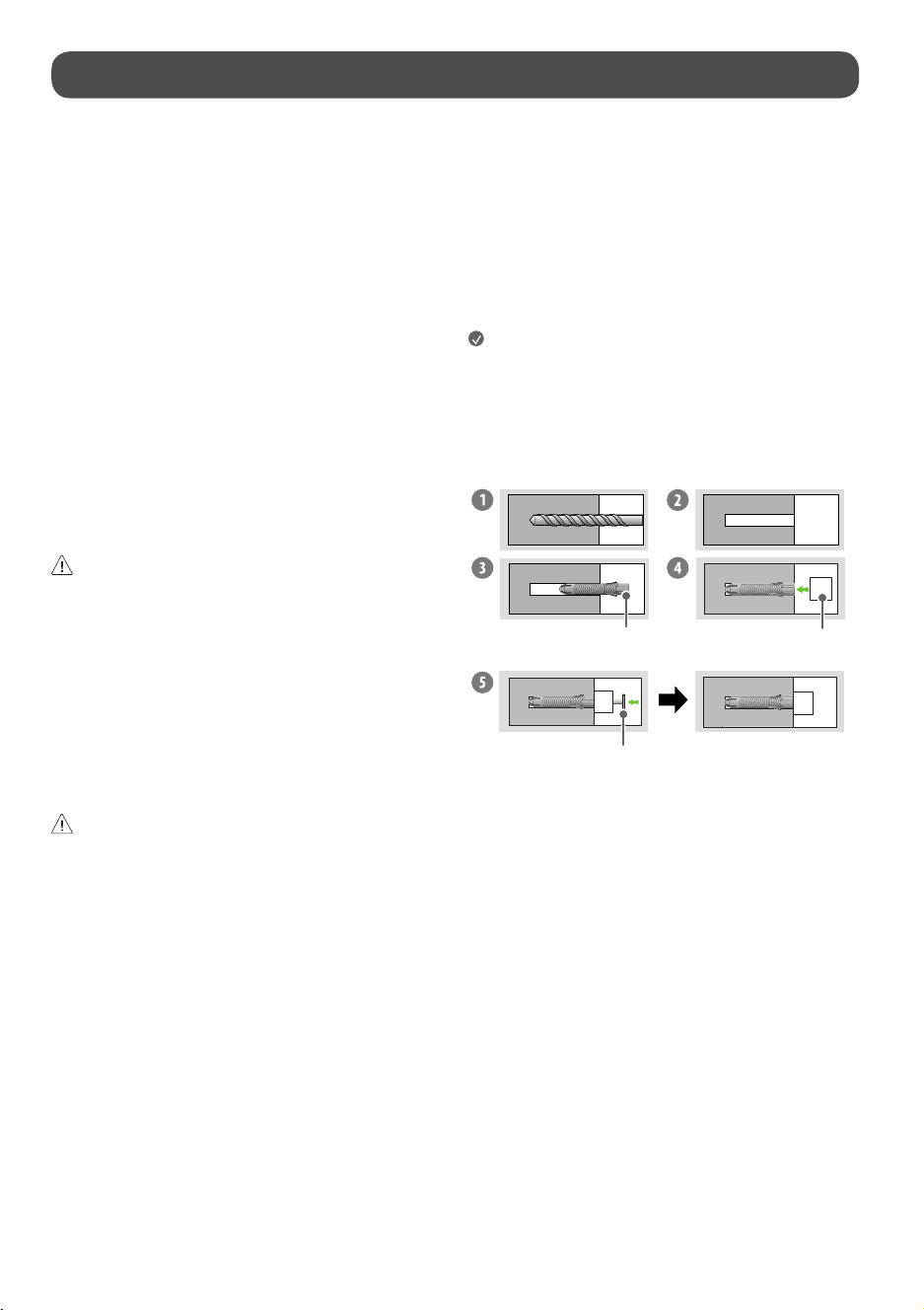
How to fasten anchors and screws
Wallfixingbracketfixinganchor
Wallfixingbracket
Screw
1 DrillholesinanchorlocationswithadrillbitofØ8mmtoadepthof
80mm(3.14inches)to100mm(3.93inches).
2 Cleanthedrilledholes.
3 Inserttheenclosedwallfixingbracketfixinganchorintothehole.(Usea
hammerwheninsertinganchors.)
4 Attachthewallfixingbracketclosetothewall,accordingtothehole
position.
5 Fitthewallfixingbrackettothehole.Atthistime,tightenthescrewstoa
torqueofbetween45kgf/cm(39.06lbf/in)to60kgf/cm(52.08lbf/in).
8
• Checkthematerialofthewallandthethicknessofthefinishing.
• UsetheWallmountanchorforwallmaterialofconcrete,lightconcrete,
strongnaturalstone,softnaturalstonemasonrybrickandhallowblock
thatdonotcrack.
Wall Material Tools Wall Width
Concrete
Wallfixingbracket,
Wallfixingbracket
fixingscrew,wallfixing
bracketfixinganchor,
drillbit
70mm
(2.75inches)
Brick
Naturalstone
MetalPanel
Plywood
Wallfixingbracket,
Wallmountingbracket
fixingscrew,drill
bit(Ø1.8)
30mm
(1.18inches)
EPSPanel Penetratethewall
Plasterboard+
Plywood
30mm
(1.18inches)
Operating the product
Turning on the product
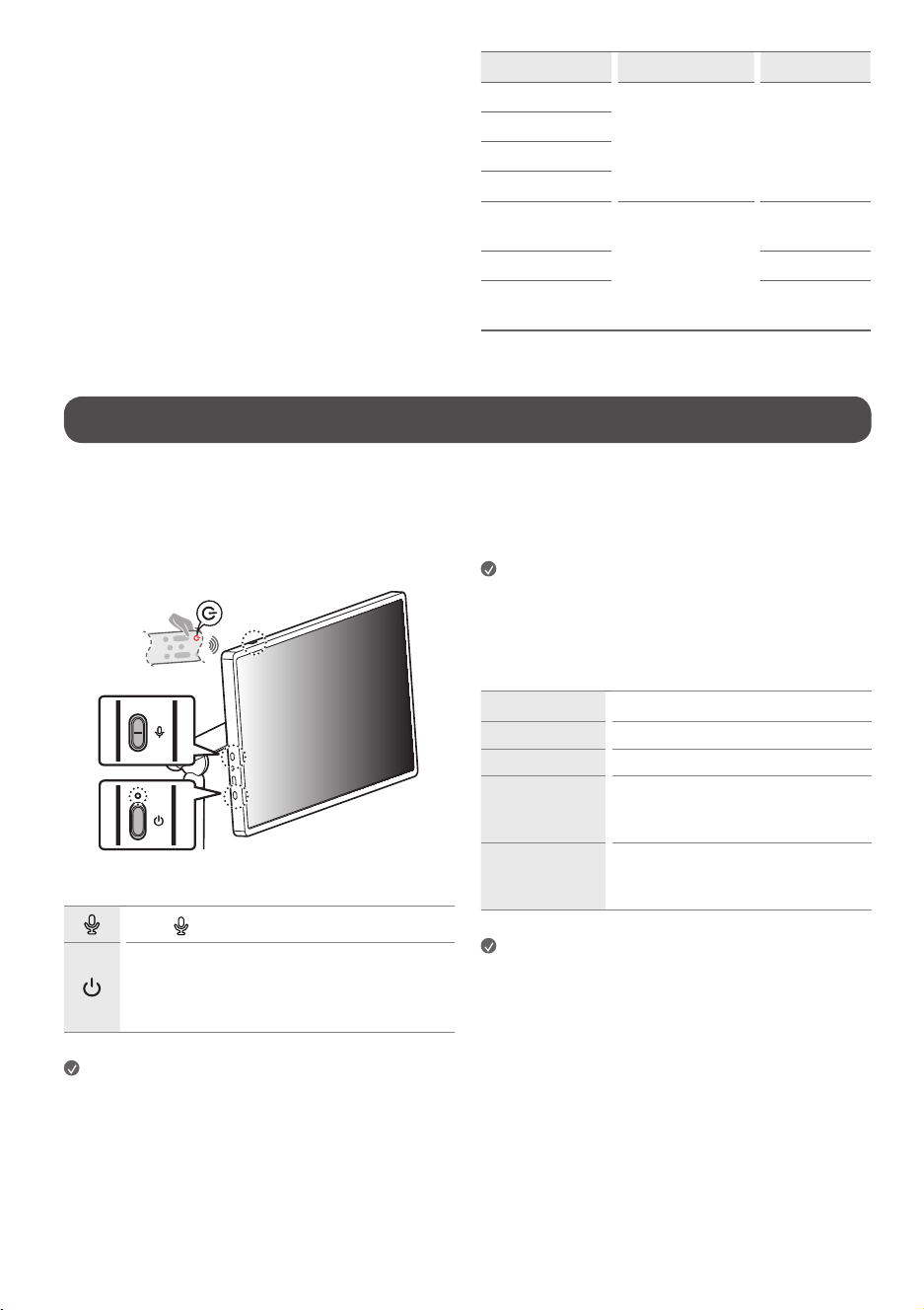
Using the button
Youcansimplyoperatetheproductfunctions,usingthebutton.
Usethe buttontoturnthemicrophonefunctiononandoff.
Turntheproductonandoff.
- Ashortpressturnstheproducton,andalongpressshuts
downallfunctionsandturnsoffthescreen.Pressandhold
formorethan7secondstoforcerestart.
Note
• Theshapeandlocationofthepowerbuttonmayvarydependingupon
theproductmodel.
• Whenthescreenispoweredonforthefirsttime,itmayturnonafter
approximatelyoneminutetocompletetheinitializationoftheproduct.
About LED operation
BatterystatuscanbecheckedviatheLEDindicatorabovethepowerbutton.
Instandbymode,thebatterystatusLEDisonlydisplayedduringcharging.
Note
• TheredLEDisdisplayedduringcharging,andthewhiteLEDisdisplayed
whenfullycharged.
Using the touch screen
Tap Tapthescreenlightly.
Tap and hold Tapthescreenfor2secondsorlonger.
Scroll Scrollthescreenup,down,left,andright.
Drag
Tapandholdtheitemyouwishtomove,such
asanapporwidget,anddragittothedesired
location.
Pinch-Close /
Pinch-Open
Youcanzoominoroutontheappbyplacing
twofingersonthescreenandspreadingthem
apartorbringingthemtogether.
Note
• Touchfunctionssuchaszoominginandoutonthescreenmaynotbe
supported,dependingupontheappused.
• Avoidpressingtoohardonthescreen;instead,taplightlyonthedesired
itemwithyourfingertips.Ifyoutouchthescreenwhilewearinggloves
orwiththetipofyourfingernails,itmaynotworkcorrectly.
• Touchsensorsmaynotworkcorrectlyifthescreenismoistorwet.
9
Connections
Otherdevices,suchasHDMI,canbeconnectedtotheproduct.
Whenconnectingwithanexternaldevice,locateandselectthedevicewith
whichyouwishtoconnectontheHomescreen.
HDMI
• WhenconnectingtheHDMIcable,theproductandexternaldevices
shouldbeturnedoffandunplugged.
Note
• UseacertifiedcablewiththeHDMIlogoattached.
• IfyoudonotuseacertifiedHDMIcable,thescreenmaynotdisplayora
connectionerrormayoccur.
• RecommendedHDMICableTypes
- UltraHighSpeedHDMI®/™cable(3m(9.84feet)orless)
USB
SomeUSBHubsmaynotwork.IfaUSBdeviceconnectedusingaUSBHubis
notdetected,connectittotheUSB-C™portontheproductdirectly.
• UseacertifiedUSB-C™cable.
• UseaUSB-AtoCadapterwhentheproductportanddeviceport(USB-A)
areincompatible.
• TheUSB-C®portcanconnectwithDisplayPortAlternateordevicesthat
supportUSB-PD.
Note
• Foranoptimalconnection,HDMIcablesandUSBdevicesshouldhave
bezelslessthan10mm(0.39inches)thickand18mm(0.7inches)
width.
• Useanextensioncablethatsupports
iftheUSBcableorUSB
memorystickdoesnotfitintoyourproduct’sUSBport.
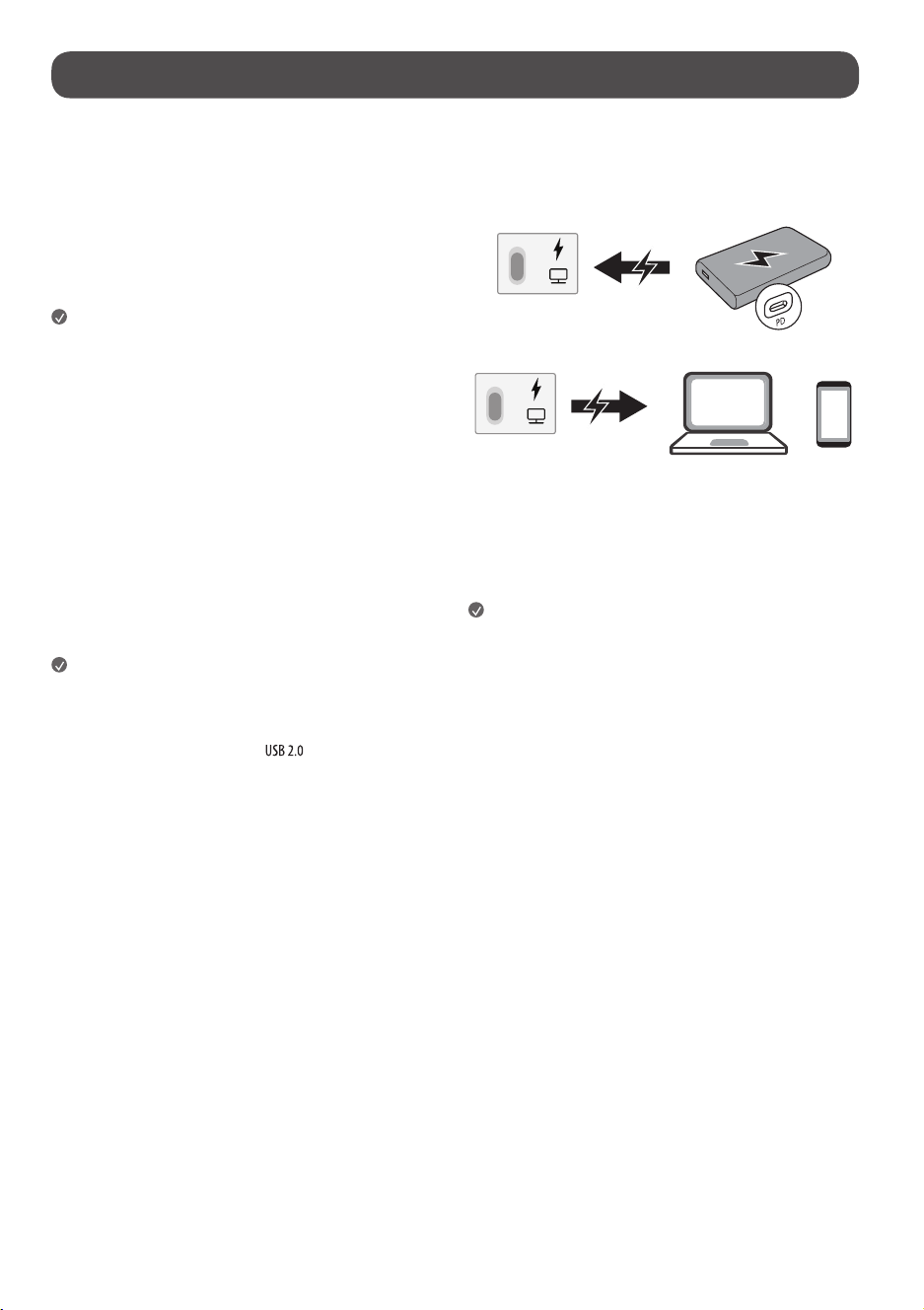
USB PD Charging Function
• Tochargetheproduct,theexternalpowersource(suchasUSBPD
charger)mustsupportUSBPowerDeliverywithoutputspecificationsof
either65W(20V/3.25A),100W(20V/5A).
• SupportschargingwhenconnectingUSBdevices.
External Devices
Supportedexternaldevicesare:Blu-rayplayer,HDreceivers,DVDplayers,
VCRs,audiosystems,USBstoragedevices,PC,gamingdevices,andother
externaldevices.
Note
• Theexternaldeviceconnectionsshownmaydifferslightlyfrom
illustrationsinamanual.
• InPCmode,theremaybenoiseassociatedwiththeresolution,vertical
pattern,contrastorbrightness.Ifnoiseispresent,changethePCoutput
toanotherresolution,changetherefreshratetoanotherrateoradjust
thebrightnessandcontrastonthe[Picture]menuuntilthepictureis
clear.Dependinguponthegraphicscard,someresolutionsettingsmay
notallowtheimagetobepositionedonthescreenproperly.
• USB-C™portchargingandtouchfunctionalitymaynotoperate
dependingupontheconnecteddevice.
• WhenchargingviaUSB-C™type,anadapterof65Worhigheranda
secondarybatteryarerequired,andforfastcharging,anadapterof86W
orhighermustbeused.

10
Using the built-in battery
Thisproducthasabuilt-inbattery,allowingconvenientuseoftheproduct
withonlythebatteryforaperiodoftimewithoutanadditionalpowersupply.
Battery status display
Theremainingbatterylevelisdisplayedas%ontheupperrightcornerofthe
screen.Instandbymode,itisdisplayedasawhite/redLEDwhenconnected
tothepowercord.
Note
• Thebatterytakesabout3hourstofullychargeinstandbymodeand
about3hours30minuteswhileinuse.
• Thebatterylifeandusagetimeafterchargingdecreaseinproportionto
theperiodanddurationofuseoftheproduct.
• Batterychargingmaynotbepossibleattemperaturesbelow0°C(32°F).
• Evenwhennotinuse,theremainingchargeofthebatterywillnaturally
decrease.
• Youcansetbatteryprotectionmodeusingthebaratthetopofthe
screenorthepowerbutton.
• Foralongerbatterylife,chargethebatteryafterusingitforacertain
periodoftimeinsteadofkeepingthebatteryfullycharged.
• Keepingthebatterylevelat50%helpsextendbatterylife.
• Themaximumusagetimeafterchargingis4hours.
• Thestandardusagetimeshowninthismanualisbasedon
measurementsconductedbyLG.Thus,theactualtimemayvary
dependinguponusage.
• Theusagetimemayvarydependinguponfactorssuchasthedevice
connected,operatingtemperature,periodofuse,andusersettings.
• Whenthebatterytemperaturerises,theproductmayturnoffasa
batteryprotectionaction.
11
Specications
Power requirement AC120V~50/60Hz
Current Value / Power consumption 1.0A/120W
Battery
Type RechargeableLithiumIonBattery Rating DC15.52V
/(5,486mAh)(85.15Wh)
Environment Condition
OperatingTemperature
0°Cto40°C
(32°Fto104°F)
StorageTemperature
-20°Cto60°C
(-4°Fto140°F)
OperatingHumidity Lessthan80% StorageHumidity Lessthan85%
• Seethelabelonthebottomoftheproductforpowersource,powerratingsandproductinformation.
Product Information
Open Source Software Notice Information
Toobtainthesourcecodethatiscontainedinthisproduct,underGPL,LGPL,MPL,andotheropensourcelicensesthathavetheobligationtodisclosesourcecode,
andtoaccessallreferredlicenseterms,copyrightnoticesandotherrelevantdocumentspleasevisithttps://opensource.lge.com.
LGElectronicswillalsoprovideopensourcecodetoyouonCD-ROMforachargecoveringthecostofperformingsuchdistribution(suchasthecostofmedia,
shipping,andhandling)uponemailrequesttoopensource@lge.com.
Thisofferisvalidtoanyoneinreceiptofthisinformationforaperiodofthreeyearsafterourlastshipmentofthisproduct.
Licenses
USBType-C®andUSB-C®areregisteredtrademarksofUSBImplementersForum.USB2.0Type-C™isatrademarkofUSBImplementersForum.
12
Troubleshooting
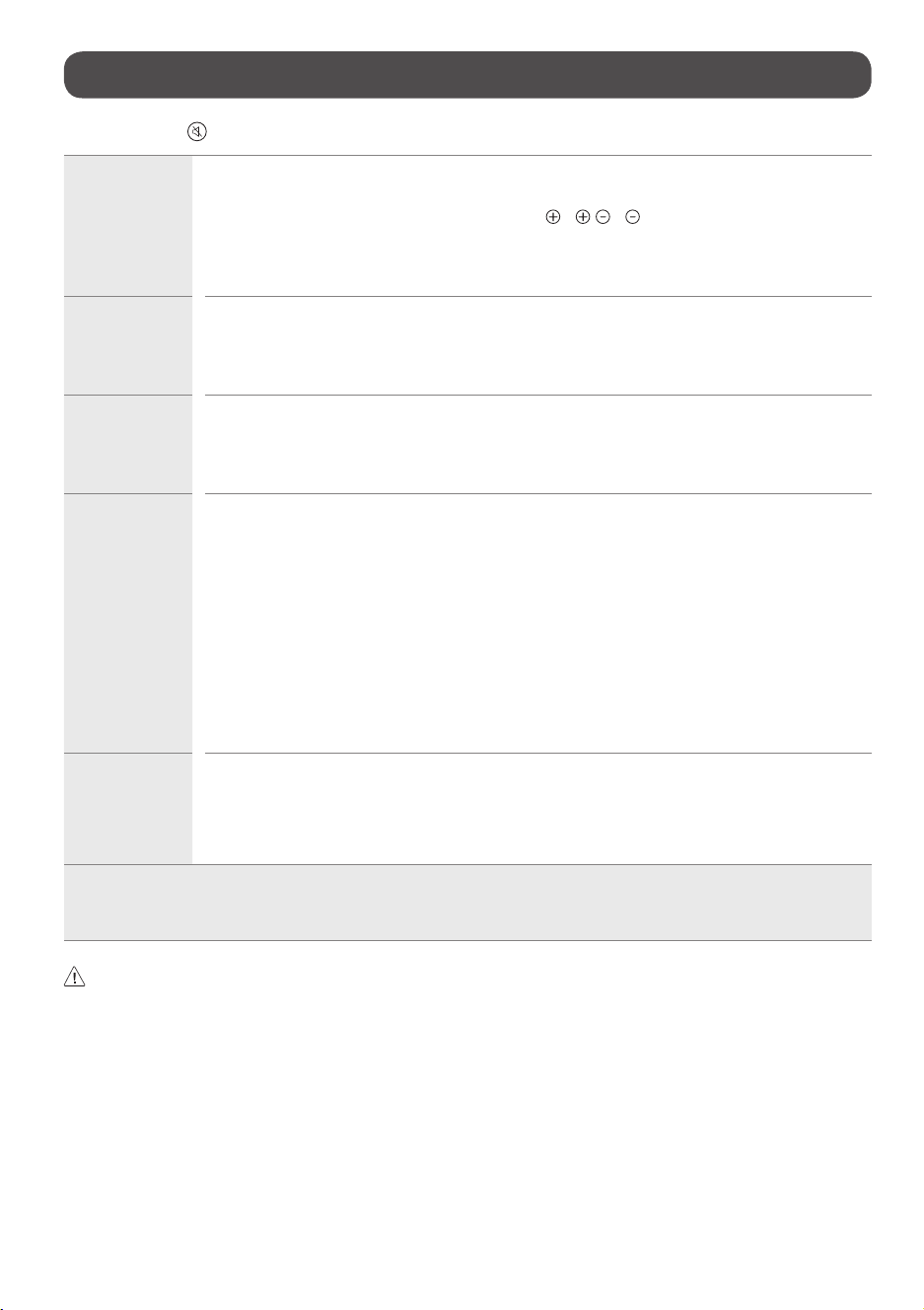
InHDMIinput,pressthe buttonontheremotecontrolthreetimestodisplaythemodelnameandserialnumberonthescreen.
Cannot control the
product with the
remote control.
• Checktheremotecontrolsensorontheproductandtryagain.
• Checkifthereisanyobstaclebetweentheproductandtheremotecontrol.
• Checkifthebatteriesarestillworkingandproperlyinstalled( to , to ).
• Replacedepletedbatterieswithnewones.
• Forremotecontrolsusingcoinbatteries,verifythattheinsulationsheetbetweenthebatteryandterminalshasbeen
removed.
No image display
and no sound is
produced.
• Checkiftheproductisturnedon.
• Checkifthepowercordisconnectedtoawalloutlet.
• Checkifthereisaprobleminthewalloutletbyconnectingotherproducts.
• Thebatterymaybedepleted;tryconnectingthepowercord.
The product turns
off suddenly.
• Checkthepowercontrolsettings.Thepowersupplymaybeinterrupted.
• Checkiftheauto-offfunctionisactivatedonthesettingsrelatedtime.
• Ifthereisnosignalwhiletheproductison,theproductwillturnoffautomaticallyafter4hoursofinactivity.
• Ifthebatteryoverheats,theproductautomaticallyturnsofftoprotectitself.
Abnormal Display • Iftheproductfeelscoldtothetouch,theremaybeasmall“flicker”whenitisturnedon.Thisisnormal,thereisnothing
wrongwithproduct.
• Thispanelisanadvancedproductthatcontainsmillionsofpixels.Youmayseetinyblackdotsand/orbrightlycoloreddots
(red,blueorgreen)atasizeof1ppmonthepanel.Thisdoesnotindicateamalfunctionanddoesnotaffecttheperformance
andreliabilityoftheproduct.Thisphenomenonalsooccursinthird-partyproductsandisnotsubjecttoexchangeorrefund.
• Youmayfinddifferentbrightnessandcolorofthepaneldependinguponyourviewingposition(left/right/top/down).
Thisphenomenonoccursduetothecharacteristicofthepanel.Itisnotrelatedwiththeproductperformance,anditisnot
malfunction.
• Avoidtouchingthescreenorholdingyourfinger(s)againstitforlongperiodsoftime.Doingsomayproducesome
temporarydistortioneffectsonthescreen.
• Displayingastillimageforaprolongedperiodoftimemaycauseimagesticking.Avoiddisplayingafixedimageonthe
productscreenforalongperiodoftime.
Generated Sound • Cracking noiseAcrackingnoisethatoccurswhenwatchingorturningofftheproductisgeneratedbyplasticthermal
contractionduetotemperatureandhumidity.Thisnoiseiscommonforproductswherethermaldeformationisrequired.
• Electrical circuit humming/panel buzzingAlowlevelnoiseisgeneratedfromahigh-speedswitchingcircuit,which
suppliesalargeamountofcurrenttooperateaproduct.Itvariesdependingupontheproduct.Thisgeneratedsounddoes
notaffecttheperformanceandreliabilityoftheproduct.
• Usingtheproductinadustyenvironmentmaycausethescreentobecomedim.
• Inthecaseofabnormaloperation,turnthebatteryswitchoff,unplugthepowercord,andthenplugitbackin.
• Inthecaseofabnormaloperation,eitherdisconnectandreconnectthepowercordorperformaforcerestartbypressingandholdingthepowerbutton.
• Whencleaningtheproduct,becarefulnottoallowanyliquidorforeignobjectstoenterthegapbetweentheupper,leftorrightsideofthepanelandthe
guidepanel.(Dependinguponmodel)
• Makesuretowringanyexcesswaterorcleanerfromthecloth.
• Donotspraywaterorcleanerdirectlyontotheproductscreen.
• Makesuretosprayjustenoughofwaterorcleanerontoadryclothtowipethescreen.
13
Using Remote Control
1
1
1
1
1
1
1
1
1
(Dependinguponmodel)
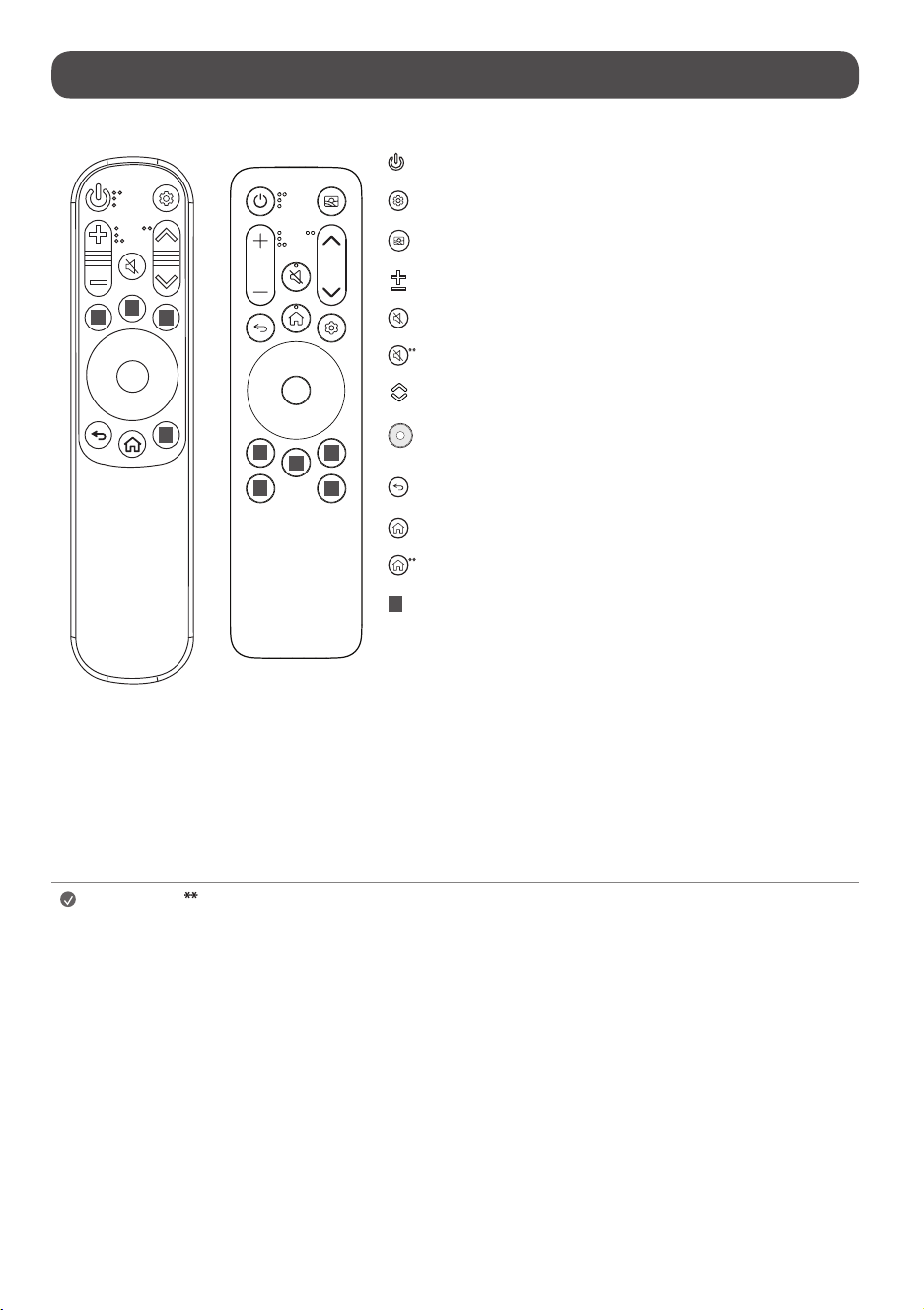
PowerTurnstheproductonoroff.
Q. SettingsAccessestheQuickSettings.
Mood MakerTurnsonthemostrecentlysetthemeinMoodMaker.
Volume buttons Adjuststhevolumelevel.
MuteMutesallsounds.
MuteAccessesthe[Accessibility]menu.
Page buttonsMovestotheprevious/nextpage.
Up/Down/Left/Right/OKEnablesyoutoselectfeaturesandmakeadjustments
afterselectingamenu.
Back Returnstothepreviouslevel.
HomeAccessestheHomemenu.
HomeThescreenzoomfunctionisactivated.
1
Streaming Service buttonsConnectstotheVideoStreamingService.
(Somebuttonsandservicesmaynotbeprovideddependinguponmodelsorregions.)
Note
To use the button, press and hold for more than 1 second.
• Thefeaturescanbeusedwithouttheremotecontrolbytouchingthescreen.
• Pleasekeepthebatteryoutofthereachofchildren.Itmaycauseinjuryormalfunction.
• Ensurethebatteryisproperlymounted.Thereisariskoffireorexplosion.
• Theremotecontrolusingacoinbatterycanbeattachedtothetopoftheproduct.Theremotecontrolcanbeconveniently
mountedontheproductoranymagneticsurfaceusingitsbuilt-inmagnet.
- Onlyattachtheremotecontroltothetopoftheproduct.Theremotecontrolmayfallifattachedtothesidesorbottom.
- Theremotecontrolusingastandardbatterycannotbemagneticallyattached.
14
Regulatory
-
-
-
-
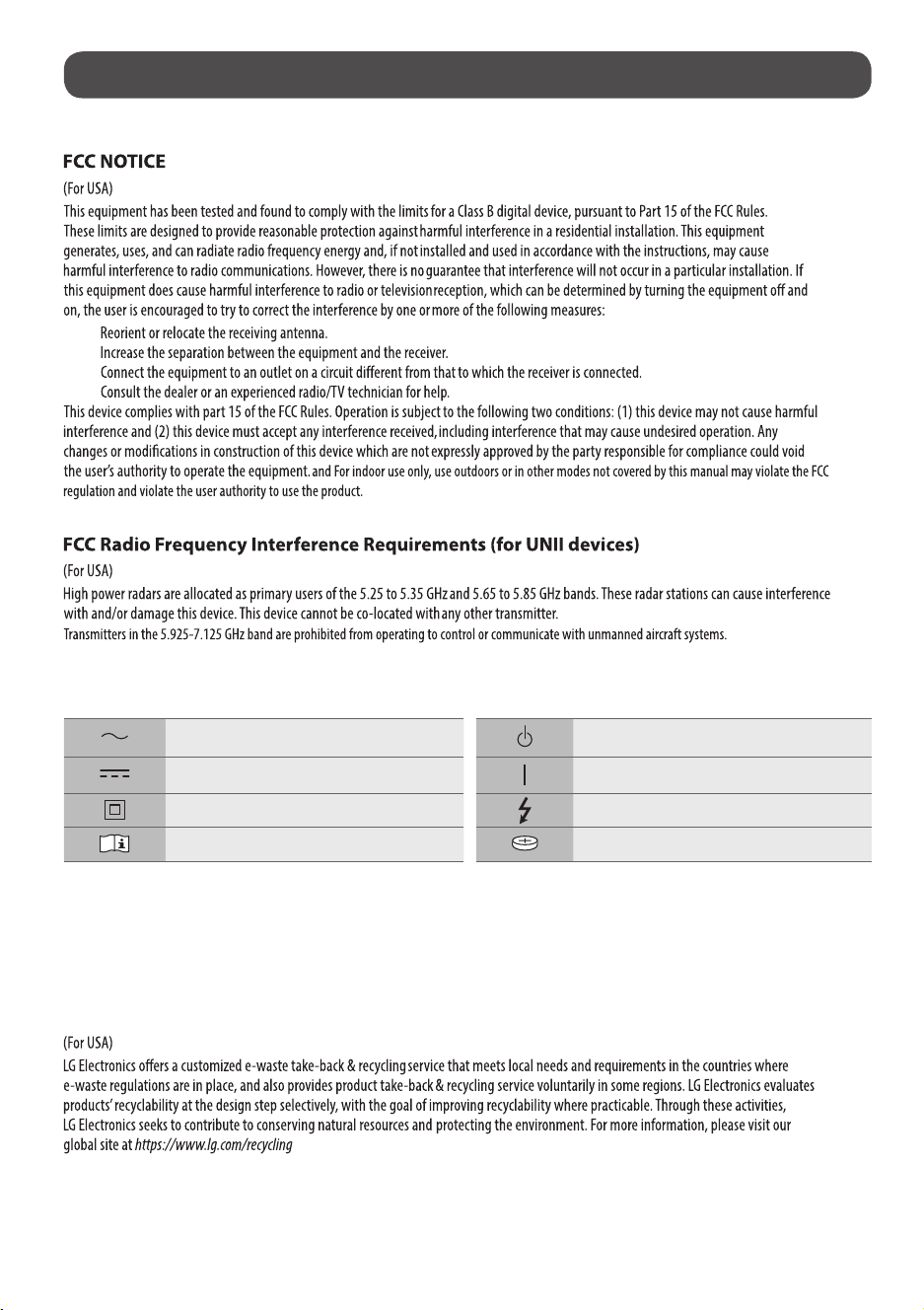
Symbols
Referstoalternatingcurrent(AC). Referstostand-by.
Referstodirectcurrent(DC). Refersto“ON”(power).
ReferstoclassIIequipment. Referstodangerousvoltage.
Referstomanual/instructions. Referstocoin/buttoncellbattery.
Battery take-back information
Incaserechargeablebatteryisincludedinthisproduct,theentiredeviceshouldberecycledincompliancewithrechargeablebatteryrecyclingstandardsbecause
oftheinternalbattery.Todisposeofproperly,call(800)822-8837orvisitwww.call2recycle.org.
LG Take-back & Recycling Policy
15
[For coin battery application]
(For USA)
WARNING
•INGESTION HAZARD: This product contains a button cell or coin battery.
•DEATH or serious injury can occur if ingested.
•A swallowed button cell or coin battery can cause Internal Chemical Burns in
as little as 2 hours.
•KEEP new and used batteries OUT OF REACH of CHILDREN
•Seek immediate medical attention if a battery is suspected to be swallowed
or inserted inside any part of the body.
Remove and immediately recycle or dispose of used batteries according to local regulations and keep
away from children. Do NOT dispose of batteries in household trash or incinerate.
Even used batteries may cause severe injury or death.
Call a local poison control center for treatment information.
The compatible battery type is CR2032.
The nominal battery voltage is 3V.
Non-rechargeable batteries are not to be recharged.
Do not force discharge, recharge, disassemble, heat above (manufacturer’s specified temperature
rating) or incinerate.
Doing so may result in injury due to venting, leakage or explosion resulting in chemical burns.
Ensure the batteries are installed correctly according to polarity ( and ).
Do not mix old and new batteries, different brands or types of batteries, such as alkaline, carbon-
zinc, or rechargeable batteries.
Remove and immediately recycle or dispose of batteries from equipment not used for an extended
period of time according to local regulations.
Always completely secure the battery compartment. If the battery compartment does not close
securely, stop using the product, remove the batteries, and keep them away from children.

16