2309_Rev01
www.lg.com
Copyright © 2023 LG Electronics Inc. All Rights Reserved.
MODEL
XT7S
OWNER’S MANUAL
Portable Bluetooth
Speaker
Please read this manual carefully before operating your set and retain it for
future reference.
2
Portable Bluetooth Speaker Quick
Guide
Connecting and Using the Speaker
a
b
c
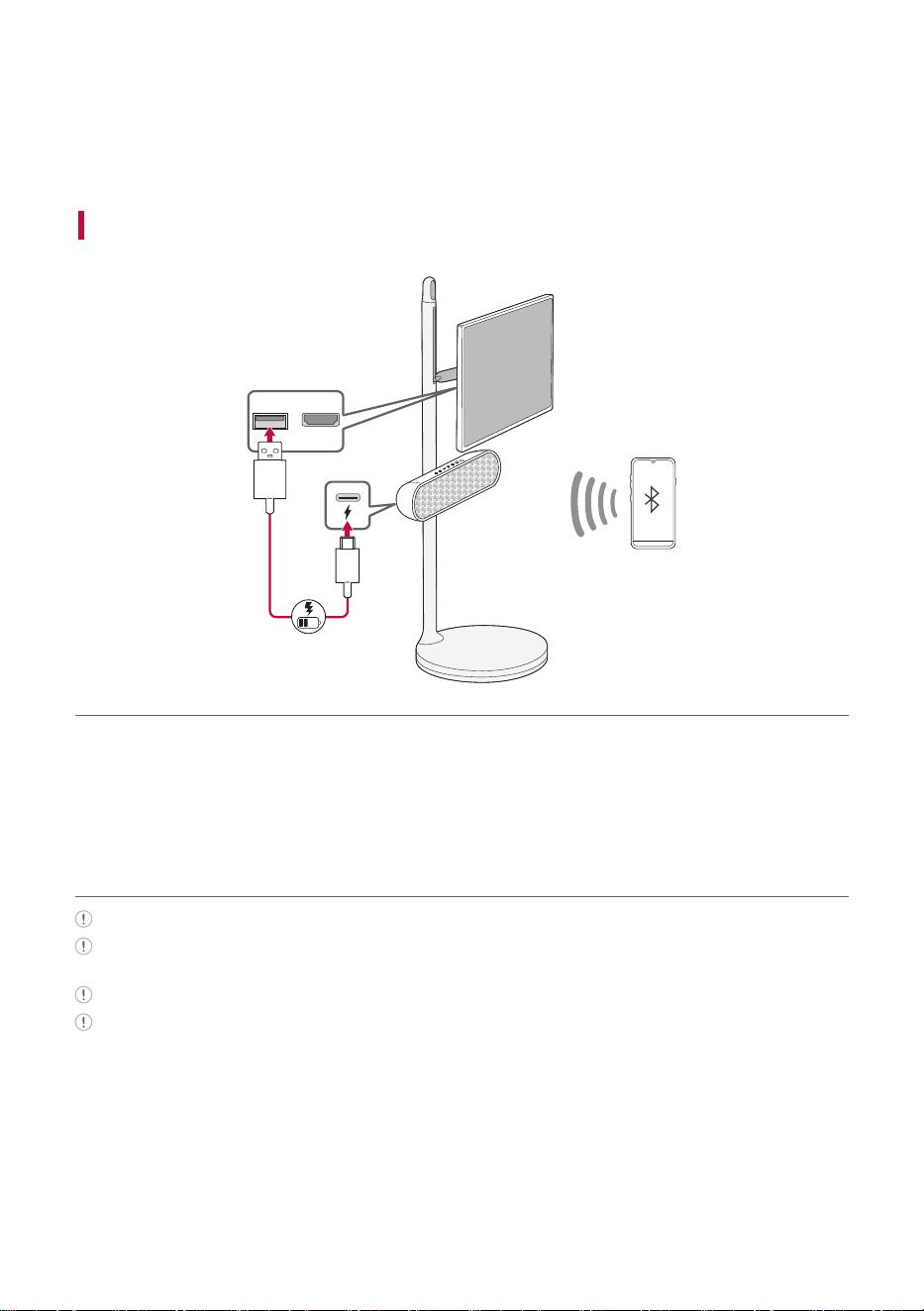
a Charge the speaker before using it by opening the rear cover
and connect the speaker to the USB port on the StanbyME
TV by the USB cable.
The speaker can be charged while the TV is on.
If the speaker is connected to the TV and powered by the battery, the usage time of the TV may be
shortened. For continuous use, connect the power to the TV.
When connecting the speaker to the TV, position the TV monitor horizontally.
You can charge the speaker without the TV by using your own AC adapter for charging.
3
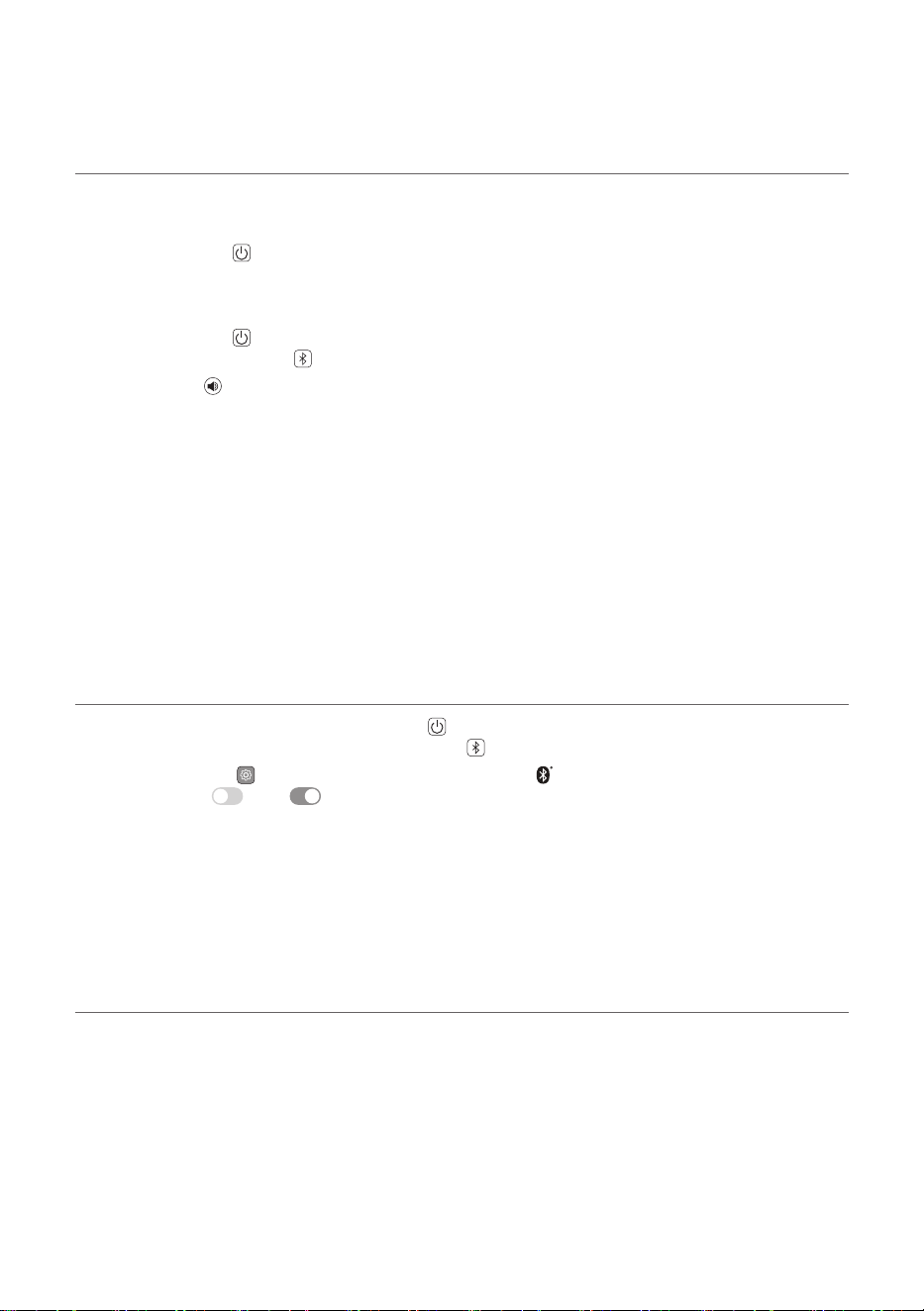
b Connect the speaker to the StanbyME TV via Bluetooth ([
See “Connecting the TV to the Speaker via Bluetooth” on
page 17.)
• Connect automatically (Initial connection)
A Turn on the TV.
B Press the Power
button on the speaker to turn it on.
C The TV finds and connects to this speaker so you can hear the TV sound.
• Connect manually
A Press the Power
button on the speaker to turn it on. Bluetooth LED blinks. If the LED is not
blinking press Bluetooth button.
B Press ; [
(Sound Out) on the StanbyME TV and select [Bluetooth device] or [Bluetooth
device+Internal speaker] and then [Device list].
- If you choose [Bluetooth device], find and select “LG-XT7S(XX)” on the Connectable Devices list.
- If you choose [Bluetooth device+Internal speaker], select [Connect One Speaker]. Then find and
select “LG-XT7S(XX)” on the Connectable Devices list.
C Once the TV is connected via Bluetooth, the Bluetooth LED will turn on and you can hear the TV
sound through the speaker.
c Connect the speaker to a smartphone via Bluetooth ([ See
“Connecting Smartphone to the Speaker via Bluetooth” on
page 19.)
A Turn off the StanbyME TV. Press the Power
button on the speaker to turn it on. Bluetooth LED
blinks. If the LED is not blinking press Bluetooth button.
B Tap the Settings
button on the smartphone and select Bluetooth. Turn on the Bluetooth
function. (Off > On )
C Find “LG-XT7S (XX)” on the device list on the smartphone and connect to it. Once the smartphone is
connected via Bluetooth, the Bluetooth LED will turn on.
D On the smartphone, play a music of your choice.
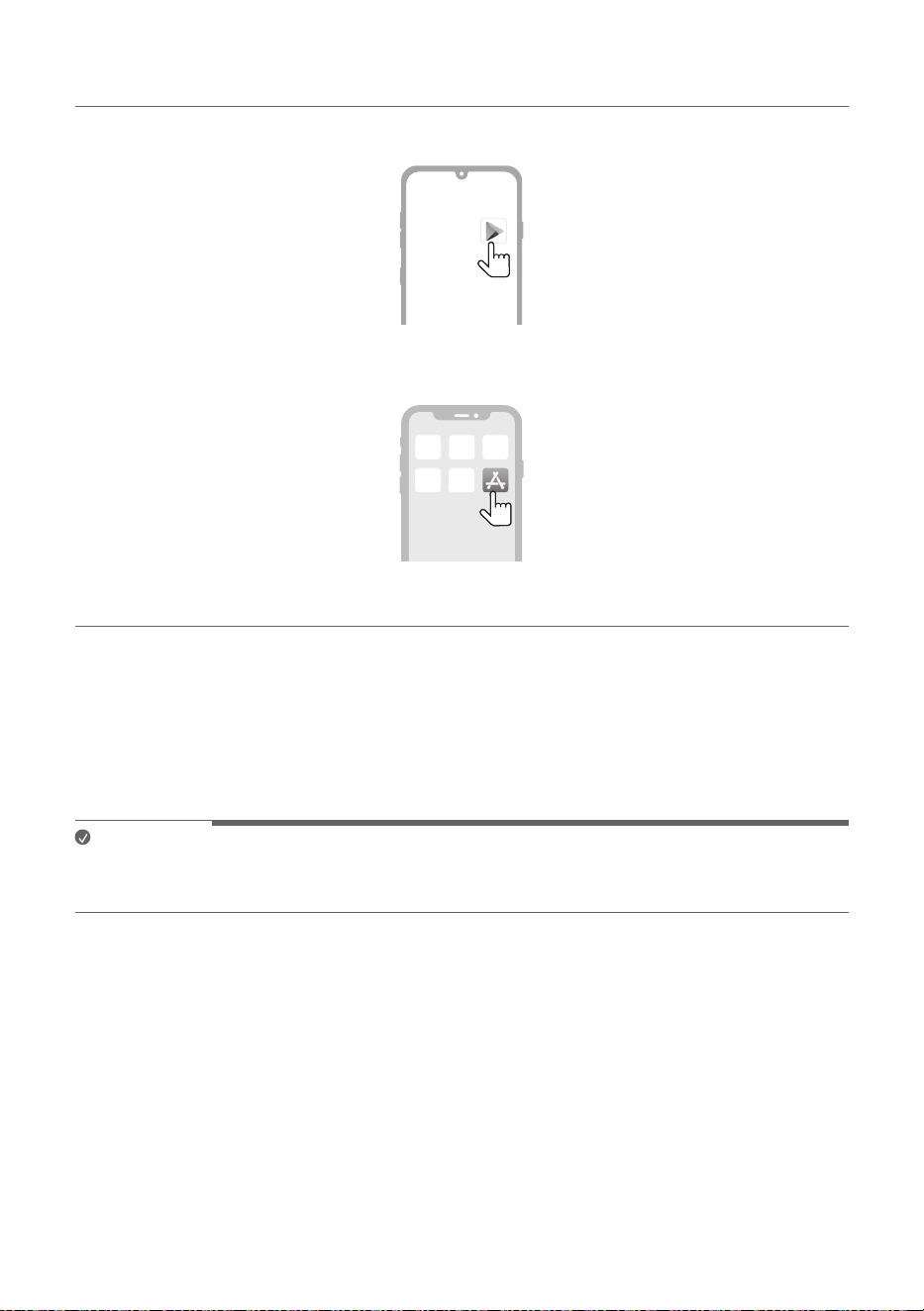
d Connecting the LG XBOOM App ([ See “Installing app” on
page 24.)
A Find the LG XBOOM app on the Google Play or App Store and install it on your smartphone.
B Run the LG XBOOM app and use more features. (EQ, Lighting, Sleep Timer, Setting etc.)

4
Table of Contents
Portable Bluetooth Speaker
Quick Guide
2 Connecting and Using the Speaker
Installation
5 Checking before installing with the TV
7 Affixing the Speaker to the TV
Exploring the Product
11 Top
13 Back
Charge
14 Charging the Battery
16 Checking Battery Status
Connecting to Bluetooth
17 Connecting the TV to the Speaker via
Bluetooth
19 Connecting Smartphone to the Speaker
via Bluetooth
22 Connecting Two Bluetooth Devices to the
Speaker
Connecting to the LG XBOOM
App
24 Installing app
Additional Functions
26 Setting Sound Effects
27 Using WOW Orchestra with LG StanbyME
TV
27 Resetting the Speaker
28 Resetting Bluetooth
28 Using Auto Power Management
29 Using Auto power - on.
29 Voice feedback function
Safety Precautions
30 Safety and Regulatory
33 Prevention of product misuse
Before Reporting Product
Malfunction
37 Troubleshooting
Appendix
39 Specifications
40 Registered Trademarks and Licenses
41 Handling the Product

5
Installation
Checking before installing with the TV
You can install this speaker with the LG StanbyME TV.
Follow the instructions below when installing the speaekr to the TV.
Please check the following first.
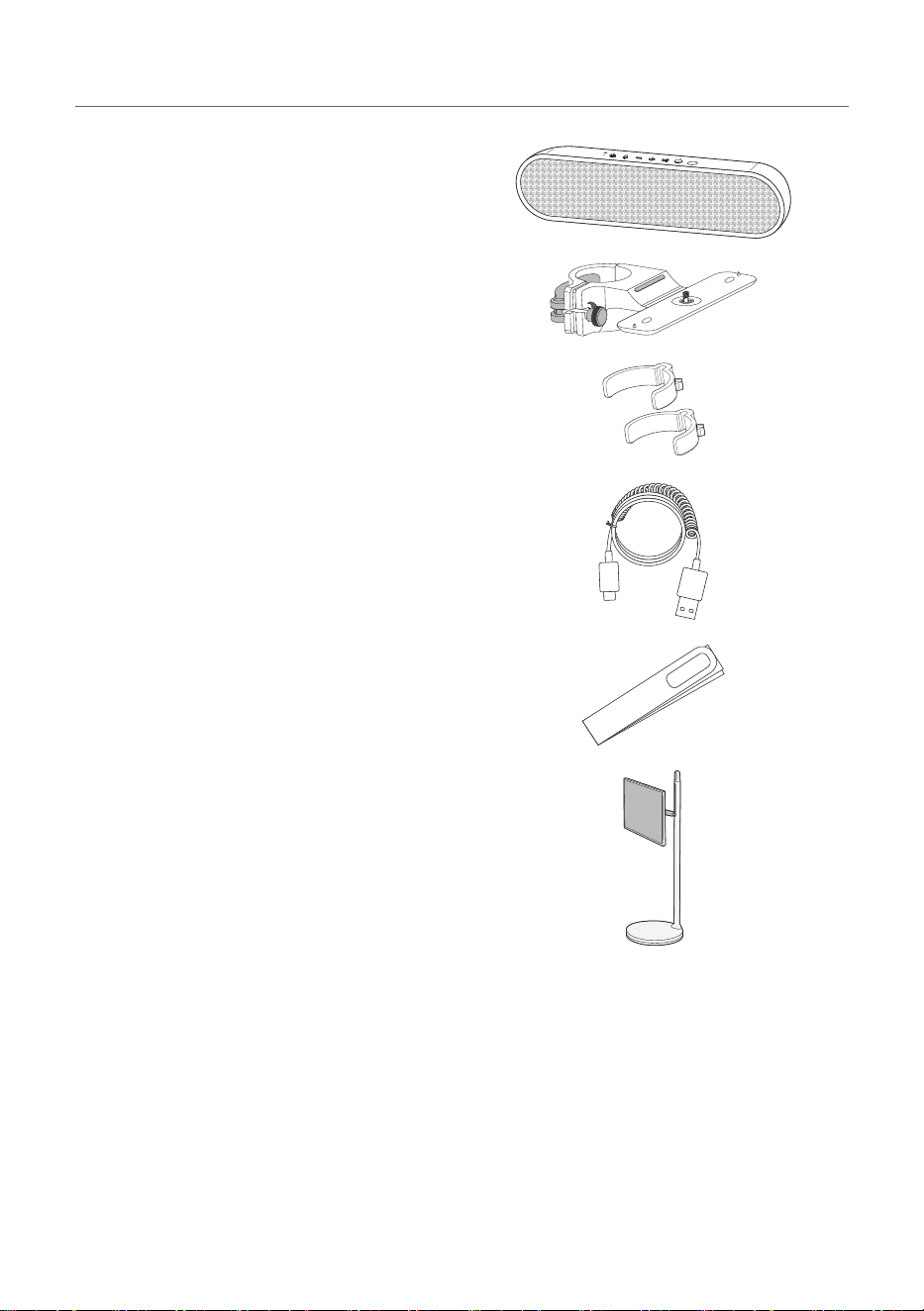
• Please note the following when you install the speaker to the TV. Product damage or injury may
occur during the process.
- Secure the speaker firmly to the TV using the fixing screw so that it does not fall off.
- Ensure it is out of the reach of children. Pulling or shaking the TV installed with the speaker
may cause it to fall.
> CAUTION
• Prevent children from hanging on the TV and the speaker or climbing it.
- Otherwise, the TV installed with the speaker may fall over, causing injury or death.
• Do not install the product in an unstable location, a location with vibration, or a location that does not
support the product safely, such as on top of a shaky shelf or on a slope.
- Otherwise, the product may fall or turn over, causing injury or product malfunction.
• Put the product on a flat hard surface.
- Otherwise, the product may fall over, causing injury.
• Make sure that you do not damage the exterior of the products when moving or handling the TV
installed with the speaker.
• If there is any dirt or fingerprint on the product exterior, only wipe the area with the dirt or fingerprint
lightly.
- Do not apply excessive force when removing the dirt. Excessive force may produce scratches or
discoloration of the product exterior.
• When assembling the speaker to the bracket, make sure that all screws are engaged to the end. (If
not, the speaker may fall down after it was installed.) Do not tighten the screws with excessive force.
Otherwise, the screws may become loose or fall out due to the wear and tear of the screwed parts.
6
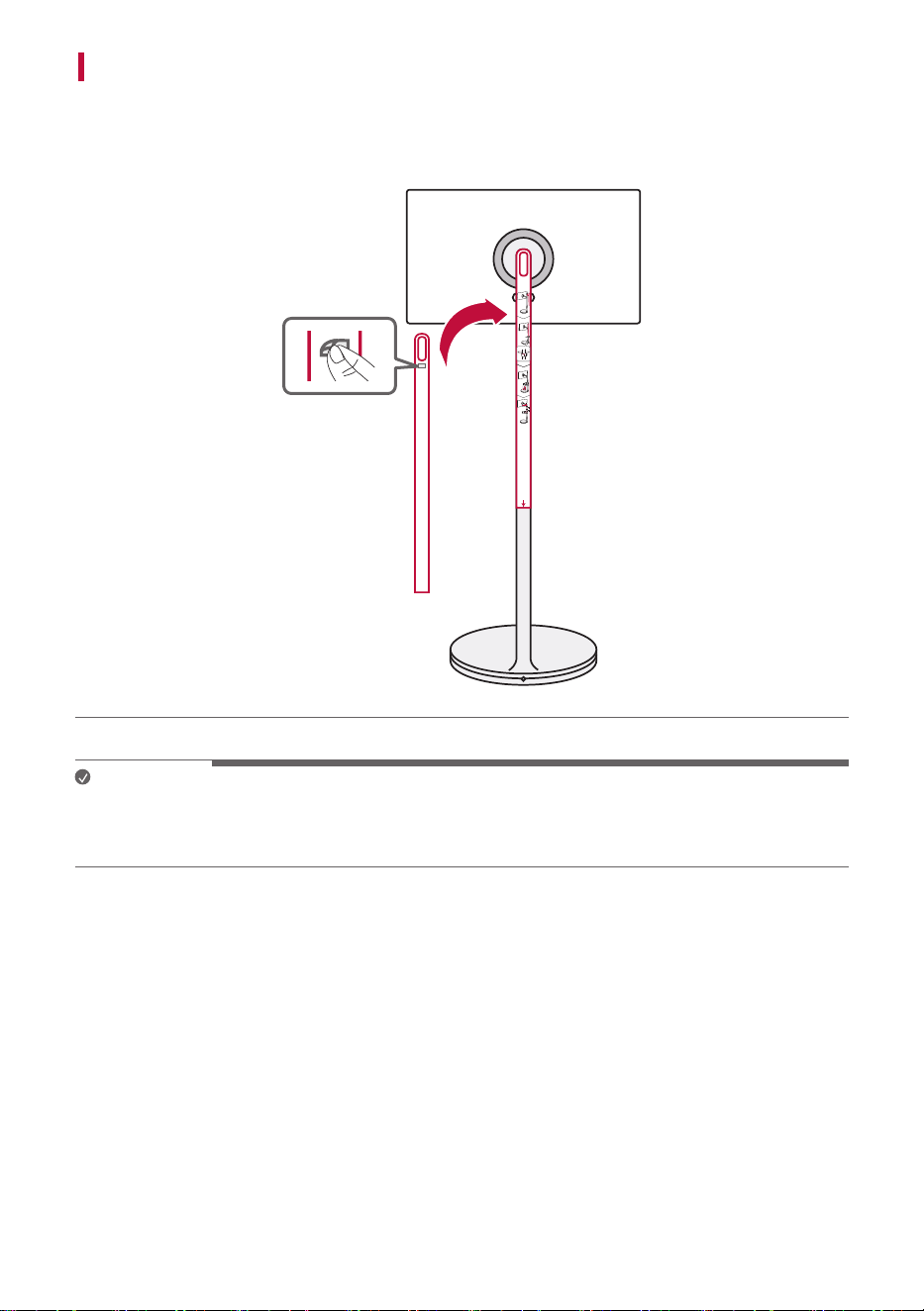
Components for installing with the TV
Speaker
Cradle
Cable holder (2 EA)
USB cable
Installation template
LG StanbyME TV (sold separately)
7
Affixing the Speaker to the TV
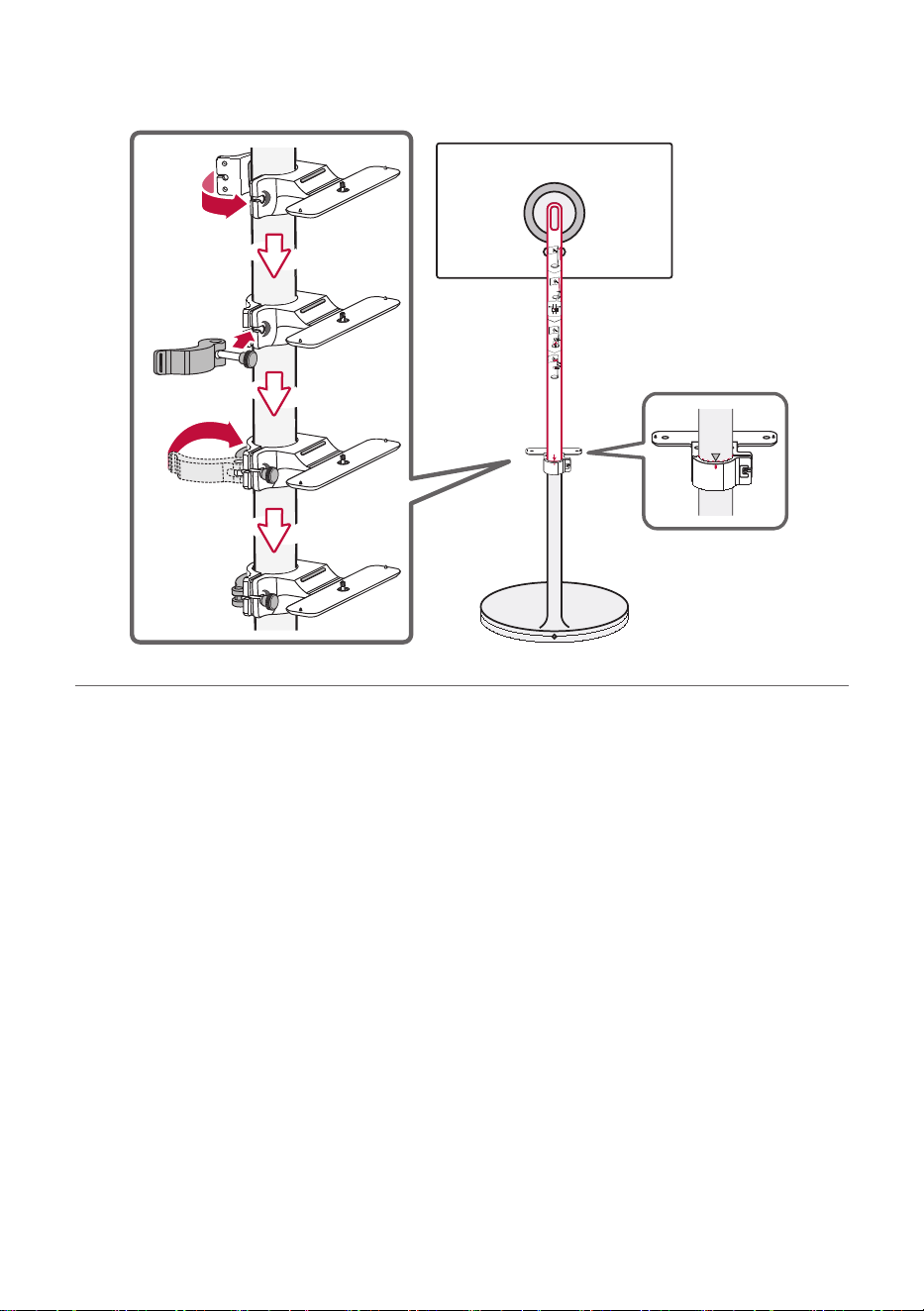
a Attach the installation template on the back of the TV stand. Remove the protective tape on the
back on the template and attach it to the TV stand. Then check the height at which the cradle will be
installed.
Note
• The speaker installation height is based on the StanbyMe TV display being turned vertically. When using
the display in landscape orientation, you can adjust the height of the speaker to your preference as long
as it does not interfere with the display.
8
b Install the cradle below the template. When installing it, align the center dot on the cradle to the s
symbol on the TV stand. And then remove the template.
9
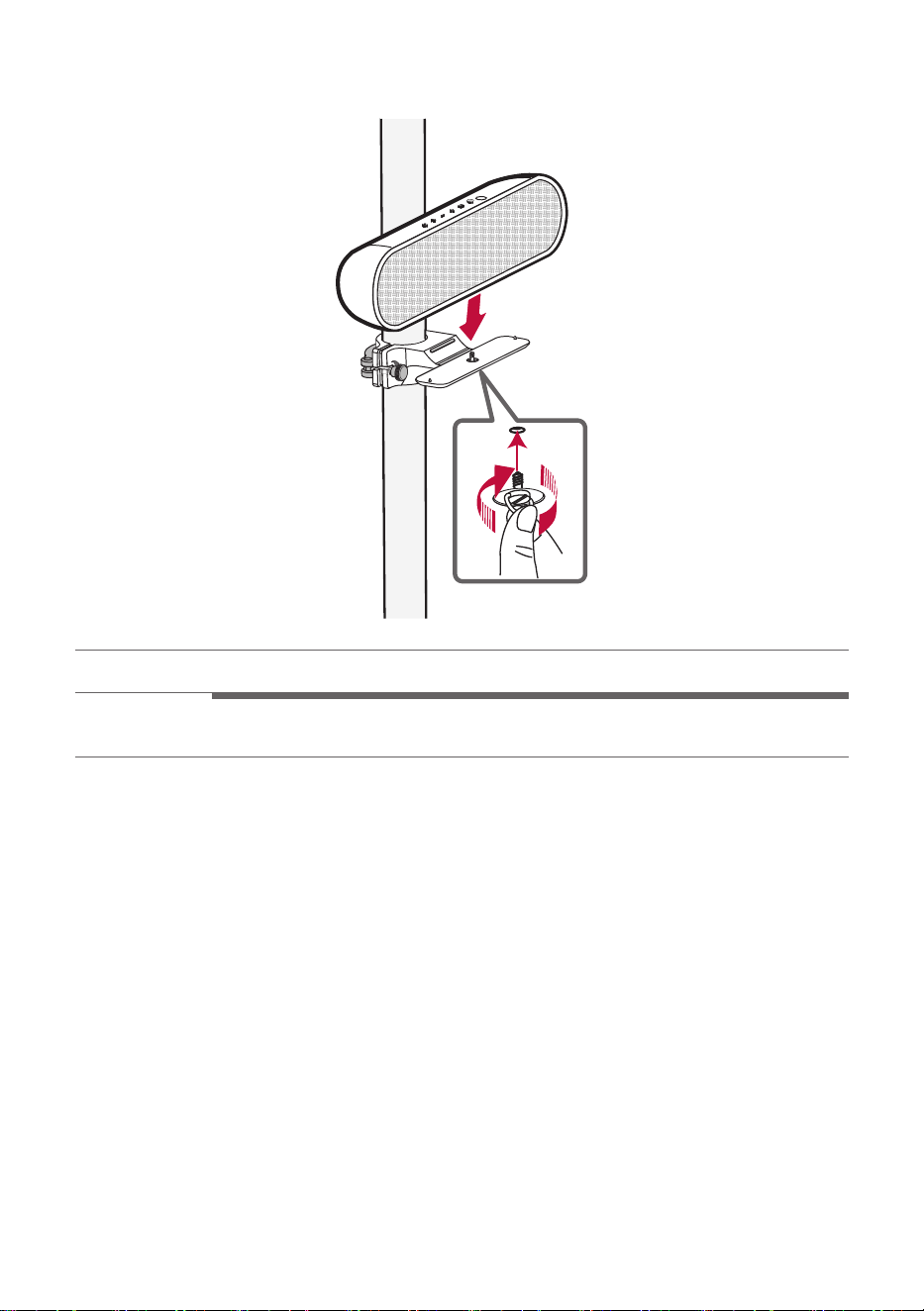
c Put the speaker on the cradle and turn the screw under the cradle as if pushing it upward to secure
the speaker.
> CAUTION
Be careful not to get your hands caught or break your nails when assembling the screws.
10
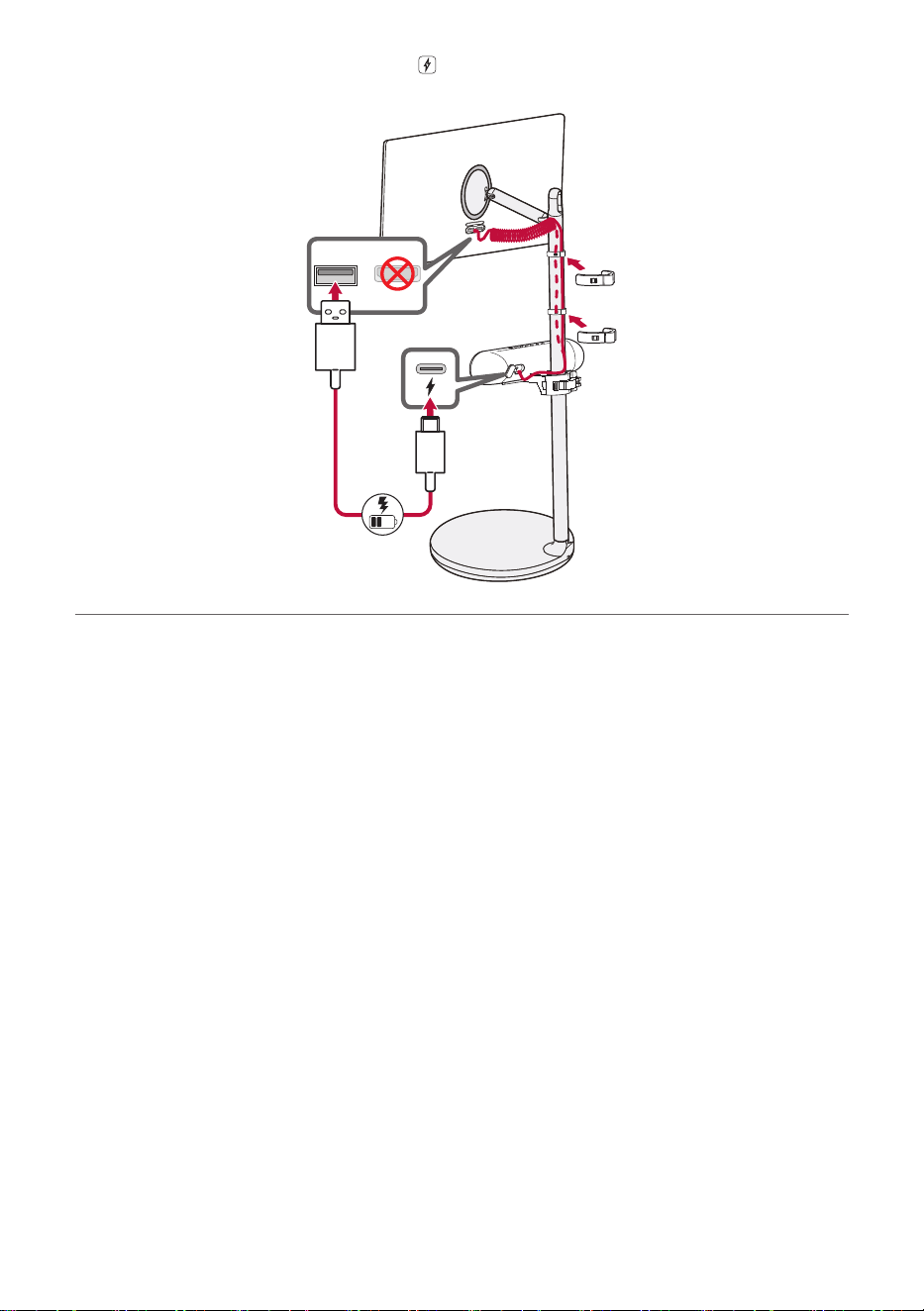
d Connect the USB Type-C connector to the
charging port on the back of the speaker and the USB
Type-A connector to the TV's USB port. And use the cable holders to organize the cable.
11
Exploring the Product
Top
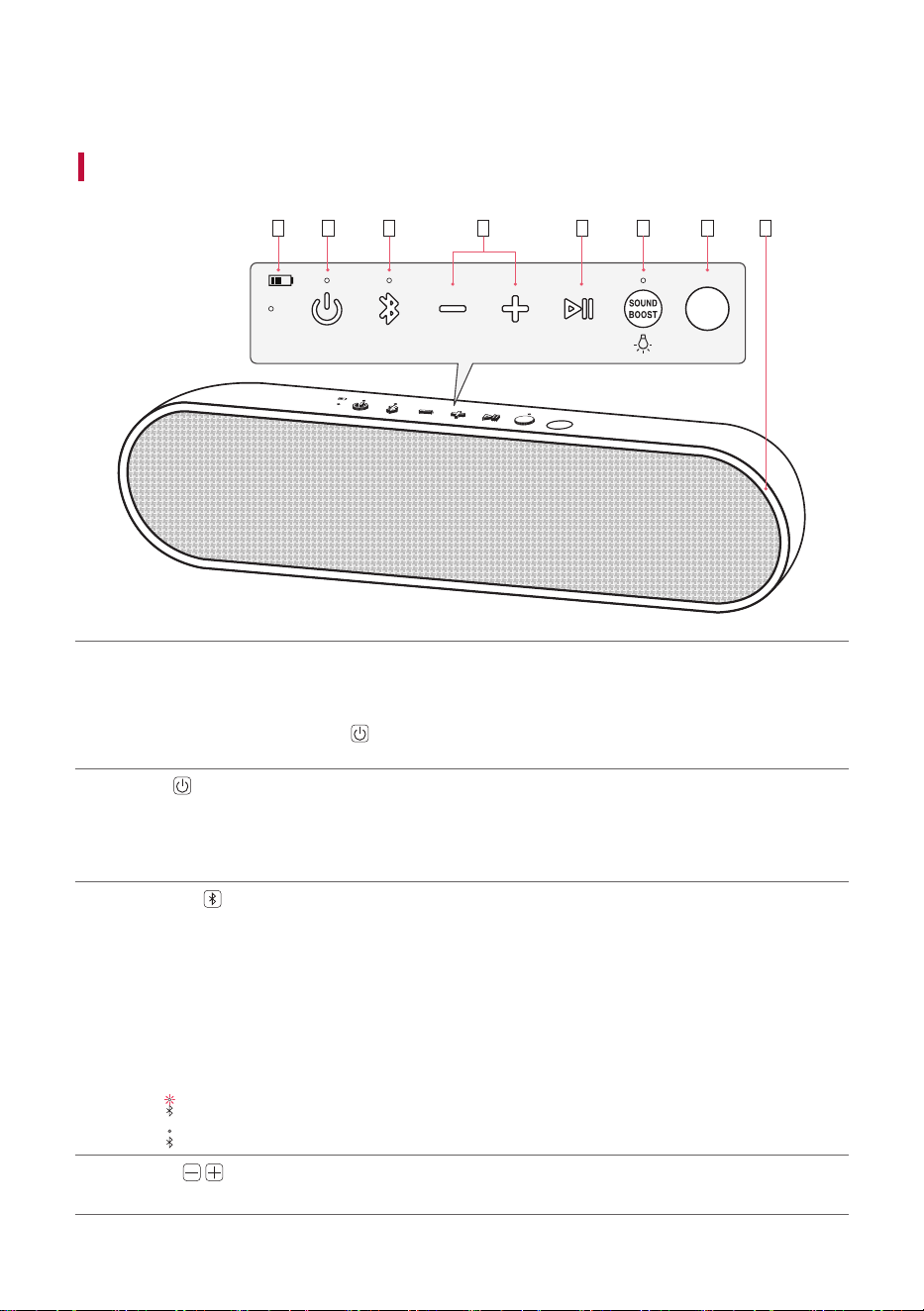
b c da e f g h
a
Battery LED
Please check the battery charging level and battery status. ([ See “Checking Battery Status” on
page 16.)
• Press and hold the Power
button for 2 seconds to check the battery level while the power
or the speaker is on.
b
Power
Turns the speaker on or off.
Power LED
Indicates the power status.
c
Bluetooth
You can change the Bluetooth settings.
• Connecting an additional smartphone: Press the button. ([ See “Connecting Two Bluetooth
Devices to the Speaker” on page 22.)
• Resetting Bluetooth: Press and hold the button for 7 seconds. ([ See “Resetting
Bluetooth” on page 28.)
Bluetooth LED
Indicates the Bluetooth connection status.
•
: Blinks in white / Ready for Bluetooth device connection.
•
: Turns on in white / Connected to a Bluetooth device.
d
Volume
This adjusts the speaker volume.
12
e
Play/Pause
While Bluetooth is connected, press the button to operate the Bluetooth device.
• Play/Pause: Press the button.
• Moving to the next music: Press the button twice quickly.
• Moving to the previous music: Press the button three times quickly.
f
SOUND BOOST
SOUND
BOOST
Changes sound effect. ([ See “Setting Sound Effects” on page 26)
SOUND BOOST LED
You can check the selected sound effect.
Lighting
Press and hold the button to turn on or off the lighting.
g
IR transmitter
This is used when connecting the TV and the speaker automatically.
Place the speaker with the IR transmitter facing the TV. If the IR transmitter is covered, the
connection may not be smooth.
h
Lighting LED
You can change the effect of Lighting and turn it on or off in the LG XBOOM app.
13
Back
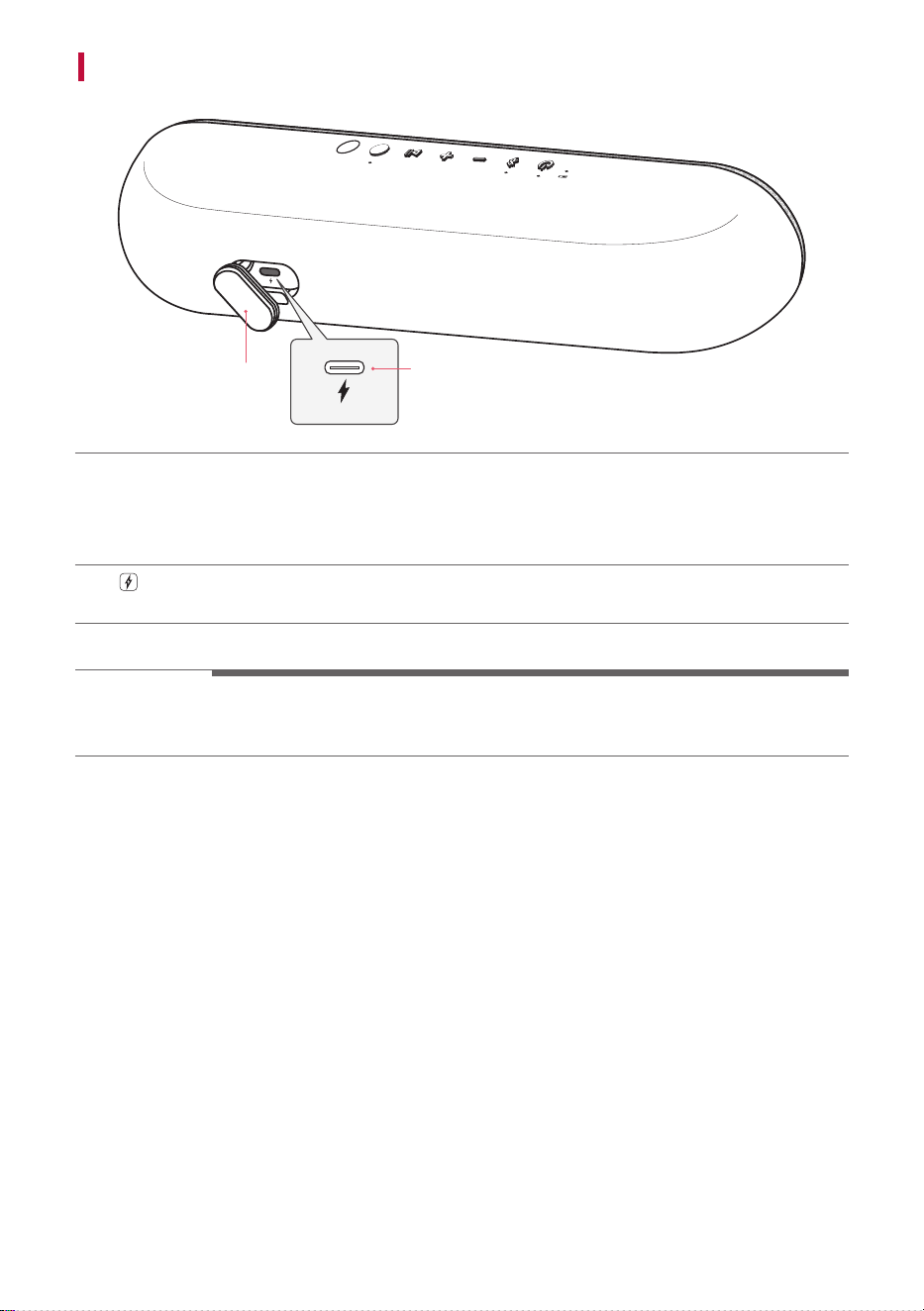
a
b
a
Back Cover
Make sure to fully close the back cover after use.
• Ingress Protection: IPX5
- Protected against low pressure jets of water from all directions.
b
(DC IN)
Plug in a USB (C-Type) cable to charge the speaker battery.
> CAUTION
Be careful not to drop the speaker. Mechanical shock may cause deterioration of water-resistant
performance.
14
Charge
Charging the Battery
The speaker has a built-in battery. Make sure to charge the battery sufficiently before use.
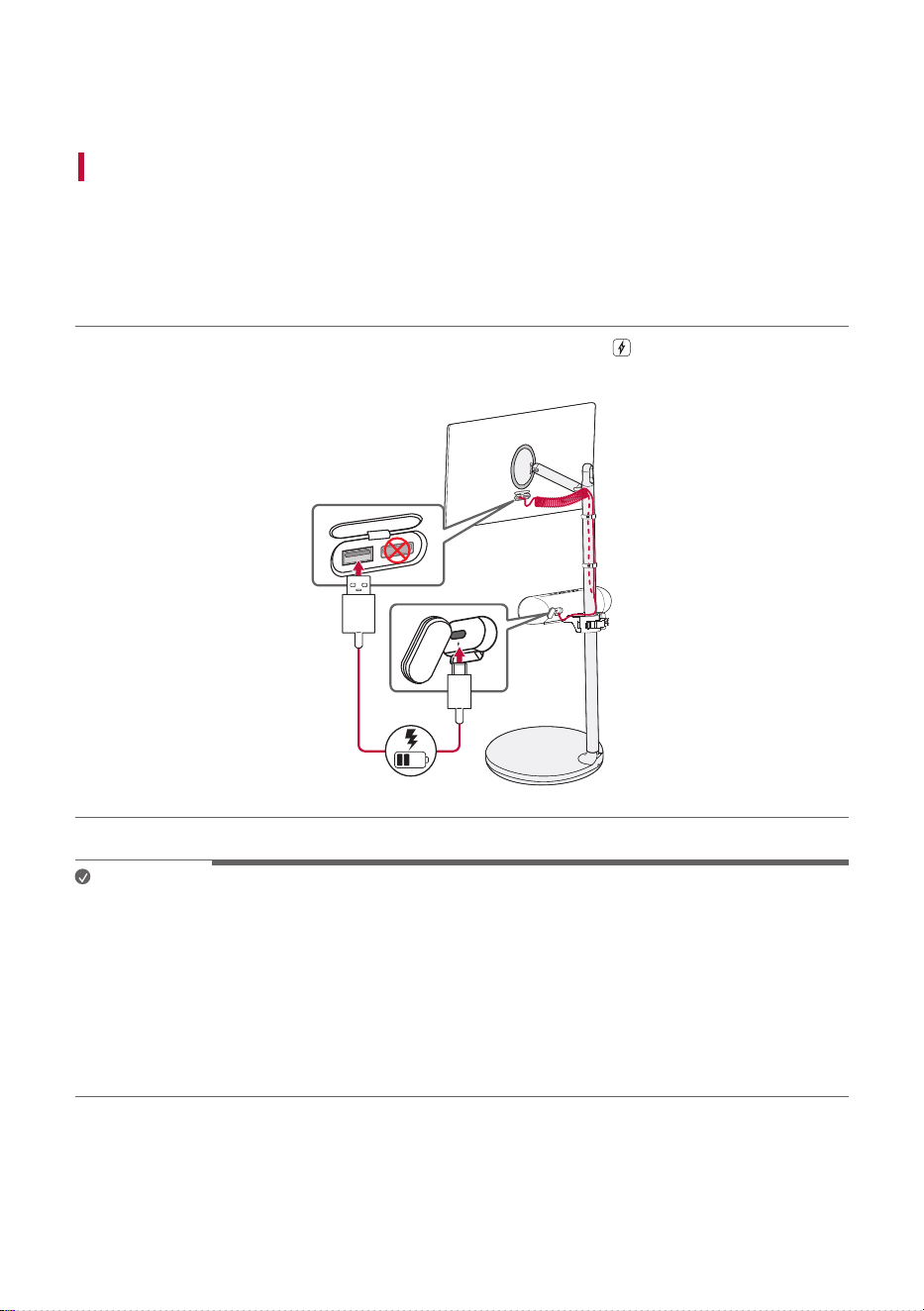
Charging the speaker by connecting it to the TV
a Open the back cover and connect the provided USB cable (C-type) to (DC IN) port of the speaker.
b Connect the other end of the USB cable to the USB port on the TV.
Note
• It takes about 4 hours to fully charge the speaker. The charging time may differ depending on the
battery status or the speaker operation status.
• Once the battery is fully charged, you can use the speaker for about 16 hours.
- Operation time may vary depending on the battery or operation status.
• If the speaker is connected to the TV and powered by the battery, the usage time of the TV may be
shortened. For continuous use, connect the power to the TV.
• Even if you connect the speaker to the TV's HDMI port by using an HDMI to USB cable, the speaker will
not charge because the port is the HDMI input port.
15
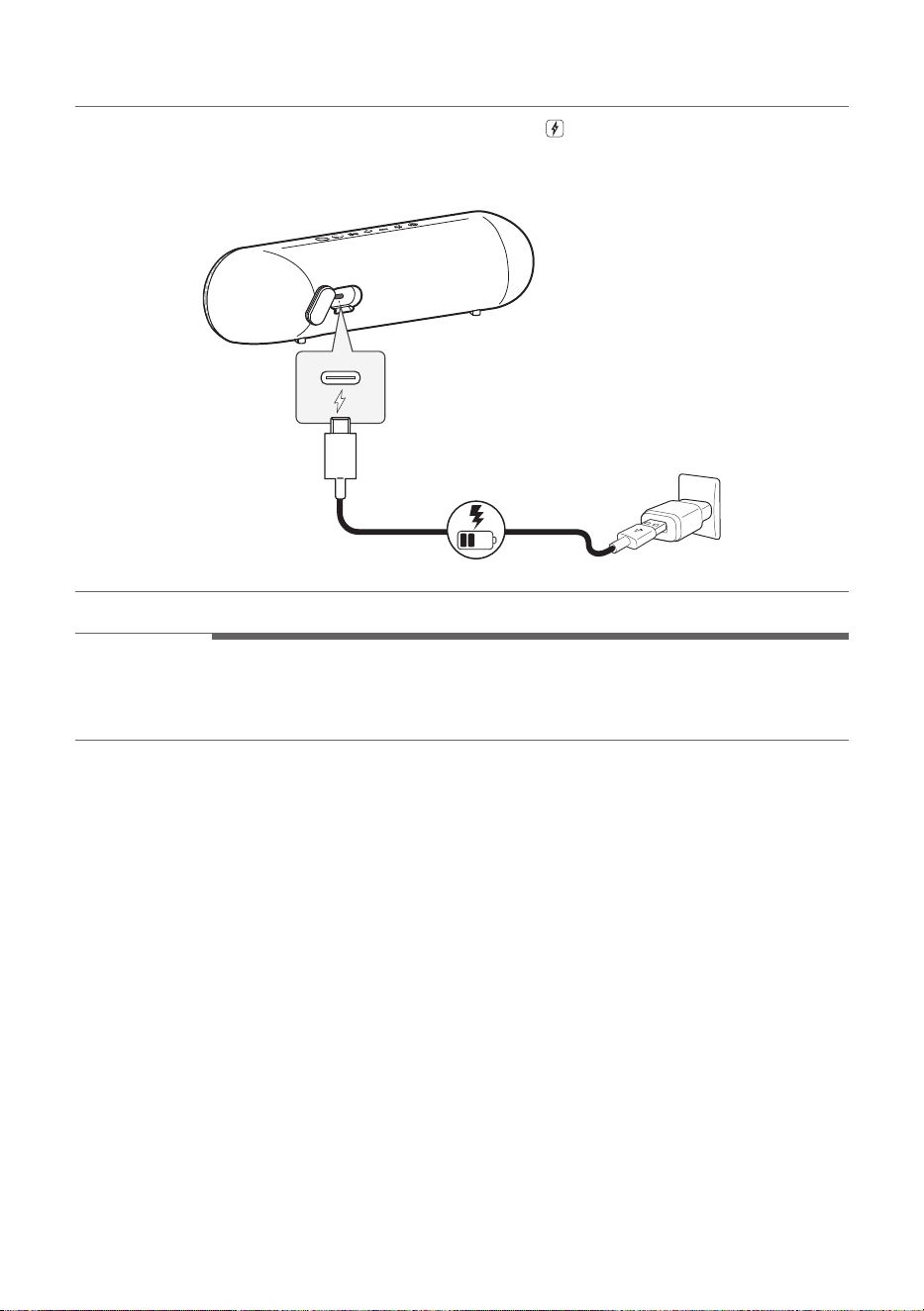
Charging the speaker using an AC adapter
a Open the back cover and connect the USB cable (C-type) to
(DC IN) port of the speaker.
b Connect the other end of the USB cable to the AC adapter (not provided).
c Plug the AC adapter into an AC outlet.
a
b
c
> CAUTION
AC adapter is not supplied. It is recommended that you use the 5 V AC adapter approved by LG
Electronics Inc. (more than 1.2 A) with this speaker because of danger of explosion. If you do not use the
recommended adapter, charging is unavailable or charging time may differ.
16
Checking Battery Status
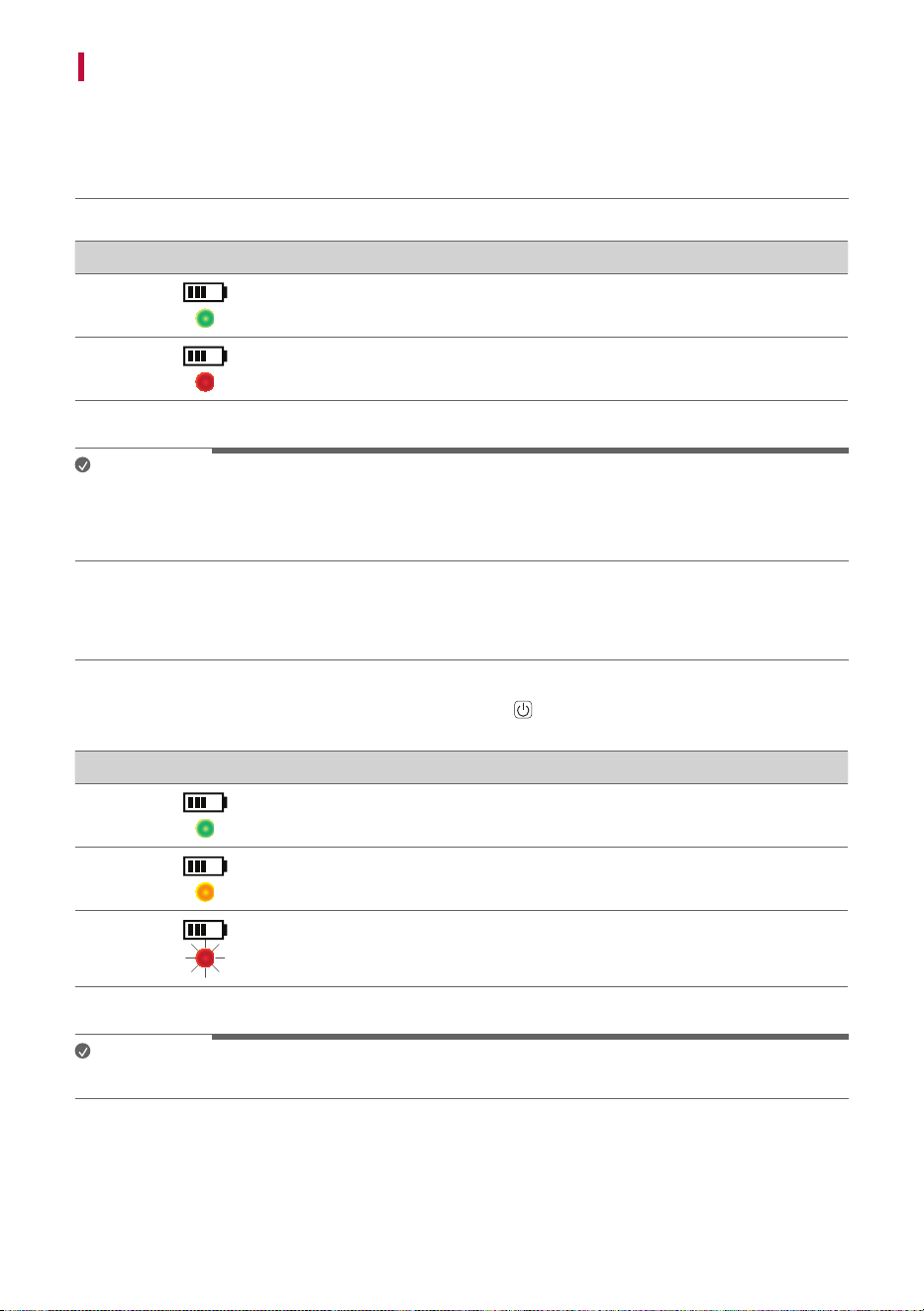
Charging Status
Once the battery charging starts, the battery LED indicates the charging status.
LED LED Status / Battery Status
It is green. / Charging is complete.
It is red. / Charging is in progress.
Note
• Playing tracks while charging may lengthen the charging time.
• When the speaker’s battery is fully charged with the power off, the battery LED lights up green for 15
seconds and then off.
Use Status
When the product is turned on, the battery status is displayed on the battery LED for 3 seconds.
When you turn on the speaker or press and hold the Power
button for 2 seconds, the battery LED is
turned on for 3 seconds according to the battery status.
LED LED Status / Battery Status
Turns on in green. / The battery level is above 70 %.
Turns on in amber. / The battery level is between 10~70 %.
It blinks red continuously and you can hear a notification sound
once. / The battery level is below 10 %, and the battery needs to
be charged.
Note
• The battery status cannot be checked while charging.
17
Connecting to Bluetooth
Connecting the TV to the Speaker via Bluetooth
You can enjoy optimized sound to connect the speaker to the TV.
Please check the following first.
• The speaker’s Bluetooth specifications are as follows:
- Bluetooth version: 5.1
- Bluetooth codec: SBC, AAC
• You need to update the TV's firmware to the latest version before connecting the speaker to the
TV. Refer to the TV to check the TV's firmware.
Connect automatically (Initial connection)
If you turn on the speaker while the TV is on, the TV will search for the speaker and connect to it.
If the connection fails, follow the steps below to connect manually.
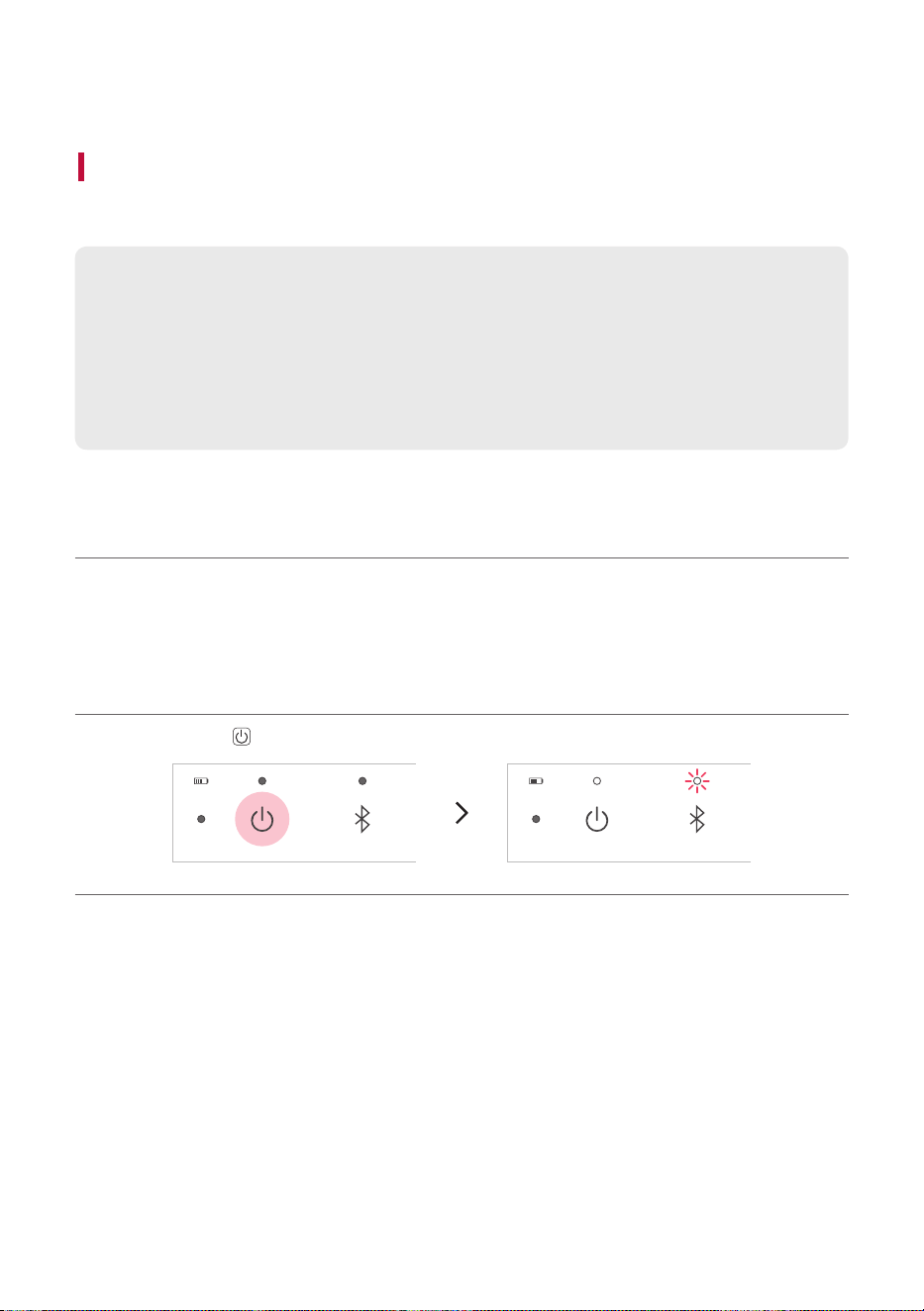
Connect manually
a Press the Power
button on the speaker to turn it on. Bluetooth LED blinks.
18
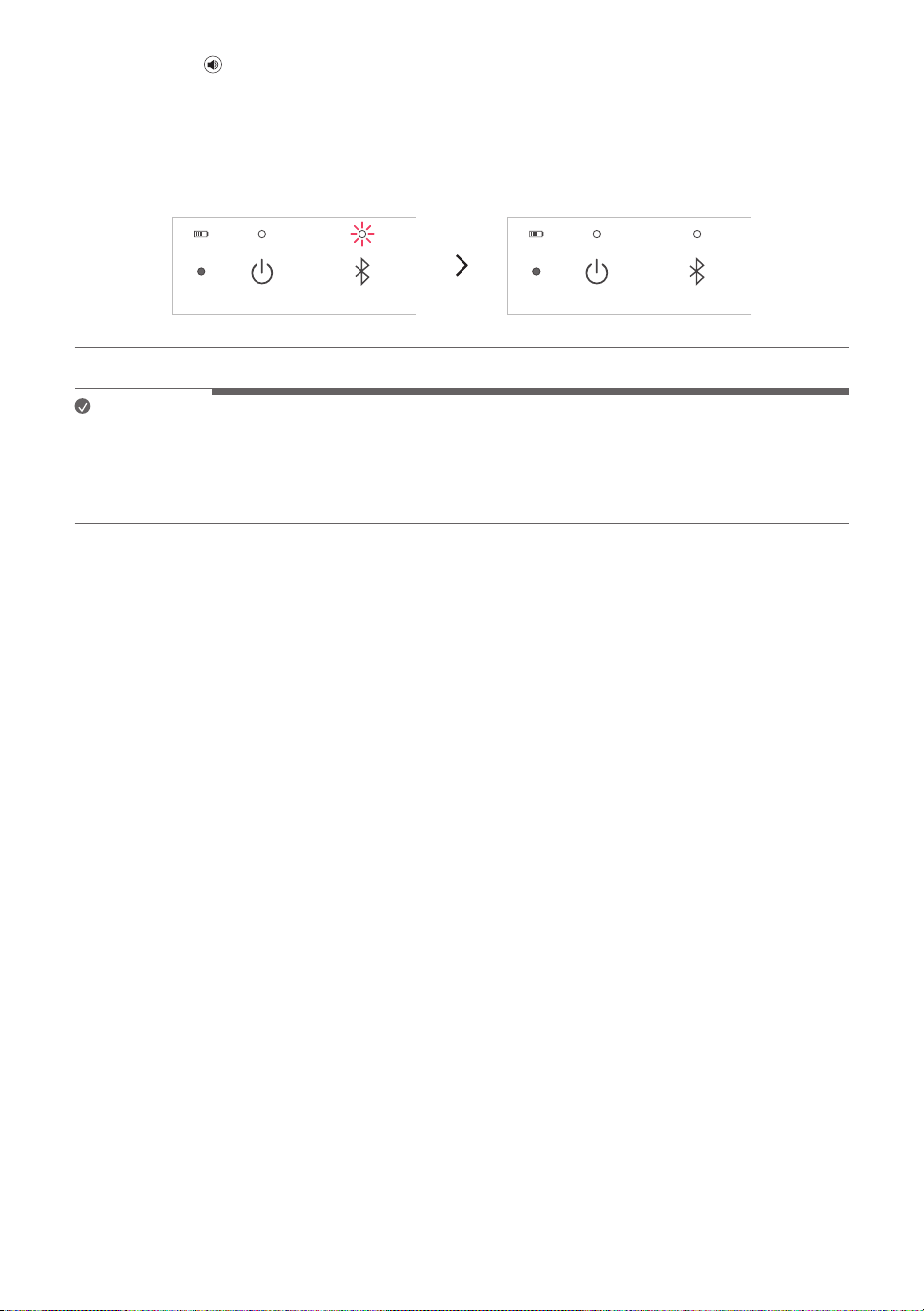
b Press ; [
(Sound Out) on the StanbyME TV and select [Bluetooth device] or [Bluetooth
device+Internal speaker] and then [Device list].
- If you choose [Bluetooth device], find and select “LG-XT7S(XX)” on the Connectable Devices list.
- If you choose [Bluetooth device+Internal speaker], select [Connect One Speaker]. Then find and
select “LG-XT7S(XX)” on the Connectable Devices list.
c Once the TV is connected via Bluetooth, the Bluetooth LED will turn on with the sound.
Note
• The sound out is set to [Use Multiple Speakers - Bluetooth Device + Internal Speaker] when
connecting the speaker and the TV for the first time.
• If you connect the speaker to the TV after you set the sound effect to [Custom] on the LG XBOOM
app, the sound effect will be changed to [SOUND BOOST] for optimizing the sound.
19
Connecting Smartphone to the Speaker via Bluetooth
You can play tracks or run a music app on a Bluetooth device and enjoy the sounds through the speaker.
Please check the following first.
• The speaker’s Bluetooth specifications are as follows:
- Bluetooth version: 5.1
- Bluetooth codec: SBC, AAC
• This product supports Bluetooth devices such as smartphones and laptops. How to connect
the devices to the speaker may differ depending on device types and models. For information on
how to connect the device, refer to the user manual of the external device to be connected.
Select the [Bluetooth] menu on the smartphone's Settings screen. The menu access method may differ
depending on the smartphone manufacturer and model.
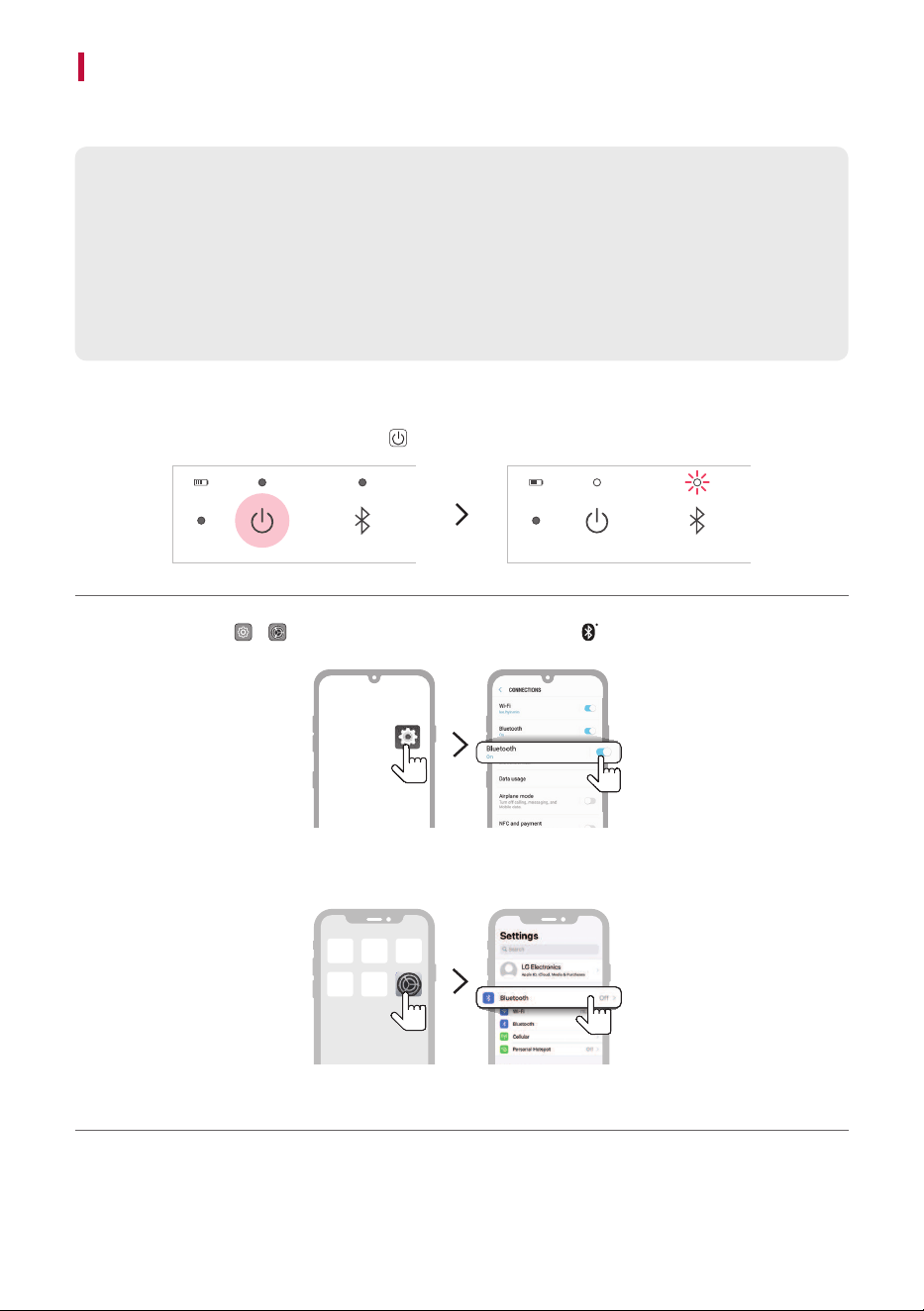
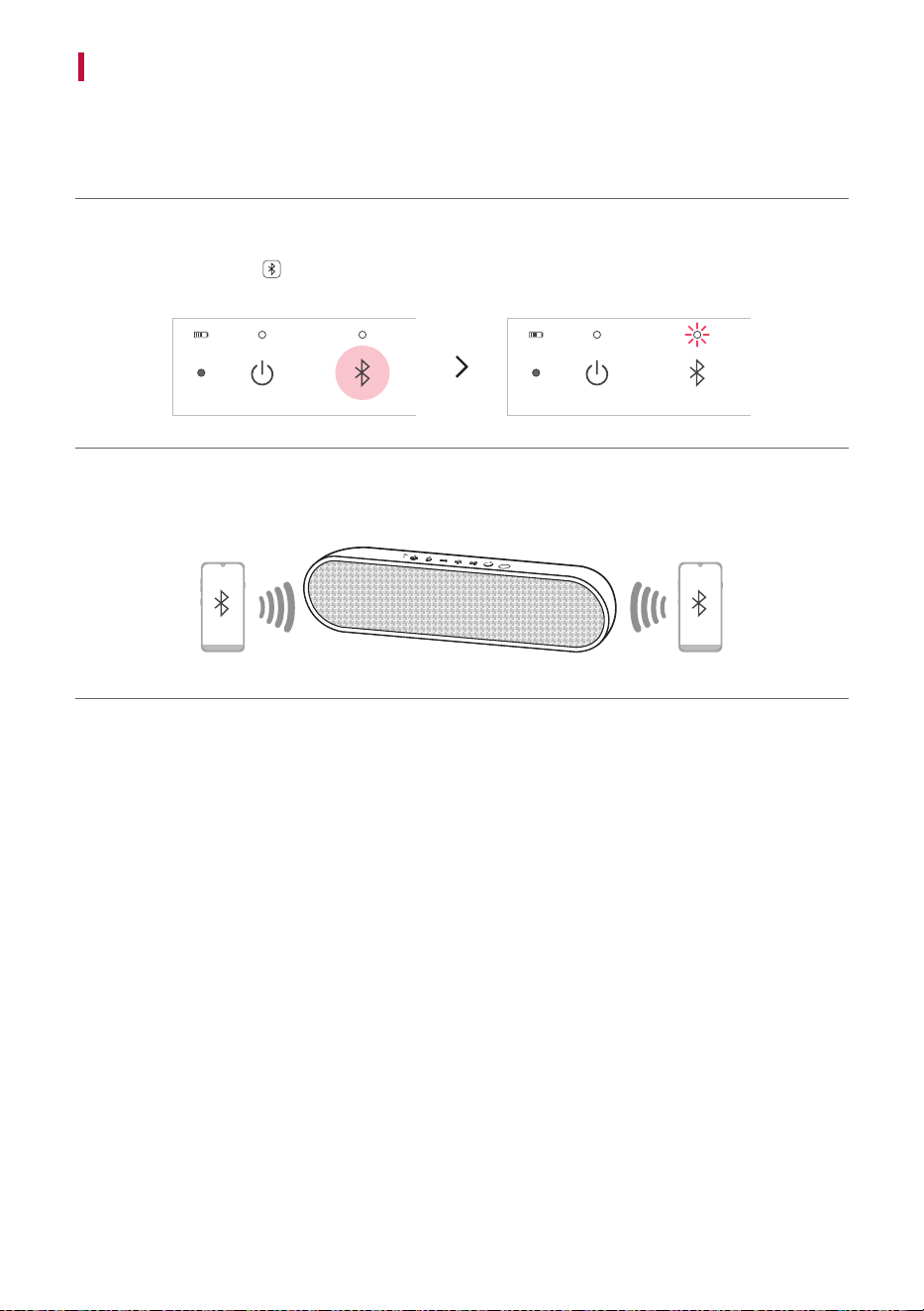
a Turn off the TV. Then press the Power
button on the speaker to turn it on. Bluetooth LED blinks.
b Tap the Setting ( / ) button on your smartphone and select Bluetooth.
(Android Phone)
(iPhone)
20
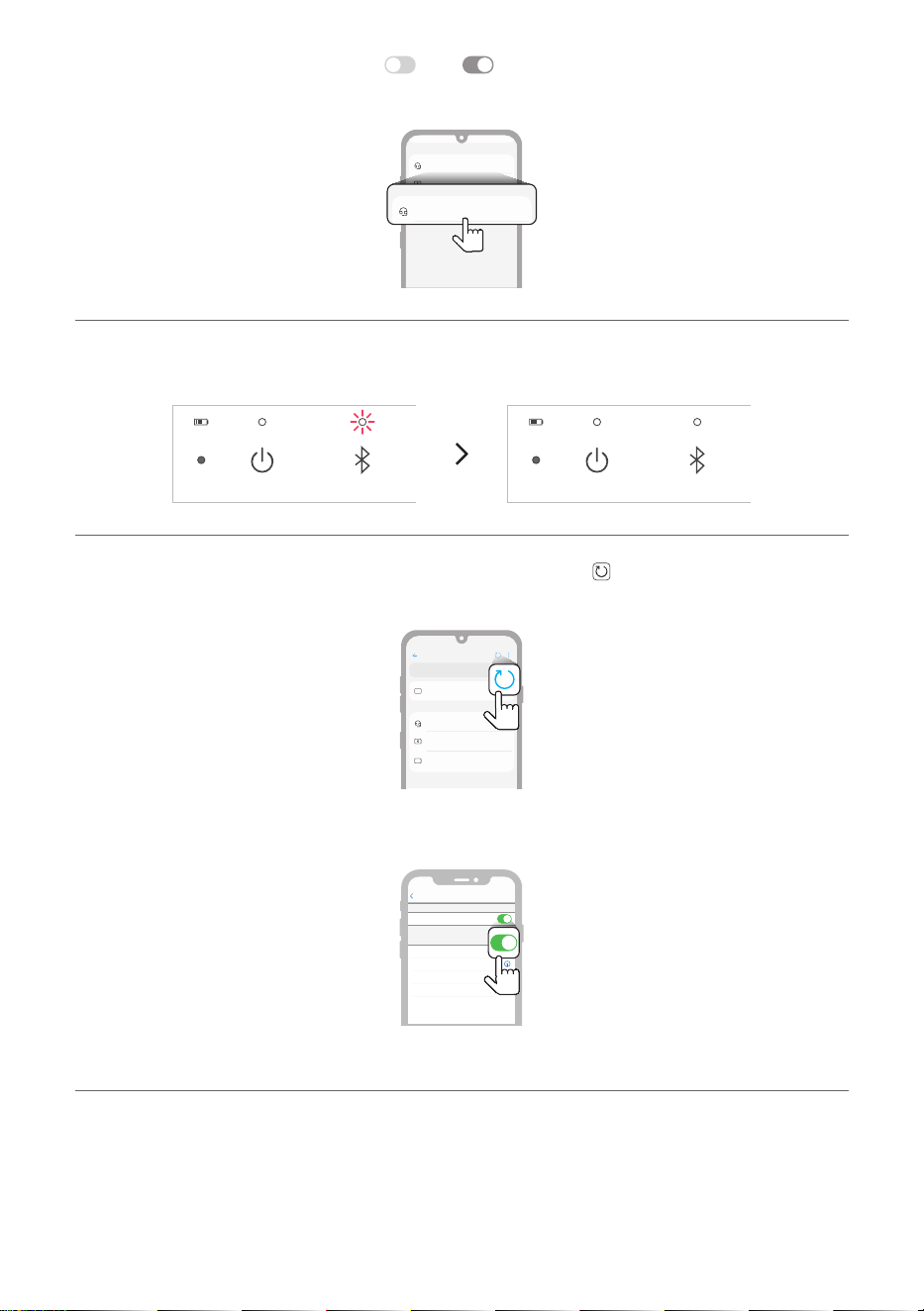
c Turn on the Bluetooth function. (Off
> On )
d You will see a list of connectable devices on the smartphone screen. Find and tap “LG-XT7S (XX)”.
LG-XT7S (XX)
Bluetooth devices
LG Smart Phone
Bluetooth devices
AVAILABLE DEVICES
LG-XT7S (XX)
AVAILABLE DEVICES
e Once the speaker and the smartphone are connected via Bluetooth, Bluetooth LED will turn on with
the sound.
f If “LG-XT7S (XX)” does not appear on the list, tap on the Refresh icon on an Android phone or
restart Bluetooth on an iPhone.
Bluetooth
Speaker
Bluetooth devices
LG Smart Phone
Bluetooth devices
On
AVAILABLE DEVICES
(Android Phone)
Not Connected
LG Speaeker1
Not Connected
Not Connected
Not Connected
Settings
LG Speaeker2
LG Speaeker3
LG Speaeker4
MY DEVICES
Now discoverable as “iPhone”
Bluetooth
Bluetooth
(iPhone)
21
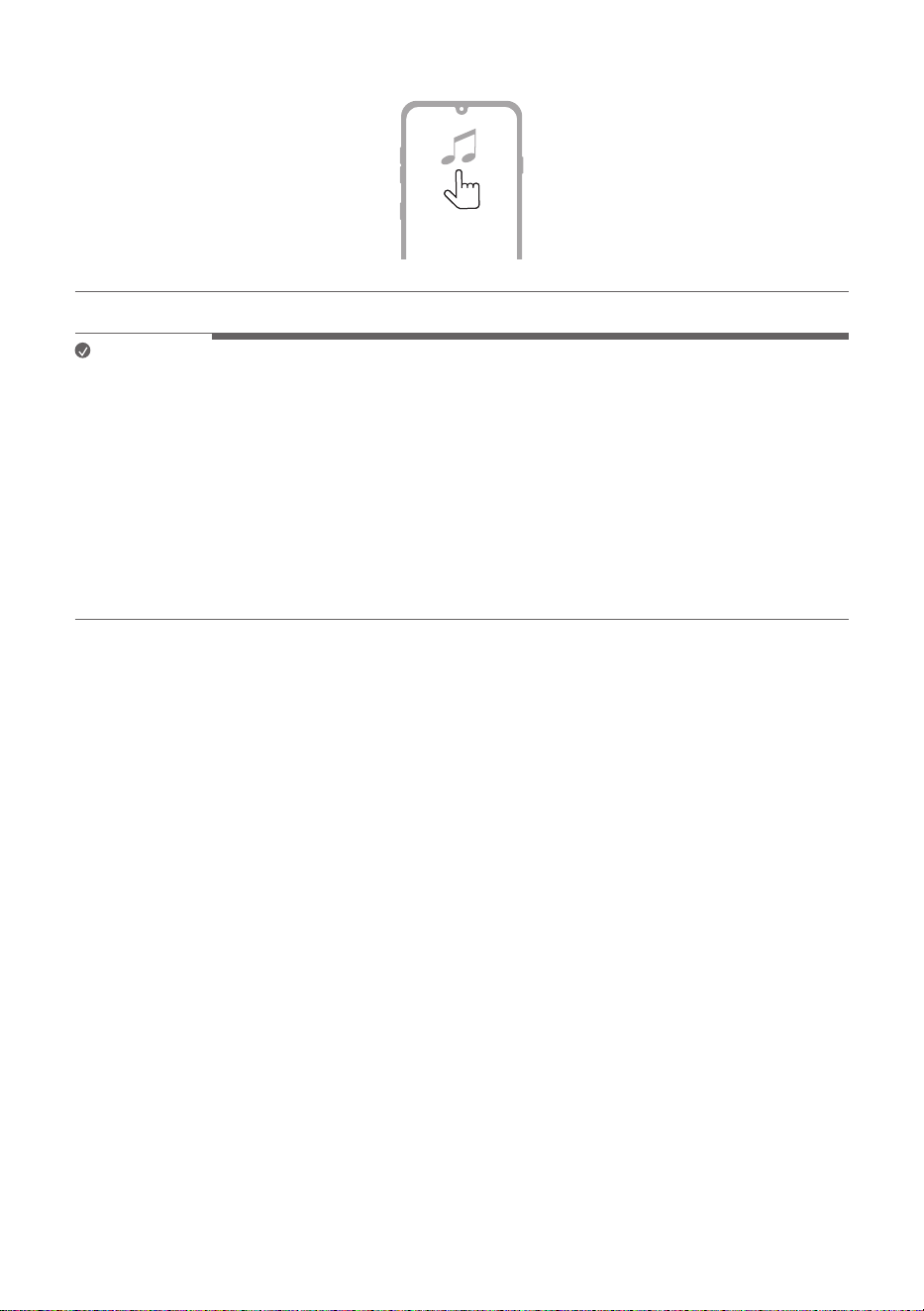
g Select and play a track on the smartphone.
Note
• XX are the last two digits of the Bluetooth address. An example would be “LG-XT7S (08)”.
• The closer the Bluetooth device is to the speaker, the better connection you will get.
• If no Bluetooth device is connected to the speaker, the Bluetooth LED blink. Connect the device again.
• Adjust the volume of the Bluetooth device to an appropriate level when using it.
• When the product is charging, if you try to connect to the product via the Bluetooth device with a
connection history, the product will automatically turn on and connect to the Bluetooth device. You
can control this function in the LG XBOOM app. ([ See “Using Auto power - on.” on page 29.)
• When you turn on the speaker, even if the speaker is connected to the other device which is not to the
TV, the speaker will go into Bluetooth standby mode for 30 seconds so that you can easily connect it
to the TV.
22
Connecting Two Bluetooth Devices to the Speaker
Pairing (Connecting) Multiple Phones
a Connect the speaker and a smartphone first. ([ See “Connecting Smartphone to the Speaker via
Bluetooth” on page 19.)
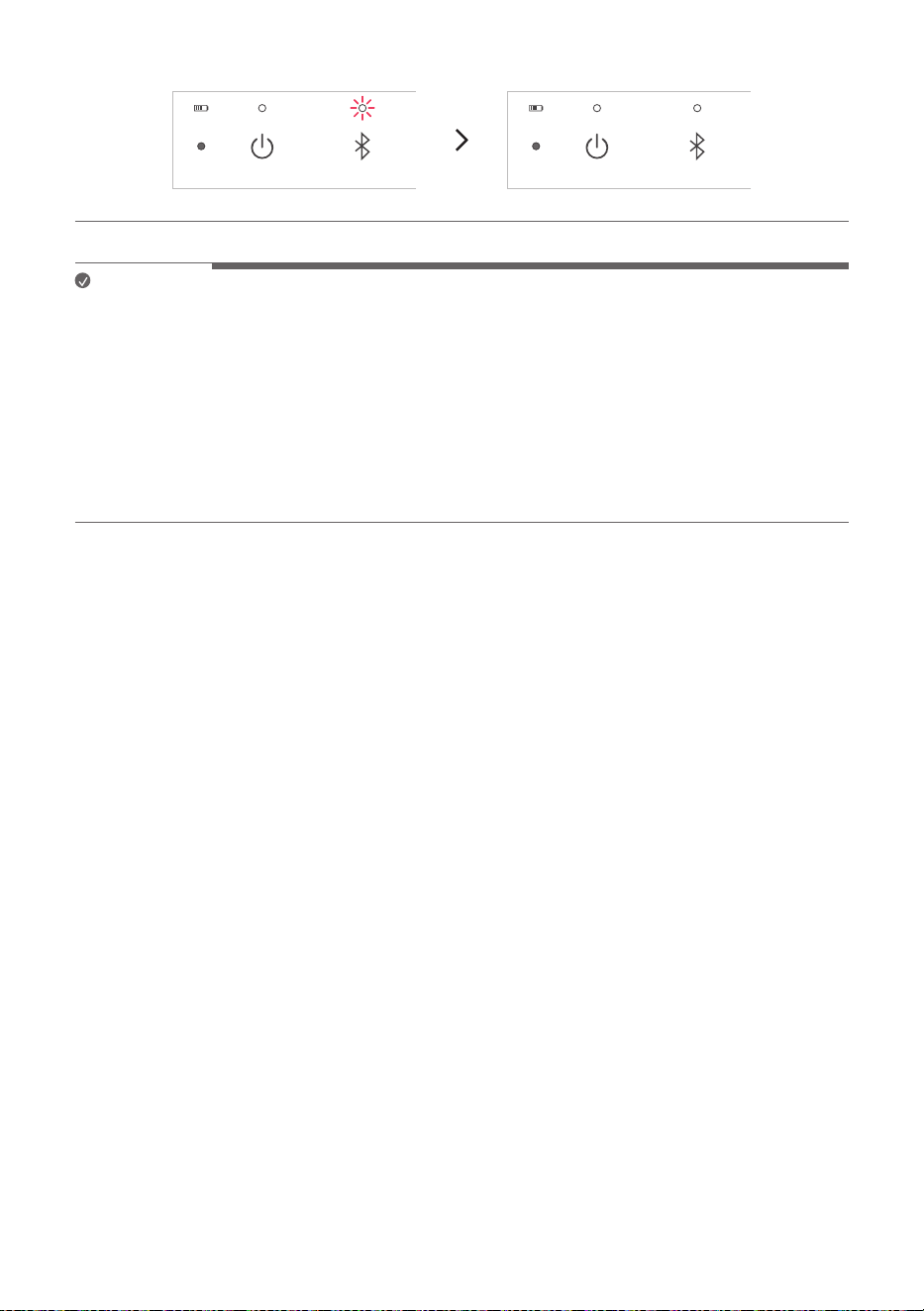
b Press the Bluetooth
button on the speaker. Then Bluetooth LED blinks with the sound. The
speaker is changed to multi pairing mode.
c Connect an additional smartphone to the speaker within 1 minute. ([ See “Connecting Smartphone
to the Speaker via Bluetooth” on page 19.)
23
d When two smartphones and the speaker are connected, the Bluetooth LED turns on.
Note
• Up to two Bluetooth devices can be connected to the speaker at the same time. (two smartphones)
• When two Bluetooth devices are connected at the same time, the speaker channels the sounds of only
one of them. You need to stop the playback on the first device to play the sounds of the other one.
• If you turn the speaker off and back on while two Bluetooth devices are connected, only the device
connected later is automatically connected.
• It is not recommended to play the speaker while the TV and the smartphone are connected at the same
time because it may occur audio delay or interruption depending on the connection environment.
• You cannot connect two smartphones to the speaker while the TV and a smartphone are connected. To
connect two smartphones disconnect the TV from the speaker.
24
Connecting to the LG XBOOM App
Installing app
Use the various functions of the speaker on the LG XBOOM app.
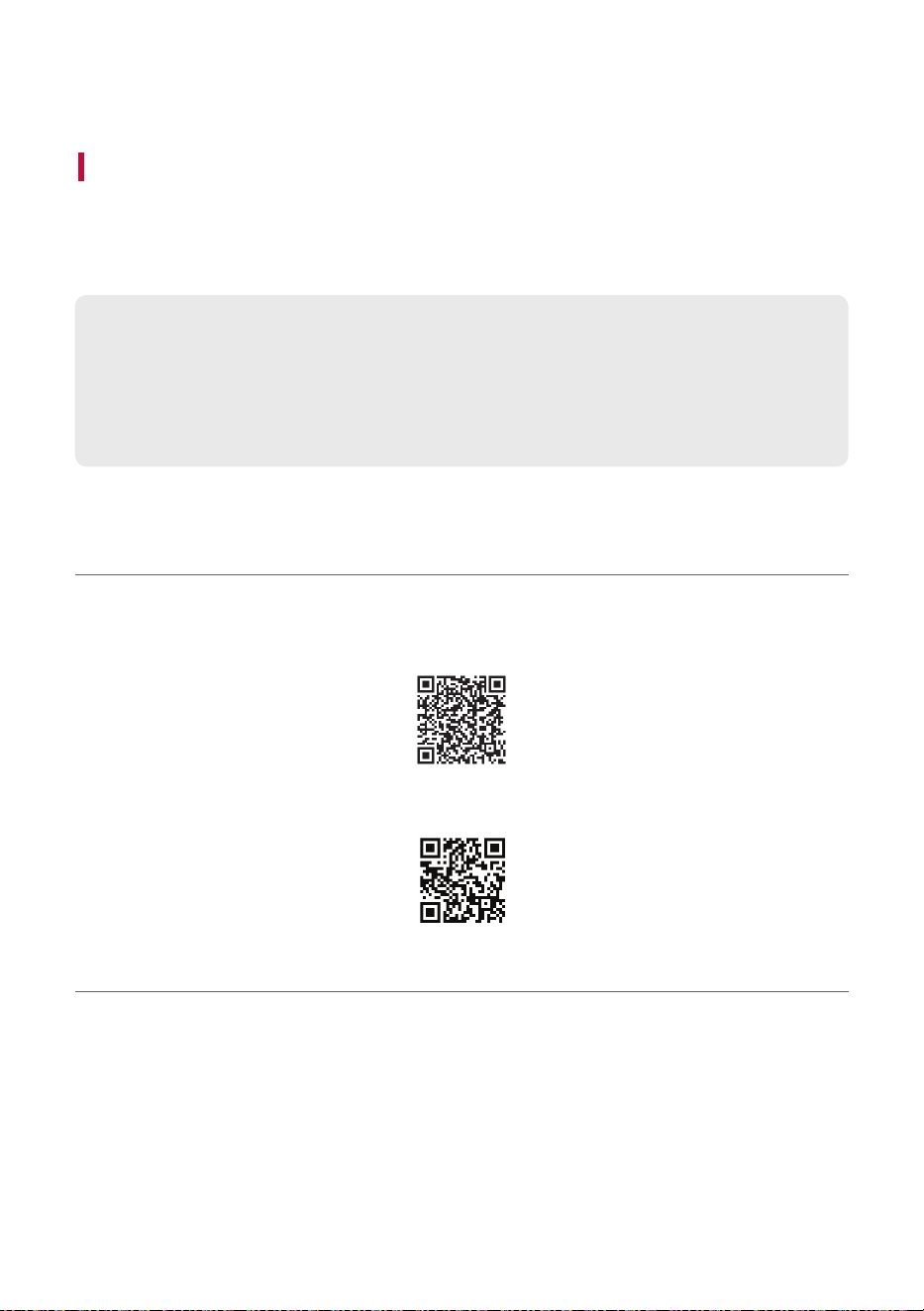
To install the LG XBOOM app, scan the QR code with an app or install LG XBOOM app on the Google
Play or App Store.
Please check the following first.
• The LG XBOOM app is available in the versions listed below.
- Android OS: Version 6.0 or higher
- iOS OS: Version 12.0 or higher
- Minimum supported versions for each OS may change later.
Downloading with a QR code
a Scan the QR code with a QR code scan app.
b You will be directed to the page where you can download the LG XBOOM app. Tap the app to install
it.
(Android Phone OS)
(iPhone OS)
25
Downloading in Google Play or App Store
a Find the LG XBOOM app on the Google Play or App Store and install it on your smartphone.
(Android™ Phone)
(iPhone)
b Connect the smartphone to the speaker via Bluetooth. ([ See “Connecting Smartphone to the
Speaker via Bluetooth” on page 19.)
c Open the LG XBOOM app installed on the smartphone.
d Follow the instructions on the LG XBOOM app. Agree to the Terms of Service, notice windows,
access settings, etc.
e Start using the various functions on the LG XBOOM app.
Note
• The menu access method may differ depending on the smartphone manufacturer and OS.
• Google, Android and Google Play are trademarks of Google LLC.
26
Additional Functions
Setting Sound Effects
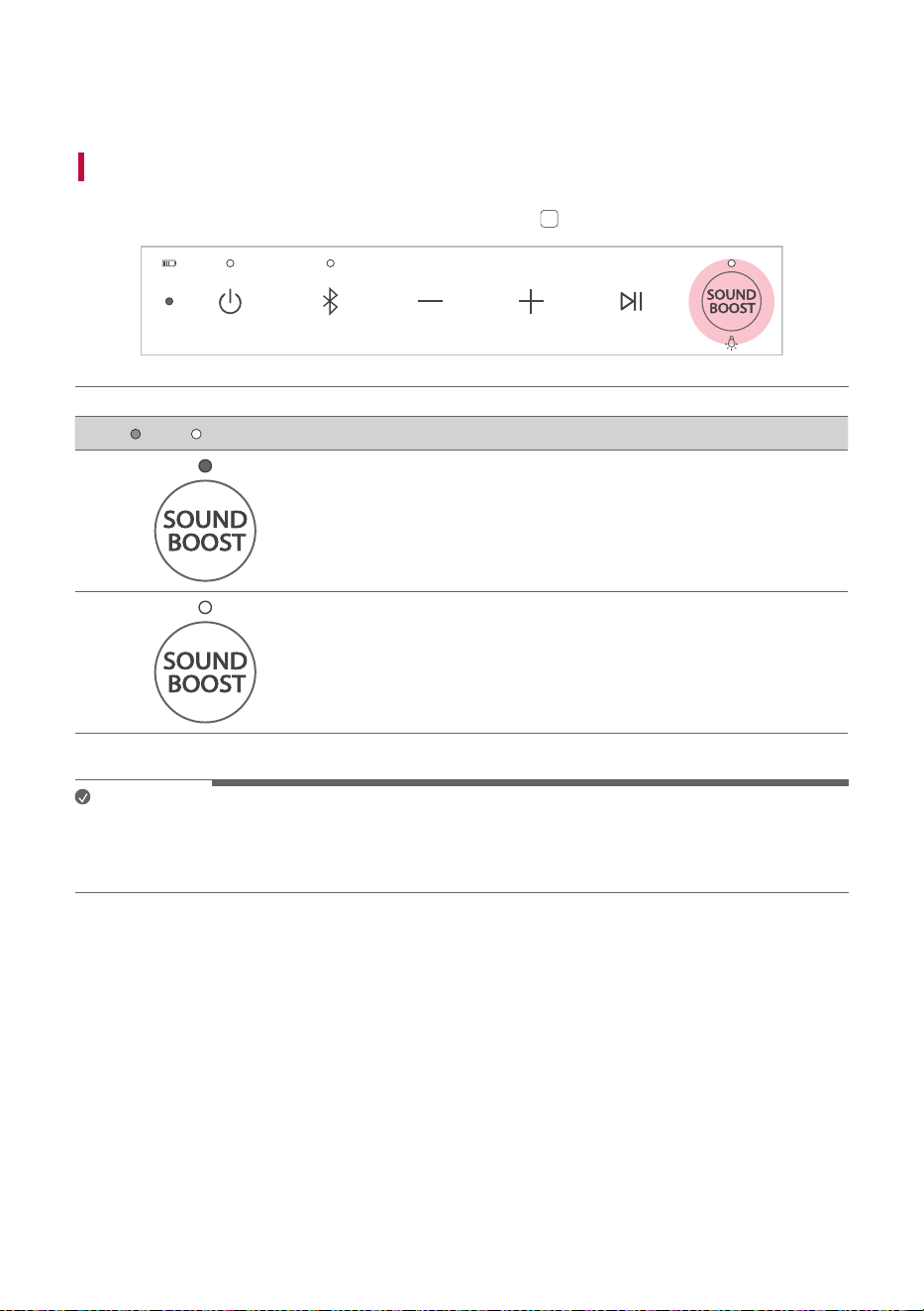
You can select a desired sound effect by using SOUND BOOST
SOUND
BOOST
button.
LED ( Off / On) Function / Description
Standard / You can enjoy High-fidelity sound with balanced and
natural.
SOUND BOOST / You can enjoy the wide sound field and powerful
sound.
Note
• Because fine-tune sound to provide optimal high-quality sound, It might be a little difference between
sound effect modes.
• When the TV is connected to the speaker, the TV's sound effect is reflected on the speaker.
27
Using WOW Orchestra with LG StanbyME TV
The combination of the LG StanbyME speaker and TV gives you the best listening experience to output
sound simultaneously through both of them.
This function is automatically activated when the speaker is connected to the TV and you can choose it on
the sound out menu on the TV: ; [
[ [Sound] [ [Sound out] [ [Use Multiple Speakers].
Note
• It operates according to the audio codec supported by the TV.
• The messages displayed on the TV may differ depending on the model.
• Refer to the TV's instruction manual for more details on settings.
Resetting the Speaker
You can reset the speaker when it operates improperly.
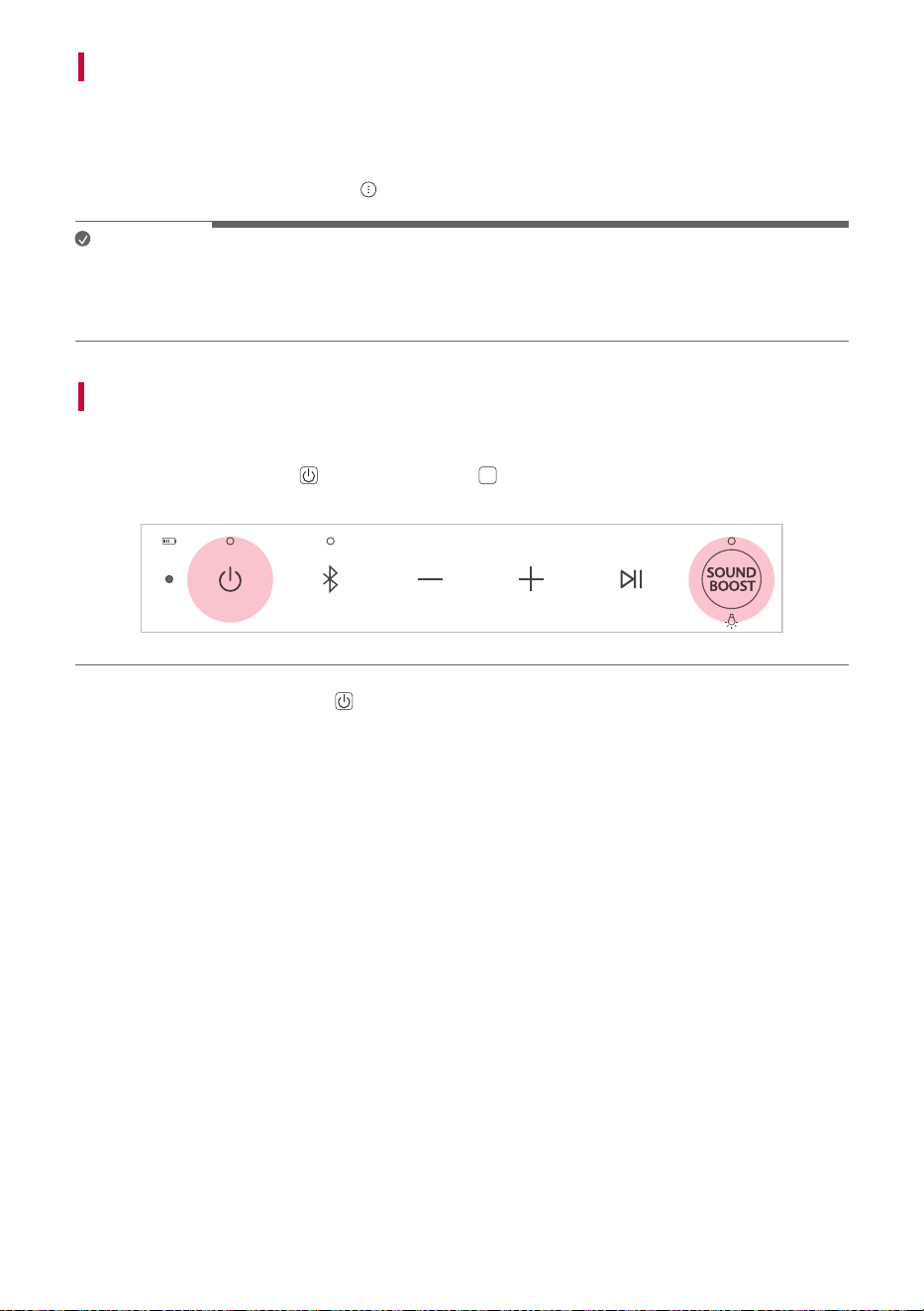
a Press and hold the Power
and SOUND BOOST
SOUND
BOOST
buttons on the speaker for 7 seconds
simultaneously. Then the speaker will turn off automatically.
b Turn on by pressing the Power button.
28
Resetting Bluetooth
Resetting Bluetooth initializes all the Bluetooth and speaker connections as well as the user settings.
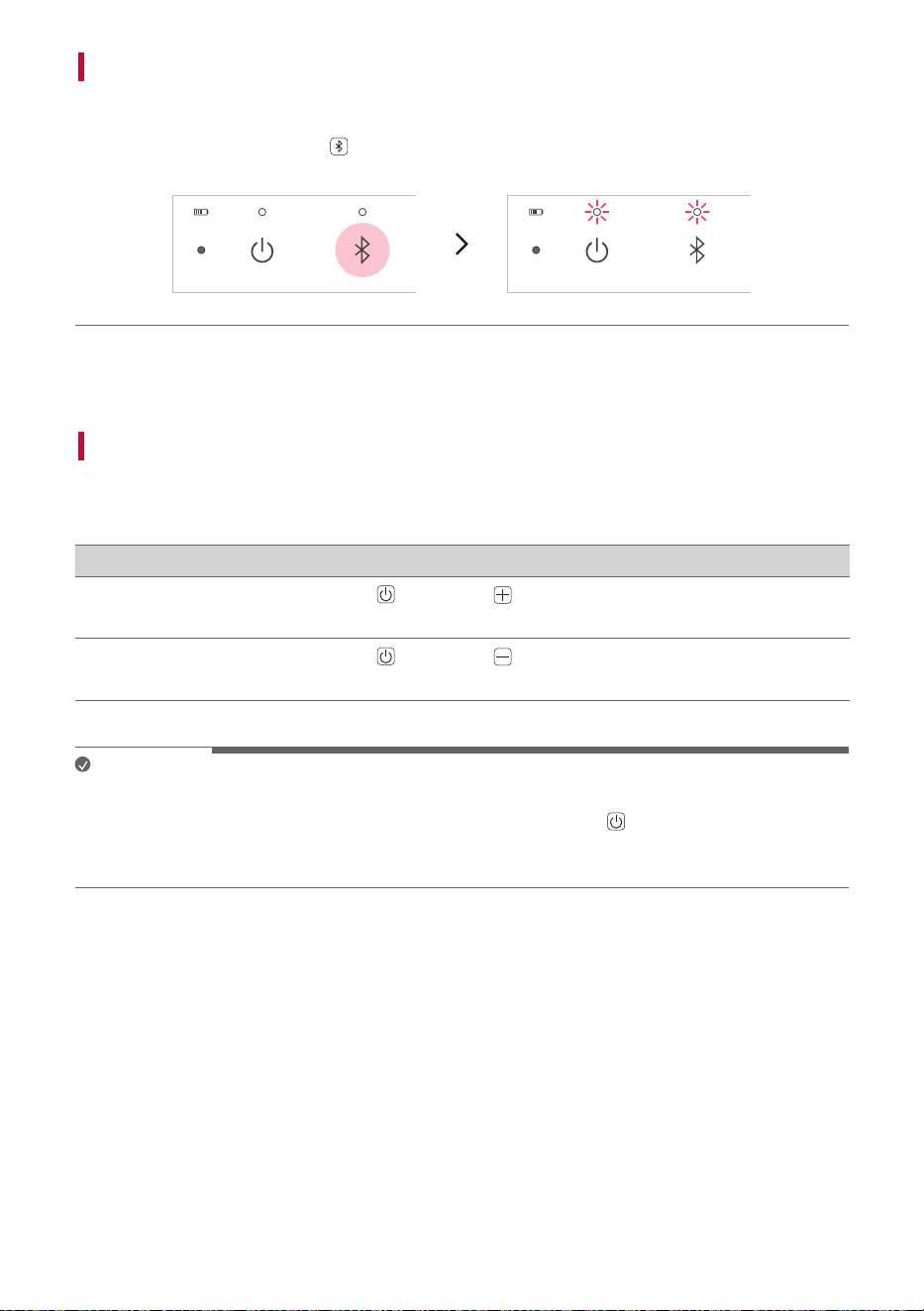
a Press and hold the Bluetooth
button on the speaker for 7 seconds. Power LED and Bluetooth
LED will blink four times.
b Connect to the speaker via Bluetooth. ([ See “Connecting the TV to the Speaker via Bluetooth“,
“Connecting Smartphone to the Speaker via Bluetooth” on page 17, 19.)
Using Auto Power Management
If there is no input signal or button operation, the speaker turns off automatically after 15 minutes.
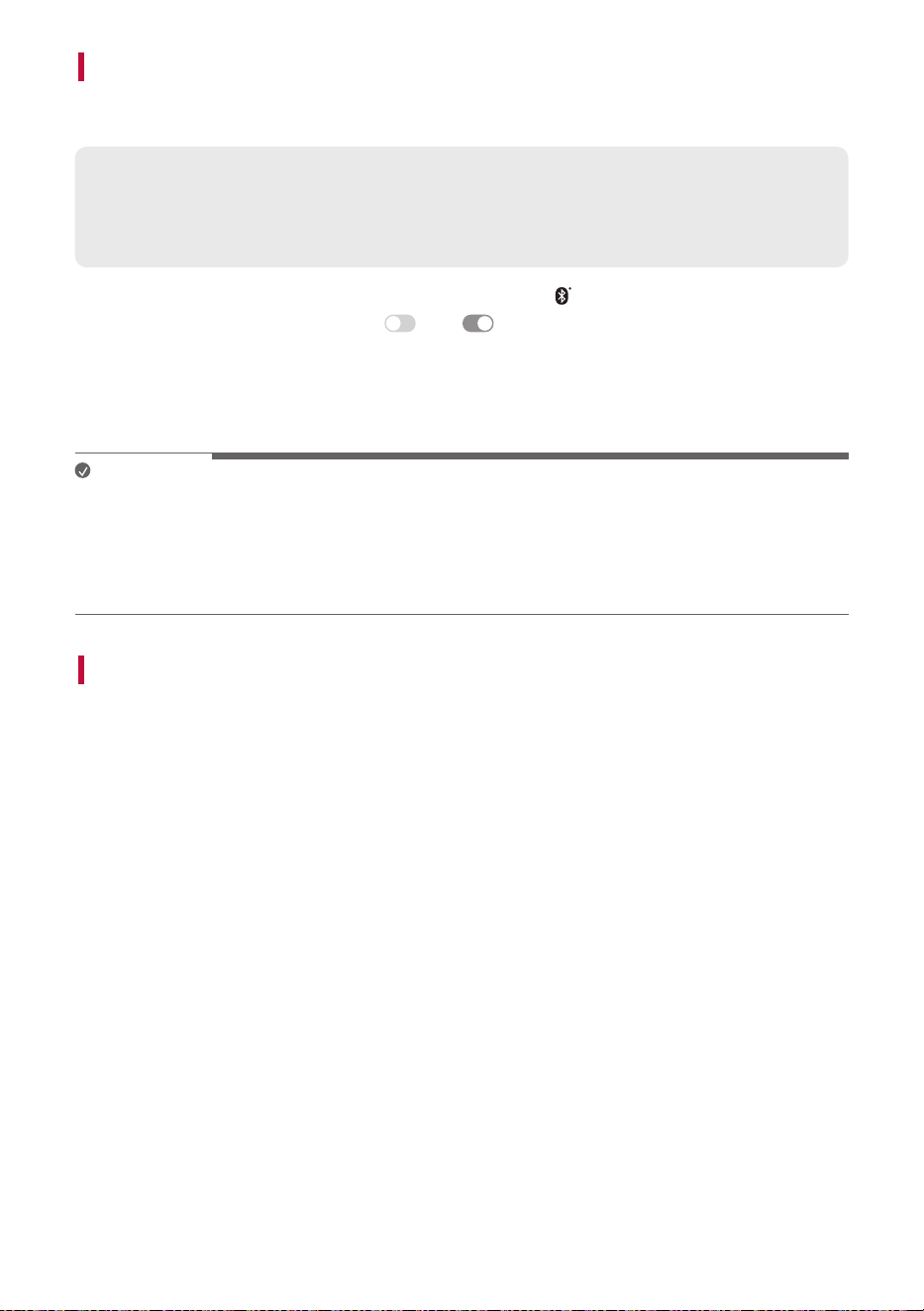
The Auto Power Management function can be enable or disable as shown below.
Function How to Use
Enable
Press and hold Power
and Volume buttons for 2 seconds simultaneously.
• The Power LED will blink five times with beep sound.
Disable
Press and hold Power
and Volume buttons for 2 seconds simultaneously.
• The Power LED will blink five times with beep sound.
Note
• You can enable or disable this function on the LG XBOOM app.
• If this function is disabled, the speaker turns off only when the Power
button is pressed or the
battery is discharged.
• This function may not work depending on the status of the connected TV (such as Home menu).
29
Using Auto power - on.
You can easily use the speaker with your Bluetooth device.
Please check the following first.
• The speaker has a history of Bluetooth connection with the Bluetooth device.
• The speaker is charging and the power is off.
a Tap the Setting button on your Bluetooth device and select
Bluetooth.
b Turn on the Bluetooth function. (Off
> On )
c You will see a list of connectable devices on the Bluetooth device screen. Find and tap “LG-XT7S
(XX)”.
d The speaker power is turned on automatically. Then the Bluetooth device and the speaker are
connected automatically.
Note
• You can turn this function on and off with the LG XBOOM app only.
• If there is a Bluetooth connection history between the TV and speaker, the speaker will also turn on
when the TV is turned on.
• While the speaker and TV are connected via Bluetooth, the speaker will also turn off when the TV is
turned off.
Voice feedback function
When you select a function or sound, the current status of the product is guided by voice. (English voice
only.)
You can turn this function on and off with the LG XBOOM app only.
30
Safety Precautions
Safety and Regulatory
CAUTION: TO REDUCE THE RISK OF ELECTRIC SHOCK DO NOT REMOVE COVER (OR BACK). NO USER-
SERVICEABLE PARTS INSIDE. REFER SERVICING TO QUALIFIED SERVICE PERSONNEL.
This lightning flash with arrowhead symbol within an equilateral triangle is intended
to alert the user to the presence of uninsulated dangerous voltage within the
product’s enclosure that may be of sufficient magnitude to constitute a risk of
electric shock to persons.
The exclamation point within an equilateral triangle is intended to alert the user to
the presence of important operating and maintenance (servicing) instructions in the
literature accompanying the product.
WARNING:
• TO PREVENT FIRE OR ELECTRIC SHOCK HAZARD, DO NOT EXPOSE THIS PRODUCT TO RAIN OR
MOISTURE.
• Do not install this equipment in a confined space such as a book case or similar unit.
CAUTION:
• Do not use high voltage products around this product. (ex. Electrical swatter) This product may
malfunction due to electrical shock.
• No naked flame sources, such as lighted candles, should be placed on the apparatus.
• Do not block any ventilation openings. Install in accordance with the manufacturer’s instructions. Slots
and openings in the cabinet are provided for ventilation and to ensure reliable operation of the product
and to protect it from over heating. The openings should never be blocked by placing the product on
a bed, sofa, rug or other similar surface. This product shall not be placed in a built-in installation such
as a bookcase or rack unless proper ventilation is provided or the manufacturer’s instruction has been
adhered to.
• The apparatus should not be exposed to water (dripping or splashing) and no objects filled with liquids,
such as vases, should be placed on the apparatus.
• For safety marking information including product identification and supply ratings, please refer to the
main label on the bottom or the other surface of the product.

31
CAUTION concerning the Power Cord
Install this apparatus in a location where the power plug can be easily unplugged and plugged in. If there
is a fire or problem with this apparatus, unplug it quickly.
Check the specification page of this owner’s manual to be certain of the current requirements.
Do not overload wall outlets. Overloaded wall outlets, loose or damaged wall outlets, extension cords,
frayed power cords, or damaged or cracked wire insulation are dangerous. Any of these conditions could
result in electric shock or fire. Periodically examine the cord of your device, and if its appearance indicates
damage or deterioration, unplug it, discontinue use of the device, and have the cord replaced with an exact
replacement part by an authorized service center.
Protect the power cord from physical or mechanical abuse, such as being twisted, kinked, pinched, closed
in a door, or walked upon. Pay particular attention to plugs, wall outlets, and the point where the cord
exits the device.
CAUTION when using this product in environments of low humidity
• It may cause static electricity in environments of low humidity.
• To prevent static electricity, it is recommended to touch metal objects before using this product.

32
For models using a battery
This device is equipped with a portable battery or accumulator.
CAUTION: Risk of fire or explosion if the battery is replaced by an incorrect type.
For models using a built-in battery
Do not store or transport at pressures lower than 11.6 kPa (0.116 bar) and at above 15,000 m (9.32
miles) altitude.
• Replacement of a battery with an incorrect type that can defeat a safeguard (for example, in the case
of some lithium battery types);
• Disposal of a battery into fire or a hot oven, or mechanically crushing or cutting of a battery, that can
result in an explosion;
• Leaving a battery in an extremely high temperature surrounding environment that can result in an
explosion or the leakage of flammable liquid or gas;
• A battery subjected to extremely low air pressure that may result in an explosion or the leakage of
flammable liquid or gas.
Symbols
: Alternating current (AC).
0 : Direct current (DC).
: This is a class II equipment.
1 : Standby power state.
! : The power is turned on.
: Danger voltage.

33
Prevention of product misuse
To prevent misuse of the product, please be sure to check the contents below.
Precautions for installing the product
• Do not install the product in an unstable or vibrating place, such as on a shaking shelf or inclined
surface. Install the product on a firm and level surface.
- Otherwise, the product may fall or tip over and cause injury.
- If you install the product on an unstable surface, the product may not work properly.
• If you install the product on a piece of furniture or shelf, make sure that the bottom front of the
product does not protrude. Always use a piece of furniture or shelf that fits the product size.
- Otherwise, the product may lose its balance and fall, causing injury or product damage.
• Install the product in a safe place. Otherwise, a child may bump into an edge of the product and get
injured.
• Install the product in a place free from electromagnetic interference for proper operation.
• If you install the product in a place that does not meet the general use conditions, an unexpected
quality problem may arise. So, make sure that you contact the service center first before installing the
product in such a place.
• Do not keep the product in a place where the temperature is too high (above 35 °C (95 °F)) or too low
(below 5 °C (41 °F)) or a place with too much humidity.
• Avoid places exposed to direct sunlight or heat, e.g., near a heater. Do not use or keep flammable sprays
or substances near the product.
- Otherwise, there is a risk of explosion or fire.
• Do not install the product in a place with too much moisture, dust or soot.
- Otherwise, it may cause a fire or electric shock.
• Do not install the product in a narrow space, such as inside a bookshelf, that does not ventilate well. Do
not cover the product with a table cover or curtain.
- Otherwise, it may increase the product temperature, causing a breakdown or fire.
• Connect the power plug of the product to a power outlet that is easily accessible.
- When a fire or other problem occurs in the product, you must be able to remove the power plug
quickly.
• Do not connect multiple products to one power outlet at the same time.
- Otherwise, it may cause overheating, resulting in a fire.

34
Precautions for using the product
• Do not lift or move the product while it is operating.
- Otherwise, it may cause a breakdown.
• When moving the product, pull out the power cord and all cables connected to the product.
- Otherwise, it may cause a fire or electric shock.
• Stop using the product immediately if you notice smoke or a strange odor. In this case, turn off the
power immediately, disconnect the power plug, and contact the service center.
- Using the product in this state may result in a fire or electric shock.
• Do not insert metal objects such as coins and hairpins or flammable objects such as paper and
matchsticks into the product. Make sure that you tell any children not to do so.
- Otherwise, it may cause a breakdown.
• If a foreign substance is inserted into the product, disconnect the power plug and contact the service
center.
• Do not put a heavy object on top of the product.
- Otherwise, it may tip over or fall, causing injury.
• Make sure that a child does not hang on the product or get on it.
- Otherwise, the product may tip over or fall, causing injury. Make sure that you tell any children not to
do so.
• Remove the power plug during thunderstorms.
- Otherwise, it may cause a fire.
• Do not place vessels with liquid, such as a vase, pot, cosmetics, or medicine, on top of the product.
- Otherwise, it may result in a fire, electric shock, or injury due to its fall, etc.
• Make sure that you connect the power plug firmly. Do not use voltage other than the rated voltage
indicated on the product.
- An insecure connection may result in a fire.
• Do not insert a conductor, such as chopsticks, into the groove on the other side of the product while
the power plug is connected to an outlet. Do not touch the power plug immediately after unplugging it
from the outlet.
- Otherwise, it may cause electric shock.
• Hold the power plug with dry hands.
- Otherwise, it may cause electric shock.
• Do not move or push the product while holding a product cable such as a power cord.
- The cable may get damaged and cause a breakdown or result in a fire or electric shock.
• When removing a cable plugged into the product, make sure that you hold the connector at the end of
the cable. Do not hold the cable line.
- Otherwise, it may result in an injury or the product may fall and cause a breakdown.
• Do not keep the product in a place exposed to heat, e.g., near a heater.
- Otherwise, it may cause a fire or malfunction.

35
• Do not disassemble, repair, or modify the product.
- Otherwise, it may cause a breakdown, resulting in a fire, electric shock, or injury.
• Keep plastic wraps out of reach of toddlers.
- Otherwise, toddlers may choke on the plastic wraps.
• Do not drop an object on the product or make an impact on it. Keep the product away from places with
severe vibrations or magnets.
• Do not damage, modify, bend, twist, or heat a power cord.
- Otherwise, it can damage the power cord, resulting in a fire or electric shock.
• When you are not using the product for a prolonged period, such as when you are away from home,
unplug the power cord from the power outlet.
- If dust accumulates, it can cause heat, resulting in electric shock or fire due to a short circuit.
• Do not dispose of waste batteries together with regular waste. Dispose of them separately.
- Otherwise, there is a risk of explosion or fire.
• Do not use high voltage products around this product. (ex. Electrical swatter)
- This product may malfunction due to electrical shock.
• Do not touch the power plug immediately after unplugging it from the outlet.
- Otherwise, it may cause electric shock.
• Connect the power plug to a grounded outlet or extension cord. (This does not apply to products
without a ground.)
- Otherwise, it may cause a breakdown or electric shock due to a short circuit.
• In the case of a product with a vent, keeping the product turned on for a prolonged period can result
in the vent getting hot. Do not touch the vent when it is hot. The heat is not a fault of the product and
does not cause any malfunction. So, you may use the product without worry.
• Do not damage the power cable, AC adapter, or power plug. Do not place a heavy object on top of the
power cable or AC adapter.
- Otherwise, it may cause a fire or electric shock.
• If dust, dirt, etc. is found on the power plug pins, an AC adapter, or a power outlet, wipe it completely.
- Otherwise, it may cause a fire.
• In the case of a product with a power cord or AC adapter, use only genuine power cords and AC
adapters provided by LG Electronics.
- Otherwise, it may cause a fire or electric shock.
• If you are using headphones or earphones, do not turn on the volume too loudly or use them for a
prolonged period. [This only applies to models that support headphones or earphones]
- Otherwise, it may negatively affect your hearing ability.
• The software of this product can be updated with the LG XBOOM app. Do not turn off the power of
the product while updating the software. Once the update is complete, the product power turns off
automatically.
- If you turn off the power of the product while the software is being updated, it may cause a product
malfunction.

36
The following only applies to models with a remote control
• Do not let children use the remote control. Keep the remote control out of reach of toddlers.
• Do not let children put the remote control in their mouth. Make sure that children don’t swallow the
remote control cover or a battery. If a child swallowed one, consult a physician immediately.
• Beware that children may step on the remote control cover and get injured.
• Remove obstacles between the product and the remote control for the smooth operation of the remote
control.
The following only applies to models that use optical discs
• Do not insert your hand into a disc drive or pull it out forcefully.
• Make sure that children do not insert their hands into the disc drive.
The following only applies to models that able to watch video
• Refrain from watching a 3D video if you didn't have enough sleep or after drinking alcohol.
- Some 3D videos may surprise or excite people.
• If any of the following symptoms occur while watching a video, stop watching it immediately and take a
rest.
- If any of the symptoms continue, consult a physician. Vertigo, burning sensation of eyes or face,
unconscious motion, spasm, clouded consciousness, confusion, disorientation, nausea.
• You may suffer a symptom such as a seizure when you watch a certain image in a video or game or a
video with a certain pattern or flashing lights. If you or any of your relatives have a history of epilepsy
or seizures, consult a physician before watching.
• When you watch a 3D video, remove objects that are fragile or can cause injury from your surroundings.
- If you mistake a 3D video as real or move your body with surprise, you or your nearby relatives may
get injured or objects near you may get damaged.
Precautions for cleaning the product
• Do not spray water directly onto the product when cleaning it.
- Otherwise, it may cause a fire or electric shock.
• When cleaning the product, make sure that you pull out the power cord first and wipe the surface of
the product lightly with a dry cloth. Do not use chemicals or detergents when cleaning the product.
They may deteriorate the product surface or peel off the paint from the product (benzene, alcohol, etc.).

37
Before Reporting Product
Malfunction
Troubleshooting
If you experience the following issues while using the product, please perform several checks, as they may
not be malfunctions.
Symptom Cause and Solution
Power is not
supplied.
• The battery is discharged. Recharge the battery.
• Connect the speaker to the charging adapter.
There is no
sound or
the sound is
distorted.
• The volume of the speaker or the smart device may be set to the minimum.
Adjust the volume on the speaker or the smart device appropriately.
• Turning on the volume to the maximum on the external device may result in
distorted sounds. Lower the volume on the external device.
The TV
connection
failed.
• Turn off the TV and on again.
• Check the TV sound out setting. Make sure that [Use Wireless Speaker] was
selected, and then “LG-XT7S (XX)” was connected.
Bluetooth
connection
failed.
• Turn off the Bluetooth setting and on again on the Bluetooth device.
• Check if the Bluetooth setting is enabled.
• Make sure that there is no obstacle between the speaker and the Bluetooth
device.
• Bluetooth pairing may fail depending on the Bluetooth device type and the
surrounding environment.

38
The device
does not
operate
normally.
• Battery discharge may cause the Bluetooth information to be deleted. If the
speaker’s power supply is blocked, previous settings may not be saved.
• Use this product in a place where the temperature and humidity are not too
high or low. If the problem continues, contact LG Electronics’ Customer Service
Center.
• Power LED and Bluetooth LED blink when the speaker malfunction occurs and
the speaker does not operate normally. Turn the power off and then on again.
• If a problem occurs while charging the battery of the product, the battery LED is
off or alternates between red and amber and charging stops. Unplug the adapter
from the outlet.
• Charging the product with a multi-charging cable (3 in 1, 5 in 1, etc.) may
damage the product. Charge the product with the provided USB (Type C to A)
cable.
The above
solutions do
not work.
• Press and hold the Power
and SOUND BOOST
SOUND
BOOST
buttons on the speaker
for 7 seconds simultaneously. ([ See “Resetting the Speaker” on page 27.)
39
Appendix
Specifications
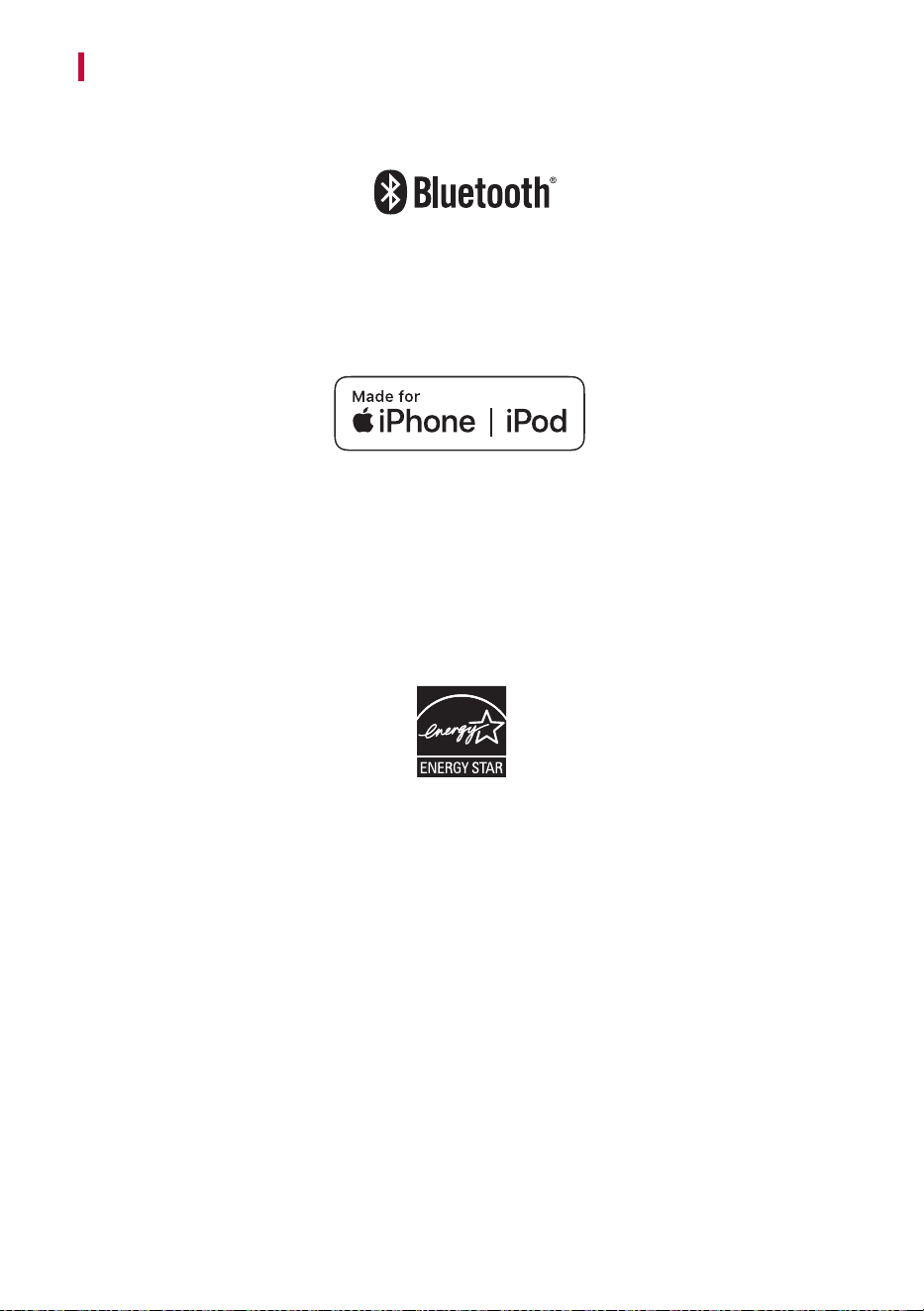
General
Power Supply
5 V 0 1.2 A (AC adapter)
Built-in rechargeable battery
Power consumption Refer to the main label.
Dimensions (W x H x D)
Approx. 326.0 mm x 78.0 mm x 87.0 mm
(12.8 inch x 3.1 inch x 3.4 inch)
Temperature 5 °C - 35 °C (41 °F to 95 °F)
Humidity 5 % - 80 % RH
Ingress Protection IPX5
Battery
Battery capacity 3900 mAh
Operating time
Up to 16 hours
16 hours battery life is based on internal testing using 50 %
volume and no lighting. Other conditional factors may affect
battery life.
Charging time
4 hours or lower
Charging time may vary depending on the battery or operation
status.
• Actual features, functionality, and other product specifications may differ and are subject to change
without notice.
40
Registered Trademarks and Licenses
All trademarks and trade names are the property of their respective owners.
The Bluetooth
®
word mark and logos are registered trademarks owned by the Bluetooth SIG, Inc. and
any use of such marks by LG Electronics is under license.
Other trademarks and trade names are those of their respective owners.
“Made for iPhone,” and “Made for iPod” mean that an electronic accessory has been designed to connect
specifically to iPhone, or iPod, respectively, and has been certified by the developer to meet Apple
performance standards. Apple is not responsible for the operation of this device or its compliance with
safety and regulatory standards. Please note that the use of this accessory with iPhone or iPod may affect
wireless performance.
The system is compatible with the latest iOS. Depending on your iPhone/iPod software version, you may
not control your iPhone/iPod from the unit.

41
Handling the Product
When shipping the Product
Please save the original shipping carton and packing materials. If you need to ship the product, for
maximum protection, re-pack the product as it was originally packed at the factory.
Keeping the exterior surfaces clean
• Do not use volatile liquids such as insecticide spray near the product.
• Wiping with strong pressure may damage the surface.
• Do not leave rubber or plastic products in contact with the product for a long period of time.
Cleaning the product
To clean the product, use a soft, dry cloth. If the surfaces are extremely dirty, use a soft cloth lightly
moistened with a mild detergent solution. Do not use strong solvents such as alcohol, benzine, or thinner,
as these might damage the surface of the product.