
Microphone Mute Switch (Applies to both boom mic and built-in mic)
Switch up: Microphone ON Switch down: Microphone OFF
ANC Button: Press once: ANC ON → ANC OFF → Transparency
Volume Down Button
Press: Volume down Press and hold: Previous track
NOTICE: While USB-C listening is possible, for best audio performance,
wired listening should be done using the included 3.5mm Aux cable.
or play without
battery power
Turn on Bluetooth in your device settings.
The headphones must be powered on to listen using USB-C input.
While using USB-C input, ANC / Transparency / Normal listening modes
remain fully functional.
The AUX cable can be used to listen with the
headphones powered on or powered off.
Power/Bluetooth Button
Press and hold ~3 seconds: Power ON
Continue holding after power on: Bluetooth pairing mode
Press once: Play / Pause music, or Answer / End calls
Press twice: Activate voice assistant (Siri / Google Assistant / Bixby)
4
Volume Up Button
Press: Volume up Press and hold: Next track
5
Warning
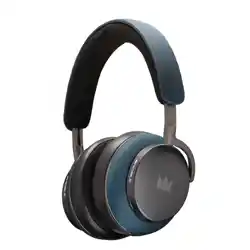
Noble FoKus Apollo Pro
FoKus
APOLLO PRO
Press and hold the power button
to turn on the headphones until
you hear the pairing tone and the
LED flashes blue and red.
Power on: 3 seconds
Pairing mode: 5 seconds
If the headphones do not appear, turn them off and repeat Step 2.
AUX CABLE
To view user manuals in other languages,
please scan the QR code.
For Product Registration, please
scan the QR code.
3s
Power ON
5s
Pairing Mode
4
Once successfully connected,
the headphones will automatically reconnect
to your device whenever they are powered on.
Select “Noble FoKus Apollo Pro” from
your Bluetooth device list to connect.
LED INDICATOR
Charging
Fully Charged
To charge, connect to a USB 5V / 1A
(or lower) power source
Red light: Charging
Blue light: Fully charged
USB-C CABLE USB-C CABLE
The headphones will charge automatically
when connected via a USB-C cable.
Boom MIC
The boom microphone is recommended when using a wired connection.
When powered OFF
No battery is used
ANC, Transparency, and volume controls are not available
When powered ON
All listening functions are available
Calling functions are not supported in AUX mode
If the headphones are not working correctly, turn them off and on, or press and hold
the “+” and “–” buttons simultaneously for 5 seconds while the headphones are
powered on to reset.
If the headphones will not turn on, recharge the battery and try again.
If the headphones will not charge, make sure the power source is working,
rated at 5V / 1A, and that the cable is not damaged.
If the headphones produce no sound or do not appear as an available Bluetooth
device, make sure they are not already connected to another device.
To re-enter Bluetooth pairing mode, press and hold the power button for 5 seconds
while the headphones are powered off.
Need some help?
Important Safety Information
Avoid dropping the product.
Do not disassemble.
Do not submerge in water.
Do not expose the product to dripping or splashing liquids.
Avoid extreme temperatures.
Do not expose to excessive heat such as direct sunlight, fire, or similar heat sources.
Use original or certified cables only.
Clean with a dry, soft, lint-free cloth. Do not use corrosive cleaners or oils.
Do not use the product outdoors during thunderstorms.
To avoid hearing damage, do not listen at high volume levels for
extended periods.
Do not increase the volume to a level where you are unable to hear
your surroundings.
Do not use headphones while driving or operating machinery.
Use caution or temporarily discontinue use in potentially hazardous
situations.