APP
soundcore
Apple and the Apple logo are trademarks of
Apple Inc.
Google Play and the Google Play
logo are
trademarks of Google Inc.
Download the soundcore app to explore the ambient sound features, EQ settings, Dolby Audio, HearID
sound, firmware updates, and other exciting features.
If your earbuds cannot connect to the soundcore app, try re-installing the app or updating it to the
latest version available in your mobile app store.
OVERVIEW
1
2
4
5
6
3
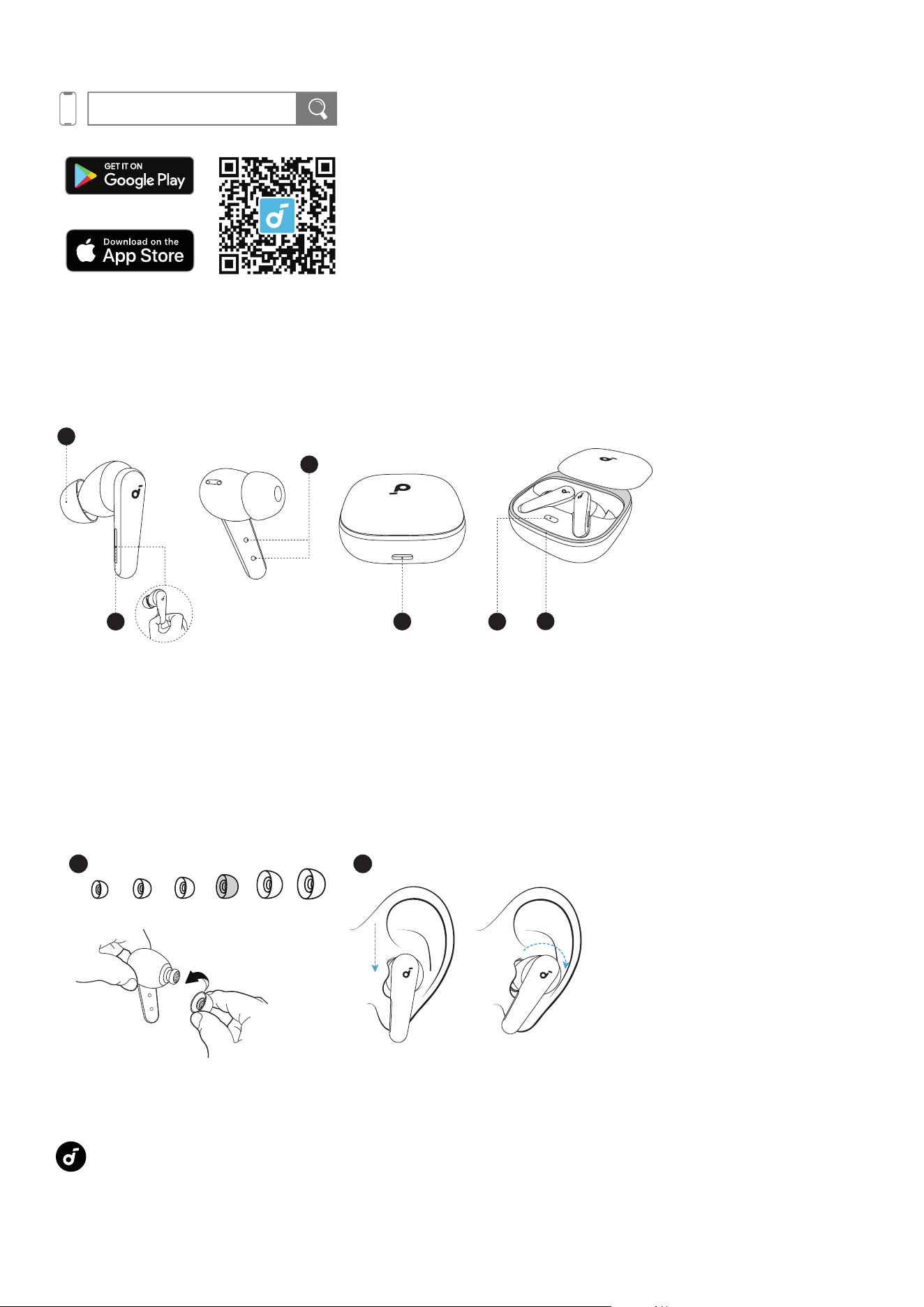
1. Ear Tip
• M-size ear tips are pre-installed at the time of purchase.
2. Earbud Control Area
• Squeeze the control area on the earbud stems to manage dierent functions.
3. Charging Contacts
4. USB-C Charging Port
5. Charging Case Button
6. LED Light Strip
WEARING
1
XXS
L
XS S M
XL
2
1. Try dierent ear tips to find the best fit.
2. Gently place the earbuds into your ear canal and rotate them until they feel snug.
3. Use the fit test in the soundcore app to ensure optimal active noise cancelling peormance.
Dust, earwax, or other debris can accumulate in the earbuds. To maintain optimal sound quality, clean
them regularly. Use a slightly moistened cotton swab with rubbing alcohol to gently wipe the metal
mesh filter beneath the rubber ear tips. Make sure the alcohol has completely dried on the metal mesh
filter before using the earbuds again.
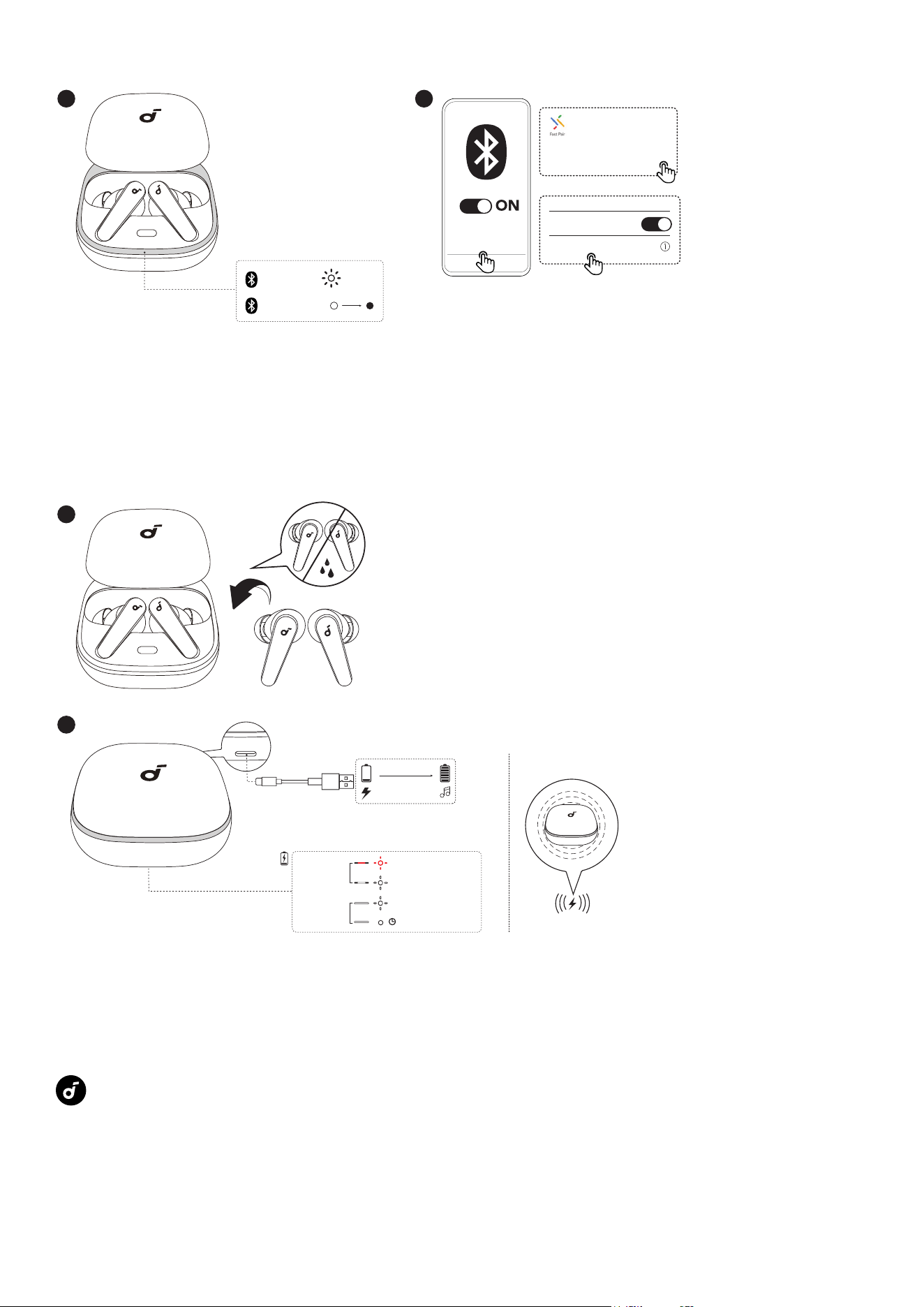
POWERING ON AND PAIRING
PAIRING
CONNECTED
2s
21
Tap to pair. Device will be
tied to Your Google Account
Android 6.0+
Fast Pair
iOS & Others
soundcore Liberty 5
Connected
Bluetooth
Bluetooth
<Setting
soundcore Liberty 5
soundcore
Liberty 5
Slide open the charging case. The earbuds will power on automatically and enter Bluetooth pairing
mode.
Google Fast Pair: Instantly pair with your Android smartphone (running Android 6.0 or above) using
Google Fast Pair.
Select soundcore Liberty 5 from your device's Bluetooth list to connect. Once connected, the LED light
strip will remain on for 2 seconds before turning o.
CHARGING
1
2
10 mins=5 hrs
3 hrs
< 20%
20% - 60%
60% - 99%
5mins 100%
short light
strip
long light
strip
Ensure the earbuds and the USB-C charging port are completely dry before charging. Place the
earbuds in the charging case and close it.
Connect the charging case to a power supply using the provided USB-C charging cable. For wireless
charging, place the charging case at the center of your wireless charger. Recharging the charging
case with earbuds takes 3 hours via cable and 4 hours wirelessly. Charging the earbuds for 10 minutes
provides 5 hours of playtime.
When the battery level of the charging case drops below 10%, it will stop charging the earbuds.
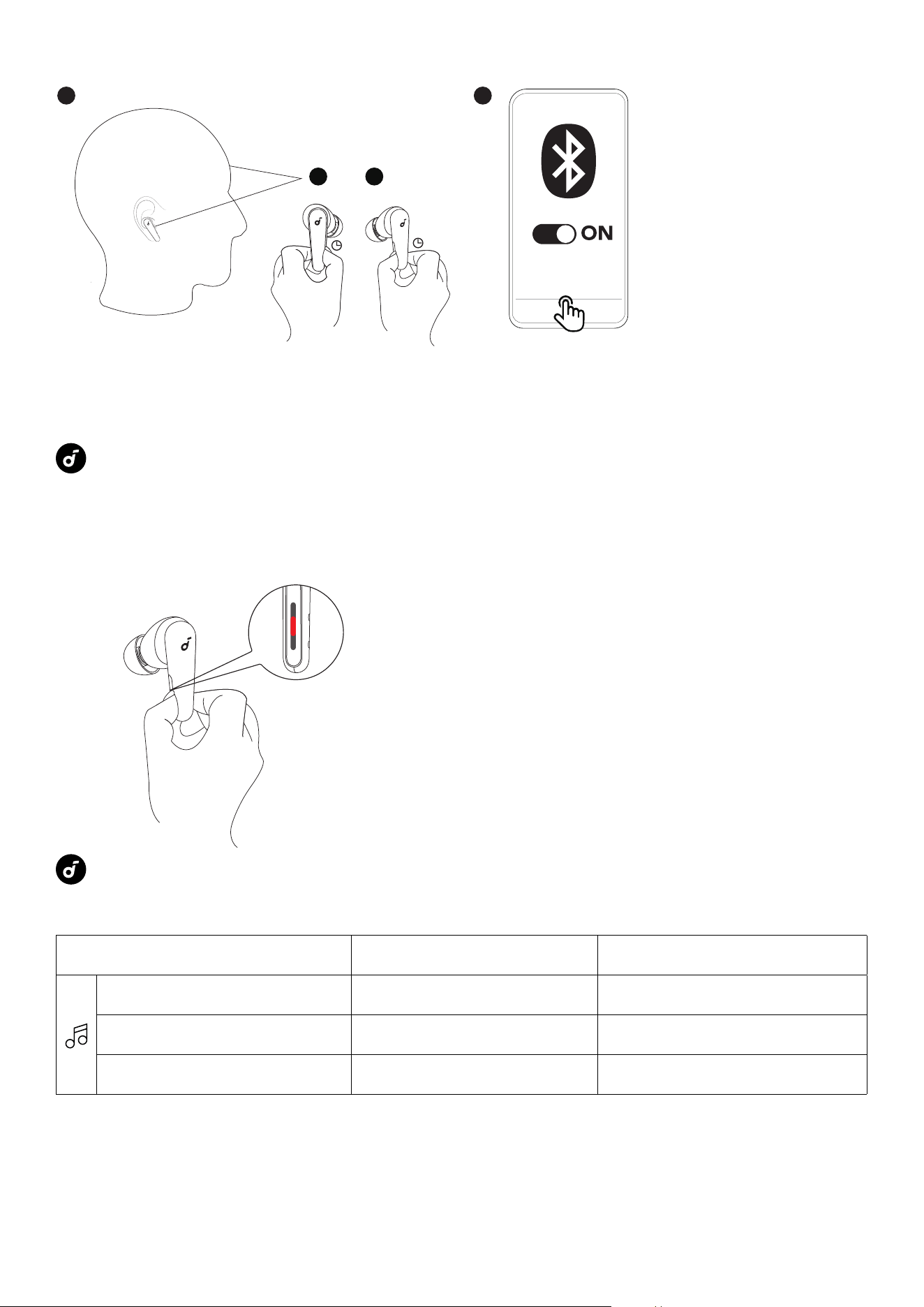
DUAL CONNECTIONS
soundcore
Liberty 5
1
L R
2
3s
3s
Dual Connections is enabled by default.
To connect a second device while already connected to one, pinch the control area on both earbud
stems for 3 seconds until you hear a voice prompt for pairing mode. Then, proceed to pair with the
second device.
You can also enable Dual Connections through the soundcore app. In the app, go to Settings > Dual
Connections > Enable Dual Connections > Connect New Device.
CONTROLS
• Press the highlighted area for the best operational experience.
• You can customize controls in the soundcore app.
Using Dual Earbuds Using Single Earbud
Play/Pause Audio Squeeze Once (L/R) Squeeze Once
Play the Next Track Squeeze Twice (R) Squeeze Twice
Play the Previous Track Squeeze Twice (L) \
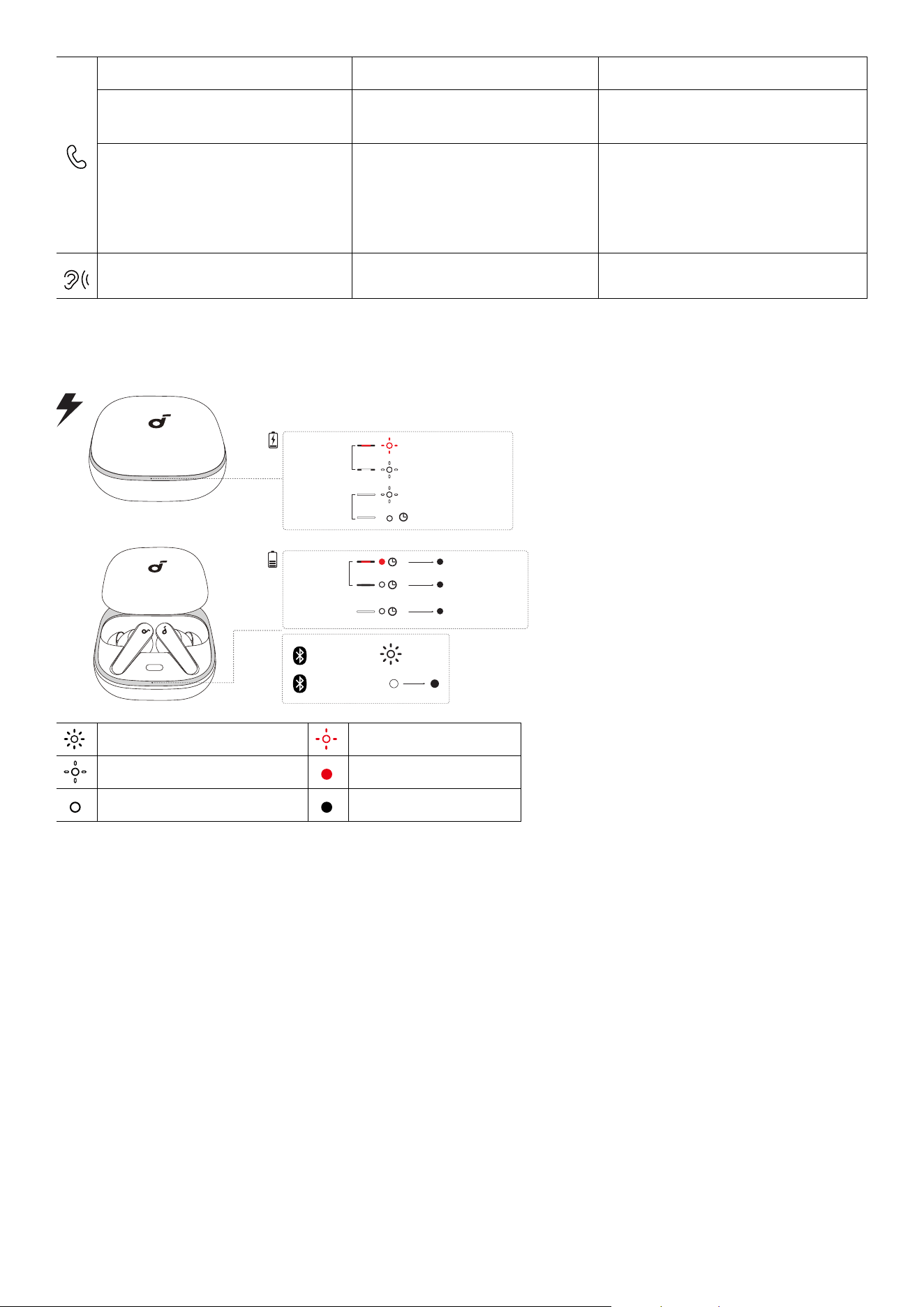
Answer a Call Squeeze Once (L/R) Squeeze Once
Reject/End a call
Squeeze and Hold for 2
Seconds (L/R)
Squeeze and Hold for 2 Seconds
Mute/Unmute Mic
* You may need to enable this
feature through Controls in
the soundcore app.
Squeeze Once (L/R) Squeeze Once
Switch Between ANC and
Transparency Modes
Squeeze and Hold for 2
Seconds (L/R)
Squeeze and Hold for 2 Seconds
LED LIGHT GUIDE
PAIRING
CONNECTED
2s
<20%
5s
20% - 60%
5s
60% - 100%
5s
short light
strip
long light
strip
< 20%
20% - 60%
60% - 99%
5mins
100%
short light
strip
long light
strip
Flashing white rapidly Flashing red slowly
Flashing white slowly Steady red
Steady white Light o
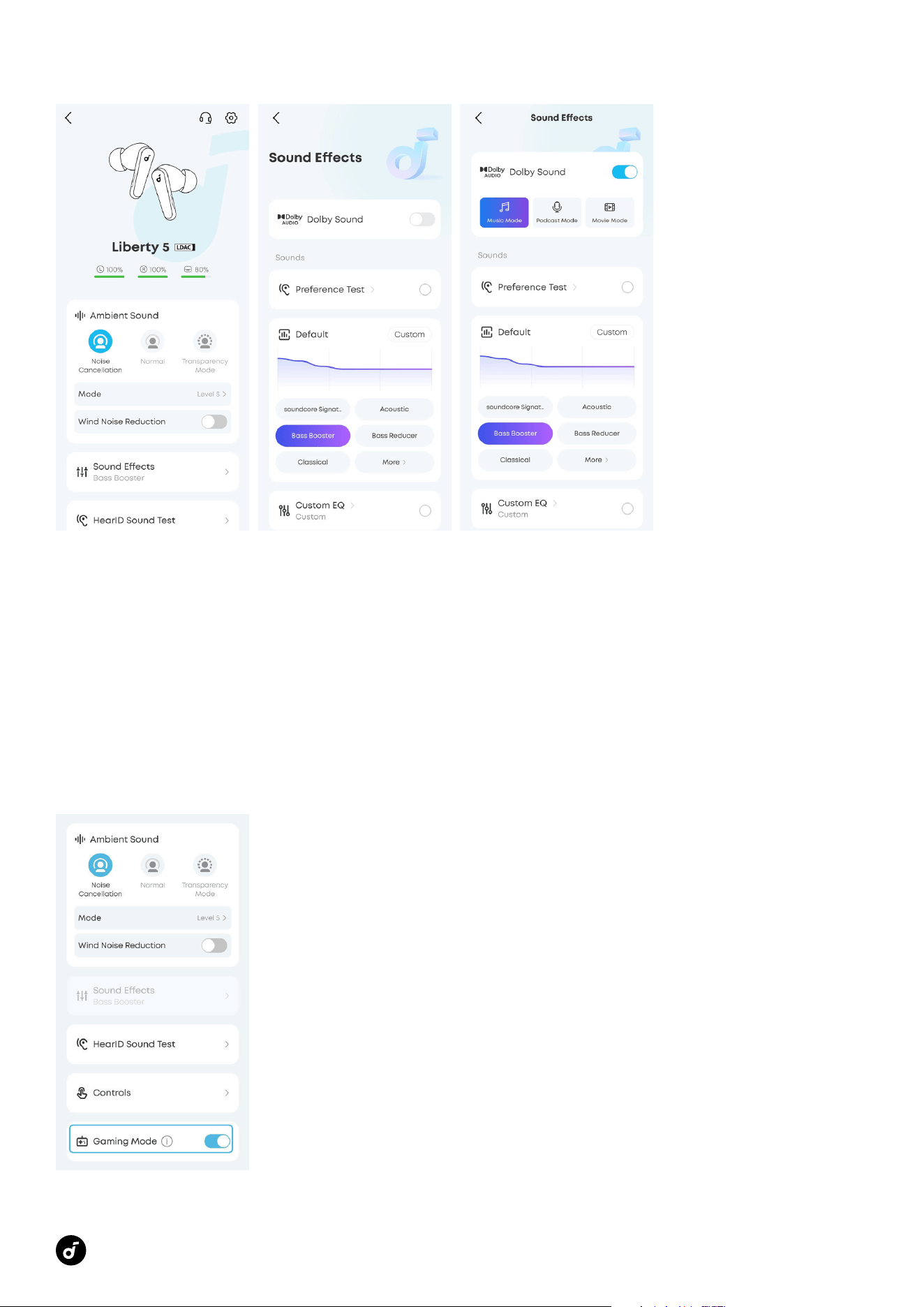
DOLBY AUDIO
Note: UI images are for illustration only; actual display may vary by soware version.
Dolby Audio delivers an immersive listening experience by placing sound all around you. You can
choose between three Dolby Audio modes in the soundcore app:
Music Mode: Delivers immersive, detailed sound for your favorite tunes, making every note and beat
clear and vivid.
Podcast Mode: Optimized for clear, focused vocals, peect for listening to spoken content.
Movie Mode: Enhances your cinematic experience with rich, immersive audio that brings every action to
life.
Note: Dolby, Dolby Audio, and the double-D symbol are trademarks of Dolby Laboratories Licensing
Corporation. Manufactured under license from Dolby Laboratories. Confidential unpublished works.
Copyright © 2020–2025 Dolby Laboratories. All rights reserved.
GAMING MODE
Provides precise audio cues for a competitive edge in gaming, allowing you to capture every detail and
react quickly.
Gaming mode and LDAC/Dolby Audio cannot be turned on at the same time.
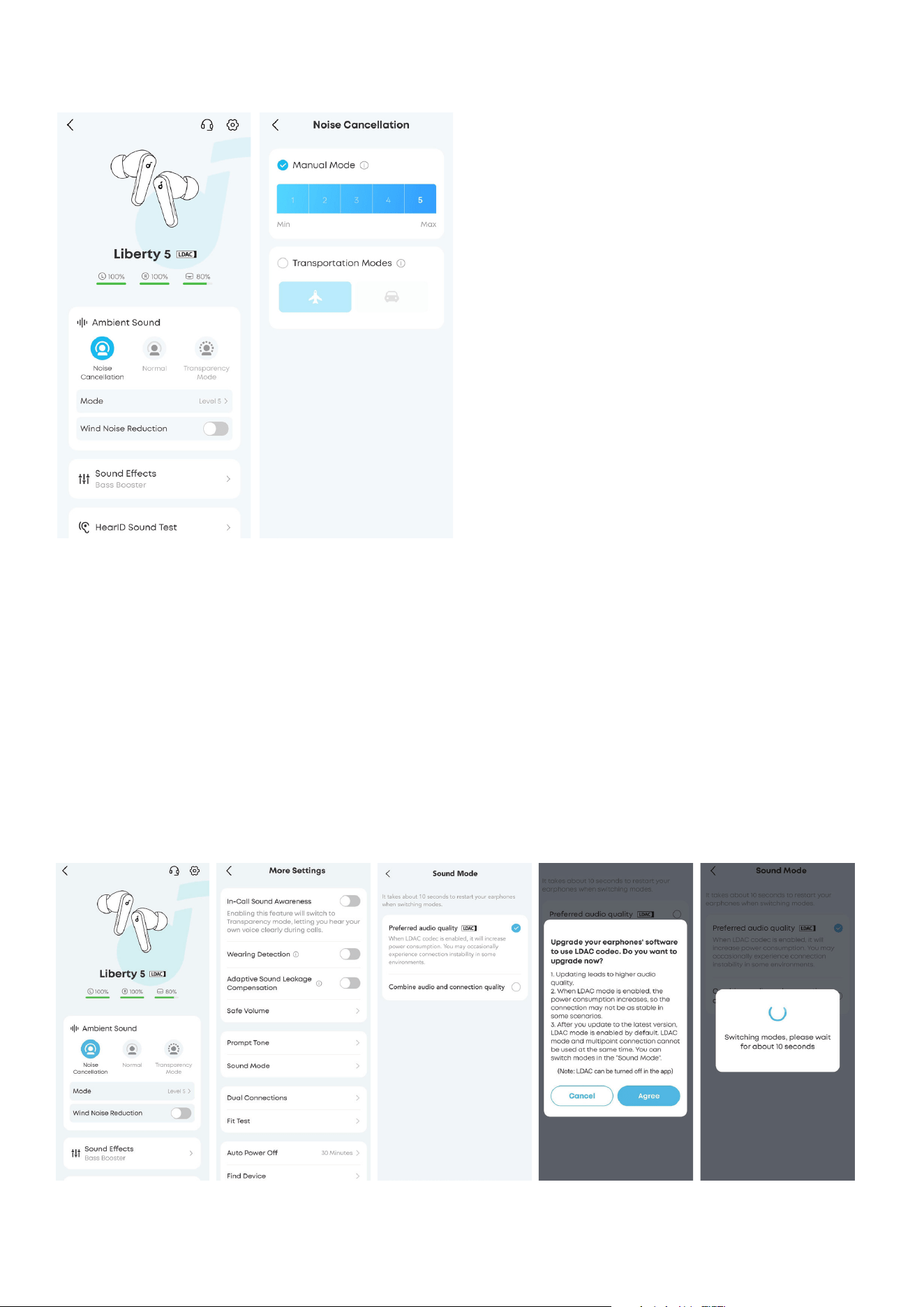
AMBIENT SOUND
Note: UI images are for illustration only; actual display may vary by soware version.
In the soundcore app, you can select from Noise Cancellation, Normal, or Transparency Mode.
Noise Cancellation (Level 1 to 5): Optimizes noise cancellation by adjusting to your ears and
environment. You can also choose dierent modes of transportation:
• Airplane Mode: Provides poweul noise cancellation to reduce airplane engine noise, ensuring
apeaceful listening experience during flights.
• Anti-Bump Mode: Optimizes noise cancellation to reduce disturbances in bumpy rides, ensuring
stable audio during travel in vehicles or on rough terrain.
Normal: Enjoy balanced sound without noise cancellation.
Transparency: Hear ambient sounds clearly while enjoying music.
LDAC
Use devices running Android 8.0 or later to experience LDAC-quality sound.
LDAC delivers higher sound quality but increases power consumption, which may reduce playtime.
Enable LDAC in low-inteerence environments for a stable Bluetooth connection.
Note: UI images are for illustration only; actual display may vary by soware version.
In the soundcore app:
1. Select Sound Mode.
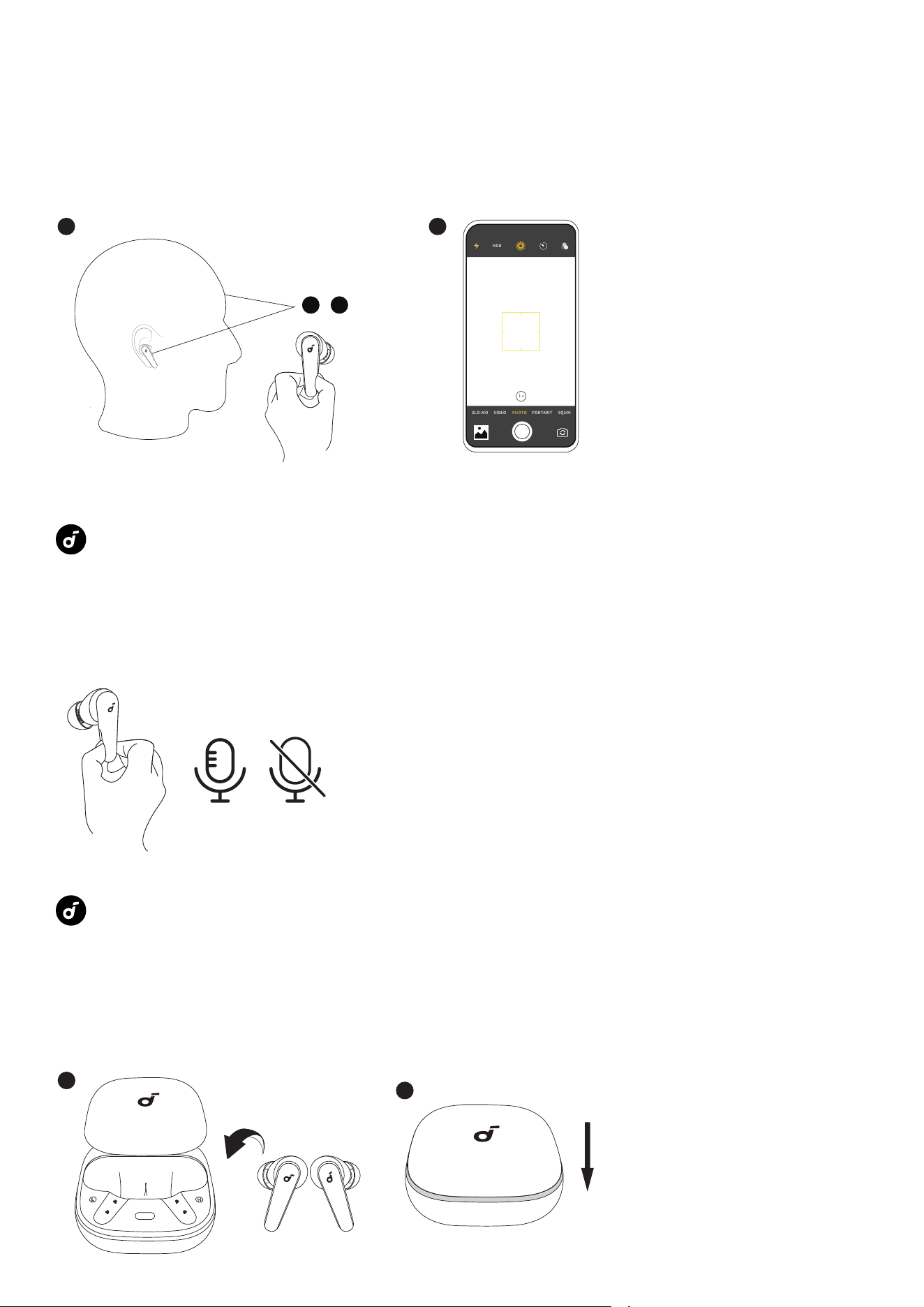
2. Tap Preferred audio quality.
3. Tap Agree to proceed.
4. Switching audio codecs takes about 10 seconds. You may be prompted to update the earbuds'
firmware if an update is available.
REMOTE PHOTO SNAP
1 ×
HDR
SLO-MO VIDEO PHOTO
PORTARIT SQUAI
1
L / R
2
×1
When the earbuds are connected to the phone via Bluetooth, and are being worn, open the camera on
the phone. Then, squeeze either earbud stem once to remotely control the phone to take a photo.
• You may need to enable this feature through Controls in the soundcore app.
• Due to system settings, this feature is not supported on some phones.
QUICK MUTE
×1
During a call or meeting, squeeze either earbud stem once to mute or unmute the microphone (default
is unmuted).
• When the microphone is muted or unmuted, you will hear a voice prompt indicating the change. If the
microphone remains o, a voice prompt will repeat every 20 seconds to indicate the mute status.
• You may need to enable this feature through Controls in the soundcore app.
POWERING OFF
1
2
To power o, return both earbuds to the charging case and close it.
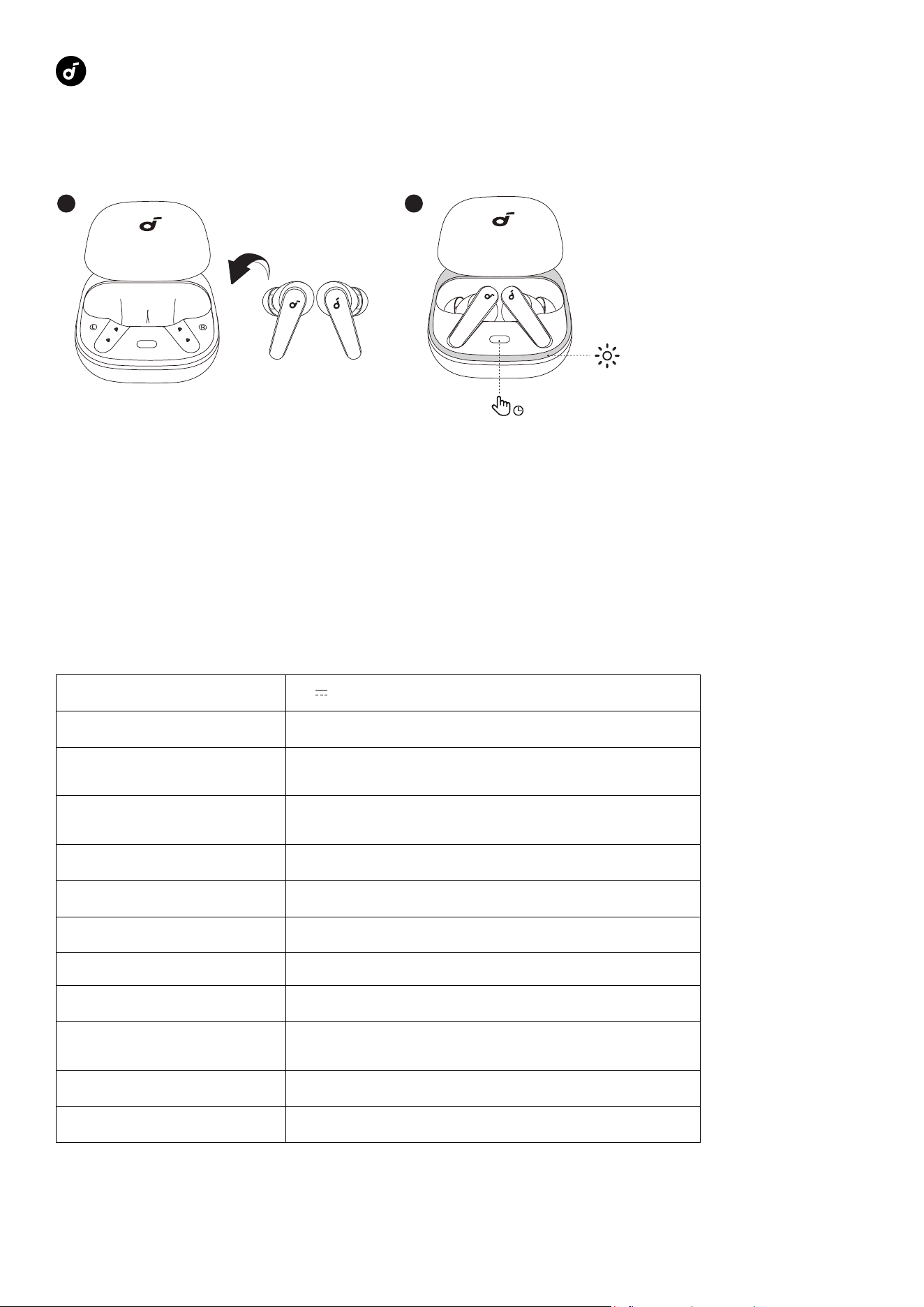
When removed from the case, the earbuds automatically power o aer 30 minutes if not connected to
any device. The duration can be set in the soundcore app.
RESET
1 2
×3
10s
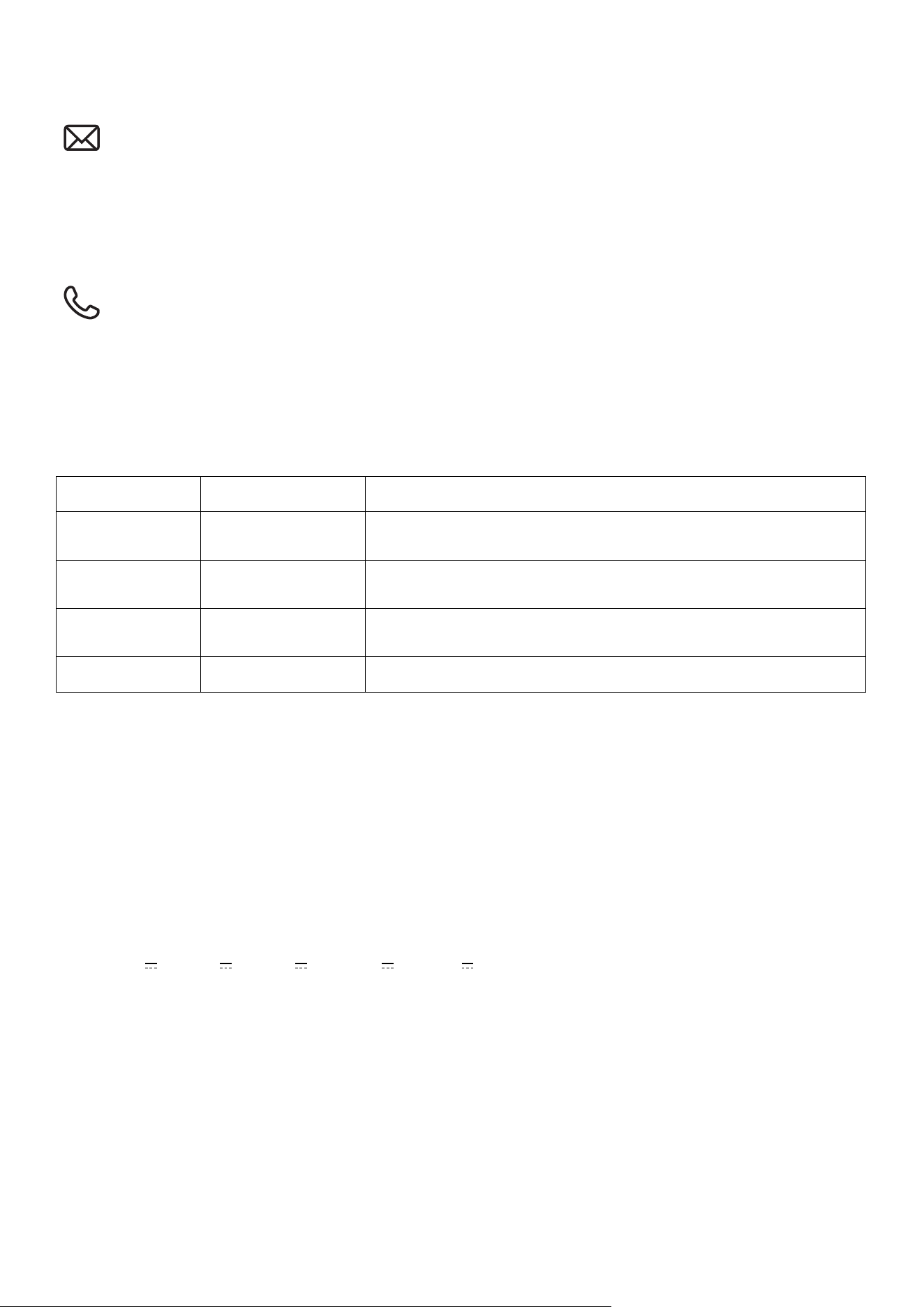
Place the earbuds in the charging case and leave the case open. Press and hold the charging case
button for 10 seconds until the LED light strip flashes white three times.
FIRMWARE UPDATE
You will be notified once a new firmware version of the earbuds or charging case is detected when the
earbuds are connected to the app. Ensure the earbuds are in the charging case and the case remains
open until the firmware update is complete. During the update, ensure the battery levels of both the
earbuds and the charging case are above 20%, and avoid any usage.
SPECS
Note: Specifications are subject to change without notice.
Input 5V 0.8A
Rated Output Power 10mW
Battery Capacity
60mAh ×2 (Earbuds)
580mAh (Charging Case)
Charging Time
Up to 1 Hour (Earbuds)
Up to 3 Hours (Charging Case with Earbuds)
Playtime (ANC O) Up to 12 Hours (Up to 48 Hours with Case)
Playtime (ANC On) Up to 8 Hours (Up to 32 Hours with Case)
Driver 9.2mm
Frequency Response 20HZ-40KHZ
Impedance 17Ω
Waterproof and Dustproof
Level (Earbuds)
IP55
Bluetooth version Bluetooth 5.4
Bluetooth range 10m
CUSTOMER SERVICE
service@soundcore.com
support.mea@soundcore.com (For Middle East and Africa Only)
support@anker.com (
日本
)
support.kr@anker.com
( 한국 )
+1 (800) 988 7973 (US/Canada)
+44 (0) 1604 936200 (UK)
+49 (0) 69 9579 7960 (DE)
03 4455 7823 (
日本
)
+86 400 0550 036 (
中国
)
+82 1666-8470 (
한국
)
+971 8000320817 (UAE)
+966 8008500030 (KSA)
+965 22069086 (Kuwait)
+20 8000000826 (Egypt)
+90 (850) 460 14 14 (Türkiye)
+8 (800) 511-86-23 (Russia)
000-8000-504-414 (India)
Note: The 'x' of SN Code: xxxxxxxxxxxxxxxx is a variable, see below table.
Variable 'x' Range of variable Content
Eighth 8,9,A,B,C...
Denotes the year, 8 means 2018, 9 means 2019, A means 2020, B
means 2021, C means 2022, and so on.
Ninth and tenth 01,02,03...
Denotes weeks, 01 means the first week in this year, 02 means
the secondary week in this year, and so on.
Eleventh 1-7
Denotes date, 1 means Monday, 2 means Tuesday..., 7 means
Sunday and so on.
The last five 00001-99999 Denotes serial No.
Hereby, Anker Innovations Limited declares that this device is in compliance with The Product Security
and Telecommunications Infrastructure (Security Requirements for Relevant Connectable Products)
Regulations 2023. For the Statement of Compliance, visit the website:
https://uk.soundcore.com/pages/psti-related.
1. Power consumption in standby mode: ≤0.5W
2. Powermanagement: ≤20min
3. Information of applicable adapter:
Brand: ANKER
Manufacturer: Anker Innovations Limited
Model: A2337
Input: 100-240Vac, 1A, 50-60Hz
Output: 5V
3A / 9V
3A / 12V
2.5A / 15V
2A / 20V
1.5A (30W Max)
Default Open Port: Classic Bluetooth
Port Description: Aer the device is powered on, Classic Bluetooth visibility (or pairing mode) is
automatically enabled, providing Bluetooth pairing (or control) services. The Bluetooth service is
disabled when the device is powered o.