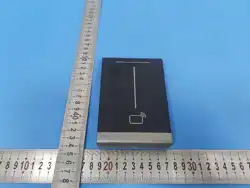

Card Reader
Quick Guide
V1.02
1
Preface
The content of this section is designed to ensure that users use the product correctly to prevent dangers
or property loss caused by improper operation. Before using this product, be sure to read this manual
carefully. Please keep this manual properly for future reference.
About This Manual
We recommend that you use this manual under the guidance of a professional.
This manual is designed for use with multiple product models, and it is not possible to list the
appearance and functions of each product individually. Please refer to the actual product for use.
This manual is intended for multiple software versions, and the illustrations and descriptions in this
manual may be different from the actual GUI and functions of the software.
Despite our best efforts, technical or typographical errors may exist in this manual. Uniview cannot be
held responsible for any such errors and reserves the right to change the manual without prior notice.
Users are fully responsible for the damages and losses that arise due to improper operation.
Uniview reserves the right to change any information in this manual without any prior notice or
indication. Due to such reasons as product version upgrade or regulatory requirement of relevant
regions, this manual will be periodically updated.
This manual will be updated in real time according to the laws and regulations of the relevant regions.
For specific details, please refer to the product's paper copy, QR code, or official website. In case of
any discrepancy between the paper copy and the electronic version, the electronic version shall
prevail.
About This Product
If the product you have chosen is a video product, please strictly adhere to the applicable laws and
regulations. You can visit our official website to inquire about the relevant content.
Instructions for Use
This document serves as a guide for use only. All statements, information, and suggestions contained
in this document do not constitute any express or implied warranty.
We assume no responsibility for any special, incidental, consequential, or indirect damages resulting
from the use of this manual or the use of our products, including but not limited to losses due to loss
of business profits, data or document loss, and product malfunction or information leakage caused
by cyber-attack, hacker attack, and virus infections.
Due to uncertain factors such as the physical environment, there may be discrepancies between the
actual values of some data and the reference values provided in the manual. In case of any questions
or disputes, the company's final interpretation shall prevail.
Formatting Conventions
The UI formatting conventions used in this document are as follows:
Format Meaning
Bold Bold means UI elements (button names, menu names, window names, etc.),
e.g., Click
Save
.
> Indicate a sequence of actions, e.g., click Device Management > Add Device,
which means first click Device Management, and then click Add Device.
Symbol Conventions
This document uses various distinctive symbols to highlight areas that require special attention during
the operation process. The meanings of these symbols are as follows:
Symbol Meaning
NOTE: Provides tips and additional information related to the operation and
2
Symbol Meaning
use of the product.
CAUTION: Alerts to matters that requires attention during operation, as
improper handling may lead to product damage, data loss, or functional
abnormalities.
WARNING: The annotations following this symbol demand extra attention, as
improper handling could potentially cause personal injury.
Legal Statement
Copyright Statement
©2025 Zhejiang Uniview Technologies., Co., Ltd. All rights reserved.
All parts of this document, including but not limited to text, images, and graphics, are copyrighted and
belong to Zhejiang Uniview Technologies Co., Ltd (hereinafter referred to as “Uniview” "we" “us”).
Without our written permission, no organization or individual may excerpt, copy, translate, modify, or
disseminate any part or all of the content of this manual in any form.
The products described in this manual may contain software copyrighted by us and any potential
licensors. Without the permission of the relevant rights holders, no one may copy, distribute, modify,
excerpt, decompile, disassemble, decrypt, reverse engineer, rent, transfer, sublicense, or engage in any
other actions that infringe upon the software copyright in any form.
Trademark Acknowledgements
are trademarks or registered trademarks of Uniview.
All other trademarks, products, services and companies in this manual or the product described in this
manual are the property of their respective owners.
Export Compliance Statement
Uniview complies with applicable export control laws and regulations worldwide, including that of the
People's Republic of China and the United States, and abides by relevant regulations relating to the
export, re-export and transfer of hardware, software and technology. Regarding the product described
in this manual, Uniview asks you to fully understand and strictly abide by the applicable export laws and
regulations worldwide.
EU Authorised Representative
UNV Technology EUROPE B.V. Treubstraa 1, 2288 EG, Rijswijk, Netherlands.
If you have any feedback, please contact us at [email protected].
Disclaimer of Liability
We assume no responsibility and offer no compensation for any special, incidental, consequential, or
indirect damages resulting from the use of this manual or our products, including but not limited to
losses related to lost business profits, data, or document loss.
The product described in this manual is provided on an "as is" basis. Unless required by applicable
law, this manual is only for informational purpose, and all statements, information, and
recommendations in this manual are presented without warranty of any kind, expressed or implied,
including, but not limited to, merchantability, satisfaction with quality, fitness for a particular purpose,
and noninfringement.
Users must assume total responsibility and all risks for connecting the product to the Internet,
including, but not limited to, network attack, hacking, and virus. Uniview strongly recommends that
users take all necessary measures to enhance the protection of network, device, data and personal

3
information. Uniview disclaims any liability related thereto but will readily provide necessary security
related support.
To the extent not prohibited by applicable law, in no event will Uniview and its employees, licensors,
subsidiary, affiliates be liable for results arising out of using or inability to use the product or service,
including, not limited to, loss of profits and any other commercial damages or losses, loss of data,
procurement of substitute goods or services; property damage, personal injury, business interruption,
loss of business information, or any special, direct, indirect, incidental, consequential, pecuniary,
coverage, exemplary, subsidiary losses, however caused and on any theory of liability, whether in
contract, strict liability or tort (including negligence or otherwise) in any way out of the use of the
product, even if Uniview has been advised of the possibility of such damages (other than as may be
required by applicable law in cases involving personal injury, incidental or subsidiary damage).
To the extent allowed by applicable law, in no event shall Uniview’s total liability to you for all damages
for the product described in this manual (other than as may be required by applicable law in cases
involving personal injury) exceed the amount of money that you have paid for the product.
When using this product, please strictly adhere to the applicable laws and regulations to avoid
infringing upon the rights of third parties, including but not limited to intellectual property rights, data
rights, or other privacy rights. You must also not use this product for the purposes of developing or
facilitating the use of weapons of mass destruction, biological or chemical weapons, nuclear weapons,
or for any other purposes that violate international norms and regulations.
Privacy Protection Reminder
Uniview complies with appropriate privacy protection laws and is committed to protecting user privacy.
You may want to read our full privacy policy at our website and get to know the ways we process your
personal information. Please be aware, using the product described in this manual may involve the
collection of personal information such as face, fingerprint, license plate number, email, phone number,
GPS. Please abide by your local laws and regulations while using the product.
Safety Precautions
The device must be installed, serviced and maintained by a trained professional with necessary safety
knowledge and skills. Before you start using the device, please read through this guide carefully and
make sure all applicable requirements are met to avoid danger and loss of property.
Storage, Transportation, and Use
Store or use the device in a proper environment that meets environmental requirements, including
and not limited to, temperature, humidity, dust, corrosive gases, electromagnetic radiation, etc.
Make sure the device is securely installed or placed on a flat surface to prevent falling.
Unless otherwise specified, do not stack devices.
Ensure good ventilation in the operating environment. Do not cover the vents on the device. Allow
adequate space for ventilation.
Protect the device from liquid of any kind.
Make sure the power supply provides a stable voltage that meets the power requirements of the
device. Make sure the power supply's output power exceeds the total maximum power of all the
connected devices.
Verify that the device is properly installed before connecting it to power.
Do not remove the seal from the device body without consulting Uniview first. Do not attempt to
service the product yourself. Contact a trained professional for maintenance.
Always disconnect the device from power before attempting to move the device.
Take proper waterproof measures in accordance with requirements before using the device outdoors.
Power Requirements
Install and use the device in strict accordance with your local electrical safety regulations.
Use a UL certified power supply that meets LPS requirements if an adapter is used.

4
Use the recommended cordset (power cord) in accordance with the specified ratings.
Only use the power adapter supplied with your device.
Use a mains socket outlet with a protective earthing (grounding) connection.
Ground your device properly if the device is intended to be grounded.
Battery Safety
Please use batteries properly; otherwise, there is a risk of fire or explosion.
Warning: Using incorrect battery models can lead to explosion.
If you need to replace the battery, it is recommended that you go to an authorized service center or
have it replaced under professional supervision. We shall not be held responsible for any issues
arising from unauthorized battery replacement.
When replacing the battery, be sure to use a battery of the same type as the original! Using the wrong
model for replacement (such as certain types of lithium batteries) may cause safety protection to fail.
Batteries must not be exposed to overheat environments such as sunlight, fire, as this may lead to fire,
explosion, or combustion.
Do not dispose of batteries in fire or heating appliances. Do not squeeze, bend, or cut batteries, as it
may cause explosion.
Do not expose batteries to extremely high or low temperatures, or to very low-pressure environments,
as this may cause explosion or leakage of flammable liquid/gas.
Dispose of the used battery according to your local regulations or the battery manufacturer's
instructions.
For products or the included remote control containing a button cell battery: Do not ingest the battery
- chemical burn hazard! If swallowed, a button cell battery can cause severe internal burns within 2
hours and may be fatal. Precautions (including but not limited to):
Keep new and used batteries away from children.
Stop using the product and keep it away from children if the battery compartment is not securely
closed.
If you suspect that a battery may have been swallowed or inserted inside any part of the body,
seek immediate medical attention.
Network Security
Please take all necessary measures to enhance network security for your device.
The following are necessary measures for the network security of your device:
Change default password and set strong password: You are strongly recommended to change the
default password after your first login and set a strong password of at least nine characters including
all three elements: digits, letters and special characters.
Do not include the account name or the reverse of the account name.
Avoid using consecutive characters, such as 123, abc, etc.
Do not use overlapping characters, such as 111, aaa, etc.
Keep firmware up to date: It is recommended that your device is always upgraded to the latest version
for the latest functions and better security. Visit Uniview's official website or contact your local dealer
for the latest firmware.
The following are recommendations for enhancing network security of your device:
Change password regularly: Change your device password on a regular basis and keep the password
safe. Make sure only the authorized user can log in to the device.
Enable HTTPS/SSL: Use SSL certificate to encrypt HTTP communications and ensure data security.
Enable IP address filtering: Allow access only from the specified IP addresses.
Minimum port mapping: Configure your router or firewall to open a minimum set of ports to the WAN
and keep only the necessary port mappings. Never set the device as the DMZ host or configure a full
con e NAT.
Disable the automatic login and save password features: If multiple users have access to your
computer, it is recommended that you disable these features to prevent unauthorized access.

5
Choose username and password discretely: Avoid using the username and password of your social
media, bank, email account, etc., as the username and password of your device, in case your social
media, bank and email account information is leaked.
Restrict user permissions: If more than one user needs access to your system, make sure each user is
granted only the necessary permissions.
Disable UPnP: When UPnP is enabled, the router will automatically map internal ports, and the system
will automatically forward port data, which results in the risks of data leakage. Therefore, it is
recommended to disable UPnP if HTTP and TCP port mapping have been enabled manually on your
router.
Multicast: Multicast is intended to transmit video to multiple devices. If you do not use this function,
it is recommended you disable multicast on your network.
Check logs: Check your device logs regularly to detect unauthorized access or abnormal operations.
Isolate video surveillance network: Isolating your video surveillance network with other service
networks helps prevent unauthorized access to devices in your security system from other service
networks.
Physical protection: Keep the device in a locked room or cabinet to prevent unauthorized physical
access.
SNMP: Disable SNMP if you do not use it. If you do use it, then SNMPv3 is recommended.
Learn More
You may also obtain security information under Security Response Center at Uniview's official website.
Avertissement de l’utilisation de la batterie
Lorsque utiliser la batterie, évitez:
Température et pression d'air extrêmement élevées ou basses pendant l'utilisation, le
stockage et le transport.
Remplacement de la batterie.
Utilisez la batterie correctement. Mauvaise utilisation de la batterie comme celles mentionnées ici,
peut entraîner des risques d’incendie, d’explosion ou de fuite liquide de gaz inflammables.
Remplacer la batterie par un type incorrect;
Disposer d’une batterie dans le feu ou un four chaud, écraser mécaniquement ou couper la
batterie;
Disposer la batterie utilisée conformément à vos règlements locaux ou aux instructions du fabricant
de la batterie.
Regulatory Compliance
This device complies with Part 15 of the FCC Rules. Operation is subject to the following two conditions:
(1) this device may not cause harmful interference, and (2) this device must accept any interference
received, including interference that may cause undesired operation.
Caution: The user is cautioned that changes or modifications not expressly approved by the party
responsible for compliance could void the user's authority to operate the equipment.
NOTE: This equipment has been tested and found to comply with the limits for a Class B digital device,
pursuant to part 15 of the FCC Rules. These limits are designed to provide reasonable protection against
harmful interference in a residential installation. This equipment generates, uses and can radiate radio
frequency energy and, if not installed and used in accordance with the instructions, may cause harmful
interference to radio communications. However, there is no guarantee that interference will not occur in
a particular installation. If this equipment does cause harmful interference to radio or television
reception, which can be determined by turning the equipment off and on, the user is encouraged to try
to correct the interference by one or more of the following measures:
—Reorient or relocate the receiving antenna.
—Increase the separation between the equipment and receiver.
—Connect the equipment into an outlet on a circuit different from that to which the receiver is
connected.
—Consult the dealer or an experienced radio/TV technician for help.
6
RF Radiation Exposure Statement
This equipment complies with FCC radiation exposure limits set forth for an uncontrolled environment.
This equipment should be installed and operated with a minimum distance of 20cm between the
radiator and any part of your body.
LVD/EMC Directive
This product complies with the European Low Voltage Directive 2014/35/EU and EMC
Directive 2014/30/EU.
WEEE Directive–2012/19/EU
The product this manual refers to is covered by the Waste Electrical & Electronic
Equipment (WEEE) Directive and must be disposed of in a responsible manner.
Battery Regulation- (EU) 2023/1542
Battery in the product complies with the European Battery Regulation (EU) 2023/1542.
For proper recycling, return the battery to your supplier or to a designated collection
point.
1 Packing List
Contact your local dealer if the package is damaged or incomplete. The package contents may
vary with device model.
No. Name Qty Unit
1
Card reader 1 PCS
2 Screws and components 4 Set
3 Bracket 1 PCS
4 Tail cable 1 PCS
5 Tail cable cover plate 1 PCS
6 Product documents 1 Set
7
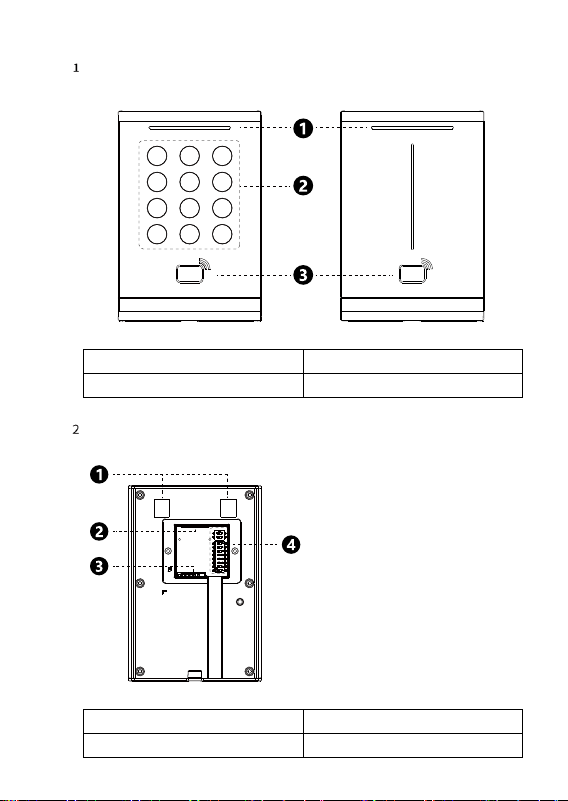
2 Product Overview
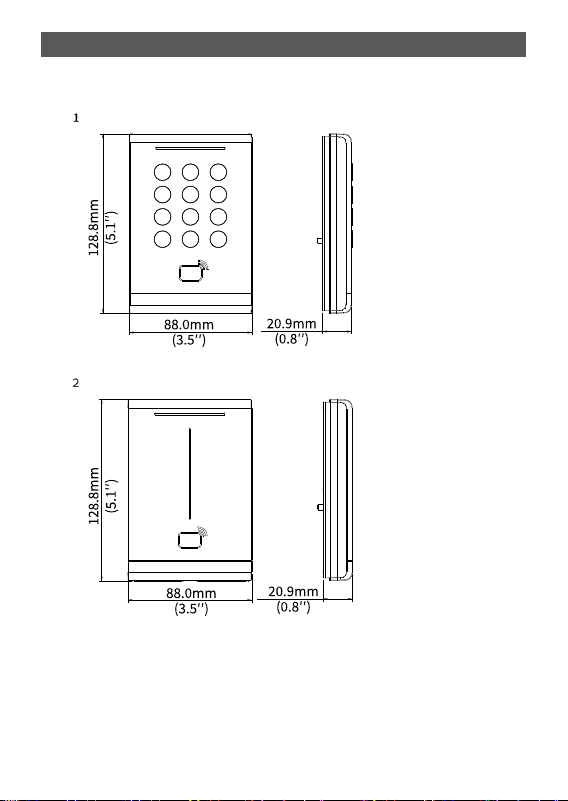
The appearance, dimensions, and structure may vary with device model.
2.1 Appearance and Dimensions
With keypad
Without keypad
9
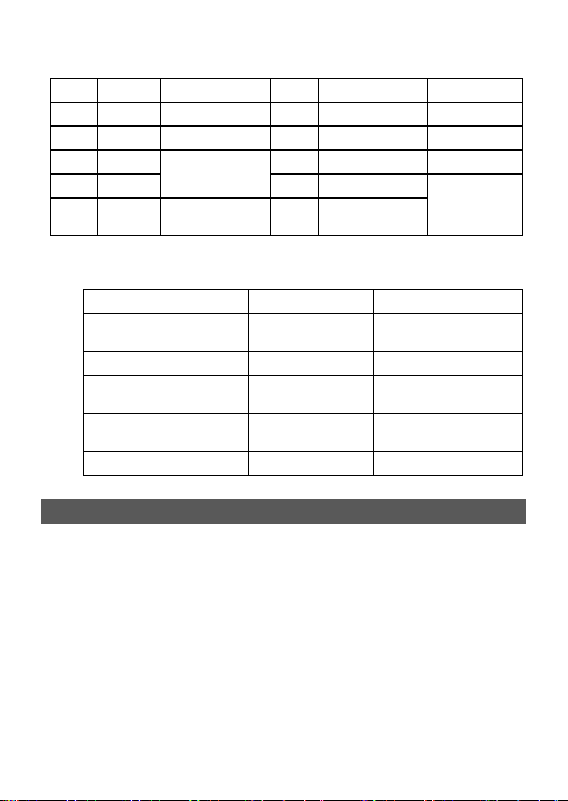
2.3 Tail Cable
Devices with or without keypad have the same tail cables. See specifications below.
Color Label Description Color Label Description
Black GND Grounding interface Blue WEIGAND_BUZZER Buzzer control
Red VDD12V Power interface Purple WIEGAND_ERR Red LED control
Orange RS485_A RS485 interface Pink WIEGAND_OK Green LED control
Yellow RS485_B Green WIEGAND_OUT_D1
Wiegand output
interface
White TAMPER
Report tamper alarms
to the control client
Brown WIEGAND_OUT_D0
2.4 Status Description
Indicator Light Sound Description
Blinks blue, green, and red
once each in sequence
One beep Startup successful
Steady blue / Normal operation
Steady green for 1s
One beep/two
beeps
Card authentication
successful
Steady red for 1s Three beeps
Card authentication
failed
/ Constant beeps Tamper alarm triggered
3 Device Installation
3.1 Installation Preparation
Cable management: Plan the cable routing in advance before installation.
Tools: Prepare a Phillips screwdriver.
10
3.2 Installation Steps
NOTE!
•
The card reader needs to be installed with a 86*86mm/115*73mm junction box (both prepared
or purchased by user). Please cho
ose appropriate accessories according to the actual
installation environment.
•
The installation methods of card readers with or without keypad are the same. The following
takes the installation of the card reader with keypad as an example.
• The following figures are for reference only. The installation methods may vary with scenarios.
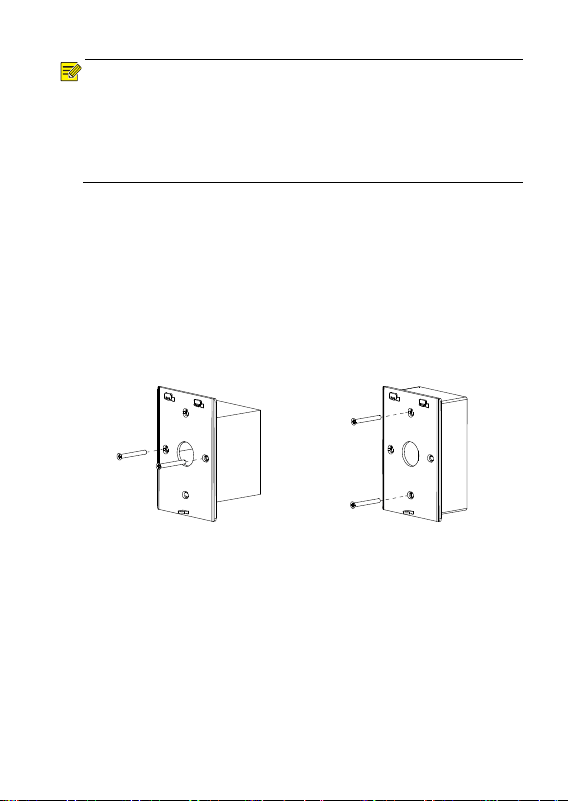
1. Determine the position of the 86mm/115mm junction box.
Use the existing 86mm/115mm junction box embedded in the wall or drill a hole to embed
one. The two installation holes on the 86mm junction box should be horizontal. The two
installation holes on the 115mm junction box should be vertical.
2. Secure the bracket.
(1) Place the bracket with the protruding side facing outward, aligning the two central holes
with the holes on the 86mm junction box (align the top and bottom holes with the holes
on the 115mm junction box).
(2) Secure the bracket to the 86mm junction box (or 115mm junction box) with two M4*35
(6#-32-16) cross-recessed flat head screws.
86mm junction box
115mm junction box
3. Connect the tail cable.
(1) Connect the tail cable according to the actual networking.
(2) Use two M2.5 cross-recessed flat head screws to secure the tail cable cover plate (with
the rubber pad side facing inward) to the back of the card reader.
(3) Thread the excess cables through the central round hole of the bracket and hide them
inside the 86mm/115mm junction box.
4. Secure the card reader to the bracket.
(1) Align the groove on the back of the card reader with the protrusion on the top of the
bracket and insert it, ensuring that the bottom screw holes of the bracket align with the
bottom screw holes of the card reader.
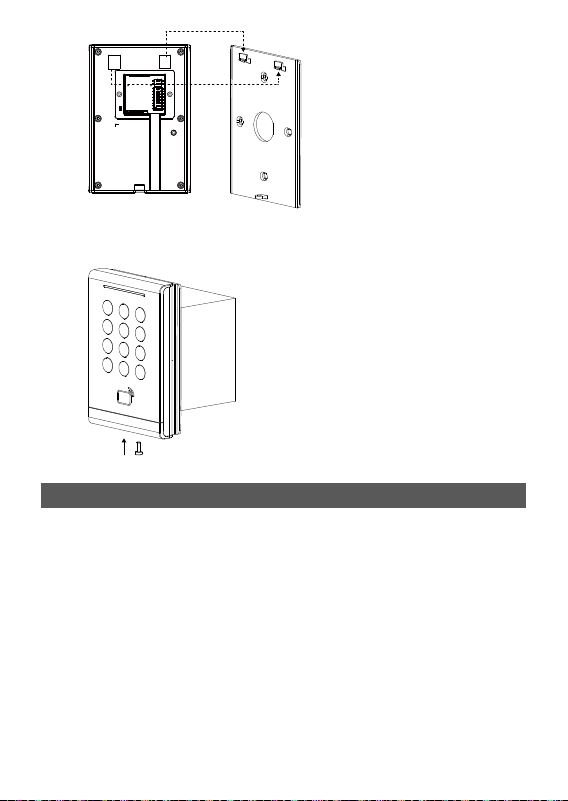
11
(2) Screw in one M3 truss head security screw from the bottom screw hole to ensure the card
reader is securely fastened to the bracket.
4 Startup
After the device is installed correctly, connect one end of the power adapter (user-purchased or
prepared) to the card reader’s power cable and the other end to a mains power outlet.
If the indicator light blinks blue, green, and red once each in sequence with a beep, the device
has started successfully.
12
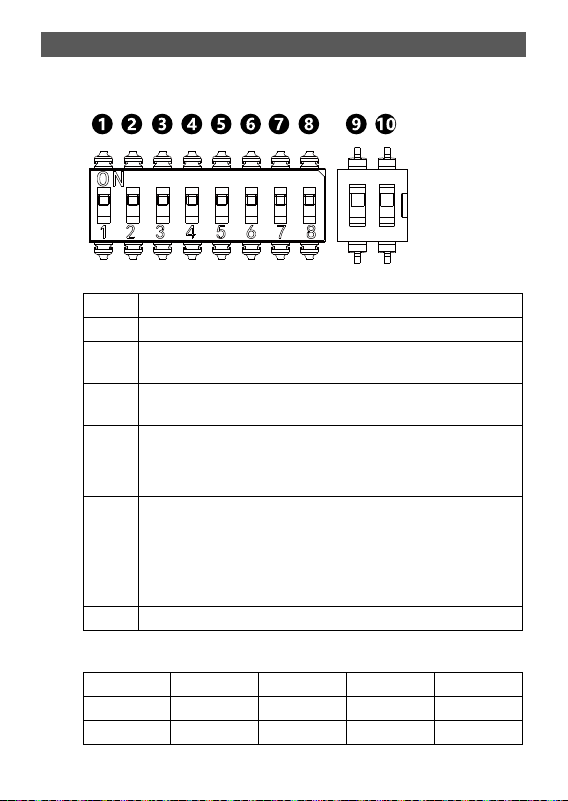
5 DIP Switch Settings
The card reader supports Wiegand and RS485 communication modes.
You can switch modes and adjust parameters through the DIP switches located on the back of
the device.
No. Description
1-4 RS485 address bit (Switch No.5 must be ON)
5 Switch card reader mode
ON: RS485 mode; OFF: Wiegand mode (default)
6 Switch Wiegand protocol (Switch No.5 must be OFF)
ON: Wiegand 26; OFF: Wiegand 34 (default)
7 RS485 termination resistor (Switch No.5 must be ON): For long-distance (>
500m) and high-speed (> 1Mbps) communications. This is used to strengthen
signal strength and ensure communication quality.
ON: Connect resistor; OFF: Not connect resistor (default)
8 Enable/disable card security function
• ON: Enables encrypted authentication for enhanced security. Supports
reading data from CPU cards. Does not support door opening through NFC
emulated cards.
• OFF: Disables encrypted authentication. Only reads the card's physical ID
number. Supports door opening through NFC emulated cards.
9-10 Reserved
Refer to the table below to set RS485 address.
Address No. 1 No. 2 No. 3 No. 4
0 OFF OFF OFF OFF
1 ON OFF OFF OFF

13
Address No. 1 No. 2 No. 3 No. 4
2 OFF ON OFF OFF
3 ON ON OFF OFF
4 OFF OFF ON OFF
5 ON OFF ON OFF
6 OFF ON ON OFF
7 ON ON ON OFF
8 OFF OFF OFF ON
9 ON OFF OFF ON
10 OFF ON OFF ON
11 ON ON OFF ON
12 OFF OFF ON ON
13 ON OFF ON ON
14 OFF ON ON ON
15 ON ON ON ON