www.fetco.com
User’s Guide and Operator Instructions
Single Air Pot Brewer: CBS-1221
FETCO Commercial Beverage Equipment
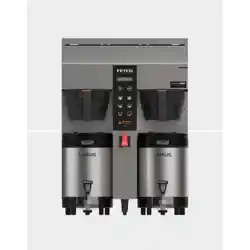
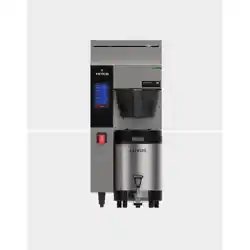
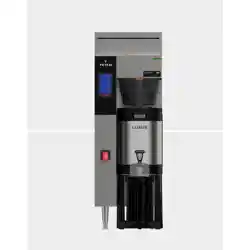
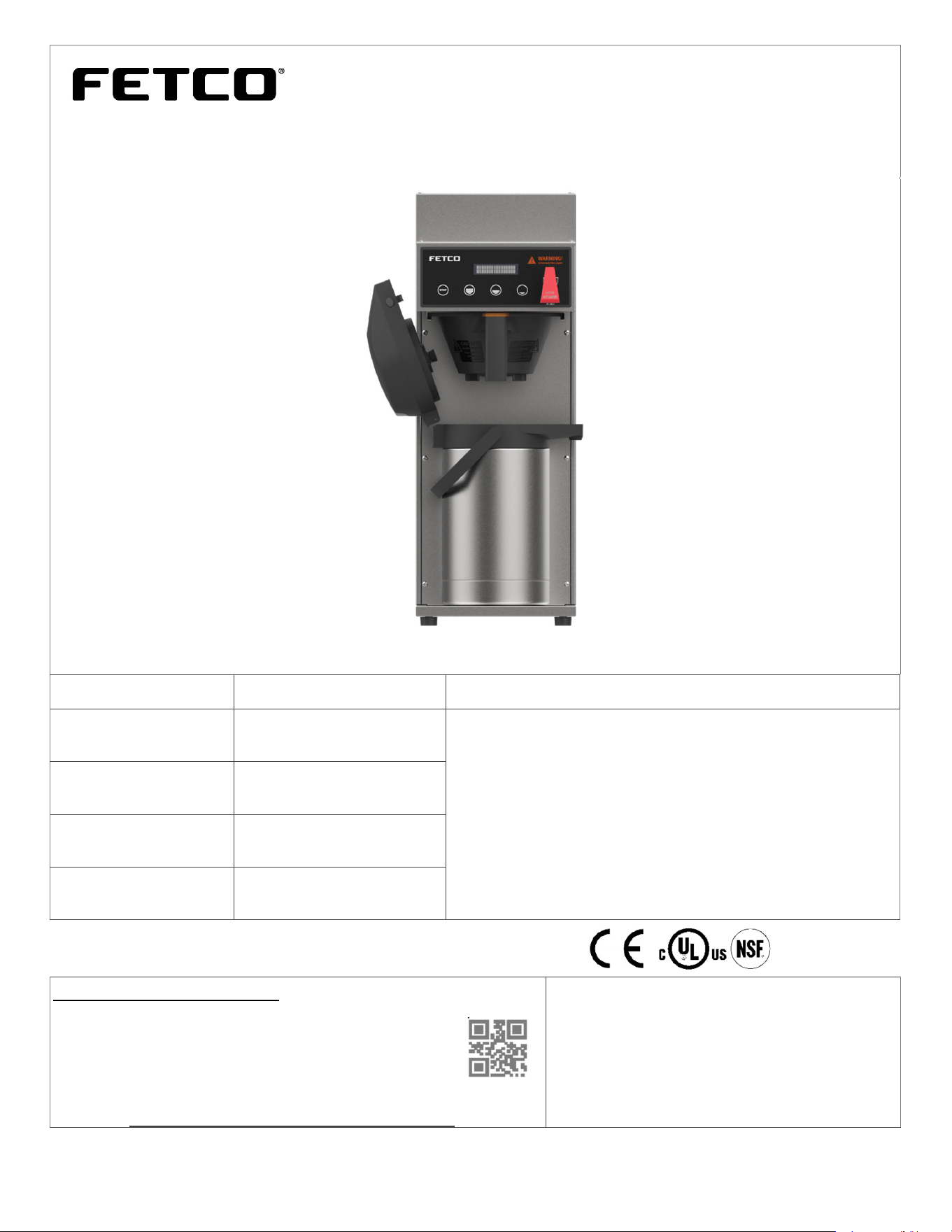
CBS-1221 Air Pot Brewer, shown with 2.2 liter Air Pot (sold separately)
SKU Product Description Features
E1221US-1X117-LM001
FETCO CBS-1221 brewer
Gourmet metal brew basket
Ready to brew out of the box-factory calibrated for 2.2 liters
Simple, intuitive digital controls and programming
User configurable batch size and brew parameters
Supplied with 120V cord and plug.
User configurable to 240V/3.3kW/13.8A for direct connect
Front accessible with modular components & service friendly
Accepts 2.2, 2.5 liter, 3 liter and 3.8 liter air pots & 1.9L server
Value priced
Self-cleaning spray head patented for mineralization resistance
E1221US-1X117-KM001
FETCO CBS-1221 brewer
Gourmet plastic brew basket
E1221US-1X117-MM001
FETCO CBS-1221 brewer
Standard metal brew basket
E1221US-1X117-PM001
FETCO CBS-1221 brewer
Standard plastic brew basket
CONTACT INFORMATION
FETCO® FOOD EQUIPMENT TECHNOLOGIES COMPANY
600 ROSE ROAD
LAKE ZURICH • IL • 60047-0429 • USA
INTERNET: www.fetco.com
©2020 FOOD EQUIPMENT TECHNOLOGIES COMPANY
PATENTS:https://www.fetco.com/pl,pa
g
es,patents,74.html
PHONE: (800) 338-2699 (US & CANADA)
(847) 719-3000 (All Countries)
FAX: (847) 719-3001
EMAIL:[email protected]
[email protected] (to order parts and equipment)
[email protected] (all service queries)
P194 REV. 000 November 2020
Coffee Brewer: CBS-1221
fetco.com
2
TABLE OF CONTENTS
Specifications and Requirements .................................. 2
Starting The Brew .......................................................... 3
Enter Programming ........................................................ 3
Exit Programming & Save .............................................. 3
Programing Menu Layout ............................................... 4
A PROGRAM ................................................................. 5
B GENERAL ................................................................... 6
C SERVICE INPUTS ...................................................... 7
D SERVICE OUTPUTS .................................................. 7
E CALIBRATION ............................................................ 7
F SERVICE MENU ........................................................ 8
G SAVE & EXIT ............................................................. 8
ERROR CODES ............................................................ 9
Operator Training ........................................................... 9
Installation Guide ......................................................... 11
Parts Diagrams ............................................................ 13
Wiring Diagram ............................................................ 17
Specifications and Requirements-North America
Water Requirements: Electrical: Supplied with 120V cord & plu
g
CBS-1221: 20-75 psi
g
,
(
138-517kPa
)
1½
g
pm/
(
5.7lpm
)
User ad
j
ustable to 220-240 volt terminal block
Water supplied to hot bevera
g
e equipment should be filtered Tank Temperature, as set by factory:
200°F
(
93°C
)
inside water tank
(
at sea level
)
Water inlet fittin
g
is a 1/4 inch male flare.
Brew Volume: Full Batch 2.20 liters (all 3 batches 2.2 liter)
User ad
j
ustable to up to 0.85
g
allon/3.25 liters per brew
Water supply: (Optimal) 100-150TDS
A
ll bevera
g
e equipment must use filtered water.
Total Brew C
y
cle—Factor
y
default settin
g
: 6 minutes=[4 minute brew time + 2.0 minute drip dela
y
]
(
all recipes
)
Brew-Process parameters are user controllable for:
Brew Volume, Brew Time, Prewet Percent and Prewet Dela
y
, Drip Dela
y
Weights and Capacities
Dispenser
Model
Height Width Depth
Water tank
capacit
y
Empty
Wei
g
ht
Filled
Wei
g
ht
Shipping
Wei
g
ht
Shipping
Dimensions
CBS-1221
Brewer
26 in
660 mm
9 1/4 in
240 mm
22 1/4 in
560 mm
2.7 gallon
10.1 L
29bs.
13.1 k
g
52 lbs.
23.6 k
g
35 lbs.
15.9 k
g
31½” x 24¾” x 13”
800mmX629X330mm
Calibrated for
2.2 L/74 oz/0.58gal air pot
Calibrated for 120g/4.2oz coffee dose
Range: 100-140 gram 3.5-4 ounce dose
Coffee Filter
FETCO# F008 or 10⅝” X 4½” (Standard)
FETCO# F002 or 13” X 5” (Gourmet)
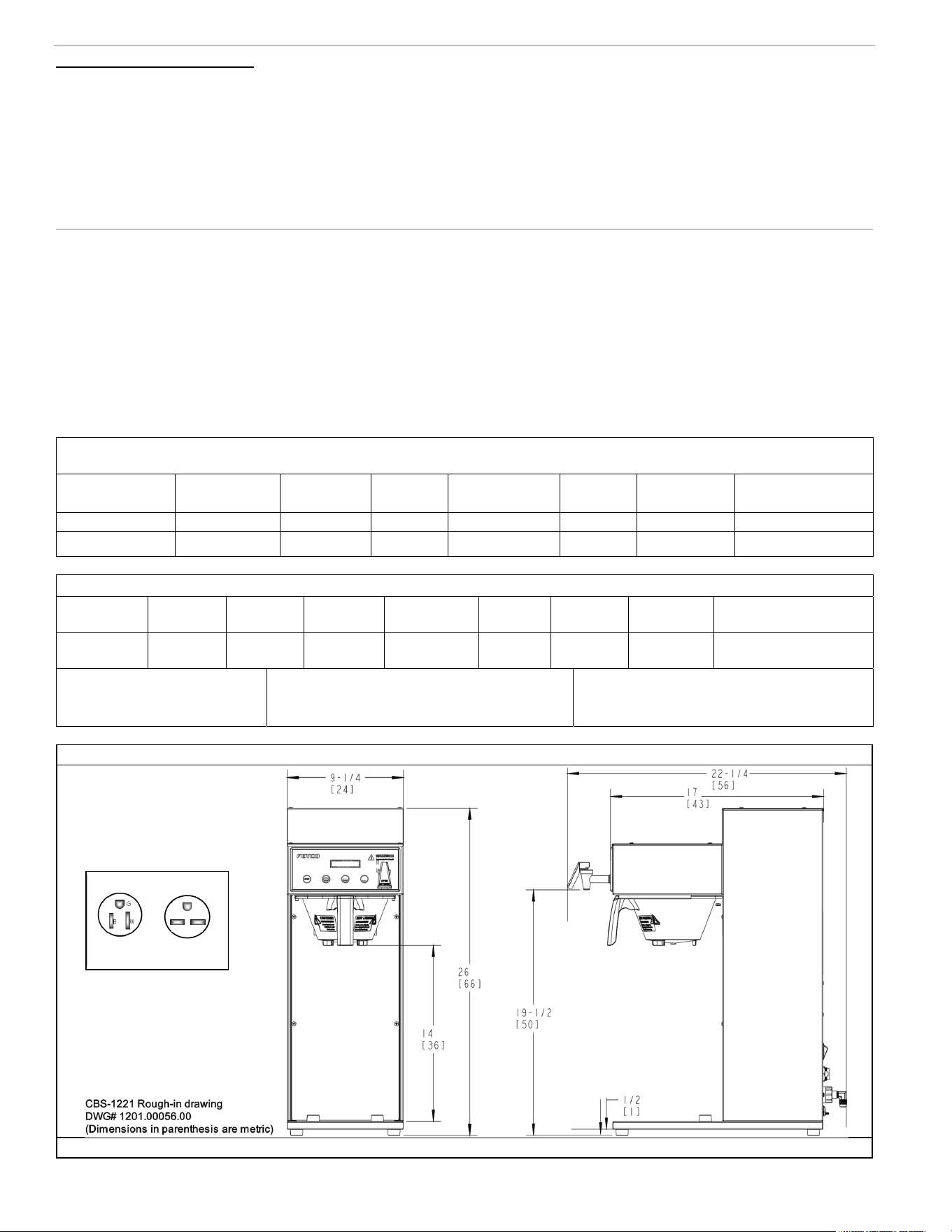
Rou
g
h-In Drawin
g
s
CBS-1221 Front CBS-1221 Side
Electrical Specifications
Universal wirin
g
, sold 120 volt cord and plu
g
. Brewers ma
y
be field converted to 200-240 volts
Heater
Configuration
Voltage Wires
Electrical
Connection
KW
Maximum
Amp Draw
Brew-Volume/Hour
Factory default 1 X 1.7 kW 120 L1,N, G Cord and plug 1.7 14.7 4.4 gal/16.5 liters
User selectable- 1 X 3.2 kW 200-240 L1,L2,G Terminal block 2.2-3.3 11.2-13.4 6-8 gal/22-32 liters
G
B W
NEMA PLUG CONFIGURATION
NEMA 5-15P NEMA 6-15P
From factory Option by user
1
Go to fetco.com for the latest versions of all information
Page 3
User Guide & Operator instructions
P194Re0 November 2020
s
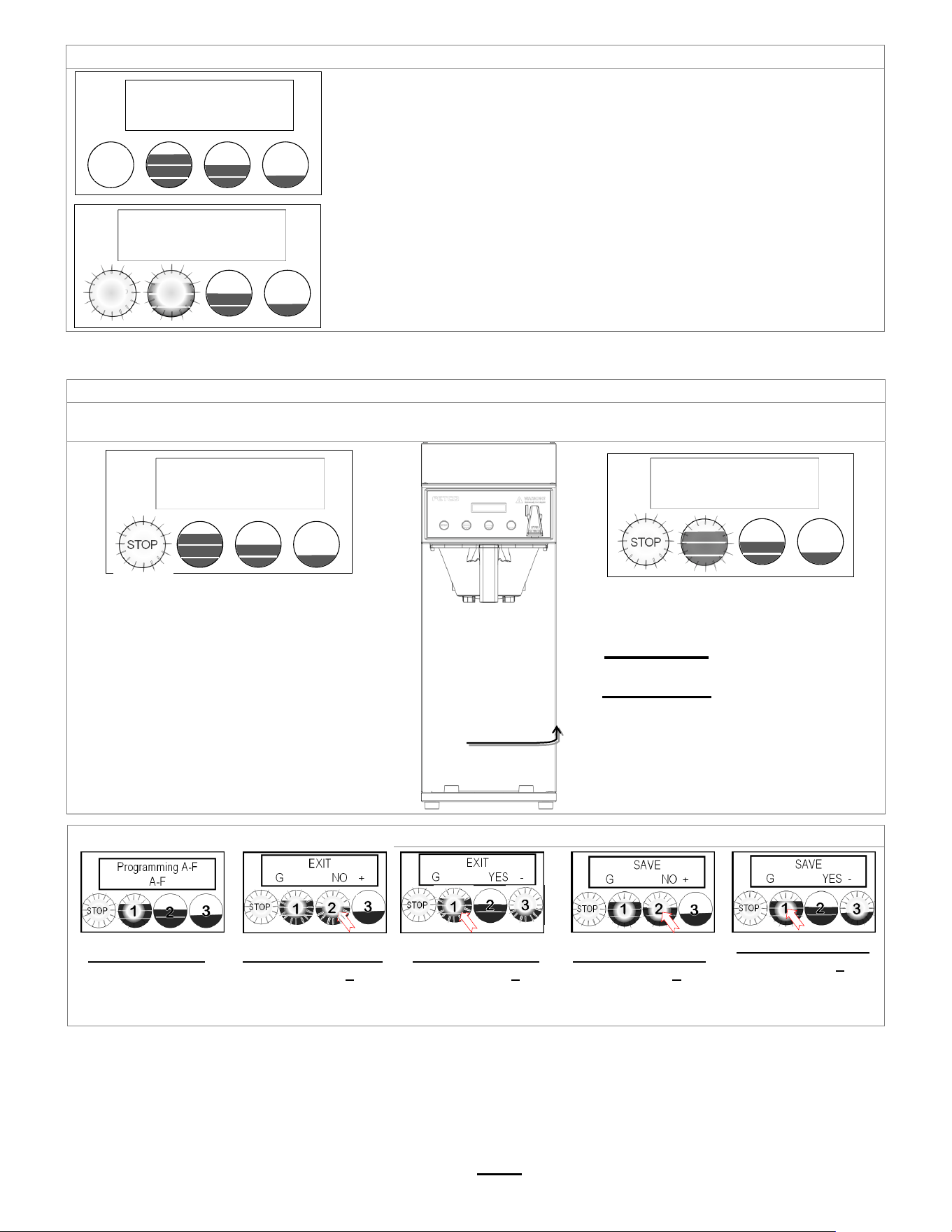
Starting The Brew
1. Turn the power switch “ON”.
2. Prepare a brew basket with the correct size filter and appropriate amount of coffee.
3. Slide the brew basket completely into the rails.
4. Place a clean, empty, preheated dispenser under the brew basket.
5. Select a batch & hold the corresponding BREW button in for 1 second to start
6. -STOP button will illuminate, Brew Selector button will illuminate
-Countdown time will display. Default time setting is 6:00 (six minutes)
-Selected BREW button will slowly pulsate to indicate brew is in progress.
-All other BREW buttons for that brew head will be unlit.
7. When the brew cycle is finished,
STOP button will extinguish and the BREW button will continue to pulsate to indicate
DRIP will display to show the 2:00 (two minutes) drip delay setting.
This indicates that coffee may still be dripping from the brew basket
For safety- do not remove brew basket until drip-out is complete.
Enter Programming
There are 7 menu groups-A-F plus EXIT (G).
See the followin
g
pa
g
es for the batch parameter definitions and all settin
g
s for the brewer
TO ENTER PROGAMMING
1-Turn brewer “OFF” from power switch
2-Turn power switch to “ON”
…Screen will initialize and then
display digital process notifications
3-After Initialization- “STOP” Lamp turns on
4-Quickly press “STOP” button (no need to hold)
When brewer is In PROGRAMMING MODE
-the screen will display:
|BATCH PRG|
|A (or B-F) |
-
Illuminated LED indicates active keypad positions
See the following pages for batch parameter
definitions and all settings for the brewer
Exit Pro
g
rammin
g
& Save Control Settin
g
Chan
g
es
From any screen-
Press STOP button
until the EXIT (“G”)
screen appears
From the “G” screen
Press button 2 to
toggle to the EXIT-
YES screen
From EXIT screen
Press button 1 to
toggle to the SAVE
screen
From SAVE screen
Press button 2 to
toggle to the SAVE-
YES screen
To SAVE and EXIT
Press button 1 to
SAVE your changes
and EXIT to
OPERATING MODE
STOP
Programming A-F
A-F
STOP
EXIT
G NO +
STOP
EXIT
G YES -
STOP
SAVE
G NO +
STOP
SAVE
G YES -
STOP
FETCO
Ready to Brew
STOP
Brewing
5:30
STOP BUTTON
↓
ON/OFF switch
is located on
lower right on
back of brewer
STOP
CBS-1221
Ver.3.0.2019
STOP
Batch Program
A
Go to fetco.com for the latest versions of all information
Page 4
User Guide & Operator instructions
P194Re0 November 2020
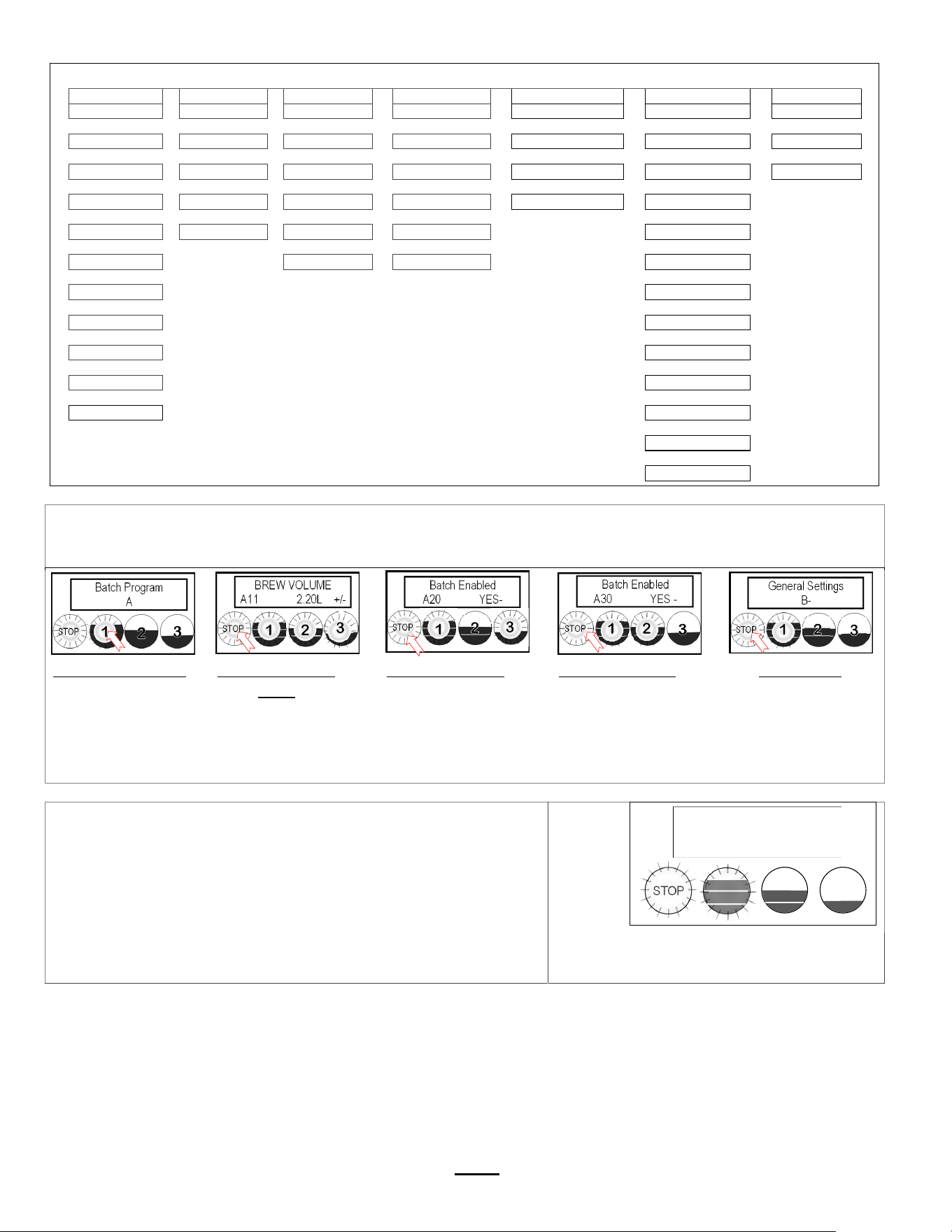
Pro
g
ramin
g
Menu La
y
out
A
10 to A70
B10-B40
C10-C50
D10-D90
E10-E70
F10-F120
G10-G11
Batch Parameters
General Settings
Service Inputs
Service Outputs
Calibration
Service Menu
Exit and Save
|
|
|
|
|
|
|
A11
Brew Volume
B1
Tank Temperature
C1
LLC Probe
D1
Heater SSR
E1
Ready Temp. Offset
F1
Firmware
G1
Save Changes
|
|
|
|
|
|
|
A12
Brew Time
B2
Brew at Temp
C2
Basket Sensor
D2
Fill Valve
E2
LLC Sensitivity
F2
Bootloader
G2
EXIT?
|
|
|
|
|
|
A13
Prewet Percent
B3
Temperature Units
C3
Tank Temperature
D4
Brew Valve
E3
Slow Flow Compensate
F3
Select Model
|
|
|
|
|
A14
Prewet Delay
B4
Volume Units
C4
USB Drive
D9
LCD Brightness %
F4
Customer Name
|
|
|
|
A16
Drip Delay
C5
Keyboard Test
D10
LED Brightness %
F5
A
dd Customer Name
|
|
A20
Batch (2) Enabled
F6
Backup to USB
|
|
A30
Batch (3) Enabled
F7
Restore from USB
|
|
A70
Copy Batch
F8
Restore Defaults
|
|
A71
Copy Batch: From
F9
Demo Mode
|
|
A72
PASTE: To
F10
Error Log
|
F11
Erase Error Log
|
F12
Service Phone#
TheAmenus[A1‐3]correspondtobatchbuttons[1‐3]onthetouchpanel
AccesstheAmenustoPROGRAM&makechangestoindividualmenurecipes.Menusetti ngs canbecopied
MenupositionA1ispermanent.Menus A2,A3canberemovedbyoperatorifdesired
FromAPRGscreen
Pressbutton1togo
totheAmenu
accessscreen
FromA11screen
PressSTOPtoscroll
toA20.
(A1 is permanent)
FromA20screen
PressSTOPto
scrolltothethird
batchinthe“A”
menus.Makeany
changesasrequired
FromA30screen
PressSTOPtoscroll
throughCOPYand
furthertoremaining
programmingkeys.
Tocontinue
PressSTOPtoscroll
throughsections
SeeSAVE&EXITin
previoustable
.
RECIPE Location map
View and change settings for the brew recipes from the “A” screens
with the controls in PROGRAMMING.
The batch A1 button position is permanent and will not display
programming steps A20 or A30 to ENABLE/DISABLE.
DISPLAY
STOP BATCH
A1
(permanent)
BATCH
A2
BATCH
A3
STOP
Batch Program
A
STOP
BREW VOLUME
A11 2.20L +/-
STOP
Batch Enabled
A20 YES-
STOP
Batch Enabled
A30 YES -
STOP
General Settings
B-
STOP
Batch Program
A

Go to fetco.com for the latest versions of all information Page 5 User Guide & Operator instructions P194Re0 November 2020
A
PROGRAM Menu Features: Batch Parameters
The settings below are shown for the top batch on a single brewer top left button on a twin brewer.
See how to access all A menus on the previous page. Below are the brew settings for default A1 & A2 batches
POSITION Program Items Factory set Default Programming Range Increments Notes
A11 Batch Volume
2.20liters
0.58
g
al
0.95 to 3.25L
0.25 to 0.85
g
al
0.05L
0.01G
Unit software is in liters;
Can convert to
g
allon
A12
Brew Time
(MIN:SEC)
4:00 minutes 2:00 – 12:00 15 sec
Default total brew time is
6:00 minutes
A13 Prewet Perc. 0% 0.00 – 25.0% 1%
Percentage of total brew
volume
A14
Prewet Delay
(Pause after prewet
completes)
0% [1:00 Min] [0:10 – 5:00] 10 sec
The time between
prewetting and start of
brew cycle.
This feature appears
ONLY if Prewet >0:00
A16 Drip Delay 2:00 mm:ss 0:30 – 6:00 min. 10 sec
Time brew basket should
remain in place during final
drip-out
Drip delay remains “ON”
for 2:00 minutes if STOP is
pressed during brew †
A20
Batch Enabled
A20 YES -
NO +
YES
(Active)
Middle and Bottom
batches A2,A3
Batch on
or off
Batches may be
individually enabled,
rewritten or deactivated
A21 Batch Volume
2.20liters
0.58
g
al
0.95 to 3.25L
0.25 to 0.85
g
al
0.05L
0.01G
Unit software is in liters;
converts to
g
allon
A22
Brew Time
(MIN:SEC)
4:00 minutes 2:00 – 12:00 15 sec
Default total brew time is
6:00 minutes
A23 Prewet Perc. 0% 0.00 – 25.0% 1%
Percentage of total brew
volume
A24
Prewet Delay
(Brew pause after
prewet completes)
0% [1:00 Min] [0:10 – 5:00] 10 sec See Note A14
A
26 Drip Dela
y
2:00 mm:ss 0:30
–
6:00 min. 10 sec
See Note A16
A30
Batch Enabled
A30 YES -
NO +
YES
(Active)
Middle and Bottom
batches A2,A3
Batch on
or off
Batches may be
individually enabled,
rewritten or deactivated
A31 Batch Volume
2.20liters
0.58
g
al
0.95 to 3.25L
0.25 to 0.85
g
al
0.05L
0.01G
Unit software is in liters;
converts to
g
allon
A32 Brew Time (MIN:SEC) 4:00 minutes 2:00 – 12:00 15 sec
Default total brew time is
6:00 minutes
A33 Prewet Perc. 0% 0.00 – 25.0% 1%
Percentage of total brew
volume
A34
Prewet Delay
(Brew pause after prewet
completes)
0% [1:00 Min] [0:10 – 5:00] 10 sec See Note A14
A
36 Drip Dela
y
2:00 mm:ss 0:30
–
6:00 min. 10 sec
See Note A16
A70
Batch Copy
Copy From Batch A71 A71 1 (1-6)
A72
(PASTE TO)
Copy To Batch? A72 A72.1 (1-6)
A11 Single Topmost Batch cannot be disabled. A21 & A31 middle and bottom batches may be disabled.
† DRIP DELAY will not activate when STOP is pressed within 5 seconds of startin
g
a brew time
.
Go to fetco.com for the latest versions of all information
Page 6
User Guide & Operator instructions
P194Re0 November 2020
B GENERAL B
r
ewer Operation Control Settin
g
s, Ad
j
ust Brew Flow Rate
POSITION Program Items Factory set Default Programming Range Increments Notes
B1 Tank Temp.
200°F -or- 93°C
NOTE: Units are in
En
g
lish b
y
default
170° to 207°F
77° to 97°C
1.0°F
0.5°C
Chart to correct for
high altitude below
B2 Brew at Temp. “YES” ON/OFF YES/NO SEE NOTE BELOW
B3
Units of Measure
TEMPERATURE
°F Fahrenheit Fahrenheit/Celsius C/F
NOTE: Overwrites
user settin
g
s
(see page 9)
B4
Units of Measure
VOLUME
L LITERS Gallons/Liters L/Gal
NOTE: Overwrites
user settings
(see page 9)
B5
Show Tank
Temperature
YES YES/NO
To display HW tank
temperature on screen
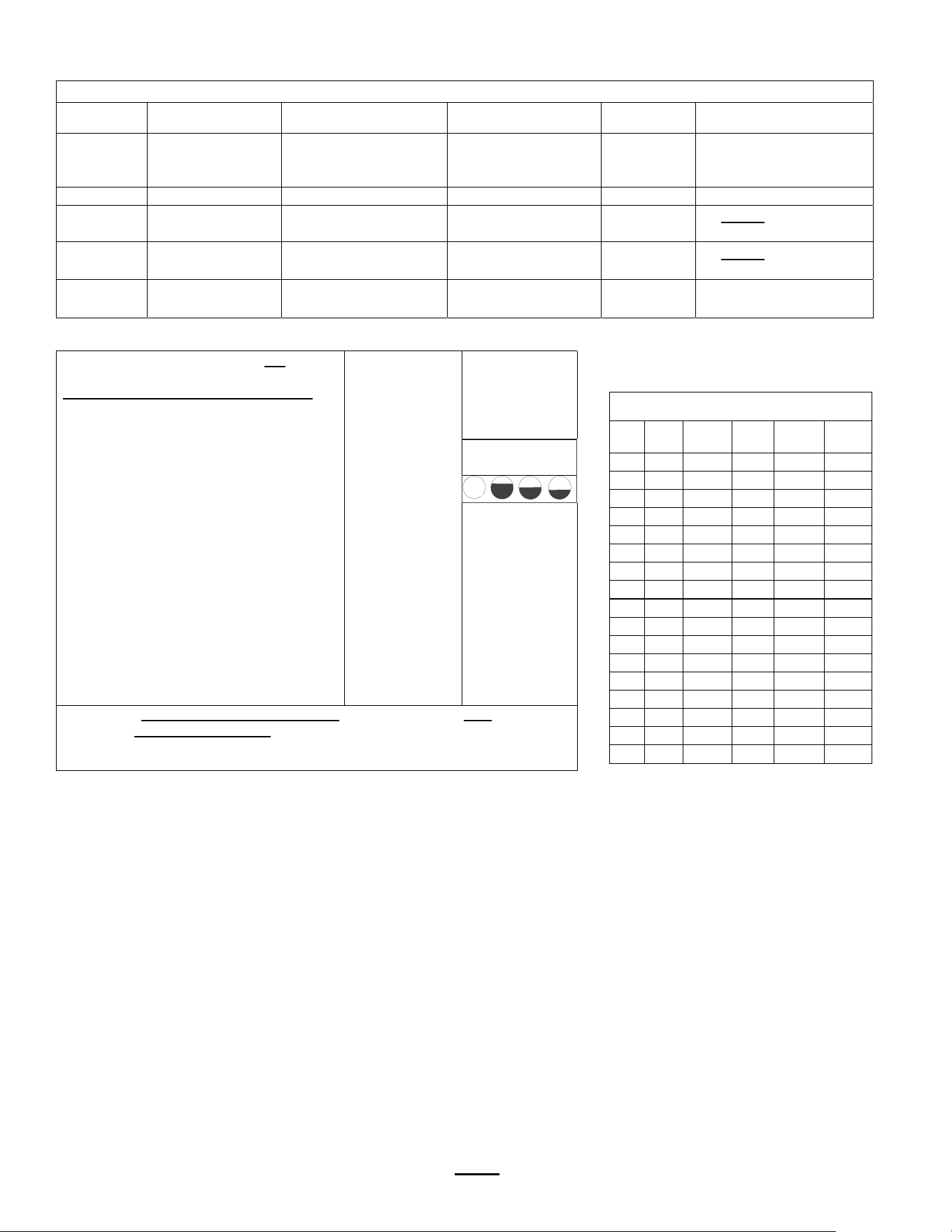
Chart to correct for altitude for boiling point
in tank water temperature.
[ft] [m]
Suggested
Setting[°F]
Boiling
point[°F]
Suggested
Setting[°C]
Boiling
point [°C]
0 0 205 212.0 96 100.0
500 152 205
211.0 96
99.5
1000 305 200
210.1 93
98.9
2000 610 200
208.1 93
97.8
2500 762 200
207.2 93
97.3
3000 914 200
206.2 93
96.8
3500 1067 197 205.3 92 96.3
4000 1219 195 204.3 91 95.7
4500 1372 194 203.4 90 95.2
5000 1524 194 202.4 90 94.7
5500 1676 193 201.5 89 94.2
6000 1829 192 200.6 89 93.6
6500 1981 191 199.6 88 93.1
7000 2134 190 198.7 87 92.6
7500 2286 188 197.8 86 92.1
8000 2438 187 196.9 86 91.6
8500 2591 185 196.0 85 91.1
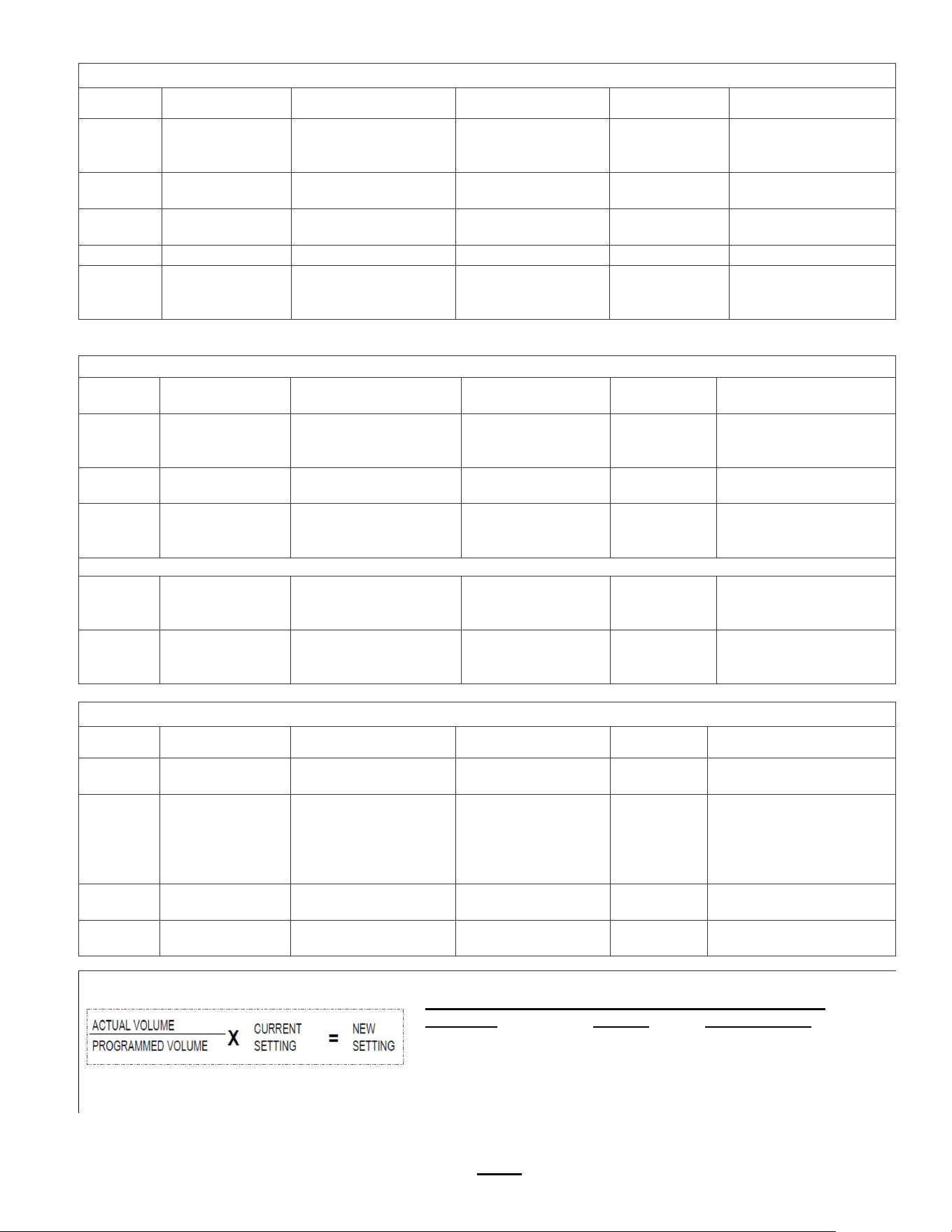
BREW AT TEMPERATURE DEFINITIONS
DEFAULT: BREW AT TEMP: “ON”
(FACTORY DEFAULT FOR BREWER)
“BREW at TEMP:
-Batch will not start if tank temperature
is below set point.
-Display will show “HEATING”
and hot water tank temperature
The “BREW START” entry buttons will not
illuminate until the hot water tank reaches the
selected temperature.
Controls allow both sides of dual brewer to
operate if one side has an ongoing brew
started and the second side brew is selected.
Notifications shown on screen:
TEXT: HEATINGTank above 87°C/189°F-
will allow brew at low temperature.
Coffee flavor may be affected
TEXT: L. HEATTank above 76°C/169°F-
will allow brew at low temperature.
Coffee flavor will be noticeably affected
Tank temp
STOP is not lit
BREW START
buttons not lit.
and are disabled
.
Buttons will
illuminate “READY”
when hot water tank
temperature is at
setpoint
Hot water tank not at
brew temp setpoint.
HEATING
160°F
USER SELECTABLE OPTION: BREW AT TEMP: OFF
(Not recommended) Unit will operate at cold temperature
Allows brewing at any temperature above 77°C/170°F
Below 70°C/170°F The red colored ready lights switch turn off
STOP
Go to fetco.com for the latest versions of all information
Page 7
User Guide & Operator instructions
P194Re0 November 2020
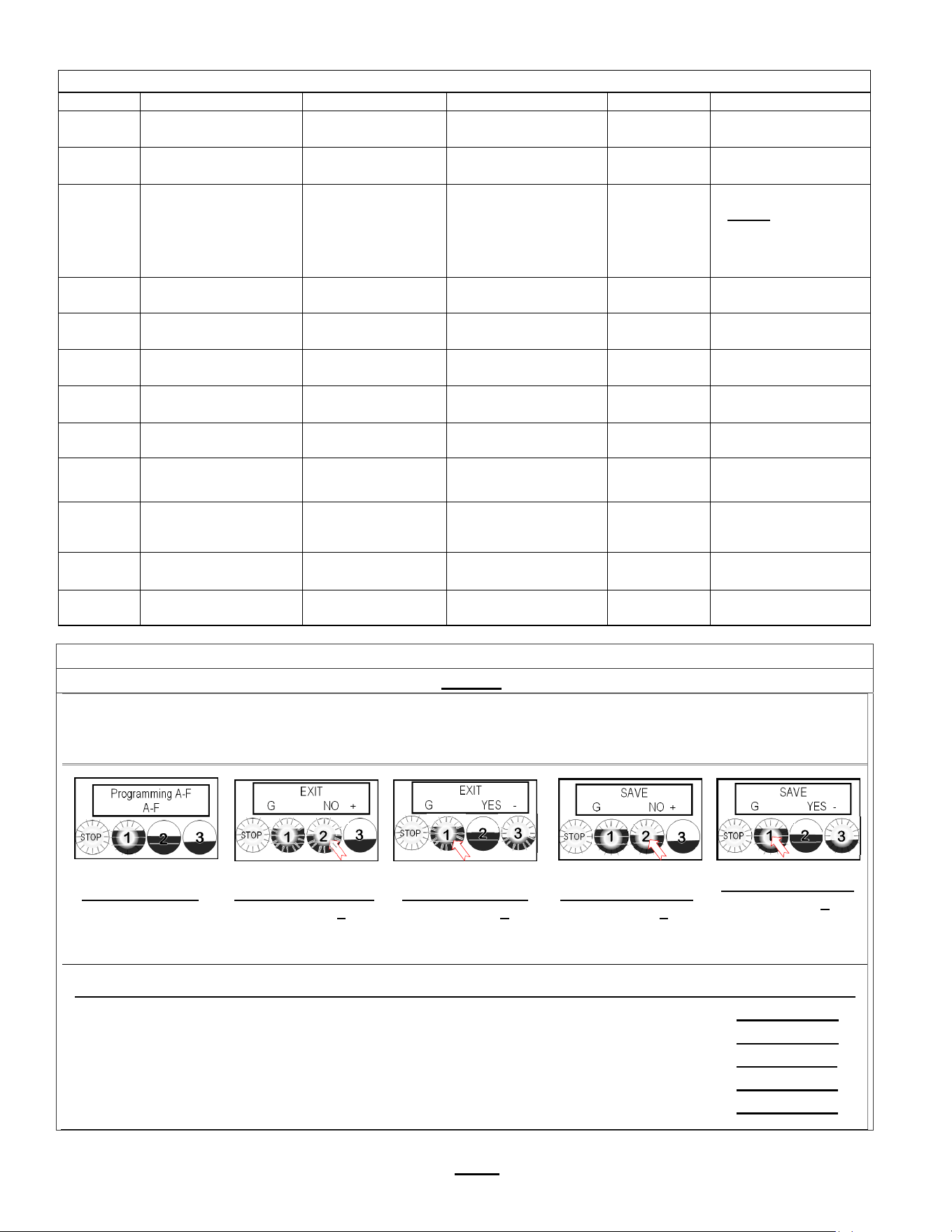
C SERVICE INPUTS Brewer Sensors and Keypad
POSITION Program Items Factory set Default Programming Range Increments Notes
C1
LLC Probe
continuity
Direct read
Reading of tank
water resistivity in
TDS
≈850- LOW
≈1600-HIGH
Nominal values
C2
Brew Basket
Sensor
Direct read YES or NO
C3
Tank
Temperature
Direct read
Hot water tank
temperature
Actual values
C4 USB Drive NO
C5 Keyboard Test Calibrate
Checks buttons
under membrane
cover
YES/NO
Follow directions on
the touch screen
.
D SERVICE OUTPUTS Test Valves and Heaters; Set screen bri
g
htness
POSITION Program Items Factory set Default
Programming
Ran
g
e
Increments Notes
D1
Heater SSR
Test
Press button 2 to test
(button 1 stops test)
Activates heater
Default is 10 sec..
Toggle +/-
OFF or ON
Energizes Heater(s)
WARNING!
Service use onl
y
.
D2 Fill Valve Test
Press button 2 to test
(
button 1 stops test
)
Activates valve
Default is 10 sec.
Toggle +/-
OFF or ON
Press To Test
D4 Brew Valve Test (Press to test)
Activates valve
Default is 10 sec.
Toggle +/-
OFF or ON
Runs valve to verify flow.
NOTE: Have container
under brew basket.
Sin
g
le series displa
y
s ri
g
ht side onl
y
Left Valve displa
y
is onl
y
for twin side brewer.
D9 LCD Brightness Brightness=90% 20-100% 5%
Adjust LCD screen
brightness only-Not for
LEDs under buttons
D10 LED Brightness Brightness=60% 20-100% 5%
Adjust LED button
brightness only-Not for
the screen displa
y
LCD
.
E CALIBRATION Brewer Sensors and Keypad
POSITION Program Items Factory set Default Programming Range Increments Notes
E1
Ready Temp.
Offset
-4°F
-2°C
-2° to -10°F
-1° to -5° C
1°F
1°C
Compensates output to
measured temperature
E2 LLC Sensitivity
NORMAL
(“NORMAL” for most
water)
HIGH
(Biased for reverse
osmosis water or
very pure water)
NORMAL
HIGH
Liquid level control
sensitivity.
High,1300Ω is for reverse
osmosis water or very
pure water.
E3
Slow flow rate
from mains
OFF OFF/ON
Toggle +/-
YES or NO
Trims fill system for low
suppl
y
E5
RIGHT brew
valve flow rate:
1.60L/0.42G
1.30-1.90Liter
0.34-0.52G
0.05L
0.013G
Adjusts flow rate
Use this formula to compensate for minor discrepancies in actual volume versus programmed volume.
Default Brew Valve Flow Rate—All CBS-1200 Brewers
CBS-1220 L/min Range
Right Brew Valve FR 1.60 +1.3 L to 1.9 L
Use the formula above to determine the correct setting
Set lower to increase volume, higher to decrease volume.
See “PROGRAM” E5 For valve settings and calibration. Factory set brew valve flow rates are in liter/min
Go to fetco.com for the latest versions of all information
Page 8
User Guide & Operator instructions
P194Re0 November 2020
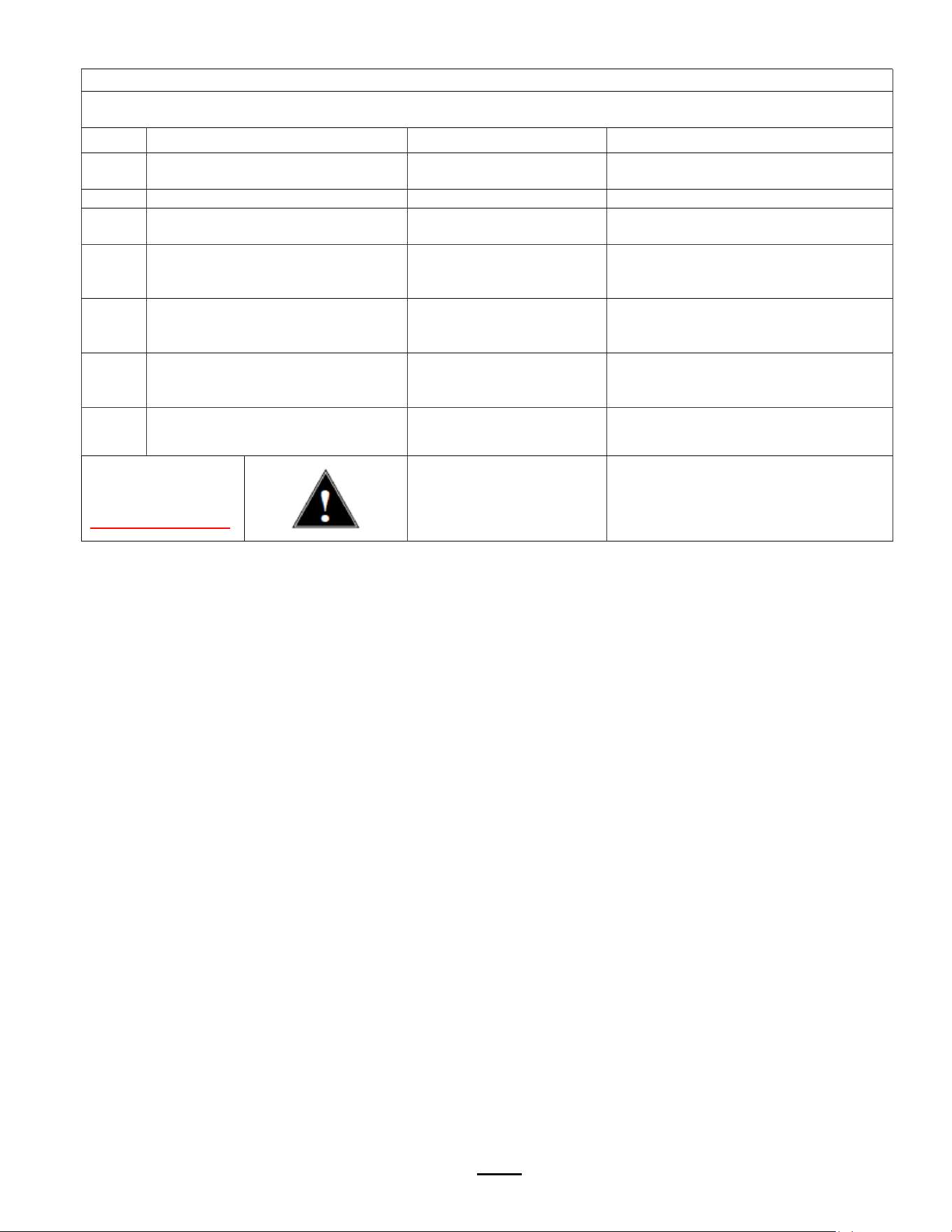
G SAVE & EXIT Saving changes and exiting PROGRAMMING
The brewer will save changes only from the “G” menu. DO NOT reboot brewer or toggle ON/OFF-exit as below.
TO EXIT PROGRAMMING & HOW TO SAVE CONTROL SETTING CHANGES
HOW TO SAVE CHANGES AND EXIT-The brewer is in PROGRAMMING mode
.
A convenient way to access the steps is to remember to scroll to EXITYES and to SAVE YES
From any screen-
Press STOP button
until the EXIT (“G”)
screen appears
From the “G” screen
Press button 2 to
toggle to the EXIT-
YES screen
From EXIT screen
Press button 1 to
toggle to the SAVE
screen
From SAVE screen
Press button 2 to
toggle to the SAVE-
YES screen
To SAVE and EXIT
Press button 1 to
SAVE your changes
and EXIT to
OPERATING MODE
NOTE: User Settings will be erased and overwritten to factory default settings by the following five programming changes
1) When setting or changing units of display for the tank temperature (F Fahrenheit or C Celsius). (SETTING B3)
2) When setting or changing units of display for the volume (L liters, G gallons). (SETTING B4)
3) When setting brewer model The software sets equipment to brewer defaults (SETTING F3)
4) When loading from USB (Reprograms settings) (SETTING E7)
5) When restoring defaults (Reloads to defaults ) (SETTING E8)
F SERVICE MENU Software & Code View and Settin
g
s
POSITION Pro
g
ram Items Factor
y
set Default Pro
g
rammin
g
Ran
g
e Increments Notes
F1 Display Firmware
1.0.201001
Displays current
version [10/2020]
F2 Display Bootloader
1.0.200930
Displays current
version [9/2020]
F3 Select Model
CBS-1221
&
CBS-1222
Will need reboot
Scroll to brewer
model Save & Exit
CBS—1221
(Single side)
CBS—1222
(Dual side)
NOTE: Overwrites
all user settings
(See below)
F4 Customer Name Off NO or YES
For name on screen
F5 Customer Name
(only if above is
“ON
)
Scroll with batch keys A-Z;a-z;0-9 16 characters total
F6 Backup to USB Follow prompts
Saves
settin
g
s
Insert blank USB
F7 Restore From USB
Applies settings
from USB
Insert USB
Will need reboot
F8 Restore Defaults NO NO/YES Reset to factory
F9 Demo Mode DEMO ON/OFF
Demonstrates the controls
for training. Disables all
components in demo mode
F10 Error Log
Lists up to six
codes, in order
1: ; 2: ;3:;4: ;5: ;6:
1=Newest/6=Oldest
LAST six errors only
Newest=first
Oldest=last
See Error Code
Chart for references
F11 Erase Error Log NO +
Toggle +/-
YES or NO
FACTORY USE ONLY.
DO NOT RESET
F12 Service Phone # Service
STOP
Programming A-F
A-F
STOP
EXIT
G NO +
STOP
EXIT
G YES -
STOP
SAVE
G NO +
STOP
SAVE
G YES -
Go to fetco.com for the latest versions of all information
Page 9
User Guide & Operator instructions
P194Re0 November 2020
Operator Training
Review the operating procedures with whoever will be using the brewer.
Pay particular attention to the following areas:
1. Always pre-heat the dispensers before the first use of each day by filling them half way with hot water, and letting
them stand for at least 5 minutes.
2. Do not remove the brew basket from a coffee brewer until it has stopped dripping.
3. Make sure the dispenser is empty before brewing into it.
4. Show how to attach covers, close, and or secure the dispensers for transporting.
5. Show the location and operation of the water shut off valve as well as the circuit breaker for the brewer.
6. Steam from the tank will form condensation in the vent tubes. This condensation will drip into and then out of the
brew baskets. Up to 1/4 cup/118cc discharging overnight is possible. Place an appropriate container under each
brew basket when not in use.
7. We recommend leaving the power to the brewer on overnight. The water tank is well insulated and very little
electricity is used to keep the tank hot. Leaving the brewer in the “ON” position will also avoid delays at the beginning
of shifts for the brewer to reach operating temperature.
ERROR CODES
DO NOT CLEAR ERROR CODES UNTIL ERROR IS IDENTIFIED AND/OR CORRECTED
Contact specialized personnel for error codes
Code Description Possible Cause Corrective Action
001
Software error-error on start up or
corrupted software
Improper start-up or
shutdown
Restart , if still fault: reload software
050 Short-circuit in temperature probe Probe failure. Replace probe.
051 Open temperature probe.
Bad probe connection, or
probe failure.
Check all connections. Replace probe
if necessar
y
.
100
Initial Fill Error.
Initial fill time took longer than
expected after power up.
Water supply flow rate is
too low.
Watch for short potting during brew
cycle. Investigate cause of low flow
rate.
(
Clo
gg
ed water filter...
)
101
Error on refill-.
Tank did not refill within expected
time.
Water supply flow rate is
too low.
Watch for short potting during brew
cycle. Investigate cause of low flow
rate.
(
Clo
gg
ed water filter…
)
201
Heater open, high limit thermostat,
or Solid State Relay (SSR) fault
Failure of heating element,
SSR, high limit or low
volta
g
e
Check and replace heating elements,
SSRs, high limit devices if necessary.
255 Touch pad error
Usually from longer than 2
min contact. Or faulty
reassembly after service
Restart , if still fault: reload software.
If mechanical: replace module
NO
BSKT
Insert Brew Basket
Brew basket must be in
place
This is a
SAFETY FEATURE
Insert brew basket into brewer rails to
enable brewer

Go to fetco.com for the latest versions of all information Page 10 User Guide & Operator instructions P194Re0 November 2020
Cleaning & Maintenance
After Each Brew:
1. Dispose of grounds and rinse brew basket.
2. Never strike a brew basket or hit it against a hard surface.
This will damage the brew cone, and may damage the brew basket support rails
3. Rinse dispensers before reuse.
Every Day:
1. Wash brew basket with hot sudsy water.
2. Pull CSD from the spray head, it is magnetically attached. Use gloves or a heavy towel.
Wash off any film and reattach. Use vinegar if limescale filming is present.
3. Clean dispensers with hot suds water and a brush, rinse and air dry.
4. Use only a soft cloth and hot suds on the outside to avoid scratches. Never use abrasives that will scratch surface.
Weekly
1. Use a commercial coffee dispenser cleaner such as URNEX™, TABZ™, DIP-IT™ or Squeak 'n Clean™.
2. Carefully Follow the instructions supplied with the cleaning product
3. Never use spray cleaners, solvent, solvent based cleaner or petroleum based polish anywhere on dispensers
Warning
1. Turn off power before any cleaning procedure, including wiping the exterior for appearance reasons.
2. Dry the exterior, especially the face panel, before turning on power.
3. Do not apply any type of spray cleaner on the face panel of this equipment.
4. Never use solvent or solvent-based cleaner or petroleum based polish anywhere on this equipment.
5. Dry the face of the touch pad before turning on power
6. Do not electrically energize this equipment or attempt operation without all covers in place and all screws fastened.
7. Unplug machine before disassembly or servicing.
Safety Notes
1. Professional installation is required. This appliance is manufactured only for commercial use
2. Operational requirements and maintenance for commercial cooking appliances differ from household appliances.
3. Operators must be trained for this equipment and must understand the use, maintenance and hazards.
4. Access to the service area is restricted to persons having safety/hygiene knowledge and practical experience of the
coffee brewer. This appliance must be installed in locations where it can be overseen by adult trained personnel.
5. Do not attempt to move hot beverage equipment once it is filled. Drain equipment before moving.
6. FETCO commercial coffee brewers prepare large amounts of coffee or tea in a single batch using very hot water
7. Commercial coffee brewers provide very hot water from the spray head, brew basket and faucet when it is pulled.
8. Coffee brewers may continue to dispense very hot water from the mechanically operated faucet after the electronic
touchpad is completely disabled by turning off the power switch on the lower back of the unit, or unplugging the unit.
9. For safety, the brewer control locks the brew basket for 6.0 minutes after starting the brew.
10. Never attempt to defeat the factory set (default) time that the brew basket is locked for safety from start of brew.
Keep these instructions for training and future reference.

Go to fetco.com for the latest versions of all information Page 11 User Guide & Operator instructions P194Re0 November 2020
Installation Guide
(For Qualified Service Technicians Only)
General:
1. If not installed correctly by qualified personnel, the brewer will not operate properly, and damage may result.
2. Utilize only qualified beverage equipment service technicians for service and installation.
3. Always have an empty dispenser under spray head of all coffee brewing equipment-including when at idle
4. Damages resulting from improper installation are not covered by the warranty, and will void the warranty.
Below are the key points to consider before installation:
Electrical:
1. All CBS_Series brewers require an electrical ground wire. Installation without grounding is dangerous.
2. Note Equipotentiality Terminal, if present,
(To identify the terminals which, when connected together, bring the various parts
of equipment or of a system to the same potential, not necessarily being the earth (ground) potential, e.g. for local bonding.)
3. Verify voltages, polarity, circuits, and circuit breaker access before attaching equipment.
4. Brewers in this series wire differently in regard to a neutral wire. Review the wire diagrams.
5. The electrical diagram is located in the User’s Guide and online at www.fetco.com.
6. Make sure of the tight grounding of the equipment and use the external ground bolt.
7. The installation must comply with applicable federal, state, and local codes having jurisdiction at your location.
Check with your local inspectors to determine what codes will apply.
See wiring diagrams for connections
Plumbing:
1. North America: All installations must comply with applicable federal, state, or local plumbing codes.
2. All Others: The water and waste piping and connections shall comply with the International Plumbing Code 2003,
International Code Council (ICC), or to the Uniform Plumbing Code 2003 (IAPMO).
3. Use an inline water filter for all beverage equipment. A finishing carbon filter is preferred
4. Install the filter unit after a water shutoff valve and in a position to facilitate filter replacement.
5. The water line and newly installed filter cartage must be flushed thoroughly prior to connecting it to the brewer to
prevent debris from contaminating the machine.
6. Verify that the water line will provide a flow rate of at least 1½gpm/(5.7lpm) per minute and the water pressure is
between 20-75 psig (138-517kPa) before making any connections.
7. Hand tighten the factory fitting when connecting the incoming water line. This will reduce stress on the internal
connections and reduce the possibility of leaks developing after the install has been completed
8. Install a backflow prevention device. Most municipalities require a recognized backflow preventer.
9. Usable on all hot beverage and cold beverage equipment is a WATTS® SD-2 or SD-3.
10. WATTS spring loaded double check valve models are accepted by most zoning authorities.
The check valve should be as close to the water supply inlet of the beverage equipment as possible.
Tank Drain
The water tank must be drained before maintenance procedures, and when the unit is to be relocated or shipped
1. Disconnect power and water to unit. DANGER: Insure that all utility connections to the brewer are broken.
2. Move the unit near a sink or obtain a container large enough to hold four gallons of water.
Note: the hot water tank may hold more than four gallons.
3. Remove the front panel and tank cover and allow the tank to cool to a safe temperature
4. The tank drain line and clamp are located inside-under the hot water tank. Pinch the drain line clamp to close
5. Locate the fill valve against the back wall, using pliers, loosen the hose clamp and move it back over the tube.
Note Do not loosen the hose clamp to the bottom of the hot water tank
6. Crimp the tube an inch or two away from the drain plug to prevent water from flowing and pull it off the valve.
7. Pull the tube end out of the brewer and position over sink or bucket.
8. Release the crimped tube and hose clamp and allow the water to flow into the sink or container.
9. Multiple buckets may be needed during the draining, see tank volumes below.
10. NOTE: Never plumb a water line into a drain.
Go to fetco.com for the latest versions of all information
Page 12
User Guide & Operator instructions
P194Re0 November 2020
Installation safety and hygiene directions-For International and CE equipment
1. Access to the service area is restricted to persons having safety/hygiene knowledge and practical experience of the coffee
brewer. This appliance must be installed in locations where it can be overseen by trained personnel.
2. For proper operation, this appliance must be installed indoors where the temperature is between 10°C/50°F to 35°C/95°F.
Drain and remove all liquid from equipment and lines if exposed to freezing temperatures.
3. All commercial cooking equipment, including this unit, is not intended for use by children or persons with reduced physical,
sensory, or mental capabilities. Ensure proper supervision of children and keep them away from the unit.
4. Children should be supervised to ensure that they do not play hot beverage equipment.
5. This unit must be installed and serviced by qualified personnel only.
6. Installation must conform to all local electrical and plumbing codes. Installation by unqualified personnel will void the unit
warranty and may lead to electric shock or burn, as well as damage to unit and/or its surroundings.
7. If the power cord requires repair or replacement-it must be performed by the manufacturer or authorized service personnel
with the specified cord only from the manufacturer in order to avoid a hazard.
8. Review the dimensions for the unit and verify that it will fit properly in the space intended for it. Verify that the counter or
table will support the total weight of the brewer and dispensers when filled (See: Technical Data).
9. Place the brewer on the counter or stand. When the brewer is in position, level it front to back as well as side-to-side by
adjusting the legs.
10. Brewers will need a sturdy supported surface for operation. Do not move brewers when filled.
11. Do not tilt appliance more than 10° to insure safe operation.
12. Unit is for protected indoor use only. Do not steam clean or use excessive water on unit.
13. This unit is not “jet-proof” construction. Do not pressure wash or use jet spray to clean this unit.
14. The unit is not waterproof-do not submerge or saturate with water.
Equipment exposed to flood and contaminated must not be used due to electrical and food safety.
Do not operate if unit has been submerged or saturated with water.
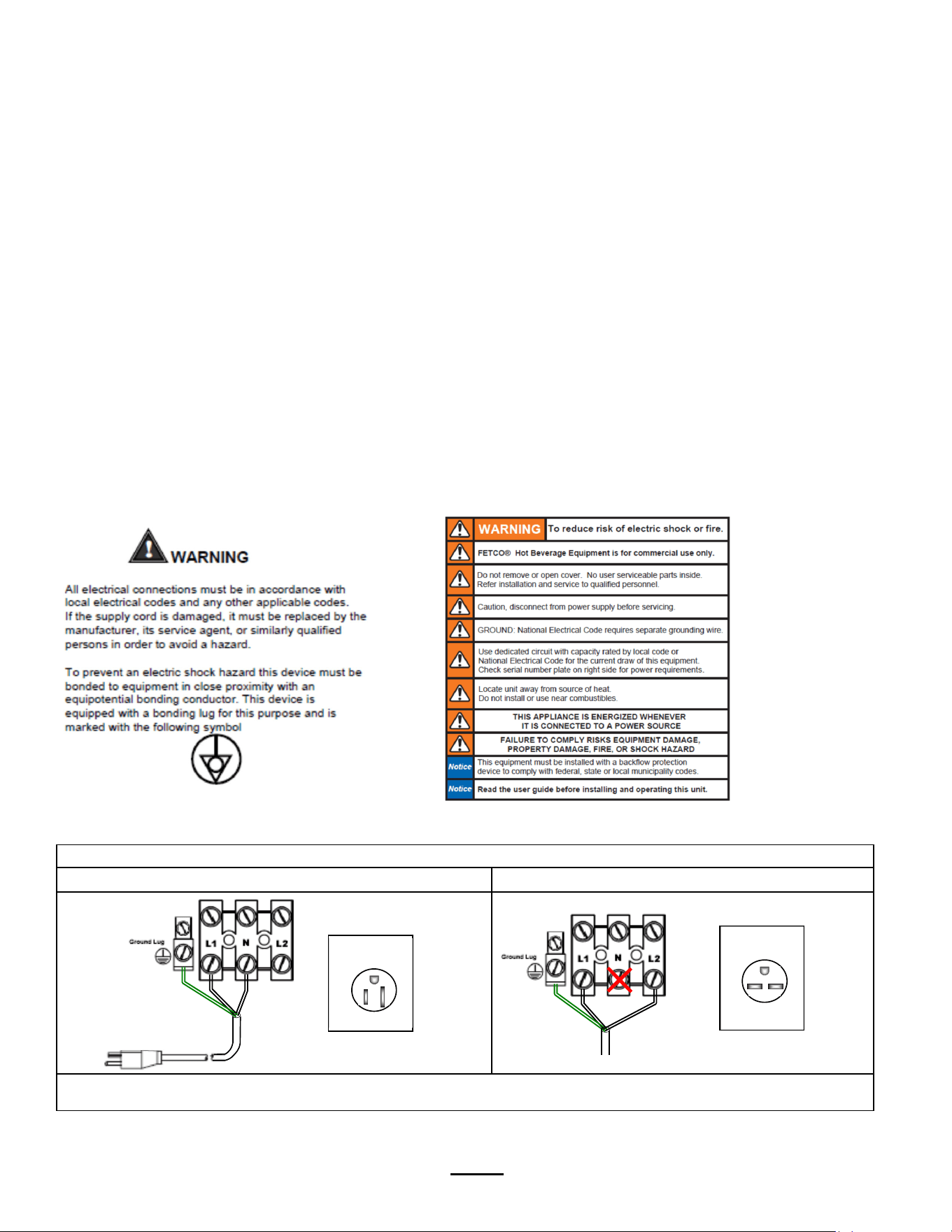
WIRING METHODS:
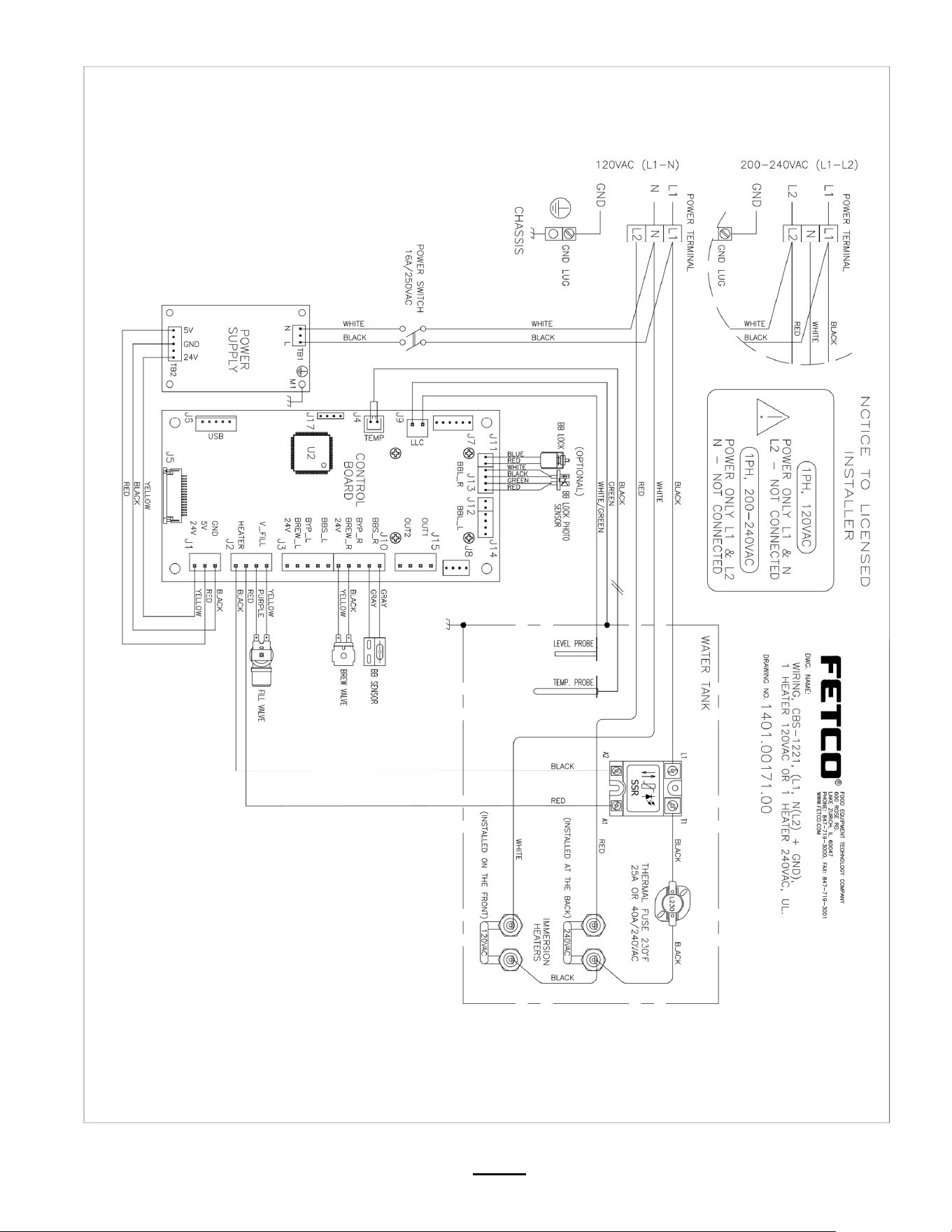
REFERENCE ONLY: SEE THE WIRING DIAGRAM AT BACK OF THIS GUIDE
CBS-1221 120-volt models with cord and plu
g
3 CBS-1221 models 200-240 volt L1, L2,G
Electrical installation, service and field conversion is to be made only by licensed electrician.
Disconnect equipment from power suppl
y
before service. Equipment ma
y
be powered even if power switch is “OFF”
Labels and
warnings for hot
beverage
equipment
For BACK PANEL
of equipment
(1046.00035.00)
NEMA PLUG
CONFIGURATION
NEMA 5-15P
G
W
NEMA PLUG
CONFIGURATION
NEMA 6-15P
Option by user
1
Go to fetco.com for the latest versions of all information
Page 13
User Guide & Operator instructions
P194Re0 November 2020
Parts Diagrams
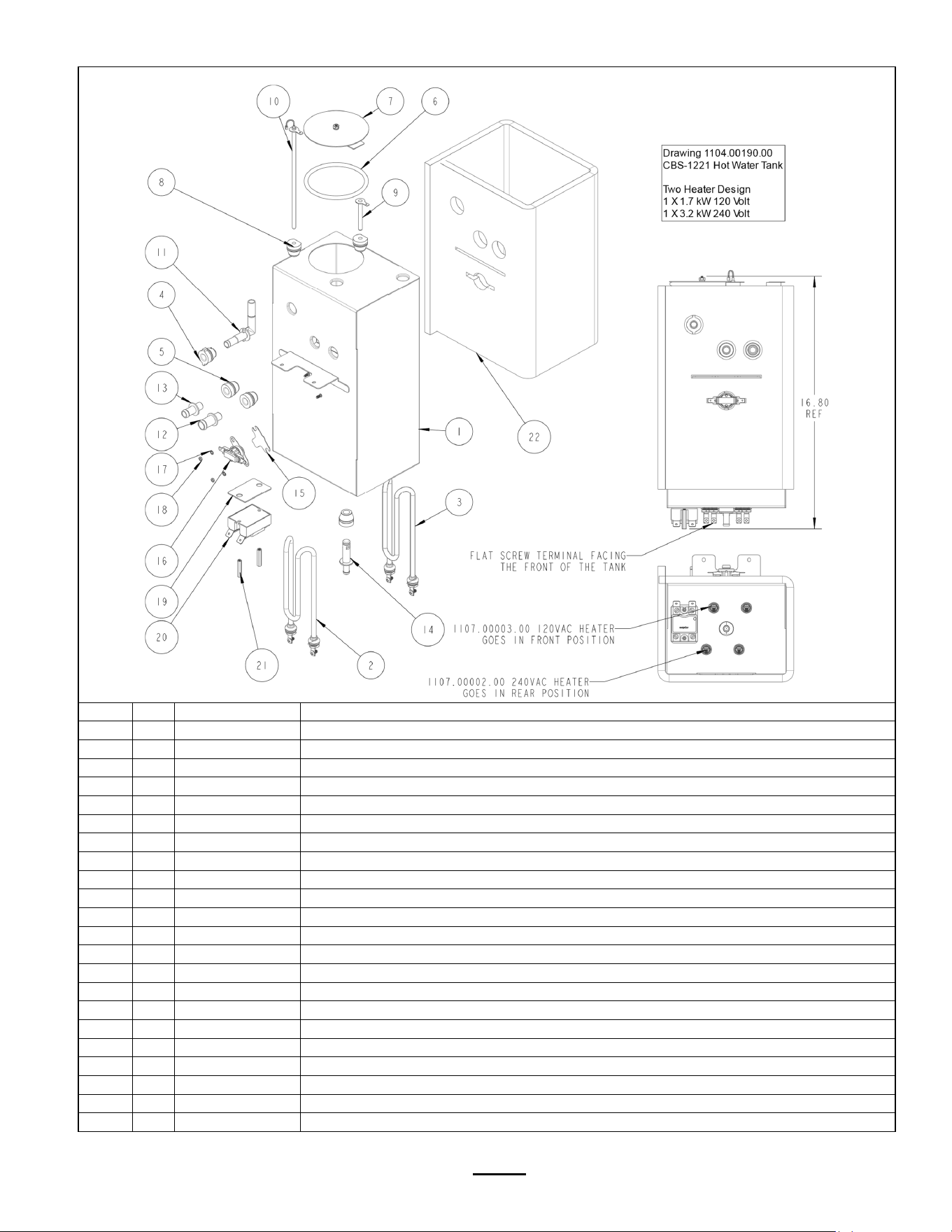
ITEM Qt
y
PART NO DESCRIPTION Hot Water Tank CBS-1221 Drawin
g
number 1104.00190.00
1 1 1114.00167.00 WELDMENT, TANK, CBS-1221
2 1 1107.00003.00 HEATER ASSY, IMMERSION 1700W/120VAC
3 1 1107.00002.00 HEATER ASSY, IMMERSION 3200W/240VAC
4 1 1024.00111.00 GROMMET, SILICONE, W/ POSITION TABS
5 3 1024.00050.00 GROMMET, SILICONE, 11.4mm ID
6 1 1024.00007.02 O-RING, DASH #344, TANK COVER
7 1 1102.00007.00 TANK COVER ASSEMBLY
8 2 1024.00007.00 GROMMET, SHORT, SILICONE, LEVEL AND TEMP PROBE
9 1 1112.00002.00 PROBE WELDMENT, WATER LEVEL 2.25" LONG
10 1 1102.00161.00 PROBE ASSEMBLY, TEMP. AND LLC, 8" LONG
11 1 1023.00362.00 FITTING VENT, ELBOW, .375" X .375", SELF POSITIONING
12 1 1023.00203.00 FITTING, STRAIGHT, GROMMET, .625"
13 1 1023.00167.00 FITTING, STRAIGHT, GROMMET, .500"
14 1 1023.00166.00 FITTING, COLD WATER INLET, GROMMET DESIGN
15 1 1003.00005.00 BRACKET, ONE SHOT THERMOSTAT
16 1 1053.00051.00 THERMOSTAT, SINGLE SHOT, 240V/45
A
17 2 1083.00009.00 WASHER, #6 SCREW , INTL TOOTH LOCKWASHER
18 2 1084.00010.00 NUT, HEX, #6-32, UNDERSIZED, ZINC PLATED
19 1 1003.00140.00
A
LUMINUM BRACKET FOR SSR
20 1 1052.00033.00 RELAY, SOLID STATE, 50A/480VAC, W/BUILD IN VARISTOR
21 2 1081.00042.00 STANDOFF, 1/4" HEX
22 1 1022.00112.00 TANK INSULATION, CBS-1221
Go to fetco.com for the latest versions of all information
Page 14
User Guide & Operator instructions
P194Re0 November 2020

Go to fetco.com for the latest versions of all information Page 15 User Guide & Operator instructions P194Re0 November 2020
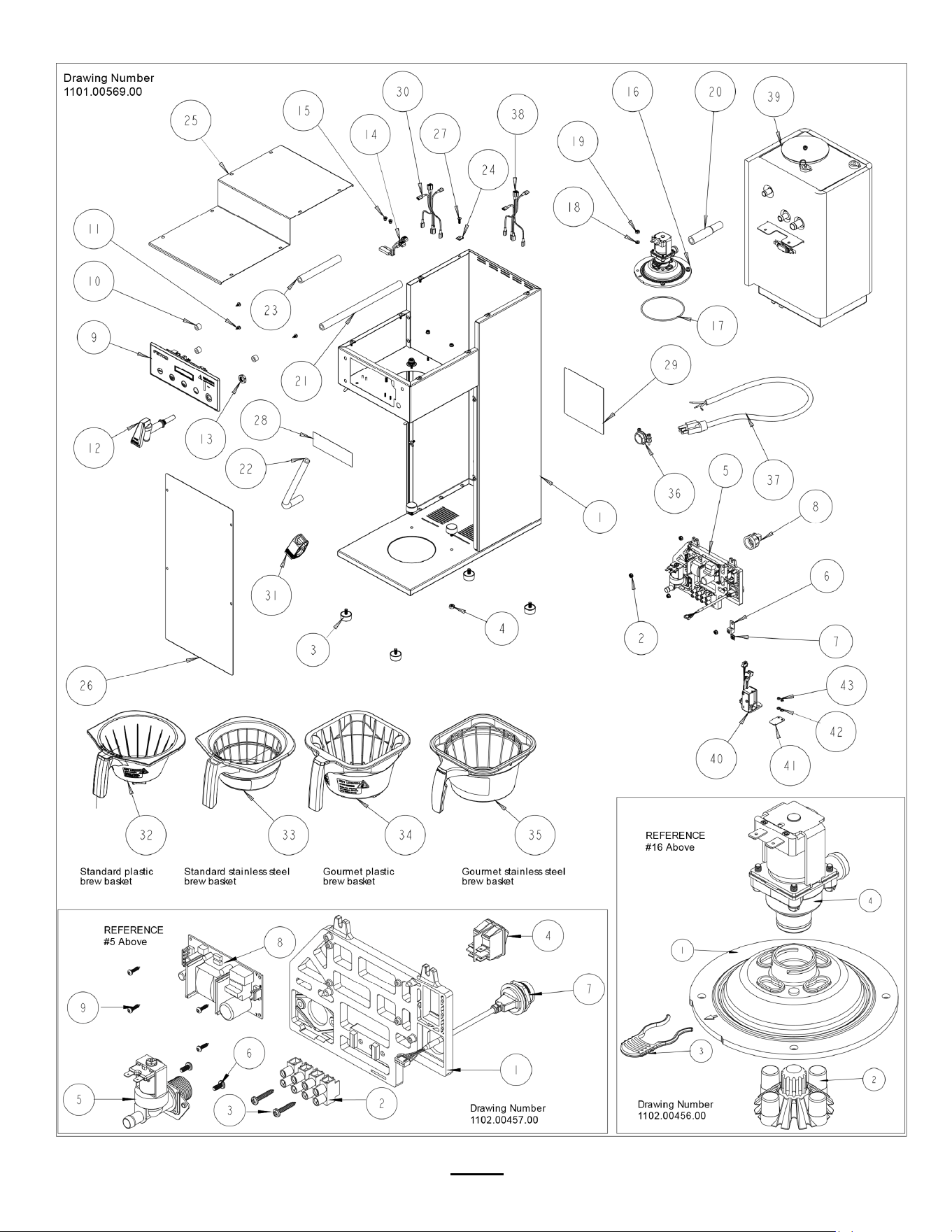
ITEM Qt
y
PART NO DESCRIPTION Drawin
g
number 1101.00569.00
1 1 1111.00105.00 WELDMENT BODY, CBS-1221
2 7 1084.00051.00 NUT, HEX LOCK WASHER, #8-32, 18-8 ST. STL.
3 6 1073.00021.00 FOOT, RUBBER, 1/4-20
4 2 1084.00017.00 NUT, HEX, 1/4"-20
5 REF 1 Reference ELECTRICAL COMPONENT LATTICE, CBS-1200
5-1 1 1023.00360.00 ELECTRICAL MOUNTING LATTICE, AIR POT
5-2 1 1052.00023.00 EUROSTRIP HE16 TERM. BLOCK, 4 POLE, 63 AMP, 18-8 AWG
5-3 2 1082.00056.00 SCREW, #8-11 X 1" PAN HD PHIL, THREAD FORMING
5-4 1 1058.00024.00 SWITCH, POWER, DOUBLE POLE, 16A, 125/250 VAC
5-5 1 1057.00043.00 SOLENOID VALVE, 5.5L/min, 180 DEG, 24VDC
5-6 2 1082.00010.00 SCREW, PAN HD. PHIL. MACH., M4x10 ZINC-PLATED
5-7 1 1058.00055.00 USB CONNECTOR
5-8 1 1052.00001.00 POWER SUPPLY, 90-264VAC/24VDC, 1.8
A
5-9 4 1082.00132.00 SCREW, PAN HD. PHIL. THREAD-FORMING, #4-20x5/16"LG.
6 1 1065.00009.00 GROUND LUG CONNECTOR, 14-2 AWG, ALUMINUM
7 1 1044.00012.00 LABEL GROUND, CE
8 1 1102.00164.00
A
DAPTER ASSY, 3/4" BSP X 1/4 SAE FLARE
9 1 1102.00453.00
A
SSEMBLY, FRONT PANEL, CBS-1220
10 3 1023.00361.00 SPACER, UNTHREADED, 1/2"OD X 3/8" LONG
11 3 1082.00115.00 SCREW, #6 x 3/8" LG., SLOTED HEX HD. WASHER
12 1 1071.00055.00 FAUCET, HOT WATER, PSC-BR-8, WITH FLAT AND STEM
13 1 1084.00048.00 JAM NUT, 1/2-20 UNF, NICKEL PLATED BRASS
14 1 1102.00113.00 SWITCH, REED, ASSEMBLY
15 2 1029.00006.00 NUT, FINGER KNURLED, #4-40
16 REF 1 1102.00456.00 QUICK CONNECT SPRAY HEAD ASSEMBLY, SMALL, RETROFIT
16-1 1 1023.00353.00 BASE, QUICK CONNECT SPRAY HEAD, RETROFIT
16-2 1 1102.00479.00
A
SSEMBLY, CASCADE SPRAY DOME, NEXT GEN
(
BLUE
)
16-3 1 1023.00342.00 QUICK CONNECT CLIP
16-4 1 1057.00076.00 VALVE ASSEMBLY, COMPLETE, NG, DELTROL
17 1 1024.00063.00 O-RING, 3 15/16" x 3/32" CS, DASH # 154, BUN
A
-N, DURO-
A
50
18 4 1083.00010.00 WASHER, #10 SCREW W/NEOPRENE-BONDED SEAL
19 4 1084.00006.00 NUT, 8-32 18-8 HEX MACHINE SCREW
20 1 1024.00065.00 CONNECTOR, SILICONE, TANK TO BREW VALVE
21 1 1025.00039.00 TUBE, 5/8" OD X 3/8 ID X 10" LG, DRAIN
22 1 1025.00058.00 TUBE, 9/16"OD X 5/16"ID X 25.00"LG
23 1 1025.00046.00 TUBE, 5/8" OD X 3/8" ID X 5.0" LG, DOUBLE VALVE
24 12 1084.00011.00 NUT, CLIP ON
(
J-NUT
)
, #6-32, 22-20 GA., BLK-PH FINISH
25 1 1001.00425.00 BREW BASKET RAIL, RIGHT, CBS-1220
26 1 1001.00426.00 FRONT COVER, CBS-1221
27 12 1082.00017.00 SCREW, TRUSS HD. PHIL. MACHINE, # 6-32 X 1/2 LG.
28 1 1046.00003.00 LABEL, CSD WARNING, 1.5" X 5.0"
29 1 1046.00035.00 LABEL, WARNING "TO REDUCE RISK OF ELECTRIC SHOCK OR FIRE"
30 1 1402.00098.01 HARNESS, LOW AMP, CBS-1131 XV+, UL
31 1 1086.00009.00 CLAMP, 3/4" MAX TUBE OD FLOW CONTROL
32 1 B024230BN2 BREW BASKET ASSY, 9-3/4" X 4-1/2", BROWN PLUG Standard Plastic
33 1 B025230B1 BREW BASKET ASSY, METAL, 9-3/4" X 4-1/2", BLACK Standard Metal
34 1 B014218BN2 BB ASSY, 13" X 5", ınˇ.218" HOLE, BRN PLUG Gourmet Plastic
35 1 B003218B1 BREW BASKET ASSY, 13" X 5", .218 DIA HOLE, BLACK Gourmet Metal
36 1 1086.00008.00 CONNECTOR, CLAMP, NON-METALLIC CABLE, 3/4"
37 1 1063.00016.00 POWER CORD, 120VAC W/NEMA 5-15P PLUG
38 1 1402.00110.00 WIRE HARNESS, CBS-1221, HIGH AMP
39 1 1104.00190.00 TANK ASSEMBLY, CBS-1221, 1.7kW/120V
A
C OR 3.2kW/240VAC
40 1 1102.00445.00
A
SSY, BREW BASKET LOCKER W/FEEDBACK
41 1 1003.00259.00 BRACKET, BREW BASKET LOCK COVER
42 2 1083.00011.00 WASHER, #8 SCREW SIZE, INTERNAL TOOTH LOCK
43 2 1084.00010.00 NUT, HEX, #6-32, UNDERSIZED, ZINC PLATED
Go to fetco.com for the latest versions of all information
Page 16
User Guide & Operator instructions
P194Re0 November 2020
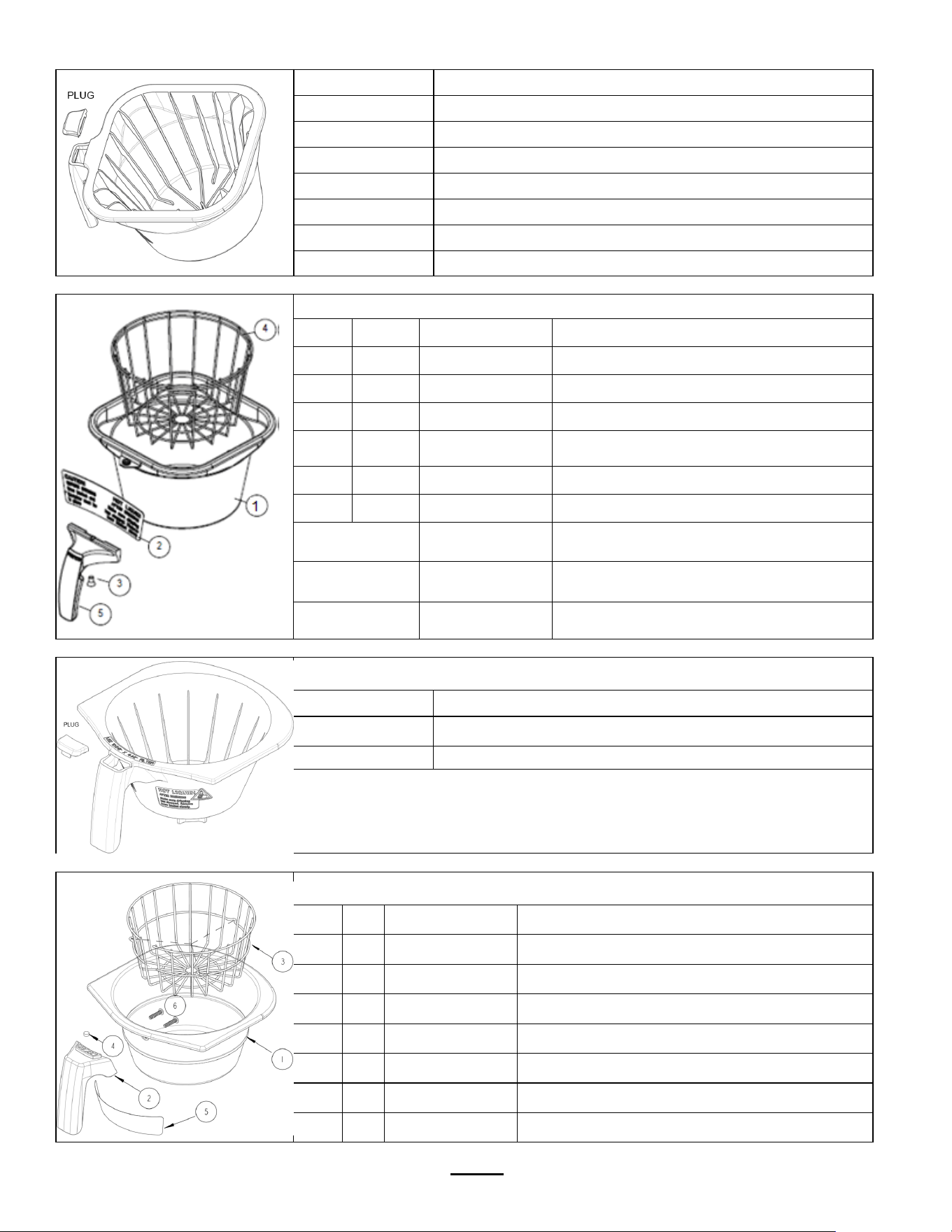
Brew Basket Parts
Part Number
B014218BN2 Gourmet Plastic Brew Basket
1023.00195.00 BROWN PLUG, BB HANDLE (STANDARD)
1023.00194.00 BLACK PLUG, BB HANDLE (OPTIONAL)
1023.00190.00 RED PLUG, BB HANDLE (OPTIONAL)
1023.00191.00 GREEN PLUG, BB HANDLE (OPTIONAL)
1023.00192.00 ORANGE PLUG, BB HANDLE (OPTIONAL)
1023.00180.00 BLUE PLUG, BB HANDLE (OPTIONAL)
Part Number B003218B1 Gourmet Stainless Steel Brew Basket
Ref# Qty Part Number Description
B003218B1 Complete Stainless Steel Brew Basket
1 1 1112.00128.00 BB WELDMENT 13" X 5", .218 DIA HOLE
2 1 1046.00025.00 BREW BASKET WARNING LABEL
3 1 1082.00040.00 SCREW, 1/4-20 X .5, FL HD, PH., W/NYLN
4 1 1009.00006.00 WIRE BASKET
5 1 1102.00064.00 HANDLE W/MAGNET ASY, BLACK
Optional
colored handle
1102.00065.00 HANDLE W/MAGNET ASY, RED
Optional
colored handle
1102.00066.00 HANDLE W/MAGNET ASY, GREEN
Optional
colored handle
1102.00067.00 HANDLE W/MAGNET ASY, ORANGE
Part Number B024230BN2 Standard Plastic Brew Basket
Part Number Description
B024230BN2 Complete Standard Plastic Brew Basket
1023.00359.00 PLUG, FOR AIR POT BREW BASKET ONLY, BROWN
Part Number B025230B1 Standard Stainless Steel Brew Basket
Ref Qty Part Number Description
B025230B1 Complete Stainless Steel Brew Basket
1 1 1004.00053.00 BREW CONE, CBS-1221, 8" W/ .230" HOLE
2 1 1023.00358.00 HANDLE, BREW BASKET,
3 1 1009.00014.00 WIRE BASKET, CBS-1221, 8" BREW BASKET
4 1 1057.00016.00 MAGNET, NEODYMIUM, 25"OD x .125"THK.
5 1 1046.00061.00 LABEL, BREW BASKET WARNING, AIR POT
6 2 1082.00123.00 SCREW, ROUND HD. PHIL.
Go to fetco.com for the latest versions of all information
Page 17
User Guide & Operator instructions
P194Re0 November 2020
Wiring Diagram

End of section notes
N