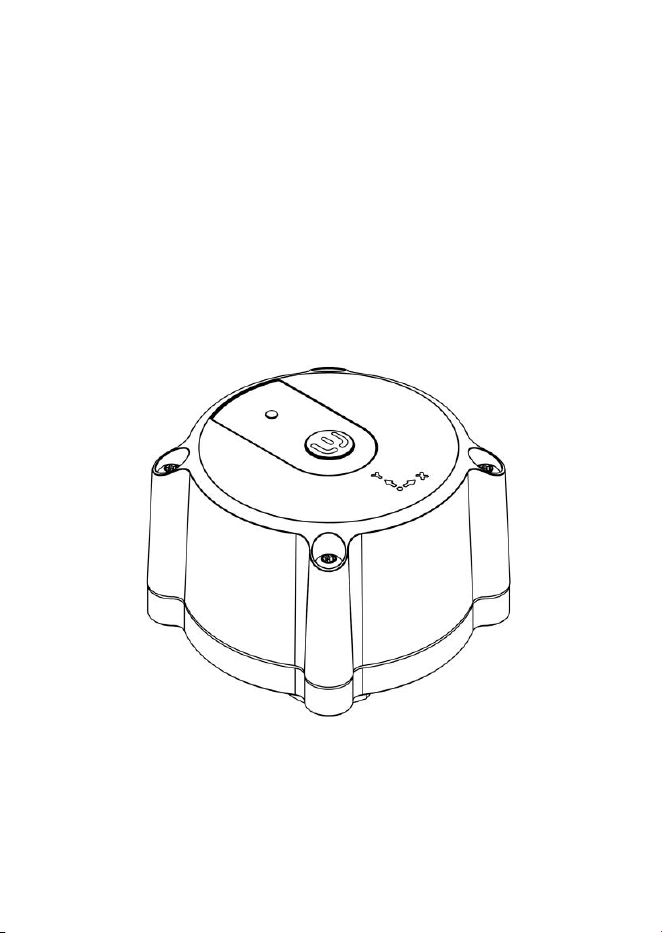
Vibration Sensor
Canary
User Manual

1
1. Description of the equipment
Product Name: Vibration Sensor Canary
Model: V-SFLITE24
2. Introduction
Canary is an intelligent sensor that continuously assesses the
condition of industrial assets, such as machinery, allowing for
real-time data collection and analysis. By leveraging a
sophisticated platform powered by artificial intelligence, the
system interprets the gathered data to provide actionable
insights. This proactive approach enables users to setup a
predictive maintenance strategy that enhances operational
efficiency and extends the lifespan of their assets
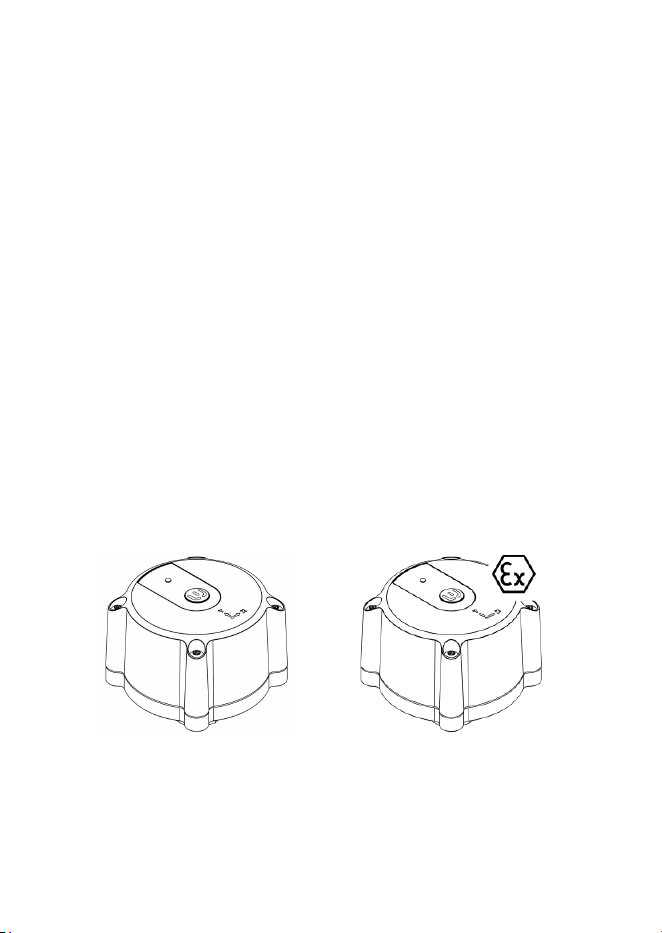
This device is not intended for the use in explosive environments;
for such applications use the model CanaryEX (V-SFATEX24).
V-SFLITE24
V-SFATEX24

2
3. Intended use of the equipment
The Canary is an intelligent low-power wireless sensor for the
monitoring of industrial assets designed to work exclusively with
the Sensorfact software suite.
The device is designed for indoor use and is intended to be
mounted on the measured asset using exclusively the Sensorfact
Bolt Adapter following instructions provided by this manual. No
other mounting methods are allowed.
The product, as described in this manual, consists of:
• Device (i.e. sensor unit)
• User manual (including Declaration of Conformity)
Necessary materials, tools, equipment for installation,
commissioning, maintenance and disposal, such as, but not
limited to: bolt adapters, fasteners, glues, connectivity hubs,
personal safety equipment, hand tools, etc. are not provided by
the product Manufacturer and therefore also not covered in this
manual.
It is expected that the device installation, commissioning,
maintenance and disposal is performed by trained personnel,
using approved equipment, materials and procedures. It is
assumed, that the industrial asset the device is attached to, is
located in a restricted zone, so no uninvolved people are present
in the safety perimeter of said asset at any time.
3
4. Safety Information
Familiarize yourself with information in this manual
before attempting installation, commissioning,
operations, maintenance or disposal of this device;
keep this manual for future reference.
Country, state or local legislation, regulations and
standards may apply to the installation,
commissioning, operations, maintenance or disposal
of this device.
Improperly performed actions such as, but not
limited to: installation, commissioning, maintenance
or disposal may cause injury or material damage.
This device is not user-serviceable. Do not attempt to
repair or modify the device. Unauthorized personnel
are strictly prohibited from performing any actions,
including but not limited to installation,
commissioning, operation, maintenance, or disposal.
Do not attempt to modify the device’s embedded
software in any way. Never attempt to update the
device with embedded software that has not been
officially released and published by the
Manufacturer. In case of doubts about particular
software release, troubles updating your device’s
software or a suspicion on a counterfeit software
release, please contact support as detailed in the
Support section of this manual.
4
Do not reach to or touch the device, attached to the
industrial asset, when in operation. Before any action,
make sure that the appropriate procedures for
safety-guaranteed switch-off procedures had been
followed (e.g. LOTO).
Make sure to monitor and inspect device for any sign
of damage of other than nominal behaviour. See
section Damaged Device of this manual for detailed
info.
Do not open, disassemble, or crush the device; Do not
drill or cut into its casing.
Do not let the device heat-up above the specified
temperature range or incinerate it. Do not dispose of
the device in fire or similar.
Make sure that the device body is or has not been in
contact with chemical materials as it can lead to
potential device damage.
The device generates, uses and can radiate radio
frequency energy and, if not installed and operated
in accordance to the instructions in this manual, may
cause harmful interference to radio communications.
5
5. Damaged Device
Do not attempt installation, commissioning,
operation or maintenance of the device if it is visibly
damaged or if you notice any other sign of other-
than-nominal behaviour as described in this manual.
If the device is damaged or if there is any suspicion of
potential damage, contact support as described in
the Support section of this manual.
The damaged device must be removed from service as soon as
possible. In the following cases, but not limited thereto, the device
must be considered damaged and it is not allowed to proceed
with installation, commissioning, operation or maintenance of
such device to avoid any potentially unsafe situation.
1. The device body is cracked.
2. Any of the screws on the device body have become loose or
are missing.
3. The device body shows extensive scratches or wear signs not
caused by normal use of the device.
4. The device cannot be turned on.
5. There is a suspicion that there may be internal mechanical
damage to the device, e.g. there are sounds hinting there
may be a loose component (screw, fragment, etc.) inside the
device.
6. The attachment mechanism parts are damaged, so the
mechanical fixation of the device to the asset may be
compromised.

6
7. The attachment mechanism contains dirt or debris, due to
which the device may have no electrical connection to the
bolt adapter.
8. The pressure relief opening has been clogged.
9. Device behaviour that is other that nominal, e.g. faulty
readings, frequent or intermittent loss of connection,
involuntary shutdowns etc.
10. Any other signs that indicate wear beyond surface wear
expected from normal use of the device.
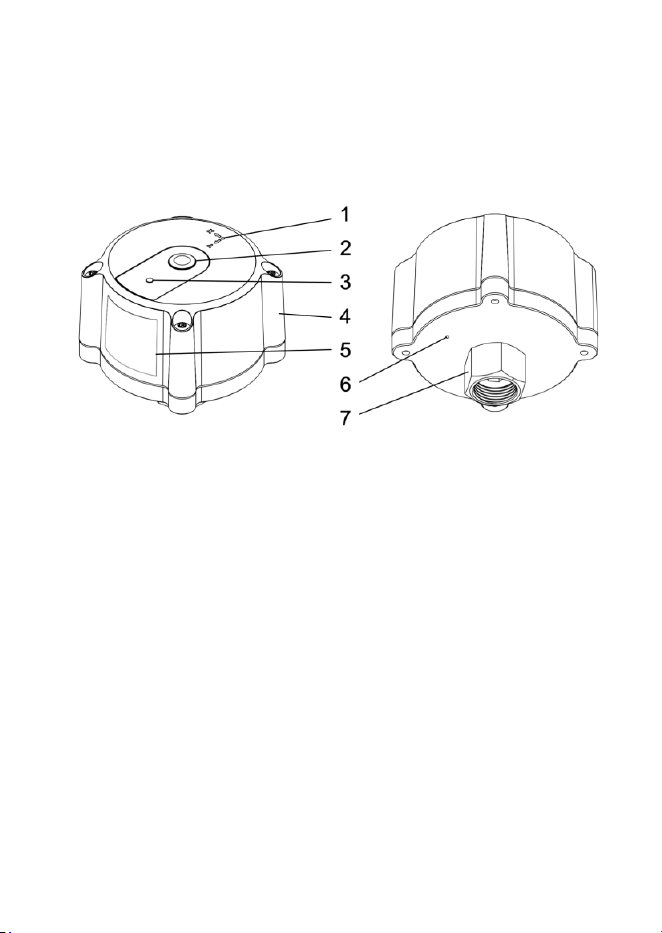
7
6. Device overview
1. Coordinate system indication
2. Button
3. Indicator
4. Device body
5. Device type plate
6. Pressure relieve opening
7. Installation nut M20x1.5
8
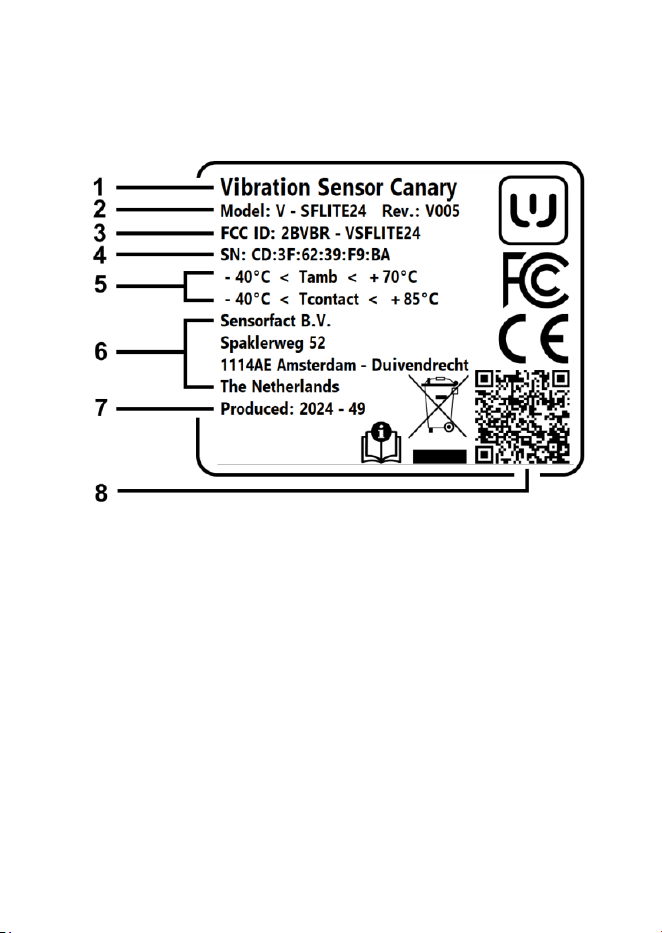
7. Device identification
Device type plate (5) contains the following information:
1. Device type
2. Model number and revision
3. FCC ID
4. Serial number (MAC address)
5. Temperature rating
6. Manufacturer
7. Production date (format YYYY-WW)
8. QR code

9
8. Overview of device’s functions
8.1. Wireless connectivity
The device is equipped with Bluetooth LE connectivity for the data
transfer to the gateway. The gateway can perform firmware
updates of the device over this interface. It is designed such, that
the device is only connecting and communicating at specific time
intervals or when pre-defined conditions are met.
8.2. Cybersecurity
The communication between the device and the gateway is
encrypted and secured using Bluetooth LE Level 4 implementation.
Passkey authentication is required for firmware updates. The
firmware update mechanism is secured and only accepts
authorized firmware images.
8.3. Operational states, actions and
indications
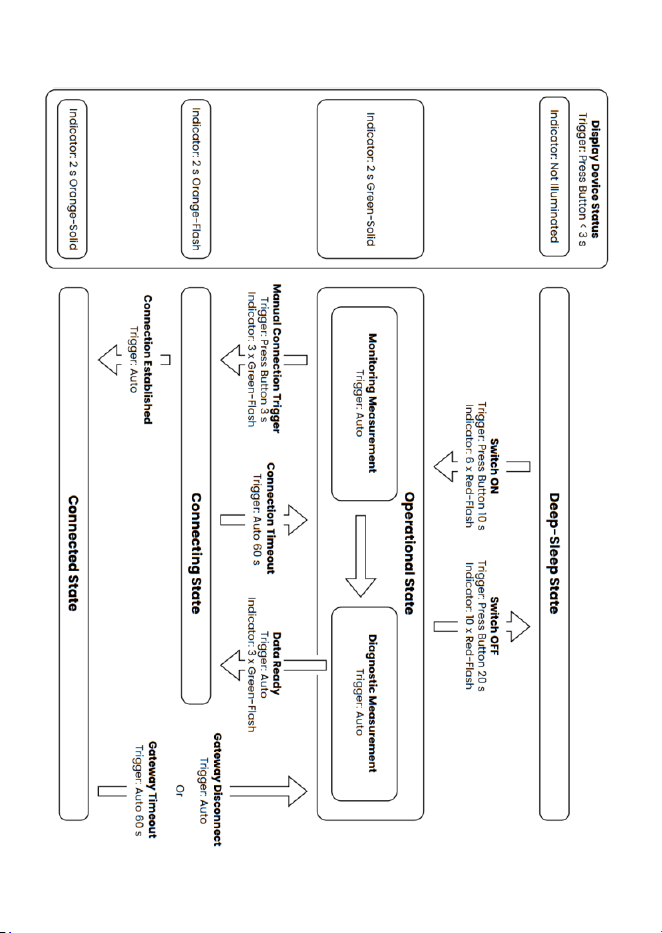
Out of the box, the device is set to deep-sleep state. To check the
current device state, press button (2) shortly (t < 3 s). The
operational states as well as actions and indications are
described in the following diagram.
10

11
8.4. Measurement capabilities
The device contains two independent measurement circuits. In
this section, their principle and capabilities will be explained.
8.4.1. Monitoring circuit
The monitoring circuit uses low-power vibration measuring circuit
to monitor the state of the asset. If defined threshold conditions
are met, the diagnostic measurement circuit is triggered for
further data gathering.
8.4.2. Diagnostic circuit
The diagnostic circuit contains individual measurement circuits
for measuring asset’s:
• Vibration
• Temperature
• Magnetic field
The measurement circuits are equipped with smart algorithms
(running on-device) designed and tuned to gather high-quality
data for accurate assessment of the asset’s state.
12
9. Pre-installation
Before attempting the installation of the device, make
sure that the appropriate procedures for safety-
guaranteed switch-off procedures had been followed
(e.g. LOTO); never attempt to install the device on a
running asset.
Check that the pressure relieve opening (6) is clean
and unobstructed before installation. For correct
function, it must remain free from blockage.
To avoid potential radiation interference the device
must not be co-located or operated in conjunction with
any other radio antenna or transmitter.
Physical obstructions such as concrete/cement block
walls or metallic objects may cause signal interference
and degraded performance of communication
between the device and the gateway.
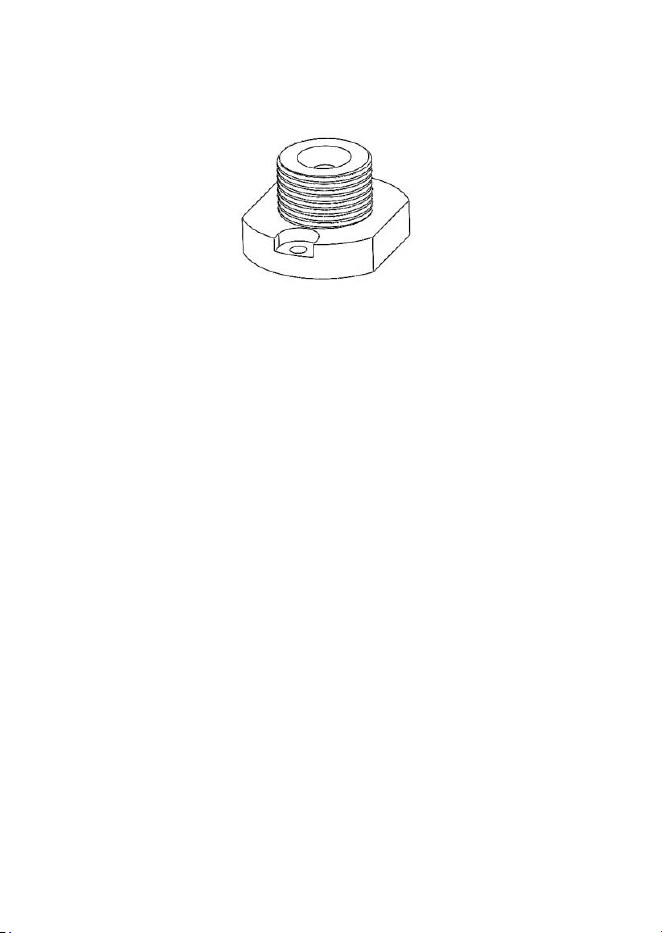
13
The device is designed to be mounted on the Sensorfact bolt
adapter:
The bolt adapter must be installed following its separate
installation instruction before the installation of the device.
Before the installation of the device verify that the bolt adapter is
solidly mounted to the asset; glue has to be fully cured according
to instructions of the glue manufacturer.
14
10. Installation procedure
To prevent seizing of the threaded connection between
the device and the bolt adapter, apply a small amount
of anti-seize compound to the bolt adapter before
attaching the device.
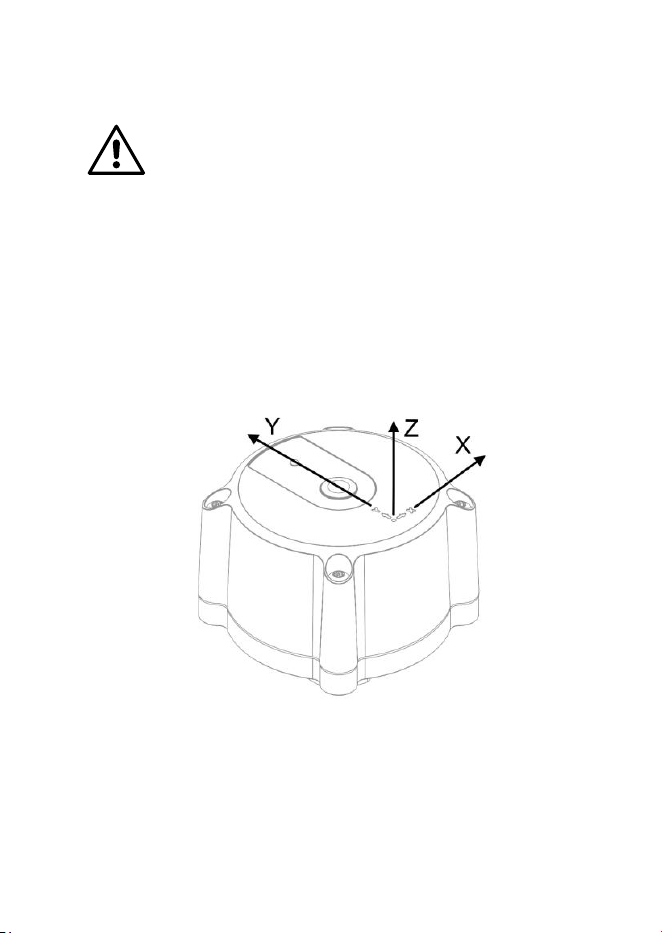
10.1. Device coordinate system
The device is designed with a pre-defined coordinate system,
using default X, Y, Z axis right-hand notation, see below:
15
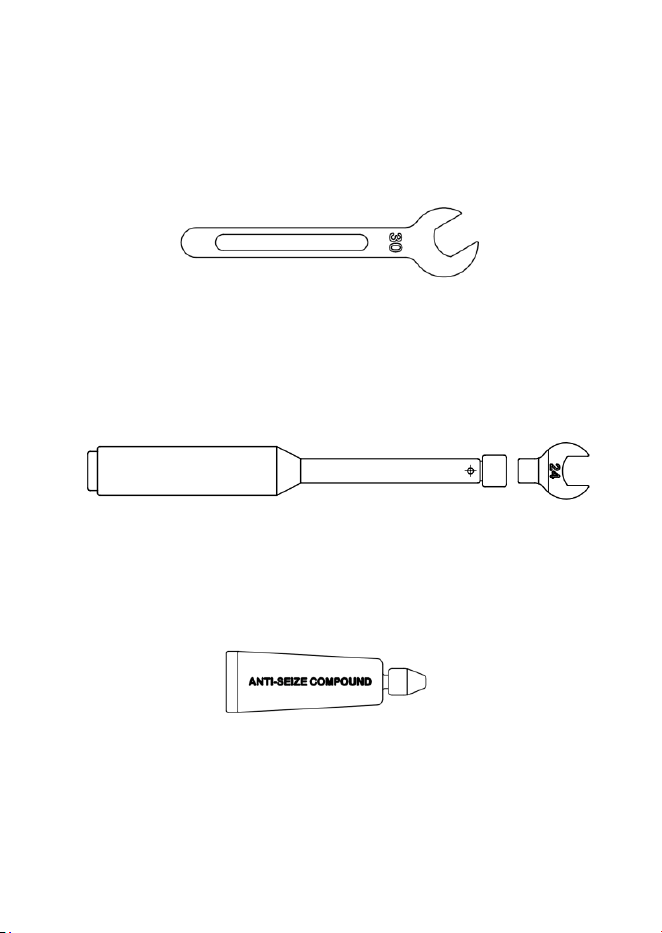
10.2. Tooling and materials
Side wrench size 30
Torque wrench with side insert size 24
Suitable anti-seize compound

16
10.3. Device attachment on asset
1. Align the device so that the X-axis and Y-axis are in the
desired orientation.
2. Attach the device to the bolt adapter by tightening the
installation nut (7) by hand. Use the open side wrench
size 30 to firmly hold the bolt adapter.
3. Tighten the installation nut (7), using the torque wrench
with side insert size 24 set to 70±10 Nm.
4. Check that the X, Y, Z alignment of the device stayed as
desired.
10.4. Connecting the device to the gateway
The device is delivered in the deep-sleep state by default.
1. Switch the device on by pressing the button (2) for 10 s;
the device is successfully switched into operational
state if the indicator shows 6 x red-flash.
2. Trigger manual connection attempt by pressing the
button (2) for 3 seconds; the indicator (3) shall flash 3x
green.
3. The device will now automatically connect to the
gateway.

17
11. Device maintenance
The device is service and maintenance free. If circumstances
require, basic maintenance may be necessary, particularly when
the device is repeatedly attached to multiple different assets.
11.1. Device refurbishment
For further information on device refurbishment, contact support
as outlined in the Support section of this manual.
11.2. Preventive maintenance
11.2.1. Exterior Cleaning
To clean the exterior of the device, use a soft damp cloth. Don’t
use any detergent or other cleaning agents. Avoid abrasive
cleaners, solvents, or excessive moisture, as these may damage
the surface. Do not immerse the device in water or use high-
pressure cleaning methods.

18
11.2.2. Installation nut
Do not attempt installation, commissioning or
operations of the device if the installation nut (7) is
visibly damaged.
1. Before each installation, visually inspect the inner thread of
the installation nut (7) on the device and the thread on the
bolt adapter. If any thread damage is detected, do not
proceed with installation, as this may result in improper
fixation of the device on the asset.
2. Visually check for dirt and debris in the thread of the
installation nut (7) as well as on the connection face. Clean
any potential dirt or debris and re-apply anti-seize
compound before installation.
3. The outer hexagonal surface (Hex 24) of the installation nut
(7) must be inspected for excessive damage before use, as
significant wear or deformation may cause wrench slipping,
leading to potential injury or material damage.

19
12. Troubleshooting
12.1. Before troubleshooting
Turn the device off by first pressing the button (2) for 20 seconds
and releasing; the indicator (3) shall flash 10x red. Now turn the
device on again by pressing the button (2) for 10 seconds and
releasing; the indicator (3) shall flash 6x red.
If turning the device off and on didn’t solve the issue, follow the
troubleshooting instructions as described in this section.
12.2. The delivered device does not turn on
Contact support as detailed in the Support section of this manual
and ask for repair/replacement.
12.3. The device is damaged or
malfunctioning
Do not attempt installation, commissioning or operations of the
device if damaged or malfunctioning as it can lead to unsafe
situations. Contact support as detailed in the Support section of
this manual and ask for repair/replacement.
12.4. The device cannot connect to the
gateway
Make sure the device is in the Operational State. Trigger manual
connection attempt by pressing the button (2) for 3 seconds and
releasing; the indicator (3) shall flash 3x green (device set to
connecting state). If the device does not automatically connect
within the next 60 seconds, the problem is probably on the side of
the gateway.

20
Check the gateway is powered on and in close range of the
device. If problems persist, contact support as detailed in the
Support section of this manual.
12.5. The device is at the end of its
projected lifetime
The device may continue to function beyond its projected lifetime;
however, its continued operation cannot be guaranteed. It is
recommended to plan for the device replacement to ensure
reliability.
If the device cannot be switched on after reaching its projected
lifetime, the internal battery is likely depleted. Contact support as
detailed in the Support section of this manual for information on
the refurbishment plan.

21
12.6. Device disposal
A damaged or non-functioning device can typically be repaired
or refurbished. Follow instructions in the Device refurbishment
section of this manual.
This device is subject to the Waste Electrical and
Electronic Equipment (WEEE) Directive (2012/19/EU).
It should not be disposed of with household waste;
please take it to an appropriate collection point for
recycling of electronic waste.
Proper disposal helps prevent environmental damage and
supports sustainable resource use. Please contact your country,
state, or local authorities to check how to dispose of the device in
the safe way according to the relevant regulations.
Detailed recycling instructions are available upon request.
22
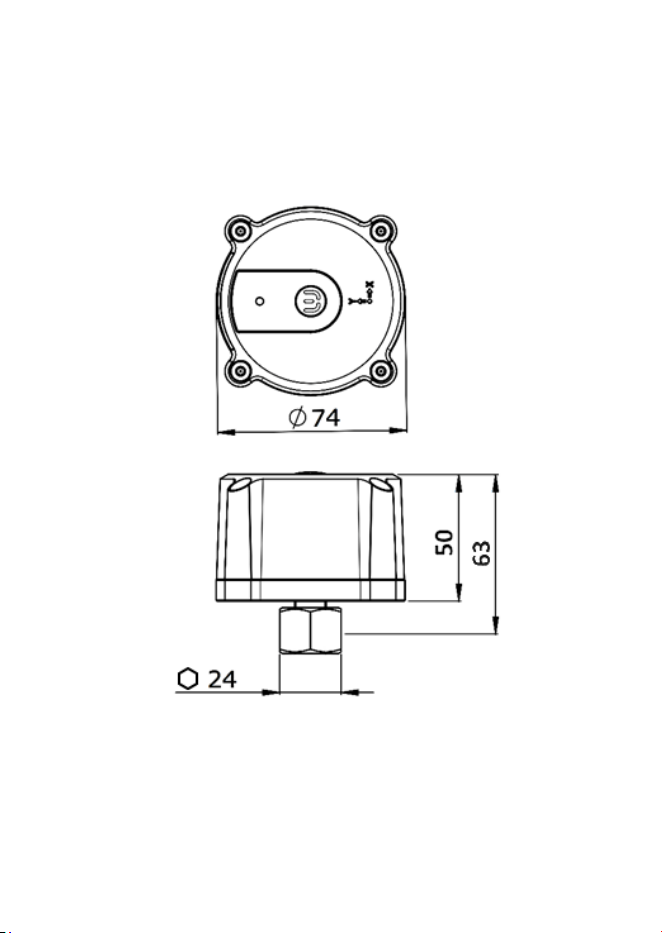
13. Device dimensions
All stated device dimensions are nominal dimensions
23
14. Transportation and storage
14.1. Transportation
The device contains a primary (non-rechargeable), 3.6 V lithium-
metal battery and can be transported under UN 3091; Section II of
Packing Instructions for Passenger or Cargo Aircraft: PI970 (IATA)
applies.
14.2. Storage
Store device in a location conforming to the prescribed storage
conditions in the Specifications section of this manual.
Storage conditions and storage duration can affect
the device's lifetime. For optimal performance, store
the device at optimal storage conditions as indicated
in the Specifications section of this manual and limit
total storage time under these conditions to a
maximum of 3 months.

24
15. Specifications
Enclosure
Material
Anodised Aluminium, Zinc-Plated
Steel, Stainless Steel, PA6 Plastic,
Polyester Plastic, EPDM Rubber
Dimensions
74 mm x 74 mm x 63 mm (Excl.
Installation Nut)
Ingress Protection
IP 67
Vibration Measurement
Measurement
3-Axis vibration measurement
Bandwidth
0-6 kHz
Noise Density
Down to 75 µg/
√
Hz
2)
Vibration Measurement Range
± 16 g
2)
Sensitivity
High stability of sensitivity over
temperature range and against
mechanical shocks
Magnetic Flux Measurement
Measurement
3-Axis AMR magnetic sensor
Bandwidth
Up to 1.5 kHz
Measurement Range
± 133 mT in all axes
Temperature Measurement
Temperature Measurement Range
-40 °C to +85 °C
Operational Environment
Operational Temperature
-40 °C to +70 °C
Operational Humidity
0% to 90% Rh, non-condensing
Operational Altitude
Max 2000 m

25
Storage Environment
Storage Temperature Range
(Optimal)
+22 °C to +28 °C
Storage Temperature Range
(Allowed)
+10 °C to +30 °C
Storage Humidity (<1 month)
Max 70% Rh, non-condensing
Storage Humidity (>1 month)
Max 60% Rh, non-condensing
Connectivity
Wireless Communication
Communication Frequency
Bluetooth Low Energy
2.402 GHz to 2.48 GHz
Power
Battery Powered
Single non-rechargeable non-
replaceable 8.5 Ah 3.6V Lithium
battery
Product Life-Cycle
Projected Product Lifetime
3)
36 Months
4)
Device Refurbishment Option
Available
5)
2) g = 9.81 ms
-1
3) The Projected Product Lifetime, as defined above, assumes the following operating
conditions: indoor use with no direct sunlight exposure, ambient temperature range of +10 °C
to +30 °C, maximum relative humidity (RH) of 60%, and placement of the Sensorfact
Gateway at a direct line-of-sight distance of 5 meters from the device.
4) The product lifetime in a specific use case may be influenced by various factors, including
but not limited to storage and operating temperature, frequency and volume of data
collection and transmission to the Sensorfact Gateway, duration of storage prior to
deployment, and other relevant environmental or operational conditions.
5) See Device refurbishment section of this manual.

26
16. Legal
16.1. Warranty and liability
The primary functionality of the device is to measure, collect, and
transmit data from internal vibration, temperature, and magnetic
field sensors using wireless communication, within the operational
limits specified by the information in this manual or equivalent
documentation. . For the avoidance of doubt, the data and
insights provided by the Canary sensor are for informational
purposes only. The Customer retains full responsibility for all
decisions and actions taken regarding the maintenance and
operation of their assets.
The Manufacturer permits the use of this product only for its
intended purpose as defined in this manual.
The Manufacturer/Distributor warrants that, to its actual
knowledge at the time of lease/sale of the product to the end
Customer, the product is free from defects and complies with
applicable laws, regulations, and industry standards in effect at
such time, including but not limited to those concerning safety,
environmental protection, and import/export requirements.
If, in the first one (1) year after delivery of the product to Customer,
the Customer determines that the product has any defects or
non-conformities due to bad material, faulty design or poor
workmanship, the Manufacturer/Distributor shall (as the
Customer’s sole remedy) replace the defective hardware, by
shipping other hardware within ten (10) business days upon
receipt of the returned hardware.

27
16.1.1. Warranty exclusions
The following circumstances are not covered under this warranty:
• Any use of the product outside the scope of these
instructions, or any improper use
• This warranty does not cover normal wear and tear and
damage, malfunctions, or loss of functionality resulting from
misuse, negligence, or failure to follow the instructions
provided in this manual. This includes, but is not limited to:
o Use of excessive force, improper handling, or
failure to follow operational instructions.
o Actions performed by unauthorized personnel.
o Unauthorized modifications, repairs, or attempts to
alter the device.
• The warranty is void if the embedded software of the device
is modified in any way, or if any attempt is made to upload
embedded software or a software version that has not been
officially released and published by the Manufacturer.
Additionally, any attempt to release, publish, or distribute
counterfeit embedded software for this device shall be
considered a criminal offense and may be subject to legal
action.
• The warranty does not cover damage, malfunctions, or
defects caused by external factors beyond normal operating
conditions, including but not limited to water ingress,
accidents, impacts, earthquakes, floods, fires, lightning, or
other natural disasters.

28
16.1.2. Indemnification / Liability
The Manufacturer disclaims any liability for damages, costs,
losses, or claims arising from wrongful or intentional misuse of the
product. The Customer agrees to fully indemnify the Manufacturer
and the Distributor and their representatives against any claims,
damages, costs, or liabilities resulting from such misuse.
Additionally, the Manufacturer and Distributor shall not be liable
for any actions taken by the Customer, or third parties based on
data provided by the product. The Customer shall indemnify the
Manufacturer and Distributor against any third-party claims
resulting from non-compliance with the obligations outlined in
this manual.
16.2. About this manual
All dimensions in this manual are provided in millimeters, unless
otherwise stated.
The information contained in this manual is for informational
purposes only. While the Manufacturer/Distributor have made
reasonable efforts to ensure the accuracy and reliability of the
information as of the date of publication, no warranties, express or
implied, are made regarding its accuracy, completeness, or
suitability for any particular purpose.
All images in this manual are for illustrative purposes only. The
final product may vary in appearance depending on version
updates, component modifications, or design improvements.
To the fullest extent permitted by law, the Manufacturer/Distributor
disclaims all liability for any reliance on the information contained
in this manual.


30
Declaration of Conformity Page 1
Declaration of Conformity
Manufacturer:
Sensorfact B.V.
Sparklerweg 52
1114 AE Amsterdam-Duivendrecht
The Netherlands
Hereby, Sensorfact B.V. declares under our sole responsibility that
the following product:
Product Name:
Vibration Sensor Canary
Type:
V-SFLITE24
Product Description:
Wireless predictive maintenance
vibration sensor for industrial assets
To which this declaration relates is in conformity with the relevant
Union harmonization legislation:
Radio Equipment Directive (RED)
2014/53/EU
Electromagnetic Compatibility Directive
(EMC)
2014/30/EU
Restriction of Hazardous Substances
Directive (RoHS2)
2011/65/EU
Waste Electrical and Electronic
Equipment Directive (WEEE)
2012/19/EU

Declaration of Conformity Page 2
Registration, Evaluation, Authorization
and Restriction of Chemicals (REACH)
Regulation
1907/2006/EC
The following harmonized standards have been used to assess
the compliance the above directives:
General requirements for EMC for
Information Technology Equipment
(ITE)
ETSI EN 301 489-1
V2.2.3 (2019-11)
Requirements for radiated emissions
NEN-EN
55032:2015/A11:2020
Requirements for electrostatic
discharge (ESD) immunity
EN-IEC 61000-4-
2:2025
Requirements for radiated immunity
EN-IEC 61000-4-
3:2020
Requirements for magnetic field
immunity
EN-IEC 61000-4-
8:2010
Wideband transmission systems;
Data transmission equipment
operating in the 2,4 GHz ISM band and
using wide band modulation
techniques; Health and Safety
ETSI EN 300 328 V2.2.2
(2019-07)
Human RF exposure restriction
NEN-EN-IEC
62311:2020
Marking of electrical and electronic
equipment in accordance with Article
11(2) of Directive 2002/96/EC (WEEE)
NEN-EN 50419:2006
Information technology Equipment
Safety
IEC 62368-1:2023

Declaration of Conformity Page 3
Common security requirements for
radio equipment Internet connected
radio equipment
EN 18031-1:2024
RoHS Compliance
EN IEC 63000:2018
Compliance is assessed with: Software version 1.0.3
Signed for and on behalf of:
Date:
Place:
Name:
Title:
Sensorfact B.V.

Declaration of Conformity Page 4

FCC Statement of Compliance Page 1
Compliance Statement
This device complies with Part 15 of the FCC Rules. Operation is
subject to the following two conditions:
1. This device may not cause harmful interference, and
2. This device must accept any interference received, including
interference that may cause undesired operation.
Warning: Changes or modifications to this unit not expressly
approved by the party responsible for compliance could void the
user’s authority to operate the equipment.
NOTE: This equipment has been tested and found to comply with
the limits for a Class B digital device, pursuant to Part 15 of the
FCC Rules. These limits are designed to provide reasonable
protection against harmful interference in a residential
installation. This equipment generates, uses, and can radiate
radio frequency energy and, if not installed and used in
accordance with the instructions, may cause harmful interference
to radio communications.

FCC Statement of Compliance Page 2
However, there is no guarantee that interference will not occur in a
particular installation. If this equipment does cause harmful
interference to radio or television reception, which can be
determined by turning the equipment off and on, the user is
encouraged to try to correct the interference by one or more of
the following measures:
• Reorient or relocate the receiving antenna.
• Increase the separation between the equipment and receiver.
• Connect the equipment into an outlet on a circuit different
from that to which the receiver is connected.
• Consult the dealer or an experienced radio/TV technician for
help.
RF Exposure Statement: This equipment complies with FCC
radiation exposure limits set forth for an uncontrolled
environment. The device can be used in portable exposure
condition without restriction.

NL - 1
19. Appendix 1 - Belangrijke
veiligheidsinformatie in het
Nederlands
19.1. Beschrijving van de apparatuur
Productnaam: Vibration Sensor Canary
Model: V-SFLITE24
19.2. Inleiding
Canary is een intelligente sensor die continu de toestand van industriële
installaties, zoals machines, beoordeelt en real-time gegevens verzamelt en
analyseert. Door gebruik te maken van een geavanceerd platform dat wordt
aangedreven door AI, interpreteert het systeem de verzamelde data en levert
het bruikbare inzichten. Deze proactieve aanpak stelt gebruikers in staat een
voorspellende onderhoudsstrategie op te zetten, waardoor de operationele
efficiëntie verbetert en de levensduur van hun installaties wordt verlengd.

NL - 2
19.3. Beoogd gebruik van de apparatuur
De Canary is een intelligente, energiezuinige draadloze sensor voor het
monitoren van industriële installaties en is exclusief ontworpen voor gebruik
met de Sensorfact-software.
Het apparaat is bedoeld voor gebruik binnenshuis en moet uitsluitend
worden gemonteerd op het te meten object, met behulp van de Sensorfact
Bolt Adapter, volgens de instructies in deze handleiding. Andere
montagemethoden zijn niet toegestaan.
Het product, zoals beschreven in deze handleiding, bestaat uit:
• Het apparaat (d.w.z. de sensorunit)
• De gebruikershandleiding (incl. EU-Conformiteitsverklaring)
Benodigde materialen, gereedschappen en apparatuur voor installatie,
ingebruikname, onderhoud en verwijdering – zoals, maar niet beperkt tot:
boutadapters, bevestigingsmiddelen, lijmen, verbindingshubs, persoonlijke
beschermingsmiddelen, handgereedschap, enz. – worden niet geleverd door
de fabrikant van het product en vallen derhalve ook niet onder deze
handleiding.
Er wordt verwacht dat de installatie, ingebruikname, het onderhoud en de
verwijdering van het apparaat worden uitgevoerd door gekwalificeerd
personeel, met gebruik van goedgekeurde apparatuur, materialen en
procedures.
Er wordt verwacht dat de industriële installatie waarop het apparaat is
gemonteerd, zich bevindt in een beperkte zone, zodat zich geen onbevoegde
personen binnen de veiligheidsperimeter van deze installatie bevinden.

NL - 3
19.4. Garantie en aansprakelijkheid
De primaire functionaliteit van het apparaat is het meten, verzamelen en
verzenden van gegevens van interne trillings-, temperatuur- en
magneetveldsensoren via draadloze communicatie, binnen de operationele
grenzen zoals gespecificeerd in deze handleiding of gelijkwaardige
documentatie. Voor alle duidelijkheid: de gegevens en inzichten die door de
Canary-sensor worden verstrekt, zijn uitsluitend bedoeld ter informatie. De
Klant blijft volledig verantwoordelijk voor alle beslissingen en handelingen
met betrekking tot het onderhoud en de werking van zijn apparatuur.
De Fabrikant staat het gebruik van dit product alleen toe voor het beoogde
doel zoals gedefinieerd in deze handleiding.
De Fabrikant/Distributeur garandeert dat, voor zover hem op het moment
van verhuur/verkoop van het product aan de eindklant daadwerkelijk bekend
is, het product vrij is van gebreken en voldoet aan de toepasselijke wet- en
regelgeving en geldende industrienormen die op dat moment van kracht zijn,
waaronder maar niet beperkt tot regelgeving inzake veiligheid,
milieubescherming en importeer-/exporteer eisen.
Indien de Klant binnen het eerste (1) jaar na levering van het product
vaststelt dat het product gebreken of non-conformiteit vertoont als gevolg
van slecht materiaal, een foutief ontwerp of gebrekkige afwerking, zal de
Fabrikant/Distributeur (als enige rechtsmiddel van de Klant) de defecte
hardware vervangen door andere hardware, welke binnen tien (10)
werkdagen na ontvangst van de geretourneerde hardware zal worden
verzonden.

NL - 4
19.4.1. Uitsluitingen van de garantie
De volgende omstandigheden vallen niet onder deze garantie:
• Elk gebruik van het product buiten de inhoud van deze instructies, of elk
onjuist gebruik.
• Deze garantie dekt geen normale slijtage, geen schade, storingen of
verlies van functionaliteit als gevolg van verkeerd gebruik, nalatigheid
of het niet opvolgen van de instructies in deze handleiding. Dit omvat,
maar is niet beperkt tot:
o Het gebruik van buitensporig kracht op het product,
onjuiste behandeling of het niet opvolgen van
bedieningsinstructies.
o Handelingen uitgevoerd door niet-geautoriseerd
personeel.
o Niet-geautoriseerde wijzigingen, reparaties of pogingen
om het apparaat aan te passen.
• De garantie vervalt als de software van het apparaat op wordt
gewijzigd, of als er een poging wordt gedaan om software of een
softwareversie te uploaden die niet officieel is uitgebracht en
gepubliceerd door de fabrikant. Daarnaast wordt elke poging om
vervalste software voor dit apparaat uit te brengen, te publiceren of te
verspreiden beschouwd als een strafbaar feit en kan dit leiden tot
juridische stappen.
• De garantie dekt geen schade, storingen of defecten die worden
veroorzaakt door externe factoren buiten de normale
bedrijfsomstandigheden, waaronder maar niet beperkt tot
binnendringend water, ongelukken, stoten, aardbevingen,
overstromingen, brand, blikseminslag of andere natuurrampen.
NL - 5
19.5. Veiligheidsinformatie
Maak uzelf vertrouwd met de informatie in deze handleiding
vóór het uitvoeren van installatie, ingebruikname, gebruik,
onderhoud of verwijdering van dit apparaat; bewaar deze
handleiding voor toekomstig gebruik.
Wetgeving, regelgeving en normen op nationaal, regionaal of
lokaal niveau kunnen van toepassing zijn op de installatie,
ingebruikname, het gebruik, onderhoud of de verwijdering van
dit apparaat.
Onjuist uitgevoerde handelingen, zoals maar niet beperkt tot:
installatie, ingebruikname, onderhoud of verwijdering, kunnen
letsel of materiële schade veroorzaken.
Dit apparaat kan niet door de gebruiker onderhouden worden.
Probeer het apparaat niet te repareren of te modificeren. Niet-
geautoriseerd personeel mag onder geen beding
handelingen uitvoeren aan het apparaat, waaronder maar
niet beperkt tot installatie, ingebruikname, gebruik, onderhoud
of verwijdering.
Probeer de software van het apparaat op geen enkele manier
te wijzigen. Probeer nooit het apparaat te updaten met
software die niet officieel door de fabrikant is uitgebracht en
gepubliceerd. Bij twijfel over een specifieke softwareversie,
problemen bij het updaten of vermoedens van
namaaksoftware, neem contact op met de supportafdeling
zoals beschreven in de sectie Support van deze handleiding.
Raak het apparaat, bevestigd aan een industriële installatie,
tijdens werking niet aan. Zorg ervoor dat de juiste
veiligheidsprocedures voor het uitzetten (bijv. LOTO) zijn
gevolgd voordat u enige handeling uitvoert.
NL - 6
Controleer het apparaat regelmatig op tekenen van schade
of afwijkend gedrag. Zie de sectie Beschadigd Apparaat in
deze handleiding voor gedetailleerde informatie.
Open, demonteer of verpletter het apparaat niet; boor of snijd
niet in de behuizing.
Laat het apparaat niet boven de gespecificeerde
temperatuurlimiet opwarmen en verbrandt het niet. Gooi het
apparaat niet in het vuur of vergelijkbare omgevingen weg.
Zorg ervoor dat het apparaat niet in contact is (geweest) met
chemische stoffen, aangezien dit het apparaat kan
beschadigen.
Het apparaat genereert, gebruikt en kan radio energie
uitstralen en kan, indien het niet correct is geïnstalleerd en
gebruikt volgens de instructies in deze handleiding,
schadelijke storing veroorzaken bij radiocommunicatie.
NL - 7
19.6. Beschadigd Apparaat
Voer geen installatie, ingebruikname, gebruik of onderhoud uit
aan het apparaat als het zichtbaar beschadigd is of als u enig
ander teken van afwijkend gedrag constateert zoals
beschreven in deze handleiding.
Als het apparaat beschadigd is of als er een vermoeden is van
mogelijke schade, neem dan contact op met de
supportafdeling zoals vermeld in de sectie Support van deze
handleiding.
Een beschadigd apparaat moet zo snel mogelijk uit gebruik worden
genomen. In de volgende gevallen (maar niet uitsluitend) wordt het
apparaat als beschadigd beschouwd en mag niet worden overgegaan tot
installatie, ingebruikname, gebruik of onderhoud, om een potentieel onveilige
situatie te voorkomen:
1. De behuizing van het apparaat is gebarsten.
2. Één of meer schroeven op de behuizing zijn losgekomen of ontbreken.
3. De behuizing vertoont overmatige krassen of slijtage die niet door
normaal gebruik kunnen worden verklaard.
4. Het apparaat kan niet worden ingeschakeld.
5. Er is een vermoeden van interne mechanische schade, bijvoorbeeld
tikkende geluiden die wijzen op losse onderdelen (schroef, fragment,
enz.).
6. Onderdelen van het bevestigingsmechanisme zijn beschadigd,
waardoor de mechanische bevestiging van het apparaat mogelijk is
aangetast.
7. Het bevestigingsmechanisme bevat vuil of stof, waardoor er mogelijk
geen elektrische verbinding is met de boutadapter.
8. De overdrukopening is verstopt.
9. Gedrag van het apparaat dat afwijkt van normaal, zoals foutieve
metingen, frequente of intermitterende verbindingsverlies,
onverwachte uitschakelingen, enz.
10. Andere tekenen van slijtage die verder gaan dan normale
gebruikssporen.
NL - 8
19.7. Voorafgaande aan de installatie
Voorafgaand aan de installatie van het apparaat dient te
worden verzekerd dat de vereiste procedures voor een
gegarandeerd veilige spanningsloze toestand zijn uitgevoerd
(bijv. LOTO). Het is ten strengste verboden om het apparaat te
installeren op een in bedrijf zijnde technische installatie.
Controleer vóór installatie of de drukontlastingsopening (6)
schoon en niet geblokkeerd is. Voor een correcte werking moet
deze opening te allen tijde vrij blijven van verstopping.
Om mogelijke storingen door stralingsinterferentie te voorkomen,
mag het apparaat niet samen met een andere radioantenne of
zender geplaatst of gebruikt worden.
Fysieke obstakels zoals betonnen of cementen muren of metalen
objecten kunnen signaalinterferentie veroorzaken en de
communicatie tussen het apparaat en de gateway negatief
beïnvloeden.
NL - 9
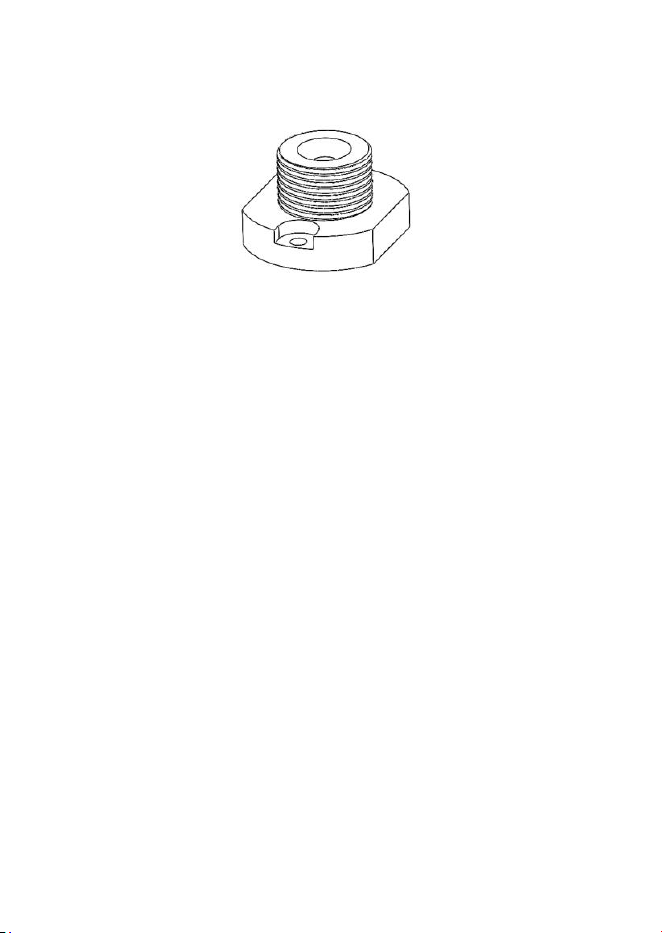
Het apparaat is ontworpen om te worden gemonteerd op de Sensorfact-
Boutadapter:
De boutadapter moet worden geïnstalleerd volgens de afzonderlijke
installatie-instructies, voorafgaand aan de installatie van het apparaat.
Voor de installatie van het apparaat moet worden gecontroleerd of de
boutadapter stevig op het object is gemonteerd; de lijm moet volledig
uitgehard zijn volgens de instructies van de lijmfabrikant.

NL - 10
19.8. Revisie van het apparaat
Voor meer informatie over revisie van het apparaat, neem contact op met de
supportafdeling zoals beschreven in de sectie Support van deze handleiding.
19.9. Preventief onderhoud van de
montagemoer
Voer geen installatie, ingebruikname of bediening van het
apparaat uit als de montagemoer (7) zichtbaar beschadigd is.
1. Controleer vóór elke installatie visueel de binnenschroefdraad van de
montagemoer (7) op het apparaat en de schroefdraad op de
boutadapter. Indien er schroefdraadbeschadiging wordt vastgesteld,
ga dan niet over tot installatie, aangezien dit kan leiden tot een
onjuiste bevestiging van het apparaat op de installatie.
2. Controleer visueel op vuil en stof in de schroefdraad van de
montagemoer (7) en op het contactvlak. Verwijder eventueel vuil of
stof en breng opnieuw montagepasta aan vóór installatie.
3. Het uitwendige zeskantoppervlak (Hex 24) van de montagemoer (7)
moet vóór gebruik worden geïnspecteerd op overmatige
beschadiging, aangezien aanzienlijke slijtage of vervorming kan
leiden tot wegglijden van de steeksleutel, wat letsel of materiële
schade kan veroorzaken.
NL - 11
19.10. Afdanking van het apparaat
Een beschadigd of niet-functionerend apparaat kan doorgaans worden
gerepareerd of gereviseerd. Volg hiervoor de instructies in de sectie Revisie
van het apparaat in deze handleiding.
De afdanking van het apparaat moet worden uitgevoerd
door de distributeur of volgens instructies van de
supportafdeling.
Dit apparaat valt onder de Richtlijn Afgedankte Elektrische
en Elektronische Apparatuur (AEEA) (2012/19/EU). Het mag
niet bij het huishoudelijk afval worden weggegooid; lever
het in bij een erkend inzamelpunt voor recycling van
elektronisch afval.



© Sensorfact B.V. 2026. All rights reserved. www.sensorfact.nl
User Manual Version : VT1738_701_v1.1-Manual Canary
Last Update 03-Apr-2026