User Manual
Emergency radio fan
(D17)
Preface
Dear Customer,
Thank you for choosing our product. Our product integrates advanced, sophisticated and cutting-edge
technologies, with stable quality and superior performance. For your convenience, please read this manual
carefully and operate the product in accordance with the steps provided. If you encounter any problems during
use, please contact us promptly, and we will be at your service at any time.
Warning: Do not place this product near open flames or high-temperature containers, so as to avoid fire or
explosion.
Our company reserves the right to modify and improve any products described in this document. Meanwhile, we
reserve the right to continuously update product information. All contents are subject to the actual product, and no
further notice will be given.
2. Maintenance and Cleaning
• Do not use this product in high-humidity places such as bathrooms.
• This product is not waterproof. Do not wash it with water.
• Do not wipe the surface with chemical reagents such as alcohol, thinner or benzene.
• Dirty sockets may cause poor contact, power failure and failure to charge. Please clean them regularly.
• Please use qualified chargers of reputable brands.
• In case of quality problems, please contact the seller. Do not disassemble the product by yourself.
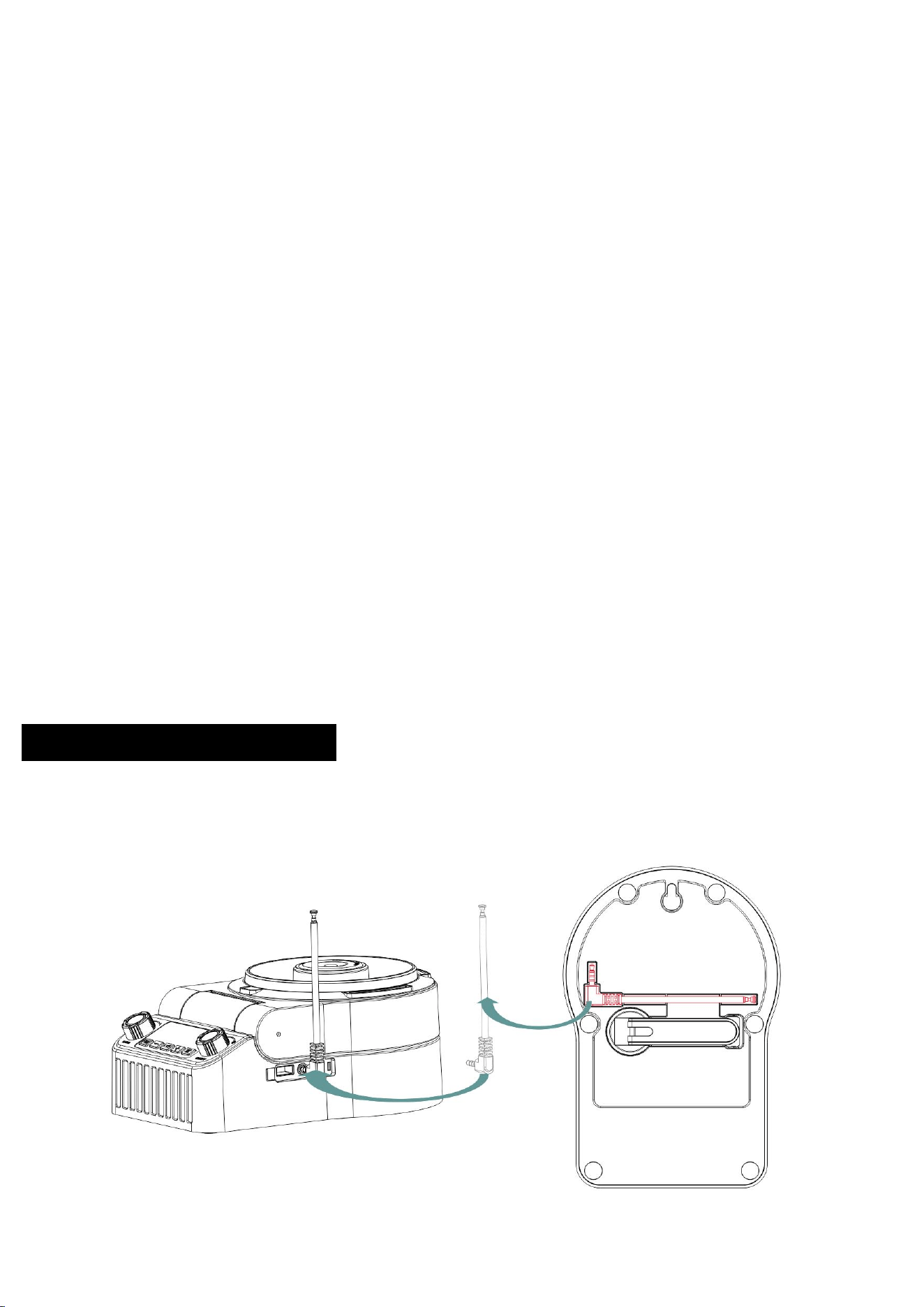
FM Antenna Connection Method
:
Please connect the antenna first when using the FM radio; otherwise, the radio will not be able to
search for station frequencies.
Function Introduction
:
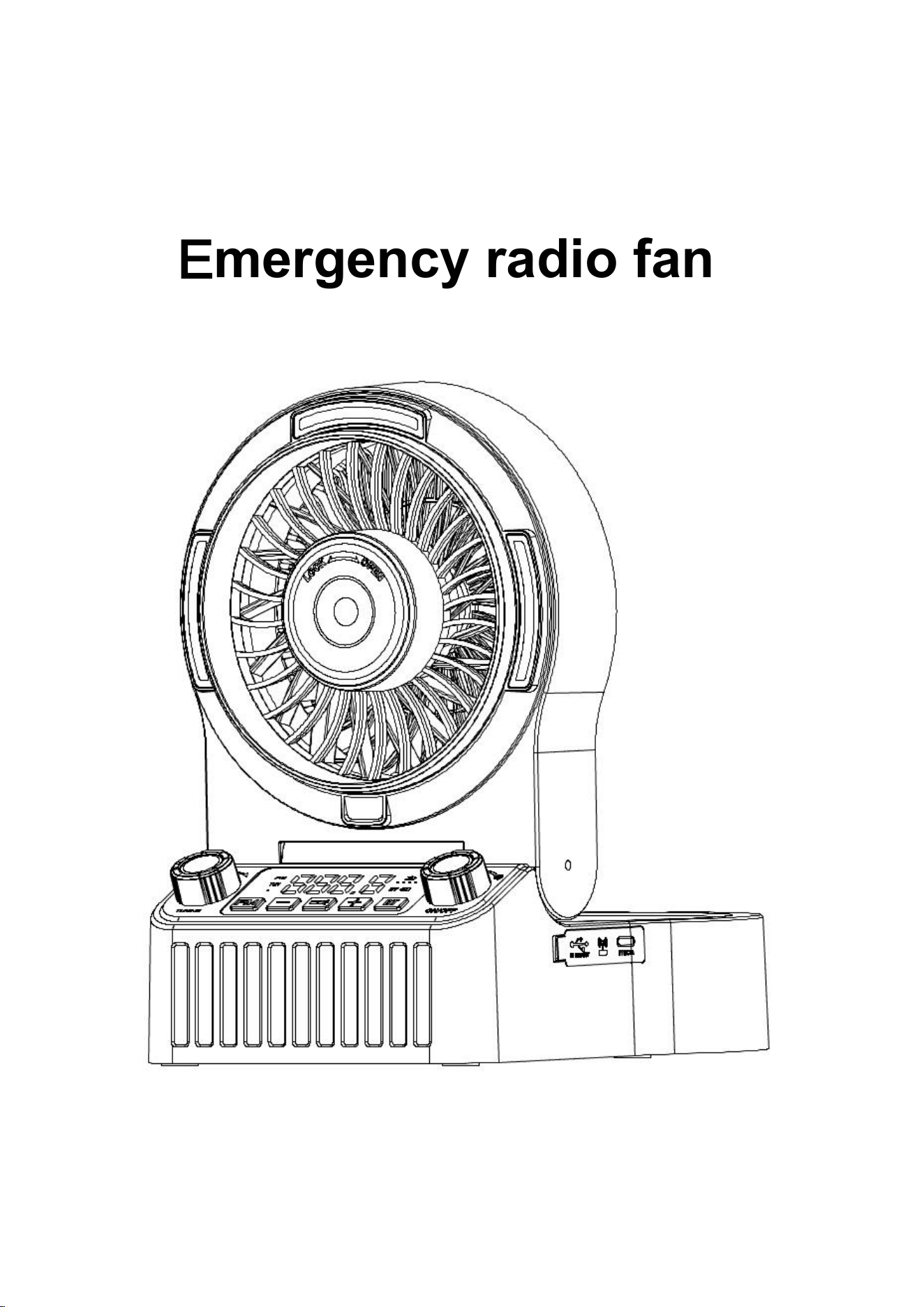
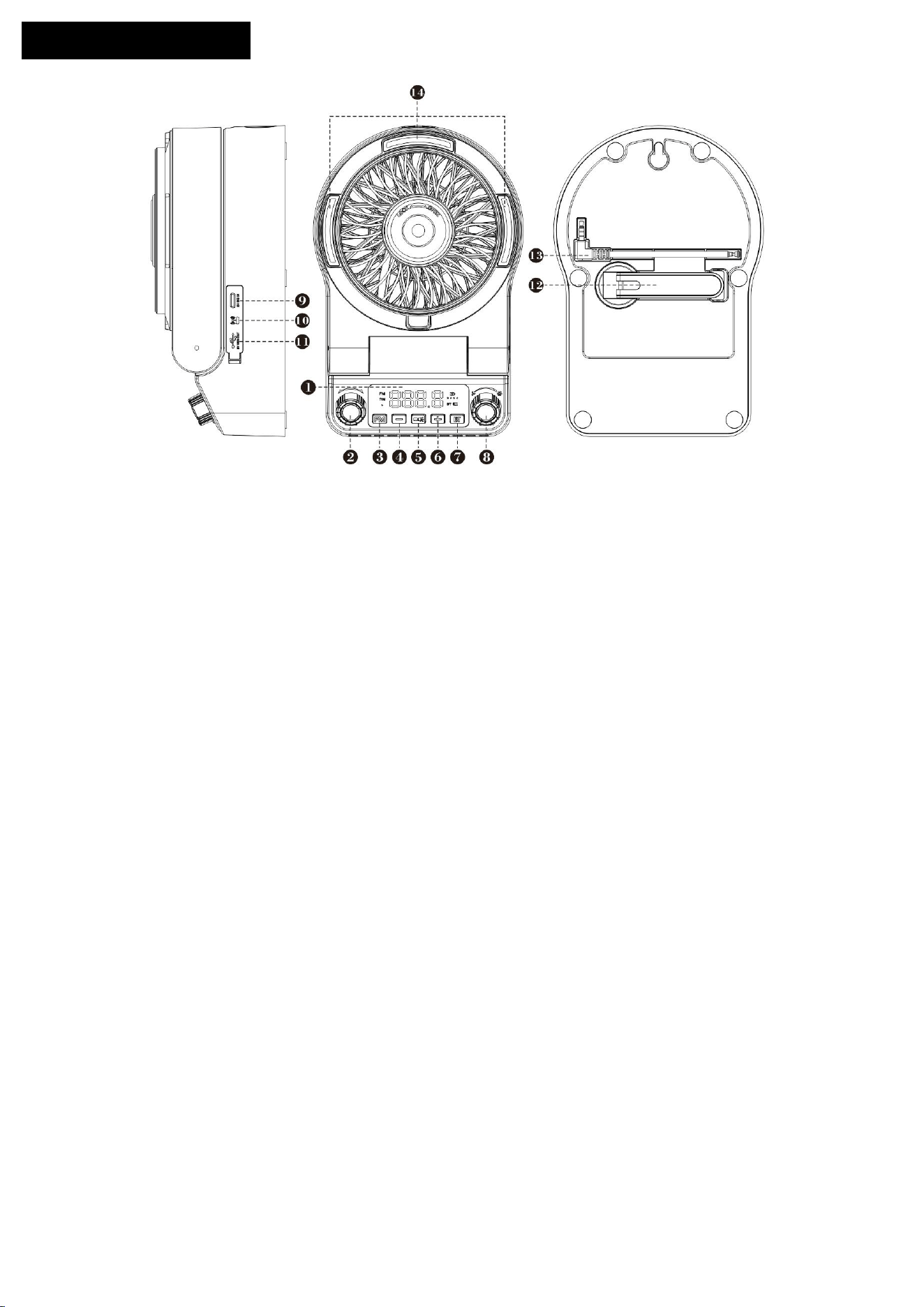
① Display: Shows battery level, radio frequency, volume level, BT Bluetooth activation icon, and hand-cranked
charging icon.
② Radio tuning knob: Rotate the knob to search for radio frequencies.
③ FM power button: Press and hold for 3 seconds to turn on the FM radio; a voice prompt will sound when
activated.
Note: To use the radio, please insert the FM antenna at position ⑬ into the port at position ⑩ and fully extend the
antenna to receive radio signals.
④ Volume – button: Short press to decrease volume; long press to decrease volume rapidly.
⑤ Light / RGB ambient light button: Short press to turn on the white flashlight; press again to activate the RGB
ambient light; press a third time to turn off the lights.
⑥ Volume + button: Short press to increase volume; long press to increase volume rapidly.
⑦ BT Bluetooth button: Press and hold for 3 seconds to turn on Bluetooth; the device name is D17. Press and
hold again for 3 seconds to turn off Bluetooth.When Bluetooth is activated, the RGB ambient light will turn on
simultaneously; you can press the light switch at position ⑤ to turn it off.
Note: If Bluetooth is turned on while FM radio is active, long-press the BT button for 3 seconds to power off
directly, or long-press the FM power button for 3 seconds to return to FM radio mode.
⑧ Fan switch & speed knob: Rotate the knob to turn on the fan and adjust the fan speed.
⑨ Type-C charging port: Connect a 5V charger with a Type-C cable to charge the device.
⑩ FM antenna jack: Insert the antenna at position ⑬ into this port to receive FM signals.
⑪ USB output port: Connect a USB charging cable to this port to charge external electronic devices with input
≤5V/2A.
⑫ Hand-cranked generator: Turn the crank clockwise or counterclockwise to activate the generator and charge
the device. The indicator on the display will light up during hand-crank charging.
Note: Hand-crank charging is recommended for emergency use only, as it charges slowly. For non-emergency
situations, USB charging is recommended for faster speed.
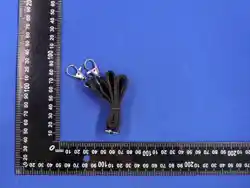
⑬ FM antenna
⑭ Flashlight / RGB ambient light
Screen Function Introduction:
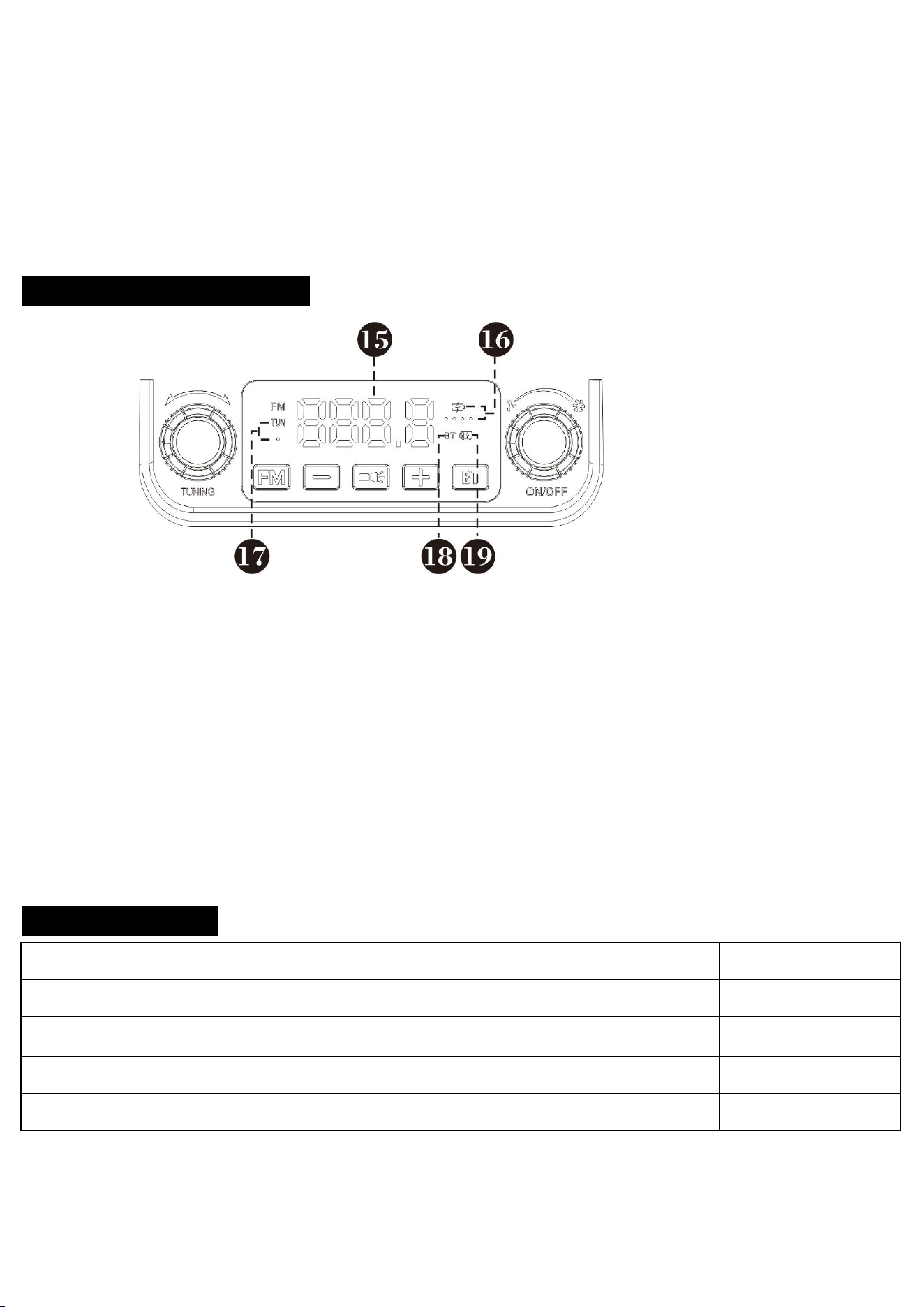
⑮ Main Screen: Displays radio station channels and volume.
⑯ Battery Indicator Lights: This device is equipped with four battery level indicators. A lit segment
indicates the current battery level range. If the last indicator flashes, the battery is exhausted and requires
immediate charging.
⑰ Station Lock Indicator: This icon lights up during radio frequency searching, indicating the station is at
its optimal signal strength.
⑱ BT Working Indicator: This icon illuminates when Bluetooth (BT) is activated.
⑲ Hand-Crank Power Indicator: This icon lights up during hand-crank generator charging.
Product Parameters:
Channel Range
FM:87.5-108MHA
Fan Motor
Brushless Motor9v
Overall Specifications
216.5X146.5X90
(
mm
)
Hand-cranked generator
5V 1.5W 300mAh
Fan Speed Control
Stepless Speed Control Knob
Speaker
3Ω5W
Type-C Charging
5V2A
BT
BT Version5.3
USB Output
5V2A
BT Transmission Distance
≥10M
This device complies with part 15 of the FCC Rules. Operation is subject to the following two conditions:
(1) This device may not cause harmful interference, and (2) this device must accept any interference
received, including interference that may cause undesired operation.
NOTE: This equipment has been tested and found to comply with the limits for a Class B digital device,
pursuant to Part 15 of the FCC Rules. These limits are designed to provide reasonable protection against
harmful interference in a residential installation. This equipment generates, uses and can radiate radio
frequency energy and, if not installed and used in accordance with the instructions, may cause harmful
interference to radio communications. However, there is no guarantee that interference will not occur in a
particular installation. If this equipment does cause harmful interference to radio or television reception,
which can be determined by turning the equipment off and on, the user is encouraged to try to correct the
interference by one or more of the following
measures:
-- Reorient or relocate the receiving antenna.
-- Increase the separation between the equipment and receiver.
-- Connect the equipment into an outlet on a circuit different from that to which the receiver is connected.
-- Consult the dealer or an experienced radio/TV technician for help.
Changes or modifications not expressly approved by the party responsible for compliance could void the
user's authority to operate the equipment.
This equipment complies with the FCC RF radiation exposure limits set forth for an uncontrolled environment.
This equipment should be installed and operated with a minimum distance of 20cm between the radiator and any
part of your body.
This device complies with part 15 of the FCC Rules. Operation is subject to the following two
conditions:
(1) This device may not cause harmful interference, and
(2) (2) this device must accept any interference received, including interference that may cause undesired
operation.