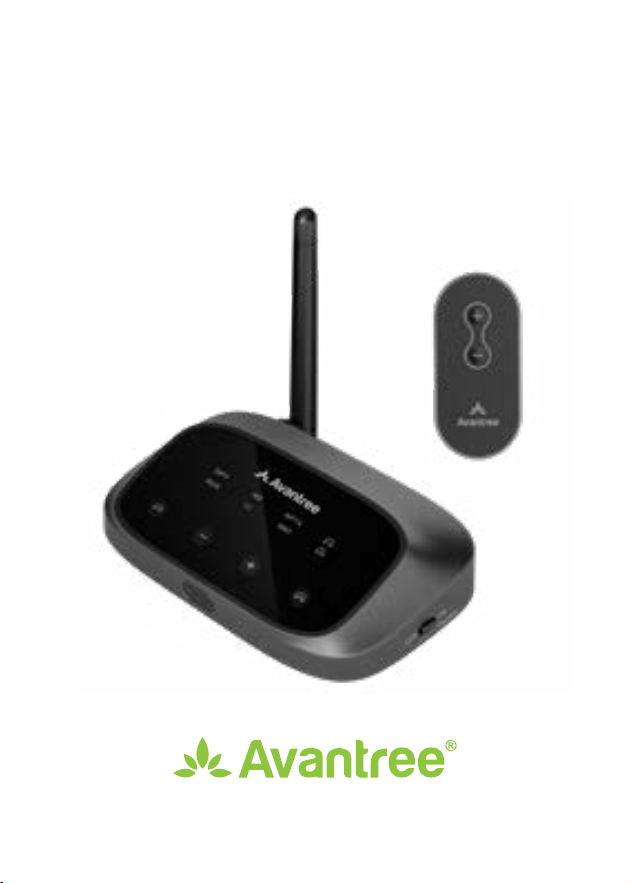
Oasis Plus
User Manual
Item No.: BTTC-500P-2

User Manual
2
EN
OASIS PLUS 2
Table of Contents
Box Contents •••••••••••••••••••••••••••••••••••••••• 3
Product Introduction ••••••••••••••••••••••••••••••••• 4
Product Overview ••••••••••••••••••••••••••••• 4
Button Functions •••••••••••••••••••••••••••••• 5
LED Indicators ••••••••••••••••••••••••••••••••• 6
Set Up •••••••••••••••••••••••••••••••••••••••••••••• 7
Connecting to TV •••••••••••••••••••••••••••••• 7
Connecting Your Headphones •••••••••••••••••• 11
Setting Up Your TV •••••••••••••••••••••••••••• 13
Advanced Features ••••••••••••••••••••••••••••••••• 14
Adding a Second Pair of Headphones •••••••••••• 14
Reconnecting Your Headphones •••••••••••••••• 15
Listening with a Soundbar ••••••••••••••••••••• 16
Using the Remote ••••••••••••••••••••••••••••••••••• 17
Specications •••••••••••••••••••••••••••••••••••••• 18
FAQ ••••••••••••••••••••••••••••••••••••••••••••••• 19
Contact Us ••••••••••••••••••••••••••••••••••••••••• 97
User Manual
3
EN
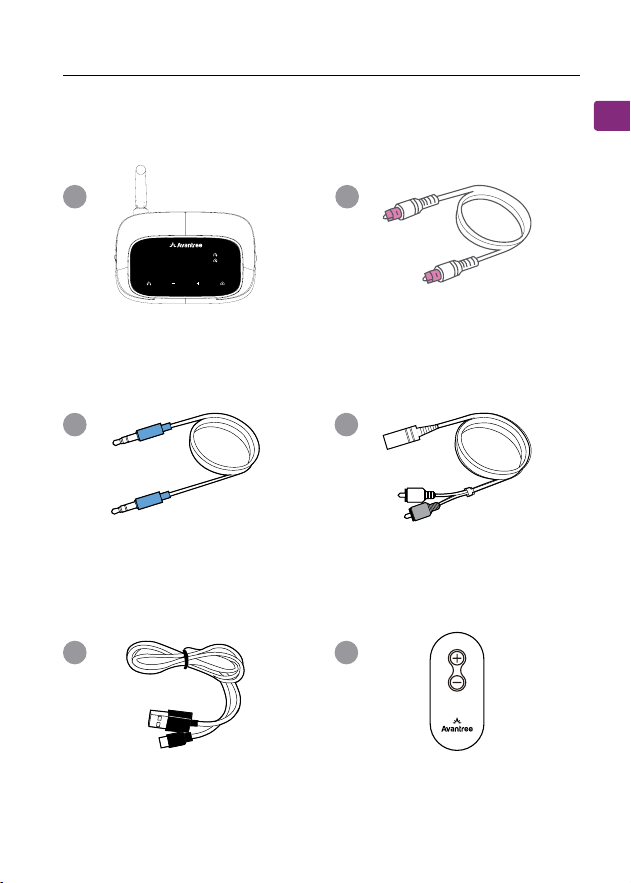
OASIS PLUS
Type C Power
Cable
Remote
AUX 3.5mm to
RCA Adapter
Oasis Plus 2 - Bluetooth
Transmitter
Digital Optical
Audio Cable
AUX 3.5mm
Audio Cable
A B
C D
E F
Box Contents
OPT
AUX
APT X
SBCLL
AD
User Manual
4
EN
OASIS PLUS 2
OP T
AU X
APT X
SBCLL
AD
Product Introduction
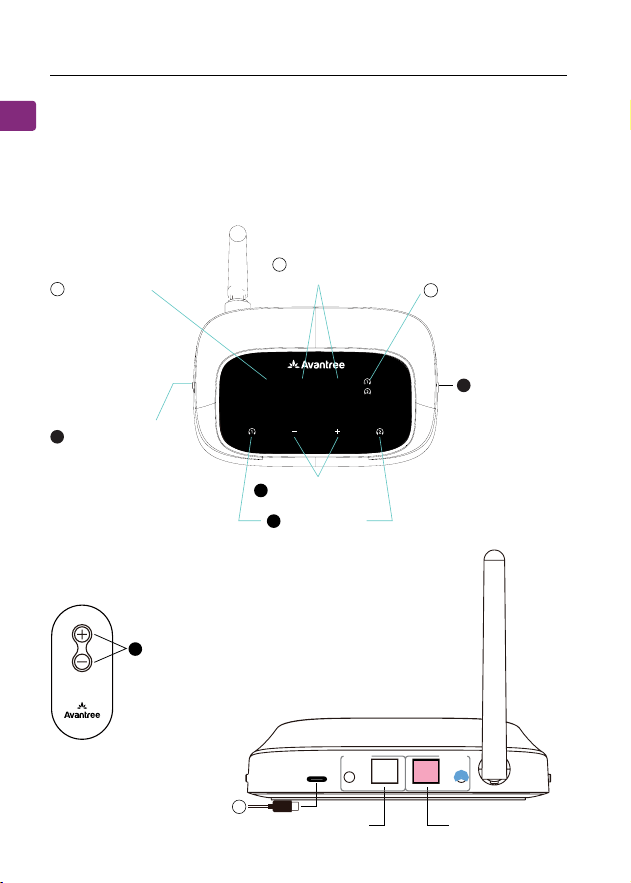
Product Overview
ON / OFF
Switch Button
Volume
TV / AVR Switch
Button
Audio Signal
Indicators
Device Connection
Indicators
Audio Codec
Indicators
Pair Buttons
Volume Control
Buttons
Output To Speaker Input From TV
1
2
4
5
3
A
C
E
B
DC IN AUX AUX
OPTICAL OPTICAL
Output
To
Speaker
Input From
TV
User Manual
5
EN
OASIS PLUS
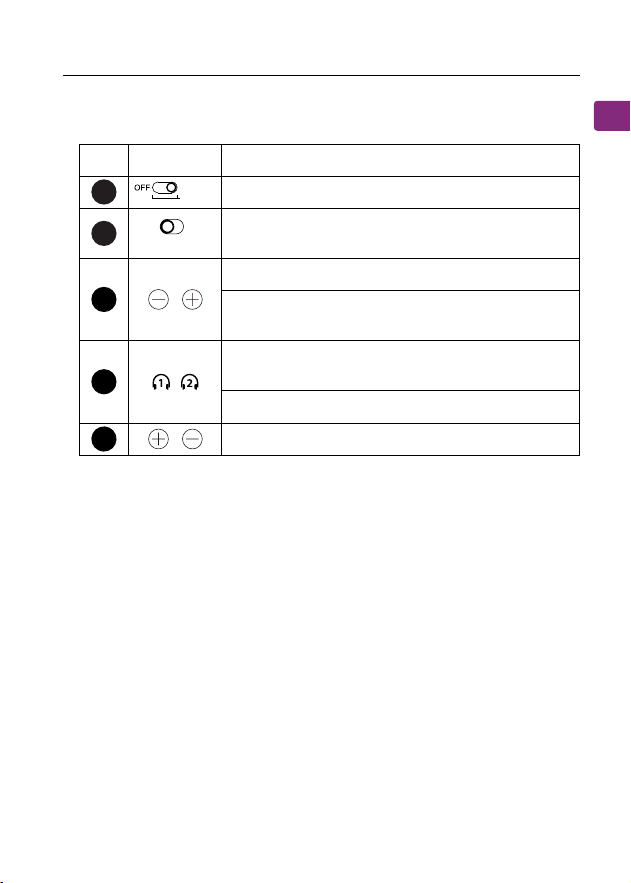
No. Button Functions
Switch to ON/OFF to turn it on/o
Switch to TV/AVR mode while connecting via
AUX cable
Press once to adjust volume
Press & hold both buttons for 7 seconds to
clear pairing history
Press & hold for 2 seconds to enter pairing
mode
Press once to reconnect paired device
Press once to adjust volume with the Remote
Button Functions
1
2
4
5
3
AVRTV
AUX only
ON
Bypass
User Manual
6
EN
OASIS PLUS 2
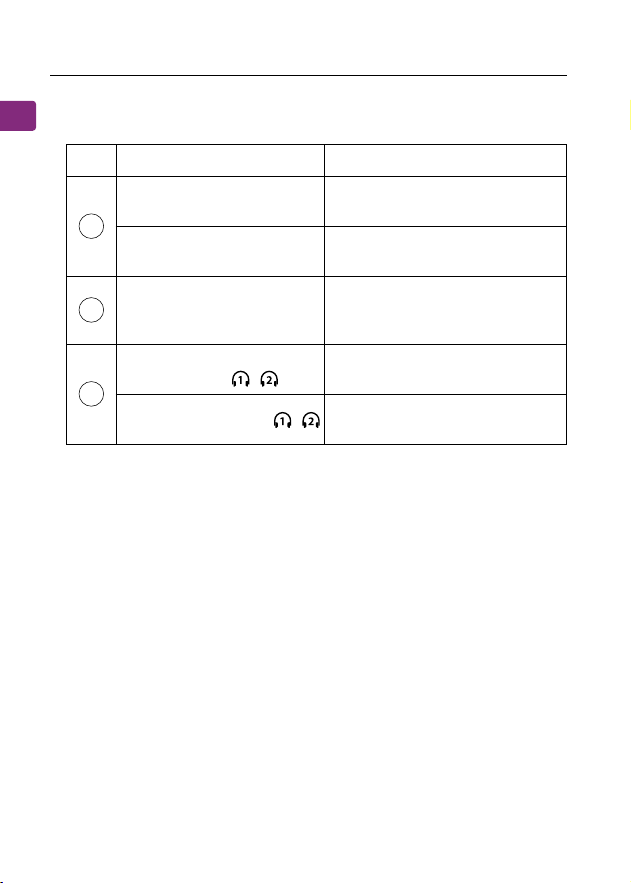
No. Indicator Status
Flashing white light by
"OPT" / "AUX"
Invalid audio signal
Solid white light by
"OPT" / "AUX"
Valid audio signal
Solid white light by "AD,"
"LL," "APTX," or "SBC"
Audio streaming in the aptX
adaptive, aptX low latency,
aptX or SBC codec
Flashing white and green
alternately by /
Pairing mode
Solid white light by /
Successfully connected to
your device(s)
LED Indicators
A
C
B

User Manual
7
EN
OASIS PLUS
The Oasis Plus 2 must be connected to a power source via the
provided power cable in order to function. Plug the transmitter
into either:
Once the Oasis Plus 2 is connected to its power source, switch
to the "on" position. You can then connect it to your TV's
audio ports. You can choose one of 3 dierent ways to do this.
1. A TV’s USB power port (we recommend this so that they
auto power ON / OFF in tandem with your TV), OR
2. A nearby wall outlet - 5V/500mA-2A rated USB adapter
(any phone charger should work. Please contact
[email protected] if you'd like us to send you a free
adapter)
Set Up
Connecting to TV
ON
Bypass
User Manual
8
EN
OASIS PLUS
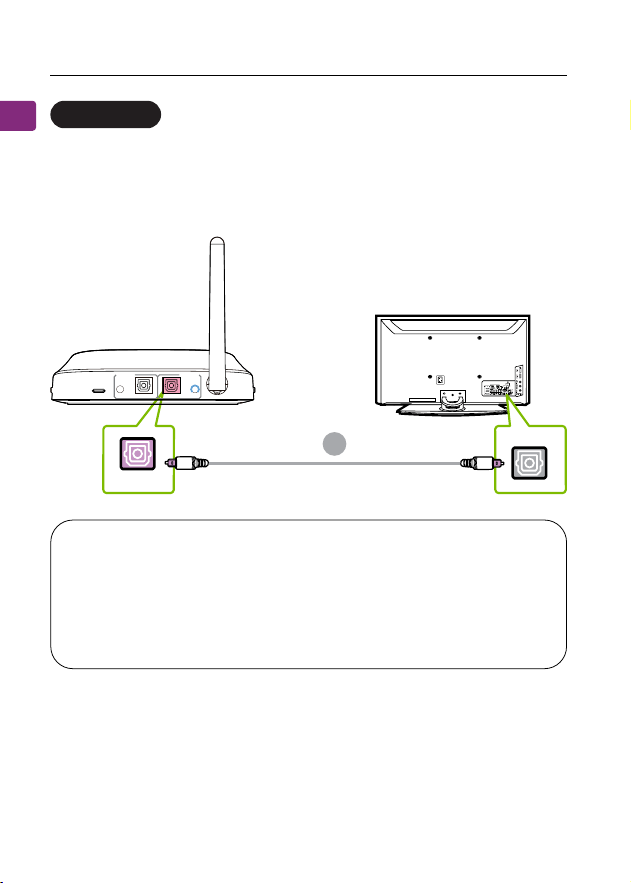
Plug the provided optical audio cable into the TV’s “optical
OUT” or “OPT OUT” port, then plug the other end into the
transmitter’s optical port in the “TX INPUT FROM TV” section.
Optical port (recommended)
OPTION 1
NOTE: Most TVs support audio output through only one
digital output port at a time, so if your TV’s HDMI ARC port
is in use, the optical port may be disabled. You can either
disconnect the HDMI ARC device, or try connecting the
transmitter via RCA / AUX.
TV
OPT OUT
B
OPTICAL
DC IN
AUX AUX
OPTICAL
OPTICAL
Output
To
Speaker
Input From
TV
User Manual
9
EN
OASIS PLUS
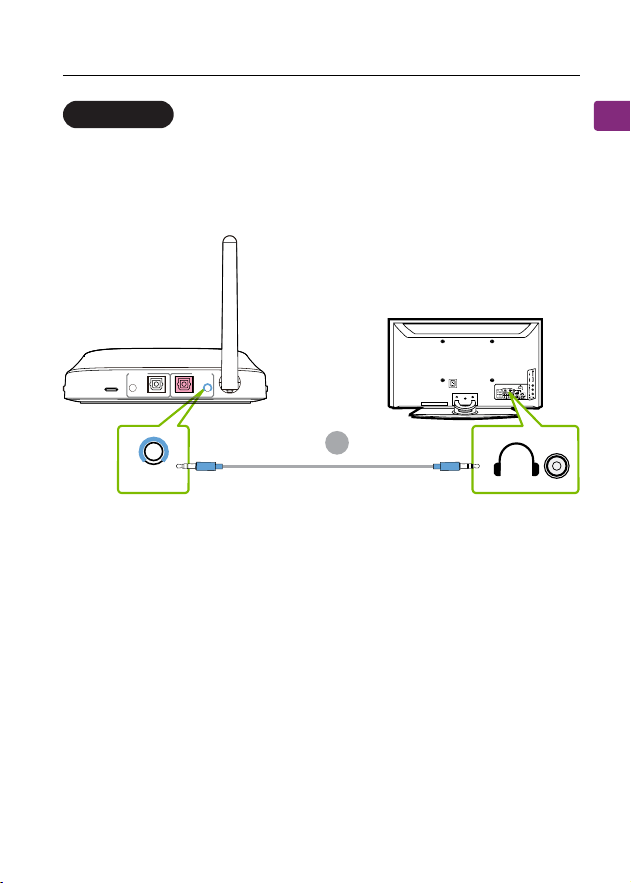
Plug the provided AUX 3.5mm audio cable into the TV’s AUX
3.5mm output port, then plug the other end into the trans-
mitter’s AUX 3.5mm port in the “TX INPUT FROM TV” section.
AUX 3.5mm port
OPTION 2
TV
AUX
C
DC IN
AUX AUX
OPTICAL
OPTICAL
Output
To
Speaker
Input From
TV
User Manual
10
EN
OASIS PLUS 2
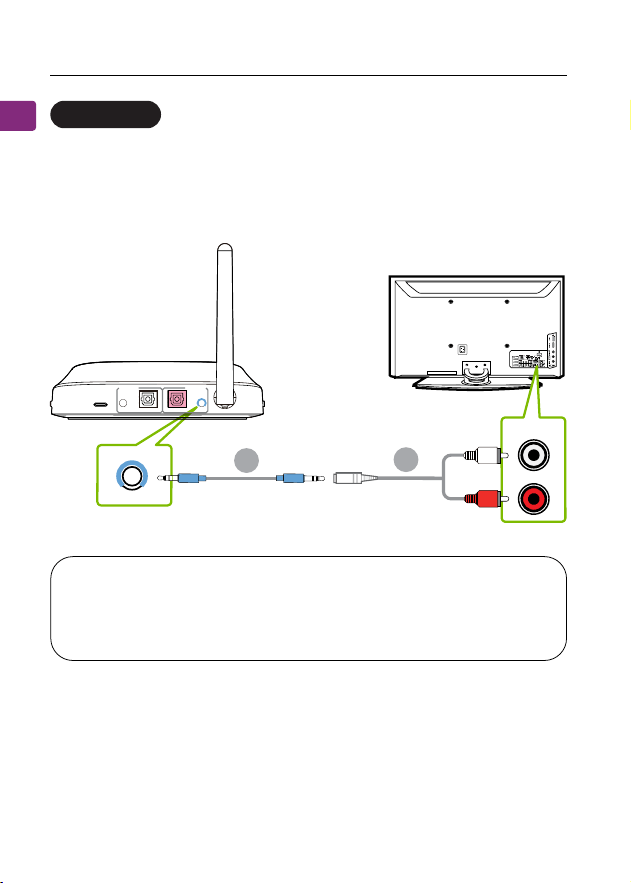
NOTE: Double check to ensure that optical / RCA cables
are plugged into the TV’s audio OUT ports and not the
AUDIO IN / COMPONENT IN ports.
Plug the red & white RCA connectors into the TV’s “AUDIO
OUT” ports, then use the provided RCA to AUX adapter to
plug the other end into the transmitter’s AUX.
RCA port
OPTION 3
AUDIOOUT
TV
AUX
C
D
DC IN
AUX AUX
OPTICAL
OPTICAL
Output
To
Speaker
Input From
TV

User Manual
11
EN
OASIS PLUS
Now that your Oasis Plus 2 is all set up, you can connect your
headphones to the transmitter.
STEP 1
First, power everything on.
STEP 2
For rst time use, the Oasis Plus 2 will enter PAIRING MODE
automatically. For subsequent use, put your Oasis Plus 2 into
PAIRING MODE by pressing & holding the button until the
" " LED ashes green and white alternately.
STEP 3
Put your Bluetooth headphones / speakers into PAIRING mode.
STEP 4
Keep the Oasis Plus 2 & your device close together and wait
for 5-10s until they connect. Once connected, the connection
indicator’s “ ” will turn a solid white.
Connecting Your Headphones
User Manual
12
EN
OASIS PLUS 2
NOTE 1: Most cases where your device & the transmitter
fail to connect happen because the device is not properly
placed into PAIRING MODE. Double check that your device
is successfully in PAIRING MODE (typically indicated by
an LED indicator's alternate red & blue ashes). For more
details, please refer to your device's online user manual.
NOTE 2: Some smart TVs will automatically scan for and
try to pair with any Bluetooth devices in its vicinity. If your
TV prompts you to connect your Bluetooth headphones
or the Oasis Plus 2, please "DENY" the request so that your
device can properly pair with the transmitter.
Avantree Oasis Plus 2
Your permission is require d
to connect your device to TV.
Allow
Deny
Close

User Manual
13
EN
OASIS PLUS
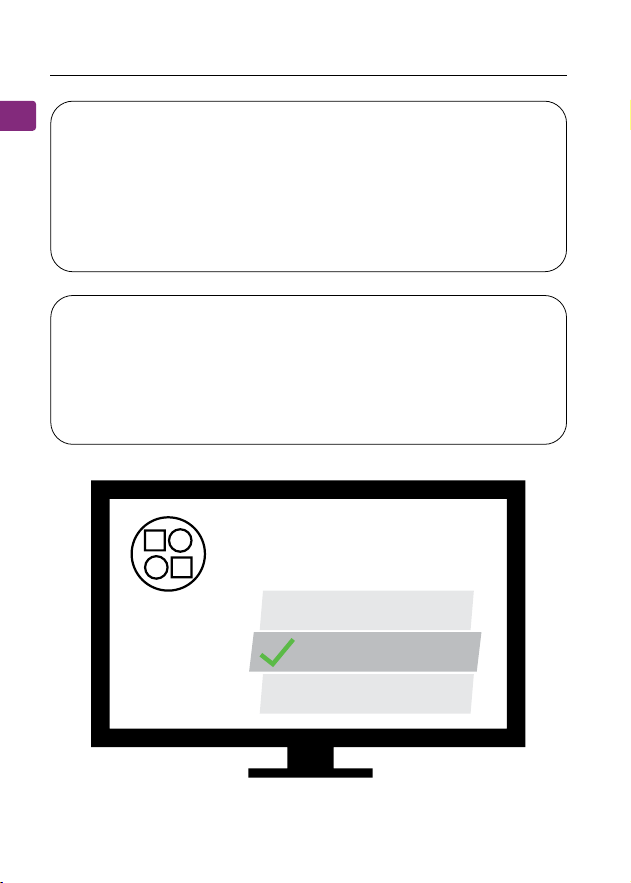
( FOR OPTICAL CONNECTIONS ONLY )
If you connected to your TV via the optical OUT or “OPT OUT”
port, you’ll need to congure your TV settings before you’ll
receive audio.
STEP 1
Using your TV’s remote control, press the SETTINGS button and
navigate to the AUDIO tab within the settings menu. (Please
note that there may be dierences in the setting names
depending on your brand of TV).
STEP 2
Proceed to AUDIO OUTPUT and select “OPTICAL OUT / DIGITAL
OUT”. Many TVs will do this automatically; skip this step as
needed.
STEP 3
Set Audio Output format to “PCM / STEREO” ON or “DOLBY”
OFF.
Setting Up Your TV
Sound
Audio Out Optical Out
Digital
Audio
Format
PCM/Stereo
Dolby - OFF
or
User Manual
14
EN
OASIS PLUS 2
If you’re having trouble nding these settings, you can scan the
QR code correlating to your TV’s brand OR visit avantree.com/
oasis-plus-2/tv-audio-settings for a more detailed guide.
LG SONY SAMSUNG
You can connect and simultaneously listen through two pairs
of headphones if desired. Visit avantree.com/oasis-plus-2/video
if you’d prefer to watch a video guide on this process.
STEP 1
Pair your rst pair of headphones to the Oasis Plus 2 by
following the steps in the “Connecting Your Headphones”
section(Page 11).
STEP 2
Once your rst device is successfully connected, put your
Oasis Plus 2 into PAIRING MODE once again by pressing &
holding the button untill the " " LED ashes GREEN and
WHITE alternately.
Adding a Second Pair of Headphones
Advanced Features
User Manual
15
EN
OASIS PLUS
STEP 3
Put your second pair of Bluetooth headphones / speakers into
PAIRING mode. Please refer to your headphones’ / speaker’s
user manual for more details if necessary.
STEP 4
Keep the Oasis Plus 2 & your second device close together
and wait for 5-10s until they connect. Once connected, the
connection indicator’s “ ” will turn a solid white.
NOTE: The dual headphones support function works
with most headphones but not all. Certain true wireless
earbuds in particular do not work well with Bluetooth
transmitters' dual headphones mode.
You typically do NOT need to re-pair your Bluetooth
headphones / speakers with the Oasis Plus 2 every time. Once
successfully paired, they should automatically reconnect when
both devices are turned on (this may take a few seconds).
If your device does not automatically reconnect after 5-10
seconds, you can manually initiate reconnection by pressing
the Oasis Plus 2’s Pairing button once and waiting for 5-10
seconds. If this still doesn't work, try initiating reconnection on
your audio device as well (typically done by pressing the main
Bluetooth PLAY button on your headphones once).
Reconnecting Your Headphones
User Manual
16
EN
OASIS PLUS 2
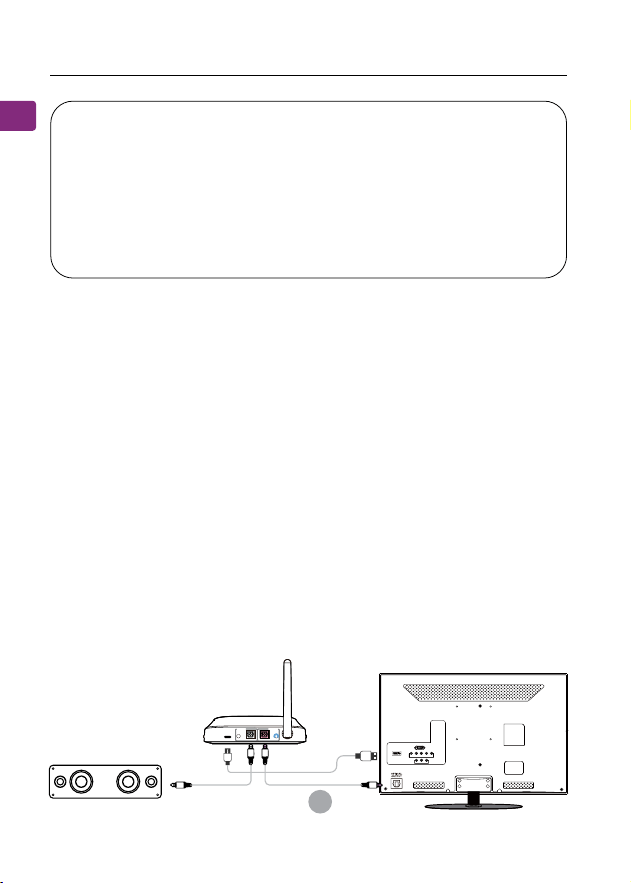
The Oasis Plus 2’s pass-through function allows you to listen
through both headphones and an external soundbar / stereo
AVR simultaneously.
STEP 1
Plug an additional optical or 3.5mm AUX cable into the cor-
relating audio port in the transmitter’s “ OUTPUT TO SPEAKER”
section.
STEP 2
Plug the other end into your external sound system, then
you’re good to go.
Listening with a Soundbar
NOTE: If you paired your headphones with a dierent
Bluetooth device, turn Bluetooth OFF on said device(s).
Airpods in particular will always prioritize iPhones for
automatic pairing, so you'll need to turn your iPhone's
Bluetooth OFF when pairing your Airpods with the Oasis
Plus 2.
B
TV/Audio Source
Sound System
Oasis Plus 2
DC IN
AUX AUX
OPTICAL
OPTICAL
Output
To
Speaker
Input From
TV
User Manual
17
EN
OASIS PLUS
NOTE: Bypass only works with the same type of input /
output, i.e. if you connect to your TV via OPT, you’ll need to
connect to your speaker via OPT as well.
Simply press the and buttons on the remote
controller to adjust volume. Facing the remote to the infrared
window in front of the Oasis Plus 2 within 4 meters and no
obstacles.
If your remote runs out of power, you can replace the battery
with any CR2025 3V Lithium battery. Use a coin, a button cell,
or a slotted screwdriver, turn the cap counterclockwise and
replace the dead battery with a fresh one, then turn the cap
back.
Using the Remote
INGESTION HAZARD: This product contains a button cell or coin battery.
DEATH or serious injury can occur if ingested.
A swallowed button cell or coin battery can cause Internal Chemical
Burns in as little as 2 hours.
KEEP new and used batteries OUT OF REACH of CHILDREN
Seek immediate medical attention if a battery is suspected to be
swallowed or inserted inside any part of the body.
WARNING

User Manual
18
EN
OASIS PLUS 2
Specications
Bluetooth version v5.3
Supported proles A2DP, AVRCP
Audio codecs aptX adaptive, aptX-LL, aptX, SBC
Operating range Up to 164ft / 50m
Input voltage / current DC5.0V / 500Ma-2A
Supported sampling rate in
optical mode
≤48KHz, 16bit
Supported audio format in
optical mode
PCM / LPCM
Net weight 90g

User Manual
19
EN
OASIS PLUS
Below are some of the most common questions people have
during setup.
Can I have audio through both my TV speakers and my
wireless headphones at the same time?
This completely depends on whether or not your TV supports
the ability to output audio to 2 sources simultaneously. You
can try a few dierent methods to test if your TV is capable of
this or not -- please refer to avantree.com/oasis-plus-2/sound
for more details.
Why am I getting audio delay?
Both the sender (i.e. the Oasis Plus 2) and the receiver (i.e.
your Bluetooth headphones) must support either aptX Low
Latency or aptX adaptive in order to eliminate audio latency.
You can check your device's specs to ensure it supports either
of these audio codecs. Please note that most true wireless
earbuds do not currently support aptX Low Latency or aptX
adaptive audio codecs.
Other Tips
If your TV’s HDMI ARC port is in use, your optical audio output
might not work. Try connecting the transmitter via RCA / AUX
or unplugging the HDMI ARC.
FAQ

User Manual
20
EN
OASIS PLUS 2
Why aren't I getting sound from my headphones?
How do I connect my Oasis Plus 2 to my Samsung / LG smart
TV?
......
For answers to questions like these and for a full FAQ list, you
can visit avantree.com/support/oasis-plus-2, or you can
contact us directly for additional assistance.
97
Contact Us
Support Tickets
Video Guide
Support Email
Support Numbers
FAQ
avantree.com/submit-a-ticket
avantree.com/oasis-plus-2/video
avantree.com/support/oasis-plus-2
CA +1 800 232 2078 9am-6pm PST
US +1 800 232 2078 9am-6pm PST
UK +44 208 068 2023 9am-6pm GMT
DE
+49 322 2109 7297
11am-9pm CET
FR +33 17 634 0312 11am-9pm CET
IT +39 069 4803 330 9am-6pm CET
ES +34 93 1786 261 9am-6pm CET
AU +61 2 8310 9897 11am-7pm AEST
Mon-Fri
Mon-Fri
Mon-Sat
Mon-Sat
Mon-Sat
Mon-Sat
Mon-Sat
Mon-Fri
Product Registration See QR code on the product.
Manufacturer:
Avantronics Limited
Luohu District, Shenzhen 518000 China
+ 86 755 8228 5022 [email protected]
US Importer:
Avantree Corporation
San Jose, California 95119 USA
+1 800 232 2078 [email protected]
UK Importer:
Avantree Limited
Watford, WD180 0HQ UK
+44 20 8068 2023 [email protected]
Servicer in Europe:
GizmexGmbH,
Sternstr.67, 40479Dusseldorf,Germany
+49 322 2109 7297 [email protected]
EC REP
Item No.: BTTC-500P
Dispose of the packaging and this product in accordance with the latest provisions.
Z-PKQG-TC500P2-V0