EN
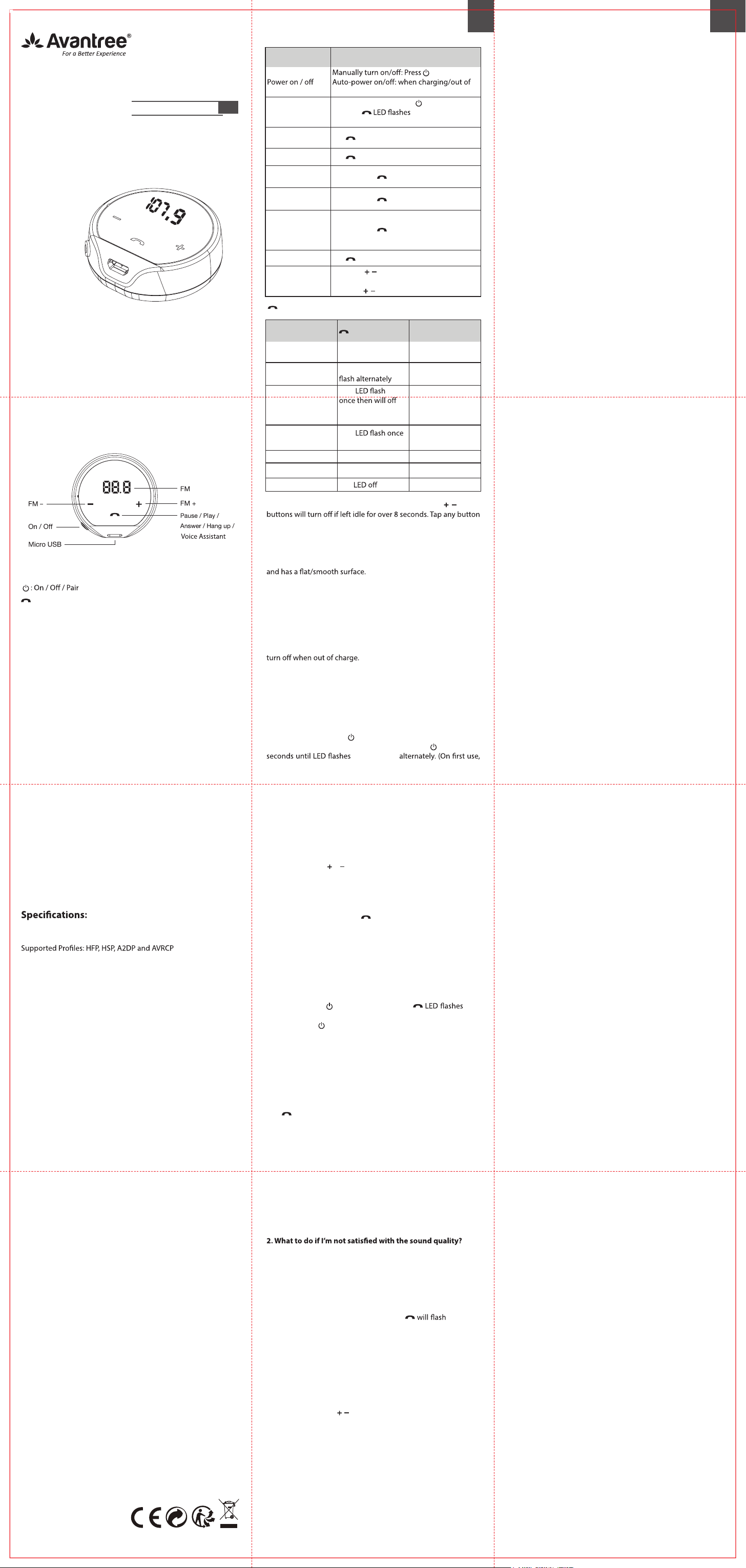
Basic Operations
LED Indicators
Function Operation
once
charge
Pairing mode
From ON, press and hold
for 3 seconds
until the
Blue and Red
alternately
Manually re-
connect
Tap
once
Answer/End a call Tap
once
Reject a call Tap and hold
for 2 seconds
Mute/Un-mute the
microphone
Tap and hold
for 3 second DURING CALL
Voice control
(phone feature:
Siri, Google
assistant)
Tap and hold
for 3 seconds
Play / Pause Tap
once
Set FM frequency
Short tap
/ once to increase/reduce 0.1
MHz
Long tap
/ once to increase/reduce 1 MHz
Working Status LED indicator Voice Prompts
Power on
Blue LED on 1
second
"Power ON"
Pairing in progress
Red and Blue LED
"Pairing"
Connected
Blue
if no-ops within 8
seconds
"Your headset is
connected"
Disconnected
Blue
every 2 seconds
"Your headset is
disconnected"
Low battery "Battery Low"
Charging in progress Red LED steady on "Charging"
Charging completed Red
Note: The RED LEDs for FM number display and
/ touch
to wake it up.
Set up
Installing CK310 onto your Car
1. Find a spot on your dashboard that is easily reachable for you
2. Use the magic tape provided to attach the CK310 in the spot
you’ve selected.
3. Please check to make sure the device and the spot won’t
hinder your driving.
If you would like to use CK310 with charger always connected>
Please connect CK310 to your existing car charger using the USB
cable provided, it will automatically turn on once in charge, and
To improve sound quality during calls >
To improve the sound quality during calls, try moving the CK310
to a spot closer to you (e.g steering wheel). The closer the device
is to you, the better the sound/call quality.
Pairing with your mobile phone
1. Turn on CK310 – Press once.
2. Set CK310 to PAIRING MODE - Press and hold
button for 3
Blue and Red
CK310 will automatically enter pairing mode once powered on)
3. Activate Bluetooth on your phone, search and select “Avantree
CK310” to connect.
FM Setting (Support frequency 88.1MHz ~
107.9MHz)
1. Choose a vacant channel from your car radio: most vacant
channels may still contain pure noise; the purer the channel, the
more suitable it is for FM transmitter use.
2. Set the FM frequency of CK310 to the same as your car radio
channel using the
& touch buttons.
Reconnecting
Please ensure your device’s Bluetooth is on. CK310 will auto
reconnect to the most recently connected device once being
powered on. Otherwise, tap
once to manually reconnect. For
other paired devices, please tap “Avantree CK310” on your phone
to reconnect.
Factory Reset
You may reset the CK310 to factory settings if it’s not working as
expected. After resetting to factory default, pairing history will
be erased from the CK310. Please
1. Make sure CK310 is connected to the charger.
2. Press and hold
for 3 seconds until the Blue
and Red alternately.
3. Double click
button and you will hear 2 “beeps” indicating
a successful reset. After resetting, the device will automatically
enter pairing mode again.
Note: For successful connection, please also delete the pairing
history on your phone and re-pair with CK310.
How to Charge
When you hear a “Battery low” prompt every 5 minutes, you
should charge the device. Full charge takes about 2 hours.
The
LED will remain Red while charging and will turn o
automatically once charging is complete.
You can plug the CK310 into a USB wall charger/car charger (DC
5V/0.5-1A) or a computer USB port with the computer powered
on.
Troubleshooting
1. Why aren’t the touch buttons working?
The product enters in “power save” mode once left idle for 8
seconds, the touch buttons does not work in this state. Please
touch the bottom half of the screen to wake the product up to
use the touch buttons.
a) Adjust the car radio to a quieter channel; the less noise
the channel has, the more suitable it is as a channel for FM
transmission.
b) Ensure the CK310 and the car radio are on the same
frequency.
3. Why can’t I connect the CK310 with my Bluetooth device?
a) Ensure CK310 is in pairing mode - LED
BLUE and
RED alternately
b) Reboot the Bluetooth device you would like to use. Delete
“Avantree CK310” from your device’s Bluetooth list and then try
to pair again.
c) Reset the CK310 as above. See the “clear pairing history”
section above.
4. Why can’t I adjust the volume via the touch screen of
CK310?
Please note that the / buttons on CK310 can only adjust the
FM frequency, NOT the volume. You may adjust the volume
using your cell phone or car speaker.
Any questions? Contact:
(Response Time: 1 working day)
Self-service Support:
• More FAQs on support.avantree.com
• 100+ Step by step video Guide – youtube.com/avantree/playlists
Telephone Support (Mon-Fri):
• USA / CANADA +1 800 232 2078
• EU / Asia telephone No. refer to http: //www.avantree.com/contact-us
: Reconnect
Music (Play / Pause)
Call (Answer / Hand Up / Reject)
Voice Assistant (Long press for 3 seconds)
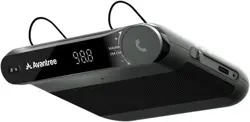
Product Overview
Wireless FM
Transmitter
for Car
Model No.: BTCK-310
User Manual
www.avantree.com
What’s in the box
Avantree CK310
Magic Tape x 2pcs
0.8m Micro USB cable
Bluetooth Version: 4.1
FM Frequency Range: 88.1MHz-107.9MHz
FM Transmitter Range: Up to 12ft
Bluetooth Operation Range: Up to 30ft
Talk Time: Up to 7 hours
Music Time: Up to 9 hours
Standby Time: Up to 12 hours
Charging Time: about 2 hours
Battery: 370mAH Lithium-ion battery
EN
Dispose of the packaging and
this product in accordance with
the latest provisions.
Z-PKQG-CK310-V3
Model No.: BTCK-310 (Avantree CK310)
Made in China
FCC ID: WJ5-BTCK-310
IC: 8475A-BTCK310