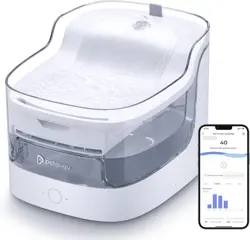
PF1 Intelligent Pet Water
Please read this manual carefully
and keep it properly before using the product.
Federal Communications Commission
(FCC) Interference Statement
This equipment has been tested and found to comply with the limits for a Class B
digital device, pursuant to Part 15 of the FCC Rules.
These limits are designed to provide reasonable protection against harmful
interference in a residential installation. This equipment generate, uses and can
radiate radio frequency energy and, if not installed and used in accordance with
the instructions, may cause harmful interference to radio communications.
However, there is no guarantee that interference will not occur in a particular
installation. If this equipment does cause harmful interference to
radio or
television reception, which can be determined by turning the equipment off and
on, the user is encouraged to try to correct the interference by one of the
following measures:
• Reorient or relocate the receiving antenna.
• Increase the separation between the equipment and receiver.
• Connect the equipment into an outlet on a circuit different from that to which
the receiver is connected.
• Consult the dealer or an experienced radio/TV technician for help.
This device complies with Part 15 of the FCC Rules.
Operation is subject to the following two conditions: (1) This device may not cause
harmful interference, and (2) this
device must accept any interference received,
including interference that may cause undesired operation.
responsible for compliance could void the user5s authority to operate this
equipment.
RF exposure warning
This equipment complies with FCC radiation exposure limits set forth for an
uncontrolled environment. This equipment must be installed and operated in
accordance with provided instructions and the antenna(s) used for this
transmitter must be installed to provide a separation distance of at least 20 cm
from all persons and must not be collocated or operating in conjunction with any
other antenna or transmitter.
Contents
Precautions
List of Parts
Product Introduction
Product Installation
Product Use
Connect to APP
Key Button Description
Indicator Description
Performance Failure Table
Basic Parameters
Services And Support
1
2
2
3
4
5
6
6
8
11
12
13
13
1
Precautions
Tips: Illustrations of product, accessories and user interface in this manual
are schematic diagrams for reference only. Since product updating, there
may be some differences between the physical object and the schematic
diagram of product, so please refer to the physical object.
Use safety instructions
1.
2.
3.
4.
5.
6.
7.
8.
This product and all accessories are not edible.
Please use it indoors in a dry environment.
Please do not place this product on high places.
Keep the machine horizontally during use, and do not tilt or
overturn it.
Do not use hot water in the water storage tank.
Please store the power cord properly, so as to avoid electricity
leakage caused by pet biting.
Do not disassemble or repair the device without authorization.
Please do not use any non-special accessories. Our company is only
responsible for the perf
ormance and safety of the accessories
Attention
1.
2.
3.
4.
Please disconnect the power supply before disassembly and cleaning.
Do not immerse the water dispenser body and power cord in the
water.
hot water when cleaning it.
it leaves the factory, which is a normal phenomenon. Rinse it with
the clear water.
sponge and aqueduct once a month.
2
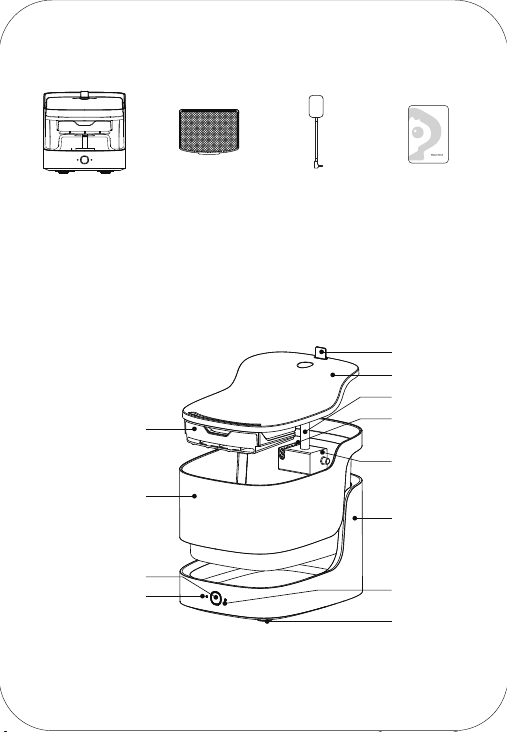
List of Parts
Power Adapter ManualHost Filter Element
Product Introduction
Filter Module
Handle
Drinking Tray
Aqueduct
Pump Filter
Sponge
Pump
Body
Foot Pad
Wi-Fi Setup
Indicator
Water Storage Tank
Function Key
Low Water Level
Indicator
PF1 Intelligent Pet Water
Please read this manual carefully
and keep it properly before using the product.
3
Foot Pad
Power Cord
Product Installation
2.
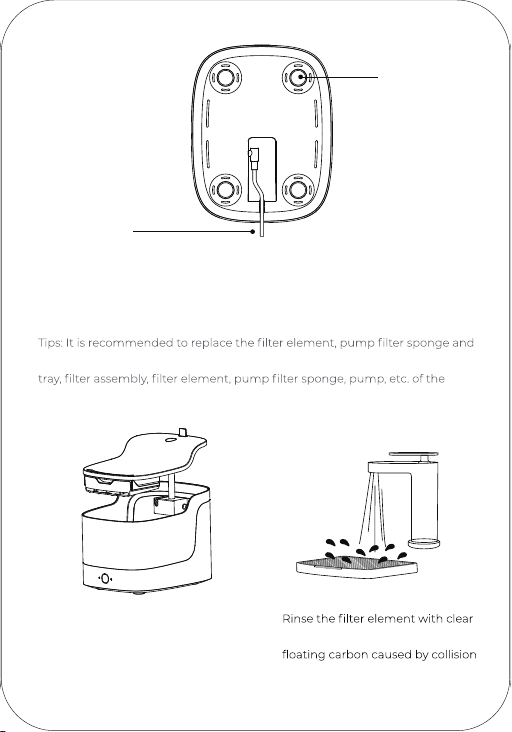
water for 2min to remove the
of activated carbon during
transportation.
1.Take up the drinking tray and
clean all parts before use. (Do not
use hot water or boiled water
when cleaning)
aqueduct once a month. Thoroughly clean the water storage tank, drinking
water dispenser at least every seven days.
4
In order to avoid the interference of sensor and prevent the accuracy of data
reported from being affected, the following points should be considered
when the device is placed:
1. The device should be placed on a stable and hard horizontal plane and
there should be a distance of more than 3cm kept from other objects (such
as walls, etc.).
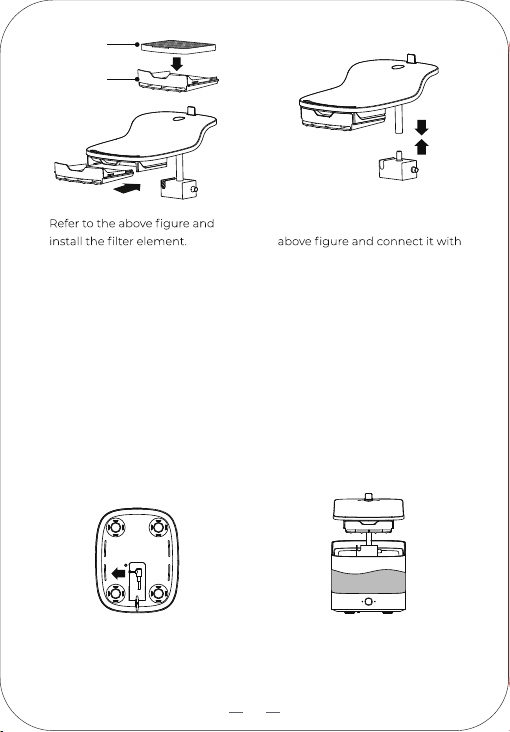
2. Please clamp the power cord of the device into the bottom groove, and the
bottom cannot be stranded with foreign bodies.
Filter Element
Filter Tray
3. * If the pump falls off, refer to the
the aqueduct.
Product Use
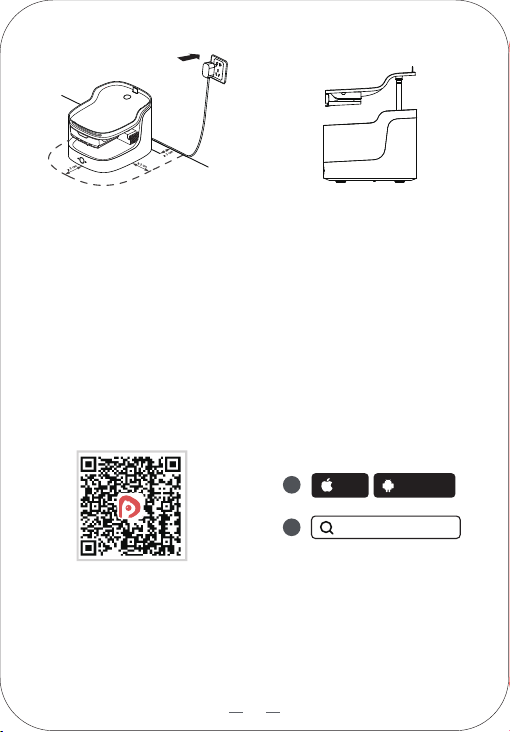
1. Connect the power cord to the
power interface at the bottom
of the body.
2. After adding water into the water
storage tank, put the tank back into
the body and place it on the
drinking tray.
5
Turn on the power and the
machine will start working.
4. Take up the drinking tray, and the
pump will stop working when it is
powered off, and the water can be
added.
3.
Connect to APP
Download and install App
iOS Android
petgugu
1
2
Method 1: Scan the QR code and
download and install the App
according to the prompts
Method 2: Open the mobile app
store, search for "petgugu",
download and install it.
Tips
After installation, please complete registration, login and networking as
instructed by mobile App page.
Please make sure that your mobile phone and home network are connected
before networking.
Indicator Description
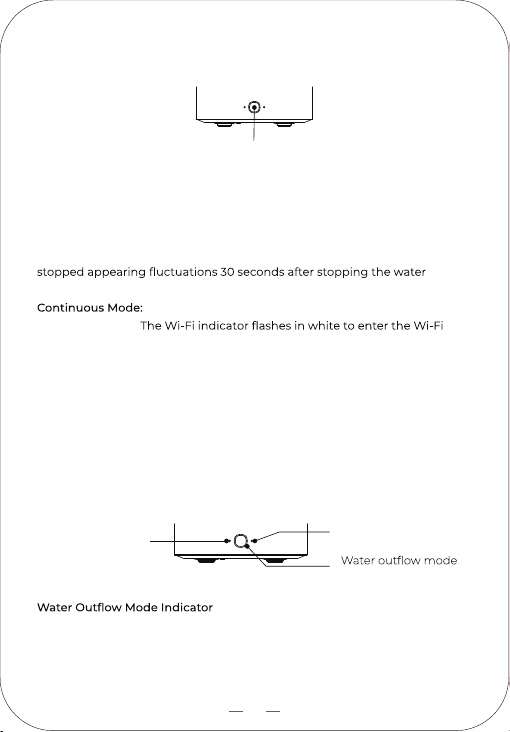
Wi-Fi setup indicator
Low water level
indicator
indicator
Turn on the power supply and start to use the product. The default mode is
continuous mode, and the indicator is white and always bright.
Short press the function key to switch to the intermittent mode, and the
indicator is WHITE BREATH.
Key Button Description
Function Key
Short Press: Switch water discharge mode
Eco: Drinking fountain water volume does not appear to change under the
intermittent water discharge, gushing 30 seconds, stop for 3 minutes.
After the pet drinking water appeared water volume change, continuous
uninterrupted water discharge, until the water dispenser water volume
discharge, return to the gushing 30 seconds, stop 3 minutes state.
continuous uninterrupted water discharge.
Long press for 5s:
networking.
Note: Please refrain from powering off, restarting, disconnecting from the
internet, or performing network setup on the machine within 5 minutes
after switching modes. Failure to comply may result in the failure to save
the mode switch.
6
Scannen Sie den QR-Code, um das Online-Handbuch auf Deutsch zu erhalten.
Scannez le QR code pour obtenir le manuel en ligne en français.
Scansiona il codice QR per ottenere il manuale online in italiano.
Escanee el código QR para obtener el manual en línea en español.
7
Low Water Level Indicator
When the water level is lower than the warning water level, the indicator
after the water is added.
If there is no operation within 1min, the indicator will go out.
When the indicator goes out, press the function key again to wake up the
indicator.
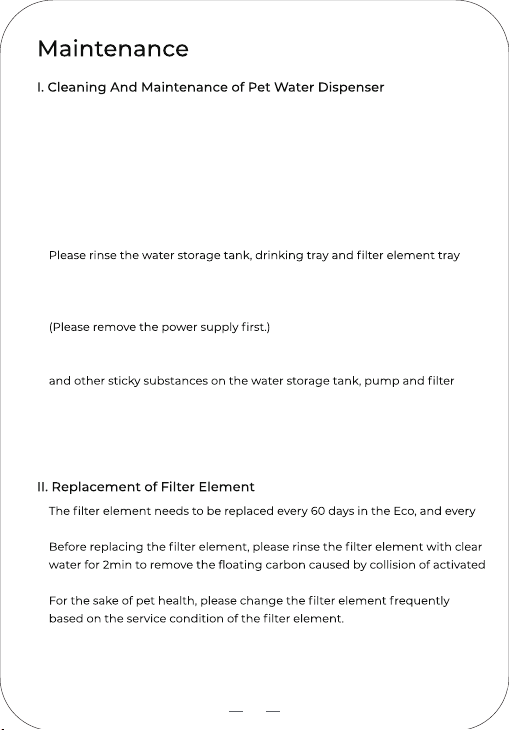
Wi-Fi Setup Indicator
the networking is not successful for 3min, the indicator goes out.
White is always bright: Wi-Fi connection is successful.
8
1.
2.
3.
4.
5.
6.
7.
8.
Please do not put it in a place where the sun shines directly, so as not to
accelerate the yellowing and aging of the machine.
Please disconnect the power supply, clean the whole machine, and ensure
that the bottom connector is dry.
Please clean the water storage tank in large containers such as sinks to
prevent water from spilling.
Please do not use gasoline, kerosene, polishing powder, bleach and other
chemical reagents to clean the device.
with warm water within 40℃. (Do not soak it in hot water.)
For daily maintenance, wipe and clean the surface stains of device or
power cord with a soft cloth that once has been rinsed with warm water.
It is recommended to completely replace the drinking water every 3-4
days. In replacement, please empty the water dispenser, remove the hair
assembly of the water dispenser.
In case it is not used for a long time, please clean and dry it, put all parts
into the packaging box in the original packaging sequence, and place it in
a dry place for proper storage.
1.
2.
3.
30 days in the continuous mode.
carbon during transportation.
9
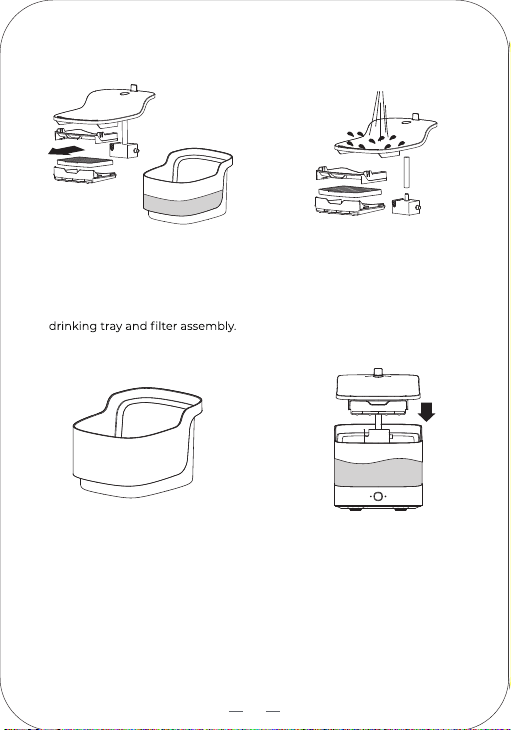
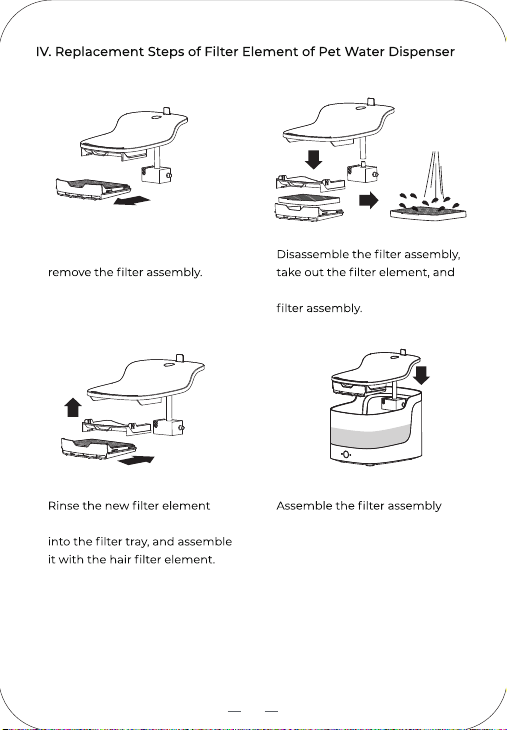
III. Cleaning Steps of Pet Water Dispenser
2. Remove and thoroughly clean the
pump assembly and aqueduct in
turn, and pay special attention to
removing the hair and dirt in the
gap.
1. Separate the drinking tray from
the water storage tank and pour
out the remaining water,
disassemble and wash the
4.
After cleaning, put the
disassembled parts back in
sequence, add proper amount of
drinking water into the water
storage tank and cover the drinking
tray.
3. Thoroughly clean the inner wall
and outer wall of the water
storage tank, and dry the
moisture on the outer wall.
10
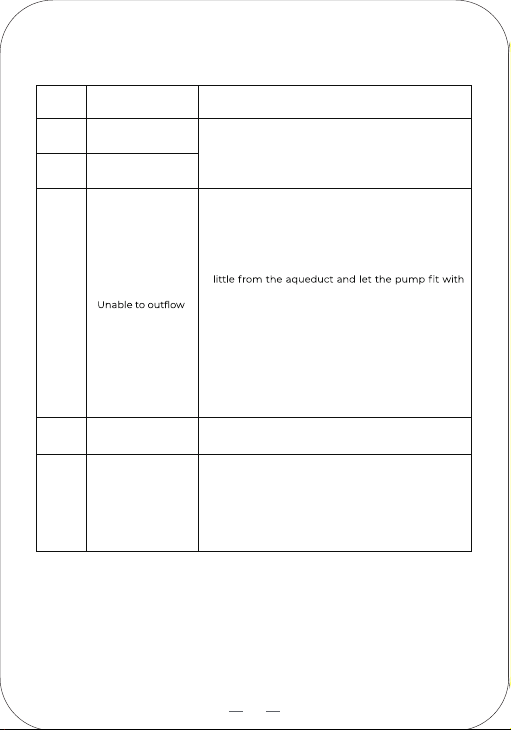
2.
remove the hair and dirt of the
1. Take up the drinking tray and
3.
thoroughly in clear water, put it
4.
with the drinking tray and put it
back on the water storage
tank.can start to use the product.
11
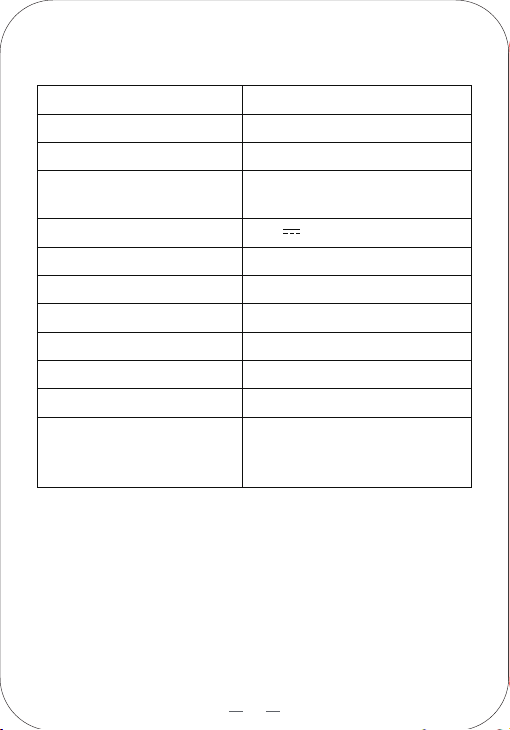
Performance Failure Table
* If the operation in the table cannot clear the trouble, contact the after-sales service
personnel.
Serial
Number
Performance Failure
Key function
failure
1
normally
The indicator
is not on
2
3
Solution
Unplug the adapter and wait 30s before plugging it
in to restart the machine. If this operation cannot
clear the trouble, please contact after-sales service.
1.
2.
Check whether the aqueduct is blocked. If it is
blocked, clean or replace the aqueduct.
If all including indicator are normal:
· The pump is not in contact with the bottom of the
water tank (suspended); then, pull out the pump a
the bottom of the water tank;
· Keep the pump interface, aqueduct and drinking
tray interface in one line as far as possible;
· Take the pump down separately and put it in the
sensing position to see if it will work normally. If it
doesn't work, it means that the pump is damaged
or the wireless charging emitter has problems.
Please contact the after-sales service.
Wi-Fi cannot connect
properly
4
No response when
powered on
5
When the Wi-Fi network signal is good, restart the
machine and connect.
1.
2.
There is a problem with the adapter: there is foreign
matter in the plug or DC head. After wiping it clean,
power on and start the machine again.
DC interface is blocked by foreign matter or there is
too much dust inside. After cleaning, power on and
start the machine again.
12
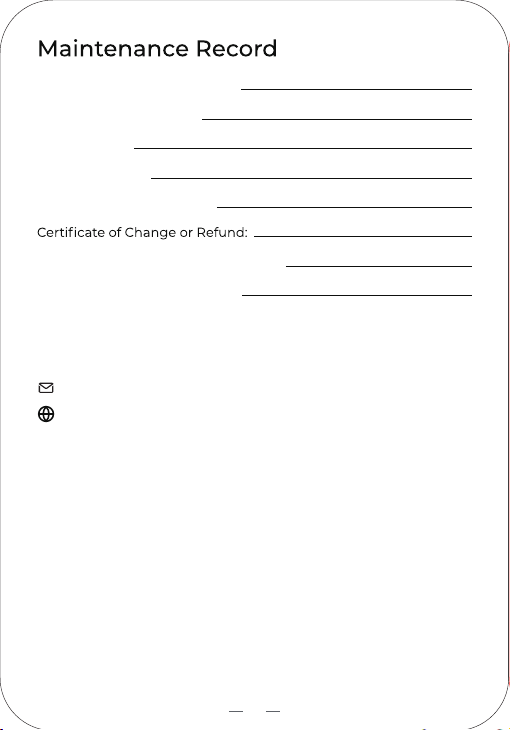
Basic Parameters
Product Name
Product Net Weight
Intelligent Pet Water Dispenser
1.5kg
Model
PF1
Input Parameters
Working Temperature
5°C~50°C
5.2V 2.0A
Rated Power
10.0W
Working Humidity
10%-80%RH
Product Size
240×191×187.5mm
Power Cord Length
1.5m/1.8m
Product Capacity
2L
This Device Contains Radio
Transmitting Module With
Model Approval Code
CMIIT ID: 2021DP14444
Main Material
ABS (body, drinking tray)
PC (water storage tank)
13
Email: [email protected]
Website: www.petgugu.com
Name of Maintenance Center:
Maintenance Center Tel:
Delivery Date:
Cause of Failure:
Failure Situation in Repair:
Signature of Maintenance Personnel:
Stamp of Maintenance Center:
Services And Support