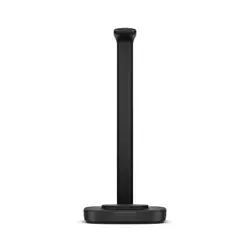

Poly Focus Wireless Charge Stand User
Guide
SUMMARY
This guide provides the end-user with task-based user information for the featured product.

Legal information
Copyright and license
© 2026, HP Development Company, L.P. The information contained herein is subject to change without
notice. The only warranties for HP products and services are set forth in the express warranty
statements accompanying such products and services. Nothing herein should be construed as
constituting an additional warranty. HP shall not be liable for technical or editorial errors or omissions
contained herein.
Trademark credits
All third-party trademarks are the property of their respective owners.
Privacy policy
HP complies with applicable data privacy and protection laws and regulations. HP products and
services process customer data in a manner consistent with the HP Privacy Policy. Please refer to HP
Privacy Statement.
Open source software used in this product
This product contains open source software. You may receive the open source software from HP
up to three (3) years after the distribution date of the applicable product or software at a charge
not greater than the cost to HP of shipping or distributing the software to you. To receive software
information, as well as the open source software code used in this product, contact HP by email at
ipgoopensourceinfo@hp.com.

Table of contents
Charge stand overview 1
Assemble charge stand 1
Charge stand LEDs 2
Locate the serial number on your HP Poly Focus charge stand 3
Load software 4
Update your Poly headset and charge stand 4
Charge your headset 6
What's in the box 7
Safety warnings 8
Safety Instructions 8
Embedded magnet warning 10
Support 11
iii
Charge stand overview
Use your charge stand to charge your headset.
Assemble charge stand
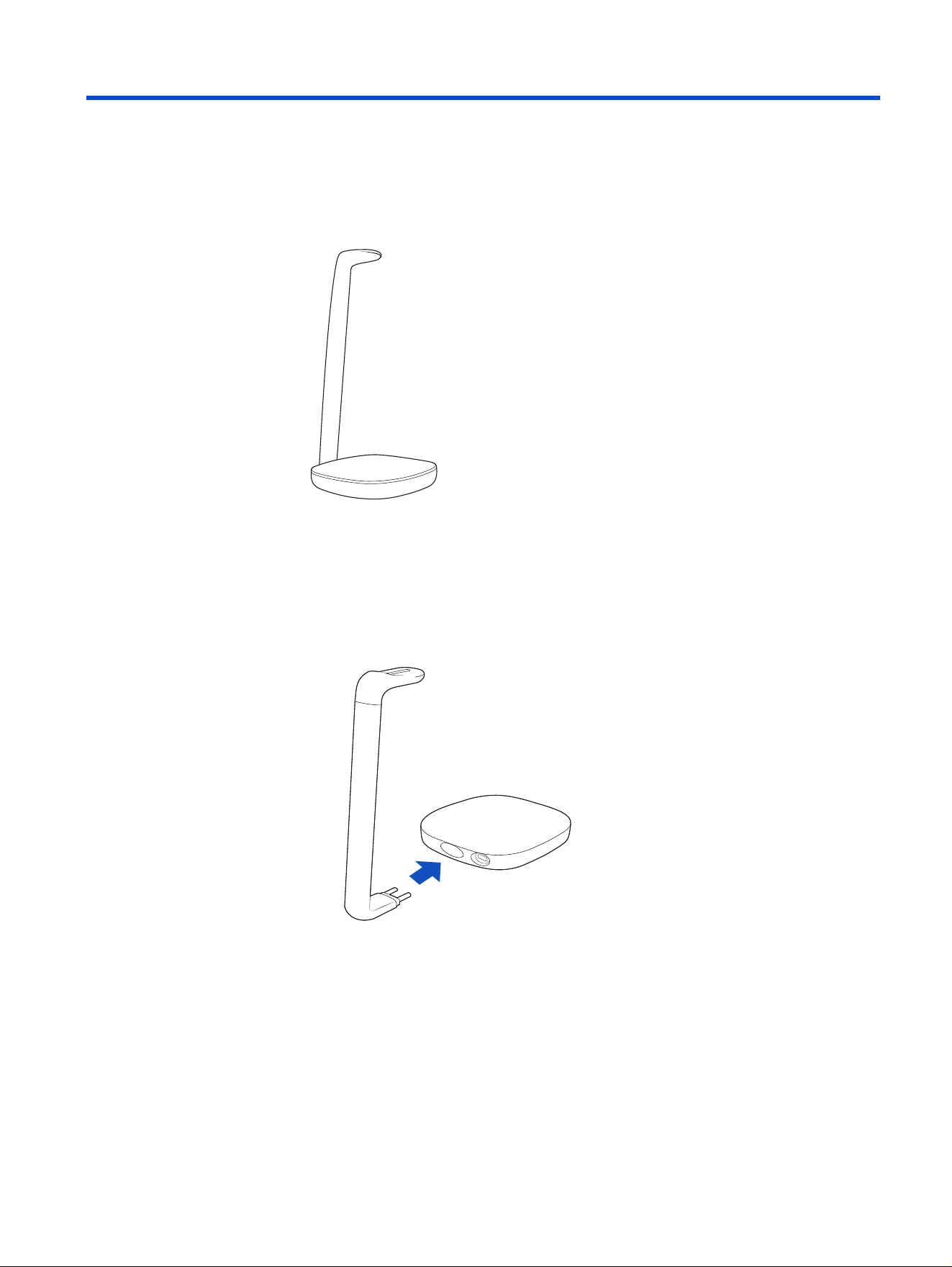
Attach the charge arm to the base and connect the USB-C cable to begin charging.
1. Firmly push the charge arm to the back of the base. You will hear a click when
the arm is in place.
Charge stand overview
1
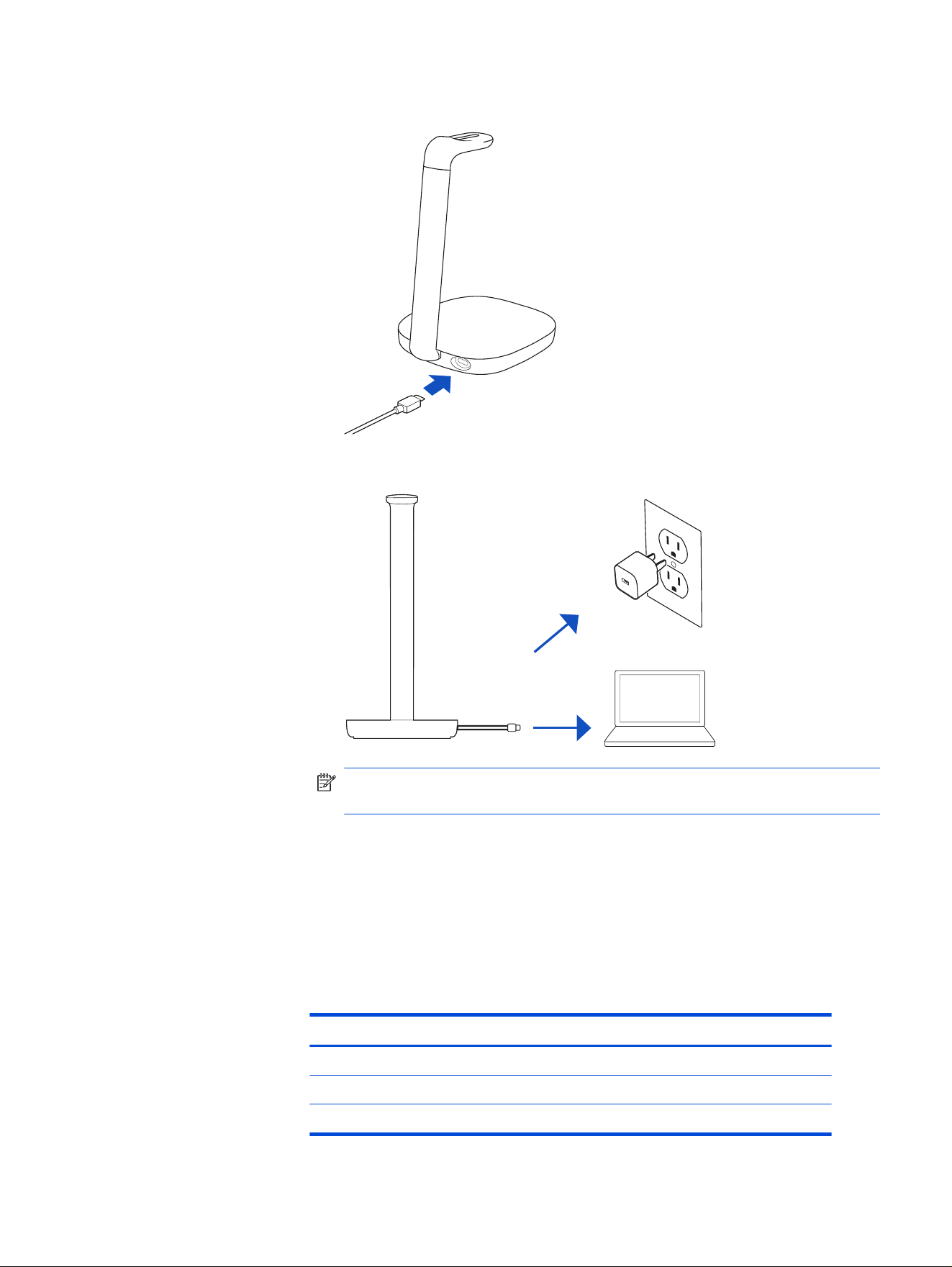
2. Connect the USB-C cable to the back of the base.
3. Connect the other end of the USB-C cable to a power source.
NOTE: The charge stand USB-C cable plugs into a computer or wall charger’s
USB-C port.
The charge stand LED on the charge arm displays solid white when the charge
stand is assembled correctly and ready to charge.
Charge stand LEDs
Your charge stand has an LED at the top of the charge arm that displays power and
charge status.
Table 1-1
Charge stand LED
LED color Status
Solid Power on
Flashing Headset charging
Off Charge complete
2 Chapter 1 Charge stand overview

Locate the serial number on your HP Poly Focus charge
stand
Find the serial number on the bottom of the charge stand.
■
On the bottom of the charge stand, nd the serial number SN: XXXXXX (typically
6 digits).
TIP: Take a photo with your smartphone for a better view of the serial number.
Locate the serial number on your HP Poly Focus charge stand 3
Load software
Download HP Poly Studio to get the most out of your device. Some softphones
require the installation of HP software to enable device call control (answer or end a
call and mute) functionality.
NOTE: Administrative privileges may be required to download the desktop
application. If you don't have administrator privileges on your system, contact your
system administrator.
● Download the HP Poly Studio Desktop app at hp.com/studio.
● Download the HP Poly Studio Mobile app at hp.com/studio, the App Store, or
Google Play.
Table 2-1 Supported features
Feature HP Poly Studio Mobile app HP Poly Studio Desktop app
Congure call control for
softphones
Available for some
softphones
✓
Change headset language ✓ ✓
Enable features ✓ ✓
Choose preferred Equalizer
setting
✓ ✓
Battery meter ✓ ✓
Update device rmware ✓ ✓
Manage notications and
alerts
✓ ✓
Schedule wellbeing
reminders
✓
View user guide ✓ ✓
FindMyHeadset ✓
Update your Poly headset and charge stand
Keep your rmware and software up to date for optimal performance and to add
new features to your Poly device.
1. With your headset turned on, dock it on the charge stand.
2. Download the HP Poly Studio App from hp.com/studio.
4
Chapter 2 Load software

3. Open the app, and then select your Poly headset from the device list to check
for available updates.
4. Click the Update button to install the latest rmware for your headset.
5. If a rmware update is available, the charge stand updates automatically.
NOTE: Your headset sends rmware updates to your charge stand via
Bluetooth.
Update your Poly headset and charge stand 5
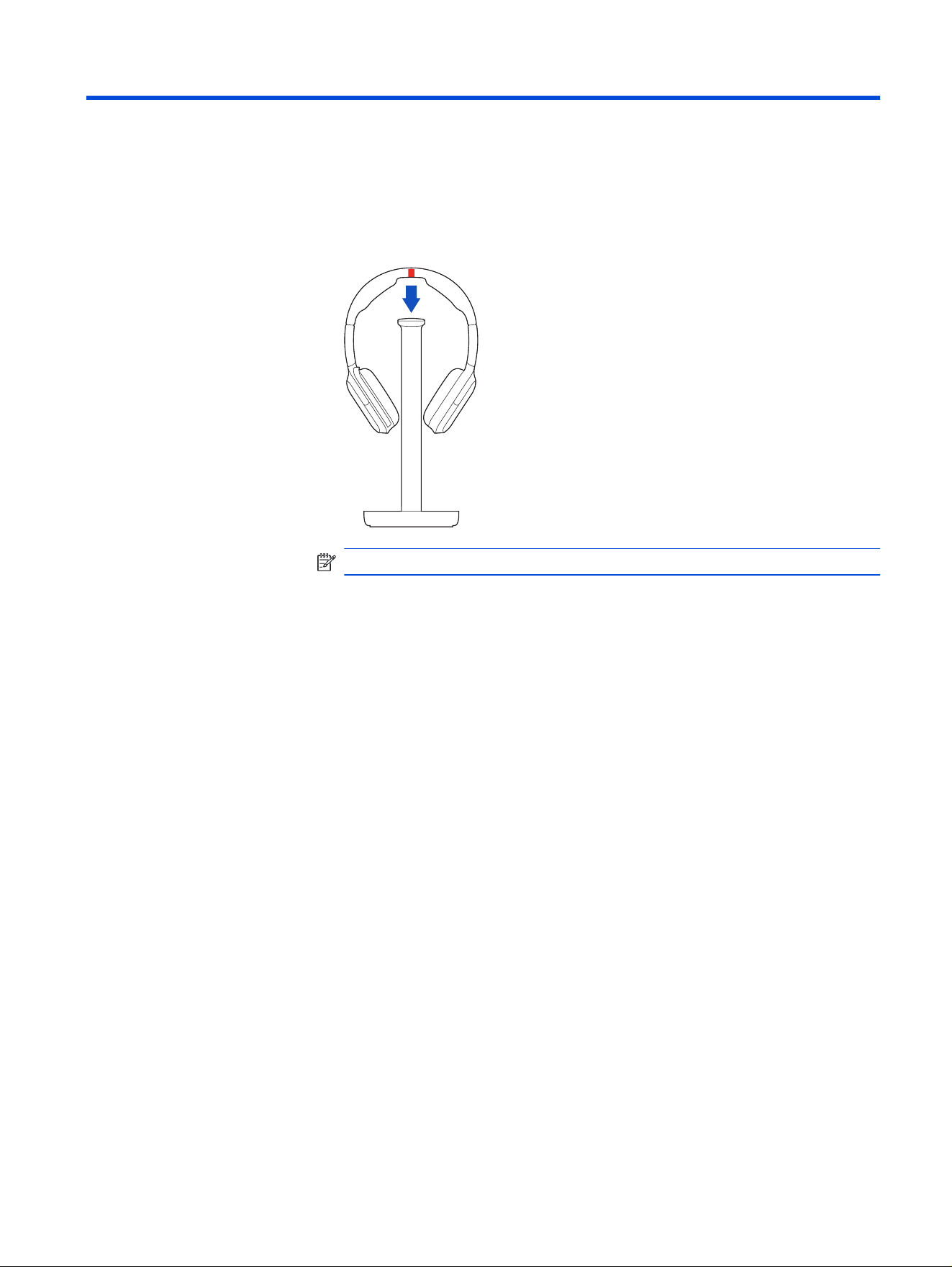
Charge your headset
Charge your headset using the charge stand.
1. Place the headset on the charge stand.
NOTE: The charge stand plugs into a computer or wall charger’s USB-C port.
2. Charge stand LED pulses when charging and turns off when the headset is
fully charged. Headset LEDs ash when charging and turn off once charging is
complete. It takes approximately 3 hours to fully charge your headset.
6
Chapter 3 Charge your headset
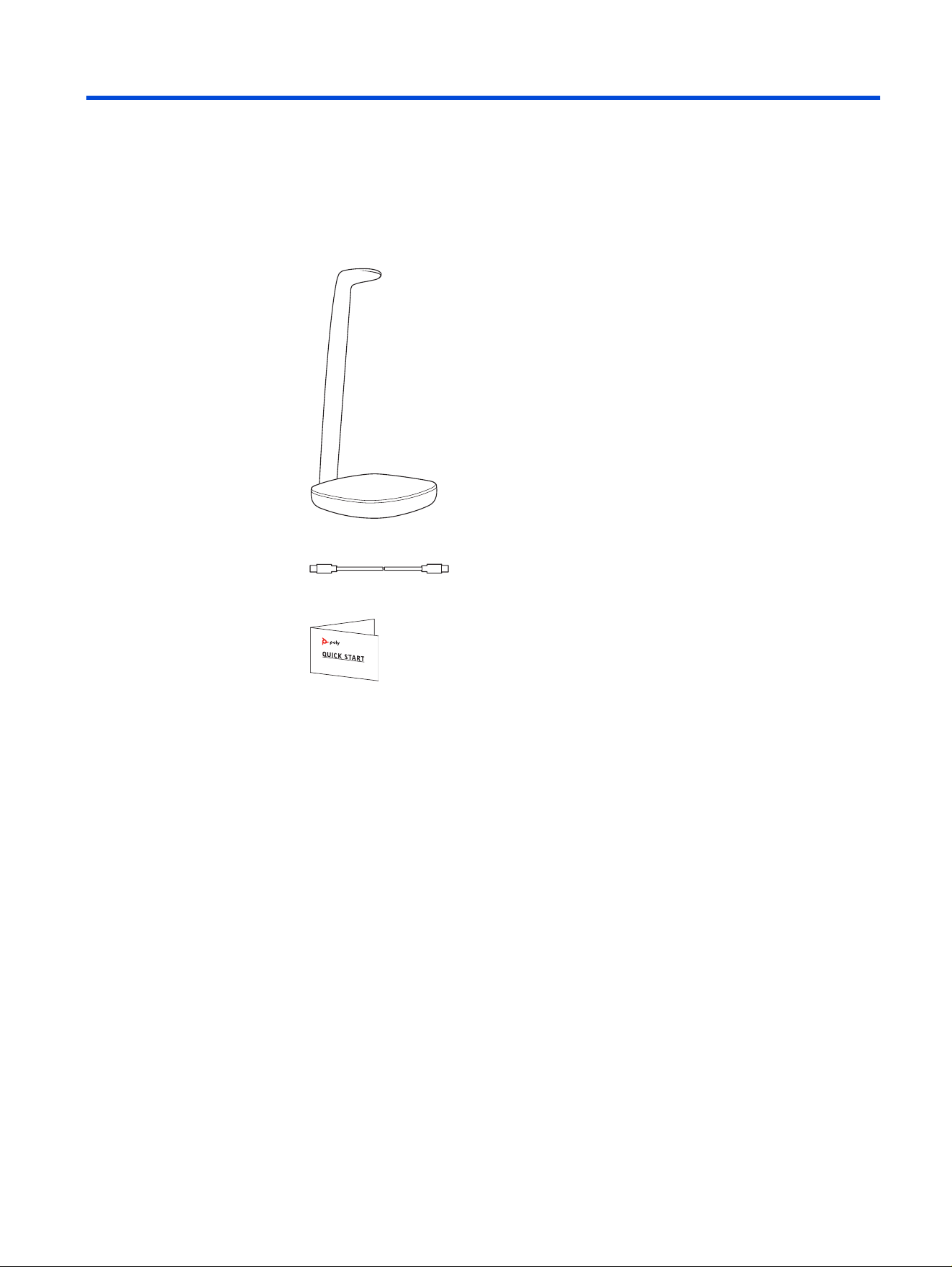
What's in the box
Contents may vary by product.
Figure 4-1 Charge stand
Figure 4-2 USB-C cable
Figure 4-3 Quick start guide
What's in the box
7

Safety warnings
Safety Instructions
To reduce the risk of re, electric shock, injury to persons and damage to property,
read all operating instructions and the following safety instructions before using
your HP product. Operating, storage and charging temperature is 10˚C to 40˚C
(50˚F to 104˚F).
● Only use those HP products and accessories designed for use with this
product.
● If you experience a skin irritation after using this product, discontinue use and
contact HP.
● CHILDREN. Never allow children to play with the product-small parts may be a
choking hazard.
● Do not disassemble the product as this may expose you to dangerous voltages
or other risks. Incorrect reassembly can cause electric shock or re when the
product is subsequently used.
● Unplug, discontinue use and contact HP if the product overheats or has a
damaged outer casing, cord or plug.
● Exposure to high volume sound levels or excessive sound pressure may
cause temporary or permanent damage to your hearing. Although there is no
single volume setting that is appropriate for everyone, you should always use
your headset/headphones with the volume set at moderate levels and avoid
prolonged exposure to high volume sound levels. The louder the volume, the
less time is required before your hearing could be affected. You may experience
different sound levels when using your headset/headphones with different
devices. The device you use and its settings affect the level of sound you hear.
If you experience hearing discomfort, you should stop listening to the device
through your headset/headphones and have your hearing checked by your
doctor. To protect your hearing, some hearing experts suggest that you:
1. Set the volume control in a low position before putting your headset/
headphones on your ears and use as low a volume as possible.
2. Avoid turning up the volume to block out noisy surroundings. Whenever
possible, use your headset/headphones in a quiet environment with low
background noise.
3. Limit the amount of time you use headsets/headphones at high volume levels.
4. Turn the volume down if the sound from the headset/headphones prevent you
from hearing people speaking near you.
8
Chapter 5 Safety warnings

● If you use your headset/headphones while driving, check local laws regarding
use of a mobile phone and headset, and ensure your attention and focus remain
on driving safely. Use of a headset/headphones that covers both ears will
impair your ability to hear other sounds and in most regions is illegal to use
while operating a motor vehicle or riding a bicycle and may be a serious hazard
for you and others.
● If this product includes earbuds/eartips, install and use them in accordance
with the instructions provided. Do not force earbuds/eartips down the ear canal.
Consult a doctor if they become lodged in the ear canal.
● Plug the mains adapter or charger into a socket-outlet that is near to the
equipment and will be easily accessible.
Battery Warnings for Wireless Products
● If your product has an embedded, non-replaceable battery, do not attempt
to open the product or remove the battery as this may cause injury and/or
damage the product. If your product has a replaceable battery, use only the
battery type supplied by HP. Remove a spent battery promptly.
● Replace rechargeable batteries after three years or 300 charge cycles,
whichever occurs rst.
● Do not immerse the battery in liquid such as water, beverages, or other uids.
● Do not attach or insert battery with polarity reversed.
● Do not use batteries in series or in parallel.
● Do not connect the battery to an AC outlet or DC automotive plug.
● Do not use the battery in equipment for which it was not intended.
● Do not dispose of the product or battery in a re or heat above 40°C (104°F).
● Do not expose the battery to extremely high temperatures. It may result in an
explosion or the leakage of ammable liquid or gas.
● Do not short-circuit the battery by directly connecting the positive and negative
terminal with metal object such as wire.
● Do not open, deform or mutilate the battery. There may be corrosive materials
which can cause damage to eyes or skin and may be toxic if swallowed.
● Do not connect the pack to an electrical outlet.
● When recharging, use the battery charger specically for that purpose.
● Do not charge the battery at high temperature or discharge it at high
temperature, which cannot exceed the operating temperature range of 0 ~
60℃.
● Stop charging if the charge process cannot be nished within the specied
time.
● Never put batteries in mouth. If swallowed, contact a physician or poison control
center.
Safety Instructions
9

● Swallowing may lead to burns, perforation of soft tissue, and death. Severe
burns can occur within 2 hours of ingestion. If the battery or any of its
component parts is swallowed, seek medical attention immediately.
● Always store batteries where children cannot reach them.
● Do not place the battery in or near a microwave or other cooking appliances.
If subjected to heat or strong electromagnetic radiation, the battery may leak,
generate heat, smoke, catch re, or explode.
● Do not mix with other batteries. The battery should not be used with other
batteries having a different capacity, chemistry, or manufacturer. Doing so
could cause the battery to generate heat, smoke, catch re, or explode.
● Immediately remove it from the device or charger, and stop using it, if there are
noticeable abnormalities, such as smell, heat, discoloration, or deformity. The
battery may be defective and could generate heat, smoke, catch re, or explode
with continued use.
● Do not use a leaking battery near open ame.
● Do not touch a leaking battery. If liquid leaking from the battery gets into your
eyes, immediately ush your eyes with clean water and seek medical attention.
If left untreated, it will cause signicant eye damage.
● To prevent short-circuit or damage during transport or store, securely pack the
battery in a case or carton. Do not transport and store the battery together with
metal objects such as necklaces, hairpins, etc.
● Do not allow any battery or its holder to contact metal objects such as keys or
coins.
● RECYCLING: The product battery must be recycled or disposed of properly.
Contact your local recycling center for battery removal and proper disposal.
● Use only the charger supplied by HP to charge the product and follow the
charging instructions provided. Alternatively, if your headset is designed to be
charged with your cell phone charger, use only cell phone chargers approved
and provided by your cell phone manufacturer. Do not use the charger for any
other purpose. Ensure that the voltage rating corresponds to the power supply
you intend to use.
Embedded magnet warning
Please read the following embedded magnet warning.
WARNING! This device contains embedded magnets. Please be aware that
magnetic elds may interfere with the proper functioning of medical devices such
as pacemakers and implantable cardioverter-debrillators (ICD’s). As a precaution
it is recommended to keep this device at least 15 cm or at least 30 cm (when using
a wireless charger) away from any individuals wearing electronic medical devices.
If interference is suspected, stop using the device immediately and consult your
physician and the medical device manufacturer for further guidance.
10
Chapter 5 Safety warnings

Support
NEED MORE HELP?
support.hp.com/poly
HP Inc.
1501 Page Mill Road
Palo Alto, CA 94304, U.S.A.
650-857-1501
HP REG 23010, 08028
Barcelona, Spain
HP Inc UK Ltd
Regulatory Enquiries, Earley West
300 Thames Valley Park Drive
Reading, RG6 1PT
United Kingdom
台灣惠普資訊科技股份有限公司
臺北市南港區經貿二路 66 號 10 樓
電話:02-37899900
RMN (Regulatory Model Number): PWPTF620
Document part number: Q12333-001
Publication date: June 2026
Email us at documentation.feedback@hp.com with queries or suggestions related
to this document.
Support
11