K200/A K210/A
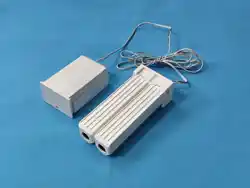
Curtain motor K200 series
Quick Start Guide
NOTE:
This device complies with part 15 of the FCC Rules.
Operation is subject to the following two
conditions:(1) this device may not cause harmful
interference, and (2) this device must accept any
interference received, including interference that
may cause undesired operation.
Any changes or modifications not expressly
approved by the party responsible for compliance
could void the user's authority to operate the
equipment.
FCC Caution:
This equipment has been tested and found to
comply with the limits for a Class B digital device,
pursuant to Part 15 of the FCC Rules. These limits
are designed to provide reasonable protection
against harmful interference in a residential
installation. This equipment generates, uses and
can radiate radio frequency energy and, if not
installed and used in accordance with the
instructions, may cause harmful interference to
radio communications. However, there is no
guarantee that interference will not occur in a
particular installation.
If this equipment does cause harmful interference
to radio or television reception,which can be
determined by turning the equipment off and on,
the user is encouraged to try to correct the
interference by one or more of the following
measures:
-- Reorient or relocate the receiving antenna.
-- Increase the separation between the equipment
and receiver.
-- Connect the equipment into an outlet on a
circuit different
from that to which the receiver is connected.
-- Consult the dealer or an experienced radio/TV
technician for help.
The device has been evaluated to meet general RF
exposure requirement. The device can be used in
portable exposure condition without restriction.
ON
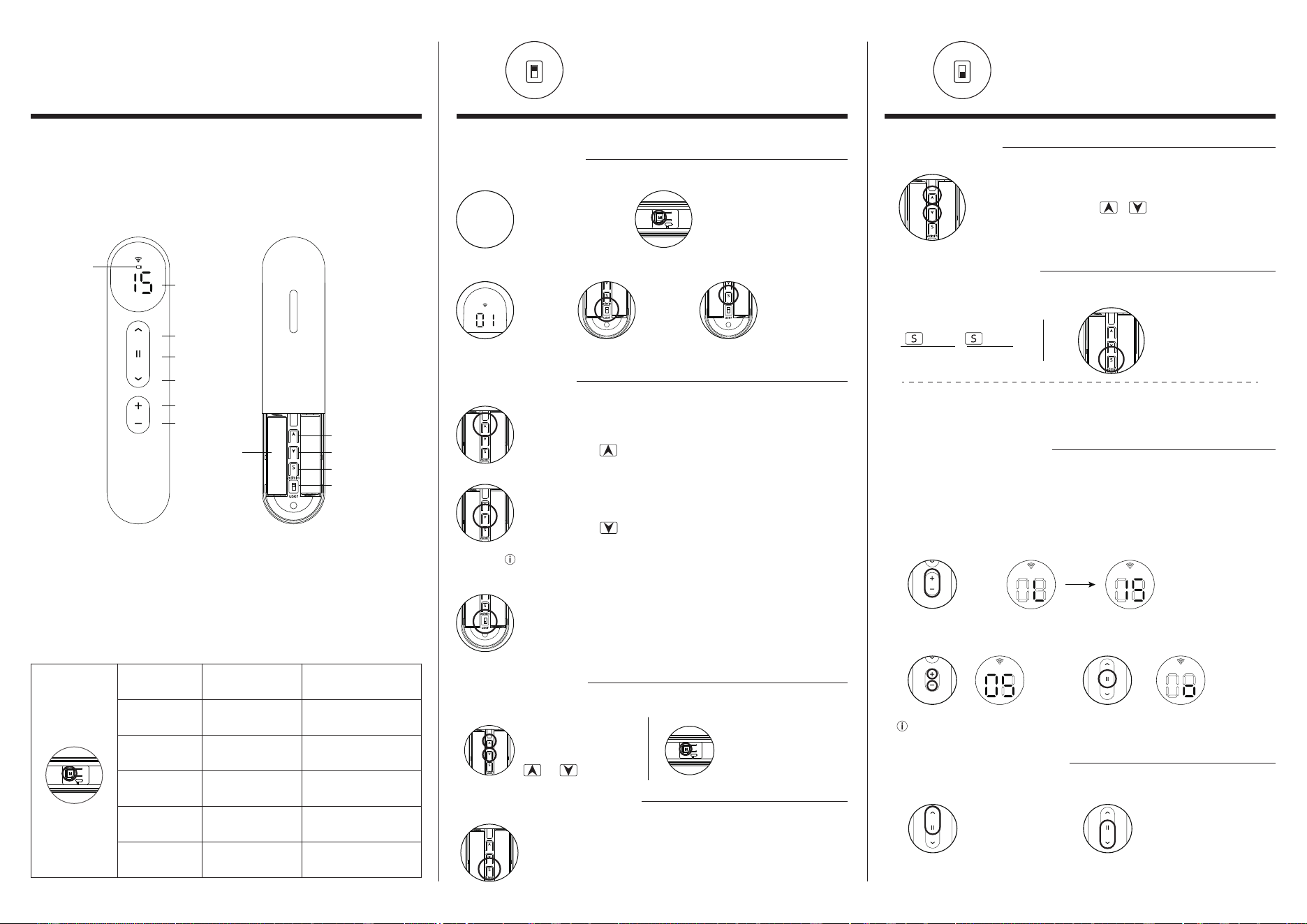
Use the front button of the transmitter to stop the curtain at the required up
travel point press for 2 seconds , motor rotation once,upper limit is set
To ”user” mode
Limits setup successful, normal use
In Admin mode, curtain operation will switch between inching operation and
continuous operation, so as to set the stroke more accurately
Step 1: Set Upper Limits
Step 2: Set Lower Limits
Use the front button of the transmitter to stop the curtain at the desired down
travel point press for 2 seconds , motor rotation once,Lower limit is set
STEP 2
press the motor "M" button for 2”
The motor rotates back and forth once
The motor enters the matching state,
(Valid for 60 seconds)
Select the
channel you
want to match
Long press "S" for 2”
The motor will rotate
back and forth once .
Match successfully
The switch
selects
"admin" mode
1. Quick Matching
②
③
①
STEP 3:
STEP 1
Make sure the
motor is energized.
In “admin” mode, Emitter channel shows slow flash,
Channel "00" invalid
“admin” mode
The user can proceed normally, Operation and use, will not be
wrong operation of the motor
“user” mode
2. Setting Limits
3.Motor reversing
The running direction of the curtain is opposite to that of the transmitter button.
4.Delete emitter matches
“S”Press 5 times,motor rotation once.
Deleting completed
Press M key 10”motor rotation
the third time
Method 2Method 1
Press both togetheruntil the
motor rotates once
+
AC2201-15A
15-channel Emitter
Back
Channel-
Channel+
Channel
Up
Stop
Down
Low
Battery
Upper Confirm
Lower Confirm
“S”key
Selector Switch
AAA
dry battery
Smart Emitter
Motor and emitter Description
Users need to set a common shading effect, such as open to 50%.This
position can be set to the Favorite point. Operate the product to
desired preferred position, + press both together for 2
seconds,motor rotation once. Set to complete. Repeat , set a new
favorite point.
Press
2 times
Press
1 times
A
B
emitter B ,"emitter quick matching"
Method 1
Method 2
Press the S key once,
The motor rotates once
Reserved channels can only be counted from channel 1. For example, 1-5. No support
for 3-7. Repeat the operation to adjust the final required number of channels.
One channel of transmitter controls one motor, and 15 channels control up to 15 motors.
For example, the 15 channel transmitter only uses 1-5 channels, the remaining 6-15
channels are not used and can be hidden without display
② Use channel switch button
Select channels to keep
③ Using the emitter stop key
Confirm the channel to be reserved
① Emitter access channel selection
Press and hold two channel switch keys at the same time emitter display, “L” appears
first, then “15” words appear, then release the key
Both Hold
Until the motor jog
up one gear
Both Hold
Until the motor jog
reduced by one gear
1. Favorite point
2. Add a new emitter
3.Emitter Lock channel
4.Motor speed regulation
Normally, emitter A controls the motor, emitter B also needs to control.
The running speed of the motor is three gears in total, and the default is gear 1. Slower
and quieter
Only one gear can be raised or lowered in one operation. When switching to the
corresponding gear, the number of motor rotation is the same as that of the gear
user
admin
user
admin
Operation
Repeated
Short Press
Press For 2”
Press For 5”
Press For 10”
Press For 15”
Moto”M”key
Functional
Specifications
Turn-stop-turn-stop
Circular Motion
The Motor Feedback
Motor Rotation
The First Times
Motor Rotation
The Second Time
Motor Rotation
The Third Time
Motor Rotation
The Fourth Time
Motor Reversing
Restore The Factory
Emergency Switch
Function
The Motor Enters The
Matching State
/