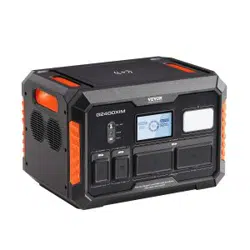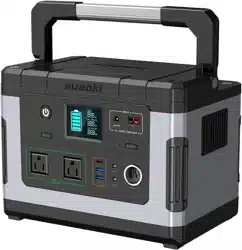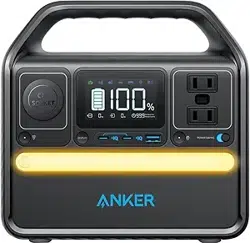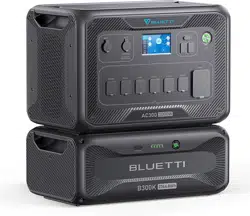
Power Station
600W /1000W
User Manual
Version V2.1

Power Station 600W/1000W User Manual (V2.1)
Catalogue
About This Document ....................................................................... 1
Preface ............................................................................................ 1
Revision History ............................................................................... 1
01 Safety Instructions ....................................................................... 1
02 Transportation & Storage ............................................................. 2
Maintenance .................................................................................... 3
03 Product Disposal .......................................................................... 3
04 Product Introduction .................................................................... 3
4.1 Package Contents ...................................................................... 3
4.2 Product Details ........................................................................... 4
4.3 The User Interface ..................................................................... 5
4.4 Socket Types ............................................................................. 7
05 Product Safety Guidelines ........................................................... 7
06 General Product Usage ................................................................ 8
6.1 Power on/Power off .................................................................... 8
6.2 Wireless Charging Function/12V Output .................................... 9
6.3 Reading Lamp ............................................................................ 9
6.4 AC Output/Atmosphere Lamp .................................................... 9
6.5 SmartDrive Mode ..................................................................... 10
6.6 Silent Charging ........................................................................ 11
6.7 AC, Car, Solar Charging ........................................................... 11
6.8 On/Off Grid Switching .............................................................. 13
07 Troubleshooting & Maintenance ............................................... 13
7.1 Faults Display and Troubleshooting ......................................... 13
08 Specifications ............................................................................. 17
Power Station 600W/1000W User Manual (V2.1)
1
About This Document
Preface
⚫ This portable power station is designed and tested in strict accordance with relevant safety
regulations, but as an electronic device, users need to follow the safety instructions in this manual.
Please read the complete user manual before operating, and familiarize yourself with the functions
and features of the product before using it. Improper operation will cause serious injury and property
loss to users! The Company disclaims any direct or indirect liability. By using this Product, you shall
be deemed to have understood, acknowledged, and accepted all terms and contents of this Document.
Users undertake to be responsible for their own actions and all consequences arising therefrom.
⚫ Use officially provided or suggested parts, and strictly follow the guidelines in this manual when
using the product. Otherwise, you won't get official after-sales service. This manual includes safety,
operation, and maintenance instructions. Be sure to carefully read and follow all instructions and
warnings in the user manual before using the product.
⚫ Subject to complying with laws and regulations, our company enjoys the final right to interpret this
document and all related documents of this product. Please refer to the latest official announcement if
there is any update, revision, or termination without prior notice.
Revision History
The product manual is constantly updated, and the latest product manual contains all previously updated
records.
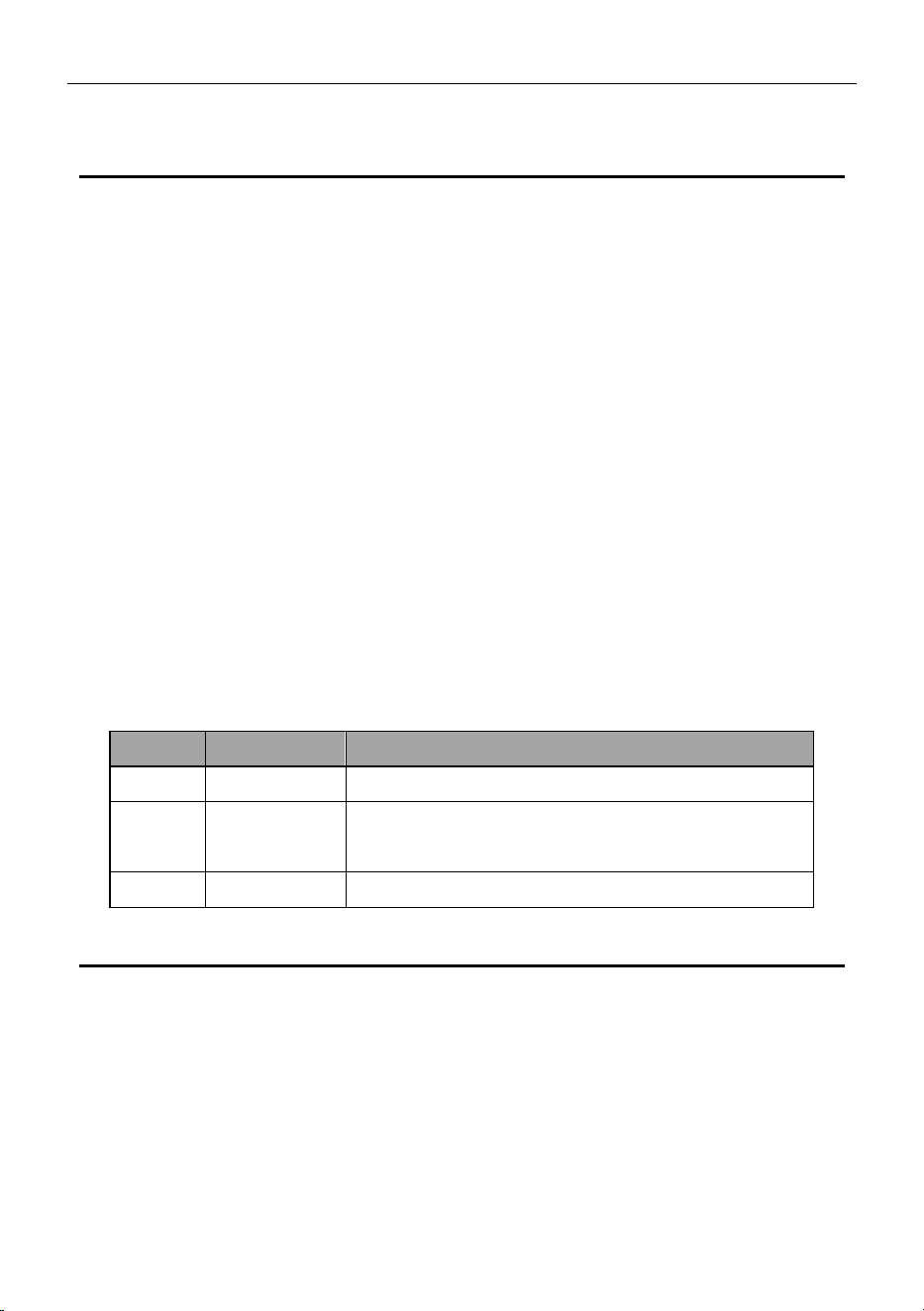
Version
Date
Record
V1.0
2022/09/30
First edition release
V1.1
2023/07/18
1. Updated the relevant drawings;
2. Improved the relevant descriptions.
V2.1
2023/09/06
3. Updated layout and description
01 Safety Instructions
1. This product is recommended to be used at an ambient temperature of 15 to 35°C. Do not store the
machine at room temperature above 45℃ or below -20℃. Too high a temperature may cause a battery
fire. If the temperature is too low, the product performance will be seriously degraded and may not meet
the requirements of normal use.
1.1 This product contains batteries. Do not place the product near a heat source, such as a fire or heating
furnace. Otherwise, it will trigger spontaneous combustion of the battery and possibly even an explosion.
If a fire breaks out due to improper storage of the product, use fire extinguishing equipment in the
recommended order: water or water mist, sand, fire blanket, dry powder, and carbon dioxide extinguisher.
2. Store the product in a dry environment. The product should not touch any liquid; do not submerge the

Power Station 600W/1000W User Manual (V2.1)
2
product in water or get it wet. Do not use this product in rainy or wet environments. If the product
accidentally falls into the water during use, after removing it from the water, place it in a safe, open area
until the product is completely dry. After drying, it shall not be used again. It shall be scrapped according
to the method of abandonment in this manual.
3. Do not use in an environment with strong static electricity or magnetic fields, as some of the protective
functions of the machine may fail.
5. Do not place anything heavy on top of the product.
6. Do not bump, fall, or step on this product. Turn off the power immediately if this product is struck by a
serious external force.
7. In case of serious damage to the product, keep it away from combustible materials and people,
ensure the surrounding safety, and scrap it in accordance with local laws and regulations.
8. Do not use unofficially provided parts or accessories. Please go to the official sales channel for relevant
purchase information if a replacement is required.
9. Without official authorization, do not disassemble the machine or pierce the battery with sharp objects
in any way. Otherwise, the battery will spontaneously burn or cause harm to humans, and the company
will not be responsible.
10. Damage to the battery may cause the electrolyte to leak. If the electrolyte leaks, do not touch the
leaked electrolyte or volatile gas, and immediately contact the after-sales service center for help
11. Avoid using products in dusty areas, which can clog fans.
12. If there is dirt in the interface of the product, use a dry cloth to clean it. Otherwise, it will cause poor
contact, resulting in energy loss or failure to charge.
13. Keep this product out of reach of children and pets to prevent accidents. If a child accidentally swallows
parts, please seek medical advice immediately.
02 Transportation & Storage
1. Please turn off the product when storing or transporting it, and store it in a dry, ventilated room
temperature environment.
2. Please charge this product before storing it. Long-term storage may damage the batteries. If the
battery capacity is seriously depleted or operates idle for too long, it will enter deep sleep mode. You
need to charge the battery and wake up before the product function can be restored from the hibernation
state.
3. It is recommended to charge and discharge this product once every three months, first to 0%, then
fully charged, then discharged to 60% for long-term storage to extend the life of this product.
Power Station 600W/1000W User Manual (V2.1)
3
4. When storing this product, seal it with an outer packaging bag to avoid dust entering and blocking the
fan port.
5. It is forbidden to store or transport machines with metal necklaces, glasses, watches, hairpins, or
other metal objects
6. Please fix it properly during transportation to avoid vibration and impact.
7. DO NOT place products near heat sources, such as cars with direct sunlight, fire sources, or heating
furnaces.
8. DO NOT transport products with battery power exceeding 30%.
9. Please DO NOT take this product on board.
Maintenance
03 Product Disposal
1. After the machine battery is completely discharged, put the machine battery in the designated battery
recycling bin. Batteries are dangerous chemicals, so it is strictly forbidden to put them in ordinary
garbage bins
2. Be sure to comply with local laws and regulations on battery recycling and disposal.
04 Product Introduction
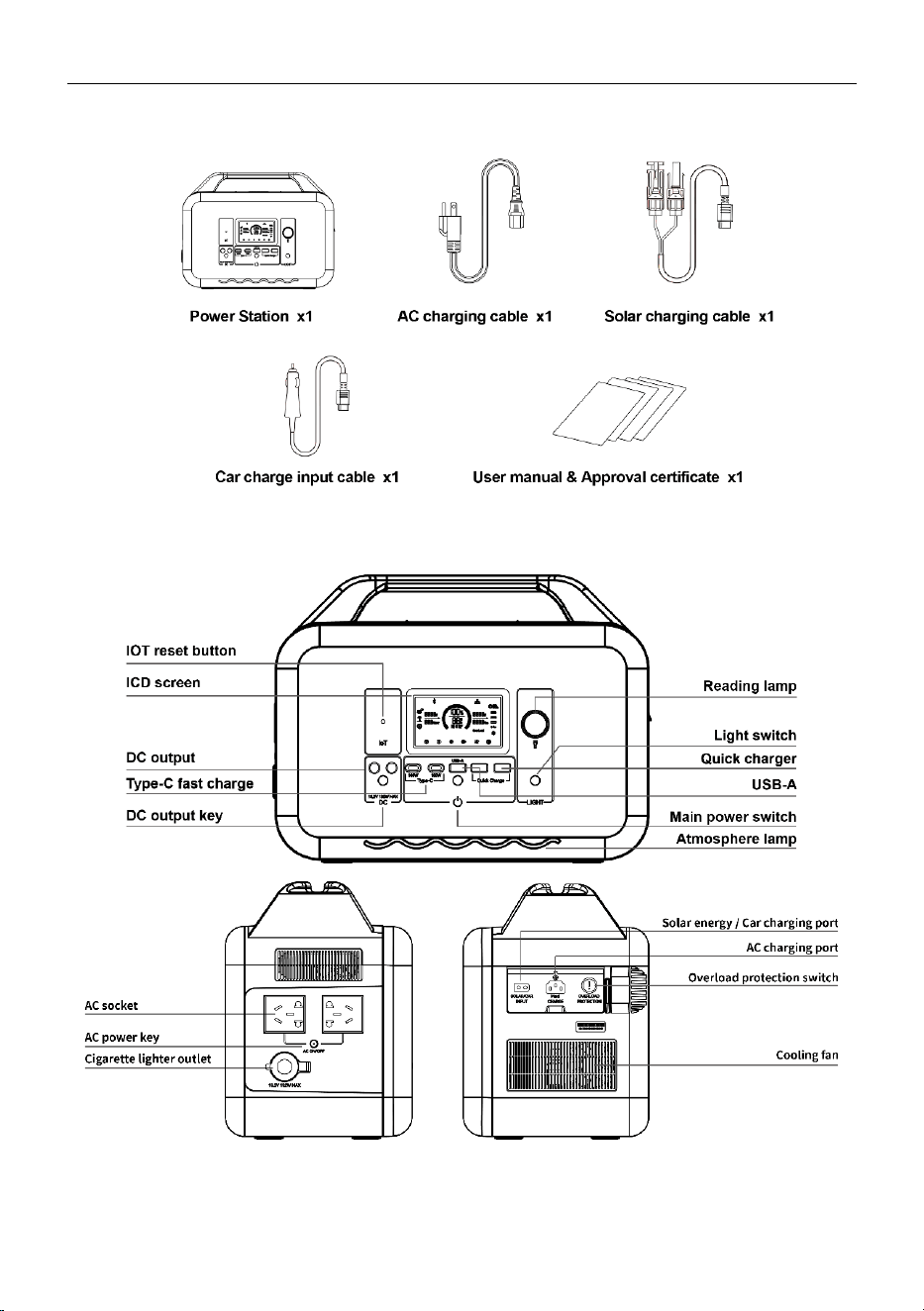
4.1 Package Contents
After receiving the product, please check whether the products are complete in the packing box. If
there is any abnormality, please contact the after-sales service center as soon as possible.
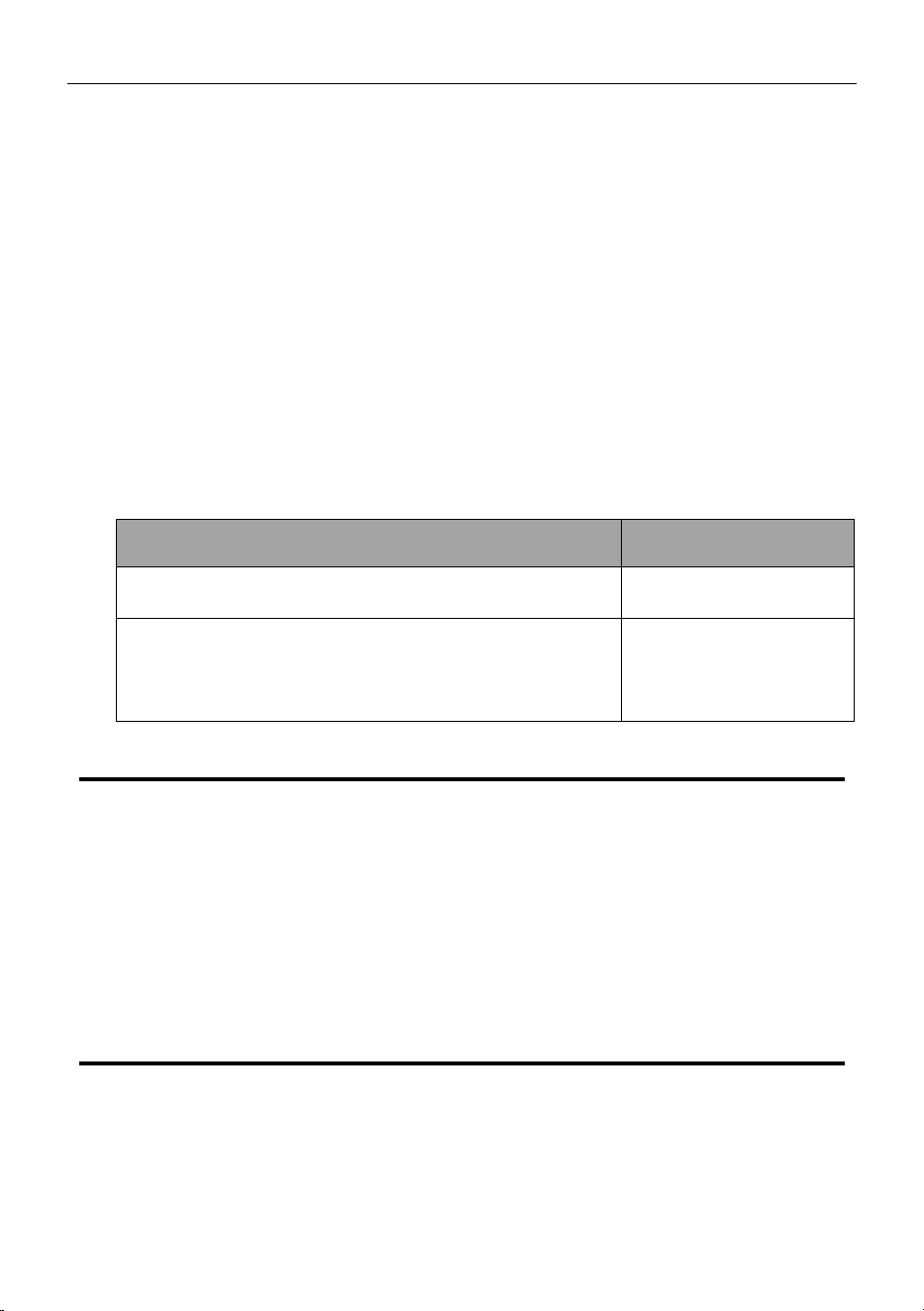
Maintenance item
Maintenance cycle
Clean housing and output (including DC output/AC socket/USB
output port) with a clean, dust-free cloth
Three months
It is recommended to charge and discharge this product once
every three months. First, discharge it to 0%, then fully charge it,
and then discharge it to 60% for long-term storage to extend the
life of this product.
Three months
Power Station 600W/1000W User Manual (V2.1)
4
4.2 Product Details
Power Station 600W/1000W User Manual (V2.1)
5
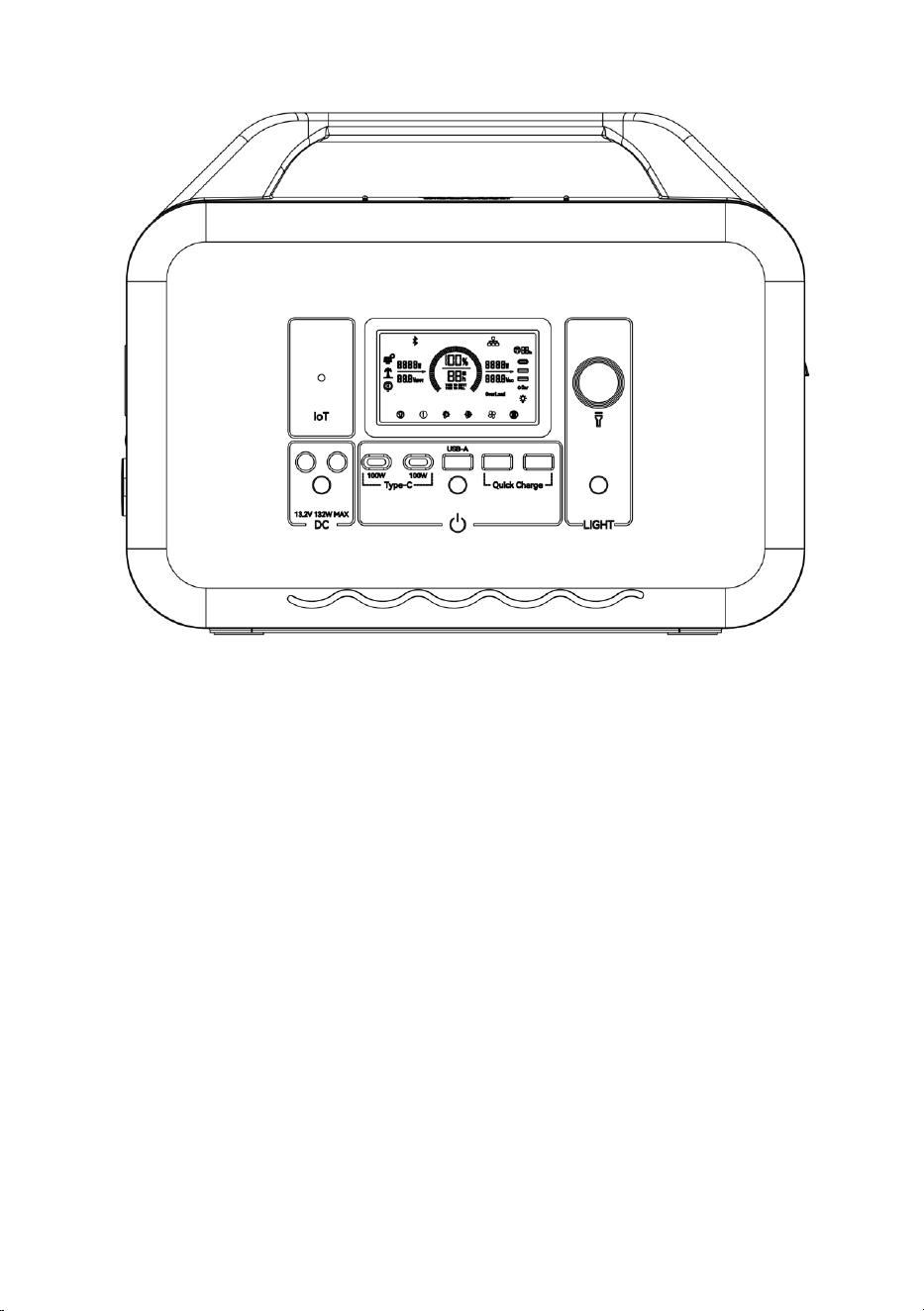
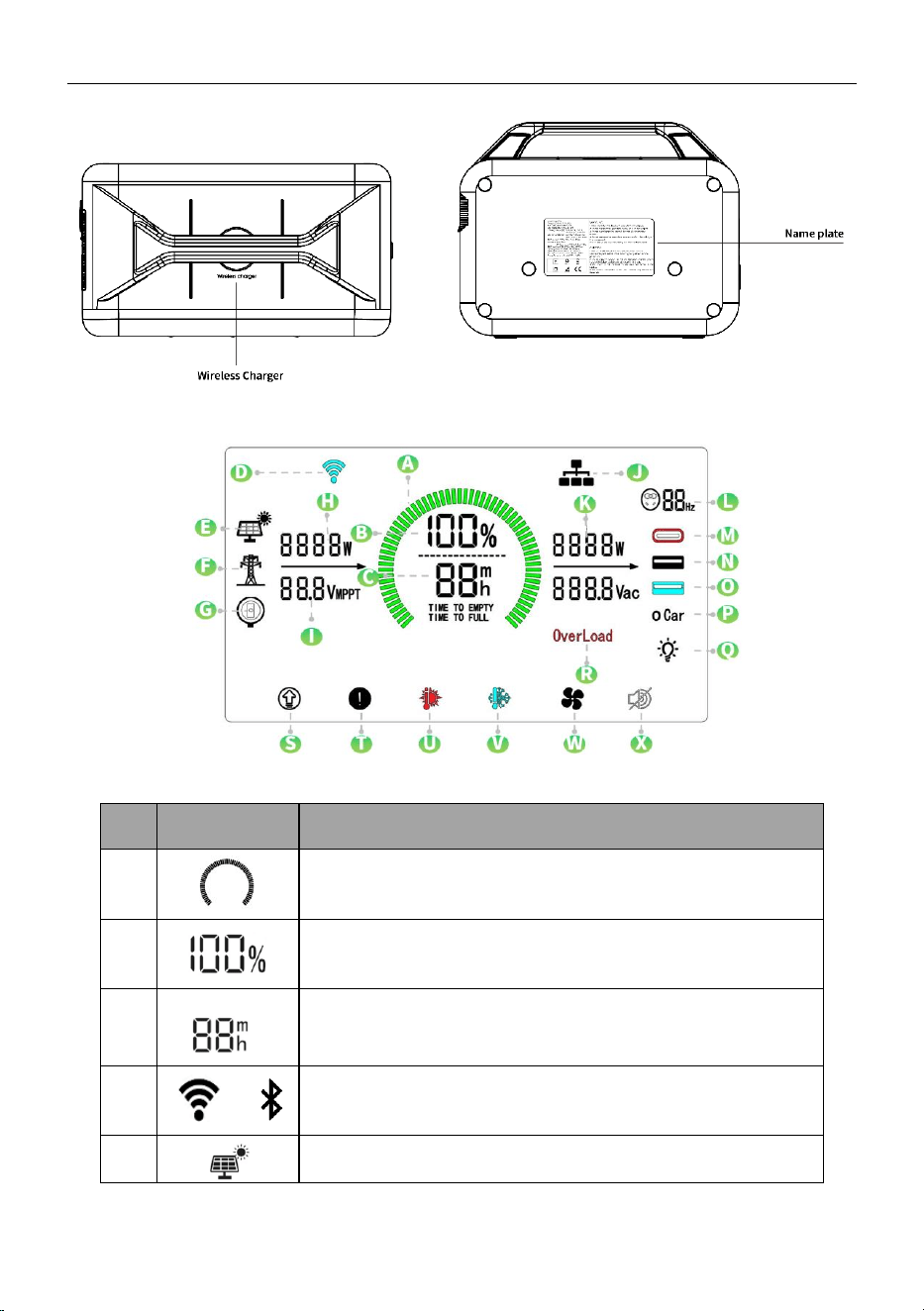
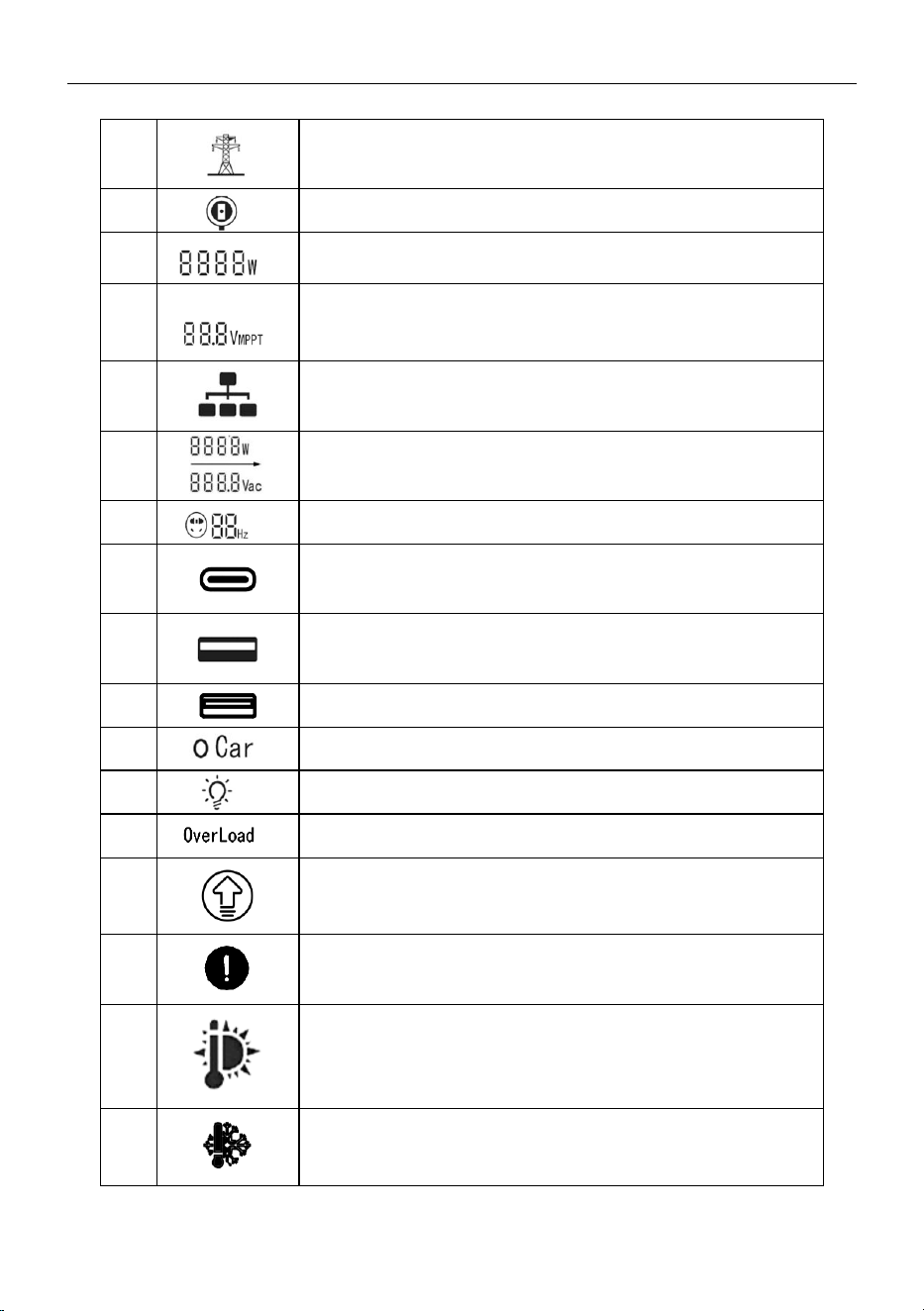
4.3 The User Interface
S/N
Icons
Description
A
Battery power status bar. The status bar will vary with the charging
and discharging of the battery.
B
Displays the percentage of remaining power.
C
Remaining rechargeable/discharge time. Determine the remaining
charge/discharge time, accurate to minutes, based on the current
power consumption of the product.
D
or
Displays IOT connection status. Icons will be displayed when
connected to WIFI but will not be displayed when not connected.
E
Indicates being recharged by solar panels.
Power Station 600W/1000W User Manual (V2.1)
6
F
Indicates being recharged by AC input.
G
Indicates being recharged by car or DC adaptor.
H
Displays the current input power. Displays the current input power of
the product in watts.
I
Display the current MPPT value of the product in terms of voltage.
This icon will only appear when the battery is charged by solar
panels.
J
When the internal communication fails, the icon blinks.
K
Displays the current output power and AC voltage.
L
Indicates the corresponding output frequency of AC output.
M
Indicates Type-C output is working. (Color: green)
N
Indicates USB-A output is working. (Color: white)
O
Indicates QC fast charge port is working. (Colar: blue)
P
Indicates that the cigarette lighter and DC output are working.
Q
This icon displays when the reading lamp is on.
R
Output overload indication icon.
S
The icon indicates that the SmartDrive function is on. The device
can power the AC loads that require higher power than the rated
output power.
T
Displayed if the BMS is faulty.
U
A high-temperature warning icon appears when the temperature of
the machine is too high. Please pay attention to the cooling of the
machine.
V
A low-temperature warning icon will appear on the screen to warn
that the temperature of the machine is too low. Please warm up the
machine properly before using it.
Power Station 600W/1000W User Manual (V2.1)
7
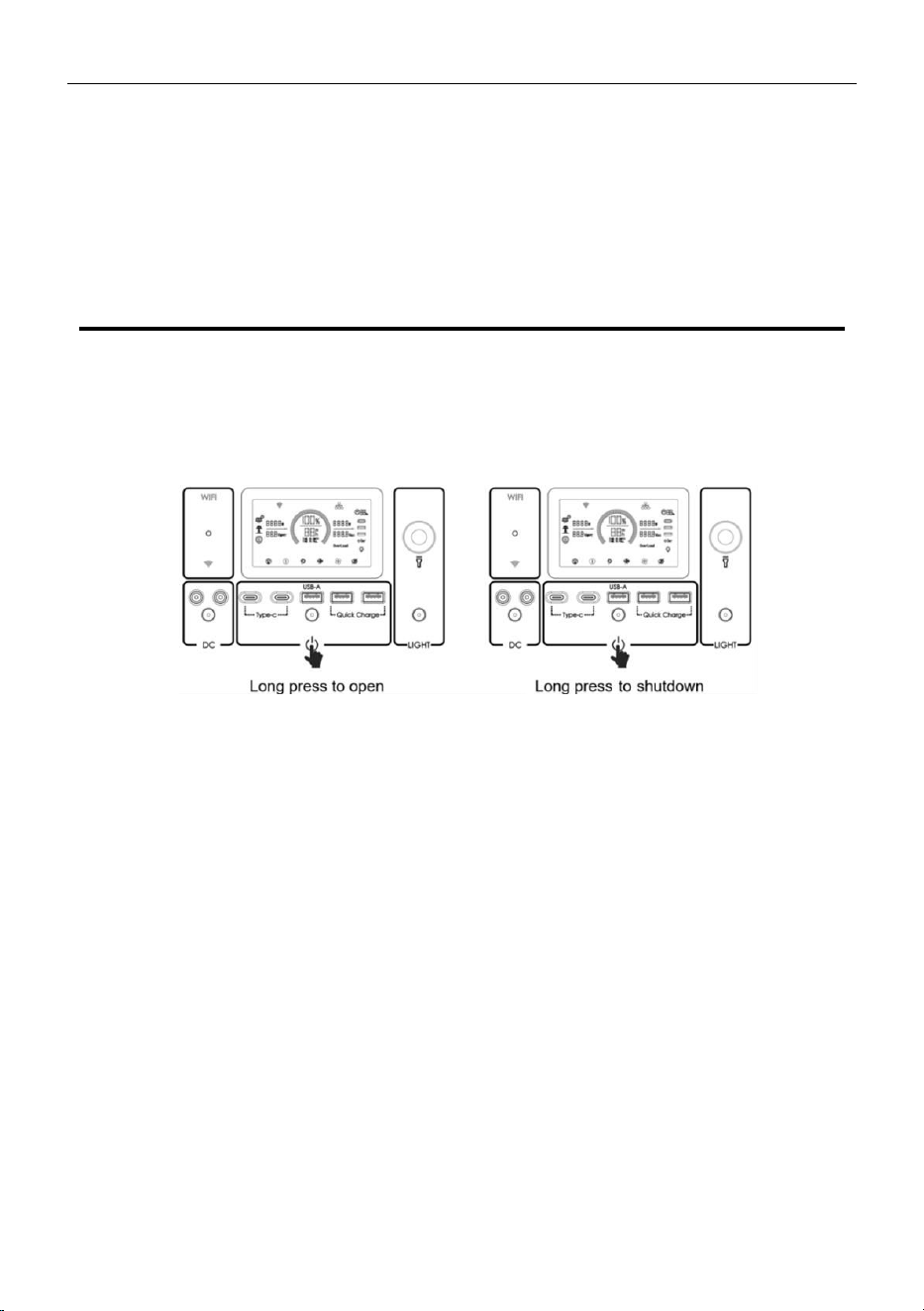
4.4 Socket Types
The type of socket in each region is different, and the specific kind received shall prevail.
05 Product Safety Guidelines
1. Portable energy storage sources must be charged using officially designated charging cables. The
Company will not be responsible for any damage and consequences caused by charging without using
the official charging cable.
2. When recharging, please place this product on the horizontal surface to ensure that there are no
inflammable and explosive materials in close proximity. Please arrange for someone to take care of the
product when charging to prevent accidents.
3. After the machine is continuously discharged at full load if the battery of the product is in a high-
temperature state, it is recommended to wait for the temperature of the product to drop to room
temperature before charging. Otherwise, the high-temperature protection function of the battery may be
triggered, and charging is prohibited.
4. The product can be charged in the temperature range (0°C ~ 40°C) and can be discharged in the
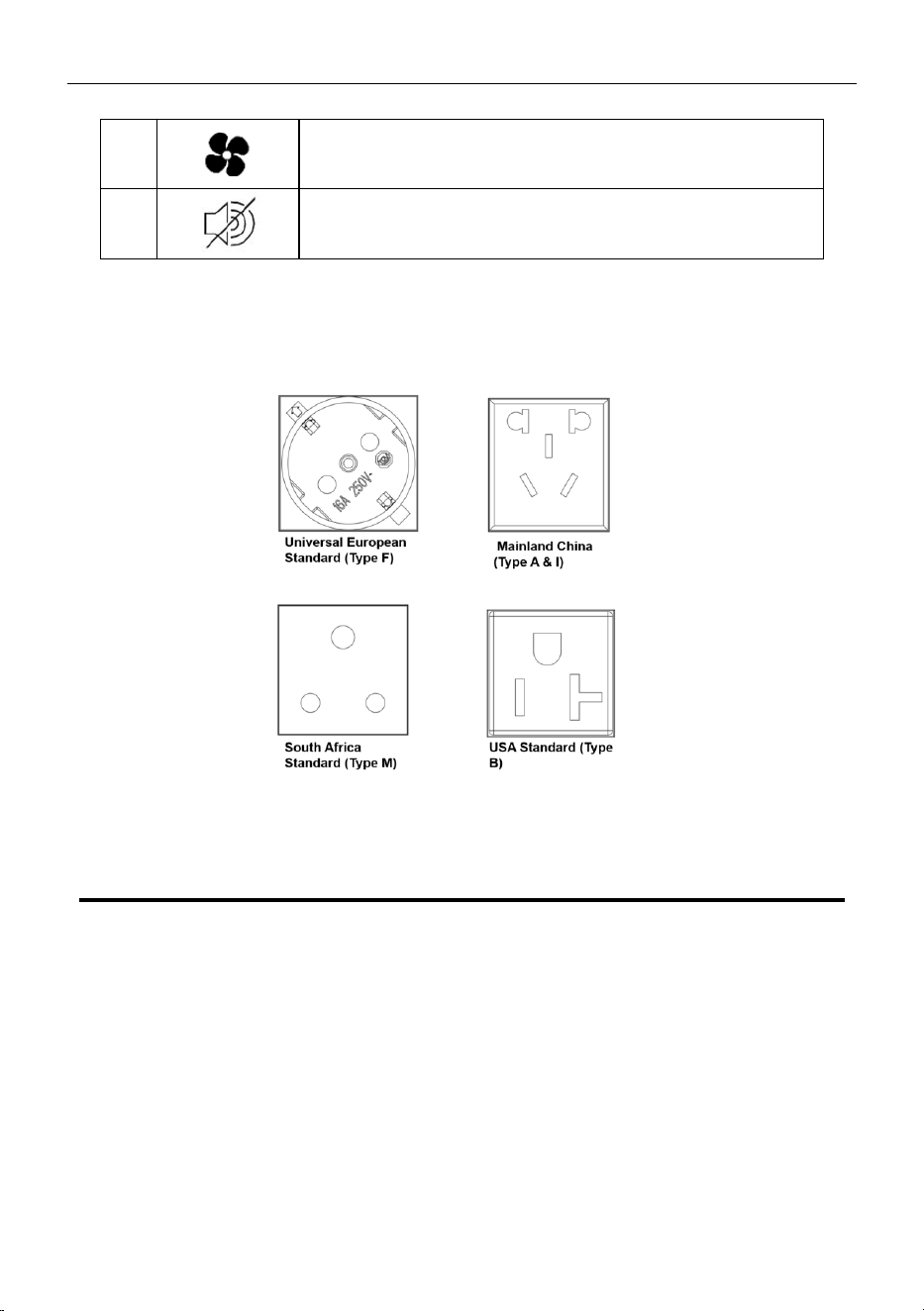
W
When the cooling fan is turned on, the icon rotates dynamically.
X
Silent charging mode: Hold down AC ON/OFF to manually enable it,
and hold down AC ON/OFF to disable silent charging.
Power Station 600W/1000W User Manual (V2.1)
8
temperature range (-15°C ~ 40°C). The battery life can be greatly extended in the ideal charging and
discharging temperature range (15°C ~ 35°C).
5. When using the product for the first time, please fully discharge the power inside the product and then
recharge it fully (to 100%) for subsequent regular use.
06 General Product Usage
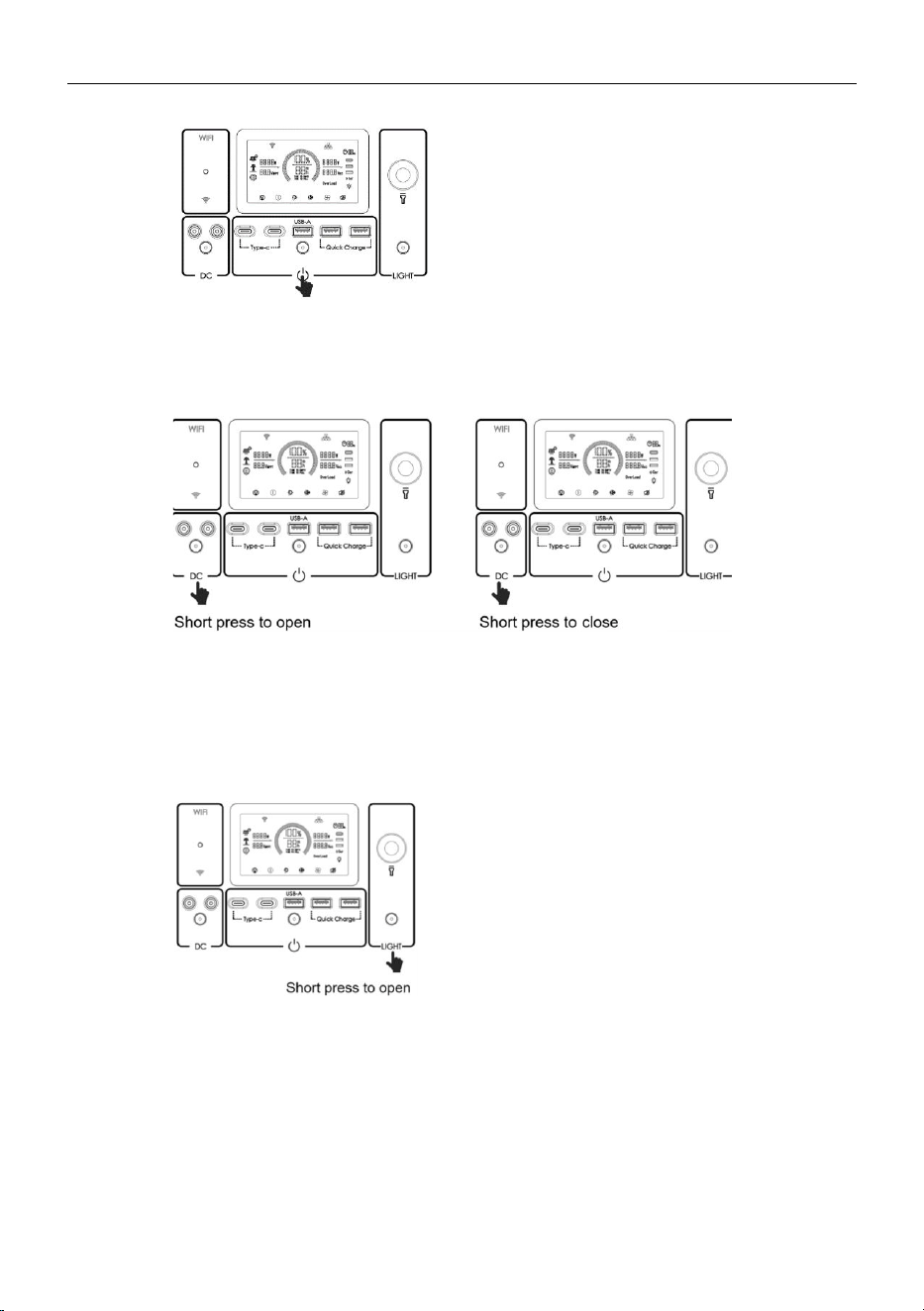
6.1 Powering On/Off
Three ways to power on:
1. Long press the power button for 3~5 seconds to turn on the product (the light on the power button
illuminates), and the display screen lights up.
2. When the device is turned off and the Type-C socket detects load access, the power supply
automatically powers on and the display screen lights up.
3. When the device is turned off and AC/solar/car charging input is connected, the display screen will
light up.
Shutdown:
Press the main power switch for 3 ~ 5 seconds, and the product will shut down (the light on the power
button goes out). Please check that each control switch has been turned off before shutting down.
Attention:
1.
When this product continues for half an hour without any operation, the display screen will
automatically go out. When there is an operation change, the display screen will automatically light up.
2. The product will enter sleep mode after half an hour without input charging and without any load
access.
Waking up display screen: When the display screen of the product is off (the screen is off, but the light
of the main power switch is on), press the main power switch, and the screen lights up.
Power Station 600W/1000W User Manual (V2.1)
9
6.2 Wireless Charging Function/12V Output
After the main power supply is turned on, press the DC output power switch to turn on the DC output and
wireless charging. Press the DC output power switch again to turn it off.
6.3 Reading Lamp
After the main power supply is turned on, please click to turn on the strong light; Click again to turn on the
dim light; Press again to turn on the SOS rescue signal flash. Finally, click again to turn off the reading
light.
6.4 AC Output/Atmosphere Lamp
1. The AC output has two specifications: 110V(60Hz)/230V(50Hz). The specifications are set before
delivery and cannot be changed. Before using the equipment, please check the voltage level of the
product in advance and use the electrical equipment in a standardized manner to avoid injury to the
equipment and people.
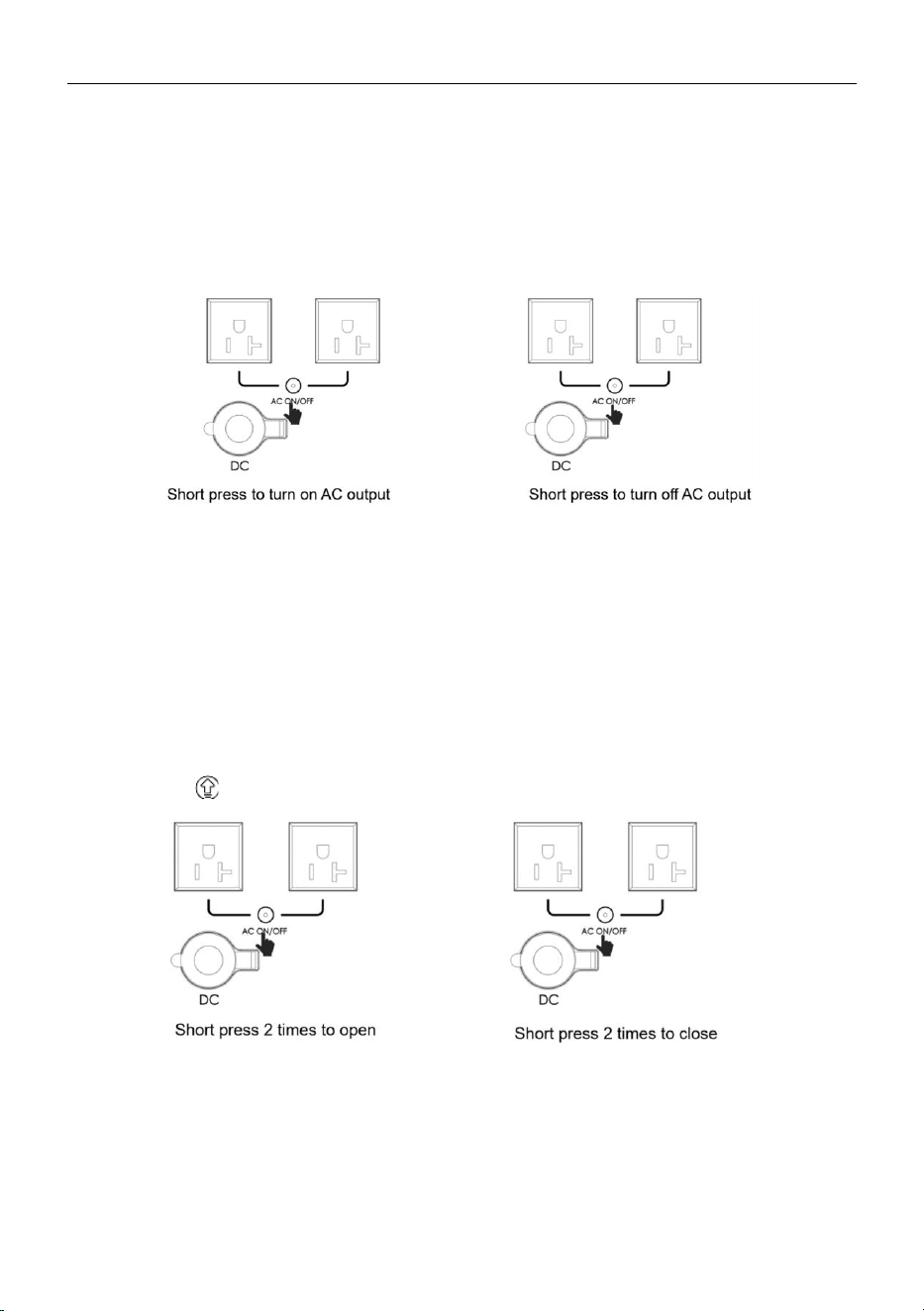
2. After the main power supply is turned on, press the AC output power switch to turn on the AC
Power Station 600W/1000W User Manual (V2.1)
10
output port and the atmosphere lamp lights up simultaneously. Press the AC output power switch again
to turn it off and the atmosphere lamp goes out simultaneously.
3. When the AC output power switch is turned on, if you want to shut down, please turn off the AC
power switch first.
Note: When AC output is not used, please turn it off in time to avoid battery power loss.
6.5 SmartDrive Mode
When the load power is greater than the rated output power, the SmartDrive mode will start! When the
product recognizes that the required power of the load is greater than the rated output power, it can still
supply power to the load. So that you can use more types of electrical appliances and you can get an
extraordinary usage experience!
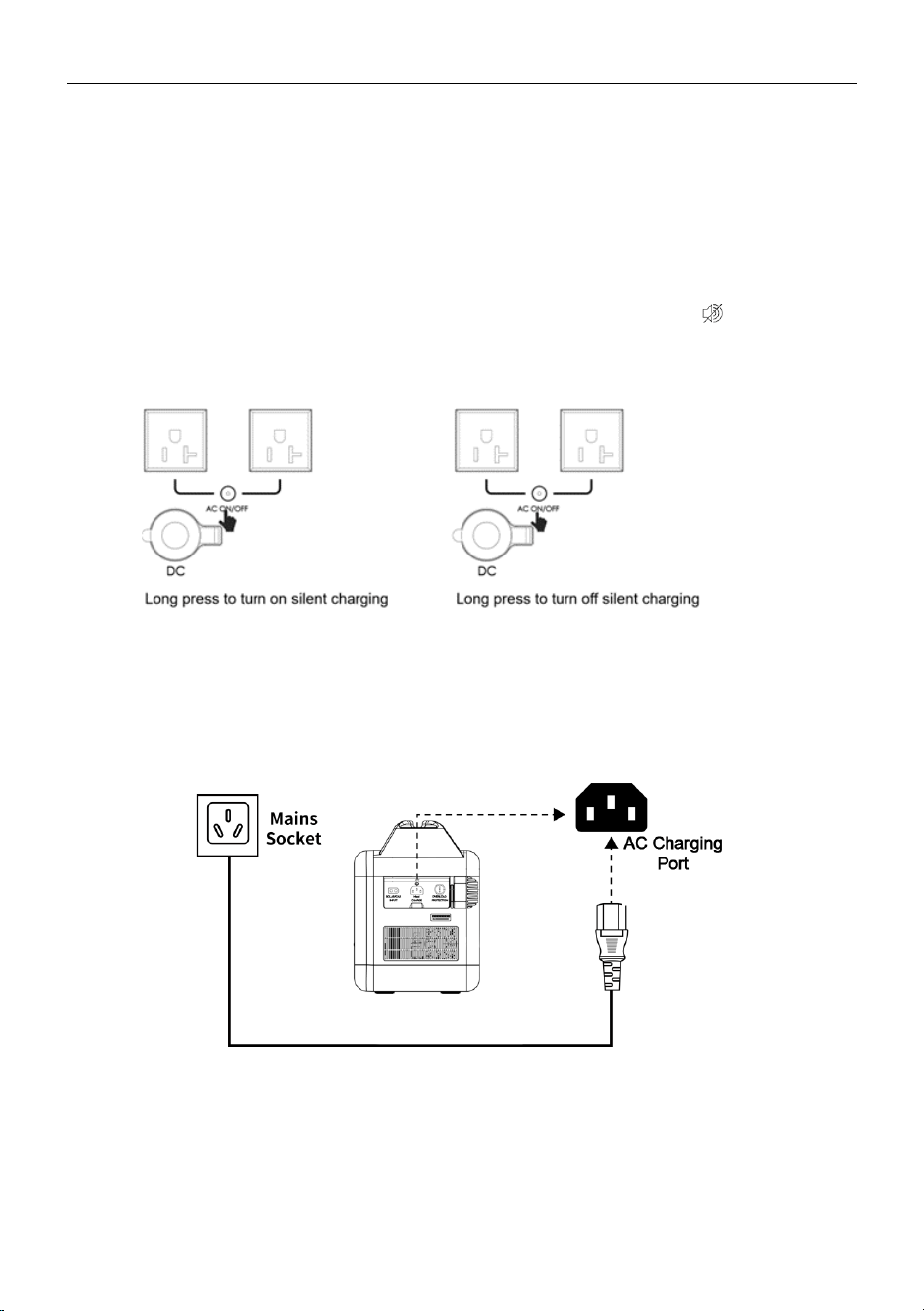
Turn on SmartDrive:
◆ This product starts the SmartDrive function by default
◆ Manual: Press AC ON/OFF twice to turn on and off.
◆ The icon will be displayed after the driver starts.
When using the SmartDrive function, please pay attention to the following:
1) This product cannot be connected to the grid for power generation.
2) SmartDrive Mode is not available when charged.
3) SmartDrive mode is specially designed for resistive load, which is suitable for heating
equipment, not for all electrical appliances. It is recommended to use heating electrical
equipment, such as a hair dryer, electric kettle, electric heater, chainsaw, induction cooker,
Power Station 600W/1000W User Manual (V2.1)
11
and so on. Some electrical appliances equipped with voltage protection (such as precision
instruments, etc.) are not suitable for SmartDrive mode. To confirm whether the device can
use smart driving mode, please fully test it before using it.
Turn off the SmartDrive: press AC ON/OFF twice to turn it on and off.
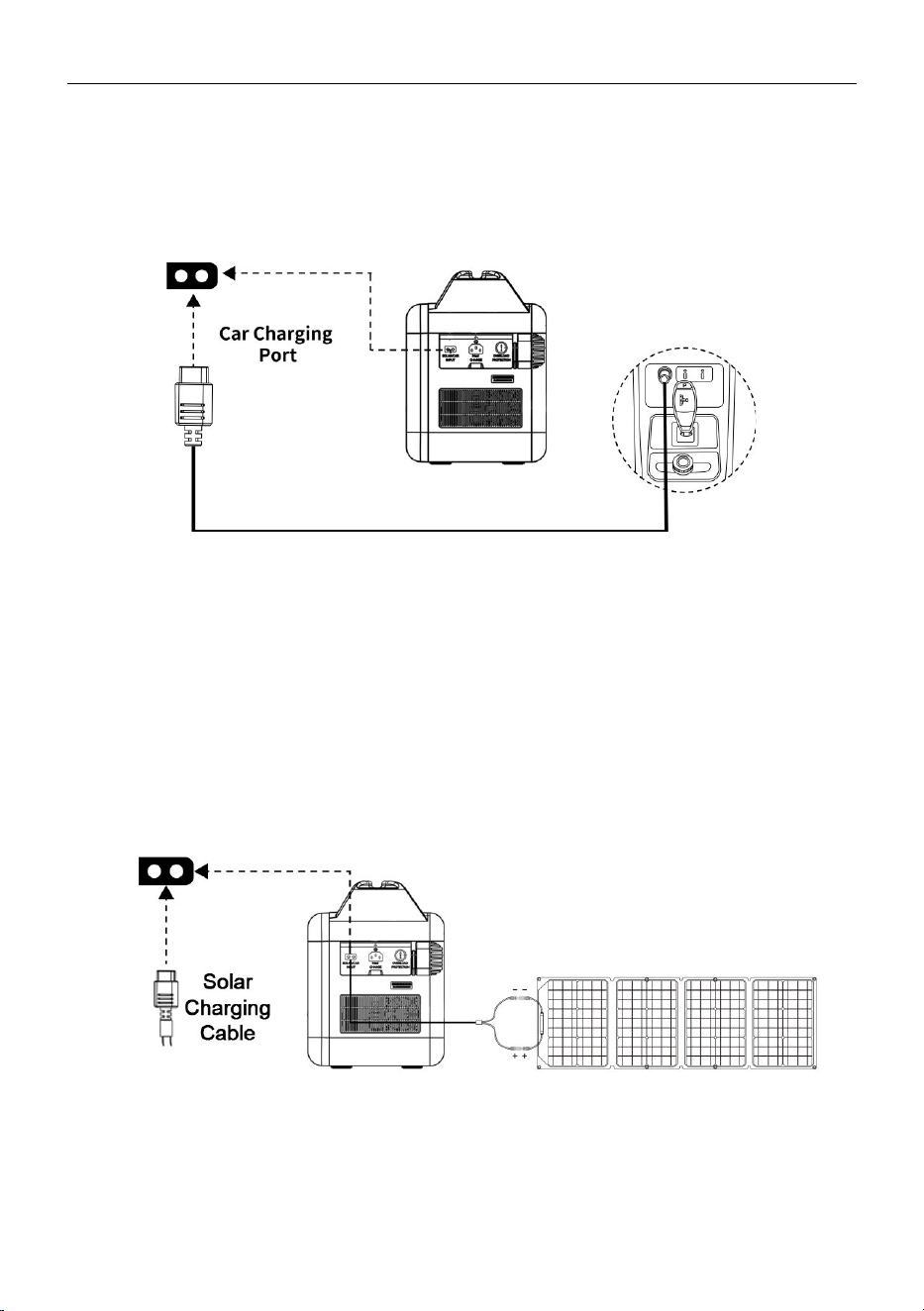
6.6 Silent Charging
Turn on
:
Long press the AC output switch, and the screen will display the silent charging icon . When enabling
the silent charging, the product will run at 0.2c charging power.
Turn off
:
Hold down AC ON/OFF to enable/exit silent charging.
6.7 AC, Car, Solar Charging
AC Charging
This product is built-in with a bi-directional inverter, which can output alternating current and also
charge the battery by the power grid. See the following figure for connection mode.
Note: Charging process equipment according to the temperature of the cell, battery capacity, and
other factors to determine the size of the charging power to ensure that the battery is in the optimal
state.
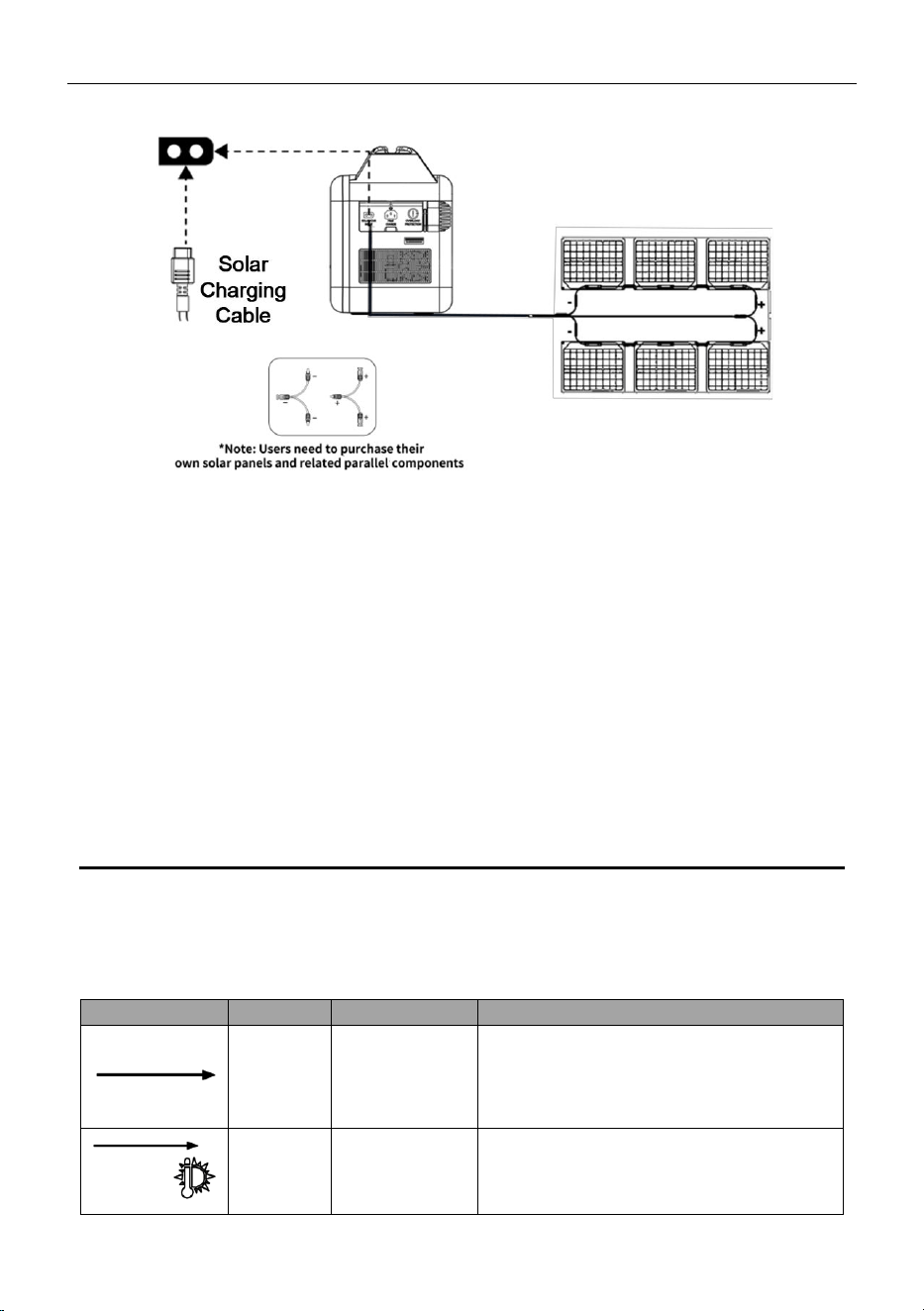
Car Charging
Car charging supports 12V/10A (Max) input. This product can be charged by using the cigarette lighter
Power Station 600W/1000W User Manual (V2.1)
12
port on the car, and the connection mode is shown in the following figure. Please start the car ignition
before recharging this product through the car input port, so as not to cause the car battery to drain. At
the same time, make sure that the cigarette light port of the car and the cigarette lighter plug of the car
charge input line are in good contact. The company will not assume responsibility if the machine is not
operated in accordance with these guidelines.
Attention: Confirm the current output capacity of the cigarette light port before use. If it is less than 10A,
the fuse of the cigarette light port will be damaged.
Solar Charging
Users can use the universal solar panel with MC4 interface standard to power the product, as long as
the voltage and current meet the requirements (10-30V 10A MAX). Pay attention to the connection
sequence of positive and negative terminals at the interface. Incorrect connection may cause damage
to the device.
1) Schematic diagram of solar charging by single plate connection
2) Schematic diagram of connection and parallel connection of two solar charging
plates
Power Station 600W/1000W User Manual (V2.1)
13
6.8 On/Off Grid Switching
1) This system has an On/Off Grid Switching function. When the AC socket is connected to the mains
supply (in this case, the AC power comes from the grid, not from the battery), the grid can supply
power to the load through the bypass relay and recharge its own battery at the same time. When the
battery is fully charged, the charging will automatically stop.
2) When a power outage occurs, the battery output will automatically start and continue to supply power
to the electrical equipment. The switching time of the battery power supply is only 10 milliseconds to
ensure uninterrupted power supply to electrical equipment.
07 Troubleshooting & Maintenance
7.1 Faults Display and Troubleshooting
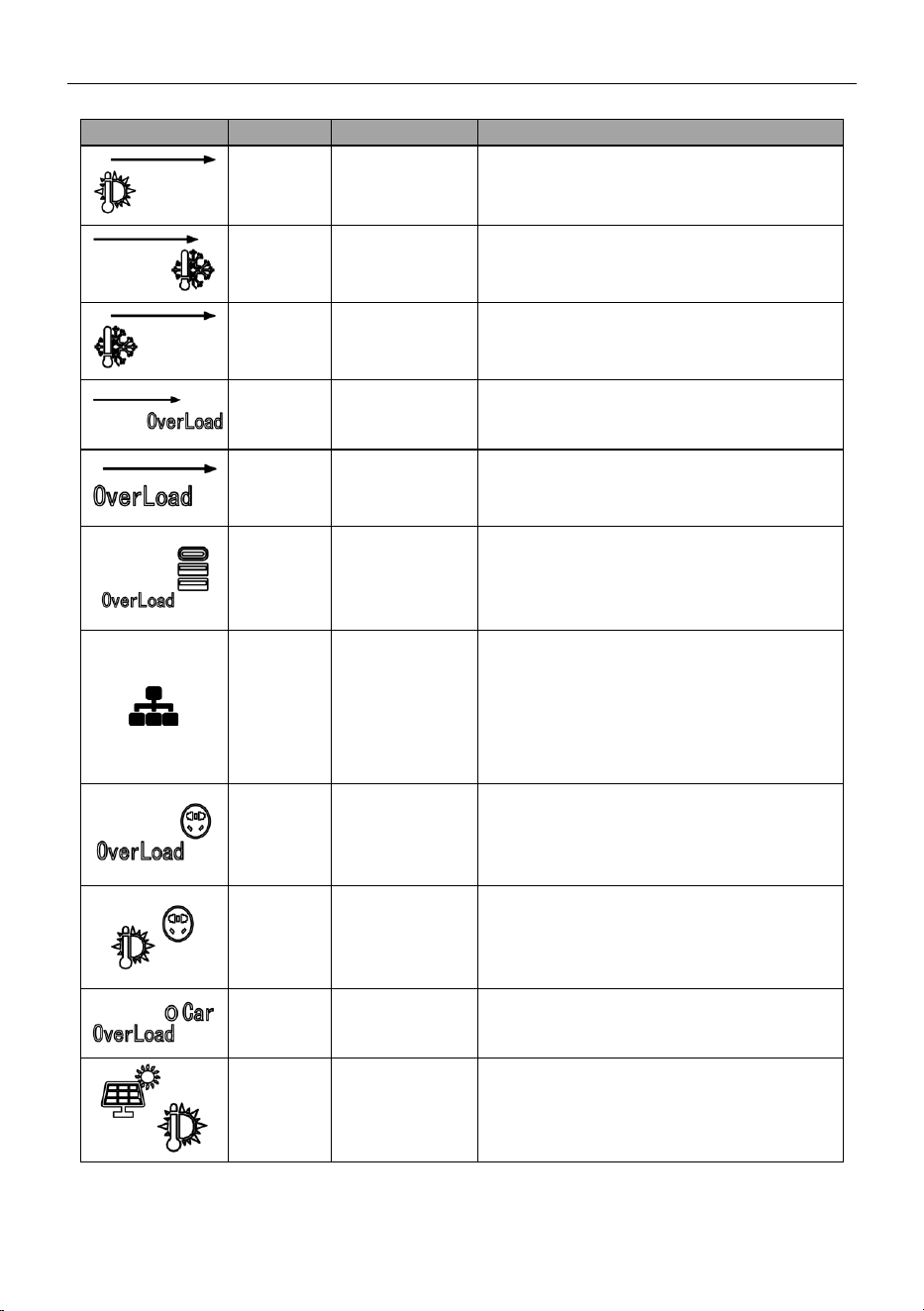
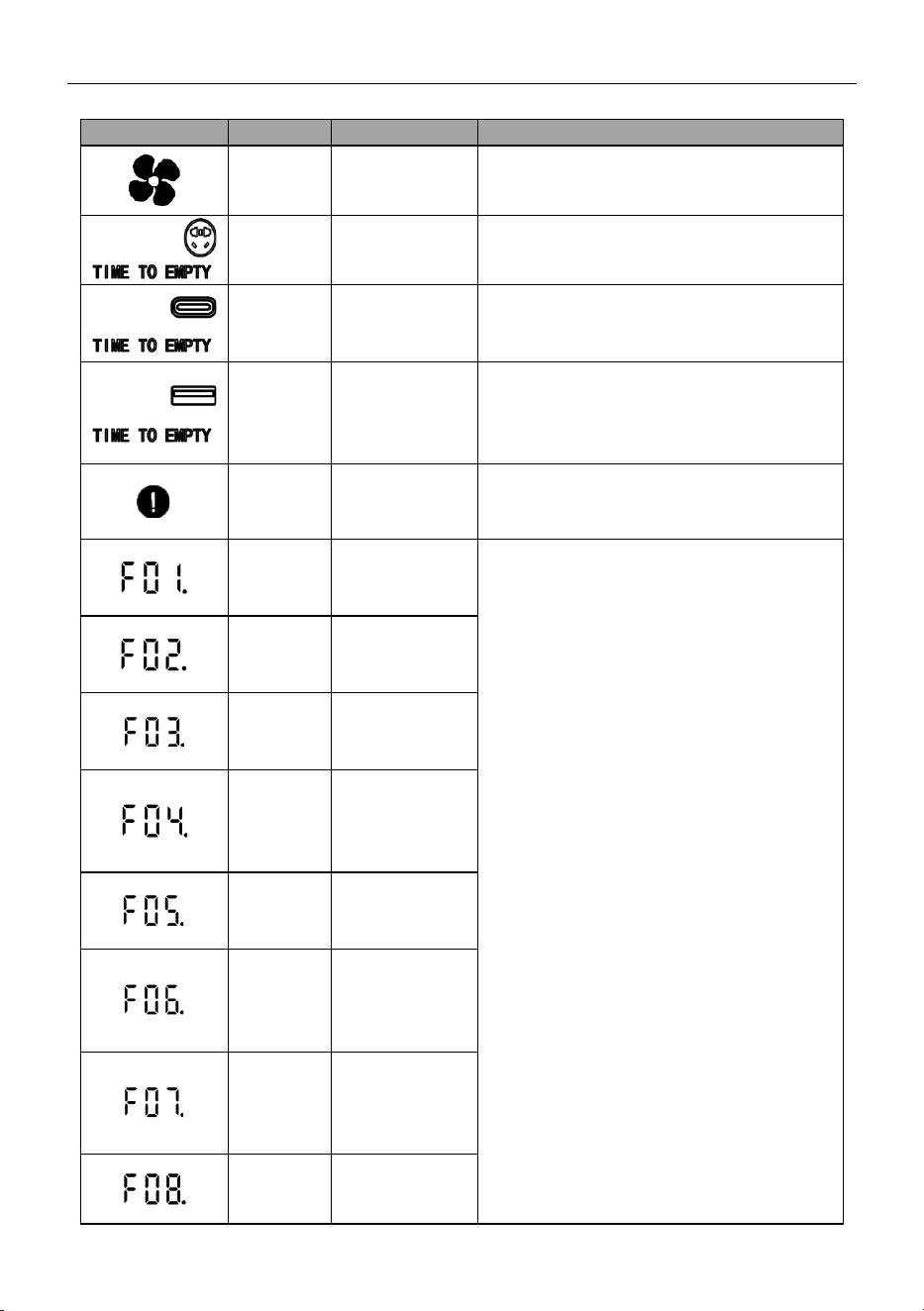
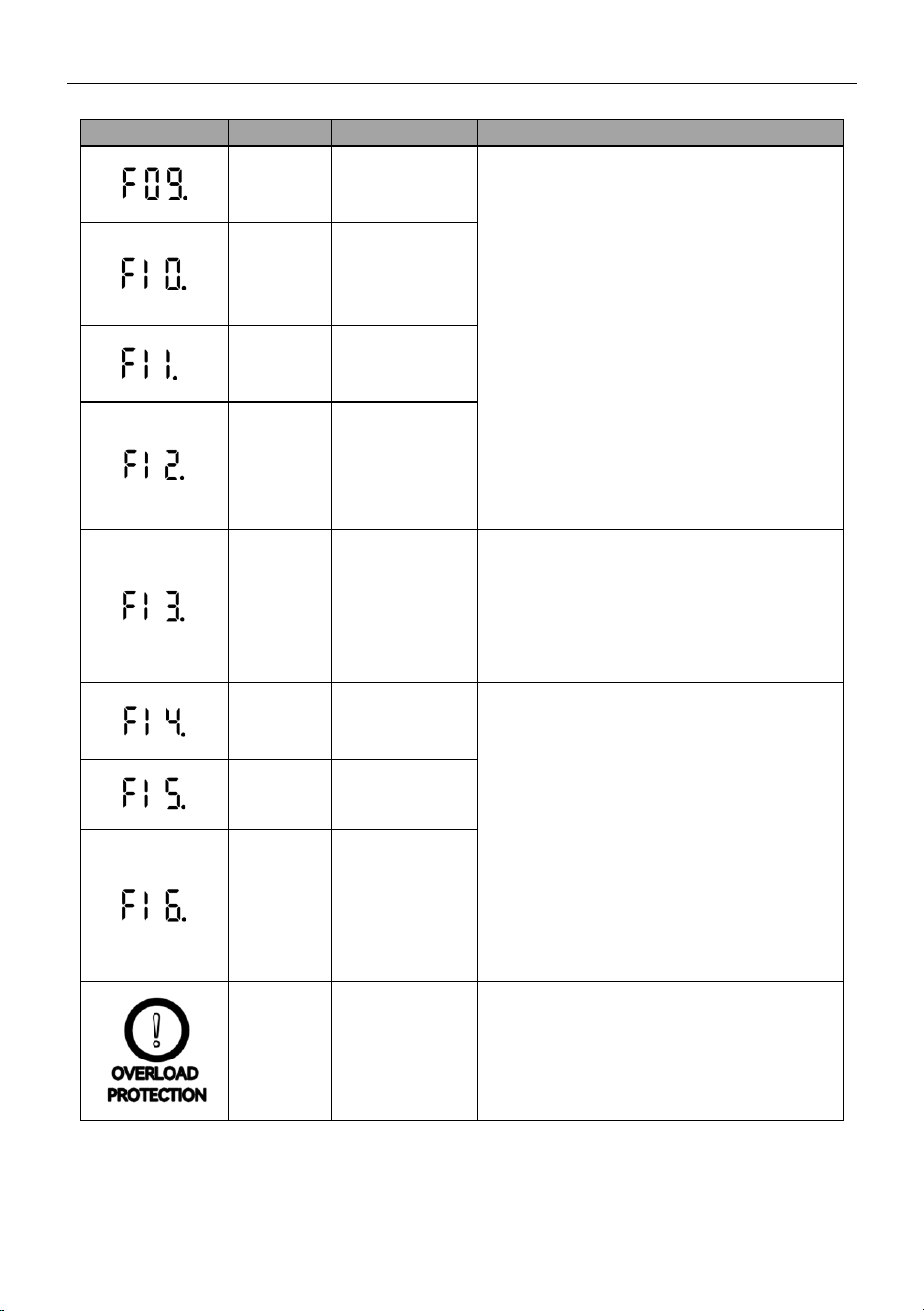
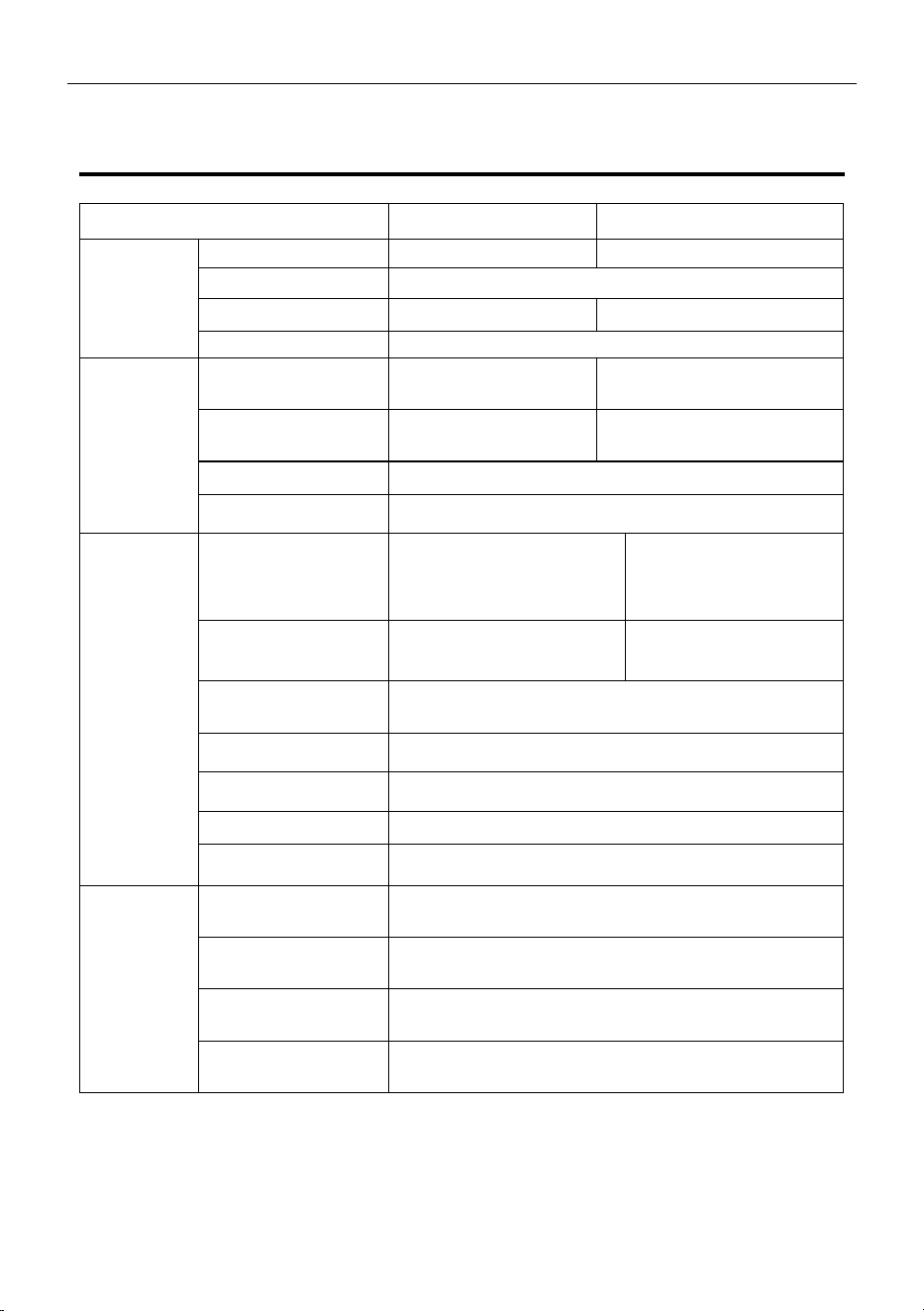
The display screen will show information for device protection through different icons and their
combinations.
Icons
Status
Fault analysis
Solution
Blink
Battery full
The icon flashes in the recharging process the
battery is fully recharged. Disconnect this
product from recharging, and the system will
automatically recover.
Blink
together
Charging high
temperature
protection
Cool down the battery properly to restore the
power supply.
Power Station 600W/1000W User Manual (V2.1)
14
Icons
Status
Fault analysis
Solution
Blink
together
Discharge high
temperature
protection
Cool down the battery properly to restore the
power supply.
Blink
together
Charging low
temperature
protection
After the battery is properly warmed, the
power supply can be restored.
Blink
together
Discharge low
temperature
protection.
Place the battery in a warm place and restore
the power supply after the battery warms up.
Blink
together
Charge overload
protection
Plug out the AC input, and restart this product.
And then plug in the AC power again.
Blink
together
Discharge
overload
protection
This product can be restored after pulling out
the loads and restarting the product. The loads
must be used within the rated power.
Blink
together
USB Overload
Protection
Unplug the appliance, it can automatically
resume operation after 10 seconds.
Blink
The
communication
between the
main control
board and the
AC failed
Restart the machine.
Blink
together
Inverter output
overload
After 10 seconds, restart ON/OFF can be
restored. Please note that the electrical
appliances must be guaranteed to be used
within the rated power.
Blink
together
Over-
temperature
protection of
inverter
After the interface cools down, the AC
ON/OFF switch can be turned on again, and
the operation can be resumed automatically.
Blink
together
DC Output
Overload
Restart the machine can be restored.
Blink
together
DC high
temperature
protection
After the interface cools down, normal use can
be resumed.
Power Station 600W/1000W User Manual (V2.1)
15
Icons
Status
Fault analysis
Solution
Blink
Fan
Check whether the fan is stuck. Restart the
machine can be restored.
Blink
together
Battery under
voltage
A level-1 undervoltage alarm is generated and
the AC stops output. Charge the battery.
Blink
together
Battery level 2
undervoltage
level-2 undervoltage alarm is generated and
the PD/DC12V output stops. Charge the
battery.
Blink
together
Battery
undervoltage
protection
The battery enters the undervoltage protection
and all ports (including AC, DC, USB, and
wireless charging) stop output. Charge the
battery.
Bright
BMS failure
Restart the machine can be restored.
Display
The BUS soft
start of the
inverter fails.
The output voltage displays the fault icon.
There are two solutions:
1. No operation is required. The product returns
to normal five minutes later.
2. Hold down the main power supply to power
off the device. Wait for one minute and then
start it again.
Display
The inverter
output is short-
circuited.
Display
The inverter
BUS
Undervoltage
Display
The inverter
BUS
overvoltage is
faulty.
Display
The BUS of the
inverter is short-
circuited.
Display
The output
overcurrent of
the inverter is
faulty.
Display
The DC
component of
the inverter is
too high.
Display
The inverter is
overheated.
Power Station 600W/1000W User Manual (V2.1)
16
Icons
Status
Fault analysis
Solution
Display
The inverter
over-discharge
is faulty.
Display
The inverter
charging
overcurrent is
faulty.
Display
The inverter
current sensor is
faulty.
Display
The inverter
output
overvoltage or
over-frequency
is faulty.
Display
AC load short
circuit
The output voltage shows the fault icon:
1. Remove the AC load and wait for five
minutes.
2. Unplug the AC load and press the POWER
button to forcibly shut down the AC. Wait for
one minute and restart the AC.
Display
The inverter
mains relay is
faulty
The output voltage displays the fault icon.
There are two solutions:
1. No operation is required. The product
returns to normal five minutes later.
2. Hold down the main power supply to power
off the device. Wait for one minute and then
start it again.
If the problem still cannot be resolved, please
contact us through the after-sales service
center.
Display
The fan of the
inverter is faulty.
Display
The
communication
between the
DSP and MCU
of the inverter is
faulty.
Button
Pop-up
Overload
protection
When the input current is continuously greater
than 15A during charging, the AC charging port
will be protected. After confirming that there is
no fault in the machine, press the protection
switch to reset and resume charging.
If the above problems occur during the use of this product and cannot be solved after operating it in the
methods suggested above, please stop using it immediately and contact us through the after-sales
service center.
Power Station 600W/1000W User Manual (V2.1)
17
08 Specifications
Product
600W
1000W
General
Information
Net weights
9.5kg
11.1 kg
Dimensions
348*264*192 mm
Capacity
672Wh
1008Wh
Cycle life
2000 times (25 ℃, 1C discharge)
Charging
Information
AC charging
480W Maxi Super Fast
Charge
800W Maxi Super Fast
Charge
AC charging voltage
range.
85 ~ 130Vac or 180 ~
270Vac
85 ~ 130Vac or 180 ~ 270Vac
Car charging
12V,10A, 120W (Max)
Solar charging
10 ~ 30V,10A, 200W (Max)
Output Ports
AC (x2)
110V/60Hz or 230V/50Hz for
a total of 600W (support
1800W peak power)
110V/60Hz or 230V/50Hz
for 1000W (support
2000W peak power)
Maximum total AC/DC
output power
720W
1200W
Car Port Output (x1)
DC Output (x2)
DC cigarette lighter: 13.2 V, 10A
DC5525: 13.2 V, 10A Total 132W
USB-A (x1)
5V, 2.4 A; 12W
Type-C (x2)
5V/9V/12V/15:3A; 20V:5A; each 100W
Fast Charge 3.0 (x2)
18W Max per port, 5V/3A, 9V/2A, 12V/1.5A
Wireless charging
10W
Maintenance
The temperature of
operation and storage
0 ~ 40 ° C (charge), -15 ~ 40 ° C (discharge)
Ideal temperature of
operation and storage
15 ~ 35 °C
Humidity range of
operation and storage
RH 0%-85%, no coagulation
Temperature of
battery operation
0 ~ 40 °C ±2(charge), -20 ~ 60 °C±2 (discharge)