
Wireless Audio
Receiver Transmitter
ENG User manual DEU Benutzerhandbuch
FRA Manuel de l'Utilisateur ESP Manual de usuario
I Manuale d'uso
JPN工汗了二寸)V
CS Navod k pou之iii
NL Gebruiksaanwijzing
S
V Anvndningsanvisning E
L 06�y6, XP的�,
PL lnstrukcja obstugi
HU Hasznalati utmutat6
DA Brugsanvisning
KO朴各补叫廿望
AR ''•'
"'
� 亡冲
USER MANUAL
Please kindly read the user manual before
using and keep it for future reference.
,区曰
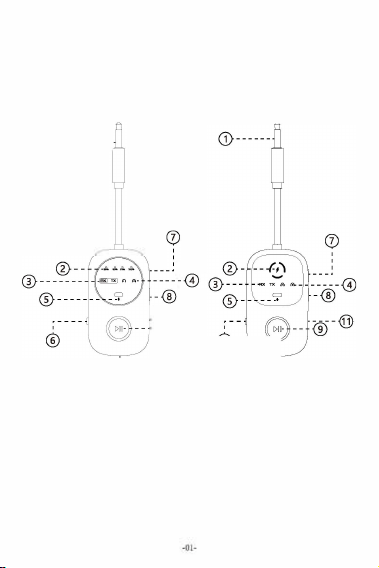
Product Diagram
(model:BT-27)
(model:BT-28)
------
窃©
: ---
@
Aux in/out
@ Battery Indicator Area
@ RX Mode/
T
X Mode
@ 1st Bluetooth device indicator
2nd Bluetooth device indicator
Mic
��
,
·---
@
@ RX-OFF-RX Sw;tch Button
Volume+/Song
p
rev;ous.
@ Volume-/Song next
®Mulbfuncbon key
面
T
y
p
e-
C
@
Reset Button

Basic operation
Button
Function
(立
moo/o
-OFF-
@
M"'l<Play/P'"过
@
Connect to the 纽 ond
""七'"""''�'"
When the two Blu e too th
@
d
d
""•
"b
m
l
令-,
d
ic
km
由
m
e
�
b血
"l
e d
0
,0
to 梵archr new d 的田
.. ,;,.
^
lume+/S ong pious
V
如1,m
,
-尺"'氓戏
Receiver
Mod
e
(
Pair with Your Smartphone
Operation
1 Swih the buon
to
to
t
1
"
he
m
o
o"
/
".
Sw
i曲
p
心
th
扣
,
o
,
bu
to
t t
tu
o
m
n t
o
o
"O
FF
•
CIiek
'"""'";,,
'"""'";,,
Loog
p
硒hor t
p
�
"'"'''"还hor t
p
"�
1. Switch the[ ]switch button to the RX" /"TX position to
power on. Switch the[ ]button to "OFF "to turn off
2. Slide the TRX switch to the "RX" position
3.Connect the wireless audio adapter to your audio device
with an AUX audio cable
4 .Find the model of the Bluetooth adapter you pu『chased in
your phone's Bluetooth search and select it for pairing.
Once paired successfully,the Bluetooth device Indicator 1
will illuminate green.

How to Pair with the 2nd Phones
1.When the first phone is paired and in an active state,
Bluetooth device (indicator 1) illuminate in green. Then
you can connect the second mobile phones.
2.Find the model of the Bluetooth adapter you purchased
in your phone's Bluetooth search and select it for pairing.
When the second smartphone is successfully paired, the 2nd
Bluetooth device和ndicato「2 will light up green.
Note
It only supports m,sk playback on one d蚁ice at a t,me. If u need to sw,tch
to the 2nd d幻,ce for playback, plea父tum o the source of the de,ke.
Transmitter Mode (T
Pair with Your Bluetooth Headphones
1. Switch the[ ]switch button to the RX"/"TX position to
power on. Switch the[ ]button to "OFF "to turn off
2. Slide the TX/RX switch to the "TX" position.
3.Connect the wi『eless audio adapte『 to your audio device
with an AUX audio cable.
4 .Tum on the Bluetooth headset and adjust it to wireless
pairing mode, wait and connect. When pairing is successful,
Bluetooth device和ndicator 1 will light up green.
How to Pair with the 2nd Bluetooth
Headphone?
1.When pai『ed with a set of headphones and in an active
state, the Bluetooth device indicator1 lights up green, and
then you can pair the second Bluetooth headphones

2.Double - click the @ button to enter pairing mode. The
2nd Bluetooth device indicator 2 will flash green quickly.
3.Pairing with your 2nd headphones.when successfully
paired,the 2nd Bluetooth device indicator2 will illuminate
green.
4 .. When the Bluetooth & (indicator1 & 2) lights are
simultaneously illuminated, the pairing is successful, and
Bluetooth devices & (BluetoothHeadsets/Speakers)
can play audio simultaneously.
Clear Paired Devices List & Reset
1.Resetting
You can use a pin-like object, such as a SIM ca「d removal tool
fo「 mobile phones, to insert it into the "RESET" hole to reset the
product.
气
2.Clear paired devices list
After powering on, press and hold the·@·button for 5
seconds until all the indicator lights on the screen turn green
This indicates that the clea『ing is successful and the product
will automatically restart
CERoHSO哗@哀
MADE IN O<INA
一

FCC Statement Warning:
This equipment has been tested and found to comply with the
limits for a Class B digital device, pursuant to part 15 of the
FCC Rules. These limits are designed to provide reasonable
protection against harmful interference in a residential
installation. This equipment generates, uses and can radiate
radio frequency energy and, if not installed and used in
accordance with the instructions, may cause harmful
interference to radio communications. However, there is no
guarantee that interference will not occur in a particular
installation. If this equipment does cause harmful interference
to radio or television reception, which can be determined by
turning the equipment off and on, the user is encouraged to try
to correct the interference by one or more of the following
measures:
• Reorient or relocate the receiving antenna.
• Increase the separation between the equipment and receiver.
• Connect the equipment into an outlet on a circuit different
from that to which the receiver is connected.
• Consult the dealer or an experienced radio/TV technician for
help.
Caution: Any changes or modifications to this device not
explicitly approved by manufacturer could void your authority
to operate this equipment.
This device complies with part 15 of the FCC Rules. Operation
is subject to the following two conditions: (1) This device may
not cause harmful interference, and (2) this device must
accept any interference received, including interference that
may cause undesired operation.
The device has been evaluated to meet general RF exposure
requirement.

Of the following measures:
-Reorient or relocate the receiving antenna.
-Increase the separation between the equipment and receiver.
-Connect the equipment into an outlet on a circuit dierent
from that to which the receiver is connected.
-Consult the dealer or an experienced radio technician
for help. Important: Change or modifications not expressly
approved by the manufacturer responsible for compliance
could void the user's authority to operate the equipment

1亚
Empfangsmodus (
)
Kombinieren Sie mit lhrem Smartphone
1. Schieben Sie die Schalten in die Position • RX " oder
• TX ", um einzuschalten. Schieben Sie den
Schaller in
die mittlere Position, um herunterzufahren.
2.Schieben Sie den TX/RX -Schaller in die Position "Rx".
3.SchlieBen Sie den drahtlosen Audioadapter mil dem
Aux -Audiokabel an 1hr Audiogerat an.
4. Suchen Sie das Bluetooth -Adapte『modell, das Sie in der
Bluetooth -Suche lhres Telefons gekauft haben, und wahlen
Sie es fur das Paar aus.Nach erfolgreicher Paarung leuchtet
das Bluetooth -Gerat -Anzeihung 1 weiB auf.
Wie man mit einem zweiten Telefon
kombiniert
1. Wenn das erste Telefon gepaart und aktiviert ist, leuchtet
das Bluetooth -Gerat (lndikator 1) weiB. Dann konnen
Sie eine Verbindung zu einem劝eiten Telefon herstellen.
2. Suchen Sie das Bluetooth -Adapte『modell, das Sie in der
Bluetooth -Suche lhres Telefons gekauft haben, und wahlen
Sie es fur das Paar aus.Wenn das动eite Smartphone
erfolgreich gepaart wi『d, leuchtet das动eite Bluetooth
-Gerat lndikator 2 weiB auf.
Obertragungsmodus
X
)
Kombinieren Sie 1hr Bluetooth -Headset
1. Schieben Sie die Schalten in die Position • RX " oder
• TX ", um einzuschalten. Schieben Sie den Schaller in die
mittlere Position, um herunterzufahren

2. Schieben Sie den TX/RX -Schaller in die "TX" -Position.
3. SchlieBen Sie den drahtlosen Audioadapter mit dem Aux
-Audiokabel an 1hr Audiogerat an.
4. Schalten Sie das Bluetooth -Headset ein und passen S1e es
auf den drahtlosen Paarungsmodus ein. Warten Sie und
ve『binden Sie sie. Beim erfolgreichen Paa『en wi『d das
Bluetooth -Gerat
-Anzeigebot 1 weiB beleuchtet.
Wie kombiniere ich mich mit dem eiten
Paar Bluetooth -Headsets??
1. Wenn das Bluetooth -Gerat Anzeigelicht 1 aktiviert isl,
leuchtet das zweite Paar Bluetooth -Kopfhorer.
2. Doppelklicken Sie auf die Schaltflache守
,
um den
Paarungsmodus einzugeben. Das zweite B uetooth -Gerat
Anzeigelicht 2 blinkt schnell weiB
3. Kombinieren Sie 1hr zweites Paar Kopfhorer. Nach
erfolgreicher Paarung leuchtet das zweite Bluetooth -Gerat
lndikator 2 weiB auf
4. Wenn die lndikatorbeleuchtung der Bluetooth -Gerate
八und (lndikatorlicht 1 und 2) gleichzeitig eingeschaltet
sind, isl die Paarung erfolgreich, und Bluetooth -Gerate
und (Bluetooth -Headsets/Bluetooth -Lautsprecher)
konnen gleichzeitig Audio spielen.
CERoHSO哗@哀
MADE IN O<INA
一

,区
Mode de reception
(
Associez a votre smartphone
1. Faites glisser le basculer vers la position«RX»ou
«TX»a mettre en marche. Faites glisser le commuter la
position centrale pour a吱ter.
2.Faites glisser l'interrupteur TX/ RX en position«RX»
3. Connectez l'adaptateur audio sans fil a votre p如ph扣que
audio a l"aide du cable audio AUX.
4.Trouvez le mod创e de l'adaptateur Bluetooth que vous avez
achete dans la recherche Bluetooth de votre t仑lephone et
s七lectionnez-lea la paires.Apres un appariement r七ussi,
l'indicateu「de dispositif Bluetooth 1 eclairera blanc.
Comment s'associer a un deuxieme
t艇phone
1. Lorsque le premi可telephone est apparie et activ色le
p的ph扣que Bluetooth (indicateur 1) s'allume blanc
Ensuite, vous pouvez vous connecter a un deuxieme
啦phone.
2. Trouvez le modele de l'adaptateur Bluetooth que vous
avez achete dans la recherche Bluetooth de votre telephone
et迳lectionnez-le合la paires.Lorsque le deu难me
smartphone est apparie avec succ妇,le deuxieme indicateur
de dispositif Bluetooth 2的airera blanc
Mode de transmission
(
TX)
Associez a votre casque Bluetooth
1. Faites glisser lebasculer vers la position«RX»ou«TX»
a mettre en marche. Faites glisser le commuter la
position centrale pour ar吃te,

2. Faites glisser l'inte『rupteur TX/ RX en position "TX"
3. Connectez l'adaptateur audio sans Iii a votre p的pherique
audio a团de du cable audio AUX
4.Allumez le casque Bluetooth et r的lez-le en mode de
couple sans fil, attendez et connectez-vous. Lorsque le
couple est reussi, le p如ph如que Bluetooth八l'indicateur 1
s'allume blanc.
Comment s'associer a la deuxieme paire
de casques Bluetooth?
1. Lorsqu'il est associe a une paire d'缸outeurs et est act吨,
le dispositif Bluetooth La lum论re de l'indicateur 1
s'allume en blanc, puis vous pouvez ensuite coupler la
deux心me paire de casques Bluetooth.
2. Double-cliquez sur le bouton @ pour entrer le mode de
couple. Le deuxieme p的pherique Bluetooth Lumiere 2
clignote rapidement en blanc
3. Associez votre deuxieme paire d'ecouteurs. Apres un
couple reussi, le deuxieme indicateur de dispositif Bluetooth
2 eclairera blanc.
4. Lorsque les lumieres des indicateurs des appareils
Bluetooth et (lumiere de l'indicateur 1 et 2) son\
allumees en meme temps, l'appariement est reussi et les
appareils Bluetooth et (casquets Bluetooth / haut
-parleurs Bluetooth) peuvent丿ouer simultanement audio.
CERoHSO哗@哀
MADE IN O<INA
一

I匡辽
Modo de recepcion (
Combina con tu telefono inteligente
1. Deslice el interruptor a la posici6n "RX'o'TX'para
encender. Deslice el interrupto『 a la posici6n med旧
para apagar.
2.Deslice el interruptor TX/RX a la posici6n'RX'
3.Conecte el adaptador de audio inalambrico a su
dispositivo de audio utilizando el cable de audio Aux
4.Encuentre el modelo de adaptador Bluetooth que compr6
en la busqueda de Bluetooth de su telefono y seleccione
pa『a combinar.Despues de un emparejamiento exitoso, el
indicador 1 del dispositivo Bluetooth se iluminara blanco.
Como emparejar con un segundo telefono
1. Cuando el prime『 telefono se combina y se activa, el
dispositivo Bluetooth (lndicador 1) se iluminara blanco.
Luego puede conectarse a un segundo telefono.
2. Encuent『e el modelo de adaptador Bluetooth que compr6
en la busqueda de Bluetooth de su telefono y seleccione
para emparejarlo.Cuando el segundo telefono inteligente se
combina con exito, el segundo indicador de dispositivo
Bluetooth 2 se iluminara blanco
Modo de transm1s1on
Combina con tus auriculares Bluetooth
1. Deslice el interruptor a la posici6n "RX" o "TX" pa『a
encender. Deslice el interrupto『 a la posici6n media para
apagar.

2. Deslice el interruptor TX/ a la posici6n "TX".
3. Conecte el adaptador de audio inalambrico a su
dispositivo de audio utilizando el cable de audio Aux.
4.Enciende el auricular Bluetooth y ajustelo al modo de
emparejamiento inalambrico, espere y conectese. Cuando el
emparejamiento es exitoso, el indicador 1 del dispositivo
Bluetooth se iluminara blanco.
,Como combinar con el segundo par de
auriculares Bluetooth?
1. Cuando se combina con un par de auriculares y se activa,
la luz indicadora del dispositivo Bluetooth 1 se iluminara
blanco, y luego puede emparejar el segundo par de
auriculares Bluetooth.
2. Haga doble die en el bot6n e para ingresar al modo de
emparejamiento. La segunda luz indicadora del dispositivo
Bluetooth 2 pa『padea由r合pidamente
3. Combina con tu segundo par de auriculares. Despues de
un emparejamiento exitoso, el segundo indicador 2 del
dispositivo Bluetooth se iluminara blanco.
4. Cuando las luces indicadoras de los dispositivos Bluetooth
八y
(luz indicadora 1 y 2) estan encendidas al mismo
tiempo, el emparejamiento es exitoso, y los dispositivos
Bluetooth y
(auriculares Bluetooth/altavoces
Bluetooth) pueden reproducir audio simultaneamente
CERoHSO哗@哀
MADE IN O<INA
一

“四
Modalita di ricezione
(
Abbina con ii tuo smartphone
1. Far scorrere ii passaggio alla posizione "RX" o "TX"
per accendersi. Far scor『ere ii passaggio alla posizione
centrale per spegnere.
2.Far scorrere l'interruttore TX/RX nella posizione "RX".
3. Collegare l'adattatore audio wireless al dispositivo audio
utilizzando ii cavo audio AUX.
4. Trova ii modello di adattatore Bluetooth che hai acquistato
nella ricerca Bluetooth del tuo telefono e selezionalo per
abbinare.Dopo l'accoppiamento co『retto, l'indicatore 1
Bluetooth 1 illuminera ii bianco.
Come abbinare un secondo telefono
1. Quando ii primo telefono e accoppiato e attivato, ii
dispositivo Bluetooth (indicatore 1) si illuminera b1anco.
Quindi puoi connetterti a un secondo telefono
2. Trova ii modello di adattato「e Bluetooth che hai acquistato
nella ricerca Bluetooth del tuo telefono e selezionalo per
abbinare.Quando ii secondo smartphone e accoppiato
correttamente, ii secondo indicatore Bluetooth 2 si
illuminera ii bianco.
Modalita di trasmissione
(
Abbina con l'auricolare Bluetooth
1. Far scorrere ii passaggio alla posizione "RX" o "TX" per
accende『si. Far scorrere ii passaggio alla posizione
centrale per spegnere.

2. Far scorrere l'inter『uttore TX/RX nella posizione "TX"
3. Collegare l'adattatore audio wireless al dispositivo audio
utilizzando ii cavo audio AUX.
4. Accendere l'auricolare Bluetooth e regolarlo in modalita d,
abbinamento wireless, attendere e connettersi. Quando
l'accoppiamento ha esito positivo, l'indicatore 1 Bluetooth
1 si illuminera ii bianco
Come abbinare ii secondo paio di cuie
Bluetooth?
1. Se abbinato a una coppia di cuie ed e attivato, la luce
indicatore del dispositivo Bluetooth 1 si illuminera di
bianco e puoi quindi abbinare la seconda coppia di cuie
Bluetooth.
2. Fare doppio die sul pulsante e per accedere alla
modalita di accoppiamento. II secondo dispositivo Bluetooth
和ndicato『e Light 2 lampeggera rapidamente bianco
3. Abbina con la seconda coppia di cuie. Dopo
l'accoppiamento co『retto, ii secondo indicatore Bluetooth
2 si illuminera ii bianco.
4. Quando le luci indicatore dei dispositivi Bluetooth e
(indicatore di luce 1 e 2) sono accesi contemporaneamente,
l'accoppiamento ha esito positivo e i dispositivi Bluetooth
e (cuie Bluetooth/altoparlanti Bluetooth) possono
riprodurre l'audio contemporaneamente
CERoHSO哗@哀
MADE IN O<INA
一

"皿
受信壬
一
()
又-卜7才>上入力众 9 去才
1.又1于苍「RX」去t二l「TX」位置1二又亏1芒甘飞霄
源老入九去寸. 又1于老中央位窒仁又弓1芒廿'乍
y卜夕勺去寸.
2.TRX又1于老「RX」位詈1二又亏1"芒甘去才.
3.AUX才
一
于4才午
一
丁丿曰吝使用L它勹1又才
-
于4才
了夕丁夕
-
左才
一
于4才于1<1又1二接绕L去才.
4携带霄括Bluetooth挨索可屑入L左Bluetooth了夕方
-
壬于
儿左晃I十七、
入
了
'
眨夕才石上亏1二遇伬L去才. "了
'
丿>夕朴
成功二俊、 Bluetooth于1<1又石\1沙片
一
夕11太白<照L
去寸.
2番目O霉括上入71丿>夕才乙方法
1最初霞即侬了仁众六7夕于1 化芒九七匕即啦呻
于I灯只 1 沙行
一
夕1h<臼<照芒九去才. 壬O俊、 2
番目霎卸习蹈沪违去丸
2携帝笔氐81uetooth筷索下瞒
入二Bluetooth了夕丁夕
一
干
于儿宅旯It七、
入
了
'
丿>夕才石51二遇捩L芸才. 2番目只
了
一
卜7才>朴正常1二71二在勹已1石埽合、 2番目
Bluetooth于,�1又1 今
一
夕2尔白<照芒九去寸.
卜亏>又 V刁>壬
一
(
)
Bluetooth 七y卜上入了1众 9 末才
1.又1千左「RX」去t二l「TX」位堂1二又弓1芒甘七
耄源苍入九去才. 又1千苍中央位置仁又弓1"芒甘飞
卜夕勺去寸.

2. TRX又千吝「TX」位置1二又亏 c芒甘去才.
3.AUX才一于4才午一7儿在使用L七、勹4乍匕又才
-
于4才
了夕丁夕
一
老才
-
于4才于,�又仁接統去寸.
4. Bluetooth" c 七夕卜苍才汃二L、勹又
入
了
'
丿夕壬
一cl绸整L、待榄L可接統L吉才. "了')夕尔成功才,
Bluetooth于I灯4又
勺
一
夕1b<白1二点灯丰寸.
Bluetooth� � 七y卜2番目�了上^了
'
丿
夕才乙方法I
?
,_ c7才
入
了了')夕芒九T了夕于7化芒九石、
Bluetooth于/�又 行
一
夕亏4卜1朴白<照七古九、
Bluetooth'> c 7才2番目了苍
入
了1二飞宅去才.
2.e祀夕注幻砂')"夕丘、
勺
7
1
丿又注
-
吁应扎
去才。2番目Bluetooth于I勺久
沙行
一
夕亏4卜21去
才<
.
仁臼仁点诫丰寸.
3."了')夕水成功L朼俊、2番目Bluetooth于I勺久6尔
成功t=梭、
入
了1二在9去才.
4. Bluetooth于八4又
(少夕分
一
夕亏4卜12)
片
一
夕亏4卜杯同峙1二才汃二众勹七,,堤合、
入
了'丿
夕f成功L、Bluetooth于I勺久 (Bluetooth" c
七y卜/Bluetooth又巳
一
力
-
)尔同峙1二才
-
于4才老再生飞告
宗才.
CE尺RoHSO痉@冗
H•nFINCHINA
一

“五
Pjemn
y re之im (
Sparujte s vasim smartphonem
1. Posute prepinac do polohy
"
Rx " nebo • TX ", abyste
zapnuli. Posute prepinac do stredni polohy a vypn七le
2.Posute prepina亡TX/RX do polohy .. RX "
3.Pripte bezd戊tovy zvukovy adapter k zvukovemu zarizeni
pomod zvuko吱ho kabelu AUX
4.Na丿啦te model adapteru Bluetooth, ktery jste zakoup巾ve
vyhled蜕ni Bluetooth telefonu, a vyberte」ej pro sparovani
Po usp毡nem parovani se indikator1 Bluetooth
『ozsviti bily.
Jak sparovat s druhym telefonem
1. Kdy勾e prvni telefon sparovan a aktivovan, ind心tor1
Bluetooth zarizeni rozsviti bilou. Pak se m泣ete pripojit
k druhemu telefonu.
2. Na丿哉te model adapteru Bluetooth, kte jste zakoup由ve
vyhled扣的i Bluetooth telefonu, a vyberte」, aby se sparoval
Kdy之je druhy smartphone uspesne sparovan, druhy
indikator2 Bluetooth se rozsviti bily.
Reiim penosu
(
Sparujte s nahlavni soupravou Bluetooth
1. Posute prepina亡 do polohy
"
Rx " nebo
"
TX ", abyste
zapnuli. Posute prepina do stredni polohy a vypnete
2. Posute prepinac TX/RX do polohy
"
TX "

3. Pfipojte bezdratovy zvukovy adapter k zvuko咬mu zaiizeni
pomoci zvuko吱ho kabelu AUX
4. Zapnete咱hlavni soupravu Bluetooth a up『avte ji na呻m
bezdrato吱ho parov合ni, po亡kejte a piipojte. Kdy勾e parovani
uspe码
,
ind归tor1 Bluetooth zafizeni \ rozsviti bile
丿ak sparovat s druhym parem nahlavnh
souprav Bluetooth?
1. Kdyz je sparov的sjednim p合rem sluchatek a je aktivovan,
Bluetooth Device \ Ind归tor s西tlo 1 rozsviti bile a pole
muzete sparovat druhy par sluchatek Bluetooth
2. Poklepanim na tlacitko pro vstup do re之imu p合rovani
Druhe zafizeni Bluetooth zafizeni lndikatory 2 bude rychle
blikat bile
3. Sparujte s vasim druhym parem sluch合tek. Po uspesnem
parovani se druhy indikator (2) dru埽ho zafizeni Bluetooth
rozsviti bilou
4. Pokud jsou ind归torov釭砖tla zafizeni Bluetooth a
\
(indikator sv志tlo 1 a 2) zapnuta sou亡asne,je parovani uspesne
a zafizeni Bluetooth石\ a (reproduktory Bluetooth
Heads/Bluetooth) mohou prehravat zvuk soucasne
CERoHSO祖@哀
H负De IN CHINA
一

I
Ontvangmodus
(
Combineer met uw smartphone
1. Schuit de schakelaar naar de'RX'of'TX'-positie om
aan le schakelen. Schuif de schakelaa『 naa「de middelste
positie om af le sluiten
2.Schuif de RX -schakelaar naar de positie'RX'
3. Sluit de draadloze audioadapter aan op uw audio
-apparaat met behulp van de AUX -audiokabel
4. Zoek het Bluetooth -adaptermodel dat u in de Bluetooth
-zoekopdracht van uw telefoon hebt gekocht en selecteer
het om te koppelen.Na succesvolle koppeling zal het
Bluetooth -appa『aat -indicator 1 wit verlichten.
Hoe te combineren met een tweede
telefoon
1. Wanneer de eerste telefoon is gekoppeld en geactiveerd,
wordt het Bluetooth -apparaat -indicator 1 wit verlicht.
Dan kunt u verbinding maken met een tweede telefoon.
2. Vind het Bluetooth -adaptermodel dat u in de Bluetooth
-zoekopd『acht van uw telefoon hebt gekocht en selecteer
het om te koppelen.Wanneer de tweede smartphone met
succes is gekoppeld, licht het tweede Bluetooth -apparaat
-indicator 2 wit op
Transm1ss1e -modus
(
T
Combineer met uw Bluetooth -headset
1. Schuit de schakelaar naar de'RX'of'TX'-positie om
aan te schakelen. Schuit de schakelaa『 naa「de middelste
positie om af te sluiten

2. Schuit de TX/RX -schakelaar naar de positie "TX"
3. Sluit de draadloze audioadapter aan op uw audio
-apparaat met behulp van de AUX -audiokabel.
4. Schakel de Bluetooth -headset aan en pas deze aan in de
draadloze parenmodus, wacht en sluit u aan. Wanneer
koppeling succesvol is, licht Bluetooth -apparaat
indicator 1 wit op.
Hoe te combineren met het tweede paar
Bluetooth -headsets?
11. In combinatie met een paar hoofdtelefoons en wordt
geactiveerd, wordt het Bluetooth -apparaat
-indicatorlicht 1 wit verlicht en kunt u vervolgens het tweede
paar Bluetooth -hoofdtelefoon koppelen.
2. Dubbelklik op de knop @ om de koppelingsmodus in te
voeren. Het tweede Bluetooth -apparaat -indicatorlicht 2
flits! snel wit.
3. Paar met uw tweede paar hoofdtelefoons. Nadal de
koppeling succesvol is, zal de indicator 2 van het tweede
Bluetooth -apparaat wit verlichten
4. Wanneer de indicatorlichten van Bluetooth -apparaten
en (indicatorlicht 1 en 2) tegelkertd zn, zn de
koppeling succesvol en kunnen Bluetooth -apparaten en
(Bluetooth -headsets/Bluetooth如dsprekers)
tegelijkertd audio spelen
CE尺RoHSO栏@哀
H负OEINCHINA
一

“玉`
Mottag
ningslage ()
Para med din smartphone
1. Sut -omkoppla『en till "RX" eller "TX" -lage for att
啦pa. Skjut Byt till mittlaget for att stanga av
2.Skjut TRX -omkopplaren till "RX" -laget
3. Anslut den t咭dlosa ljudadapte『n till din�udenhet med
hjalp av AUX -ljudkabeln.
4.Hitta Bluetooth -adapte『modellen du kopte i telefonens
Bluetooth -sokning och valj den for att para.Etter
framgangsrik parning kommer Bluetooth -enheten
indikator 1 att tanda vitt.
Hur man kopplar ihop med en andra
telefon
1. Nar den forsta telefonen ar parad och aktiverad kommer
Bluetooth -enheten石\ indikator 1 att tanda vitt. Da kan du
ansluta till en andra telefon.
2. Hitta Bluetooth -adaptermodellen du kopte i telefonens
Bluetooth -sokning och valj den for alt para.Na, den andra
smarttelefonen ar f『amg合ngsrikt parad komme「den andra
Bluetooth -enheten \ indikator 2 att tanda vitt
Transmission Mode ()
Para med ditt Bluetooth -headset
1. Sut -omkopplaren till "RX" eller "TX" -lage for att sl合
pa. Sut Byt till mittlaget for att stanga av

2. Sut TX/RX -omkopplaren till "TX" -lget
3. Anslut den t泊dlosa ljudadapte『n till din udenhet med
hjlp av AUX -ljudkabeln.
4. Sia pa Bluetooth -headsetet och」ustera det till t咱dlost
pa『ningslge, vnta och ansluta. Nr parning r framgangsrik
kommer Bluetooth -enhet indikator 1 alt tnda vitt.
Hur kan man para ihop med det andra
paret Bluetooth -headset?
1. Nr det r parat med ett par horlurar och aktiveras
kommer Bluetooth -enheten indikatorlampan 1 alt tnda
vitt och du kan sedan koppla ihop det andra paret
Bluetooth -horlurar.
2. Dubbelklicka pa @ -knappen for alt ga in i parningslge
Den andra Bluetooth -enheten indikatorlampan 2 kommer
att blinka vii snabbt.
3. Par med ditt andra par ho『lurar. Nr parningen lyckas
kommer indikato「2 pa den andra Bluetooth -enheten
att lysa vitt.
4. Nr indikato『ljusen pa Bluetooth -enheter
och
(indikatorlampan 1 och 2) a「pa samtidigt kan parningen
framgangsrik och Bluetooth -enheter och (Bluetooth
-headseVBluetooth -hogtalare) kan spela ud samtidigt.
CERoHSO涕@哀
H负INCHINA
一

"巳星
ElOU
pyia
入i吓(
Iuv6tart1比TOsmartphone aa
1. rup盯釭OV 6taK6m� OT�8fo�"RX" � "TX" y1a va
evepyono由OETE. LUpETE TO 6taK如�at�µeoala 8如
yia va迦OEI.
2.rupETE to 6taK如�TX/RX示�e的q "RX".
扛uv6的TE TOV a的pµmo npooapµoy的�XOU ot q OKEU�
� xou
xpqotµono
心vt a,to KaAw610�XOU AUX
4.Bpel«to µov也o npooapµoy的Bluetooth nou
ayopao咋叩v ava(�tqo�Bluetooth tout咋wvou oa,
Kat E妞TE TO yta Va (EuyapwOETE.MET可V Ent
X�
如血ol
x
1oq,
q EV6如1对OK动1 Bluetooth ea
咄邮El入EUK6.
nw va (EuyapwanE严仓va6的npo
可入钮心VO
1.'0仅lVto np山totq入匈wvo eivm (ruyapwµ 七VO Kat
evepyono,qµtvo, q ev6Et灯IK� OK呐1 Bluetooth八如
叩中El入EUK6. T 6TE µnopElTE va v6啦lTE OE tva 6函EpO
可入的WVO
2. BpElTE to µov也o npooapµoy的Bluetooth六OU
ayop
如吓叩v ava(尔qoq Bluetooth tou ,q入EWVOU oa,
Ka顷咦TEto yia va住uyap如画0如to 6的飞po
smartphone v6ua(ETat µe rn1
x
la, �6, 虹Ep�OKEU�
Bluetooth 'Ev6或q 2 8a ava中El入EUKO.
^”仅oupyiaµ
n的oa尔
工uv6红六E佴TOaKOU吓1K6 Bluetooth

1工up盯盯ov 6皿6m� �Seo�'RX' �'TX'y,a va
evepyoo由0£E. rupee W 6lOK如•� � µeoala Seo�
y,a va啦iou.
2. rup盯盯06心K6m�TX/RX �Seo�'TX'
3. ruv6如nov a的pµaw pooapµoyfo�xou �oKeu介
呕ou XP�otµo六OlWV仅•�w Kw6to �xou AUX
4. Evepyoo,�e w a•ou,•6 Bluetooth Kat pu8µie w
氓a的pµ�入moupyi 知严pwµo�ep1µ扣£E KOl
v6e8亩e.'0,av � 的知�� eivmrnrn劝�� OKEU�
Bluetooth , o 6£1«��1 8a知炖El入£UK6
nw(va叩v6u如ETE釭06的EpO{E的0(
aKouatKv Bluetooth;
1., 叩v6ua(ew, µ 廷va (砌0�OKOUlKWV KOl
evepyool£i,a� �oKeu�Bluetooth 妙血1 8a
OVOEl入ruK6 Katµopeie �v钦ua va v6uaoete
w 6的飞po (euyo�OKOUO.lK如Bluetooth
2. K如£ 6叫妞lK 示0KOUµi e yia VO ElO叩平,n�
入moupyia (ruyapwµo�. H 6的ep�oKeu�Bluetooth
lcv6u妎28a知呻00阶vu
yp�yopa.
3.ru(的�.. µ 盯06如£po (euyo�OKOU示lK心V oa�. Meta•�V
盯lX� 的(ru切,06的CT��2•��6的ep��OKEU尔
Bluetooth
8釭iva中El入£UK6.
4.'0, 如,a叭oa 6eiK吓WV OK印趴vBluetooth Kat
(w�ev6或��1 Kat 2) elvm下血6xpova, w (euyo�Elva,
叩,x尔KOl Ol OKEU扛Bluetooth Kat (aKou吓Ka
Bluetooth/ �xeia Bluetooth)µopouv va a眨ouv
T如,6xpova牧o.
CERoHSO涕@哀
H负INCHINA
一

“五
Tryb odbierania (
)
Potcz ze smartfonem
1. Przesun przelcz do pozycji • RX" lub. TX" , aby
zasilac. Przesun przelcznik do srodkowej pozycji, aby
zamkn忒
2.Przesun przelcznik TX/RX do pozycji • RX"
3. Pod恬cz bezprzewodowy adapter audio do urzdzenia
audio za pomoc kabla audio Aux.
4.Znaj拉model adaptera Bluetooth, kt6ry kupi!es w
wyszukiwaniu Bluetooth w telefonie i wybierz go do
parowania.Po pomyslnym parowaniu wska土nik 1 Bluetooth
rozswietli sie na bialo
Jak sparowac z drugim telefonem
1. Po sparowaniu i aktywowaniu pierwszego telefonu
urzdzenie Bluetooth Wskanik 1 rozswietli biale.
Nastepnie mozesz p啦c水sie z drugim telefonem
2. Zna」d model adaptera Bluetooth, kt6ry kup什es w
wyszukiwaniu Bluetooth w telefonie i wybierz go do
parowania.Gdy drugi smartfon zostanie pomyslnie sparowany,
drugie wskanik2 urz�dzenia Bluetooth oswietli si�bialo
Tryb transmisji (T
X
)
Polcz z zestawem uchawkom Bluetooth
1. p「zesun prz啦cz do po水ji.RX" lub. TX" , aby
zasilac. Przesun prz啦cznik do srodkowej po可吼
aby zamkn砬

2. Przesun przelcznik TX/RX do pozyi
"
TX
"
3. Podlcz bezprzewodowy adapter audio do urzdzenia
audio za pomoc kabla audio Aux.
4. Wlcz zestaw sluchawkowy Bluetooth i dostosuj go do
trybu parowania bezprzewodowego, poczekaj i podlcz
Gdy parowanie sie powiodlo, wska之nik 1 Bluetooth
oswietli sie bialo.
Jak sparowac z dru
g
par
sluchawek
Bluetooth?
1. Po sparowaniu zjedn par sluchawek ijest aktywowany,
urzdzenie Bluetooth Wska加k Light 1 rozswietli sie na
b啦o, a nastepnie mo之na sparowa亡drug
pare sluchawek
Bluetooth.
2. Klikn dwukrotnie przycisk @ , aby wprowadzic tryb
parowania. Drugie u『互dzenieBluetooth Wska加k2
bedzie szybko blysn平bialo
3. Polcz z drugim zestawem sluchawek. Po pomyslnym
polczeniu wska如k2 drugiego ur互dzeniaBluetooth
zaswieci bialo.
4. Gdy swiatla wska加k6w urzdz的Bluetooth i
(swiatlo wska之nika 1 i 2) S wlczone w tym samym czasie,
parowanie sie powiodlo, a urzdzenia Bluetooth i
(zestawy sluchawkowe Bluetooth/glosniki Bluetooth) mog
grac jednoczesnie dwiek
CERoHSO涕@哀
H负INCHINA
一

I
Fogad缸i mod ()
Parositsa az okostelefonj叙
1. Csusztassa be az vlt令st az • RX" vagy ,, TX"
helyzetbe, hogy bekapcsoljon. Csusztassa be az叫tst
a k诠ps6 helyzetbe a le合llitshoz
2.Csusztassa a TRX kapcso16t az • RX" helyzetbe.
3.Az aux audio kabel segitsegevel csatlakoztassa a vezet钦
n仓lkOli audio adaptert az audio eszkzhz.
4. Keresse meg a vsrolt Bluetooth adapte「modellt a
telefon Bluetooth -kerese迳ben, 妇西lassza ki a parositast.
A sikeres p合rositas ut的a Bluetooth -eszkz 1. mutat6ja
megvilgia a feheret.
Hogyan parositsunk egy masodik
telefonnal
1. Amikor az els6 telefon prosul es aktivl6dik, a Bluetooth
-eszkz 1. mutat6ja megvilgia a feheret. Ezut知
csatlakozhat egy msodik telefonhoz.
2. Keresse meg a vsrolt Bluetooth adapte「modellt a
telefon Bluetooth -kereseseben, es vlassza ki a prosit合st
Amikor a masodik okostelefon sikeresen parosul, a msodik
Bluetooth -eszkz indiktor 2 feheret vilgit
Aiteli mod (
Parositson a Bluetooth flhallgat6j白val
1. Csusztassa be az vltst az ,, RX" vagy
,, TX"
helyzetbe, hogy bekapcsoljon. Csusztassa be az vi均st
a kzeps6 helyzetbe a leallitshoz.

2. Csusztassa a TRX kapcso16t a "TX" helyzetbe.
3. Csatlakoztassa a vezetek nelkuli audio adapter! az audio
eszkozhoz az aux audio kabel segitsegevel
4. Kapcso�a be a Bluetooth fejhallgat6jat, es allitsa be vezetek
nelkuli p白rositasi m6dra, varjon es csatlakozzon. Ha a
p的sitas sikeres, a Bluetooth Device
1. mutat6
megvilagia a feheret.
Hogyan lehet parositani a m缸odikp缸
Bluetooth fejhallgat6val?
1. Ha parosul egy
par fejhallgat6val, es aktiv翋dik, a
Bluetooth eszkoz jelz6f如y 1 fenyt vii乞git, majd
悼rosithaa a m合sodik r Bluetooth fejhallgat6t.
2. Kattintson duplan a @ gombra a p合rosit知m6d
b啦P•抬hez.A m缸odik Bluetooth -eszkoz Indicator
Light 2 gyorsan feherre villog
3.Kot6dj ossze a masodik par Bluetooth -eszkoz-dal. Ha a
拉rositas sikeres, a masodik Bluetooth -eszkoz 2.
mutat勺a megvilagia a feheret.
4. Ha az . es . Bluetooth -eszkoz (1. 的2.jelz6伶ny
)
jelz6fenye egyszerre be van kapcsolva, a pa「ositas sikeres,
妇az
. 妇 . Bluetooth -eszkoz (Bluetooth headsets/
Bluetooth hangsz6r6k
)
egyidejuleg lej合tszhat6
CERoHSO涕@哀
H负INCHINA
一

“五
Modtagstilstand ()
Par med din smartphone
1. SkubSkift til "RX" eller "TX" -positionen til t王ndt
SkubSkift til den midterste position for at lukke ned.
2.Skub TRX -kontakten til "RX" -positionen.
3. Tilslut den tradl0se lydadapter til din lydenhed ved hjlp
af AUX -lydkablet.
4.Find Bluetooth -adaptermodellen, du har尥bt i din telefons
Bluetooth -s0gning, og v王lg den for at parre.Efter vellykket
parring lyser Bluetooth -enheden -indikatoren 1 hvidt.
Hvordan man parrer med en anden telefon
1. NAr den frste telefon er parret og aktiveret. vii Bluetooth
-enheden -indikatoren 1 lyse op hvidt. Derefter kan du
op『ette forbindelse Iii en anden telefon.
2. Find Bluetooth -adaptermodellen, du har厄bt i din
telefons Bluetooth -sgning, og vlg den for at parre.N合r
den anden smartphone er parret med succes, lyser den
anden Bluetooth -enhed indikator 2 hvidt
Transm1ss1onstilstand (
Par med dit Bluetooth -headset
1. Skub Skift til "RX" eller "TX" -positionen til t王ndt.
Skub Skift til den midterste position for at lukke ned.

2. Skub TRX -kontakten til'TX'-positionen
3. Tilslut den tradl0se lydadapter til din lydenhed ved hjlp
af AUX -lydkablet.
4. Tnd for Bluetooth -headsettet, ogjuster det til tradl0s
pa『ringstilstand, vent og tilslut. Nar parring er vellykket, lyser
Bluetooth -enhed indikator 1 hvidt.
Hvordan parrer man med det andet par
Bluetooth -headset?
1.N扣den er parret med et par hovedtelefoner og aiveres,
vii Bluetooth -enheden -indikatorlys 1 t王nde hvidt, og du
kan derefter parre det andet par Bluetooth -hovedtelefoner.
2 .. Dobbeltklik pa knappen@tor at indtaste parringstilstand
Den anden Bluetooth -enhed indikatorlys 2 blinker
hvidt hurt叩
3. Par dit andet s王t h0retelefoner. Nar paringen er vellykket
vii indikator 2 pa det andet Bluetooth -enhed lyser hvidt.
4.N扣ndikatorlysene pa Bluetooth -enheder
og
(indikatorlys 1 og 2) er pa samme tid, er parringen vellykket,
og Bluetooth -enheder og (Bluetooth -headset/
Bluetooth -h句ttalere) kan afspille 1yd samtidigt.
CERoHSO涕@哀
H负INCHINA
一

“玉
三()
土可三芒遇对备01旱4人1又
,. 召轧号"RX飞芒"TX"针司呈甩oJ 刊各升甘入]立.
号亏牡针司呈甩叶焚吽各科廿朴立
.
2.TRX全针J号"RX"�斗呈电d寻立廿斗立.
3.AUX立可立升JoJ昔号斗号科寸早对立引立叶咽国号立叫
立
付司叶书苍斗甘朴立
4. 弃啡衬卦斗Bluetooth召斗叶对子甘翌Bluetooth叶咽目
旦嗤仓萎叶斗咐号牡刮卦甘斗立.号司电叫loJ卒'Bluetooth
苍对 入1711°1利斗立呈升对斗吽
早屯洲召卦斗叫弓芍亡岩甘
1戌电对对斗7卜咐音。1早叶针讨抖斗电Bluetooth吩司 m
丑补7]1叫刊卦立里升y吽. 卫司吽音早电对对空H电唱彗
午双合斗吽
2. 弃哺对抖斗Bluetooth召斗啡斗子廿牡Bluetooth叫咄因
旦嗤号共叶斗吩音牡刮科甘朴立.导电对土叶三芒o]
号司立呈
哺叶习司电导屯对Bluetooth才对丑斗7] 271迾斗立旦
升召甘吽.
召舍旦三(TX)
Bluetooth司三决斗叫I弓抖怂人1
1.召牡号"RX飞宅, "TX诩斗呈电叫召刊号升廿入区.号
号旮针司里甩叶焚吽全科甘朴立.
2. TX/RX土针夭1号"TX"针司旦甩叶浔合斗斗
.

3.Aux立叫立平l替音斗令科O早牡立叫立叫咽司昼
立叫立
付司叶书苍古卜护区
4. Bluetooth刮三外号升卫早牡啡叶弓旦三呈丕刊斗卫
啡71科卫电召科甘斗立. 啡叫咽oJ 甘号科 Bluetooth 咕司
人J1J 1叫迾斗.呈升甘日吽.
早巴 Bluetooth刮l三决惺叫硐圣 01 早芒
皆甘合早臾己Lj�?
1牡咐斗刮三芒斗呼号。1早丑针入j斗叫屯 Bluetooth司
m
入1号1叶导心立呈甘of习丑早电列慧早早土刮三芒各呏叶弓
彗午双合斗寸.
2.e 心号早电号呾回平i旦三呈号叩甘中吽早电列
Bluetooth
扣l
人1号 2七皂斗旦旦叫旦哺沓斗廿斗寸.
3. 导电对刮三芒泭斗哺叶妒l 梦号卦电早电对 Bluetooth
扣l 斗丑朴7] 271迾斗立呈甘斗
4. Bluetooth司m臾(入1号1吴 2)斗丑入1号oJ 号对啡
双立电啡叫o]号司。旧 Bluetooth 咕司m淏 6
(Bluetooth刮三外/Bluetooth土叫升)71号斗叶立g立号哺咽针
午双合甘斗
CERoHSO涕@哀
H负INCHINA
一

“五
,改t IJ尸J1r ()
LA心
rt
01心心IJ过§
1. C兄
@
1J心守抖
IJ• 心
t
"RX'1, "TX" iJ心
IJI;, C」•@IJ心哼J iJa
,,,
少
t IJI, 吐J比厄..
2,c沌r"心1
0
TX/RX I心心e'RX'.
3.a, y,,J
代
,, ,,,心IJJ七"•无ol) IJ, 心IJ亡1 Y• 心气冲心J
Aux Audio.
4., 无心
心切
,,
rc,J Bluetooth 1J屯'沪沪', YC心Bluetooth "t'"
yol心.无心, JJ也沁屯, IJI心沁l山'••.心中
c
•IJBluetooth
心,
1
心如IJ
L炉
·
归�, !
JI
泸扣yo!心J心LE
1.
t砰沁邸
I
JoluIJl,J'"叩J,,心叶
心,
0,,,Bluetooth 1
ly心·
心
"心. ,� 屯JylJol心jlJ心1呼
2心c心
心切
,, rc,J Bluetooth'"• 妇产书无心Bluetooth
1J
扣
y
•lu心无心o心'""心氐,,, 沪rl却
IJ•I
心"'"吹;
IJ心1
屯心吐. 炉$心,
Bluetooth 1J心,,, 压,2ylJJ,o
1Jl
y
沪
,政七IJ心(T
邸代
r
'
t
'Bluetooth 1J亡1; yd
1 。d@
I
心哼IJ• r心t'RX" 1,'TX'1心,心loo,
0
,• IJ心呼
殴"'"吃
IJ如七JI氐.
.
2. 0,, r"'c TX/RX归凸虴
霄
TX
"
3. orY"'叹J re"'iJ
, 心
I
JJ七J竘无,IJIJ,u IJt l
y
心
y
lc守'r•叫
Aux Audio.
4. or yut;J ,,,; Bluetooth 心y,tJa ,t IJI心心IJJ七J岭,心心知
沪
J
,心oc
't:
IJI心心,心牧. ,,,, Bluetooth
1J,;, 1
ylJJ,;
IJly心·

屿J叶如!JI扣 tt !Jj, IJ心10 10心ti七'心 Bluetooth,
1. t心IJ沁'"玩,心心J戍'心IJ,1�,
;
心r "'"'妇,心牧·
r
心七
心
,
Bluetooth
1
. ,, 心过哎,,心,.心IJJ,c IJ占,,,心
叶
't'心
Bluetooth.
2. 吵心国心心),e 蚐J,tlJI护沁心沁
c•IJ r
l心
Bluetooth 1J占1岭
TJ•
,, 心心,1J,;,21JL;少"�心
3. lo心),c• IJ心,,,
心
叮'七'心IJ儿.心IJI心心IJolcc• 心'抖.,;山
Bluetooth 1
J心l岭
4. "'''心如1汪心,杞心, Bluetooth
,
(,,
1
J心, 1, 2)
书0心IJ心,lo lJI起沁''
«
.,,心
J
l
c•
l• Bluetooth ,
(
叶
'七'心IJ,七Ir•心'心IJ,心J,心心歹扭J IJ夕3心, , 心沁·
CRoHSO湮@哀
MADEINCHINA
一