User’s guide
Tikee sentinel
EN

2
Summary :
Content .......................................................................................................................................................................
3
4
4-5
4
5
5
5-6
5
6
6
6
6
Overview .....................................................................................................................................................................
Connection ................................................................................................................................................................
Installation .................................................................................................................................................................
Going further ............................................................................................................................................................
Requirements ......................................................................................................................................................................................................
Pairing .......................................................................................................................................................................................................................
Camera reaction to a detection ...............................................................................................................................................................
Detection elds ...................................................................................................................................................................................................
Connection range .............................................................................................................................................................................................
Perform a connection test ..........................................................................................................................................................................
Adjust sensitivity ................................................................................................................................................................................................
7
Products brief ...........................................................................................................................................................
8
8
Maintenance and cautions ................................................................................................................................
Enlaps support ....................................................................................................................................................................................................
9
Informations about frequency bands ..........................................................................................................
9-10
10
10
Battery information ...............................................................................................................................................
Storage and handling of the battery....................................................................................................................................................
Treatment of electrical and electronic equipment at end of life .....................................................................................
10
Trademarks ................................................................................................................................................................
About ...........................................................................................................................................................................
3
3
Enlaps : 26 av. Jean Kuntzmann,
38330 Montbonnot-Saint-Martin, France
For any questions, please visit the FAQ on
our website at help.enlaps.io/en/ or contact us at enlaps.io/en/contact/
Follow us on:
Content
Tikee sentinel
quick start guide:F R , EN
wall plugs
4x40 screws
1x
1x
4x
4x
1x Tikee
sentinel
1x quick start
guide
4x wall plugs 4x 4x40 screws
4
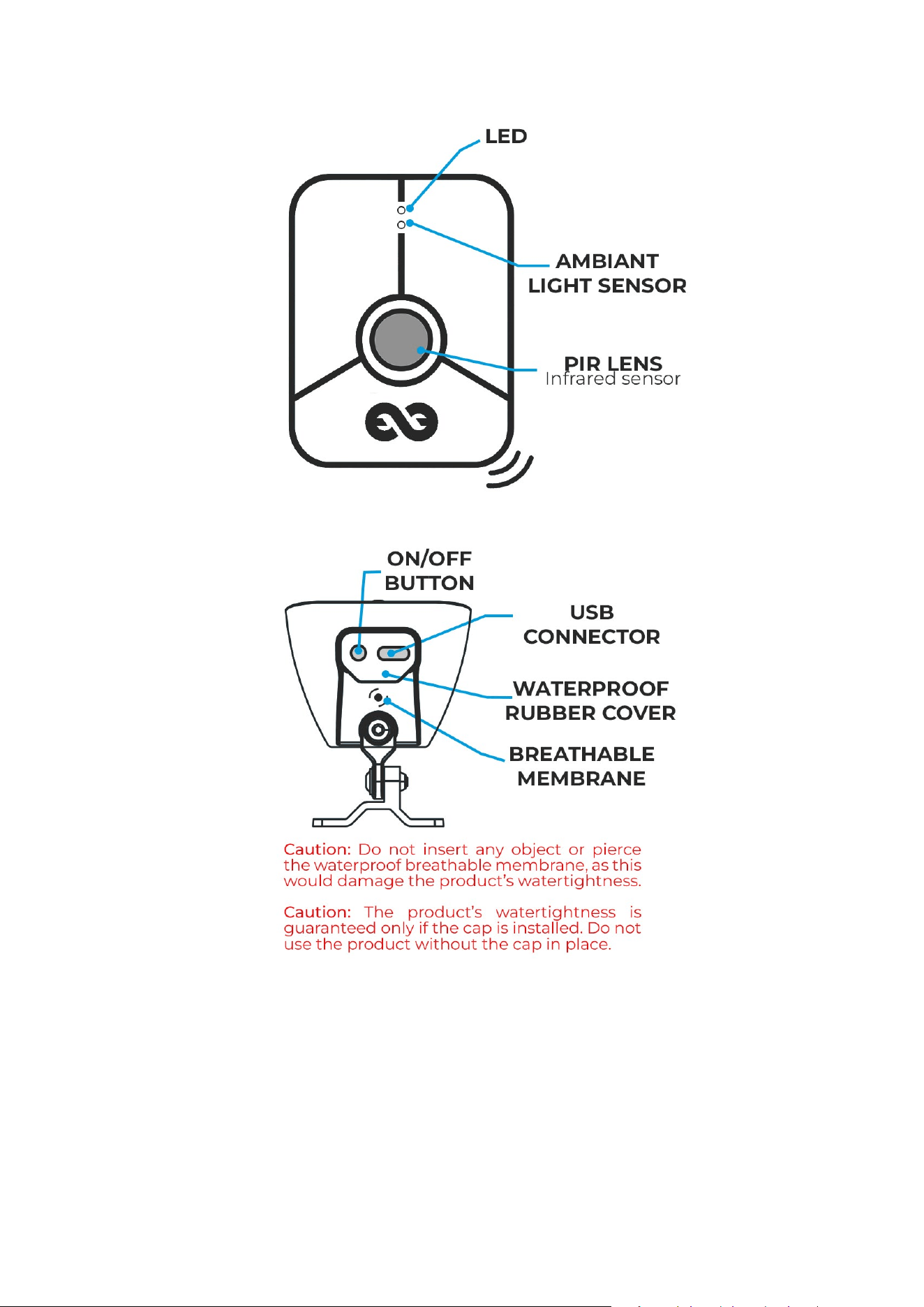
Overview
Front view:
Bottom view:
Connection
Requirements:
You must have connected your Tikee camera to the Tikee Remote app. To do so, please refer
to your camera’s Quick Start Guide.
1.
You must have charged the Tikee sentinel using a USB-C charger delivering at least 1A. A full
charge can take up to 5 hours.
2.
You must have a compatible Tikee: Tikee 4, Tikee mini, Tikee mini+, or later. The Tikee came-
ra must be charged, updated, nearby, and powered on.
3.
Minimum firmware version: V8.0.0
Overview - Connection
5
Pairing:
Open the Tikee Remote app and log into your account.
1.
Start the scan.
2.
Select your Tikee camera to connect.
3.
Click on sentinel
4.
Create a new link.
5.
Turn on your Tikee sentinel by pressing the button, the LED should ash, wait until it stops
ashing.
6.
Press the button again on your Tikee sentinel to enter pairing mode, the LED should ash
blue.
7.
Press select device.
8.
Select your Tikee sentinel from the list of detected devices and follow the pairing steps.
9.
Your Tikee sentinel is paired with your Tikee camera once the success message appears.
10.
Camera reaction to a detection:
Connect to the Tikee camera you want to congure via the Tikee Remote app.
1.
Click on sentinel
2.
Click on Mode; you will be offered 3 options:
• Always react to Tikee sentinel events
• React only outside capture hours
• Mute (never react to Tikee sentinel events)
3.
Select your preferred mode, then save.
4.
The Motion tab allows you to choose the type of media your Tikee camera will capture when a
Tikee sentinel event is received.
5.
Choose between Photo, Video (only with Tikee mini and Tikee mini+) or Burst, depending on
your use case, then save.
6.
Installation
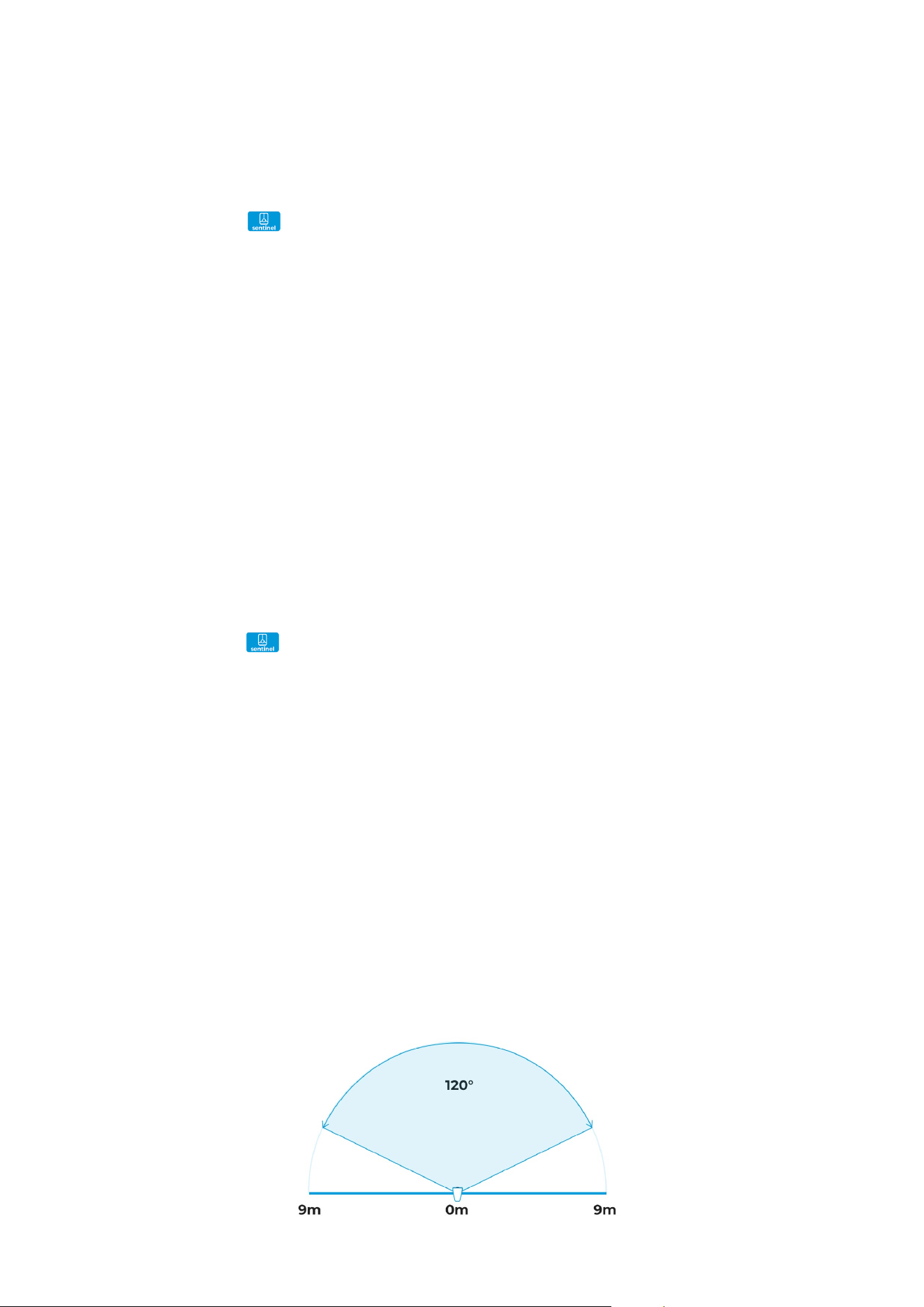
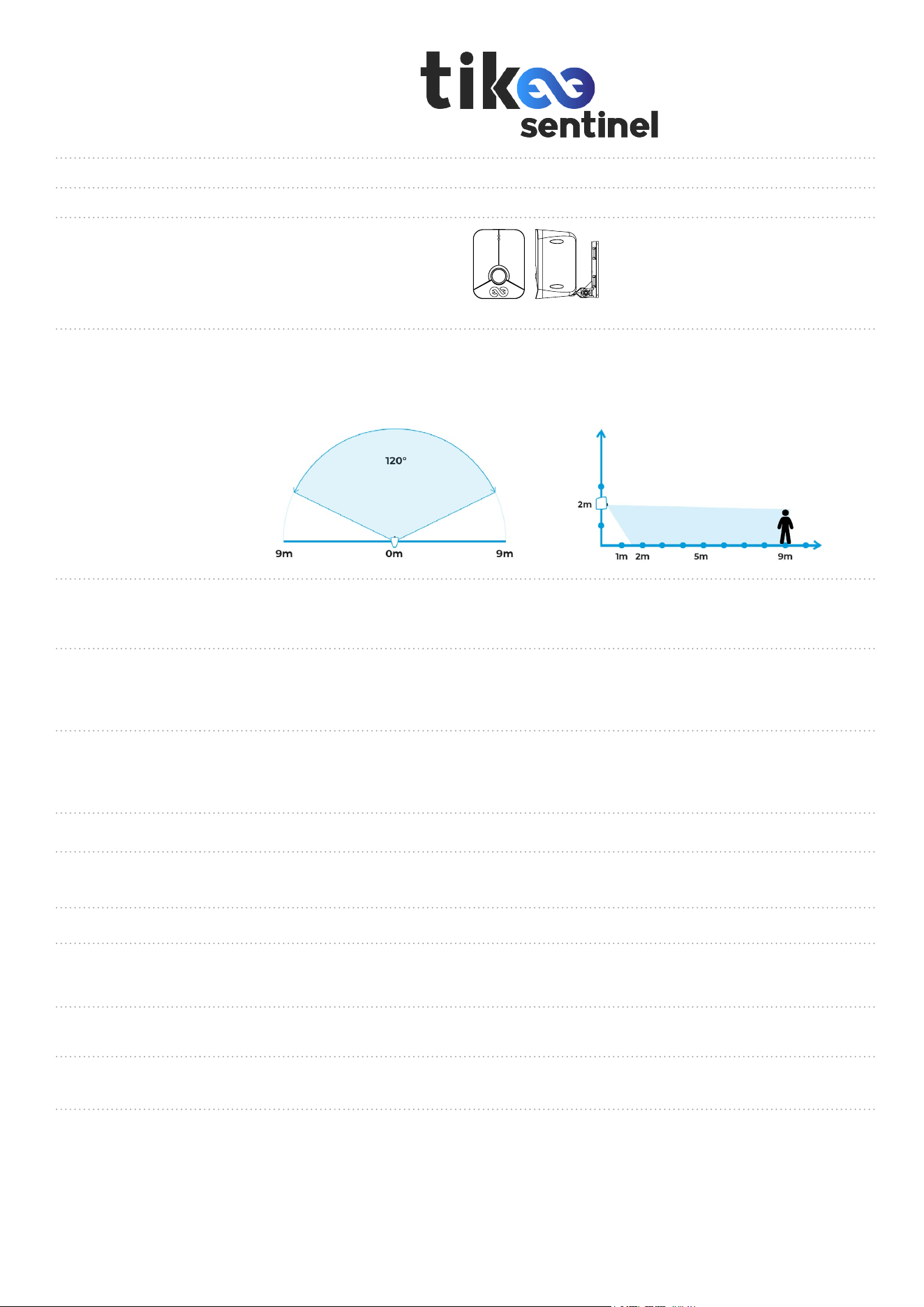
Detection elds:
TOP VIEW:
Overview - Connection Connection - Installation
6
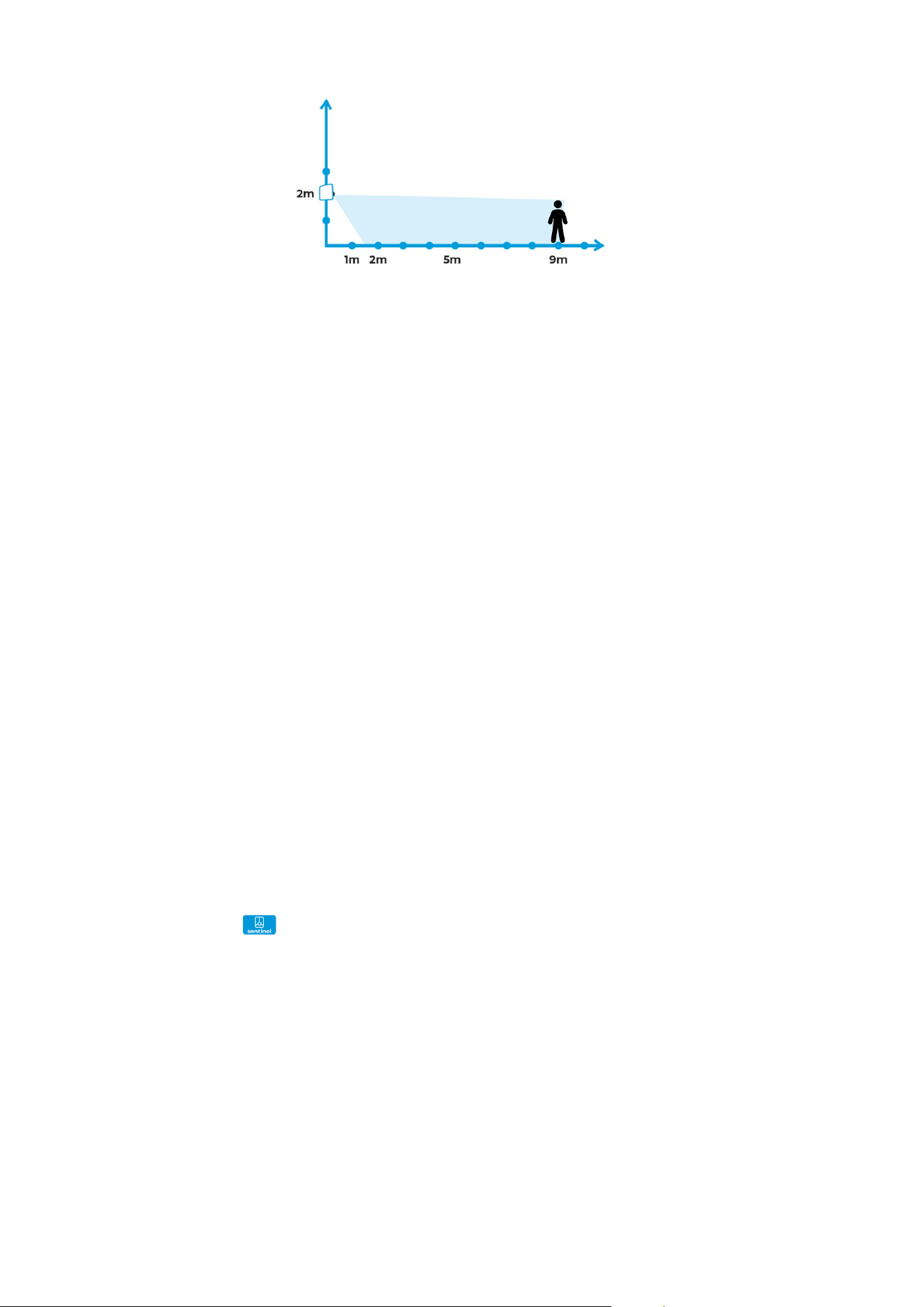
SIDE VIEW:
Connection range:
Actual detection range may depend on environment in front of the Tikee sentinel.
Your Tikee sentinel has a connection range with your Tikee camera of up to 30 meters, depen-
ding on the environment between the two.
Going further
Perform a connection test:
Open the Tikee Remote app and log into your account.
1.
Start the scan.
2.
Turn on your Tikee sentinel by pressing the button, the LED should ash, wait until it stops
ashing.
3.
Press the button again on your Tikee Sentinel to enter pairing mode, the LED should ash
blue.
4.
Select your Tikee sentinel from the detected devices list.
5.
Next to the serial number of cameras already paired with your Tikee sentinel, the Test Connec-
tion button allows you to test the link between your Tikee sentinel and your Tikee camera.
6.
Adjust sensitivity:
Click on sentinel in the app.
1.
On your powered on Tikee sentinel, press the button again on your Tikee sentinel to enter
pairing mode, the LED should ash blue.
2.
Select your Tikee sentinel from the detected devices list.
4.
You will access the conguration page of your Tikee sentinel, where you can adjust the sen-
sitivity of the PIR sensor and the light sensor.
5.
Installation - Going further
7
Products briefs
Version
Compatibility
Tikee 4, Tikee mini, Tikee mini+ and later models
Weight
150g
Dimensions
85 x 65 x 51 mm
Sensor
Passive Infrared sensor
9m detection range
120° horizontal eld of view
42° vertical eld of view
Sensitivity
settings
Adjustable PIR sensor sensitivity to minimize false alarms and ensure reliable
motion detection
Responsiveness
Delay between event and information sent to the Tikee camera: < 1s
Capture delay by the Tikee camera: approx. 5s, depending on standby mode
Upload delay to the myTikee platform: approx. 30s, depending on network quality
Weatherproof
IP 66 : Designed for extended outdoor use (resistant to sand, snow, rain, etc.)
Operating temperature : -10 / + 60 °C
Storage temperature : -10 / + 60 °C
Battery
Integrated Li-ion battery – 3000 mAh
Battery life
Up to 2 years (based on 30 triggers per day; actual performance may vary
depending on external conditions)
Charge
USB-C 5V / 1A max
Installation
assistant
Pairing between Tikee camera and Tikee sentinel can be achieved via
Tikee remote app
Connectivity
Bluetooth Low Energy
Tikee and Tikee sentinel maximum distance: 30m (environment may affect range)
Setup and
control
IOS and Android compatible mobile application
Minimum smartphone compatibility: Bluetooth 4.2 / Android 8 / IOS 15
Mounting
system
Integrated mounting arm
(mounting via screws (included) or clamps (not included),
compatible with Tikee mounting kit)
A A
B B
C C
D D
E E
F F
8
8
7
7
6
6
5
5
4
4
3
3
2
2
1
1
AUTEUR
VERIF.
APPR.
FAB.
QUAL.
SAUF INDICATION CONTRAIRE:
LES COTES SONT EN MILLIMETRES
ETAT DE SURFACE:
TOLERANCES:
LINEAIRES:
ANGULAIRES:
FINITION:
CASSER LES
ANGLES VIFS
NOM
SIGNATURE
DATE
MATERIAU:
NE PAS CHANGER L'ECHELLE
REVISION
TITRE:
No. DE PLAN
ECHELLE:1:2
FEUILLE 1 SUR 1
A3
MASSE:
ENL 06 A1 Trigger_a - 2025_04_02 v6 (1)
A A
B B
C C
D D
E E
F F
8
8
7
7
6
6
5
5
4
4
3
3
2
2
1
1
AUTEUR
VERIF.
APPR.
FAB.
QUAL.
SAUF INDICATION CONTRAIRE:
LES COTES SONT EN MILLIMETRES
ETAT DE SURFACE:
TOLERANCES:
LINEAIRES:
ANGULAIRES:
FINITION:
CASSER LES
ANGLES VIFS
NOM
SIGNATURE
DATE
MATERIAU:
NE PAS CHANGER L'ECHELLE
REVISION
TITRE:
No. DE PLAN
ECHELLE:1:2
FEUILLE 1 SUR 1
A3
MASSE:
ENL 06 A1 Trigger_a - 2025_04_02 v6 (1)

8
Maintenance and cautions
Follow the instructions below to get the best performance from your Tikee sentinel
The Tikee sentinel is guaranteed IP66. If the cover protecting the USB-C slot is open, the water-
proofness of the Tikee sentinel is not guaranteed
About the waterproong of Tikee sentinel:
• Do not immerse.
• Check and guarantee the closing of the cover.
• Inspect Tikee sentinel from the outside.
• Do not expose / use a damaged Tikee sentinel.
Electrical characteristics:
Supply voltage at the micro-USB connector should be between +4.5 Vdc up to +5.5 Vdc (+5 Vdc
typical).
Use AC/DC/ power supply tpe LPS, Limited Power Source (according to IEC EN 60950-1 Ed2) or
type ES1, PS2 (according to IEC EN 62368-1).
Consumption max under 5Vdc : 1000 mA
Built-in-Lithium battery : Typical voltage : 3.6V / Typical coveracity 3 Ah
Temperature range :
• Operating temperature: -10° C / + 60° C
• Storage temperature: -10°C/+60°C
• Charge temperature : 0°C / +45°C
Before closing the cover, make sure that no debris is on the seal. If necessary, clean it with a
cloth.
Before opening the cover, make sure that the Tikee sentinel is free of water and debris
If the Tikee sentinel sentinel is dirty, you can clean it with a damp soft cloth.
To clean the lenses, wipe it with a soft cloth.
Don’t insert any foreign object around the lens.
Special precautions:
• Do not store Tikee sentinel with a discharged battery (level below 50%).
• Do not insert objects (or metal) into the USB-C connector.
For questions relating to your Tikee sentinel or mobile & cloud platform, you can read our FAQ :
https://help.enlaps.io/en/
You can also contact us on https://enlaps.io/contact
In the event of an identied failure, a return of the product to our premises will be necessary for a
diagnosis.
Enlaps support:
Maintenance and cautions Informations about frequency bands - Battery information

9
Informations about frequency bands
Radio-Frequency technologies embedded in Tikee sentinel device:
ENLAPS Tikee sentinel
FCC ID : 2ASLI-SENTIN01
IC : 24785-SENTIN01
Caution: The user that changes or modifications not expressly approved by the party
responsible for compliance could void the user's authority to operate the equipment.
NOTE: This equipment has been tested and found to comply with the limits for a Class B
digi-tal device, pursuant to part 15 of the FCC Rules. These limits are designed to provide
reasonable protection against harmful interference in a residential installation. This
equipment generates, uses and can radiate radio frequency energy and, if not installed and
used in accordance with the instruction, may cause harmful interference to radio
communications. However, there is no guarantee that interference will not occur in a particular
installation. If this equipment does cause harmful interference to radio or television reception
which can be determined by turning the equipment off and on, the user is encouraged to try
to correct interference by one or more of the following measures:
• Reorient or relocate the receiving antenna.
• Increase the separation between the equipment and receiver.
• Connect the equipment into an outlet on circuit different from that to which the receiver
is connected.
• Consult the dealer or an experienced radio/TV technician for help.
RF technology Frequency bands
Max power
Bluetooth 2.4Ghz
7.95 dB (EIRP)
This device complies with FCC RF radiation exposure limits set forth for general population. This
device must be installed to provide a separation distance of at least 20cm from all persons and
must not be co-located or operating in conjunction with any other antenna or transmitter.
Under Industry Canada regulations, this radio transmitter may only operate using an antenna of a
type and maximum (or lesser) gain approved for the transmitter by Industry Canada. To reduce
potential radio interference to other users, the antenna type and its gain should be so chosen
that the equivalent isotropically radiated power (e.i.r.p.) is not more than that necessary for
successful communication.
This device
complies with Industry Canada licence-exempt RSS standard(s). Operation is subject
to the following two conditions: (1) this device may not cause interference, and (2) this device must
accept any interference, including interference that may cause undesired operation of the device.
This device complies with ISED radiation exposure limits set forth for general population. This de-
vice must be installed to provide a separation distance of at least 20cm from all persons and must
not be co-located or operating in conjunction with any other antenna or transmitter.
Battery information
Integrated lithium-ion battery:
Typical voltage: 3.6 V / Typical capacity: 3 Ah / 10.8Wh.
Temperature ranges :
Operating and charging temperature: -10°C / +60°C
Storage temperature: -10°C / +60°C
Informations about frequency bands - Battery information

10
Treatment of electrical and electronic equipment at end of life:
This symbol indicates that this product should not be disposed of with unsorted
household waste.
A system of elimination and treatment specic to electrical and electronic equipment used, whose
use is mandatory, has been implemented including a free right of recovery of used equipment on
the occasion of the purchase of equipment new and separate collection by an accredited body.
For more information, you can contact your local Council. A correct disposal of electronic and
electrical equipment used ensures treatment and an appropriate value to avoid damage to the
environment and human health and conserve natural resources.
Trademarks
EnlapsTM and TikeeTM are registered trademarks or trademarks of Enlaps SAS in France and at
the international level.
Other names and brands are the property of their respective owners.
Battery information - Trademarks
Storage and handling of the battery:
The product contains delicate parts, including the battery. Do not expose your product at tem-
peratures outside the intended range of use. Too low or too high temperatures could temporarily
reduce the battery life or adversely affect the correct functioning of the product.
Do not dry the product with the help of an external source of heat such as a microwave oven or
hairdryer.
Do not store Tikee sentinel with a discharged battery (level below 50%).
Make no unauthorised changes on the product. You might compromise your security and the
performance of the product, breaking the regulations in force and void the warranty.
Warning: Never let fall, disassemble, open, crush, bend, deform, pierce, lacerate, expose to the
microwave, incinerate or paint the product. Do not use the product or battery if these have
been damaged, for example if they are cracked, breakthroughs, or if they took the water. Disas-
sembly or drilling of the battery can cause an explosion or re.