QUICK START GUIDE
GUIDE DE DÉMARRAGE RAPIDE
910X
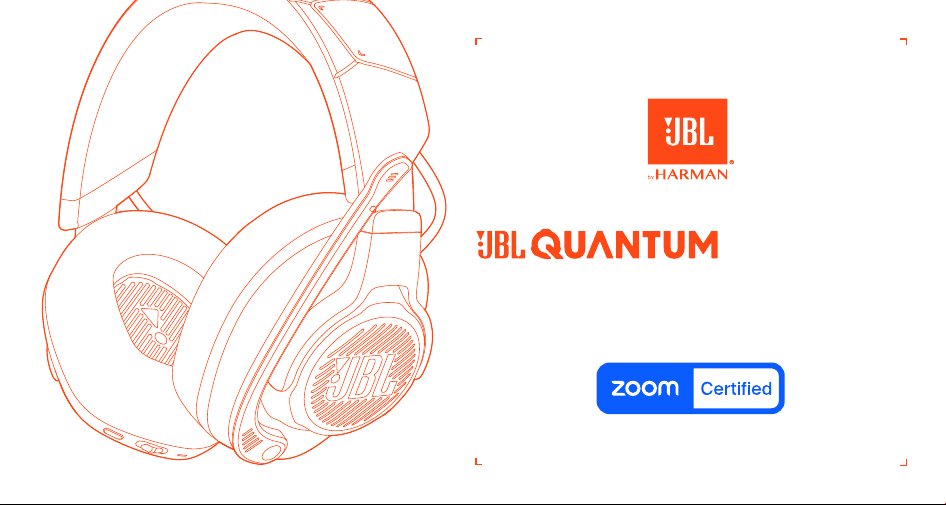
WIRELESS FOR XBOX
SANS FIL POUR XBOX
Software requirements | Exigences en matière de logiciel
Platform: Windows 10 (64 bit only) / Windows 11
500MB of free hard drive space for installation
*Always use the latest version of Windows 10 (64 bit) or Windows 11 for the most optimal experience on JBL QuantumENGINE
Plateforme: Windows10 (64bit seulement) / Windows11
500MB d’espace de stockage sur disque dur pour l’installation
*Toujours utiliser la version la plus récente de Windows10 (64bit) ou Windows11 pour une expérience optimale pour JBL QuantumENGINE
JBL QuantumSPHERE 360
available on Windows only. Software installation required.
JBL QuantumSPHERE360
seulement disponible sur Windows. Installation logiciel requise.
JBL QuantumSPATIAL 360
Available on XBOX SERIES (X/S), XBOX ONE, Playstation™ (PS4/PS5) and Nintendo Switch
JBL QuantumSPATIAL360
Disponible sur XBOX SERIES (X/S), XBOX ONE, Playstation™ (PS4/PS5) et Nintendo Switch
Download JBL QuantumENGINE to gain full access to features on your JBL Quantum headsets - from headset calibration to adjusting 3D audio to suit your
hearing, from creating customized RGB lighting effects to determining how the boom microphone side-tone works. JBLquantum.com/engine
Téléchargez JBL QuantumENGINE pour accéder à toutes les fonctionnalités de vos casques JBL Quantum - de la calibration du casque au réglage de l’audio
3D en fonction de votre ouïe, de la création d’effets d’éclairage RGB personnalisés à la configuration du fonctionnement de la tonalité latérale du
microphone sur tige. JBLquantum.com/engine
JBL QuantumENGINE
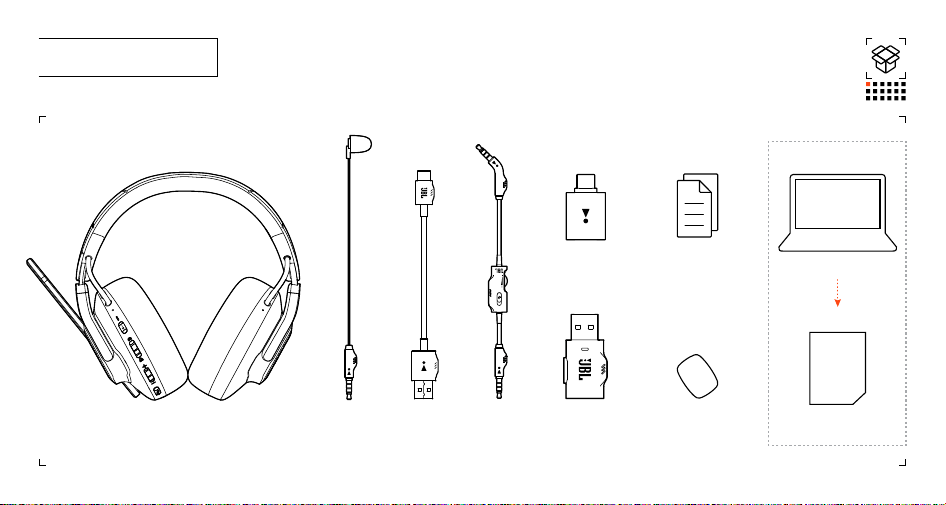
001 WHAT'S IN THE BOX
JBL Quantum910X Wireless For Xbox
USB charging
cable
Windshield foam for
boom microphone
USB WIRELESS
DONGLE
USB-A to USB-C
converter
www.jbl.com
OWNER’S
MANUAL
3.5 MM AUDIO
CABLE
Calibration
Microphone
QSG | WARRANTY CARD |
Safety Sheet
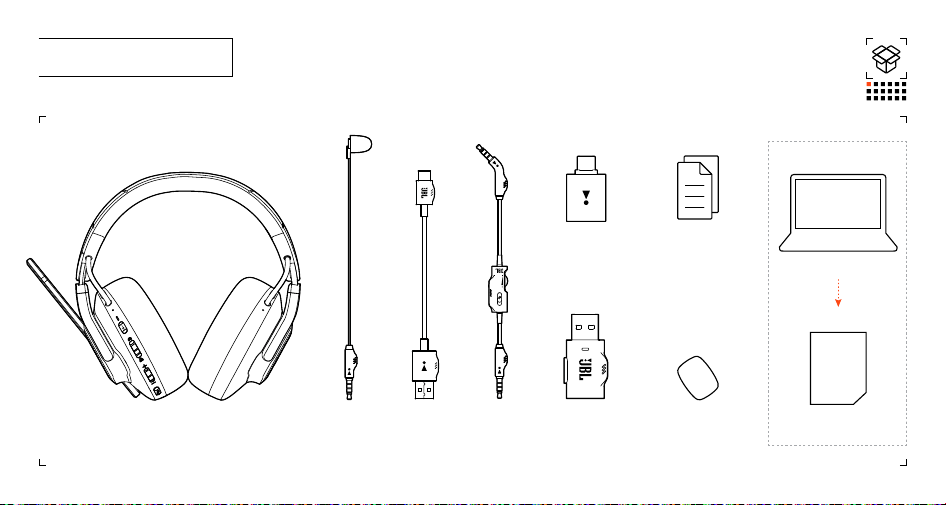
001 CONTENU DE LA BOÎTE
www.jbl.com
GUIDE DE
L’UTILISATEUR
JBL Quantum910X sans fil pour Xbox
Câble de
recharge USB
Mousse de protection
pour microphone sur tige
CLÉ ÉLECTRONIQUE
SANS FIL USB
Convertisseur
USB-A à USB-C
CÂBLE AUDIO
DE 3,5MM
Calibration du
microphone
GUIDE DE DÉMARRAGE RAPIDE |
FICHE DE GARANTIE |
Fiche de sécurité
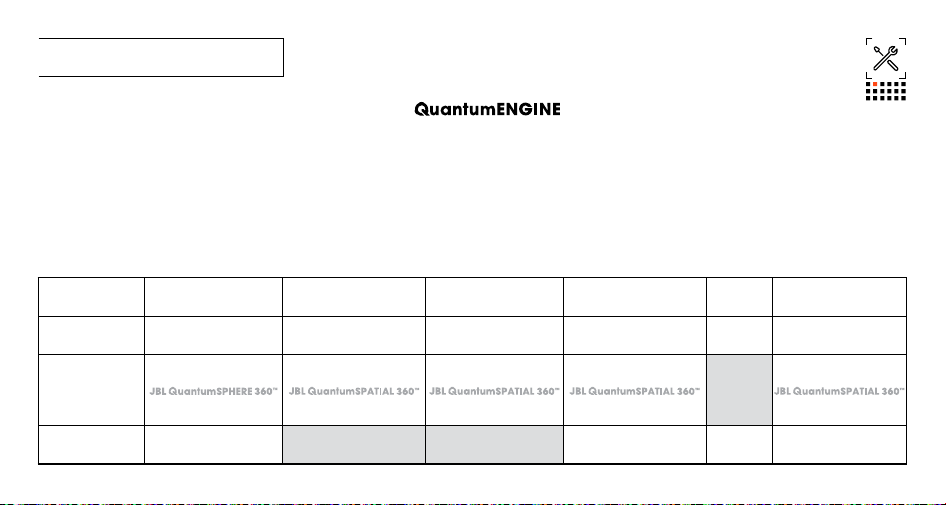
002 Requirements | Exigences
System compatibility | Compatibilité des systèmes
PC | Xbox™ | PlayStation™ | Nintendo Switch™ | Mobile | MAC
Platform: Windows 10 (64 bit only) / Windows 11
500MB OF FREE HARD DRIVE SPACE FOR INSTALLATION
Plateforme: Windows10 (64bit seulement) / Windows11
500MB D’ESPACE DE STOCKAGE SUR DISQUE DUR POUR L’INSTALLATION
SOFTWARE REQUIREMENTS | EXIGENCES EN MATIÈRE DE LOGICIEL
JBL
Connectivity
Connectivité
PC PS4/PS5
PS4 | PS5
XBOX™ Nintendo Switch™ Mobile MAC
3.5 mm Audio Cable
Câble audio de 3,5mm
Stereo
Stéréo
Stereo
Stéréo
Stereo
Stéréo
Stereo
Stéréo
Stereo
Stéréo
Stereo
Stéréo
2.4GHz Wireless
2,4GHz Sans l
Not
Compatible
Non
compatible
Bluetooth
Stereo
Stéréo
Not Compatible
Non compatible
Not Compatible
Non compatible
Stereo
Stéréo
Stereo
Stéréo
Stereo
Stéréo
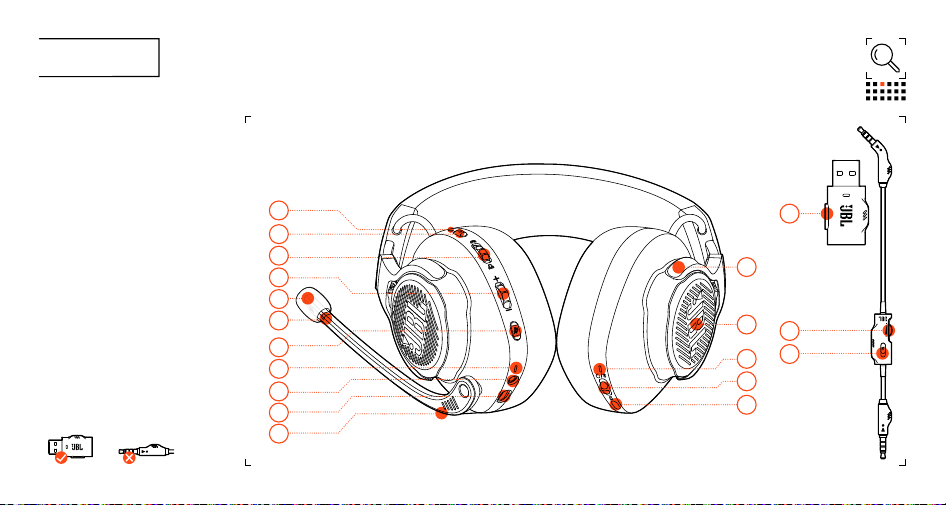
003 OVERVIEW
01 ANC / TALKTHRU LED
02 ANC / TALKTHRU button
03 Game audio-chat balance dial
04 Volume Control
05 Detachable Windshield foam
06* Notification LED for mic mute / unmute
07* Microphone Mute / unMute
08 CHARGING LED
09 3.5 mm Audio Jack
10 USB-C port
11 Voice Focus Boom Microphone
12 SPATIAL SOUND / head tracking control
13 Power on / off and Bluetooth pairing slider
14 POWER / 2.4GHz / Bluetooth LED
15* RGB Lighting Zones
16 Flat-fold ear cup
17 2.4GHz PAIRING BUTTON
18 Volume Control
19 MIC MUTE BUTTON
03
04
06
13
14
12
16
15
01
07
02
09
05
10
17
18
08
11
19
*
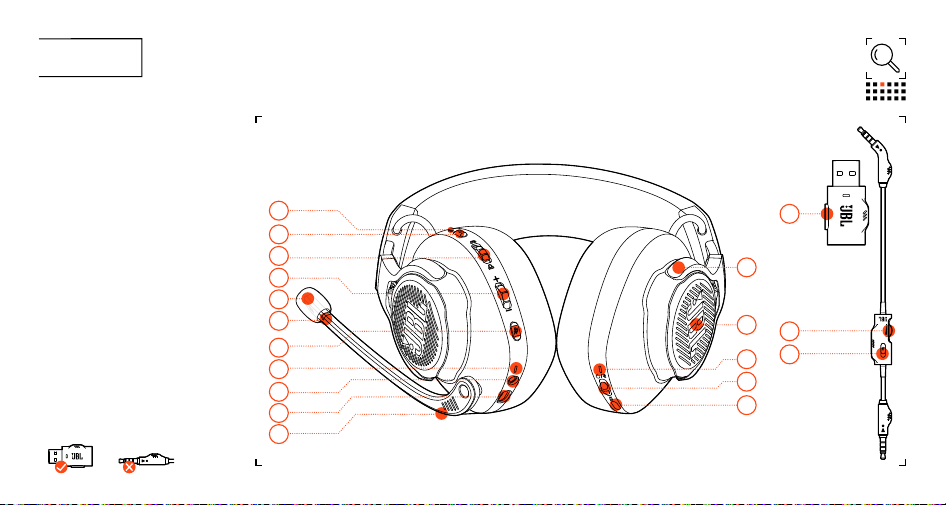
003 SURVOL
03
04
06
13
14
12
16
15
01
07
02
09
05
10
17
18
08
11
19
01 LED ANC / TALKTHRU
02 Bouton ANC / TALKTHRU
03 Égaliseur audio jeu-discussion
04 Réglage du volume
05 Mousse de protection détachable
06* LED de notification d’activation /
désactivation du micro
07* Activation / désactivation du microphone
08 LED DE RECHARGE
09 Prise audio de 3,5mm
10 Port USB-C
11 Microphone sur tige à focalisation vocale
12 SON SPATIAL / Contrôle du suivi de la tête
13 Mise en marche / arrêt et interrupteur de
jumelage Bluetooth
14 ALIMENTATION / 2,4GHz / LED Bluetooth
15* Zones d’éclairage RGB
16 Oreillette à pliage plat
17 BOUTON DE JUMELAGE 2,4GHz
18 Réglage du volume
19 BOUTON DE DÉSACTIVATION DU MICRO
*
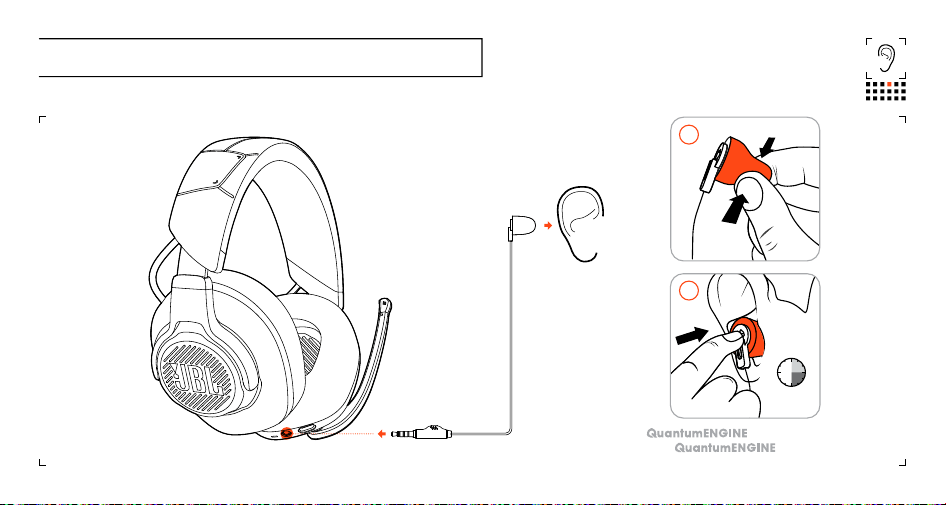
004 Calibration microphone | Calibration du microphone
15-30 sec
15-30 s
02
01
Go to JBL for detailed setup instructions.
Se rendre à JBL pour des instructions
détaillées de configuration.
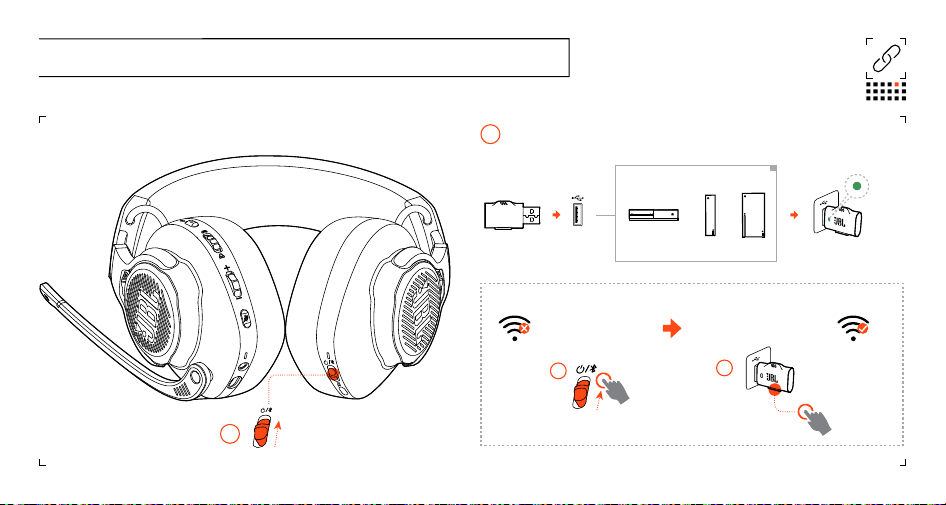
Manual pairing | Jumelage manuel
02
>5S | >5S
01
005 POWER ON & CONNECT (XBOX) | MISE EN MARCHE ET CONNEXION (XBOX)
power on | mise en marche
power on | mise en marche
01
2.4GHz Wireless | 2,4GHz Sans fil
02
XBOX™
USB
TYPE-A
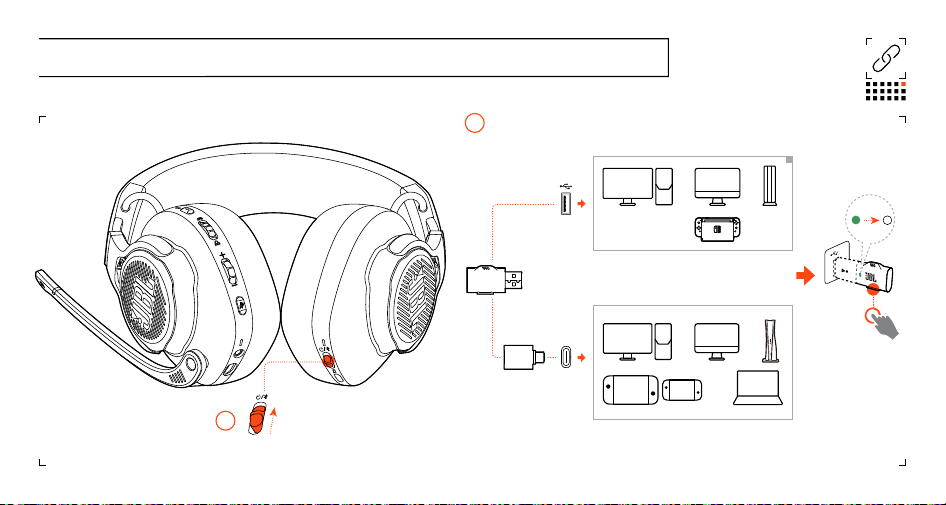
* Only required for devices (e.g., Windows PC) without auto switch (green to white automatically)
* Uniquement nécessaire pour les appareils (par exemple, PC Windows) sans interrupteur automatique
(du vert au blanc automatiquement).
*
X1
006 POWER ON & CONNECT (PC, mac ETC.) | MISE EN MARCHE ET CONNEXION (PC, mac ETC.)
power on | mise en marche
01
2.4GHz Wireless | 2,4GHz Sans fil02
PC | mac | PLAYSTATION™ | Nintendo Switch™
USB
TYPE-C
PC | MAC | PORTABLE | PS5 | Nintendo Switch™
PC | MAC | LAPTOP | PS5 | Nintendo Switch™
USB
TYPE-A
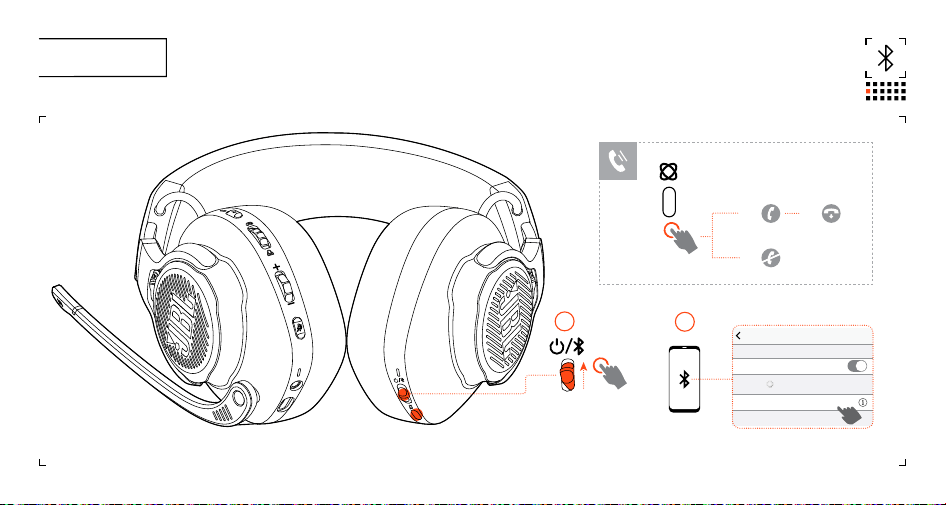
Settings Bluetooth
Bluetooth
DEVICES
JBL Quantum 910X
Now Discoverable
Connected
ON
01
02
>2S
007 Bluetooth
×1 ×1
×2
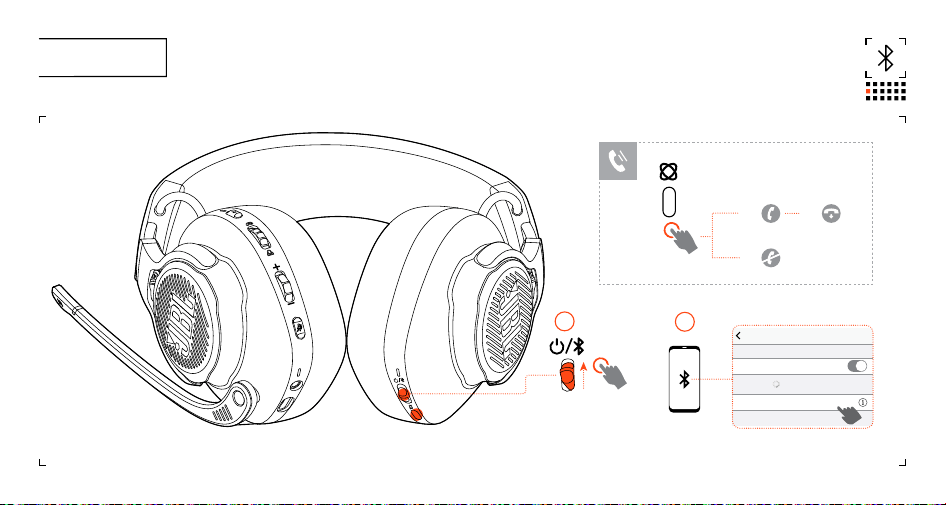
Réglages Bluetooth
Bluetooth
APPAREILS
JBL Quantum 910X
Maintenant détectables
Connectés
MARCHE
01
02
>2S
007 Bluetooth
×1 ×1
×2
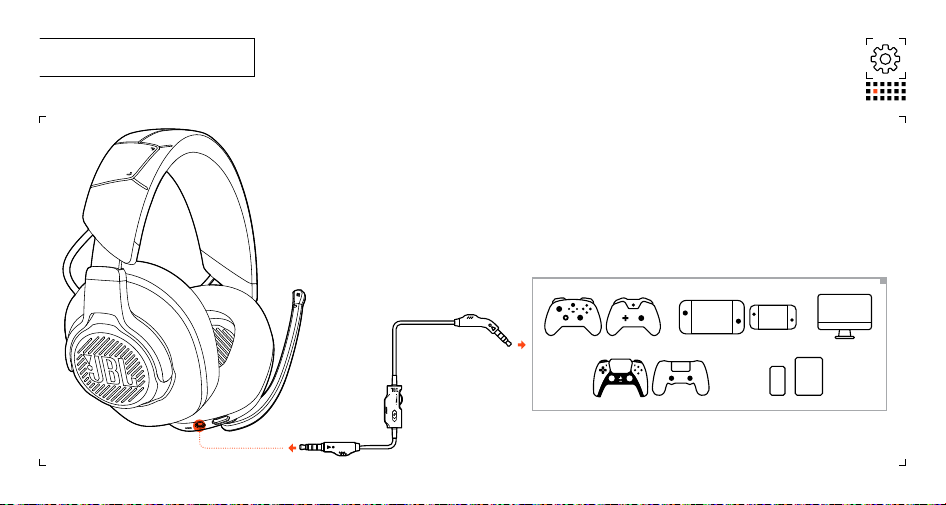
008 SETUP | CONFIGURATION
Xbox™ | PlayStation™ | Nintendo Switch™ | Mobile | MAC
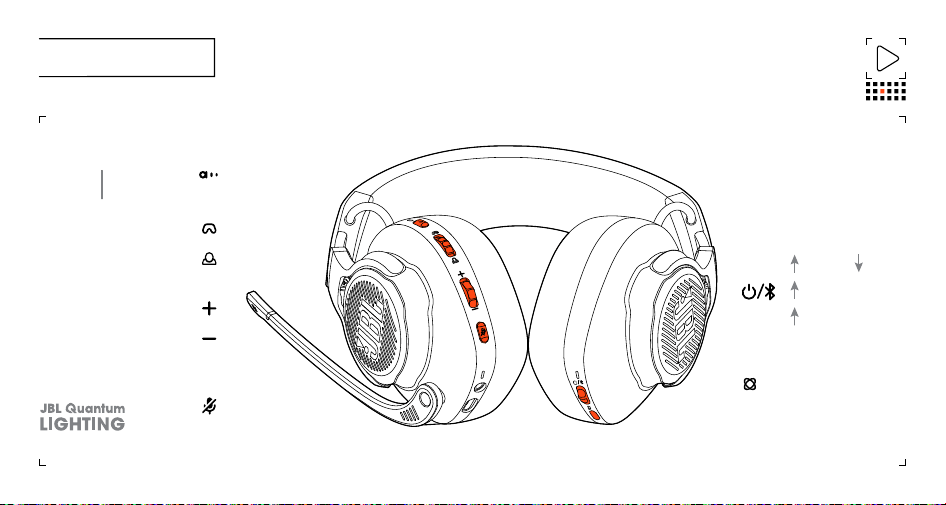
009 BUTTON COMMAND
INCREASE CHAT VOLUME
INCREASE GAME VOLUME
INCREASE MASTER VOLUME
DECREASE MASTER VOLUME
ON / OFF
X1
>5
S
Microphone Mute / unMute
ANC on/off
X1
TALKTHRU ON/OFF
>2S
>2S
X
1
Off (default) | spatial
sound | spatial sound +
head tracking
Re-centering for head
tracking
>2S
BT PAIRING MODE
X1 BT reconnecting
ON OFF
X1
X1
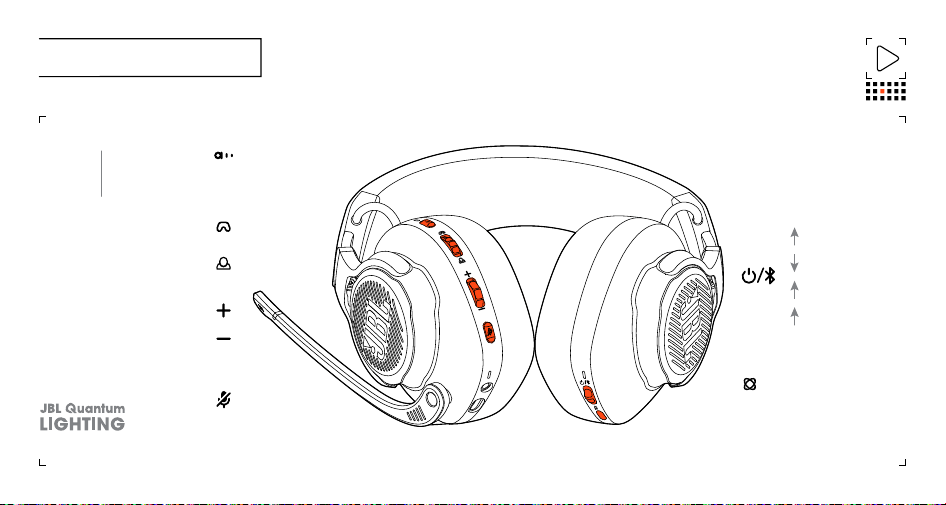
009 BOUTONS DE COMMANDES
AUGMENTER LE VOLUME
DE LA CONVERSATION
AUGMENTER LE VOLUME DU JEU
AUGMENTER LE VOLUME PRINCIPAL
DIMINUER LE VOLUME PRINCIPAL
ACTIVÉE /
DÉSACTIVÉE
X1
>5
S
Activation / désactivation
du microphone
>2 S
X
1
Désactivé (défaut) | son
spatial | son spatial +
suivi de la tête
Recentrage pour le suivi
de la tête
>2 S MODE JUMELAGE BT
X1 BT en reconnexion
ACTIVÉE
DÉSACTIVÉE
X1
X1
ANC activé/
désactivée
X1
TALKTHRU ACTIVÉ/
DÉSACTIVÉ
>2 S
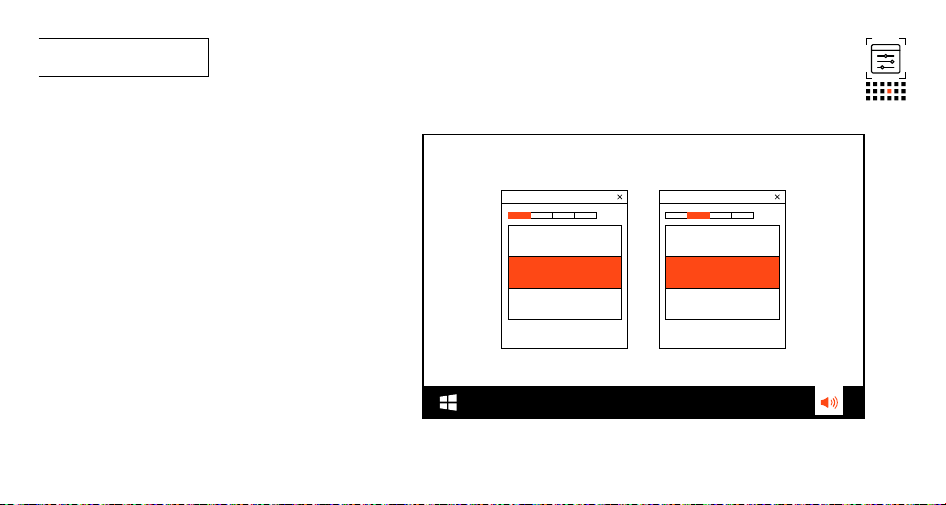
010 First time setup
10a Connect the headset to your PC via 2.4GHz USB wireless
connection.
10b Go to “Sound Settings” -> “Sound Control Panel”.
10c* Under “Playback” highlight “JBL Quantum 910X Wireless For
Xbox Game” and select “Set Default” -> “Default Device”.
10d Highlight “JBL Quantum 910X Wireless For Xbox Chat” and
select “Set Default” -> “Default Communication Device”.
10e Under “Recording” highlight “JBL Quantum 910X Wireless For
Xbox Chat” and select “Set Default” -> “Default Device”.
10f In your chat application select “JBL Quantum 910X Wireless
For Xbox Chat” as the default audio device.
10G Follow the onscreen instructions to personalize your
sound settings.
* If you have not installed JBL QuantumEngine, ensure to
complete this step before enabling JBL QuantumSPATIAL 360.
JBL Quantum 910X Wireless
For Xbox Game
JBL Quantum 910X Wireless
For Xbox
Chat
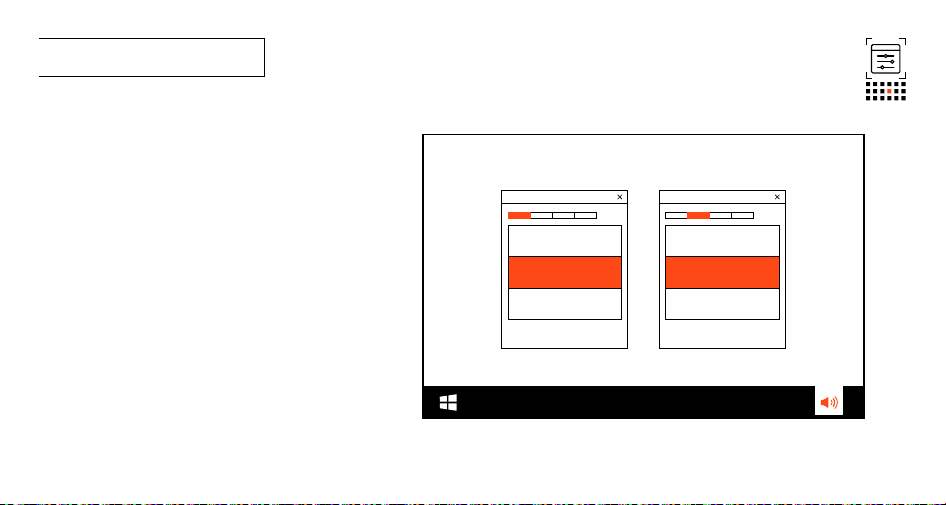
010 Première configuration
10a Connectez le casque à votre PC par une connexion USB 2,4GHz sans fil.
10b Allez dans «Réglages de son» -> «Panneau de configuration du son».
10c* Dans «Lecture», choisissez «JBL Quantum 910X Sans fil pour Xbox Jeu»
et choisissez «Définir valeurs par défaut» -> «Appareil par défaut».
10d Choisissez «JBL Quantum 910X Sans fil pour Xbox Conversation» et
choisissez «Définir valeurs par défaut» -> «Appareil de communication
par défaut».
10e Dans «Enregistrement», choisissez «JBL Quantum 910X Sans fil pour
Xbox Conversation» et choisissez «Définir valeurs par défaut» ->
«Appareil par défaut».
10f Dans votre application de discussion, réglez «JBL Quantum 910X Sans fil
pour Xbox Conversation» comme appareil audio par défaut.
10G Suivez les instructions à l’écran pour personnaliser les paramètres
sonores.
* Si vous n’avez pas installé JBL QuantumEngine, assurez-vous de compléter
cet étape avant d’activer JBL QuantumSPATIAL360.
JBL Quantum 910X Sans
fil pour Xbox Jeu
JBL Quantum 910X Sans fil
pour Xbox Conversation
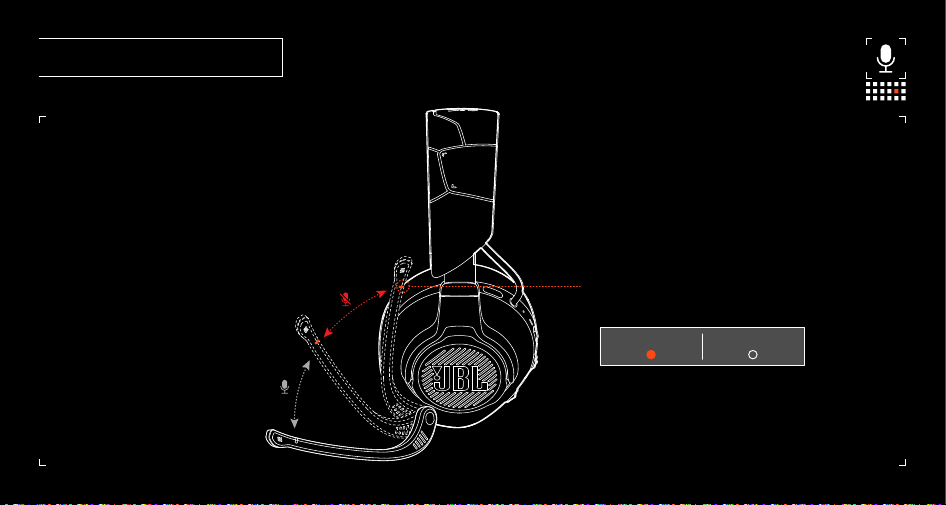
011 MICROPHONE | MICROPHONE
Notification LED for mic mute / unmute
LED de notification d’activation / désactivation du micro
mute | désactivé unmute | activé
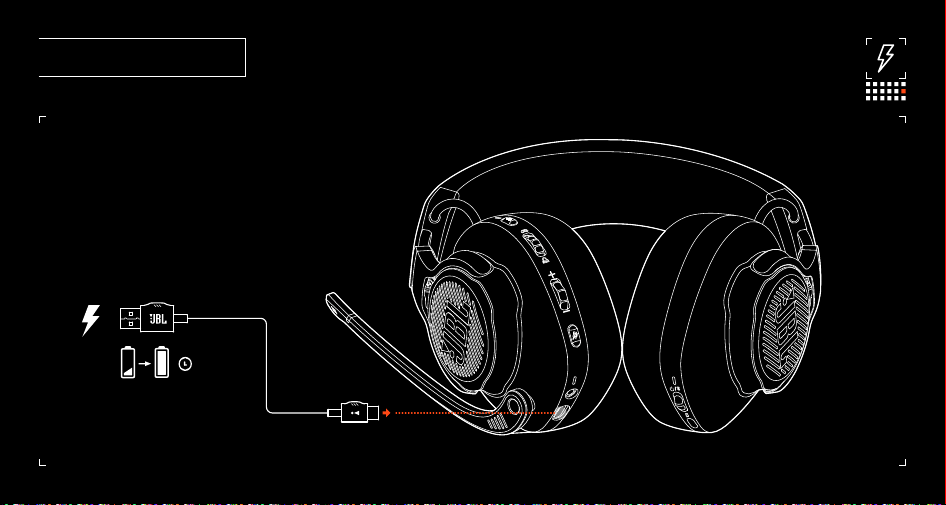
012 CHARGING | RECHARGE
3.5hr
3,5 hr
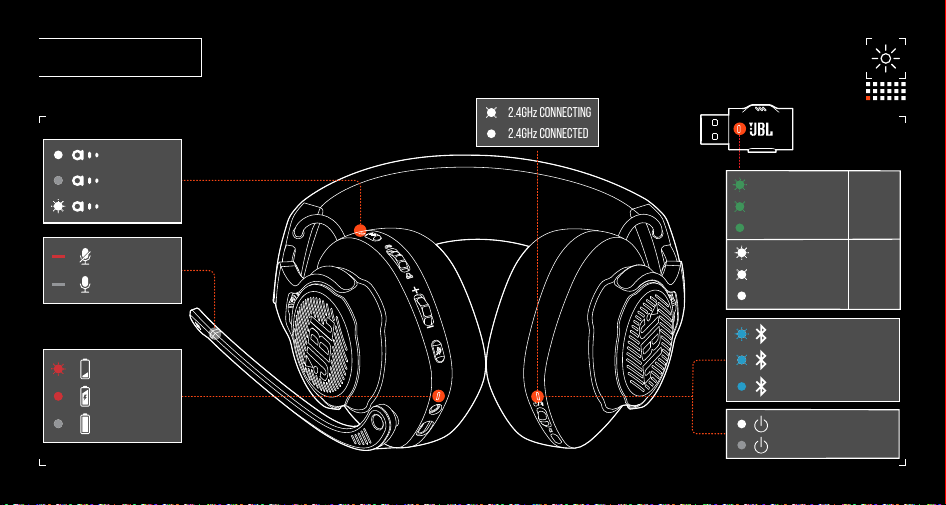
013 LED BEHAVIOURS
LOW BATTERY
CHARGING
FULLY CHARGED
BT CONNECTING
BT PAIRING
BT CONNECTED
MIC MUTE
MIC UNMUTE
POWER OFF
POWER ON
ANC ON
ANC OFF
TALKTHRU ON
2.4GHz CONNECTING
2.4GHz PAIRING
2.4GHz CONNECTED
2.4GHz CONNECTING
2.4GHz PAIRING
2.4GHz CONNECTED
Xbox
PC, Mac ...
2.4GHz CONNECTING
2.4GHz CONNECTED
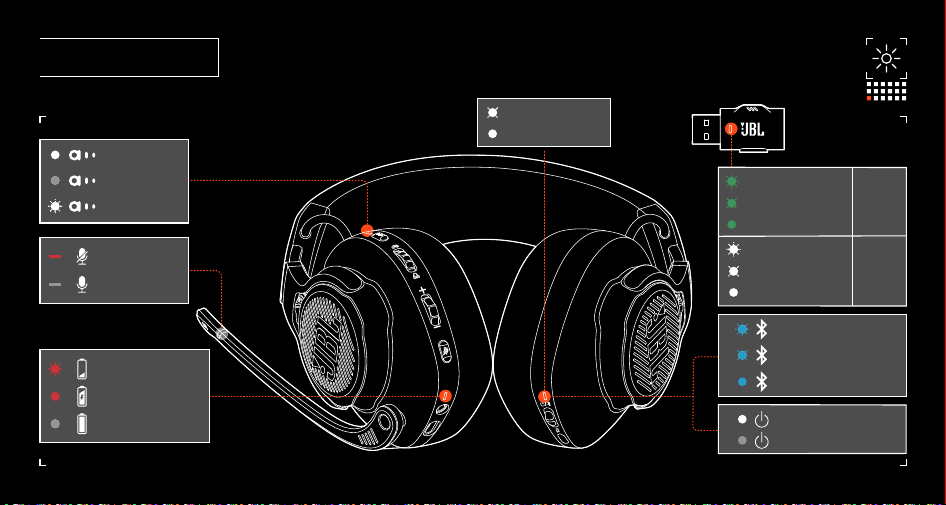
013 LÉGENDE DE LA LED
BATTERIE FAIBLE
EN RECHARGE
PLEINEMENT CHARGÉE
BT EN CONNEXION
BT EN JUMELAGE
BT CONNECTÉ
MICRO DÉSACTIVÉ
MICRO ACTIVÉ
ARRÊT
MISE EN MARCHE
ANC ACTIVÉE
ANC DÉSACTIVÉE
TALKTHRU ACTIVÉ
2,4GHz EN CONNEXION
2,4GHz EN JUMELAGE
2,4GHz CONNECTÉ
2,4GHz EN CONNEXION
2,4GHz EN JUMELAGE
2,4GHz CONNECTÉ
Xbox
PC, Mac ...
2,4GHz EN CONNEXION
2,4GHz CONNECTÉ

014 TECH SPEC
Model: JBL QUANTUM910X WIRELESS FOR XBOX
Driver size: 50 mm Dynamic drivers
Frequency response (Passive): 20 Hz - 40 kHz
Frequency response (Active): 20 Hz - 20 kHz
Microphone frequency response: 100 Hz - 8 kHz
Max input power: 30 mW
Sensitivity: 113 dB SPL @1 kHz / 1 mW
Maximum SPL: 93 dB
Microphone sensitivity: -38 dBV / Pa @1 kHz
Impedance: 32 ohm
2.4GHz Wireless transmitter power: <10 dBm (EIRP)
2.4GHz Wireless modulation: GFSK, π/4-DQPSK
2.4GHz Wireless carrier frequency: 2400 MHz - 2483.5 MHz
Bluetooth transmitted power: <13 dBm (EIRP)
Bluetooth transmitted modulation: GFSK, π/4-DQPSK
Bluetooth frequency: 2400 MHz - 2483.5 MHz
Bluetooth prole version: HFP: v1.8, A2DP: v1.3
Bluetooth version: BT Core: v5.2
Battery type: Li-ion battery (3.7 V / 1300 mAh)
Power supply: 5 V, 2 A
Charging time: 3.5 hrs
Music play time with BT+2.4GHz on and
ANC+RGB lighting o: Up to 34 hrs
Talk time with BT+2.4GHz on and ANC+RGB
lighting o: Up to 35 hrs
Music play time with only 2.4GHz on and
ANC+RGB lighting o: Up to 37 hrs
Talk time with only 2.4GHz on and ANC+RGB
lighting o: Up to 37 hrs
Music play time with only BT on and ANC+RGB
lighting o: Up to 42 hrs
Talk time with only BT on and ANC+RGB
lighting o: Up to 46 hrs
Microphone pickup pattern: Unidirectional
Weight: 420 g

014 SPÉCIFICATIONS TECHNIQUES
Modèle: JBL QUANTUM910X WIRELESS FOR XBOX
Taille du haut-parleur: Haut-parleur dynamique de 50mm
Réponse en fréquences (passive): 20Hz - 40kHz
Réponse en fréquences (active): 20Hz - 20kHz
Réponse en fréquences du microphone: 100Hz - 8kHz
Alimentation maximale: 30mW
Sensibilité: NPA 113dB à 1kHz / 1mW
NPA maximum: 93dB
Sensibilité du micro: -38dBV / Pa à 1kHz
Impédance: 32ohms
Puissance de l’émetteur 2,4GHz sans l: <10dBm (EIRP)
Modulation 2,4Ghz sans l: GFSK, π/4-DQPSK
Fréquence porteuse 2,4GHz sans l: 2400MHz - 2483,5MHz
Puissance transmise Bluetooth: <13dBm (EIRP)
Modulation transmise Bluetooth: GFSK, π/4-DQPSK
Fréquence Bluetooth: 2400MHz - 2483,5MHz
Version du prol Bluetooth: HFP: v1.8, A2DP: v1.3
Version Bluetooth: BT Core: v5.2
Type de batterie: Batterie lithium-ion (3,7 V / 1300mAh)
Alimentation: 5V, 2A
Temps de recharge: 3,5h
Temps d’écoute musicale avec BT+2,4GHz
activés et ANC+éclairage RGB désactivés: Jusqu’à 34h
Temps de conversation avec BT+2,4GHz activés
et ANC+éclairage RGB désactivés: JJusqu’à 35h
Temps d’écoute musicale avec 2,4GHz
seulement activé et ANC+éclairage RGB
désactivés: Jusqu’à 37h
Temps de conversation avec 2,4GHz seulement
activé et ANC+éclairage RGB désactivés: Jusqu’à 37h
Temps d’écoute musicale avec BT seulement
activé et ANC+éclairage RGB désactivés: Jusqu’à 42h
Temps de conversation avec BT seulement
activé et ANC+éclairage RGB désactivés: Jusqu’à 46h
Mode de captation du microphone: Unidirectionnel
Poids: 420g
ES
014 ESPECIFICACIONES TÉCNICAS
Modelo: JBL QUANTUM910X WIRELESS FOR XBOX
Tamaño de la unidad: Unidades dinámicas de 50mm
Respuesta en frecuencias (pasivo): 20Hz - 40kHz
Respuesta en frecuencias (activo): 20 Hz - 20 kHz
Respuesta del micrófono en frecuencias: 100 Hz - 8 kHz
Potencia máxima de entrada: 30 mW
Sensibilidad: 113dB SPL a 1kHz/1mW
SPL máximo: 93 dB
Sensibilidad del micrófono: -38dBV/Pa a 1kHz
Impedancia: 32ohm
Potencia del transmisor inalámbrico
de 2,4 GHz: <10dBm (EIRP)
Modulación inalámbrica de 2,4GHz: GFSK, π/4-DQPSK
001 CONTENIDO DE LA CAJA
JBL Quantum910X Wireless For Xbox;
Micrófono de calibración; Cable de carga
USB; CABLE DE AUDIO DE 3,5MM; ADAPTADOR
DE USB-A USB-C; ADAPTADOR INALÁMBRICO
USB; Filtro anti-viento para el micrófono
de varilla; QSG | TARJETA DE GARANTÍA |
Hoja de seguridad
002 Requisitos
REQUISITOS
DE SOFTWARE; Plataforma: Windows 10
(solo 64 bits) / Windows 11; 500MB DE
ESPACIO LIBRE EN EL DISCO DURO PARA LA
INSTALACIÓN; Compatibilidad del sistema;
PC | Xbox™ | PlayStation™ | Nintendo
Switch™ | Mobile | MAC
003 DESCRIPCIÓN GENERAL
01 LED ANC/TalkThru; 02 Botón ANC/
TalkThru; 03 Control de balance de audio
de juego-chat; 04 Control del volumen
05 Espuma paravientos desmontable;
06* LED de notificación de micrófono
silenciar/reactivar; 07* silenciar /
reactivar el micrófono; 08 LED DE CARGA;
09 Conector de audio de 3,5mm; 10 Puerto
USB-C; 11 Micrófono de varilla Voice
Focus; 12 SONIDO ESPACIAL/seguimiento
de la cabeza; 13 Encendido/Apagado y
control deslizante de emparejamiento
de Bluetooth; 14 ENCENDIDO/2,4GHz/LED
Bluetooth; 15* Zonas de iluminación RGB;
16 Auriculares plegables; 17 BOTÓN DE
EMPAREJAMIENTO 2,4GHz; 18 Control de
volumen; 19 BOTÓN PARA SILENCIAR MICRÓFONO
004 Micrófono de calibración
Ve a
para
las instrucciones de configuración
detalladas.
005 ENCENDER Y CONECTAR (XBOX)
1 Encendido; 2. Inalámbrica de 2,4GHz;
XBOX™; USB TIPO-A; Emparejamiento Manual
006 ENCENDER Y CONECTAR (PC, mac ETC.)
1 Encendido; 2. Inalámbrica de 2,4GHz;
PC | mac | PLAYSTATION™ | Nintendo
Switch™; USB TIPO-A; PC | MAC | LAPTOP |
PS5 | Nintendo Switch™; USB TIPO-C; * Solo
requerido para dispositivos (p. ej. Windows
PC) sin cambio automático (de verde a
blanco automáticamente)
007 Bluetooth
008 CONFIGURACIÓN
009 COMANDO DEL BOTÓN
ANC activada/desactivada; TALKTHRU
activada/desactivada; SUBIR EL VOLUMEN
DEL JUEGO; SUBIR EL VOLUMEN DEL CHAT; SUBIR
EL VOLUMEN MAESTRO; DISMINUIR VOLUMEN
MAESTRO; Silenciar/cancelar el silencio
del micrófono; ACTIVAR / DESACTIVAR;
RECONECTAR BT; MODO DE EMPAREJAMIENTO
BT; DESACTIVAR (por defecto) | Sonido
espacial | Sonido espacial + seguimiento
de la cabeza; Volver a centrar el
seguimiento de la cabeza
010 Configuración para el primer uso
10A Conecta el auricular al PC mediante
una conexión inalámbrica 2,4GHz USB.
10B Ve a “Sound Settings” (Ajustes
de sonido) -> “Sound Control Panel”
(Panel de control de sonido). 10C* En
“Playback” (Reproducción), resalta
“JBL Quantum 910X Wireless For Xbox
Game” y selecciona “Set Default”
(Establecer predeterminado) -> “Default
Device” (Dispositivo predeterminado).
10D Resalta “JBL Quantum 910X Wireless
For Xbox Chat” y selecciona “Set Default”
(Establecer predeterminado) -> “Default
Communication Device” (Dispositivo de
comunicación predeterminado). 10E En
“Recording” (Grabación), resalta “JBL
Quantum 910X Wireless For Xbox Chat”
y selecciona “Set Default” (Establecer
predeterminado) -> “Default Device”
(Dispositivo predeterminado). 10F En
tu aplicación de chat, selecciona “JBL
Quantum 910X Wireless For Xbox Chat”
como dispositivo de audio predeterminado.
10G Sigue las instrucciones en pantalla
para personalizar los ajustes de sonido.
* Si no has instalado JBL QuantumEngine,
asegúrate de completar este paso antes
de activar JBL QuantumSPATIAL 360.
011 MICRÓFONO
LED de notificación para silenciar/
reactivar el micrófono; silenciar; reactivar
012 CARGA
013 COMPORTAMIENTOS DE LOS LED
ANC ACTIVADA/ANC DESACTIVADA/TALKTHRU
ACTIVADA; SILENCIAR/REACTIVAR
MICRÓFONO; BATERÍA BAJA/CARGA/CARGA
COMPLETA; 2,4GHz CONECTANDO/CONECTADO
A 2,4GHz; 2,4GHz EMPAREJANDO/2,4GHz
CONECTANDO/2,4GHz CONECTADO /Xbox; PC,
Mac ...; EMPAREJAMIENTO BT/CONECTANDO BT/
CONECTADO BT; ENCENDIDO/APAGADO
Frecuencia portadora inalámbrica de 2,4 GHz: 2400 MHz - 2483,5 MHz
Potencia del transmisor Bluetooth: <13dBm (EIRP)
Modulación del transmisor Bluetooth: GFSK, π/4-DQPSK
Frecuencia de Bluetooth: 2400 MHz - 2483,5 MHz
Versión del perl de Bluetooth: HFP: v1.8, A2DP: v1.3
Versión Bluetooth: BT Core: v5.2
Tipo de batería: Batería de ion-litio (3,7V, 1300mAh)
Alimentación: 5V, 2A
Tiempo de carga: 3,5horas
Tiempo de reproducción de música con
BT+2,4 GHz activados y la función de
cancelación activa del ruido (ANC) más la
iluminación RGB desactivadas: hasta 34horas
Tiempo de conversación con BT+2,4 GHz
activados y la función de cancelación activa
del ruido (ANC) más la iluminación RGB
desactivadas: hasta 35horas
Tiempo de reproducción de música solo con
2,4 GHz activado y la función de cancelación
activa del ruido (ANC) más la iluminación
RGB desactivadas: hasta 37horas
Tiempo de conversación solo con 2,4 GHz
activado y la función de cancelación activa
del ruido (ANC) más la iluminación RGB
desactivadas: hasta 37horas
Tiempo de reproducción de música solo
con BT activada y la función de cancelación
activa del ruido (ANC) más la iluminación
RGB desactivadas: hasta 42horas
Tiempo de conversación solo con BT activado
y la función de cancelación activa del ruido
(ANC) más la iluminación RGB desactivadas: hasta 46horas
Patrón de captación del micrófono: Unidireccional
Peso: 420 g
DONGLE:DONGLE:
HVIN: Q910XWTMHVIN: Q910XWTM
FCC/ISED RF EXPOSURE INFORMATION AND STATEMENT
This equipment complies with FCC/ISED radiation exposure limits set forth for an uncontrolled environment.
End user must follow the specic operating instructions for satisfying RF exposure compliance. This transmitter
must not be co-located or operating in conjunction with any other antenna or transmitter.
The portable device is designed to meet the requirements for exposure to radio waves established by the
Federal Communications Commission (USA)/ISED. These requirements set a SAR limit of 1.6 W/kg averaged
over one gram of tissue. The highest SAR value reported under this standard during product certication for
use when properly worn on the head.
RENSEIGNEMENTS ET ÉNONCÉ SUR L’EXPOSITION AUX RF D’FCC/ISDE
L’appareil est conforme aux limites d’exposition aux rayonnements FCC / ISDE spéciées pour les
environnements non contrôlés. Les utilisateurs naux doivent suivre des instructions d’utilisation spéciques
pour répondre aux exigences de conformité en matière d’exposition aux radiofréquences. Cet émetteur ne doit
pas coexister ou fonctionner conjointement avec toute autre antenne ou émetteur.
Les appareils portables sont conçus pour répondre aux exigences d’exposition aux ondes radio établies par
la Federal Communications Commission / ISDE des États - Unis. Ces exigences établissent une limite SAR de
1,6 W / kg en moyenne pour un gramme de tissu. La valeur SAR la plus élevée rapportée conformément à cette
norme lorsqu’elle est correctement portée sur la tête lors de la certication du produit.
FCC ID: APIQ910WL
IC: 6132A-Q910WL
CLÉ ÉLECTRONIQUE:CLÉ ÉLECTRONIQUE:
HVIN: Q910XWTMHVIN: Q910XWTM
DO NOT ATTEMPT TO OPEN, SERVICE, OR DISASSEMBLE THE BATTERY | DO NOT SHORT CIRCUIT | MAY EXPLODE
IF DISPOSED OF IN FIRE | RISK OF EXPLOSION IF BATTERY IS REPLACED BY AN INCORRECT TYPE | DISPOSE OR
RECYCLE USED BATTERIES ACCORDING TO THE INSTRUCTIONS
NE PAS ESSAYER D’OUVRIR, DE RÉPARER OU DE DÉMONTER LA BATTERIE | NE PAS COURT-CIRCUITER | RISQUE
D’EXPLOSION EN CAS D’INCENDIE | RISQUE D’EXPLOSION SI LA BATTERIE EST REMPLACÉE PAR UNE BATTERIE
DE TYPE INCORRECT | ÉLIMINER OU RECYCLER LES BATTERIES USAGÉES CONFORMÉMENT AUX INSTRUCTIONS
AVERTISSEMENT
The Bluetooth® word mark and logos are registered trademarks owned by Bluetooth SIG, Inc. and any use of
such marks by HARMAN International Industries, Incorporated is under license. Other trademarks and trade
names are those of their respective owners.
La marque verbale et les logos Bluetooth® sont des marques déposées appartenant à Bluetooth SIG, Inc. et
toute utilisation de ces marques par HARMAN International Industries, Incorporated se fait sous licence. Les
autres marques et noms commerciaux sont ceux de leurs propriétaires respectifs.
To protect battery lifespan, fully charge at least once every 3 months. Battery life will vary due to usage
patterns and environmental conditions.
Pour préserver la durée de vie de la batterie, la charger complètement au moins une fois tous les trois mois. La
durée de vie de la batterie varie en fonction des habitudes d’utilisation et des conditions environnementales.
Para proteger la duración de la batería, cárgala completamente al menos una vez cada 3 meses. La duración de
la batería depende de los patrones de uso y las condiciones ambientales.


HP_JBL_QUANTUM 910X_QSG_US_CR_V8
Product specications and app screens are subject to change without notice.
Les spécications des produits et les écrans d’application peuvent être modiés sans préavis.