Full Instructions Guide forthe
AndericRR7079T,RR7078TR,RR7078TUDL,
andRR7080Tceiling fan remote controls.
Compatibility
All models operate on 303.835 (304MHz) frequency with the FCC ID number: CHQ7078T,
CHQ7080T1
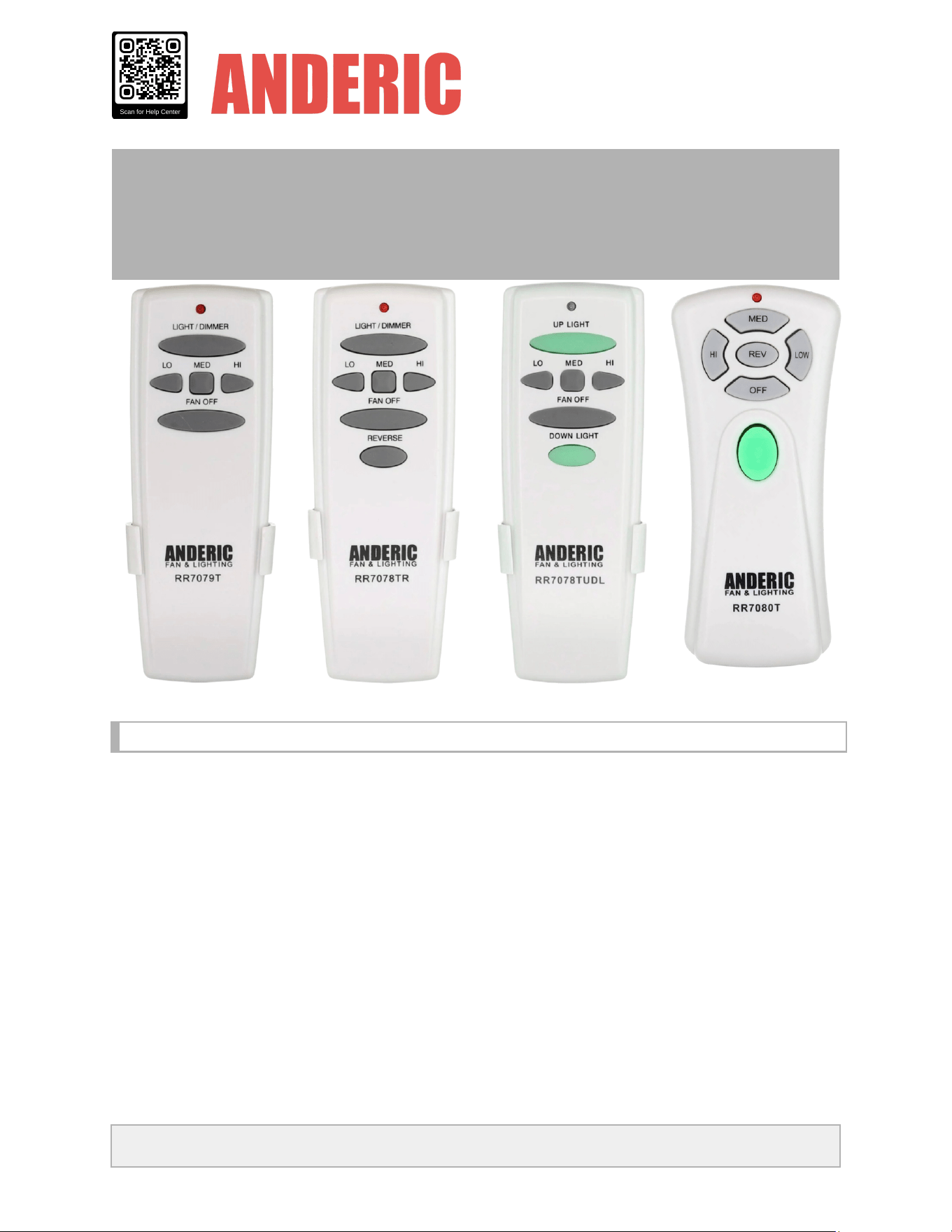
The Anderic RR7079T remote control is compatible with any 3-speed fan that has
the UC7067FMRX or FAN-28R receivers installed.
The Anderic RR7078TR remote control is compatible with many 3-speed fans that have one of
the following receivers installed: UC7067FMRX with a UC7067REVB reversing module, or a
similar reversing model, FAN-28R with a reversing module, FAN2R, UC7058RY, or UC7051R.
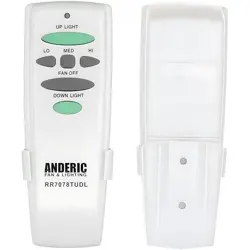
The Anderic RR7078TUDL remote control is compatible with any 3-speed fan that has
the UC7067GMRX, FAN28R-UD receiver installed.
ANDERIC® | www.anderic.com | Scan QR code for Help Center
All product names and trademarks are property of their respective owners.
The Anderic RR7080T remote control is compatible with any 3-Speed fan that has
the UC7067GMRX receiver installed. For the "REV" (reverse) key to function, your fan must
also be equipped with a Reversing module, such as the UC7067-REV-B, or a receiver with the
reversing option built in, such as the UC7058GM or UC7051G.
Button Functions
●
LIGHT
- Press the light button to toggle the fan's lights on or off. Press and hold the light
button to cycle through the dimming levels. Release when your desired brightness is
reached.
●
UP
LIGHT
- (only applicable with the RR7078TUDL and RR7080T): Press to toggle the
upper lights on and off, and holding the button controls dimming (requires compatible
receiver and bulbs).
●
DOWN
LIGHT
(only applicable with the RR7078TUDL and RR7080T) - Press to turn the
lower fan light ON/OFF, and holding the button controls dimming (requires compatible receiver
and bulbs)
●
LO/LOW
- Press to turn the fan oscillation speed to low
●
MED
- Press to turn the fan oscillation speed to medium
●
HI/HIGH
- Press to turn the fan oscillation speed to high
●
FAN
OFF
- Press to turn the fan oscillation off
●
REV
- (only applicable with the RR7078TR and RR7080T) - Press to reverse the fan
oscillation direction (requires compatible receiver)
Removing the Battery Cover and Installing Battery
Slide the battery door off by pressing it in and down
toward the bottom of the remote to remove the
cover from the battery compartment.
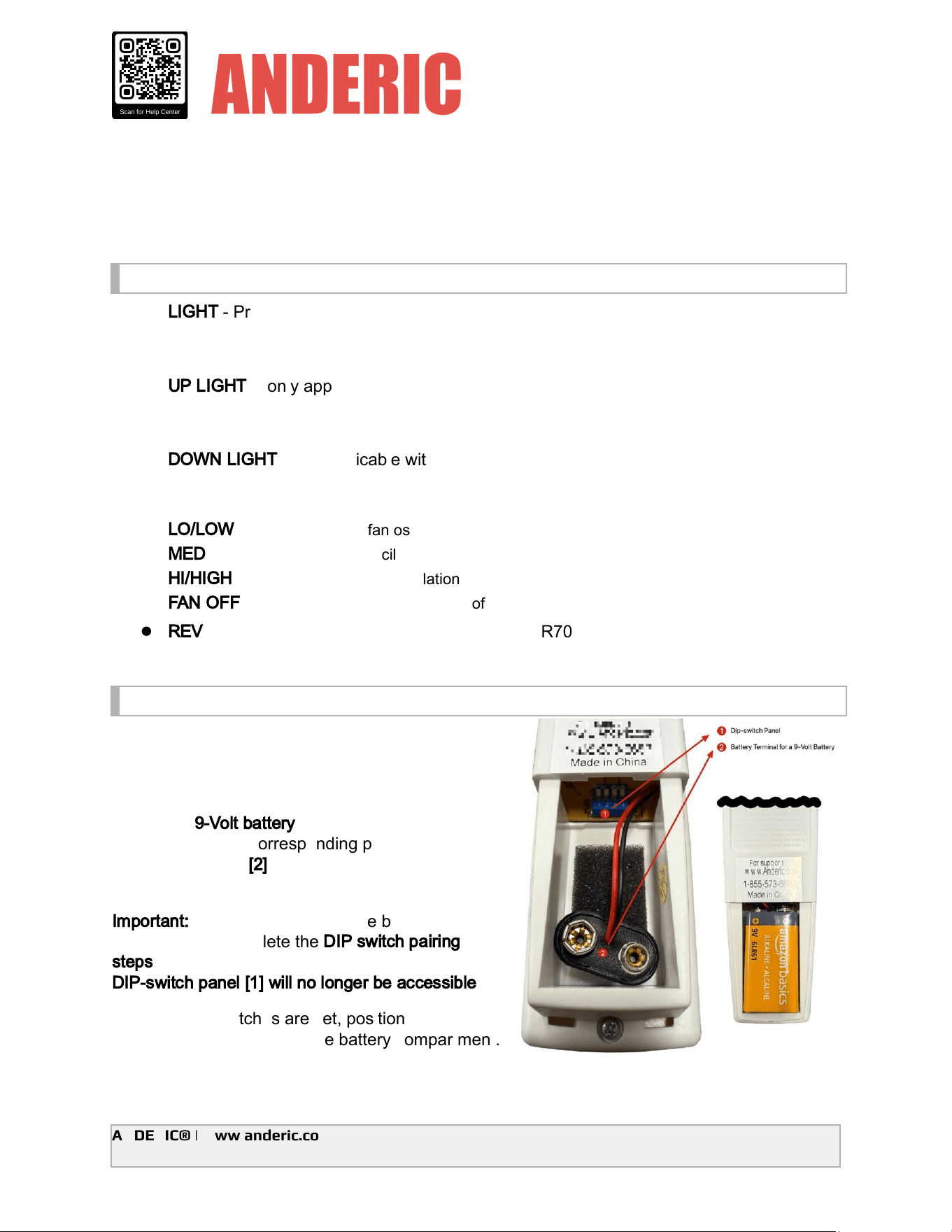
Install one
9-Volt
battery
by aligning the battery
terminals with the corresponding prongs on the
battery connector
[2]
, ensuring the polarity
matches.
Important:
Before fully inserting the battery into the
compartment, complete the
DIP
switch
pairing
steps
below. Once the battery is installed, the
DIP-switch
panel
[1]
will
no
longer
be
accessible
.
After the DIP switches are set, position the battery
so it fits completely inside the battery compartment.
ANDERIC® | www.anderic.com | Scan QR code for Help Center
All product names and trademarks are property of their respective owners.
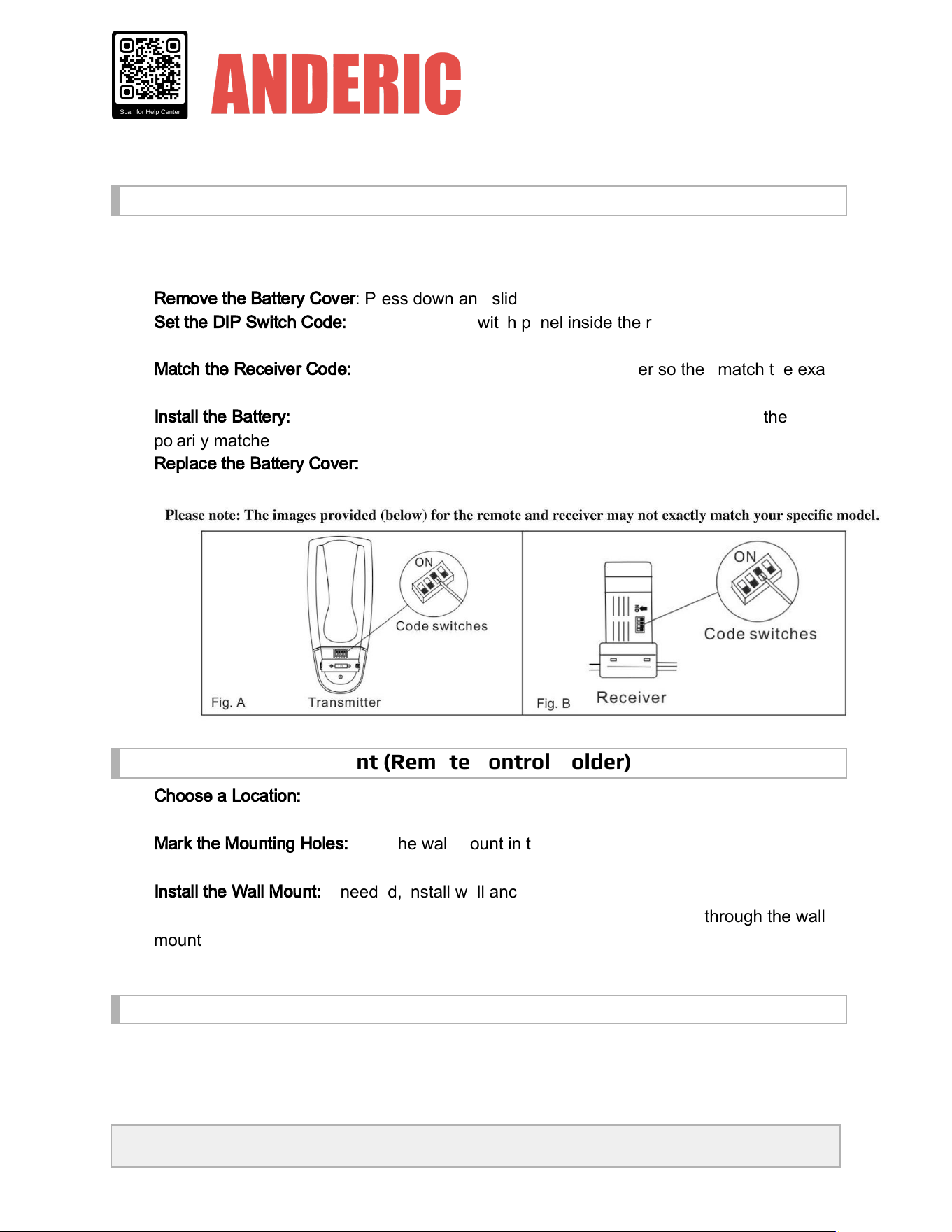
Installation & Pairing Setup
NOTE: Before you begin, please ensure that your fan and wall switch are powered OFF by the
fuse box.
1.
Remove
the
Battery
Cover
: Press down and slide the battery cover off the remote control
2.
Set
the
DIP
Switch
Code:
Locate the DIP switch panel inside the remote control and set
the switches to your desired pattern. (Fig. A below)
3.
Match
the
Receiver
Code:
Adjust the DIP switches on the receiver so they match the exact
pattern of the switches on the remote control. (Fig. B below)
4.
Install
the
Battery:
Connect one 9V battery to the battery compartment, ensuring the
polarity matches, and place it inside.
5.
Replace
the
Battery
Cover:
Reinstall the battery cover on the remote control.
Installing the wall mount (Remote Control Holder)
6.
Choose
a
Location:
Select a convenient area on the wall where you would like to store the
remote control.
7.
Mark
the
Mounting
Holes:
Hold the wall mount in the desired position and use a pencil to
mark the two mounting holes on the wall.
8.
Install
the
Wall
Mount:
If needed, install wall anchors (not included) at the marked
locations. Align the wall mount with the holes, then insert the two screws through the wall
mount and tighten them into the anchors or wall to secure the mount in place.
Troubleshooting
If the wall control or ceiling fan does not operate as expected, review the following steps:
ANDERIC® | www.anderic.com | Scan QR code for Help Center
All product names and trademarks are property of their respective owners.
1.
Fan
or
Light
Does
Not
Turn
On
● Verify that the circuit breaker or wall power switch supplying the fan is turned
ON
.
2.
Fan
Does
Not
Respond
to
Wall
Control
● Check that the
dip
switch
settings
on
the
remote
control
match
those
on
the
receiver
.
● Turn the power
OFF
, adjust the DIP switches, then restore power.
3.
Fan
Speeds
Do
Not
Work
Correctly
● Verify that the receiver installed in the fan is
compatible
with this wall control.
● Confirm the wiring connections between the receiver and the fan are properly installed.
4.
Light
Does
Not
Turn
On
or
Dim
Properly
● Ensure the light kit is properly connected to the receiver.
● Some
LED
bulbs
may
not
support
dimming
. If dimming does not function correctly, try
using a compatible dimmable bulb. Must use dimming Incandescent or dimming LED
bulbs.
5.
Intermittent
Operation
● Turn power
OFF
, recheck all wiring connections, and ensure wire nuts are securely
fastened.
● Verify that the receiver and wall control dip switch patterns match exactly.
Warning / Safety Notice
⚠
Electrical
Safety
Warning
●
Turn
off
the
power
at
the
circuit
breaker
before installing or servicing this wall control.
● Improper installation may result in
electric
shock,
fire,
or
damage
to
the
fan
or
electrical
system
.
● This wall control must be installed in accordance with
local
electrical
codes
and
regulations
.
If you are unsure about any part of the installation, or if the product does not operate correctly
after installation,
stop
installation
immediately
and
contact
a
licensed
or
certified
electrician
for
assistance.
ANDERIC® is not responsible for damage or injury resulting from improper installation or
misuse of this product.
ANDERIC® | www.anderic.com | Scan QR code for Help Center
All product names and trademarks are property of their respective owners.

ANDERIC® | www.anderic.com | Scan QR code for Help Center
All product names and trademarks are property of their respective owners.