有毒有害物质或元素
铅
(Pb)
汞
(Hg)
镉
(Cd)
六价铬
(Cr6+)
多溴
联苯
(PBB)
多溴
二苏醚
(PBDE)
部件
名称
塑料
外壳
: 表示该有毒有害物质在该部件所有均质材料中的
含量在GB/T26572-2011<<电子电气产品中限用物质
的限量要求>>规定的限量要求以下。
x: 表示该有毒有害物质至少在该部件的某一均质材
料中的含量超出GB/T26572-2011<<电子电气产品中
限用物质的限量要求>>规定的限量要求,且目前业界
没有成熟的替代方案,符合欧盟RoHS指令环保要求。
电池
线路
板
线缆
连接
器
11
电子信息产品有害物质申明
1. 产品建议使用年龄为14岁及以上,14岁以下使用者
建议在监护人陪同下使用
2. 产品使用时,请勿将手靠近机器狗的前后腿,谨防被
前后腿夹伤;拿起机器狗时,也请勿过于靠近机足
3. 使用时请注意防水,请不要将产品浸入水中,电子器
件进水会导致产品无法使用
4. 如果发现电池有任何异常,请立即停止使用
5. 本产品包含人工智能系统,其语音交互功能由人工智
能驱动,请注意甄别。输出内容仅为人工智能生成,
不代表品牌方立场,若因AI输出内容对用户造成误导,
品牌方不承担相关责任
6. 产品在使用过程中会收集和处理用户的语音数据,仅
用于用户主动唤醒并进行的AI对话功能,同时数据对
加密和非标注信息处理。该数据会在AI处理完后,进
行自动删除
7. 在室内使用产品时,请注意不要造成家具损坏和破坏
8. 切勿将机器狗乱扔,乱碰撞。若因用户操作不当导致
任何财产损失,品牌方不承担赔偿责任
9. 请勿在设备开机状态下,强行掰动机器狗的四肢及耳朵
10、OTA升级时,请确保电量充足,严禁中途断电
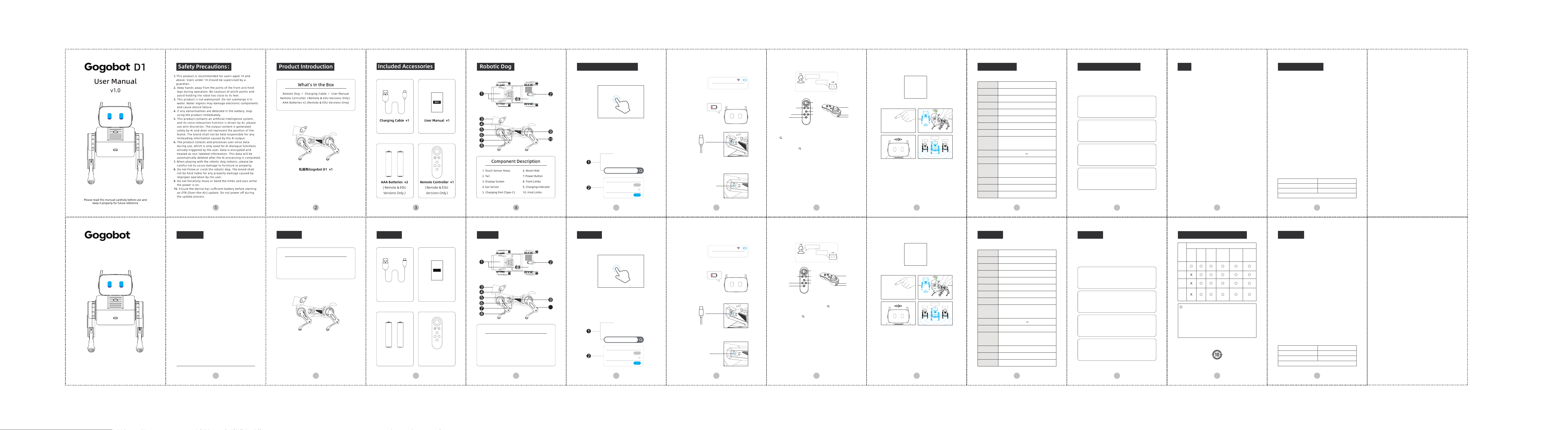
D1
用户手册
注意事项:
v1.0
请在使用前仔细阅读此手册,并妥善保管以备日后查询。
*所有图片仅供参考,请以产品实物为准*
1
部件说明
产品介绍
2
产品清单
机器狗 / 充电线 / 说明书
遥控器(仅遥控器版本&EDU版本包含)
干电池*2(仅遥控器版本&EDU版本包含)
1. 抚摸感应区
2. 尾巴
3. 显示屏
4. 耳朵
5. 充电插口
6. 复位孔
7. 电源键
8. 前肢
9. 充电指示灯
10. 后肢
机器狗Gogobot D1 ×1
3
配件说明
3. 电量&充电提醒
1) App可以查看机器狗电量
2) 低电量时,机器狗会有表情变化
3) 使用type-c插头充电
4) 充电时,充电指示灯亮起,充满后熄灭
4. AI对话
呼叫“gogo”既可开启语音对话
5. 遥控器操控
1) 遥控器版本附带遥控器和两节7号电池
2) 遥控器使用2节7号电池,安装电池后才能使用
3) 机器狗开机后30s内,长按3秒“ ”按钮开机后,蓝色
指示灯闪烁同时扫描设备并连接,耳朵摇晃为连接完成。
继续长按3秒“ ”键则会关机,蓝色指示灯熄灭
4) 长按3秒“O”键,听到提示音则且耳朵竖起,进入校准
模式。用户可以在校准模式操作机器狗前进后退转弯来
校准机器狗步伐。其中推动摇杆到机器狗不动为校准一
次,校准分数会显示在机器狗屏幕上,建议校准分数大
于95为佳。可以反复校准,取最后一次的校准数值为准。
再次长按3秒“O”键看到耳朵竖起后则会推出校准模式
5) 推动“摇杆”操控机器狗移动
6) 按住“L”“R”任意一按键,推动摇杆启动特殊移动模式
7) 按“A”进行握手,按“B”坐下,按“C”趴下,按“D”
站立
6. 个性化编程
EDU版本,请扫描下方二维码查看使用文档
7. 多设备联机
1) 机器狗开机后,连续单击电源键5次,此台机器选定为
主机,在无线范围内的所有刚开机5秒内的机器狗,自
动连接为从机
2) 听到提示音后,机器狗进入主机或者从机模式
3) 所有的从机只做和机器狗主机一样的动作,包括App
操控,遥控器操控
4) 关机后,退出主机或者从机模式
1. 开关机说明
长按3秒,即可开机或者关机
2. App连接以及联网
1) 应用商店搜索“gogobot”或者扫描二维码下载App
2) 在App内搜索设备连接
3) 输入wifi名称和密码进行联网
type-c
7号干电池 ×2
仅支持遥控器&EDU版本
充电线 ×1
遥控器 ×1
仅支持遥控器&EDU版本
C
A
B
D
说明书 ×1
说明书
Gogobot
4
10
机器狗
5
使用说明
6 7 8 9
Gogo!
在的,主人
主机
从机 从机
规格说明
【Gogobot Labs Limited】
【高高機器人實驗室有限公司】
www.gogobot.io
「关注我们」
小红书社交媒体入口
社媒名称:Gogobot
YouTube社交媒体入口
社媒名称:Gogobot
ins 社交媒体入口
社媒名称:Gogobot
Facebook社交媒体入口
社媒名称:Gogo Bot
登录入口:
https://www.facebook.com/profile.php?id=61584720410428
10
联系方式
type-c
3. Battery & Charging
1) You can check the battery level via the App.
2) When the battery is low, the robot's facial expressions will
change to indicate low power.
3) Use a Type-C cable for charging.
4) The Charging Indicator stays on during charging and turns
off when the battery is fully charged.
6. Personalized Programming
Please scan the QR code below to access the programming
documentation.
7. Multi-Device Synchronization
1) Power on the robot dog and press the power button 5 times
to set it as the Master. Other units nearby (within Bluetooth
range) that were turned on within the last 5 seconds will
automatically pair as Slaves.
2) A prompt tone will sound once the dog successfully enters
Master or Slave mode.
3) Slaves will replicate all actions performed by the Master unit,
whether controlled by the App or remote .
4) Simply turn off the device to exit Master/Slave mode.
1. Power On/Off
Long press the power button for 3 seconds to turn the device
on or off.
2. App Connection & Networking
1) Search for "gogobot" in the App Store/Google Play or scan
the QR code to download the app.
2) Search for the device within the app to connect.
3) Enter your Wi-Fi name and password in the app to connect
the robotic dog to the internet.
4. AI Conversation
Say the wake word "gogo" to start a voice conversation.
5. Remote Control (Remote Version)
1) The remote version includes a controller and two AAA batteries.
2) Install the 2 AAA batteries before use.
3) Within 30s after the robotic dog is powered on, long-press the
" " button for 3 seconds. The blue indicator light will flash
while scanning and connecting to the device, and the ears
wiggling indicates the connection is complete. Continuing to
long-press the " " button for 3 seconds will power off
the device, and the blue indicator light will turn off.
4) Long-press the "O" button for 3 seconds. Hearing a prompt
tone and seeing the ears stand up indicates entry into
calibration mode. Users can operate the robotic dog to move
forward, backward, or turn to calibrate its gait. Moving the
joystick until the dog stops constitutes one calibration; the
score will be displayed on the screen, and a score above 95 is
recommended. Calibration can be repeated, with the final value
taken as the standard. Long-pressing the "O" button again for
3 seconds until the ears stand up will exit calibration mode.
5) Use the Joysticks to control the robot's movement.
6) Hold the top "L" or "R" buttons while moving the joysticks to
trigger special movement modes.
7) Press A to Shake Hands, B to Sit, C to Lie Down, and D to Stand Up.
Warranty Coverage
C
A
B
D
Gogobot
5 6 7 8 9
Unbind
“O”Scan the device
and connect
“B”Sit down
“D”stand
“A”handshake
“C”Lie down
joystick
“L”
“R”
Gogo!
Hi!
Host
Slave Slave
【Gogobot Labs Limited】
【高高機器人實驗室有限公司】
www.gogobot.io
CMIIT ID is located on the product nameplate.
Copyright © All rights reserved. The Gogobot trademark is the
property of Gogobot Labs Limited Co., Ltd.
注:无线电型号核准CMIIT ID见产品铭牌。
版权所有 ©Gogobot商标均归高高機器人實驗室有限公司所有,
保留一切权利。
RedNote
Social Media Name:Gogobot
YouTube
Social Media Name:Gogobot
Instagram
Social Media Name:Gogobot
Facebook
Social Media Name:Gogo Bot
Login Portal:
https://www.facebook.com/profile.php?id=61584720410428
10 11 12
Operating Instructions
Specifications
Contact Us & Follow Us
FCC Warranty Policy
1. This device complies with Part 15 of the FCC Rules. Operation
is subject to the following two conditions:
(1) This device may not cause harmful interference.
(2) This device must accept any interference received, including
interference that may cause undesired operation.
2. Changes or modifications not expressly approved by the party
responsible for compliance could void the user's
authority to operate the equipment.
NOTE:
This equipment has been tested and found to comply with the
limits for a Class B digital device,pursuant to Part 15 of the FCC
Rules. These limits are designed to provide reasonable protection
against harmful interference in a residential installation.
This equipment generates uses and can radiate radio frequency
energy and, if not installed and used in accordance with the
instructions, may cause harmful interference to radio
communications. However, there is no guarantee that
interference will not occur in a particular installation.
If this equipment does cause harmful interference to radio or
television reception, which can be determined by turning the
equipment off and on, the user is encouraged to try to correct
the interference by one or more of the following measures:
-Reorient or relocate the receiving antenna;
-Increase the separation between the equipment and receiver;
-Connect the equipment into an outlet on a circuit different
from that to which the receiver is connected;
-Consult the dealer or an experienced radio/TV technician
for help.
1. This product is manufactured under strict quality control standards.
2. Under normal use, we provide a one-year comprehensive warranty
starting from the date of purchase. During this period, non-accidental
quality issues are eligible for free repair services.
3. The warranty covers any repairs not caused by human error. We provide
dedicated customer service and expert guidance/assistance throughout
the warranty period.
4. The specific duration and terms of the warranty will comply with the
consumer laws of the country where the product was purchased.
5. Please keep this warranty card in a safe place. Any alterations or
tampering will void the warranty.
Warranty Exclusions (Out-of-Warranty Terms)
Warranty Card
The following conditions are not covered by the warranty:
1. The product has exceeded the designated warranty period.
2. Damage caused by self-disassembly or unauthorized repairs to the
robot dog.
3. Damage resulting from uncontrollable external factors such as fire,
flood, or lightning strikes.
4. Products that have been resold to a third party.
5. Issues caused by physical impact, liquid ingress, or other forms of
improper handling.
6. Use of the product in violation of any laws or failure to comply with
the safety instructions provided.
7. Any faults or damage caused by issues unrelated to the product's
design, manufacturing, or inherent quality.
Paired Devices
Ai-Dog-Cd02
Unlink
Link
Scan Complete
Connected
Ai-Dog-Cd01
已配对设备
Ai-Dog-Cd02
断开
连接
扫描完成
已连接
Ai-Dog-Cd01
Recharge Time
Dimension
Weight
Material
Processor
Wi-Fi
Display
Microphone
Speaker
Sensors
Battery
Input
Battery Life
Charging
Control Method
LWH:255mm*137mm*188mm
860g
ABS + Carbon Fiber + Silicone
Dual-core 32-bit 320MHz
2.4G
2.4-inch TFT
Bottom-port Digital Silicon Microphone x4
4Ω 1W
Capacitive Touch Sensors ×2
6-Axis IMU (Gyroscope & Accelerometer) ×1
ToF (Time-of-Flight) Laser Sensors ×2
7.4V 2600 mAh
Intensive Use (Continuous Movement):
approx. 70–90 minutes
Typical Use (Standby + Normal Interaction):
up to 3 hours
USB Type-C
2-3H
App+Remote control
5V 3A
输入
5V 3A
尺寸/大小
重量
材料
处理器
Wi-Fi
显示屏
麦克风
喇叭
传感器
电池
续航时长
充电方式
充电时间
操控方式
长宽高:255mm*137mm*188mm
860g
ABS+碳纤维+硅胶
双核32位320MHz
2.4G
2.4寸 TFT屏
硅基阵列麦克风 x4
4Ω 1W
电容传感器 ×2
六轴陀螺仪传感器 ×1
TOF激光传感器 ×2
7.4V 2600 mAh
极限使用场景 (持续运动): 70–90 minutes
标准使用场景 (待机 + 正常运动): up to 3 hours
USB Type-C
2-3H
App/遥控器
User Name:
Email Address:
Product Serial Number (S/N):
Phone Number:
Purchase Platform:
Date of Purchase:
Shipping Address:
保修说明
12
保修政策
1. 本产品于严格的质量管控下生产
2. 正常使用情况下,我们提供自购买之日起为期一年的全面保修服务,
保修期内非人为的质量问题可以免费维修
3. 保修涵盖任何非人为引起的维修,并在保修期内为您提供共客服与
专家指导和协助
4. 保修期限将遵循产品购买所在国家的消费者法律
5. 请妥善保管此保修卡,避免涂抹与篡改
保修以外说明
保修卡
1. 超过保修期的期限
2. 自行拆装机器狗产品
3. 火灾、洪灾或雷击等不可抗拒因素造成的损坏
4. 转售您的机器狗产品
5. 人为原因造成的损坏:如物理损坏或进液等
6. 违反任何法律,或不符合上述安全须知要求的情况下使用本产品
7. 其他非产品本身、制造、质量等问题而导致的故障和损坏
8. 违反任何法律,或不符合上述安全须知要求的情况下使用本产品
9. 其他非产品本身、制造、质量等问题而导致的故障和损坏
用户名:
电子邮箱:
产品序列号(S/N):
手机号码:
购买平台:
购买日期:
收货地址:
充电指示灯
二维码
Charging Indicator Light
取消绑定“O”扫描设备并连接
“B”坐下
“D”站立
“A”握手
“C”趴下
遥杆
“L”
“R”
指示灯
Indicator Light
二维码
FCC Radiation Esposure Statement This equipment complies with FCC
radiation exposure limits set forth for an uncontrolledenvironment. This
equipment should be installed and operated with minimum distance
20cmbetween the radiator & your body