Factory Add: 2/F, No. 19, Qiaoda Road, Pingshan 1st Village, Shibi Subdistrict, Panyu District, Guangzhou, Guangdong, China
Email: MayHuang@benshi.ltd www.benshidisplay.com https://youtube.com/@alexgr5547 TIKTOK @benshidisplay
User Manual
Note:
Before using the product, please read the instructions carefully and check the accessories inside the box are
completed.Do not attempt to disassemble this product. If the product does not work properly,
Advertising Player

Catalogue
Assembly and Connection ................................................................................................................................................................................................................3
E.g. Packing List for floor stand non touch screen ........................................................................... 3
Steps for Assembly ...................................................................................................... 4
Steps for Assembly with Casters ...........................................................................................5
Installing batteries for the remote control: ................................................................................... 6
Precautions for using the remote control: ................................................................................... 6
Description of remote control buttons: ......................................................................................6
Power on/off ............................................................................................................ 7
Getting Familiar with Android: Main Interface and Essential Settings ............................................................ 7
Two Methods to Publish Advertising Content: ................................................................................9
Technical Specifications ................................................................................................. 10
Factory Add: 2/F, No. 19, Qiaoda Road, Pingshan 1st Village, Shibi Subdistrict, Panyu District, Guangzhou, Guangdong, China
Email: MayHu[email protected]d www.benshidisplay.com https://youtube.com/@alexgr5547 TIKTOK @benshidisplay
1
Features
◎1◎
Embedded with Android 4.4/6/7.1/9.0/11.0/12.0/13.0/14.0 smart operating system and unique UI design,
bringing you a more convenient operation and better visual experience.
◎ 2 ◎ Support USB mouse and keyboard, realizing easy manipulation like a computer. Using a mouse for set up
is recommended.
◎ 3 ◎ Built-in Wi-Fi module, high capacity memory and high capacity cache, Making it smoother to playing
2K/4K photos and videos.
◎ 4 ◎ High-quality LCD screen as the display, no flicker, low radiation, greatly reducing eye fatigue, eye
protection, high brightness, high contrast, and wide viewing angle; ultra-fast response time greatly reduces
ghosting of fast moving images.
◎ 5 ◎ Progressive image processing and industry-leading motion compensation technology improve the
flickering and blurring in the edges of motion picture.
◎ 6 ◎ Dynamic contrast technology can significantly improve the clarity and contrast of various screens.
◎ 7 ◎ Multi-channel USB interfaces, HDMI input/output port for optional, supporting connect external devices
◎ 8 ◎ Ultra-thin narrow bezel design
Safety Warnings and Precautions
Thank you for purchasing the high-performance multi-functional LED backlight Digital Signage from Guangzhou
Bems. We have considered the factors to ensure personal safety in product design and have tested rigorously at
the factory. However, improper installation and use may result in electric shock and fire. In order to safely use,
maximize performance of the unit and extend the life of the product, please read and follow all instructions
carefully before using the product. Keep the instructions for future reference.
Symbol Legends:
Warning: May cause personal injury or death
The operation is prohibited
Caution: May cause damage or property loss
The operation must be executed
If any of the following occurs:
Power outage or unstable voltage.
Abnormal sound or smell from the unit.
AC power cord is damaged.
Digital Interactive Table is damaged due to drop, knock or impact.
Any liquid or foreign matters fall into the enclosure.
Turn off the Digital Advertising Player immediately, pull out the plug from the power outlet,
and ask the authorized personnel for maintenance timely
If coal gas or other flammable gas leaks, do not pull out the plug of the LCD Digital Signage or other
electrical appliances; instead, turn off the gas valve immediately, and open the doors and windows quickly.
Factory Add: 2/F, No. 19, Qiaoda Road, Pingshan 1st Village, Shibi Subdistrict, Panyu District, Guangzhou, Guangdong, China
Email: MayHuang@benshi.ltd www.benshidisplay.com https://youtube.com/@alexgr5547 TIKTOK @benshidisplay
2
WARNING
●
D
o not use power supply other than 110V-240V 50/60Hz
●
Cut off the power supply before connecting or disconnecting any cables.
● Do not place the Digital Signage on any unstable positions, or else it may be damaged or cause fire.
● Do not place the Digital Signage in the positions such as:
1.
The environment subject to direct strong sunlight, moisture, extreme temperature or too much dust;
2.
The environment with flammable or explosive materials;
3.
The environment with flammable or corrosive gases;
● Do not use damaged or inappropriate power outlets, and ensure that the plugs and outlets contact properly.
● Do not let dust or metal deposits adhere to the plugs and outlets.
● Do not damage the power cords:
1.
Do not modify the power cords;
2.
Do not place heavy objects on the power cords;
3.
Keep the power cords away from heat source;
4.
Do not pull the cord to remove the plug.
●
Do not connect too many plugs to one outlet in parallel, or else it may cause fire due to excessive power
consumption.
●
Do not approach the Digital Signage with open flame (e.g. a lighted candle), or else it may cause
electric shock or fire.
● Do not put water filled container on the Digital Signage to avoid electric shock and fire due to water
drops or splashing.
●
Do not put any sharp objects, metal or liquid into the vents or let them touch the signal terminals to
avoid short circuit,
●
product damage, and electric shock.
● The openings in the enclosure are designed for ventilation and cooling, to ensure long time reliable
running of components inside the enclosure and prevent overheating. Do not block the openings when
place the unit.
Do not touch the plugs with wet fingers, or else it will cause electric shock
Do not use the Digital Signage in stormy weather, especially when there is lightning; instead, please
disconnect the power and antenna plugs to avoid lightning strike.
Do not disassemble the Digital Signage without permission, or else it may cause electric shock or fire.
Please ask qualified technician for repair.
Factory Add: 2/F, No. 19, Qiaoda Road, Pingshan 1st Village, Shibi Subdistrict, Panyu District, Guangzhou, Guangdong, China
Email: MayHu[email protected]d www.benshidisplay.com https://youtube.com/@alexgr5547 TIKTOK @benshidisplay
3
CAUTION
●
Do not let children climb onto the Digital Signage.
● Keep the small parts away from children to prevent them from swallowing.
● If the Digital Signage won’t be used for a long time, please turn it off and pull out the power plug.
● To adjust the position or angle of the Digital Signage, please disconnect all power cords and move
slowly to avoid falling.
●
Do not scratch or knock the LCD with hard object, or twist and squeeze the LCD.
●
Do not turn on the unit immediately when it is moved from a place with low temperature to high
temperature, or else it will
● cause condensation and malfunction.
● Before cleaning the Digital Signage, please pull out the power plug; wipe with soft cloth; do not use
industrial chemicals; prevent foreign matters from entering the machine. Improper cleaning (such as
cleaning solution, water) may damage the product, erase the printed information, and even cause
damage of the components if fluid flows in, resulting in machine failure.
● If the unit displays the same screen for a long time or the moving picture has fixed text or icon, it will
leave ghosting on the screen and won’t disappear when the unit is turned off, it is normal and isn’t
covered by the warranty.
● The power of the Digital Signage can be cut off by pulling out the plug.
●
If the LCD screen ruptures and the liquid splashes on the skin, please rinse for 15 minutes with clean
water immediately,
● and consult your doctor.
● To carry the Digital Signage with hands, please grab the corners and hold the bottom; do not apply
pressure on the panel.
● Use the Digital Signage properly: Use in proper lighting conditions, insufficient lighting or long time
watching will impair your eyesight.
●
When the plug is used as disconnection device, it should be easy to operate the device.
● Insert the plug into the outlet properly, or else it may cause sparks and fire.
● The technical specifications printed herein and on the packaging are subject to change without prior
notice. The Manual may be slightly different from actual operation, and the latter is applicable.
Assembly and Connection
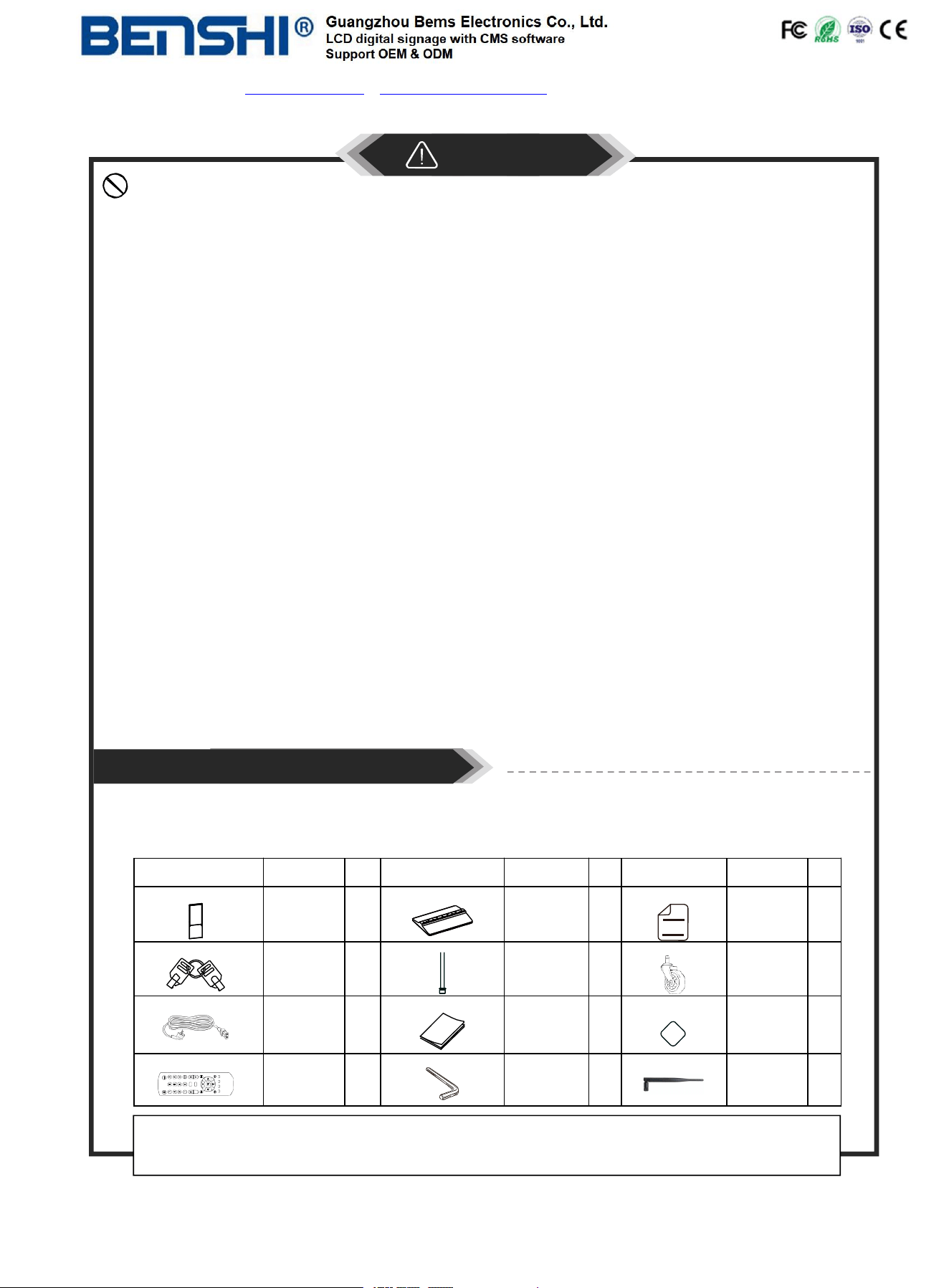
E.g. Packing List for floor stand non touch screen
Item
Name
Qty.
Item
Name
Qty.
Item
Name
Qty.
Screen
1
Stand Base
1
Warranty
Card
1
Key
2
Set Screws
10
Casters
(Optional)
4
PowerCord
1
Quick Start
Guide
1
QC
Qualified
Certificate
1
VGAA
HDM II
AVAV
Remote
Control
1
Hex Wrench
1
WiFi
antenna
1
Please note: Accessories might vary slightly between production batches. Your actual product
package contents may differ from what's shown in this manual.
Factory Add: 2/F, No. 19, Qiaoda Road, Pingshan 1st Village, Shibi Subdistrict, Panyu District, Guangzhou, Guangdong, China
Email: MayHuang@benshi.ltd www.benshidisplay.com https://youtube.com/@alexgr5547 TIKTOK @benshidisplay
4
1
2
3
4
1
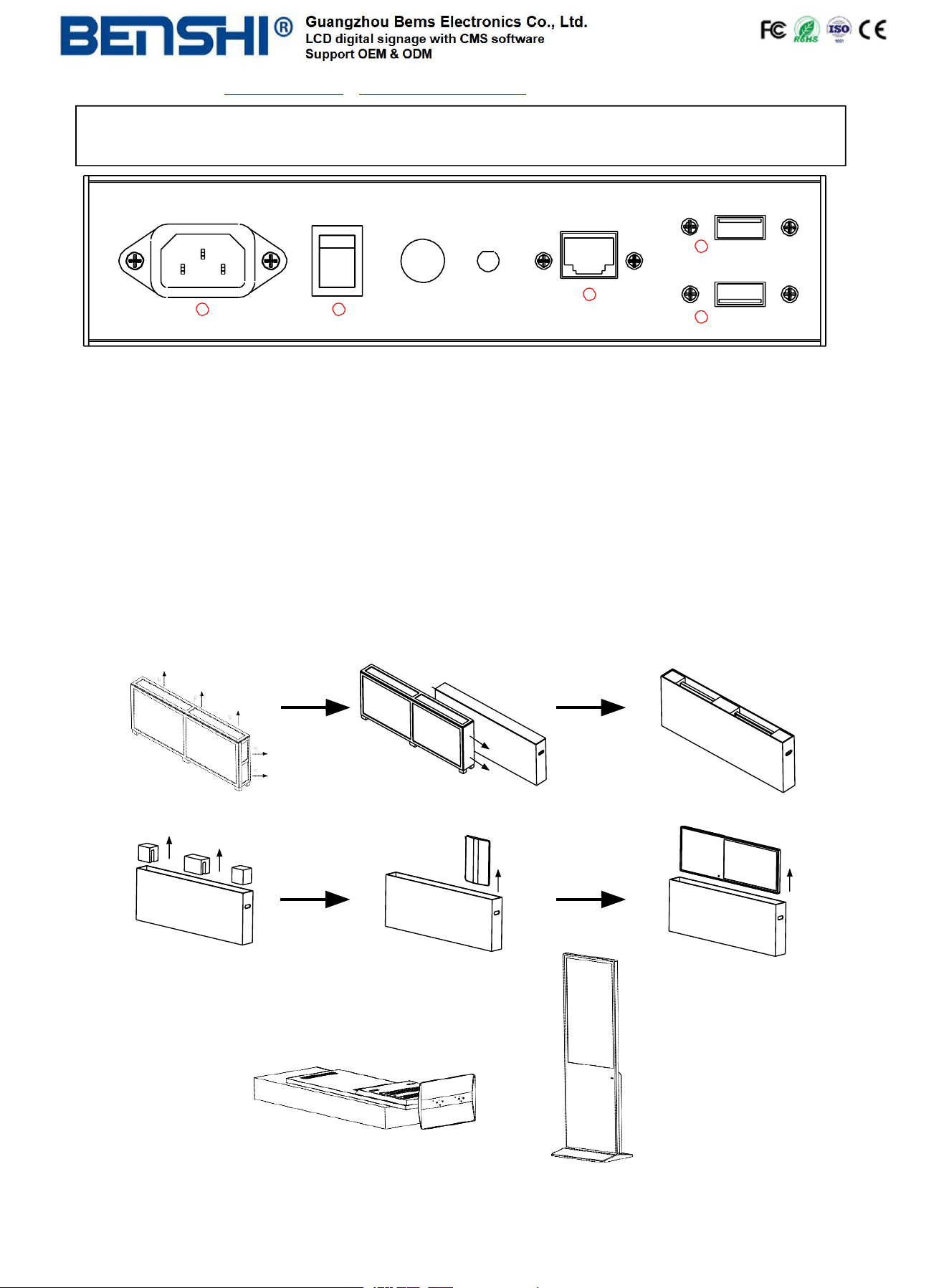
1.USB interface; 2.RJ45 interface(Ethernet); 3.Power port; 4.On/Off button;
Note: Please pull out the power plug before installing or disassembling the unit !
Steps for Assembly
1. Remove the screws with screwdriver and open the wood case;
2. Unlock the Toggle Latches and carefully take out the master carton from one side
3. Open the master carton and remove EPE on both sides of the box;
4. Take out the base from the package;
5. Carefully lift out the unit and place it on the solid flat surface (avoid scratching);
6. Assemble the base and the unit with dedicated screws using hex wrench
① ②
③
④ ⑤
⑥
⑦
⑧
Please note: The interfaces shown and installation steps provided are for reference only. Due to variations in
production batches and product types, additional listings will not be provided. The actual product shall prevail.
Factory Add: 2/F, No. 19, Qiaoda Road, Pingshan 1st Village, Shibi Subdistrict, Panyu District, Guangzhou, Guangdong, China
Email: MayHu[email protected]d www.benshidisplay.com https://youtube.com/@alexgr5547 TIKTOK @benshidisplay
5
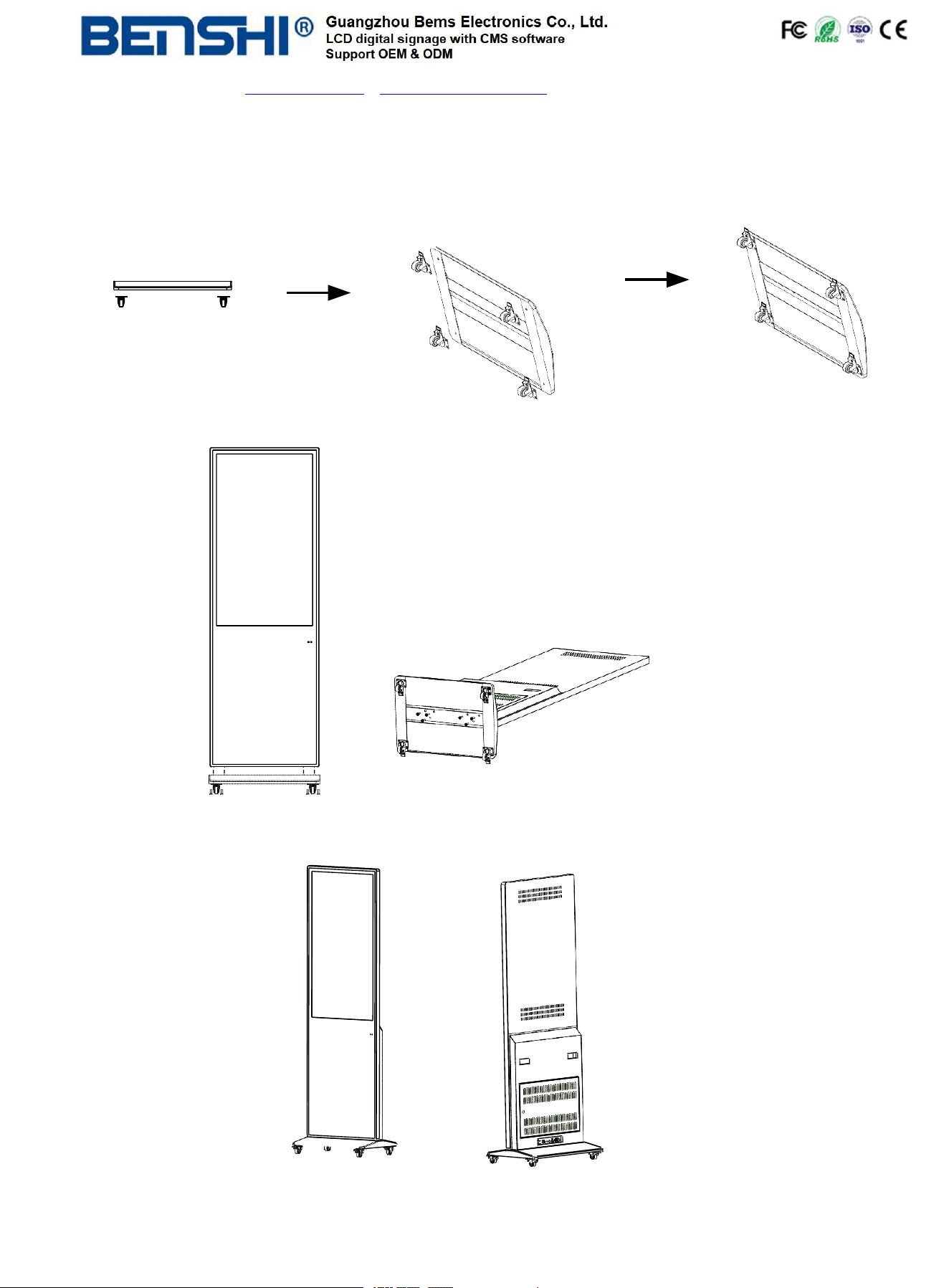
Steps for Assembly with Casters
1、To use this product as a mobile unit, install 4 casters to the metal base by threading them into the holes on
the bottom of the base. Tighten all casters with screwdriver.
2、Connect the base and the digital signage with provided screws. Tighten all screws with an hex wrench.
3、The assembly is finished:
Factory Add: 2/F, No. 19, Qiaoda Road, Pingshan 1st Village, Shibi Subdistrict, Panyu District, Guangzhou, Guangdong, China
Email: MayHuang@benshi.ltd www.benshidisplay.com https://youtube.com/@alexgr5547 TIKTOK @benshidisplay
6
Remote Control
Installing batteries for the remote control:
Remove the battery cover and insert two AAA batteries (1.5V). Ensure that the battery polarity matches the
“+”/“-” marks in the battery compartment of the remote control.
Precautions for using the remote control:
● Aim the remote control at the receiver window. Do not place any object between the remote control and the
receiver window to avoid interference with the normal operation.
● Keep the remote control away from violent vibration. In addition, do not set or place the remote control in
direct sunlight, or else the
● remote control may be deformed by heat.
●
The remote control may be invalid when the receiver window of the unit is in direct sunlight or strong lighting;
in this case, please adjust the angle of the lighting or the unit or approach the receiver window to use it.
●
The distance of remote control will be shortened if the battery voltage is insufficient; in this case, please
replace with new batteries; if the remote control won’t be used for a long time or the batteries are run out,
please take out the batteries to avoid corrosion due to battery leakage, which will damage the remote control.
● Do not use batteries of different types or mix new batteries with old ones. Always replace the batteries in
pairs.
● Do not put the batteries in fire, or charge or disassemble them, or charge, short circuit, disassemble, heat or
burn used batteries Please dispose of waste batteries in accordance with local environmental regulations. Do
not expose the batteries in overheated environments such as sunlight and fire.
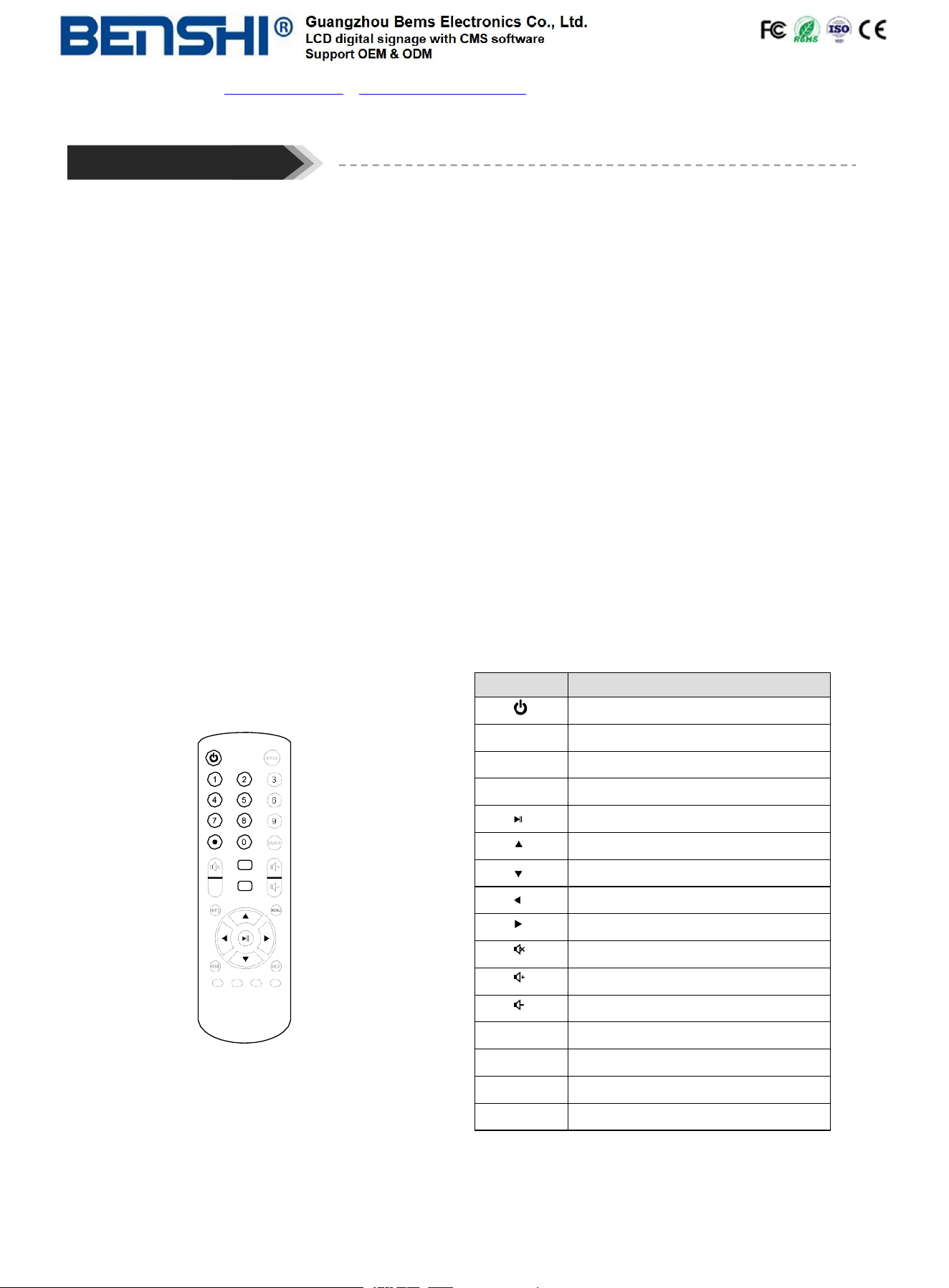
Description of remote control buttons:
VG A
HDM I
AV
Remark: The real appearance of the remote control
may be different from the picture, please refer to
the actual product.
The touch screen does not come with a remote control.
Butt
on
Func
tion
Po
w
er
s
wit
ch
MENU
T
o
sho
w
the
main
menu
SETUP
T
o
set
up
OSD
menu
SOUR
CE
T
o
sho
w
the
Sour
c
e
menu
Pla
y
pr
ogr
ams;
confirm
selection
T
o
mo
v
e
the
cur
sor
up
T
o
mo
v
e
the
cur
sor
do
wn
T
o
mo
v
e
the
cur
sor
lef
t
T
o
mo
v
e
the
cur
sor
right
Mut
e
T
urn
up
the
v
olume
T
urn
do
wn
the
v
olume
HDMI
Selec
t
HDMI
de
vic
e
as
the
sour
c
e
VG
A
Selec
t
V
GA
de
vic
e
as
the
sour
c
e
Back
Back
Home
T
o go
b
ack
t
o
home
p
age
User
Factory Add: 2/F, No. 19, Qiaoda Road, Pingshan 1st Village, Shibi Subdistrict, Panyu District, Guangzhou, Guangdong, China
Email: MayHuang@benshi.ltd www.benshidisplay.com https://youtube.com/@alexgr5547 TIKTOK @benshidisplay
7
Description of Basic Operation
Power on/off
Insert the power plug into the outlet. If the Digital Signage has the switch button “ ” to ”I” to turn it on;
and press the switch button “O” to turn off the Digital Signage.
Note:
These two Android interface examples may differ slightly from your actual product.
Different versions may have variations.
Getting Familiar with Android: Main Interface and Essential Settings
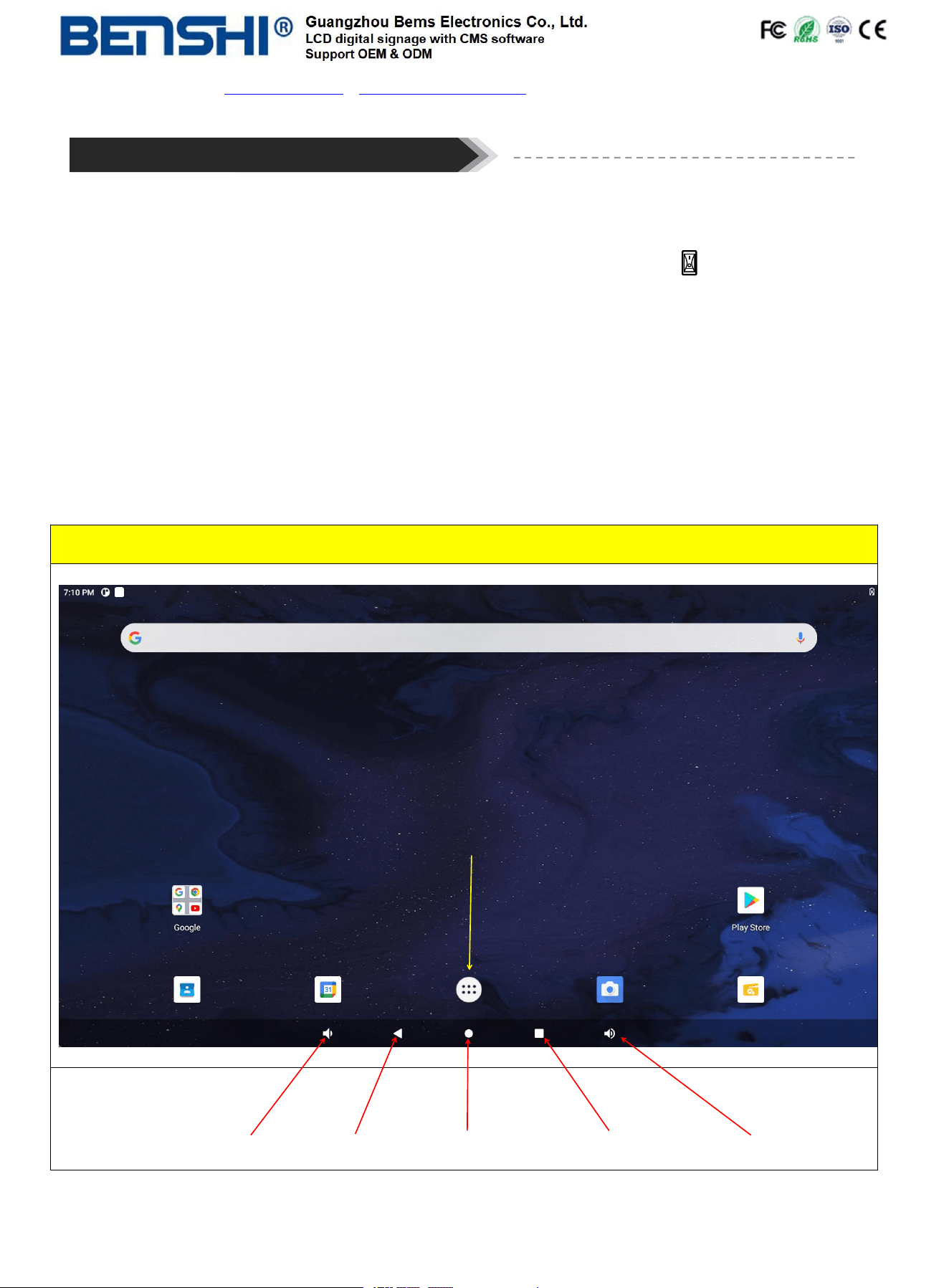
1. Home Page
For example: 3566 Android mother board
Volume - Back Home Page Multi-app window Volume +
Enter the application interface
User
Factory Add: 2/F, No. 19, Qiaoda Road, Pingshan 1st Village, Shibi Subdistrict, Panyu District, Guangzhou, Guangdong, China
Email: MayHuang@benshi.ltd www.benshidisplay.com https://youtube.com/@alexgr5547 TIKTOK @benshidisplay
8
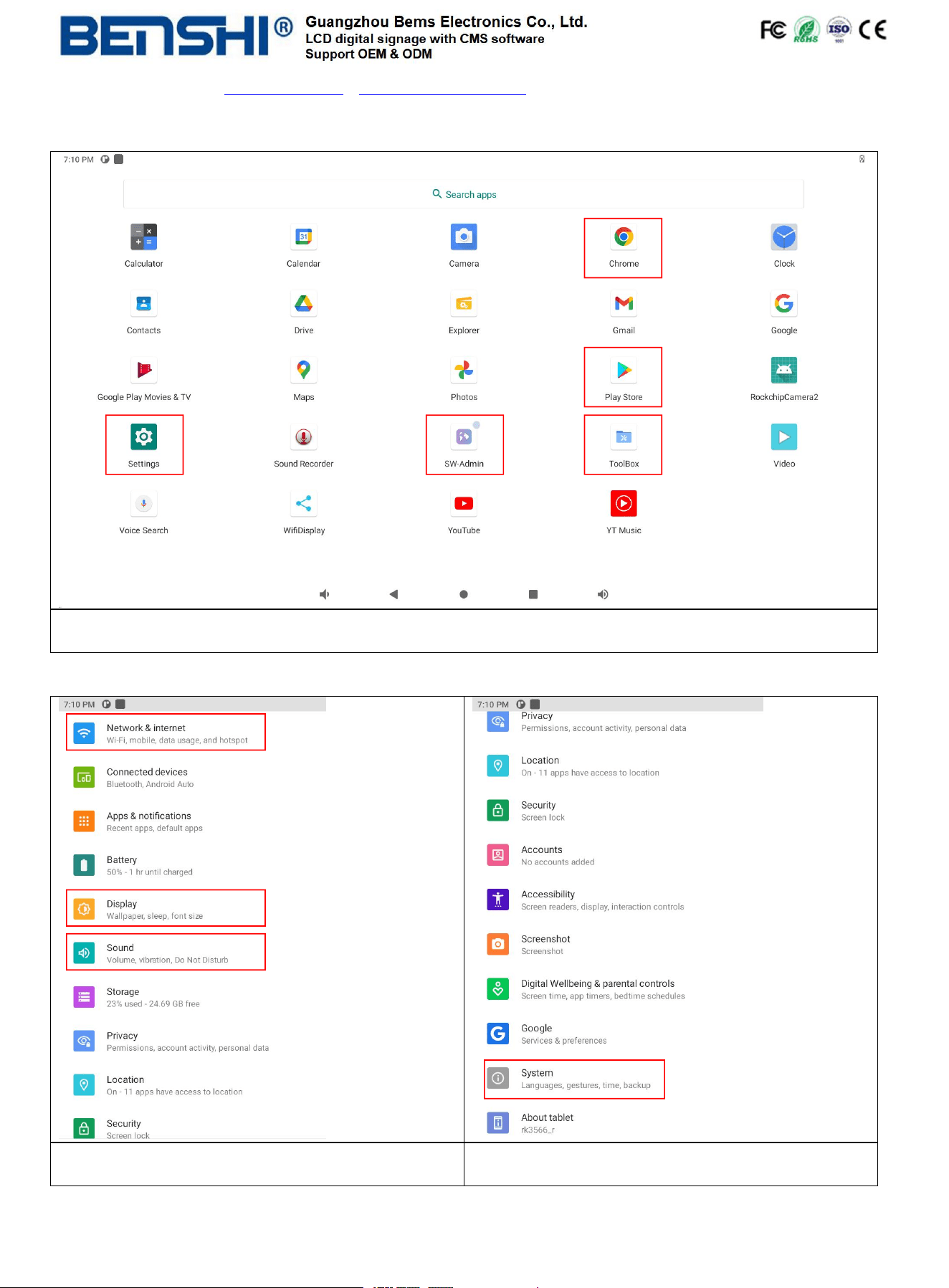
2. Main Apps
Main functions:
Chrome, File Manager[Explorer], Play Store, Settings, SW-Admin [BMES CMS for advertising], Toolbox, etc.
3. Settings
Main functions:
network[wifi], display, sound, etc.
Main functions:
Settings ---> System ---> Languages / time, etc.
User
Factory Add: 2/F, No. 19, Qiaoda Road, Pingshan 1st Village, Shibi Subdistrict, Panyu District, Guangzhou, Guangdong, China
Email: MayHuang@benshi.ltd www.benshidisplay.com https://youtube.com/@alexgr5547 TIKTOK @benshidisplay
9
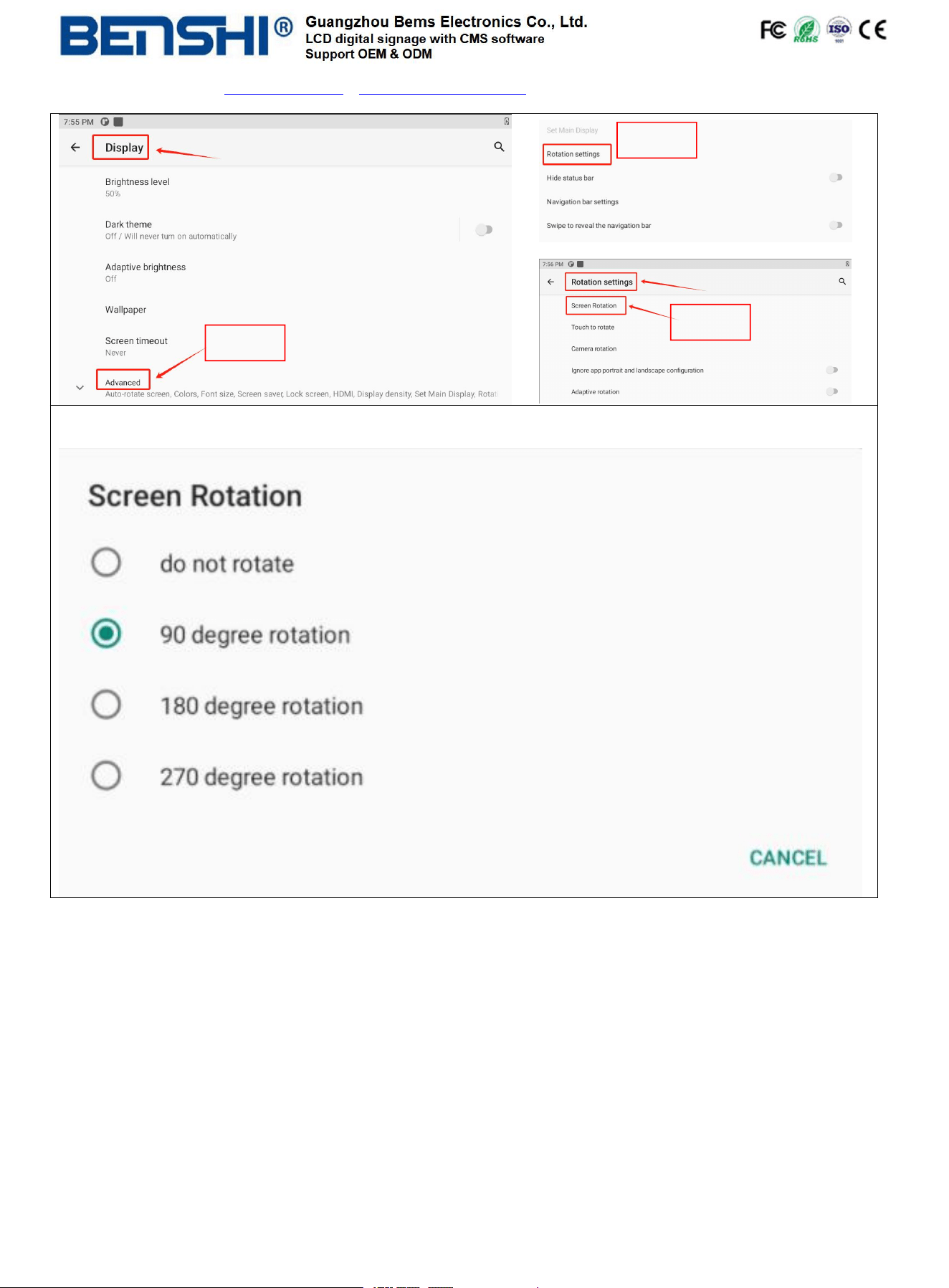
Settings ---> Display ---> Advanced ---> Rotation Settings ---> Screen Rotation
Two Methods to Publish Advertising Content:
USB Drive Method
Copy your advertisement images/videos to a USB drive. Under the Signworld display interface, insert the USB
drive into the screen's USB port - the system will automatically load the content. After uploading completes,
safely remove the USB drive. For detailed instructions, please refer to the Signworld User Manual & Video Guide.
Network Method
Access the Settings interface and configure WiFi connection to join a local network with strong signal, or
alternatively connect via Ethernet cable to the RJ45 port. Once successfully connected to the network, follow
the Signworld User Manual & Video Guide to remotely publish advertising content from your computer.
Step 1
Step 3
Step 2
User
Factory Add: 2/F, No. 19, Qiaoda Road, Pingshan 1st Village, Shibi Subdistrict, Panyu District, Guangzhou, Guangdong, China
Email: MayHuang@benshi.ltd www.benshidisplay.com https://youtube.com/@alexgr5547 TIKTOK @benshidisplay
10
Technical Specifications
Item
Parameters
Panel
LCD size
10-100 inch et
Panel brand
LG/SUMSUNG/AUO/BOE etc.
Light source
LED backlight
Resolution
1920*1080/3840*2160 (pixels)
Brightness (typ.)/(min)
350/450/500/700/1000cd/㎡ (typ.) or above
Contrast (typ.)
5000:1 (typ.)
Response (ms)
6.5-8.5 ms (typ.)
Chromaticness
16.7M
Refresh rate
60Hz
Viewing angle
178° (H)/178° (V)
Life
50,000hrs (min)
Environment
Operating temperature (° C)
0~50° C
Storage temperature (° C)
-20~60° C
Storage humidity
35~75%RH Non -condensing
Operating humidity
20~85% RH Non-condensing
Functions
Operating system
Android 4.4/5.1/6/7.1/9.0/11.0/12.0/13.0/14.0
Windows i3/i5/i7 for optional
Processor
Cortex A53/Quad-core A55 (others for optional)
RAM
1G/2G/4G etc.
ROM
8G/16G/32G/64G/128G etc.
Power supply
Voltage
100V~240V, 50-60Hz
Please note: Final product specifications are subject to the actual shipped product.
Factory Add: 2/F, No. 19, Qiaoda Road, Pingshan 1st Village, Shibi Subdistrict, Panyu District, Guangzhou, Guangdong, China
Email: MayHuang@benshi.ltd www.benshidisplay.com https://youtube.com/@alexgr5547 TIKTOK @benshidisplay
11
Functions
Decoding resolution
1080P FHD/2160P UHD
Playback mode
Support loop, split-screen, shim, etc
Compatible network
WiFi 2.4G/Ethernet
Touch support
Non touch/Infrared touch/PCAP touch
Supported Video Files
AVI, MPEG4, WMV, MKV, FLV, MP4, MOV, etc.
Supported Photo Files
JPG, JPEG, BMP, PNG, GIF, etc.
Audio output, supported files
MP3,WAV,AAC,AC3,EAC3,FLAC,APE, etc.
RTC (real-time clock)
Yes
Schedule power on/off
Yes
System update
USB compatible
App installation
Support download and installation
I/O interfaces
USB 2.0
2
Ethernet (RJ45)
1
HDMI IN/ OUT
1 (others for optional)
LINE OUT
1
TF card slot
1 (for optional)
SIM card slot
1 (for optional)
Structure
Shell material
Aluminum profile/sheet metal
Shell color
black (others for optional)
Speaker
2*5W 8Ω
Language
OSD
Multilingual
Please note: Final product specifications are subject to the actual shipped product.
User
Factory Add: 2/F, No. 19, Qiaoda Road, Pingshan 1st Village, Shibi Subdistrict, Panyu District, Guangzhou, Guangdong, China
Email: MayHuang@benshi.ltd www.benshidisplay.com https://youtube.com/@alexgr5547 TIKTOK @benshidisplay
12
Guangzhou Bems Electronics Co., Ltd. reserves the final right to interpret all information herein,
All unauthorized and permitted reproduction is not recognized and should be prohibited.
This document may not fully reflect all the latest changes to the product, but the actual product
shall prevail. This Manual is for reference only and is subject to change without prior notice.

FCC Warnning:
This equipment has been tested and found to comply with the limits for a Class B digital device,
pursuant to part 15 of the FCC Rules. These limits are designed to provide
reasonable
protection againstharmful interference in a residential installation. This equipment generates,
uses and can radiateradio
frequency
energy
and,
if
not
installed
and
used
in
accordance
with
the
instructions,
maycause
harmful
interference
to
radio
communications.
However,
there
is
no
guarantee
thatinterference
will
not
occur
in
a
particular
installation.
If
this
equipment
does
cause
harmfulinterference to radio or television reception, which can be
determined by turning the equipmentoff
and
on,
the
user
is
encouraged
to
try
to
correct
the
interference
by
one
or
more
of
thefollowing measures:
•
Reorient or relocate the receiving antenna.
•
Increase the separation between the equipment and receiver.
•
Connect the equipment into an outlet on a circuit different from that to which the receiver is
connected.
• Consult the dealer or an experienced radio/TV technician for help.
Caution:
Any
changes
or
modifications
to
this
device
not
explicitly
approved
by
manufacturer
could void your authority to operate this equipment.
This
device
complies
with
part
15
of
the
FCC
Rules.
Operation
is
subject
to
the
following
two
conditions:
(1)This
device
may
not
cause
harmful
interference,
and
(2)
this
device
must
accept
any
interference received, including interference that may cause undesired operation.
This
equipment
complies
with
FCC
radiation
exposure
limits
set
forth
for
an
uncontrolled
environment.
This
equipment
should
be
installed
and
operated
with
minimum
distance
20cm
between the radiator and your body.

Factory Add: 2/F, No. 19, Qiaoda Road, Pingshan 1st Village, Shibi Subdistrict, Panyu District, Guangzhou, Guangdong, China
Email: MayHuang@benshi.ltd www.benshidisplay.com https://youtube.com/@alexgr5547 TIKTOK @benshidisplay
13
Guangzhou Bems Electronics Co.,Ltd
Add: 2/F, No. 19, Qiaoda Road, Pingshan 1st Village, Shibi Subdistrict, Panyu District, Guangzhou,
Guangdong, China
Tel: +8618928758081
Email: mayhuan[email protected]
www.benshidisplay.com / www.signagemall.com / http://ads.signagemall.com