OS
OS:Android 14,OTA upgrade from interne
OS
OS:Android 14,OTA upgrade from internet
t
OS
OS:Android 14,OTA upgrade from internet
OS
OS:Android 14,OTA upgrade from internet
OS
OS:Android 14,OTA upgrade from internet
OS
OS:Android 14,OTA upgrade from internet
100/1000M :ethernet
802.11/b/g/n :wifi
OTA upgrade from internet,Android 14
OS
108g 铜版纸 折页 双面黑白印刷
A55
A55
A55
A55
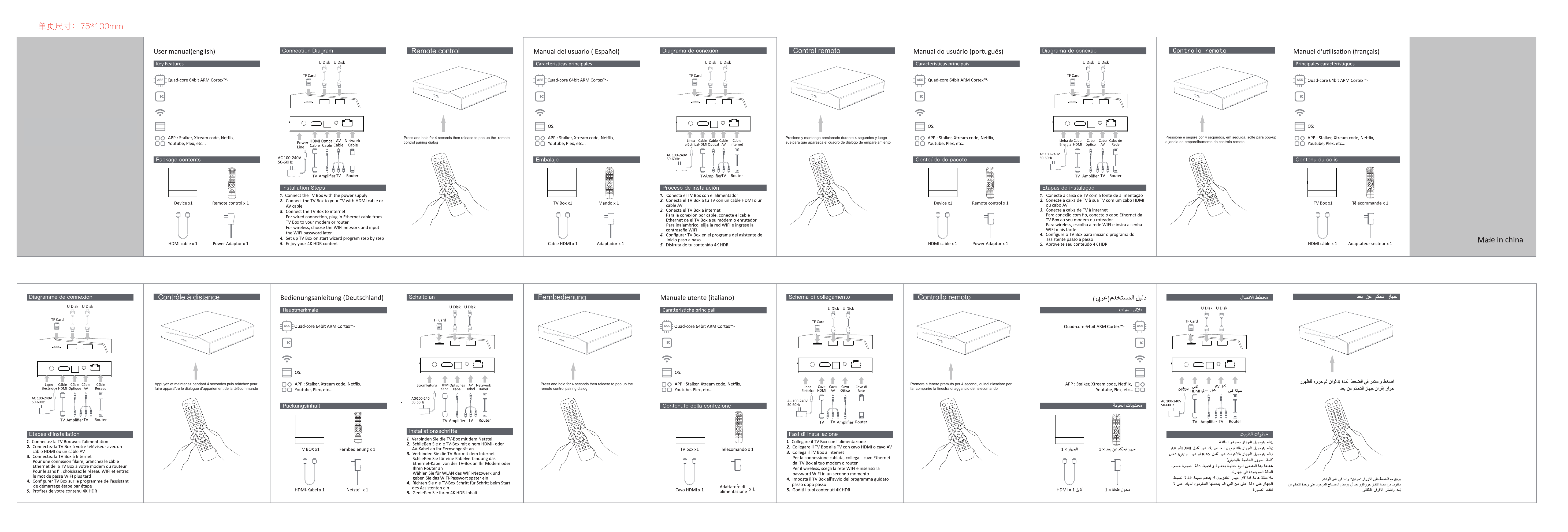
Press and hold for 4 seconds then release to pop up the remote
A55
A55
A55
control pairing dialog
Remote control
HEVC 10-bit HDR 8K decode
Ethernet:100/1000M
Wifi:802.11/b/g/n
8
8
8
8
8
8
User Manual
HEVC 10-bit HDR 8K decode
Ethernet:100/1000M
Wifi:802.11/b/g/n
Pless and hold the “OK”and “-” buttons at the same time.
Close to the TV stick,release the button after the light on the remote
HEVC 10-bit HDR 8K decode
HEVC 10-bit HDR 8K decode
Ethernet:100/1000M
HEVC 10-bit HDR 8K decode
Ethernet:100/1000M
HEVC 10-bit HDR 8K decode
Ethernet:100/1000M
Wifi:802.11/b/g/n
Wifi:802.11/b/g/n
Wifi:802.11/b/g/n
HEVC 10-bit HDR 8K decode
Ethernet:100/1000M
Wifi:802.11/b/g/n
8
control flashes,and wait for automatic pairing.
Presione y mantenga presionado durante 4 segundos y luego
suelpara que aparezca el cuadro de diálogo de emparejamiento
del control remoto
Control remoto
Pless y mantenga los botones "OK" y "-" al mismo tiempo.
Cerca de la TV, suelel el botón después de la luz en el control remoto
Controlar los destellos, y esperar a que apareamiento automático.
Pressione e segure por 4 segundos, em seguida, solte para pop-up
a janela de emparelhamento do controlo remoto
Controlo remoto
Pless e segure os botões "OK" e "-" ao mesmo tempo.
Perto da TV stick, solte o botão após a luz do controle remoto
piscar e aguarde o emparelhamento automático.
Appuyez et maintenez pendant 4 secondes puis relâchez pour
faire apparaître le dialogue d’appariement de la télécommande
Contrôle à distance
Press and hold for 4 seconds then release to pop up the
Pless and hold the “OK”and “-” buttons at the same time.
Close to the TV stick,release the button after the light on the
remote control flashes,and wait for automatic pairing.
remote control pairing dialog
Fernbedienung
Premere e tenere premuto per 4 secondi, quindi rilasciare per
Pless and hold the “OK”and “-” buttons at the same time.
Close to the TV stick,release the button after the light on the
remote control flashes,and wait for automatic pairing.
far comparire la finestra di aggancio del telecomando
Controllo remoto
Posare e tenere i pulsanti "OK" e "-" allo stesso tempo.
Vicino alla bacchetta TV, rilasciare il pulsante dopo che la luce sul
telecomando si accende e attendere un accoppiamento automatico.
OTT Media Player

FCC WARNING
This device complies with part 15 of the FCC Rules. Operation is subject to the following two
conditions: (1) this device may not cause harmful interference, and (2) this device must accept
any interference received, including interference that may cause undesired operation.
Any changes or modifications not expressly approved by the party responsible for compliance
could void the user's authority to operate the equipment.
NOTE: This equipment has been tested and found to comply with the limits for a Class B
digital device, pursuant to Part 15 of the FCC Rules. These limits are designed to provide
reasonable protection against harmful interference in a residential installation. This equipment
generates, uses and can radiate radio frequency energy and, if not installed and used in
accordance with the instructions, may cause harmful interference to radio communications.
However, there is no guarantee that interference will not occur in a particular installation.
If this equipment does cause harmful interference to radio or television reception,
which can be determined by turning the equipment off and on, the user is encouraged to try to
correct the interference by one or more of the following measures:
-- Reorient or relocate the receiving antenna.
-- Increase the separation between the equipment and receiver.
-- Connect the equipment into an outlet on a circuit different
from that to which the receiver is connected.
-- Consult the dealer or an experienced radio/TV technician for help.
To maintain compliance with FCC’s RF Exposure guidelines, This equipment should be
installed and operated with minimum distance between 20cm the radiator your body: Use
only the supplied antenna.