Sharpness :
200dpi
Paper size : 57*26mm
lnput power : DC5V 1A
前言
按键说明
(以实物为准)
产品规格
尊敬的用户:
非常感谢您购买本公司产品!为了更好地为您服务,请务必仔细阅
读以下保修条例:
1.在正常使用情况下,因产品主机本身原因造成的故障,自购机之
日起一年内免费维修;接受服务后的产品享有剩余期限的保修期
(不包含数据线、等所赠的配件)。
2.下列情况故障产品不能享有免费服务:自然灾害等不可抗力、意
外、人为因素及使用保养不当造成;产品正常折损(含内置电池
消耗)及自拆修理所造成;未按要求正确填写保修卡项目内容。
5.本公司保留对产品故障原因进行鉴别的权利。
6.请用户认真填写并妥善保存保修卡用户联,无法在保修时出具保
修卡或购买凭证的。
尊敬的用户:感谢您购买本公司产品!本公司产品服务政策参照
中华人民共和国颁布的《微型计算机商品修理更换退货责任规定》
中的有关规定执行,三包的有效期为自购买之日起一年以内。
1.对于下列原因导致的产品故障、异常或损坏,我公司将不承担
三包责任,请你选择有偿服务:(1).超过三包有效期或无效三包凭
证的(能够证明产品在三包有效期的除外);
(2).未按产品使用说明、维护、保管而造成损坏的;
(3).经非指定维修机构拆修的;
(4).擅自涂改三包凭证与实际故障产品型号、序列号(若有)不符的;
(5).意外因素或人为行为(包括误操作、磕碰等)及因不可抗力
造成损坏的。
重要提示:为保证您享受快速便捷的服务,请认真填写以下内容后随产品寄给我们
姓 名:
联系电话:
购买日期:
联系地址:
产品型号:
购买地址:
备 注:
用户保修卡 第一次 NO:
电池容量 :800mAh
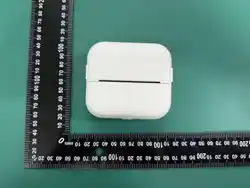
产品尺寸 :88.88*40.63*80.50mm
打印纸规格 :57*26mm
温馨提示:规格参数可能因机型配置不同会有变更,请以实物为准
迷你打印机
产品使用手册
重要事项(警告)
如果电池长期未使用或电池电量耗尽,再次充电时可能无法立即
正常开机,请持续充电一段时间后再开机使用。
1.请勿将电池浸于水中,注意防潮防爆。
2.请勿擅自拆卸或改造电池。
3.请勿短路电池正负两极。
4.请勿将电池置于60°C高温中或靠近火源。
5.电池浸水后禁止使用。
6.内含小零件,不适宜三岁以下儿童使用!
7.玩耍时请勿靠近火源!
8.用错误型号电池更换会有爆炸危险,务必按照说明处置用完的电池
9.注意打印时打印头最高温度70℃,请小心勿触;
10.注意撕纸刀片锋利,请小心勿触;
11.本产品不属于儿童玩具,14岁以下儿童应在成人的监护下使用,
根据我司获得国家强制性产品CCC认证标准,本产品出厂均不含
电源适配器,用户若使用电源适配器供电,则需购买配套使用
获得CCC认证并满足标准要求的电源适配器。
1.机子电量低时,请及时为本机充电;
2.使用随机配带的充电线连接充电适配器(推荐使用规格DC5V 1A,
本产品不提供充电器);
3.约4-6小时可充满电。
4.充电时请放到小朋友接触不到的地方,避免出现安全隐患
首次使用请先充电,长按
电源键3秒左右开/关机。
使用手机扫描图中二维码下载APP。
苹果用户 : 在App Store搜索【知无涯】
下载APP;
安卓用户 : 在各大应用商店或者浏览器
搜索【知无涯】下载APP;
港澳台地区请下载【Tiny Print】使用
感谢您使用本公司生产的智能数码产品,让您轻松体验产品,
我们随机配备了内容详细的使用说明书,您从中可以获得产品的
使用介绍等,在您开始使用本机之前请先仔细阅读说明书,以方
便您能准确的使用本产品,当涉及内容有变更时,恕不另行通知。
产品概述
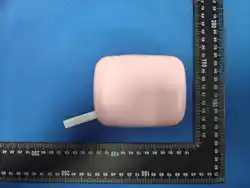
本产品是一款外观独特,设计精美,携带方便的迷你打印机,
适用学习、办公、生活等...
注意事项
本节内容是为了使用者正确使用标签打印机,请认真阅读并遵守。
☆ 避免直射光线、热源、灰尘、潮湿、易受震动或易被风吹倒的
地方,亦不可浸入水滴,勿扔放、震动机器、以免损坏机器的零
部件、以免损坏机器的零部件。
☆ 避免频繁的插拔外部设备(如充电接口等),以免造成插口松动、
接触不良影响本机的正常使用。
☆ 禁止自行拆卸、修理、改造、重摔,以免对本机造成损坏,如本
机出现故障,请及时联系服务中心进行维修。
☆ 切勿接触苯、稀释剂等化学物品。
☆ 骑车、驾驶汽车及摩托车时请勿使用,以免造成危险。
警告:所有包装材料,如胶带、提手、塑料片、捆绑线、标签等,
都不属于产品的一部分,不适于儿童玩耍,
为了您孩子的安全,请妥善处理以上包装材料。废旧电池、
旧电子产品,请分类妥善处理。
充电使用方法
首次使用 保修条例
三包凭证
用户保修卡
重要提示:
为保证您享受快速便捷的服务,请认真填写以下内容后随产品寄给我们
姓 名:
联系电话:
购买日期:
联系地址:
产品型号:
购买地址:
备 注:
用户保修卡 第二次 NO:
用户保修卡
1.
2.
开启手机蓝牙后,用手机
下载好的APP,在“我的设备”
标签栏连接打印机,连接成功
后即可打印纸条。
(图中型号仅供参考)
3.
打印纸更换教程
1.
根据箭头指示方向,手动
两侧向内按压,同时向上
打开纸仓盖子,如图2所示。
2.
取出旧纸卷,将新纸卷按图示
方向放入,纸要放正,不要
放歪。(注意:新热敏纸需
露出纸仓2CM长度,以便装
纸仓盒时机器能自动吸纸)
3.
4.
将纸仓盒盖上,机器自动
吸纸后便可正常使用。
上述步骤无误后,连接APP
即可正常打印。
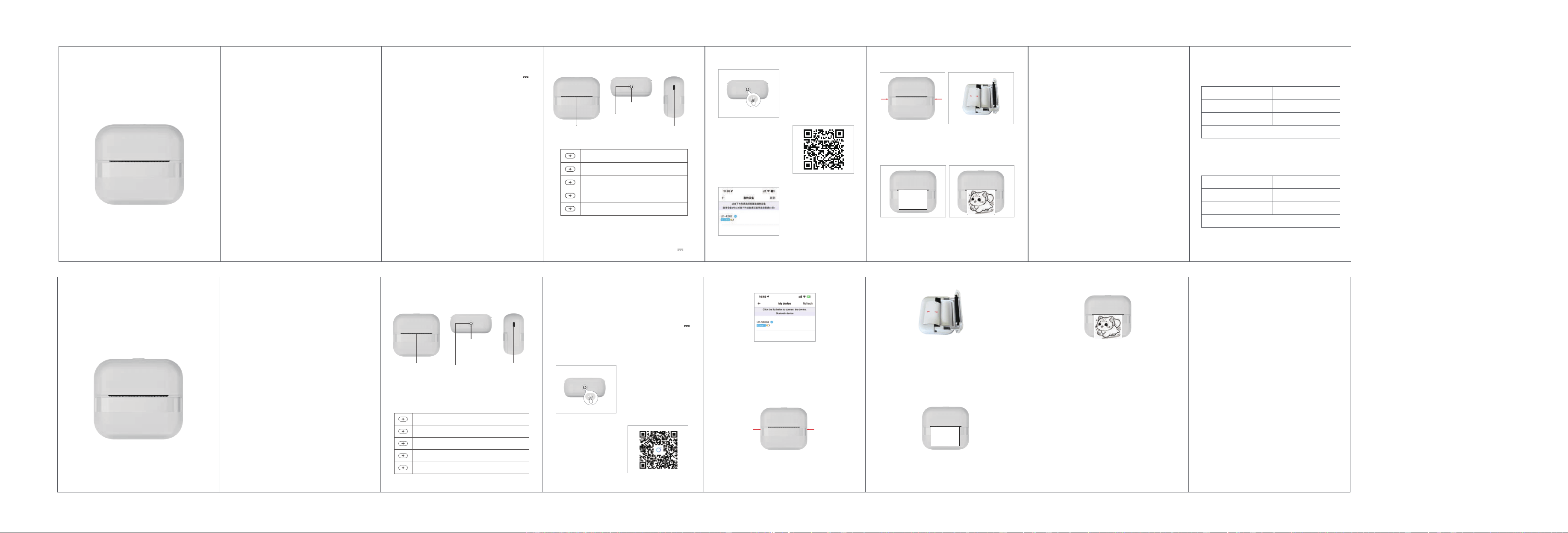
功能指示灯状态:
打印方式 :热敏/无墨打印
清晰度 : 200dpi
输入电源 :DC5V 1A
绿灯闪烁:开机、待机状态
绿灯呼吸状态:已连接APP
绿灯长亮:打印中
红灯长亮:缺纸、过热、开盖
红灯闪烁:电量低
电源键:长按3秒开机
功能指示灯
打印出口
充电口
2cm
2cm
W
arm Prompt: Specifications and parameters may be changed depending
on the configuration of the model. Please refer to the actual product.
Oper
ating Manual
Ma
tters needing
K
ey/interface specification
Indicator light status
Green light flashing: Powered on, Standby mode
Breathing Green Light: App Connected
Solid Green Light: Printing in Progress
Solid red light: Out of paper, overheating, or cover open
Flashing red light: Low battery
U
se the wizard
Ba
ttery capacity : 800mAh
Printing method : inkless printing
Product Size : 88.88*40.63*80.50mm
Pr
oduct specification
Se
arch for "Tiny Print" in the
App Store and download it.
First use please charge first ,
long press the power key 3
seconds to boot .
1 . when char
ging . please gently insert or pull out the charging
line to prevent excessive force damage to the port;
2 . After charging , please unplug the charging line in time
3 . In order to avoid danger , do not use or charge in high
temperature ,high humidity , excessive smoke and dust
environment . such as: bathroom , steam room , open fire , etc ;
4 . Improper charging may lead to print head damage ;
5 . Do not touch the print head to prevent overheating and
scalding ;
6 . Tear paper blade sharp , be careful not to touch;
7.Contains small parts, not suitable for children under three
years of age to use
8.The Guardian should be in custody while the child is playing.
Brie
f Introduction
Maintenance and maintenance
This product should not be placed in wet environment for a
long time,please wipe the surface stains with dry
cloth.Wires,plug shells and other components must be
regularly checked for damage,and damage should be stopped
immediately until repaired.in order to reduce battery aging and
swelling; lf it is not used for a long time,it needs to be charged
once every three months or so.
Thank you for using the intelligent digital products
produced by our company. We have randomly equipped with
detailed instructions, from which you can obtain instructions
on the use of the products. Please read the instructions
carefully before you start using this machine,so as to facilitate
you to use this product accurately. When the contents involved
are changed, no notice willbe given.
This product is aunique sheape, exquisite design,easy to
operate Portable mini printer,designed for children's digital
products,so that children in use to learn more imagination
play,experience the fun of nature.
Take out the old paper roll and put the new paper roll in the
direction shown. The paper should be put straight and not
crooked .( Note : The new thermosensitive paper needs to be
exposed to 2 cm of paper bin length so that the machine can
absorb paper automatically when the paper bin is shaped)
After turning on your phone's BT, open the downloaded app
and connect the printer under the "My Devices" tab. Once
connected successfully, you can start printing labels.
(The model shown in the image is for reference only.)
Cover the paper bin,the machine can automatically absorb
paper after normal use
P
aper replacement course
F
or first-time use, please charge the device first. Press and hold
the power button for about 3 seconds to turn the device on/off.
Ba
ttery Warning Note
Onc
e the above steps are completed correctly, connect to
the app to start printing normally.
4.
3.
2.
1.
1 . Ple
ase use 5V charger to charge according to the
specification to avoid damage to the machine;
2 . Disassembly , impact , extrusion or fire are prohibited ;
3 . If severe bulging occurs , do not continue to use .
4 . Do not put in high temperature environment , battery after
immersion is prohibited to use;
5 . Replacement with the wrong type of battery can be
explosive , be sure to follow the instructions to dispose of
used batteries .
Power button:
Press and hold for 3 seconds to turn on
Function
indicator light
Paper outlet
Charging port
Mini Portable Printer

This device complies with part 15 of the FCC Rules. Operation is subject to the
following two conditions: (1) This device may not cause harmful interference, and (2)
this device must accept any interference received, including interference that may cause
undesired operation.
Any Changes or modifications not expressly approved by the party responsible for
compliance could void the user's authority to operate the equipment.
Note: This equipment has been tested and found to comply with the limits for a Class B
digital device, pursuant to part 15 of the FCC Rules. These limits are designed to
provide reasonable protection against harmful interference in a residential installation.
This equipment generates uses and can radiate radio frequency energy and, if not
installed and used in accordance with the instructions, may cause harmful interference
to radio communications. However, there is no guarantee that interference will not
occur in a particular installation. If this equipment does cause harmful interference to
radio or television reception, which can be determined by turning the equipment off and
on, the user is encouraged to try to correct the interference by one or more of the
following measures:
-Reorient or relocate the receiving antenna.
-Increase the separation between the equipment and receiver.
-Connect the equipment into an outlet on a circuit different from that to which the
receiver is connected.
-Consult the dealer or an experienced radio/TV technician for help.
FCC Radiation Exposure statement
The device has been evaluatec to meel general RF exposure requirement. The device
can be used in portable exposure condition without restriction.