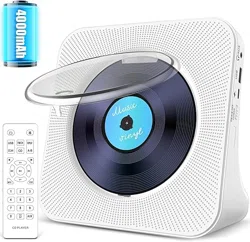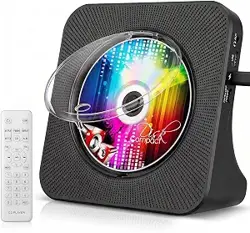
User Manual
Thank you for purchasing our products. Please read this
manual carefully before using this product. If you encounter
any difficulties or problems during use, please contact us
for further assistance.
EN

USER MANUAL-EN . . . . . . . . . . P 1 - P 1 0
BENUTZERHANDBUCH-DE . . . . P 1 1 - P 2 0
MANUALE D'USO-IT . . . . . . . . . P 2 1 - 3 0
MANUEL D'UTILISATION-FR . . . . P31-40
MANUAL DEL USUARIO-ES . . . . . P41-50

EN
CONTENTS
FUNCTION DESCRIPTION . . . . . . . . . . . . . . . . . . . . 2
MAIN FUNCTIONS . . . . . . . . . . . . . . . . . . . . . . . . . 4
POWER ON/OFF . . . . . . . . . . . . . . . . . . . . . . . . . . 4
CD MODE . . . . . . . . . . . . . . . . . . . . . . . . . . . . . . . 5
BLUETOOTH RECEIVER MODE . . . . . . . . . . . . . . . . . 5
USB MODE. . . . . . . . . . . . . . . . . . . . . . . . . . . . . . . 6
AUX MODE. . . . . . . . . . . . . . . . . . . . . . . . . . . . . . . 6
BLUETOOTH TRANSMITTER MODE. . . . . . . . . . . . . . 7
A-B REPEAT FUNCTION. . . . . . . . . . . . . . . . . . . . . . 7
REPEAT MODE . . . . . . . . . . . . . . . . . . . . . . . . . . . . 8
SLEEP MODE . . . . . . . . . . . . . . . . . . . . . . . . . . . . . 8
EQ SOUND. . . . . . . . . . . . . . . . . . . . . . . . . . . . . . . 8
FAST SONG SKIPPING. . . . . . . . . . . . . . . . . . . . . . . 8
RESET FUNCTION. . . . . . . . . . . . . . . . . . . . . . . . . . 8
NOTE . . . . . . . . . . . . . . . . . . . . . . . . . . . . . . . . . . 9
PRODUCT PARAMETERS . . . . . . . . . . . . . . . . . . . . . 9
WARRANTY . . . . . . . . . . . . . . . . . . . . . . . . . . . . . 10
PACKING LIST . . . . . . . . . . . . . . . . . . . . . . . . . . . 10
2
FUNCTION DESCRIPTION
EN
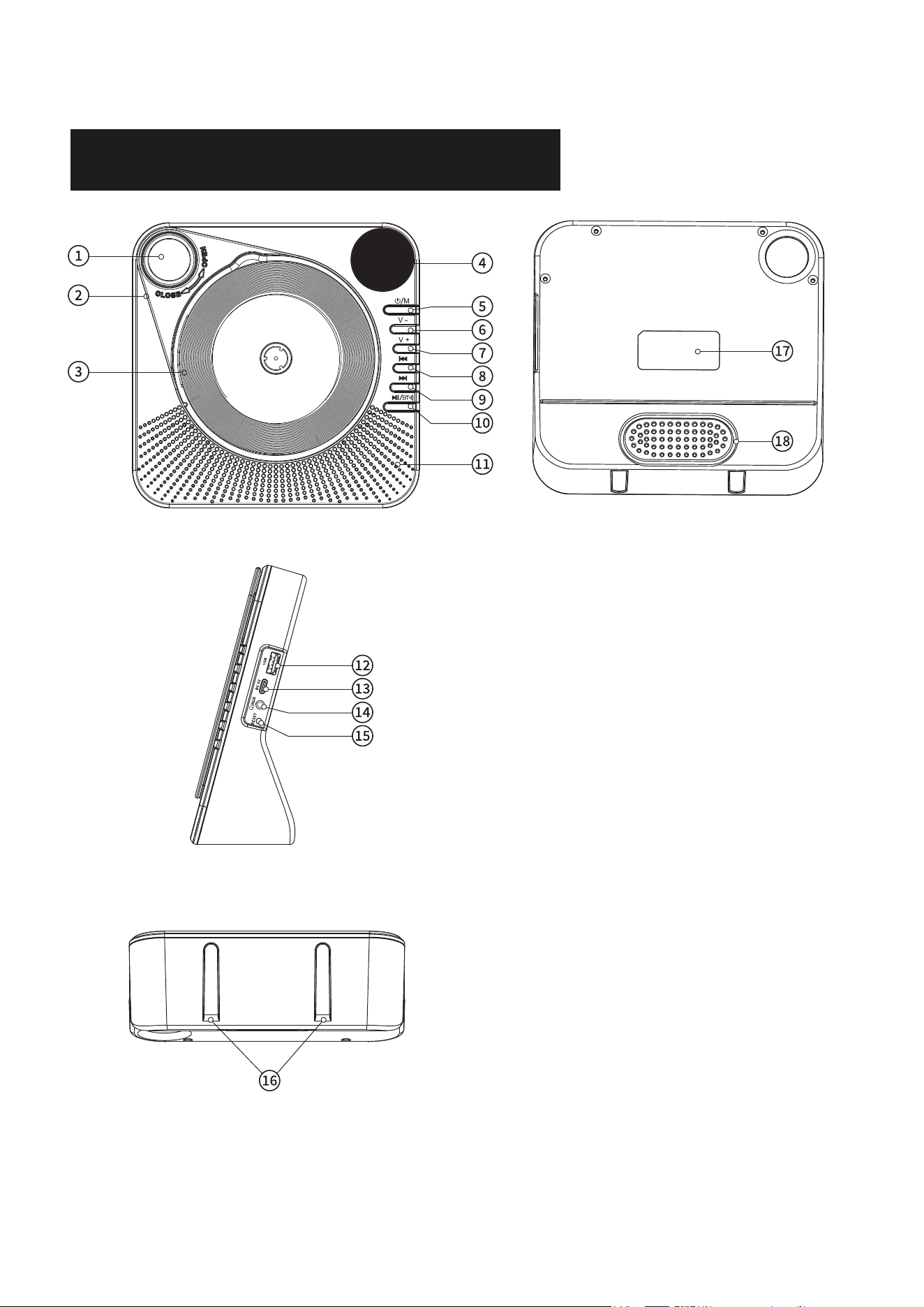
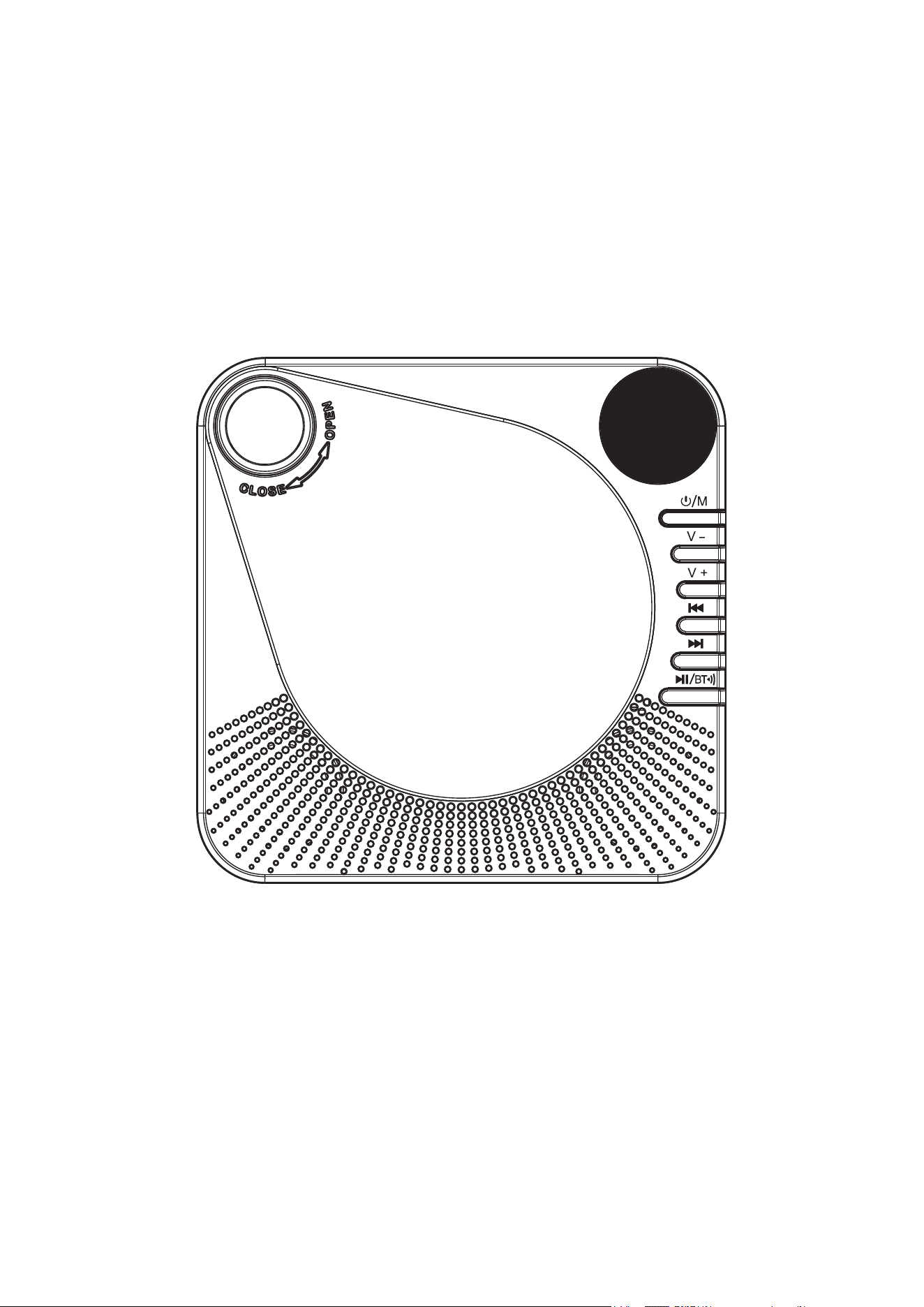
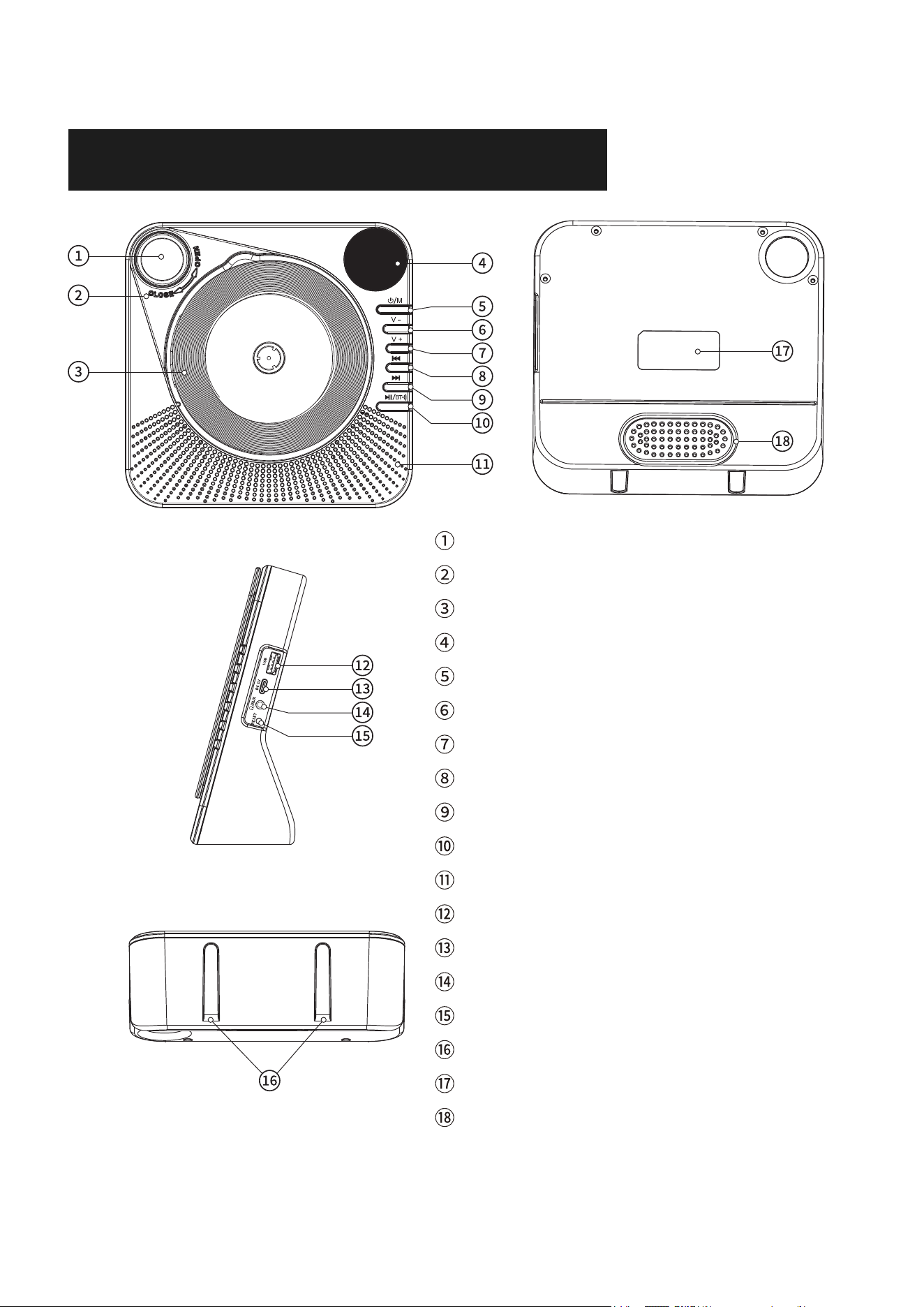
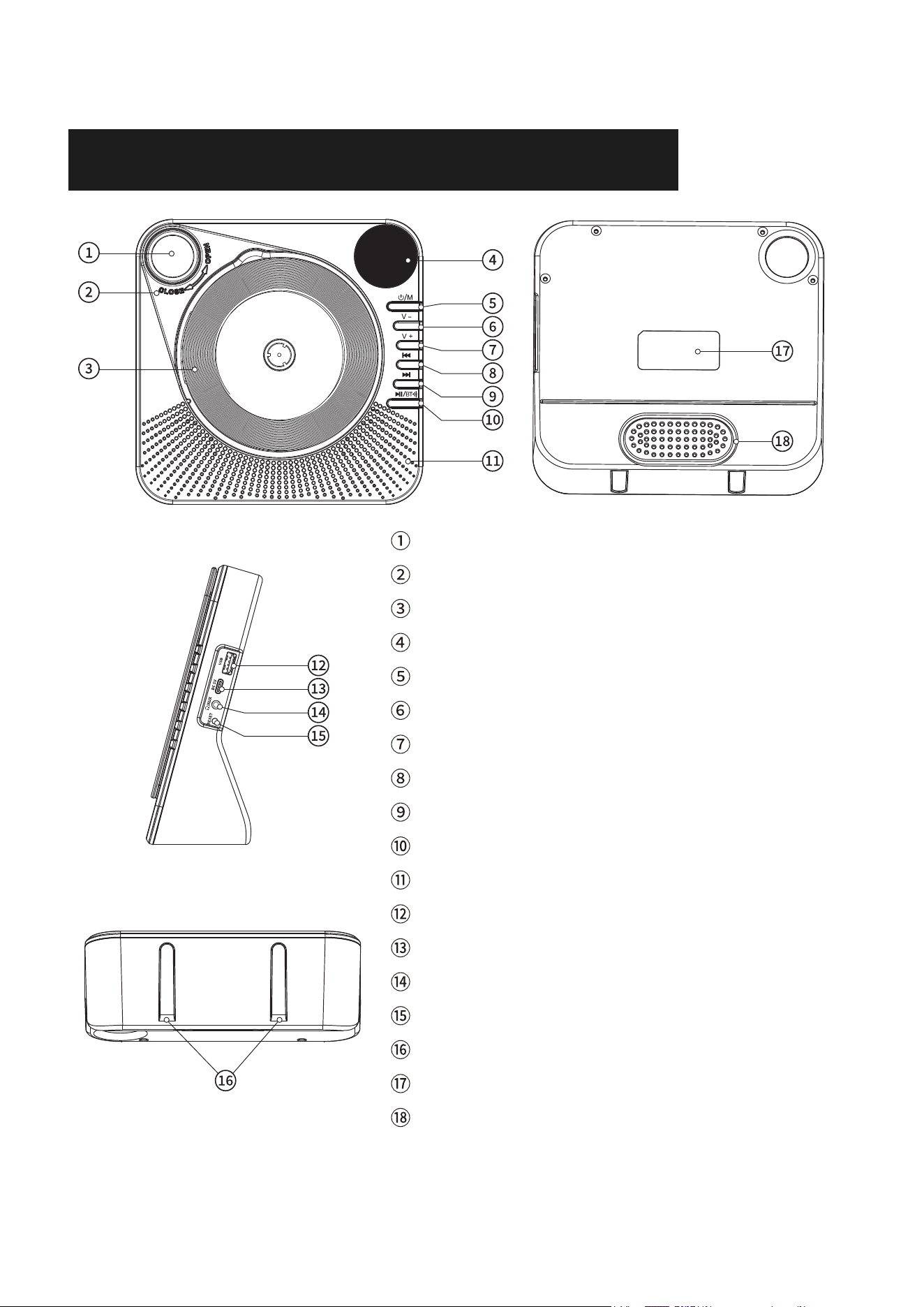
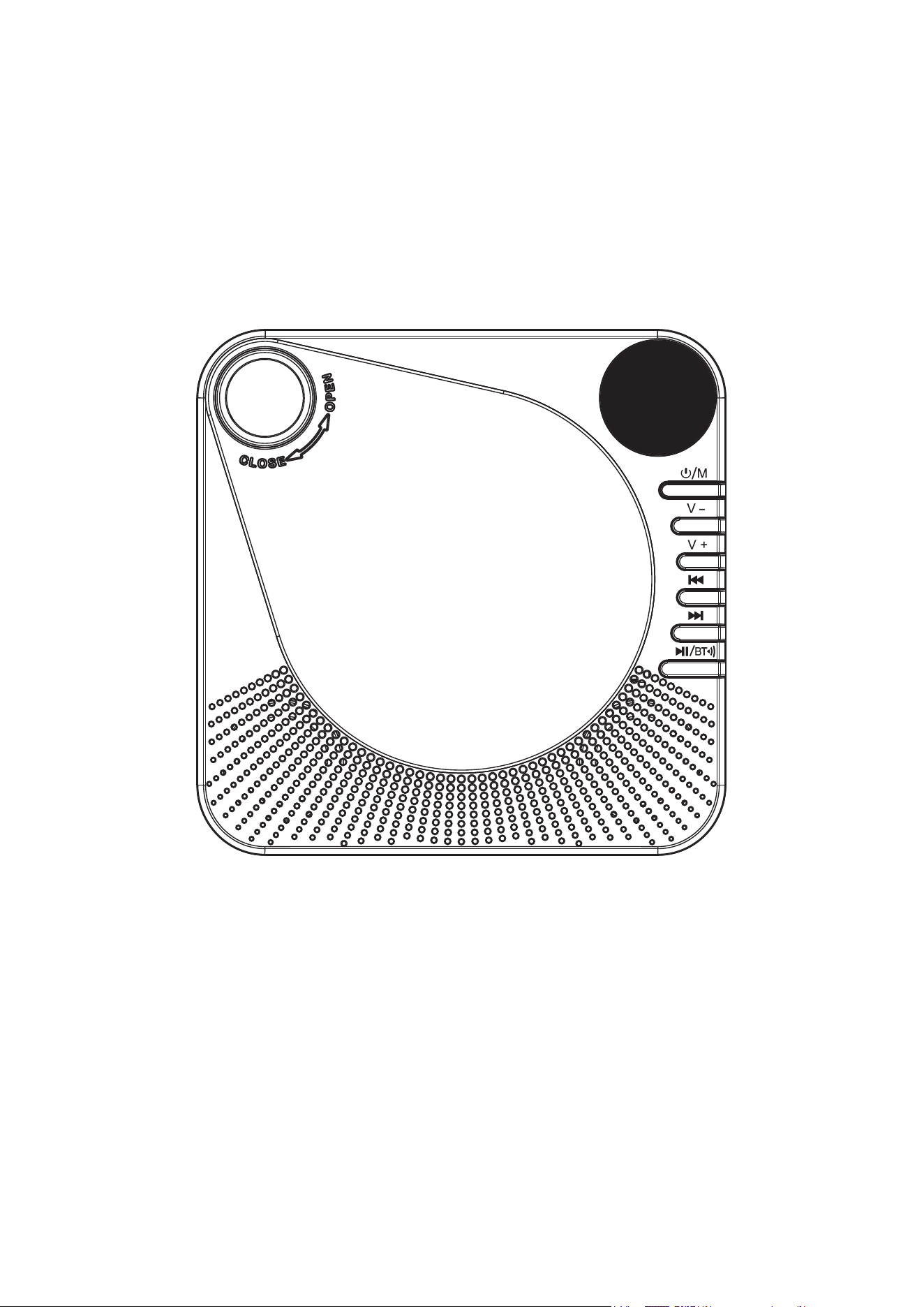
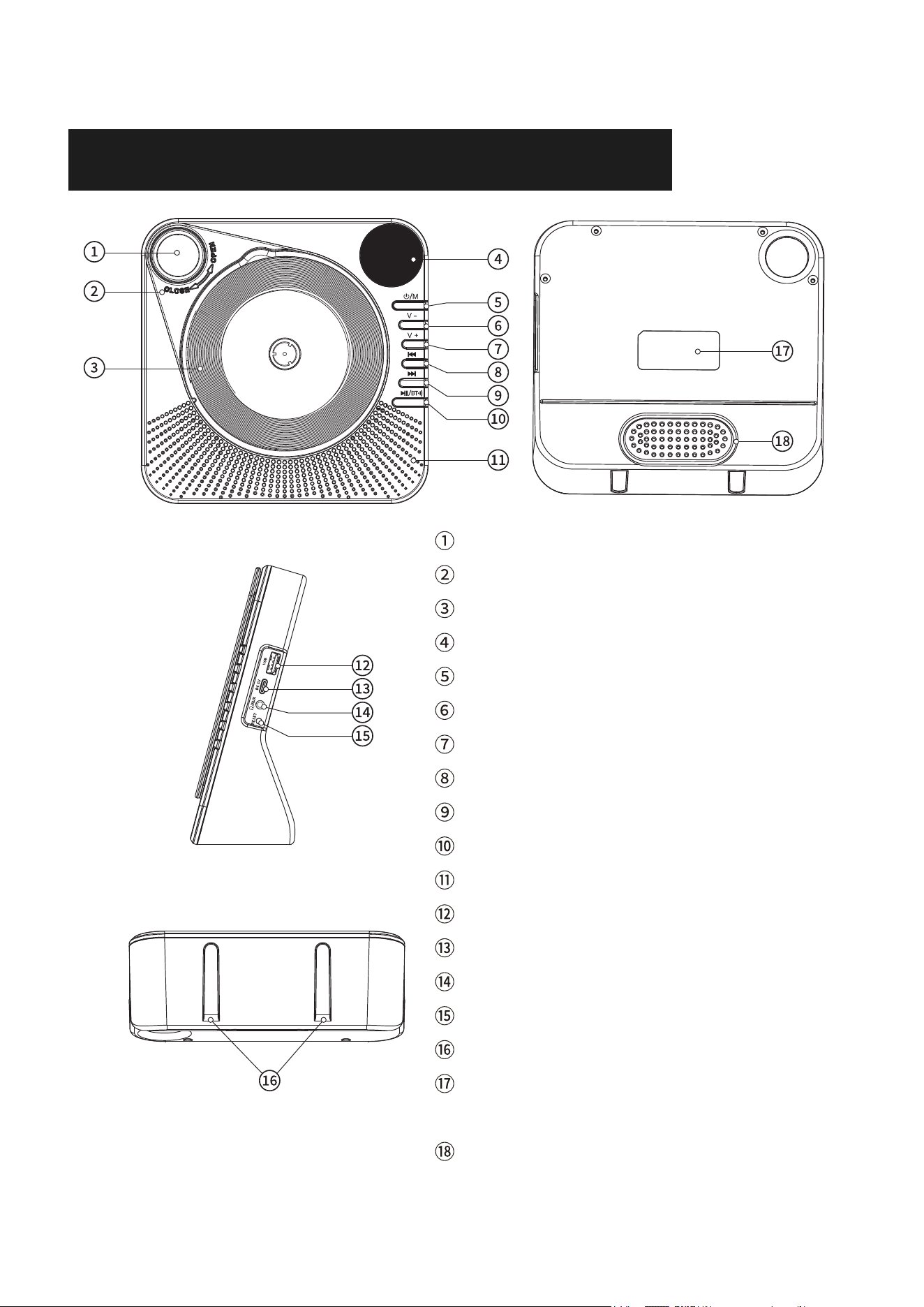
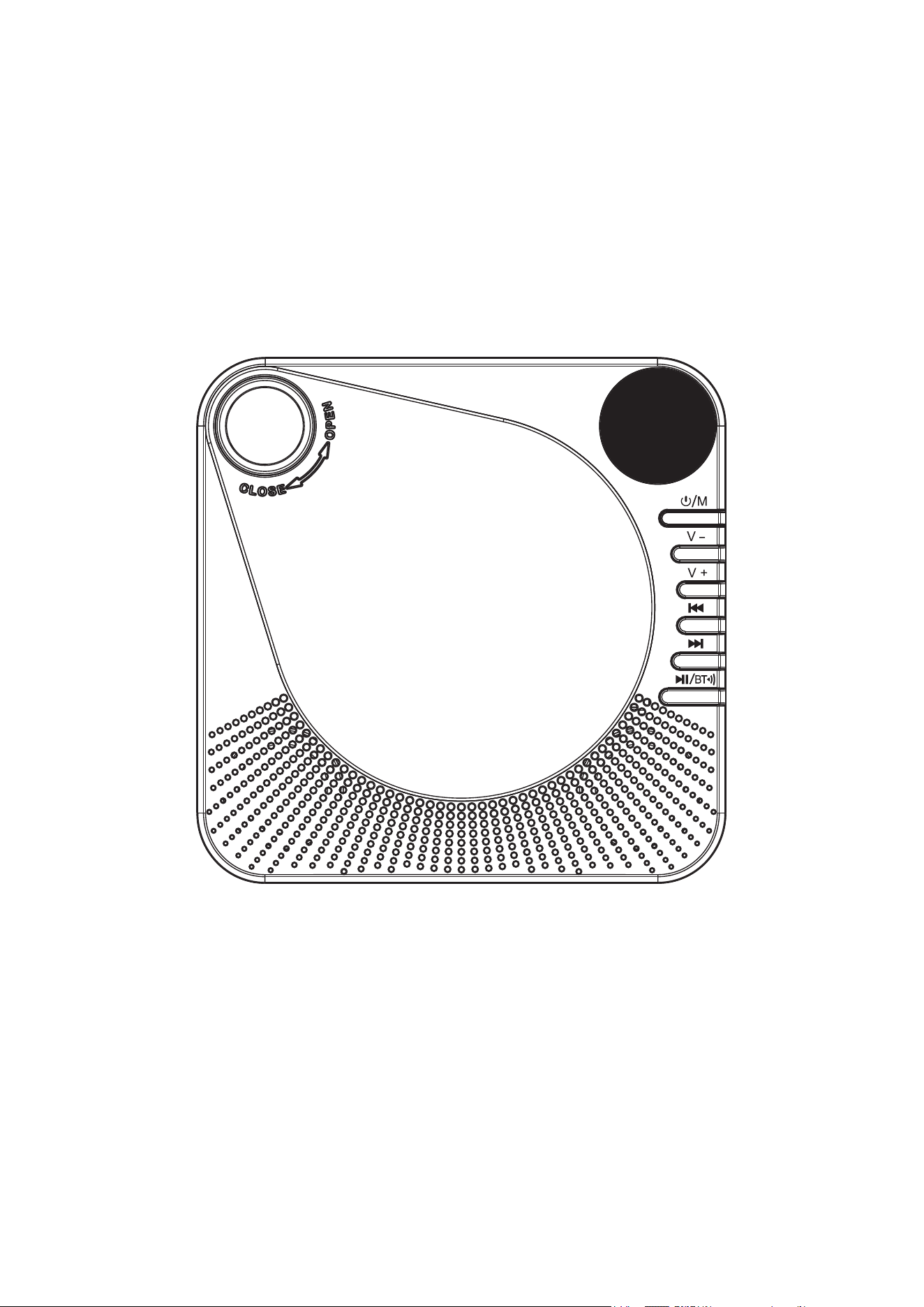
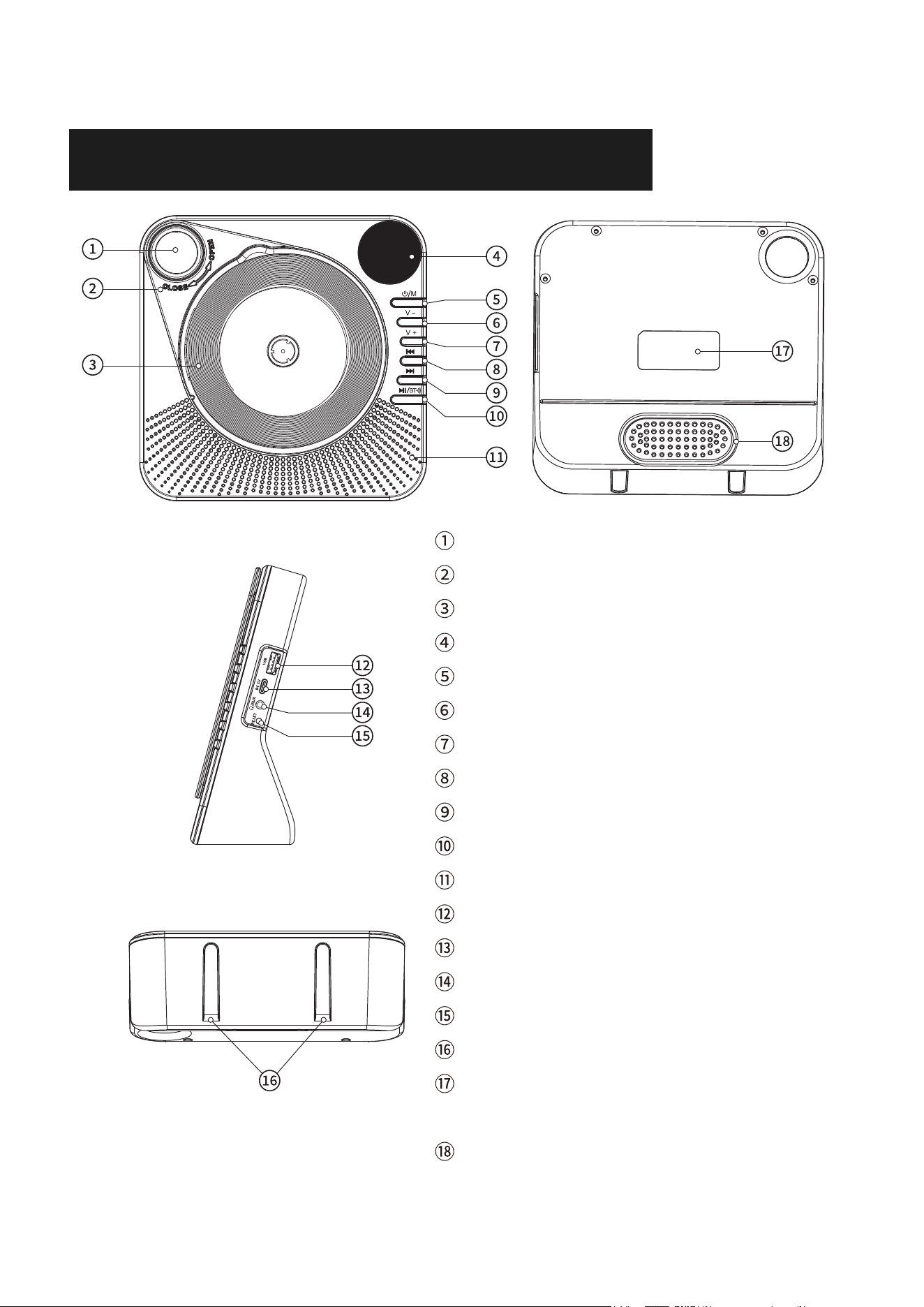
Ζ Carrying Handle
Η CD Lid
Θ CD Disc Placement Area
Ι LED Screen
Κ Power/Mode Switching Button
Λ Volume -
Μ Volume +
Ν Previous Song
Ξ Next Song
Ο Play/Pause/Bluetooth Transmitter
Π Speaker
Ρ USB Reading Port
Type-C Power Port
Σ Headphone Jack/Audio Input
Τ Reset Button
Υ Silicone Anti-slip Pad
Φ Nameplate Position-Product Nameplate
Χ Membrane Hole
3
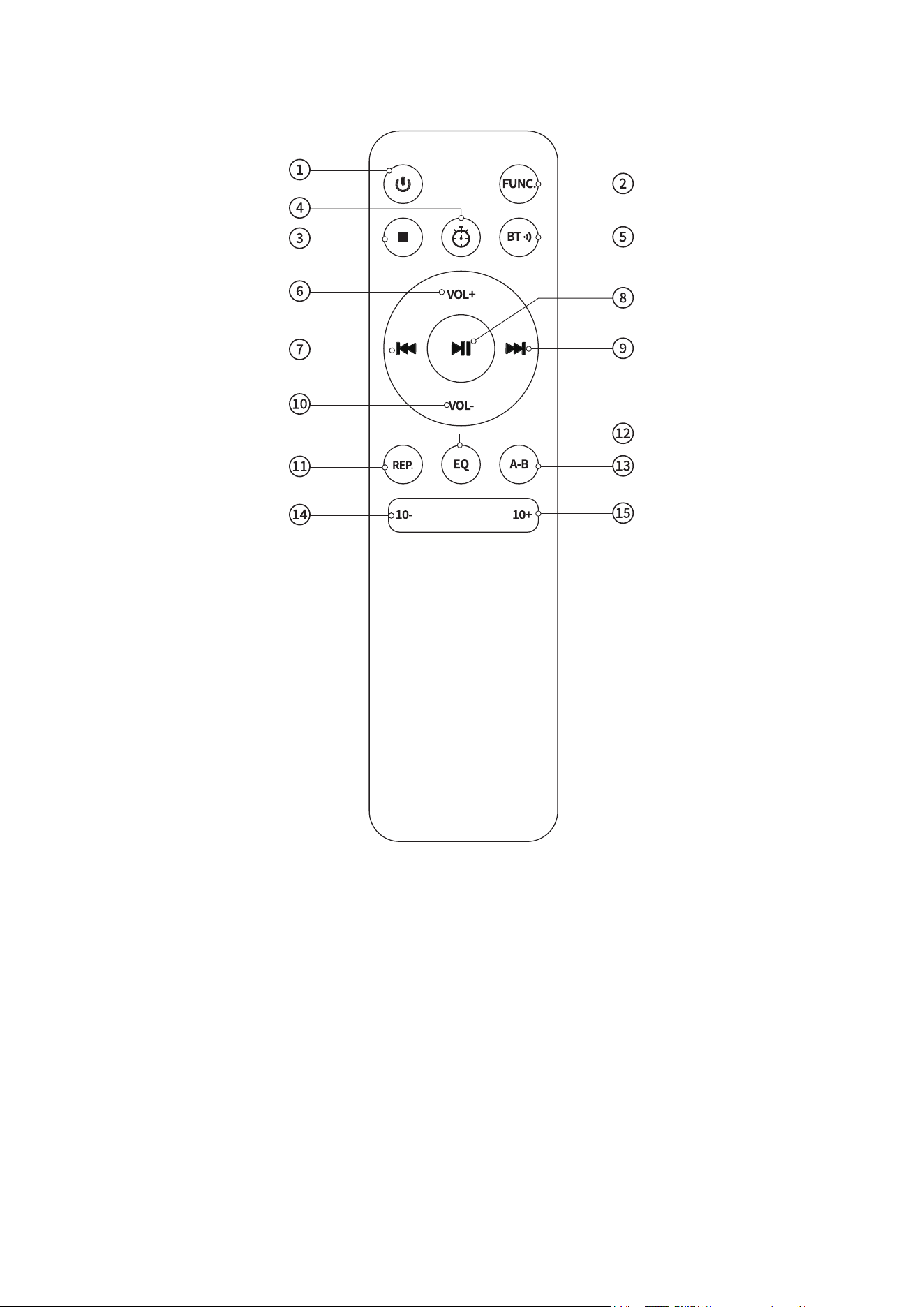
EN
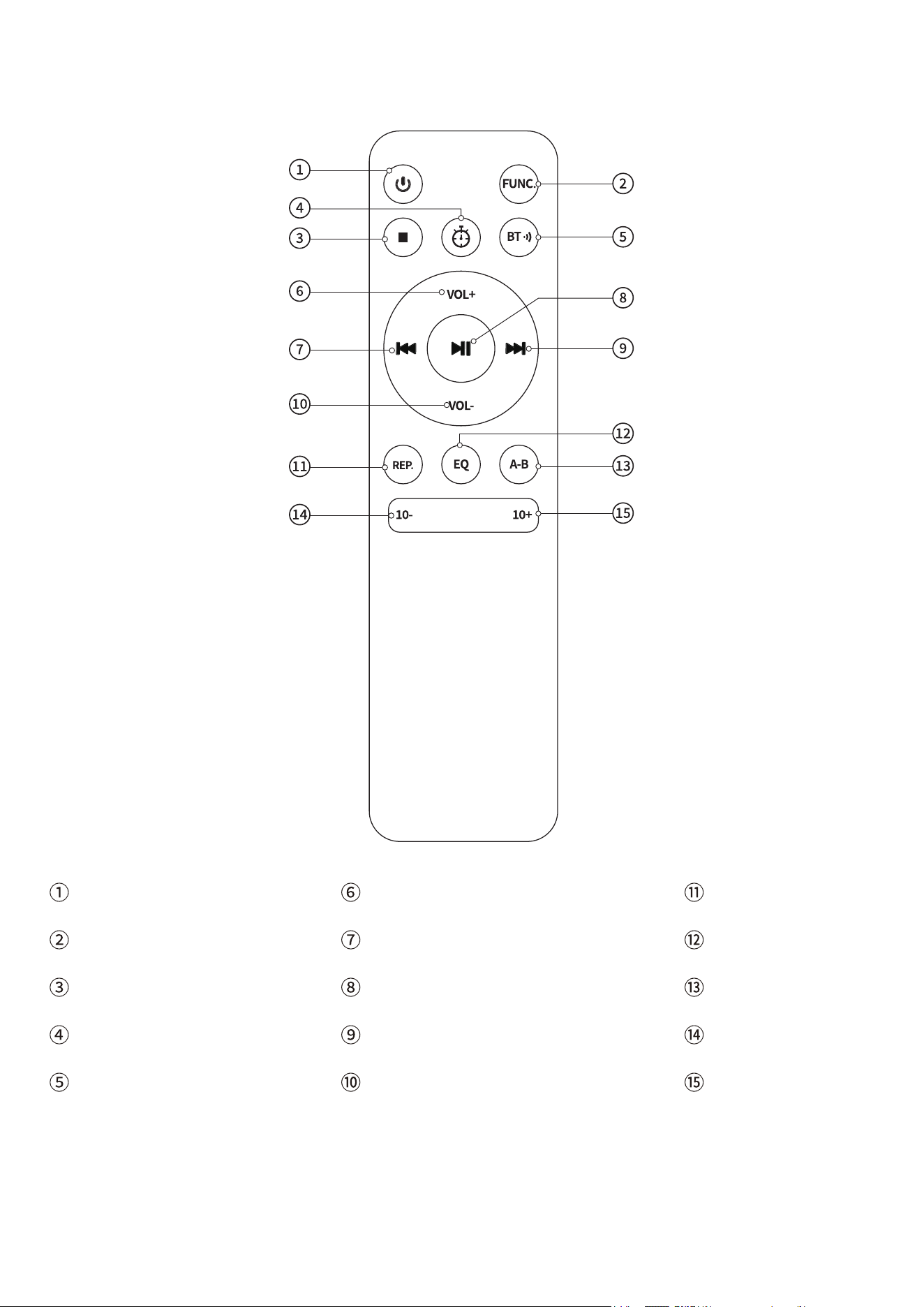
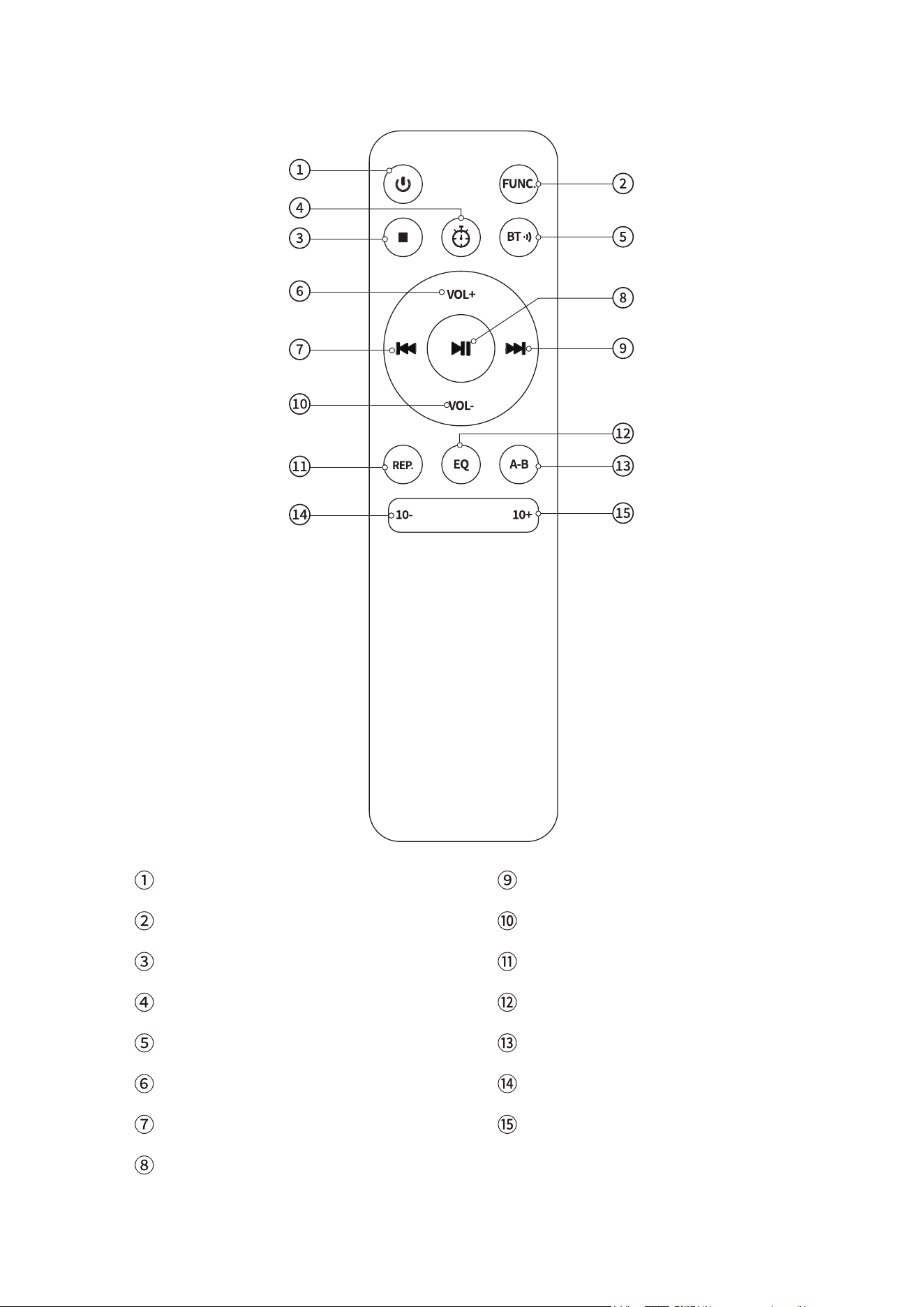
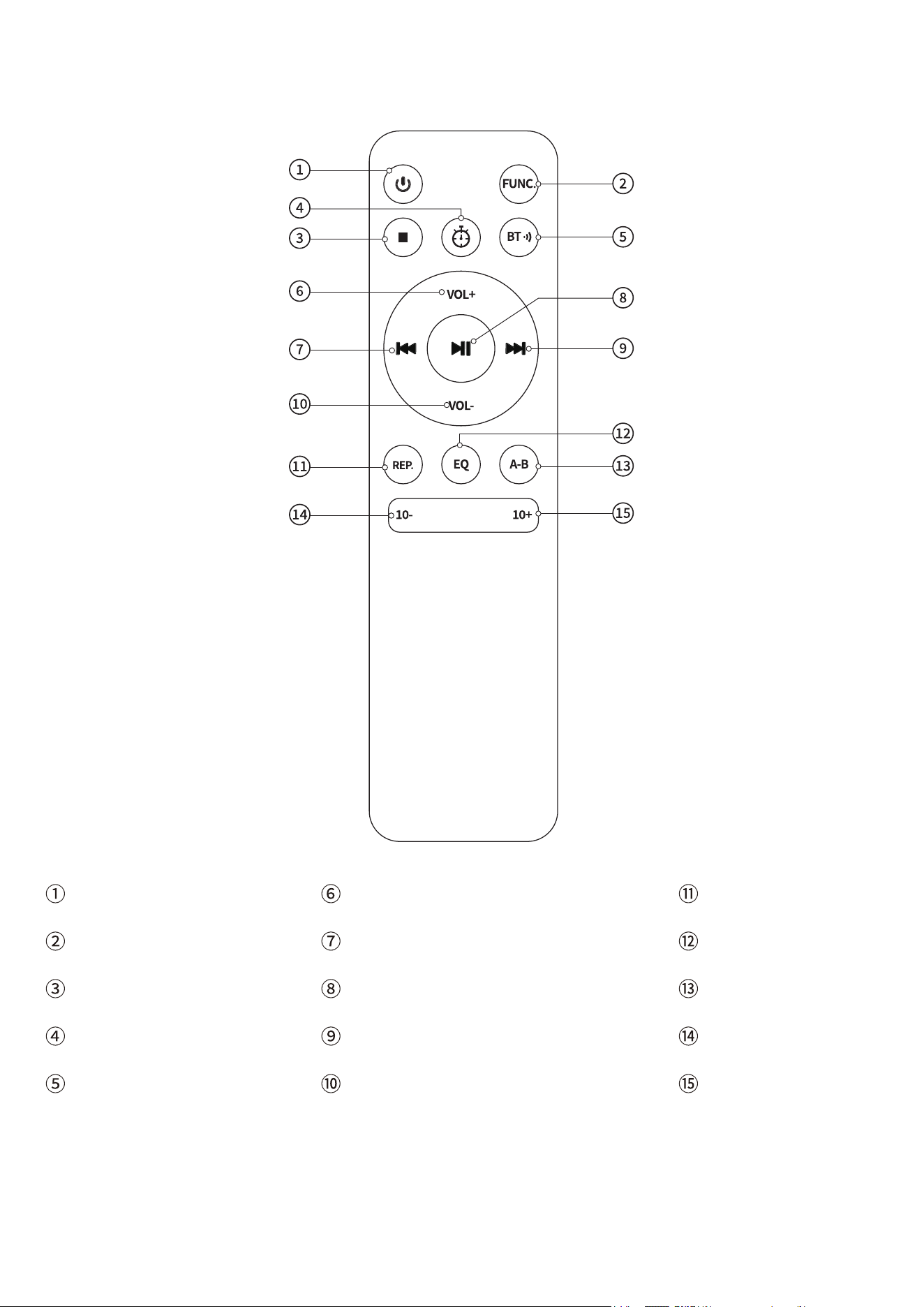
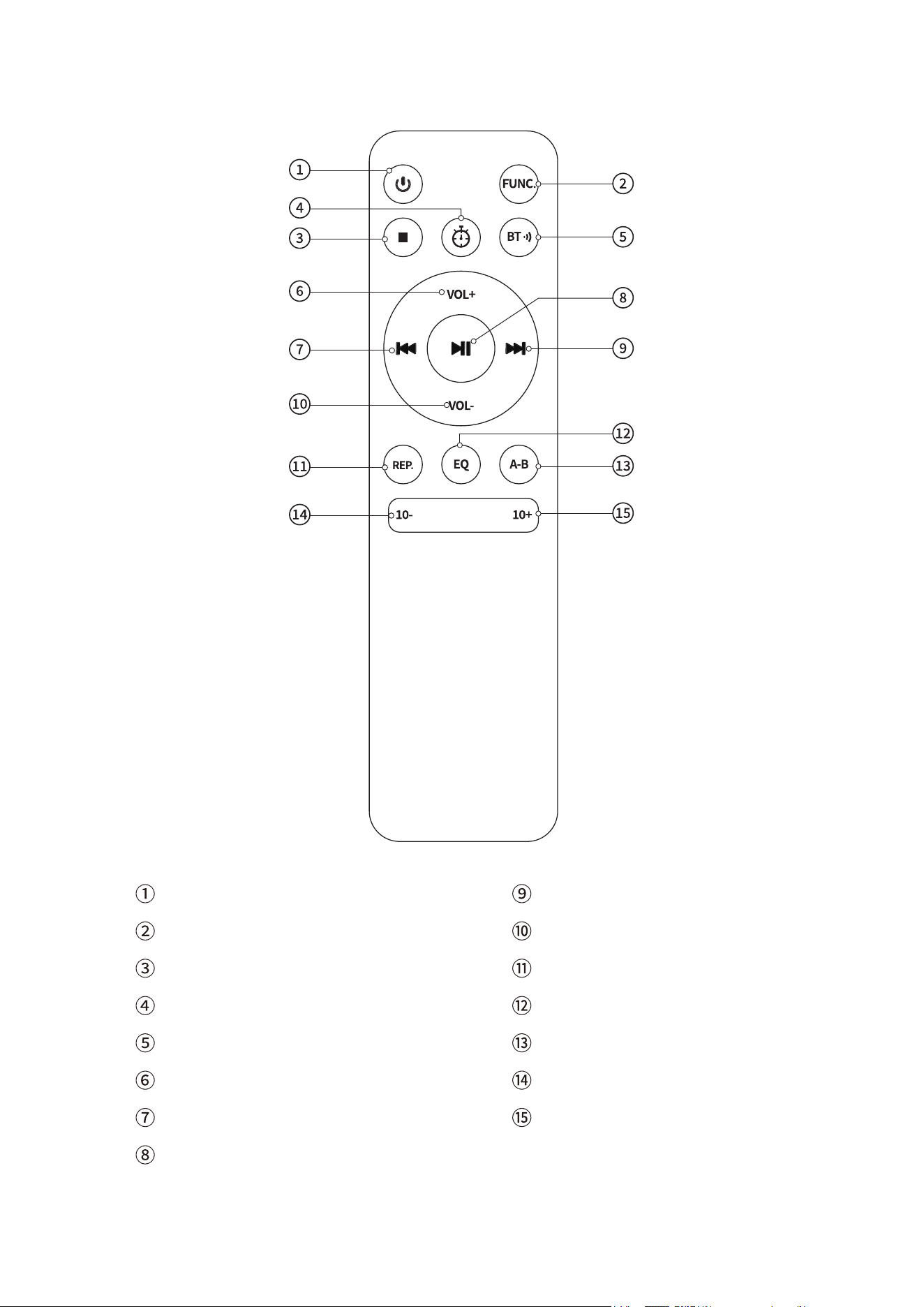
Ζ Power ON/OFF
Η Function Switching
Θ Stop Playback
Ι Sleep Mode
Κ Bluetooth Transmit
Λ Volume +
Μ Previous Song/Fast Rewind
Ν Play/Pause
Ξ Next Song/Fast Forward
Ο Volume -
Π Repeat Mode
Ρ EQ Mode
A-B Repeat
Σ Track -10
Τ Track +10

EN
MAIN FUNCTIONS
CD Mode: Supports CD/CD-R/CD-RW/MP3/WMA
Bluetooth Connection: For audio playback from mobile devices
Bluetooth Transmission: Sends audio to Bluetooth receiving devices
USB Mode: Supports MP3/WMA (Maximum memory: 64G, Maximum
number: 999)
AUX Input: Connects external audio devices
A-B Repeat: Repeats a specific section of a track
Sleep Mode: Set sleep time:10-15-30-60-90 minutes.
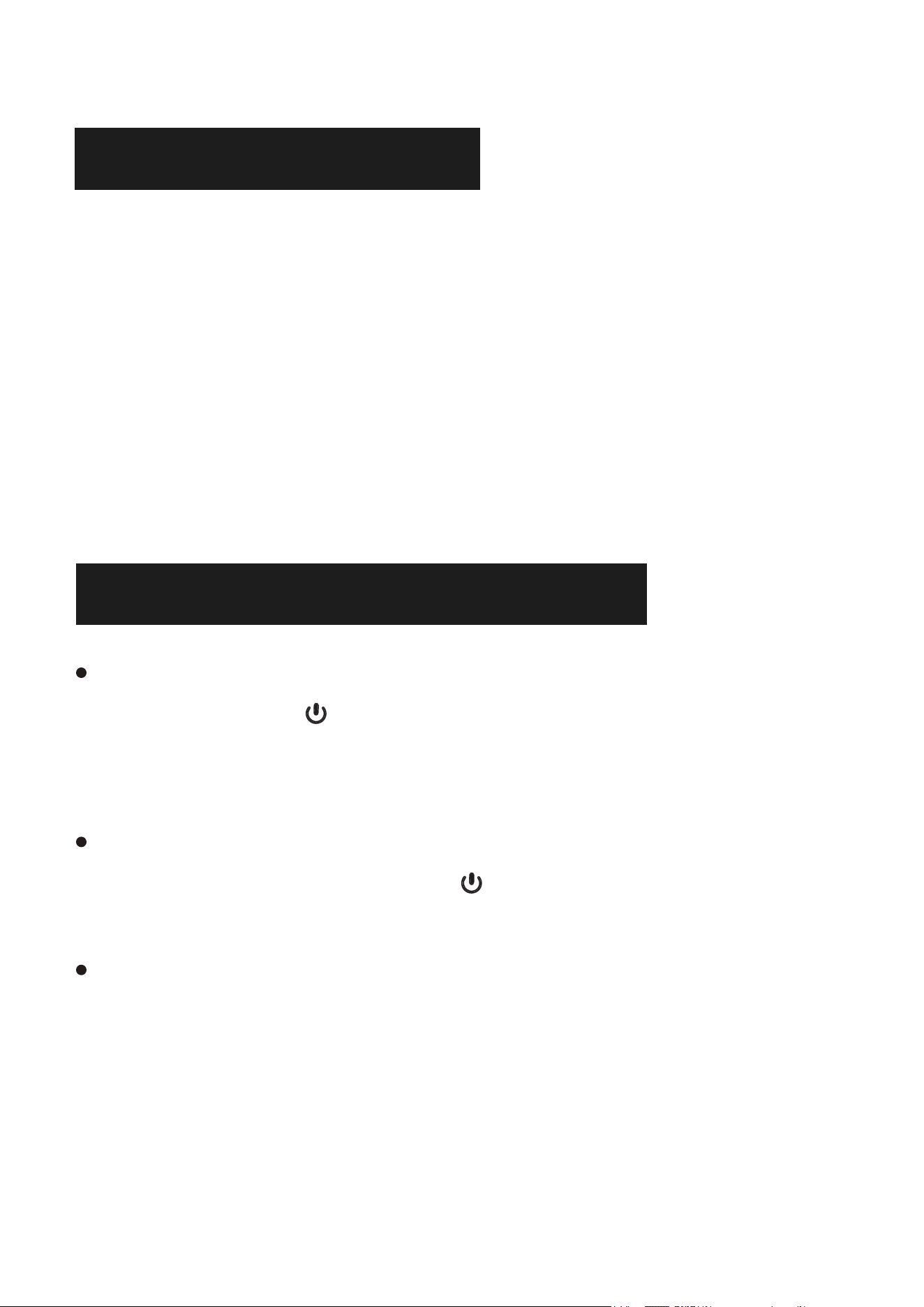
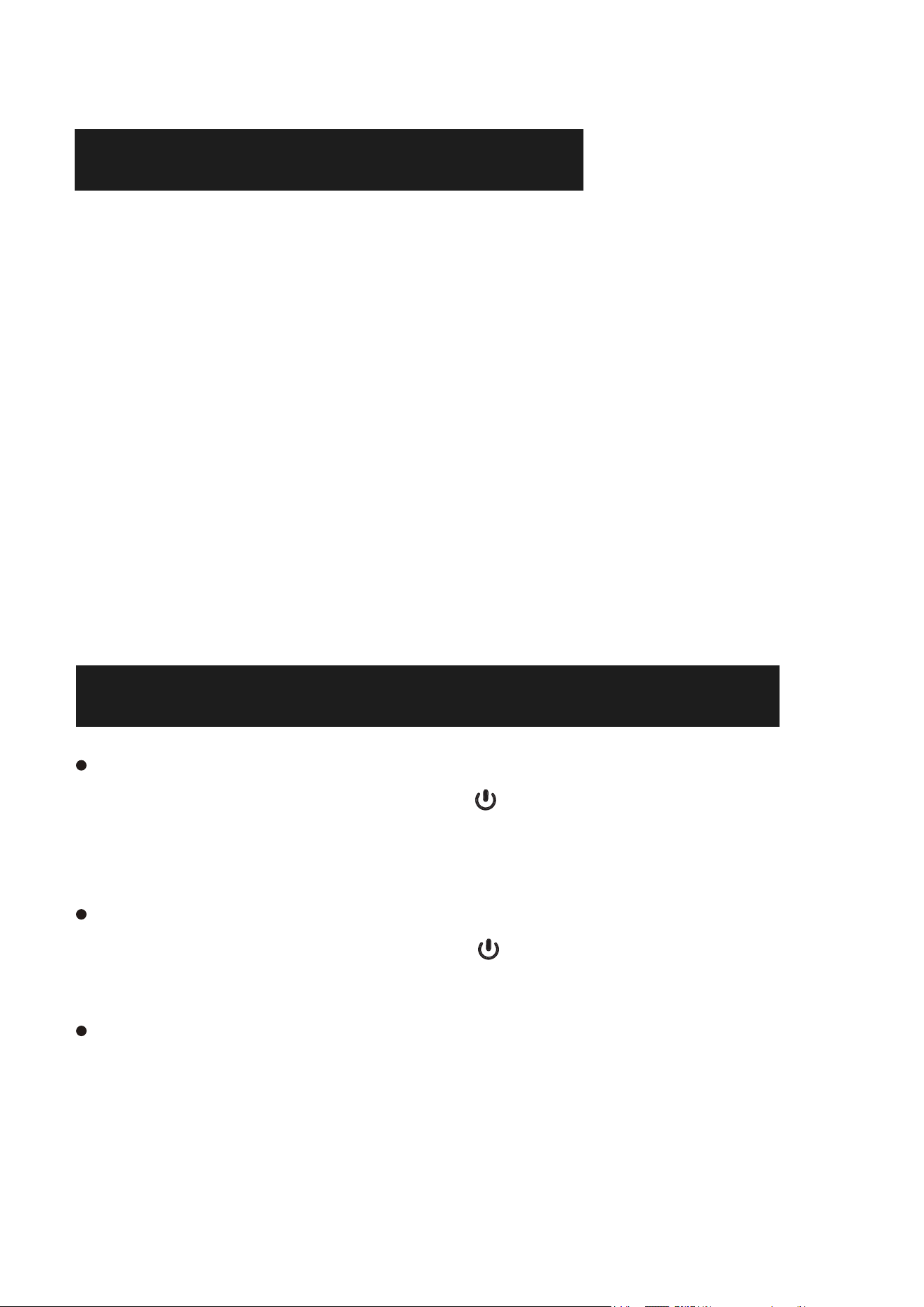
POWER ON/OFF
1PXFS0O
-POHQSFTTUIF .CVUUPOUPUVSOPOUIF$%QMBZFSXJMM
BVUPNBUJDBMMZQMBZUIF$%5IFEJTDTNVTUCFJOTFSUFEJOUPUIF$%
QMBZFSCFGPSFQPXFSJOHPO
1PXFS0
-POHQSFTTUIF .CVUUPOBHBJOUPUVSOPUIF$%QMBZFS1MFBTF
EPOPUUPVDIUIFEJTDCFGPSFUVSOJOHPUIF$%QMBZFS
/05&
$%QMBZFSSFRVJSFTBQPXFSDPOOFDUJPO6TFB5ZQF$QPXFSDBCMF
XJUIB7"BEBQUFS
4
5
CD MODE
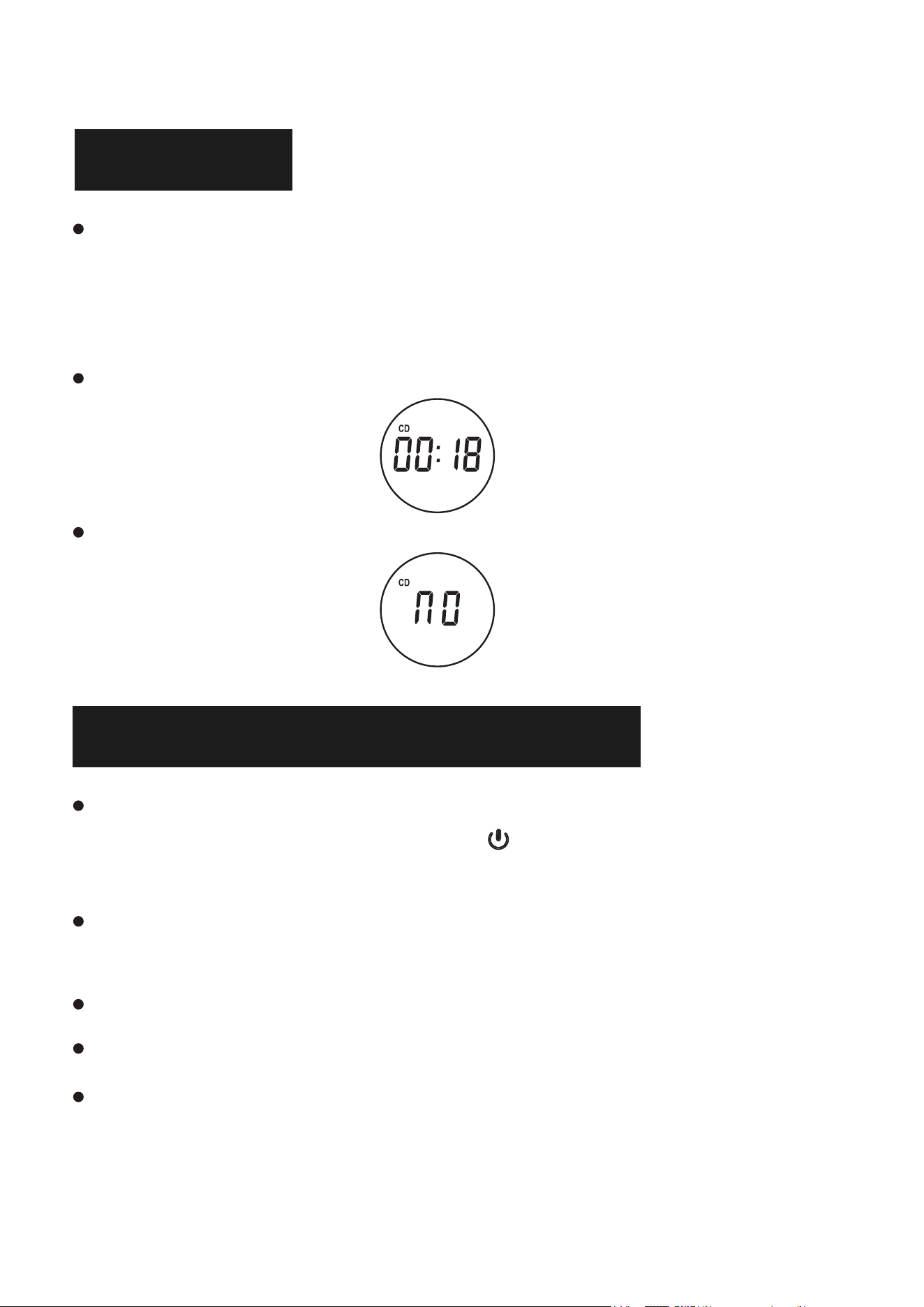
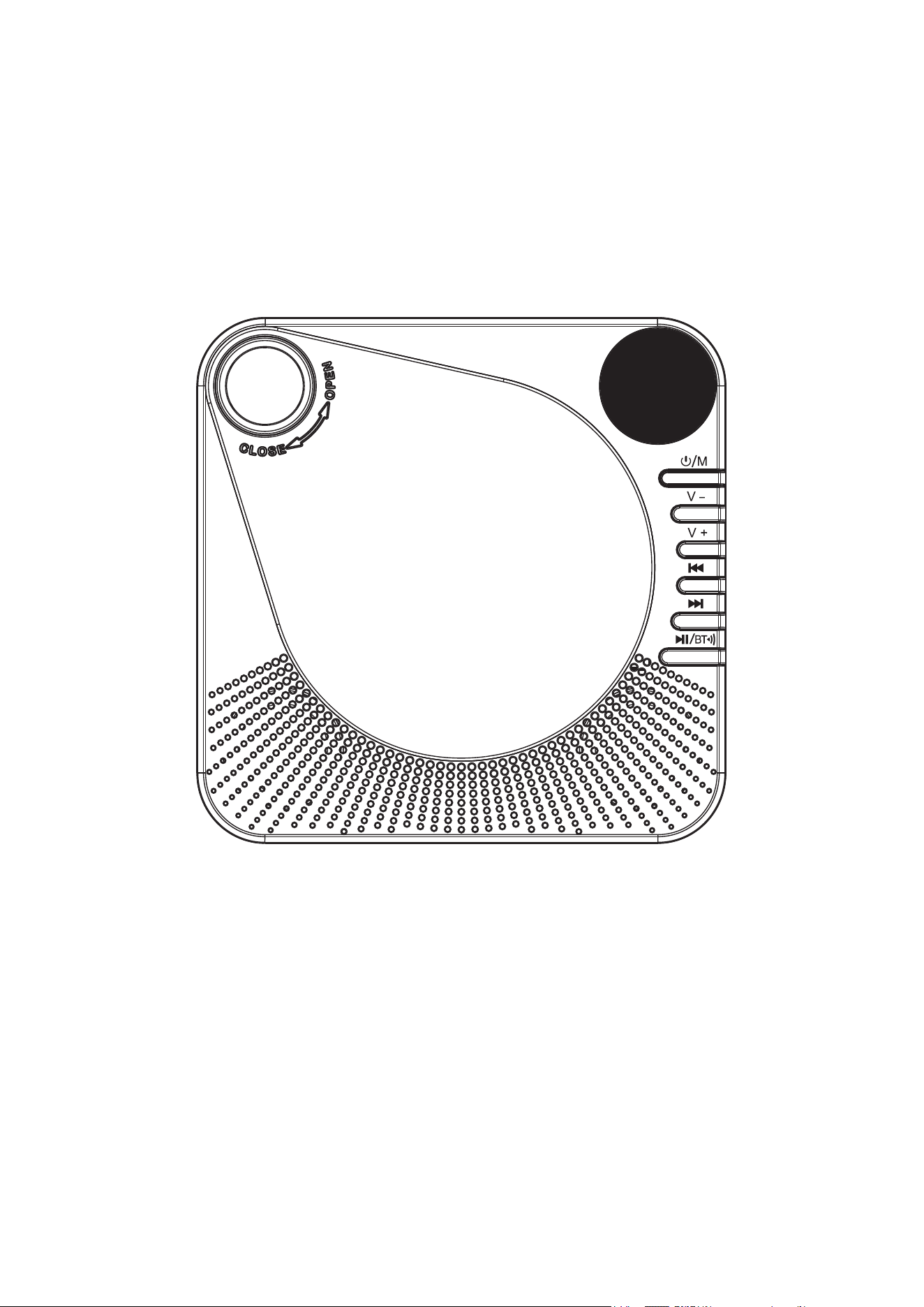
Press the [ FUNC. ] button on the remote control to switch to CD
mode, or press the “Mode” button (on the unit) to switch CD mode,
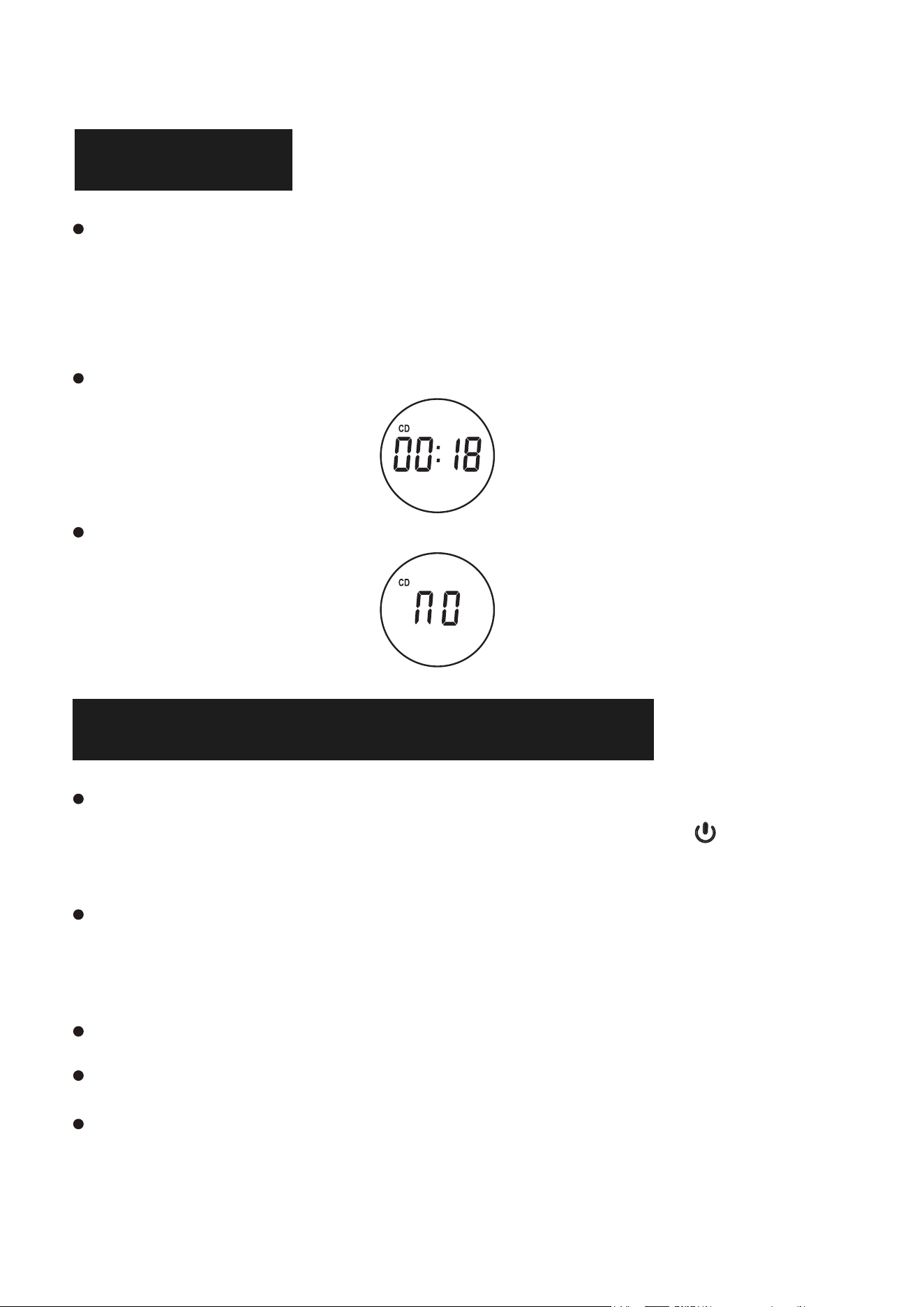
the disc will run automatically and the CD icon will appear on the LED
screen.
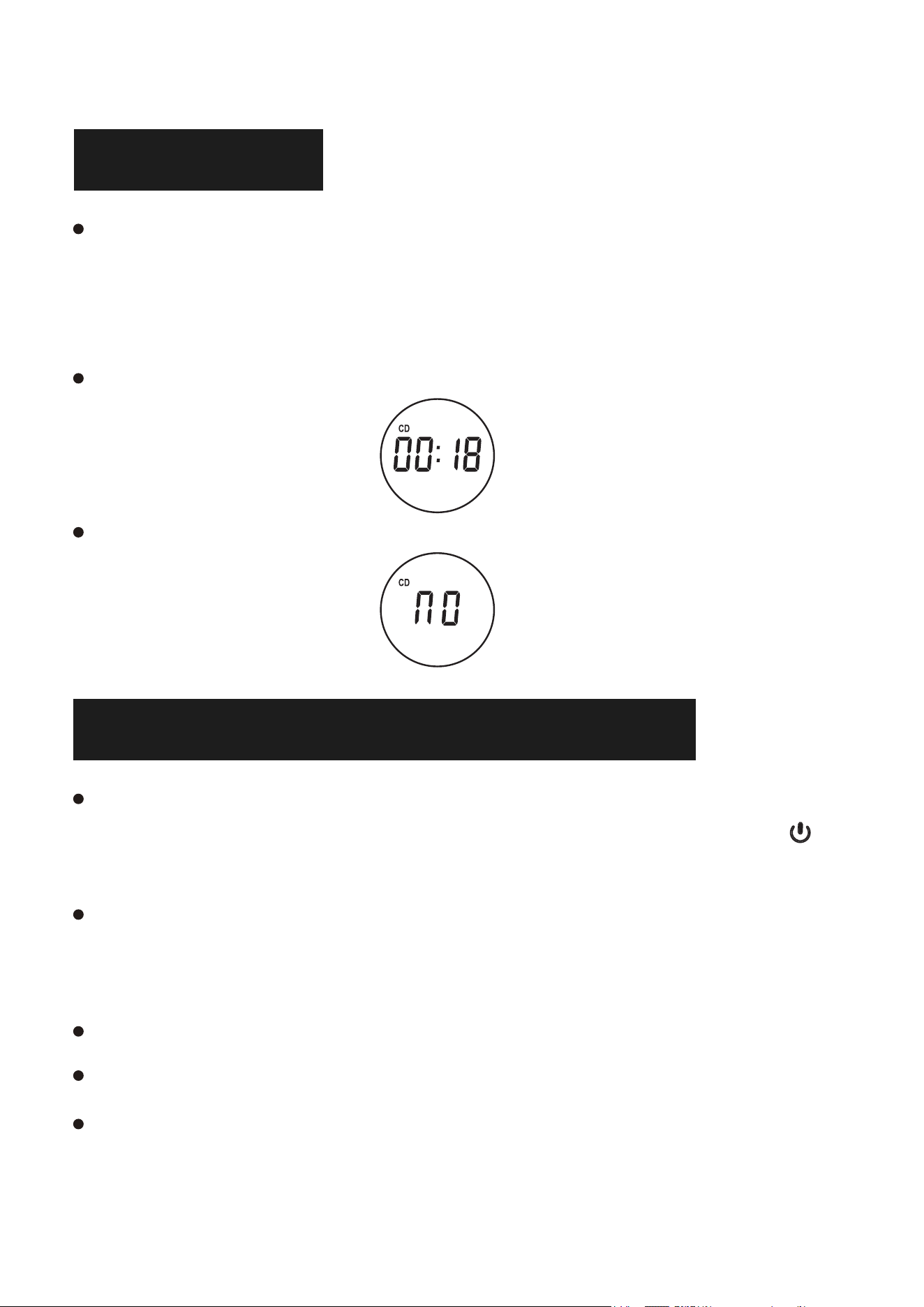
Wait 12-15 seconds, the CD player will play the CD audio.
If the disc is not recognised, "NO" will be displayed on the LED screen.
BLUETOOTH RECEIVER MODE
Press the [ FUNC. ] button on the remote control to switch to
“Bluetooth Mode” or short press the /M button on the cd player to
switch to Bluetooth Mode.
Activate Bluetooth in your mobile phone and select the bluetooth
named “CD86” in your mobile phone for pairing.
Your mobile phone will be paired/connected with the CD player.
After successful connection, there is a "Connected" voice prompt.
Play music on your mobile phone and the audio will be transmitted to
the CD player speakers via Bluetooth.
EN
6
EN
USB MODE
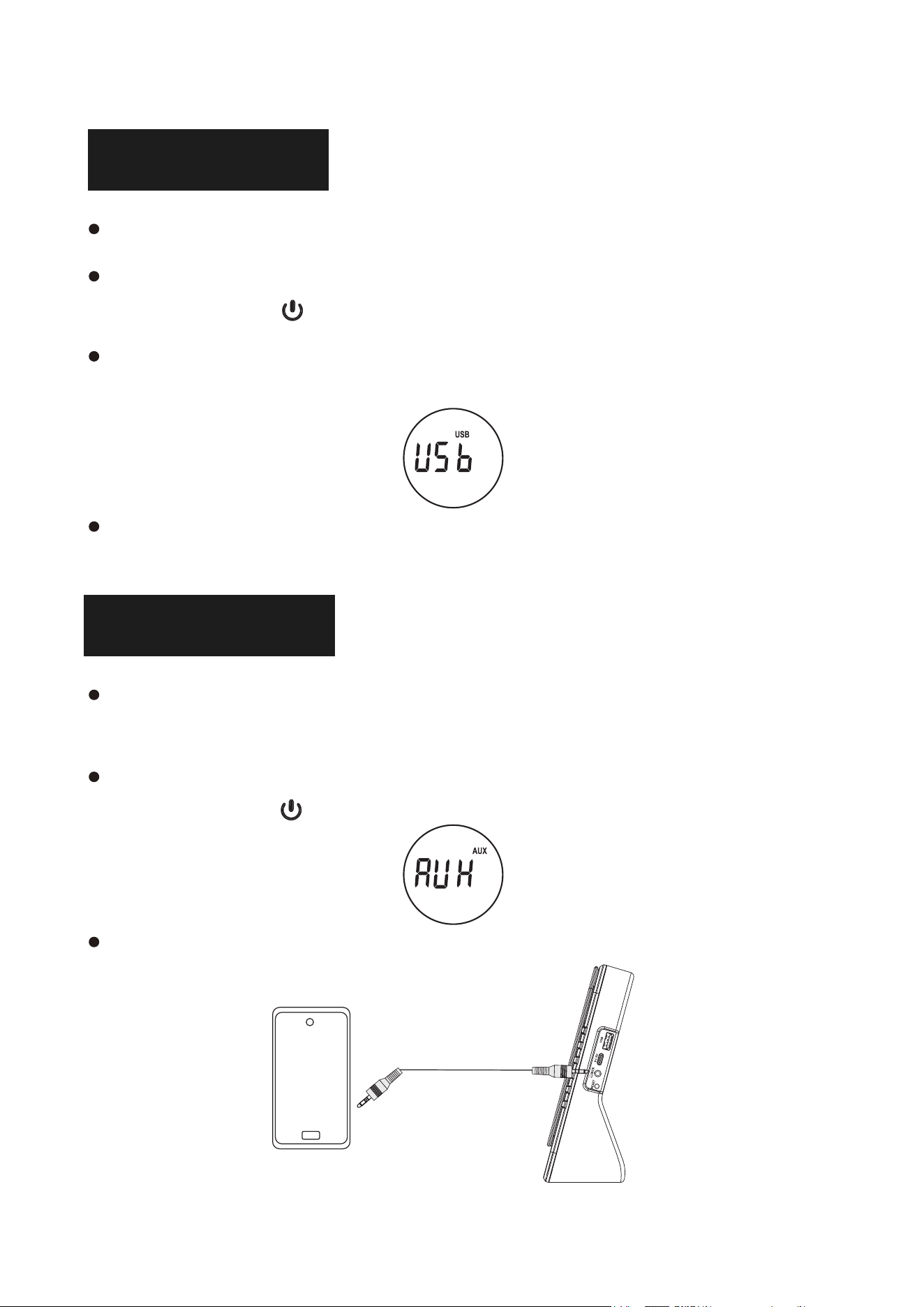
Insert a USB stick into the USB port of the CD player.
Press the[ FUNC. ]button on the remote to switch to USB mode or
short press the /M button on the cd player to switch to USB mode.
The "USB" icon will be displayed on the LED screen, the CD player
will read and play the music on the USB stick.
NOTE: Maximum memory: 64G. Maximum number of tracks on USB
999.
AUX MODE
Plug one end of the AUX cable into the AUX port of the CD player,
the other end plug into the audio device.
Press the[ FUNC. ]button on the remote to switch to AUX mode or
short press the /M button on the cd player to switch to AUX
mode.
The song played on the audio device will be play through the
speakers of the CD player.
7
BLUETOOTH TRANSMITTER MODE
A-B REPEAT FUNCTION
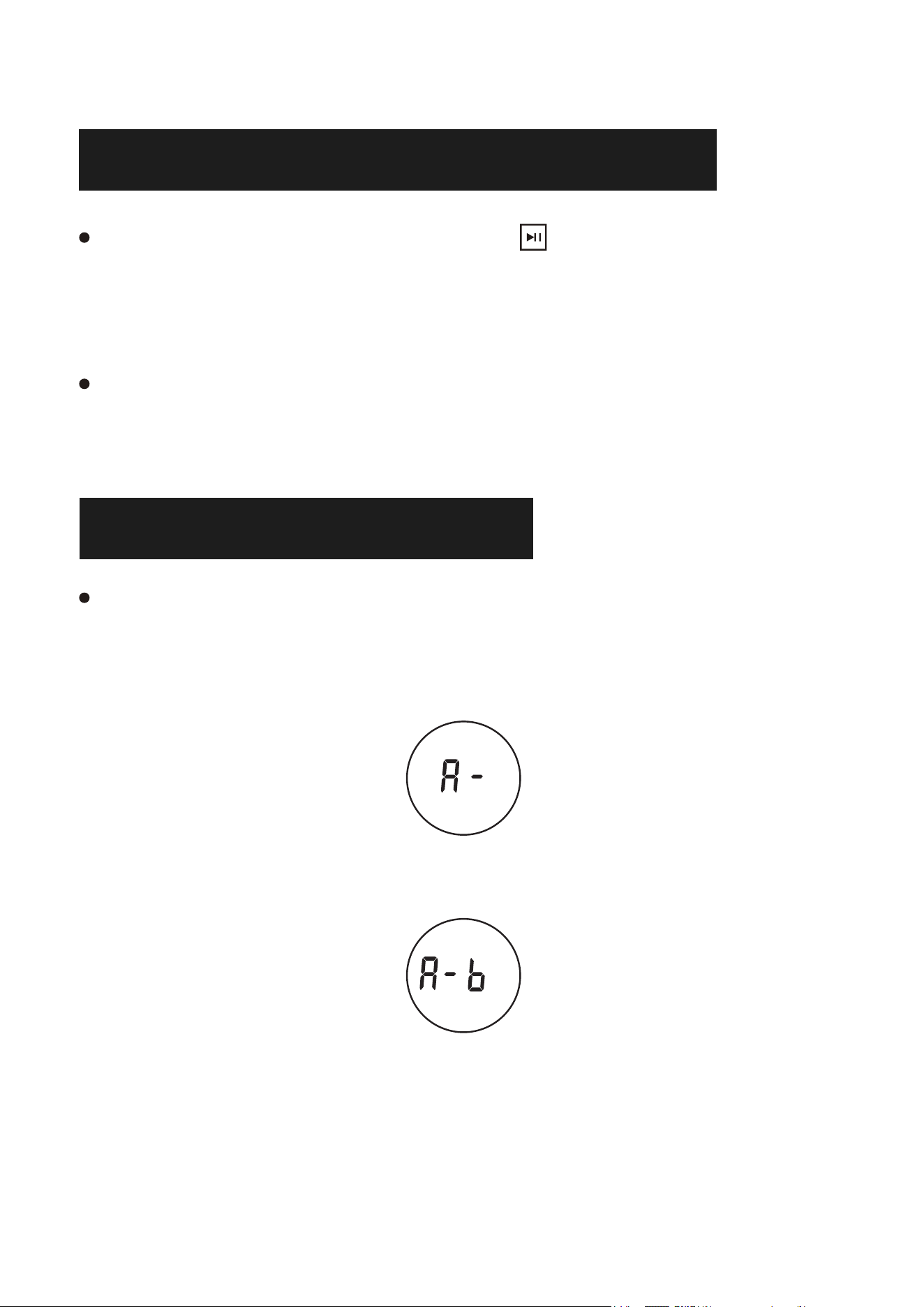
The A-B Repeat function allows you to repeat a specific zone of the
song by setting the start point (A) and end point (B).
1. During playback, press the A-B button on the remote control to set
the start point (A) and "A-"will be displayed on the screen.
2. During playback, press the A-B button on the remote control to set
the end point (B), and "A-B" will be displayed on the screen.
3. Then the designated part from A to B will be played repeatedly.
4. Press the A-B button again to exit AB repeat and "OFF" will be
displayed on the screen.
EN
In CD/USB/AUX mode, short press the button on the CD player
or press the bluetooth transmit button on the remote control, the
audio signal of this CD player will be transmitted to the nearby
Bluetooth receiving device.
Turn on another Bluetooth receiving device and keep waiting for
pairing status, this cd player will automatically connect to that
device and play music of this CD player.
Press the timer " " button on the remote control, you can set the
timer time, 15 minutes, 30 minutes, 60 minutes, 90 minutes.
8
REPEAT MODE
EQ SOUND
During playback, press the EQ button on the remote control to select
your favourite sound effects: FLAT, JAZZ, ROCK, CLASS, POP.
FAST SONG SKIPPING
In CD/USB mode, press the 10- button on the remote control to skip
up 10 tracks; press the 10+ button to skip down 10 tracks.
RESET FUNCTION
When the machine encounters occasional jamming in the work or
function button can't work, you can try to press the reset button to
recover.
SLEEP MODE
When the timer time is up, the cd player will enter the sleep state.
Press the power switch to turn cd player on again.
EN
In CD/TF/USB mode, press the [RER]button on the remote control
briefly to operate:
Press once: Play the current track in single loop.
Press twice: Play all tracks in loop.
Press three times: Play all tracks randomly.
Note: Supports multiple directory loops.
9
NOTE
Do not play cracked or unclean CD discs, otherwise the playback
laser head will be damaged.
Remove the CD protective paper from the CD player before
switching on the unit, otherwise the disc cannot be read.
Never touch the laser head of the unit and always use the dust
cover to prevent dust from collecting on the laser.
If the device does not scan discs correctly, please clean the laser
optics with a standard commercial cleaner. Other cleaning methods
may damage the laser optics.
PRODUCT PARAMETERS
Product Name Desktop CD Player
Dimension 178*66*178mm/7.0*2.6*7.0in
Product Model CD86
Weight 577g/1.27lb
Power Supply Method Type-C 5V 2A
Working Voltage 5V
Support Disc Format CD/CD-R/CD-RW/MP3/WMA
EN
10
WARRANTY
The equipment is covered by a 12-month warranty manufacturing
defects from the date of purchase.
PACKING LIST
Made in China
EN
CD Player 1
AUX Cable 1
Type-C Power Cable 1
Remote Control 1
Instruction Manual 1
Box 1
NOTE: The remote control does not include batteries and requires
the installation of two AAA batteries.
Benutzerhandbuch
Wir danken Ihnen für den Kauf unserer Produkte. Bitte
lesen Sie dieses Handbuch sorgfältig durch, bevor Sie das
Produkt benutzen. Sollten Sie während des Gebrauchs auf
Schwierigkeiten oder Probleme stoßen, wenden Sie sich
bitte an uns, um weitere Unterstützung zu erhalten.
DE

INHALT
FUNKTIONSBESCHREIBUNG . . . . . . . . . . . 12
HAUPTFUNKTIONEN . . . . . . . . . . . . . . . 14
STROM EIN-/AUSSCHALTEN
. . . . . . . . . . . 14
CD-MODUS . . . . . . . . . . . . . . . . . . . 15
BLUETOOTH-EMPFANGERMODE . . . . . . . . . 15
USB-MODUS. . . . . . . . . . . . . . . . . . . 16
AUX-MODUS. . . . . . . . . . . . . . . . . . . 16
BLUETOOTH-TRANSMITTERMODUS . . . . . . . 17
A-B-WIEDERHOLUNGSFUNKTION. . . . . . . . . 17
WIEDERHOLUNGSMODUS . . . . . . . . . . . . 18
SLEEP MODE
. . . . . . . . . . . . . . . . . . 18
EQ-TON . . . . . . . . . . . . . . . . . . . . . 18
SCHNELLES SONG-SKIPPING . . . . . . . . . . . 18
RESET-FUNKTION . . . . . . . . . . . . . . . . 18
NOTIZ . . . . . . . . . . . . . . . . . . . . . 19
PRODUKT-PARAMETER. . . . . . . . . . . . . . 19
GARANTIE . . . . . . . . . . . . . . . . . . . 20
VERPACKUNGSLISTE
. . . . . . . . . . . . . . . 20
DE
11
12
FUNKTIONSBESCHREIBUNG
Tragegriff
CD-Deckel
CD-Platteneinlegebereich
LED-Bildschirm
Power/Modus-Umschalttaste
Lautstärke -
Lautstärke +
Vorheriger Titel
Nächster Titel
Wiedergabe/Pause/Bluetooth-Sender
Lautsprecher
USB-Leseanschluss
Typ-C-Netzanschluss
Kopfhöreranschluss/Audioeingang
Reset-Taste
Silikon-Anti-Rutsch-Pad
Namensschild Position-Produktnamensschild
Membran-Loch
DE
13
Power ON / OFF
Funktionsschalten
Stoppen Sie die Wiedergabe
Schlafmodus
Bluetooth-Übertragung
Volumen +
Vorheriger Song/Schnelle Rewind
Spielen/Pause
Nächster Song/Schnell voraus
Volumen -
Wiederholmodus
EQ-Modus
A-B Wiederholung
Spur -10
Spur +10
DEDE
14
CD-Modus: Unterstützt CD/CD-R/CD-RW/MP3/WMA
Bluetooth-Verbindung: Zur Audiowiedergabe von mobilen Geräten
Bluetooth-Übertragung: Sendet Audio an Bluetooth-Empfangsgeräte
USB-Modus: Unterstützt MP3/WMA (Maximaler Speicher: 64G,
Maximale Anzahl: 999)
AUX-Eingang: Verbindet externe Audiogeräte
A-B Wiederholung: Wiederholt einen bestimmten Abschnitt einer Spur
Schlafmodus: Stellen Sie die Schlafzeit: 10-15-30-60-90 Minuten.
HAUPTFUNKTIONEN
EINSCHALTEN/AUSSCHALTEN
Einschalten:
Drücken Sie die Taste /M lange, um das Gerät einzuschalten. Der CD-Player
spielt dann automatisch die CD ab (die Discs müssen vor dem Einschalten in den
CD-Player eingelegt werden).
Ausschalten:
Drücken Sie erneut lange auf die Taste /M, um den CD-Spieler auszuschalten.
Bitte berühren Sie die Disc nicht, bevor Sie den CD-Player ausschalten.
HINWEIS:
Ausgestattet mit einem 4000mAh-Akku, lädt sich der CD-Player über ein
Type-C-Netzkabel und einen 5V 2A-Adapter mit einer vollen Ladezeit von
etwa 4 Stunden auf.
DE
15
CD-MODUS
Drücken Sie die Taste [ FUNC. ] auf der Fernbedienung, um in den
CD-Modus zu wechseln, oder drücken Sie die Taste „Mode“ (am Gerät),
um in den CD-Modus zu wechseln; die CD wird automatisch abgespielt
und das CD-Symbol erscheint auf dem LED-Bildschirm.
Warten Sie 12-15 Sekunden, dann spielt der CD-Player den CD-Ton ab.
Wenn die Disc nicht erkannt wird, wird „NO“ auf dem LED-Bildschirm
angezeigt.
BLUETOOTH-EMPFÄNGERMODUS
Drücken Sie die Taste [ FUNC. ] auf der Fernbedienung, um in den
„Bluetooth-Modus“ zu wechseln, oder drücken Sie kurz die Taste /M
am CD-Player, um in den Bluetooth-Modus zu wechseln.
Aktivieren Sie Bluetooth auf Ihrem Mobiltelefon und wählen Sie das
Bluetooth-Gerät mit dem Namen „CD86“ auf Ihrem Mobiltelefon für die
Kopplung aus.
Ihr Mobiltelefon wird mit dem CD-Spieler gekoppelt/verbunden.
Nach erfolgreicher Verbindung ertönt die Sprachansage „Verbunden“.
Spielen Sie Musik auf Ihrem Mobiltelefon ab, und der Ton wird über
Bluetooth an die Lautsprecher des CD-Players übertragen.
DE
16
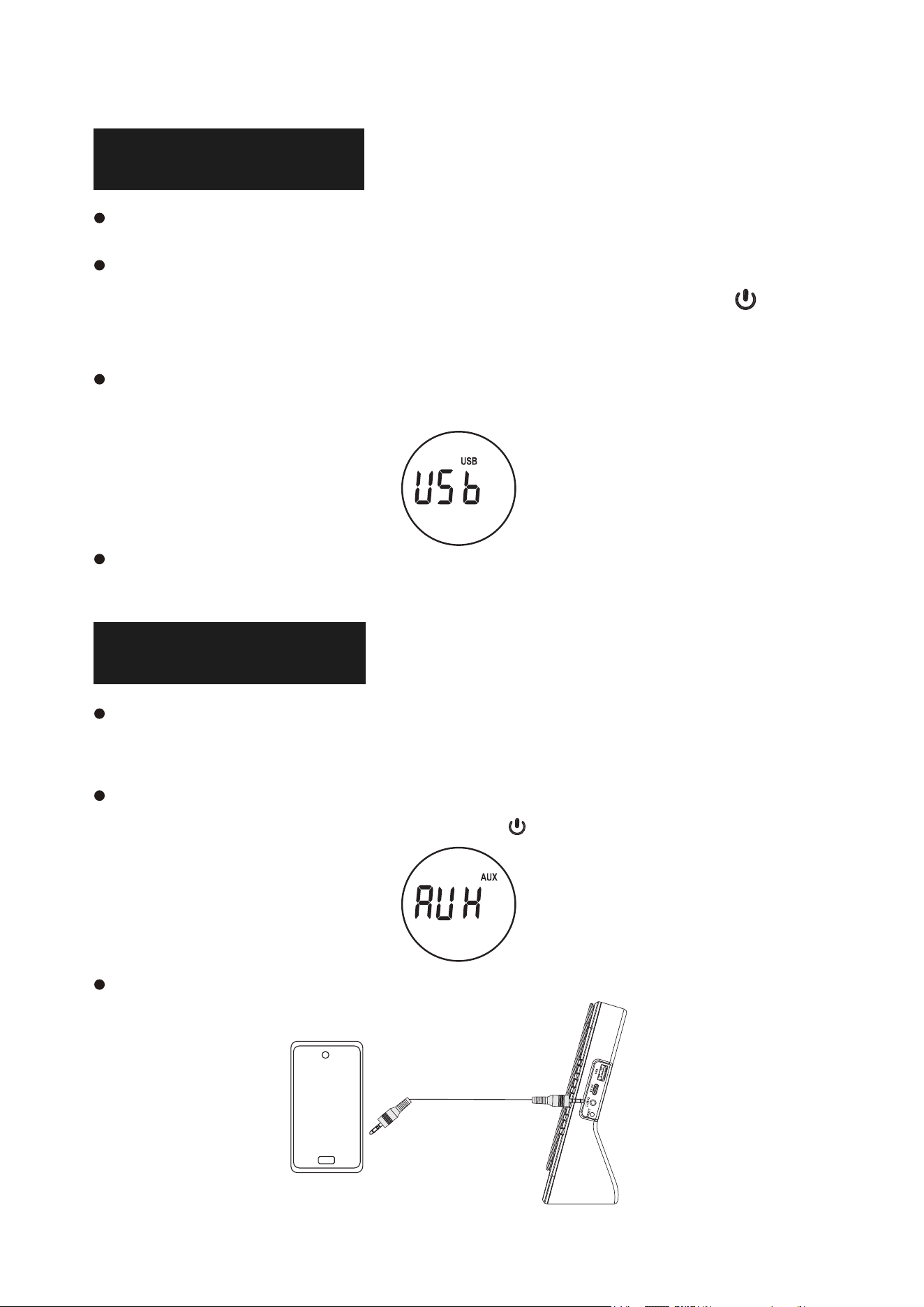
USB-MODUS
einen USB-Stick in den USB-Anschluss des CD-Players einstecken.
Drücken Sie die [ FUNC. ] auf der Fernbedienung, um in den
USB-Modus zu wechseln, oder drücken Sie kurz die Taste /M am
CD-Player, um in den USB-Modus zu wechseln.
Das „USB“-Symbol wird auf dem LED-Bildschirm angezeigt, der
CD-Player liest und spielt die Musik auf dem USB-Stick.
HINWEIS: Maximaler Speicher: 64G. Die maximale Anzahl von USB-
Spuren beträgt 999.
AUX-MODUS
Stecken Sie das eine Ende des AUX-Kabels in den AUX-Anschluss des
CD-Players und das andere Ende in das Audiogerät.
Drücken Sie die
[ FUNC. ] auf der Fernbedienung, um in den AUX-Modus zu
wechseln, oder drücken Sie kurz die Taste /M am CD-Spieler, um in den
AUX-Modus zu wechseln.
Der auf dem Audiogerät abgespielte Titel wird über die Lautsprecher des
CD-Players wiedergegeben.
DE
17
BLUETOOTH-SENDERMODUS
Im CD/USB/AUX-Modus drücken Sie kurz die Taste auf dem
CD-Player oder drücken Sie die Bluetooth-Sendetaste auf der
Fernbedienung, das Audiosignal dieses CD-Players wird an das nahe
gelegene Bluetooth-Empfangsgerät übertragen.
schalten Sie ein anderes Bluetooth-Empfangsgerät ein und warten
Sie auf den Pairing-Status, dieser CD-Player verbindet sich
automatisch mit diesem Gerät und spielt Musik von diesem
CD-Player.
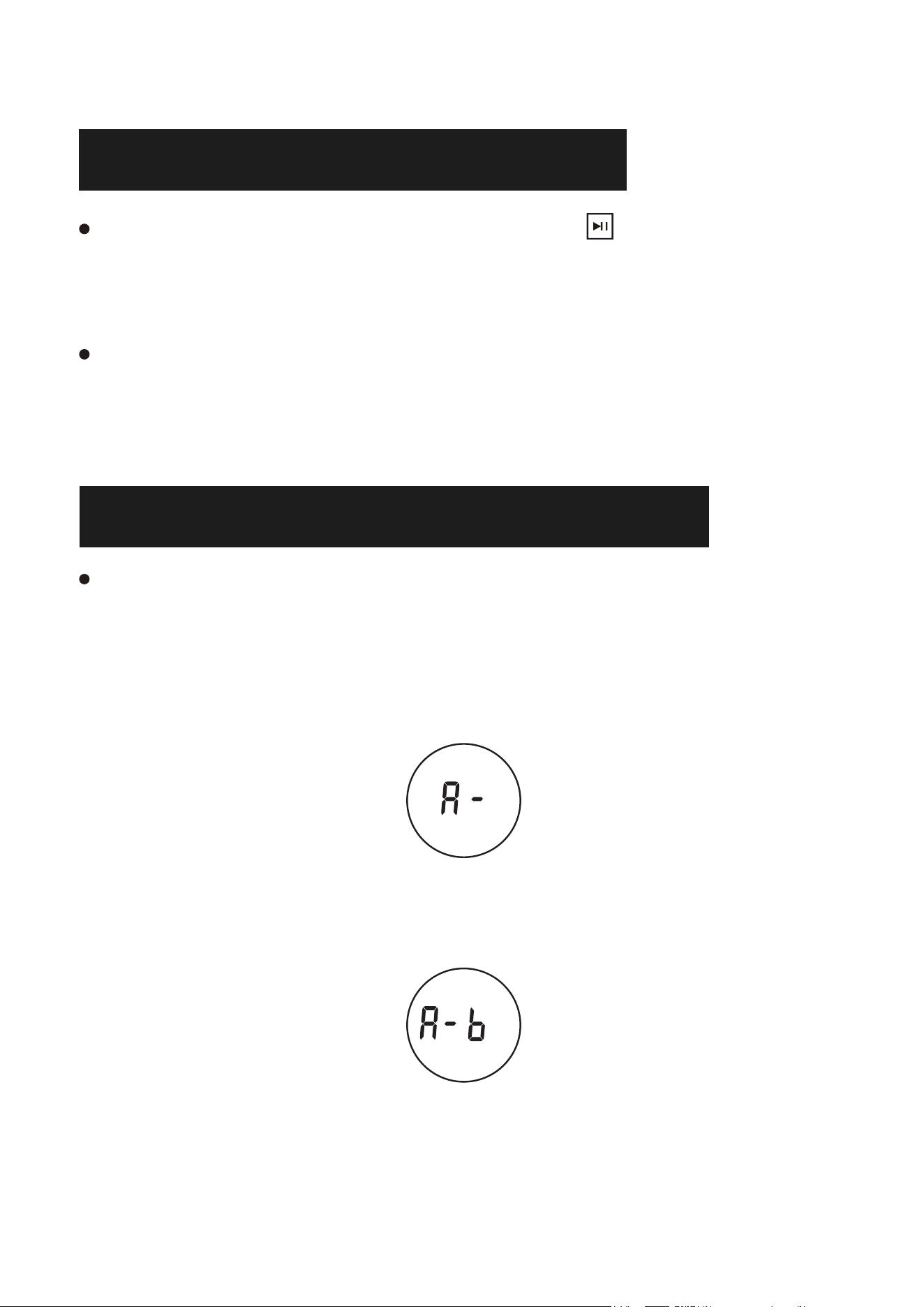
A-B-WIEDERHOLUNGSFUNKTION
Mit der A-B-Wiederholungsfunktion können Sie eine bestimmte
Zone des Songs wiederholen, indem Sie den Startpunkt (A) und
den Endpunkt (B) festlegen.
1. Drücken Sie während der Wiedergabe die Taste A-B auf der
Fernbedienung, um den Startpunkt (A) festzulegen; „A-“ wird auf
dem Bildschirm angezeigt.
2. Drücken Sie während der Wiedergabe die Taste A-B auf der
Fernbedienung, um den Endpunkt (B) festzulegen, woraufhin
„A-B“ auf dem Bildschirm angezeigt wird.
3. Dann wird der angegebene Teil von A bis B wiederholt abgespielt.
4. Drücken Sie erneut die Taste A-B, um die AB-Wiederholung zu
beenden, und „OFF“ wird auf dem Bildschirm angezeigt.
DE
18
TRACK-SCHLEIFE
Drücken Sie im CD/TF/USB-Modus kurz die [RER]-Taste der Fernbedienung, um zu bedienen:
Einmal drücken: Den aktuellen Titel in einer Schleife abspielen.
Zweimal drücken: Alle Titel in einer Schleife abspielen.
Dreimal drücken: Alle Tracks zufällig abspielen.
Hinweis: Unterstützt mehrere Verzeichnisschleifen.
RESET-FUNKTION
Wenn das Gerät gelegentlich klemmt oder die Funktionstasten nicht funktionieren,
können Sie versuchen, die Reset-Taste zu drücken, um den Zustand
wiederherzustellen.
EQ-TON
Drücken Sie während der Wiedergabe die EQ-Taste auf der Fernbedienung, um Ihre
bevorzugten Klangeffekte auszuwählen: FLAT, JAZZ, ROCK, CLASS, POP.
SCHNELLES SONG-SKIPPING
Drücken Sie im CD/USB-Modus die Taste 10- auf der Fernbedienung, um 10 Titel
nach oben zu springen; drücken Sie die Taste 10+, um 10 Titel nach unten zu
springen.
SCHLAFMODUS
Drücken Sie den Timer " " auf der Fernbedienung, können Sie die
Timerzeit, 15 Minuten, 30 Minuten, 60 Minuten, 90 Minuten.
Wenn die Timerzeit abgelaufen ist, geht der CD-Player in den Ruhezustand über.
Drücken Sie den Netzschalter, um den CD-Player wieder einzuschalten.
DE
19
HINWEIS
Spielen Sie keine rissigen oder unsauberen CDs ab, da sonst der
Laserabspielkopf beschädigt wird.
Entfernen Sie das CD-Schutzpapier aus dem CD-Player, bevor Sie
das Gerät einschalten, da die CD sonst nicht gelesen werden kann.
berühren Sie niemals den Laserkopf des Geräts und verwenden Sie
immer die Staubschutzhaube, um zu verhindern, dass sich Staub auf
dem Laser ansammelt.
Wenn das Gerät Discs nicht korrekt einliest, reinigen Sie bitte die
Laseroptik mit einem handelsüblichen Reinigungsmittel. Andere
Reinigungsmethoden können die Laseroptik beschädigen.
PRODUKT-PARAMETER
Produktname Portabler CD-Spieler
Dimension 178*66*178mm/7.0*2.6*7.0in
Produkt-Modell CD86
Gewicht 577g/1.27lb
Methode Der Energieversorgung Type-C 5V 2A
Arbeitsspannung 5V
Unterstützte Disc-Formate CD/CD-R/CD-RW/MP3/WMA
DE
20
GARANTIE
Für das Gerät gilt eine 12-monatige Garantie auf Herstellungsfe
HINWEIS: Die Fernbedienung enthält keine Batterien und erfordert
die Installation von zwei AAA-Batterien.
-
hler ab dem Kaufdatum.
PACKLISTE
CD-Spieler 1
AUX-Kabel 1
STROMKABEL TYP-C 1
Fernbedienung 1
Gebrauchsanweisung 1
Box 1
Made in China
DE
Manuale d'uso
Grazie per aver acquistato i nostri prodotti. Prima di
utilizzare il prodotto, leggere attentamente il presente
manuale. Se si riscontrano difficoltà o problemi durante
l'uso, si prega di contattarci per ulteriore assistenza.
IT

21
CONTENUTI
DESCRIZIONE DELLA FUNZIONE . . . . . . . . . 22
FUNZIONI PRINCIPALI . . . . . . . . . . . . . . 24
ACCENSIONE/SPEGNIMENTO. . . . . . . . . . . 24
MODALITÀ CD. . . . . . . . . . . . . . . . . . 25
MODALITÀ RICEVITORE BLUETOOTH . . . . . . .
25
MODALITÀ USB . . . . . . . . . . . . . . . . . 26
MODALITÀ AUX . . . . . . . . . . . . . . . . . 26
MODALITÀ TRASMETTITORE BLUETOOTH . . . . 27
FUNZIONE DI RIPETIZIONE A-B . . . . . . . . . 27
MODO DORNO
. . . . . . . . . . . . . . . . . 28
MODO RIPETE . . . . . . . . . . . . . . . . .
28
SUONO EQ . . . . . . . . . . . . . . . . . . . 28
SALTO VELOCE DEL BRANO . . . . . . . . . . . 28
FUNZIONE DI RESET . . . . . . . . . . . . . . 28
NOTA . . . . . . . . . . . . . . . . . . . . . . 29
PARAMETRI DEL PRODOTTO . . . . . . . . . . . 29
GARANZIA . . . . . . . . . . . . . . . . . . . 30
ELENCO DEGLI IMBALLAGGI . . . . . . . . . . . 30
IT
22
DESCRIZIONE DELLA FUNZIONE
Maniglia per il trasporto
Coperchio per CD
Area di posizionamento dei dischi CD
Schermo a LED
Pulsante di accensione/Modalità
Volume -
Volume +
Canzone precedente
Canzone successiva
Trasmettitore Play/Pause/Bluetooth
Altoparlante
Porta di lettura USB
Porta di alimentazione di tipo C
Presa per cuffie/Ingresso audio
Pulsante di reset
Padiglione antiscivolo in silicone
Posizione della targhetta: targhetta del prodotto
Foro della membrana
IT
23
Potenza ON/OFF
Commutazione funzione
Fermare la riproduzione
Modalità sonno
Trasmettere Bluetooth
Volume +
Canzone precedenti/Fast Rewind
Gioca/Pausa
Prossima canzone/Fast Forward
Volume -
Modalità Ripetizione
Modalità EQ
A-B Ripetizione
Traccia -10
Traccia +10
IT
24
Modalità CD: Supporta CD/CD-R/CD-RW/MP3/WMA
Connessione Bluetooth: per la riproduzione audio da dispositivi mobili
Trasmissione Bluetooth: invia audio ai dispositivi riceventi Bluetooth
Modalità USB: Supporta MP3/WMA (memoria massima: 64G, numero
massimo: 999)
Ingresso AUX: collega dispositivi audio esterni
A-B Ripetere: Ripete una sezione specifica di una traccia
Modalità di sonno: Impostare il tempo di sonno: 10-15-30-60-90 minuti.
FUNZIONI PRINCIPALI
ACCENSIONE/SPEGNIMENTO
Accensione:
Premere a lungo il tasto /M per accendere il lettore CD, che riprodurrà
automaticamente il CD (i dischi devono essere inseriti nel lettore CD prima
dell'accensione).
Spegnimento:
Premere nuovamente a lungo il tasto /M per spegnere il lettore CD. Non
toccare il disco prima di spegnere il lettore CD.
NOTA:
Il lettore CD richiede una connessione di alimentazione. Utilizzare un cavo di
alimentazione di tipo C con un adattatore 5V 2A.
IT
25
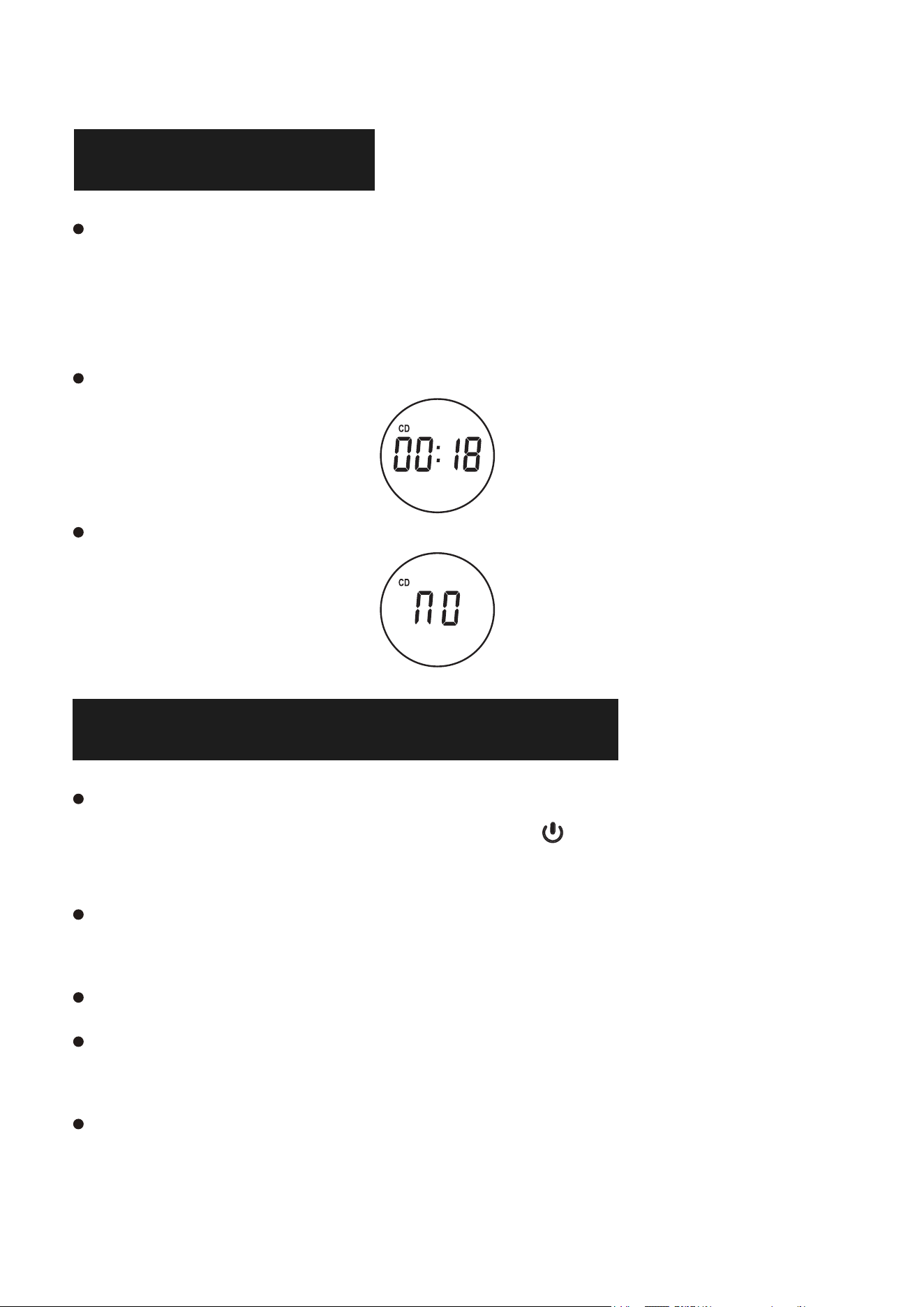
MODALITÀ CD
Premere il tasto [ FUNC. ] del telecomando per passare alla modalità
CD, oppure premere il tasto "Mode" (sull'unità) per passare alla
modalità CD; il disco si avvia automaticamente e l'icona CD appare
sullo schermo LED.
Attendere 12-15 secondi e il lettore CD riprodurrà l'audio del CD.
Se il disco non viene riconosciuto, sullo schermo LED viene visualizzato
"NO".
Modalità ricevitore Bluetooth
Premere il tasto [ FUNC. ] del telecomando per passare alla "Modalità
Bluetooth" o premere brevemente il tasto /M del lettore CD per
passare alla modalità Bluetooth.
Attivare il Bluetooth nel telefono cellulare e selezionare il Bluetooth
denominato "CD86" nel telefono cellulare per l'accoppiamento.
Il telefono cellulare viene accoppiato/collegato al lettore CD.
Dopo l'avvenuta connessione, viene visualizzato un messaggio vocale
"Connected".
Riprodurre la musica sul cellulare e l'audio verrà trasmesso agli
altoparlanti del lettore CD tramite Bluetooth.
IT
26
MODALITÀ USB
Inserire una chiavetta USB nella porta USB del lettore CD.
Premere il tasto [FUNC.] del telecomando per passare alla modalità
USB o premere brevemente il tasto /M del lettore CD per
passare alla modalità USB.
Sullo schermo LED viene visualizzata l'icona "USB", il lettore CD
legge e riproduce la musica contenuta nella chiavetta USB.
NOTA: Memoria massima: 64G. Il numero massimo di tracce USB è 999.
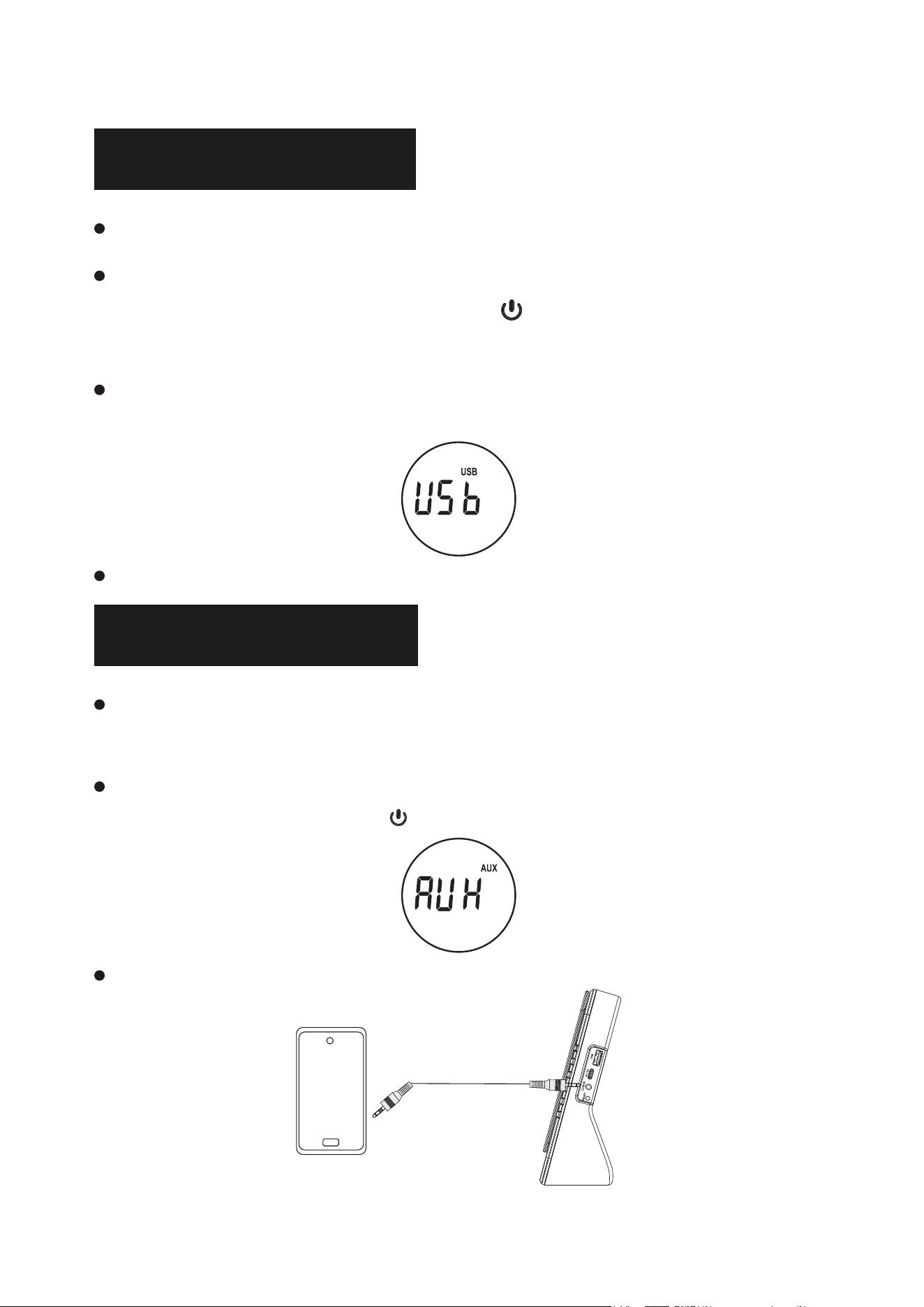
MODALITÀ AUX
Inserire un'estremità del cavo AUX nella porta AUX del lettore CD e l'altra
estremità nel dispositivo audio.
Premere il tasto [FUNC.] del telecomando per passare alla modalità AUX o
premere brevemente il tasto /M del lettore CD per passare alla modalità
AUX.
Il brano riprodotto dal dispositivo audio verrà riprodotto attraverso gli
altoparlanti del lettore CD.
IT
27
MODALITÀ TRASMETTITORE BLUETOOTH
In modalità CD/USB/AUX, premere brevemente il pulsante sul
lettore CD o premere il pulsante trasmettere bluetooth sul telecomando,
il segnale audio di questo lettore CD verrà trasmesso al dispositivo
ricevente Bluetooth nelle vicinanze.
Accendere un altro dispositivo di ricezione Bluetooth e attendere lo
stato di accoppiamento; il lettore CD si collegherà automaticamente
a tale dispositivo e riprodurrà la musica di questo lettore CD.
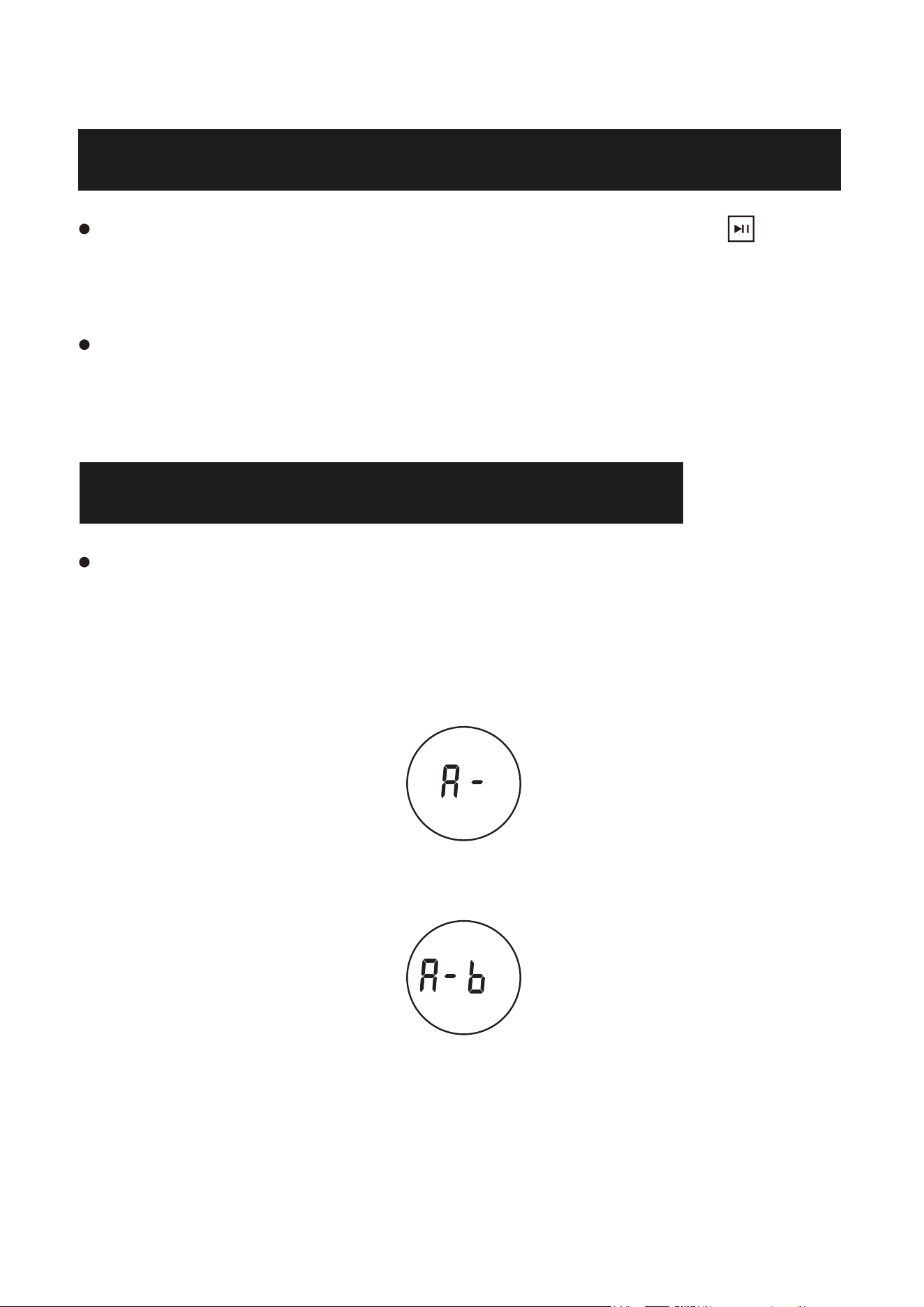
FUNZIONE DI RIPETIZIONE A-B
La funzione di ripetizione A-B consente di ripetere una zona
specifica del brano impostando il punto di inizio (A) e il punto di
fine (B).
1. Durante la riproduzione, premere il tasto A-B del telecomando per
impostare il punto di inizio (A) e sullo schermo verrà visualizzato
"A-".
2. Durante la riproduzione, premere il pulsante A-B del telecomando
per impostare il punto finale (B) e sullo schermo verrà visualizzato
"A-B".
3. Quindi la parte designata da A a B verrà riprodotta ripetutamente.
4. Premere nuovamente il pulsante A-B per uscire dalla ripetizione AB
e sullo schermo verrà visualizzato "OFF".
IT
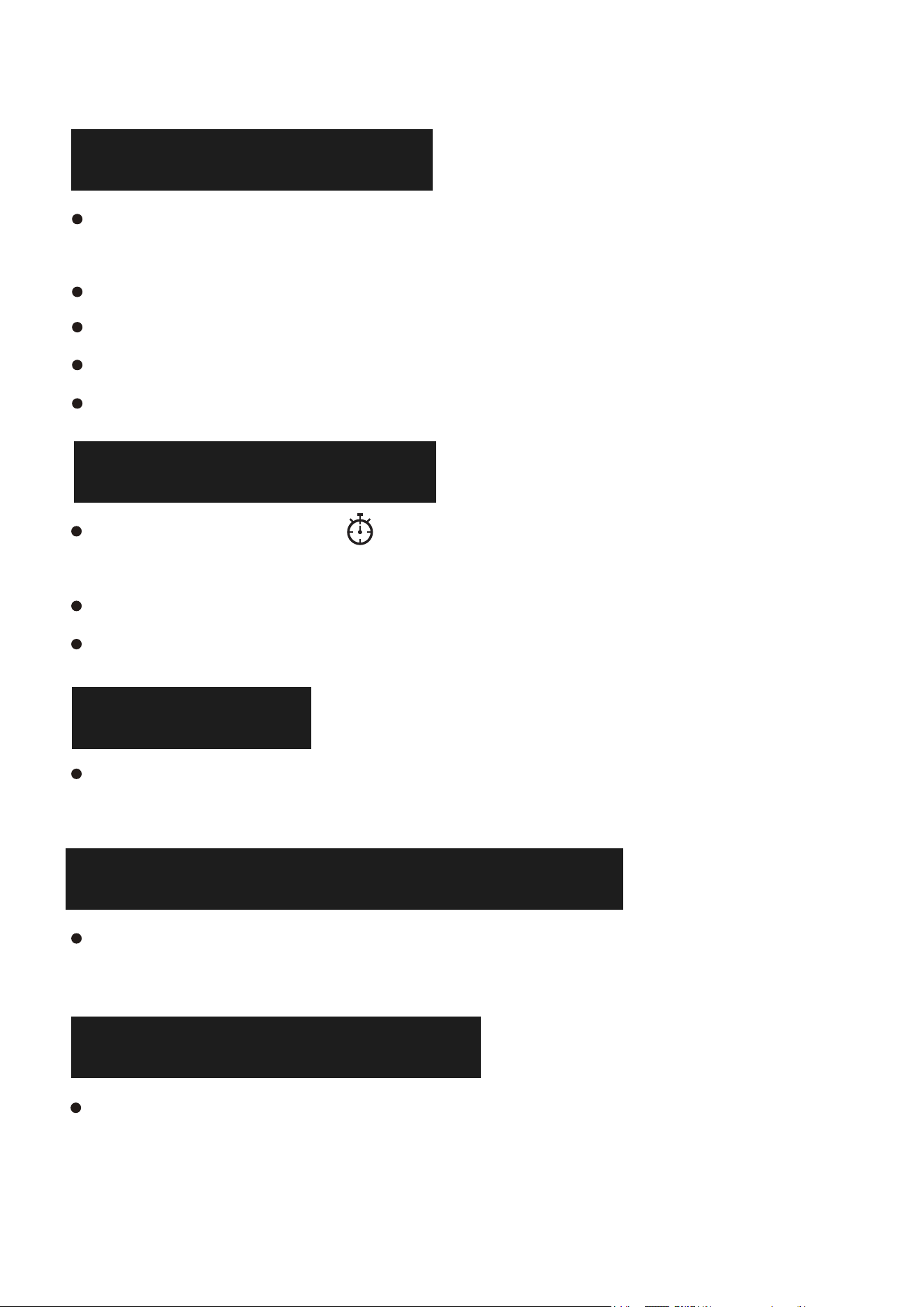
28
CICLO DI TRACCE
In modalità CD/TF/USB, premere brevemente il pulsante [RER] del telecomando
per operare:
Premere una volta: riproduci la traccia corrente in loop singolo.
Premere due volte: riprodurre tutte le tracce in loop.
Premere tre volte: riproduci tutte le tracce in modo casuale.
Nota: Supporta più loop di directory.
SUONO EQ
Durante la riproduzione, premere il pulsante EQ sul telecomando per selezionare
gli effetti sonori preferiti: FLAT, JAZZ, ROCK, CLASS, POP.
SALTO VELOCE DI UN BRANO
In modalità CD/USB, premere il tasto 10- del telecomando per saltare 10 tracce
in alto; premere il tasto 10+ per saltare 10 tracce in basso.
FUNZIONE DI RESET
Quando la macchina si inceppa occasionalmente nel lavoro o il pulsante di
funzione non funziona, si può provare a premere il pulsante di ripristino per
recuperare.
MODO DORNO
Premere il pulsante timer " " sul telecomando, è possibile impostare il
tempo del timer, 15 minuti, 30 minuti, 60 minuti, 90 minuti.
Quando il tempo del timer è scaduto, il lettore CD passa allo stato di riposo.
Premere l'interruttore di alimentazione per riaccendere il lettore CD.
IT
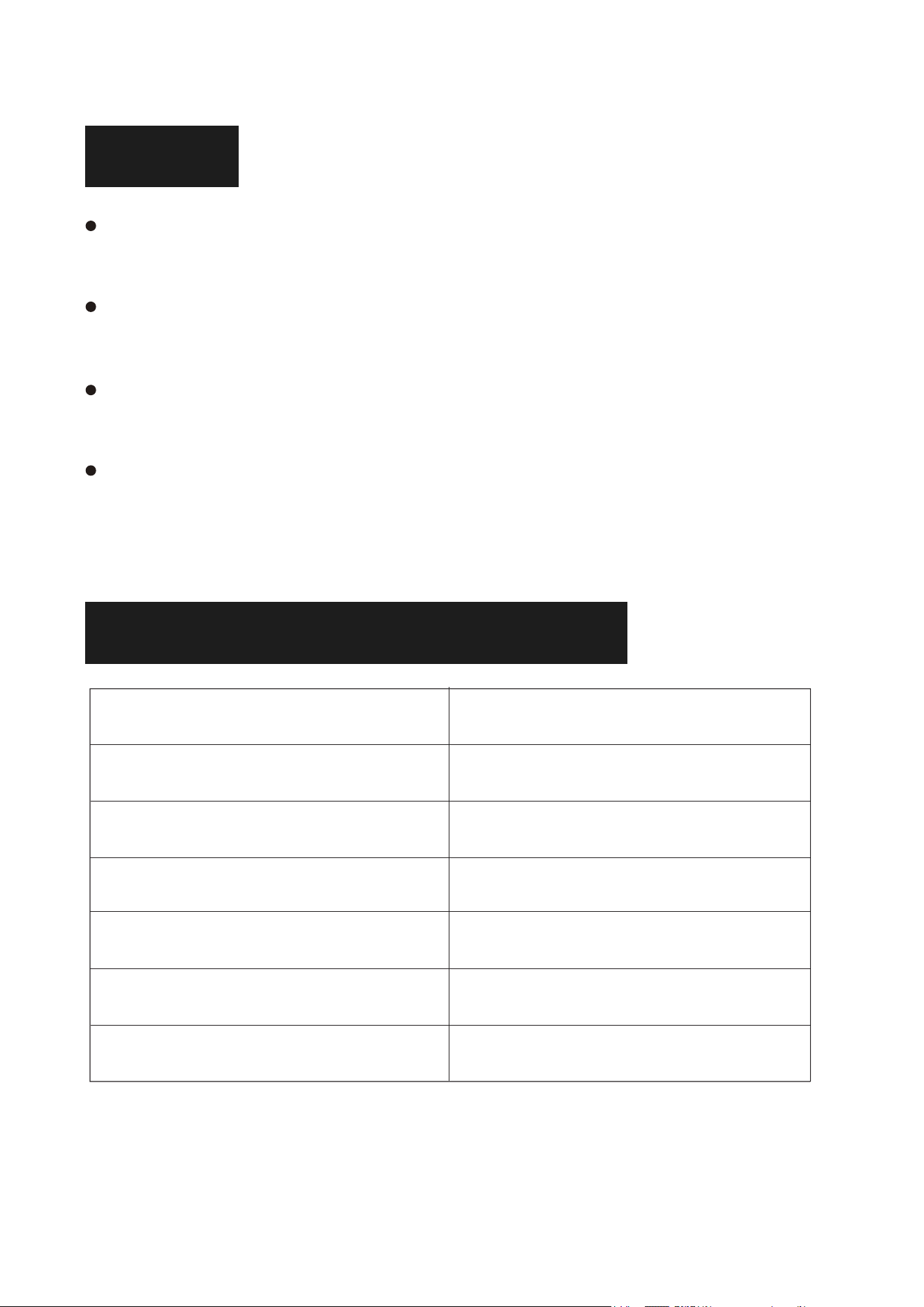
29
NOTA
Non riprodurre dischi CD incrinati o non puliti, per non danneggiare
la testina laser di riproduzione.
Rimuovere la carta protettiva del CD dal lettore CD prima di
accendere l'unità, altrimenti il disco non potrà essere letto.
Non toccare mai la testina laser dell'unità e utilizzare sempre il
coperchio antipolvere per evitare che la polvere si depositi sul laser.
Se l'apparecchio non esegue correttamente la scansione dei dischi,
pulire l'ottica del laser con un normale detergente commerciale. Altri
metodi di pulizia possono danneggiare le ottiche del laser.
PARAMETRI DEL PRODOTTO
Nome del prodotto Lettore CD portatile
Dimension 178*66*178mm/7.0*2.6*7.0in
Modello prodotto CD86
Peso 577g/1.27lb
Metodo di alimentazione Tipo-C 5V 2A
Tensione di lavoro 5V
Formato del disco supportato CD/CD-R/CD-RW/MP3/WMA
IT
30
GARANZIA
L'apparecchiatura è coperta da una garanzia di 12 mesi per difetti
di fabbricazione a partire dalla data di acquisto.
ELENCO DEGLI IMBALLAGGI
Lettore CD 1
Cavo AUX 1
Cavo di alimentazione di tipo C
NOTA: Il telecomando non include batterie e richiede l'installazione di
due batterie AAA.
1
Telecomando 1
Manuale d'istruzioni 1
Scatola 1
Made in China
IT
Manuel de l'utilisateur
Nous vous remercions d'avoir acheté nos produits. Veuillez
lire attentivement ce manuel avant d'utiliser ce produit. Si
vous rencontrez des difficultés ou des problèmes lors de
l'utilisation, veuillez nous contacter pour obtenir de l'aide.
FR

31
CONTENU
DESCRIPTION DE LA FONCTION . . . . . . . . . 32
PRINCIPALES FONCTIONS . . . . . . . . . . . . 34
MISE SOUS TENSION/HORS TENSION . . . . . . 34
MODE CD . . . . . . . . . . . . . . . . . . . . 35
MODE RÉCEPTEUR BLUETOOTH . . . . . . . . .
35
MODE USB . . . . . . . . . . . . . . . . . . . 36
MODE AUX . . . . . . . . . . . . . . . . . . . 36
MODE ÉMETTEUR BLUETOOTH . . . . . . . . . . 37
FONCTION DE RÉPÉTITION A-B . . . . . . . . . 37
MODE DE SOMMEIL
. . . . . . . . . . . . . . . 38
MODE DE RÉPÉTITION . . . . . . . . . . . . . 38
EQ SOUND . . . . . . . . . . . . . . . . . . . 38
SAUT DE CHANSON RAPIDE . . . . . . . . . . . 38
FONCTION DE RÉINITIALISATION . . . . . . . . 38
NOTE . . . . . . . . . . . . . . . . . . . . . . 39
PARAMÈTRES DU PRODUIT . . . . . . . . . . . 39
GARANTIE . . . . . . . . . . . . . . . . . . . 40
LISTE DE COLISAGE . . . . . . . . . . . . . . . 40
FR
32
DESCRIPTION DE LA FONCTION
Poignée de transport
Couvercle pour CD
Zone de placement des disques CD
Écran LED
Bouton de Commutation Alimentation/Mode
Volume -
Volume +
Chanson Précédente
Chanson Suivante
Émetteur de lecture/pause/Bluetooth
Haut-parleur
Port de Lecture USB
Port d'alimentation de type C
Prise Casque/Entrée Audio
Bouton de Réinitialisation
Coussinet Antidérapant En Silicone
Position de La Plaque Signalétique-
Plaque Signalétique du Produit
Trou de La Membrane
FR
33
Alimentation ON/OFF
Commutation de fonction
Arrêter la lecture
Mode sommeil
Transmettre Bluetooth
Volume +
Chanson précédente / Fast Rewind
Jouer/Pause
Suivant Chanson/Rapid Forward
Volume -
Mode de répétition
Mode EQ
A-B Répéter
Piste -10
Piste +10
FR
34
Mode CD : prend en charge CD/CD-R/CD-RW/MP3/WMA.
Connexion Bluetooth : Pour la lecture audio depuis des appareils
mobiles.
Transmission Bluetooth : envoie l'audio aux appareils récepteurs
Bluetooth.
Mode USB : prend en charge MP3/WMA (mémoire maximale: 64G,
nombre maximum: 999).
Entrée AUX : connecte des périphériques audio externes.
A-B Repeat : répète une section spécifique d'une piste.
Mode de sommeil: Définir le temps de sommeil: 10-15-30-60-90 minutes.
PRINCIPALES FONCTIONS
MISE SOUS TENSION/HORS TENSION
Mise sous tension :
Appuyez longuement sur la touche /M pour allumer, le lecteur CD
lira automatiquement le CD (les disques doivent être insérés dans le
lecteur CD avant la mise sous tension).
Mise hors tension :
Appuyez longuement sur le bouton /M pour éteindre le lecteur CD.
Ne touchez pas le disque avant d'éteindre le lecteur CD.
NOTE :
Le lecteur de CD nécessite une connexion électrique. Utilisez un câble
d'alimentation Type-C avec un adaptateur 5V 2A.
FR
35
MODE CD
Appuyez sur le bouton [ FUNC. ] de la télécommande pour passer en
mode CD, ou appuyez sur le bouton "Mode" (sur l'appareil) pour
passer en mode CD, le disque se lance automatiquement et l'icône CD
apparaît sur l'écran LED.
attendez 12 à 15 secondes, le lecteur de CD lit le CD audio.
si le disque n'est pas reconnu, "NO" s'affiche sur l'écran LED.
MODE RÉCEPTEUR BLUETOOTH
Appuyez sur le bouton [ FUNC. ] de la télécommande pour passer au
"Mode Bluetooth" ou appuyez brièvement sur le bouton /M du
lecteur CD pour passer au Mode Bluetooth.
activez le Bluetooth dans votre téléphone portable et sélectionnez le
Bluetooth nommé "CD86" dans votre téléphone portable pour
l'appairage.
votre téléphone portable est couplé/connecté avec le lecteur CD.
Une fois la connexion établie, le message vocal "Connecté" s'affiche.
écoutez de la musique sur votre téléphone portable et le son sera
transmis aux haut-parleurs du lecteur CD via Bluetooth.
FR
36
MODE USB
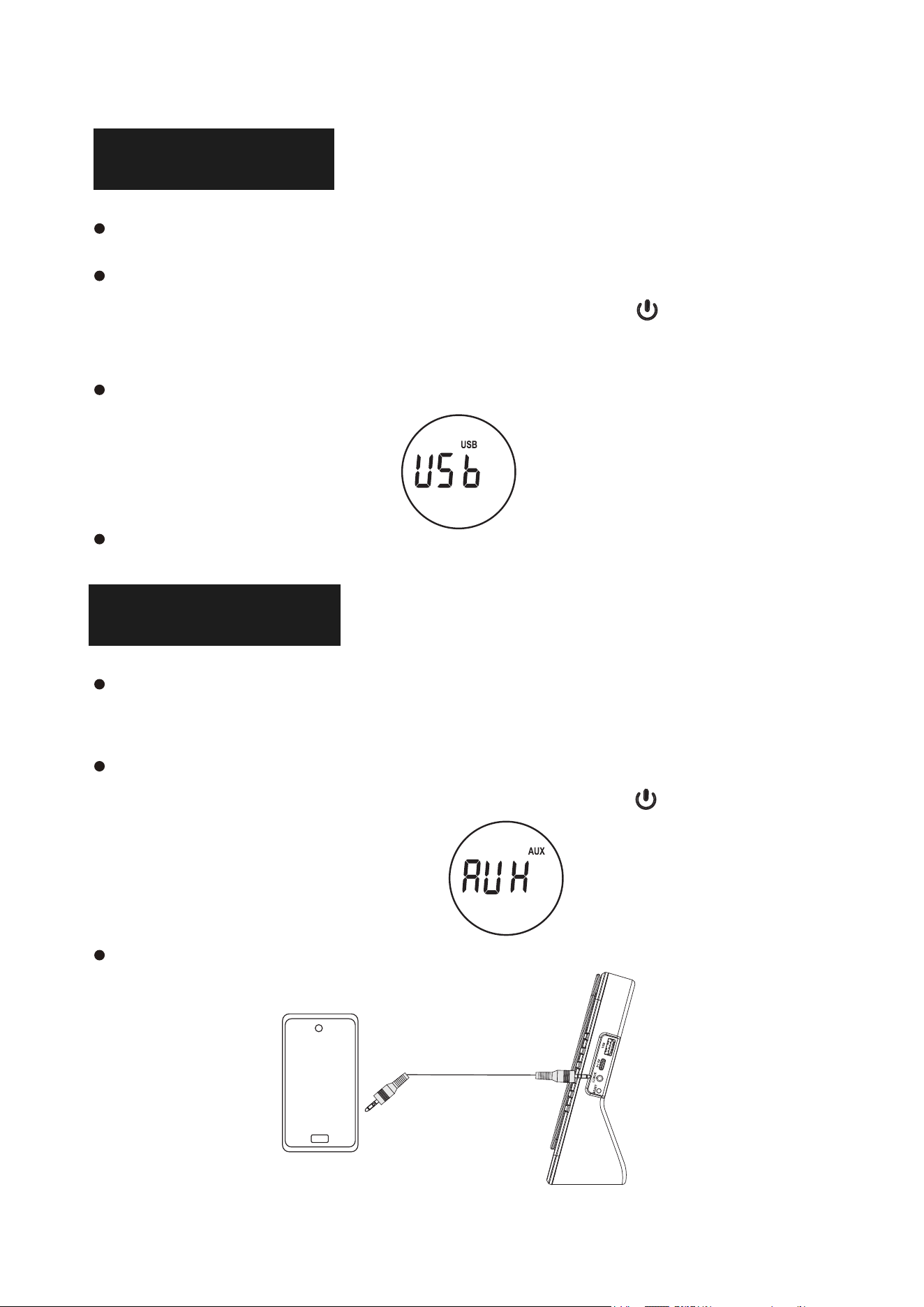
insérez une clé USB dans le port USB du lecteur CD.
appuyez sur la touche [ FUNC. ] de la télécommande pour passer en
mode USB ou appuyez brièvement sur la touche /M du lecteur
CD pour passer en mode USB.
l'icône "USB" s'affiche sur l'écran LED, le lecteur CD lit et joue la
musique sur la clé USB.
REMARQUE: Mémoire maximale: 64G. Le nombre maximum de pistes
USB est de 999.
MODE AUX
branchez une extrémité du câble AUX dans le port AUX du lecteur
CD, l'autre extrémité dans l'appareil audio.
appuyez sur la touche [ FUNC. ] de la télécommande pour passer en
mode AUX ou appuyez brièvement sur la touche /M du lecteur
CD pour passer en mode AUX.
la chanson jouée sur l'appareil audio sera diffusée par les
haut-parleurs du lecteur CD.
FR
37
MODE ÉMETTEUR BLUETOOTH
En mode CD/USB/AUX, appuyez sur le bouton du lecteur CD ou
appuyez sur le bouton de transmission bluetooth de la télécommande,
le signal audio de ce lecteur CD sera transmis au dispositif de
réception Bluetooth à proximité.
allumez un autre appareil récepteur Bluetooth et attendez l'état
d'appairage, ce lecteur CD se connectera automatiquement à cet
appareil et jouera la musique de ce lecteur CD.
FONCTION DE RÉPÉTITION A-B
La fonction de répétition A-B vous permet de répéter une zone
spécifique du morceau en définissant le point de départ (A) et le
point d'arrivée (B).
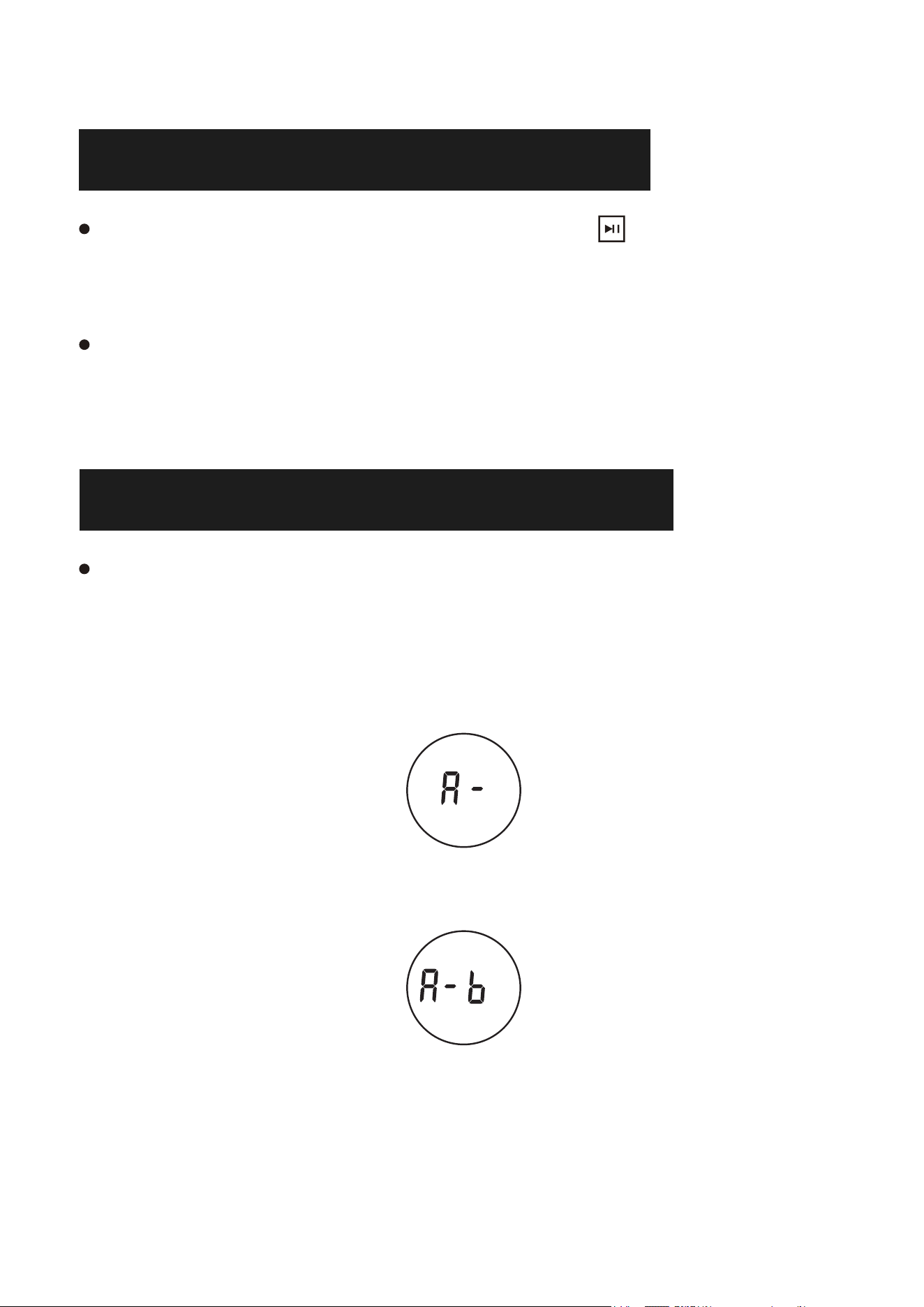
1. Pendant la lecture, appuyez sur la touche A-B de la télécommande
pour définir le point de départ (A) et "A-" s'affiche à l'écran.
2. Pendant la lecture, appuyez sur la touche A-B de la télécommande
pour définir le point final (B), et "A-B" s'affiche à l'écran.
3. La partie désignée de A à B est ensuite jouée de manière répétée.
4. Appuyez à nouveau sur le bouton A-B pour quitter la répétition AB
et "OFF" s'affiche à l'écran.
FR

38
BOUCLE DE PISTE
En mode CD/TF/USB, appuyez brièvement sur le bouton [RER] de la télécommande
pour fonctionner :
Appuyez une fois : jouez la piste actuelle en boucle unique.
Appuyez deux fois : jouez toutes les pistes en boucle.
Appuyez trois fois : jouez toutes les pistes au hasard.
Remarque : prend en charge plusieurs boucles de répertoire.
EQ SOUND
Pendant la lecture, appuyez sur la touche EQ de la télécommande pour sélectionner
vos effets sonores préférés : FLAT, JAZZ, ROCK, CLASS, POP.
SAUT DE CHANSON RAPIDE
En mode CD/USB, appuyez sur la touche 10- de la télécommande pour avancer
de 10 pistes; appuyez sur la touche 10+ pour reculer de 10 pistes.
FONCTION DE RÉINITIALISATION
Lorsque la machine se bloque occasionnellement dans le travail ou que le bouton
de fonction ne fonctionne pas, vous pouvez essayer d'appuyer sur le bouton de
réinitialisation pour rétablir la situation.
MODE DE SOMMEIL
Appuyez sur le bouton " " de la télécommande, vous pouvez régler le
temps de minuterie, 15 minutes, 30 minutes, 60 minutes, 90 minutes.
Lorsque le temps de la minuterie est écoulé, le lecteur CD passe en mode veille.
Appuyez sur l'interrupteur d'alimentation pour remettre le lecteur CD en marche.
FR
39
NOTE
ne pas lire de disques CD fissurés ou non nettoyés, sous peine
d'endommager la tête laser de lecture.
retirer le papier de protection du lecteur CD avant d'allumer
l'appareil, sinon le disque ne pourra pas être lu.
ne jamais toucher la tête laser de l'appareil et toujours utiliser le
couvercle anti-poussière pour empêcher la poussière de s'accumuler
sur le laser.
Si l'appareil ne scanne pas correctement les disques, nettoyez les
optiques du laser à l'aide d'un produit de nettoyage commercial
standard. D'autres méthodes de nettoyage risquent d'endommager
l'optique du laser.
PARAMÈTRES DU PRODUIT
Product name Portable CD player
Dimension 178*66*178mm/7.0*2.6*7.0in
Modèle de produit CD86
Poids 577g/1.27lb
Méthode d'alimentation Type-C 5V 2A
Tension de fonctionnement 5V
Format de disque pris en charge CD/CD-R/CD-RW/MP3/WMA
FR
40
GARANTIE
L'équipement est couvert par une garantie de 12 mois contre les
défauts de fabrication à compter de la date d'achat.
LISTE DE COLISAGE
Lecteur CD 1
Câble AUX 1
Câble d'alimentation Type-C
REMARQUE: La télécommande ne comprend pas de piles et nécessite
l'installation de deux piles AAA.
1
Télécommande 1
Manuel d'instruction 1
Boîte 1
Made in China
FR
Manual del usuario
Gracias por adquirir nuestros productos. Lea atentamente
este manual antes de utilizar este producto. Si encuentra
alguna dificultad o problema durante el uso, póngase en
contacto con nosotros para obtener más ayuda.
ES

41
CONTENIDO
DESCRIPCIÓN DE LA FUNCIÓN . . . . . . . . . . 42
FUNCIONES PRINCIPALES . . . . . . . . . . . . 44
ENCENDIDO/APAGADO . . . . . . . . . . . . . 44
MODO CD . . . . . . . . . . . . . . . . . . . . 45
MODO RECEBIDOR BLUETOOTH
. . . . . . . . . 45
MODO USB . . . . . . . . . . . . . . . . . . . 46
MODO AUX . . . . . . . . . . . . . . . . . . . 46
MODO TRANSMISOR BLUETOOTH . . . . . . . . 47
FUNCIÓN DE REPETICIÓN A-B . . . . . . . . . . 47
MODO DE SUEÑO
. . . . . . . . . . . . . . . . 48
REPETIR MODO . . . . . . . . . . . . . . . . . 48
EQ SONIDO . . . . . . . . . . . . . . . . . . . 48
SALTO RÁPIDO DE CANCIÓN . . . . . . . . . . . 48
FUNCIÓN RESET. . . . . . . . . . . . . . . . . 48
NOTA . . . . . . . . . . . . . . . . . . . . . . 49
PARÁMETROS DEL PRODUCTO . . . . . . . . . . 49
GARANTÍA . . . . . . . . . . . . . . . . . . . 50
LISTA DE EMBALAJE . . . . . . . . . . . . . . . 50
ES
42
DESCRIPCIÓN DE LA FUNCIÓN
Asa de transporte
Tapa de CD
Zona de colocación de discos CD
Pantalla LED
Botón de encendido/Conmutación de modo
Volume -
Volume +
Canción anterio
Siguiente canción
Reproducción/Pausa/Transmisor Bluetooth
Altavoz
Puerto de lectura USB
Puerto de alimentación tipo C
Enchufe para auriculares/Entrada de audio
Botón de reinicio
Almohadilla antideslizante de silicona
Posición de la placa de identificación-
Placa de identificación del producto
Agujero de la membrana
ES
43
Potencia ON/OFF
Conmutación de función
Detener la reproducción
Modo de sueño
Transmisión Bluetooth
Volumen +
Canción anterior/Fast Rewind
Reproducción/Pausa
Siguiente canción / Rapid Forward
Volumen -
Modo de repetición
Modo EQ
A-B Repetir
Pista -10
Pista +10
ES
44
Modo CD: Soporta CD/CD-R/CD-RW/MP3/WMA.
Conexión Bluetooth: Para la reproducción de audio desde dispositivos
móviles.
Transmisión Bluetooth: envía audio a dispositivos receptores Bluetooth.
Modo USB: Soporta MP3/WMA (memoria máxima: 64G, número
máximo: 999).
Entrada AUX: Conecta dispositivos de audio externos.
A-B Repetir: Repite una sección específica de una pista
Modo de sueño: Ajuste el tiempo de sueño: 10-15-30-60-90 minutos.
FUNCIONES PRINCIPALES
ENCENDIDO/APAGADO
Encendido:
Mantenga pulsado el botón /M para encender, el reproductor de
CD reproducirá automáticamente el CD (los discos deben estar
insertados en el reproductor de CD antes de encenderlo).
Apagado:
Pulse de nuevo el botón /M para apagar el reproductor de CD. No
toque el disco antes de apagar el reproductor de CD.
NOTA:
El reproductor de CD requiere una conexión de alimentación. Utilice
un cable de alimentación tipo C con un adaptador 5V 2A.
ES
45
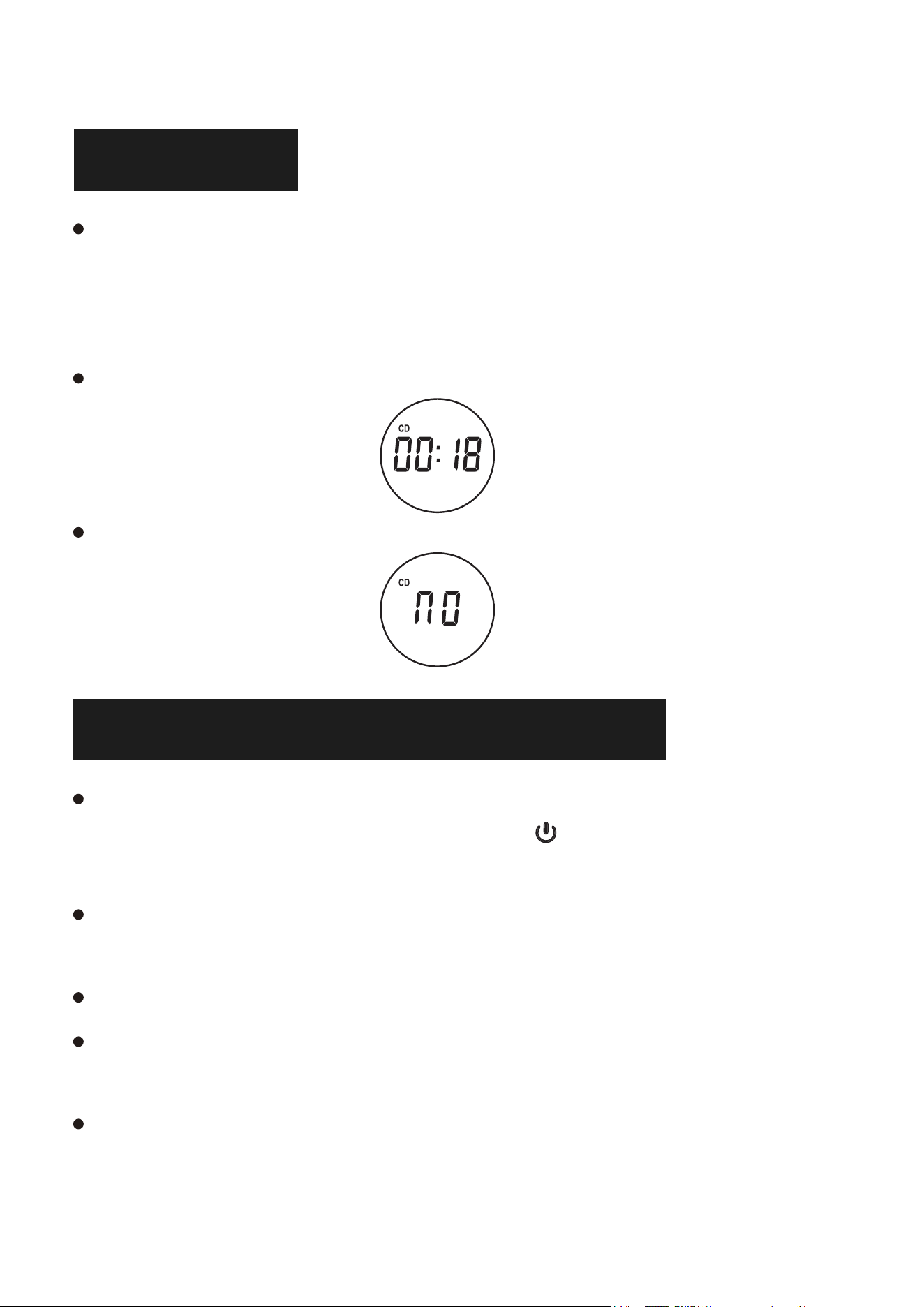
MODO CD
Pulse el botón [ FUNC. ] del mando a distancia para cambiar al modo
CD, o pulse el botón «Mode» (en la unidad) para cambiar al modo CD,
el disco se ejecutará automáticamente y el icono CD aparecerá en la
pantalla LED.
Espere 12-15 segundos, el reproductor de CD reproducirá el audio del
CD.
Si no se reconoce el disco, aparecerá «NO» en la pantalla LED.
MODO RECEBIDOR BLUETOOTH
Pulse el botón [ FUNC. ] del mando a distancia para cambiar al «Modo
Bluetooth» o pulse brevemente el botón /M del reproductor de CD
para cambiar al Modo Bluetooth.
Active el Bluetooth en su teléfono móvil y seleccione el Bluetooth
denominado «CD86» en su teléfono móvil para el emparejamiento.
Su teléfono móvil se emparejará/conectará con el reproductor de CD.
Una vez realizada la conexión, aparecerá el mensaje de voz
«Conectado».
Reproduzca música en su teléfono móvil y el audio se transmitirá a los
altavoces del reproductor de CD a través de Bluetooth.
ES
46
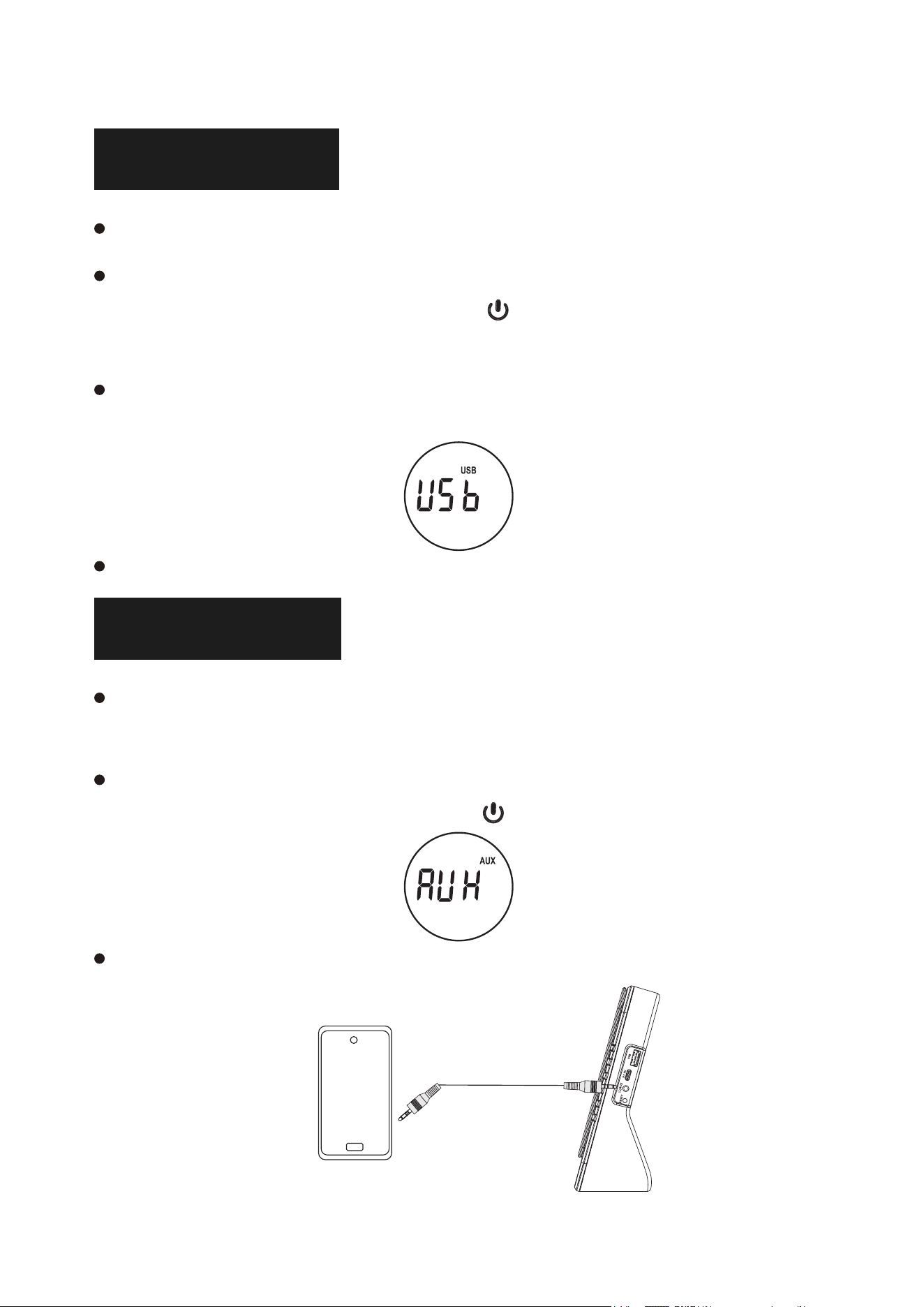
MODO USB
Inserte una memoria USB en el puerto USB del reproductor de CD.
Pulse el botón [ FUNC. ] del mando a distancia para cambiar al modo
USB o pulse brevemente el botón /M del reproductor de CD para
cambiar al modo USB.
El icono «USB» se mostrará en la pantalla LED, el reproductor de
CD leerá y reproducirá la música de la memoria USB.
NOTA:Memoria máxima: 64G. El número máximo de pistas USB es 999.
MODO AUX
Conecte un extremo del cable AUX al puerto AUX del reproductor
de CD y el otro extremo al dispositivo de audio.
Pulse el botón [ FUNC. ] del mando a distancia para cambiar al modo
AUX o pulse brevemente el botón /M del reproductor de CD para
cambiar al modo AUX.
La canción reproducida en el dispositivo de audio se reproducirá a
través de los altavoces del reproductor de CD.
ES
47
MODO TRANSMISOR BLUETOOTH
En el modo CD/USB/AUX, presione el botón en el reproductor de
CD o presione el botón de transmisión bluetooth en el mando remoto,
la señal de audio de este reproductor de CD se transmitirá al
dispositivo receptor Bluetooth cercano.
Encienda otro dispositivo receptor Bluetooth y espere a que se
produzca el estado de emparejamiento, este reproductor de CD se
conectará automáticamente a ese dispositivo y reproducirá la
música de este reproductor de CD.
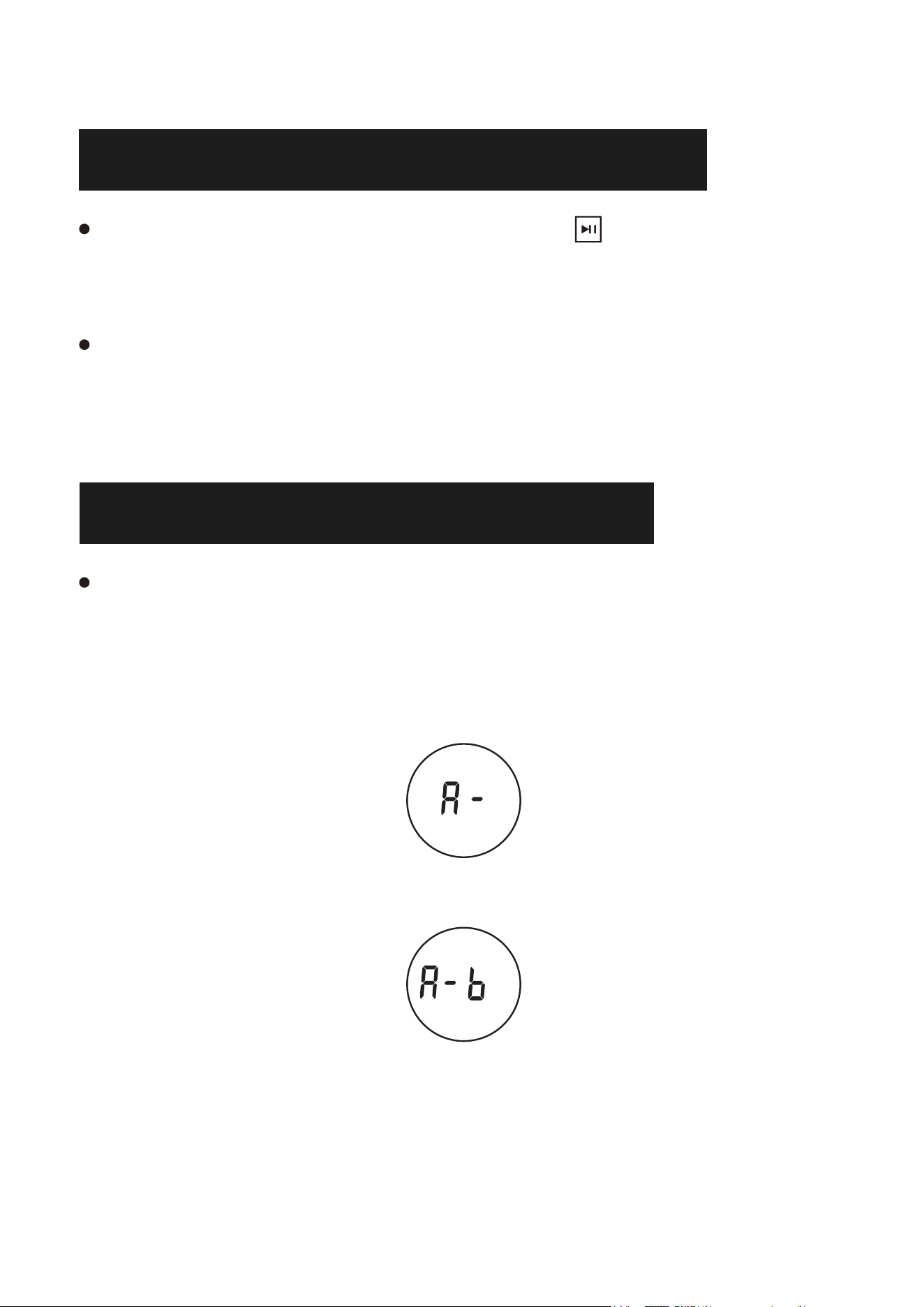
FUNCIÓN DE REPETICIÓN A-B
La función de repetición A-B le permite repetir una zona específica
de la canción estableciendo el punto de inicio (A) y el punto final
(B).
1. Durante la reproducción, pulse el botón A-B del mando a distancia
para establecer el punto de inicio (A) y se mostrará «A-» en la
pantalla.
2. Durante la reproducción, pulse el botón A-B del mando a distancia
para ajustar el punto final (B) y «A-B» se mostrará en la pantalla.
3. A continuación, la parte designada de A a B se reproducirá
repetidamente.
4. Pulse de nuevo el botón A-B para salir de la repetición AB y
aparecerá «OFF» en la pantalla.
ES
48
BUCLE DE PISTA
En el modo CD/TF/USB, presione brevemente el botón [RER] del control remoto
para operar:
Pulsa una vez: Reproduce la pista actual en un solo bucle.
Presione dos veces: Reproduzca todas las pistas en bucle.
Presione tres veces: Reproduzca todas las pistas al azar.
Nota: Soporta múltiples bucles de directorio.
EQ SONIDO
Durante la reproducción, pulsa el botón EQ del mando a distancia para seleccionar
tus efectos de sonido favoritos: FLAT, JAZZ, ROCK, CLASE, POP.
SALTO RÁPIDO DE CANCIÓN
En modo CD/USB, pulsa el botón 10- del mando a distancia para saltar 10 pistas
hacia arriba; pulsa el botón 10+ para saltar 10 pistas hacia abajo.
FUNCIÓN RESET
Cuando la máquina se atasca ocasionalmente en el trabajo o el botón de función
no puede funcionar, puede intentar pulsar el botón de reinicio para recuperar.
MODO DE SUEÑO
Presione el botón " " del control remoto, puede ajustar el
Tiempo de temporización, 15 minutos, 30 minutos, 60 minutos, 90 minutos.
Una vez transcurrido el tiempo del temporizador, el reproductor de CD entrará en
estado de reposo.
Pulse el interruptor de encendido para volver a encender el reproductor de CD.
ES
49
NOTA
No reproduzca discos CD agrietados o sucios, de lo contrario se
dañará el cabezal láser de reproducción.
Retire el papel protector de CD del reproductor de CD antes de
encender la unidad, de lo contrario no se podrá leer el disco.
No toque nunca el cabezal láser de la unidad y utilice siempre la
cubierta antipolvo para evitar que se acumule polvo en el láser.
Si el aparato no escanea los discos correctamente, limpie la óptica
láser con un limpiador comercial estándar. Otros métodos de
limpieza pueden dañar la óptica láser.
PARÁMETROS DEL PRODUCTO
Nombre del producto Reproductor de CD portátil
Dimension 178*66*178mm/7.0*2.6*7.0in
Modelo del producto CD86
Peso 577g/1.27lb
Método de alimentación Tipo-C 5V 2A
Tensión de trabajo 5V
Formato de disco compatible CD/CD-R/CD-RW/MP3/WMA
ES
50
GARANTÍA
El equipo está cubierto por una garantía de 12 meses por
defectos de fabricación a partir de la fecha de compra.
LISTA DE EMBALAJE
Reproductor de CD 1
Cable AUX 1
Cable de alimentación tipo C
NOTA: El control remoto no incluye baterías y requiere la instalación
de dos baterías AAA.
1
Mando a distancia 1
Manual de instrucciones 1
Caja 1
Made in China
ES

5)H[SRVXUHVWDWHPHQW
7KLVHTXLSPHQWFRPSOLHVZLWKWKH)&&UDGLDWLRQH[SRVXUHOLPLWVVHWIRUWKIRUDQ
XQFRQWUROOHGHQYLURQPHQW7KLVWUDQVPLWWHUPXVWQRWEHFRORFDWHGRURSHUDWLQJ
LQFRQMXQFWLRQZLWKDQ\RWKHUDQWHQQDRUWUDQVPLWWHU
)&&:DUQLQJ
7KLVGHYLFHFRPSOLHVZLWK3DUWRIWKH)&&5XOHV2SHUDWLRQLVVXEMHFWWRWKH
IROORZLQJWZRFRQGLWLRQV
7KLVGHYLFHPD\QRWFDXVHKDUPIXOLQWHUIHUHQFHDQGWKLVGHYLFHPXVW
DFFHSWDQ\LQWHUIHUHQFHUHFHLYHGLQFOXGLQJLQWHUIHUHQFHWKDWPD\FDXVH
XQGHVLUHGRSHUDWLRQ
1RWH7KLVHTXLSPHQWKDVEHHQWHVWHGDQGIRXQGWRFRPSO\ZLWKWKHOLPLWVIRUD
&ODVV%GLJLWDOGHYLFHSXUVXDQWWRSDUWRIWKH)&&5XOHV7KHVHOLPLWVDUH
GHVLJQHGWRSURYLGHUHDVRQDEOHSURWHFWLRQDJDLQVWKDUPIXOLQWHUIHUHQFHLQD
UHVLGHQWLDOLQVWDOODWLRQ7KLVHTXLSPHQWJHQHUDWHVXVHVDQGFDQUDGLDWHUDGLR
IUHTXHQF\HQHUJ\DQGLIQRWLQVWDOOHGDQGXVHGLQDFFRUGDQFHZLWKWKH
LQVWUXFWLRQVPD\FDXVHKDUPIXOLQWHUIHUHQFHWRUDGLRFRPPXQLFDWLRQV+RZHYHU
WKHUHLVQRJXDUDQWHHWKDWLQWHUIHUHQFHZLOOQRWRFFXULQDSDUWLFXODULQVWDOODWLRQ
,IWKLVHTXLSPHQWGRHVFDXVHKDUPIXOLQWHUIHUHQFHWRUDGLRRUWHOHYLVLRQ
UHFHSWLRQZKLFKFDQEHGHWHUPLQHGE\WXUQLQJWKHHTXLSPHQWRIIDQGRQWKH
XVHULVHQFRXUDJHGWRWU\WRFRUUHFWWKHLQWHUIHUHQFHE\RQHRUPRUHRIWKH
IROORZLQJPHDVXUHV
²5HRULHQWRUUHORFDWHWKHUHFHLYLQJDQWHQQD
²,QFUHDVHWKHVHSDUDWLRQEHWZHHQWKHHTXLSPHQWDQGUHFHLYHU
²&RQQHFWWKHHTXLSPHQWLQWRDQRXWOHWRQDFLUFXLWGLIIHUHQWIURPWKDWWRZKLFK
WKHUHFHLYHULVFRQQHFWHG
²&RQVXOWWKHGHDOHURUDQH[SHULHQFHGUDGLR79WHFKQLFLDQIRUKHOS
127($Q\FKDQJHVRUPRGLILFDWLRQVWRWKLVXQLWQRWH[SUHVVO\DSSURYHGE\
WKHSDUW\UHVSRQVLEOHIRUFRPSOLDQFHFRXOGYRLGWKHXVHUVDXWKRULW\WRRSHUDWH
WKHHTXLSPHQW