USER MANUAL
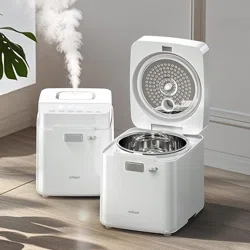
Warm Steam Humidifier
Model: MFS-JSQ-01
Looking for help?
We provide a one-year warranty. Any questions or concerns,
please feel free to contact us at [email protected]

Precautions
Before using this product, please read this manual carefully
and keep it for future reference.
All pictures shown are for illustration purposes only.
Actual products may vary due to product improvement.
https://www.feekaa.com/pages/user-guide
For more installation information,
please visit the official website link or scan the QR code:
Thank you for purchasing our humidifier MFS-JSQ-01.

Contents
Safety Precautions 1-2
3
4
5-6
5-8
7
8
9
10-11
12-13
14
Product Structure Diagram
Location Requirements
Using Instructions
Before Use
LED Display
Control Panel
Cleaning & Maintenance
Troubleshooting
Product Specifications
Warranty Information
1
2
3
4
5
6
7
8

Safety Precautions
To prevent injury to the user or other people and property damage,
follow all instructions and safety guidelines.
General Safety
Operation Safety
● Only use the humidifier as described in this manual.
● Keep the humidifier out of reach from children and infants.
● This humidifier is not to be used by persons (including children) with reduced
physical, sensory, or mental capacities, or lack of experience and knowledge,
unless they have been given supervision or instruction concerning the use of the
appliance by a person responsible for the safety.
1
●
Do not touch hot surfaces.
● Do not open the cover during use.
● Do not cover the steam outlet during use.
● Do not touch the steam outlet and keep hands and face away to avoid scalding.
● Allow appliance to cool before putting on or taking off parts, and before cleaning
or storage.
● Be extremely cautious when moving the humidifier or inner pot if it contains hot water.
● Always make sure to place the humidifier on a flat, level surface before operation.
● Do not use the humidifier in wet environments.

Safety Precautions
Electricity Safety
2
●
Do not use outdoors. Intended for indoor household use only.
● Do not place the humidifier near sources of heat, such as stovetops, ovens,
or radiators.
● Only fill the water tank with clean water. Never fill the water tank with any
other liquids.
● Do not add essential oils or water filters into the water tank.
● Water amount should NOT exceed the MAX level marked on inner pot.
● Ensure the heating plate is clean and the underside of the inner pot is dry before
inserting the inner pot.
● Do not disassemble, repair or modify the humidifier. For any repair, consult
Customer Support.
● Do not handle the power cord or plug with wet hands.
● Do not immerse the humidifier base, power cord, or plug in water.
● Do not run cord under carpeting, furniture, appliances or similar coverings.
● Always turn the humidifier off and unplug from electrical outlet when not in use and
before cleaning.
● Do not let the power cord hang over the edge of a table or counter or touch
hot surfaces.
● Do not use this appliance if the cord or plug has been damaged to avoid fire
or electric hazards.
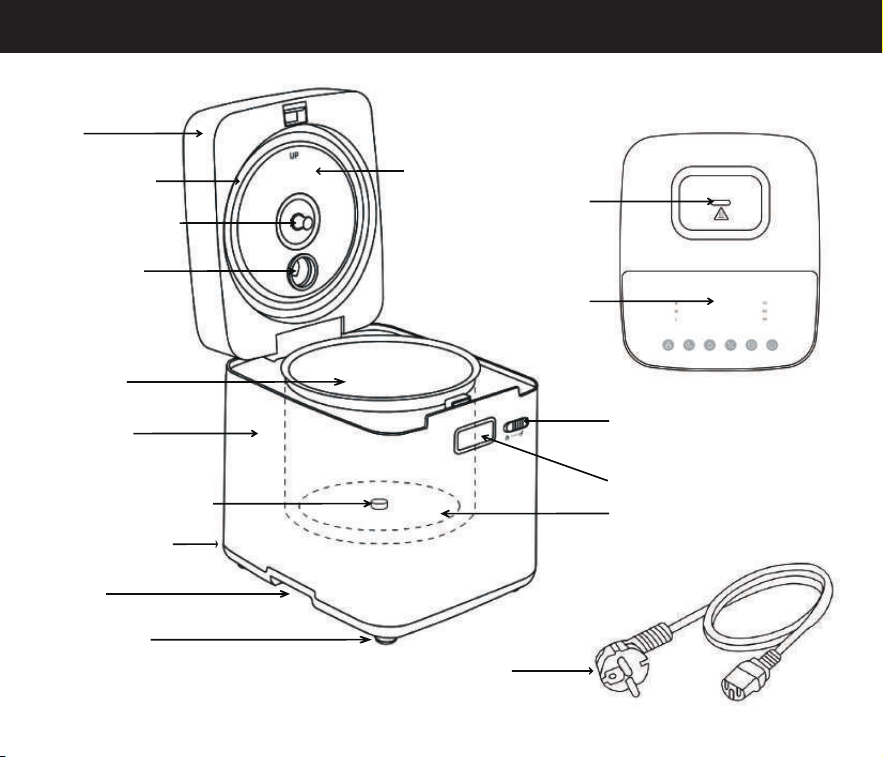
Product Structure Diagram
Steam Outlet
Control Panel
Open Button
Lid Lock
Lid
Lid Seal Ring
Inner Lid
Inner Lid Handle
Steam Hole
Main Body
Inner Pot
Temperature Sensor
Input Connector
Handle
Non-slip Mat
Power Cord
Heating Plate
3
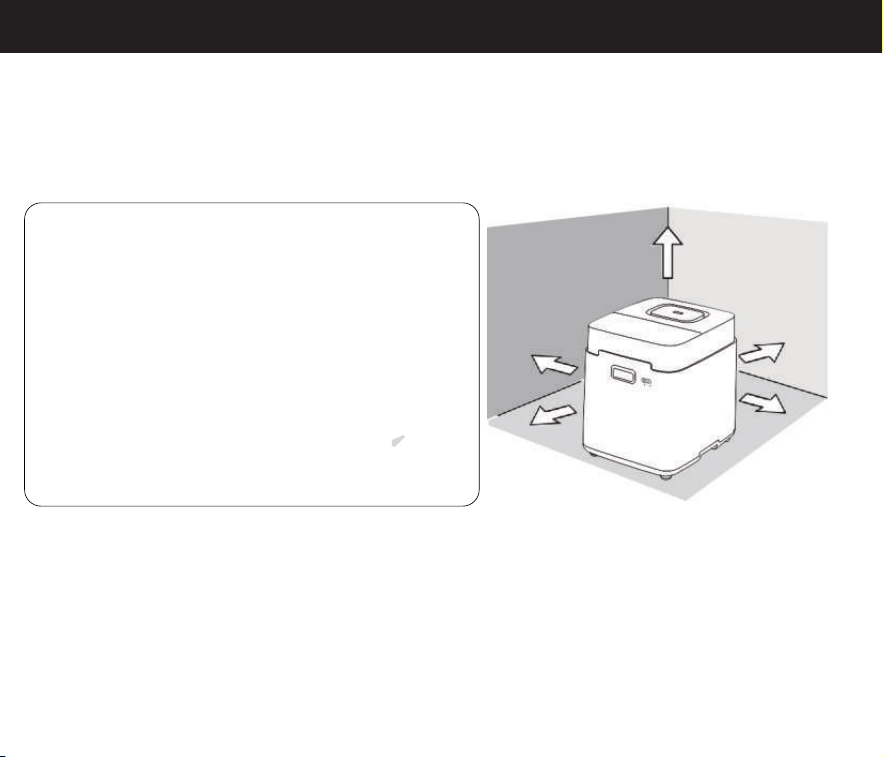
Location Requirements
Place the humidifier on a flat, level surface, keeping at least 32 cm/13 inches
(all around), and 100 cm/40 inches (above) from walls or any major obstacles.
Avoid using the humidifier in the following situations to prevent water leakage,
signal jamming, damage, or injury:
4
32cm
32cm
100cm
32cm
32cm
Please follow these guidelines carefully to ensure the safe and proper operation of your humidifier.
If you have any questions or concerns, please refer to the user manual or contact customer support.
● In direct sunlight.
● On an unstable platform.
● In high temperatures, humidity, or dust.
● Areas within reach of children and infants.
● Near heat sources like air conditioners, heaters,
stoves, or any other objects that emit heat.
● Near precision instruments like mobile phones,
computers, and other electronic devices.
● Near objects that emit radio waves such as radios.
● Near areas that can be damaged by steam
(such as walls, cupboards, tables, curtains or carpets).
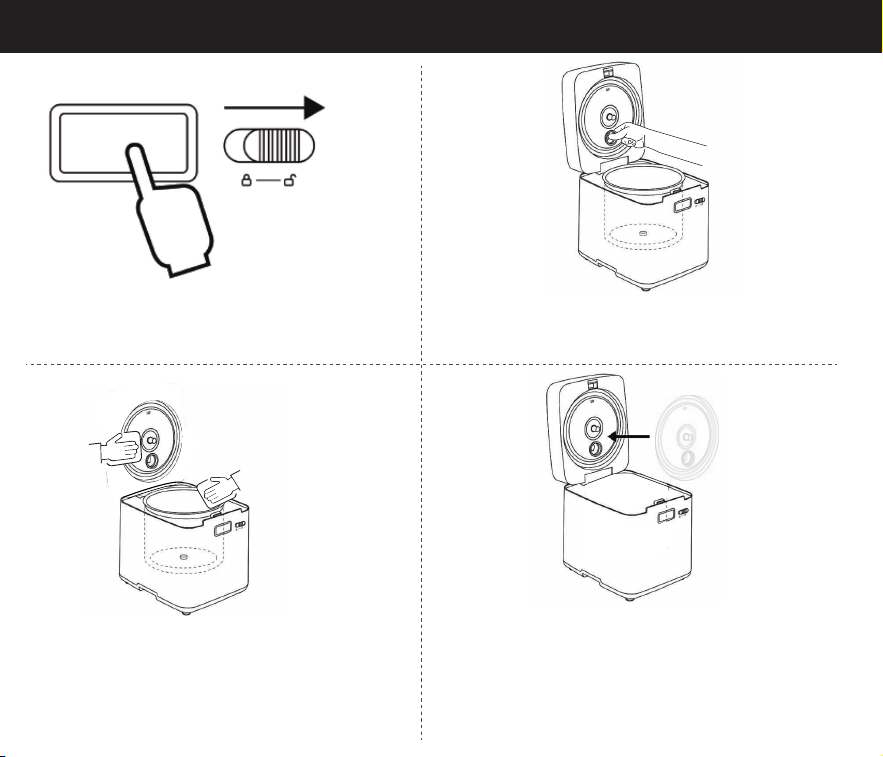
Using Instructions(Before Use)
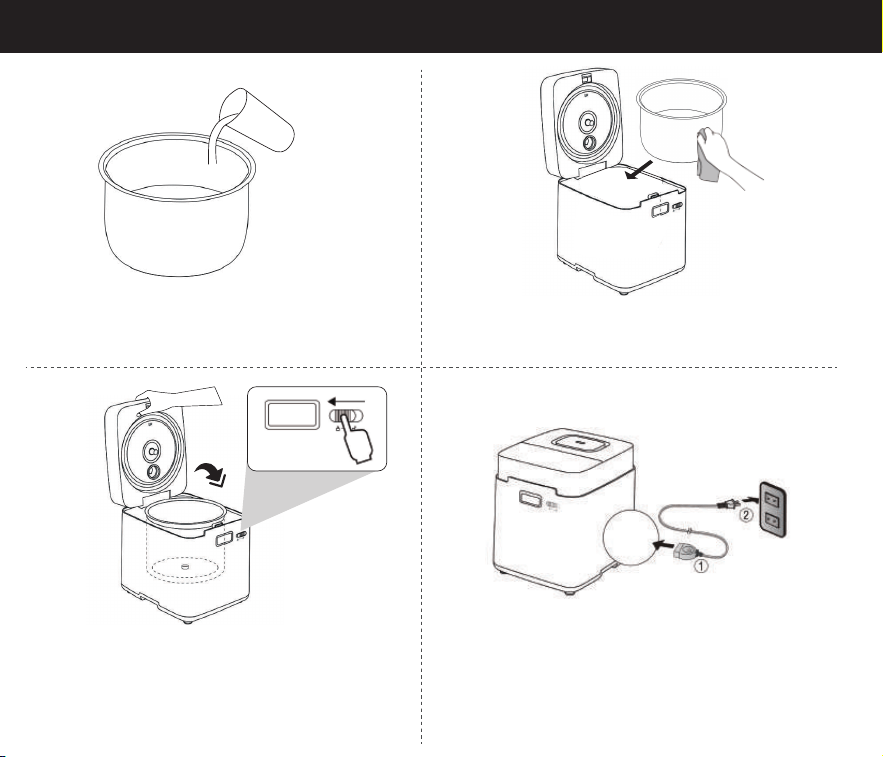
1. Slide lid lock to right to the unlock position,
then press open button.
2. Hold the steam hole on inner lid and remove it.
3. Wash the inner lid and inner pot with hot,
soapy water and a non-abrasive sponge.
4. Reinstall the inner lid, making sure to align the
steam hole.
5
Using Instructions(Before Use)
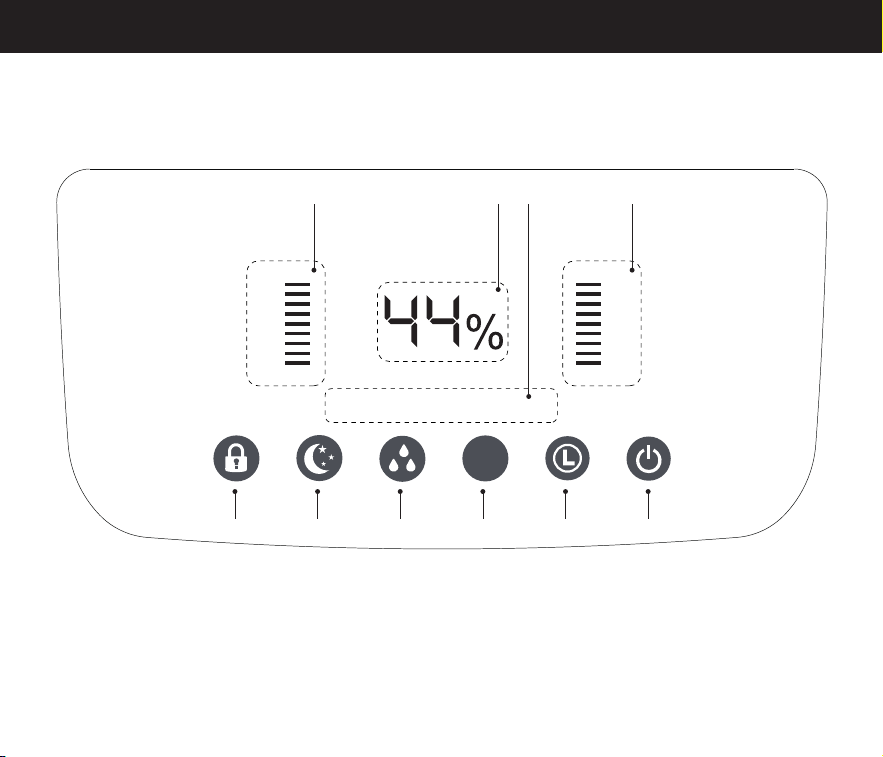
5. Add clean water to the inner pot.
Note: Do not exceed the MAX level mark.
7. Close and press the lid downward. Then slide
the lid lock to left to the lock position.
8. Plug the power cord into an electrical outlet.
6. Dry the bottom and around the inner pot.
Place it in the humidifier.
6
Using Instructions(LED Display)
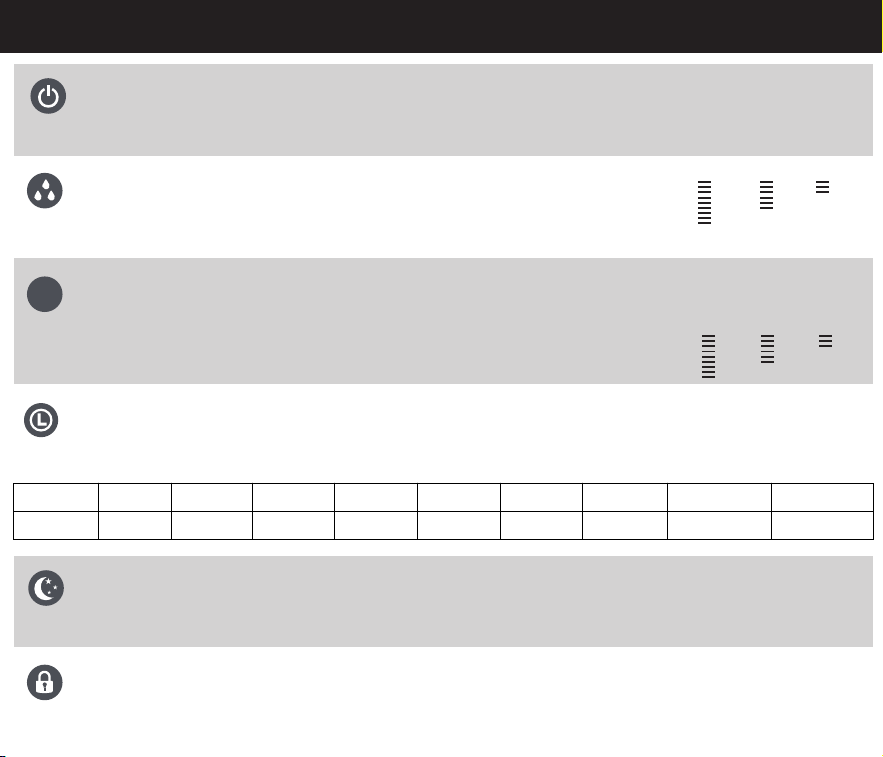
A:Child Lock Button
A
1 2 3 4
B C D E F
1:Mist Level Indicators
4:Humidity Level Indicator
2:Relative Humidity (RH) Percentage
3:Timer Hour Indicator
D:Humidity Setting Button
E:Timer Button
F:Power Button
B:Sleep Mode Button
C:Mist Level Button
H
M
L
70
60
50
1H 4H2H 3H
7
%
Using Instructions(Control Panel)
8
70 60 50
● The panel displays current ambient humidity, not target humidity.
● Humidity level indicator as shown on the right
● You can switch target humidity level between 70%/60%/50%.
Humidity Setting Button
● When Sleep Mode is on, tap any other button to wake up the display.
● In Sleep Mode, the humidifier will switch to low mist.
● Except for sleep indicator, the other display lights will be turned off.
Sleep Mode Button
● Only power button can shut down the device in child lock mode, and
other function buttons are unavailable.
● Long press for 3 seconds to enable or disable the child lock function.
Child Lock Button
● Press to enter "standby mode", the power button's red light will be on.
● The display shows current humidity levels in the humidifier’s environment.
● Turn the humidifier on/off.
Power Button
H M L
● Mist level indicator as shown on the right
● Switch between High/Medium/Low mist level.
Mist Level Button
● Press repeatedly to cycle through options in increments of 1 hour.
● To stop this function, press repeatedly until the hour indicator light turns off.
● Press to cycle through timer options from 1–9 hours.
Timer Button
2 hour
2H
3 hour
3H
4 hour
4H
5 hour
1H 4H
6 hour
2H 4H
7 hour
3H 4H
8 hour
1H 3H 4H
9 hour
2H 3H 4H
Timer
Display
1 hour
1H
%
Cleaning & Maintenance
Note:
Cleaning
● Change the water daily to avoid bacteria growth.
● If not using for 1 week or longer, do not leave water inside. Clean and dry the humidifier instead.
● Before cleaning, turn off and unplug the humidifier and allow it to cool completely.
● Do not immerse the humidifier base, power cord, or plug in water.
● Do not use abrasive cleaners, metal scouring pads, or metal utensils on any part of the humidifier.
These will scratch or damage their surfaces.
Storage
1. Clean and dry the humidifier and all accessories.
2. Place the inner pot in the humidifier. Close the lid.
3. Store the humidifier in an upright position. Do not store anything on top.
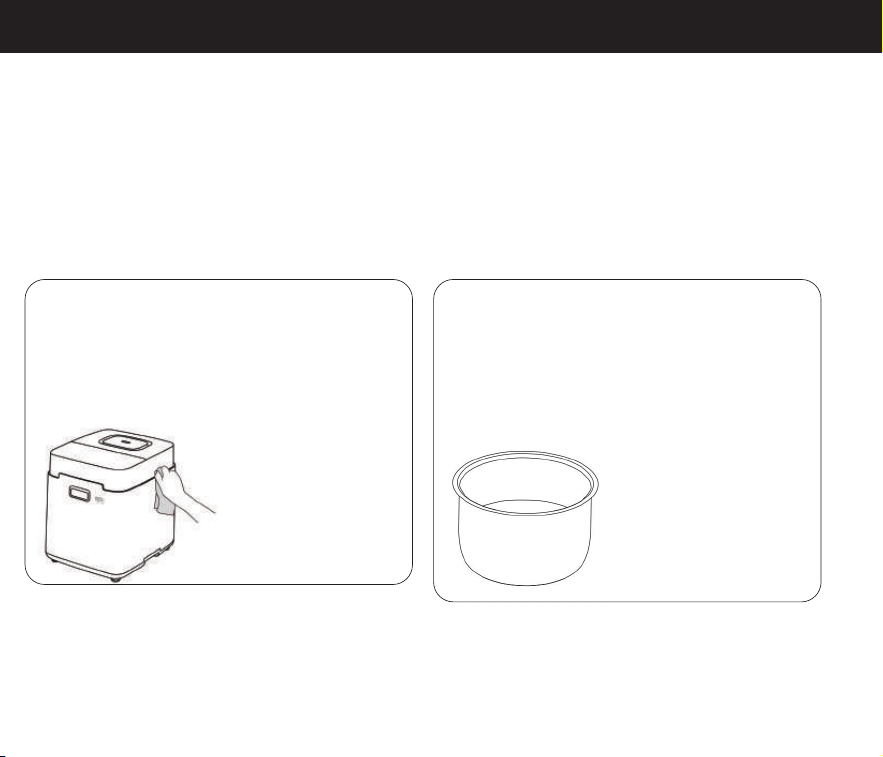
Main Body
● Wipe the surface with a soft towel/sponge.
If it is very dirty, clean it with a neutral
detergent.
Inner Pot
● Please clean 1~2 times a week
● Wash with hot, soapy water and a soft
towel/sponge.
● The stainless steel inner pot is
dishwasher-safe.
● To descale (remove
mineral buildup), we
recommend cleaning
with neutral detergent/
distilled white vinegar/
citric acid. Soak for 15-
20 minutes if necessary.
● You can use a vacuum cleaner to remove
dust from hard-to-clean areas.
9
Troubleshooting
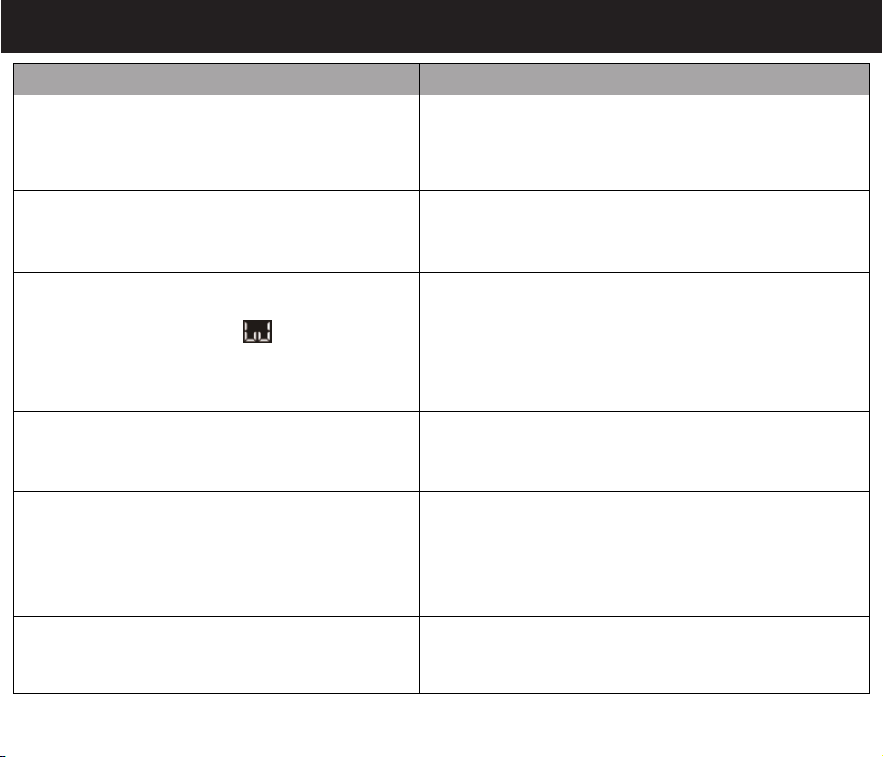
Humidifier does not work.
Make sure the humidifier is plugged into a working
outlet and the mains voltage corresponds with the
voltage indicated on the humidifier.
No mist comes out.
This humidifier works by heating water to a boil to
produce steam. Please be patient for 15-30 minutes.
Display shows Error Code “E1”.
The thermistor is open-circuited. Immediately unplug
humidifier, and contact customer support.
Display shows Error Code “E2”.
The thermistor is short-circuited, or the heating plate is
too hot. Immediately unplug humidifier, and restart it
after cooling down. If not, please contact customer
support.
There is scale in the water tank.
Tap water contains minerals that can adhere to objects.
You should descale the water tank regularly.
Problem Possible Solution
1. The tank is short of water. Please re-fill the water
tank.
2. The scale in the water tank has not been cleaned
for a long time. Please descale the water tank.
Display shows Error Code " "
and makes a beeping noise.
10

The area around the humidifier is damp
or wet from condensation.
1. The humidity may be too high. Turn down the mist
level, humidity level, turn off the humidifier.
2. The humidifier may be placed in a non-ventilated
area. Open a window to ensure proper airflow for
the humidifier, or move the humidifier to a more
well-ventilated room.
Please note that the humidity sensor and hygrometer
in the room may have an error range of 5-10%
depending on the sensing method and structure.
Display shows an incorrect humidity percentage.
The composition of tap water can react with the flame,
so keep the humidifier away from the stove.
Why is the fire on the stove turning red?
If your problem is not listed, please contact Customer Support.
Troubleshooting
Problem Possible Solution
11

Warranty
● Our company provides a one-year warranty starting from the date of purchase.
Warranty Requirements
In order to receive warranty service, please follow these steps:
● Provide the warranty card and the order number.
Please note that we cannot provide warranty service without the above information.
Thank you for choosing our product, and we hope you enjoy using it. If you have any questions or
concerns, please don't hesitate to contact us.
● Describe the problems you are experiencing in detail and provide pictures or videos if possible.
Non-Warranty Policy
Warranty Period
The following conditions are not covered by the warranty:
● Damage that occurs after the warranty period has expired.
● Damage caused by natural disasters or other force majeure events.
● Any damage caused by use that does not follow the requirements outlines in the
User Manual.
● Failure or damage caused by the forced use of the product.
● The user disassembles or repairs the product without authorization.
● Send an email to
● If you need to return the product, please make sure that it is intact and the packaging
boxes and accessories are completely assembled.
12
Warranty
6-Month Extended Warranty Application
6ヶ月延長保証の申込
Antrag auf 6-monatige Garantieverlängerung
LINEをフォローし、お申込み
いただけると、保証期間が加
えて6ヶ月延 長 いたします。
日本語
LINE:@455mppqy
Login to apply for a
6-month extended
warranty service.
English
https://feekaa.com/
pages/warranty
Melden Sie sich an,
um Ihre 6-monatige
Garantieverlängerung
zu beantragen.
Deutsch
https://feekaa.com/
pages/warranty
13
Product Specifications
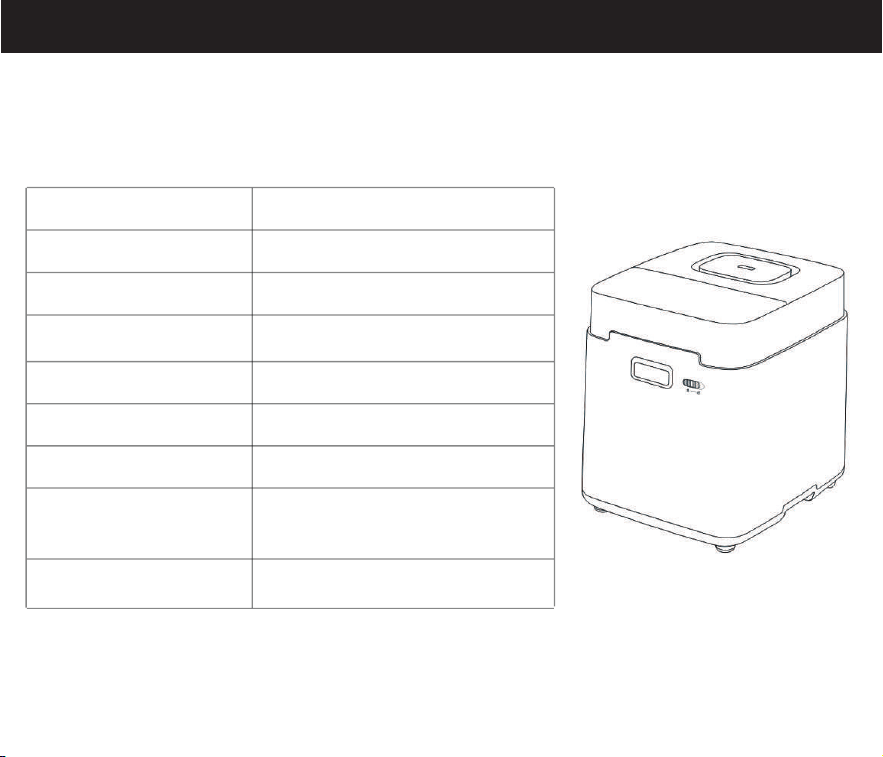
Product Name Warm Steam Humidifier
Model Number MFS-JSQ-01
Operation Mode Low Medium High
Rated Frequency 60Hz
3.3L / 0.87Gal
Rated Power
Rated Voltage
800W
120V~
Water Tank Capacity
Dimensions
30.3 x 25.5 x 29.3 cm /
11.9 x 10 x 11.5 in
Weight 4.2 kg / 9.3 lb
14