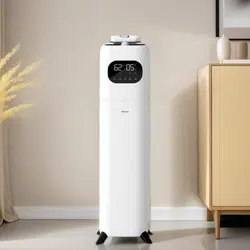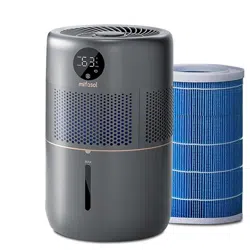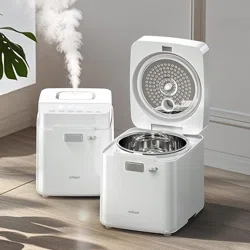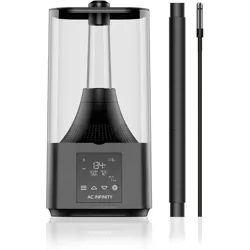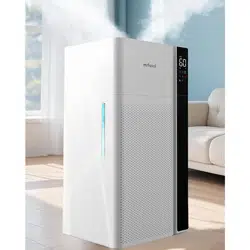
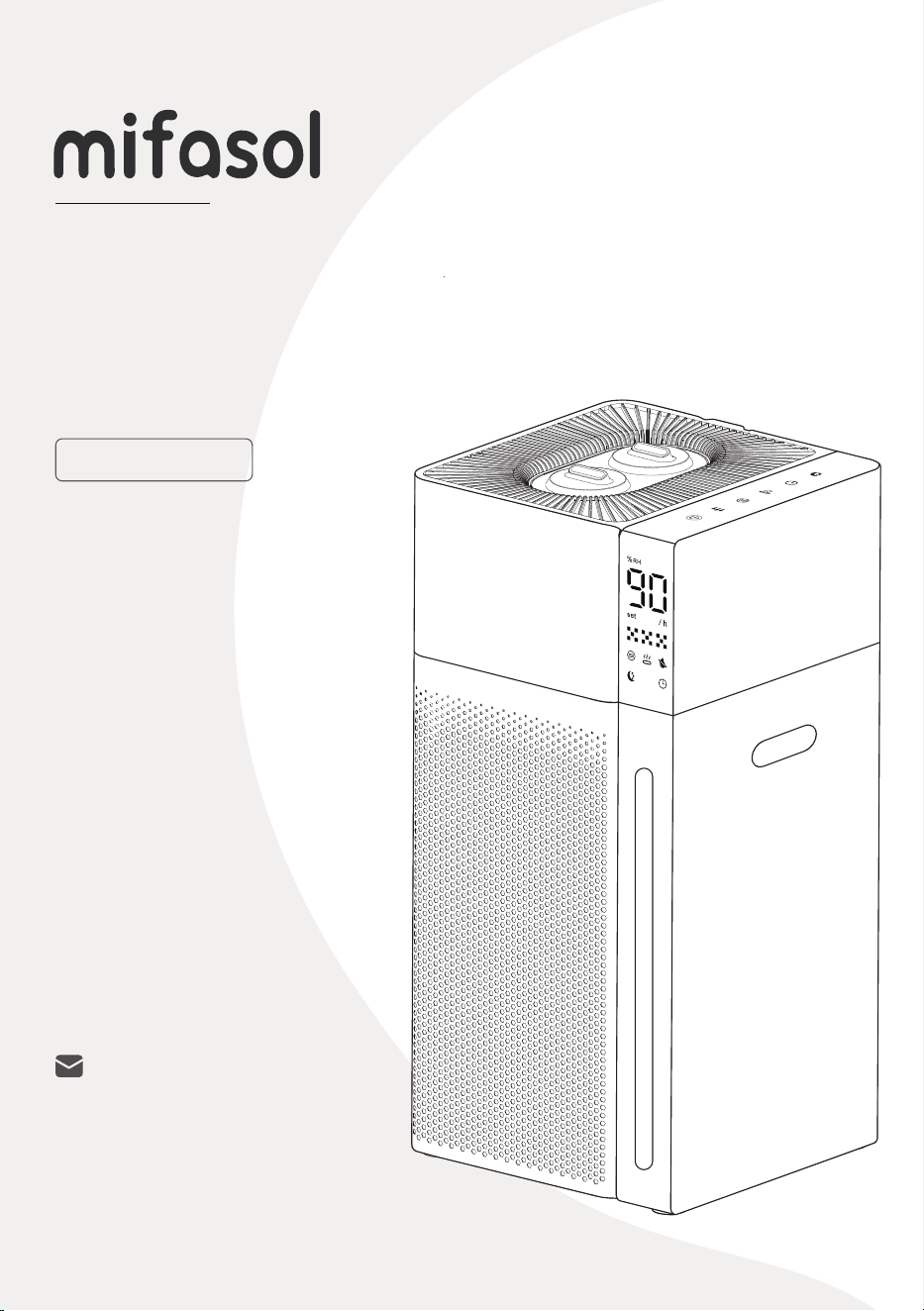
Cool and Warm
Mist Humidier
USER MANUAL
LCD-MH-J18
Need Assistance?
We're here to help!


Your support means the world to us.
We hope you enjoy our product as much as
we enjoyed creating it.
Please read this manual carefully before use
and keep it for future reference.
All images shown are for illustration purposes only.
The actual product may vary due to enhancements.
For more installation details,
visit our website or scan the QR code:
https://lacidoll.com/pages/user-manual

Contents
Important Safety Instructions
1-2
Knowing Your Humidier
Using Your Humidier
——Package Contents
——Specications
——LED Display & Control Panel
——Remote Control
Contents
19-22
23-24
3-4
5
12
13
14
16
17
18
17
——Getting Started
——Filling Water
——White Dust (Mineral Residue)
6-9
10-11
Cleaning And Maintenance
Troubleshooting
Warranty Policy
——Regular Cleaning
——Descaling Instructions
——Seasonal Storage Guidelines
——Pump Maintenance & Replacement

Important Safety Instructions
Please read and retain the following safety instructions before using this
humidifier. Always follow these basic precautions to reduce the risk of fire,
electric shock, and personal injury.
1. General Safety
Placement
Temperature
Keep Away From Heat Sources
Keep out of Reach of Children and Pets
Indoor Use Only
Place the humidifier on a firm, flat, and waterproof surface to ensure stability and
prevent tipping.
Keep the humidifier at least 12 inches
(30 cm) away from walls or wooden furniture.
If using on a wooden floor, a waterproof mat is recommended to prevent excessive
moisture buildup.
Before first use, let the humidifier sit at room temperature for 30 mins to prevent
potential damage to the water tank caused by sudden temperature changes.
Operate the humidifier within a room temperature range of 41°F - 104°F
(5°C-40°C).
If the temperature drops below 32°F (0°C), empty the water tank to prevent freezing
and potential damage.
Do not place the humidifier near heat sources such as stoves, ovens, radiators,
or direct sunlight.
Place the humidifier where children and pets cannot access it.
Children should not operate or clean the humidifier without supervision.
This humidifier is designed for indoor use only.
Do not use it outdoors or in damp environments.
Avoid running it in a closed room for extended periods without supervision.
The water temperature inside the tank will heat up during the heater operation of
the warm mist function. Please don't touch it directly as there is a risk of burns.
1

Important Safety Instructions
2
3. Special Precautions
Avoid Over-Humidication
2. Power & Cord Safety
Cord
Plug and Outlet
Unplug When Not in Use
Avoid pulling, twisting, or damaging the power cord.
Ensure the plug fits securely into the outlet to prevent overheating.
Always unplug the humidifier before refilling, moving, cleaning, or when not in use
for an extended period.
If condensation appears on walls, windows, or around the device, turn off the
humidifier or lower the mist output.
Do Not Inhale Mist Directly
Avoid inhaling mist directly or directing mist toward people or objects.
Do Not Add Substances
Do not add essential oils, medications, or other additives to the water tank or mist
outlet, as this may damage the unit or affect health.
4. Maintenance & Repairs
No Self-Repair
Do not disassemble, modify, or repair the humidifier yourself. Repairs should only be
performed by the manufacturer or a qualified professional.
Routine Inspections
Regularly check the power cord, plug, and water tank for any signs of damage.
If any issues are detected, stop using the humidifier and contact customer service.
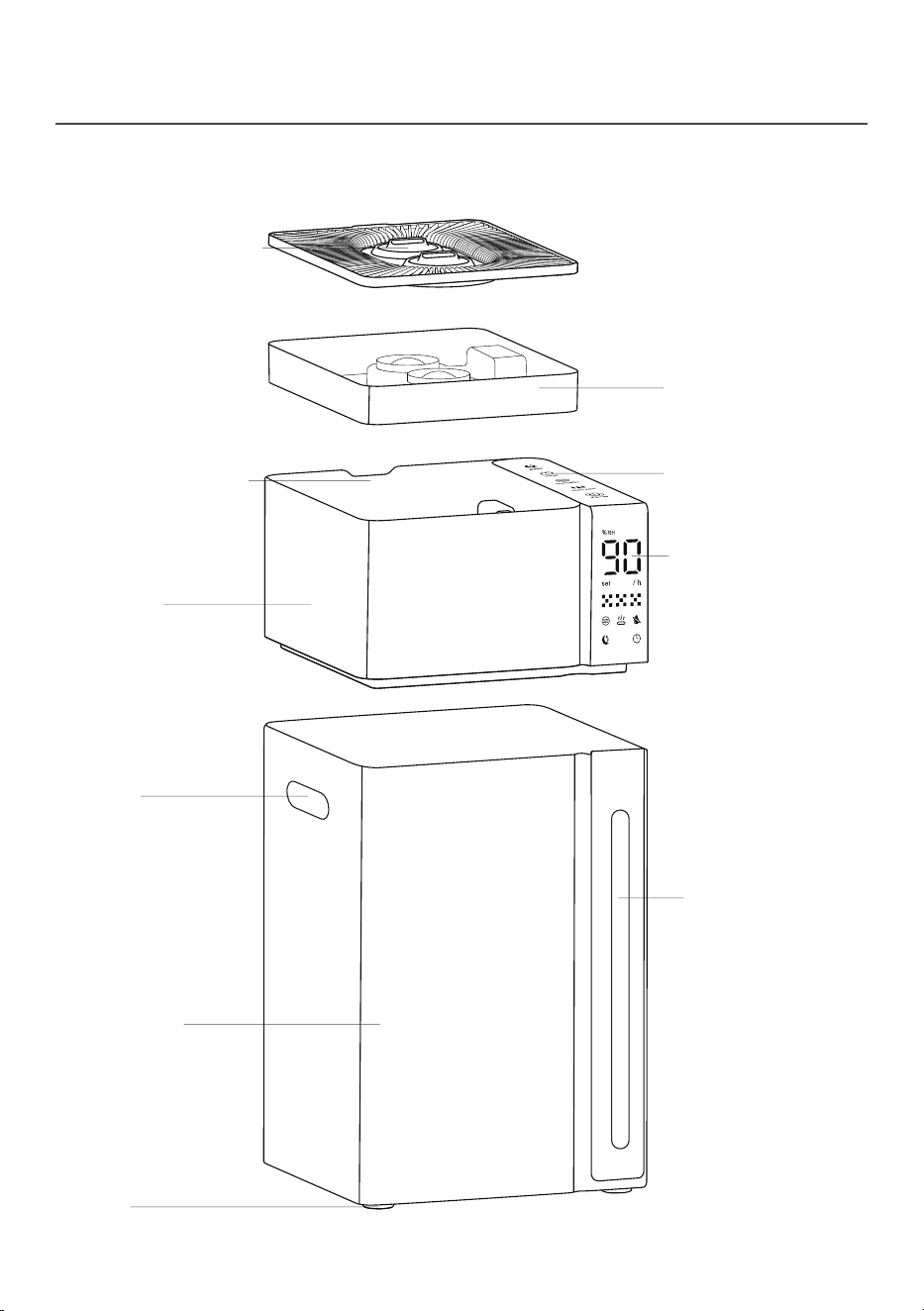
Package Contents
Double Nozzles
LED Display
Control Panel
Water Tank
Water Level
Window
Main Unit
Handle
Wheel
Water Inlet Tank
3
Water Chamber/
Water Reservoir
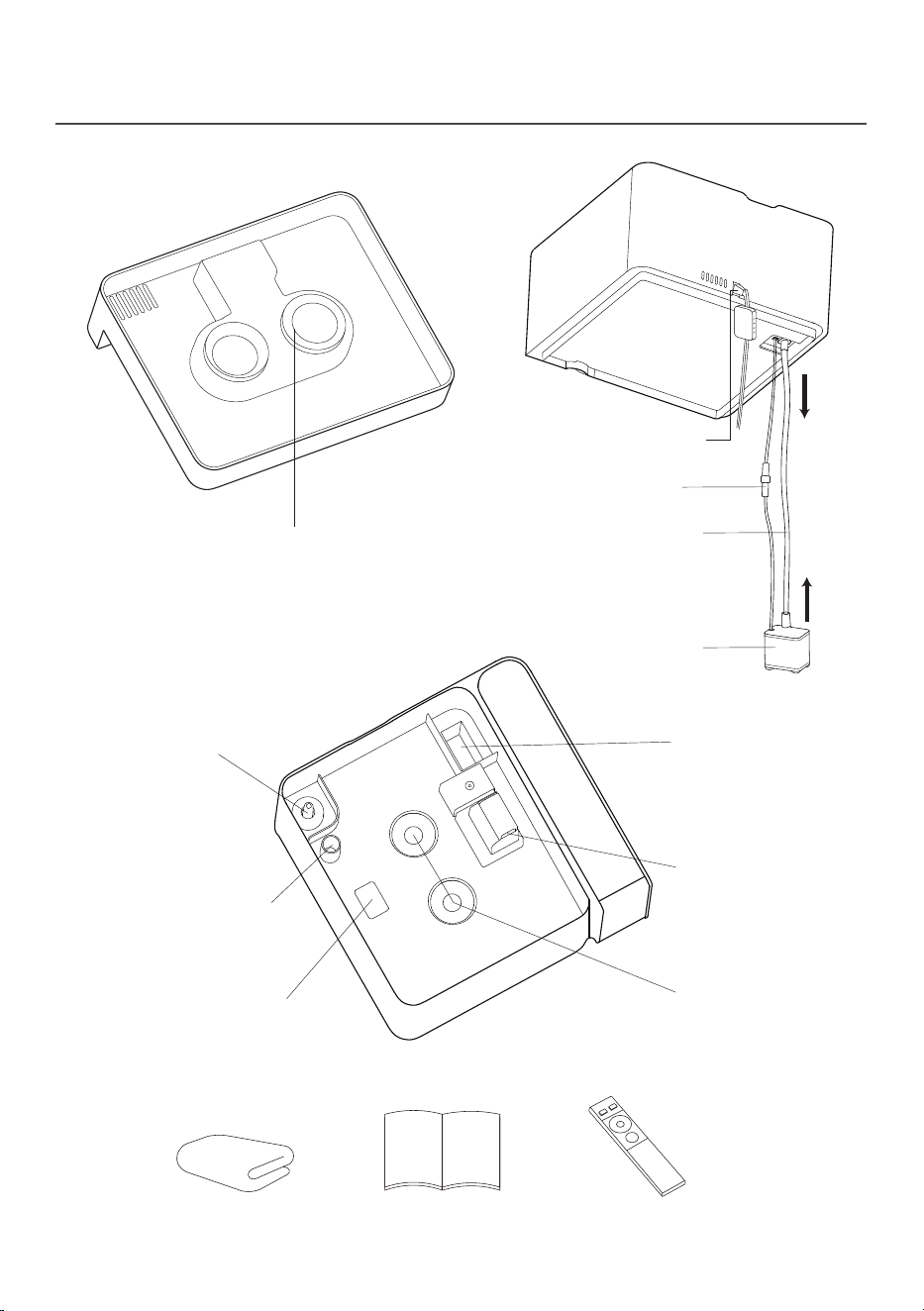
User Manual Remote ControlSoft Cloth
Water Inlet
Overow Valve
Air Outlet
Heating Element
Float
Stainless Steel
Ultrasonic Disks
Package Contents
Pump
Silicone Tube
Power Cord
Double Mist Tubes
4
Connector
Specications
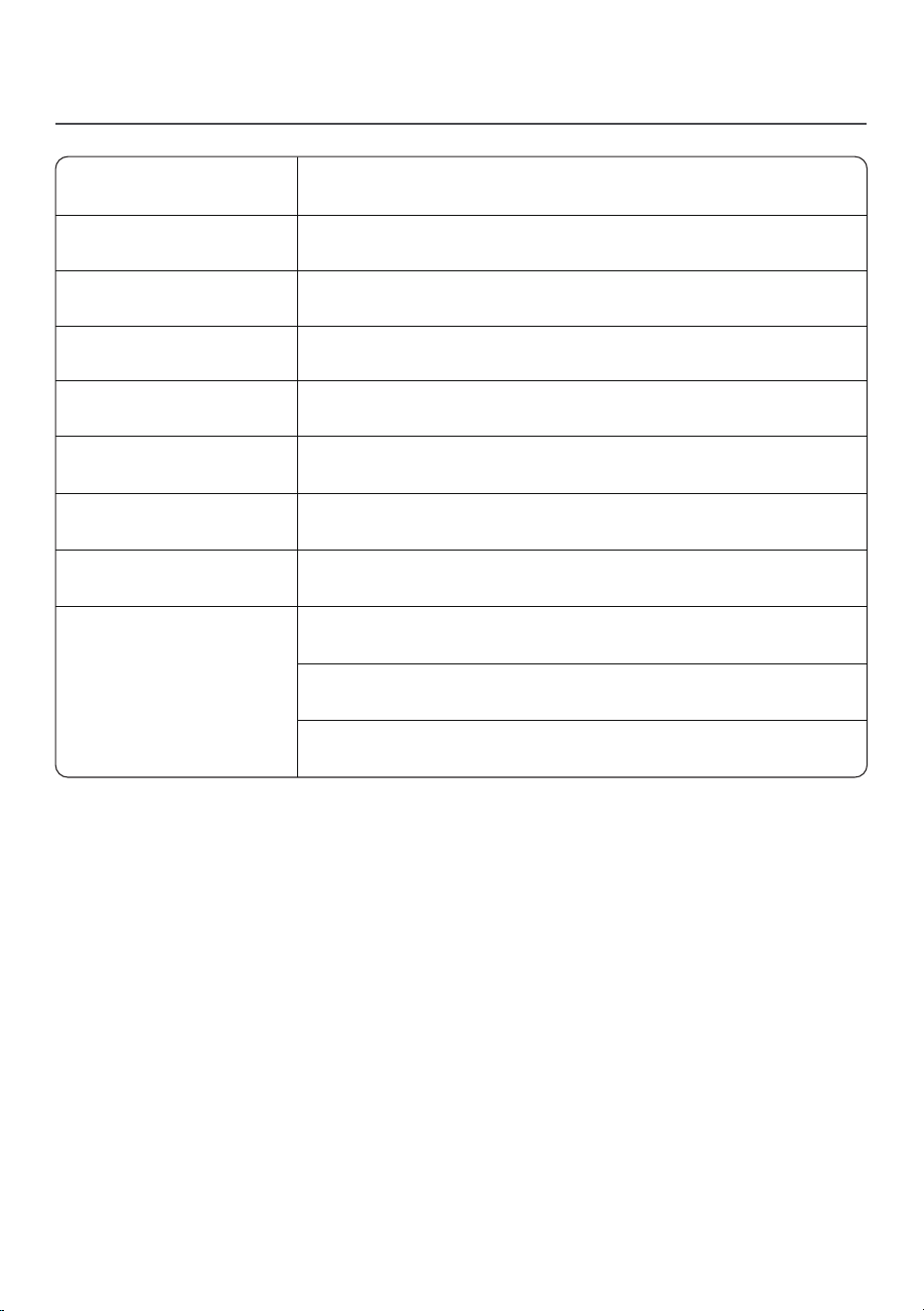
Product Name
Cool and Warm Mist Humidier
Low Medium High
Model Number
Mist level
LCD-MH-J18
50W
(Cool Mist) 130W(Warm Mist)
Rated Power
120V~
Rated Voltage
<35 dB
Noise
5.3Gal/20L
Tank Capacity
9.5"D x 9.8"W x 20.0"H
Size
1-24 hours Timer
Waterless auto shut-o
Automatic shutdown when falling
Safety Functions
5
LED Display & Control Panel
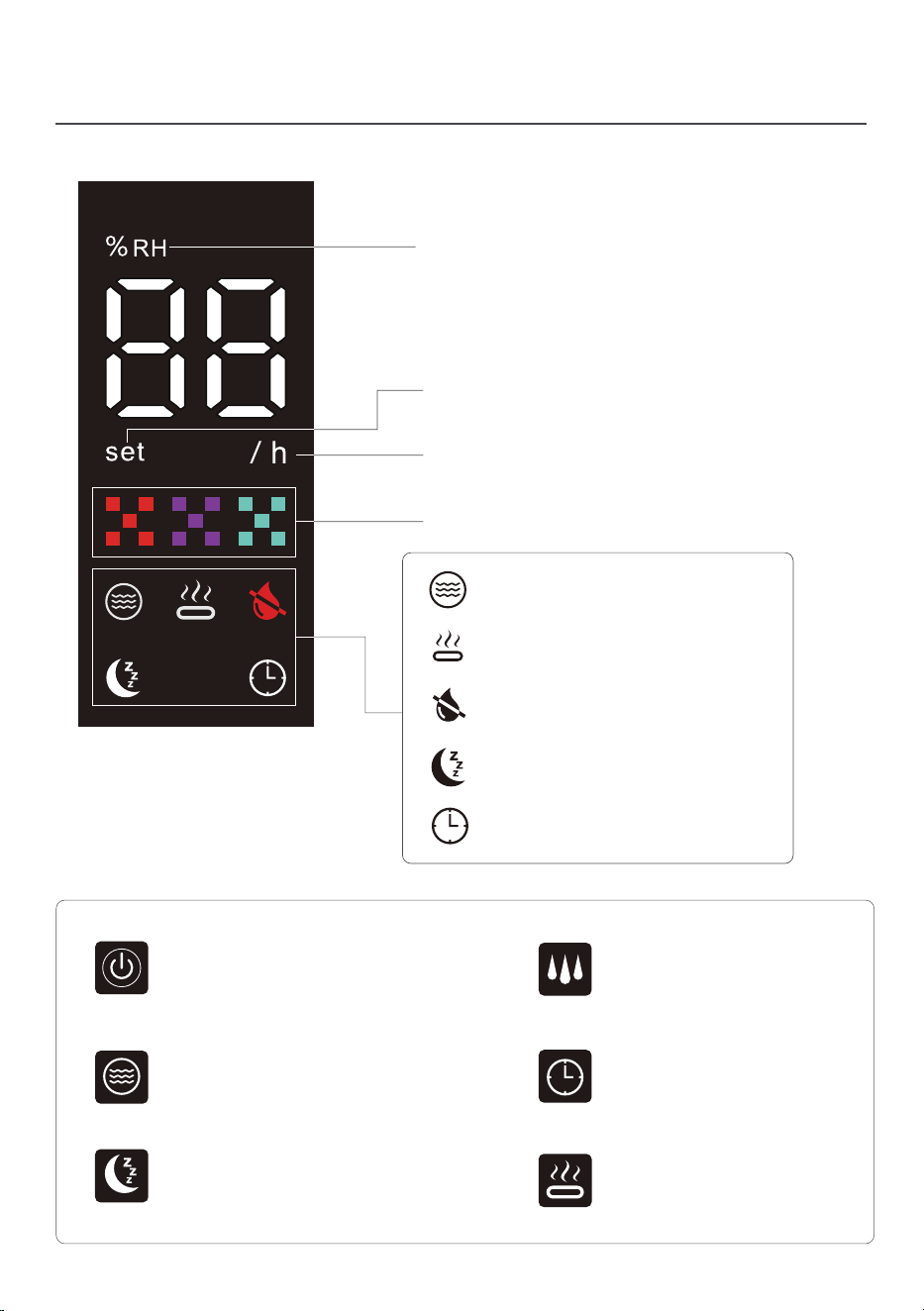
Warm Mist Button
Timer Button
Mist Level Button
Sleep Button
Target Humidity Button
Power Button
Relative Humidity(RH)
Percentage Indicator
Hour Indicator
Humidity Setting Indicator
Mist Level Indicator
Warm Mist Indicator
No Water Indicatior
Target Humidity Indicator
Timer Indicator
Sleep Mode Indicator
6
LED Display & Control Panel
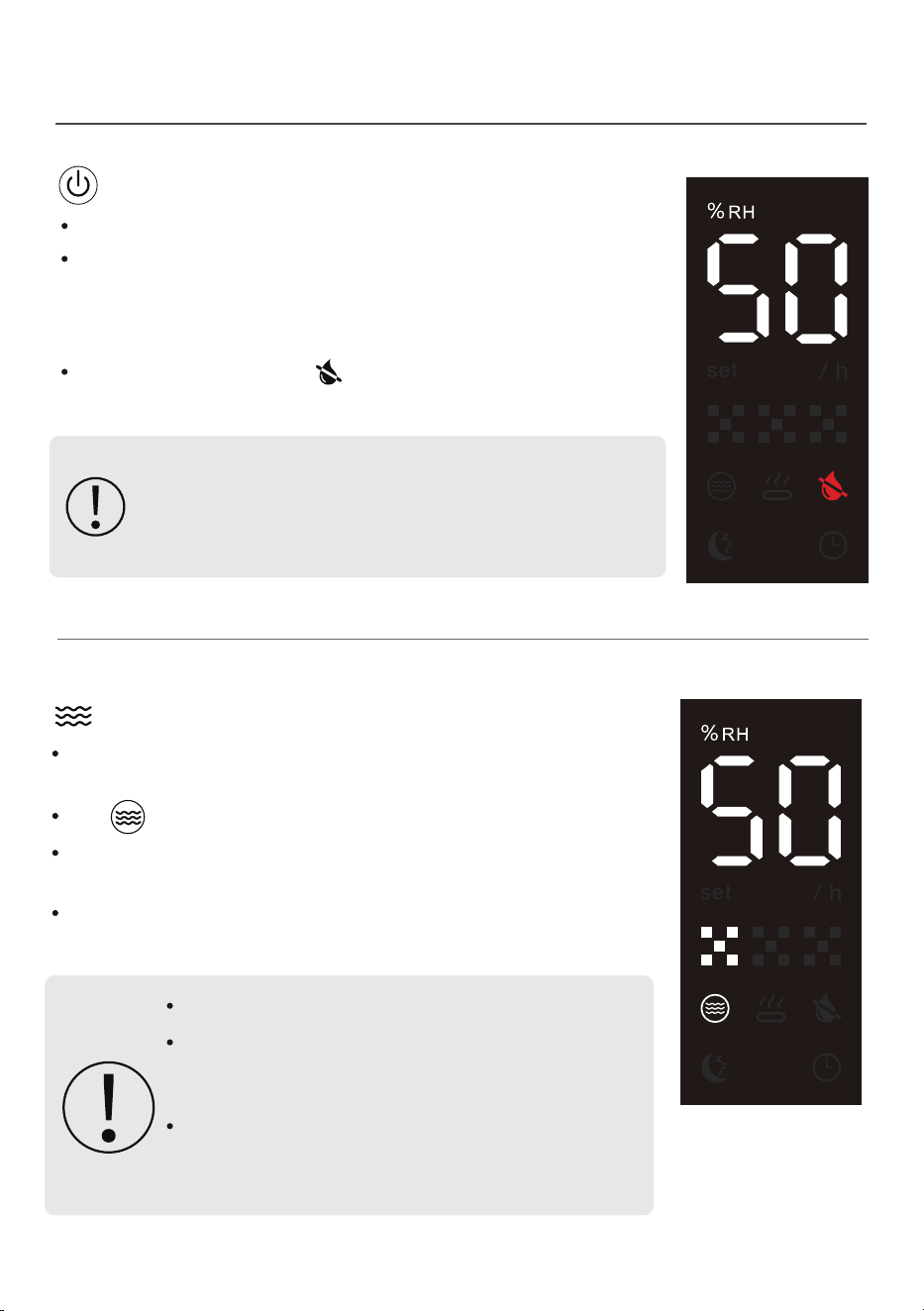
Press the button to turn the humidifier on or off.
If the tank is empty, the " " icon will blink serveral times,
and the humidifier will shut off automatically
If the humidifier has been in storage or transit for
a long time, the sensor may briefly display a
"Low Water" warning—even when the tank is full.
Restart the humidifier 2–3 times to reset the sensor.
After powering on, there will be a sound of the water pump
drawing water, and mist production will begin 40-60 sec
later. Lightly touch the power button to turn off the machine,
and the fan will shut down with a 15-sec delay.
Power (ON/OFF)
The icon on the screen will light up.
Target Humidity
Press and hold the button to set your desired humidity
level (adjustable between 45%-90%).
The target humidity function is off by default when the
humidifier is turned on.
A comfortable humidity range is 40%–60%.
After setting a target humidity, the display will
show the current ambient humidity,
not the target.
The humidifier will automatically pause misting
when reaching target humidity and resume
when humidity falls below the set level.
To cancel or reset the target humidity, press the button
repeatedly until the screen displays "--" and the icon turns off.
Target Humidity
7
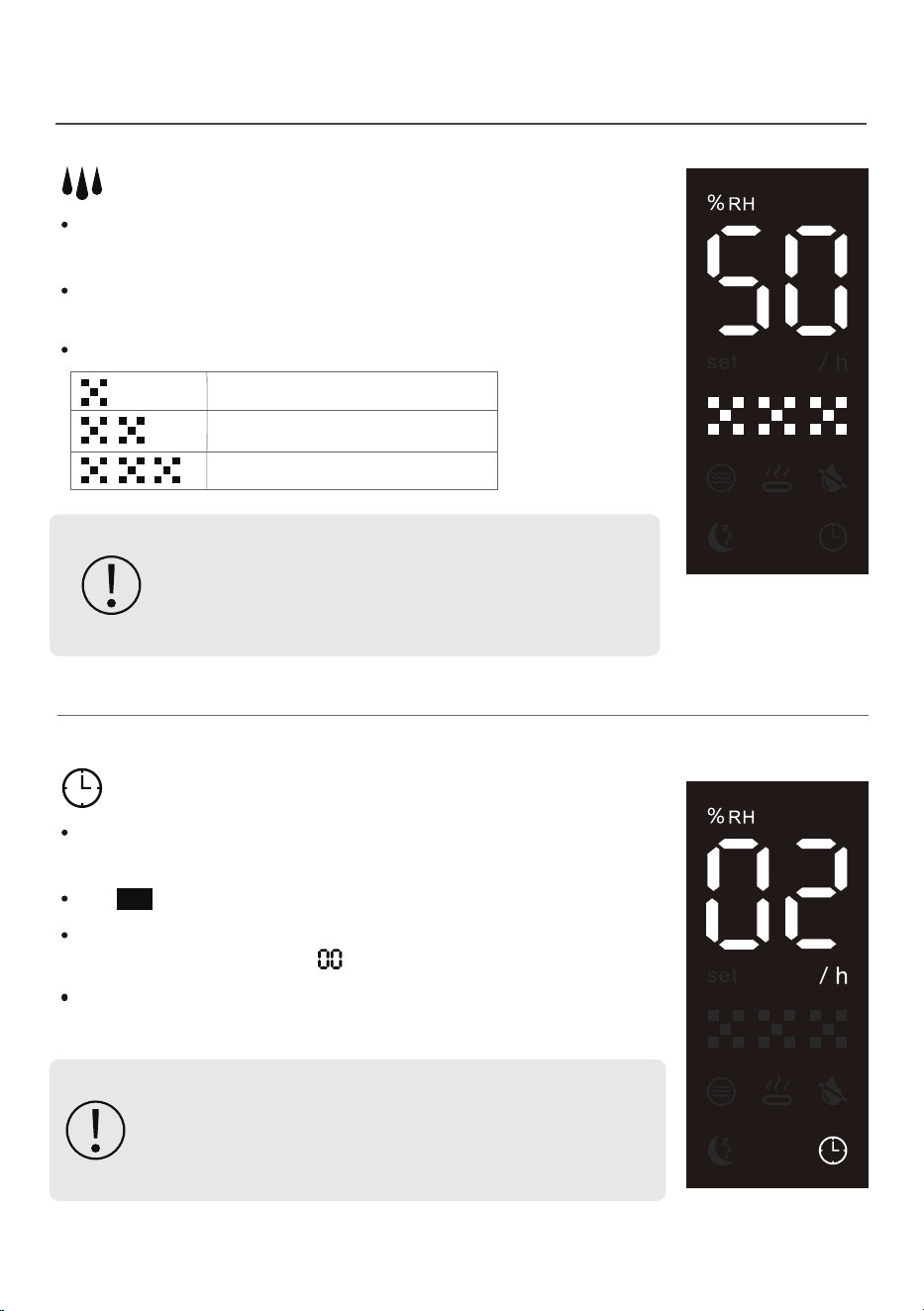
After setting the time, it takes effect after a flashing
period, and the display shows the current humidity
with the Timer Indicator.
Timer
Press and hold the button to set your desired time
(adjustable between 1-24 hours).
The /h icon on the screen will light up.
To cancel or reset the timer, press the button repeatedly
until the screen displays " " and the icon turns off.
The timer function is off by default when the humidifier
is turned on.
LED Display & Control Panel
Red is the 1st level
Blue is the 2nd level
Green is the 3rd level.
If you see water pooling near the humidifier,
the room may be too humid.
Lower the mist setting to avoid excess moisture.
Mist Level
The humidifier starts misting at the minimum level and
does not retain the setting.
Press and hold the button to set your desired mist levels:
1 → 2 → 3.
Display:
8
LED Display & Control Panel
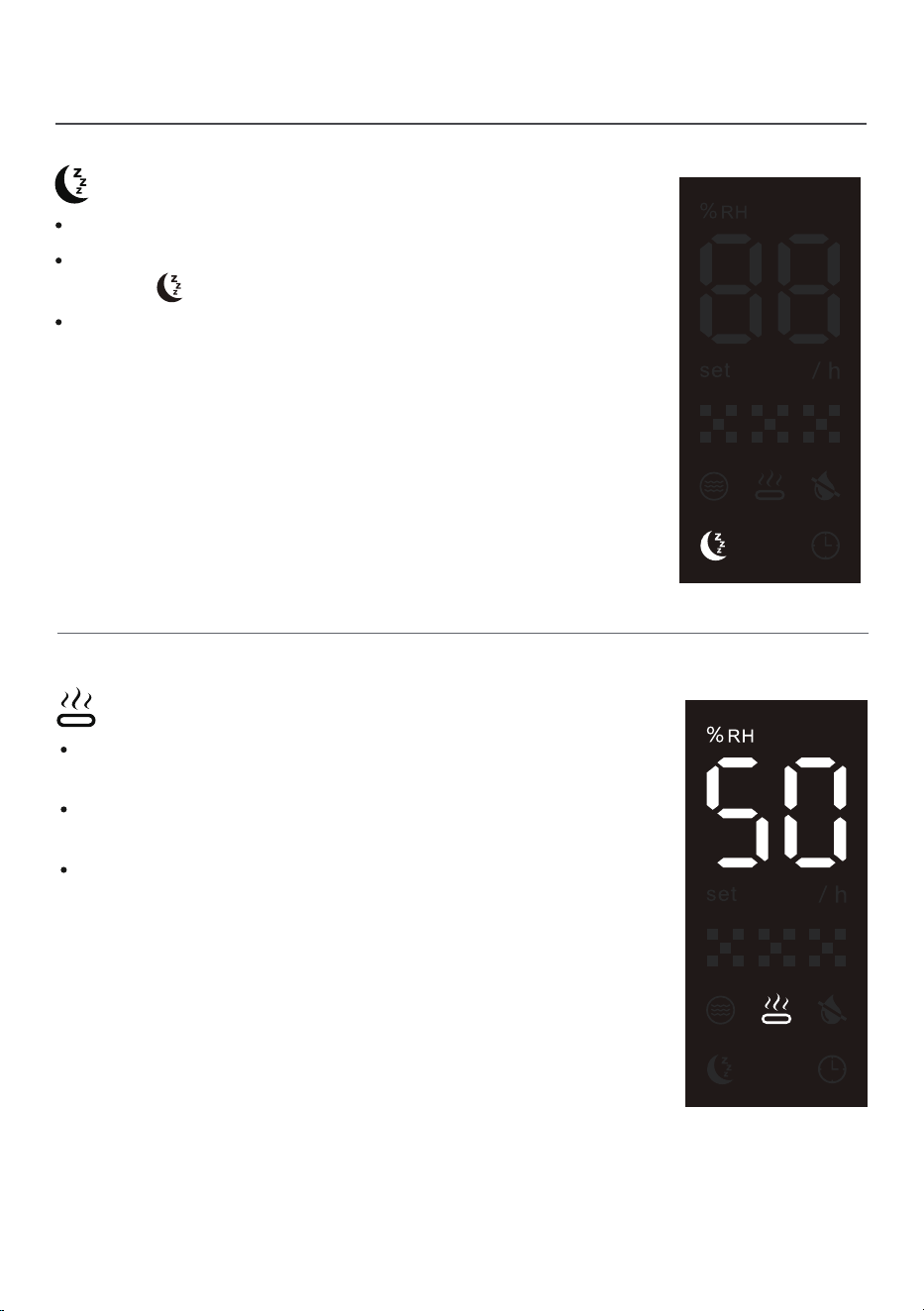
The Sleep Mode function is off by default when the
humidifier is turned on.
Press the button to turn the Sleep Mode on or off.
When activated, the display screen turns off, leaving
only the .
Sleep Mode
Press and hold for 3-5 sec to enter. Press the panel
again to exit.
Please note that actual performance is related to
room temperature.
The warm mist is produced at about 137℉ but cools to
around 100℉ in the air.
Warm (Long Press)
9
Remote Control
+
_
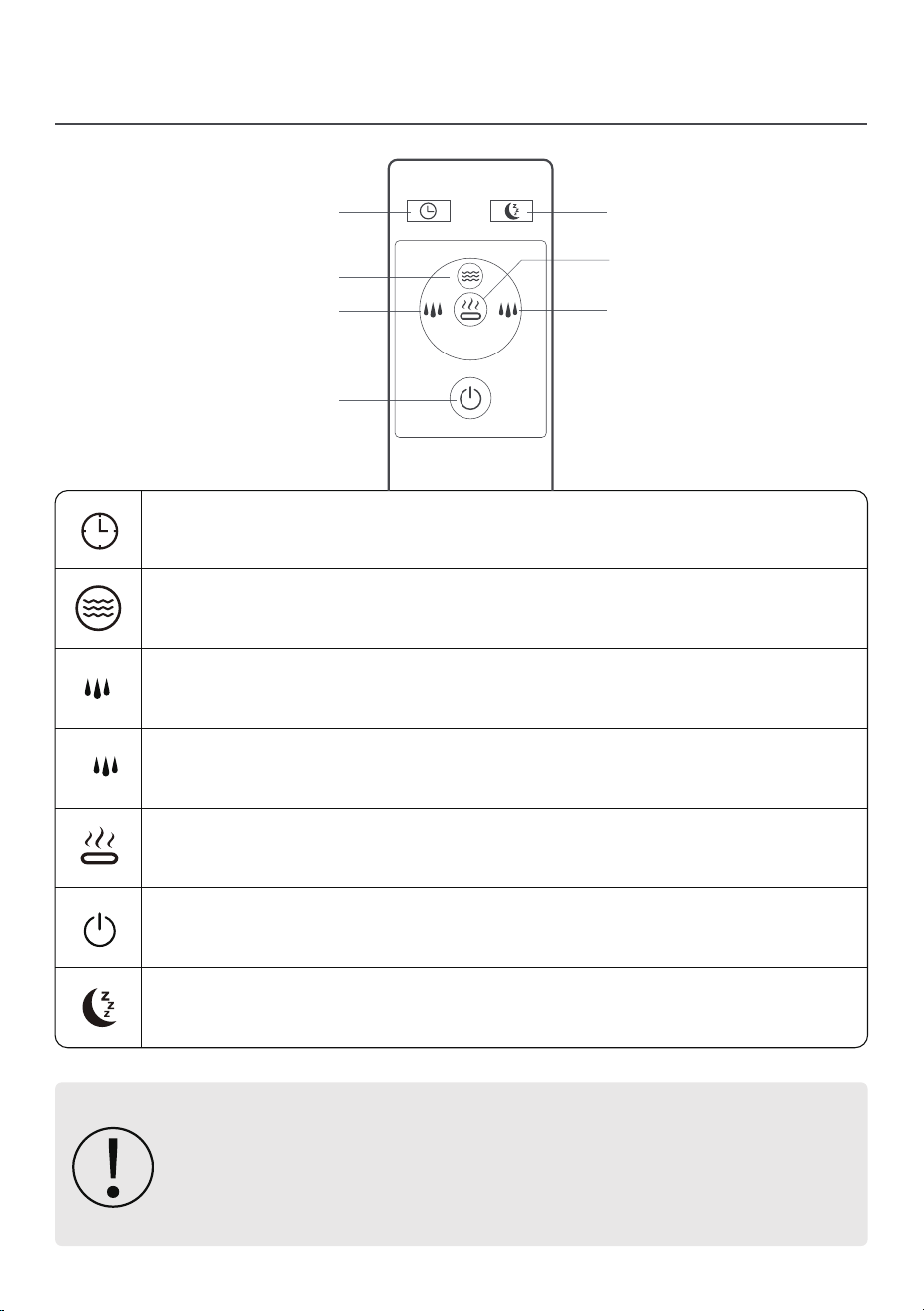
Timer Button
– Sets the misting duration (1–24 hours).
Timer Button
Sleep Button
– Enables or disables Sleep Mode.
Warm Mist Button
– Controls the warm mist function.
Target Humidity Button
– Adjusts the desired humidity level (45%–90%).
Mist Increase Button
– Increases mist output level.
Mist Decrease Button
– Decreases mist output level.
Power Button
– Turns the humidifier on/off.
For safety during transportation, the remote control does not include
batteries. Please install AAA 1.5V batteries before use.
Point the infrared emitter of the remote control towards the
humidifier's control panel.
Warm Mist Button
Mist Increase Button
Power Button
Sleep Button
Target Humidity Button
Mist Decrease Button
+
_
10

Battery Safety Instructions
Install dry batteries strictly according to the polarity indication (+ and -) in the
battery compartment.
Incorrect installation may cause device malfunction or battery leakage.
Do not mix new and used dry batteries, or different brands/types (e.g., alkaline,
carbon - zinc). Mixed use may reduce performance and increase leakage risk.
Replace depleted dry batteries promptly. Recycle or dispose of used batteries
following local regulations. Do not discard them in household trash.
If battery leakage occurs, remove batteries from the remote control immediately
and keep them away from the device. If skin or eyes contact the leakage, rinse
with clean water thoroughly and seek medical help if needed.
Remote Control
11
Getting Started
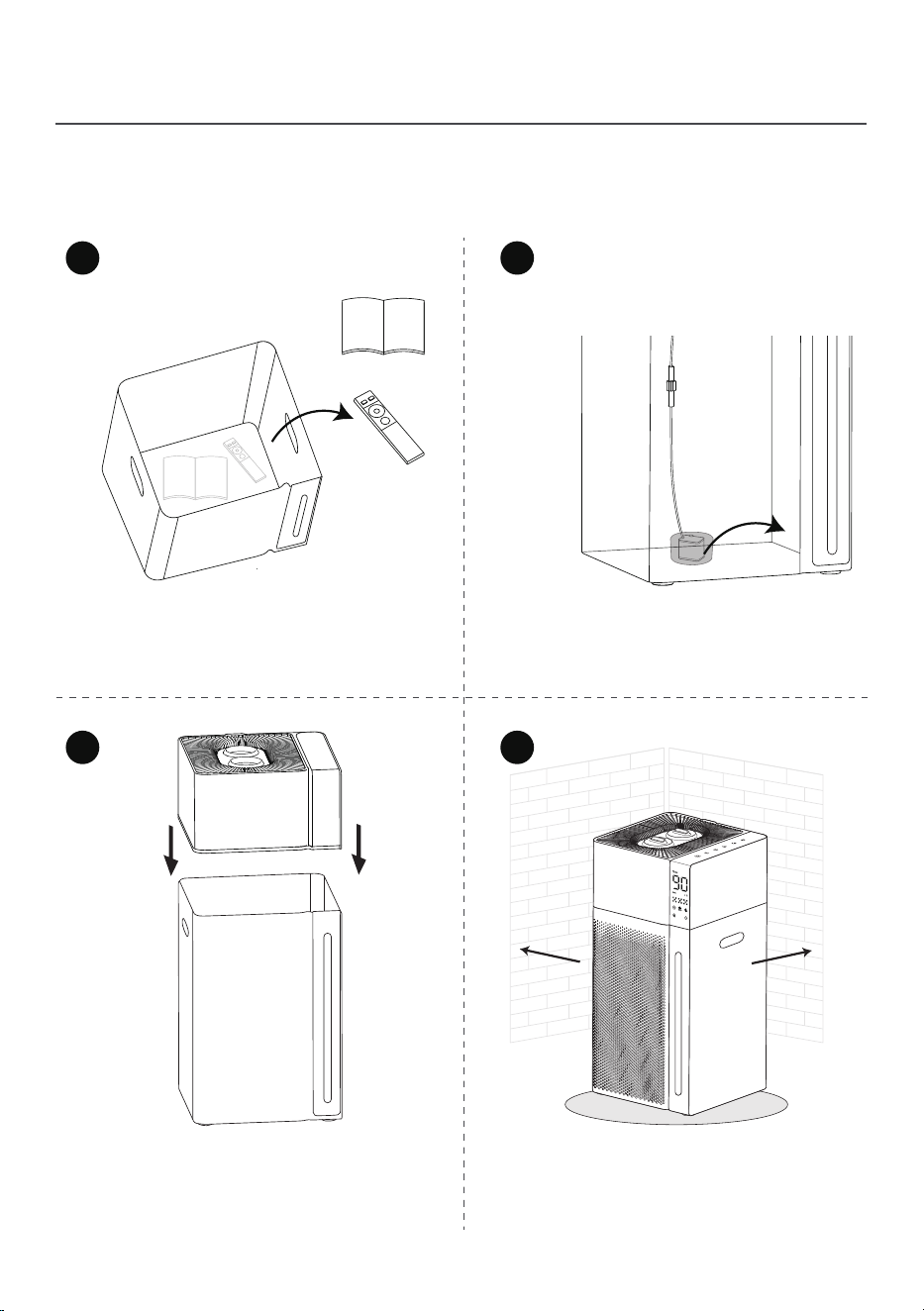
When using your humidier for the rst time, remove the wraps
and follow the steps below.
Remove the remote control,
and user manual from the water tank.
Remove the protective packaging
from the water pump.
Place the main unit onto the tank.
No need to secure the water pump
to the bottom of the tank.
Place on a flat surface 12+ inches
from walls. Use a waterproof mat
underneath to catch spills.
MAX LEVEL
1
2
3 4
12 inch
12 inch
12
Filling Water
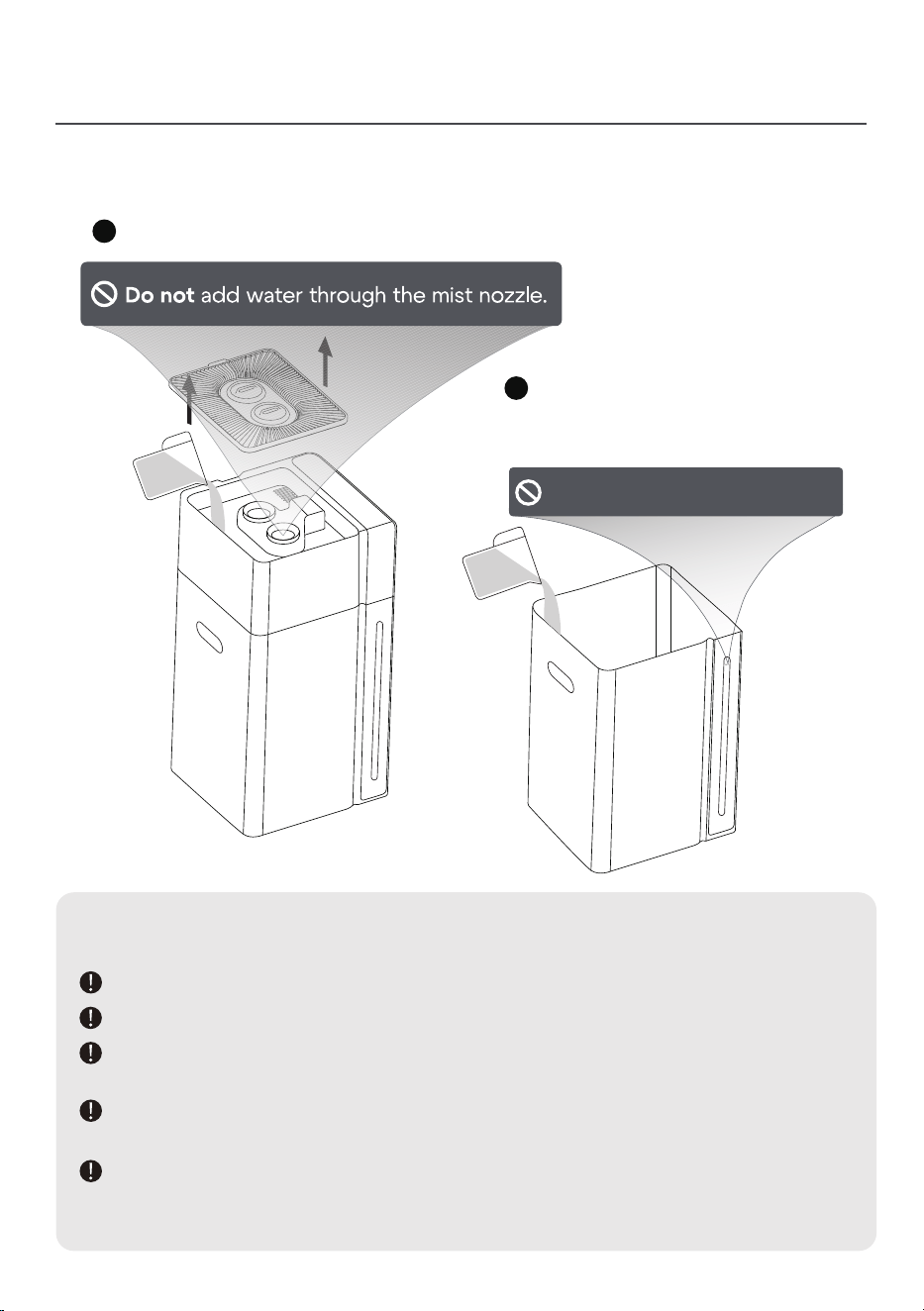
There are two ways to add water:
Top Fill
Bottom Fill
Note
Use purified or distilled water to minimize white dust accumulation.
Place a waterproof mat beneath the humidifier to contain spills.
Fill with room-temperature water only - never use hot water, boiling water,
or other liquids.
Avoid pouring water through the mist outlet to prevent internal damage
and operational failure.
This humidifier does not come with an aroma pad tray.
Never add essential oils directly to the water tank as this may damage the
tank components.
(Open the top cover of the main unit to add water.)
(Remove the main body and add
water to the water tank directly.)
2
1
2
13
Do not ll past the MAX line.
MAX
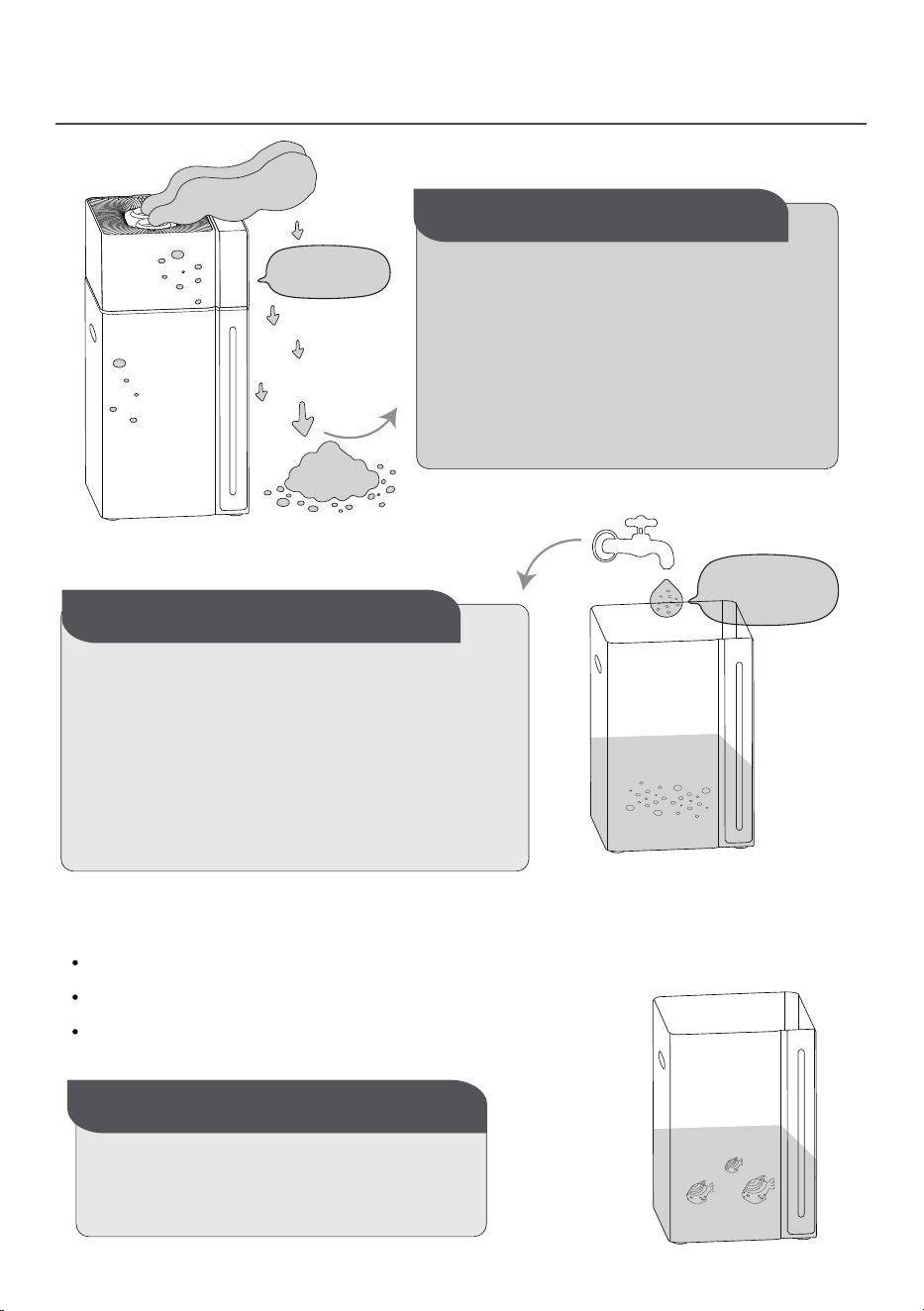
White Dust (Mineral Residue)
White Dust
White dust, also called mineral residue,
is a powdery buildup that can appear
near your humidifier.
It’s caused by minerals (like calcium and
magnesium) in your water—a common
issue in areas with "hard water."
The harder your water, the more likely
you’ll see this dust.
What Is White Dust?
The demineralization cartridge can minimize white dust buildup.
The humidifier doesn’t create this dust—
it simply releases minerals that are already
in your water.
If you live in a hard water area, switching
to distilled water can greatly reduce or even
eliminate white dust.
It’s a natural process, not a problem with
your humidifier.
Why Does It Happen?
Still experiencing issues?
Contact our customer support team.
Contact Our Customer
hard water
Replace the cartridge every 30-40 water refills.
Replace more often if you have very hard water.
Switch to distilled water if dust persists after replacement.
14
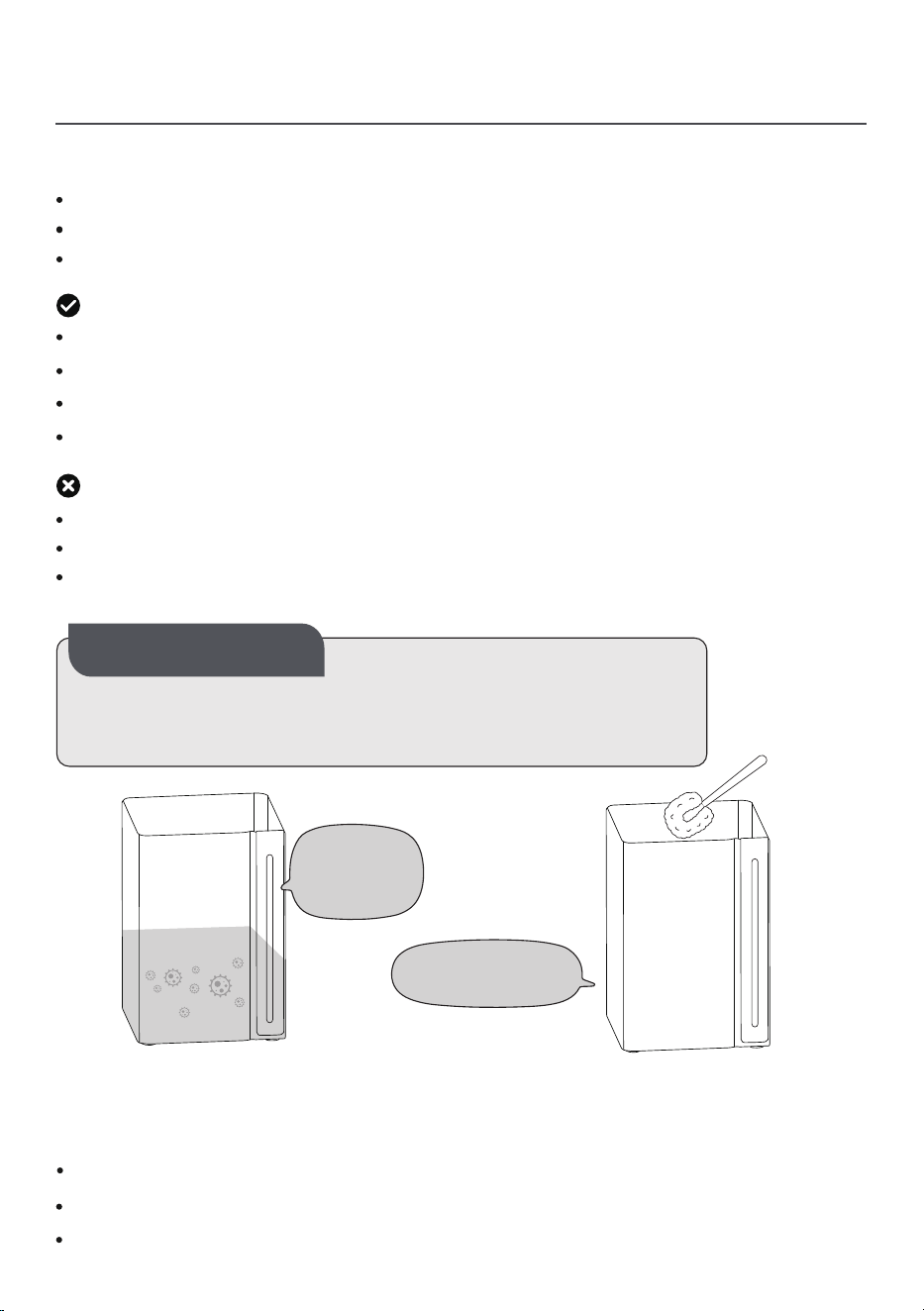
Cleaning & Maintenance
Mold spores naturally exist in air and water.
When water sits in tanks for >48 hours, spores multiply rapidly.
Mold Buildup
Regular cleaning is one of the most important steps you can take.
According to the Environmental Protection Agency (EPA), homeowners should clean
their humidifiers at least every 3 days to prevent mold buildup.
Use distilled or demineralized water (reduces mineral deposits that mold thrives on).
Dry the tank completely between uses.
Deep clean weekly with white vinegar.
Before You Begin
Cleaning Do's
Always unplug the unit before maintenance.
Work on a waterproof surface.
If you've been using the warm mist setting, allow the humidifier to cool before cleaning.
Wipe surfaces with a damp cloth.
Clean the mist nozzle regularly with a soft tissue
Change water regularly to prevent bacteria.
For storage: Empty all water and dry completely.
Cleaning Don'ts
Never submerge or rinse the main unit.
Keep water away from air outlet.
Avoid using detergents, gasoline, thinners, solvents, or other chemicals for cleaning.
Sit in tanks for
48 hours
Clean every 3 days.
15
Cleaning & Maintenance
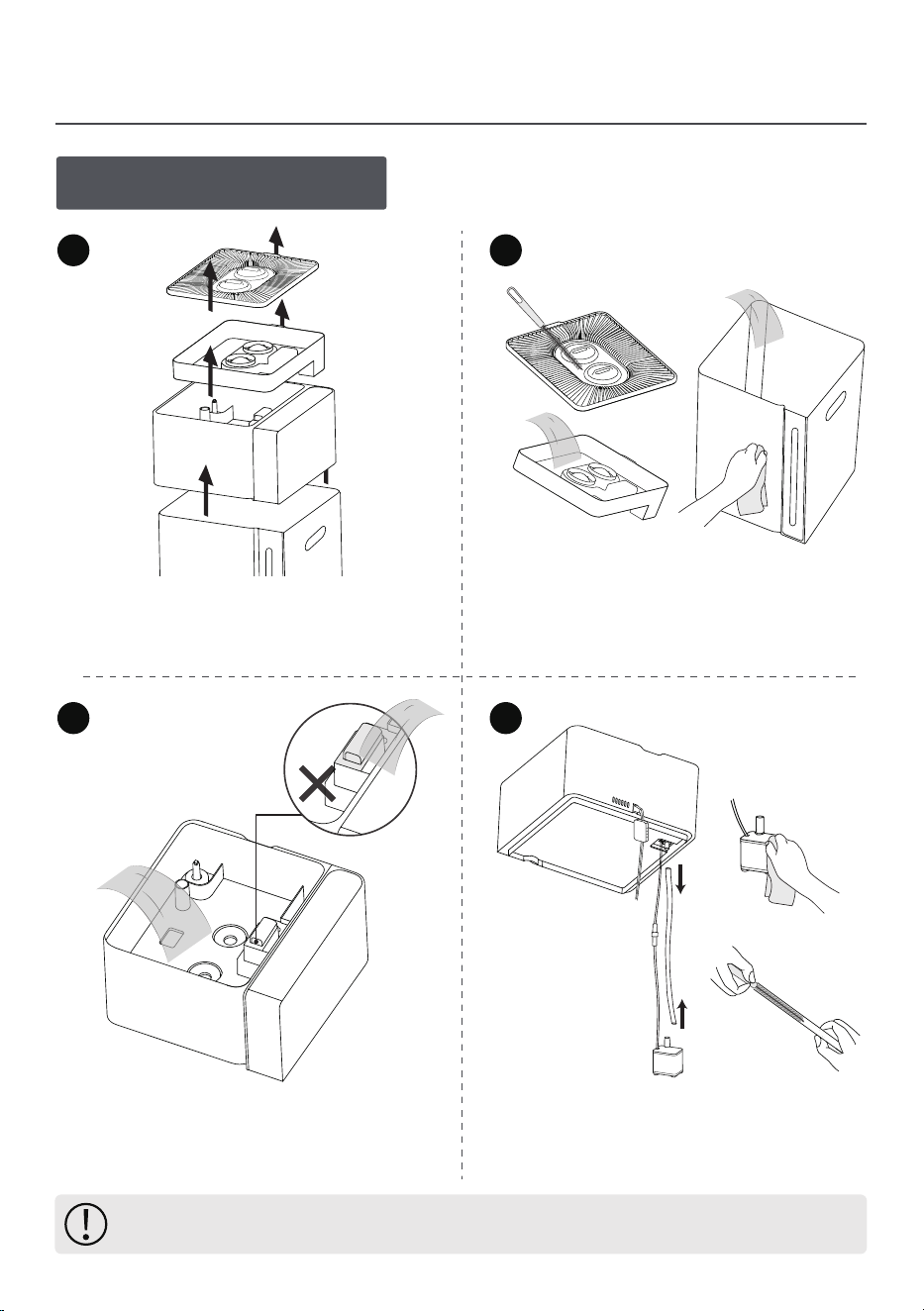
1.Regular Cleaning
1
2
3 4
Remove the humidifier main unit
from the water tank and empty any
remaining water.
Gently clean the inside of the chamber
interior with a soft brush, ensuing no
water enters the air outlet.
Clean the water pump with a soft
brush and use a long, narrow brush
to clean the silicone tube.
Clean the cover, water inlet tank,
and water tank using a soft cloth
or brush.
Note: Ensure all parts are fully dry before reassembling or storing the humidifier.
16
Before storing the humidifier at the end of the season, follow the above cleaning steps.
Ensure all parts are completely dry before storing.
Pack the unit securely and store it in a cool, dry place.
Cleaning & Maintenance
3.Seasonal Storage Guidelines
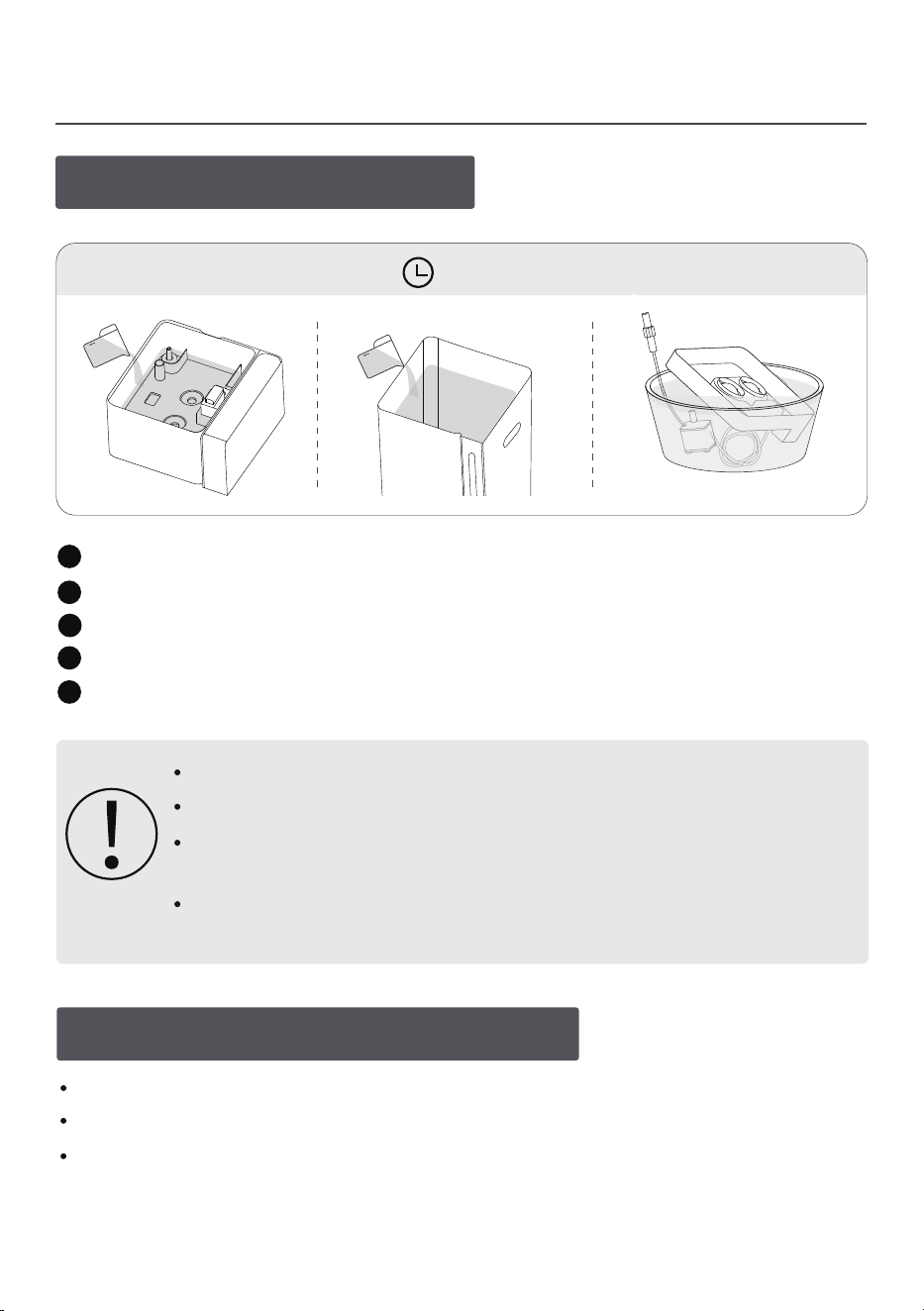
Pour white vinegar into the chamber and water tank.
Soak the water pump and silicone tube in white vinegar as well.
Let the solution sit for 20–30 minutes.
4
1
2
3
Scrub away scale buildup with a soft cloth or brush.
5
Rinse thoroughly with clean water.
2.Descaling Instructions
Do not allow water to enter the air outlet during cleaning.
Avoid harsh scrubbing of the ultrasonic disk to prevent damage.
White vinegar may leave a slight odor—ensure proper ventilation
and let all parts air-dry completely before reuse.
Citric acid can be used as an alternative descaler; follow the product
instructions for proper usage.
20-30Min
17
If stubborn deposits persist after cleaning, for replacement,
please contact the after -sales email: [email protected]
Cleaning & Maintenance
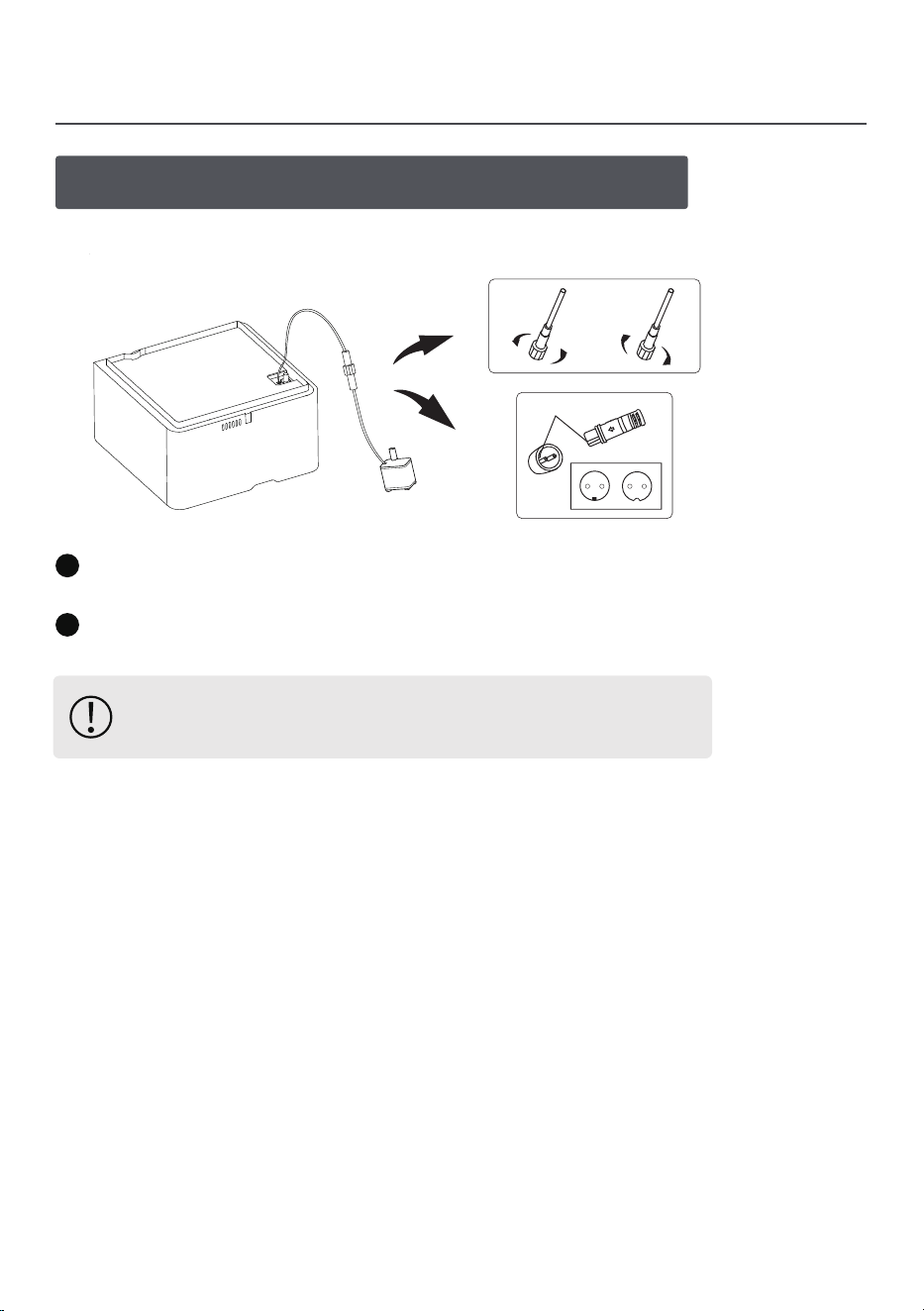
4.Pump Maintenance & Replacement
If the water pump stops working, first try removing and reinstalling it.
Disconnect: Turn the locking nut counterclockwise, hold the cable near the connector,
and firmly pull to separate the plug (pin end) from the socket (jack).
Reconnect: Align the plug and socket, push in until secure, then tighten the
locking nut clockwise.
1
2
Open Close
Slot
18

Troubleshooting
No Power / Unable To Turn On
Check Power Supply
If Recently Cleaned
Make sure the humidifier is plugged into a working electrical outlet.
Water may have entered the unit during cleaning, preventing startup. Place in a
well-ventilated area to dry for at least 24 hours before retrying.
Low Mist Output
Check Water Level
Adjust Mist Settings
Check Humidity Setting
In Auto Mode, misting stops when target humidity is reached,
increase mist level or raise target humidity setting.
Clean Ultrasonic Disk
If clogged, follow cleaning steps in "Descaling Instructions"(Page 17) .
Turn up the mist level if set too low.
Make sure the tank is filled with enough water.
Mist Escaping From The Water Tank
Check Tank Installation
Adjust Mist Level
Ensure the tank is properly placed.
Reduce the mist output to prevent excessive mist buildup.
Still Getting Weak Mist?
Contact customer support.
Still Getting Weak Mist?
Contact customer support.
19

Troubleshooting
No Mist Output With Red Light Flashing
Water Level
Sensor Reset
Ensure water tank is adequately filled.
–
Inspect Water Pump
If failing to move water from tank to chamber:
Follow "Regular Cleaning"(Page 16 Point 4) and "Pump Maintenance &
Replacement" (Page 18).
–
Check Main Unit Float
Clean with cotton swab if stuck to verify float moves freely up/down.
After long storage/transit, sensor may falsely show "Low Water".
Restart unit 2-3 times to recalibrate.
–
Examine Ultrasonic Disk
Still Not Working?
If clogged, follow cleaning steps in "Descaling Instructions"(Page 17) .
Contact customer support for pump or main unit
replacement options.
Pour water into chamber while powered on - check for mist production.
If Issue Persists
For more details,visit our website or scan the QR code:
https://lacidoll.com/pages/user-manual
Insucient Humidication
Adjust Mist Level
Increase the mist output.
Check Environmental Humidity
If the air is very dry, it may take longer for humidity levels to rise.
Check Room Size
If the room is too large, the humidifier may not effectively increase humidity.
Consider using a larger unit.
20
For more details,visit our website or scan the QR code:
https://lacidoll.com/pages/user-manual

Troubleshooting
Inaccurate Humidity Reading
Normal Range
A difference of 5–10% between displayed and actual humidity is normal.
Check Placement
Avoid placing the humidifier in corners or near walls. Ensure good airflow.
For Large Errors
If the humidity reading is significantly inaccurate, contact customer support.
Check The Humidity Sensor
Ensure the sensor is free from dust or moisture; wipe it dry if necessary.
Water Leakage
Inspect Water Tank
Check for cracks / damage.
Never fill water past the MAX line.
Verify Placement
Place on perfectly flat, level surface.
Water Accumulation Around Unit
Check Humidity Settings
If set too high, excess moisture may form
Verify Placement
Reduce mist level.
Place on flat, stable surface.
Keep minimum 12 inches from walls/furniture for proper airflow.
Inspect Water Tank
Ensure proper installation to prevent leaks.
Never fill past MAX water line.
For smallest settings: Move to larger space or use waterproof mat.
21

Troubleshooting
Scale buildup / Unpleasant Odor
Clean Regularly
Clean the water tank and main unit frequently to remove scale buildup.
Use White Vinegar
Soak parts with mineral deposits in distilled white vinegar for 15–20 minutes,
then rinse thoroughly.
White Mist Or White Dust
Check Water Quality
Use purified or distilled water instead of tap water with high mineral content.
Clean The Humidier
Regularly clean the water tank and base to remove mineral deposits.
See the "Cleaning & Maintenance" section for details.
Furnace Malfunctions
Tap Water Minerals Dispersed As "White Dust" Can
Clog furnace air filters faster.
Coat sensitive sensors/electronics.
How To Prevent It
Only use distilled/demineralized water.
Replace furnace filter monthly during humidifier use.
Wipe down furnace exterior weekly.
Warm Mist Mode Is Not Work
Check Room Temperature
If the room temperature is low, the mist may cool down quickly after release,
making it feel cooler than expected.
Check Heating Plate
The warm mist is produced at 137℉ but cools to around 100℉ in the air—try
running the humidifier for an hour and check the mist near the ultrasonic disk.
If the mist still feels cool, it may indicate an issue with the heating plate.
22

Warranty Policy
23
Warranty Coverage
We warrants to the original purchaser that this product shall be free from
defects in material and workmanship under normal use and conditions for
a period of 1 year from the date of purchase.
During the warranty period, we will, at its sole discretion, repair or replace
the product if such defects occur.
Warranty Exclusions
This warranty does not cover the following:
Unauthorized repairs/modifications: Any repair, modification, or disassembly not
authorized by the manufacturer voids the warranty.
Misuse or abuse: Damage caused by accidents, misuse, improper maintenance,
or failure to follow instructions in the user manual.
Commercial use: Products used for commercial, rental, or non-household purposes.
Normal wear & tear: Deterioration due to regular use or consumable parts
(e.g., aroma pad).
External factors: Damage from natural disasters, shipping, power surges,
or other external causes.
Unauthorized sellers: Products purchased from unauthorized dealers or distributors.
Warranty Claim Process
If your product exhibits a defect during the warranty period:
Provide the product model, proof of purchase (invoice/order number), and
photos / videos of the issue.
We will evaluate the claim and provide a repair or replacement if eligible.
Product Registration
To streamline warranty services, register your product promptlyon the manu-
fac
turer’s official website.
Registration is quick, optional, and does not affect warranty rights.
Warranty Policy
Customer Support
For warranty claims or inquiries
info@mifasol.vip
Voiding conditions
Unauthorized repairs, use of chemicals/oils, or improper cleaning
void the warranty.
Safety alert
Discontinue use and contact support if the product exhibits abnor-
mal noise, odors, or malfunction.
Important Notes
Your Rights
This warranty provides specific legal protections. Additional rights
may apply under your state's consumer laws.
LCD-MH-J18Model
Within 1 year from the date of purchase
Warranty Period
Month Date YearOrder Placed
Sold by
Order Number
Name
Address
Phone Number
Customer
24