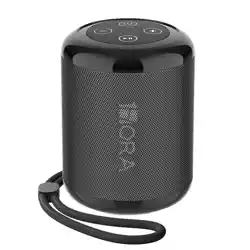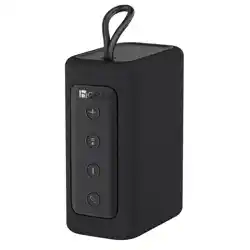
WIRELESS SPEAKER
USER MANUAL
BOC242

Model: BOC242
Bluetooth Version: 5.1
Support: L2CAP/A2DP/AVRCP, receive
AUDIO signal and control the AUDIO device.
Supports HSP/HFP (hands-free), built in
microphone for hands-free calls.
Connection Distance: 10M approx
SNR: 85dB
Battery: 2400mAh 3.7V 8.88Wh
Play Time: 3.5H (At 100% Volume) Playing
time depends on volume and audio content.
Charging Time: 4H
Speaker Size: Φ45mm
Power: 4Ω/5W*2 RMS
Frequency: 150HZ-20KHZ
Input: 5V 1A
Size: Φ72.4*155.9mm
Weight: 495g
1.Advanced bluetooth chip and circuit design
techniques, compatible with all wireless
devices.
2.With Hi-Fi speaker, to ensure clear and
bright sound.
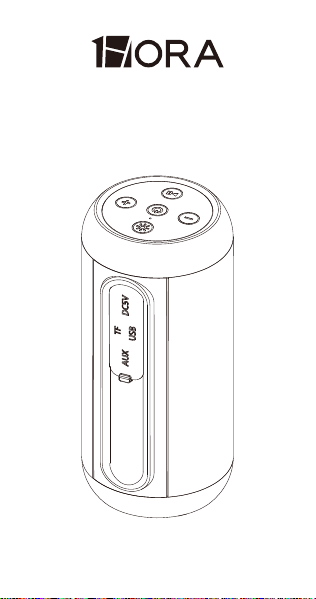
3.Support TF card and USB card, play audio
with MP3 mode.
4.The distance range is about 10 meters.
PRODUCT SPECIFICATIONS:
PRODUCT FEATURES:
KEY AND SLOT FUNCTIONS:
5.With built-in AUX line, you can directly
connect the external devices, such as, tablet
PC/TV/cell phone.
6.It will turn off automatically if you
disconnect Bluetooth for 5 minutes.
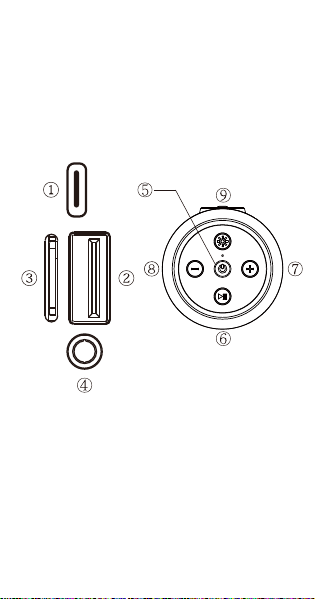
①.DC 5V Slot: Use the standard Type C
charging cable to charge.
②.USB Slot: When inserting the U disk into the
slot, it can decode and play audio in
MP3/WAV format.
③.TF Slot: When inserting a TF card into the
slot, it can decode and play audio in
MP3/WAV format.

④.AUX Line in Slot: Use 3.5mm AUX line input
through external equipment.
⑤.Power Switch: Long press for "on/off " When
play music (U disk /TF card/ Bluetooth),
short press to switch U disk /T F/Bluetooth
.(Switch to "Line In" if connected to an audio
device via an AUX cable).
TWS Pairing: After turning on the two
speakers, double click the power button of
one of the speakers and the speakers will
automatically perform TWS pairing.
⑥.Play Button
1) Press once: Play or pause;
2) Long press: enter pairing mode;
3) Radio mode: short press to automatically
search for radio stations.
⑦.During music playback, press the "+" button
once to increase the volume, long press the
"+" button to skip to the next song.
In radio mode, press the "+" button once to
increase the volume, and press and hold the
"+" button to jump to the next station.
⑧.During music playback, press the"-" button
once to decrease the volume, long press the
"-" butt to return to the previous song.
In radio mode, press the "-" button once to
reduce the volume and long press the "-"
button to return to the previous station.

FCC WARNING
④.AUX Line in Slot: Use 3.5mm AUX line input
through external equipment.
⑤.Power Switch: Long press for "on/off " When
play music (U disk /TF card/ Bluetooth),
short press to switch U disk /T F/Bluetooth
.(Switch to "Line In" if connected to an audio
device via an AUX cable).
TWS Pairing: After turning on the two
speakers, double click the power button of
one of the speakers and the speakers will
automatically perform TWS pairing.
⑥.Play Button
1) Press once: Play or pause;
2) Long press: enter pairing mode;
3) Radio mode: short press to automatically
search for radio stations.
⑦.During music playback, press the "+" button
once to increase the volume, long press the
"+" button to skip to the next song.
In radio mode, press the "+" button once to
increase the volume, and press and hold the
"+" button to jump to the next station.
⑧.During music playback, press the"-" button
once to decrease the volume, long press the
"-" butt to return to the previous song.
In radio mode, press the "-" button once to
reduce the volume and long press the "-"
button to return to the previous station.
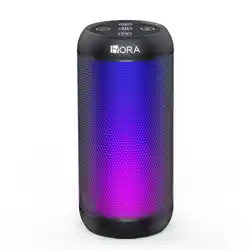
⑨.Light mode switch: When the music starts
to play, the certain pattern of the lights will
follow the rhythm of the music. To change
the light mode, you need to press the button
briefly to get the "breathing light"; to turn off
the light, you need to press the button long.
This device complies with part 15 of the FCC
Rules. Operation is subject to the following
two conditions:(1) This device may not
cause harmful interference, and (2) this
device must accept any interference
received, including interference that may
cause undesired operation.
Any Changes or modifications not expressly
approved by the party responsible for
compliance could void the user's authority to
operate the equipment.
This equipment has been tested and found
to comply with the limits for a Class B digital
device, pursuant to part 15 of the FCC
Rules. These limits are designed to provide
reasonable protection against harmful
interference in a residential installation. This
equipment generates uses and can radiate
radio frequency energy and, if not installed
and used in accordance with the
instructions, may cause harmful interference
to radio communications. However, there is
RESET: Long press ON/OFF for 10 seconds
to reset

no guarantee that interference will not occur
in a particular installation. If this equipment
does cause harmful interference to radio or
television reception, which can be
determined by turning the equipment off and
on, the user is encouraged to try to correct
the interference by one or more of the
following measures:
- Reorient or relocate the receiving
antenna.
- Increase the separation between the
equipment and receiver.
- Connect the equipment into an outlet on a
circuit different from that to which the
receiver is connected.
- Consult the dealer or an experienced
radio/TV technician for help.
The device has been evaluated to meet
general RF exposure requirement. The
device can be used in portable exposure
condition without restriction.

WARRANTY STATEMENT:
All products are guaranteed to be free from
defective materials and workmanship. The
warranty period of all equipment provided by
our company is 12 months after purchase.
If you have any questions, please contact a
customer service representative for
assistance.