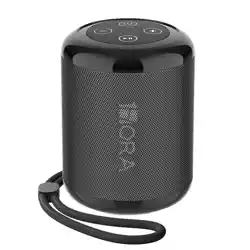
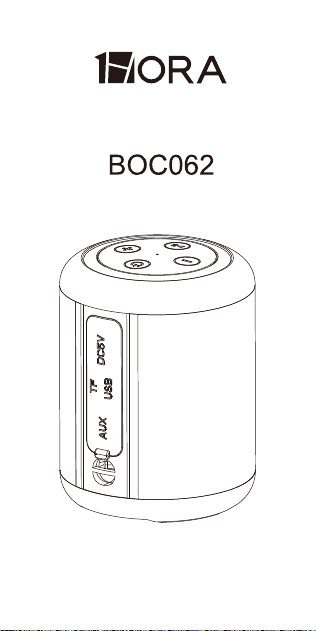
WIRELESS SPEAKER
USER MANUAL

PRODUCT SPECIFICATIONS:
PRODUCT FEATURE:
Model: BOC062
Bluetooth version: 5.1
Connection Distance:10M approx
SNR:85dB
Battery: 1500mAh 3.7V 5.55Wh
Playingtime: 7H
Charging time: 4H
Speaker driver: Φ52mm
Power: 4Ω/5W RMS
Frequency:150HZ-20KHZ
Input:5V 1A
Dimensions: Φ72.7*96.15mm
Weight: 286g
1. Internationally advanced wireless chip
and circuit design technology, supporting
all wireless devices.
2. With Hi-Fi speaker, to make sure the
clear and bright sound.
3. 10 meters wireless working distance,
can connect all external wireless devices
(mobile phone/tablet/TV) to play music.
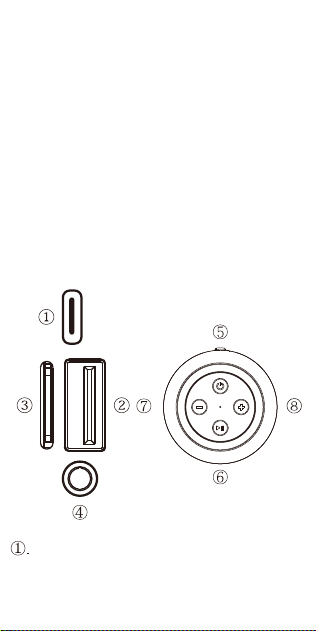
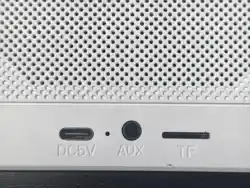
DC 5V Slot: Use the standard Type C
charging cable for charging.
4.With AUX line in, can be directly
connected external devices , for example,
tablet/TV/mobile phone.
5.Support TF card and USB card, play
MP3 format audio.
6.With FM function, it can automatically
search for radio stations.
7.Built-in microphone for hands-free
calling.
8.Support True Wireless Stereo Dual
Pairing.
KEY AND SLOT FUNCTIONS:

4.With AUX line in, can be directly
connected external devices , for example,
tablet/TV/mobile phone.
5.Support TF card and USB card, play
MP3 format audio.
6.With FM function, it can automatically
search for radio stations.
7.Built-in microphone for hands-free
calling.
8.Support True Wireless Stereo Dual
Pairing.
USB Slot: When inserting the USB
card into the slot, it can decode and
play audio in MP3/WAV format.
TF Slot: When inserting a TF card into
the slot, it can decode and play audio
in MP3/WAV format.
AUX Line in Slot: Use 3.5mm AUX line
input through external equipment.
Power Switch:
1)Long press for “on/off ”. When play
music (USB card/ TF card/FM/
Bluetooth), short press to switch
USB/TF/FM /Bluetooth.(Switch to
"Line In" if connected to an audio
device via an AUX cable)
2)Turn on the two speakers and
keep them in Bluetooth mode without
pairing with the mobile phone.
Double-click the "ON/OFF" button on
the speakers respectively. When you
hear the sound prompt, it means that
entered TWS connection mode. When
hearing the beep again, it means the
TWS function pairing is successful.
Play Button
1) Press once: Play or pause.
2) Long press: Turn off or turn on the
light.

FM Mode:
USB Slot: When inserting the USB
card into the slot, it can decode and
play audio in MP3/WAV format.
TF Slot: When inserting a TF card into
the slot, it can decode and play audio
in MP3/WAV format.
AUX Line in Slot: Use 3.5mm AUX line
input through external equipment.
Power Switch:
1)Long press for “on/off ”. When play
music (USB card/ TF card/FM/
Bluetooth), short press to switch
USB/TF/FM /Bluetooth.(Switch to
"Line In" if connected to an audio
device via an AUX cable)
2)Turn on the two speakers and
keep them in Bluetooth mode without
pairing with the mobile phone.
Double-click the "ON/OFF" button on
the speakers respectively. When you
hear the sound prompt, it means that
entered TWS connection mode. When
hearing the beep again, it means the
TWS function pairing is successful.
Play Button
1) Press once: Play or pause.
2) Long press: Turn off or turn on the
light.
1) Plug one end of the 3.5mm audio
cable into the speaker.
2) Press "ON/OFF" button to turn on,
and keep it without pairing with
bluetooth.
3) Press the "Play" button, it will try to
search for Bluetooth.
4) Press the "Play" button again, the
Bluetooth speaker will search for FM
stations in FM mode.
NOTE:In the FM mode, please plug in
the AUX charging cable for better FM
radio stations.
During music playback, press the "+"
button once to increase the volume,
long press the "+" button to skip to the
next song.
During music playback, press the "-"
button once to decrease the volume,
long press the "-" button to return to
the previous song.

WARRANTY STATEMENT:
All products are guaranteed to be free
from defective materials and workman-
ship. The warranty period of all
equipment provided by our company is
12 months after purchase.
If you have any questions, please
contact a customer service representa-
tive for assistance.