HearLink
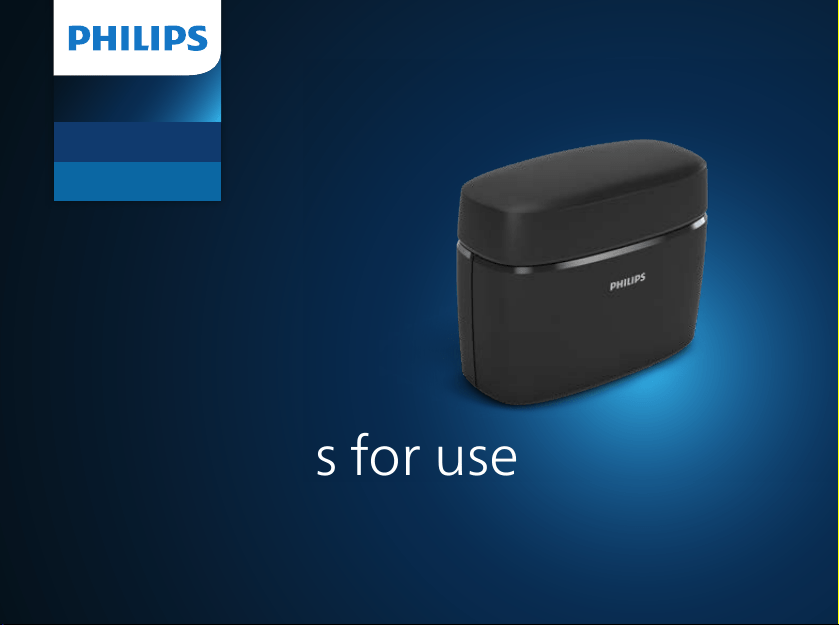
Charger Plus
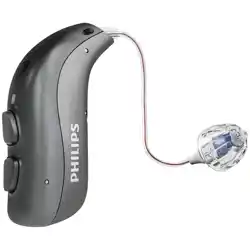
miniRITE TR / miniBTE TR
CROS miniRITE TR
Instructions for use
Compatible with HearLink 30 and 40 miniRITE TR
/ miniBTE TR and HearLink CROS miniRITE TR

Introduction to this booklet
This booklet guides you on how to use and maintain your new charger.
More information is available on www.hearingsolutions.philips.com
Ensure you read this booklet carefully, including the Warnings section.
This will help you get the most benet from your charger.
Warnings
Text marked with a warning symbol must be read before using
the device.
If you have additional questions about the use of your charger, contact
your hearing care professional.
For your convenience, this booklet contains a navigation bar to help you
navigate through the dierent sections.
About Getting started Daily use Warnings More info
Intended use
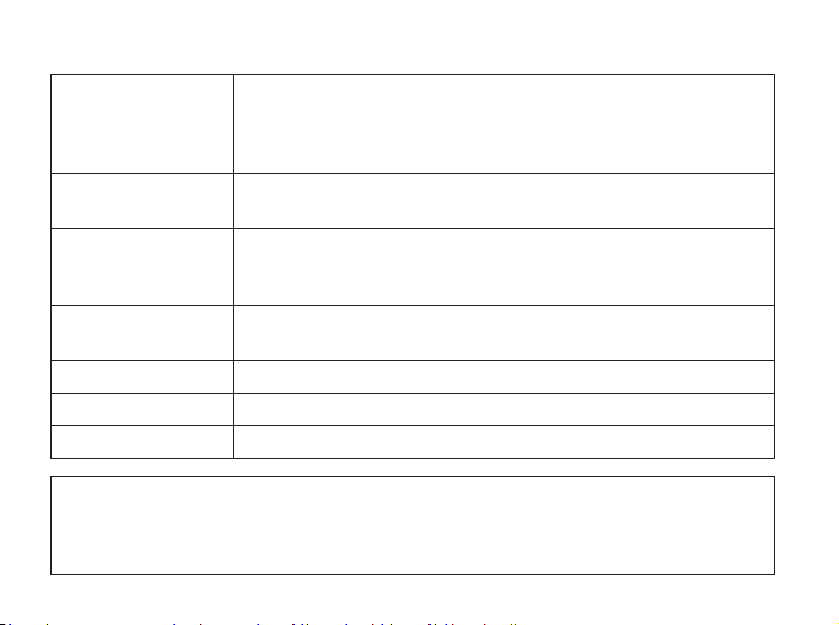
Intended use The charger is intended to recharge the hearing aids and CROS
transmitter that contain rechargeable batteries.
The product is intended to be used together with the given
hearing solution.
Indications for use There are no indications for use (diagnoses) for the charger
itself.
Intended user Person with hearing loss using a hearing aid and their
caregivers. Hearing care professional responsible for adjusting
the accessory.
Intended user
group
Adults and children older than 36months.
Use environment Indoor and outdoor.
Contraindications No contraindications.
Clinical benets See clinical benets of the hearing aid.
IMPORTANT NOTICE
For details on the functionality of your specic hearing aid solution, refer to
your hearing aid’s instructions for use.
Table of contents
About
Package contents 6
Charger 8
Temperature conditions 9
Getting started
Prepare charger 10
Charge the hearing aids 12
Daily use
Charging time 14
Charging the charger 16
Power bank function 18
Power and charge using other sources 19
Drying your hearing aids 20
Caring for your charger 21
Warnings
General warnings 22
More info
Troubleshooting 26
Conditions of use 30
Compliance statements 34
Warranty 37
6
About Getting started Daily use Warnings More info
Package contents
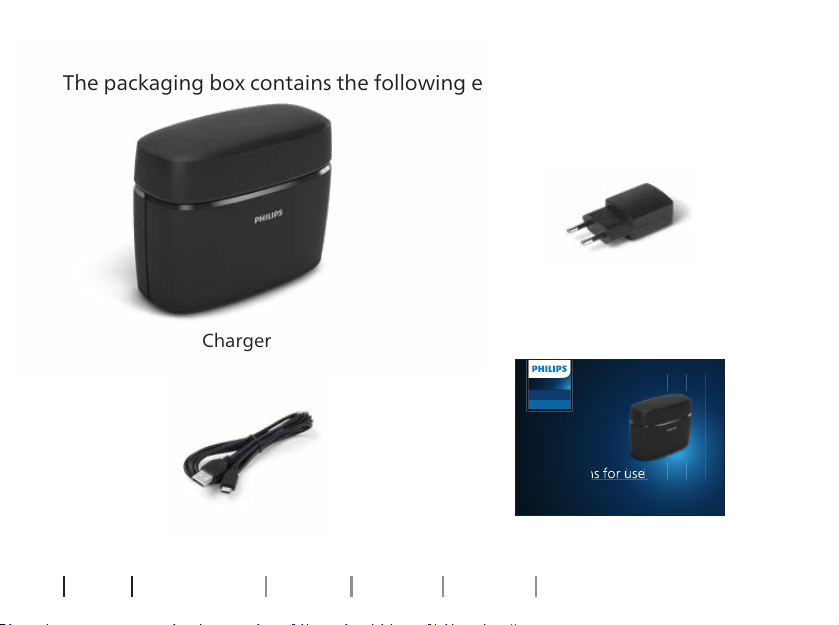
The packaging box contains the following elements:
This booklet
Power plug
(varies from
country to country)
Charger
Cable
About
HearLink
Charger Plus
miniRITE TR / min iBTE TR
CROS miniRI TE TR
Instructions for use
Compatible with HearLink 30 and 40 miniRITE TR
/ miniBTE TR and HearLink CROS miniRITE TR
Instructions for use

8
About Getting started Daily use Warnings More info
Charger
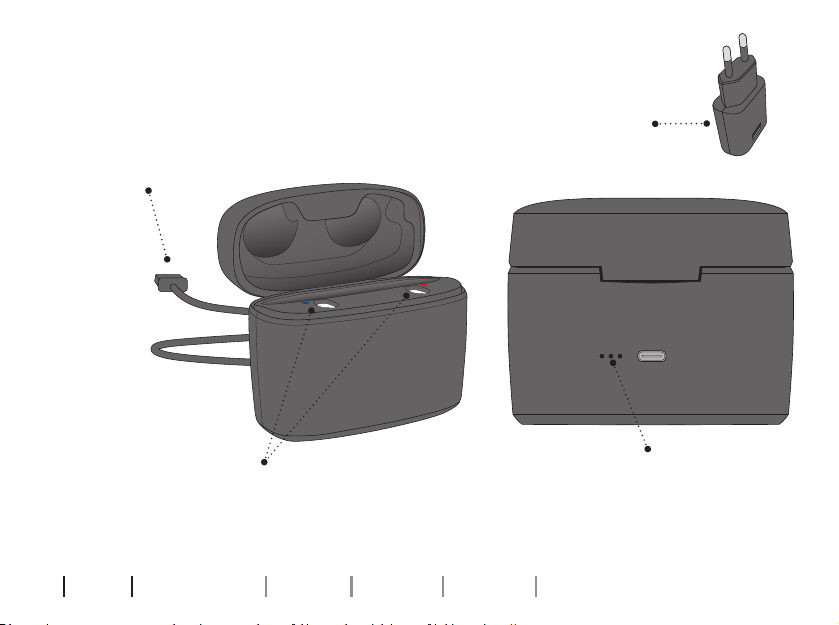
What it is and does
Charging ports
For hearing aids when charging
Battery indicator
Displays charging status
of the power bank/power
bank battery levels
Power plug
For power socket
USB cable
Insert in power plug
9
IMPORTANT NOTICE
Do not expose the charger to temperatures below -
20°C(-4°F) or above
+60°C(140°F).
Temperature conditions
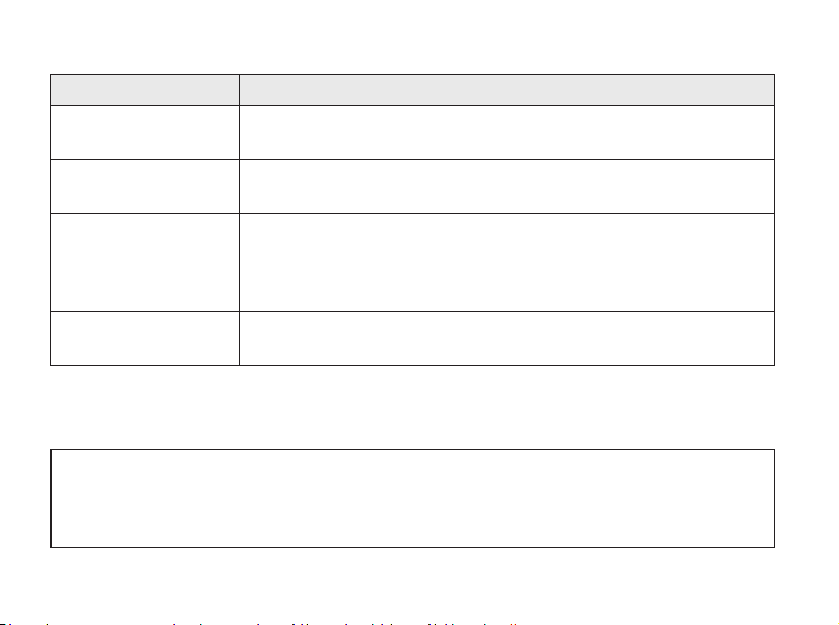
Temperature Charging condition
Below +5°C
(+41°F)
No charging due to low temperature.
+10°C to +35°C
(+50°F to +95°F)
Best charging condition. The charging of hearing aids can take
up to 3.5hours.
+5°C to +10°C and
+35°C to +38°C
(+41°F to 50°F and
+95°F to +100°F)
Extended charging. The charging of hearing aids can take
up to 5 hours.
Above +38°C
(+100°F)
No charging due to high temperature.
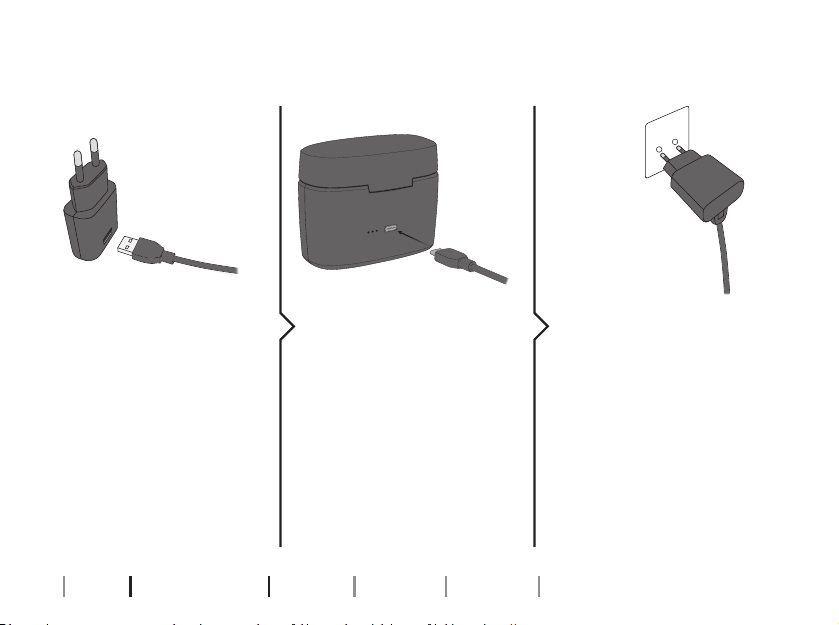
Step 1 Step 2 Step 3
10
About Getting started Daily use Warnings More info
Prepare charger
Insert the USB plug into
the power plug.
Insert the other end of
the USB cable into the
back of the charger.
Insert the power plug
into a power socket.
The charger turns ON
automatically and begins
charging the built-in
power bank battery.
Connect to power source
Getting started
11
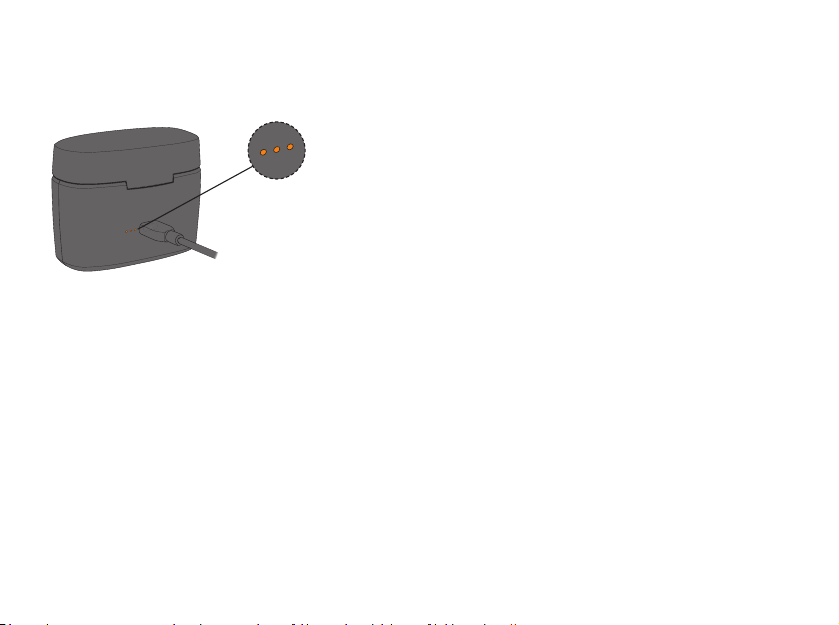
When the charger is connected to
power, the charger’s power bank
charging status is shown.
First use – Charge the power bank’s
battery
When you use your charger for the
rst time, it is important that you fully
charge the charger’s built-in battery.
Charger is turned ON
12
About Getting started Daily use Warnings More info
Charge the hearing aids
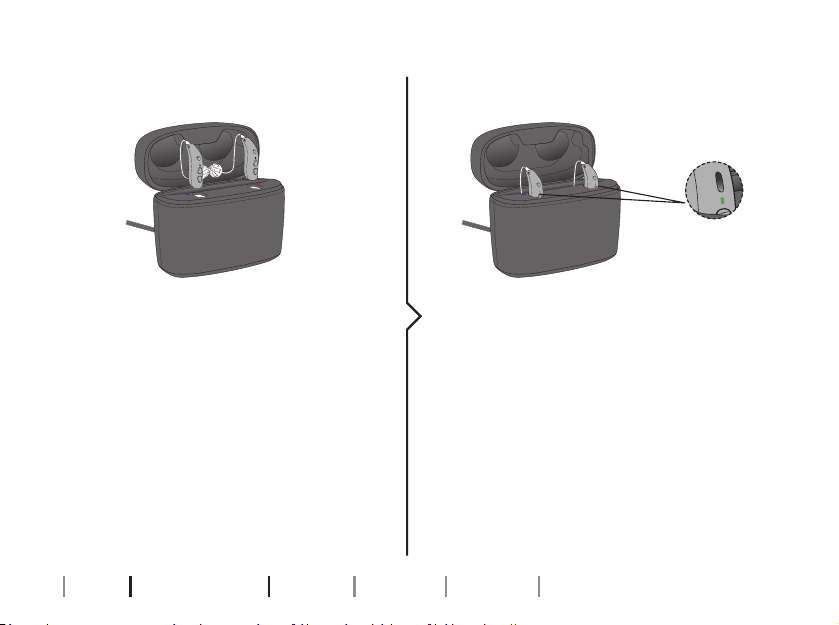
Place the hearing aids in the charging
ports as shown in the picture and
close the lid. Make sure that your
hearing aids match the right and
left color indicators on the charger’s
charging ports.
The RED indicator is for the right side
hearing aid. The BLUE indicator is for
the left side hearing aid.
The hearing aid LED lights turn ON
when the hearing aids are correctly
placed in the charger.
Hearing aid LED light charging status:
ORANGE = Charging
GREEN = Fully charged
Place hearing aids in charger Charging status

14
About Getting started Daily use Warnings More info
Charging time
Ensure you fully charge your hearing aids before rst use and charge them
every night. That ensures that you start your day with fully charged hearing
aids.
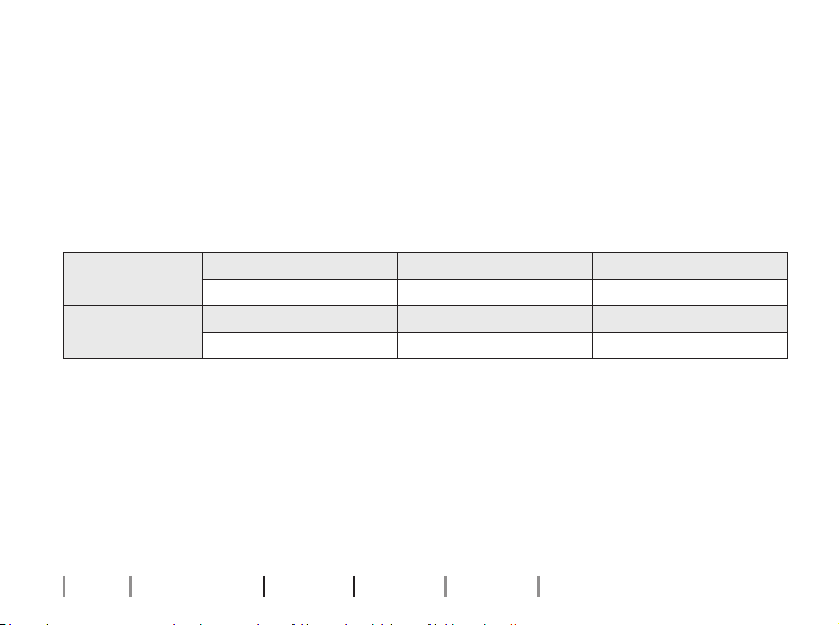
If your hearing aid’s battery is completely drained, the normal charging
time is:
miniRITE T R Fully charged 50% charged 25% charged
3 hours 1 hour 0.5 hours
miniBTE T R Fully charged 40% charged 20% charged
3.5 hours 1 hour 0.5 hours
When the battery in your hearing aids is fully charged, the charging process
stops automatically.
Charging time may vary depending on the remaining capacity of the
battery and between the left/right-hand side hearing aid.
Daily use
15
The charger’s lid serves as protection and storage for your hearing aids.
During charging, when you open the lid, the LEDs in your hearing aids light
up to indicate their charging status.
Note
If you have not used your hearing aid in a long time and you then try to recharge it, it may take up to 30seconds
before the hearing aid begins charging. For more information, see your hearing aid’s instructions for use.
IMPORTANT NOTICE
Ensure that your charger is powered or that the charger’s built-in battery is charged
when the hearing aid or transmitter is seated in the charging port. Otherwise your
hearing aids or transmitter will remain turned ON and continue using battery power.
16
About Getting started Daily use Warnings More info
Charging the charger
Your charger contains a built-in lithium-ion rechargeable battery that
doubles as a power bank. This lets you fully charge a pair of hearing aids a
minimum of three times on a fully-charged power bank while you are on-
the-go.
When the charger is plugged into a power source
• Your hearing aids and the charger’s built-in battery are being charged.
When the charger is unplugged from a power source
• The charger enters Power bank mode, letting you charge your hearing
aids when you do not have access to a power socket.
Charging times
Power bank battery Power bank + hearing aids
Up to 4 hours depending on charge level Up to 8 hours depending on charge level
Note
It is recommended that you keep the lid closed at all times while you charge your hearing aids.
17
IMPORTANT NOTICE
When charging, the charging indicators on your charger should be lit as
described in this booklet. If the charging indicators are not lit as described,
disconnect the charger and consult your hearing care professional.
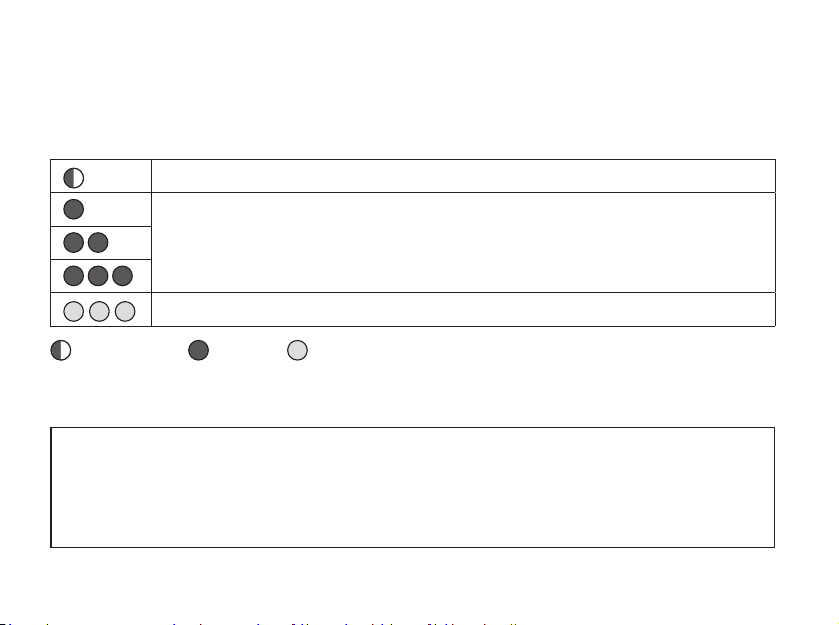
When the charger is connected to a power source, the LEDs on your
charger indicate the charging status of the power bank.
The LEDs turn OFF shortly after the power bank battery is fully charged.
Charging (Battery too low to recharge the hearing aids)
Charging
Fully charged
ORANGE blink ORANGE GREEN
18
About Getting started Daily use Warnings More info
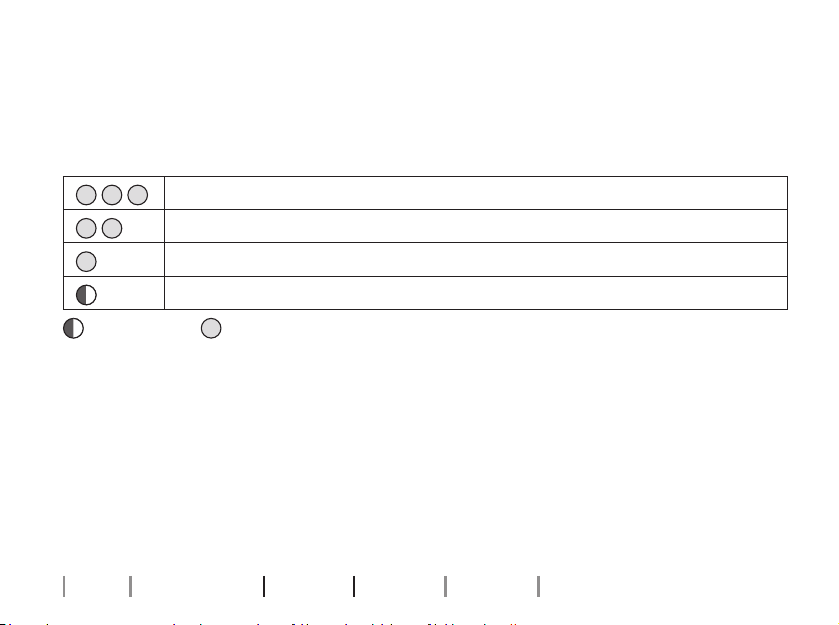
Power bank function
When the charger is disconnected from power, the LEDs on your charger
indicate the charger’s power bank battery level. You can check the
remaining battery level by opening the charger’s lid.
Three full charging cycles of two hearing aids
Two full charging cycles of two hearing aids
One full charging cycle of two hearing aids
Battery too low for a full charging cycle
ORANGE blink GREEN
Long-term storage
Before you put away or store the charger for a prolonged period of time
(more than 14days), ensure you rst fully charge the charger’s power bank
battery. This way the battery can be charged again.
Note
To protect the rechargeable battery, it is necessary that you fully charge the charger’s power bank battery every
12 months, otherwise the rechargeable battery may need to be replaced.
19
Power and charge using other sources
You can power and charge the charger’s battery from other sources than a
power socket. This can be done by using the charger’s USB cable.
Ensure that the power source is USB 2.0 compliant, with a minimum of
500mA output.
Examples of power sources:
• Computer
• Car
IMPORTANT NOTICE
When using a power socket, use the supplied original power supply (5.0V/1A)
for the charger.
20
About Getting started Daily use Warnings More info
Drying your hearing aids
Your charger uses heat from inductive charging to dry your hearing aids
when you place them in the charger ports.
The drying of your hearing aids is activated when you place the hearing
aids in the charger ports and charging begins.
IMPORTANT NOTICE
Ensure you remove the USB cable when you transport the charger.
21
Caring for your charger
Always ensure that the charger is dry and clean before use. Keep the
charging ports clean from dust by using a dry cloth. Do not use water
or cleaning uids to clean the charging ports.
Store your charger in a dry location, e.g. in the bedroom.
Ensure you keep the charger in an environment with a temperature
between +5°C and +38°C (+41°F and +100°F).
IMPORTANT NOTICE
To clean the charger, use a soft, dry cloth. The charger must never be washed or
immersed in water or other liquids.
About Getting started Daily use Warnings More info
22
For your personal safety and to ensure
correct usage, you should familiarize yourself
fully with the following general warnings
before using your charger. Consult your
hearing care professional if you experience
unexpected operations or serious incidents
with your charger during use or because
of its use. Your hearing care professional
will support you with issue handling and, if
relevant, reporting to the manufacturer and/
or the national authorities.
Risk of burns
Do not place anything but the hearing aids
in the charger ports.
Choking hazards and risk of swallowing
batteries or other small parts
Charger, hearing aids and their parts should
be kept out of reach of children and anyone
who might swallow these items or otherwise
cause injury to themselves.
If a battery, hearing aid or small part
is swallowed, see a doctor immediately
and contact the National Poison Center at
1-800-222-1222 or National Battery Ingestion
Hotline at 1-800-498-8666.
Heat and chemicals
The charger must never be exposed to
extreme heat, e.g. left inside a parked car in
the sun.
The charger must not be dried in microwave
ovens or other ovens.
The chemicals in cosmetics, hairspray, perfume,
aftershave lotion, suntan lotion and insect
repellent can damage the charger. Always
remove your charger before applying such
products and allow time to dry before use.
General warnings
Warnings

23
Explosives
The charger is safe to use under normal
usage conditions. The charger has
not been tested for compliance with
international standards concerning explosive
environments.
Therefore, do not use the charger in
environments with danger of explosions e.g.
mines, oxygen rich environments or areas
where ammable anaesthetics are handled.
Rechargeable battery
Do not attempt to open the charger, as it
may damage the battery.
Never attempt to replace the battery. If
battery replacement is needed, return your
device to the supplier. The service guarantee
is void if there are signs of tampering.
In case of battery leakage, do not wear
or carry your charger, as it may cause skin
irritation due to acids leaking from the
battery. If your skin has been in contact with
the leaked battery acids, use a wet cloth to
wipe it o and ensure no acid is left on your
skin. If you experience skin irritation, consult
your doctor. For further handling instructions
of your charger consult your hearing care
professional.
The safety of recharging batteries using a
USB connector is determined by the external
signal source. When connected to external
equipment plugged into a power socket, this
equipment must comply with IEC 62368-1 or
equivalent safety standards.
Connection to external equipment
The safety of the charger, when connected
to external equipment with USB cable, is
determined by the external signal source.
When the charger is connected to external
equipment which is plugged into a power
socket, this equipment must comply with IEC
62368-1 or equivalent safety standards.
About Getting started Daily use Warnings More info
24
Be aware of your surroundings
Avoid interacting with your charger when
your attention is needed elsewhere. This
may take away your attention from your
surroundings, for example while in trac.
Refer to national trac laws regarding the
use of communication devices (for example
mobile phones).
Possible side eects
The otherwise non-allergenic materials used
in your charger may, in rare cases, cause a
skin irritation or other side eects.
If these conditions occur, seek consultation
with a physician.
Transport on aircraft
Consult the airline for details regarding
transportation of your hearing aid charger
on aircraft.
Active Implants
The charger has been thoroughly tested and
characterized for human health according to
international standards for human exposure
(Specic Absorption Ratio — SAR), induced
electromagnetic power and voltages into the
human body. The exposure values are well
below international accepted safety limits
for SAR, induced electromagnetic power and
voltages into the human body dened in the
standards for human health.
It is recommended to keep the charger at
least 15 centimeters away from the implant,
e.g. do not carry it in a breast pocket as
it contains magnets. In general, please
follow the guidelines recommended by the
manufacturers of implantable debrillators
and pacemakers on use
with portable electronics and magnets.
If you have an active implant, contact the
manufacturer of your implantable device for
information about the risk of interference.
General warnings

25
Charging
To prevent potential battery damage during
storage charge your charger
every 12 months.
Use of third-party accesories
Only use accessories, transducers, or cables
supplied by the manufacturer. Nonoriginal
accessories may result in reduced
electromagnetic compatibility (EMC) of your
charger.
X-ray/CT/MR/PET scanning, electrotherapy
and surgery
Remove your charger before X-ray
examinations and CT/MR/PET scans,
electrotherapy, surgery, etc. as your charger
may be damaged when exposed
to strong electromagnetic elds.
26
About Getting started Daily use Warnings More info
Troubleshooting
More info
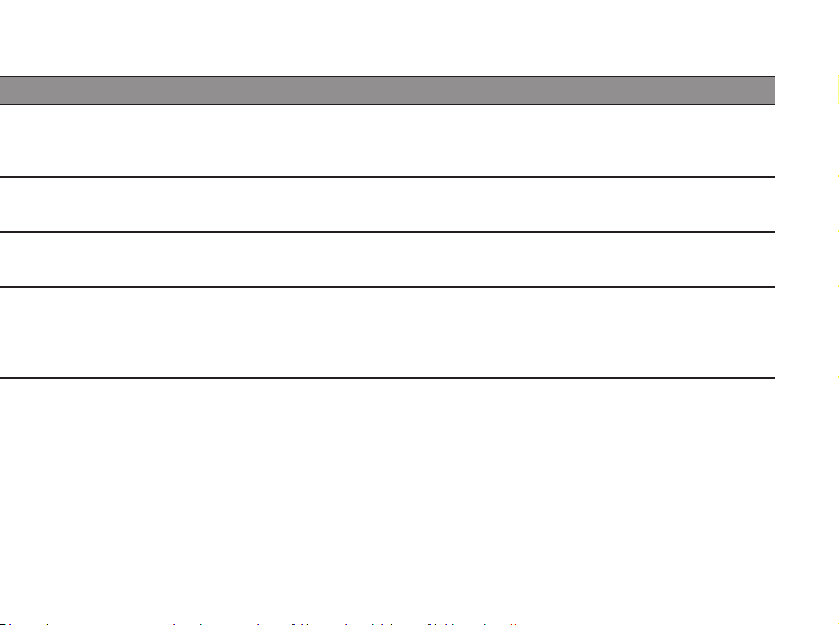
Symptom Possible causes Solutions
The hearing aids do
not turn ON after being
removed from the charger
The charger did not have enough time to turn the hearing aids ON
before they were removed from the charger
Place the hearing aids in the charger ports and try again, or use the push button to turn the hearing
aids ON manually
Two charger LEDs show
ORANGE blinks
The hearing aid or charger’s temperature is too cold or too warm
Move the charger and hearing aid to a location with a temperature between +5°C and +38°C (+41°F
and +100°F)
Three charger LEDs show
ORANGE blinks
System error
Contact your hearing care professional
The charger LEDs remain
turned OFF when the
charger is connected
to power
The charger is not charging
Verify that the power plug is correctly connected
Ensure that the power source delivers sucient output for your charger
27
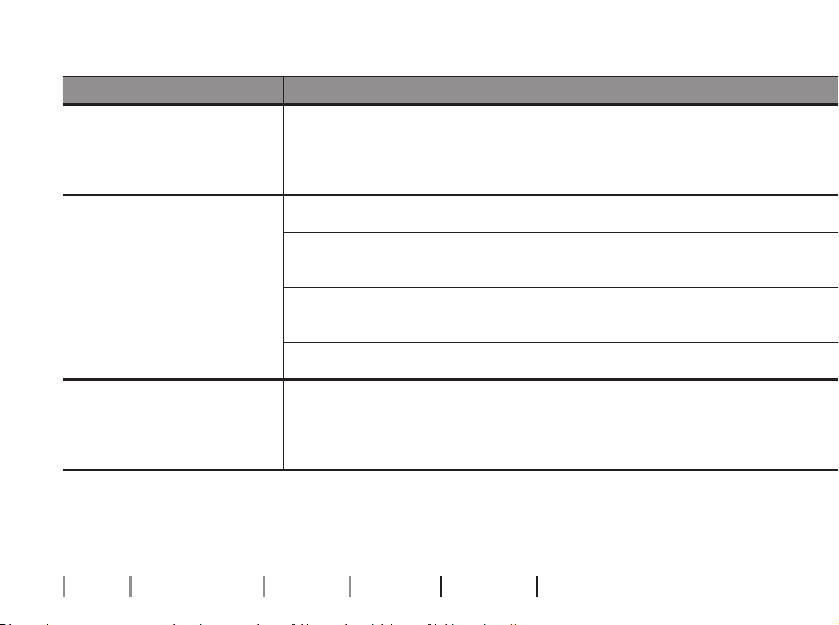
Symptom Possible causes Solutions
The hearing aids do
not turn ON after being
removed from the charger
The charger did not have enough time to turn the hearing aids ON
before they were removed from the charger
Place the hearing aids in the charger ports and try again, or use the push button to turn the hearing
aids ON manually
Two charger LEDs show
ORANGE blinks
The hearing aid or charger’s temperature is too cold or too warm
Move the charger and hearing aid to a location with a temperature between +5°C and +38°C (+41°F
and +100°F)
Three charger LEDs show
ORANGE blinks
System error
Contact your hearing care professional
The charger LEDs remain
turned OFF when the
charger is connected
to power
The charger is not charging
Verify that the power plug is correctly connected
Ensure that the power source delivers sucient output for your charger
Continues on next page
28
About Getting started Daily use Warnings More info
Troubleshooting
Symptom Possible causes Solutions
The hearing aid LED blinks
GREEN when the hearing
aid is placed in the charger
The hearing aid has not been in use for an extended period of time
Depending on how depleted the battery in the hearing aid is, the hearing aid automatically resumes
normal charging mode after a timeframe of up to 10minutes.
Ensure you leave the hearing aid in the charger during this process.
The hearing aid LED
remains turned OFF when
the hearing aid is placed
in the charger
The charger is not turned ON
Verify that the charger power plug is correctly connected or the power bank has enough battery
The hearing aid or charger’s temperature is either too warm or
too cold
Move the charger and hearing aid to a location with a temperature between +5°C and +38°C (+41°F
and +100°F)
Charging is incomplete. The charger has stopped charging to protect
the battery.
Reinsert the hearing aid into the charger. This completes the charging within approximately
15minutes.
The hearing aid is not correctly seated in the charger Check the charging ports for foreign objects
The hearing aid LED blinks
ORANGE when
the hearing aid is placed
in the charger
System error
Contact your hearing care professional
29
Symptom Possible causes Solutions
The hearing aid LED blinks
GREEN when the hearing
aid is placed in the charger
The hearing aid has not been in use for an extended period of time
Depending on how depleted the battery in the hearing aid is, the hearing aid automatically resumes
normal charging mode after a timeframe of up to 10minutes.
Ensure you leave the hearing aid in the charger during this process.
The hearing aid LED
remains turned OFF when
the hearing aid is placed
in the charger
The charger is not turned ON
Verify that the charger power plug is correctly connected or the power bank has enough battery
The hearing aid or charger’s temperature is either too warm or
too cold
Move the charger and hearing aid to a location with a temperature between +5°C and +38°C (+41°F
and +100°F)
Charging is incomplete. The charger has stopped charging to protect
the battery.
Reinsert the hearing aid into the charger. This completes the charging within approximately
15minutes.
The hearing aid is not correctly seated in the charger Check the charging ports for foreign objects
The hearing aid LED blinks
ORANGE when
the hearing aid is placed
in the charger
System error
Contact your hearing care professional
30
About Getting started Daily use Warnings More info
Conditions of use
Operating conditions Temperature: +5°C to +38°C (+41°F to +100°F)
Humidity: 5% to 93%, non-condensing
Atmospheric pressure: 700hPa to 1060hPa
Transportation and
storage conditions
Temperature and humidity shall not exceed the below
limits for extended periods during transportation and
storage:
Temperature: -20°C to +60°C (-4°F to +140°F)
Humidity: 5% to 93%, non-condensing
For information about your hearing aid’s conditions of use, see your hearing aid’s instructions for use.
31
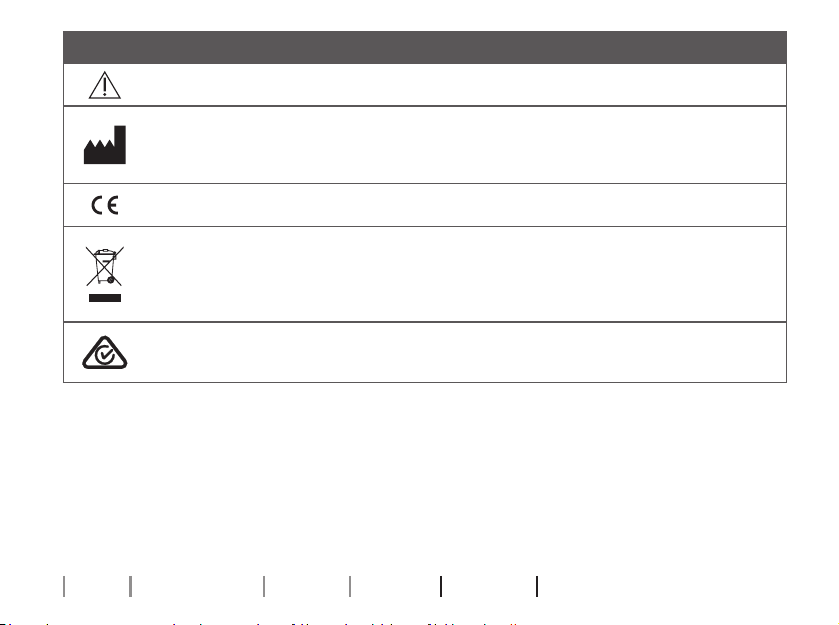
Waste from electronic
equipment must be
handled according to
local regulations.
This medical device complies with the
Medical Device Regulation (EU) 2017/745.
The device is classied as CISPR 11
group 2 class B equipment. This
means that the device is using locally
generated radio-frequency energy
which is used for wireless power transfer
(WPT) and, that the device is suitable for
use in residential environments.
Declaration of Conformity is available at
the headquarters.
SBO Hearing A/S
Kongebakken 9
DK-2765 Smørum
Denmark
hearingsolutions.philips.com/doc
SBO Hearing A/S
Kongebakken 9
DK-2765 Smørum
Denmark
32
About Getting started Daily use Warnings More info
Description of symbols and abbreviations used in this booklet
Warnings
Text marked with a warning symbol must be read before using the device.
Manufacturer
The device is produced by the manufacturer whose name and address are stated next
to the symbol. Indicates the medical device manufacturer, as dened in EU Regulation
2017/745.
CE mark
The device complies with all required EU regulations and directives.
Electronic waste (WEEE)
Recycle hearing aids, accessories or batteries according to local regulations.
Hearing aid users can also return electronic waste to their hearing care professional for
disposal. Electronic equipment covered by Directive 2012/19/EU on waste and electrical
equipment (WEEE).
Regulatory Compliance Mark (RCM)
The device complies with electrical safety, EMC and radio spectrum requirements for
devices supplied to the Australian or New Zealand markets.
33
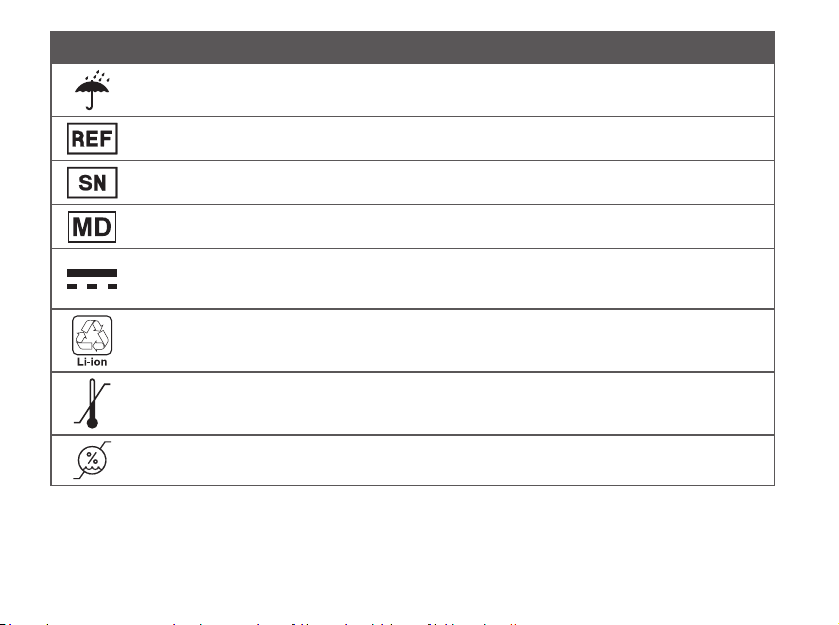
Description of additional symbols used on labels
Keep dry
Indicates a medical device that needs to be protected from moisture.
Catalog number
Indicates the manufacturer’s catalog number so that the medical device can be identied.
Serial number
Indicates the manufacturer’s serial number so that a specic medical device can be identied.
Medical Device
The device is a medical device.
Nature of supply voltage
Indicates that the nature of the device’s power supply voltage shall be DC (direct
current).
Battery recycling symbol
Li-ion Battery recycling symbol.
Temperature limit
Indicates the temperature limits to which the medical device can be safely exposed.
Humidity limitation
Indicates the range of humidity to which the medical device can be safely exposed.
34
About Getting started Daily use Warnings More info
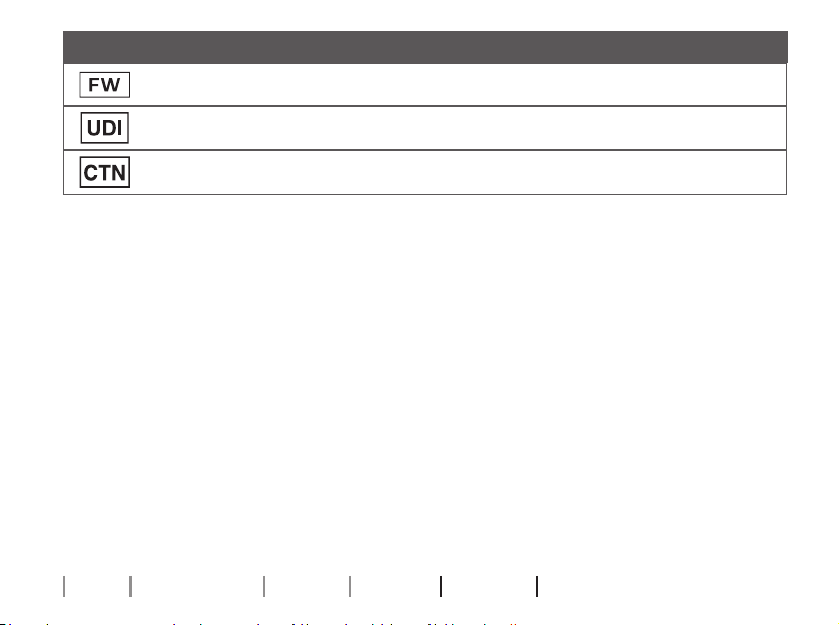
Description of additional symbols used on labels
FW
Firmware version used in the device.
Unique device identier
Indicates a carrier that contains unique device identier information.
CTN
Commercial Trade Number
REACH Declaration
REACH requires Philips Hearing Solutions to provide chemical content information for
Substances of Very High Concern (SVHC) if they are present above 0.1% of the article
weight. Recent information can be found on the website hearingsolutions.philips.com/
REACH.


36
About Getting started Daily use Warnings More info
Compliance statements
This device complies with part 18
of the FCC Rules.
Radiofrequency radiation
exposure information
For body-worn operation, this device
meets FCC RF exposure limits and has
been tested while in contact with the
human body. Use of other accessories
not veried by the manufacturer may not
ensure compliance with FCC RF exposure
guidelines.
This device must not be co-located or
operating in conjunction with any other
antenna or transmitter.
User information
This device has been tested and found to
comply with the limits pursuant to part 18
of the FCC Rules.
These limits are designed to provide
reasonable protection against harmful
interference in a residential environment.
This device generates, uses and
can radiate radio frequency energy
and, if not used in accordance with
the instructions, may cause harmful
interference to radio communications.

37
However, there is no guarantee that
interference will not occur in a particular
use case. If this device does cause
harmful interference to other electronic
equipment, which can be determined
by turning the equipment OFF and ON,
the user is encouraged to try to correct
the interference by one or more of the
following measures:
• Reorient or relocate the equipment
• Increase the separation between
the equipment
Changes or modications not expressly
approved by the party responsible for
compliance could void the user’s authority
to operate the device.

38
About Getting started Daily use Warnings More info
263709US | 2023.05.24 | v2
International warranty
Your device is covered by an international
warranty issued by the manufacturer.
This international warranty covers
manufacturing and material defects in
the device itself, but not in accessories
such as batteries, tubing, speakers,
earpieces and lters, etc. Problems arising
from improper/incorrect handling or care,
excessive use, accidents, repairs made
by an unauthorized party, exposure to
corrosive conditions, physical changes
in your ear, damage due to foreign
objects entering the device, or incorrect
adjustments are NOT covered by the
international warranty and may void
it. The above international warranty
does not aect any legal rights that
you might have under applicable
national legislation governing the sale
of consumer goods in the country where
you have bought your device. Your
hearing care professional may also have
issued a warranty that goes beyond the
clauses of this international warranty.
Please consult him/her for further
information.
If you need service
Take your device to your hearing care
professional, who may be able to sort
out minor problems and adjustments
immediately. Your hearing care professional
may charge a fee for their services.

263709US | 2023.05.24 | v2
Warranty
Certicate
Name of owner: _________________________________________________________________
Hearing care professional: _________________________________________________________
Hearing care professional’s address: ________________________________________________
Hearing care professional’s phone: _________________________________________________
Purchase date: ___________________________________________________________________
Warranty period: ___________________ Month: ______________________________________
Model: ____________________________ Serial no.: ____________________________________

hearingsolutions.philips.com
0000263709000001
Philips and the Philips Shield Emblem are registered trademarks of
Koninklijke Philips N.V. and are used under license. This product has
been manufactured by or for and is sold under the responsibility of
SBO Hearing A/S, and SBO Hearing A/S is the warrantor in relation
to this product.
263709US | 2023.05.24 | v2