Operating and installation
instructions
Induction hobs
It is essential to read the operating and installation instructions be-
fore setup, installation, and commissioning. This prevents both per-
sonal injury and damage to the appliance.
en-GB M.-Nr. 13 156 530

Contents
Warnings and safety notes ............ 6
Sustainability and environmental
protection ..........................................
16
Installation......................................... 18
Safety notes for installation .............
18
Additional safety notes for ex-
traction mode...............................
19
Additional safety notes for Plug
& Play mode .................................
20
Additional safety notes for sur-
face-mounted installation ..........
22
Additional safety notes for
flush-fit installation......................
22
Safety distances ................................
23
Operating options..............................
26
Installation examples........................
26
Plug & Play adapter dimensions .....
28
Installation dimensions for surface-
mounted installation .........................
29
KMDA5649FR........................... 29
KMDA5649FL,
KMDA5649FLMattFinish .......
30
Extraction and guided recircula-
tion mode......................................
31
Plug&Play mode .......................... 33
Installation dimensions for flush-fit
installation ..........................................
35
KMDA5649FL,
KMDA5649FLMattFinish .......
35
Extraction and guided recircula-
tion mode......................................
36
Plug&Play mode .......................... 37
Connection to window contact, if
required...............................................
38
Installing a surface-mounted hob
withextraction and guided recircu-
lation mode.........................................
40
Preparing the worktop for sur-
face-mounted installation in ex-
traction and guided recirculation
mode..............................................
40
Installing a surface-mounted
hob with extraction and guided
recirculation mode.......................
40
Installing a surface-mounted hob
withPlug & Play ..................................
41
Preparing the worktop for sur-
face-mounted installation with
Plug & Play ....................................
41
Installing a surface-mounted
hob with Plug & Play....................
42
Installing a flush-fit hobwith extrac-
tion and guided recirculation mode.
42
Preparing the worktop for flush-
fit installation in extraction and
guided recirculation mode...........
42
Installing a flush-fit hob with ex-
traction and guided recirculation
mode ..............................................
42
Installing a flush-fit hobwith Plug &
Play.......................................................
44
Preparing the worktop for flush-
fit installation with Plug & Play...
44
Installing a flush-fit hob with
Plug & Play ....................................
44
Rear wall cut-out without drilling
template ..............................................
47
Creating the rear panel cut-out
with surface-mounted installa-
tion and an installation distance
(vertical) between the top of the
appliance and the lowest point
of the Plug & Play adapter of
200mm.........................................
47
Creating the rear panel cut-out
with flush-fit installation and an
installation distance (vertical)
between the top of the appli-
ance and the lowest point of the
Plug & Play adapter of 200mm
48
Electrical connection .........................
49
Familiarisation ................................... 51
Your hob...............................................
51
Features...............................................
52
Scope of delivery.......................... 52
Optional accessories ................... 53
Controls and indicators .....................
54
Cooking zone data .............................
56
2

Contents
Power management..........................
57
Operation............................................
57
Components ......................................
58
Grease filter .................................. 58
Charcoal filter ............................... 58
Special functions...............................
58
Permanent pan recognition........ 58
Pan size recognition .................... 58
Flex cooking area ......................... 58
Hob power levels......................... 58
Hob Booster ................................. 58
Stop&Go....................................... 58
Auto heat-up................................. 58
Timer.............................................. 58
System lock .................................. 59
Safety lock .................................... 59
Recall ............................................. 59
Keeping warm............................... 59
Wipe protection ........................... 59
Con@ctivity.................................. 59
Guided recirculation mode......... 59
Plug & Play mode ........................ 59
Vapour extractor power levels ... 59
Cooker hood Booster function... 59
Run-on function ........................... 59
Operating hours counter............. 60
Settings ......................................... 60
Demo mode.................................. 60
Residual heat indicator ............... 60
Safety switch-off.......................... 60
Overheating protection............... 61
Software version.......................... 61
Commissioning................................. 62
Unpacking the hob ............................
62
Cleaning the hob for the first time..
62
Switching on the hob for the first
time......................................................
62
Using the vapour extractor for the
first time..............................................
62
Operation........................................... 63
Safety notes for operation................
63
Switching the hob on........................
63
Positioning cookware ........................
63
Linking/unlinking Flex cooking
zones manually...................................
64
Hob power levels ...............................
64
Setting the power level................ 64
Setting the power level – inter-
mediate levels ...............................
64
Changing the power level............ 65
Booster ................................................
65
Activating the Booster................. 65
Deactivating the Booster ............ 65
Activating/deactivating Stop&Go ...
65
Power transfer ....................................
65
Auto heat-up.......................................
65
Activating auto heat-up ............... 66
Deactivating auto heat-up........... 66
Timer ....................................................
66
Setting the time............................ 66
Setting the timer........................... 66
Changing the timer duration....... 66
Deleting the timer duration......... 67
Setting the switch-off time......... 67
Changing the switch-off time
for a cooking process...................
67
Deleting the switch-off time for
a cooking process.........................
67
Setting the switch-off time for
further cooking processes...........
67
Displaying the switch-off time
for a cooking process...................
68
Using both timer functions at
the same time ...............................
68
System lock.........................................
68
Activating the system lock .......... 68
Deactivating the system lock...... 68
Safety lock...........................................
68
Activating the safety lock ............ 68
Deactivating the safety lock........ 68
Activating the Recall function...........
68
Activating/deactivating the Keep-
ingwarm function ..............................
68
Wipe protection .................................
69
Activating wipe protection .......... 69
Deactivating wipe protection...... 69
3

Contents
Vapour extraction ..............................
69
Manually setting the vapour ex-
tractor power level.......................
69
Manually switching off the
cooker hood..................................
69
Activating the Booster ................ 69
Deactivating the Booster............ 69
Deactivating Con@ctivity tem-
porarily...........................................
69
Run-on........................................... 69
Activating/deactivating demo
mode ...................................................
70
Setting ranges for the hob power
levels...................................................
71
Good to know.................................... 72
Your hob..............................................
72
How induction hobs work........... 72
Noises ........................................... 72
Cookware...................................... 72
Your cooker hood...............................
74
How the cooker hood works ...... 74
Operating hours counter............. 74
Air extraction tips......................... 74
Adjusting settings ............................ 76
Displaying the software version......
79
Cleaning and care ............................ 80
Surfaces..............................................
80
Cleaning the ceramic glass hob:
KMDA5649FR, KMDA5649FL ..
80
Safety notes on cleaning and
care ................................................
80
When to clean .............................. 80
Cleaning the ceramic glass sur-
faces ..............................................
81
Unsuitable cleaning agents ........ 81
Cleaning the MattFinish ceramic
glass hob:
KMDA5649FLMattFinish..............
81
Safety notes on cleaning and
care.................................................
81
When to clean............................... 82
Cleaning the MattFinish
ceramic glass surfaces ................
82
Unsuitable cleaning agents......... 83
Parts suitable for dishwashers.........
83
Cover grille ..........................................
83
Removing the cover grille............ 83
Cleaning the cover grille by
hand................................................
83
Cleaning the cover grille in the
dishwasher ....................................
83
Grease filter ........................................
84
Removing the grease filter .......... 84
Cleaning the grease filter by
hand................................................
84
Cleaning the grease filter in the
dishwasher ....................................
84
Fitting the grease filters............... 84
Replacing the grease filter........... 84
Resetting the grease filter oper-
ating hours counter ......................
84
Charcoal filter (only in the case of
guided recirculation mode or Plug
& Play mode) ......................................
85
Replacing the charcoal filter
(only in the case of guided recir-
culation mode or Plug & Play
mode).............................................
85
Resetting the charcoal filter op-
erating hours counter (only in
the case of guided recirculation
mode or Plug & Play mode)........
85
Cleaning the cooker hood drip tray .
85
Cleaning inside the cooker hood
casing...................................................
86
Troubleshooting ................................ 87
Messages in the display....................
87
Unexpected behaviour ......................
88
Unsatisfactory results .......................
89
4

Contents
General problems or technical
faults....................................................
89
Customer Service ............................ 91
Contact in the event of a fault.........
91
Data plate ...........................................
91
Warranty .............................................
91
Technical data................................... 92
Product data sheets..........................
92
Copyrights and Licences..................
93
5

Warnings and safety notes
This hob complies with all relevant local and national safety re-
quirements. Inappropriate use can, however, lead to personal injury
and material damage.
Read the operating and installation instructions carefully before us-
ing the hob. They contain important information on safety, installa-
tion, use and maintenance. This prevents both personal injury and
damage to the hob.
In accordance with standard IEC60335-1, Miele expressly and
strongly advises that you read and follow the instructions in the
chapter on installing the hob as well as the warnings and safety
notes.
Miele cannot be held liable for injury or damage caused by non-
compliance with these instructions.
Keep the operating and installation instructions in a safe place and
pass them on to any future owner.
Correct application
This hob is intended for domestic use and use in other similar en-
vironments.
This hob is not intended for outdoor use.
It is intended for domestic use only to cook food and keep it warm.
Any other use is not supported by the manufacturer and could be
dangerous.
This hob is not intended for use by people with reduced physical,
sensory or mental capabilities or lack of experience and knowledge,
unless they have been given supervision and instruction concerning
its use by a person responsible for their safety. They may only use the
hob unsupervised if they have been shown how to use it in a safe
way. They must be able to recognise and understand the dangers of
misuse.
Safety with children
Children under 8 years of age must be kept away from the hob un-
less they are constantly supervised.
6

Warnings and safety notes
Children over 8years of age may use the hob without supervision
if its operation has been clearly explained to them and they are able
to use it safely. Children must be able to understand and recognise
the possible dangers caused by incorrect operation.
Children must not be allowed to clean the hob unsupervised.
Children should be supervised in the vicinity of the hob. Never al-
low children to play with the hob.
The hob gets hot when in use and remains hot for a while after be-
ing switched off. Keep children well away from the hob until it has
cooled down and there is no danger of burning.
Danger of burning. Do not store anything which might arouse a
child’s interest in storage areas above or behind the hob. Otherwise
they could be tempted to climb onto the hob.
Risk of burning and scalding. Place pots and pans on the cooking
zone in such a way that children cannot pull them down and burn
themselves.
Danger of suffocation! Whilst playing, children may become en-
tangled in packaging material (such as plastic wrapping) or pull it over
their head with the risk of suffocation. Keep packaging material away
from children.
Activate the system lock to ensure that children cannot switch on
the hob inadvertently. Use the safety lock when the hob is in use to
prevent children from altering the settings selected.
Technical safety
Unauthorised installation, maintenance or repairs could result in
unforeseen dangers for the user, for which the manufacturer cannot
accept liability. Installation, maintenance or repairs must only be car-
ried out by a qualified specialist or Miele Customer Service.
Damage to the hob can compromise your safety. Check the hob for
visible signs of damage. Do not use the hob if it is damaged.
7

Warnings and safety notes
Temporary or permanent operation on an autonomous power sup-
ply system or a power supply system that is not synchronised with
the mains power supply (e.g. island networks, back-up systems) is
possible. A prerequisite for operation is that the power supply system
complies with the specifications of EN50160 or an equivalent stand-
ard.
The function and operation of the protective measures provided in
the domestic electrical installation and in this Miele product must
also be maintained in isolated operation or in operation that is not
synchronised with the mains power supply, or these measures must
be replaced by equivalent measures in the installation. As described,
for example, in the current version of BS OHSAS 18001–2 ISO
45001.
The electrical safety of this hob can only be guaranteed when cor-
rectly earthed. It is essential that this basic safety requirement is ful-
filled. If in doubt, the electrical installation should be checked by a
qualified electrician.
The connection data (voltage and frequency) on the data plate of
the hob must match the mains power supply in order to avoid the risk
of damage to the hob.
Compare this data before connecting the appliance. If in any doubt,
consult a qualified electrician.
Do not connect the hob to the mains electrical supply by a multi-
socket adapter or extension lead. These are a fire hazard and do not
guarantee the required safety of the appliance.
For safety reasons, this hob may only be used after it has been
built in.
This hob must not be used in a non-stationary location (e.g. on a
ship).
Any contact with live connections or tampering with the electrical
or mechanical components of the hob will endanger your safety and
may lead to the hob malfunctioning.
Do not open the hob housing under any circumstances.
The manufacturer’s warranty will be invalidated if the hob is not re-
paired by a qualified specialist or by Miele Customer Service.
If defective safety-relevant components are replaced, Miele can
only guarantee full compliance with safety requirements if genuine
Miele replacement parts are used.
8
Warnings and safety notes
The hob is not intended for use with an external timer switch or a
remote control system.
The hob must be connected to the electricity supply by a qualified
electrician (see “Installation – Electrical connection”).
If the mains connection cable is damaged, it must be replaced
with a special mains connection cable by a qualified specialist or
Miele Customer Service.
During installation, maintenance and repair work, the hob must be
completely disconnected from the electricity supply. It is only com-
pletely isolated from the electricity supply when:
- The mains fuse has been disconnected or
- The screw-out fuses have been fully unscrewed or
- The mains plug (if present) is removed from the socket. To do this,
pull the mains plug and not the mains connection cable.
Risk of electric shock. Do not use the hob if it is faulty, or if the
ceramic surface is cracked, chipped or damaged in any way. Switch it
off immediately. Disconnect the hob from the mains power supply.
Contact a qualified specialist or Miele Customer Service.
If the hob is installed behind a furniture front, do not close the door
while the hob is in use. Heat and moisture can build up behind the
furniture front when closed. This can result in damage to the hob, the
housing unit and the floor. Do not close the furniture front until the
residual heat indicators go out.
In areas which may be subject to infestation by cockroaches or
other vermin, pay particular attention to keeping the appliance and its
surroundings clean at all times. Any damage caused by cockroaches
or other vermin will not be covered by the warranty.
Using at the same time as other heating appliances that depend on the air from
the room
9

Warnings and safety notes
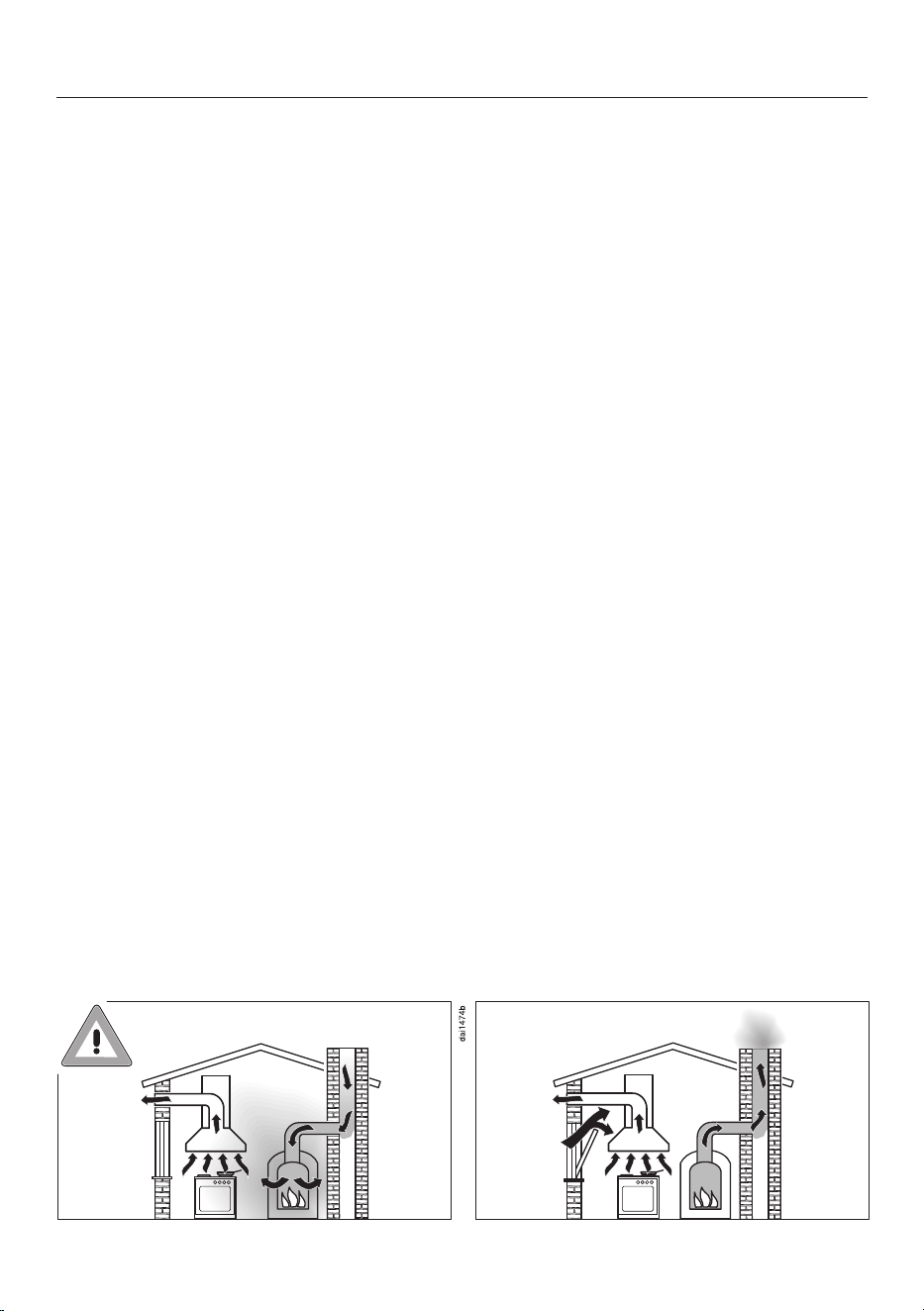
Danger of toxic fumes!
Great care should be taken when using the cooker hood in the
same room or the same area of the house as another heating appli-
ance that depends on the air from the room.
Such heating appliances draw in air from the room and duct ex-
haust gases out through a chimney or extraction ducting. They in-
clude gas, oil, wood and coal-fired boilers and heaters, continuous
flow or other water heaters, gas hobs and ovens.
The cooker hood draws in air from the kitchen and from neighbour-
ing rooms. This applies to the following modes of operation:
- extraction mode,
- recirculation mode with a recirculation box installed outside the
room.
If there is insufficient air, an underpressure will occur. The heating
appliance may be starved of oxygen. This impairs combustion.
Harmful gases could be drawn from the chimney or extraction
ducting back into the room, with potentially fatal consequences.
Risk of death!
10

Warnings and safety notes
In order to ensure safe operation and to prevent gases given off by
the heating appliance from being drawn back into the room, when
the cooker hood and the heater are both operated simultaneously,
an underpressure in the room of 0.04mbar (4Pa) is the maximum
permissible.
Sufficient ventilation can be maintained by air inlets which cannot
be blocked, e.g. in windows, doors and outside wall vents. The dia-
meter of the inlet openings must enable sufficient ventilation. A
ventilation brick alone is not generally sufficient to ensure safe
ventilation.
The overall ventilation condition of the dwelling must be taken into
account. If in any doubt, the advice of a competent builder, or for
gas, a qualified gas fitter should be sought.
If the cooker hood is being operated in recirculation mode, where
the air is passed back into the room in which the extractor is in-
stalled, the above restrictions do not apply.
Correct use
The hob gets hot when in use and remains hot for quite a while
after being switched off. There is a risk of burning until the residual
heat indicators go out.
Oil and fat can overheat and catch fire. Do not leave the hob unat-
tended when cooking with oil and fat. If it does ignite do not attempt
to put the flames out with water.
Disconnect the hob from the mains and use a suitable fire blanket,
saucepan lid, damp towel or similar to smother the flames.
Do not leave the hob unattended whilst it is being used. It should
be continually monitored whilst boiling and flash frying.
Open flames are a fire hazard.
Do not flambé food. When switched on, the cooker hood could draw
flames into the filter. Kitchen grease deposits could ignite.
Spray canisters, aerosols and other inflammable substances can
ignite when heated. Therefore do not store such items or substances
in a drawer under the hob. Cutlery inserts must be heat-resistant.
Do not heat an empty pan.
11

Warnings and safety notes
Do not heat up food in closed containers e.g. tins or sealed jars on
the hob, as pressure can build up in the container, causing it to ex-
plode.
Do not cover the hob, e.g. with a hob cover, a cloth or protective
foil. The material could catch fire, shatter or melt if the hob is
switched on by mistake or if residual heat is still present.
When the hob is switched on either deliberately or by mistake, or
when there is residual heat present, there is the risk of metal items
placed on the hob heating up. Other materials can melt or catch fire.
Damp pan lids might adhere to the ceramic surface and be difficult to
dislodge. Do not use the hob as a resting place for anything. Always
switch the cooking zones off after use.
You could burn yourself on the hot hob. Protect your hands with
heat-resistant pot holders or gloves when working on the hot hob. Do
not let them get wet or damp. Heat transfers through damp and wet
material more quickly with the risk of scalding or burning yourself.
Hot cooking vapours during cooking can cause the cooker hood to
get hot.
Do not touch the casing or the grease filters until the cooker hood
has cooled down.
When using an electrical appliance (e.g. a hand mixer) near the
hob, ensure that the cable of the electrical appliance cannot come
into contact with the hot hob. The cable’s insulation could become
damaged.
Grains of salt, sugar, or sand (e.g. from cleaning vegetables) can
cause scratches if they get under the cookware. Make sure the
ceramic glass surface and the underside of the cookware are clean
before placing down the cookware.
Even a light object can cause damage in certain circumstances. Do
not drop anything on the ceramic surface.
Hot items placed down on the sensor controls and displays can
damage the electronic modules underneath. Never place hot pots or
pans on the sensor controls and displays.
12

Warnings and safety notes
Do not allow solid or liquid sugar, or pieces of plastic or aluminium
foil to get onto the hob when it is hot, as they can damage the
ceramic surface when it cools down. If this should occur, turn off the
hob immediately and scrape off all the sugar, plastic or aluminium
residues while still hot, using a shielded scraper blade. Wear oven
gloves when doing this. Allow the ceramic surface to cool down and
then clean it with a suitable ceramic glass cleaner.
Do not heat empty pans on the hob as this can damage the
ceramic glass and/or the cookware. Never leave the hob unattended
during use!
Rough bases can scratch the ceramic glass. Use only pots and
pans with smooth bases.
Always lift cookware to move it. This will help prevent scratching.
Because induction heating works so quickly, the base of the cook-
ware could, under certain circumstances, heat up to the temperature
at which oil or fat self-ignites within a very short time. Never leave
the hob unattended during use!
Heat oil or fat for a maximum of one minute. Never use the
Booster function to heat oil or fat.
For people fitted with a heart pacemaker: please note that the area
immediately surrounding the hob is electromagnetically charged
when it is switched on. It is very unlikely to affect a pacemaker. How-
ever, if in any doubt, consult the manufacturer of the pacemaker or
your doctor.
When switched on, the electromagnetic field of the hob can impair
the function of magnetisable objects. Do not leave credit cards, di-
gital storage devices, pocket calculators, etc. in the immediate vicin-
ity of the hob.
Metal utensils stored in a drawer under the hob can become hot if
the appliance is used intensively for a long time.
The hob is fitted with a cooling fan. If a drawer is fitted directly un-
derneath the hob, ensure that there is sufficient space between the
drawer and its contents and the underside of the hob in order to en-
sure sufficient ventilation for the hob.
If a drawer is fitted directly underneath the hob, do not store any
pointed or small items, paper, serviettes, etc. in the drawer. They
could get in through the ventilation slots or be sucked into the casing
by the fan and damage the fan or impair cooling.
13

Warnings and safety notes
If the cookware only partially covers a cooking zone or extended
zone, the handle could become very hot.
Always place cookware in the middle of a cooking or extended zone!
Deposits of grease and dirt will prevent the cooker hood from
working properly.
Do not use the cooker hood without the grease filters in place. Other-
wise cooking vapours will not be cleaned.
There is a risk of fire if cleaning is not carried out as described in
these operating instructions.
Do not cover the vapour extraction cover grille when in use.
Do not place hot cookware on the vapour extraction cover grille.
This will impair the function of the vapour extraction and may damage
the cover grille.
Liquids can damage the cooker hood if they get into it. Keep liquids
away from the cooker hood.
Light objects can be drawn into the cooker hood and impair its op-
eration. Do not place any light objects (e.g. paper towels) within
close proximity of the cooker hood.
The induction generators could be damaged or even destroyed if
you use an induction adapter plate for cookware. Do not use induc-
tion adapter plates.
Cleaning and care
The steam from a steam cleaner could reach live electrical com-
ponents and cause a short circuit.
Do not use a steam cleaner to clean the hob.
If the hob is built-in above a pyrolytic oven or cooker, do not use it
during a Pyrolytic cleaning programme as this could trigger the over-
heating protection device on the hob (see “Safety features – Over-
heating protection”).
Cosmetic products, especially sunscreen, and hand disinfectants
can leave stains on matt glass surfaces. If cosmetic products come
into contact with a matt glass surface, remove the residue immedi-
ately with hot water, washing-up liquid and a clean microfibre cloth.
Accessories
We recommend using original Miele accessories. If other parts are
used, warranty, performance and/or product liability claims will be in-
validated.
14

Warnings and safety notes
Miele original spare parts are kept in stock for at least 10years and
up to 15years after discontinuation of your hob.
15

Sustainability and environmental protection
Energy saving tips when cook-
ing
- Cook in covered pots and pans if pos-
sible. This prevents heat escaping un-
necessarily.
- Cook with as little water as possible.
- Once food has come to the boil or the
pan is hot for frying, reduce the heat
to a lower power level.
- Use a pressure cooker to reduce
cooking durations.
Energy saving tips when operat-
ing the cooker hood
- It is important to ensure that the kit-
chen is well ventilated during opera-
tion. In extraction mode if there is in-
sufficient air flow, the cooker hood
cannot operate efficiently and this
causes increased operating noise
levels.
- Always cook with the lowest possible
setting. This produces fewer cooking
vapours, so you can use a lower
power level on the cooker hood and
therefore benefit from reduced energy
consumption.
- Check the power level on the cooker
hood. A low power level is usually suf-
ficient. Only use the Booster level
when necessary.
- When a large volume of cooking va-
pours are being produced, switch to a
high power level in good time. This is
more efficient than operating the
cooker hood for longer to try to cap-
ture cooking vapours which have
already been distributed throughout
the kitchen.
- Switch the cooker hood off after
cooking.
- Clean or replace the filters at regular
intervals. Heavily soiled filters reduce
performance, increase the risk of fire
and are unhygienic.
Disposing of the packaging ma-
terial
The packaging material is used for hand-
ling and protects the appliance from
transport damage.
Recycling the packaging material re-
duces the use of raw materials. Use ma-
terial-specific collection points for valu-
able materials and take advantage of re-
turn options. Your Miele dealer will take
the packaging material away.
Disposing of your old appliance
Electrical and electronic appliances con-
tain many valuable materials. They also
contain certain materials, compounds
and components which were essential
for their correct functioning and safety.
These could be hazardous to human
health and to the environment if dis-
posed of with household waste or if
handled incorrectly. Please do not,
therefore, dispose of your old appliance
with household waste.
Instead, please make use of officially
designated collection and disposal
points to dispose of and recycle elec-
trical and electronic appliances in your
local community, with your dealer or
with Miele, free of charge. By law, you
are solely responsible for deleting any
personal data from the old appliance
prior to disposal. You are legally obliged
16

Sustainability and environmental protection
to remove any old batteries which are
not securely enclosed by the appliance
and to remove any lamps without des-
troying them, where this is possible.
These must be taken to a suitable col-
lection point where they can be handed
in free of charge. Please ensure that
your old appliance poses no risk to chil-
dren while being stored for disposal.
17
Installation
Safety notes for installation
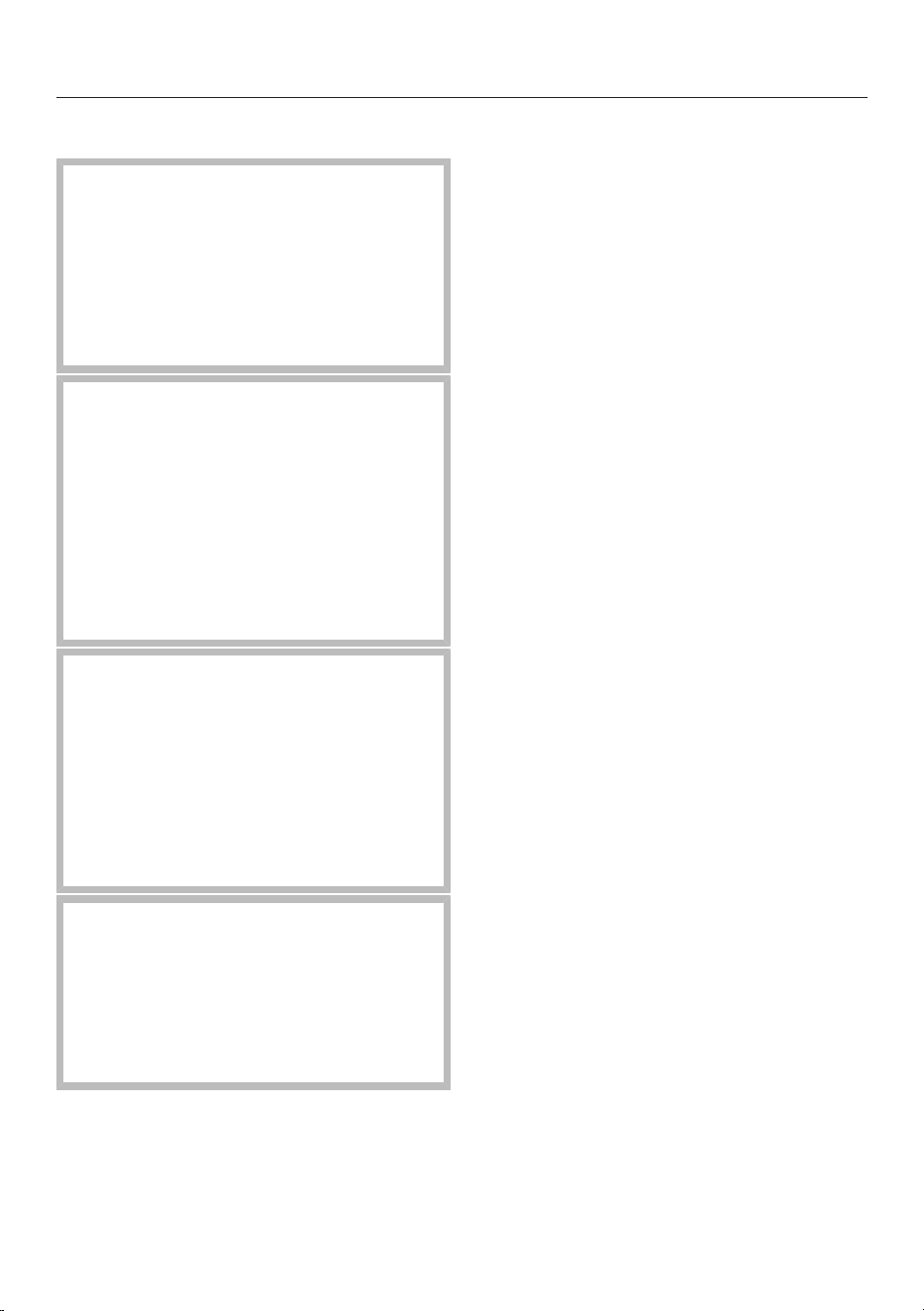
Risk of damage from incor-
rect installation.
Incorrect installation can cause
damage to the hob.
The hob must only be installed
by a qualified specialist.
Risk of electric shock from
mains voltage.
Incorrect connection to the
mains supply may result in an
electric shock.
The hob must be connected to
the electrical supply by a quali-
fied electrician only.
Damage from falling ob-
jects.
Take care not to damage the
hob when fitting wall units or a
cooker hood above it.
Fit the wall units and the
cooker hood before the hob.
Dismantling the hob for service
purposes may damage the
sealing strip underneath the
edge of the hob.
Always replace the sealing strip
before reinstalling.
The hob must not be installed
over refrigeration appliances,
dishwashers, washing machines,
washer-dryers or tumble dryers.
This hob may only be installed
above a cooker or oven if they
have a built-in cooling fan.
A gas hob must not be in-
stalled next to this hob.
Ensure that the mains connec-
tion cable cannot be touched
after the hob has been installed.
After installation, the mains
connection cable of the hob must
not come into contact with any
moving kitchen components
(such as a drawer) or be subject
to mechanical loads.
The veneers or laminate coat-
ings of worktops must be treated
with 100°C heat-resistant ad-
hesive so they do not come loose
or warp. Any wall strips must be
of heat-resistant material.
The crossbeams in front of the
top area of the housing unit rear
wall must be removed for install-
ation.
The hob must be installed
such that the drip tray and the
cleaning flap are easily accessible
and can be removed for cleaning.
The air duct is laid behind the
housing unit rear wall. The rear
wall must be removable for main-
tenance purposes.
The minimum plinth height is:
- Extraction mode: no minimum
plinth height required
- Guided recirculation mode:
100mm
- Plug & Play mode: 25mm
18

Installation
The exhaust air drawn into the
vapour extraction may only be
routed through the base unit and
back into the room in Plug&Play
mode. In extraction mode and in
guided recirculation mode, the
exhaust air must be routed out-
side through ducting (extraction
mode) or back into the room
through the recirculation box
(guided recirculation mode).
Remember to maintain the
minimum safety distances (see
“Installation – Safety distances”).
Additional safety notes for extraction
mode
The appliance must not be
connected to a chimney or flue
which is in use. Neither should it
be connected to ducting which
ventilates rooms with fireplaces.
If exhaust air is to be extracted
into a chimney or ventilation duct
no longer used for other pur-
poses, seek professional advice.
Exhaust ducting must be of
non-inflammable material. Suit-
able material is available from
Miele specialist dealers or the
Miele Spares Dept.
19
Installation
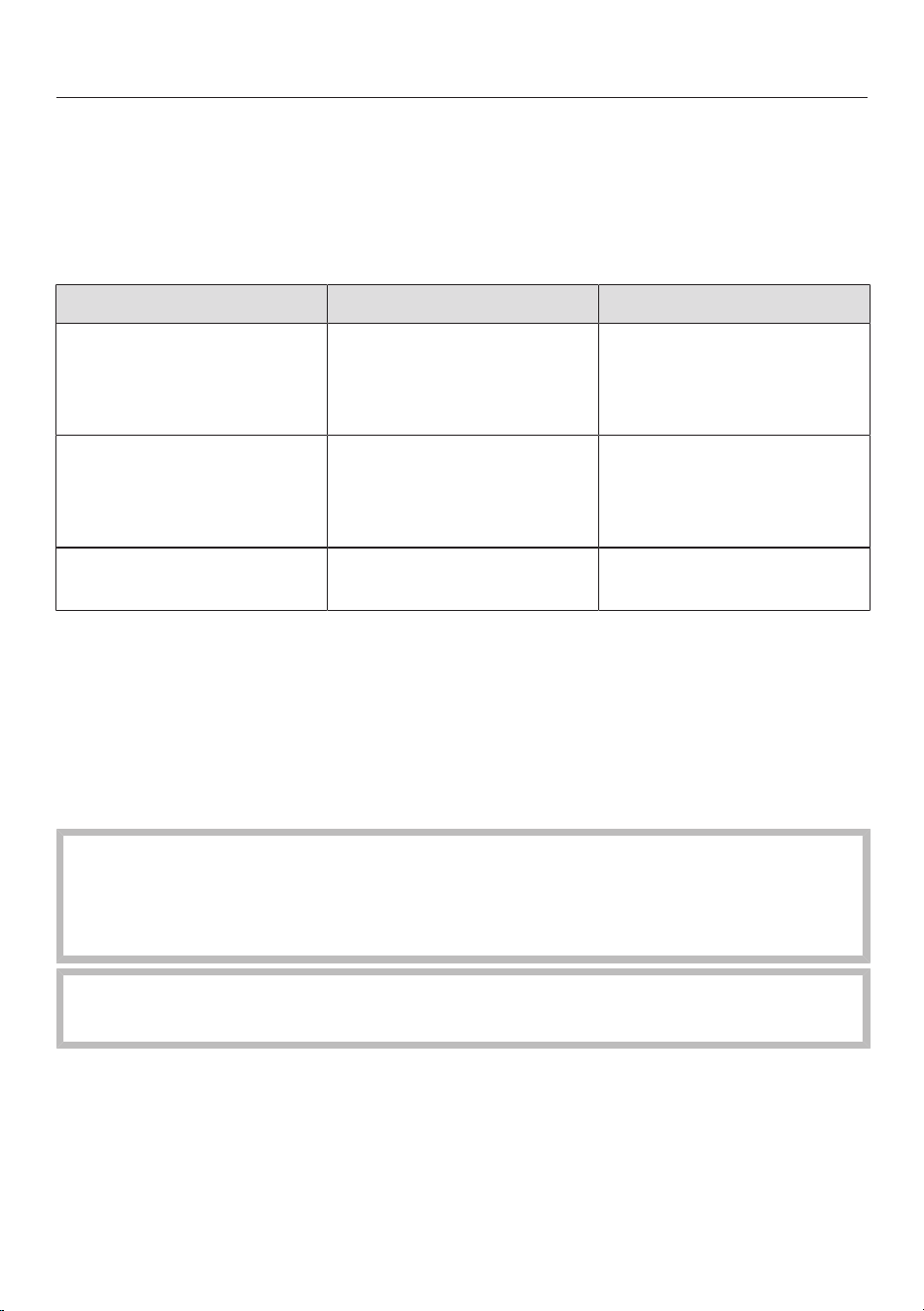
Additional safety notes for Plug & Play mode
U value
Plug&Play operation is possible in younger or renovated buildings. If the adjacent
wall or the floor is in contact with the ground or the outside air, it must have a heat
transfer coefficient (U value) of ≤ 0.5W/(m²K).
Material Material thickness U value
(as of 1995)
Solid wall
(vertical coring brick, floating brick or com-
parable porous or highly perforated materi-
als)
≥ 30cm 0.5
Solid timber wall
(e.g. log cabin/prefabricated house). Timber
frame or timber panel wall with insulating
filling
– 0.4
Passive house
(KfW 55, 40, 40 Plus)
– 0.15–0.2
The U values for other materials can be found on the websites of the German Fed-
eral Ministry for Economic Affairs and Climate Action and the German Federal Min-
istry of the Interior and Community.
If you have any other questions about your building, please contact a construction
expert or energy adviser.
The cross-section of the ventilation opening must be at least
425cm².
If ventilation grilles are to be inserted into the ventilation gaps, the
ventilation gaps must be larger than 425cm². The unobstructed
airflow of 425cm² is calculated by adding up the total area of vent-
ilation openings in the grilles.
The ventilation gaps must not be covered or blocked in any way.
They must also be regularly dusted.
The Plug&Play adapter included with the hob is required for opera-
tion in Plug&Play mode.
A template is required when installing the hob.
20

Installation
Risk of damage to the refrigeration appliance caused by va-
pours.
Vapours from the hob behind the refrigeration appliance can dam-
age the refrigeration appliance.
Do not install appliances that discharge air or vapours directly be-
hind the refrigeration appliance. Provide a separate air guide or in-
stall a partition wall between the appliances.
21
Installation
Additional safety notes for surface-
mounted installation
Damage caused by incor-
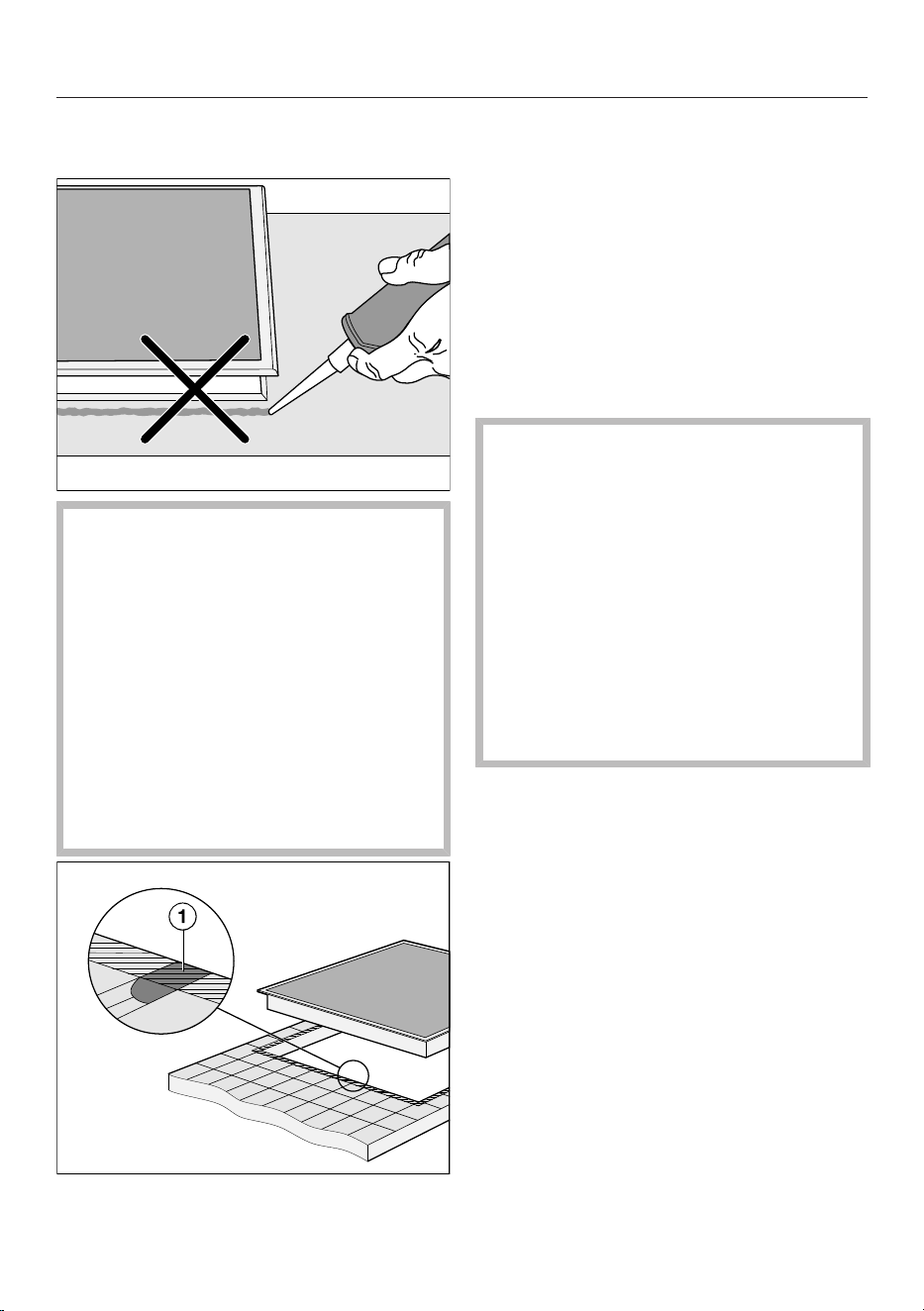
rect installation.
Using sealant under the hob
could result in damage to the
hob and the worktop if the hob
ever needs to be removed.
Do not use sealant between
the hob and the worktop.
The sealing strip under the
edge of the hob provides a suf-
ficient seal for the worktop.
Grout lines and the hatched
area underneath the hob frame
must be smooth and even. If they
are not, the hob will not sit flush
with the worktop and the sealing
strip underneath the hob will not
provide a good seal between the
hob and the worktop.
Additional safety notes for flush-fit in-
stallation
Damage caused by using
an unsuitable sealant.
Unsuitable sealant can damage
natural stone.
For natural stone worktops and
natural stone tiles, only use sil-
icone sealant that is temperat-
ure-resistant (min. 160°C) and
specially formulated for natural
stone. Follow the manufac-
turer’s instructions.
The internal width of the base
unit underneath the appliance
must be at least as wide as the
inner worktop cut-out (see “In-
stallation – Installation dimen-
sions for flush-fit installation”), so
that the hob is easily accessible
from underneath after installation
and the casing can be removed
for maintenance. If the underside
of the hob is not freely accessible
after installation, any sealant
used must be removed to enable
the hob to be lifted out of the
cut-out should this be necessary.
22
Installation
A flush-fit hob is suitable only
for installation in natural stone
(granite, marble), solid wood and
tiled worktops. When using a
worktop made from any other
material, please check first with
the worktop manufacturer that
the material is suitable for in-
stalling a flush-fit hob.
- Natural stone worktops: the
hob is set directly in the cut-
out.
- Solid wood worktops, tiled
worktops: the hob is secured
inside the cut-out with
wooden battens. The battens
must be provided on site and
are not included in the scope
of delivery.
Safety distances
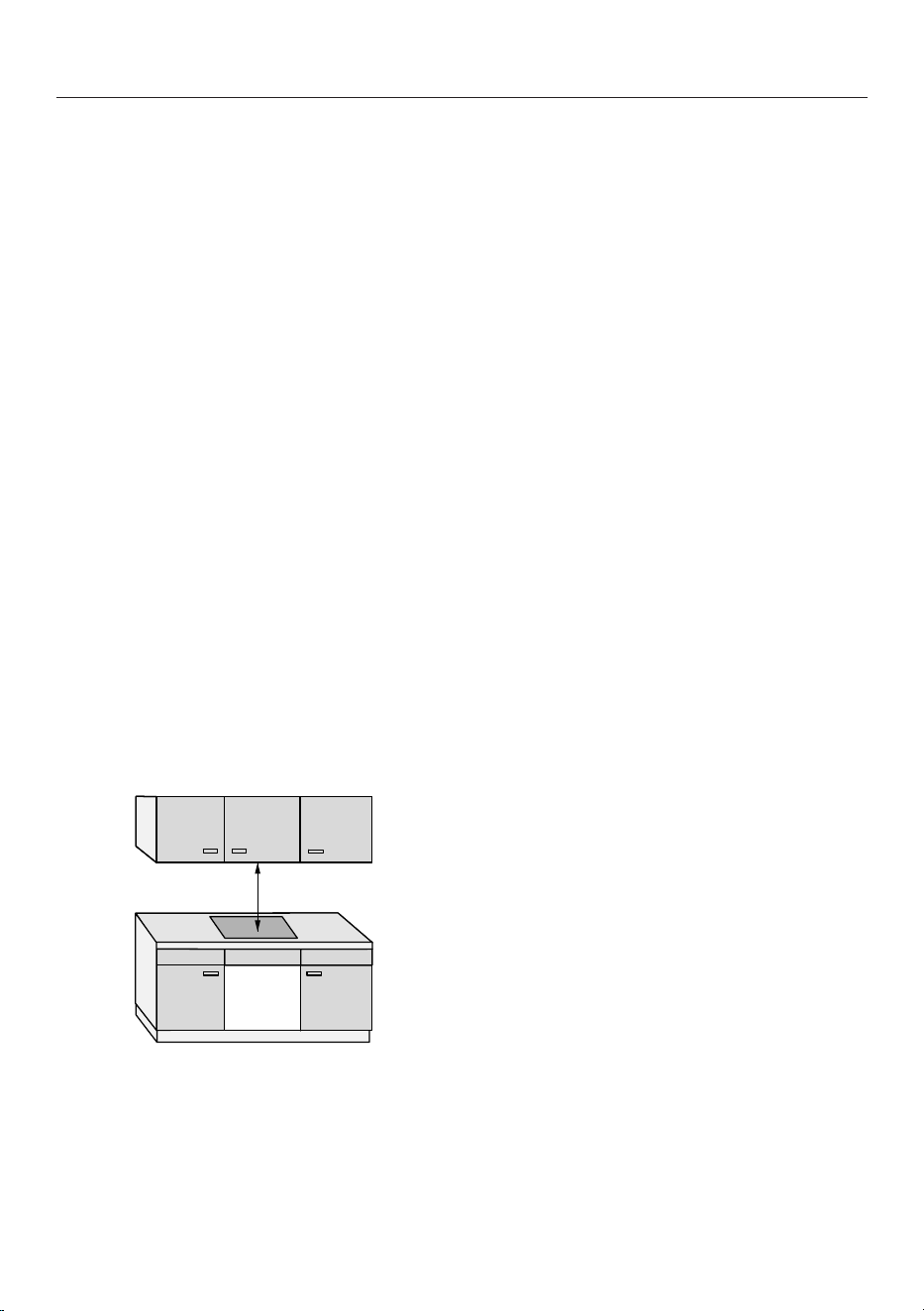
Safety distance above the hob
The following must be ensured between
the hob and the cooker hood above it:
- The safety distance specified by the
manufacturer of the cooker hood must
be maintained.
- When two or more appliances which
have different safety distances are in-
stalled together below a cooker hood,
the greatest specified safety distance
must be maintained.
If combustible objects are installed
above the hob (e.g. cabinets, utensil rail,
etc.), a minimum safety distance of 500
mm must be maintained.
23
Installation
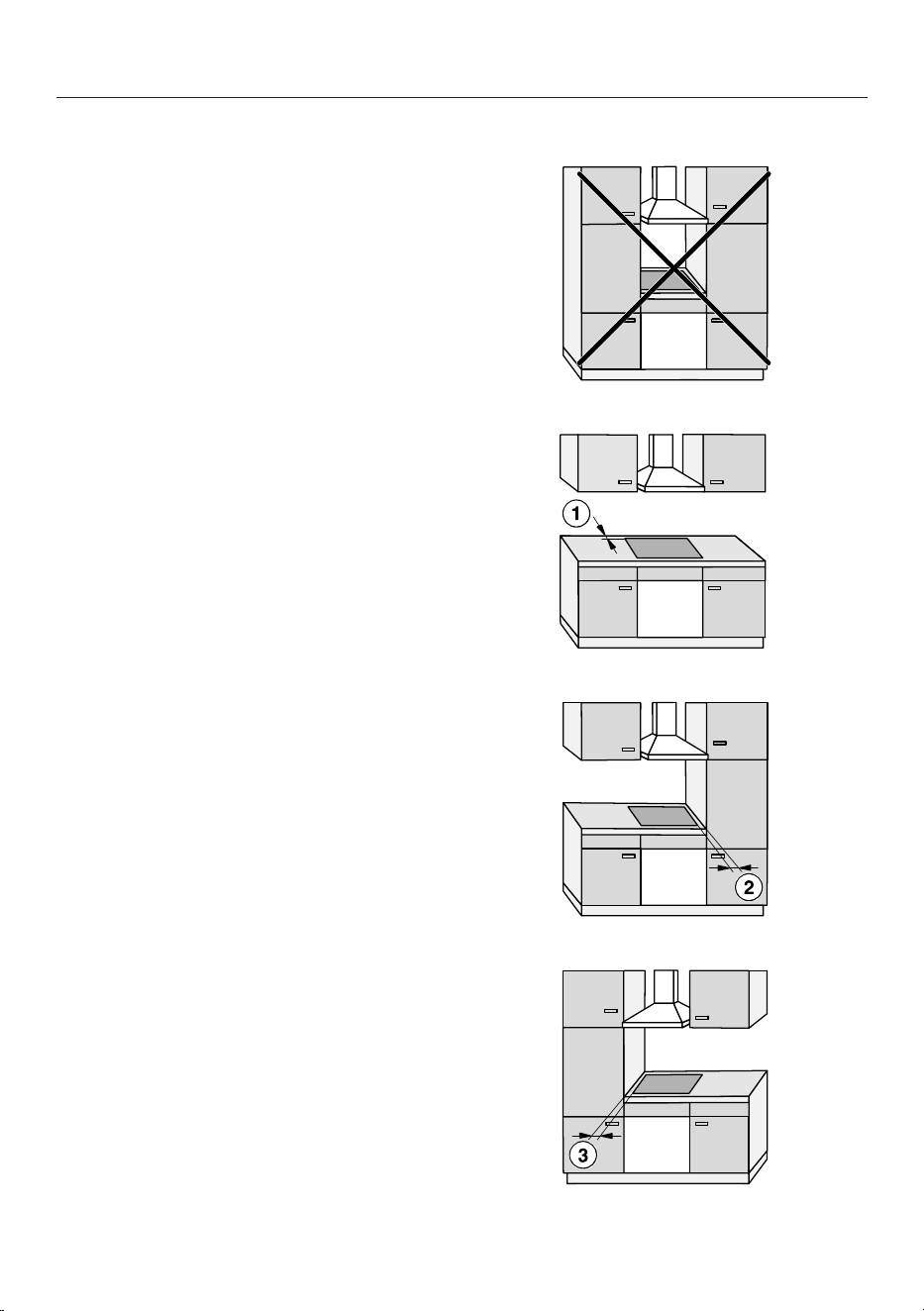
Safety distance behind and to the side of the hob
The minimum safety distances shown
below must be maintained between the
appliance and a tall unit or wall:
- Between the back of the worktop
cut-out and the rear edge of the
worktop:
50mm
and
- On the right side between the
worktop cut-out and the closest adja-
cent piece of furniture (e.g. tall unit)
or a room wall:
50mm and on the opposite side a
minimum safety distance of 200mm
or
- On the left side between the
worktop cut-out and the closest adja-
cent piece of furniture (e.g. tall unit)
or a room wall:
50mm and on the opposite side a
minimum safety distance of 200mm
Not permitted
Highly recommended
Not recommended
Not recommended
24
Installation
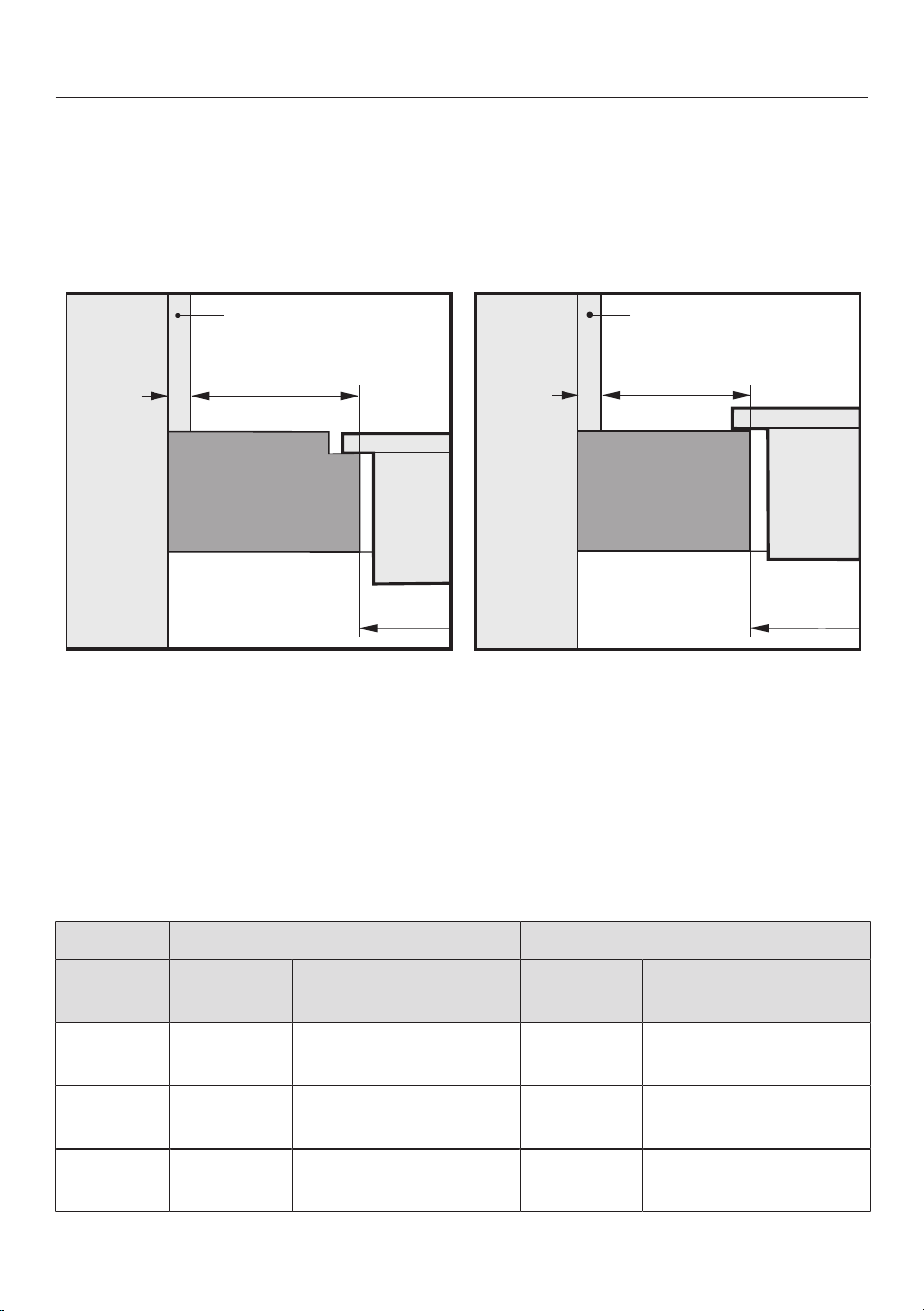
Minimum safety distance from the niche cladding
If niche cladding is installed, a minimum safety distance must be maintained
between the worktop cut-out and the cladding. High temperatures can alter or
damage these materials.
Flush-fit installation Surface-mounted installation
b
b
c
a
a
d
d
c
x
x
e
e
a
Masonry
b
Dimensionx= thickness of the niche cladding material
c
Worktop
d
Worktop cut-out
e
Minimum safety distance to
combustible materials (e.g. wood)
non-combustible materials (e.g. metal, natural stone, ceramic tiles)
Side Opposite side
Material Combust-
ible
Non-combustible Combust-
ible
Non-combustible
Back 50mm 50mm – dimen-
sionx
– –
Right 50mm 50mm – dimen-
sionx
200mm 200mm – dimen-
sionx
Left 50mm 50mm – dimen-
sionx
200mm 200mm – dimen-
sionx
See “Installation – Safety distances”
25
Installation
Example: 15mm thick non-combustible niche cladding
50mmminus15mm = minimum safety distance of 35mm
Operating options
All operating modes listed in the table are possible with all KMDAs featured in
these operating instructions.
Depending on the operating mode and the installation situation, further accessor-
ies and a change to the factory default settings may be necessary.
Operating mode Further accessories
Adjust factory de-
faults
Extraction mode
Guided recirculation mode
Plug & Play mode
Necessary
Not necessary
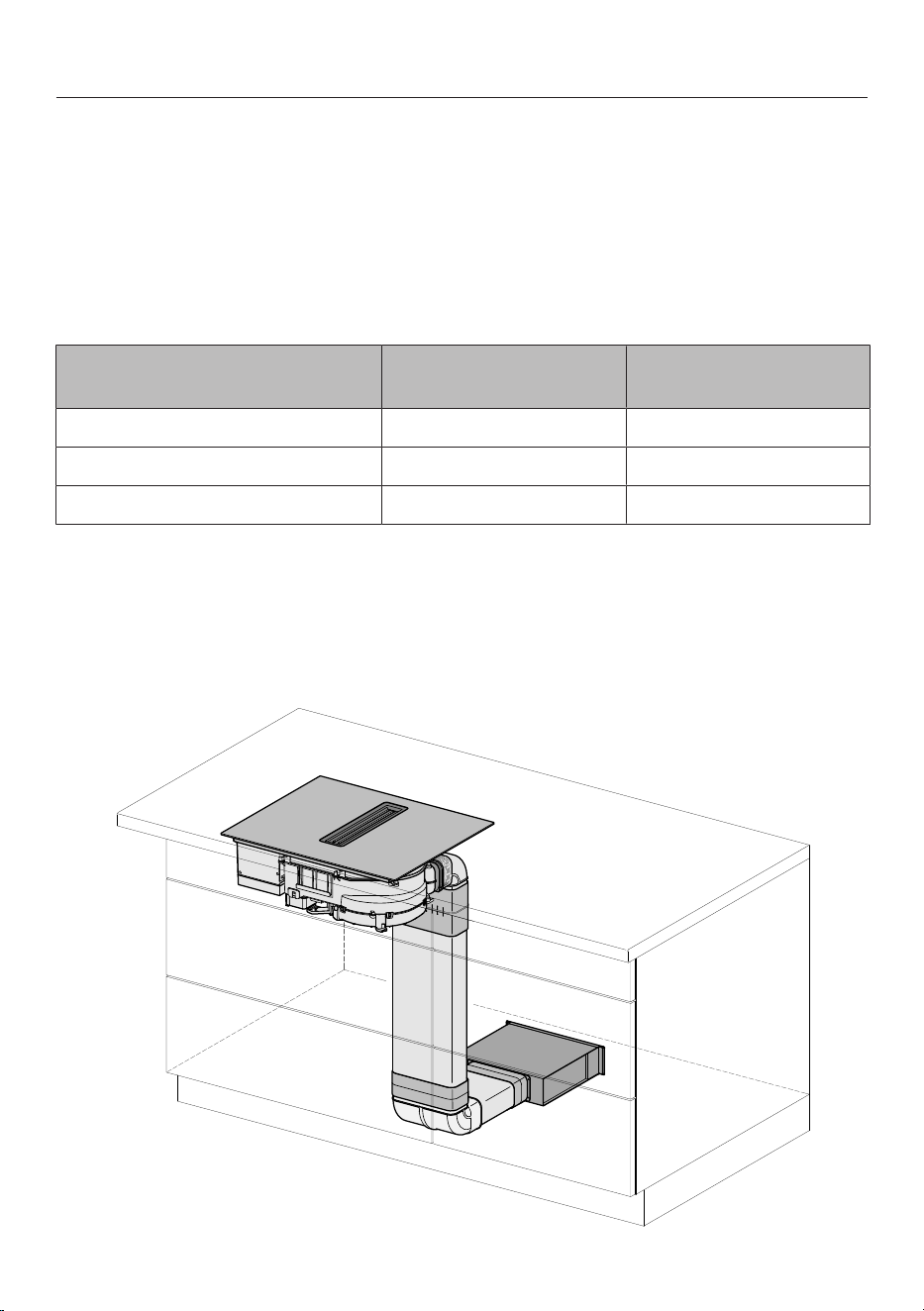
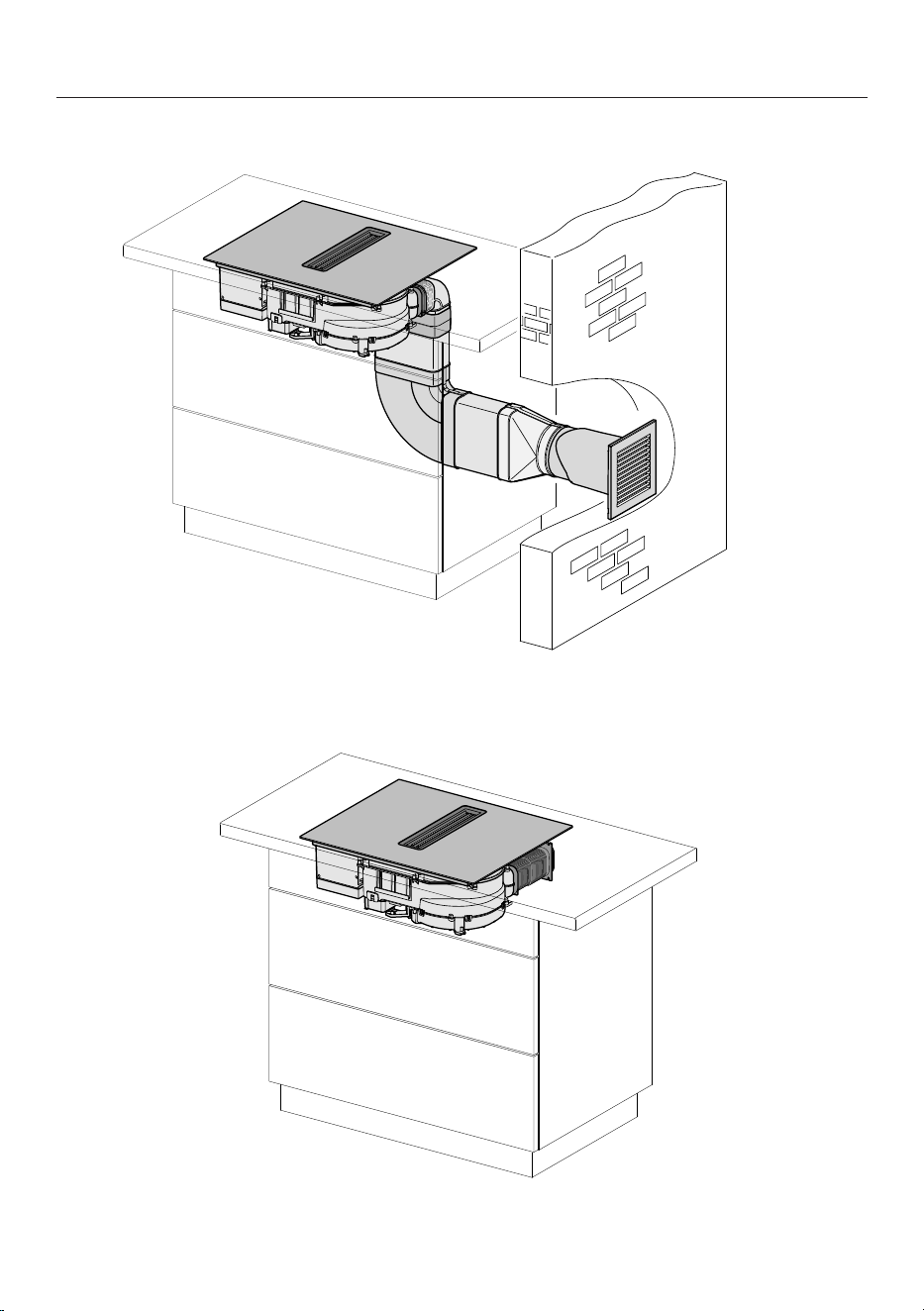
Installation examples
Guided recirculation mode
26
Installation
Extraction mode
Plug & Play mode
27
Installation
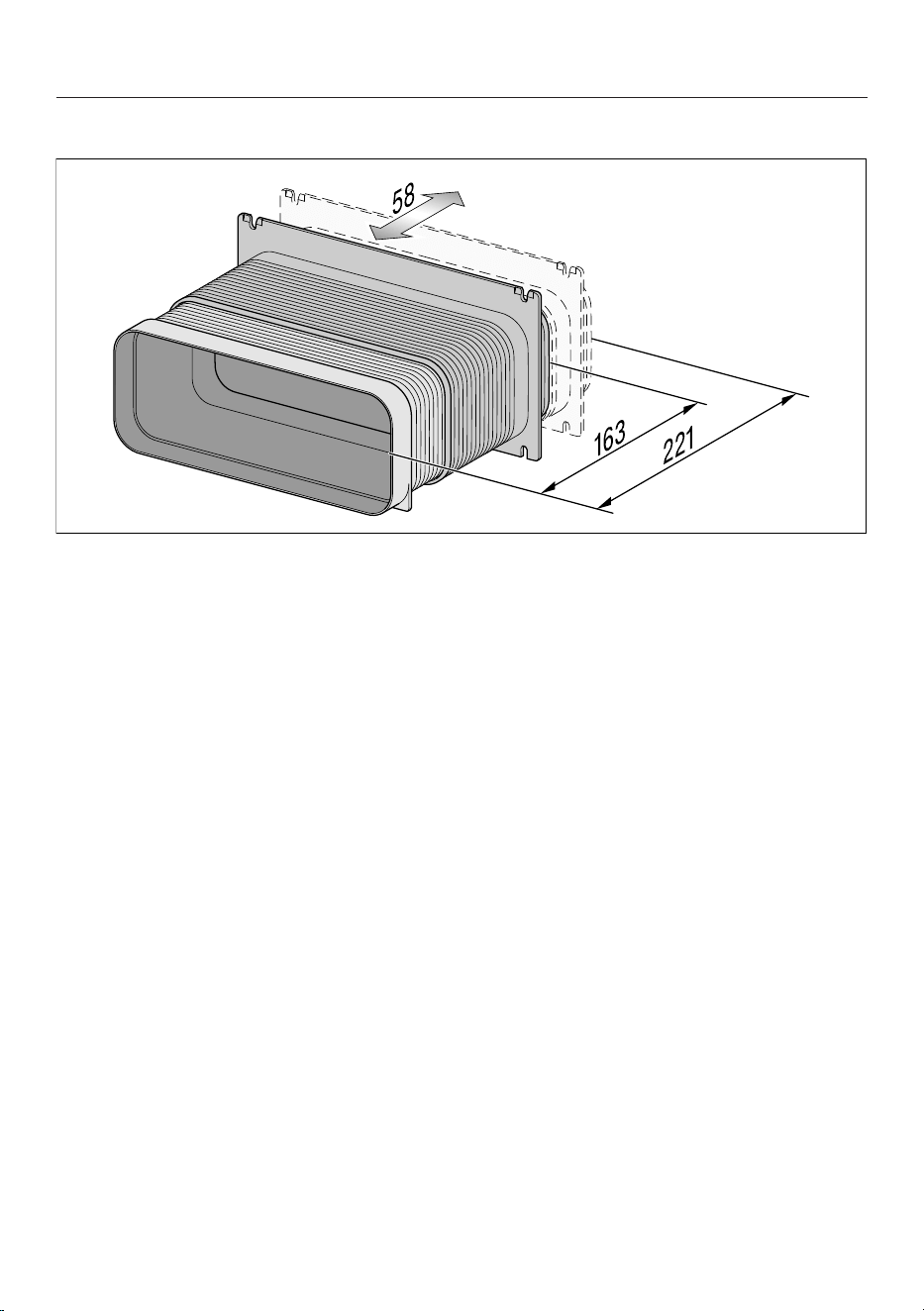
Plug & Play adapter dimensions
28
Installation
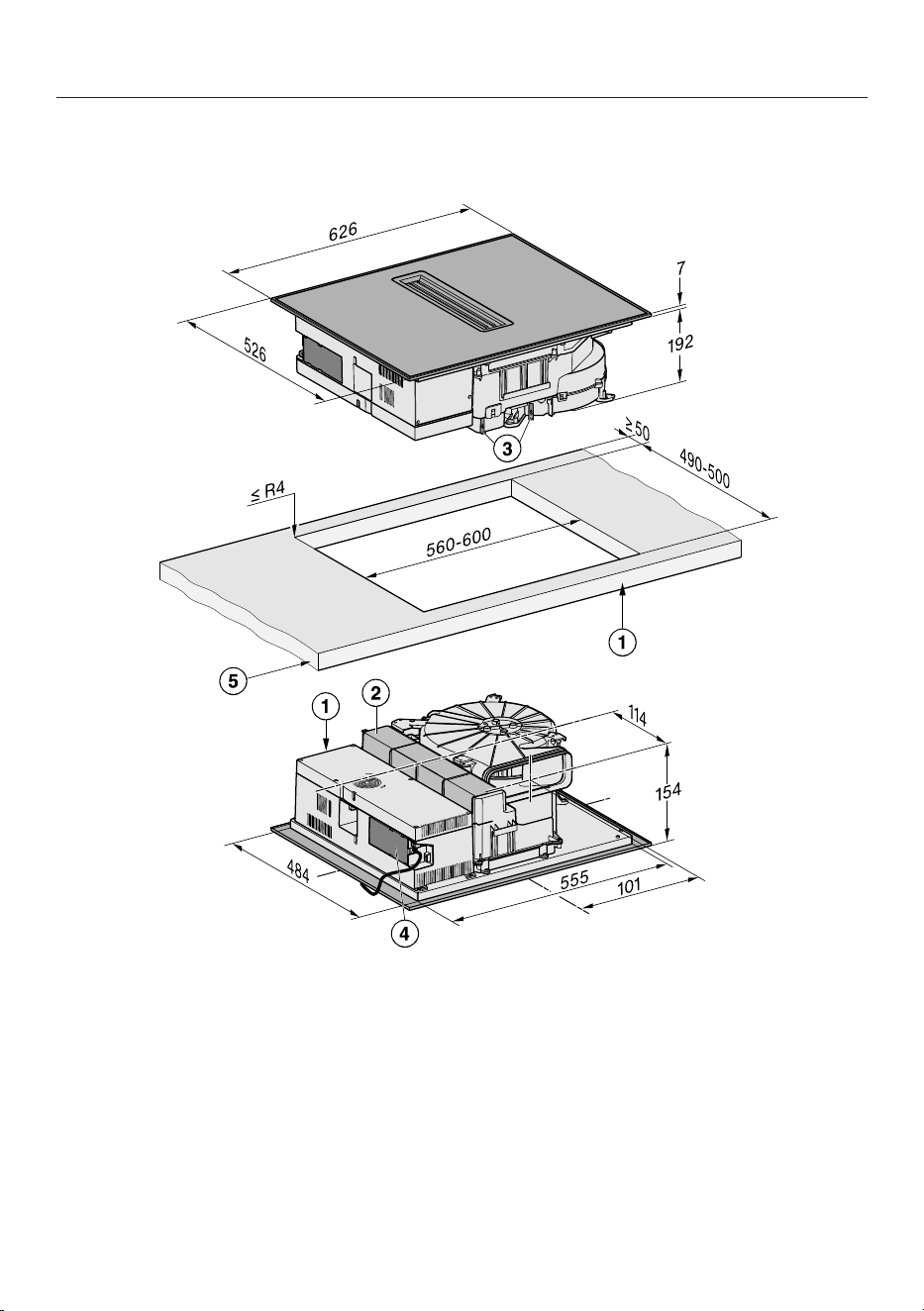
Installation dimensions for surface-mounted installation
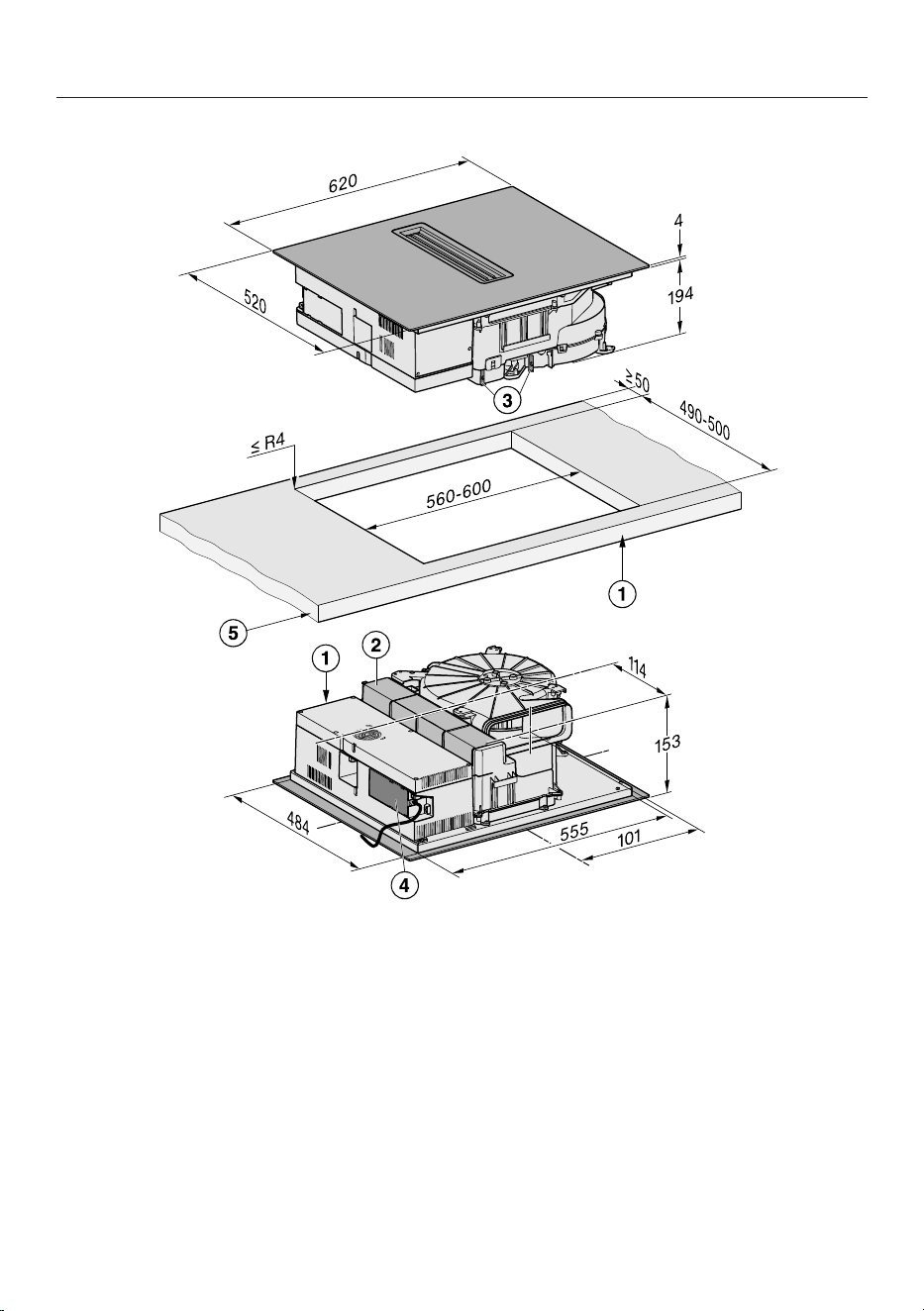
KMDA5649FR
All dimensions are given in mm.
a
Front
b
Removable drip tray
c
Cleaning flap
d
Mains connection box with mains connection cable
Mains connection cable L=1.080mm
e
Worktop thickness
Extraction and guided recirculation mode: ≥10mm
Plug&Play mode: ≥10mm–≤40mm
29
Installation
KMDA5649FL, KMDA5649FLMattFinish
All dimensions are given in mm.
a
Front
b
Removable drip tray
c
Cleaning flap
d
Mains connection box with mains connection cable
Mains connection cable L=1.080mm
e
Worktop thickness
Extraction and guided recirculation mode: ≥10mm
Plug&Play mode: ≥10mm–≤40mm
30
Installation
*INSTALLATION*
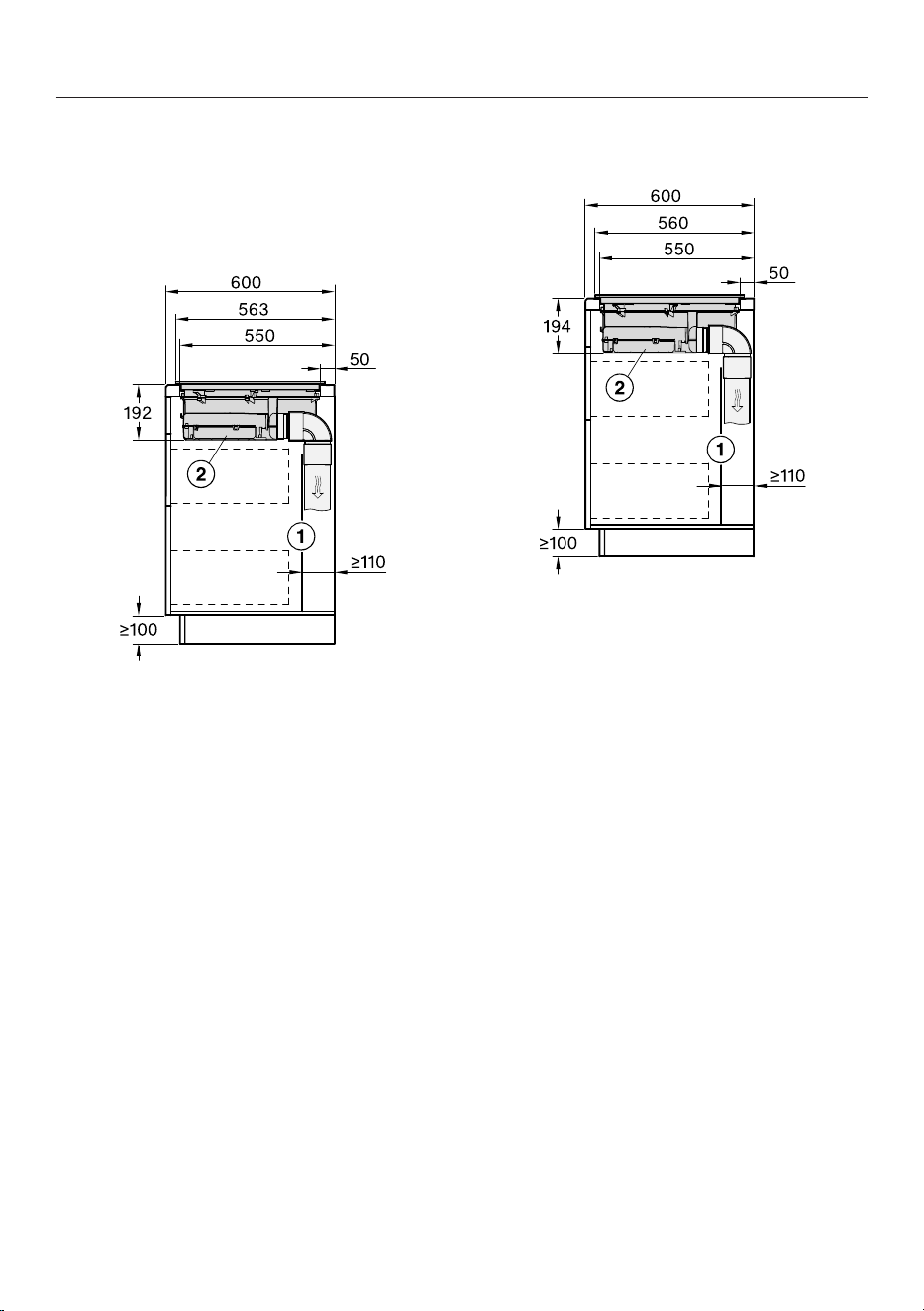
Extraction and guided recirculation
mode
Worktop depth 600mm
KMDA5649FR
All dimensions are given in mm.
a
For maintenance work it must be
possible to remove the rear cabinet
wall.
The cabinet wall and an adjoining
room wall or a piece of furniture
must be at least 110mm apart to en-
sure sufficient room for the ducting.
b
The removable drip tray and the
cleaning flap(s) must be accessible
after installation.
KMDA5649FL,
KMDA5649FLMattFinish
All dimensions are given in mm.
a
For maintenance work it must be
possible to remove the rear cabinet
wall.
The cabinet wall and an adjoining
room wall or a piece of furniture
must be at least 110mm apart to en-
sure sufficient room for the ducting.
b
The removable drip tray and the
cleaning flap(s) must be accessible
after installation.
31
Installation
*INSTALLATION*
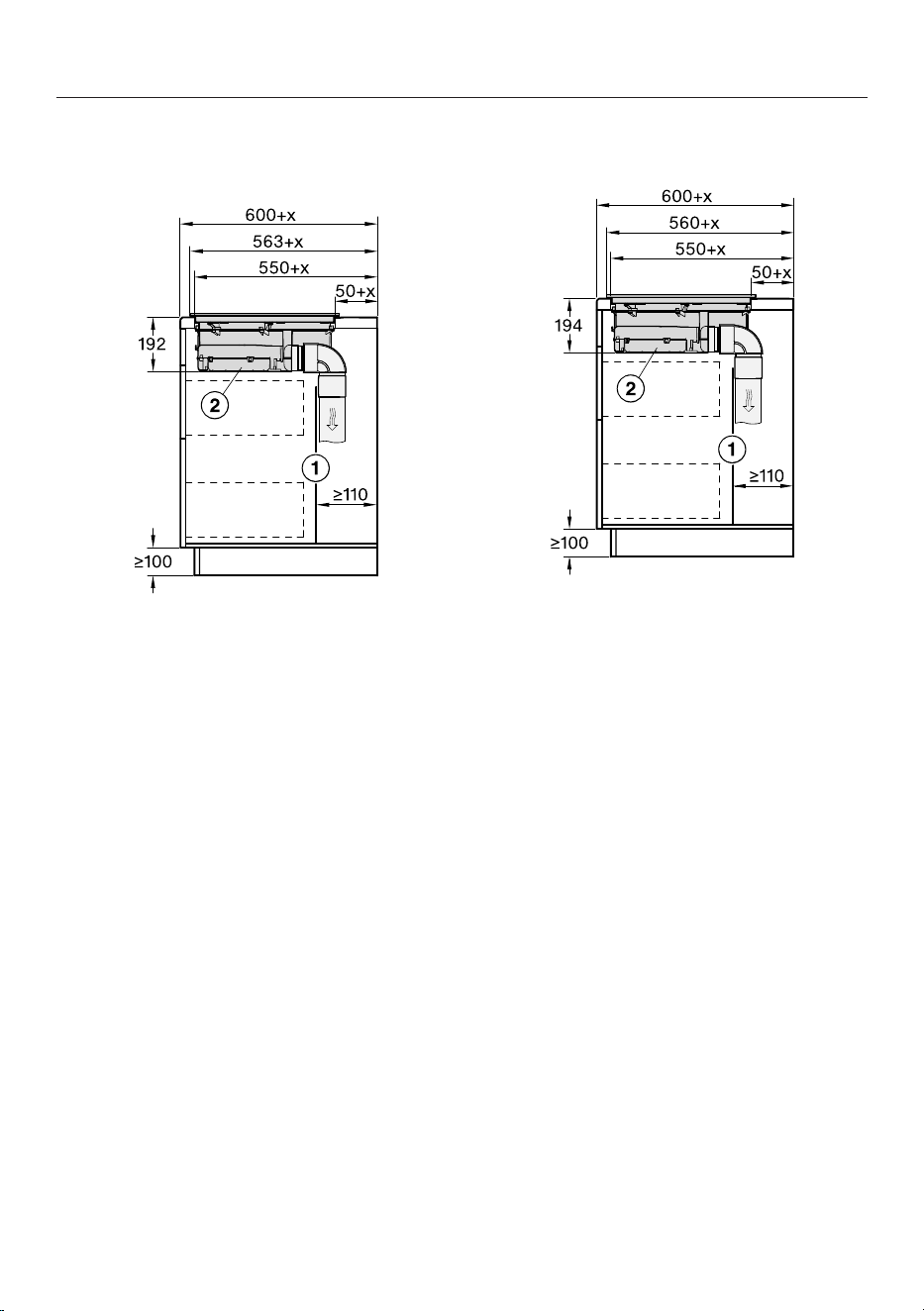
Worktop depth greater than 600mm
KMDA5649FR
All dimensions are given in mm.
a
For maintenance work it must be
possible to remove the rear cabinet
wall.
The cabinet wall and an adjoining
room wall or a piece of furniture
must be at least 110mm apart to en-
sure sufficient room for the ducting.
b
The removable drip tray and the
cleaning flap(s) must be accessible
after installation.
x Dimension of which the worktop is
deeper than 600mm.
KMDA5649FL,
KMDA5649FLMattFinish
All dimensions are given in mm.
a
For maintenance work it must be
possible to remove the rear cabinet
wall.
The cabinet wall and an adjoining
room wall or a piece of furniture
must be at least 110mm apart to en-
sure sufficient room for the ducting.
b
The removable drip tray and the
cleaning flap(s) must be accessible
after installation.
x Dimension of which the worktop is
deeper than 600mm.
32
Installation
*INSTALLATION*
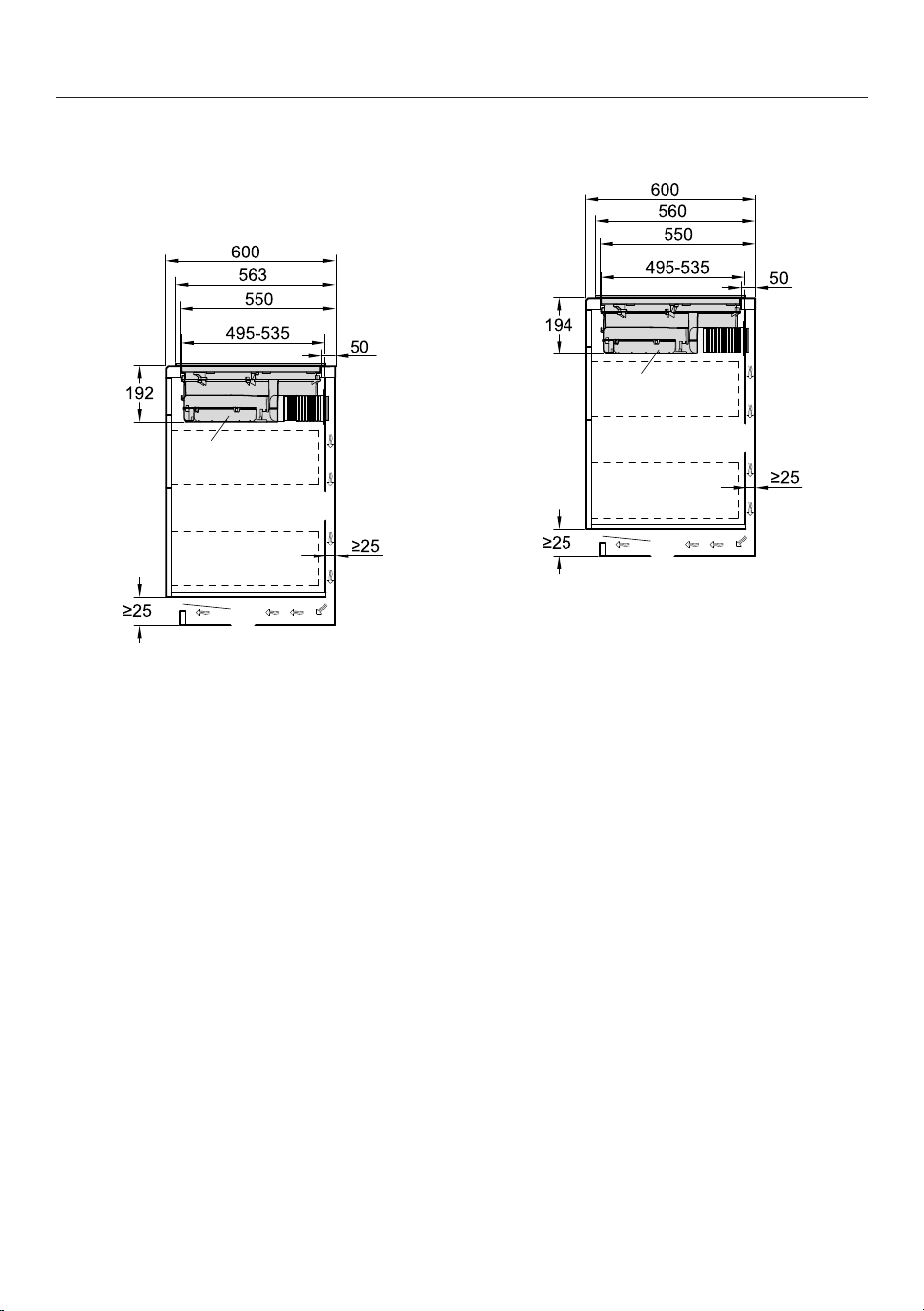
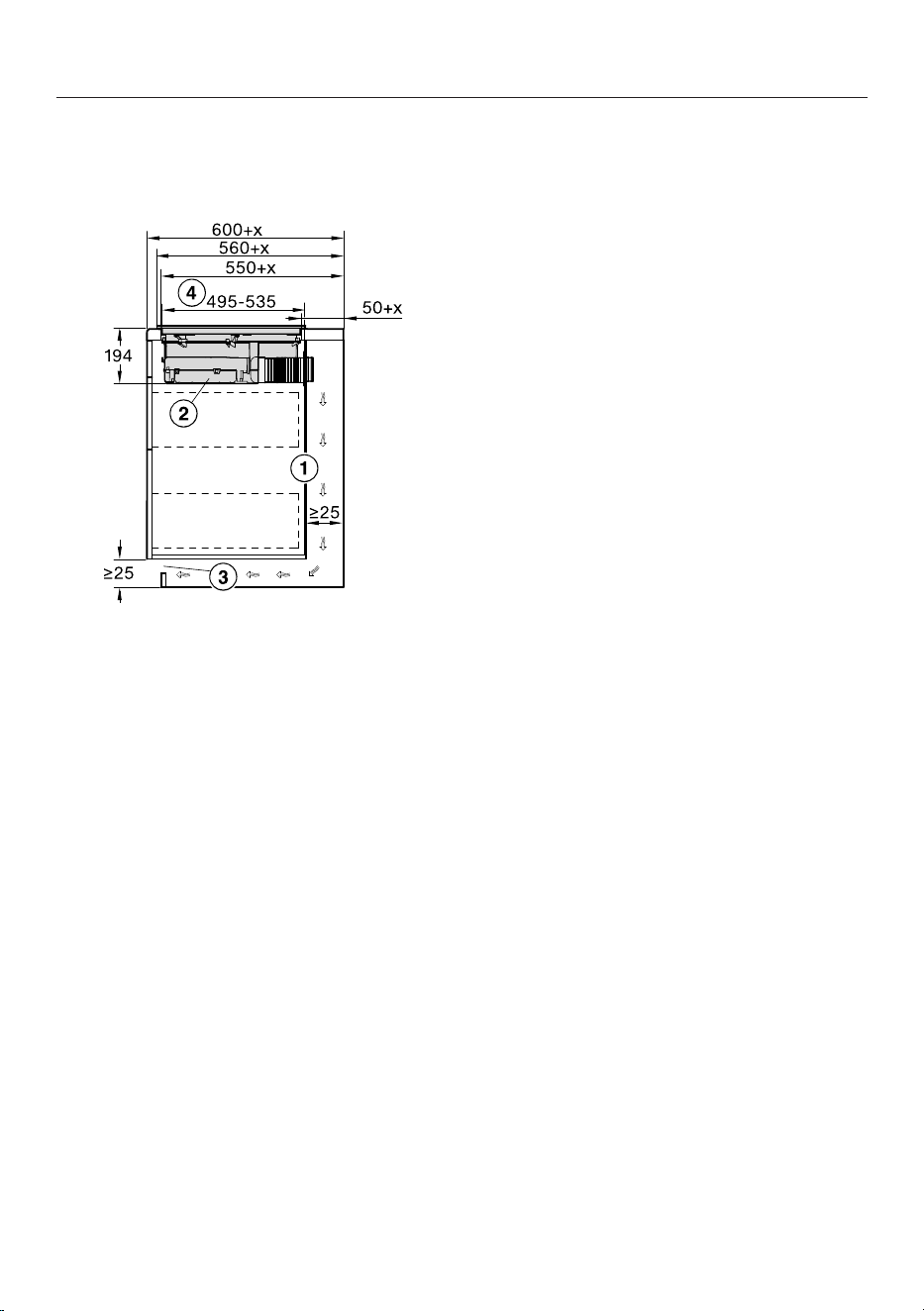
Plug&Play mode
Worktop depth 600mm
KMDA5649FR
All dimensions are given in mm.
a
The housing unit wall and an adjoin-
ing room wall or a piece of furniture
must be at least 25mm apart to en-
sure sufficient room for the exhaust
air ducting.
b
The removable drip tray and the
cleaning flap(s) must be accessible
after installation.
c
The cross-section of the ventilation
opening must be at least 425cm².
d
Distance from front of casing to end
of Plug & Play adapter
KMDA5649FL,
KMDA5649FLMattFinish
All dimensions are given in mm.
a
The housing unit wall and an adjoin-
ing room wall or a piece of furniture
must be at least 25mm apart to en-
sure sufficient room for the exhaust
air ducting.
b
The removable drip tray and the
cleaning flap(s) must be accessible
after installation.
c
The cross-section of the ventilation
opening must be at least 425cm².
d
Distance from front of casing to end
of Plug & Play adapter
33
Installation
*INSTALLATION*
Worktop depth greater than 600mm
KMDA5649FL,
KMDA5649FLMattFinish
All dimensions are given in mm.
a
The housing unit wall and an adjoin-
ing room wall or a piece of furniture
must be at least 25mm apart to en-
sure sufficient room for the exhaust
air ducting.
If the housing unit rear wall is
>555mm away from the front of the
worktop, the Plug&Play adapter
must be combined with an expan-
sion set from Miele.
b
The removable drip tray and the
cleaning flap(s) must be accessible
after installation.
c
The cross-section of the ventilation
opening must be at least 425cm².
d
Distance from front of casing to end
of Plug & Play adapter
x Dimension of which the worktop is
deeper than 600mm.
34
Installation
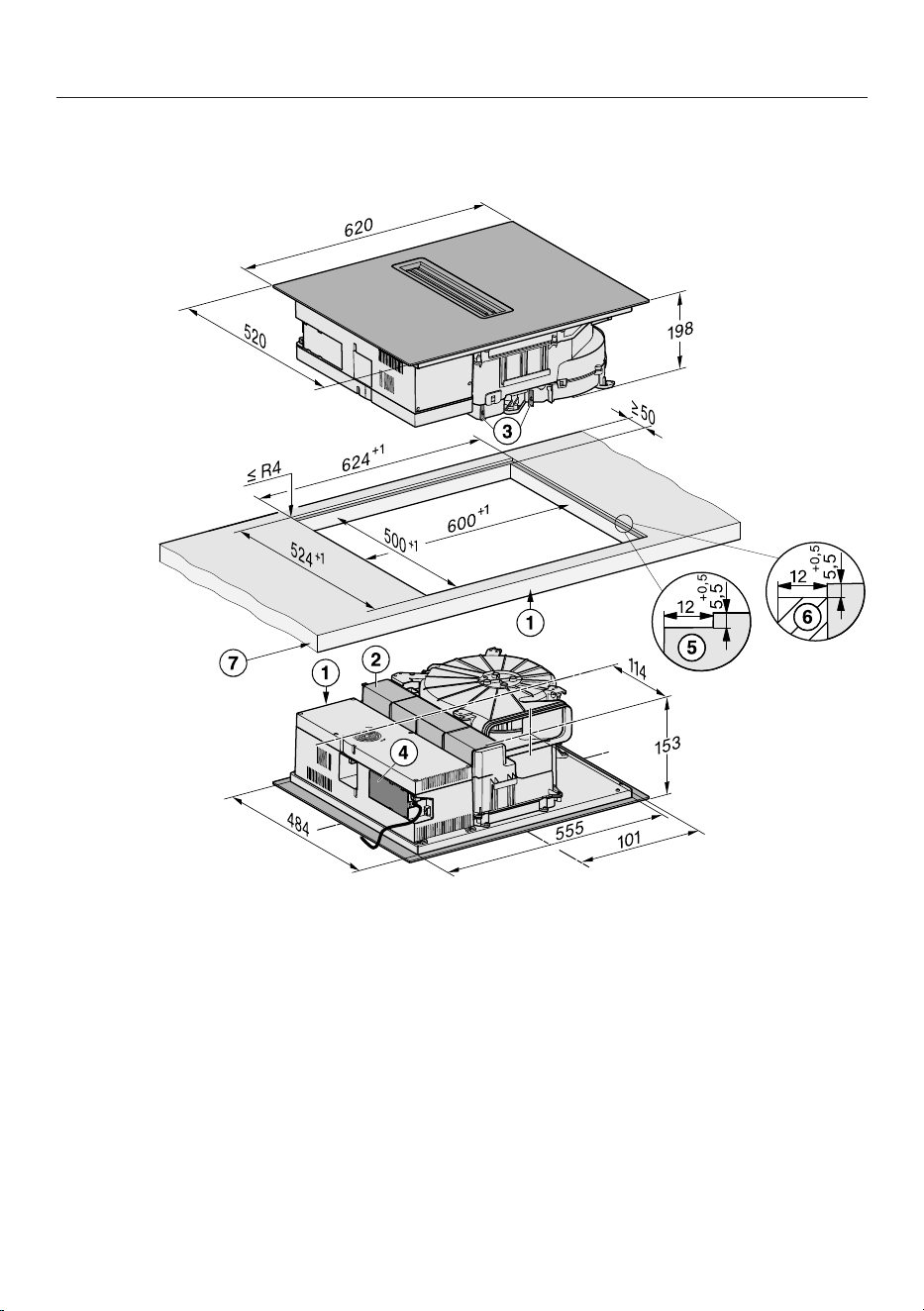
Installation dimensions for flush-fit installation
KMDA5649FL, KMDA5649FLMattFinish
All dimensions are given in mm. The dimensions shown in brackets are recommendations.
a
Front
b
Removable drip tray
c
Cleaning flap
d
Mains connection box with mains connection cable
Mains connection cable L=1.080mm
e
Stepped cut-out, natural stone worktop
f
Wooden batten 12mm (accessories not included)
g
Worktop thickness
Extraction and guided recirculation mode: ≥10mm
Plug&Play mode: ≥10mm–≤40mm
35
Installation
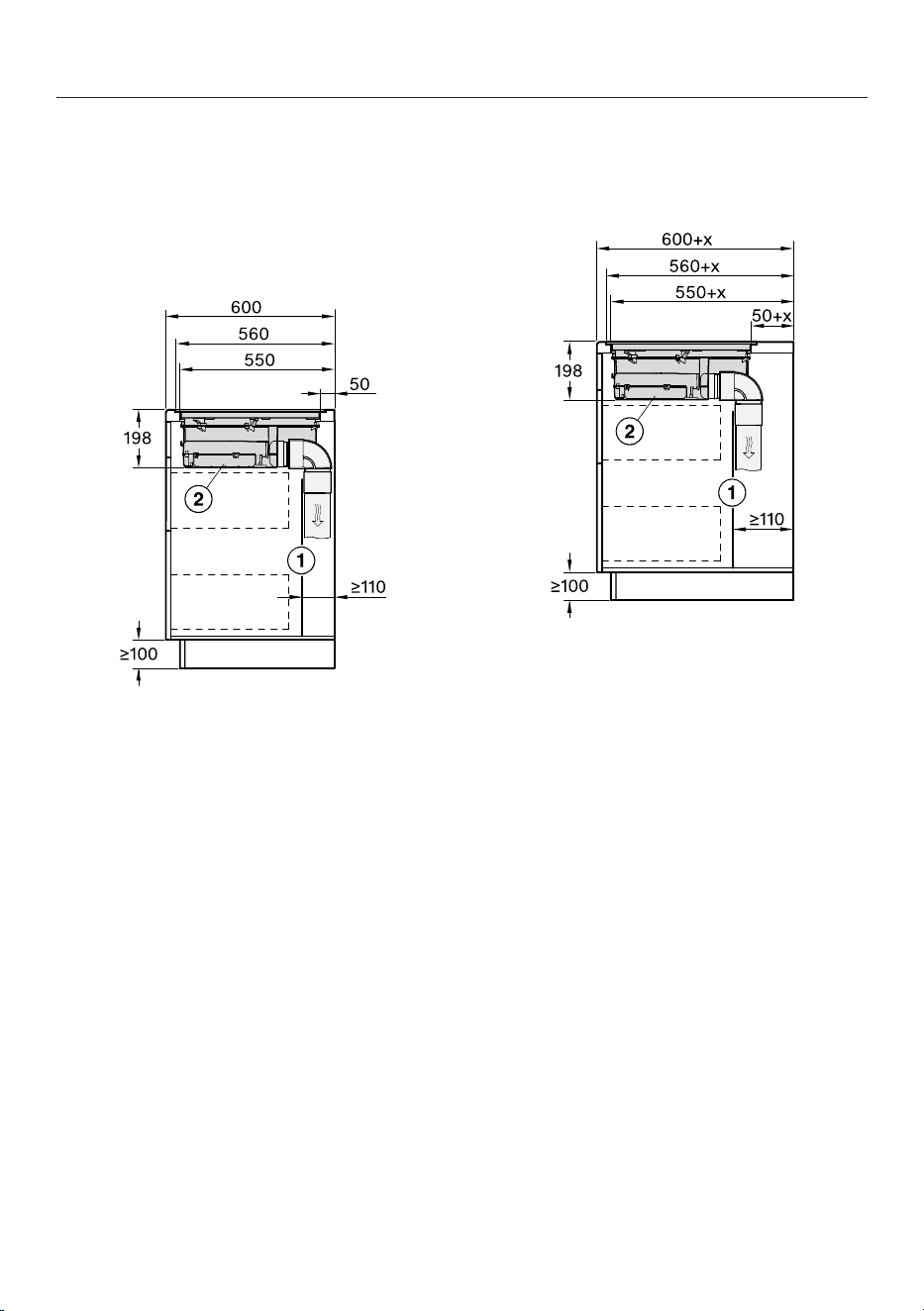
*INSTALLATION*
Extraction and guided recirculation
mode
Worktop depth 600mm
KMDA5649FL,
KMDA5649FLMattFinish
All dimensions are given in mm.
a
For maintenance work it must be
possible to remove the rear cabinet
wall.
The cabinet wall and an adjoining
room wall or a piece of furniture
must be at least 110mm apart to en-
sure sufficient room for the ducting.
b
The removable drip tray and the
cleaning flap(s) must be accessible
after installation.
Worktop depth greater than 600mm
KMDA5649FL,
KMDA5649FLMattFinish
All dimensions are given in mm.
a
For maintenance work it must be
possible to remove the rear cabinet
wall.
The cabinet wall and an adjoining
room wall or a piece of furniture
must be at least 110mm apart to en-
sure sufficient room for the ducting.
b
The removable drip tray and the
cleaning flap(s) must be accessible
after installation.
x Dimension of which the worktop is
deeper than 600mm.
36
Installation
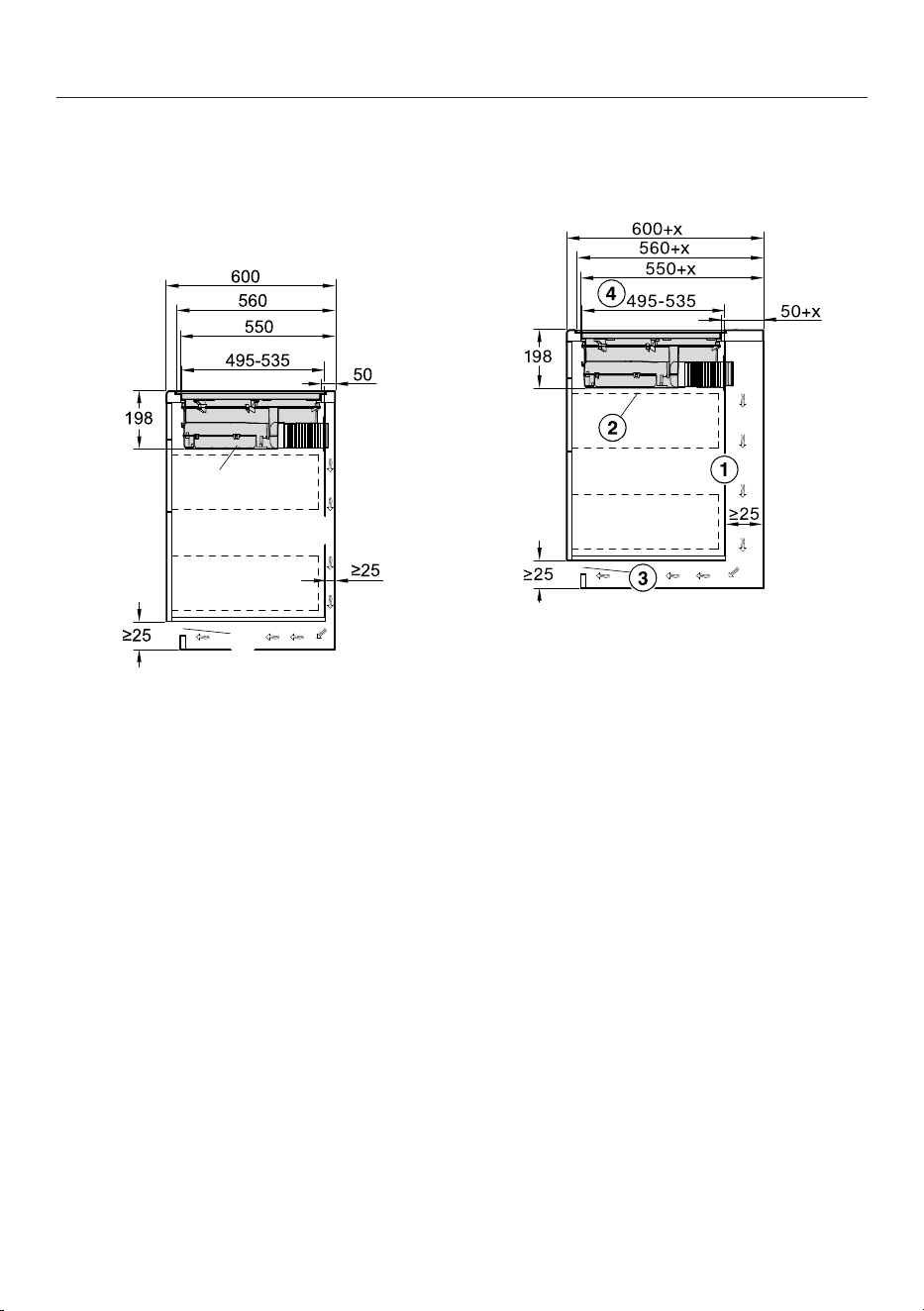
*INSTALLATION*
Plug&Play mode
Worktop depth 600mm
KMDA5649FL,
KMDA5649FLMattFinish
All dimensions are given in mm.
a
The housing unit wall and an adjoin-
ing room wall or a piece of furniture
must be at least 25mm apart to en-
sure sufficient room for the exhaust
air ducting.
b
The removable drip tray and the
cleaning flap(s) must be accessible
after installation.
c
The cross-section of the ventilation
opening must be at least 425cm².
d
Distance from front of casing to end
of Plug & Play adapter
Worktop depth greater than 600mm
KMDA5649FL,
KMDA5649FLMattFinish
All dimensions are given in mm.
a
The housing unit wall and an adjoin-
ing room wall or a piece of furniture
must be at least 25mm apart to en-
sure sufficient room for the exhaust
air ducting.
If the housing unit rear wall is
>555mm away from the front of the
worktop, the Plug&Play adapter
must be combined with an expan-
sion set from Miele.
b
The removable drip tray and the
cleaning flap(s) must be accessible
after installation.
c
The cross-section of the ventilation
opening must be at least 425cm².
d
Distance from front of casing to end
of Plug & Play adapter
x Dimension of which the worktop is
deeper than 600mm.
37
Installation
*INSTALLATION*
Connection to window contact,
if required
The window contact connection
is live.
Danger of electric shock.
Disconnect the hob from the mains
power supply before connecting the
switching system.
The mains connection cable for the
switching system must only be con-
nected by a suitably qualified electri-
cian.
The mains connection cable for the
switching system must comply with
type H03VV-F 2x0.75mm
2
and
must not exceed 2.0m in length.
The switching system must be
equipped with a potential-free con-
tact suitable for 230V, 1A. The
cooker hood is switched off when the
switch is open.
Only use DIBt-approved and tested
radio switching systems (e.g. window
contact switches, pressure switches)
and have them approved by author-
ised specialists (e.g. building regula-
tions inspector).
You will need the appropriate external
switching system documents to
safely connect and operate the
switch.
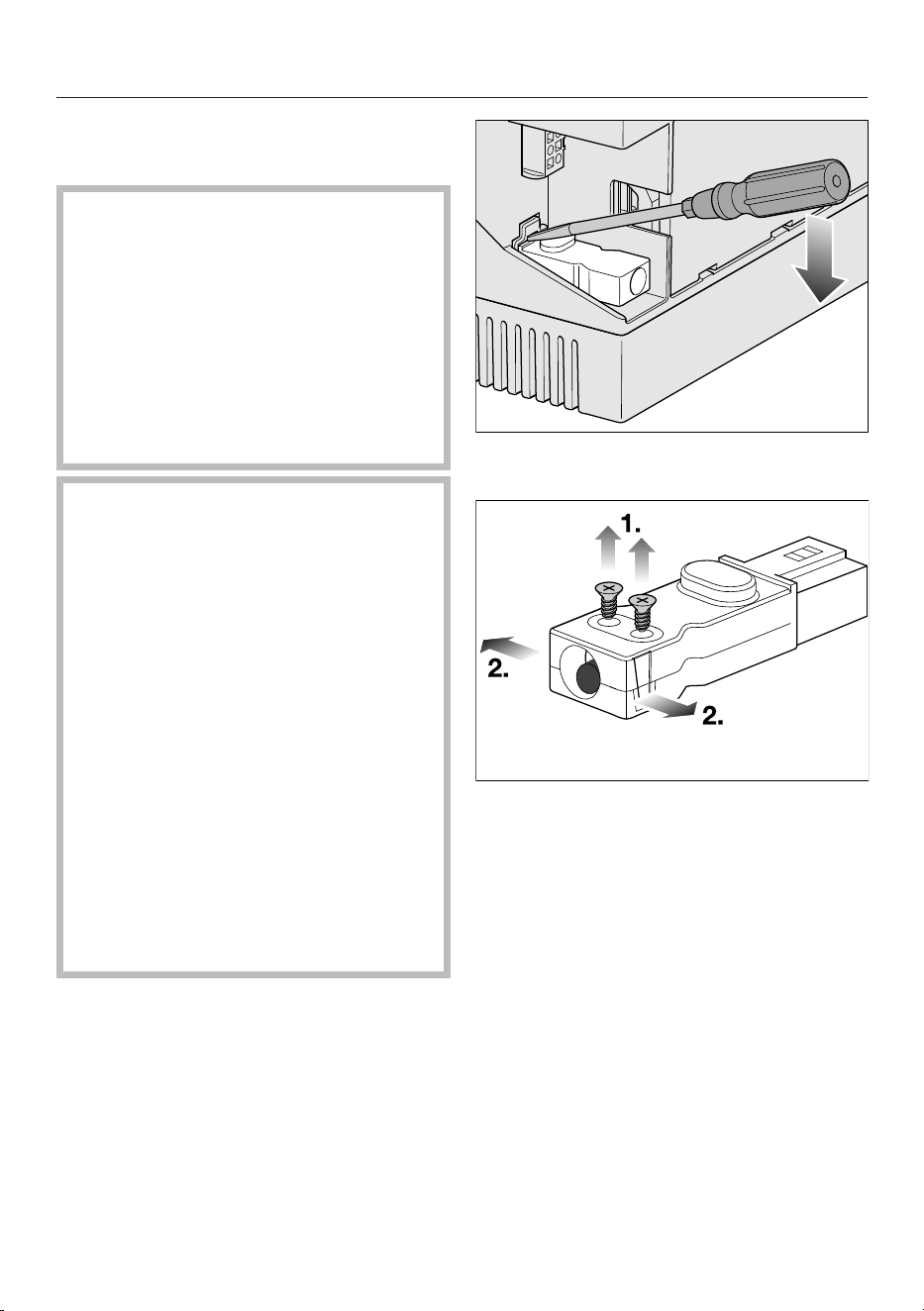
Loosen the retainer and pull the plug
out.
Loosen the strain relief screws and
unlock the casing on both sides.
Open the casing.
Remove the stopper.
38
Installation
*INSTALLATION*
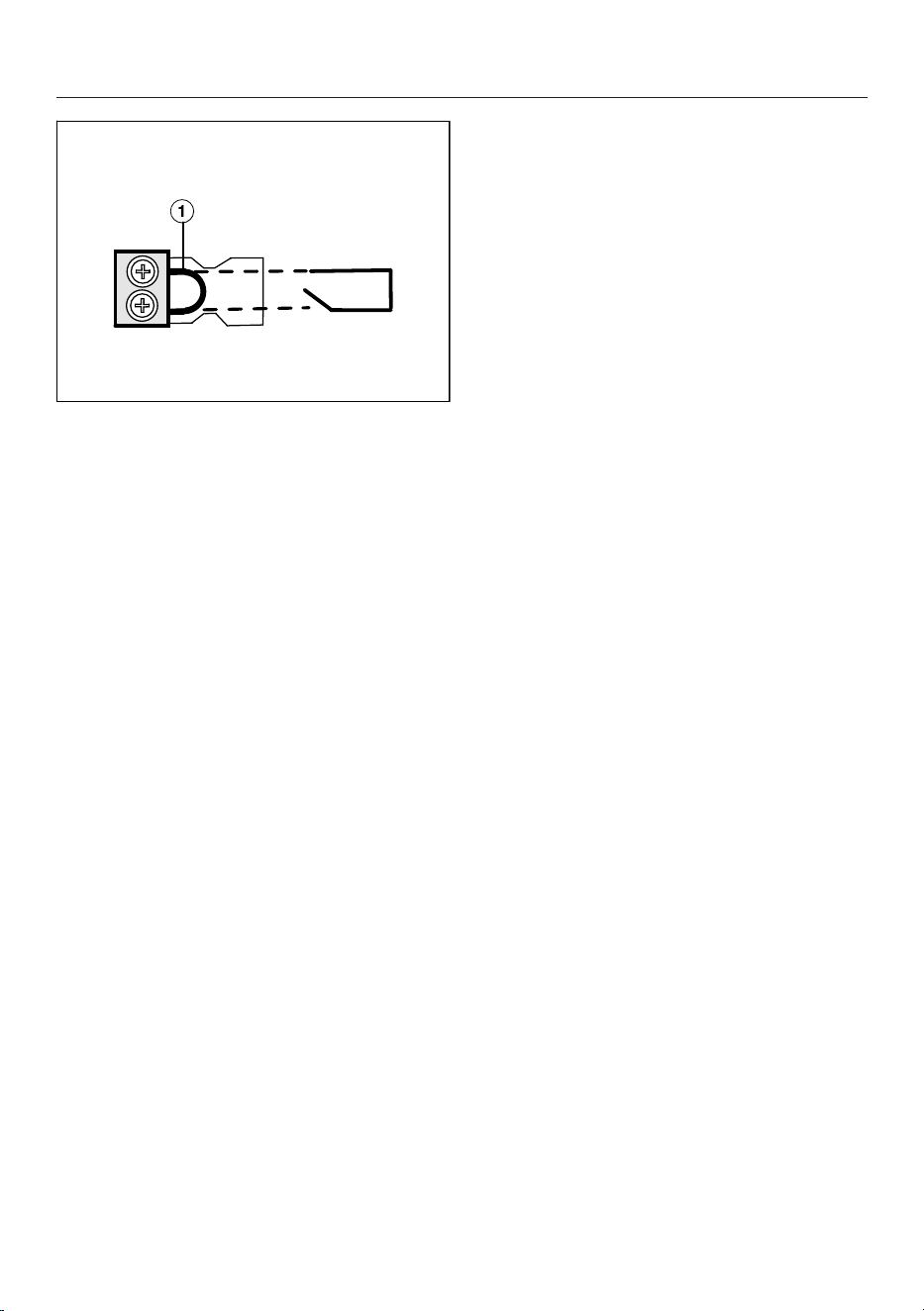
Exchange the bridge for the mains
connection cable of the switching
system.
Close the casing.
Tighten the strain relief screw.
Reinsert the plug.
39
Installation
Installing a surface-mounted hob with
extraction and guided recirculation mode
Preparing the worktop for surface-mounted installation in extraction and guided
recirculation mode
Remember to maintain the minimum safety distances.
Create the worktop cut-out.
Wooden worktops:
Seal any cut surfaces with a special varnish, silicone sealant or resin to prevent
the wood from swelling as a result of moisture ingress. The sealant must be heat-
resistant.
Make sure that the sealant does not come into contact with the surface of the
worktop.
Installing a surface-mounted hob with extraction and guided recirculation mode
Attach the sealing strip provided underneath the edge of the hob. Do not apply
the sealing strip under tension.
Feed the mains connection cable for the hob down through the worktop cut-out.
Place the hob centrally in the cut-out. When doing this, make sure that the seal
of the appliance sits flush with the worktop on all sides. This is important to en-
sure effective sealing all round.
If the seal does not sit flush with the worktop in the corners, the corner radius
(≤R4) can be carefully cut to fit using a jigsaw.
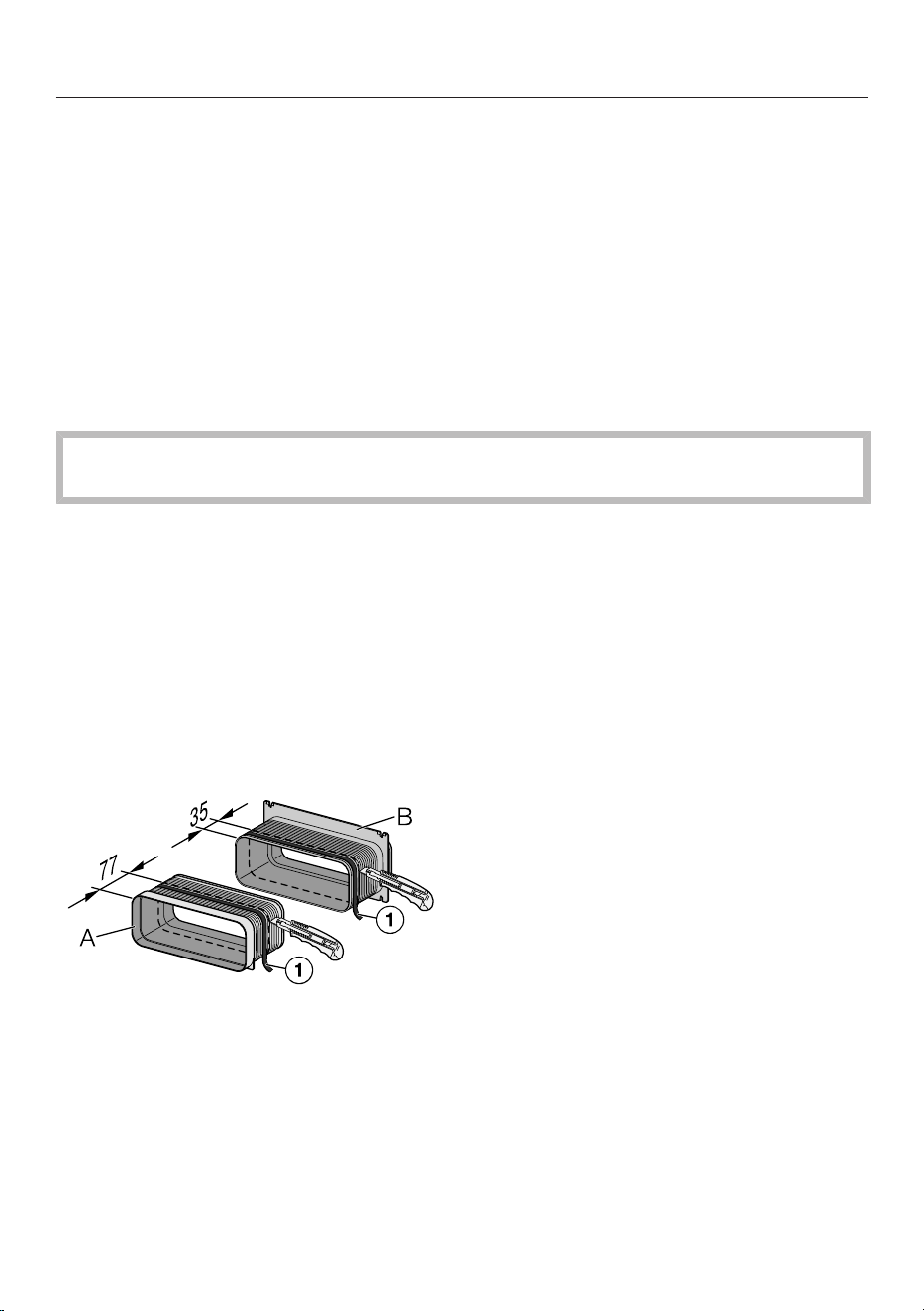
Cut 77mm off the rear section of adapter A and 35mm off the front section of
adapter B.
Wrap sealing tape () around the end of the front section of adapter A and
around the cut-off section of adapter B.
40
Installation
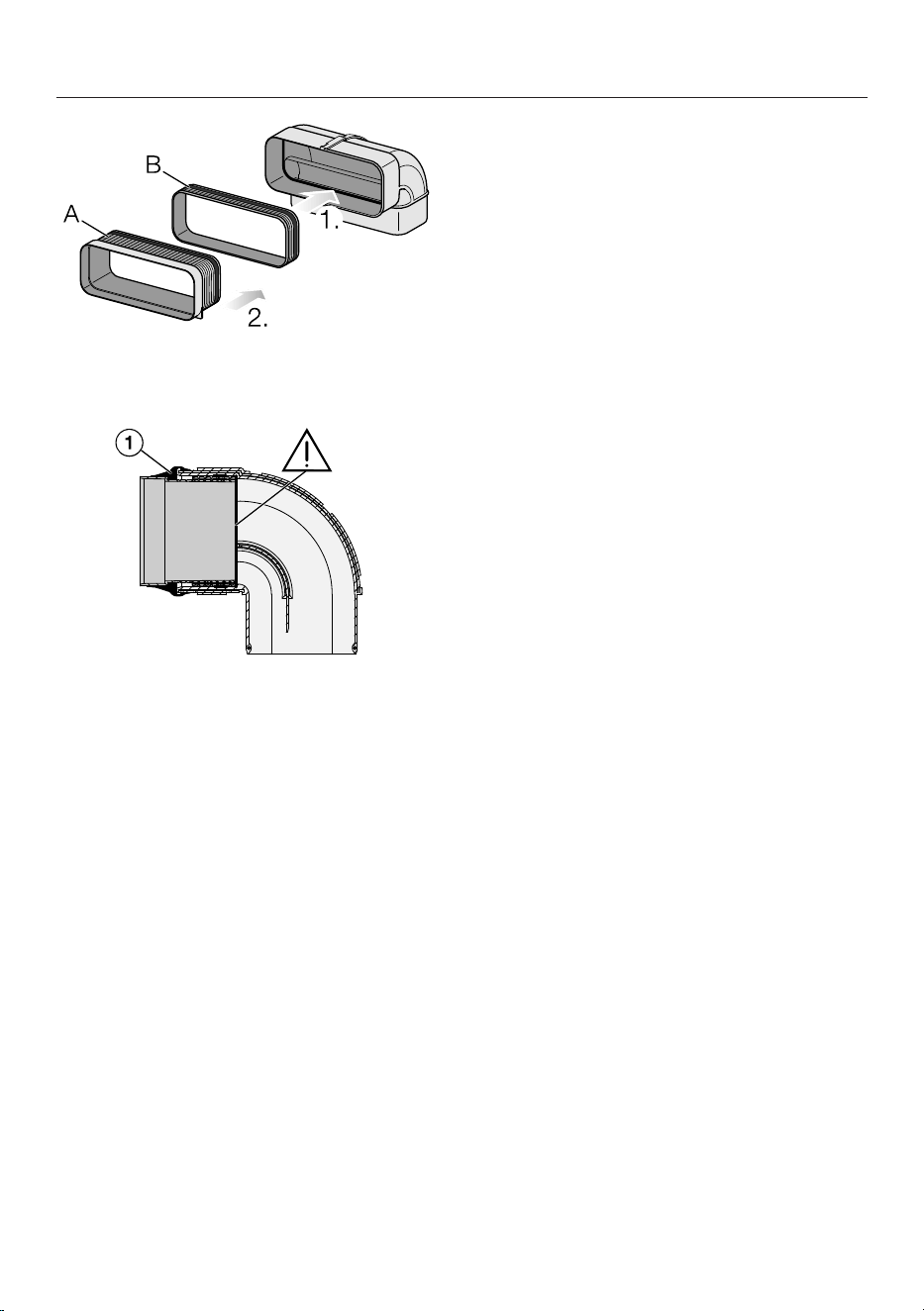
1. Insert the cut-off section of adapter B into the air duct.
2. Insert adapter A into the cut-off section of adapter B.
Wrap sealing tape () around the end of the duct.
Fit the duct to the hob.
Connect the hob to the mains power supply.
Check that the hob is working.
Installing a surface-mounted hob with
Plug & Play
Preparing the worktop for surface-mounted installation with Plug & Play
Remember to maintain the minimum safety distances.
Create the worktop cut-out.
Cut the top of the drilling template to the thickness of your worktop. Place drilling
template 2 on top of the cabinet rear panel. Use the drilling template to create a
cut-out for the Plug & Play adapter.
If you do not have a drilling template, see “Installation – Rear panel cut-out
without drilling template”.
Wooden worktops:
Seal any cut surfaces with a special varnish, silicone sealant or resin to prevent
the wood from swelling as a result of moisture ingress. The sealant must be heat-
resistant.
41

Installation
Make sure that the sealant does not come into contact with the surface of the
worktop.
Installing a surface-mounted hob with Plug & Play
Attach the sealing strip provided underneath the edge of the hob. Do not apply
the sealing strip under tension.
The Plug & Play adapter may break off.
When placing the hob on the worktop, make sure that it is not placed on top of
the Plug & Play adapter.
Connect the Plug & Play adapter to the hob and set the adapter position.
Feed the mains connection cable for the hob down through the worktop cut-out.
Remove the protective foil from the adhesive tape at the end of the Plug & Play
adapter.
Place the hob centrally in the cut-out. When doing this, make sure that the seal
of the appliance sits flush with the worktop on all sides. This is important to en-
sure effective sealing all round.
If the seal does not sit flush with the worktop in the corners, the corner radius
(≤R4) can be carefully cut to fit using a jigsaw.
Align the Plug & Play adapter with the predrilled hole. Press the adapter onto the
rear panel until it sticks in place.
Connect the hob to the mains power supply.
Check that the hob is working.
Installing a flush-fit hob
with extraction and guided recirculation mode
Preparing the worktop for flush-fit installation in extraction and guided recircu-
lation mode
Remember to maintain the minimum safety distances.
Create the worktop cut-out.
Solid wood and tiled worktops:
Secure the wooden frame 5,5mm below the top edge of the worktop.
Installing a flush-fit hob with extraction and guided recirculation mode
Attach the sealing strip provided underneath the edge of the hob. Do not apply
the sealing strip under tension.
Feed the mains connection cable for the hob down through the worktop cut-out.
42
Installation
The gap between the ceramic surface and the worktop must be at least 2mm
wide. This is required so that the hob can be sealed.
Centre the hob in the cut-out.
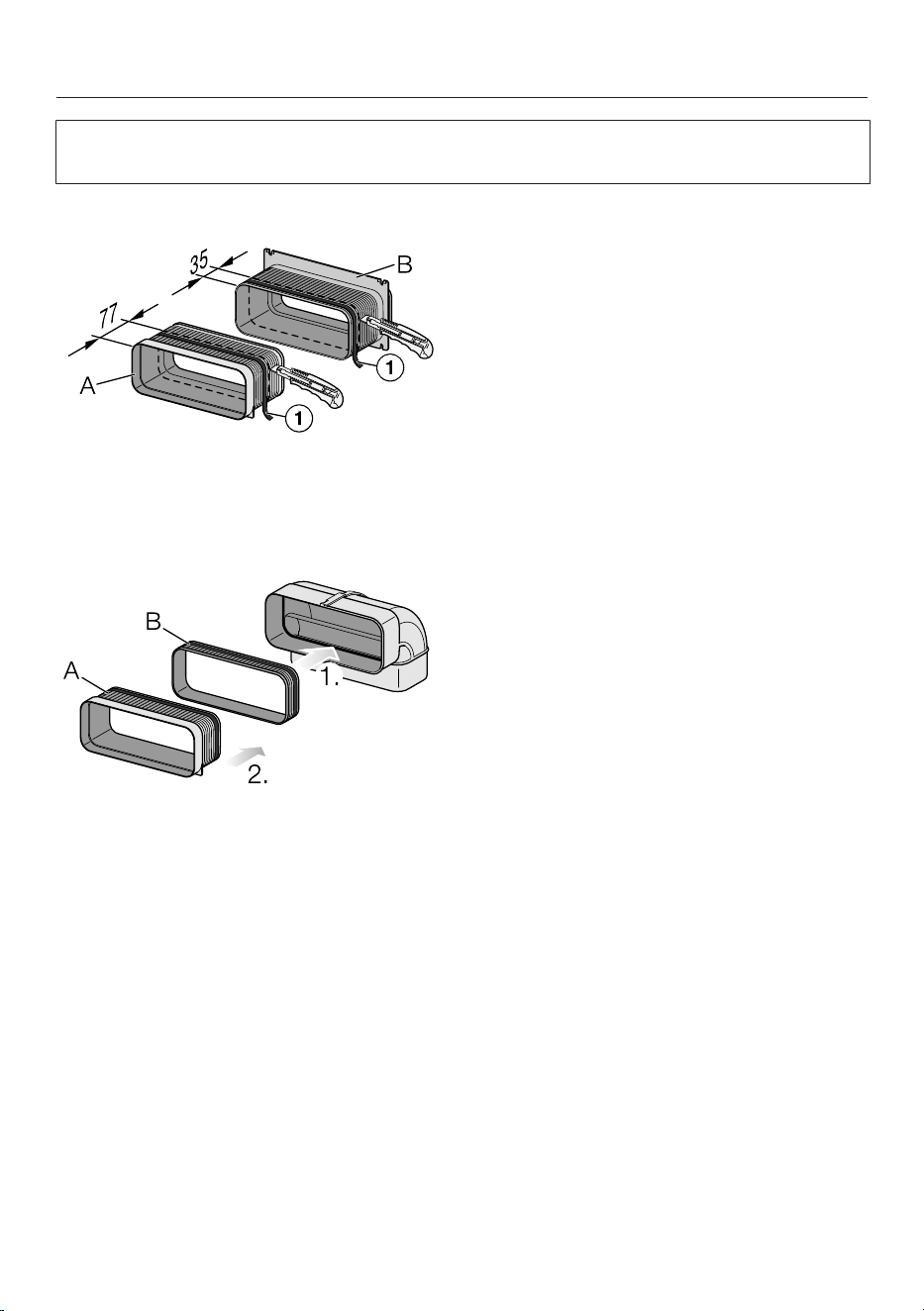
Cut 77mm off the rear section of adapter A and 35mm off the front section of
adapter B.
Wrap sealing tape () around the end of the front section of adapter A and
around the cut-off section of adapter B.
1. Insert the cut-off section of adapter B into the air duct.
2. Insert adapter A into the cut-off section of adapter B.
43
Installation
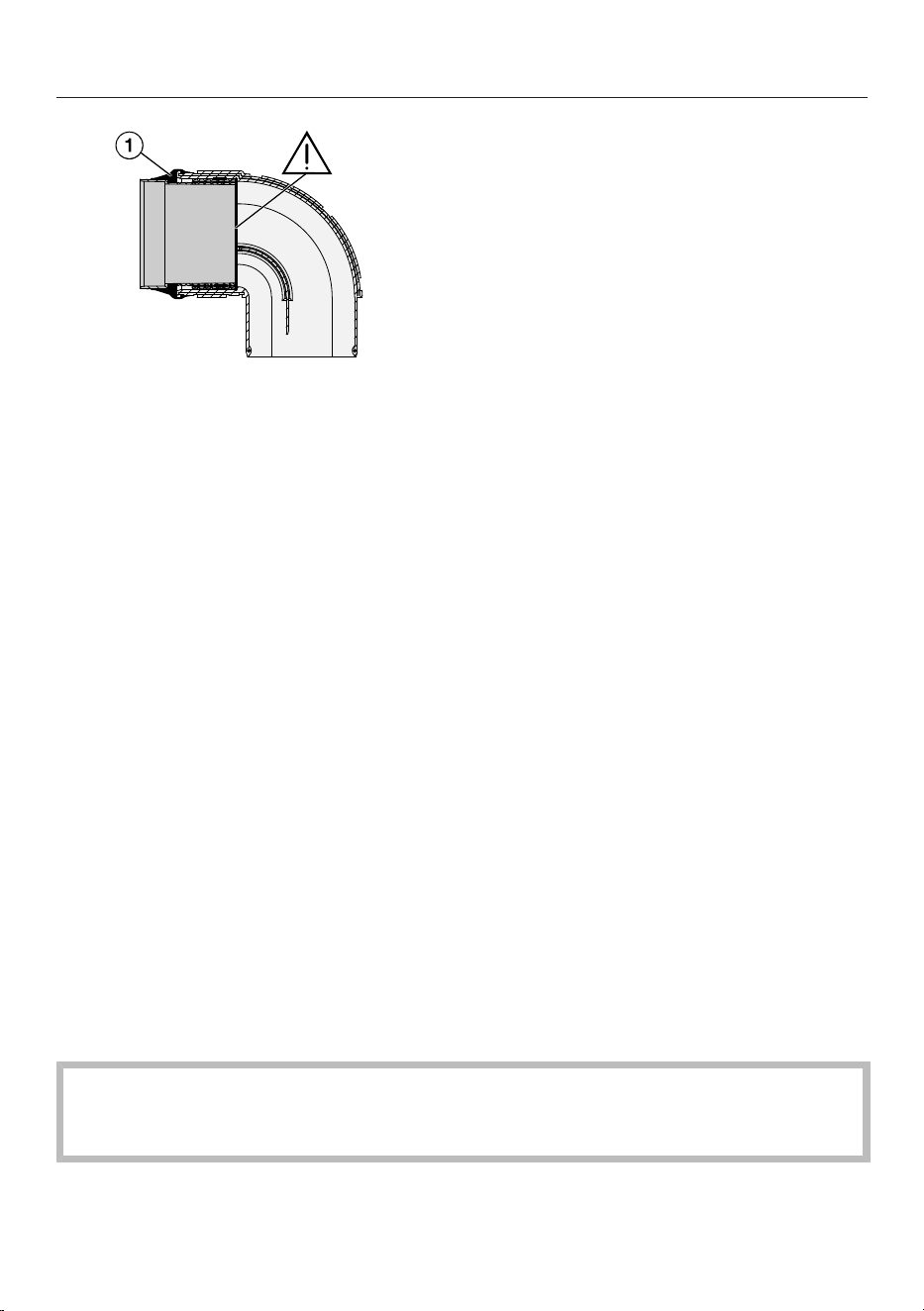
Wrap sealing tape () around the end of the duct.
Fit the duct to the hob.
Connect the hob to the mains power supply.
Check that the hob is working.
Seal the gap between the hob and worktop with a silicone sealant that is heat-
resistant to at least 160°C.
Installing a flush-fit hob
with Plug & Play
Preparing the worktop for flush-fit installation with Plug & Play
Remember to maintain the minimum safety distances.
Create the worktop cut-out.
Cut the top of the drilling template to the thickness of your worktop. Place drilling
template 1 on top of the cabinet rear panel. Use the drilling template to create a
cut-out for the Plug & Play adapter.
If you do not have a drilling template, see “Installation – Rear panel cut-out
without drilling template”.
Solid wood and tiled worktops:
Secure the wooden frame 5,5mm below the top edge of the worktop.
Installing a flush-fit hob with Plug & Play
Attach the sealing strip provided underneath the edge of the hob. Do not apply
the sealing strip under tension.
The Plug & Play adapter may break off.
When placing the hob on the worktop, make sure that it is not placed on top of
the Plug & Play adapter.
Connect the Plug & Play adapter to the hob and set the adapter position.
Feed the mains connection cable for the hob down through the worktop cut-out.
44

Installation
Plug & Play mode: remove the protective foil from the adhesive tape at the end
of the Plug & Play adapter.
Centre the hob in the cut-out.
The gap between the ceramic glass surface and the worktop must be at least
2mm wide. This is required so that the hob can be sealed.
Align the Plug & Play adapter with the predrilled hole. Press the adapter onto the
rear panel until it sticks in place.
Connect the hob to the mains power supply.
Check that the hob is working.
Seal the gap between the hob and worktop with a silicone sealant that is heat-
resistant to at least 160°C.
45
Installation
*INSTALLATION*
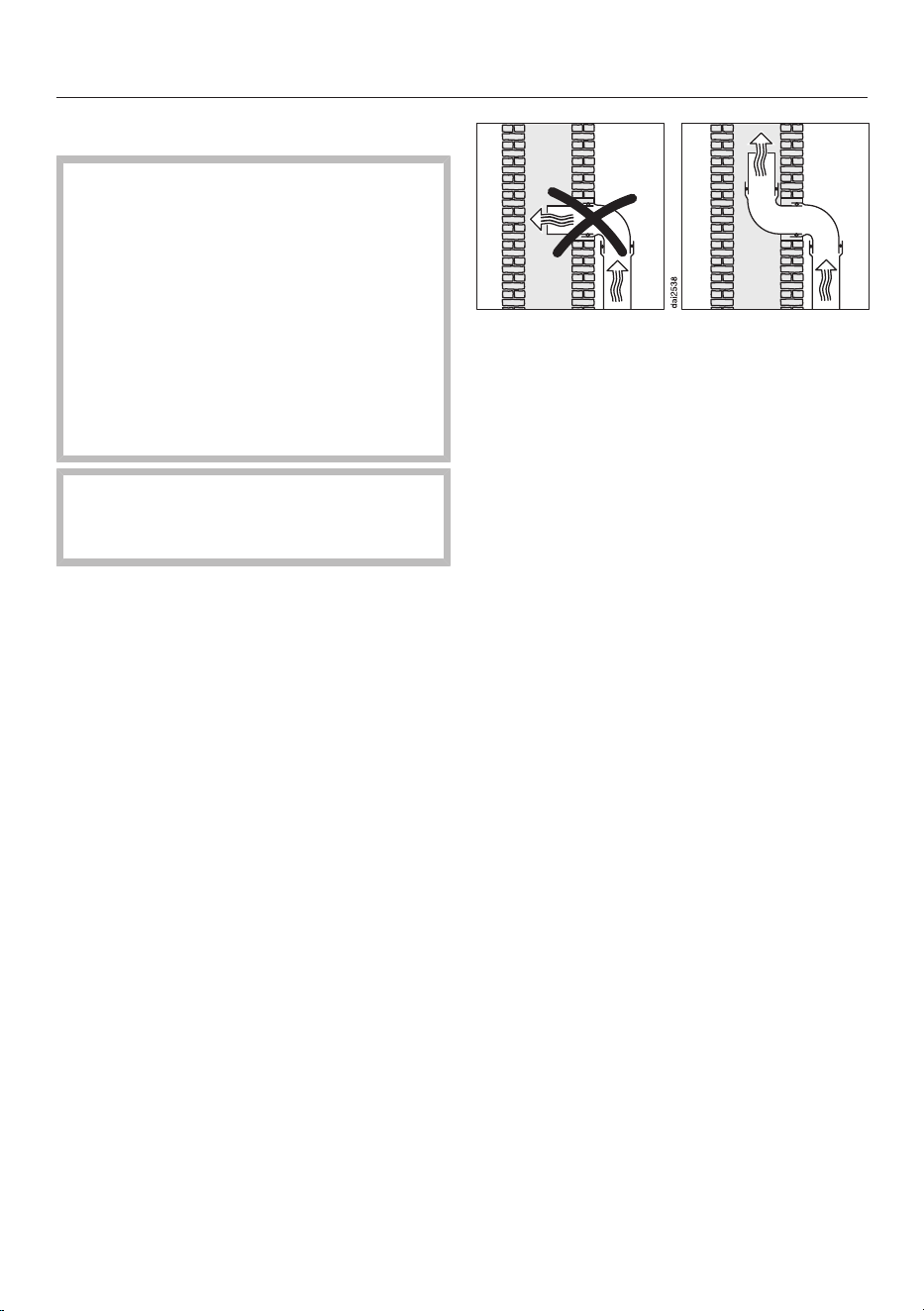
Installing exhaust ducting
If the vapour extraction is used at
the same time as a heating appliance
that relies on oxygen from the same
room, there is a risk of toxic fumes.
It is essential that the “Warnings and
safety notes” are observed.
The vapour extraction should be in-
stalled according to local and na-
tional building regulations. Seek ap-
proval from the building regulations
inspector where necessary.
Remember that any constriction of
the air flow will reduce air throughput
and increase operating noise.
The vapour extraction has an exhaust
duct with the following dimensions:
222x88mm.
Only use smooth pipes or flexible ex-
haust hoses made from non-flam-
mable materials for exhaust ducting.
To achieve the most efficient air
throughput with the lowest noise
levels, please note the following:
- The cross-section of the exhaust
ducting must not be smaller than the
cross-section of the exhaust duct (see
the appliance dimensions).
- The ducting should be as short and
straight as possible.
- Only use wide radius bends.
- The exhaust ducting must not be
kinked or compressed.
- Ensure that all connections are strong
and airtight.
If the exhaust air is to be ducted into
a flue, the ducting must be directed in
the flow direction of the flue.
If ducting is to be laid horizontally it
must be laid with a downwards slop-
ing gradient. This is to ensure that
condensate cannot drain back into
the fan.
If the ducting is to run through cool
rooms, ceiling space, etc., there may
be great variations in temperature
between the different areas. The
problem of condensation will need to
be addressed. The ducting will need
to be suitably insulated.
46
Installation
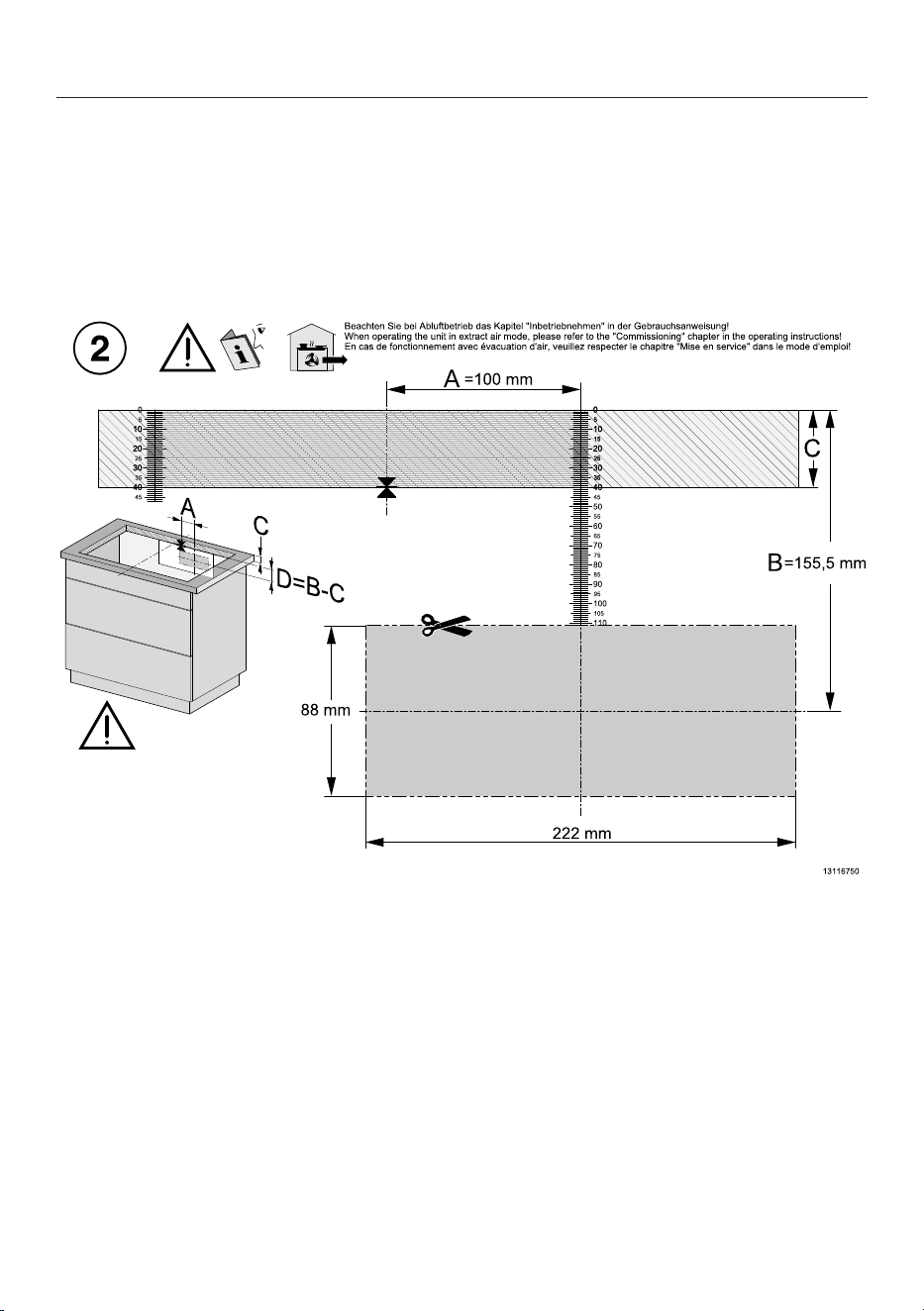
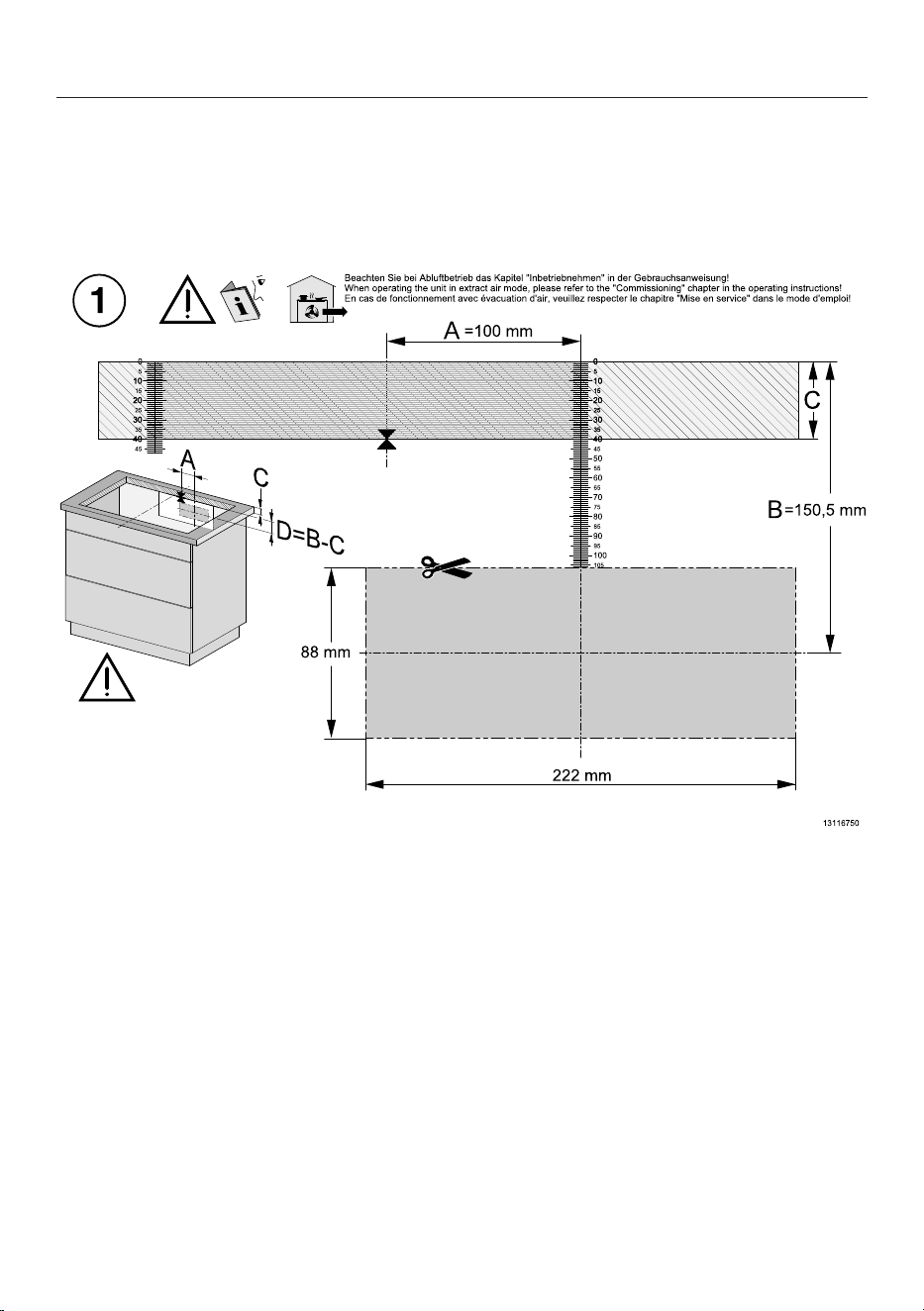
Rear wall cut-out without drilling template
Creating the rear panel cut-out with surface-mounted installation and an install-
ation distance (vertical) between the top of the appliance and the lowest point
of the Plug & Play adapter of 200mm
Ideally, the drilling template supplied with the appliance should be used. The fol-
lowing instructions should only be used if the drilling template is not available.
Image of drilling template, side 2. Not to scale.
Measure the thickness of the worktop (C).
Locate the centre of the long axis of the cut-out.
Mark the point that is 100mm (A) to the right of the midpoint.
Mark the point (D) that is (B [155,5mm] – C [thickness of the worktop]) below
the right end of distance A.
Create a cut-out around the area using the following measurements: 222x88.
Plug & Play mode only: engage the Plug & Play adapter in position2.
47
Installation
Creating the rear panel cut-out with flush-fit installation and an installation dis-
tance (vertical) between the top of the appliance and the lowest point of the
Plug & Play adapter of 200mm
Ideally, the drilling template supplied with the appliance should be used. The fol-
lowing instructions should only be used if the drilling template is not available.
Image of drilling template, side 1. Not to scale.
Measure the thickness of the worktop (C).
Locate the centre of the long axis of the cut-out.
Mark the point that is 100mm (A) to the right of the midpoint.
Mark the point (D) that is (B [150,5mm] – C [thickness of the worktop]) below
the right end of distance A.
Create a cut-out around the area using the following measurements: 222x88.
Plug & Play mode only: engage the Plug & Play adapter in position1.
48
Installation
*INSTALLATION*
Electrical connection
Risk of damage from incorrect
connection.
Unauthorised installation, mainten-
ance and repairs can cause consider-
able danger for the user.
Miele cannot be held liable for dam-
age or injury caused by unauthorised
installation, maintenance or repair
work, or by an inadequate or faulty
on-site earthing system (e.g. electric
shock).
This hob must be connected to the
mains power supply by a qualified
electrician.
The qualified electrician must be fa-
miliar with and comply with the na-
tional regulations and any additional
regulations of the local electricity
provider.
After installation, ensure that all elec-
trical components are shielded and
cannot be accessed by users.
Total power rating
See data plate
Connection data
The connection data is quoted on the
data plate. Please ensure these match
the household mains supply.
Please see wiring diagrams for connec-
tion. (N.B. This appliance is supplied
single phase only in the UK / AUS / NZ).
Residual current device
For extra safety, it is advisable to protect
the hob with a suitable residual current
device (RCD) with a trip range of
30mA.
Disconnecting devices
It must be possible to disconnect the
hob from the mains at all poles using
disconnecting devices. A contact dis-
tance of at least 3mm must be ob-
served in the switched-off state. The
disconnecting devices include overcur-
rent protection devices and residual cur-
rent protection devices.
Disconnecting from the mains
Risk of electric shock from mains
voltage.
There is a risk of electric shock if the
appliance is reconnected to the
mains voltage supply during repair or
service work.
After disconnection, ensure the appli-
ance cannot be switched back on by
mistake.
To disconnect the appliance from the
mains power supply, do one of the fol-
lowing depending on installation:
Fine-wire fuses
Completely remove the fuse links
from the screw caps.
Automatic circuit breakers
Press the test button (red) until the
middle button (black) springs out.
Built-in circuit breakers
For circuit breakers of at least typeB
or C, switch the lever from1 (on) to
0(off).
Residual current device
Residual current device: switch the
main switch from1 (on) to 0(off) or
press the test button.
49
Installation
*INSTALLATION*
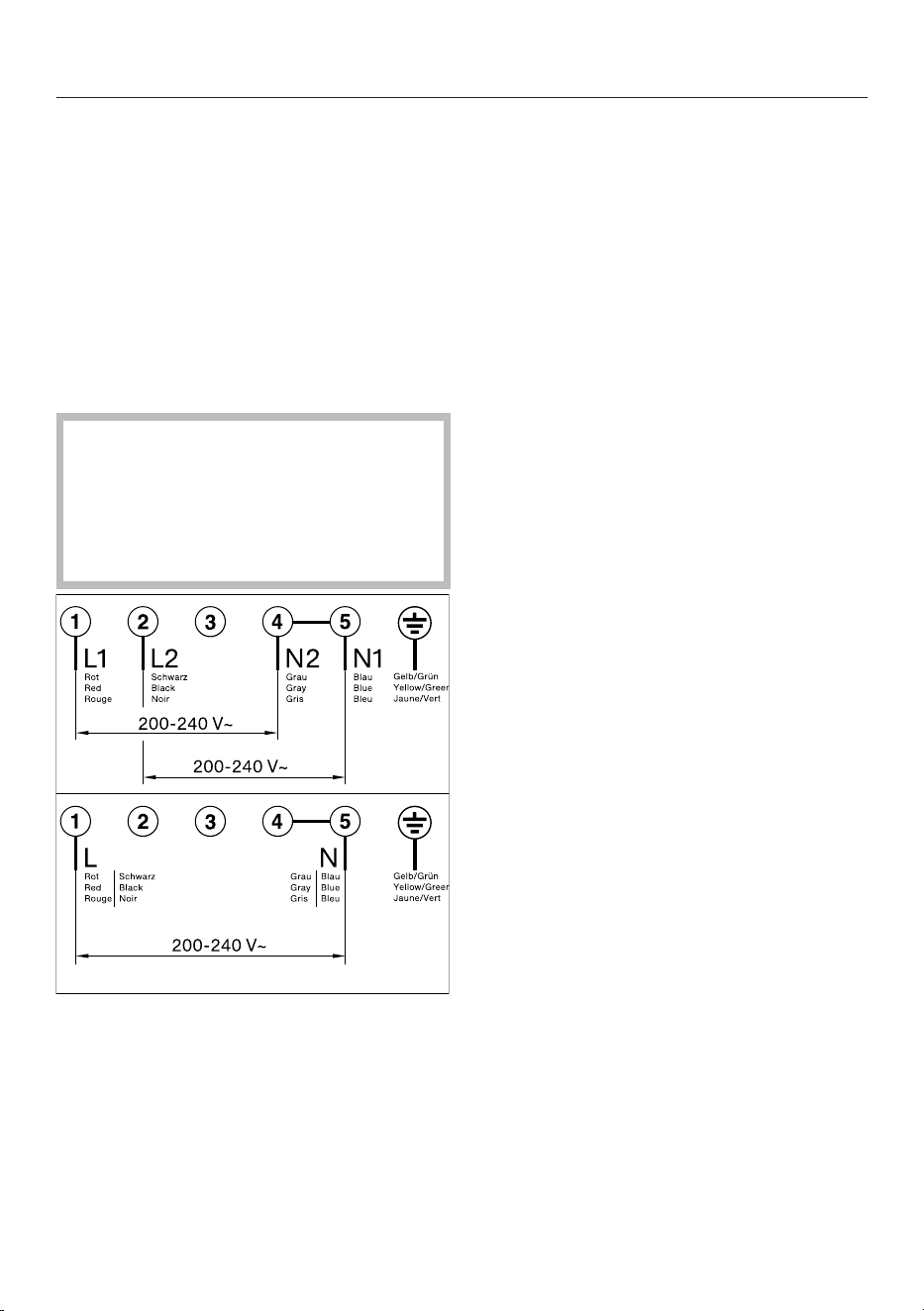
Mains connection cable
The hob must be connected to the elec-
trical supply with a special connection
cable, type H05VV-F (PVC insulated)
with a suitable diameter.
Please see wiring diagrams for connec-
tion.
See the data plate on the hob for the
correct voltage and rated load.
Wiring diagram
Some connection methods are not
permitted in all installation locations.
Ensure compliance with national reg-
ulations and any additional regula-
tions issued by the local electricity
provider.
50
Familiarisation
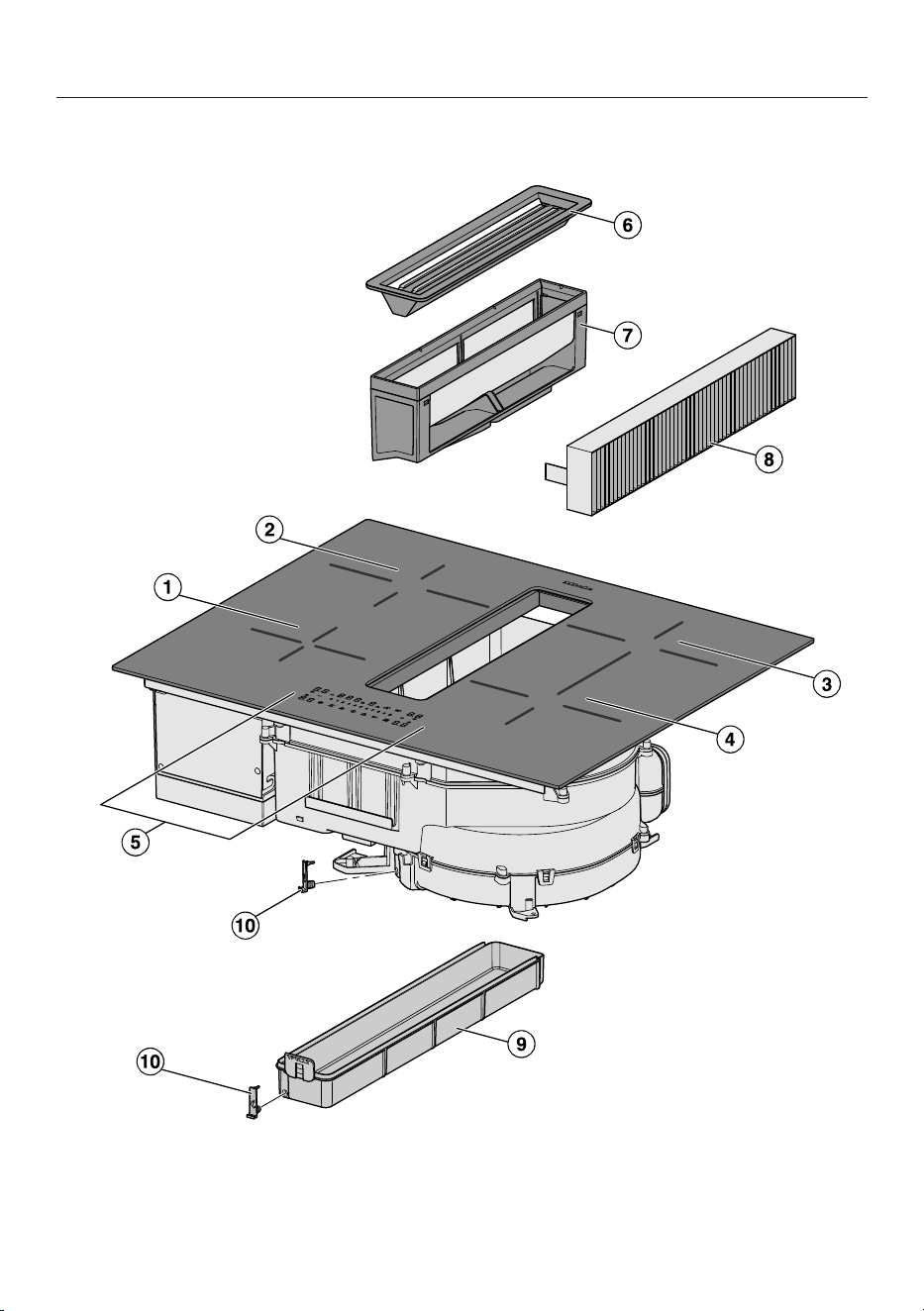
Your hob
a
Cooking zone with Booster function
b
Cooking zone with Booster function
51

Familiarisation
c
Flex cooking zone with Booster
can be combined with Flex cooking zone to form Flex cooking area
d
Flex cooking zone with Booster
Can be combined with Flex cooking zone to form Flex cooking area
e
Controls and indicators
f
Cover grille
g
Grease filter
h
Charcoal filter
Only required in the case of guided recirculation mode or Plug & Play mode
i
Removable drip tray
j
Cleaning flap
Features
Features will vary depending on model.
Scope of delivery
- Drilling template
- Charcoal filter
- Plug & Play adapter
- Operating and installation instructions
- Mains connection cable
- Further accessories (depending on the model)
Drilling template
Drilling template printed on both sides, used to create the cut-out for the Plug &
Play adapter with an installation distance (vertical) between the top of the appli-
ance and the lowest point of the Plug & Play adapter of 200mm.
52
Familiarisation
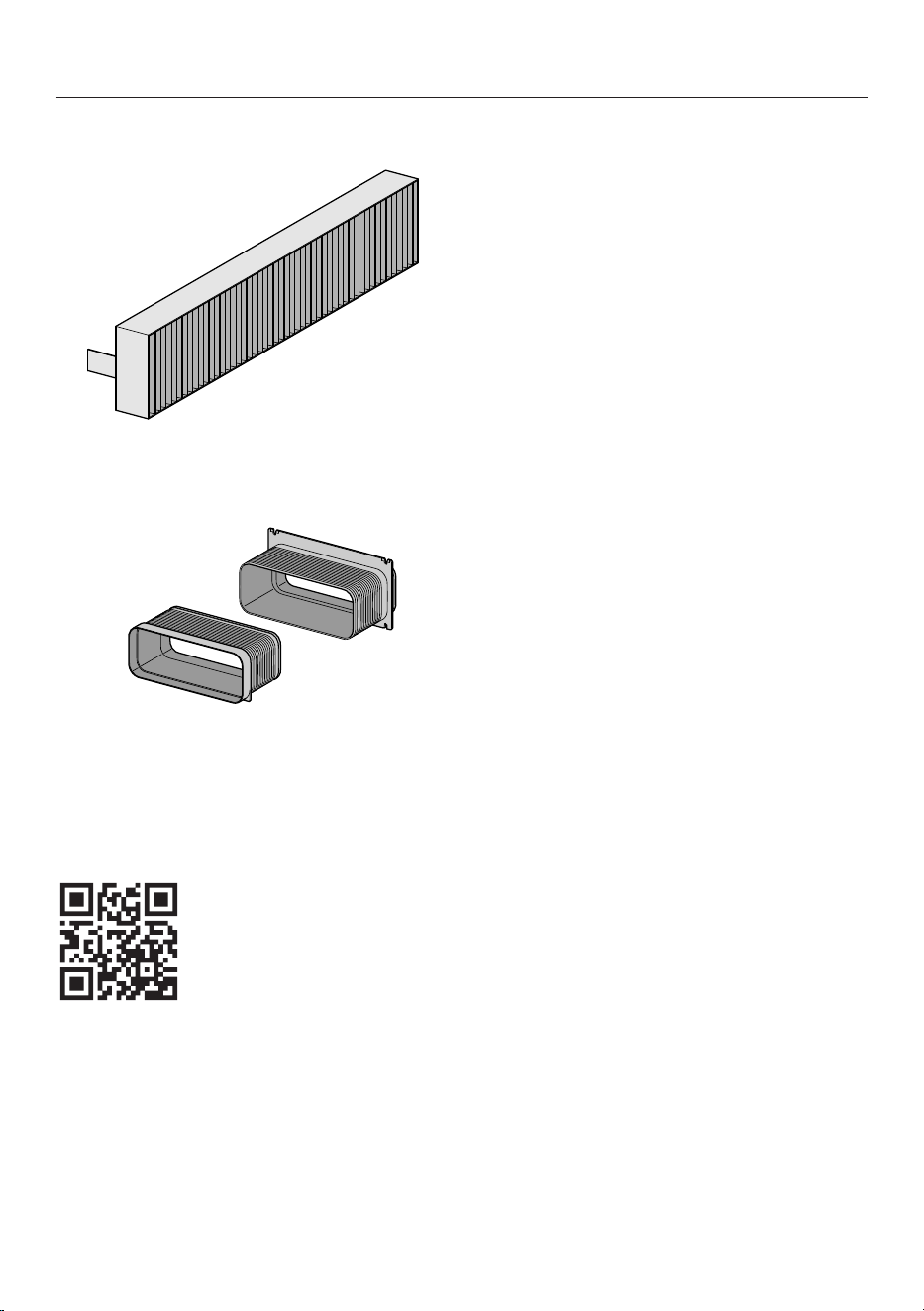
Charcoal filter
The charcoal filterDKF 37-P is included 1times with KMDA.
Plug & Play adapter
Optional accessories
Products specially tailored to your hob – such as cookware and cleaning agents –
are available from the Miele online shop, Miele Customer Service or your Miele
specialist dealer.
You can access the Miele online shop via the following QR code:
53
Familiarisation
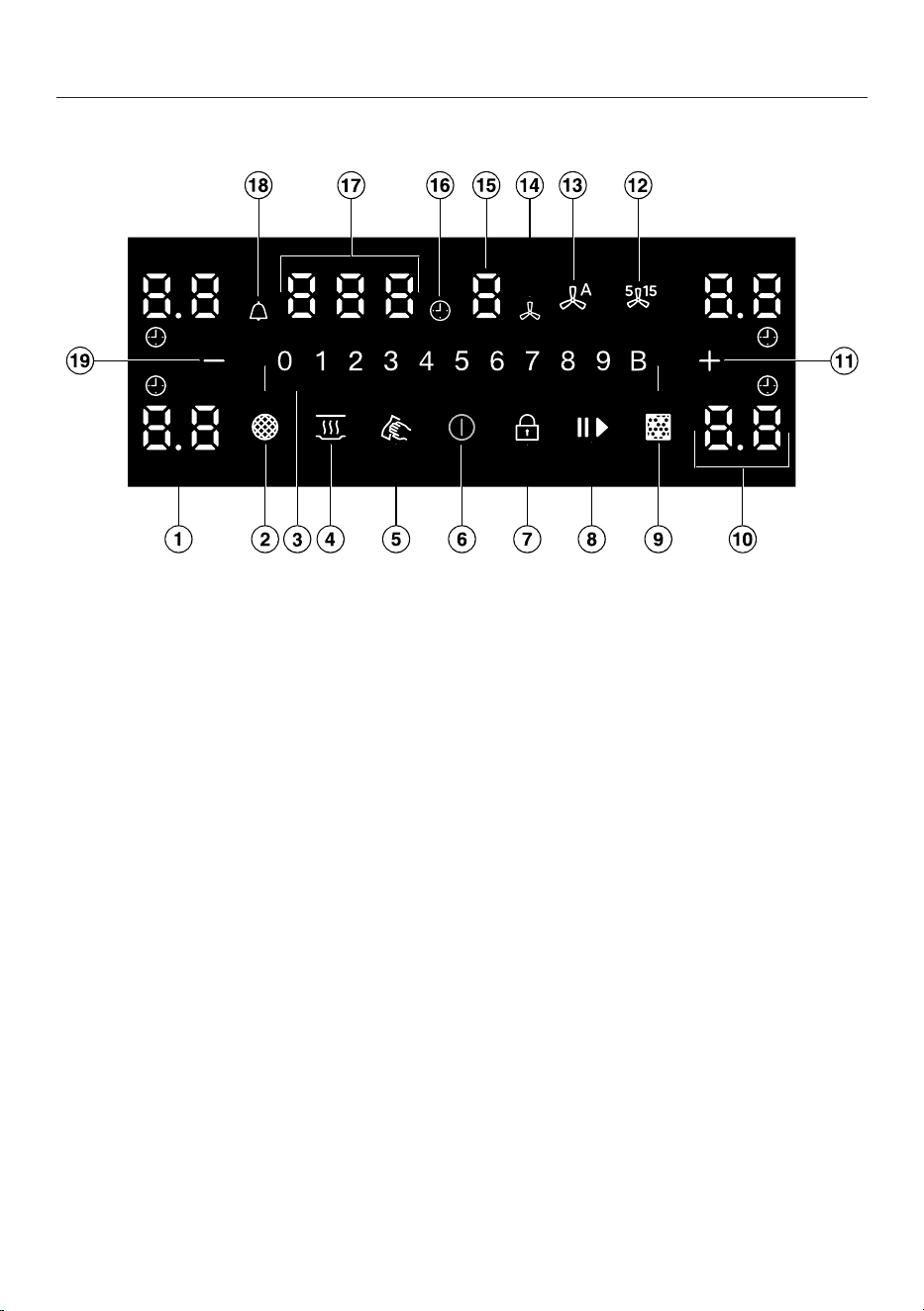
Controls and indicators
a
Separator display
Display of intermediate power levels
b
Grease filter indicator
Grease filter must be cleaned
c
Numerical display
– To set the power level
– To set the times
d
Keeping warm
sensor control
To activate/deactivate the Keeping warm special function
e
Wipe protection
sensor control
To lock the control elements and indicators for 20seconds
f
On/Off
sensor control
g
System lock
/
Lock
sensor control
To lock the control elements and indicators
h
Stop&Go
sensor control
To stop/start a cooking process in progress
i
Charcoal filter indicator
Charcoal filter(s) must be replaced
54

Familiarisation
j
Cooking zone display
Cooking zone is ready for operation
to Power level
Residual heat
Auto heat-up
Cookware missing or unsuitable
Booster
Keeping warm
k
Plus
sensor control
– To change the power levels – intermediate levels
– To adjust the times
– To adjust the settings
l
5 or 15minute run-on
sensor control
m
Con@ctivity
sensor control
For activating/deactivating the Con@ctivity function of the built-in cooker hood
n
Cooker hood
o
Vapour extraction display
The vapour extractor is ready for operation
to Power level
Booster is activated
Con@ctivity function of integrated extractor is activated
p
Auto switch off
Indicates that the switch-off time for the/one cooking zone has been set.
q
Timer display
to Duration in minutes
System lock/safety lock is activated
Demo mode is activated
r
Minute minder
s
Minus
sensor control
– To change the power levels – intermediate levels
– To adjust the times
55
Familiarisation
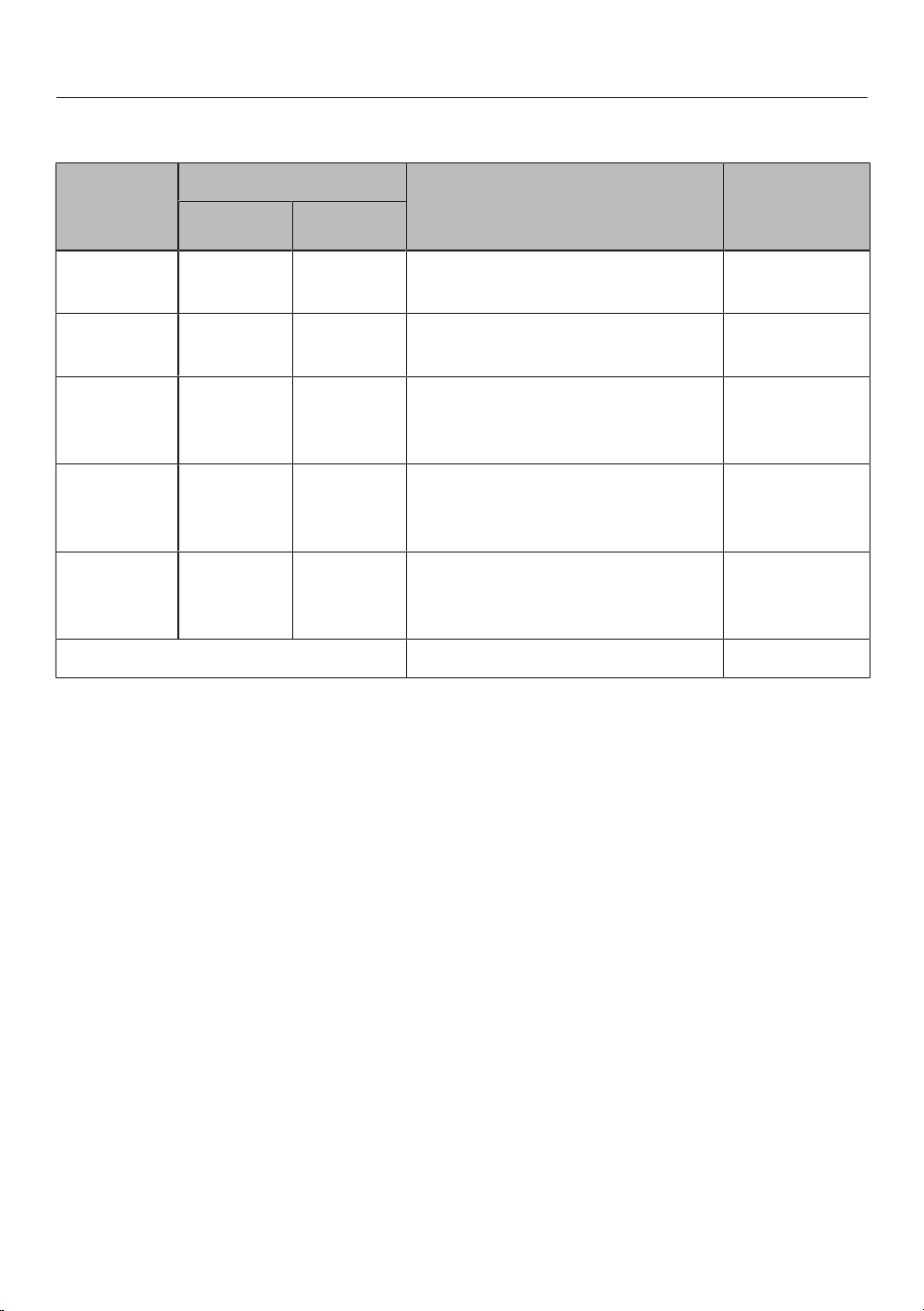
Cooking zone data
Cooking
zone
Size in cm
1
Max. rating in watts for
230V
2
Linked
cooking
zone
3
Ø
12–16 –
Normal
Booster
1200
1500
14–21 –
Normal
Booster
2000
2600
14–21
14x14
–
21x19
Normal
Booster
2100
3000
14–21
14x14
–
21x19
Normal
Booster
2300
2600
+
18–21
18x18
–
21x39
Normal
Booster
3000
3600
-
Total 7360
1
Cookware with a base diameter or surface (widthxdepth) within the given range may be used.
2
The rating given may vary depending on the size and material of the cookware used.
3
The cooking zone is linked to this cooking zone electrically so that the rating can be increased.
56

Familiarisation
Power management
Total permitted power consumption
The hob has a maximum total permitted
power consumption which cannot be
exceeded for safety reasons. You can re-
duce the maximum total permitted
power consumption.
The higher the total permitted power
consumption of the hob, the more
power levels/special functions can be
used on all cooking zones at the same
time.
If the set power levels/special functions
require more power than can be
provided in accordance with the total
permitted power consumption, the hob
will distribute the maximum permitted
power between the cooking zones.
Effects of power distribution
If a cooking zone gives power to another
zone, this can have the following effects
on the zone giving the power:
- The power level is reduced.
- Auto heat-up is deactivated. Cooking
continues at the set level. If the power
is not sufficient, the power level will
be reduced again.
- The Booster function is deactivated.
- The cooking zone is switched off.
When the cooking zone stops transfer-
ring power to another zone, the power
level can be increased again.
Tip: If you wish to cook a large quantity
of food on one cooking zone, switch the
other cooking zones to lower power
levels.
Operation
Hob when switched off
Only the printed symbol for the On/
Off
On/Off
sensor control is visible
when the hob is switched off. More
sensor controls light up when the hob is
switched on.
Selecting a cooking zone
If you want to configure settings for a
cooking zone, the cooking zone must be
selected first. To select a cooking zone,
touch the corresponding cooking zone
display. After you touch the cooking
zone display, it lights up brightly. When
the cooking zone display appears bright,
the cooking zone is selected and you
can configure settings for the cooking
zone. If cookware is detected on the
other cooking zones, the other cooking
zone indicators light up dimly. Excep-
tion: if only one of the cooking zones is
in operation, you can configure settings
without selecting the cooking zone.
Kitchen ventilation
Ensure that the kitchen is well ventilated
when operating the cooker hood.
In extraction mode, the efficiency of the
cooker hood is improved by the incom-
ing air.
In recirculation mode, the moisture pro-
duced during cooking remains in the kit-
chen. Ventilation helps to dissipate
moisture.
57

Familiarisation
Components
Grease filter
The re-usable metal grease filters in the
appliance remove solid particles
(grease, dust, etc.) from the kitchen va-
pours, preventing soiling of the cooker
hood.
Charcoal filter
With recirculation mode and Plug &
Play recirculation mode, a charcoal filter
must be fitted in addition to the grease
filters. The charcoal filter is designed to
absorb cooking odours.
A charcoal filter (DKF 37-P) is supplied
as standard.
Charcoal filters are available as optional
accessories.
Special functions
Permanent pan recognition
When you place cookware on a cooking
zone, the numerical display for the
cooking zone is activated automatically.
Pan size recognition
The size of the cookware is detected
within a cooking zone. The release of
energy is adapted to the size of the pan.
Flex cooking area
Depending on the model, your hob
may not have a Flex cooking area.
A Flex cooking area links together 2
PowerFlex cooking zones, making it
possible to use larger cookware.
The Flex cooking zones link automatic-
ally to form a Flex cooking area when
you place sufficiently large items of
cookware on them. The Flex cooking
zones can also be linked manually.
Hob power levels
You can set the power for the cookware
in levels from 1 to 9.
If you wish to fine-tune the power
levels, you can activate intermediate
levels via the settings.
Hob Booster
When the Booster function is activated,
the power is boosted so that large
quantities can be heated up quickly, e.g.
when boiling water for cooking pasta.
Stop&Go
When Stop&Go is activated, all power
levels are reduced to1.
When the function is deactivated, the
appliance switches back to the power
level that was set last.
Tip: Use this special function if there is
a danger of food boiling over.
Auto heat-up
When auto heat-up has been activated,
the cooking zone switches on automat-
ically at the highest setting (heat-up
boost) and then switches to the power
level (continued cooking setting) which
you have previously selected.
Timer
The timer can be used for the following
two functions:
- For setting the minute minder
- For automatically switching a cooking
zone off
You can use the functions simultan-
eously.
Minute minder
You can set an alarm for activities that
are independent of the hob.
58

Familiarisation
Auto switch off
You can set a time after which a cooking
zone will switch off automatically. This
function can be used for all cooking
zones at the same time.
System lock
If the system lock is activated, then the
hob cannot be switched on.
Safety lock
The safety lock is activated when the
hob is switched on. When the lock is ac-
tivated, the hob can be operated only
under certain conditions.
Recall
If the hob is switched off by mistake
during use, this function can be used to
restore all settings. The hob must be
switched on again within 10seconds of
being switched off.
Keeping warm
This special function enables food to be
kept warm after it has finished cooking.
The maximum duration for keeping food
warm is 2hours.
Wipe protection
The hob sensor controls can be locked
for 20seconds to remove soiling, for ex-
ample.
On/Off
is not locked.
Con@ctivity
The vapour extraction will switch itself
on automatically if there is an item of
cookware on the cooking zone and a
power level has been set for that zone.
The power level for vapour extraction is
set to suit the power level of the cook-
ing zone. After switching off the cooking
zones, the cooker hood is gradually re-
duced and finally switched off.
You can deactivate Con@ctivity tem-
porarily or permanently.
Extraction mode
The air is drawn in and cleaned by the
grease filter and directed outside.
Guided recirculation mode
The air is drawn in and cleaned by the
grease filter. The air is then also cleaned
by a charcoal filter. The air is then circu-
lated back into the kitchen via an air
duct.
Plug & Play mode
Without an air duct, the air flows into
the base unit and back into the kitchen
through openings. Please follow the in-
structions in “Installation”.
Vapour extractor power levels
Select power levels 1 to 3 for light to
heavy cooking vapours, odours or heat.
Increase the power level as the level of
vapours, odours or heat increases.
Cooker hood Booster function
For short periods of cooking food with
intensive vapours, odours or heat, e.g.
when searing meat, select Booster level
B.
Run-on function
The run-on function enables the cooker
hood to continue running for a pre-de-
termined time before switching itself off
automatically.
This helps to remove any lingering va-
pours and odours from the air after
cooking. It also reduces the risk of
residues accumulating in the cooker
hood and any resultant odours.
59
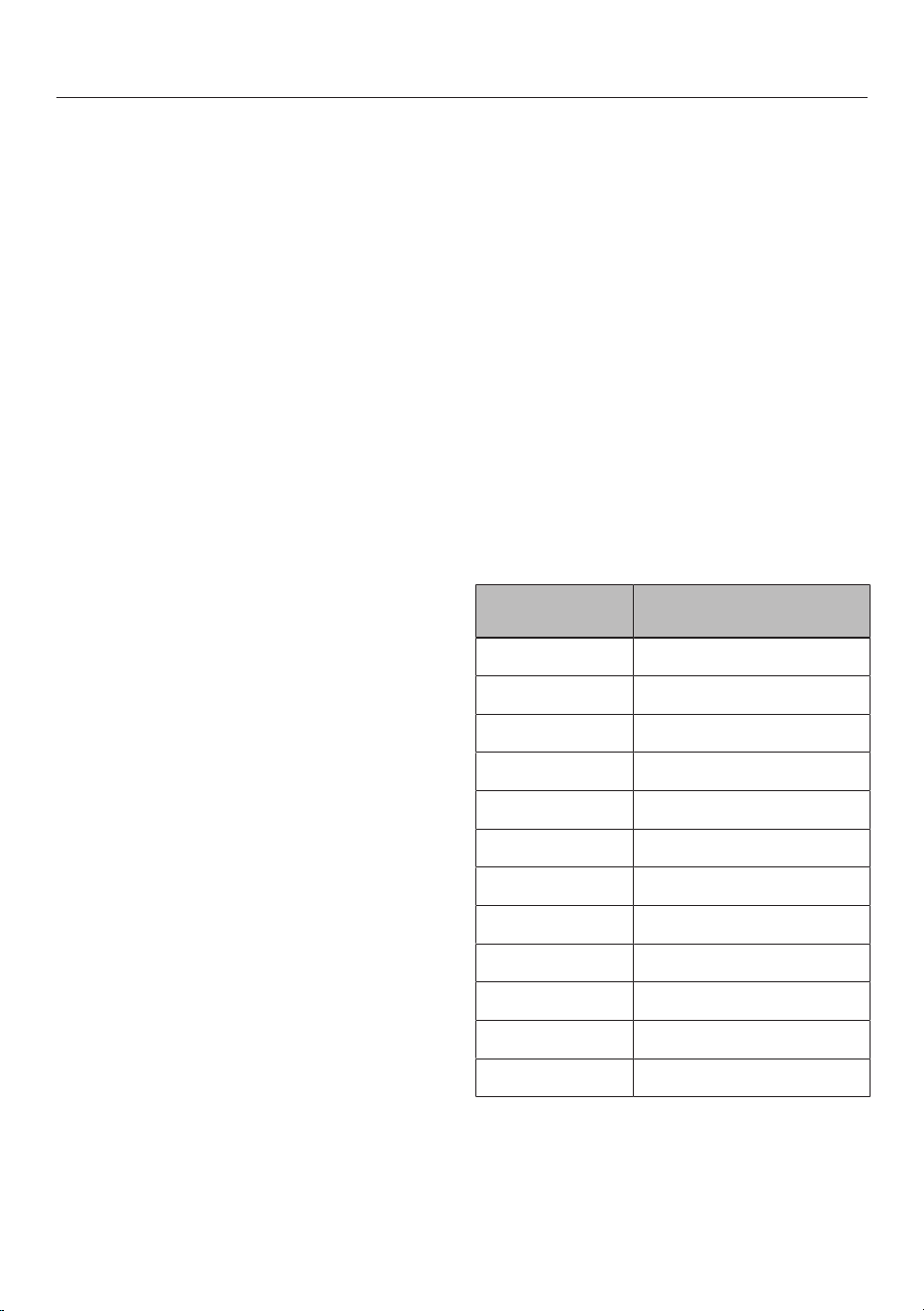
Familiarisation
Operating hours counter
The number of hours that the cooker
hood has been used for is stored in
memory.
When the
Grease filter indic-
ator
sensor control lights up, the grease
filter must be cleaned.
When the
Charcoal filter indic-
ator
sensor control lights up, the char-
coal filter must be replaced or reactiv-
ated (if suitable for reactivating).
You can set the operating hours counter
intervals to suit the type of cooking you
do.
The operating hours counter for the
charcoal filter is deactivated in extrac-
tion mode.
Settings
You can adapt the settings of the hob to
your personal needs.
Demo mode
This special function enables the hob to
be demonstrated in dealer showrooms
without heating up.
Residual heat indicator
If a cooking zone is still hot, the residual
heat indicator will light up after all cook-
ing zones have been switched off.
The bars of the residual heat indicator
go out one after the other as the cook-
ing zone cools down. The last bar only
goes out when the cooking zone is safe
to touch.
Safety switch-off
Sensor controls are covered
Your hob will switch off automatically if
one or several of the sensor controls re-
main covered for longer than
10seconds; for example, by finger con-
tact, food boiling over or by an object.
The timer display alternates between
and and a buzzer sounds. will go
out once you have removed the ob-
struction and/or soiling and the hob will
be ready to use again.
Excessive operating time
The safety switch-off is triggered auto-
matically if a cooking zone is heated for
an unusually long period of time. This
time depends on the power level selec-
ted. If the time has been exceeded, the
cooking zone switches off and the resid-
ual heat indicator appears on the hob. If
you switch the cooking zone off and on
again, it is ready for operation again.
Power level
1
Maximum operating time
[h]
Keeping warm 10
1.0 10
1.5 10
2.0/2.5 5
3.0/3.5 5
4.0/4.5 4
5.0/5.5 4
6.0/6.5 4
7.0/7.5 4
8.0 4
8.5 4
9.0 1
1
The power levels with a dot are intermedi-
ate levels.
60

Familiarisation
Overheating protection
In order to prevent the hob from being
damaged by excessive temperatures,
the overheating protection mechanism
intervenes in one of the following ways:
Overheating protection measures
- If the Booster function is switched on,
it will stop.
- The set power level will be reduced.
- A cooking zone will switch off.
flashes alternately with on the timer
display.
- All cooking zones will switch off.
Triggering the overheating protection
mechanism
The overheating protection mechanism
may be activated under the following
circumstances:
- The cookware being heated is empty.
- Fat or oil is being heated on a high
power level.
- Insufficient ventilation to the under-
side of the hob.
- A hot cooking zone is switched back
on after an interruption to the power
supply.
Software version
Your hob can display its software status.
61

Commissioning
Unpacking the hob
Please stick the data plate for the ap-
pliance, supplied with this document-
ation, in the space provided in the
“After sales service” section of this
booklet.
Remove any protective foil and stick-
ers.
Cleaning the hob for the first
time
Before using for the first time, clean
the hob with a damp cloth.
Wipe the hob dry.
Switching on the hob for the
first time
The metal components have a protect-
ive coating. When the hob is used for
the first time, this causes a smell and
possibly also vapour. The heating of the
induction coils also causes odours in
the first few hours of operation. With
each subsequent use, the odour is re-
duced until it disappears completely.
The odour and any vapours given off do
not indicate a faulty connection or appli-
ance and they are not hazardous to
health.
Using the vapour extractor for
the first time
Extraction mode:
The charcoal filter is not required for ex-
traction mode.
Set the operating mode of the integ-
rated extractor () to extraction
mode ().
Guided recirculation mode or Plug &
Play mode:
Fit the charcoal filter.
62
Operation
Safety notes for operation
Risk of fire due to over-
heated food.
Unattended food can overheat
and catch alight.
Do not leave the hob unatten-
ded whilst it is being used.
Risk of burning due to hot
cooking zones.
The cooking zones will be hot
after use.
Do not touch the cooking
zones while the residual heat
indicators are on.
Risk of burning due to hot
items.
When the hob is switched on
either deliberately or by mis-
take, or when there is residual
heat present, there is the risk
of metal items placed on the
hob heating up.
Do not use the hob as a resting
place for anything.
After use, switch the hob off
with the sensor control.
Placing hot cookware on
the sensor controls and dis-
plays can damage the elec-
tronic module underneath.
The sensor controls do not re-
spond.
They may be switched on or off
unintentionally.
The hob will switch itself off
(see “Familiarisation – Safety
switch-off”).
Do not place hot cookware
over the sensor controls or dis-
plays.
Switching the hob on
Touch
On/Off
.
Other sensor controls light up.
If no further entry is made, the hob will
switch itself off after a few seconds for
safety reasons.
Positioning cookware
Refer to the cooking zone data for your
hob model for information about cook-
ware sizes and the corresponding posi-
tions (see “Familiarisation – Hob data”).
Position the cookware as shown be-
low:
63
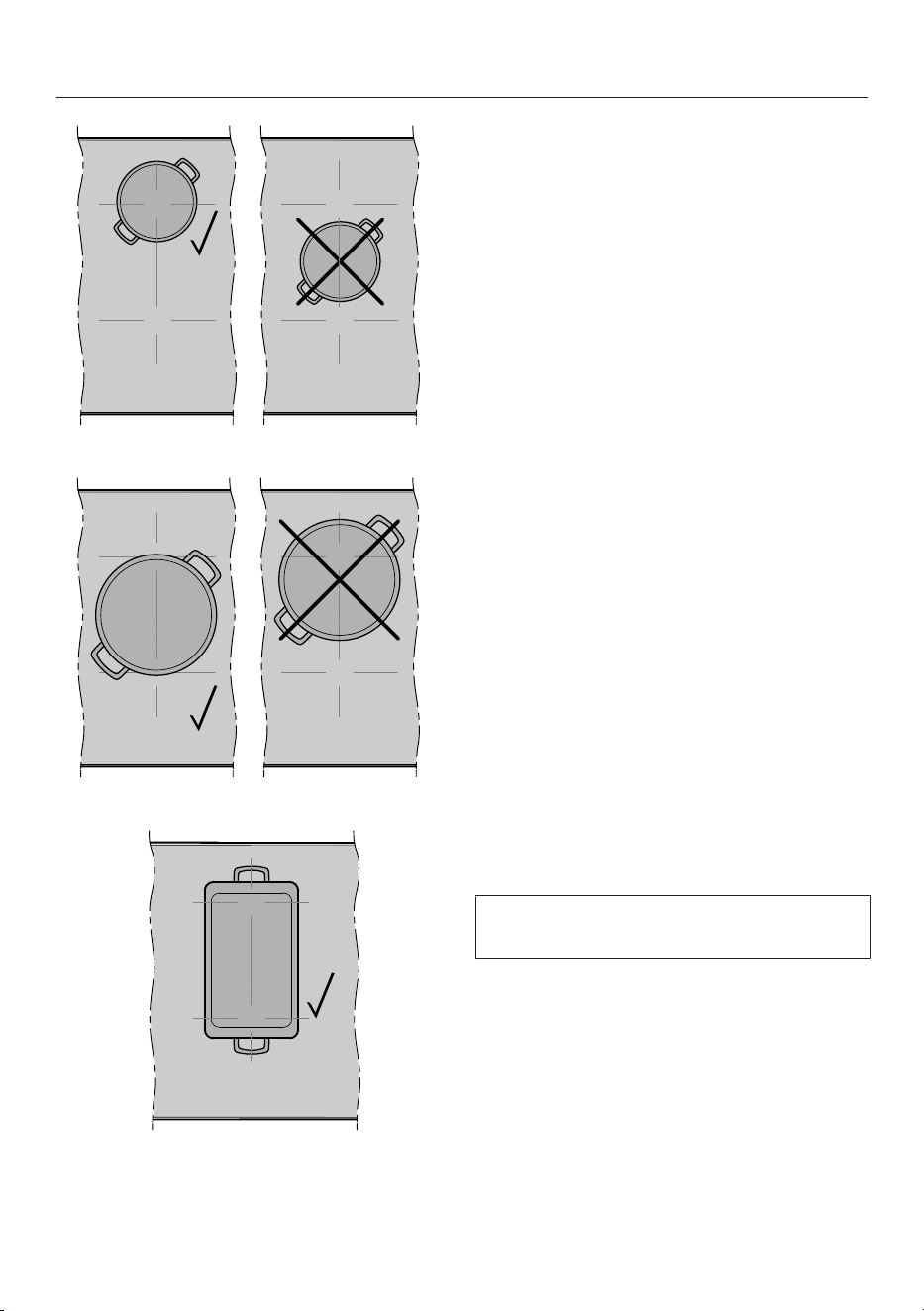
Operation
Flex cooking zone
Flex cooking area
Flex cooking area
Linking/unlinking Flex cooking
zones manually
To manually link or unlink the Flex
cooking zones, touch the two corres-
ponding cooking zone displays at the
same time until both cooking zones
light up brightly. The other sensor
controls light up dimly.
When the Flex cooking zones are linked,
both cooking zone displays show the
set power level.
Hob power levels
Setting the power level
Permanent pan recognition is activated
as standard. When the hob is switched
on and you place an item of cookware
on a cooking zone, the cooking zone dis-
play lights up brightly. The other sensor
controls light up dimly.
Place the cookware on the cooking
zone you want to use.
Touch the appropriate sensor control
for the power level you want on the
numerical display.
Setting the power level – intermediate
levels
The intermediate levels are activated
(see “Adjusting settings”).
Touch
Plus
or
Minus
The power level is displayed on the cor-
responding cooking zone display.
64

Operation
Changing the power level
Touch the relevant cooking zone in-
dicator.
The cooking zone display lights up
brightly. The other sensor controls light
up dimly.
Touch the appropriate sensor control
for the power level you want on the
numerical display.
Booster
Activating the Booster
When the Booster is activated, the set-
tings for the linked cooking zone may be
changed.
You can use the Booster:
- On any cooking zone on either side
or
- On the Flex cooking area
The Booster function is active for a max-
imum of 5minutes.
Place the cookware on the cooking
zone you want to use.
Select a power level if necessary.
Touch B
Booster
.
The cooking zone display shows .
Deactivating the Booster
Set another power level.
If you deactivate the Booster function or
at the end of the booster time, the
cooking area will automatically revert to
power level9.
Activating/deactivating
Stop&Go
All timer functions, booster times and
heat-up boost times continue to run.
The timer settings cannot be changed.
The hob can only be switched off.
If the special function is not deactivated
within 1hour, the hob will switch off.
Touch
Stop&Go
.
The active cooking zones are changed
from the set power level or keeping
warm function to power level1 or
switched back again.
Power transfer
If the new cooking zone is capable of
delivering less power than the previous
one, the power level will be reduced.
Press and hold (>2seconds) the
cooking zone display for the zone
from which you wish to transfer the
power.
All cooking zone displays will flash.
Touch the cooking zone display to
which you want to send the power
and, immediately afterwards, touch
the cooking zone display from which
you want to take the power.
The power will be transferred.
Auto heat-up
The heat-up time depends on which
continued cooking setting has been
chosen:
65
Operation
Continued cook-
ing setting
Heat-up time
[min:sec]
1 Approx. 0:45
2 Approx. 2:20
3 Approx. 3:45
4 Approx. 5:15
5 Approx. 6:45
6 Approx. 2:00
7 Approx. 2:45
8 Approx. 3:40
9 –
Activating auto heat-up
No timer functions can be set during the
heat-up time.
Touch the cooking zone indicator for
the required cooking zone.
Touch the sensor control for the con-
tinued cooking level you want until a
tone sounds and the cooking zone
display shows.
The power level flashes alternately with
while the heat-up boost (power level
9) is running.
Deactivating auto heat-up
Touch the cooking zone display for the
required cooking zone.
Set another power level.
Timer
Setting the time
A duration of between 1min() and
99min() can be set.
The time is entered using the numerical
display and can be adjusted using the
Plus
and
Minus
.
Enter durations in the order of
minutes in tens and then units.
Example:
59minutes = entry: 5-9
80minutes = entry: 8-0
After the first number has been entered,
the timer display will light up constantly.
After the second number has been
entered, the first number will move to
the left.
Setting the timer
No cooking zone has been selected.
Minute minder
lights up.
Touch the timer display.
The timer display lights up brightly. The
other sensor controls light up dimly.
Set the required time.
Touch the timer display or wait
5seconds to start the timer.
Changing the timer duration
No cooking zone has been selected.
Minute minder
lights up.
Touch the timer display.
The timer display lights up brightly. The
other sensor controls light up dimly.
Set the required time.
Touch the timer display or wait
5seconds to start the timer.
66

Operation
Deleting the timer duration
No cooking zone has been selected.
Minute minder
lights up.
Touch the timer display.
Touch 0 on the numerical display.
Setting the switch-off time
A cooking zone will switch off when the
maximum operating time has elapsed,
regardless of the switch-off time that
has been set.
Select a cooking zone and set a
power level.
Touch the timer display.
The timer display lights up brightly. The
other sensor controls light up dimly.
Auto switch off
next to the timer dis-
play lights up.
Set the required time.
Touch the timer display or wait
5seconds to start the switch-off time.
The switch-off time for the cooking pro-
cess will count down and
Auto
switch off
next to the cooking zone will
light up.
After approx. 10seconds, the cooking
zone will be automatically deselected
and the switch-off time for the cooking
process will no longer be displayed on
the timer display.
Changing the switch-off time for a
cooking process
Touch the required cooking zone dis-
play.
Touch the timer display.
The timer display lights up brightly. The
other sensor controls light up dimly.
Auto switch off
next to the timer dis-
play lights up.
Set the required time.
Touch the timer display or wait
5seconds to start the switch-off time.
The switch-off time for the cooking pro-
cess will count down and
Auto
switch off
next to the cooking zone will
light up.
After approx. 10seconds, the cooking
zone will be automatically deselected
and the switch-off time for the cooking
process will no longer be displayed on
the timer display.
Deleting the switch-off time for a
cooking process
Touch the required cooking zone dis-
play.
Touch the timer display.
The timer display lights up brightly. The
other sensor controls light up dimly.
Auto switch off
next to the timer dis-
play lights up.
Touch 0 on the numerical display.
Setting the switch-off time for further
cooking processes
To set a switch-off time for a further
cooking process, follow the same
steps as described under “Operation
– Setting the switch-off time for a
cooking process”.
If a switch-off time is set for further
cooking processes, the time left for the
selected cooking zone is displayed.
Auto switch off
lights up brightly next
to the corresponding cooking zone dis-
play. The other sensor controls light up
dimly.
67

Operation
Displaying the switch-off time for a
cooking process
If you want to show the time left
which is counting down in the back-
ground, touch the relevant cooking
zone display.
Auto switch off
next to the timer dis-
play lights up.
The rounded up time left is displayed
for the required cooking zone.
Using both timer functions at the
same time
If you use both functions at the same
time, the time of the last selected func-
tion is always displayed.
Touch the timer display or the relev-
ant cooking zone display and then the
timer display if you want to show the
times left counting down in the back-
ground.
System lock
Activating the system lock
All sensor controls are locked. A set
timer will continue to count down.
No power level has been set for any of
the cooking zones.
Touch
System lock
/
Lock
until the
timer display shows .
The system lock is activated.
If a disallowed sensor control is touched
while the system lock is activated, the
timer display will show for a few
seconds and a buzzer will sound.
The settings can be adjusted so that
the system lock is activated automat-
ically 5minutes after the hob has been
switched off.
Deactivating the system lock
Touch
System lock
/
Lock
until the
timer display no longer shows .
The system lock is deactivated.
Safety lock
Activating the safety lock
When the safety lock is activated, the
hob can only be switched off.
Touch
System lock
/
Lock
.
The timer display shows .
If a disallowed sensor control is touched
while the safety lock is activated, the
timer display will show for a few
seconds and a buzzer will sound.
Deactivating the safety lock
Touch
System lock
/
Lock
.
The timer display no longer shows .
The lock function is deactivated.
Activating the Recall function
Switch the hob on again.
Immediately after switching the hob
on, touch one of the flashing cooking
zone indicators.
All settings are restored.
Activating/deactivating the
Keepingwarm function
The Keepingwarm function cannot be
used to reheat food that has gone cold.
Touch the cooking zone indicator for
the required cooking zone.
The cooking zone display lights up
brightly. The other sensor controls light
up dimly.
Touch
Keeping warm
.
68

Operation
The corresponding cooking zone display
shows .
Tips for keeping food warm
- Only use cookware (pots/pans) for
keeping food warm. Cover the cook-
ware with a lid.
- Stir firm or viscous food (mashed
potatoes, stew) occasionally.
- Nutrients are lost when food is
cooked, and continue to diminish
when food is kept warm. The longer
food is kept warm, the greater the
loss of nutrients. Try to ensure that
food is kept warm for as short a time
as possible.
Wipe protection
Activating wipe protection
Touch
Wipe protection
.
Wipe protection
pulsates for approx.
20seconds.
Deactivating wipe protection
Touch
Wipe protection
until
Wipe protection
lights up con-
stantly and is no longer pulsating.
Vapour extraction
Manually setting the vapour extractor
power level
If the vapour extractor starts at power
level1, the power is automatically in-
creased to level2 for 5seconds.
The increase in power is necessary in
order to ensure that the flap opens in
extraction mode. If you are using the
vapour extractor in recirculation mode,
you can deactivate this automatic
function.
Touch the vapour extraction display.
Touch the appropriate sensor control
for the power level you want.
Manually switching off the cooker
hood
Touch the vapour extraction display.
Touch0 on the numerical display.
Activating the Booster
The Booster function is active for a max-
imum of 5minutes.
Touch the vapour extraction display.
Touch B
Booster
.
Deactivating the Booster
Touch the vapour extraction display.
Set another power level.
Deactivating Con@ctivity temporarily
You can deactivate Con@ctivity in
various ways:
- Touch
Con@ctivity
.
- Touch 0 on the numerical display.
- Select a different power level.
Set the power level you want.
Con@ctivity is reactivated when you
switch the hob off and back on again.
Run-on
If recirculation mode is set, the cooker
hood runs at level 1.
69

Operation
Depending on the last active power
level, run-on lasts between 2 and
30minutes.
Do not cancel the run-on function pre-
maturely. Especially in Plug & Play
mode, the run-on ensures that the base
unit is dried.
In extraction mode without Con@ctiv-
ity, manually activate the run-on.
Manually activating run-on
After you have finished cooking, touch
5 or 15minute run-on
with the
vapour extractor switched on:
- If you touch the sensor control once,
the vapour extractor will switch off
after 5minutes.
- If you touch the sensor control twice,
the vapour extractor will switch off
after 15minutes.
The timer display shows the run-on
time.
5 or 15minute run-on
lights up
brightly. The other sensor controls light
up dimly.
Activating/deactivating demo
mode
Open the Settings menu.
Under , select .
The timer display flashes for a few
seconds:
- alternating with (demo mode
activated)
or
- alternating with (demo mode
deactivated)
70
Setting ranges for the hob power levels
The hob is programmed with 9power levels with intermediate levels at the factory.
If you only want to use the whole-number settings for power levels, you can deac-
tivate intermediate levels via the settings.
Recommended
cookware
1
Setting range
2
Factory set-
ting
9levels
with
intermediate
levels
Whole num-
bers
9levels
without
intermediate
levels
Melting butter
Pot
1 1
Melting chocolate
Dissolving gelatine
Keeping warm food which sticks easily
Heating small quantities of liquid
1–1. 1–2
Cooking rice
Defrosting frozen vegetables in a block
Making milk puddings
Warming up liquid and semi-solid food
1.–3 2–3
Steaming fruit
Simmering potatoes
Rendering bacon Frying pan
Making pancakes, omelettes, lightly fried
eggs, etc.
Frying pan with sandwich
base and non-stick coating
2.–4. 3
Steaming fish
2–4. 2–3
Steaming vegetables
PotCooking pasta and pulses
Thickening sauces, e.g. Hollandaise
Defrosting and reheating frozen food See manufacturer’s in-
structions
Gentle frying (e.g. whole fish) Frying pan with sandwich
base and non-stick coating
3–4. 3
Gentle frying (e.g. meat patties, chicken
breast)
Frying panFrying (e.g. fish fillet, escalopes, fried eggs) 3–5. 3–5
Searing/hot frying (e.g. steak, small quantities
of meat, fried potatoes, hash browns)
5.–6. 5–7
Frying, e.g. chips Pot with high rim
7.–9 9
Searing large quantities of meat Pot with high rim or oven
dish
Bringing water to the boil Pot Booster Booster
1
Cook in covered pots and pans if possible. This prevents heat escaping unnecessarily.
2
These settings should only be taken as a guide. The power of the induction coils will vary depending on
the size and material of the cookware. For this reason, the power levels may need to be adjusted slightly
to suit your cookware. As you use the hob, you will get to know which settings suit your cookware best.
When using new cookware that you are not familiar with, set the power level to one level below the one
specified.
71

Good to know
Your hob
How induction hobs work
An induction coil is located under each
induction cooking zone. The coil creates
a magnetic field that reacts directly with
the base of the cookware and heats it
up. The cooking zone itself is heated up
indirectly by the heat given off by the
cookware.
An induction cooking zone only works
when cookware with a magnetic base is
placed on it. The hob automatically de-
tects the size of the cookware.
Noises
When using induction cooking zones,
the following noises can occur in the
cookware, depending on what it is made
of and how it has been constructed:
Buzzing on the higher power levels. This
will decrease or cease altogether when
the power level is reduced.
If the cookware base is made of layers
of different materials (e.g. in a sand-
wiched base), it might emit a crackling
sound.
Whistling might occur if linked cooking
zones are being used at the same time
and the cookware also has a base made
of layers of different materials (e.g.
sandwich base).
You might hear a clicking sound from
the electronic switches, especially at
lower power levels.
A whirring sound, when the cooling fan
comes on. This switches on to protect
the electronic module when the hob is
being used intensively. The cooling fan
may continue to run after the hob has
been switched off.
Cookware
Suitable cookware
- Stainless steel cookware with a mag-
netic base
- Enamelled steel cookware
- Cast iron
Please be aware that the properties of
the cookware base can affect the even-
ness with which the food heats up (e.g.
when making pancakes). The base of
the cookware must be able to distribute
the heat evenly. Cookware with a base
made from multilayer material (sand-
wich or encapsulated base) is ideal in
this case.
Unsuitable cookware
- Stainless steel cookware without a
magnetic base
- Aluminium or copper cookware
- Glass, ceramic or earthenware cook-
ware
Testing cookware
To test whether a pot or pan is induc-
tion-compatible, hold a magnet to the
base. If the magnet sticks, the pan is
generally suitable.
Cookware tips
- Position the cookware as centrally as
possible on the relevant cooking
zone/cooking area.
- To make optimum use of the cooking
zones, choose cookware with a suit-
able base diameter. If a pan is too
small, it will not be detected.
- Use only pots and pans with smooth
bases. Rough bases can scratch the
ceramic surface.
72
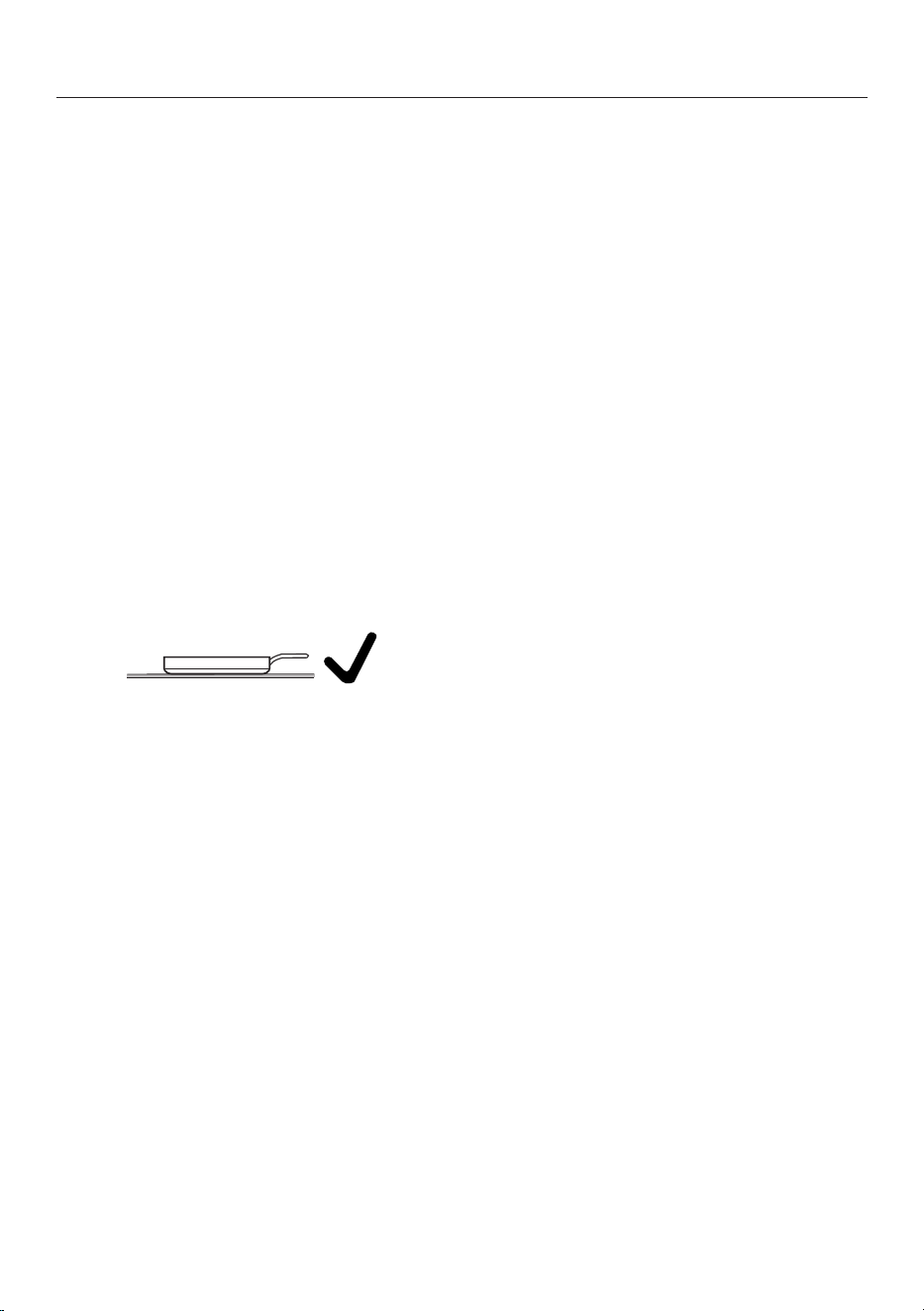
Good to know
- When cooking zones are joined to-
gether, we recommend using cook-
ware which more or less covers the
entire cooking area (e.g. an oven
dish).
- Always lift cookware to move it. This
will help prevent scratching. If any
scratches do appear as a result of
cookware being pushed around, this
will not affect the function of the hob.
These scratches are normal signs of
use and are not grounds for making a
complaint.
- Please note that the cookware dia-
meter quoted by manufacturers often
refers to the maximum diameter or
diameter of the top rim. The diameter
of the base (generally smaller) is more
important.
- Where possible, use cookware with
vertically straight sides. If an item of
cookware has angular sides, induction
also acts on the sides of the item of
cookware. The sides of the item of
cookware may discolour or the coat-
ing may peel off.
73
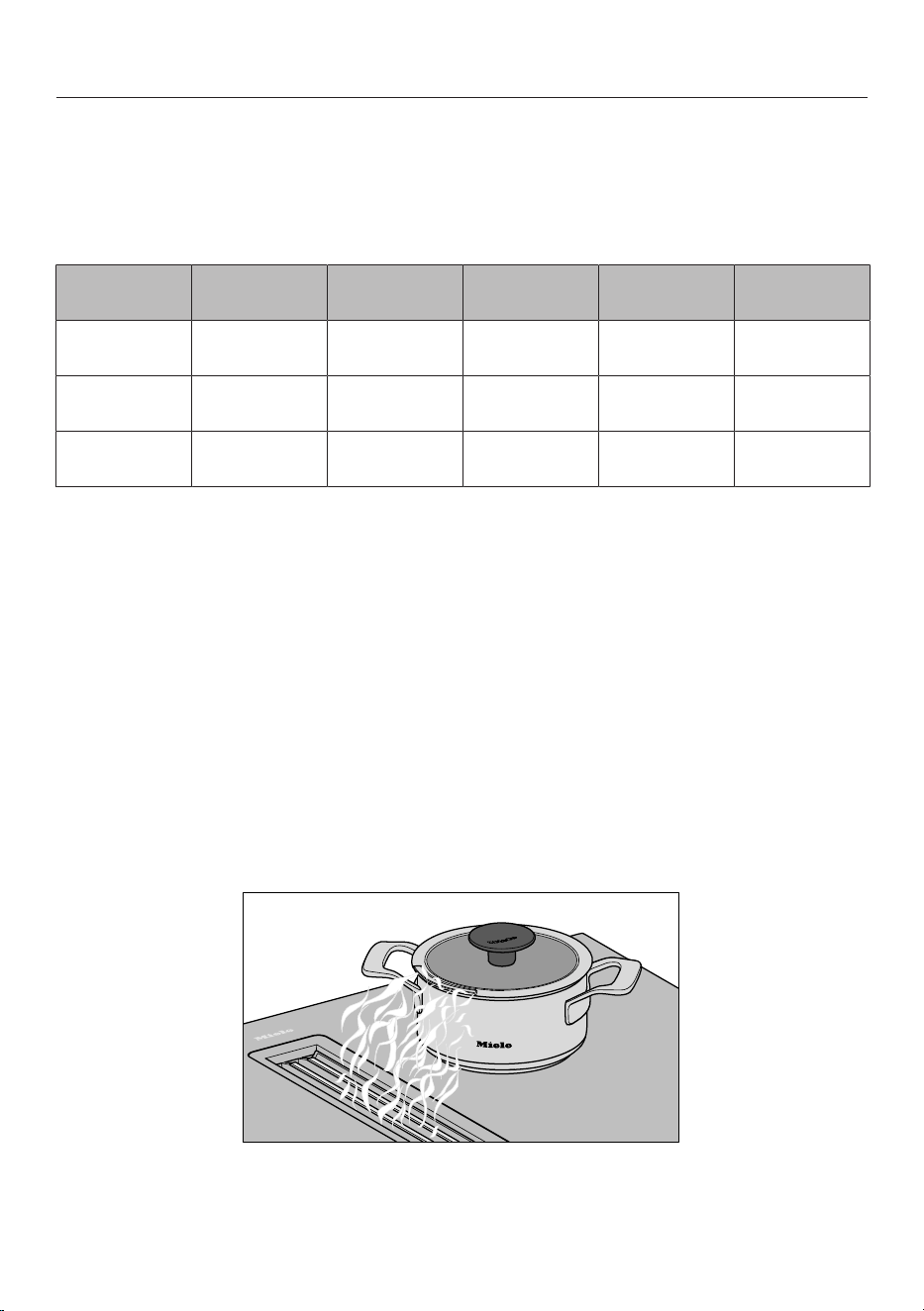
Good to know
Your cooker hood
How the cooker hood works
What happens to the air after extraction varies depending on the type of operation
selected:
Air guidance Grease filter Duct Charcoal filter
Out of the
building
Back into the
kitchen
Extraction
mode
x x - x -
Guided
recirculation mode
x x x - x
Plug & Play
mode
x - x - x
A summary of the operating options and the KMDA variants that offer them can be
found in “Installation – Operating options”.
Operating hours counter
The number of hours that the vapour extractor has been used for is stored in
memory.
When the grease filter symbol or the charcoal filter symbol (only in the case
of guided recirculation mode or Plug & Play mode) lights up, the operating hours
counters are signalling that the filters need to be cleaned or replaced.
Air extraction tips
Tip: For light to heavy cooking vapours and odours, select power levels 1 to 3 (3 if
the power level settings for the cooker hood have been modified). For short periods
of very strong vapours and odours, e.g. whilst searing meat, select the Booster set-
tingB.
Tip: Cookware with an optimised outlet for the vapours can be found in “Familiar-
isation – Optional accessories”.
74
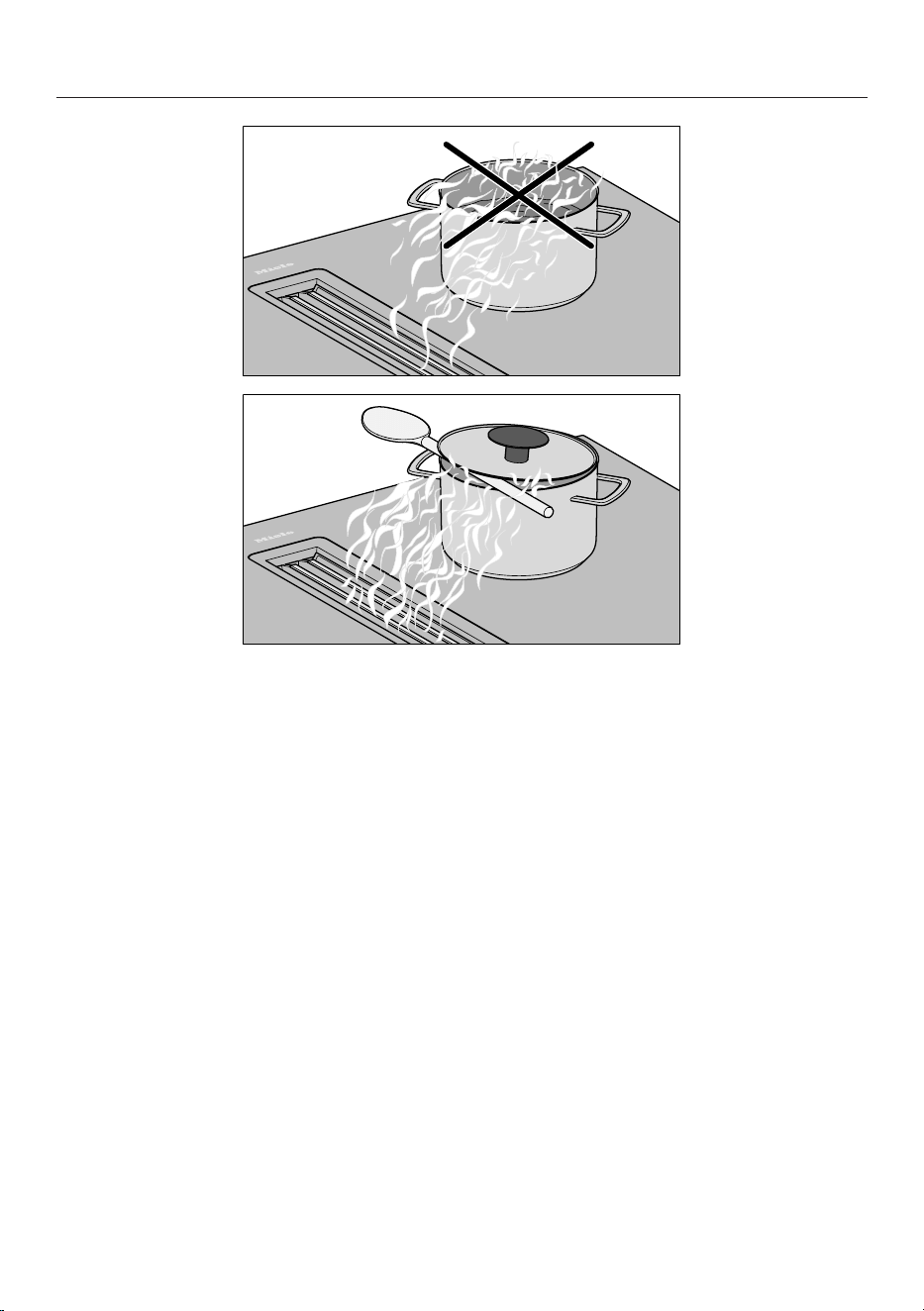
Good to know
Tip: If you do not have cookware with an optimised outlet for the vapours, you can
place a wooden spoon between the lid and the pot to help extract air effectively
with pots over 15cm high.
75

Adjusting settings
Accessing the Settings menu
The hob is switched off.
Press and hold
On/Off
until the
timer display shows .
Setting parameters
The display switches between para-
meter and code every 5seconds.
While or a parameter (e.g. ) is
visible on the display, press
Plus
re-
peatedly until the number for the
parameter you want appears on the
timer display.
Setting the code
The display switches between para-
meter and code every 5seconds.
While a code (e.g. ) is visible on
the display, press
Plus
repeatedly
until the number for the code you
want appears on the timer display.
Saving the settings
While is visible on the display,
press and hold
On/Off
until the in-
dicators go out.
To avoid saving the settings
While a parameter (e.g. ) or a
code (e.g. ) is visible on the dis-
play, press and hold
On/Off
until
the indicators go out.
76
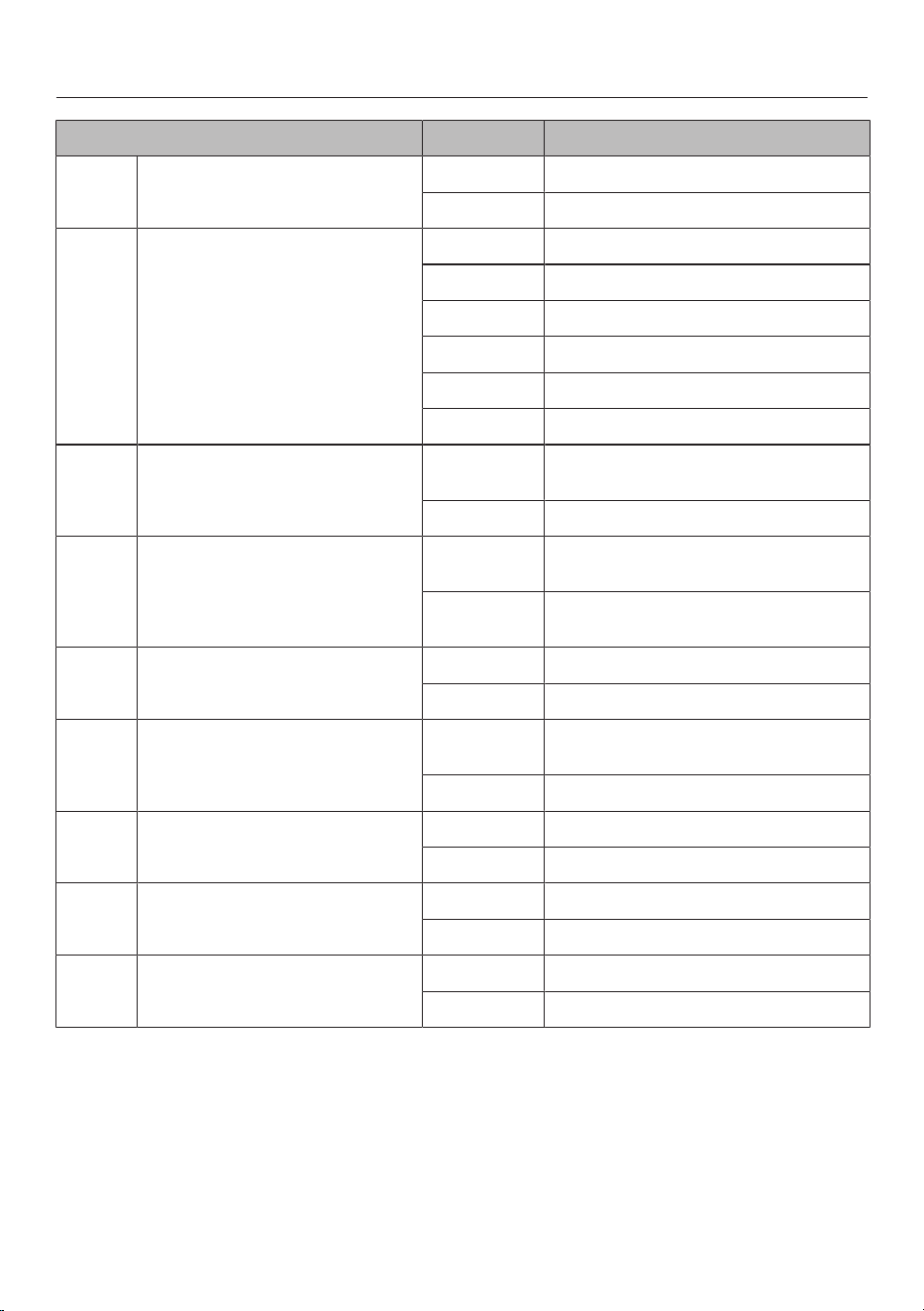
Adjusting settings
Parameter
1
Code Settings
2
Demo mode Demo mode off
Demo mode on
3
Power management
4
Off
5700W
4500W
3300W
2800W
1500W
Factory default Do not restore factory default set-
tings
Restore factory default settings
Hob power level setting range 9 power levels
without intermediate levels + Booster
9 power levels
with intermediate levels + Booster
Timer buzzer Off
On
System lock System lock can only be activated
manually
System lock activated automatically
Permanent pan recognition Permanent pan recognition off
Permanent pan recognition on
Operating mode of the integ-
rated extractor
Recirculation mode
Extraction mode
Deleting the fault memory Off
Deleting the fault memory
1
Programmes not shown here have no allocation.
2
The factory default setting is shown in bold.
3
After turning on the hob, the timer display shows for a few seconds.
4
The total hob power may be reduced in order to meet the local power supply provider’s re-
quirements.
77

Adjusting settings
5
is intended solely for service purposes.
78

Adjusting settings
Displaying the software version
Switch the hob on.
Press and hold the timer display and
the cooking zone display at the bot-
tom left at the same time until a
buzzer sounds.
Within 10seconds, press and hold
the timer display and the cooking
zone display at the bottom right at the
same time until a buzzer sounds.
The figures displayed can be analysed in
conjunction with the Customer Service
Department.
79
Cleaning and care
Surfaces
Hob models with MattFinish at the end
of their name feature matt black
ceramic glass. MattFinish ceramic glass
hobs differ from standard ceramic glass
hobs due to their rougher texture and
fewer light reflections. Special cleaning
instructions must be observed due to
the special features of MattFinish
ceramic glass.
Cleaning the ceramic glass hob:
KMDA5649FR,
KMDA5649FL
Cleaning MattFinish ceramic glass sur-
faces is described in “Cleaning and care
– Cleaning MattFinish ceramic glass
hobs”.
Safety notes on cleaning and care
Cleaning standard ceramic
glass surfaces such as
MattFinish ceramic glass sur-
faces
can damage the standard
ceramic glass surface.
Clean the standard ceramic
glass surface according to the
cleaning instructions for stand-
ard ceramic glass hobs.
Risk of burning due to hot
surfaces.
All parts of the hob may be hot
after use.
Switch the hob off.
Allow the hob to cool down be-
fore cleaning it.
All surfaces could be discol-
oured or damaged if unsuitable
cleaning agents are used or if
residues from suitable cleaning
agents are heated on the hob.
All surfaces are susceptible to
scratching.
Allow the surfaces to cool
down before cleaning the hob.
Remove all cleaning agent
residues immediately.
Never use abrasive sponges or
cleaning agents.
Using washing-up liquid will
not remove all soiling and
residues. An invisible film can
develop that can lead to discol-
ouration of the ceramic glass
surface. This discolouration
cannot be removed.
Clean the glass ceramic sur-
face regularly with a proprietary
ceramic glass cleaner.
Do not use a steam cleaner to
clean the hob.
Do not use pointed objects for
cleaning.
When to clean
Before each use:
Clean the entire hob and the base of
the cookware.
After every use:
Clean the entire hob.
Once a week:
To prevent cleaning agent residue be-
ing burned on, clean the ceramic sur-
face with the Miele ceramic and
80
Cleaning and care
stainless steel cleaner or with a pro-
prietary ceramic glass cleaner. Please
follow the cleaning agent manufac-
turer’s instructions.
Cleaning the ceramic glass surfaces
Removing light soiling
Clean the entire ceramic surface of
the hob with a damp, soft cloth and a
solution of water and a little washing-
up liquid. Please follow the cleaning
agent manufacturer’s instructions.
Removing stubborn soiling
Remove any coarse soiling with a
damp cleaning cloth and more stub-
born soiling with a glass scraper.
Clean the ceramic surface with the
Miele ceramic and stainless steel
cleaner or with a proprietary ceramic
glass cleaner. Please follow the clean-
ing agent manufacturer’s instructions.
Finishing the cleaning process
Remove all cleaning agent residues
with a damp cleaning cloth.
Dry the ceramic surface of the hob
after cleaning.
Unsuitable cleaning agents
To avoid damaging the surfaces of the
appliance, do not use:
- Cleaning agents containing soda, al-
kalines, ammonia, acids or chlorides
- Stain and rust removers
- Abrasive cleaning agents, e.g. powder
cleaners and cream cleaners
- Cleaning agents containing solvents
- Dishwasher cleaning agents
- Grill and oven sprays
- Hard, abrasive brushes
- Eraser stain remover blocks
- Sponges
Cleaning the MattFinish
ceramic glass hob:
KMDA5649FLMattFinish
Cleaning Standard ceramic glass sur-
faces is described in “Cleaning and care
– Cleaning ceramic glass hobs”.
Safety notes on cleaning and care
If you clean the MattFinish
ceramic glass surfaces in the
same way as standard ceramic
glass surfaces, the MattFinish
ceramic glass may not become
clean.
Clean the MattFinish ceramic
glass surface according to the
cleaning instructions for
MattFinish ceramic glass hobs.
Risk of burning due to hot
surfaces.
All parts of the hob may be hot
after use.
Switch the hob off.
Allow the hob to cool down be-
fore cleaning it.
All surfaces could be discol-
oured or damaged if unsuitable
cleaning agents are used or if
residues from suitable cleaning
agents are heated on the hob.
Allow the surfaces to cool
down before cleaning the hob.
Remove all cleaning agent
residues immediately.
81
Cleaning and care
Take care when handling
cleaning chemicals. Some
agents may be corrosive and ir-
ritant.
The relevant safety regulations
and safety data sheets issued
by the cleaning chemical man-
ufacturers must be observed.
Wear gloves!
Cosmetic products, especially
sunscreen, and hand disinfect-
ants can leave stains on matt
glass surfaces.
If cosmetic products come into
contact with a matt glass sur-
face, remove the residue im-
mediately with hot water,
washing-up liquid and a clean
microfibre cloth.
Do not use a steam cleaner to
clean the hob.
Do not use pointed objects for
cleaning.
When to clean
Before each use:
Clean the entire hob and the base of
the cookware.
After every use:
Clean the entire hob.
Once a week:
To prevent cleaning agent residue be-
ing burned on, clean the ceramic sur-
face with the Miele ceramic and
stainless steel cleaner or with a pro-
prietary ceramic glass cleaner. Please
follow the cleaning agent manufac-
turer’s instructions.
Cleaning the MattFinish ceramic glass
surfaces
Removing light soiling
Clean the entire ceramic surface of
the hob with a damp, soft cloth and a
solution of water and a little washing-
up liquid. Please follow the cleaning
agent manufacturer’s instructions.
Removing stubborn soiling
1. Example of a cleaning sponge with a soft
scouring side.
Remove any coarse soiling with a
damp cleaning cloth and more stub-
born soiling with a glass scraper.
Clean the ceramic surface with the
Miele ceramic and stainless steel
cleaner, with a proprietary ceramic
glass cleaner or scouring liquid.
Please follow the cleaning agent man-
ufacturer’s instructions.
Soak heavily soiled areas with scour-
ing liquid for 15minutes.
Clean the affected areas with a clean-
ing sponge with a soft scouring side
(1) for 2–5minutes.
If any residue remains, repeat the pro-
cess up to 3times.
Removing very heavy soiling
In the event of extreme soiling, use a
strong alkaline oven cleaner or barbe-
cue cleaner suitable for hobs. Leave
the cleaning agent to work for at least
30minutes.
82
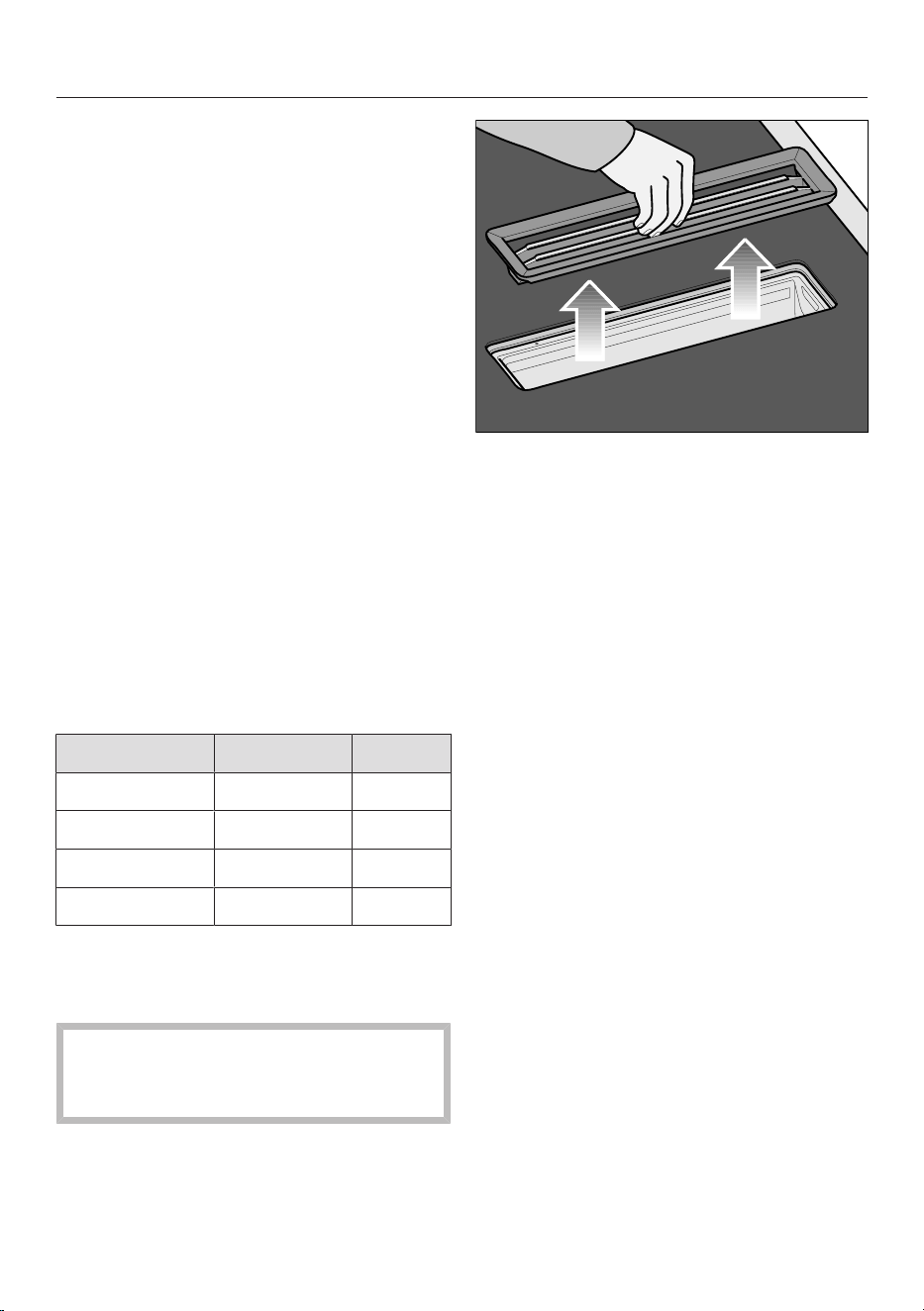
Cleaning and care
Finishing the cleaning process
Remove all cleaning agent residues
with a damp cleaning cloth.
Dry the ceramic surface of the hob
after cleaning.
Unsuitable cleaning agents
To avoid damaging the surfaces of the
appliance, do not use:
- Cleaning agents containing soda, am-
monia, acids or chlorides
- Stain and rust removers
- Powder cleaners and cream cleaners
- Cleaning agents containing solvents
- Dishwasher cleaning agents
- Hard, abrasive brushes
- Eraser stain remover blocks
Parts suitable for dishwashers
You can clean the removable compon-
ents of your hob as follows:
Automatic By hand
Cover grille X X
Grease filter X X
Drip tray X X
Cleaning flap X X
Cover grille
Removing the cover grille
The cover grille could be damaged.
Pull the cover grille vertically out of
the top of the KMDA.
Take hold of the cover grille in the
centre of the bars.
Pull the cover grille vertically upwards.
Cleaning the cover grille by hand
Clean the cover grille with a soft nylon
brush in a mild solution of hot water
and a little washing-up liquid. Do not
use concentrated washing-up liquid.
Cleaning the cover grille in the dish-
washer
Place the cover grille upright in the
lower basket.
Use a standard household dishwasher
detergent.
Select a dishwasher programme with
a maximum wash temperature of
55°C.
83
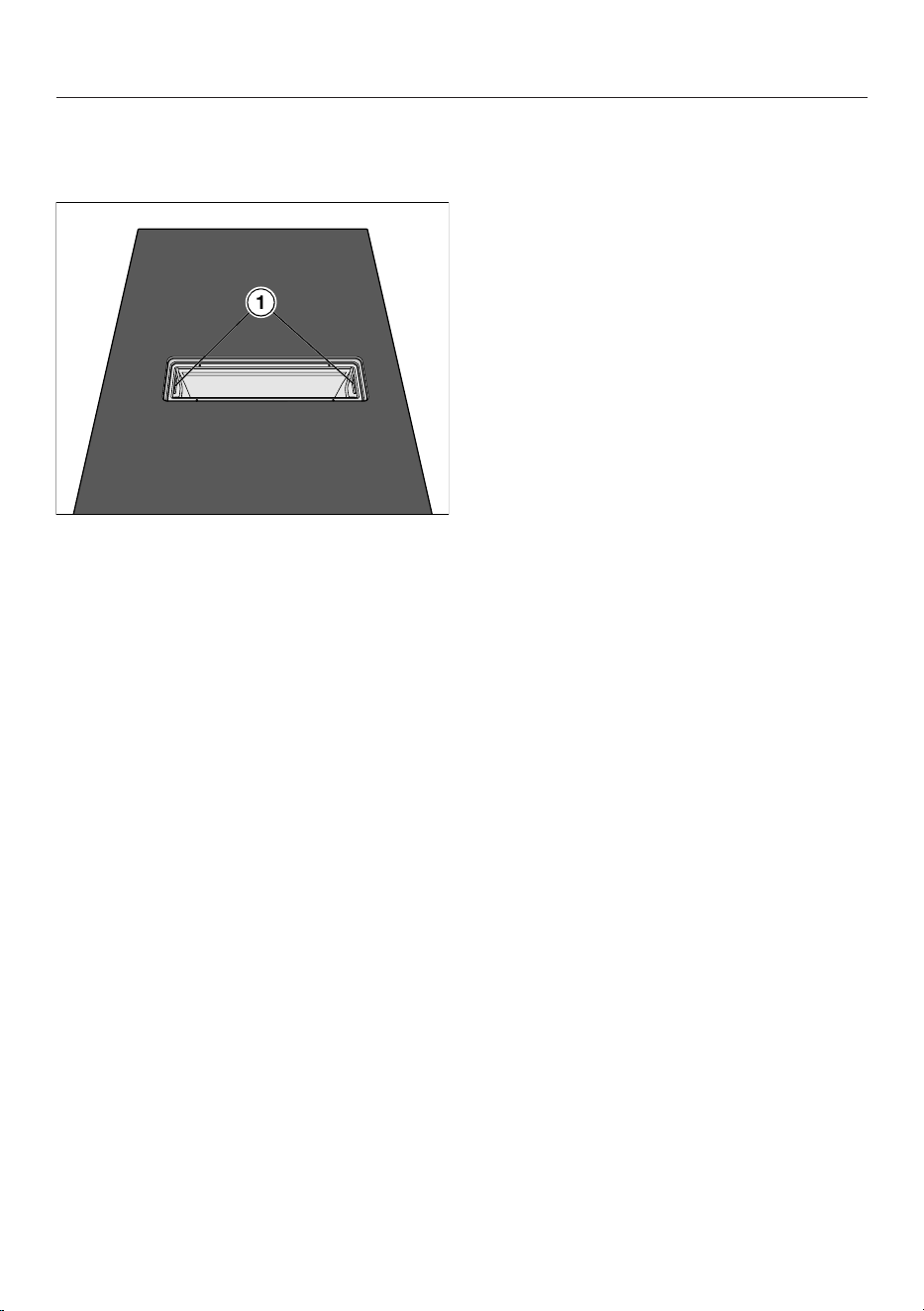
Cleaning and care
Grease filter
Removing the grease filter
Remove the cover grille.
Carefully remove the grease filter us-
ing the recessed grips (1). Ensure that
you do not tilt the grease filter.
Pour out any liquid which has collec-
ted at the bottom of the grease filter.
Cleaning the grease filter by hand
Clean the grease filter with a soft
nylon brush in a mild solution of hot
water and a little washing-up liquid.
Do not use concentrated washing-up
liquid.
Important information on cleaning in a
dishwasher
Excessively high temperatures can
render the grease filter unusable (e.g.
due to being warped out of shape). Se-
lect a programme that does not exceed
the recommended temperature.
Also follow the information provided in
the operating instructions for the dish-
washer.
Depending on the cleaning agent used,
the internal filter surfaces may become
discoloured. However, this will not af-
fect the functioning of the grease filter
in any way.
Cleaning the grease filter in the dish-
washer
Place the grease filter with its base fa-
cing upwards in the lower basket. En-
sure the spray arm is not obstructed.
Use a standard household dishwasher
detergent.
Select a dishwasher programme with
a maximum wash temperature of
65°C.
Fitting the grease filters
The grease filter and the grease filter
slot are designed so that it is impossible
to insert the filter the wrong way round.
Do not force the grease filter into place.
Insert the grease filter so that it is
completely hidden inside the grease
filter slot.
Replacing the grease filter
Regular usage and cleaning can cause
the filter surfaces to become worn.
If you identify any damage, replace the
grease filter.
Grease filters are available to order via
the Miele Customer Service Depart-
ment (see end of these operating in-
structions for contact details) or from
your Miele dealer.
Resetting the grease filter operating
hours counter
After cleaning the grease filter, the oper-
ating hours counter needs to be reset.
84
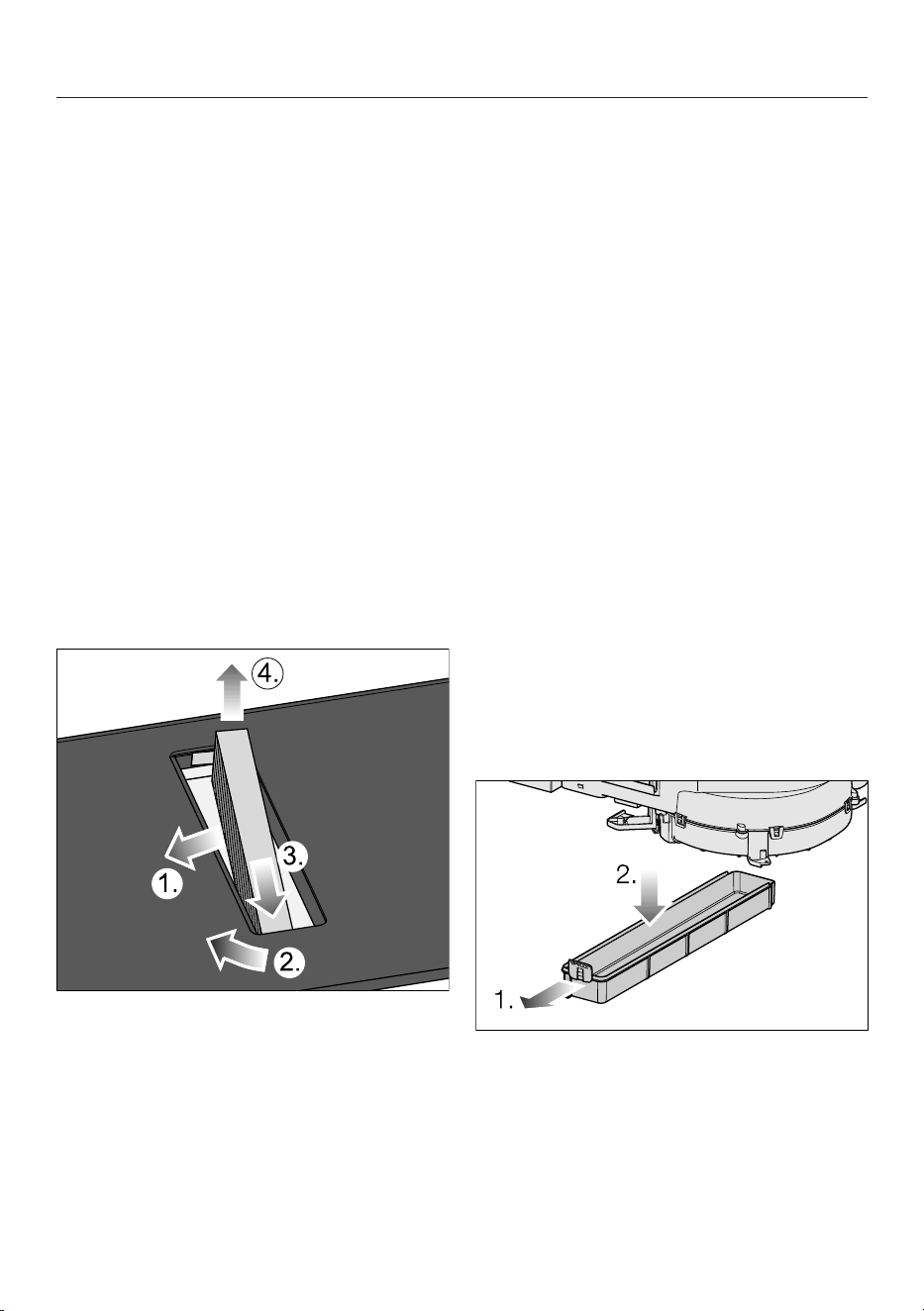
Cleaning and care
Touch and hold
Grease filter indic-
ator
for 3seconds.
The sensor control goes out.
Charcoal filter (only in the case
of guided recirculation mode or
Plug & Play mode)
Replacing the charcoal filter (only in
the case of guided recirculation mode
or Plug & Play mode)
The charcoal filters must be replaced
after 120operating hours. Charcoal
filter indicator is illuminated.
The charcoal filters listed here are suit-
able for the KMDA variants covered by
these operating instructions: DKF 37-P.
Remove the cover grille.
Remove the grease filter.
Remove the charcoal filter.
Resetting the charcoal filter operating
hours counter (only in the case of
guided recirculation mode or Plug &
Play mode)
The operating and installation instruc-
tions supplied with the recirculation box
state that the operating hours counter
for the charcoal filter needs to be activ-
ated. This is not necessary here.
Charcoal filter indicator
is also illu-
minated when the vapour extractor is
operated using extraction mode.
Touch and hold
Charcoal filter in-
dicator
for 3seconds.
The sensor control goes out.
Cleaning the cooker hood drip
tray
Clean the drip tray if liquid from food
being spilled or boiling over has got into
the cooker hood.
Remove and clean the grease filter as
described in “Cleaning and care –
Grease filter”.
Push the plastic bracket to the left
until the drip tray can be pulled down-
wards.
Pour out the liquid.
Clean and dry the drip tray.
Also clean and dry accessible areas
inside of the cooker hood.
85

Cleaning and care
Fasten the drip tray back onto the
casing.
Replace the grease filter and refit the
cover grille.
Cleaning inside the cooker hood
casing
Remove the grease filter.
Clean off any accessible oil or fat
build-up from the casing.
86

Troubleshooting
Messages in the display
Problem Cause and remedy
After turning on the hob
or touching a sensor, the
timer display shows
for a few seconds.
The system lock is activated.
Deactivate the system lock.
The safety lock is activated.
Deactivate the safety lock.
After turning on the hob,
the timer display briefly
shows. The cooking
zones do not heat up.
The hob is in demo mode.
There is cookware on the hob.
Switch the hob on.
Switch demo mode off.
flashes alternately with
on the timer display.
The overheating protection mechanism has been ac-
tivated.
Allow the hob to cool down.
Rectify the causes of the overheating.
Check that the hob is working.
If this fault message continues to appear on the
timer display, contact the Customer Service Depart-
ment.
The timer display altern-
ates between and .
The fan is blocked or defective.
Make sure it has not been blocked by an object.
Remove the obstruction.
If this fault message continues to appear on the
timer display, contact the Customer Service Depart-
ment.
The hob has switched off
automatically. When the
hob is switched back on,
the timer display shows
.
One or more of the sensor controls are covered, e.g.
by finger contact, food boiling over or an object.
Remove the soiling and/or obstruction.
The timer display altern-
ates between and or
.
The hob is set to the wrong voltage.
Disconnect the hob from the mains power supply.
Contact the Customer Service Department.
A message not listed in
this table is appearing in
the timer display.
There is an electronic module fault.
Disconnect the power supply to the hob for approx.
1minute.
If the problem persists after the power supply has
been restored, please contact the Customer Service
Department.
87
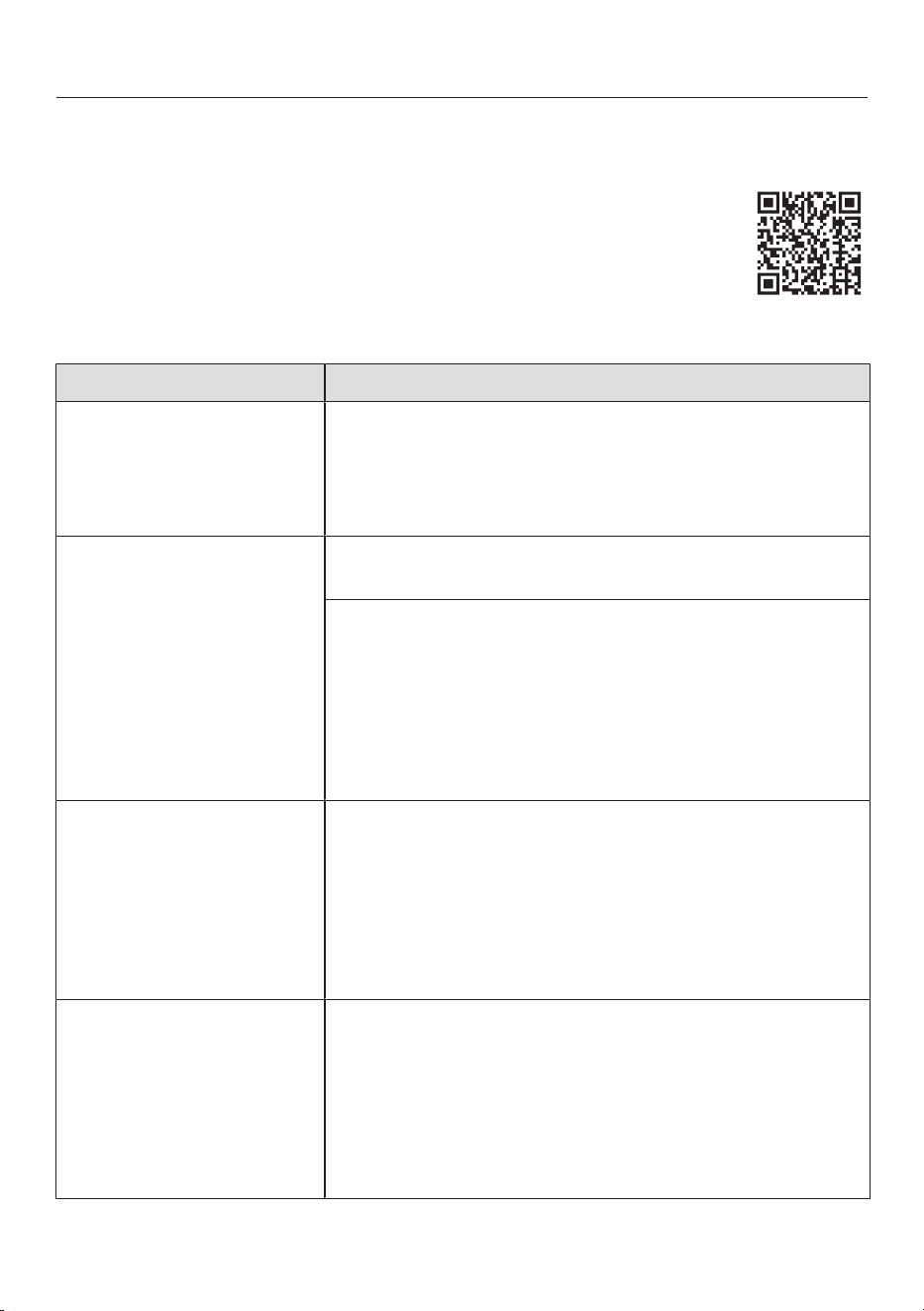
Troubleshooting
Many malfunctions and faults can be easily remedied. You can save time and
money in many cases, as you do not need to contact Customer Service.
More information to help you remedy faults yourself can be found at
www.miele.de/support/customer-assistance.
Unexpected behaviour
Problem Cause and remedy
Power level9 is auto-
matically reduced if you
also set power level9 for
the connected cooking
zone.
Operating both zones at power level9 exceeds the
permitted maximum power for the two zones.
Use a different cooking zone.
A cooking zone or the
whole hob switches off
automatically.
It has been operated for too long.
Switch the hob or cooking zone on again.
The overheating protection mechanism has been ac-
tivated.
Allow the hob to cool down.
Rectify the causes of the overheating.
Check that the hob is working.
If the problem occurs again, contact the Customer
Service Department.
The cooking zone is not
working in the usual way
with the set power level.
The overheating protection mechanism has been ac-
tivated.
Allow the hob to cool down.
Rectify the causes of the overheating.
Check that the hob is working.
If the problem occurs again, contact the Customer
Service Department.
The Booster level has
deactivated early auto-
matically.
The overheating protection mechanism has been ac-
tivated.
Allow the hob to cool down.
Rectify the causes of the overheating.
Check that the hob is working.
If the problem occurs again, contact the Customer
Service Department.
88
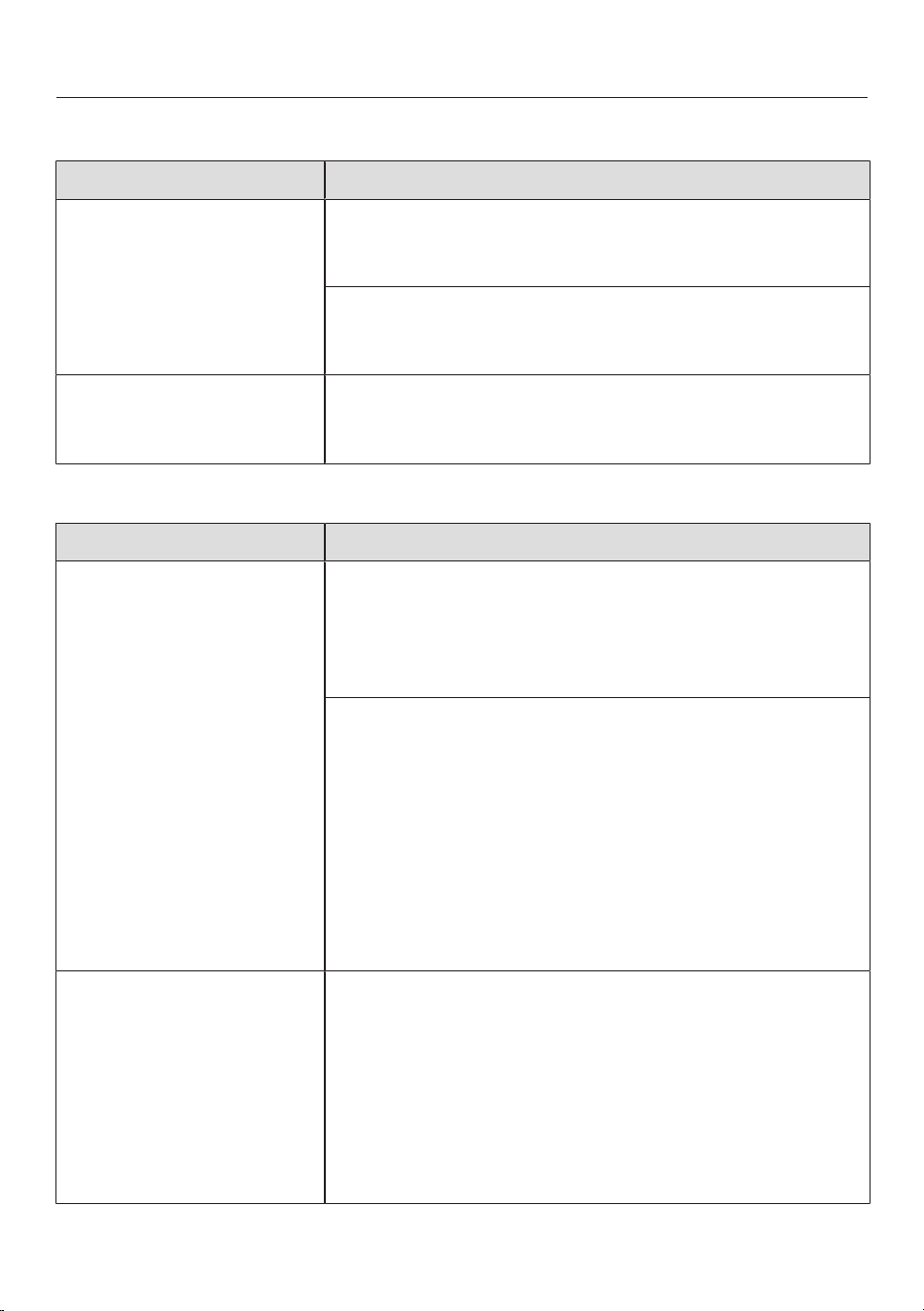
Troubleshooting
Unsatisfactory results
Problem Cause and remedy
The food in the cook-
ware does not heat up
when the auto heat-up is
switched on.
Large quantities of food are being cooked.
Start cooking at the highest power level and then
switch back manually.
The cookware is not conducting heat properly.
Use different cookware that is able to better con-
duct heat.
The extraction power of
the vapour extractor is
low.
Recirculation mode is set as the operating mode.
Set the operating mode of the integrated extractor
() to extraction mode ().
General problems or technical faults
Problem Cause and remedy
The hob or cooking
zones will not switch on.
There is no power to the hob.
Check whether the circuit breaker has tripped. Con-
tact a qualified electrician or the Miele Customer
Service Department (for the minimum fuse rating,
see data plate).
There may be a technical fault.
Disconnect the hob from the electricity supply for
approx. 1minute. To do this:
– Trip the relevant mains fuse or screw the fine-
wire fuse out completely, or
– Switch off at the residual current device.
If the hob will still not turn on after resetting the trip
switch in the fuse box or the residual current device,
contact a qualified electrician or the Miele Customer
Service Department.
A smell and vapours are
given off when the new
hob is being used.
The metal components have a protective coating.
When the hob is used for the first time, this causes a
smell and possibly also vapour. The material from
which the induction coils are made also gives off an
odour in the first few hours of operation. With each
subsequent use, the odour is reduced until it disap-
pears completely. The odour and any vapours given off
do not indicate a faulty connection or appliance and
they are not hazardous to health.
89
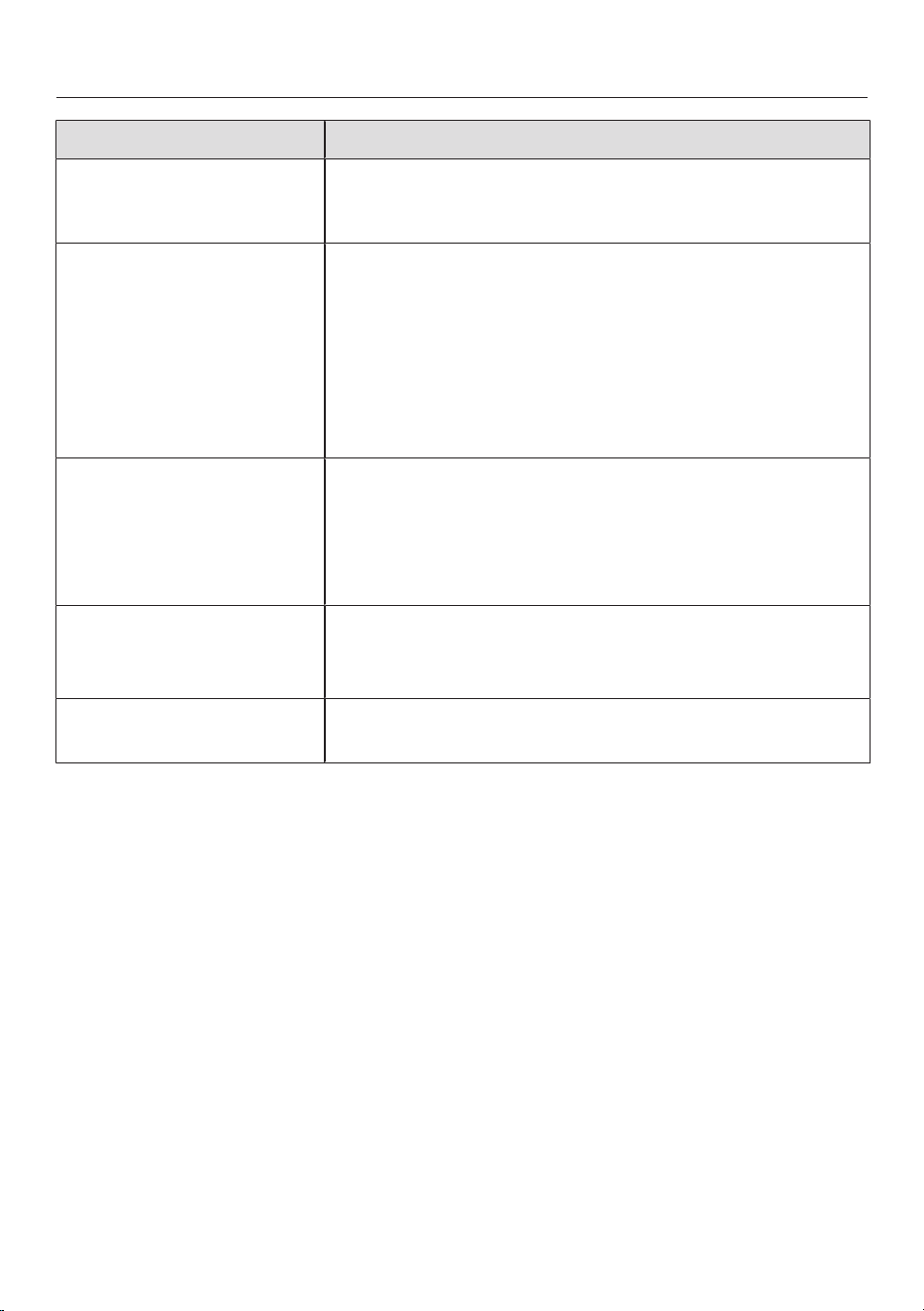
Troubleshooting
Problem Cause and remedy
An operating noise can
be heard after the hob
has been switched off.
The cooling fan runs until the hob has cooled down
and then switches off automatically.
Liquid has got into the
vapour extractor.
Due to boiling over or spillage, liquid has made its way
through the cover grille into the vapour extractor.
The base of the grease filter can hold approx. 250ml
of liquid. The drip tray underneath the housing can
hold a further 900ml of liquid.
Switch the vapour extractor off.
Clean the grease filter, the drip tray and the inside of
the housing.
Extraction power has de-
creased. Extraction
noise has increased.
Objects (e.g. a cloth) have been drawn into the cooker
hood.
Switch the vapour extractor off.
Remove the grease filter.
Remove any objects from the grease filter.
Charcoal filter indic-
ator
lights up
The charcoal filter must be replaced.
Replace the charcoal filter.
Reset the operating hours counter.
Grease filter indicator
lights up
The grease filter needs to be cleaned.
Clean the grease filter.
90

Customer Service
Information to help you rectify faults yourself and about Miele spare parts can be
found at www.miele.com/service.
Contact in the event of a fault
In the event of a fault which you cannot remedy yourself, please contact your Miele
dealer or Miele Customer Service.
You can book a Miele Customer Service call-out online at www.miele.com/ser-
vice.
Contact information for Miele Customer Service can be found at the end of this
document.
Please quote the model identifier and serial number of your appliance (SN) when
contacting Miele Customer Service. These can be found on the data plate or see
“Operation – Hob data”.
Data plate
Stick the extra data plate supplied with the appliance here. Make sure that the
model identifier matches the one specified on the back cover of this document.
Warranty
For information on the appliance warranty specific to your country please contact
Miele. See back cover for address.
In the UK, your appliance warranty is valid for 2 years from the date of purchase.
However, you must activate your cover by calling 0330 160 6640 or registering on-
line at www.miele.co.uk.
91
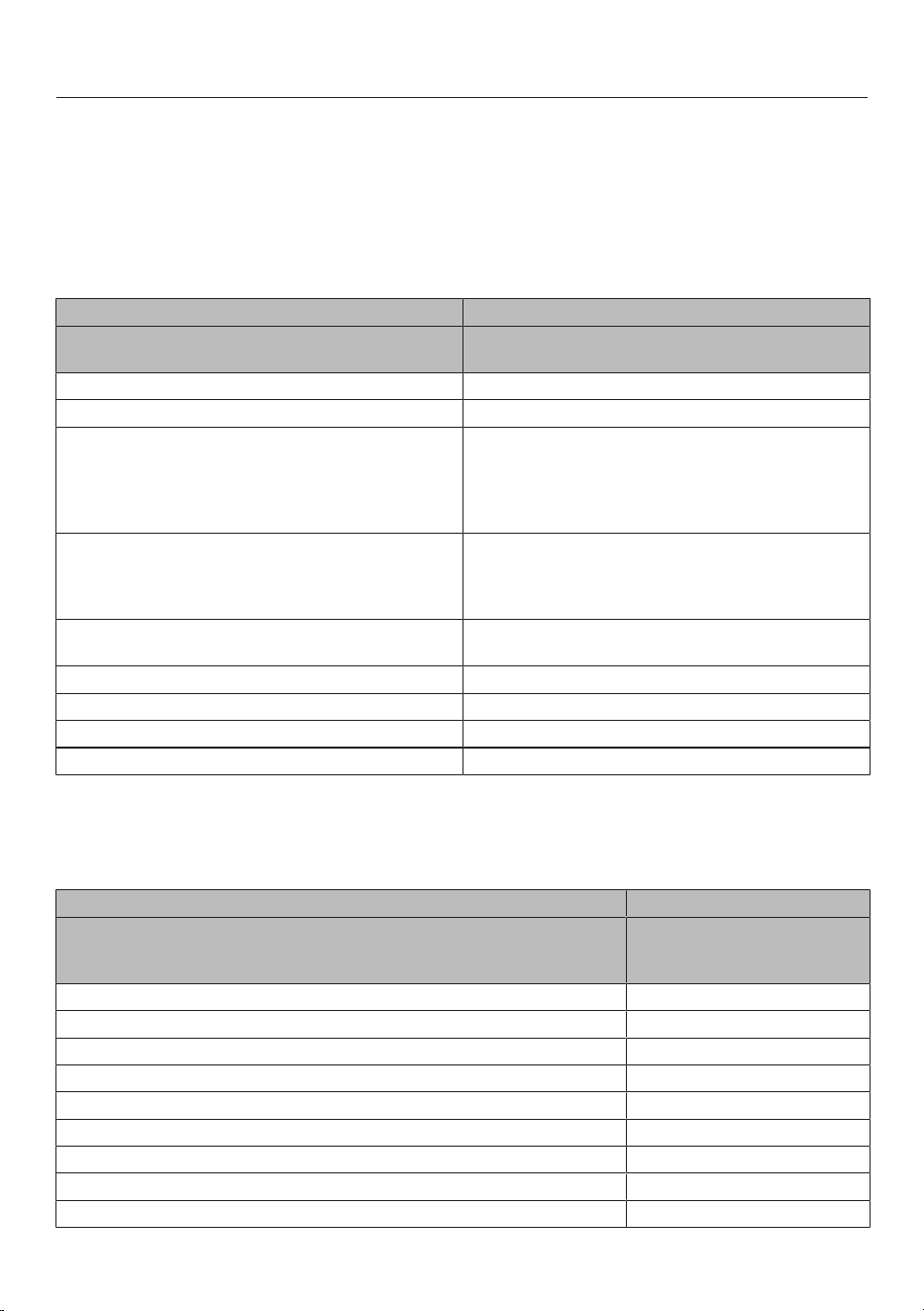
Technical data
Product data sheets
The following product data sheets apply to the models described in these operating
and installation instructions.
Information for domestic electric hobs
In acc. with regulation (EU) No. 66/2014
MIELE
Model name/identifier KMDA5649FR, KMDA5649FL,
KMDA5649FLMattFinish
Type of hob built-in
Number of cooking zones and/or areas 4
For circular cooking zones: diameter of useful sur-
face area/cooking zone
For non-circular cooking zones or areas: length and
width of useful surface area per electric cooking
zone or area
1. = Ø 120-160 mm
2. = Ø 140-210 mm
3. = 210x380 mm
Energy consumption per cooking zone or area cal-
culated per kg (EC
electric cooking
)
1. = 177,7 Wh/kg
2. = 206,7 Wh/kg
3. = 192,5 Wh/kg
Energy consumption for the hob calculated per kg
(EC
electric hob
)
192,3 Wh/kg
- Dual-circuit ring / front left / Induction
- Dual-circuit ring / rear left / Induction
- Flex cooking area / right / Induction
Data sheet for household cooker hoods
In acc. with delegated regulation (EU) No. 65/2014 and regulation (EU) No.
66/2014
MIELE
Model name/identifier KMDA5649FR,
KMDA5649FL,
KMDA5649FLMattFinish
Annual Energy Consumption (AEC
hood
) 48,7 kWh/year
Energy efficiency class A
Energy efficiency index (EEI
hood
) 45,5
Fluid Dynamic Efficiency (FDE
hood
) 33,8
Fluid Dynamic Efficiency class
A (most efficient) to G (least efficient) A
Lighting Efficiency (LE
hood
) 0,0 lx/W
Lighting Efficiency class
A (most efficient) to G (least efficient) NA
92
Technical data
Grease Filtering Efficiency 91,0%
Grease Filtering Efficiency class
A (most efficient) to G (least efficient) B
Airflow at best efficiency point 335,8 m
3
/h
Air flow (min. speed) 230 m
3
/h
Air flow (max. speed) 495 m
3
/h
Air flow (intensive or boost setting) 635 m
3
/h
Max. air flow (Q
max
) 635,9 m
3
/h
Air pressure at best efficiency point 605 Pa
Airborne acoustical A-weighted sound power emissions (min. speed) 48 dB
Airborne acoustical A-weighted sound power emissions (max. speed) 66 dB
Airborne acoustical A-weighted sound power emissions (intensive or
boost setting)
71 dB
Electrical power input at best efficiency point 166,8 W
Power consumption in standby mode (P
s
) 0,30 W
Nominal power of lighting system W
Average illumination of the lighting system on the cooking surface Ix
Time increase factor 0,8
Copyrights and Licences
Zhongshan E-Tech ANC Co., Ltd All rights reserved.
Redistribution and use in source and binary forms, with or without modification, are
permitted provided that the following conditions are met:
1. Redistributions of source code must retain the above copyright notice, this list
of conditions and the following disclaimer.
2. Redistributions in binary form must reproduce the above copyright notice, this
list of conditions and the following disclaimer in the documentation and/or other
materials provided with the distribution.
3. Neither the name of Zhongshan E-Tech ANC Co., Ltd nor the names of its con-
tributors may be used to endorse or promote products derived from this soft-
ware without specific prior written permission.
THIS SOFTWARE IS PROVIDED BY THE COPYRIGHT HOLDERS AND CON-
TRIBUTORS "AS IS" AND ANY EXPRESS OR IMPLIED WARRANTIES, INCLUD-
ING, BUT NOT LIMITED TO, THE IMPLIED WARRANTIES OF MERCHANTABIL-
ITY AND FITNESS FOR A PARTICULAR PURPOSE ARE DISCLAIMED. IN NO
EVENT SHALL THE COPYRIGHT HOLDER OR CONTRIBUTORS BE LIABLE FOR
ANY DIRECT, INDIRECT, INCIDENTAL, SPECIAL, EXEMPLARY, OR CON-
SEQUENTIAL DAMAGES (INCLUDING, BUT NOT LIMITED TO, PROCURE-
MENT OF SUBSTITUTE GOODS OR SERVICES; LOSS OF USE, DATA, OR
PROFITS; OR BUSINESS INTERRUPTION) HOWEVER CAUSED AND ON ANY
THEORY OF LIABILITY, WHETHER IN CONTRACT, STRICT LIABILITY, OR TORT
93

Technical data
(INCLUDING NEGLIGENCE OR OTHERWISE) ARISING IN ANY WAY OUT OF
THE USE OF THIS SOFTWARE, EVEN IF ADVISED OF THE POSSIBILITY OF
SUCH DAMAGE.
Copyright 2024 - Zhongshan E-Tech ANC Co., Ltd
Apache License
Version 2.0, January 2004
http://www.apache.org/licenses/
TERMS AND CONDITIONS FOR USE, REPRODUCTION, AND DISTRIBUTION
1. Definitions.
"Contributor" shall mean Licensor and any individual or Legal Entity on behalf of
whom a Contribution has been received by Licensor and subsequently incorpor-
ated within the Work.
"License" shall mean the terms and conditions for use, reproduction, and distri-
bution as defined by Sections 1 through 9 of this document.
"Licensor" shall mean the copyright owner or entity authorized by the copyright
owner that is granting the License.
"Legal Entity" shall mean the union of the acting entity and all other entities that
control, are controlled by, or are under common control with that entity. For the
purposes of this definition, "control" means (i) the power, direct or indirect, to
cause the direction or management of such entity, whether by contract or other-
wise, or (ii) ownership of fifty percent (50%) or more of the outstanding shares,
or (iii) beneficial ownership of such entity.
"You" (or "Your") shall mean an individual or Legal Entity exercising permissions
granted by this License.
"Source" form shall mean the preferred form for making modifications, including
but not limited to software source code, documentation source, and configura-
tion files.
"Object" form shall mean any form resulting from mechanical transformation or
translation of a Source form, including but not limited to compiled object code,
generated documentation, and conversions to other media types.
"Work" shall mean the work of authorship, whether in Source or Object form,
made available under the License, as indicated by a copyright notice that is in-
cluded in or attached to the work (an example is provided in the Appendix be-
low).
"Derivative Works" shall mean any work, whether in Source or Object form, that
is based on (or derived from) the Work and for which the editorial revisions, an-
notations, elaborations, or other modifications represent, as a whole, an original
94

Technical data
work of authorship. For the purposes of this License, Derivative Works shall not
include works that remain separable from, or merely link (or bind by name) to the
interfaces of, the Work and Derivative Works thereof.
"Contribution" shall mean any work of authorship, including the original version
of the Work and any modifications or additions to that Work or Derivative Works
thereof, that is intentionally submitted to Licensor for inclusion in the Work by
the copyright owner or by an individual or Legal Entity authorized to submit on
behalf of the copyright owner. For the purposes of this definition, "submitted"
means any form of electronic, verbal, or written communication sent to the Li-
censor or its representatives, including but not limited to communication on
electronic mailing lists, source code control systems, and issue tracking systems
that are managed by, or on behalf of, the Licensor for the purpose of discussing
and improving the Work, but excluding communication that is conspicuously
marked or otherwise designated in writing by the copyright owner as "Not a
Contribution."
2. Grant of Copyright License. Subject to the terms and conditions of this License,
each Contributor hereby grants to You a perpetual, worldwide, non-exclusive,
no-charge, royalty-free, irrevocable copyright license to reproduce, prepare De-
rivative Works of, publicly display, publicly perform, sublicense, and distribute
the Work and such Derivative Works in Source or Object form.
3. Grant of Patent License. Subject to the terms and conditions of this License,
each Contributor hereby grants to You a perpetual, worldwide, non-exclusive,
no-charge, royalty-free, irrevocable (except as stated in this section) patent li-
cense to make, have made, use, offer to sell, sell, import, and otherwise transfer
the Work, where such license applies only to those patent claims licensable by
such Contributor that are necessarily infringed by their Contribution(s) alone or
by combination of their Contribution(s) with the Work to which such Contribu-
tion(s) was submitted. If You institute patent litigation against any entity (includ-
ing a cross-claim or counterclaim in a lawsuit) alleging that the Work or a Contri-
bution incorporated within the Work constitutes direct or contributory patent in-
fringement, then any patent licenses granted to You under this License for that
Work shall terminate as of the date such litigation is filed.
4. Redistribution. You may reproduce and distribute copies of the Work or Derivat-
ive Works thereof in any medium, with or without modifications, and in Source or
Object form, provided that You meet the following conditions:
You may add Your own copyright statement to Your modifications and may
provide additional or different license terms and conditions for use, reproduction,
or distribution of Your modifications, or for any such Derivative Works as a
whole, provided Your use, reproduction, and distribution of the Work otherwise
complies with the conditions stated in this License.
– You must give any other recipients of the Work or Derivative Works a copy of
this License; and
95

Technical data
– You must cause any modified files to carry prominent notices stating that You
changed the files; and
– You must retain, in the Source form of any Derivative Works that You distrib-
ute, all copyright, patent, trademark, and attribution notices from the Source
form of the Work, excluding those notices that do not pertain to any part of
the Derivative Works; and
– If the Work includes a "NOTICE" text file as part of its distribution, then any
Derivative Works that You distribute must include a readable copy of the attri-
bution notices contained within such NOTICE file, excluding those notices
that do not pertain to any part of the Derivative Works, in at least one of the
following places: within a NOTICE text file distributed as part of the Derivative
Works; within the Source form or documentation, if provided along with the
Derivative Works; or, within a display generated by the Derivative Works, if
and wherever such third-party notices normally appear. The contents of the
NOTICE file are for informational purposes only and do not modify the Li-
cense. You may add Your own attribution notices within Derivative Works that
You distribute, alongside or as an addendum to the NOTICE text from the
Work, provided that such additional attribution notices cannot be construed
as modifying the License.
5. Submission of Contributions. Unless You explicitly state otherwise, any Contri-
bution intentionally submitted for inclusion in the Work by You to the Licensor
shall be under the terms and conditions of this License, without any additional
terms or conditions. Notwithstanding the above, nothing herein shall supersede
or modify the terms of any separate license agreement you may have executed
with Licensor regarding such Contributions.
6. Trademarks. This License does not grant permission to use the trade names,
trademarks, service marks, or product names of the Licensor, except as required
for reasonable and customary use in describing the origin of the Work and re-
producing the content of the NOTICE file.
7. Disclaimer of Warranty. Unless required by applicable law or agreed to in writ-
ing, Licensor provides the Work (and each Contributor provides its Contribu-
tions) on an "AS IS" BASIS, WITHOUT WARRANTIES OR CONDITIONS OF
ANY KIND, either express or implied, including, without limitation, any war-
ranties or conditions of TITLE, NON-INFRINGEMENT, MERCHANTABILITY, or
FITNESS FOR A PARTICULAR PURPOSE. You are solely responsible for de-
termining the appropriateness of using or redistributing the Work and assume
any risks associated with Your exercise of permissions under this License.
8. Limitation of Liability. In no event and under no legal theory, whether in tort (in-
cluding negligence), contract, or otherwise, unless required by applicable law
(such as deliberate and grossly negligent acts) or agreed to in writing, shall any
Contributor be liable to You for damages, including any direct, indirect, special,
incidental, or consequential damages of any character arising as a result of this
License or out of the use or inability to use the Work (including but not limited to
96

Technical data
damages for loss of goodwill, work stoppage, computer failure or malfunction, or
any and all other commercial damages or losses), even if such Contributor has
been advised of the possibility of such damages
9. Accepting Warranty or Additional Liability. While redistributing the Work or De-
rivative Works thereof, You may choose to offer, and charge a fee for, accept-
ance of support, warranty, indemnity, or other liability obligations and/or rights
consistent with this License. However, in accepting such obligations, You may
act only on Your own behalf and on Your sole responsibility, not on behalf of any
other Contributor, and only if You agree to indemnify, defend, and hold each
Contributor harmless for any liability incurred by, or claims asserted against,
such Contributor by reason of your accepting any such warranty or additional li-
ability.
END OF TERMS AND CONDITIONS
APPENDIX: How to apply the Apache License to your work.
To apply the Apache License to your work, attach the following boilerplate notice,
with the fields enclosed by brackets "[]" replaced with your own identifying inform-
ation. (Don't include the brackets!) The text should be enclosed in the appropriate
comment syntax for the file format. We also recommend that a file or class name
and description of purpose be included on the same "printed page" as the copy-
right notice for easier identification within third-party archives.
Licensed under the Apache License, Version 2.0 (the "License"); you may not use
this file except in compliance with the License. You may obtain a copy of the Li-
cense at
http://www.apache.org/licenses/LICENSE-2.0
Unless required by applicable law or agreed to in writing, software distributed un-
der the License is distributed on an "AS IS" BASIS, WITHOUT WARRANTIES OR
CONDITIONS OF ANY KIND, either express or implied. See the License for the
specific language governing permissions and limitations under the License.
97


United Kingdom
Miele Co. Ltd., Fairacres, Marcham Road, Abingdon, Oxon, OX14 1TW
Tel: 0330 160 6600, Internet: www.miele.co.uk, E-mail: [email protected]
Australia
Miele Australia Pty. Ltd.
ACN 005 635 398
ABN 96 005 635 398
Level 4, 141 Camberwell Road
Hawthorn East, VIC 3123
Tel: 1300 464 353
E-mail: [email protected]
Internet: www.miele.com.au
Miele Electrical Appliances Co. Ltd.
No. 82, Shimenyi Road, JingAn District
Shanghai, China, P.R.C
Post Code: 200040
Phone: +86 21 6157 3500
Fax: +86 21 6157 3511
E-mail: info@miele.cn
Internet: www.miele.cn
China Mainland
Miele (Hong Kong) Ltd.
41/F - 4101, Manhattan Place
23 Wang Tai Road
Kowloon Bay, Hong Kong
Tel: (852) 2610 1025
Fax: (852) 3579 1404
E-mail:
Website: www.miele.hk
Hong Kong, China
Miele India Pvt. Ltd.
1st Floor, Copia Corporate Suites,
Commercial Plot 9, Mathura Road,
Jasola, New Delhi - 110025
E-mail: customercare@miele.in
Website: www.miele.in
India
Miele Ireland Ltd.
2024 Bianconi Avenue
Citywest Business Campus
Dublin 24
Tel: (01) 461 07 10
Fax: (01) 461 07 97
E-mail: [email protected]
Internet: www.miele.ie
Ireland
Malaysia
Miele Sdn Bhd
Suite 12-2, Level 12
Menara Sapura Kencana
Petroleum
Solaris Dutamas No. 1
Jalan Dutamas 1
50480 Kuala Lumpur, Malaysia
Phone: +603-6209-0288
Fax: +603-6205-3768
Miele New Zealand Limited
IRD 98 463 631
8 College Hill
Freemans Bay, Auckland 1011
Tel: 0800 464 353
Internet: www.miele.co.nz
New Zealand
Miele Pte. Ltd.
29 Media Circle
#11-04 ALICE@Mediapolis
Singapore 138565
Tel: +65 6735 1191
Fax: +65 6735 1161
E-mail: [email protected]
Internet: www.miele.sg
Singapore
Miele (Pty) Ltd.
63 Peter Place, Bryanston 2194
Tel: (011) 875 9000
Fax: (011) 875 9035
E-mail: [email protected]
Internet: www.miele.co.za
South Africa
Miele Appliances LLC
Showroom 1, Eiffel 1 Building
P.O. Box 114782 - Dubai
Tel. +971 4 3044 999
Fax. +971 4 3418 852
800-MIELE (64353)
E-mail: [email protected]
Website: www.miele.ae
United Arab Emirates
Manufacturer: Miele & Cie. KG, Carl-Miele-Straße 29, 33332 Gütersloh, Germany
Thailand
Miele Appliances Ltd.
BHIRAJ TOWER at EmQuartier
43rd Floor Unit 4301-4303
689 Sukhumvit Road
North Klongton Sub-District
Vadhana District
Bangkok 10110, Thailand
Sheikh Zayed Road, Umm Al Sheif
E-mail: customercare@miele.co.nz
P.O. Box 69434, Bryanston 2021

M.-Nr. 13 156 530 / 00 / 002en-GB
KMDA5649FR, KMDA5649FL,
KMDA5649FLMattFinish