Applications Operation Separate washing
Changing the programme sequence
OPERATION
SEPARATE WASHING
SEPARATE DRYING
Separate drying
WTW 870 WPM en - AU, NZ M.-Nr. 11 976 040/00
尜Before using the washer-dryer for
the first time, ensure that it is correctly
installed and connected. Install and
connect the appliance as described in the
operating instructions.
It is essential to read the separate
operating instructions.
You can use this washer-dryer to:
– wash separately
with a maximum load of 9.0kg,
– dry separately
with a maximum load of 5.0kg,
or
– wash and dry in a continuous
sequence
with a maximum load of 5.0kg.
3 5
1
2
4
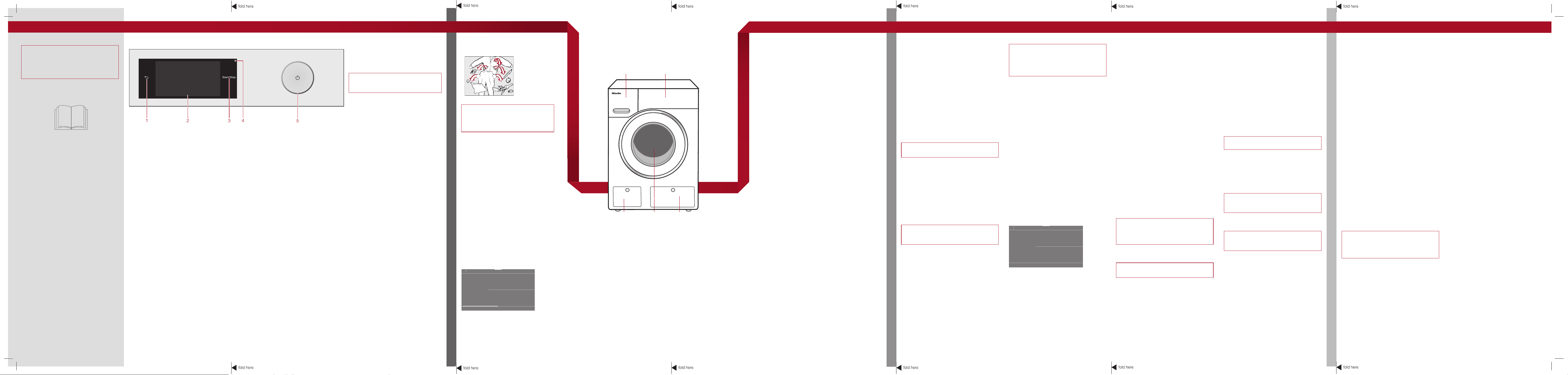
1 Detergent dispenser drawer
2 Control panel
3 Access to filters, pumps and
emergency release
4 Door
5 Access panel for TwinDos containers
1. Preparing the laundry
ĺ Empty all pockets.
尜Foreign objects (e.g. nails, coins,
paper clips etc.) can cause damage
to fabrics and to components in the
machine.
ĺ Sort the laundry by colour and by care
label. Most garments have a textile
care label in the collar or side seam.
ĺ Pre-treat stains and badly soiled areas
(see "ABC of Stains" on the Miele
website.).
If you have washed a full load of laundry
and you wish to dry the laundry in the
washer-dryer afterwards, you will have
to remove half the load and carry out the
drying process in two loads.
1. Preparing the laundry
ĺ Sort the laundry according to the type
of fibre and weave, garment care label
symbol and the drying level required.
ĺ Before drying, check the drying symbol
on the care label.
1 sensor
Takes you back a level in a menu.
2 Touch display
3 Start/Stop sensor
Touching the Start/Stop sensor starts the selected programme or cancels a programme that has already started. The sensor flashes
slowly as soon as it is possible for a programme to be started and then lights up constantly after the programme has started.
4 Optical interface
For service technicians.
5 sensor
For switching the washer-dryer on and off. The washer-dryer switches off automatically to save energy. It is switched off 15minutes
after the end of the programme/Anti-crease phase, or after being switched on if no further selection is made.
Touch display and sensors
The and Start/Stop sensors and the
sensors in the display react to fingertip
contact.
The touch display can be scratched by
pointed or sharp objects, e.g. pens.
Only touch the display with your fingers.
Main menu
After switching on the washer-dryer, the
main menu will appear in the display.
You can access all important sub-menus
from the main menu.
Touch the sensor at any time to return
to the main menu. Values that have not yet
been confirmed with the OK sensor are not
saved when you return to the main menu.
Washing
For selecting the wash programme.
Drying
For selecting the drying programme.
Washing + Drying
For selecting programmes which include a
continuous washing and drying sequence.
Favourite programmes
12 of your saved programmes.
MobileStart
The washer-dryer can be operated remotely
via the Miele@mobile App.
Assistant
Guides you step by step so that you can
select the optimum washing and drying
programme.
Maintenance
Maintenance options for the TwinDos
system and the Clean machine and Rinse
out fluff programmes.
Settings
For altering the washer-dryer's electronics
to suit changing requirements.
Operating the touch display
Scrolling through menus
You can scroll to the right or the left by
swiping your finger across the screen.
The orange bar under the pictures shows
that there are further options to choose
from.
Options
Touch an option in the menu to select it.
If there are multiple options, the selected
option will be highlighted in orange.
Pull-down menu
Touch the top edge of the screen in the
middle and drag down with your finger.
2. Selecting a programme
Switching the washer-dryer on
ĺ Press the sensor.
Programme selection
ĺ Touch the Washing sensor.
ĺ Scroll to the right of the display until the
programme you want appears.
ĺ Touch the sensor for that programme.
The display will then change to the
standard menu for the programme.
There are 3 other ways to select a
programme:
1. Favourite programmes
2. The Washing/Drying assistant
3. Miele MobileStart
3. Selecting programme settings
Selecting the temperature
ĺ Touch the Temperature sensor and
select the temperature you want.
Selecting the spin speed
ĺ Touch the Spin speed sensor and
select the spin speed you want.
Activating TwinDos
TwinDos dispensing is automatically
activated for all programmes in which
dispensing is possible.
– Switching TwinDos on or off
ĺ Touch the TwinDos sensor, select Off
or On and confirm with OK.
Selecting Extras
ĺ Touch the Extras sensor and select
one or more Extras.
Activating CapDosing
ĺ Touch the CapDosing sensor and
select the Cap you want to use.
Selecting stains
ĺ Touch the Stains sensor and select the
type of stains in your load from the list.
Timer
You can use the Timer to set the finish
time or the start time for a programme.
4. Loading the drum
Opening the door
ĺ Reach under the door grip and pull the door
open.
ĺ Unfold the laundry and load loosely in the drum.
ĺ Always observe the maximum recommended
load for each programme.
Tip: The maximum load size for the programme
selected will appear in the pull-down menu.
Closing the door
ĺ Make sure that no items are caught between the
door and the seal.
ĺ Shut the door with a gentle swing.
6. Starting the programme
ĺ Touch the slowly flashing Start/Stop
sensor.
The door will lock and the programme will
start.
The programme status will appear in the
display.
7. At the end of the programme
The door remains locked during the Anti-
crease phase.
ĺ Touch the Start/Stopsensor.
ĺ Pull open the door.
ĺ Remove the laundry.
尜Check that all items have been
removed from the drum.
ĺ Check the folds in the door seal for any
small articles, e.g. buttons, which might
be lodged there.
Note: For safety reasons, close the door.
ĺ Switch the washer-dryer off with the
sensor.
ĺ Remove any used capsules from the
detergent dispenser drawer.
Leave the detergent dispenser drawer
slightly open to allow it to dry.
See the section "After each washing or
drying programme" under "Washing and
drying in one continuous sequence".
2. Selecting a programme
Switching the washer-dryer on
ĺ Press the sensor.
Selecting a programme
ĺ Touch the Drying sensor.
ĺ Scroll to the right of the display until the
programme you want appears.
ĺ Touch the sensor for that programme.
The display will then change to the
standard menu for the programme.
There are 3 other ways to select a
programme:
1. Favourite programmes
2. The Washing/Drying assistant
3. Miele MobileStart
3. Selecting programme
settings
Selecting a thermospin spin speed
ĺ Touch the Spin speed sensor.
ĺ Select the desired spin speed.
Selecting the drying level
ĺ Touch the Drying level sensor.
ĺ Select the desired drying level.
Selecting Extras
ĺ Touch the Extras sensor.
ĺ Select one or more Extras.
ĺ Confirm with the OK sensor.
Timer
You can use the Timer to set the finish time
or the start time for a programme.
4. Loading the drum
Opening the door
ĺ Reach under the door grip and pull the
door open.
ĺ Load the laundry loosely in the drum.
Do not overload the drum. Overloading
can cause unnecessary wear and tear of
the laundry, give a disappointing drying
result and cause more creasing.
ĺ Remove foreign objects like detergent
dispensing devices from the laundry.
尜They can melt and damage the dryer
and the laundry.
Closing the door
ĺ Shut the door with a gentle swing.
5. Starting the programme
ĺ Touch the slowly flashing Start/Stop
sensor.
The door will lock and the drying
programme will start.
The programme status will appear in the
display.
The mains water tap must be kept open
for drying.
6. At the end of the programme
The door remains locked during the Anti-
crease phase.
ĺ Touch the Start/Stopsensor.
The door will unlock.
If you have unloaded the drum during the
Anti-crease phase, make sure you spread
out the laundry to cool it down.
ĺ Pull open the door.
ĺ Remove the laundry.
See the section "After each washing or
drying programme" under "Washing and
drying in one continuous sequence".
ĺ Switch the washer-dryer off.
Cancelling a programme
You can cancel a programme at any time
after it has started.
ĺ Touch the Start/Stopsensor.
The following will appear in the display:
Cancel the programme?
ĺ Select Yes.
The suds will be drained away or the
laundry will be cooled down before the door
can be opened.
Removing the laundry
ĺ Wait until the symbol in the display
goes out and the door is unlocked.
ĺ Pull the door open and unload the drum.
Selecting another programme
ĺ Close the door.
ĺ Select the required programme.
ĺ Press the Start/Stop sensor.
Making changes
It is not possible to change the programme,
the temperature, the spin speed or the
selected Extras after the programme has
started. This prevents the appliance being
operated unintentionally, e.g. by children.
Adding laundry
Laundry can be added or removed if Add
laundry
is illuminated in the display.
ĺ Touch the Add laundry sensor.
The following will appear in the display:
Please wait
The programme will stop and the door will
unlock.
ĺ Pull open the door and add or remove
items.
ĺ Close the door.
ĺ Touch the Start/Stop sensor.
The programme will continue.
5. Adding detergent
Detergent can be dispensed via TwinDos, the
detergent dispenser drawer or CapDosing.
TwinDos
The optimum amount of UltraPhase1 and
UltraPhase2 will be dispensed automatically
according to the colour mix of the load.
ĺ Touch the TwinDos sensor in the standard menu
of the programme.
Detergent dispenser drawer
ĺ Pull out the detergent drawer and add detergent
to the compartments , or .
CapDosing
There are different types of capsules available.
Each capsule contains the correct amount of
detergent for one wash cycle.
ĺ Touch the Cap sensor in the standard menu
of the programme, select the type of capsule
and place a capsule in the compartment.
11:02
40 °C 1600
2:29
Cottons
h
Washing
Temperature Spin speed
TwinDos Extras
not selectedColours
Timer Save
rpm
11:02
1600
1:29
Cottons
h
Drying
Drying level
Extras
not selected
Timer Save
rpm
Spin speed
Normal
ĺ Make sure that no items are caught
between the door and the seal.
Tip: The maximum load size for the
programme selected will appear in the pull-
down menu.
Interrupting a programme
ĺ Switch the washer-dryer off with the
sensor.
ĺ To continue the programme, switch the
washer-dryer back on with the
sensor.
尜Do not switch the washer-dryer off
before the end of a drying programme
unless all items are removed immediately
and spread out to cool down.
en - AU, NZ
M.-Nr. 11 976 0
40
PROGRAMME OVERVIEW
PROBLEM SOLVING GUIDE
WASHING AND DRYING IN ONE CONTINUOUS SEQUENCE / EXTRAS
Extras Programme chart - Washing Programme chart - Drying Problem solving guideWashing and drying in one continuous sequence
These short instructions are not a substitute for the operating instructions supplied with
the appliance. Please read the operating instructions supplied with your washer-dryer
before using it for the first time and take note of the Warning and Safety instructions, as
well as the full descriptions on how to use your appliance.
Quick Start Guide
Washer-dryer
Do not exceed the maximum load for the
drying programme.
It is very important to read the sections
"Separate washing" and "Separate
drying" before proceeding.
1. Preparing the laundry
ĺ Sort the laundry according to the type
of fibre and weave, garment care label
symbol and the drying level required.
After each washing or drying
programme
ĺ Open the drum door fully.
尜Risk of burning! The metal cap is hot
after drying. Do not touch the metal cap
located on the inside of the door glass.
ĺ Remove the laundry.
ĺ Check the folds in the door seal for any
small articles, e.g. buttons, which might
be lodged there.
ĺ After drying, remove any fluff from around
the door seal and the porthole glass.
Check that all items have been removed
from the drum. Items left behind could be
damaged in the next washing or drying
programme.
ĺ Switch the washer-dryer off.
Tip: Leave the detergent dispenser drawer
slightly open to allow it to dry.
2. Selecting a programme
Switching the washer-dryer on
ĺ Press the sensor.
Programme selection
ĺ Touch the Washing + Drying sensor.
ĺ Scroll to the right of the display until the
programme you want appears.
ĺ Touch the sensor for that programme.
The display will then change to the standard
menu for the programme.
There are 3 other ways to select a
programme:
1. Favourite programmes
2. The Washing/Drying assistant
3. Miele MobileStart
3. Loading the drum
ĺ Open the door.
ĺ Unfold the laundry and load loosely in the
drum.
尜Detergent dispensing aids, e.g. plastic
dispenser balls, can melt during the
drying programme and cause damage
to the machine and the laundry. These
dispensing aids must be removed from
the laundry before drying.
ĺ Close the door.
尜When closing the door, make sure
that laundry does not get trapped in the
door opening.
4. Selecting programme settings
ĺ Select the desired temperature, spin
speed and drying level.
ĺ Select TwinDos or CapDosing if desired.
ĺ Select further Extras or stains as required.
Timer
You can use the Timer to set the finish time
or the start time for a programme.
5. Adding detergent
ĺ Dispense detergent via TwinDos,
CapDosing or the detergent dispenser
drawer.
6. Programme start/finish
ĺ Touch the Start/Stop sensor.
The door will lock. The programme status
will appear in the display.
The Anti-crease phase will start at the end
of the programme.
ĺ Touch the Start/Stop sensor.
The door will unlock.
If you have unloaded the drum during the
Anti-crease phase, make sure you spread
out the laundry to cool it down.
ĺ Pull the door open and unload the drum.
See "After each washing or drying
programme".
Rinse out fluff programme
During drying, fluff is developed and can
collect in the drum and suds container.
The Rinse out fluff programme must not
be used for rinsing laundry.
ĺ Switch the washer-dryer on.
ĺ Scroll through the main menu until
Maintenance appears.
ĺ Touch the Maintenance sensor.
ĺ Select Rinse out fluff.
Do not use detergent.
ĺ Touch the Start/Stop sensor.
Any fluff will be rinsed away within a few
minutes.
ĺ If necessary, wipe any remaining fluff off
the door seal and door glass.
ĺ Switch the washer-dryer off.
Selecting Extras
ĺ Touch the Extras sensor.
ĺ Select one or more Extras.
Not all Extras can be combined. Extras
that cannot be combined
are greyed out and cannot be selected.
ĺ Confirm with the OK sensor.
Washing and drying:
– SingleWash/Dry – for the efficient
washing and drying of very small loads.
– Extra quiet – washing or drying with
reduced noise.
– Pre-ironing – for reducing creasing at the
end of the programme.
Washing
– Quick – for light soiling, with a shorter
programme duration.
– Water plus – more water when washing
and rinsing.
– Pre-wash – for laundry with large
amounts of dirt.
– Soak – for heavily soiled fabrics.
– Intensive – for hard-wearing laundry that
is very heavily soiled.
– AllergoWash – where particularly high
levels of hygiene are required.
– Rinse hold – If Rinse hold is selected, the
laundry remains in the water following the
final rinse cycle.
– Separate rinse – for a particularly good
wash result.
– Extra gentle – for gentle washing of lightly
soiled fabrics.
Drying
– Gentle tumble – for delicate fabrics such
as acrylics.
Thermospin (drying only)
A spin cycle is carried out in some
drying programmes to reduce energy
consumption.
Programme Load (inkg) Items Temperature
ECO 40-60 9.0
Normally soiled cotton garments.
A laundry load that is intended for washing at 40°C or 60°C can be washed in the
same wash cycle.
Cottons 9.0
Cottons, linens or cotton mix fabrics, e.g. table linen, towelling, underwear, T-shirts
etc.
Cold to 90°C
Minimum
iron
4.0
Synthetic, mixed fibre and easy care cotton.
Reduce the spin speed for fabrics which crease easily.
Cold to 60°C
QuickPower 4.0
Moderately soiled garments which are also suitable for washing in the Cottons
programme.
A special saturation process and wash rhythm ensure that the laundry is cleaned
particularly quickly and thoroughly.
40°C to 60°C
Delicates 3.0
Delicate garments made from synthetic fibre, mixed fibre, rayon and viscose.
For items which crease easily, deselect the spin.
Cold to 60°C
Shirts 2.0
Shirts and blouses made of cotton and mixed fibre.
Turn shirts and blouses inside out, do up buttons and turn collars and cuffs inwards.
Cold to 60°C
Woollens
2.0
Machine-washable or hand-washable wool or wool blend fabric. If the care label
does not specify a temperature, wash using the cold setting.
Reduce the spin speed for items which crease easily.
Cold to 40°C
Denim 3.0
Items made of denim. Cold to 60°C
Outerwear 2.5
Performance outerwear (e.g. jackets and trousers) made from membrane fabric
such as Gore-Tex®, SYMPATEX®, WINDSTOPPER® etc.
Cold to 40°C
An explanation of further programmes can be found in the "Washing:Programme chart" in the operating instructions.
Programme
Load*
(inkg) Items Drying levels
ECO 40-60 5.0
For cotton fabrics.
Cottons 5.0
Cottons, linens or cotton mix fabrics, e.g. table linen, towelling, underwear,
T-shirts etc.
, , , ,
Minimum iron 4.0
For minimum iron items made of cotton, synthetic, or mixed fibre.
, , ,
QuickPower 4.0
Garments suitable for the Cottons programme.
, , ,
Delicates 1.5
Delicate items with the symbol on the care label made of synthetic fibre,
mixed fibre, rayon, and easy care cotton.
, , ,
Shirts 1.0
Shirts and blouses made of cotton and mixed fibres.
, , ,
Woollens
2.0
For woollen garments and fabric containing wool blends. Wool and wool blend
fabrics and woollen garments are only fluffed up, they are not dried completely.
Denim 3.0
All denim garments, e.g. jeans, jackets, skirts, shirts.
, , ,
Freshen up 1.0
Clean, dry garments and garments that have been worn briefly and are not
soiled.
, ,
Steam care 2.0
Reduces the amount of creasing in damp, freshly washed and spun cotton or
linen garments.
Outerwear 2.5
Outerwear which is suitable for drying in a tumble dryer.
, , ,
Proofing 2.5
For thermally fixing textiles which are suitable for tumble drying and have been
treated with a proofing agent.
Express 20 3.5
Garments suitable for the Cottons programme.
, , ,
* Weight of dry laundry
= Normal plus; = Normal; = Hand iron ; = Machine iron; = Timed drying
An explanation of further programmes can be found in the "Drying: Programme chart" in the operating instructions.
To switch off the fault message, switch the washer-dryer off with the sensor.
Problem/Fault message Possible cause and remedy
The display remains dark
and the Start/Stop sensor
indicator light does not
come on.
There is no power to the machine.
ĺ Check whether the mains plug is plugged in and
switched on.
ĺ Check whether the circuit breaker has tripped.
You are asked to enter a
code.
Access via a code has been activated.
ĺ Enter the code and confirm the entry. Deactivate the
code if you do not wish this message to appear in the
display the next time the machine is switched on.
The display is dark. The display has switched off automatically to save energy
(Standby mode).
ĺ Touch the Start/Stop sensor. This switches Standby
off.
The following appears in the
display:
Door will not lock. Call Miele.
or
The door lock has jammed. Call
Miele.
The door is not closed properly. The door lock could not
engage.
ĺ Close the door again.
ĺ Start the programme again.
If the fault message appears again, contact Miele.
The door will not open. The door lock has jammed.
ĺ Call Miele.
The programme has been
cancelled and the following
fault message appears in
the display:
Drainage fault
The water outlet is blocked or restricted. The drain hose
has been fixed too high.
ĺ Clean the filters and the drain pump.
ĺ Check whether the maximum delivery height of 1m has
been exceeded.
The programme has been
cancelled and the following
fault message appears in
the display:
Water intake fault.
The water inlet is blocked or restricted.
ĺ Check whether the tap is turned on properly.
ĺ Check whether the inlet hose is kinked.
If the fault message appears again, contact Miele.
The programme has been
cancelled and the following
fault message appears in
the display:
Waterproof system activated.
The water protection system has reacted.
ĺ Turn off the tap.
ĺ Call Miele.
The programme has been
cancelled and the following
fault message appears in
the display:
Fault F
There is a fault.
ĺ Restart the programme.
If the fault message appears again, contact Miele.
Problem/Fault message Possible cause and remedy
The following appears in the
display:
Check load
There is very little or no laundry in the drum.
ĺ In future use a timed drying programme for drying only
a few individual items.
A machine overload was detected.
ĺ In future adhere to the maximum load limit for each
programme.
The following appears in the
display:
Start "Rinse out fluff" programme
in the "Maintenance" menu
The Rinse out fluff programme has not been used for a
long time.
ĺ Start the Rinse out fluff programme.
The following appears in the
display:
Hygiene info
No drying programme or no wash programme using a
temperature above 60°C has been run for a long time.
ĺ Start the Clean machine programme.
The following appears in the
display:
Use "TwinDos" or carry out
"TwinDos" Maintenance in the
"Maintenance" menu.
TwinDos or automatic dispensing via compartment
/ has not been used for a long time.
ĺ Use TwinDos for one of your next loads.
ĺ Carry out the TwinDos maintenance programme.
The following appears in the
display:
"TwinDos" Maintenance for
compartment must be started
in the "Maintenance" menu.
TwinDos or automatic dispensing via compartment /
has not been used for a long time.
ĺ Carry out the TwinDos maintenance programme
immediately as described in “Cleaning and care
– Maintenance programmes” in the operating
instructions.
At the end of the
programme or after a
programme cancellation
the following appears in the
display:
Extra cooling
For safety reasons, the door cannot be opened if the
temperature in the drum exceeds 55°C during washing or
70°C during drying.
ĺ Wait until the temperature in the drum has decreased
and the message has gone out in the display.
The laundry feels damp
after drying.
Warm laundry can feel damp.
ĺ Spread the laundry out to cool it down.
The laundry is too damp or
too dry after a drying cycle.
The desired residual moisture level is between two drying
levels.
ĺ Change the level of drying as described in "Settings -
Drying levels".