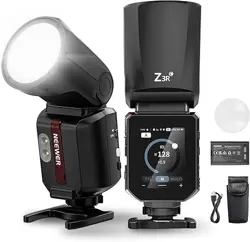
Thank you for your purchase of a product.
Precautions
Foreword
1. Always keep this product dry.
3. Do not disassemble or modify the product.
2. Keep this product out of reach of children.
4. Do not subject to any form of physical shock. The product
shouldn't be exposed to fire or an environment where the
temperature exceeds 50 degrees.
5. Do not fire the flash directly into the eyes which could result in
visual impairment.
6. Do not use the product near chemicals, flammable gases or
other volatile substances which may cause fire or
electromagnetic interference.
7. Do not use in the rain or in damp conditions.
8. Turn off the product immediately, if it appears to be operating
abnormally, and try to troubleshoot the likely cause.
9. Failure to comply with the recommendations and warnings
listed in the manual will invalidate the warranty.
Built-in upper and lower modeling lamps allows independent lighting
adjustment for precise flash previews.
Stable output, High speed continuous flash and color temperature
with good even lighting.
Supports manual frequency flash mode, HSS/second curtain sync
/FEC and other i-TTL functions.
Built-in 2.4GHz wireless transmission, Integrated transmitter and
receiver with a large radius.
Full-color touchscreen for easier operation.
Supports E-TTLII auto flash, which can be used as the master or
slave unit of a wireless multi-lamp flash system - making shooting
easier and faster.
Removable Li-ion battery, 500 full-power flashes, 1.7s recycling time,
and incomparable portability.
Maximum flash power of 100Ws, 81 levels of dimming (1/1~1/256)
ENEN
0201
Catalog
This on-camera flash is compatible with Canon EOS cameras and s
upports E-TTL II auto flash. The E-TTL flash automatically provides
accurate exposure in complex lighting conditions and simplifies your
workflow. Key features include:
The upgraded quartz tube supports up to 100,000 flashes during
its lifespan.
Foreword
02
02
03
03
06
07
08
08
12
13
14
26
28
29
30
31
32
32
Precautions
Package Contents
Name of components
Battery
Power Management
Mount / Unmount flash
M: Manual Flash
RPT: Stroboscopic Flash
Flash Mode: E-TTL Autoflash
1. Wireless Setup
Wireless Flash Shooting: Wireless (2.4G) Transmission
2. Disable Master Device
3. Channel Setting
4. Wireless ID
5. Scan Free Channel
6. Built-in 2.4G Q & X Systems
7. Wireless Sync
8. E-TTL: Auto Wireless Flash
9. M: Manual Wireless Flash
10. Multi: Stroboscopic Wireless Flash
C.Fn: Setting Custom Functions
Restore factory settings
Technical Data
Protection Function
Troubleshooting
Flash Control via Camera Menu
Firmware upgrade
32
Compatible Cameras
1.E-TTL Mode
2. Flash Exposure Compensation
3. FEB (Flash Exposure Bracketing)
4. Second-Curtain Sync
5. High-Speed Sync
6. Second-Curtain Sync
23
23
Wireless Flash Shooting: Wireless (2.4G) Transmission
Other Applications
1. Sync Triggering
2. Auto Focus Assist Beam
4. Bounce Flash
5. ZOOM: Set the flash coverage
6. Modeling Lamp
7. Modeling Flash
3. TCM - One key switching i-TTL/M mode
ZOOM:105
+1.0
MULTI
FEB
03
EN EN
04
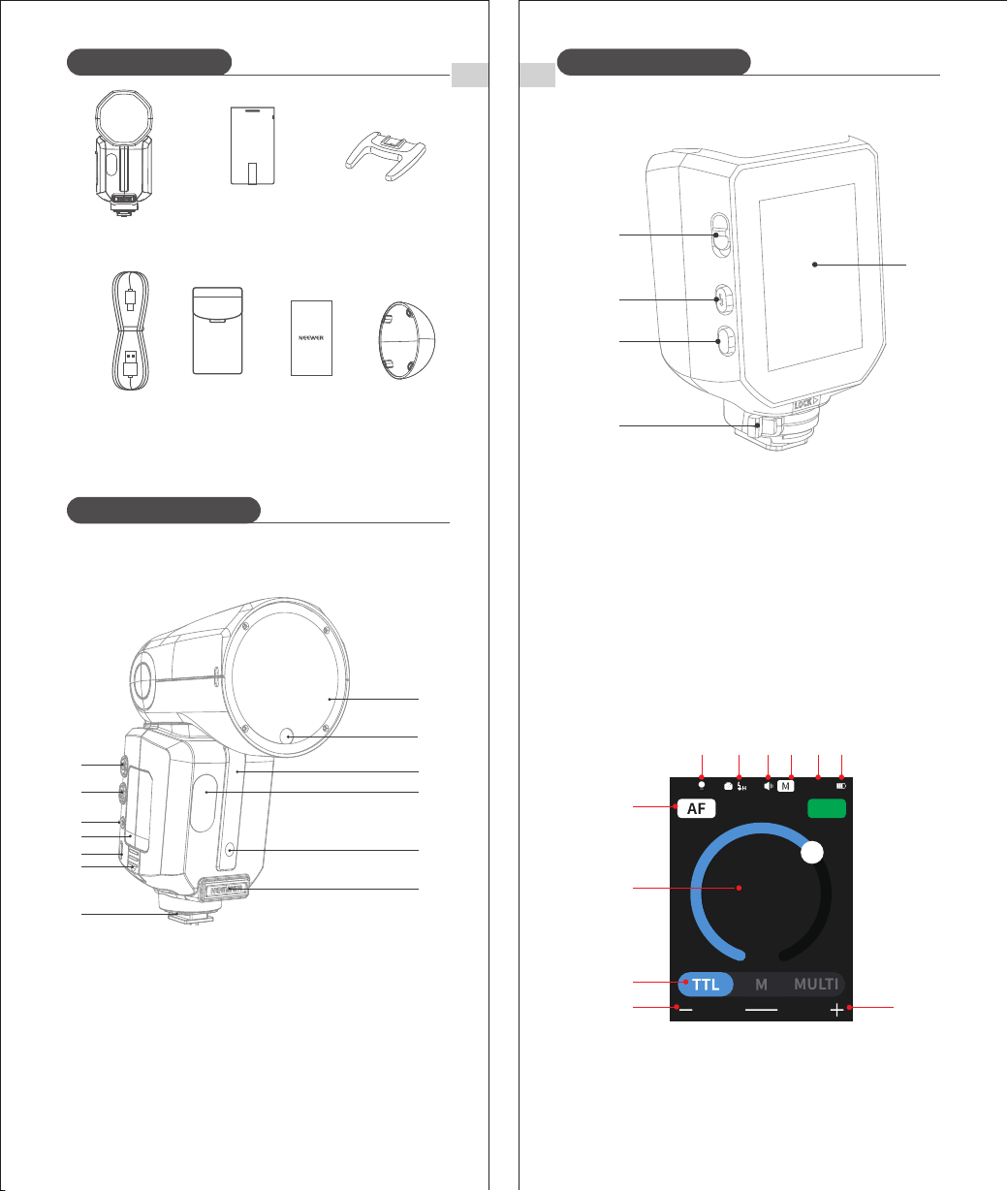
Name of components
2. Control Panel
3. Display
(1) E-TTL Autoflash
1. Flash Body
※ The USB Type-C port is exclusively intended for flash firmware
upgrades and is not designed for charging purposes.
① Modeling Light ② High-Speed Sync (p.11) ③ Beep
④ Zoom (A: Auto, M: Manual) ⑤Zoom (p.25)
⑥ Battery Level ⑦ AF Assist ⑧ Flash Exposure Compensation
⑨E-TTL II Auto Flash ⑩ Value ‒ ⑪ Value +
Protective
Case ×1
USB power
cord ×1
Flash unit ×1 Mini stand ×1
Lithium
Battery ×1
Package Contents
Name of components
⑤
③
①
④
②
① TCM switch
② Test flash button/recycling indicator
③ Main UI return button: Short press
④ Hot shoe lock
⑤ Display
① ② ③
⑧
④
⑩
⑥
⑨
⑤
⑪
⑦
User Manual×1
Diffuser×1
① Power switch: Long press for 2s
② Modeling lamp switch: Short press ③ Sync jack
④ Li-ion battery ⑤ USB-C upgrading port ⑥ Battery lock
⑦ Hot shoe ⑧ Flash head ⑨ Modeling lamp
⑩Wireless sensor ⑪Modeling lamp ⑫ Focus assistant lamp
⑬(CP-E4) External power input (CP-E4)
①
②
③
⑧
④
⑩
⑥
⑨
⑤
⑪
⑦
⑫
⑬
ZOOM:35
1/8
MULTI
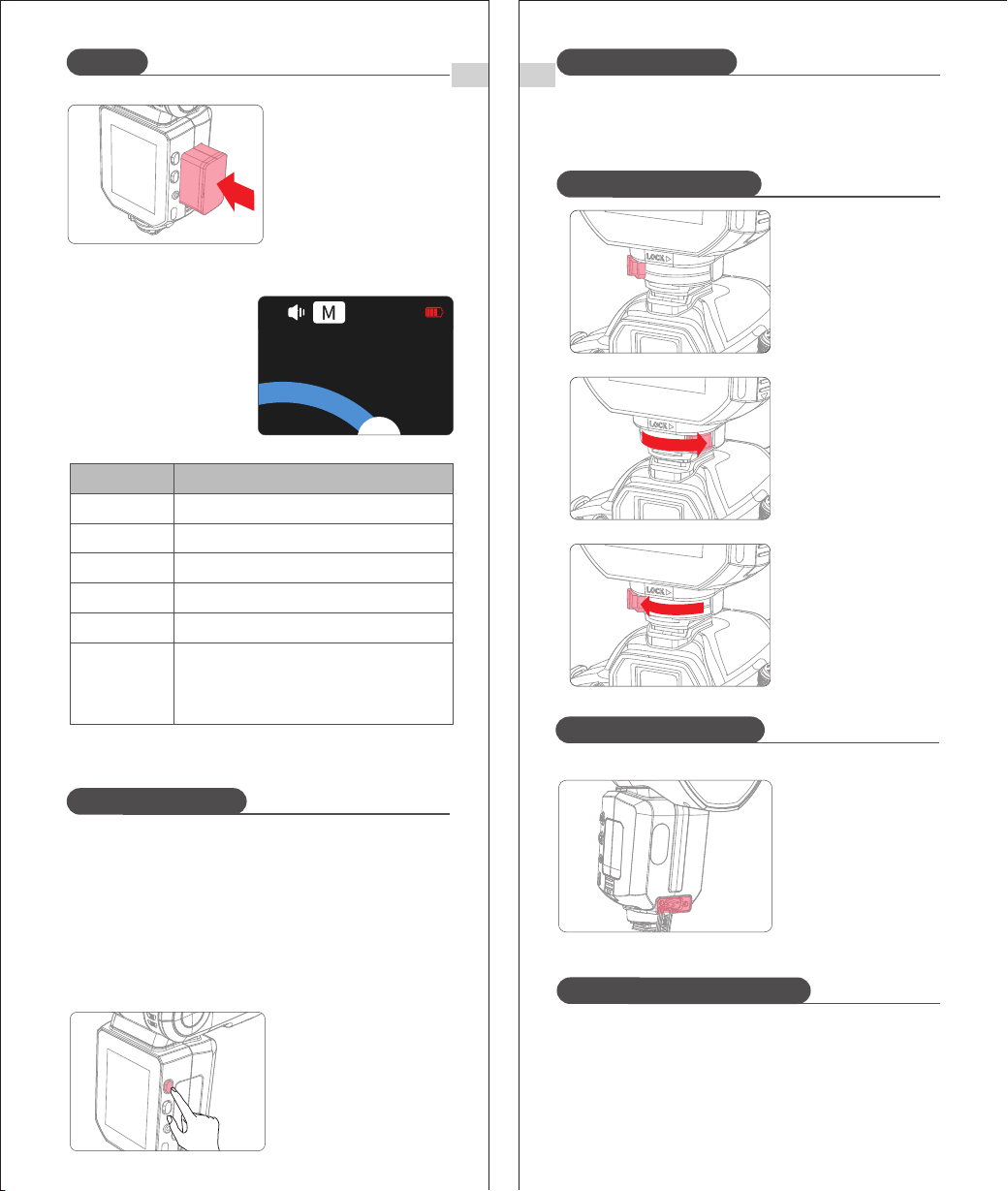
3. Inserting and Removing the Battery
① Removing the battery
Slide the button in the
direction shown to remove
the battery.
Name of components
EN
05
EN
1. Features
① This flash unit uses Li-ion polymer battery which boasts a long
service life and can be charged / discharged up to 500 times.
② Safe and reliable, the built-in circuit protects against overcharge,
overdischarge, overcurrent, and short circuit.
2. Caution
① Do not short circuit.
② Do not immerse the battery in water.
③ Keep the battery out of reach of children.
④ Do not exceed 24 hours of continuous charging.
⑤ Store the battery in a dry, cool and ventilated environment.
⑥ Do not place the battery near or in a fire.
⑦ Dead batteries should be disposed according to local regulations.
⑧ If the battery isn't to be used for some time, please ensure it is
charged at least every 3 months.
Battery
S1/S2
mode
06
Name of components
② RX unit
(2) M Manual Flash (p.12)
Manual
flash
output
(3) Multi Stroboscopic Flash (p.13)
(4) Wireless Radio Flash (p.14)
① Transmitter Unit
Flash
group
Channel
M : Manual Flash
MULTI(Stroboscopic)
flash
Number
of flashes
Flash
frequency
ZOOM:35
1/8
times
Hz
1
2
MULTI
3
ZOOM:105
A
B
C
D
CH11
ZOOM:35
1/8
MULTI
CH11
RX
Battery
EN
Mount / Unmount flash
Flash Mode: E-TTL Auto Flash
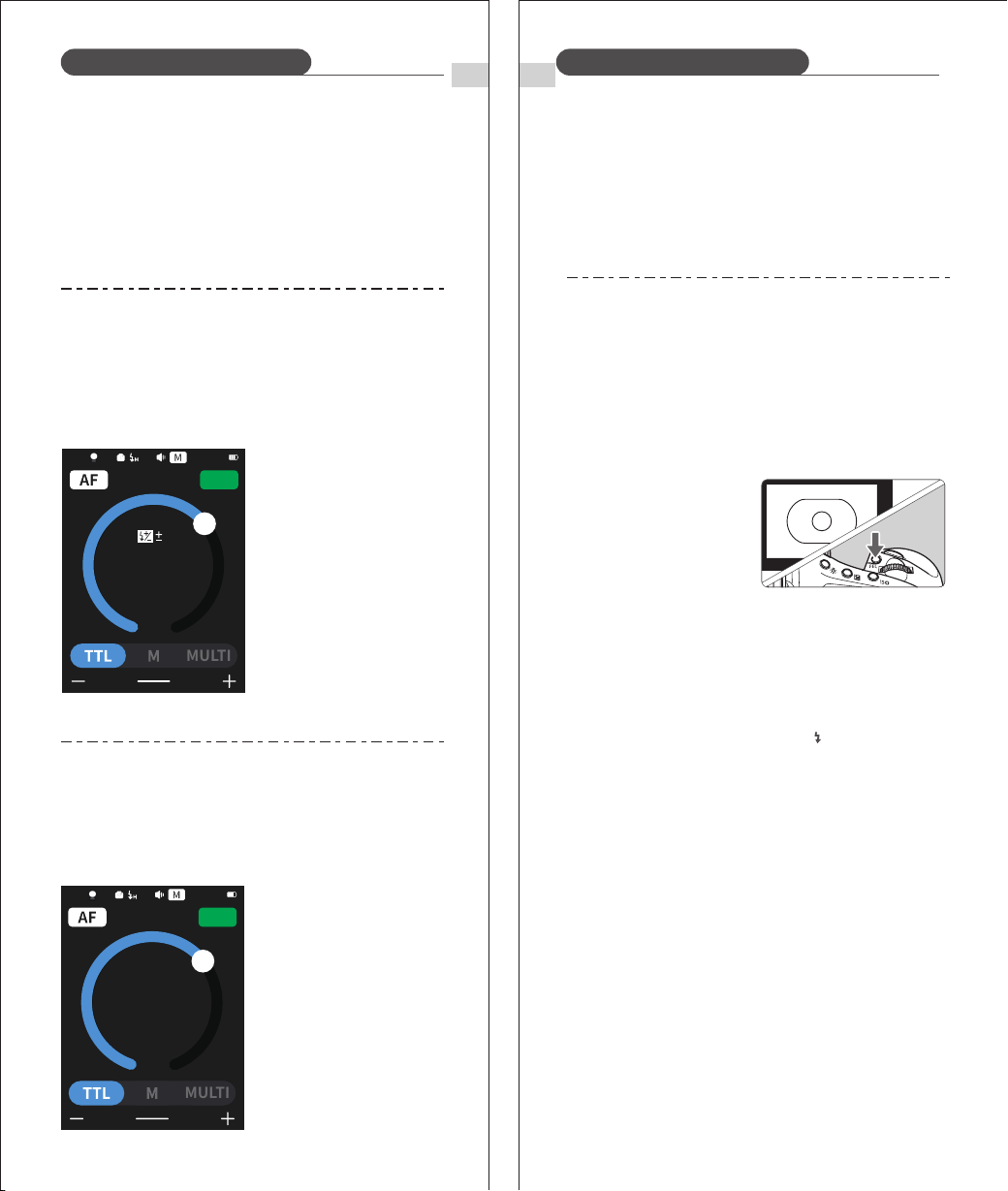
1. Mount the Camera Flash
Turn the locking ring to
the left to fully insert the
camera's hot shoe.
3. Unmount the Camera
Flash.
Press the button and rotate
the hotshoe locking ring to
the left to loosen.
2. Secure the Camera
Flash
Rotate the locking ring to the
right until secure.
08
EN
4. Battery Level Indicator
Make sure the battery is
securely inserted in the
flash. Check the battery
level indication on the
LCD panel to see the
remaining battery level.
Medium
Low
Very low
Low battery. Please charge as soon as possible
Battery is about to run out. The flash will no
longer work.
Please recharge the battery as soon as possible
(within 10 days). the battery can then be used or
stored for a long period.
电池电量显示
Full
3 bars
2 bars
1 bars
Empty bar
Flashing
4 bars
Battery Level
Indicator
Indicates
② Inserting the battery
Insert the lithium battery
into the battery
compartment in the
direction indicated by the
battery until the fastener
snaps into place.
07
Use ON/OFF Power Switch to power the flash unit on or off. Please
turn off the power if the flash won't be used for a long period. When
setting as a transmitter (TX) flash, the flash will turn the power
off automatically after a certain period (approx. 90 seconds) of
inactivity. Pressing the camera shutter halfway or pressing any flash
button will wake up the flash unit. When setting as a receiver (RX)
flash, it will enter sleep mode after a certain period (adjustable, 60
minutes by default) of idle use. Pressing any flash button will
reactivate device.
Note: ① When used off the camera, it is recommended that you
customize the function to disable "automatic power off ".
② Receiver Auto Power Off Timer is set to 60 minutes by
default. A 30 minute timer can also be applied.
Power Management
Power Management
Press and hold the power
button for 2s to turn the
flash on/off.
ZOOM:35
+1.0
External Power Input
The Z3R features an
external power port for the
DC330V battery pack to
cut recycle time in half
and offer reliable
performance for
high-intensity, continuous
shooting.
In standard flash mode, the flash supports three modes: E-TTL auto
flash, M manual flash, and Multi stroboscopic flash. In E-TTL mode,
the camera’s metering system measures flash light reflected from
the subject and automatically adjusts flash output for balanced
subject and background exposure.
Supports exposure compensation, exposure bracketing, high-speed
sync, second-curtain sync, exposure lock, modeling flash, and
Canon camera menu control.
EN
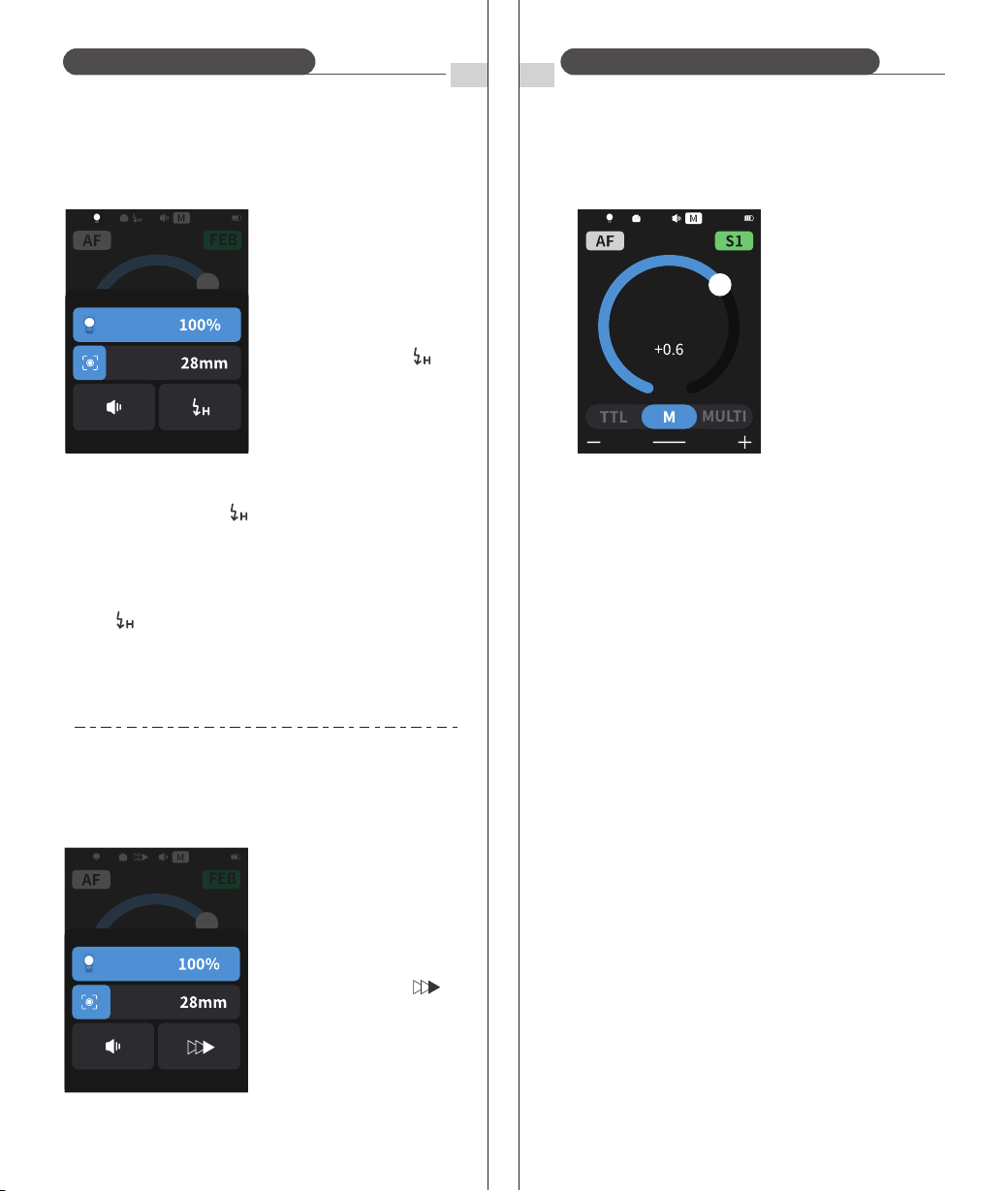
1.E-TTL Mode
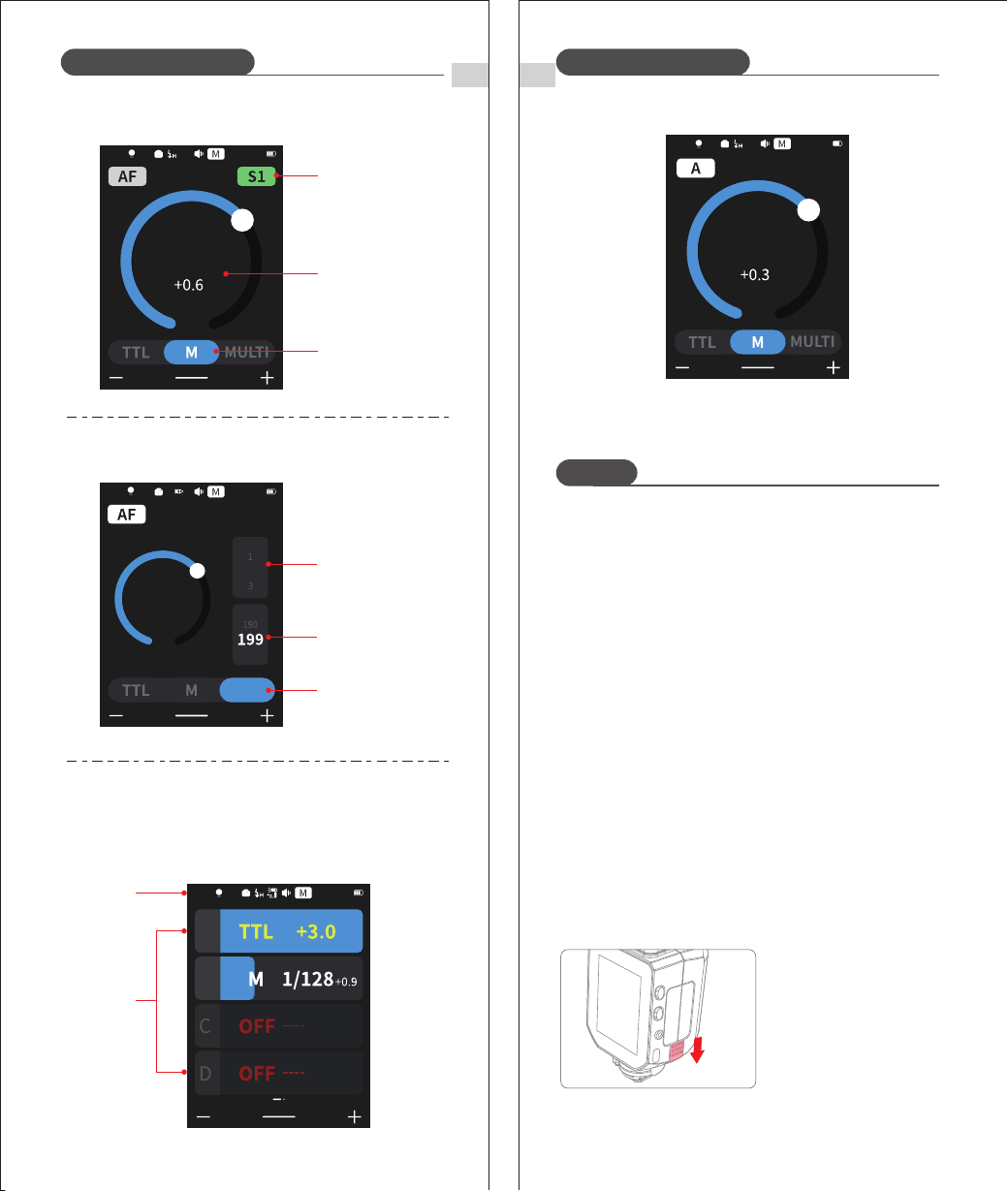
Tap <ETTL> at the bottom of the screen to set the flash to ETTL and
enable i-TTL flash mode.
① Press the camera release button halfway to focus.
② A pre-flash is fired moments before the shutter is released, and
the flash receives camera information for the main flash.
2. FEC(Flash Exposure Compensation)
In FEC mode, the flash can adjust flash exposure compensation in
1/3-stop increments between ±3 stops. This feature is useful when
the i-TTL system needs to be fine-tuned to accommodate the
shooting environment.
Set the flash exposure
compensation amount.
① Drag the circle or tap < + > /
< - > to adjust flash exposure
compensation.
② "0.3" indicates 1/3 step, "0.7"
indicates 2/3 step.
③ To cancel the flash exposure
compensation, set the
amount to "0.0".
09
EN
10
3. FEB (Flash Exposure Bracketing)
FEB automatically changes flash output within ±3 stops in 1/3-stop
steps for each shot. The camera records three images: correct
exposure, underexposed, and overexposed. Useful for moving
subjects or complex lighting scenes.
Flash Mode: E-TTL Auto Flash Flash Mode: E-TTL Auto Flash
* Set the camera drive mode to Single Shot and ensure the flash is
fully charged before shooting.
* FEB is automatically canceled after 3 shots.
* FEB can be used together with flash exposure compensation and
flash exposure lock.
Auto-cancel after 3 shots can be disabled in the camera menu.
4. FEL: Flash Exposure Lock
Im Kameramenü
einstellen und aktivieren.
FEL allows you to lock correct flash exposure for any part
of the scene.
When <ETTL> is shown on the LCD, press the camera’s
<FEL> button. If unavailable, press <*>.
(1) Focus on the subject.
(2) Press <FEL>.
* If the subject is too far, underexposure may occur and the
warning icon will blink. Move closer and retry.
* FEL cannot be set if <ETTL> is not displayed on the LCD.
* FEL may be unreliable with very small subjects.
① Aim the center of the
viewfinder at the subject
and press <FEL>.
② The flash fires a pre-flash and stores the required flash
output.
③ “FEL” appears in the viewfinder for 0.5 seconds.
④ Each press of <FEL> triggers a new pre-flash and locks a
new exposure.
ZOOM:105
+1.0
MULTI
FEB
0
ZOOM:105
+1.0
MULTI
FEB
EN EN
* S1 Optical control unit setting
In M manual flash mode, the S1 function can be used and the
flash unit can function as an optical secondary flash. It will fire
synchronously when the main flash fires, the same effect as that
obtained by the use of radio triggers. This helps the photographer
create multiple lighting effects.
Tap <S1/S2> at the top right corner of the screen to
adjust S1/S2 modes.
* S2 Optical control unit setting
Note: S1 and S2 optical triggering is only available in M manual flash
mode.
In M manual flash mode, the S2 function can be used and the flash
unit can function as an optical S2 secondary flash. In this mode, it
will ignore the pre-flash emitted by the TTL flash and will only fire in
response to the second flash from the main unit.
① Tap <M> at the bottom of
the screen.
② Drag the circle or tap <+, ->
to adjust flash output power.
The flash output is adjustable from 1/1 full power to 1/256th
power in 1/10th stop increments.
To obtain a correct flash exposure, use a hand-held flash meter to
determine the required flash output.
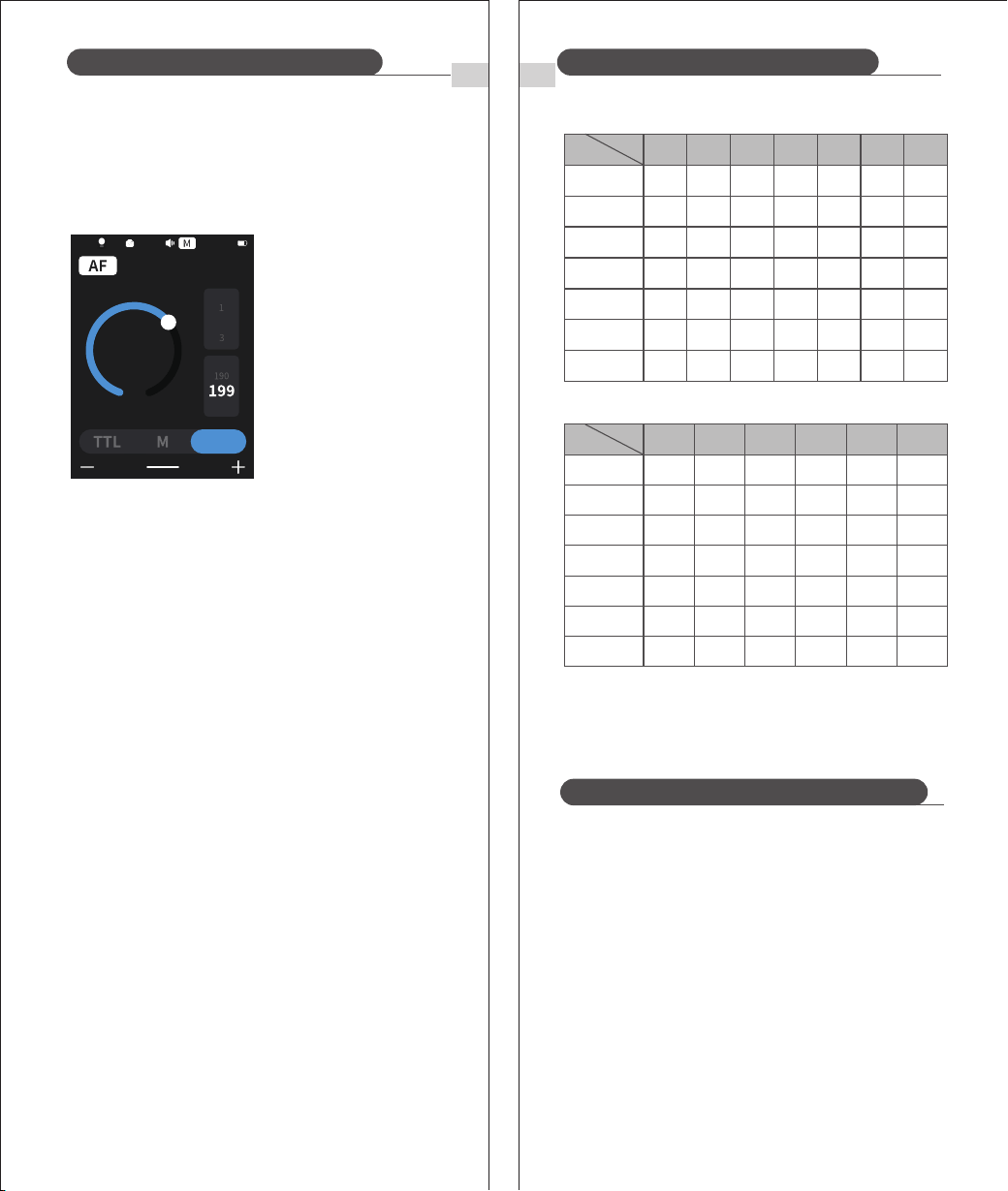
5. High-Speed Sync (HSS)
Swipe up from the bottom
of the screen and tap the
sync icon to display < >.
6. Second-Curtain Sync
With a slow shutter speed, you can create a trail of light following the
subject. The flash fires right before the shutter closes.
* If the shutter speed is at or below the camera’s maximum
flash sync speed, the < > icon will not appear in the
viewfinder.
* The higher the shutter speed in HSS, the smaller the
effective flash range.
* Stroboscopic (Multi) flash cannot be used in HSS mode.
* After 100 consecutive HSS flashes, the flash’s thermal
protection may activate.
* To return to normal flash, tap the sync icon again;
the < > icon will disappear.
Using High-Speed Sync allows flash to fire at any shutter
speed. This is especially useful for fill-flash in aperture-
priority portraits.
11 12
Swipe up from the bottom
of the screen and tap the
sync icon to display < >.
Flash Mode: E-TTL Auto Flash Flash Mode: Multi Stroboscopic Flash
ZOOM:28
+1.0
MULTI
FEB
ZOOM:105
+1.0
MULTI
FEB
ZOOM:35
1/8
MULTI
EN
13
EN
14
Maximum number of strobe flashes
1/4
1/8
1/16
1/32
1/64
1/128
1/256
1
8
14
30
60
90
100
100
2
6
14
30
60
90
100
100
3
4
12
30
60
90
100
100
4
3
10
20
50
80
100
100
5
3
8
20
50
80
100
100
6-7
2
6
20
40
70
90
90
8-9
2
5
10
30
60
80
80
Flash
output
Hz
1/4
1/8
1/16
1/32
1/64
1/128
1/256
10
2 2 2 2 2
4 4 4 4 4 4
8 88 88 8
20
50
70
70
11
20
40
70
70
12-14
20
40
60
60
15-19
18
35
50
50
20-50
16
30
40
40
60-199
2
12
20
40
40
Flash
output
Hz
Flash Mode: Multi Stroboscopic Flash
* To avoid overheating and deterioration of the flash head, do not
use the stroboscopic flash more than 10 times in succession. After
10 times, allow the camera flash to rest for at least 15 minutes. If
you try to use the stroboscopic flash more than 10 times in
succession, the flash may stop flashing automatically. This is to
protect the flash head. Should this happen, please allow the
camera to rest for 15 minutes.
* Stroboscopic flash is most effective with a highly reflective subject
against a dark background.
* It is recommended to use a tripod and a remote control.
* A flash output of 1/1 and 1/2 cannot be set for stroboscopic flash
mode.
* Stroboscopic flashes can be used with the “buLb” function.
⑶ Drag the circle or tap <+, -> to
adjust flash output power.
⑵ Set the flash frequency and the
number of flashes.
① Scroll the number below
<Times> to set the number of
flashes.
② Scroll the number below <Hz>
to set the flash frequency.
⑴ Tap <
<MULTI>> at the bottom
of the screen.
The term stroboscopic flash relates to a rapid series of flashes being
fired. It can be used to capture multiple images of a moving subject
in a single photograph.
You can set the firing frequency (number of flashes per sec. expressed
as Hz), the number of flashes, and the flash output.
Calculating the Shutter Speed:
During a stroboscopic flash, the shutter remains open until the firing
stops. Use the formula below to calculate the shutter speed and set
it with the camera.
Number of Flashes / Flash Frequency = Shutter Speed
For example, if the number of flashes is 10 and the firing frequency
is 5 Hz, the shutter speed should be at least 2 seconds.
* If the flash count is displayed as --, the flash will fire continuously
until the shutter release or the battery is exhausted. The number
of flashes will be limited as shown in the table below.
Wireless Flash Shooting: Wireless (2.4G) Transmission
* This mode is not available in full-auto or program auto zones; set
the camera to P/Tv/Av/M/B (Creative Zone modes).
* A Z3R-C mounted on the camera acts as the Master; a wirelessly
controlled Z3R-C acts as the Slave.
ZOOM:105
1/8
times
Hz
1
2
MULTI
3
Flash Mode: Multi Stroboscopic Flash
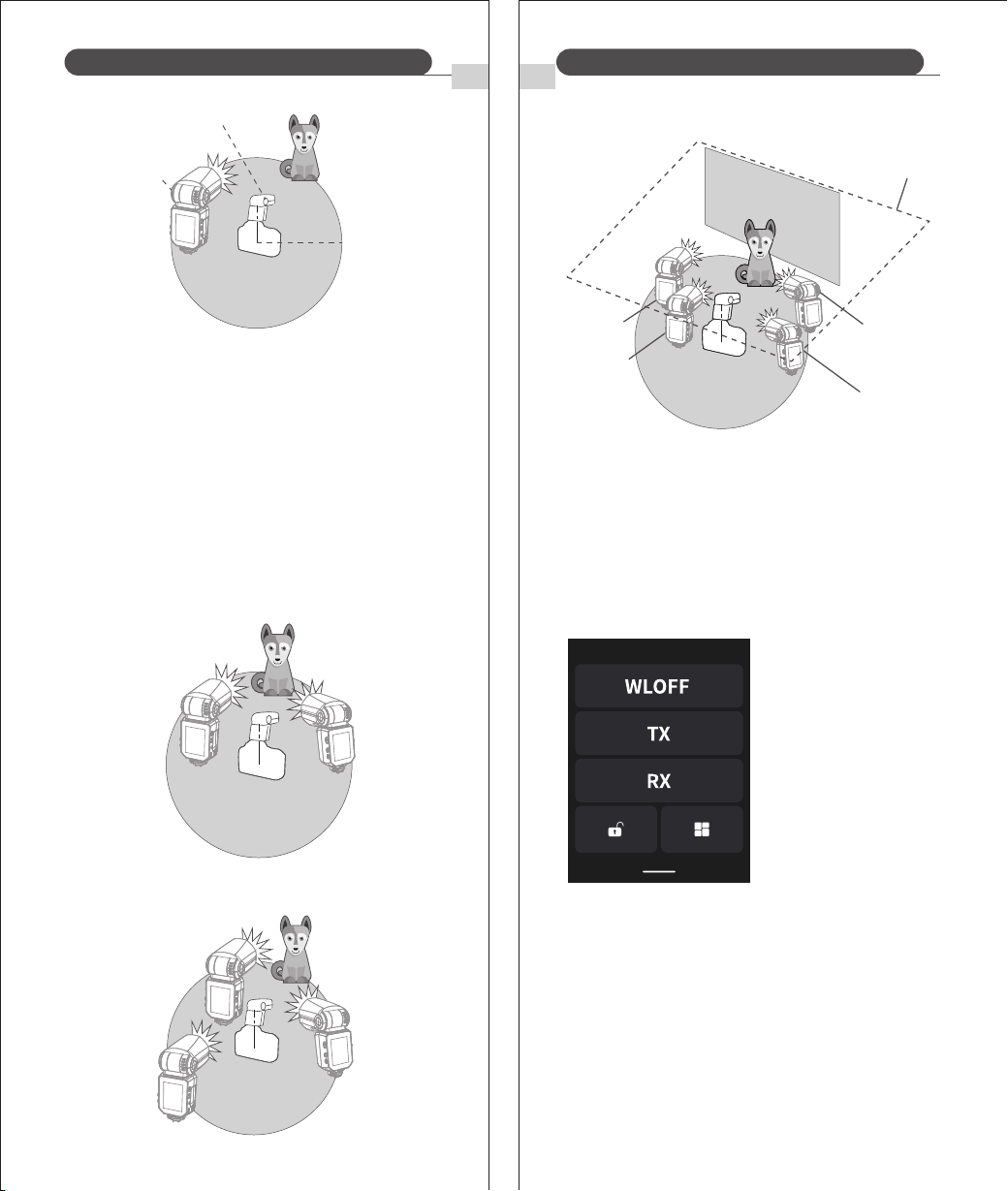
Positioning & Operation (Example of Wireless Flash Shooting):
Single Slave unit can perform auto flash shooting.
Wireless-enabled flash units (Master/Slave) can perform advanced
wireless multi-flash shooting using the same method as standard
E-TTL II auto flash.Set the Master unit to <ETTL> to perform wireless
E-TTL II auto flash.
15
16
ENEN
Wireless Flash Shooting: Wireless (2.4G) TransmissionWireless Flash Shooting: Wireless (2.4G) Transmission
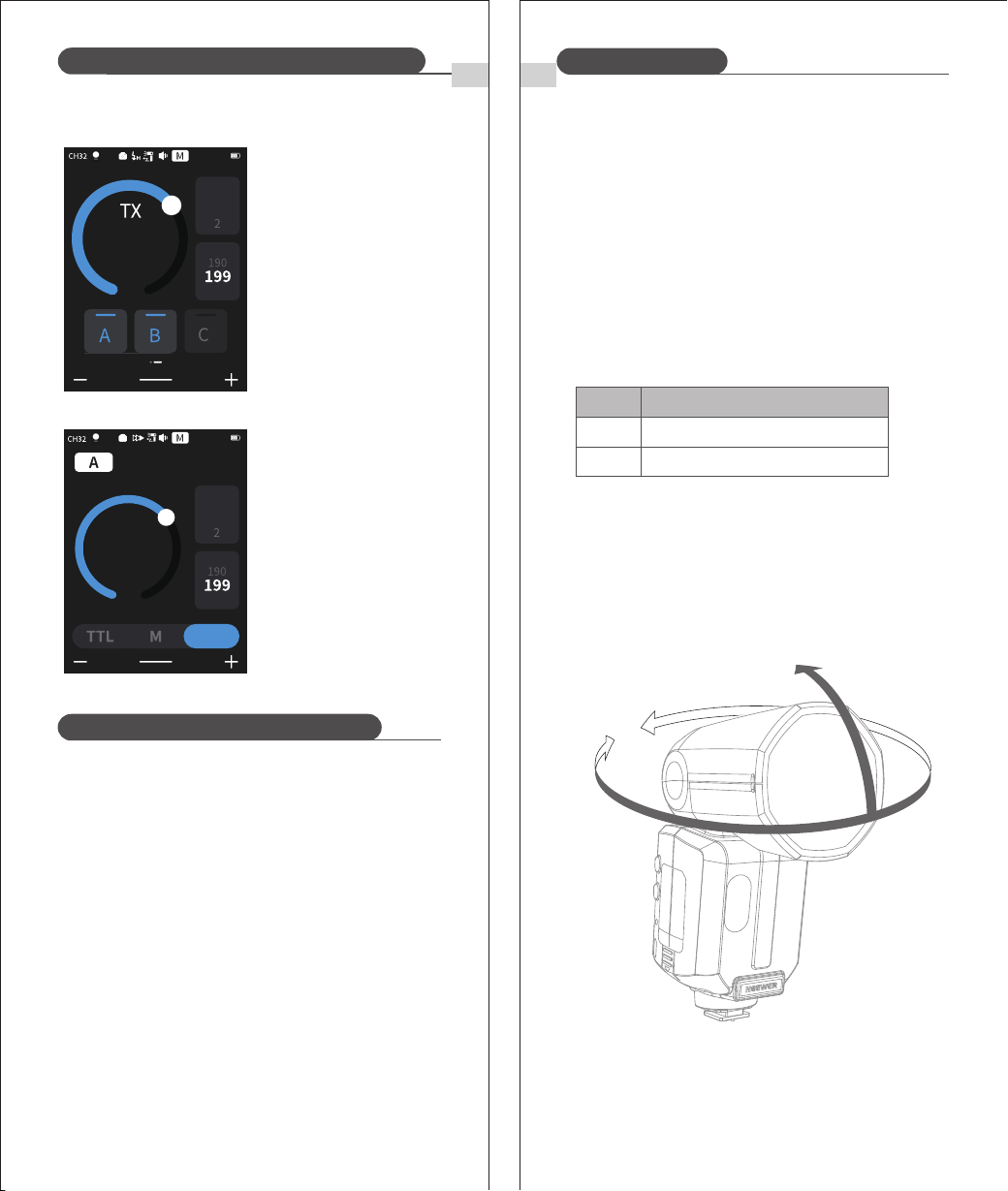
You can split the RX unit into two or three groups and shoot
i-TTL Auto Flash while changing the flash ratio (focus). In addition,
each flash group (up to 5 groups) can be set and shot with
different flash modes.
* Use the supplied mini stand to position the Receiver unit.
* Perform a test flash and test shot before shooting.
* The transmission distance might be shorter depending on the
conditions such as the positioning of the Receiver units, the
surrounding environment and weather conditions.
① Auto flash shooting with two RX groups.
Wireless Multiple Flash Shooting
A
B
(Transmitter)
(Receiver)
Transmission
distance
is about 100m.
RX
TX
② Auto flash Shooting with three RX groups
A
B
C
③ Shoot in different flash modes set for different groups.
* Flash modes listed above are for reference only.
A
C
D
Ceiling
Manual Flash
B
Auto External
Flash Metering
Manual Flash
E-TTL II
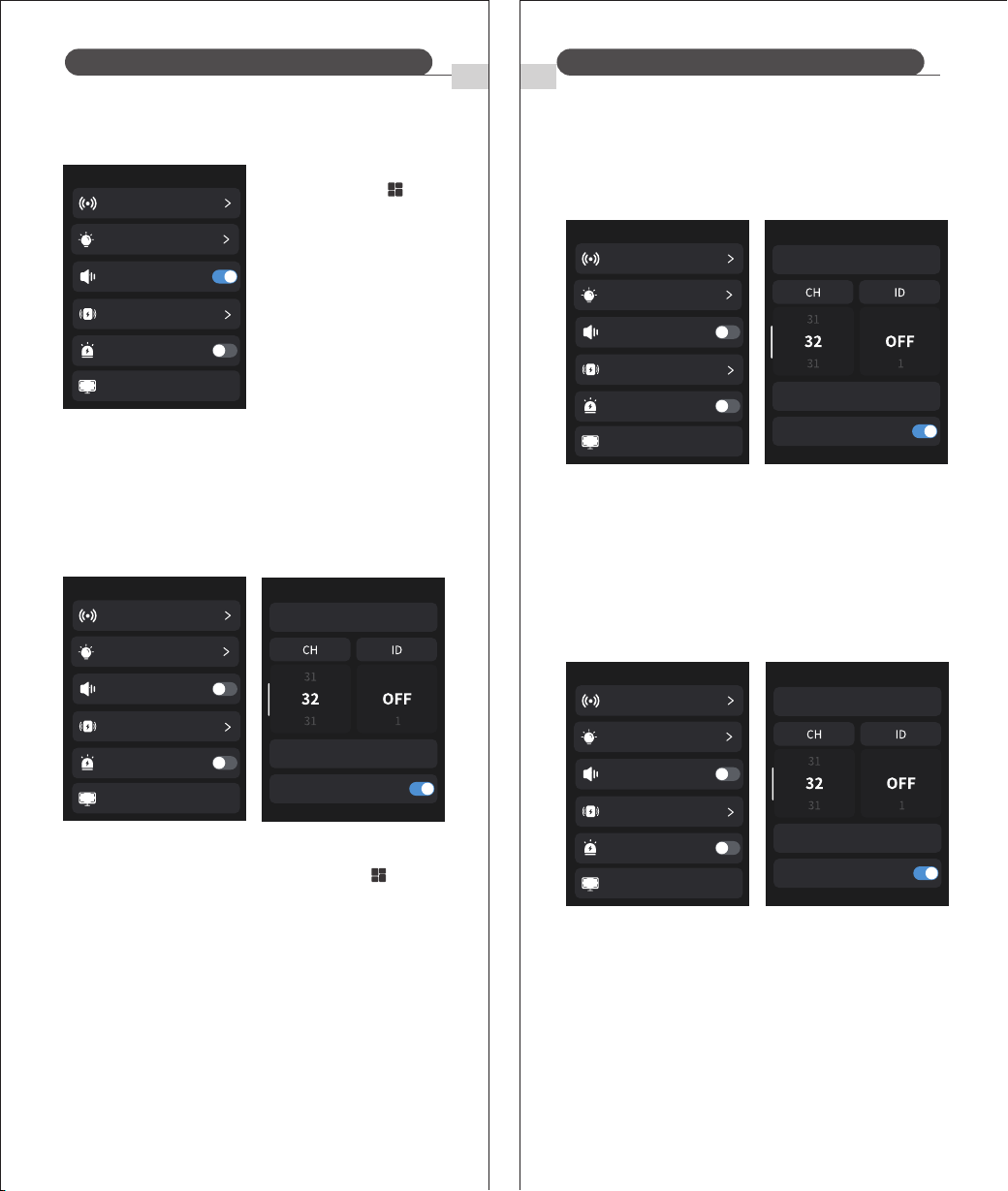
Receiver (RX) Unit Setting
You can switch between normal flash and wireless flash. For
normal flash, make sure to set it to <WL OFF>.
Transmitter (TX) Unit Setting
1. Wireless Settings
Swipe down from the top of
the screen and select <TX>.
① Swipe down from the top of the screen and select <RX>.
② The <RX> icon will appear on the screen, indicating
the flash is now in RX Mode.
Screen
Settings
ENEN
Wireless Flash Shooting: Wireless (2.4G) TransmissionWireless Flash Shooting: Wireless (2.4G) Transmission
17
2. Master Unit Disable
When the Master flash is disabled, only Slave units fire.
* The disabled Master still
fires a pre-flash to transmit
wireless signals.
18
① Swipe down < >from
the top of the screen
② Tap <TX> to enable.
If there is more than one wireless flash system nearby, you can
change the communication channel to prevent signal interference.
Ensure that the channel of the transmitter and receiver units are
matching.
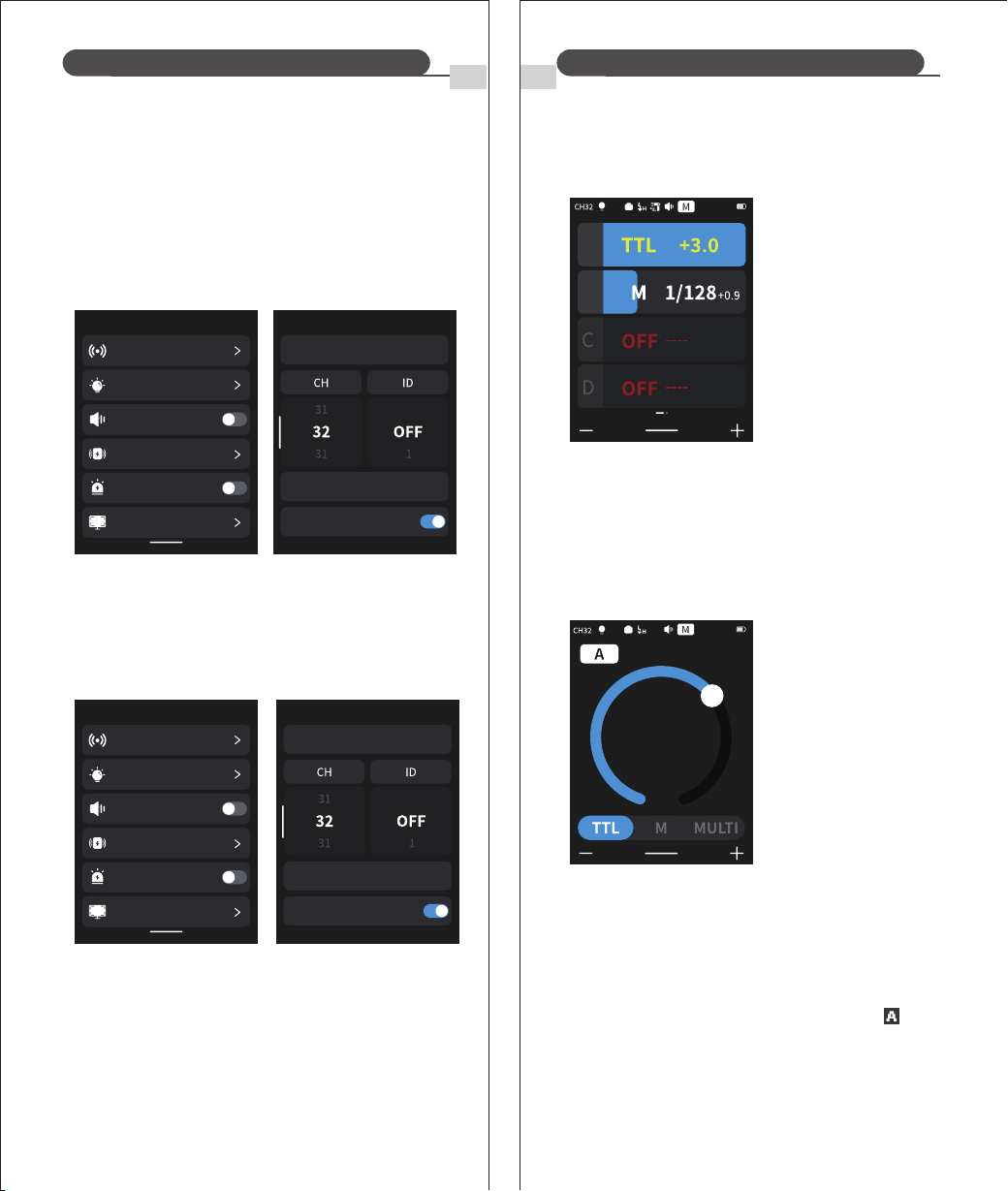
3. Setting the communication channel
① Swipe down from the top of the screen and tap < > to enter
the menu.
② Tap <RF Wireless>.
③ Scroll the number below <CH> to select a channel.
To avoid signal interference, change the channel and wireless ID.
Set the master and slave units to the same channel and wireless
ID. Go to the <RF Wireless> menu and scroll the number below ID
to adjust it. Select OFF to disable wireless ID.
To prevent interference from others using the same channel, you
can use the “Scan Free Channels” function: go to the <RF
Wireless> menu, tap <Scan Free Channels>, and after scanning, 8
available channels will be displayed.
4. Wireless ID Settings
5. Scan for a free, unused channel
Scan Free Channel
Wireless Sync
Rx compatible
Menu
FEB ACL
RF Wireless
Screen Settings
Modeling Light
Sound Prompt
Flash Triggering Distance
Menu
FEB ACL
RF Wireless
Screen Settings
Modeling Light
Sound Prompt
Flash Triggering Distance
Menu
FEB ACL
RF Wireless
Screen Settings
Modeling Light
Sound Prompt
Flash Triggering Distance
Menu
FEB ACL
RF Wireless
Screen Settings
Modeling Light
Sound Prompt
Flash Triggering Distance
Scan Free Channel
Wireless Sync
Rx compatible
Scan Free Channel
Wireless Sync
Rx compatible
ENEN
Wireless Flash Shooting: Wireless (2.4G) TransmissionWireless Flash Shooting: Wireless (2.4G) Transmission
19 20
⑴ Transmitter Unit Setting
① To have the Master fire normally, set the on-camera Z3R-C to
Master and turn the Master flash ON (see p.17).
② Can also use a transmitter as the Master; it can control the
Z3R-C zoom, but zoom must be set to Auto mode< >.
Using Automatic Wireless Flash with a Single Receiver Unit.
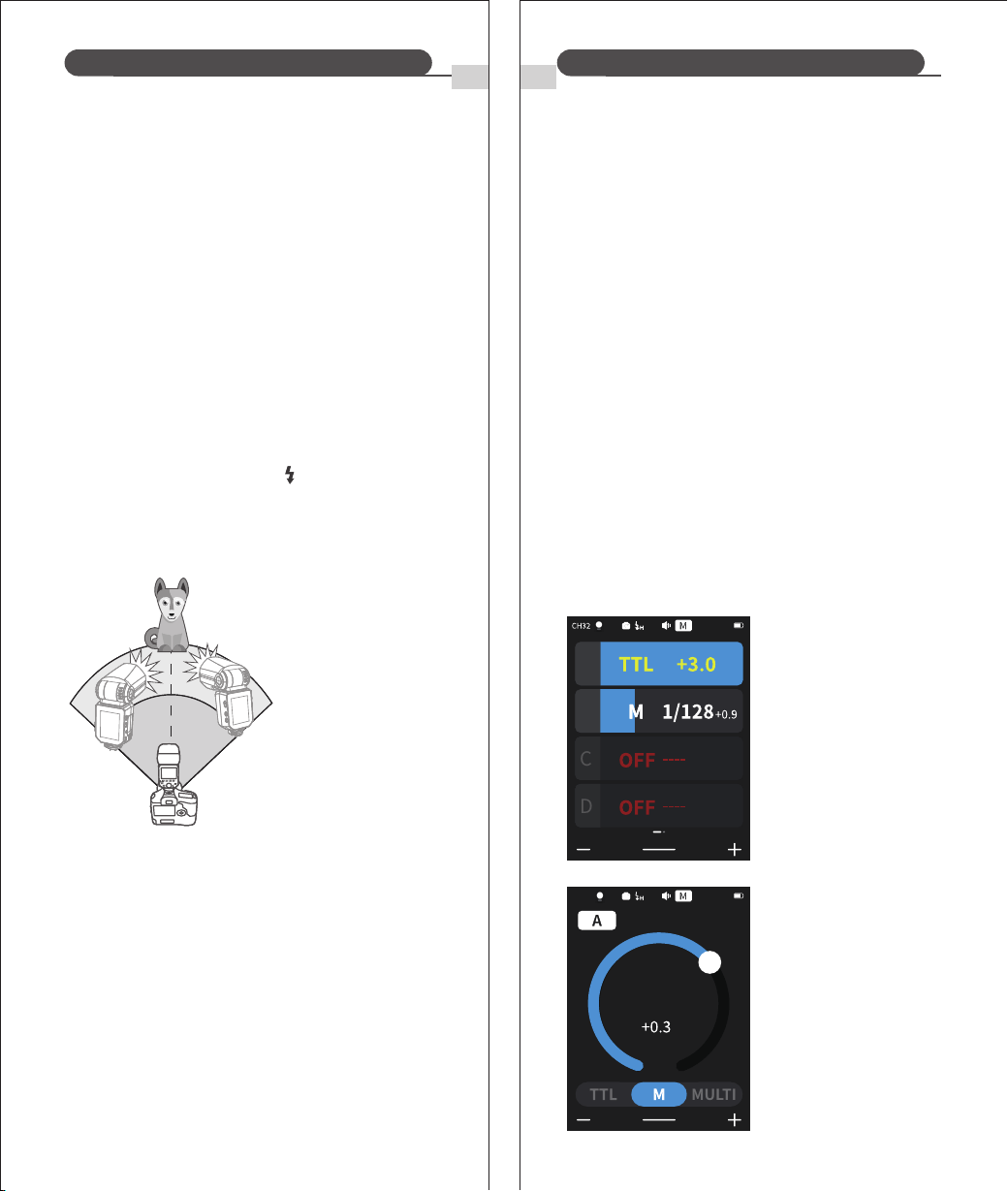
8. i-TTL: Automatic wireless flash photography
TX Control Unit:
This flash uses the 2.4G wireless Q system by default and can
function as a master or slave unit. It is compatible with the NEEWER
QPRO-C TTL transmitter (sold separately). Additionally, it supports
the 2.4G wireless X system: by entering the custom menu and
enabling <Slave Compatibility>, it can operate only as a slave unit
and is compatible with Godox Xpro/X3/X2 transmitters and other
X-system master flashes.
6. Built in 2.4G Wireless Q and X Systems
When you need to trigger the flash wirelessly, the wireless sync
function helps you quickly set the same channel and ID on both
units.
① Set the flash to TX or RX.
② Go to the <RF Wireless> menu and tap <Wireless Sync>.
※ The wireless sync function must be used on both the transmitter
and receiver. It will automatically synchronize the transmitter’s
wireless CH and ID to the receiver for quick wireless pairing.
※ The wireless sync function does not work in On-Camera Mode.
7. Wireless Sync
Note: The Q and X triggers cannot be used simultaneously.
① Tap the group on the left side of the screen and select TTL.
② Drag the bar to adjust the exposure compensation for the
selected group.
③ Tap <+, ‒> at the bottom of the screen to set the exposure
compensation for all groups.
RX Unit
Menu
RF Wireless
Flash Triggering Distance
FEB ACL
Screen Settings
Modeling Light
Sound Prompt
Menu
RF Wireless
Flash Triggering Distance
FEB ACL
Screen Settings
Modeling Light
Sound Prompt
ZOOM:105
A
B
C
D
ZOOM:105
+ 1.0
MULTI
M
RX
Scan Free Channel
Wireless Sync
Rx compatible
Scan Free Channel
Wireless Sync
Rx compatible
ENEN
Wireless Flash Shooting: Wireless (2.4G) TransmissionWireless Flash Shooting: Wireless (2.4G) Transmission
21
⑵ Setting the Slave Unit
Set the Z3R-C to be wirelessly controlled as a Slave unit.
(3) Check Transmission Channel
Make sure the Master and Slave units are set to the same channel
(see p.17).
(4) Position Camera and Flash
Place them within the operation range shown on p.15.
(5) Check Flash Readiness
① Confirm the Master flash ready indicator is lit.
② When the Slave flash is ready, the AF-assist illuminator flashes
at 1-second intervals.
⑹ Test Operation
① Press the Master flash test button < >.
② The Slave unit should fire. If it doesn’t, check that it is within
the operation range.
22
When a larger flash output is
required, you can increase the
number of RX units and flash
them as a single flash.
When the number of RX units is increased or the TX flash is setto ON,
automatic control ensures that all flashes fire at the same flash output
so that the total flash output meets the standard exposure.
To add receiver (RX) units, use
the same steps as setting
"automatic wireless flash with a
single Receiver unit " . Any flash
group can be set (A/B/C/D/E).
Using Automatic Wireless Flash with Multiple
Receiver (RX) Units
* Can trigger modeling flash using the camera's depth-of-field
preview button.
* If the Slave unit's auto power-off is active, press the Master test
button to turn it on. Note: test flash cannot be done during the
camera's metering timer.
,
* The auto power-off duration of the Slave unit can be adjusted.
* Can disable the AF-assist emitter from flashing after the Slave
unit is ready.
About Transmitter Unit
Two or more TX units can be used. By configuring multiple
cameras with TX units, you can change the cameras used for
shooting while maintaining the same lighting (RX units).
The flash exposure compensation (FEC) and other settings set on
the TX unit are also set automatically in the RX unit.
Operation of the RX unit is not required. The following settings
can be used for shooting with no line flash in the same way as for
normal flash shooting.
① Flash Exposure Compensation ② Manual Flash
③ Flash Exposure Lock ④ Stroboscopic Flash
Using a fully automatic wireless flash
9. M: Manual Wireless Flash Shooting
Shooting with manual flash with no line (multi-flash) allows you
to set different flash outputs for each RX unit (flash group) for
shooting. All parameters need to be set on the TX control unit.
③ Taking pictures. Each group
fired at the set flash ratio.
① Tap the group on the left
side of the screen and
select M.
② Drag the bar to adjust
exposure compensation
for the selected group.
Setting <M> Flash Mode
You can directly operate the
Receiver unit to manually set
the manual flash or
stroboscopic flash.
⑴ Setting the Receiver unit.
⑵ Setting flash mode to <M>.
① Tap <M> at the bottom of
the screen.
② Slide the progress bar to
set the flash output.
ZOOM:35
1/8
MULTI
CH11
RX
ZOOM:105
A
B
C
D
ENEN
Wireless Flash Shooting: Wireless (2.4G) Transmission
2423
-7-120°
360°
10. Multi: Wireless Stroboscopic Flash
To disable AF-assist, tap the <AF> icon at the top-left of the screen.
* If the AF-assist does not light, the camera is already in focus.
Other Applications
To set the <MULTI> strobe mode.
① In TX Mode, swipe the screen
from right to left until <MULTI>
appears.
② Set the strobe flash setting
in the main control screen
mode.
In RX Mode, tap <MULTI> at the
bottom of the screen.
1. Interference of the 2.4g signal resulting from external factors
(such as a wireless hub, 2.4G Wi-Fi routing, Bluetooth equipment,
etc.)
2. Please ensure that the flash is fully recycled, the flash ready
indicator is on and that the overheat protection feature hasn't
been triggered.
3. Please check whether the flash detector and the receiving device
are running low on power
→ Please replace the batteries (1.5V disposable alkaline batteries
are recommended for the flash receiver battery)
→ Please adjust the channel CH setting of the transmitter(+10 is
recommended) to find a channel without interference, or turn
off other 2.4G devices in close proximity whilst working.
→ Please lower the flash setting by changing to manual mode (M)
If the device is in i-TTL mode, you need to fire a preflash)
Troubleshooting: 2.4G wireless flash misfiring
1. Sync Triggering
2. Auto Focus Assist Beam
The Sync Cord Jack is a Φ2.5mm connector. Insert a trigger plug
here and the flash will be fired in sync with the camera shutter.
In low-brightness or low-contrast shooting situations, the flash's
built-in autofocus assist lamp turns on to make autofocusing easier.
When focusing is difficult, the red autofocus assist light comes on.
Position
Center
Periphery
Operating range
0.6-10m / 2.0-32.8 feet
0.6-5m / 2.0-16.4 feet
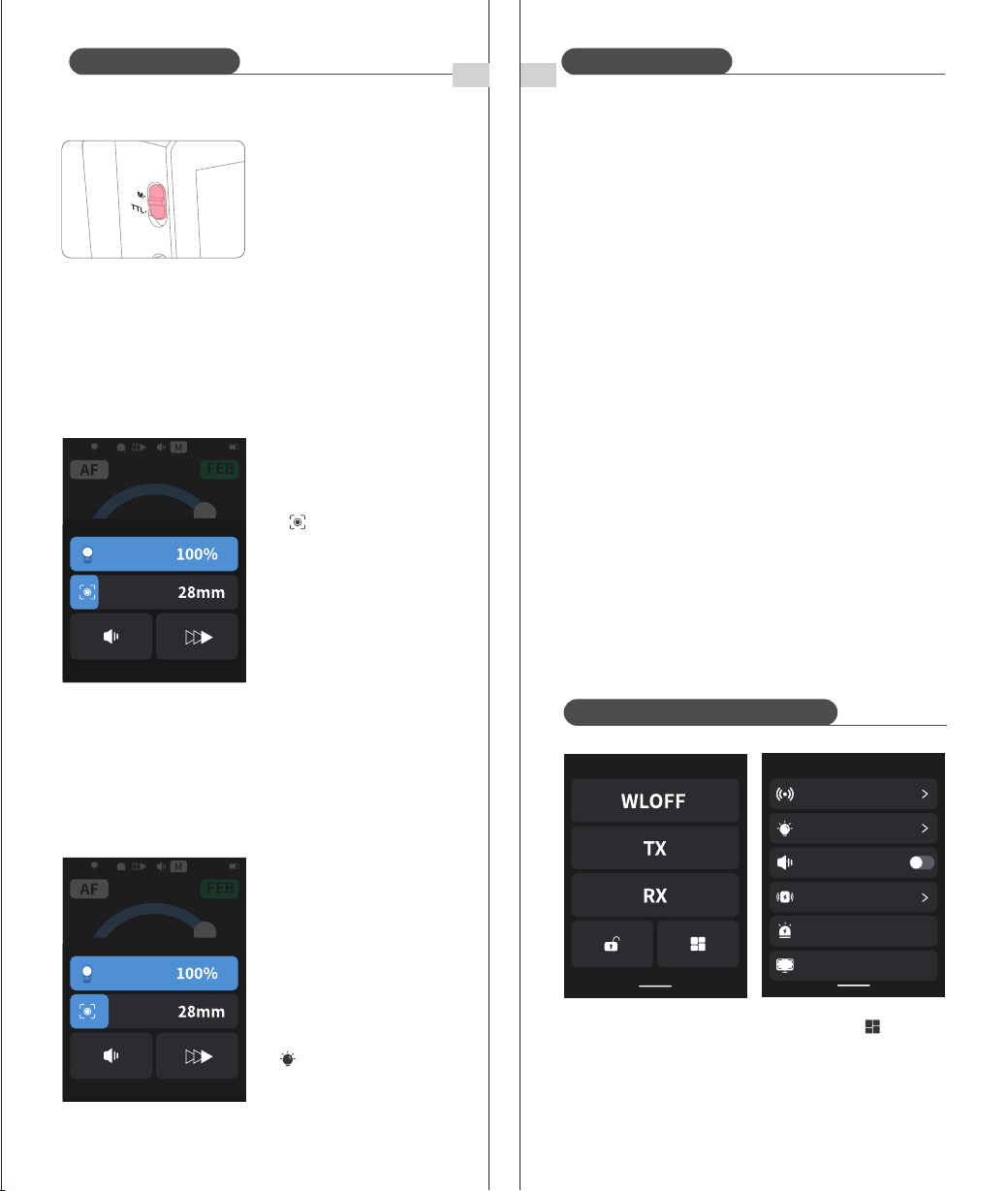
3. Bounce Flash
By pointing the flash head toward a wall or ceiling, the flash will
bounce off the surface before illuminating the subject. This can
soften shadows behind the subject for a more natural-looking
shot. This is commonly known as a 'bounce flash'.
Position the flash head to set the bounce direction.
* If the wall or ceiling is too far away, the bounced flash might
be too weak and result in underexposure
* The wall or ceiling should be a plain, white color for high
reflectance. If the bounce surface isn't white it will result in
"off color" photos.
ZOOM:105
1/8
RX
MULTI
1
2
times
Hz
ZOOM:105
1/4
1
2
times
Hz
C
25 26
7. Modeling Flash
If your camera has a depth-of-field preview button, pressing it
activates a 1-second continuous flash, known as modeling flash.
This feature helps you observe the effect of the light and shadow
on your subject and evaluate the illumination balance, whether
you're using wireless or standard flash
* Avoid triggering the modeling flash more than 10 times in quick
succession. If you've performed 10 consecutive modeling flashes,
please allow the flash to cool down for at least 10 minutes to
prevent overheating or damage to the flash head.
* EOS 300 and B-series cameras do not support modeling flash.
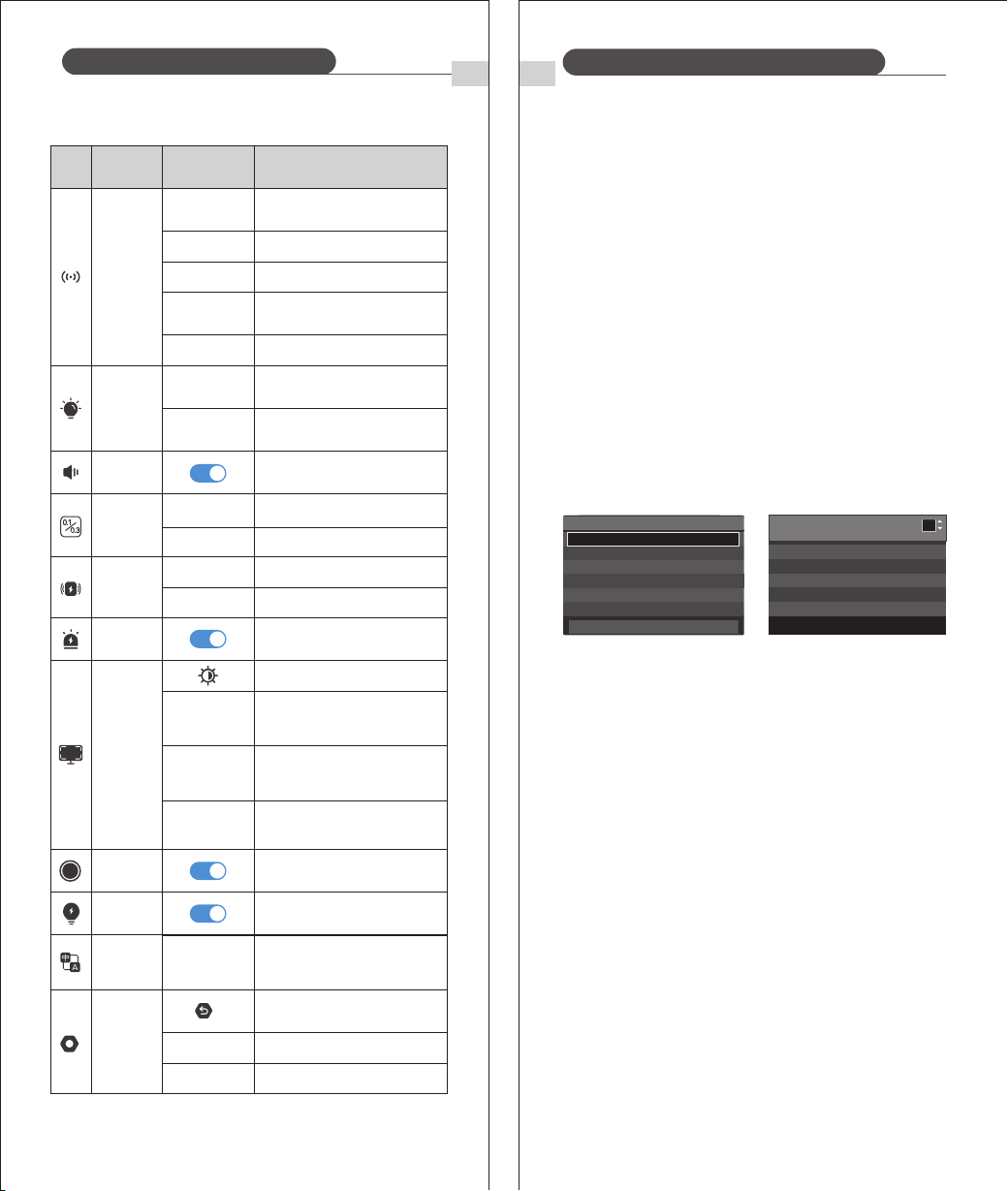
4. TCM: One-Touch E-TTL / Manual Switch
ENEN
Other ApplicationsOther Applications
Quickly meter in E-TTL mode,
retain exposure memory, then
switch to Manual mode for fine a
djustments.
Flip the switch to M for one-touch
manual control.
5. ZOOM: Set the flash coverage
The flash coverage can be set automatically or manually. It can be
set to match the lens focal length from 28mm to 105mm. In auto
zoom, the focal length changes with the camera's zoom lens to
provide the best flash effect.
* If you set the flash coverage manually, make sure it covers the lens
focal length so that the picture will not have a dark periphery.
① When using manual zoom,
swipe up from the bottom of
the screen and adjust the
flash coverage by sliding the
< > bar.
② Automatic flash coverage
adjustment in <AUTO> mode.
6. Modeling Lamp
① Swipe up from the bottom of
the screen and tap the modeling
lamp bar to switch between
upper and lower modeling
lamps.
② Slide the bar to adjust
modeling lamp brightness.
③ Enter the menu and tap
< Modeling Lamp> to switch
between <CONT> and <INTER>.
C.Fn: Setting Custom Functions
① Swipe down from the top of the screen and tap < > to enter
the menu.
② Tap any item to access its settings.
Menu
RF Wireless
Flash Triggering Distance
FEB ACL
Screen Settings
Modeling Light
Sound Prompt
ZOOM:28
+1.0
MULTI
FEB
ZOOM:28
+1.0
MULTI
FEB
FEB Auto Cancel On / Off
27
When mounted on an EOS camera, the flash can be fully controlled
via the camera. Refer to the camera manual.
1. Setting Flash Functions
2. Flash Custom Functions
C.Fn-00, C.Fn-01, C.Fn-03, C.Fn-04, C.Fn-08, C.Fn-20, C.Fn-22 (7 total)
Custom flash
function interface
* Example shown is EOS-1D Mark III.
* If flash exposure compensation (FEC) has already been s
et on the flash, it cannot be adjusted via the camera. To
set FEC from the camera, first reset the flash’s FEC to “0.”
* If both the camera and flash are used to set flash custom
functions or other flash settings (excluding flash exposure
compensation), the most recent setting applied will take
effect.
Flash C.Fn
settings interface
Functions vary by flash mode:
28
① Flash Mode
② Shutter Sync
③ FEB
④ Flash Exposure Compensatio
⑤ Flash Firing
⑥ Clear Flash Settings
Clears all custom flash functions.
Control Flash From Camera Menu
Function Settings
Shutter Sync
FEB
FEC
E-TTL II
Flash Fire
Clear Settings
Flash Mode
E-TTL II
Front-Curtain Sync
-3.2.1.0.1.2.3
-3.2.1.0.1.2.3
Review
On
-
-
Custom Function Settings
Auto Power Off
1
0:On
1:Off
0 1 3 8 10
0 0 0 0 0
-
20 22
0 0
FEB ACL
RX AF
TX
CH
ID
0-10m
1-100m
CONT
INTER
CH/EN/DE/
ES/IT/FR/RU
KO/JP/NL/VN
Enable/Disable Slave
Ready Indicator
Enable/Disable Master Disable
C.Fn: Setting Custom Functions
EN EN
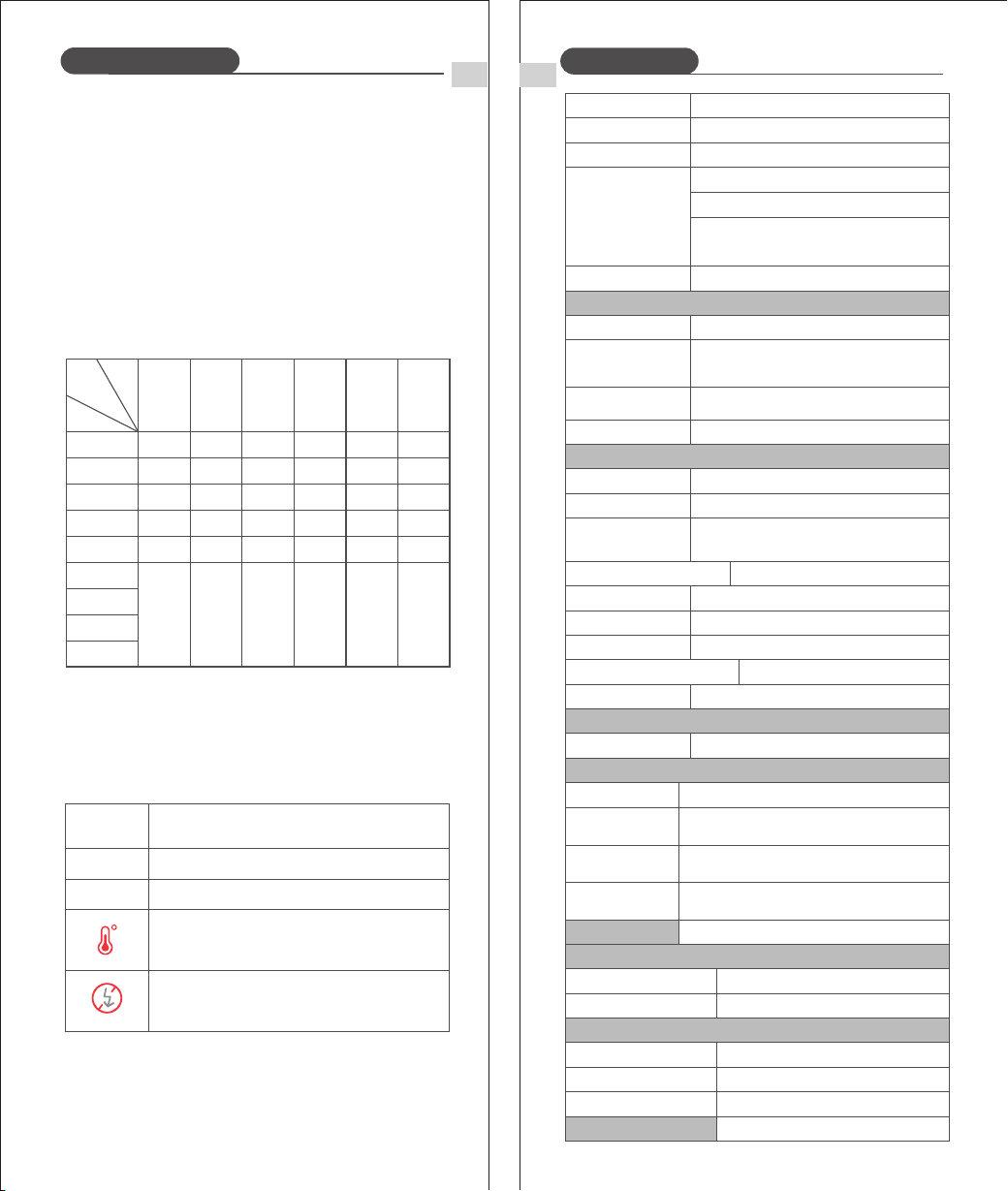
Use the Customize function to complete settings according to the
following chart.
FunctionSymbol Parameters Description
RF Wireless
Scan Free
Channels
RX Compatibility
Wireless Sync
Start scanning for free channels
Channel (1‒32)
Wireless ID (OFF, 1‒99)
Turn RX Compatibility On or Off
Tap to enable Wireless Sync
Modeling light stays on during flash
Modeling light turns off during flash
Modeling
Light
Sound
Prompt
Beep on/off
Flash
Triggering
Distance
Flash triggering distance: 0‒10m
Flash triggering distance: 1‒100m
Screen
Settings
Display brightness
TX/WLOFF
Standby
TX/On-Camera Mode standby time
(60s, 90s, 120s, OFF)
RX/S1/S2
Standby
RX/S1/S2 Mode standby time
(30min, 60min, 90min, OFF)
OFF Time
Power Off
Auto power-off time
(30min, 60min, 90min, OFF)
Language
Selection
Language
Model
Version Current software version
System
Settings
Restore factory settings
Model
Increment
0.1
For precise adjustment
For efficient adjustment
0.3
29 30
Number of flashes that will activate over-temperature protection:
1. Over-Temperature Protection
① To prevent the flash head from deteriorating and overheating, it
is recommended not to fire more than 100 continuous flashes in
fast succession at 1/1 full power. After 100 continuous flashes,
pause the use of the flash for at least 10 minutes.
② If you fire more than 100 continuous flashes and then fire more
flashes in short intervals, the inner over-temperature protection
function may be activated. The recycling time will be longer
(over 10s). If this occurs, the use of the device should be paused
for at least 10 minutes for the flash unit to operate as normal.
ZOOM
1/1
1/2
1/4
1/8
1/16
1/32
1/64
1/128
1/256
100
150
300
300
1200
3500
100
150
300
300
1200
3500
90
134
273
300
1200
3500
80
120
240
300
1200
3500
75
114
231
300
1200
3500
70
28mm 35mm 50mm 70mm 80mm 105mm
106
215
300
1200
3500
Power
Number
EN
Protection Function
EN
Technical Data
2. Other Safety Functions
* The system provides real-time protection to secure the device and
your safety. The following lists prompts for your reference:
Indicates
Prompts on
LCD Panel
IGBT damaged
High-voltage capacitor overvoltage
Level 1 overheat protection: Internal
temperature too high. Flash disabled.
Stop triggering for 10 minutes.
E1
E3
Level 2 overheat protection: Internal
temperature too high. Flash disabled.
Stop triggering for 10 minutes.
Wireless flash function Transmitter, Receiver, Off
A, B, C, D, E (E group can be controlled by QPRO
series flash trigger available on Neewer.com)
Transmitter groups
Controllable Receiver
groups
Transmission range (approx.)
Channels
ID
100m
32 Groups:01~32
01~99
Modeling Flash
Using the camera's depth-of-field preview button
A, B, C, D
Z3R-C
100Ws
Auto zoom 、Manual zoom
Swinging/tilting flash head (bounce flash):
0 to 360° horizontally and -7° to 120° vertically
1/180 to 1/20000 seconds
E-TTL II autoflash and manual flash
Manual. FEB: ±3 stops in 1/3 stop increments
(Manual FEC and FEB can be combined.)
High-speed sync (up to 1/8000 seconds),
first-curtain sync, and second-curtain sync
Autonomy(up to 100 times, 199Hz)
Center: 0.6~10m / Periphery: 0.6~5m
Model
Compatible Cameras
Power(1/1 output)
Flash Coverage
Flash Duration
Exposure Control
Exposure control system
Flash exposure
compensation (FEC)
Sync mode
RPT flash
Wireless flash (radio 2.4G transmission)
Auto Focus Assist Beam
Effective range (approx.)
7.2V/3000mAh Li-ion battery
Approx 1.5 seconds. Red LED indicator
will light up when the flash is ready.
Approx. 500
Auto Power off after approx. 90 seconds of
idle operation. (60 minutes if set as Receiver)
Hotshoe, 2.5mm sync line
Power source
Built-in Li-ion battery
Recycle time
Number of flash
in full power
Energy-saving
Sync Triggering Mode
Dimensions
Volume
Net weight without battery
Weight with battery
Modeling Lamp
Power
Color Temperature
28 -105 mm
Upper: 2W / Lower: 2W
3300K±200K
Canon EOS Cameras (E-TTL II Auto Flash)
0℃ ~ 40℃Operating Temperature
Frequency Range
Maximum radio-frequency power
2412.75MHz-2464.25MHz
5.30dBm
76*76*215 mm
505g
625g
① The camera flash is not attached securely to the camera.
→Attach the hot shoe base mount of the flash securely to the
camera.
② The electrical contacts of the camera flash and camera are dirty.
→Clean the contacts.
③ < > or < > icon does not appear in the viewfinder:
→ Wait for the flash to finish charging; the ready indicator should light.
→ If the ready indicator is lit but the icon still does not appear, check t
he hot shoe connection.
→ If the ready indicator never lights, check the battery. If low (battery
icon flashes), replace the battery.
31 32
1DX
6D 7D
R R3
R7 R10
R8
R5 M6 60D 50D 70D 80D
90D
R5C
R6
7DMark II77D/9000D6DMark II
77D/9000D 1500D/2000D/T7
760D/T6s 800D/T7i
750D/T6i
650D600D550D500D450D 1100D 3000D850D
200D II/250D/SL3
5D Mark II1DMark III 5D Mark IV5D Mark III
This flash is compatible with the following Canon EOS cameras:
EN EN
Troubleshooting
Firmware upgrade
If you experience a problem with the device, please refer to this
Troubleshooting Guide.
1. The Camera Flash does not fire
2. Auto power off
① After 90 seconds of idle operation, auto power off will have
activated if the flash is set as Transmitter (Master).
→Press the shutter button halfway or press any flash button to wake
up.
② After 60 minutes (or 30 minutes) of idle operation, the flash unit
will enter sleep mode if it is set as Receiver (Slave).
→Press any flash button to wake up.
3. Auto zoom does not work.
The camera flash is not attached securely to the camera.
→Attach the camera flash's mounting base to the camera.
4. The flash exposure is underexposed or overexposed.
① There was a highly reflective object (e.g. glass window) in the
picture.
→Use FE lock (FEL).
② You used high-speed sync.
→With high-speed sync, the effective flash range will be shorter.
Make sure the subject is within the effective flash range
displayed.
③ Use Manual Flash mode.
→Set the flash mode to E-TTL or modify the flash output.
5. Photos have dark corners or only parts of the target
subject are illuminated.
The focal length of lens exceeds the flash coverage.
→Check the focal length that has been set. This flash unit has the
flash coverage between 28 and 105mm, which fits medium-
format cameras.
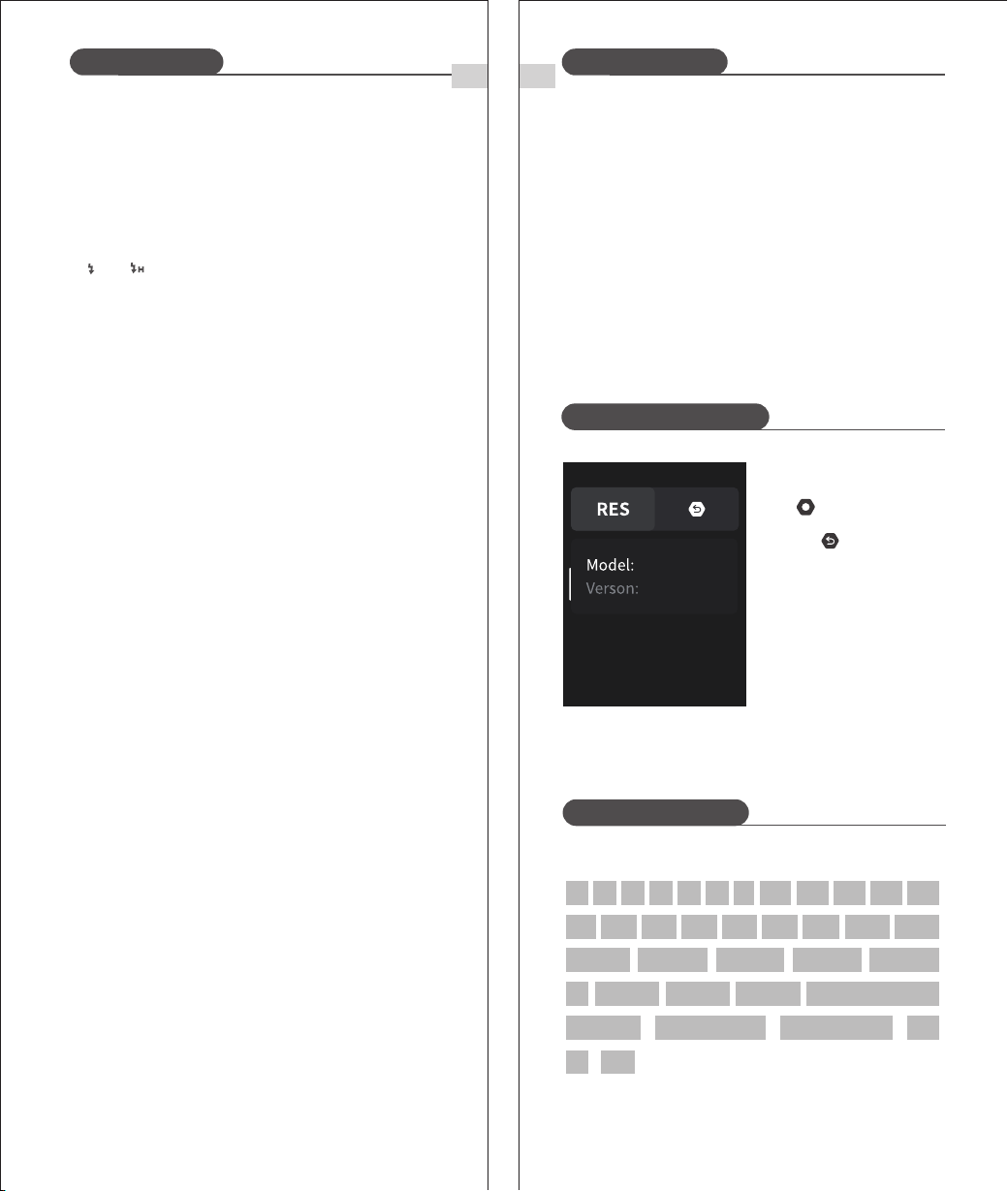
Restore factory settings
① Enter the menu and tap
< > for System Settings.
② Tap < > to enter and
confirm.
The firmware of this product can be upgraded through the USB
port. The latest software announcements and instructions will be
published on the official website.
※ This product does not come with a USB cable for the firmware
upgrade. Please purchase separately. The USB port of this
product is a Type-C port. Please use only a USB Type-C cable.
※ Upgrading the firmware requires Neewer Firmware software
support. Please download and install "Neewer Firmware
Update", and then select the corresponding firmware file before
updating.
※ As the product is undergoing a firmware upgrade, please refer
to the latest electronic version of the manual.
Z3R-C
Compatible Cameras
V1.0.6