SEQTRAK Quick Operation Guide
2
Thank you for purchasing Music Production Studio SEQTRAK.
SEQTRAK is a product that lets you enjoy intuitive music production and performance with sophisticated, yet
fast workflow. Since it’s compact, you can create songs almost anywhere you want. Moreover, by using the
dedicated software, you can edit the sound more finely and even produce images that move in sync with the
songs.
This manual explains the product overview and basic operations required for production for people using
SEQTRAK for the first time. In order to take full advantage of SEQTRAK’s functionality and enjoy performing
with it even more, please read the manual carefully before use. After you have read the manual, keep it in a
safe and handy place for future reference.
About the manuals
The following three manuals are available for the product.
Quick Operation Guide
(this book)
This guide helps you use the product immediately ‘right out of the box,’ with
short explanations that focus on a general overview and basic functions.
Safety Guide
Describes information for safe use of the product.
User Guide (HTML)
Explains functions and operations of the product in more
detail.
https://manual.yamaha.com/mi/de/seqtrak/index.html
SEQTRAK Quick Operation Guide
3
Included Accessories
• Quick Operation Guide (this book)
• Safety Guide
• USB cable (Type-C)
• Dedicated MIDI Converter Cable
(1003-M06 plate bottom en 01)
Contents
Sections and Controls..........................................................6
Charging...................................................................................7
Getting Started ......................................................................9
Turning the Power On or Off..........................................11
Basic Operations.................................................................13
SEQTRAK app.......................................................................18
Specifications....................................................................... 19
The model number, serial number, power
requirements, etc., may be found on or near the
name plate, which is at the bottom of the unit. You
should note this serial number in the space provided
below and retain this manual as a permanent record
of your purchase to aid identification in the event of
theft.
Model No.
Serial No.

SEQTRAK Quick Operation Guide
4
Information
• The copyright of the “content”
*1
installed in this
product belongs to Yamaha Corporation or its
copyright holder. Except as permitted by copyright
laws and other relevant laws, such as copying for
personal use, it is prohibited to “reproduce or
divert”
*2
without the permission of the copyright
holder. When using the content, consult with a
copyright expert.
If you create music or perform with the contents
through the original use of the product, and then
record and distribute them, the permission of
Yamaha Corporation is not required regardless of
whether the distribution method is paid or free of
charge.
*1: The word “content” includes a computer program,
audio data, Accompaniment Style data, MIDI data,
waveform data, voice recording data, music score, and
score data, etc.
*2: The phrase “reproduce or divert” includes taking out
the content itself in this product, or recording and
distributing it without changes in a similar manner.
• The illustrations as shown in this manual are for
instructional purposes only.
• Windows is a registered trademark of Microsoft®
Corporation in the United States and other
countries.
• Mac, iPadOS and App Store are trademarks of
Apple Inc., registered in the U.S. and other
countries.
• IOS is a trademark or registered trademark of Cisco
in the U.S. and other countries and is used under
license.
• Android and Google Play are trademarks of Google
LLC.
• Wi-Fi and Wi-Fi CERTIFIED are registered
trademarks or trademarks of Wi-Fi Alliance®.
• The Wi-Fi CERTIFIED™ Logo is a certification mark
of Wi-Fi Alliance®.

SEQTRAK Quick Operation Guide
5
• The Bluetooth® word mark and logos are
registered trademarks owned by Bluetooth SIG,
Inc. and any use of such marks by Yamaha
Corporation is under license.
• “USB Type-C” and “USB-C” are trademarks of USB
Implementers Forum, registered in the U.S. and
other countries.
• The company names and product names in this
manual are the trademarks or registered
trademarks of their respective companies.
SEQTRAK Quick Operation Guide
6
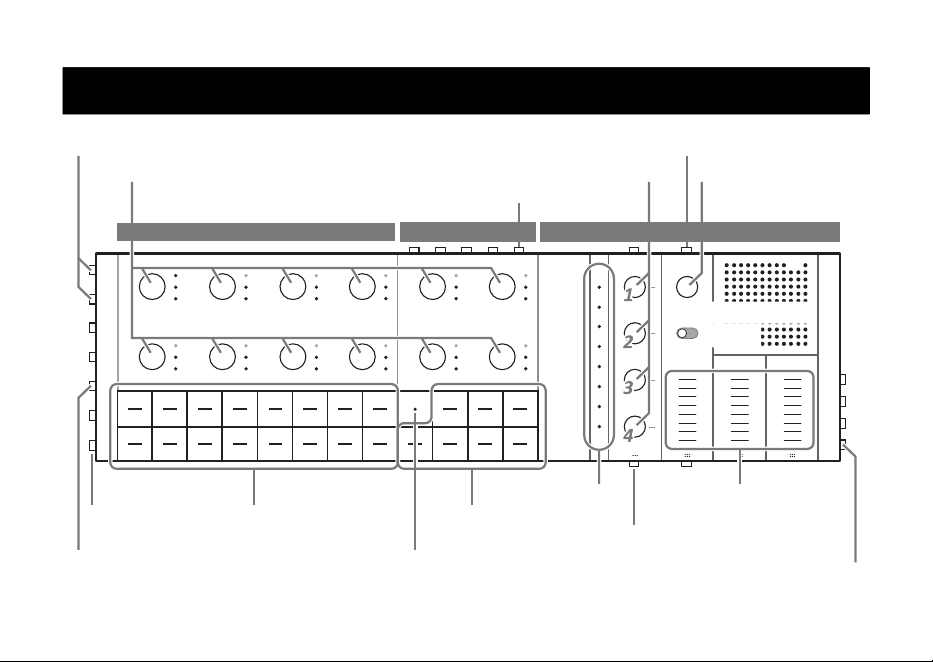
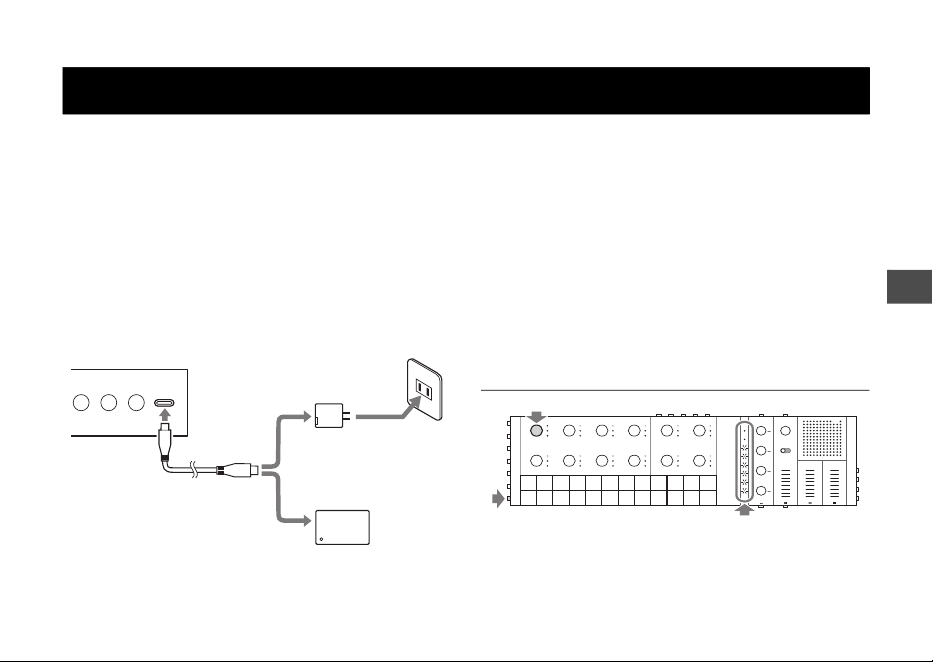
Sections and Controls
Track knobs
Drum section Synth section Sound Design & FX section
Sound Design knobs [FX] knob
Drum keys
Synth keys
Touch sliders
[FX LEVEL]
[HIGH PASS]
[REPEATER]
[PROJECT] button
Global Meter
Record key
[VOL+]/[VOL−] button
[CLEAR FX] button
[REC SAMPLE] button
Sound Design Page
button
[MASTER/SINGLE]
switch
[P/PLAY] button
[SOLO] button
SEQTRAK Quick Operation Guide
7
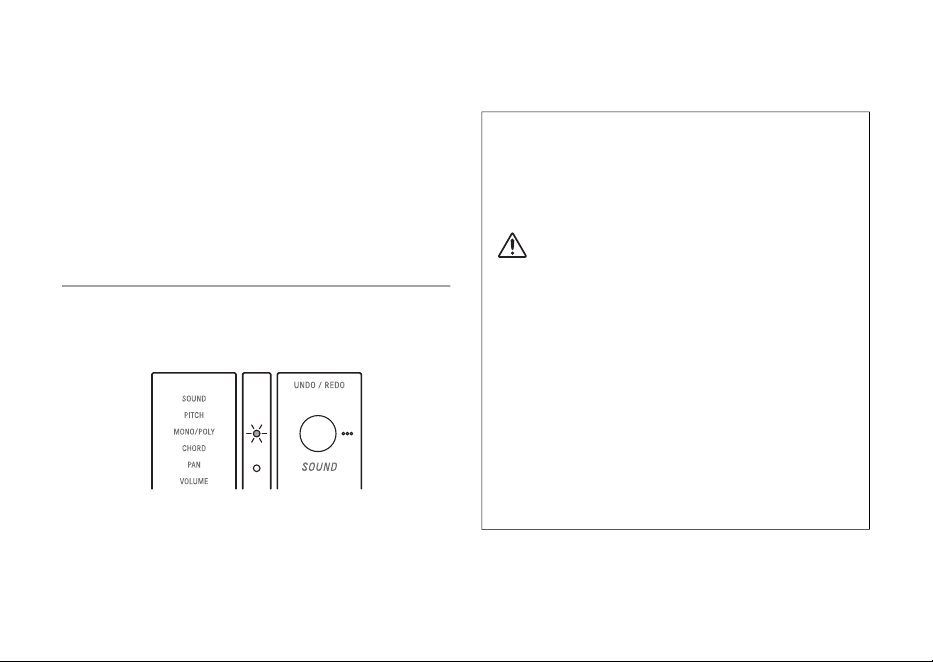
SEQTRAK can be charged from an outlet by using
USB power adapter or a USB mobile battery. (When
using a USB mobile battery for smartphones, make
sure that it meets the requirements on the next
page.) Connect the power supply and included USB
cable in the order shown below. The charging status
indication differs depending on whether the product
is turned on or off. Refer to “Charge Status” below.
NOTE
• The estimated time from low battery to full charge is 3–5
hours (depending on usage environment and battery
deterioration).
• When the battery is low, the Global Meter will flash in red
for 2 seconds every 90 seconds.
• Before the battery runs out, the current project will be
saved automatically, and then SEQTRK will be turned off.
Charge Status
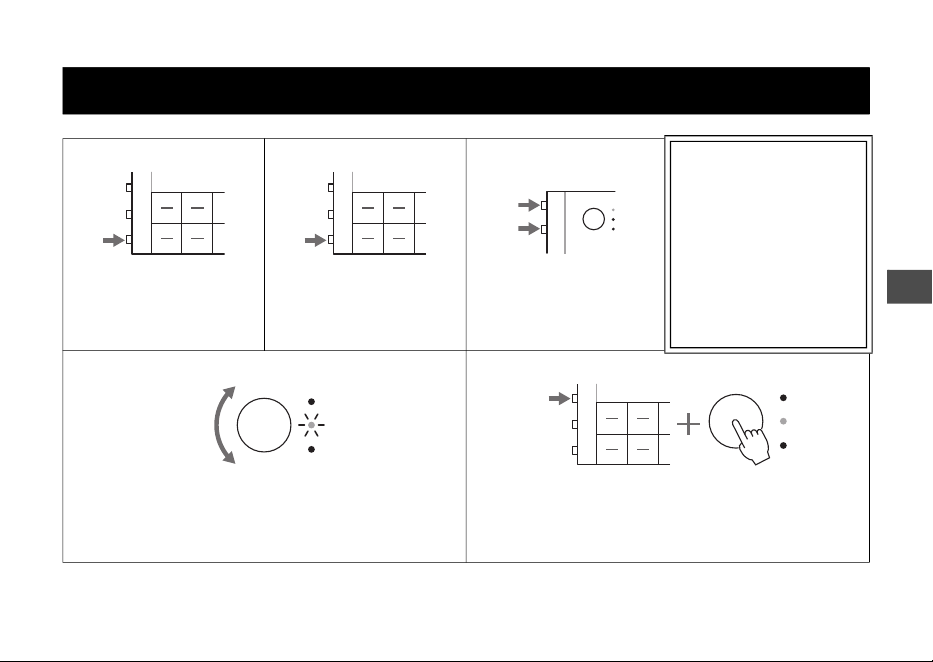
When the Power is On
Hold down both the [ALL] knob and the [P/PLAY]
button. The Global Meter will then light according to
Charging
1
2
2
3
[USB] jack
SEQTRAK right side
USB power adaptor
(Commercially
available)
USB mobile battery
(Commercially available)
USB cable
(Included)
or
* The shape of the plug and
outlet differs depending
on your locale.
SEQTRAK Quick Operation Guide
8
the remaining battery power (charging: cyan blue,
not charging: white, trouble: flashes red.)
NOTE
• SEQTRAK can be used while charging.
• If the electricity supplied from the power supply is
insufficient, it will be used for operation of the SEQTRAK
and charging will not be possible even if the LED lamps
are lit in cyan blue.
When the Power is Off
• During charging, the top LED lamp of the Global
Meter lights up in red. (Battery level is not
indicated.)
• When the SEQTRAK cannot be charged due to
battery failure or other reasons, the top LED lamp
of the Global Meter flashes in red.
• When charging is complete, the top LED lamp of
the Global Meter will turn off.
USB power adaptor / USB mobile battery
requirements
Output voltage: 4.8 V to 5.2 V
Output current: 1.5 A or greater
CAUTION
Make sure to use a USB Power Delivery (PD) power
adaptor or USB Power Delivery (PD) mobile battery
with the specifications above. Using the wrong USB
device can result in damage to the product or
overheating. Read the safety precautions for your
particular USB devices.
NOTICE
When the product is turned on and power turns off
suddenly and unexpectedly, your USB device may
not meet the requirements or may be damaged. Try
using another USB device that meets the
requirements, etc. If the product appears to be
malfunctioning, consult Yamaha service personnel.
SEQTRAK Quick Operation Guide
9
Getting Started
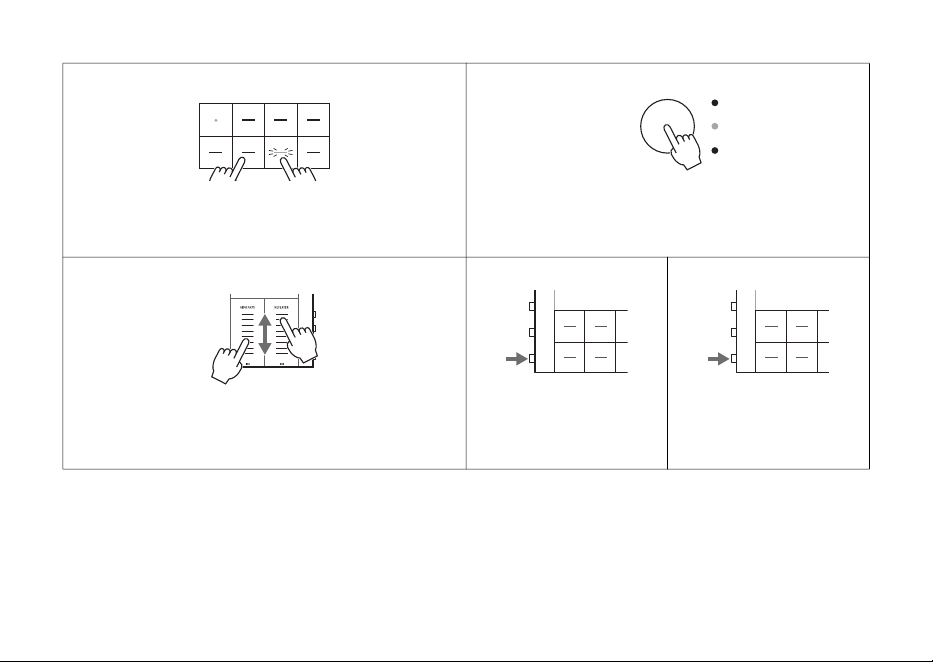
Power on
1. Press and hold the
[P/PLAY] button for 2
seconds or longer. The LED
lamps will light.
Playback
2. Briefly press the
[P/PLAY] button. The
demo song (call it a
“project”) will be played.
Volume control
3. If necessary, use the
[VOL+] and [VOL−]
buttons to adjust the
volume.
The project (like a song)
has a total of 11 tracks
(each corresponding to a
specific sound part).
You can choose one
pattern (a looped phrase)
for each track. The
11 patterns will overlap
and repeat until playback
is stopped.
Pattern selection
4. Turn one of the track knobs. You can select a pattern for
each track. The LED lamp corresponding to the selected
pattern lights.
Solo
5. If it’s difficult to hear any change in the pattern change,
press one of the track knobs while holding down the
[SOLO] button to hear only the sound of that track.
Perform the same operation again to cancel Solo.
SEQTRAK Quick Operation Guide
10
Performing with synth pitches
6. Press one of the Synth keys. The pitch of the sound (in
proper scale) will change according to the pressed key.
Changing the synth track sound
7. Press one of the SYNTH1, SYNTH2, DX and SAMPLER
track knobs. The sound changes each time you press a
Synth key.
Tweaking the sound
8. Slide your finger on [HIGH PASS] touch slider or
[REPEATER] touch slider to expressively change the sound
in real time.
Stopping playback
9. Briefly press the
[P/PLAY] button. The
demo song will stop.
Power Off
10. Press and hold the
[P/PLAY] button for
2 seconds or longer. The
LED lamps will go out.
SEQTRAK Quick Operation Guide
11
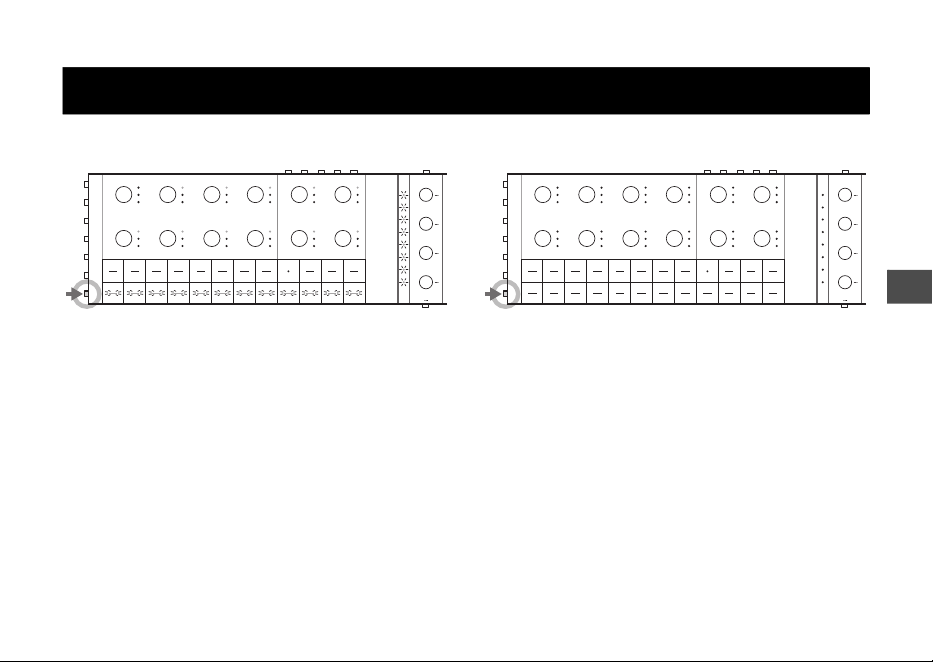
Turning the Power On
Press and hold the [P/PLAY] button for
2 seconds or longer.
The LED lamps of the Drum keys, the Synth keys, and
the Global Meter light up in a white, flowing L-shape
when the SEQTRAK is turned on.
When the device is ready to use, the LED lamps lit in
L-shape go out, and then the LED lamps light up
depending on the project status.
Turning the Power Off
Press and hold the [P/PLAY] button for
2 seconds or longer.
The LED lamps of the Global Meter briefly flash in
white for a while, and then all LED lamps turn off
when the SEQTRAK is turned off.
In this case, the current project is saved
automatically.
Turning the Power On or Off
SEQTRAK Quick Operation Guide
12
Forced termination
If the SEQTRAK behaves abnormally and cannot be
operated, you can turn the power off by pressing
and holding the [P/PLAY] and [PROJECT]
buttons.
In this case, the current project in progress is not
saved.
Auto Power Off
If the SEQTRAK is not operated for 30 minutes, the
current project will be saved automatically, and then
the power will be turned off to save power.
Before the power turns off, LED lamps of the Global
Meter flash in white.
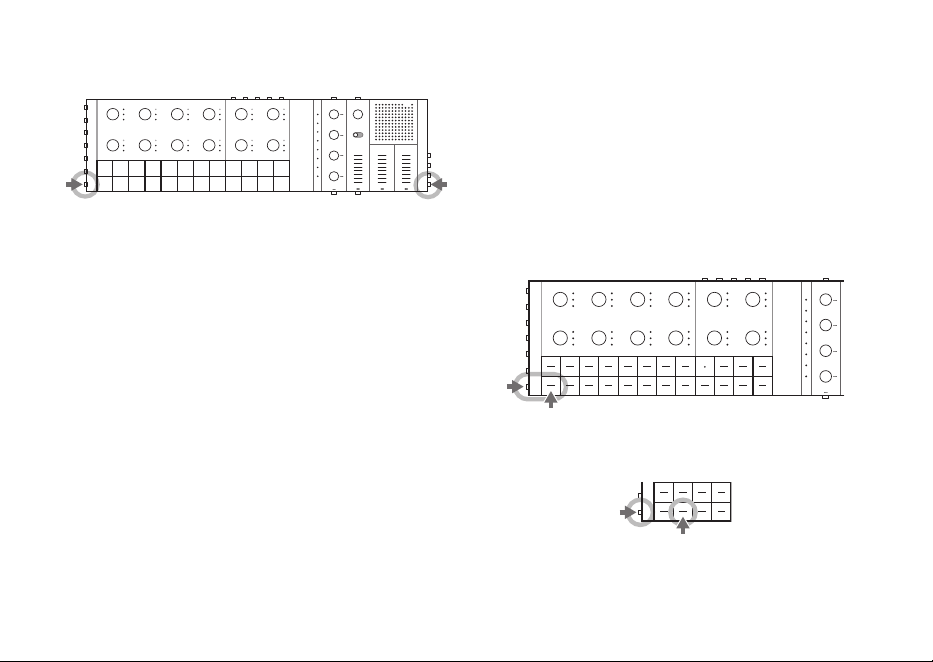
NOTE
• You can disable the auto power off function by turning on
the SEQTRAK while pressing the lower left Drum key.
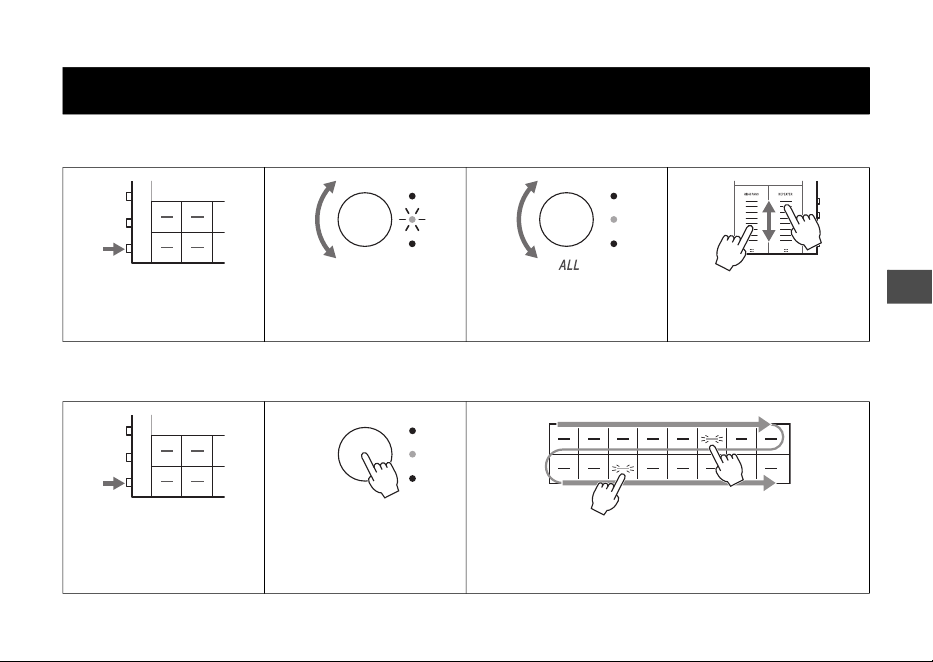
• To enable the Auto Power Off function (30 min), turn on
the SEQTRAK while holding down the Drum key shown
below.
• You can make more detailed settings (OFF/5 min/10 min/
15 min/30 min/60 min/120 min) with the SEQTRAK app.
For details, refer to the User Guide (HTML).
SEQTRAK Quick Operation Guide
13
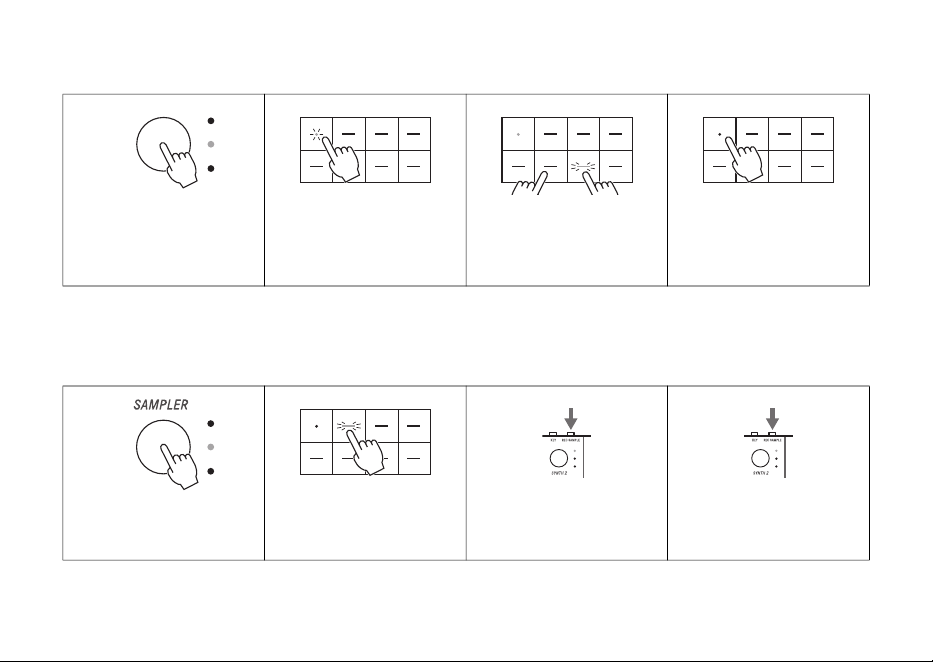
Playing and changing patterns
Stopping playback Editing drum patterns
Basic Operations
Press the [P/PLAY] button
to play patterns.
Select different track
patterns by turning the
track knob.
Use the [ALL] knob to
simultaneously change all
eleven track patterns.
Slide your finger on the
touch sliders to tweak the
sound in real time.
Press the [P/PLAY] button
to stop playback.
Press one of the Drum
track knobs to select the
desired track for editing
the pattern.
Each press of a Drum key toggles the corresponding step
on and off.
The pattern plays from top left to bottom right.
SEQTRAK Quick Operation Guide
14
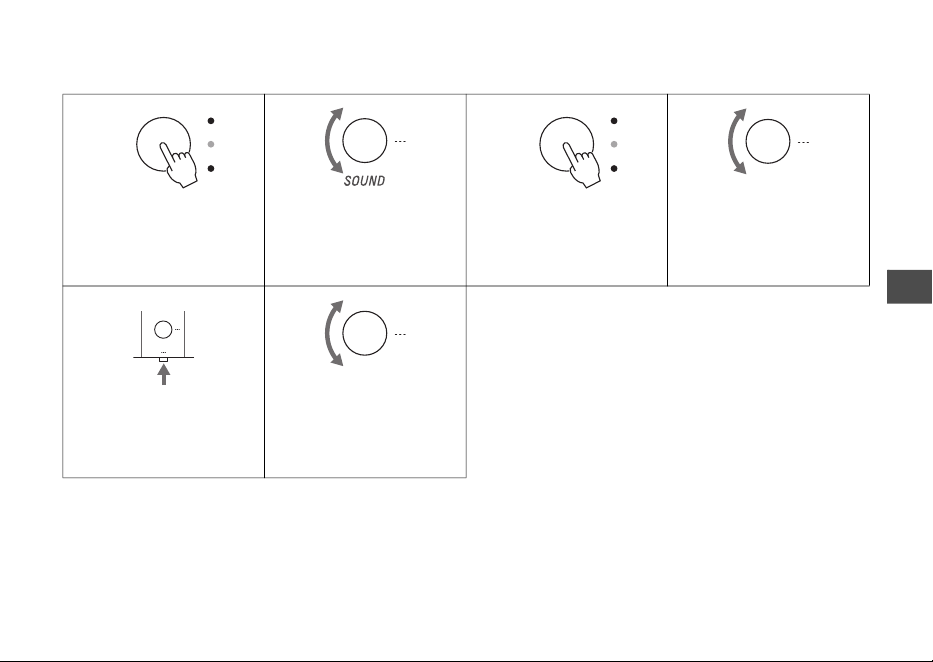
Recording synth patterns
* The notes corresponding to each Synth key can be changed by using the octave, key and scale settings.
Sampling
* Refer to the User Guide (HTML) for sampling sources other than the built-in microphone.
Press one of the Synth
track knobs to select the
desired track for recording
a pattern.
Press the Record key to
start pattern recording.
Use the Synth keys to play
the pattern.
Press the Record key again
to stop pattern recording.
Press the [SAMPLER] knob
to select the SAMPLER
track.
Press one of the Synth keys
for assigning the sound to
be recorded.
Press the [REC SAMPLE]
button to start recording
with the built-in microphone.
Press the [REC SAMPLE]
button again to stop
recording.
The recorded sound or the input sound from external devices can be played on
the SAMPLER track.
SEQTRAK Quick Operation Guide
15
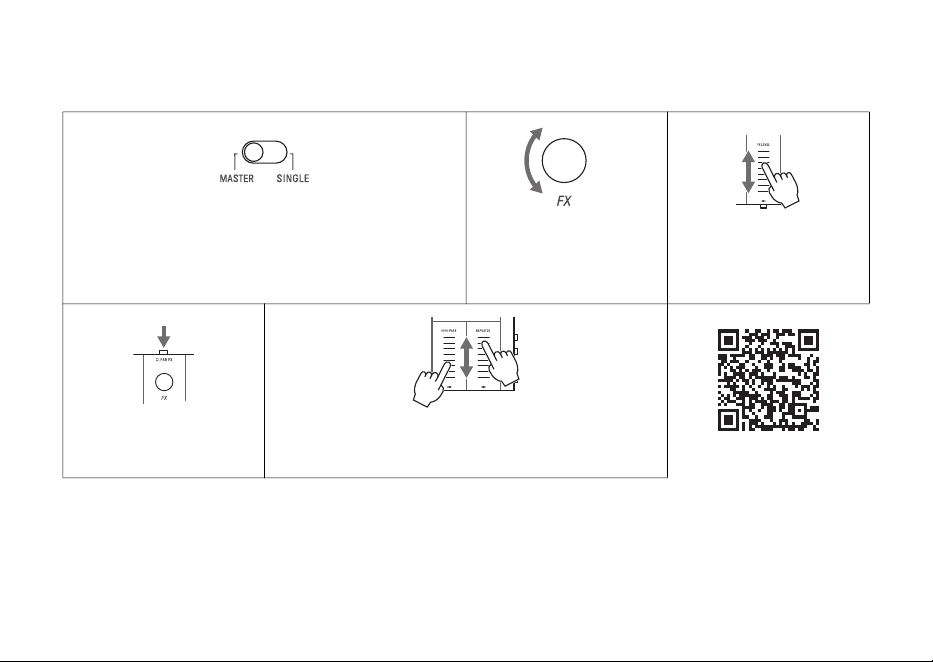
Sound Design
* Refer to the User Guide (HTML) for details on editing parameters.
Press a one of the track
knobs to select the desired
track for editing.
Turn the [SOUND] knob to
change the sound of the
selected track.
To listen to the sound,
press the track knob or a
Synth key while playback is
stopped.
Turn one of the Sound
Design knobs 2–4 to adjust
the sound.
Press the Sound Design
Page button to switch
among available
parameters.
Adjust the parameters can
be adjusted by using
Sound Design knobs 1–4.
SEQTRAK Quick Operation Guide
16
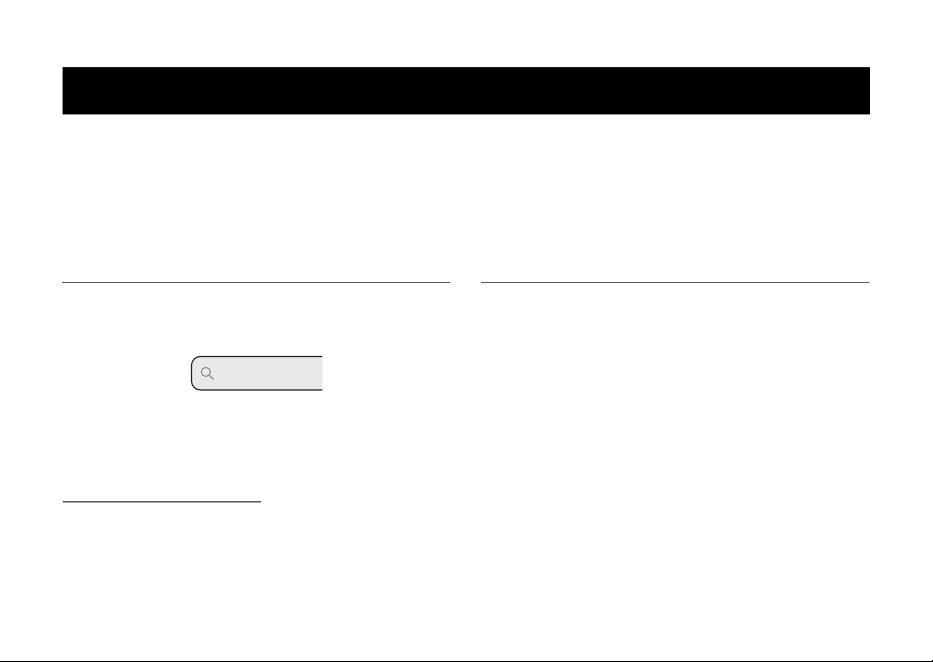
Effects
* Refer to the User Guide (HTML) for details on the effects.
Using the [MASTER/SINGLE] switch to select the desired
effect type.
MASTER: Effects that are common to all tracks
SINGLE: Effects that are applied to only one track
Turn the [FX] knob to
change the effect.
Slide your finger on the
[FX LEVEL] touch slider to
adjust the amount (level)
of the applied effect.
Press the [CLEAR FX]
button to minimize the
effect level.
The [HIGH PASS] and [REPEATER] effects are applied to all
tracks regardless of the [MASTER/SINGLE] switch status.
Effect block diagram
One effect type can be applied to each track, as well as the common effects
applied to all tracks.

SEQTRAK Quick Operation Guide
17
Creating an Original Song
The following operations are effective for creating your original song from scratch.
• You can change the project by pressing the Drum key corresponding to the project while holding down the
[PROJECT] button.
• You can delete the project by pressing the Drum key corresponding to the project while holding down the
[PROJECT] and [DELETE] buttons.
• You can delete the selected pattern by pressing the track knob while holding down the [DELETE] button.
* Refer to the User Guide (HTML) for details.
SEQTRAK Quick Operation Guide
18
Using the dedicated SEQTRAK app, you can edit the sound more finely, produce images linked to the SEQTRAK
operation, manage your content, and so on.
The software can be used on smartphones, tablets, and computers.
* Refer to the User Guide (HTML) for details about the SEQTRAK app.
Obtaining SEQTRAK app
iOS, iPadOS, and Android versions are available from
the App Store or Google Play Store.
Windows and Mac versions are available from the
following Yamaha website:
https://www.yamaha.com/
Connection Settings
When the SEQTRAK app is launched, setup
operations for connecting the SEQTRAK app to the
SEQTRAK device start as required.
Follow the on-screen instructions to set up the
connection.
NOTICE
Do not connect this product to a public Wi-Fi and/or
Internet service directly. Only connect this product to
the Internet through a router with strong password
protections. Consult your router manufacturer for
information on optimum security practices.
(624-M01)
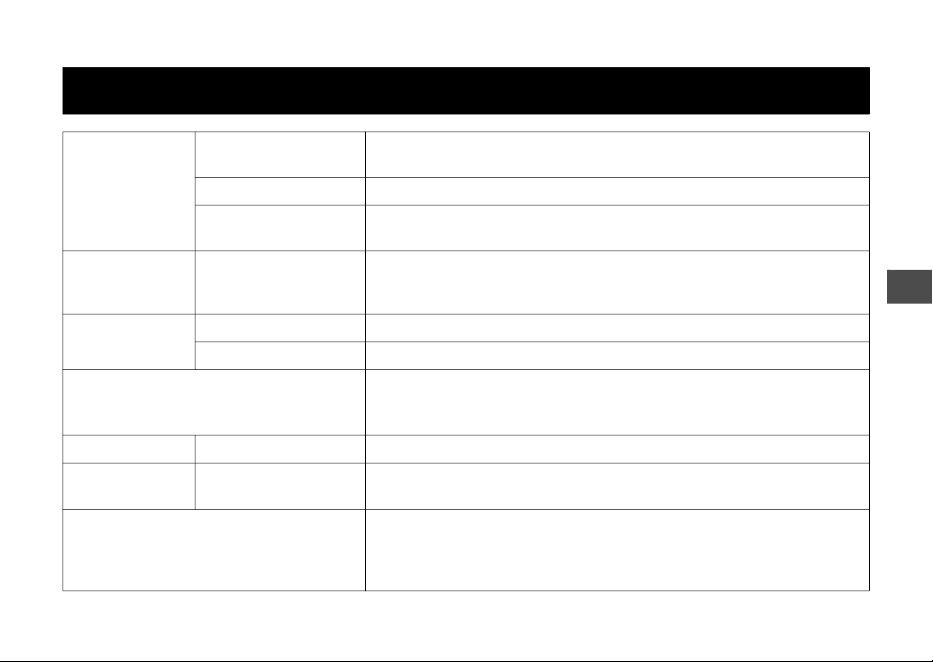
SEQTRAK app
Search “SEQTRAK”
SEQTRAK
SEQTRAK Quick Operation Guide
19
Specifications
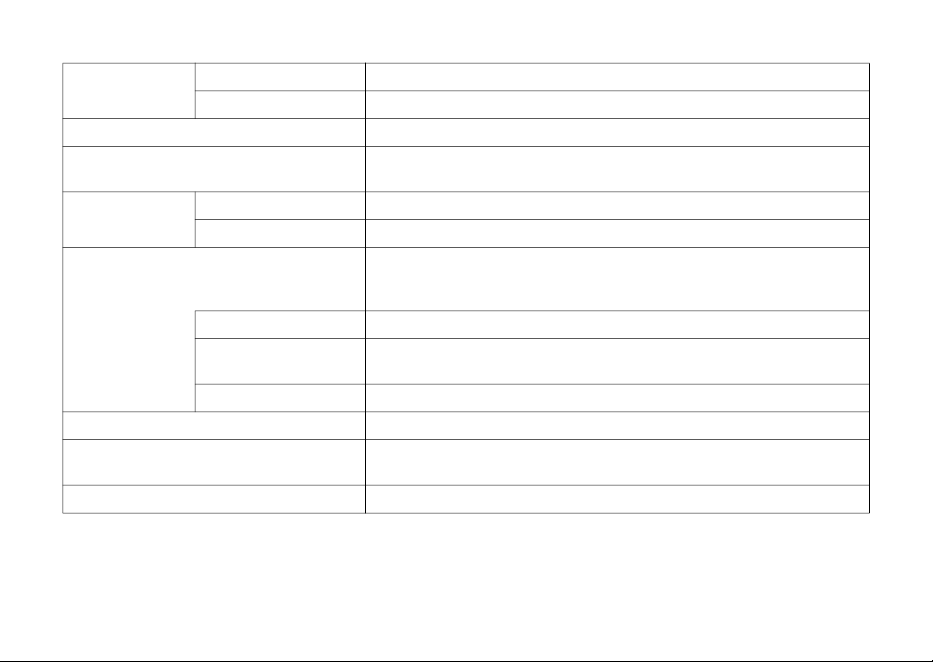
Tone Generation
Tone Generation
Technologies
AWM2, FM: 4 operators
Polyphony (max.) AWM2: 128, FM: 8
Waveforms
Preset: 800 MB (when converted to 16-bit linear format),
User: 500 MB
Effects Type
Reverb × 12 types, Delay × 9 types, Master Effect × 85 types,
Single Effect × 85 types
Maxter EQ 5 bands, LP-HP filters for each track
Tracks
Track Types DRUM, SYNTH, DX, SAMPLER
Number of Tracks 11
Sounds
Preset Sound: 2032
Preset Sampler Sound: 392
* Can be added from the SEQTRAK app
Sequencer Block Steps (max.) 128
Project Projects
8
* Can be saved to the SEQTRAK app
Connectivity
USB-C (power, MIDI to host, MIDI to device, audio)
PHONES (stereo mini jack)
AUDIO IN (stereo mini jack)
MIDI IN/OUT
* Only included cable can be used.
SEQTRAK Quick Operation Guide
20
* The contents of this manual apply to the latest specifications as of the publishing date. To obtain the latest manual, access the
Yamaha website then download the manual file. Since specifications, equipment or separately sold accessories may not be the same
in every locale, please check with your Yamaha dealer.
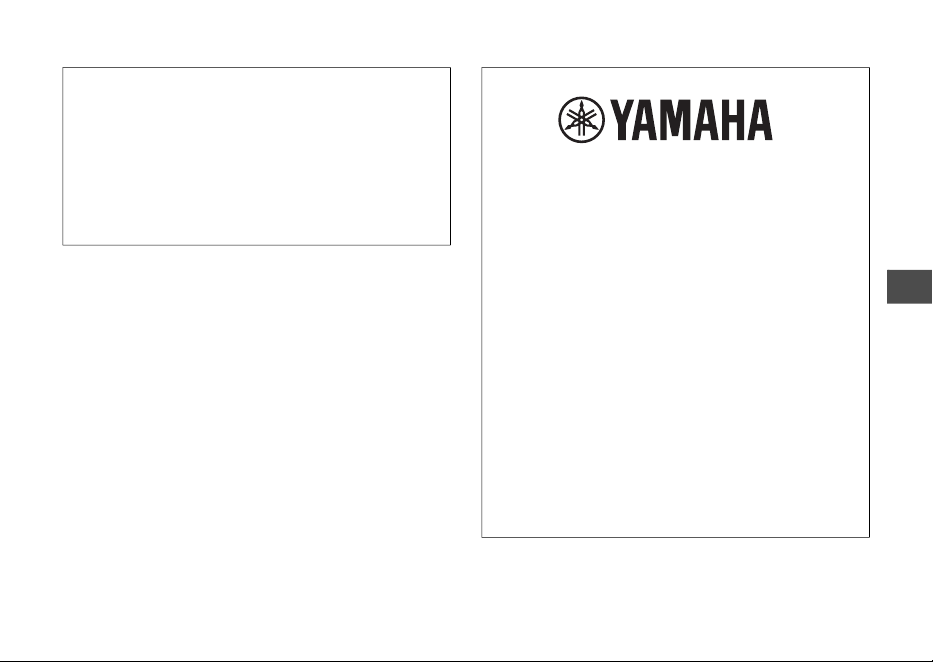
USB Audio
Interface
Sampling Frequency 44.1 kHz (quantization bit depth: 24-bit)
Input/Output Channels Input: 2 channels (stereo 1 channel), Output: 2 channels (stereo 1 channel)
Bluetooth MIDI transmission/reception (wireless capability varies by country)
Wi-Fi
Data transmission/reception with dedicated app (wireless capability varies
by country)
Sound System
Built-in Speakers 2.3 cm, 1 W
Built-in Microphone Internal MEMS microphone
Power Supply
Rechargeable lithium-ion battery (2100 mAh, 7.6 Wh)
USB Power Delivery (PD) (Output voltage: 4.8 V to 5.2 V, Output current:
1.5 A or greater)
Power Consumption 6 W
Battery life for
continuous use
3–4 hours
Battery charge time 3–5 hours
Size/Weight 343 (W) × 97 (D) × 38 (H) mm, 0.5 kg
Included Accessories
USB C – USB C cable, dedicated MIDI Converter Cable,
Quick Operation Guide (this book), Safety Guide
Dedicated Software SEQTRAK app
SEQTRAK Quick Operation Guide
21
Wireless communication functions
[Models for U.K. and Europe]
Bluetooth
Radio Frequency: 2400 MHz to 2483.5 MHz
Maximum Output Power (EIRP): +4.7 dBm
Wi-Fi (2.4 GHz)
Radio Frequency: 2402 MHz to 2482 MHz
Maximum Output Power (EIRP): 19.30 dBm
(559-M04, 637-M01)
Important Notice:
U.S. LIMITED WARRANTY for Customers in
the United States
For detailed information about this Yamaha
product and warranty service, please either visit
the following website address (printable file is
available at our website) or contact Customer
Service at the address or telephone number
identified below.
Website Address:
Yamaha.io/SynthAndStageWarranty
Customer Service:
Yamaha Corporation of America
6600 Orangethorpe Avenue,
Buena Park, CA 90620-1273
Telephone: 800-854-1569
148
For details of products, please contact your nearest Yamaha representative or the authorized distributor listed below.
CANADA
Yamaha Canada Music Ltd.
135 Milner Avenue, Toronto,
Ontario M1S 3R1, Canada
Tel: +1-416-298-1311
U.S.A.
Yamaha Corporation of America
6600 Orangethorpe Avenue,
Buena Park, CA 90620, U.S.A.
Tel: +1-714-522-9011
MEXICO
Yamaha de México, S.A. de C.V.
Av. Insurgentes Sur 1647 Piso 9, Col. San José
Insurgentes, Delegación Benito Juárez, CDMX,
C.P. 03900, México
Tel: +52-55-5804-0600
BRAZIL
Yamaha Musical do Brasil Ltda.
Praça Professor José Lannes,
40-Cjs 21 e 22, Brooklin Paulista Novo
CEP 04571-100 – São Paulo – SP, Brazil
Tel: +55-11-3704-1377
ARGENTINA
Yamaha Music Latin America, S.A.,
Sucursal Argentina
Olga Cossettini 1553, Piso 4 Norte,
Madero Este-C1107CEK,
Buenos Aires, Argentina
Tel: +54-11-4119-7000
PANAMA AND OTHER LATIN AMERICAN
REGIONS/CARIBBEAN REGIONS
Yamaha Music Latin America, S.A.
Edificio Torre Davivienda, Piso: 20 Avenida
Balboa, Marbella, Corregimiento de Bella Vista,
Ciudad de Panamá, Rep. de Panamá
Tel: +507-269-5311
THE UNITED KINGDOM/IRELAND
Yamaha Music Europe GmbH (UK)
Sherbourne Drive, Tilbrook, Milton Keynes,
MK7 8BL, U.K.
Tel: +44-1908-366700
GERMANY
Yamaha Music Europe GmbH
Siemensstrasse 22-34, 25462 Rellingen, Germany
Tel: +49-4101-303-0
SWITZERLAND/LIECHTENSTEIN
Yamaha Music Europe GmbH,
Branch Switzerland in Thalwil
Seestrasse 18a, 8800 Thalwil, Switzerland
Tel: +41-44-3878080
AUSTRIA/CROATIA/
CZECH REPUBLIC
/
HUNGARY/ROMANIA/SLOVAKIA/SLOVENIA
Yamaha Music Europe GmbH,
Branch Austria
Schleiergasse 20, 1100 Wien, Austria
Tel: +43-1-60203900
POLAND
Yamaha Music Europe
Sp.z o.o. Oddział w Polsce
ul. Młynarska 48, 01-171 Warszawa, Poland
Tel: +48-22-880-08-88
BULGARIA
Dinacord Bulgaria LTD.
Bul.Iskarsko Schose 7 Targowski Zentar Ewropa
1528 Sofia, Bulgaria
Tel: +359-2-978-20-25
MALTA
Olimpus Music Ltd.
Valletta Road, Mosta MST9010, Malta
Tel: +356-2133-2093
NETHERLANDS/BELGIUM/LUXEMBOURG
Yamaha Music Europe, Branch Benelux
Wattbaan 1 3439ML Nieuwegein,
The Netherlands
Tel: +31-347-358040
FRANCE
Yamaha Music Europe
7 rue Ambroise Croizat, Zone d'activités de
Pariest, 77183 Croissy-Beaubourg, France
Tel: +33-1-6461-4000
ITALY
Yamaha Music Europe GmbH, Branch Italy
Via Tinelli N.67/69 20855 Gerno di Lesmo (MB),
Italy
Tel: +39-039-9065-1
SPAIN/PORTUGAL
Yamaha Music Europe GmbH Ibérica,
Sucursal en España
Ctra. de la Coruña km. 17,200, 28231
Las Rozas de Madrid, Spain
Tel: +34-91-639-88-88
GREECE
Philippos Nakas S.A. The Music House
19th klm. Leof. Lavriou 190 02 Peania – Attiki,
Greece
Tel: +30-210-6686260
SWEDEN
Yamaha Music Europe GmbH Germany
Filial Scandinavia
JA Wettergrensgata 1, 400 43 Göteborg, Sweden
Tel: +46-31-89-34-00
DENMARK
Yamaha Music Denmark,
Fillial of Yamaha Music Europe GmbH,
Tyskland
Generatorvej 8C, ST. TH., 2860 Søborg,
Denmark
Tel: +45-44-92-49-00
FINLAND
F-Musiikki Oy
Antaksentie 4
FI-01510 Vantaa, Finland
Tel: +358 (0)96185111
NORWAY
Yamaha Music Europe GmbH Germany -
Norwegian Branch
c/o Box 30053, 400 43 Göteborg, Sweden
Tel: +47-6716-7800
NORTH AMERICA
CENTRAL & SOUTH AMERICA
EUROPE
149
ICELAND
Hljodfaerahusid Ehf.
Sidumula 20, IS-108 Reykjavik, Iceland
Tel: +354-525-5050
CYPRUS
Nakas Music Cyprus Ltd.
Nikis Ave 2k, 1086 Nicosia
Tel: + 357-22-511080
Major Music Center
21 Ali Riza Ave. Ortakoy
P.O.Box 475 Lefkoşa, Cyprus
Tel: (392) 227 9213
RUSSIA
Yamaha Music (Russia) LLC.
Room 37, entrance 7, bld. 7, Kievskaya street,
Moscow, 121059, Russia
Tel: +7-495-626-5005
OTHER EUROPEAN REGIONS
Yamaha Music Europe GmbH
Siemensstrasse 22-34, 25462 Rellingen, Germany
Tel: +49-4101-303-0
Yamaha Music Gulf FZE
JAFZA-16, Office 512, P.O.Box 17328,
Jebel Ali FZE, Dubai, UAE
Tel: +971-4-801-1500
TURKEY
Dore Muzik
Yeni Sülün Sokak No. 10
Levent İstanbul / Turkiye
Tel: +90-212-236-3640
Fax: +90-212-259-5567
ISRAEL
RBX International Co., Ltd.
P.O Box 10245, Petach-Tikva, 49002
Tel: (972) 3-925-6900
OTHER REGIONS
Yamaha Music Gulf FZE
JAFZA-16, Office 512, P.O.Box 17328,
Jebel Ali FZE, Dubai, UAE
Tel: +971-4-801-1500
MAINLAND CHINA
Yamaha Music & Electronics (China) Co., Ltd.
2F, Yunhedasha, 1818 Xinzha-lu,
Jingan-qu, Shanghai, China
Tel: +86-400-051-7700
INDIA
Yamaha Music India Private Limited
P-401, JMD Megapolis, Sector-48, Sohna Road,
Gurugram-122018, Haryana, India
Tel: +91-124-485-3300
INDONESIA
PT Yamaha Musik Indonesia Distributor
Yamaha Music Center Bldg. Jalan Jend. Gatot
Subroto Kav. 4, Jakarta 12930, Indonesia
Tel: +62-21-520-2577
KOREA
Yamaha Music Korea Ltd.
11F, Prudential Tower, 298, Gangnam-daero,
Gangnam-gu, Seoul, 06253, Korea
Tel: +82-2-3467-3300
MALAYSIA
Yamaha Music (Malaysia) Sdn. Bhd.
No.8, Jalan Perbandaran, Kelana Jaya, 47301
Petaling Jaya, Selangor, Malaysia
Tel: +60-3-78030900
SINGAPORE
Yamaha Music (Asia) Private Limited
Block 202 Hougang Street 21, #02-00,
Singapore 530202, Singapore
Tel: +65-6740-9200
TAIWAN
Yamaha Music & Electronics Taiwan Co., Ltd.
2F., No.1, Yuandong Rd., Banqiao Dist.,
New Taipei City 22063, Taiwan
Tel: +886-2-7741-8888
THAILAND
Siam Music Yamaha Co., Ltd.
3, 4, 15, 16th Fl., Siam Motors Building,
891/1 Rama 1 Road, Wangmai,
Pathumwan, Bangkok 10330, Thailand
Tel: +66-2215-2622
VIETNAM
Yamaha Music Vietnam Company Limited
15th Floor, Nam A Bank Tower, 201-203 Cach
Mang Thang Tam St., Ward 4, Dist.3,
Ho Chi Minh City, Vietnam
Tel: +84-28-3818-1122
OTHER ASIAN REGIONS
https://asia.yamaha.com/
AUSTRALIA
Yamaha Music Australia Pty. Ltd.
Level 1, 80 Market Street, South Melbourne,
VIC 3205 Australia
Tel: +61-3-9693-5111
NEW ZEALAND
Music Works LTD
P.O.BOX 6246 Wellesley, Auckland 4680,
New Zealand
Tel: +64-9-634-0099
REGIONS AND TRUST TERRITORIES IN
PACIFIC OCEAN
https://asia.yamaha.com/
Head Office/Manufacturer: Yamaha Corporation 10-1, Nakazawa-cho, Naka-ku, Hamamatsu, 430-8650, Japan
Importer (European Union): Yamaha Music Europe GmbH Siemensstrasse 22-34, 25462 Rellingen, Germany
Importer (United Kingdom): Yamaha Music Europe GmbH (UK) Sherbourne Drive, Tilbrook, Milton Keynes, MK7 8BL, United Kingdom
AFRICA
MIDDLE EAST
ASIA
OCEANIA
DMI32
150
151
VFD1390
10-1 Nakazawa-cho, Naka-ku, Hamamatsu, 430-8650 Japan
© 2023 Yamaha Corporation
Published 04/2023
MWEM-A0
〒430-8650静岡県浜松市中区中沢町 10-1
Yamaha Global Site
https://www.yamaha.com/
Yamaha Downloads
https://download.yamaha.com/