
中文
英文
德语
日语
西班牙语
法语
俄语
韩语
意大利语
无线降噪耳机头戴式
F1
用户手册
USER
MANUAL
蓝牙耳机基本按键操作
音量调节
关机
蓝牙模式连接
开机
歌曲选择
播放/暂停/打接电话
1
3
2
长按播放/暂停键 3秒,红色灯长亮
3秒后熄灭,耳机关机。
长按播放/暂停键 3秒,蓝色灯长亮3
秒后耳机开机。开机后自动进入配对
状态,蓝牙指示灯红色/蓝色交替闪烁
耳机开机后,进入蓝牙配对模式,蓝牙指示灯红
色/蓝色交替闪烁,打开手机蓝牙功能,并搜索蓝
牙设备名:picun F1,点击设备名进行连接,连
接成功后蓝灯长亮,音乐播放时蓝灯慢闪。
短按加键+可调节音量变大。
短按减键-可调节音量变小。
长按+键,跳到下一曲播放
长按-键,跳到上一曲播放
音乐播放时短按播放/暂停键 键,音乐暂停。
音乐暂停时短按播放/暂停键 键,音乐播放。
有来电时短按开播放/暂停键 键,接听电话。
在通话中短按开播放/暂停键 键,挂断当前通话。
有来电时长按开播放/暂停键 键,拒绝接听。
Basic Operation of BT Earphones
Volume Adjustment
Power On
BT Connection Mode
Power Off
Song Selection
1
3
2
Long press the play/pause button
for 3 seconds. The blue light will stay
on for 3 seconds, and then the
earphones will turn on.
After turning on, it will automatically
enter pairing mode. The BTindicator
will flash red/blue alternately.
Long press the play/pause button
for 3 seconds. The red light will stay on
for 3 seconds and then turn off. The
earphones will shut down.
After turning on, the headphones enter BT pairing
mode, and the BT indicator light flashes red/blue
alternately. Turn on the BT function of your mobile
phone, search for the device name "picun F1," and
click on the device name to connect. Once
connected successfully, the blue light will stay on,
and during music playback, the blue light will flash
slowly.
Short press/Long press the plus button for 1 second
to increase the volume.
Short press/Long press the minus button for 1
second to decrease the volume.
Short press/long press to skip to the previous track.
Short press/long press to skip to the next track.
Grundlegende Bedienung der BT-Ohrhörer
Lautstärkeregelung
Einschalten
BT-Verbindungsmodus
Ausschalten
Musikauswahl
1
3
2
Drücken Sie die
Wiedergabe-/Pause-Taste 3
Sekunden lang. Die blaue Lampe leuchtet
3 Sekunden lang auf, und dann werden
die Ohrhörer eingeschaltet.
Nach dem Einschalten schaltet es
automatisch in den Pairing-Modus. Die
Bluetooth-Anzeige blinkt abwechselnd
rot/blau.
Drücken Sie die
Wiedergabe-/Pause-Taste 3
Sekunden lang. Die rote Lampe
leuchtet 3 Sekunden lang auf und
erlischt dann. Die Ohrhörer werden
ausgeschaltet.
After turning on, the headphones enter BT pairing
mode, and the BT indicator light flashes red/blue
alternately. Turn on the BT function of your mobile
phone, search for the device name "picun F1," and
click on the device name to connect. Once
connected successfully, the blue light will stay on,
and during music playback, the blue light will flash
slowly.
Kurzes Drücken/Langes Drücken der Plus-Taste für 1
Sekunde erhöht die Lautstärke.
Kurzes Drücken/Langes Drücken der Minus-Taste für
1 Sekunde verringert die Lautstärke.
Langes Drücken oder Kurzes Drücken, um zum
vorherigen Lied zu springen.
Langes Drücken oder Kurzes Drücken, um zum nächsten
Lied zu springen.
Wiedergabe/Pause/Anruf annehmen
Während der Musikwiedergabe kurze Wiedergabe-/Pause-Taste
drücken, um die Musik anzuhalten.
Während die Musik pausiert ist, die Wiedergabe-/Pause-Taste
kurz drücken, um die Musikwiedergabe zu starten.
Bei einem eingehenden Anruf kurz auf die Wiedergabe-/Pause-Taste
drücken, um den Anruf anzunehmen.
Während des Telefonats die Wiedergabe-/Pause-Taste kurz
drücken, um das aktuelle Telefonat zu beenden.
Bei einem eingehenden Anruf lange auf die
Wiedergabe-/Pause-Taste drücken, um den Anruf abzulehnen.
BTイヤホンの基本操作
音量調整
電源オン
BTモードの接続
電源オフ
曲選択
1
3
2
再生/一時停止ボタンを3秒間長押
しします。青色のライトが3秒間点灯し
た後、イヤホンの電源が入ります。
電源を入れた後、自動的にペアリングモ
ードに入ります。BTインジケーターは赤
色と青色が交互に点滅します。
再生/一時停止ボタンを3秒間長押
しします。赤色のライトが3秒間点灯し
てから消え、イヤホンの電源が切れます
。
イヤホンの電源が入ると、BTペアリングモードに入り
、BTインジケーターが赤/青交互に点滅します。携帯
電話のBT機能をオンにして、「picun F1」を検索し、
接続します。接続に成功すると、青色のLEDが点灯し
、音楽再生時には青色のLEDがゆっくりと点滅します
。
短押し/長押し1秒で音量が上がります。
短押し/長押し1秒で音量が下がります。
長押しまたは短押しで、前の曲にスキップします。
長押しまたは短押しで、次の曲にスキップします。
再生/一時停止/電話を受ける
音楽再生中に再生/一時停止ボタンを短く押 すと、音楽が一時停
止されます。
音楽が一時停止中に再生/一時停止ボタンを短く押 すと、音楽再
生が再開します。
着信があった場合、再生/一時停止ボタンを短く押 すと電話に応
答します。 通話中に再生/一時停止ボタンを短く押 すと
、現在の通話を切断します。
着信があった場合、再生/一時停止ボタンを長く押 すと、通話を
拒否します。
Operación básica de los auriculares BT
Ajuste de volumen
Encendido
Modo de conexión BT
Apagado
Selección de canciones
1
3
2
Mantén presionado el botón de
reproducir/pausar durante 3
segundos. La luz azul se encenderá
durante 3 segundos y luego los
auriculares se encenderán.
Después de encender, automática-
mente entrará en modo de
emparejamiento. El indicador de
BTparpadeará en rojo/azul
alternativamente.
Mantén presionado el botón de
reproducir/pausar durante 3
segundos. La luz roja se encenderá
durante 3 segundos y luego se apagará.
Los auriculares se apagarán.
Después de encenderlos, los auriculares entran en modo
de emparejamiento BT, y la luz indicadora de BT
parpadea en rojo/azul alternativamente. Active la función
BT de su teléfono móvil, busque el nombre del dispositivo
"picun F1" y haga clic en el nombre del dispositivo para
conectarse. Una vez conectados correctamente, la luz
azul permanecerá encendida, y durante la reproducción
de música, la luz azul parpadeará lentamente..
Presione brevemente / mantenga presionado el botón de más
durante 1 segundo para aumentar el volumen.
Presione brevemente / mantenga presionado el botón de menos
durante 1 segundo para disminuir el volumen.
Presione brevemente / mantenga presionado para
retroceder a la pista anterior.
Presione brevemente / mantenga presionado para
avanzar a la siguiente pista.
Reproducción / Pausa / Responder llamada / Finalizar llamada
Cuando la música está sonando, presiona brevemente el botón de
reproducir/pausar para pausar la música.
Cuando la música está en pausa, presiona brevemente el botón de
reproducir/pausar para reanudar la reproducción de música.
Cuando entra una llamada, presiona brevemente el botón de
reproducir/pausar para responder la llamada.
Durante una llamada, presiona brevemente el botón de
reproducir/pausar para colgar la llamada actual.
Cuando entra una llamada, mantén presionado el botón de
reproducir/pausar para rechazar la llamada.
Opération de base des écouteurs BT
Réglage du volume
Allumer
Mode de connexion BT
Éteindre
Sélection des chansons
1
3
2
Appuyez longuement sur le bouton
de lecture/pause pendant 3 secondes.
La lumière bleue restera allumée
pendant 3 secondes, puis les
écouteurs s'allumeront.
Après l'allumage, ils entreront
automatiquement en mode de
jumelage. L'indicateur BTclignotera en
alternance en rouge/bleu.
Appuyez longuement sur le bouton de
lecture/pause pendant 3 secondes.
La lumière rouge restera allumée pendant
3 secondes et s'éteindra ensuite. Les
écouteurs s'éteindront.
Après l'allumage, les écouteurs passent en mode
d'appariement BT, et le voyant BT clignote en
rouge/bleu de manière alternative. Activez la fonction
BT de votre téléphone portable, recherchez le nom du
périphérique "picun F1" et cliquez sur le nom du
périphérique pour vous connecter. Une fois connecté
avec succès, le voyant bleu restera allumé, et pendant
la lecture de musique, le voyant bleu clignotera
lentement.
Appuyez brièvement/longuement sur le bouton plus
pendant 1 seconde pour augmenter le volume.
Appuyez brièvement/longuement sur le bouton moins
pendant 1 seconde pour diminuer le volume.
Appuyez brièvement/longuement pour passer à la piste
précédente.
Appuyez brièvement/longuement pour passer à la piste
suivante.
Lecture/pause/répondre à un appel/terminer un appel
Lors de la lecture de musique, appuyez brièvement sur le
bouton Lecture/Pause pour mettre la musique en
pause.
Lorsque la musique est en pause, appuyez brièvement sur
le bouton Lecture/Pause pour reprendre la lecture de
la musique.
Lorsqu'un appel entre, appuyez brièvement sur le bouton
Lecture/Pause pour répondre à l'appel.
Pendant un appel, appuyez brièvement sur le bouton
Lecture/Pause pour raccrocher l'appel en cours.
Lorsqu'un appel entre, appuyez longuement sur le bouton
Lecture/Pause pour rejeter l'appel.
Основная операция BT-наушников
Регулировка громкости
Включение
Режим BT-подключения
Выключение
Выбор песен
1
3
2
Нажмите и удерживайте кнопку
воспроизведения/паузу в течение 3
секунд. Синий свет будет гореть 3
секунды, и наушники включатся.
После включения наушники
автоматически войдут в режим
сопряжения. Индикатор BTбудет
поочередно мигать красным/синим
цветом.
Нажмите и удерживайте кнопку
воспроизведения/паузу в течение 3
секунд. Красный свет будет гореть 3
секунды, а затем погаснет. Наушники
выключатся.
После включения наушники входят в режим
сопряжения BT, и индикатор BT мигает
красным/синим поочередно. Включите функцию BT
на вашем мобильном телефоне, найдите имя
устройства "picun F1" и нажмите на имя устройства,
чтобы подключиться.После успешного
подключения синий индикатор останется
включенным, а во время воспроизведения музыки
синий свет будет медленно мигать.
Нажмите коротко/удерживайте кнопку "+" в течение 1
секунды, чтобы увеличить громкость.
Нажмите коротко/удерживайте кнопку "-" в течение 1
секунды, чтобы уменьшить громкость.
Длительное нажатие кнопка - для перехода к
предыдущей песне.
Длительное нажатие кнопка + для перехода к
следующей песне.
Воспроизведение/пауза/ответ на звонок/завершение звонка
При воспроизведении музыки короткое нажатие
кнопки Воспроизведение/Пауза останавливает музыку.
Когда музыка на паузе, короткое нажатие кнопки
Воспроизведение/Пауза возобновляет воспроизведение
музыки.
При поступающем звонке короткое нажатие кнопки
Воспроизведение/Пауза принимает звонок.
Во время разговора короткое нажатие кнопки
Воспроизведение/Пауза завершает текущий звонок.
При поступающем звонке длительное нажатие кнопки
Воспроизведение/Пауза отклоняет звонок.
BT 이어폰 기본 작동
볼륨 조절
전원 켜기
블루투스 연결 모드
전원 끄기
곡 선택
1
3
2
재생/일시정지 버튼을 3초간 길게
누릅니다. 파란색 불빛이 3초간 켜진 후
이어폰이 켜집니다.
켜면 자동으로 페어링 모드로
전환됩니다. 블루투스 표시등은
빨간색/파란색이 번갈아 깜박입니다.
재생/일시정지 버튼을 3초간 길게
누릅니다. 빨간색 불빛이 3초간 켜졌다가
꺼집니다. 이어폰이 꺼집니다.
헤드폰을 켠 후에는 블루투스 페어링 모드로 들어가며,
블루투스 표시등이 빨강/파랑으로 번갈아 깜빡입니다.
휴대전화의 블루투스 기능을 켜고, "picun F1" 장치
이름을 찾아서 장치 이름을 클릭하여 연결합니다.
연결에 성공하면 파란 불빛이 켜지고, 음악 재생 중에는
파란 불빛이 천천히 깜빡입니다.
1초 동안 플러스 버튼을 짧게 누르거나 길게 누르면 볼륨이
증가합니다.
1초 동안 마이너스 버튼을 짧게 누르거나 길게 누르면 볼륨이
감소합니다.
긴 누름 - 버튼을 누르면 이전 곡으로 건너뜁니다.
긴 누름 + 버튼을 누르면 다음 곡으로 건너뜁니다.
재생/일시 정지/전화 받기/전화 끊기
음악 재생 중에 재생/일시 정지 버튼을 짧게 누르면
음악이 일시 정지됩니다.
음악이 일시 정지 상태일 때 재생/일시 정지 버튼을 짧게
누르면 음악 재생이 재개됩니다.
전화가 걸려오면 재생/일시 정지 버튼을 짧게 누르면
전화를 응답합니다.
통화 중에 재생/일시 정지 버튼을 짧게 누르면 현재
통화를 끊습니다.
전화가 걸려오면 재생/일시 정지 버튼을 길게 누르면
전화를 거절합니다.
Operazioni di base delle cuffie BT
Regolazione del volume
Accensione
Modalità di connessione BT
Spegnimento
Selezione delle tracce
1
3
2
Premi e tieni premuto il pulsante di
riproduzione/pausa per 3 secondi. La
luce blu rimarrà accesa per 3 secondi e
poi le cuffie si accenderanno.
Dopo l'accensione, entrerà
automaticamente in modalità di
abbinamento. L'indicatore
BTlampeggerà alternativamente in
rosso/blu.
Premi e tieni premuto il pulsante di
riproduzione/pausa per 3 secondi. La
luce rossa rimarrà accesa per 3 secondi e
poi si spegnerà. Le cuffie si spegneranno.
Dopo l'accensione, le cuffie entreranno in modalità di
accoppiamento BT e il segnalatore BT lampeggerà
alternativamente in rosso/blu. Attivare la funzione BT del
telefono cellulare, cercare il nome del dispositivo "picun
F1" e fare clic sul nome del dispositivo per connettersi.
Una volta connessi con successo, la luce blu rimarrà
accesa e durante la riproduzione musicale, la luce blu
lampeggerà lentamente.
Premere brevemente / tenere premuto il pulsante più per
1 secondo per aumentare il volume.
Premere brevemente / tenere premuto il pulsante meno
per 1 secondo per diminuire il volume.
Premere brevemente/lungo per passare alla traccia precedente.
Premere brevemente/lungo per passare alla traccia successiva.
Riproduzione/Pausa/Risposta alla chiamata/Terminazione
della chiamata
Durante la riproduzione della musica, premi brevemente il
pulsante Riproduci/Pausa per mettere in pausa la musica.
Quando la musica è in pausa, premi brevemente il pulsante
Riproduci/Pausa per riprendere la riproduzione della musica.
Quando arriva una chiamata, premi brevemente il pulsante
Riproduci/Pausa per rispondere alla chiamata.
Durante una chiamata, premi brevemente il pulsante
Riproduci/Pausa per riagganciare la chiamata in corso.
Quando arriva una chiamata, tieni premuto a lungo il pulsante
Riproduci/Pausa per rifiutare la chiamata.
Play/Pause/Answer Call
When music is playing, short press the Play/Pause button
to pause the music.
When music is paused, short press the Play/Pause button
to resume playing music.
When a call comes in, short press the Play/Pause button
to answer the call.
During a call, short press the Play/Pause button to
hang up the current call.
When a call comes in, long press the Play/Pause button
to decline the call.
一拖二连接方式
1.在开机状态下长按开机键3秒,让耳机进入配对状态,然后连接第一台手机。
2.关闭第一台已连接手机的蓝牙功能,让耳机进入配对状态,然后连接第二台手
机。
3.第一台手机打开蓝牙功能,手动操作来连接耳机。
自动关机及超距离回连
当耳机超出有效距离范围耳机会断开连接。在5分钟内回到蓝牙范围内耳机会自
动重新连接,如未在5分钟内回到有效蓝牙连接范围耳机自动关机。
降噪模式
在蓝牙开启状态下,短按ANC按键开启主动降噪,再次短按关闭降噪功能。
备注
在蓝牙关闭状态下长按ANC按键开启主动降噪,再次长按关闭降噪功能。
在蓝牙关闭状态下短按ANC按键开启主动降噪,再次短按关闭降噪功能。
低延时功能
在开机任意模式下,三击ANC键进入低延时功能,耳机提示“叮叮”两声。再次三击退
出低延时模式,耳机提示“叮”一声。(配对状态和通话状态下不支持)
语音助手功能
在非通话状态下,三击开关机键启动语音助手功能。
电池容量状态
当耳机连接IOS设备时,在IOS设备屏幕右上角显示目前耳机电池状态。
耳机充电
当电池电量低时,请使用USB充电线充电3小时左右,在充电过程中耳机会自动关
机。
充电时红色指示灯长亮,充满红灯灭。
清空配对信息
在非通话状态下,同时长按音量加 + 与音量减 - 3秒。
Line in模式
插入音频线,耳机会自动关机。
备注
1.Line in模式下不能使用蓝牙和降噪功能。
2.如果要使用蓝牙需要拔下音频线后再次开机使用。
耳机参数配件
蓝牙协议
接收距离
喇叭尺寸
频响范围
喇叭灵敏度
喇叭阻抗
麦克风灵敏度
工作电流
充电电压
A2DP/AVRCP/HFP/HSP
10m
40mm
20HZ-20kHZ
122±3dB
32Ω±15%
—42dB±3dB
10-30mA
5V
包装配件
1.蓝牙耳机
2.充电线
3.音频线
4.用户手册
Two-Device Connection Method
1.While the headphones are on, press and hold the power button for 3 seconds to put them into
pairing mode, then connect to the first mobile phone.
2.Turn off the BT function of the first connected mobile phone to put the headphones into pairing
mode, then connect to the second mobile phone.
3.Turn on the BT function of the first mobile phone and manually connect to the headphones.
Automatic Power Off and Reconnection at a Distance
If the headphones are out of range, they will disconnect. If you return within BT range
within 5 minutes, the headphones will automatically reconnect. If you don't return within 5
minutes, the headphones will automatically power off.
Noise Cancelling Mode
With BT enabled, short press the ANC button to activate active noise cancelling, and
short press again to deactivate noise cancelling function.
Note
With BT disabled, long press the ANC button to activate active noise cancelling, and
long press again to deactivate noise cancelling function.
In Bluetooth-off mode, short press the ANC button to activate active noise cancelling,
and short press again to deactivate the noise cancelling function.
Low Latency Function
In any powered-on mode, triple press the ANC button to enter low latency mode. The
headphones will emit two "ding-ding" sounds. Triple press again to exit low latency
mode, and the headphones will emit a single "ding" sound. (Pairing status and call status
not supported)
Voice Assistant Function
In non-call status, triple press the power button to activate the voice assistant function.
Battery Capacity Status
When headphones are connected to an iOS device, the current headphone battery
status will be displayed on the iOS device's screen in the top right corner.
Headphone Charging
When battery level is low, please charge the headphones for about 3 hours using the
USB charging cable. The headphones will automatically power off during charging.
During charging, the red indicator light will stay on, and when fully charged, the red
light will turn off.
Clear Pairing Information
In non-call status, simultaneously long press the volume up+and volume down-buttons
for 3 seconds.
Line-in Mode
Inserting the audio cable will automatically power off the headphones.
Note
1.In Line-in mode, BT and noise cancelling functions cannot be used.
2.To use BT, power on the headphones again after removing the audio cable.
Headphone Specifications and Accessories
BT Protocol
Reception Distance
Speaker Size
Frequency Response
Speaker Sensitivity
Speaker Impedance
Microphone Sensitivity
Working Current
Charging Voltage
A2DP/AVRCP/HFP/HSP
10m
40mm
20HZ-20kHZ
122±3dB
32Ω±15%
—42dB±3dB
10-30mA
5V
Packaging Accessories
1.BT Headphones
2.Charging Cable
3.Audio Cable
4.User Manual
Verbindung von zwei Geräten gleichzeitig
1.Halten Sie den Ein-/Aus-Schalter im eingeschalteten Zustand 3 Sekunden lang gedrückt,
um die Kopfhörer in den Pairing-Modus zu versetzen, und verbinden Sie dann das erste
Mobiltelefon.
2.Deaktivieren Sie die BT-Funktion des ersten verbundenen Mobiltelefons, um die
Kopfhörer in den Pairing-Modus zu versetzen, und verbinden Sie dann das zweite
Mobiltelefon.
3.Aktivieren Sie die BT-Funktion des ersten Mobiltelefons und stellen Sie manuell eine
Verbindung zu den Kopfhörern her.
Automatische Abschaltung und automatische erneute
Verbindung bei Überreichweite
Wenn die Kopfhörer außerhalb der Reichweite sind, wird die Verbindung getrennt. Wenn
Sie innerhalb von 5 Minuten wieder in den BT-Bereich zurückkehren, werden die
Kopfhörer automatisch neu verbunden. Wenn Sie innerhalb von 5 Minuten nicht in den
gültigen BT-Verbindungsbereich zurückkehren, schalten sich die Kopfhörer automatisch
aus.
Geräuschunterdrückungsmodus
Im aktivierten BT-Modus drücken Sie kurz die ANC-Taste, um die aktive Geräuschunter-
drückung zu aktivieren, und drücken Sie erneut kurz, um die Geräuschunterdrückungs-
funktion zu deaktivieren.
Anmerkung
Im deaktivierten BT-Modus lange die ANC-Taste drücken, um die aktive
Geräuschunterdrückung zu aktivieren, und erneut lange drücken, um die
Geräuschunterdrückungsfunktion zu deaktivieren.
Niedrige Latenzfunktion
In jedem eingeschalteten Modus drücken Sie dreimal die ANC-Taste, um in den
niedrigen Latenzmodus zu wechseln. Die Kopfhörer geben zwei "Ping-Pong"-Töne aus.
Drücken Sie erneut dreimal, um den niedrigen Latenzmodus zu verlassen, und die
Kopfhörer geben einen "Ping"-Ton aus. (Pairing-Status und Anrufstatus werden nicht
unterstützt)
Drücken Sie bei ausgeschaltetem BTkurz die ANC-Taste, um die aktive Geräuschunter-
drückung zu aktivieren. Drücken Sie erneut kurz, um die Geräuschunterdrückung zu
deaktivieren.
Sprachassistentenfunktion
Drücken Sie im Nicht-Anrufstatus dreimal die Ein-/Aus-Taste, um die Sprachassistenten-
funktion zu aktivieren.
Akku-Kapazitätsstatus
Wenn die Kopfhörer mit einem iOS-Gerät verbunden sind, wird der aktuelle Akkustatus
der Kopfhörer oben rechts auf dem iOS-Gerät angezeigt.
Kopfhörer aufladen
Wenn der Akkustand niedrig ist, laden Sie den Kopfhörer bitte etwa 3 Stunden lang
über das USB-Ladekabel auf. Während des Ladevorgangs schalten sich die Kopfhörer
automatisch aus.
Während des Ladevorgangs leuchtet die rote Anzeige durchgehend, und wenn der
Ladevorgang abgeschlossen ist, erlischt die rote Anzeige.
Kopplungsinformationen löschen
Im Nicht-Anrufstatus halten Sie gleichzeitig die + Lautstärketaste und die -
Lautstärke-nach-unten-Taste 3 Sekunden lang gedrückt.
Line-in-Modus
Stecken Sie das Audiokabel ein, um die Kopfhörer automatisch auszuschalten.
1.Im Line-in-Modus können BT- und Geräuschunterdrückungsfunktionen nicht verwendet werden.
2.Um BT zu verwenden, schalten Sie die Kopfhörer nach dem Entfernen des Audiokabels erneut ein.
Anmerkung
Kopfhörer-Spezifikationen und Zubehör
BT-Protokoll
Empfangsreichweite
Lautsprechergröße
Frequenzbereich
Lautsprecherempfindlichkeit
Lautsprecherimpedanz
Mikrofonempfindlichkeit
Betriebsstrom
Ladevoltage
A2DP/AVRCP/HFP/HSP
10m
40mm
20HZ-20kHZ
122±3dB
32Ω±15%
—42dB±3dB
10-30mA
5V
2台同時接続方法
1.電源がオンの状態で電源ボタンを3秒長押しし、イヤホンをペアリングモードにし、最初の携
帯電話に接続します。
2.最初に接続した携帯電話のBT機能をオフにし、イヤホンをペアリングモードにし、次の携帯
電話に接続します。
3.最初の携帯電話のBT機能をオンにし、手動でイヤホンに接続します。
自動電源オフおよび超距離再接続
イヤホンが有効範囲外に移動すると、イヤホンは切断されます。 5分以内にBT範囲内に戻ると
、イヤホンは自動的に再接続されます。 5分以内にBT範囲内に戻らない場合、イヤホンは自動
的に電源が切れます。
ノイズキャンセルモード
BTがオンの状態で、ANCボタンを短く押すとアクティブノイズキャンセルがオンになり、再度
押すとノイズキャンセル機能がオフになります。
BTがオフの状態でANCボタンを短く押すと、アクティブノイズキャンセリングがオンになりま
す。再度短く押すと、ノイズキャンセリング機能がオフになります。
備考
BTがオフの状態でANCボタンを長押しするとアクティブノイズキャンセルがオンになり、再度
長押しするとノイズキャンセル機能がオフになります。
低遅延機能
電源が入っている状態で、ANCボタンを3回押すと低遅延モードに入り、ヘッドフォンが「ビ
ービー」と2回音を出します。再度3回押すと低遅延モードが終了し、ヘッドフォンが「ビー」
と音を出します。(ペアリング状態および通話中はサポートされていません)
音声アシスタント機能
通話中ではない状態で、電源ボタンを3回押すと音声アシスタント機能が起動します。
バッテリー容量状態
ヘッドフォンがiOSデバイスに接続されている場合、iOSデバイスの画面右上に現在のヘッドフ
ォンのバッテリー状態が表示されます。
ヘッドフォンの充電
バッテリー残量が低い場合は、USB充電ケーブルで約3時間充電してください。充電中はヘッ
ドフォンが自動的に電源がオフになります。
充電中は赤色のインジケータが点灯し、充電が完了すると赤色の灯が消えます。
ペアリング情報を削除する
通話中ではない状態で、音量を上 + げるボタンと音量を下 - げるボタンを同時に3秒間押し
てください。
Line inモード
オーディオケーブルを挿入すると、ヘッドフォンが自動的に電源がオフになります。
備考
1.Line inモードではBTおよびノイズキャンセル機能を使用できません。
2.BTを使用する場合は、オーディオケーブルを抜いてから再度電源を入れてください。
イヤホンの仕様と付属品
BTプロトコル
受信距離
スピーカーサイズ
周波数応答
スピーカー感度
スピーカーインピーダンス
マイク感度
A2DP/AVRCP/HFP/HSP
10m
40mm
20HZ-20kHZ
122±3dB
32Ω±15%
—42dB±3dB
パッケージの付属品
動作電流
充電電圧
10-30mA
5V
1.BTイヤホン
2.充電ケーブル
3.オーディオケーブル
4.ユーザーマニュアル
Método de conexión de dos dispositivos
Si los auriculares están fuera del alcance, se desconectarán. Si regresa dentro del
alcance de BT dentro de los 5 minutos, los auriculares se reconectarán automática-
mente. Si no regresa dentro de los 5 minutos, los auriculares se apagarán
automáticamente.
Modo de cancelación de ruido
Con BT activado, presione brevemente el botón ANC para activar la cancelación de ruido
activa, y presione brevemente nuevamente para desactivar la función de cancelación de ruido.
En modo BTapagado, presiona brevemente el botón de ANC para activar la cancelación activa
de ruido, y presiona brevemente de nuevo para desactivar la cancelación de ruido.
Nota
Con BT desactivado, mantenga presionado el botón ANC para activar la cancelación de ruido
activa, y mantenga presionado nuevamente para desactivar la función de cancelación de
ruido.
Función de baja latencia
En cualquier modo encendido, presione tres veces el botón ANC para ingresar al modo de
baja latencia. Los auriculares emitirán dos tonos "ding-ding". Presione tres veces nuevamente
para salir del modo de baja latencia, y los auriculares emitirán un solo tono "ding". (El estado
de emparejamiento y el estado de la llamada no son compatibles)
Función de asistente de voz
En estado de no llamada, presione tres veces el botón de encendido para
activar la función de asistente de voz.
Estado de la capacidad de la batería
Cuando los auriculares están conectados a un dispositivo iOS, el estado actual de la
batería de los auriculares se mostrará en la pantalla del dispositivo iOS en la esquina
superior derecha.
Carga de auriculares
Cuando el nivel de la batería es bajo, cargue los auriculares durante aproximadamente 3
horas con el cable de carga USB. Los auriculares se apagarán automáticamente durante
la carga.
Durante la carga, la luz indicadora roja permanecerá encendida, y cuando esté
completamente cargada, la luz roja se apagará.
Borrar información de emparejamiento
En estado de no llamada, presione simultáneamente los + botones de volumen - hacia arriba
y hacia abajo durante 3 segundos.
Modo de entrada de línea
Insertar el cable de audio apagará automáticamente los auriculares.
Nota
En el modo de entrada de línea, no se pueden utilizar las funciones de BT y cancelación
de ruido.
Para usar BT, encienda los auriculares nuevamente después de quitar el cable de audio.
Especificaciones y accesorios de auriculares
Protocolo BT
Distancia de recepción
Tamaño del altavoz
Respuesta de frecuencia
Sensibilidad del altavoz
A2DP/AVRCP/HFP/HSP
10m
40mm
20HZ-20kHZ
122±3dB
Impedancia del altavoz
Sensibilidad del micrófono
Corriente de trabajo
Voltaje de carga
32Ω±15%
—42dB±3dB
10-30mA
5V
Accesorios de embalaje
1.Auriculares BT
2.Cable de carga
3.Cable de audio
4.Manual del usuario
Méthode de connexion pour deux appareils
1.Pendant que les écouteurs sont allumés, maintenez le bouton d'alimentation enfoncé
pendant 3 secondes pour les mettre en mode d'appariement, puis connectez-les au
premier téléphone portable.
2.Désactivez la fonction BT du premier téléphone portable connecté pour mettre les
écouteurs en mode d'appariement, puis connectez-les au deuxième téléphone portable.
3.Activez la fonction BT du premier téléphone portable et connectez-les manuellement
aux écouteurs.
Arrêt automatique et reconnexion à distance
Si les écouteurs sont hors de portée, ils se déconnecteront. Si vous revenez dans la
portée BT dans les 5 minutes, les écouteurs se reconnecteront automatiquement. Si
vous ne revenez pas dans les 5 minutes, les écouteurs s'éteindront automatiquement.
Mode de réduction de bruit
Avec le BT activé, appuyez brièvement sur le bouton ANC pour activer la réduction active
du bruit, et appuyez brièvement à nouveau pour désactiver la fonction de réduction du
bruit.
Remarque
Avec le BT désactivé, maintenez enfoncé le bouton ANC pour activer la réduction active
du bruit, et maintenez enfoncé à nouveau pour désactiver la fonction de réduction du
bruit.
En mode BTdésactivé, appuyez brièvement sur le bouton ANC pour activer l'annulation
active du bruit, puis appuyez brièvement de nouveau pour désactiver la fonction
d'annulation du bruit.
Fonction de faible latence
Dans n'importe quel mode sous tension, appuyez trois fois sur le bouton ANC pour entrer
en mode de faible latence. Le casque émettra deux sons "ding-ding". Appuyez à nouveau
trois fois pour quitter le mode de faible latence, et le casque émettra un seul son "ding".
Fonction d'assistant vocal
Dans l'état non appel, appuyez trois fois sur le bouton d'alimentation pour activer la
fonction d'assistant vocal.
État de capacité de batterie
Lorsque les écouteurs sont connectés à un appareil iOS, l'état actuel de la batterie des
écouteurs sera affiché sur l'écran de l'appareil iOS dans le coin supérieur droit.
Chargement des écouteurs
Lorsque le niveau de batterie est faible, veuillez charger les écouteurs pendant environ 3
heures à l'aide du câble de chargement USB. Les écouteurs s'éteindront automatiquement
pendant le chargement.
Pendant le chargement, le voyant rouge restera allumé, et lorsqu'il sera complètement
chargé, le voyant rouge s'éteindra.
Supprimer les informations d'appairage
Dans l'état non appel, maintenez simultanément enfoncés + es - boutons de volume et de
réduction du volume pendant 3 secondes.
Mode d'entrée de ligne
Insérer le câble audio éteindra automatiquement les écouteurs.
Remarque
1.En mode d'entrée de ligne, les fonctions BT et de réduction de bruit ne peuvent pas
être utilisées.
2.Pour utiliser le BT, allumez à nouveau les écouteurs après avoir retiré le câble audio.
Spécifications des écouteurs et accessoires
Protocole BT
Distance de réception
Taille du haut-parleur
Réponse en fréquence
Sensibilité du haut-parleur
Impédance du haut-parleur
A2DP/AVRCP/HFP/HSP
10m
40mm
20HZ-20kHZ
122±3dB
32Ω±15%
Sensibilité du microphone
Courant de fonctionnement
Tension de charge
—42dB±3dB
10-30mA
5V
Accessoires d'emballage
1.Écouteurs BT
2.Câble de charge
3.Câble audio
4.Manuel de l'utilisateur
Метод подключения для двух устройств
1.Пока наушники включены, удерживайте кнопку включения в течение 3 секунд,
чтобы перевести их в режим сопряжения, затем подключите к первому
мобильному телефону.
2.Выключите функцию BT первого подключенного мобильного телефона, чтобы
перевести наушники в режим сопряжения, затем подключите к второму
мобильному телефону.
3.Включите функцию BT первого мобильного телефона и вручную подключитесь к
наушникам.
Автоматическое выключение и повторное подключение
на расстоянии
Если наушники находятся вне зоны действия, они отключатся. Если вы вернетесь
в пределы действия BT в течение 5 минут, наушники автоматически подключатся
повторно. Если вы не вернетесь в течение 5 минут, наушники автоматически
выключатся.
Режим шумоподавления
С включенным BT коротко нажмите кнопку ANC, чтобы активировать активное
шумоподавление, и еще раз коротко нажмите, чтобы отключить функцию
шумоподавления.
Примечание
С выключенным BT долго нажмите кнопку ANC, чтобы активировать активное
шумоподавление, и снова долго нажмите, чтобы отключить функцию
шумоподавления.В режиме отключенного BTкороткое нажатие кнопки ANC
включает активное шумоподавление, и короткое нажатие снова выключает
функцию шумоподавления.
Функция низкой задержки
В любом включенном режиме трижды нажмите кнопку ANC, чтобы войти в режим
низкой задержки. Наушники издадут два звука "динь-динь". Еще раз трижды
нажмите, чтобы выйти из режима низкой задержки, и наушники издадут один звук
"динь". (Статус парения и статус вызова не поддерживаются)
Функция голосового помощника
В состоянии без вызова трижды нажмите кнопку включения, чтобы активировать
функцию голосового помощника.
Статус емкости аккумулятора
Когда наушники подключены к устройству iOS, текущий статус батареи наушников
будет отображаться на экране устройства iOS в правом верхнем углу.
Зарядка наушников
Если уровень заряда аккумулятора низкий, подключите наушники кабелем USB
на примерно 3 часа для зарядки. Наушники автоматически выключатся во время
зарядки.
Очистить информацию о паре
В состоянии без + вызова - одновременно удерживайте кнопки увеличения и
уменьшения громкости в течение 3 секунд.
Режим линейного ввода
Вставка аудиокабеля автоматически выключит наушники.
Примечание
2.Для использования BT снова включите наушники после удаления аудиокабеля.
Характеристики наушников и комплектация
Протокол BT
Дальность приема
Размер динамика
Частотный диапазон
Чувствительность динамика
Импеданс динамика
A2DP/AVRCP/HFP/HSP
10m
40mm
20HZ-20kHZ
122±3dB
32Ω±15%
Чувствительность микрофона
Рабочий ток
Напряжение зарядки
—42dB±3dB
10-30mA
5V
Комплектация упаковки
1.BT-наушники
2.Кабель для зарядки
3.Аудиокабель
4.Руководство пользователя
두 기기 연결 방법
1.헤드폰이 켜진 상태에서 전원 버튼을 3초 동안 길게 누르고, 첫 번째 휴대전화에
연결합니다.
2.첫 번째로 연결된 휴대전화의 블루투스 기능을 끄고, 헤드폰을 페어링 모드로 전환한 다음,
두 번째 휴대전화에 연결합니다.
3.첫 번째 휴대전화의 블루투스 기능을 켜고, 헤드폰에 수동으로 연결합니다.
자동 전원 꺼짐 및 거리에서 다시 연결
헤드폰이 유효 거리를 벗어나면 연결이 끊깁니다. 5분 이내에 블루투스 범위 내로 돌아오면
헤드폰이 자동으로 다시 연결됩니다. 5분 이내에 유효한 블루투스 연결 범위 내로 돌아오지
않으면 헤드폰이 자동으로 꺼집니다.
소음 제거 모드
블루투스가 활성화된 상태에서 ANC 버튼을 짧게 눌러 활성 소음 제거를 활성화하고, 다시
한 번 눌러 소음 제거 기능을 비활성화합니다.
참고
블루투스가 비활성화된 상태에서 ANC 버튼을 길게 눌러 활성 소음 제거를 활성화하고,
다시 한 번 길게 눌러 소음 제거 기능을 비활성화합니다.블루투스가 꺼진 상태에서 ANC
버튼을 짧게 눌러 능동 소음 제거 기능을 켭니다. 다시 짧게 누르면 소음 제거 기능을
끕니다.
낮은 지연 기능
전원이 켜진 상태에서 어떤 모드에서든 ANC 버튼을 세 번 눌러 낮은 지연 모드로
진입합니다. 이어폰은 "딩-딩" 소리를 두 번 발생시킵니다. 낮은 지연 모드를 종료하려면
다시 세 번 누르고, 이어폰은 "딩" 소리를 한 번 발생시킵니다. (페어링 상태 및 통화
상태는 지원되지 않습니다)
음성 보조 기능
통화 상태가 아닌 상태에서 전원 버튼을 세 번 눌러 음성 보조 기능을 활성화합니다.
배터리 용량 상태
이어폰이 iOS 장치에 연결된 경우 현재 이어폰 배터리 상태가 iOS 장치의 화면 오른쪽
상단에 표시됩니다.
이어폰 충전
배터리 잔량이 낮은 경우 USB 충전 케이블을 사용하여 약 3시간 충전하십시오. 충전 중에
이어폰은 자동으로 꺼집니다.
충전 중에는 빨간색 표시등이 켜져 있고, 충전이 완료되면 빨간색 불이 꺼집니다.
페어링 정보 지우기
통화 상태가 아닌 상태에서 볼륨 증가 버튼과 볼륨 감소 버튼을 동시에 3초간 누릅니다.
라인 인 모드
오디오 케이블을 연결하면 이어폰이 자동으로 꺼집니다.
참고
1.라인 인 모드에서는 BT 및 소음 제거 기능을 사용할 수 없습니다.
2.BT를 사용하려면 오디오 케이블을 제거한 후 이어폰을 다시 켜세요.
헤드폰 사양 및 액세서리
블루투스 프로토콜
수신 거리
스피커 크기
주파수 응답
스피커 감도
스피커 임피던스
마이크 감도
작동 전류
충전 전압
A2DP/AVRCP/HFP/HSP
10m
40mm
20HZ-20kHZ
122±3dB
32Ω±15%
—42dB±3dB
10-38mA
5V
포장 액세서리
1.블루투스 헤드폰
2.충전 케이블
3.오디오 케이블
4.사용자 매뉴얼
Metodo di connessione per due dispositivi
1.Mentre le cuffie sono accese, premere e tenere premuto il pulsante di accensione per 3
secondi per metterle in modalità di accoppiamento, quindi connetterle al primo telefono
cellulare.
2.Disattivare la funzione BT del primo telefono cellulare connesso per mettere le cuffie in
modalità di accoppiamento, quindi connetterle al secondo telefono cellulare.
3.Attivare la funzione BT del primo telefono cellulare e connettersi manualmente alle cuffie.
Spegnimento automatico e riconnessione a distanza
Se le cuffie sono fuori portata, si scollegano. Se si rientra nel raggio BT entro 5 minuti, le
cuffie si ricollegheranno automaticamente. Se non si rientra entro 5 minuti, le cuffie si
spegneranno automaticamente.
Modalità di cancellazione del rumore
Con il BT attivato, premere brevemente il pulsante ANC per attivare la cancellazione attiva
del rumore, e premere nuovamente brevemente per disattivare la funzione di cancellazione
del rumore.
Nota
Con il BT disattivato, tenere premuto a lungo il pulsante ANC per attivare la cancellazione
attiva del rumore, e premere nuovamente a lungo per disattivare la funzione di
cancellazione del rumore.In modalità BTdisattivata, premi brevemente il pulsante ANC per
attivare la cancellazione attiva del rumore e premi brevemente di nuovo per disattivare la
funzione di cancellazione del rumore.
Funzione di bassa latenza
In qualsiasi modalità accesa, premere tre volte il pulsante ANC per entrare in modalità a
bassa latenza. Le cuffie emetteranno due suoni "ding-ding". Premere nuovamente tre volte
per uscire dalla modalità a bassa latenza, e le cuffie emetteranno un solo suono "ding". (Lo
stato di accoppiamento e lo stato della chiamata non sono supportati)
Funzione dell'assistente vocale
Nello stato non in chiamata, premere tre volte il pulsante di accensione per attivare la
funzione dell'assistente vocale.
Stato della capacità della batteria
Quando le cuffie sono collegate a un dispositivo iOS, lo stato attuale della batteria delle
cuffie verrà visualizzato sullo schermo del dispositivo iOS nell'angolo in alto a destra.
Ricarica delle cuffie
Quando il livello della batteria è basso, caricare le cuffie per circa 3 ore utilizzando il cavo
di ricarica USB. Le cuffie si spegneranno automaticamente durante la ricarica.
Cancellare le informazioni di accoppiamento
Nello stato non in chiamata, premere + contemporaneamente - i pulsanti del volume su e
del volume giù per 3 secondi.
Modalità di ingresso linea
Inserendo il cavo audio, le cuffie si spegneranno automaticamente.
Nota
1.In modalità ingresso linea, le funzioni BT e di cancellazione del rumore non possono
essere utilizzate.
2.Per utilizzare il BT, accendere nuovamente le cuffie dopo aver rimosso il cavo audio.
Specifiche e accessori delle cuffie
Protocollo BT
Distanza di ricezione
Dimensione dell'altoparlante
Risposta in frequenza
Sensibilità dell'altoparlante
Impedenza dell'altoparlante
Sensibilità del microfono
Corrente operativa
Tensione di ricarica
A2DP/AVRCP/HFP/HSP
10m
40mm
20HZ-20kHZ
122±3dB
32Ω±15%
—42dB±3dB
10-30mA
5V
Accessori di imballaggio
1.Cuffie BT
2.Cavo di ricarica
3.Cavo audio
4.Manuale utente
耳机LED指示灯说明
电源开启
配对状态
蓝色灯长亮后进入配对状态
开降噪:绿色灯亮,关降噪:绿色灯熄灭
待机模式
蓝色灯长亮
降噪模式
红色灯5秒闪烁3次
红色/蓝色灯交替闪烁
低电状态
充电亮红色灯,充满电红色灯熄灭充电模式
Headphone LED Indicator
Power On
Blue LED stays on continuously
and enters pairing mode
Red/blue LEDs flash alternately
Pairing Mode
Blue LED stays on continuouslyStandby Mode
Red LED flashes 3 times every 5 seconds
Charging - red LED lights up
fully charged - red LED goes off
Low Battery Status
Charging Mode
Noise cancelling on (green LED lights up)
noise cancelling off (green LED goes off)
Noise Cancelling Mode
Kopfhörer-LED-Anzeige
Blaue LED leuchtet dauerhaft und wechselt
in den Pairing-Modus
Geräuschunterdrückung ein (grüne LED leuchtet)
Geräuschunterdrückung aus (grüne LED erlischt)
Blaue LED leuchtet dauerhaft
Stromversorgung
eingeschaltet
Geräuschunterdrückungsmodus
Standby-Modus
Rote LED blinkt 3 Mal alle 5 Sekunden
Rote LED leuchtet beim Laden, erlischt wenn
vollständig aufgeladen
Niedriger
Batteriestatus
Ladezustand
Pairing-Modus Rote/blaue LEDs blinken abwechselnd
イヤホンLEDインジケーター
電源オン
ペアリングモード
スタンバイモード
低電力モード
青色のLEDが点灯し、ペアリングモードに入る
青色のLEDが点灯する
赤色のLEDが5秒間隔で3回点滅する
充電モード 充電中は赤色のLEDが点灯し、充電完了後は消灯する
赤/青色のLEDが交互に点滅する
ノイズキャンセリングモード
ノイズキャンセリングオン(緑色のLED点灯)
ノイズキャンセリングオフ(緑色のLEDが消灯)
Indicador LED de auriculares
Encendido
Modo de emparejamiento
Modo de espera
Estado de batería baja
LED azul permanece encendido continuamente
y entra en modo de emparejamiento
LED azul permanece encendido continuamente
LED rojo parpadea 3 veces cada 5 segundos
Modo de carga
Cargando - LED rojo encendido, completamente
cargado - LED rojo apagado
LED rojo/azul parpadean alternativamente
Modo de cancelación
de ruido
cancelación de ruido activada (LED verde encendido)
cancelación de ruido desactivada (LED verde apagado)
Indicateur LED du casque
Allumage
Mode d'appariement
Mode veille
Niveau de
batterie faible
LED bleue reste allumée en continu et entre
en mode d'appariement
LED bleue reste allumée en continu
LED rouge clignote 3 fois toutes les 5 secondes
LED rouge/bleue clignotent alternativement
Mode de réduction
de bruit
réduction de bruit activée (LED verte allumée)
réduction de bruit désactivée (LED verte éteinte)
Mode de charge
En charge - LED rouge allumée, complètement
chargé - LED rouge éteinte
Индикатор LED наушников
Включение
Режим сопряжения
Режим ожидания
Низкий уровень
заряда батареи
синий светодиод остается включенным постоянно
и переходит в режим сопряжения
синий светодиод остается включенным постоянно
красный светодиод мигает 3 раза каждые 5 секунд
Режим зарядки
Зарядка - красный светодиод горит, полностью
заряженный - красный светодиод выключен
красный/синий светодиоды мигают попеременно
Режим
подавления шума
подавление шума включено (зеленый светодиод горит)
подавление шума выключено (зеленый светодиод не горит)
헤드폰 LED 표시등
전원 켜기
페어링 모드
대기 모드
배터리 부족 상태
충전 모드
파란 LED가 계속 켜진 채로 페어링 모드로 전환됩니다
파란 LED가 계속 켜집니다
빨간 LED가 5초마다 3번 깜박입니다
충전 중 - 빨간 LED가 켜집니다, 완전히 충전되면
빨간 LED가 꺼집니다
빨간/파란 LED가 번갈아가며 깜박입니다
소음 제거 모드
소음 제거 켜기(녹색 LED가 켜집니다)
소음 제거 끄기(녹색 LED가 꺼집니다)
Indicatore LED cuffie
Accensione
Modalità di
accoppiamento
Modalità standby
Stato batteria bassa
Modalità di ricarica
LED blu rimane acceso continuamente ed entra in
modalità di accoppiamento
LED blu rimane acceso continuamente
LED rosso lampeggia 3 volte ogni 5 secondi
In carica - LED rosso acceso, completamente carico
- LED rosso spento
LED rosso/blu lampeggiano alternativamente
Modalità di
cancellazione del rumore
cancellazione del rumore attivata (LED verde acceso)
cancellazione del rumore disattivata (LED verde spento)
Wireless noise-canceling headphones
over-ear
F1
User Manual
Kabellose Geräuschunterdrückungskopfhörer
Over-Ear
F1
Benutzerhandbuch
ワイヤレスノイズキャンセリングヘッドフォン
オーバーイヤー
F1
ユーザーマニュアル
Auriculares inalámbricos con cancelación de ruido
de diadema
F1
Manual de usuario
Casque sans fil avec réduction de bruit
circum-aural
F1
Manuel de l'utilisateur
Casque sans fil avec réduction de bruit
circum-aural
F1
Manuel de l'utilisateur
무선 노이즈 캔슬링 헤드폰
오버 이어
F1
사용자 매뉴얼
Cuffie wireless con cancellazione del rumore
over-ear
F1
Manuale utente
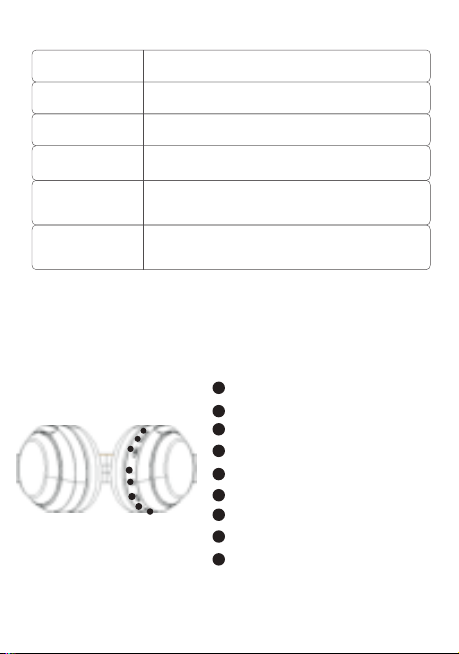
降噪开关
通话麦克风
USB-C充电接口
3.5音频口
音量加/下一曲
音量减/上一曲
播放/暂停键
蓝牙指示灯/降噪指示灯
1
2
3
4
5
6
7
8
Noise Cancellation Switch
Call Microphone
USB-C Charging Port
3.5mm Audio Port
Volume Up / Next Track
Volume Down / Previous Track
Play / Pause Button
BTIndicator / Noise Cancellation Indicator
1
2
3
4
5
6
7
8
9
Geräuschunterdrückungsschalter
Gesprächsmikrofon
USB-C-Ladeanschluss
3,5-mm-Audiobuchse
Lautstärke erhöhen / Nächstes Lied
Lautstärke verringern / Vorheriges Lied
Wiedergabe / Pause-Taste
BT-Anzeige / Geräuschunterdr
ückungsanzeige
1
2
3
4
5
6
7
8
ノイズキャンセリングスイッチ
通話用マイク
USB-C充電ポート
3.5mmオーディオポート
音量アップ/次の曲
音量ダウン/前の曲
再生/一時停止ボタン
BTインジケーター/ノイズキャ
ンセリングインジケーター
1
2
3
4
5
6
7
8
9
Interruptor de cancelación de ruido
Micrófono de llamada
Puerto de carga USB-C
Puerto de audio de 3.5 mm
Subir volumen / Siguiente pista
Bajar volumen / Pista anterior
Botón de reproducir/pausar
Indicador de BT/ Indicador de
cancelación de ruido
1
2
3
4
5
6
7
8
Interrupteur de réduction de bruit
Microphone d'appel
Port de chargement USB-C
Port audio de 3,5 mm
Augmentation du volume / Piste suivante
Diminution du volume / Piste précédente
Bouton lecture/pause
Indicateur BT/ Indicateur de réduction
de bruit
1
2
3
4
5
6
7
8
Переключатель шумоподавления
Микрофон для разговоров
Порт зарядки USB-C
Разъем для наушников 3.5 мм
Увеличение громкости / Следующий трек
Уменьшение громкости / Предыдущий трек
Кнопка воспроизведения / паузы
Индикатор BT/ Индикатор
шумоподавления
1
2
3
4
5
6
7
8
노이즈 캔슬링 스위치
통화용 마이크
USB-C 충전 포트
3.5mm 오디오 포트
볼륨 증가 / 다음 트랙
볼륨 감소 / 이전 트랙
재생 / 일시 정지 버튼
블루투스 표시등 / 노이즈 캔슬링 표시등
1
2
3
4
5
6
7
8
Interruttore per la cancellazione del rumore
Microfono per le chiamate
Porta di ricarica USB-C
Porta audio da 3,5 mm
Aumento del volume / Traccia successiva
Riduzione del volume / Traccia precedente
Pulsante di riproduzione / pausa
Indicatore BT/ Indicatore di cancellazione
del rumore
1
2
3
4
5
6
7
8
Schizzo e funzioni del design delle cuffie
헤드폰 외형 스케치 및 기능 개요
Краткое описание внешнего вида и функций наушников
Schéma et fonctions du design du casque
Esquema y funciones del diseño de auriculares
イヤホンの外観線図と機能の概要
Skizze und Funktionen des Kopfhörer-Designs
Outline and Functions of Headphone Appearance
耳机外观线框图与功能简介
用户手册
材质:70g书写纸,双面单黑印刷尺寸:73X105mm
Verpackungsinhalt
1、BT-Kopfhörer
2、Ladekabel
4、Benutzerhandbuch
3、Audiokabel
1
4
2
3
5
6
7
8
1
4
2
3
5
6
7
8
1
4
2
3
5
6
7
8
1
4
2
3
5
6
7
8
1
4
2
3
5
6
7
8
1
4
2
3
5
6
7
8
1
4
2
3
5
6
7
8
1
4
2
3
5
6
7
8
1
4
2
3
5
6
7
8
中文
英文
德语
日语
西班牙语
法语
俄语
韩语
意大利语
无线降噪耳机头戴式
F1
用户手册
USER
MANUAL
蓝牙耳机基本按键操作
音量调节
关机
蓝牙模式连接
开机
歌曲选择
播放/暂停/打接电话
1
3
2
长按播放/暂停键 3秒,红色灯长亮
3秒后熄灭,耳机关机。
长按播放/暂停键 3秒,蓝色灯长亮3
秒后耳机开机。开机后自动进入配对
状态,蓝牙指示灯红色/蓝色交替闪烁
耳机开机后,进入蓝牙配对模式,蓝牙指示灯红
色/蓝色交替闪烁,打开手机蓝牙功能,并搜索蓝
牙设备名:picun F1,点击设备名进行连接,连
接成功后蓝灯长亮,音乐播放时蓝灯慢闪。
短按加键+可调节音量变大。
短按减键-可调节音量变小。
长按+键,跳到下一曲播放
长按-键,跳到上一曲播放
音乐播放时短按播放/暂停键 键,音乐暂停。
音乐暂停时短按播放/暂停键 键,音乐播放。
有来电时短按开播放/暂停键 键,接听电话。
在通话中短按开播放/暂停键 键,挂断当前通话。
有来电时长按开播放/暂停键 键,拒绝接听。
Basic Operation of BT Earphones
Volume Adjustment
Power On
BT Connection Mode
Power Off
Song Selection
1
3
2
Long press the play/pause button
for 3 seconds. The blue light will stay
on for 3 seconds, and then the
earphones will turn on.
After turning on, it will automatically
enter pairing mode. The BTindicator
will flash red/blue alternately.
Long press the play/pause button
for 3 seconds. The red light will stay on
for 3 seconds and then turn off. The
earphones will shut down.
After turning on, the headphones enter BT pairing
mode, and the BT indicator light flashes red/blue
alternately. Turn on the BT function of your mobile
phone, search for the device name "picun F1," and
click on the device name to connect. Once
connected successfully, the blue light will stay on,
and during music playback, the blue light will flash
slowly.
Short press/Long press the plus button for 1 second
to increase the volume.
Short press/Long press the minus button for 1
second to decrease the volume.
Short press/long press to skip to the previous track.
Short press/long press to skip to the next track.
Grundlegende Bedienung der BT-Ohrhörer
Lautstärkeregelung
Einschalten
BT-Verbindungsmodus
Ausschalten
Musikauswahl
1
3
2
Drücken Sie die
Wiedergabe-/Pause-Taste 3
Sekunden lang. Die blaue Lampe leuchtet
3 Sekunden lang auf, und dann werden
die Ohrhörer eingeschaltet.
Nach dem Einschalten schaltet es
automatisch in den Pairing-Modus. Die
Bluetooth-Anzeige blinkt abwechselnd
rot/blau.
Drücken Sie die
Wiedergabe-/Pause-Taste 3
Sekunden lang. Die rote Lampe
leuchtet 3 Sekunden lang auf und
erlischt dann. Die Ohrhörer werden
ausgeschaltet.
After turning on, the headphones enter BT pairing
mode, and the BT indicator light flashes red/blue
alternately. Turn on the BT function of your mobile
phone, search for the device name "picun F1," and
click on the device name to connect. Once
connected successfully, the blue light will stay on,
and during music playback, the blue light will flash
slowly.
Kurzes Drücken/Langes Drücken der Plus-Taste für 1
Sekunde erhöht die Lautstärke.
Kurzes Drücken/Langes Drücken der Minus-Taste für
1 Sekunde verringert die Lautstärke.
Langes Drücken oder Kurzes Drücken, um zum
vorherigen Lied zu springen.
Langes Drücken oder Kurzes Drücken, um zum nächsten
Lied zu springen.
Wiedergabe/Pause/Anruf annehmen
Während der Musikwiedergabe kurze Wiedergabe-/Pause-Taste
drücken, um die Musik anzuhalten.
Während die Musik pausiert ist, die Wiedergabe-/Pause-Taste
kurz drücken, um die Musikwiedergabe zu starten.
Bei einem eingehenden Anruf kurz auf die Wiedergabe-/Pause-Taste
drücken, um den Anruf anzunehmen.
Während des Telefonats die Wiedergabe-/Pause-Taste kurz
drücken, um das aktuelle Telefonat zu beenden.
Bei einem eingehenden Anruf lange auf die
Wiedergabe-/Pause-Taste drücken, um den Anruf abzulehnen.
BTイヤホンの基本操作
音量調整
電源オン
BTモードの接続
電源オフ
曲選択
1
3
2
再生/一時停止ボタンを3秒間長押
しします。青色のライトが3秒間点灯し
た後、イヤホンの電源が入ります。
電源を入れた後、自動的にペアリングモ
ードに入ります。BTインジケーターは赤
色と青色が交互に点滅します。
再生/一時停止ボタンを3秒間長押
しします。赤色のライトが3秒間点灯し
てから消え、イヤホンの電源が切れます
。
イヤホンの電源が入ると、BTペアリングモードに入り
、BTインジケーターが赤/青交互に点滅します。携帯
電話のBT機能をオンにして、「picun F1」を検索し、
接続します。接続に成功すると、青色のLEDが点灯し
、音楽再生時には青色のLEDがゆっくりと点滅します
。
短押し/長押し1秒で音量が上がります。
短押し/長押し1秒で音量が下がります。
長押しまたは短押しで、前の曲にスキップします。
長押しまたは短押しで、次の曲にスキップします。
再生/一時停止/電話を受ける
音楽再生中に再生/一時停止ボタンを短く押 すと、音楽が一時停
止されます。
音楽が一時停止中に再生/一時停止ボタンを短く押 すと、音楽再
生が再開します。
着信があった場合、再生/一時停止ボタンを短く押 すと電話に応
答します。 通話中に再生/一時停止ボタンを短く押 すと
、現在の通話を切断します。
着信があった場合、再生/一時停止ボタンを長く押 すと、通話を
拒否します。
Operación básica de los auriculares BT
Ajuste de volumen
Encendido
Modo de conexión BT
Apagado
Selección de canciones
1
3
2
Mantén presionado el botón de
reproducir/pausar durante 3
segundos. La luz azul se encenderá
durante 3 segundos y luego los
auriculares se encenderán.
Después de encender, automática-
mente entrará en modo de
emparejamiento. El indicador de
BTparpadeará en rojo/azul
alternativamente.
Mantén presionado el botón de
reproducir/pausar durante 3
segundos. La luz roja se encenderá
durante 3 segundos y luego se apagará.
Los auriculares se apagarán.
Después de encenderlos, los auriculares entran en modo
de emparejamiento BT, y la luz indicadora de BT
parpadea en rojo/azul alternativamente. Active la función
BT de su teléfono móvil, busque el nombre del dispositivo
"picun F1" y haga clic en el nombre del dispositivo para
conectarse. Una vez conectados correctamente, la luz
azul permanecerá encendida, y durante la reproducción
de música, la luz azul parpadeará lentamente..
Presione brevemente / mantenga presionado el botón de más
durante 1 segundo para aumentar el volumen.
Presione brevemente / mantenga presionado el botón de menos
durante 1 segundo para disminuir el volumen.
Presione brevemente / mantenga presionado para
retroceder a la pista anterior.
Presione brevemente / mantenga presionado para
avanzar a la siguiente pista.
Reproducción / Pausa / Responder llamada / Finalizar llamada
Cuando la música está sonando, presiona brevemente el botón de
reproducir/pausar para pausar la música.
Cuando la música está en pausa, presiona brevemente el botón de
reproducir/pausar para reanudar la reproducción de música.
Cuando entra una llamada, presiona brevemente el botón de
reproducir/pausar para responder la llamada.
Durante una llamada, presiona brevemente el botón de
reproducir/pausar para colgar la llamada actual.
Cuando entra una llamada, mantén presionado el botón de
reproducir/pausar para rechazar la llamada.
Opération de base des écouteurs BT
Réglage du volume
Allumer
Mode de connexion BT
Éteindre
Sélection des chansons
1
3
2
Appuyez longuement sur le bouton
de lecture/pause pendant 3 secondes.
La lumière bleue restera allumée
pendant 3 secondes, puis les
écouteurs s'allumeront.
Après l'allumage, ils entreront
automatiquement en mode de
jumelage. L'indicateur BTclignotera en
alternance en rouge/bleu.
Appuyez longuement sur le bouton de
lecture/pause pendant 3 secondes.
La lumière rouge restera allumée pendant
3 secondes et s'éteindra ensuite. Les
écouteurs s'éteindront.
Après l'allumage, les écouteurs passent en mode
d'appariement BT, et le voyant BT clignote en
rouge/bleu de manière alternative. Activez la fonction
BT de votre téléphone portable, recherchez le nom du
périphérique "picun F1" et cliquez sur le nom du
périphérique pour vous connecter. Une fois connecté
avec succès, le voyant bleu restera allumé, et pendant
la lecture de musique, le voyant bleu clignotera
lentement.
Appuyez brièvement/longuement sur le bouton plus
pendant 1 seconde pour augmenter le volume.
Appuyez brièvement/longuement sur le bouton moins
pendant 1 seconde pour diminuer le volume.
Appuyez brièvement/longuement pour passer à la piste
précédente.
Appuyez brièvement/longuement pour passer à la piste
suivante.
Lecture/pause/répondre à un appel/terminer un appel
Lors de la lecture de musique, appuyez brièvement sur le
bouton Lecture/Pause pour mettre la musique en
pause.
Lorsque la musique est en pause, appuyez brièvement sur
le bouton Lecture/Pause pour reprendre la lecture de
la musique.
Lorsqu'un appel entre, appuyez brièvement sur le bouton
Lecture/Pause pour répondre à l'appel.
Pendant un appel, appuyez brièvement sur le bouton
Lecture/Pause pour raccrocher l'appel en cours.
Lorsqu'un appel entre, appuyez longuement sur le bouton
Lecture/Pause pour rejeter l'appel.
Основная операция BT-наушников
Регулировка громкости
Включение
Режим BT-подключения
Выключение
Выбор песен
1
3
2
Нажмите и удерживайте кнопку
воспроизведения/паузу в течение 3
секунд. Синий свет будет гореть 3
секунды, и наушники включатся.
После включения наушники
автоматически войдут в режим
сопряжения. Индикатор BTбудет
поочередно мигать красным/синим
цветом.
Нажмите и удерживайте кнопку
воспроизведения/паузу в течение 3
секунд. Красный свет будет гореть 3
секунды, а затем погаснет. Наушники
выключатся.
После включения наушники входят в режим
сопряжения BT, и индикатор BT мигает
красным/синим поочередно. Включите функцию BT
на вашем мобильном телефоне, найдите имя
устройства "picun F1" и нажмите на имя устройства,
чтобы подключиться.После успешного
подключения синий индикатор останется
включенным, а во время воспроизведения музыки
синий свет будет медленно мигать.
Нажмите коротко/удерживайте кнопку "+" в течение 1
секунды, чтобы увеличить громкость.
Нажмите коротко/удерживайте кнопку "-" в течение 1
секунды, чтобы уменьшить громкость.
Длительное нажатие кнопка - для перехода к
предыдущей песне.
Длительное нажатие кнопка + для перехода к
следующей песне.
Воспроизведение/пауза/ответ на звонок/завершение звонка
При воспроизведении музыки короткое нажатие
кнопки Воспроизведение/Пауза останавливает музыку.
Когда музыка на паузе, короткое нажатие кнопки
Воспроизведение/Пауза возобновляет воспроизведение
музыки.
При поступающем звонке короткое нажатие кнопки
Воспроизведение/Пауза принимает звонок.
Во время разговора короткое нажатие кнопки
Воспроизведение/Пауза завершает текущий звонок.
При поступающем звонке длительное нажатие кнопки
Воспроизведение/Пауза отклоняет звонок.
BT 이어폰 기본 작동
볼륨 조절
전원 켜기
블루투스 연결 모드
전원 끄기
곡 선택
1
3
2
재생/일시정지 버튼을 3초간 길게
누릅니다. 파란색 불빛이 3초간 켜진 후
이어폰이 켜집니다.
켜면 자동으로 페어링 모드로
전환됩니다. 블루투스 표시등은
빨간색/파란색이 번갈아 깜박입니다.
재생/일시정지 버튼을 3초간 길게
누릅니다. 빨간색 불빛이 3초간 켜졌다가
꺼집니다. 이어폰이 꺼집니다.
헤드폰을 켠 후에는 블루투스 페어링 모드로 들어가며,
블루투스 표시등이 빨강/파랑으로 번갈아 깜빡입니다.
휴대전화의 블루투스 기능을 켜고, "picun F1" 장치
이름을 찾아서 장치 이름을 클릭하여 연결합니다.
연결에 성공하면 파란 불빛이 켜지고, 음악 재생 중에는
파란 불빛이 천천히 깜빡입니다.
1초 동안 플러스 버튼을 짧게 누르거나 길게 누르면 볼륨이
증가합니다.
1초 동안 마이너스 버튼을 짧게 누르거나 길게 누르면 볼륨이
감소합니다.
긴 누름 - 버튼을 누르면 이전 곡으로 건너뜁니다.
긴 누름 + 버튼을 누르면 다음 곡으로 건너뜁니다.
재생/일시 정지/전화 받기/전화 끊기
음악 재생 중에 재생/일시 정지 버튼을 짧게 누르면
음악이 일시 정지됩니다.
음악이 일시 정지 상태일 때 재생/일시 정지 버튼을 짧게
누르면 음악 재생이 재개됩니다.
전화가 걸려오면 재생/일시 정지 버튼을 짧게 누르면
전화를 응답합니다.
통화 중에 재생/일시 정지 버튼을 짧게 누르면 현재
통화를 끊습니다.
전화가 걸려오면 재생/일시 정지 버튼을 길게 누르면
전화를 거절합니다.
Operazioni di base delle cuffie BT
Regolazione del volume
Accensione
Modalità di connessione BT
Spegnimento
Selezione delle tracce
1
3
2
Premi e tieni premuto il pulsante di
riproduzione/pausa per 3 secondi. La
luce blu rimarrà accesa per 3 secondi e
poi le cuffie si accenderanno.
Dopo l'accensione, entrerà
automaticamente in modalità di
abbinamento. L'indicatore
BTlampeggerà alternativamente in
rosso/blu.
Premi e tieni premuto il pulsante di
riproduzione/pausa per 3 secondi. La
luce rossa rimarrà accesa per 3 secondi e
poi si spegnerà. Le cuffie si spegneranno.
Dopo l'accensione, le cuffie entreranno in modalità di
accoppiamento BT e il segnalatore BT lampeggerà
alternativamente in rosso/blu. Attivare la funzione BT del
telefono cellulare, cercare il nome del dispositivo "picun
F1" e fare clic sul nome del dispositivo per connettersi.
Una volta connessi con successo, la luce blu rimarrà
accesa e durante la riproduzione musicale, la luce blu
lampeggerà lentamente.
Premere brevemente / tenere premuto il pulsante più per
1 secondo per aumentare il volume.
Premere brevemente / tenere premuto il pulsante meno
per 1 secondo per diminuire il volume.
Premere brevemente/lungo per passare alla traccia precedente.
Premere brevemente/lungo per passare alla traccia successiva.
Riproduzione/Pausa/Risposta alla chiamata/Terminazione
della chiamata
Durante la riproduzione della musica, premi brevemente il
pulsante Riproduci/Pausa per mettere in pausa la musica.
Quando la musica è in pausa, premi brevemente il pulsante
Riproduci/Pausa per riprendere la riproduzione della musica.
Quando arriva una chiamata, premi brevemente il pulsante
Riproduci/Pausa per rispondere alla chiamata.
Durante una chiamata, premi brevemente il pulsante
Riproduci/Pausa per riagganciare la chiamata in corso.
Quando arriva una chiamata, tieni premuto a lungo il pulsante
Riproduci/Pausa per rifiutare la chiamata.
Play/Pause/Answer Call
When music is playing, short press the Play/Pause button
to pause the music.
When music is paused, short press the Play/Pause button
to resume playing music.
When a call comes in, short press the Play/Pause button
to answer the call.
During a call, short press the Play/Pause button to
hang up the current call.
When a call comes in, long press the Play/Pause button
to decline the call.
一拖二连接方式
1.在开机状态下长按开机键3秒,让耳机进入配对状态,然后连接第一台手机。
2.关闭第一台已连接手机的蓝牙功能,让耳机进入配对状态,然后连接第二台手
机。
3.第一台手机打开蓝牙功能,手动操作来连接耳机。
自动关机及超距离回连
当耳机超出有效距离范围耳机会断开连接。在5分钟内回到蓝牙范围内耳机会自
动重新连接,如未在5分钟内回到有效蓝牙连接范围耳机自动关机。
降噪模式
在蓝牙开启状态下,短按ANC按键开启主动降噪,再次短按关闭降噪功能。
备注
在蓝牙关闭状态下长按ANC按键开启主动降噪,再次长按关闭降噪功能。
在蓝牙关闭状态下短按ANC按键开启主动降噪,再次短按关闭降噪功能。
低延时功能
在开机任意模式下,三击ANC键进入低延时功能,耳机提示“叮叮”两声。再次三击退
出低延时模式,耳机提示“叮”一声。(配对状态和通话状态下不支持)
语音助手功能
在非通话状态下,三击开关机键启动语音助手功能。
电池容量状态
当耳机连接IOS设备时,在IOS设备屏幕右上角显示目前耳机电池状态。
耳机充电
当电池电量低时,请使用USB充电线充电3小时左右,在充电过程中耳机会自动关
机。
充电时红色指示灯长亮,充满红灯灭。
清空配对信息
在非通话状态下,同时长按音量加 + 与音量减 - 3秒。
Line in模式
插入音频线,耳机会自动关机。
备注
1.Line in模式下不能使用蓝牙和降噪功能。
2.如果要使用蓝牙需要拔下音频线后再次开机使用。
耳机参数配件
蓝牙协议
接收距离
喇叭尺寸
频响范围
喇叭灵敏度
喇叭阻抗
麦克风灵敏度
工作电流
充电电压
A2DP/AVRCP/HFP/HSP
10m
40mm
20HZ-20kHZ
122±3dB
32Ω±15%
—42dB±3dB
10-30mA
5V
包装配件
1.蓝牙耳机
2.充电线
3.音频线
4.用户手册
Two-Device Connection Method
1.While the headphones are on, press and hold the power button for 3 seconds to put them into
pairing mode, then connect to the first mobile phone.
2.Turn off the BT function of the first connected mobile phone to put the headphones into pairing
mode, then connect to the second mobile phone.
3.Turn on the BT function of the first mobile phone and manually connect to the headphones.
Automatic Power Off and Reconnection at a Distance
If the headphones are out of range, they will disconnect. If you return within BT range
within 5 minutes, the headphones will automatically reconnect. If you don't return within 5
minutes, the headphones will automatically power off.
Noise Cancelling Mode
With BT enabled, short press the ANC button to activate active noise cancelling, and
short press again to deactivate noise cancelling function.
Note
With BT disabled, long press the ANC button to activate active noise cancelling, and
long press again to deactivate noise cancelling function.
In Bluetooth-off mode, short press the ANC button to activate active noise cancelling,
and short press again to deactivate the noise cancelling function.
Low Latency Function
In any powered-on mode, triple press the ANC button to enter low latency mode. The
headphones will emit two "ding-ding" sounds. Triple press again to exit low latency
mode, and the headphones will emit a single "ding" sound. (Pairing status and call status
not supported)
Voice Assistant Function
In non-call status, triple press the power button to activate the voice assistant function.
Battery Capacity Status
When headphones are connected to an iOS device, the current headphone battery
status will be displayed on the iOS device's screen in the top right corner.
Headphone Charging
When battery level is low, please charge the headphones for about 3 hours using the
USB charging cable. The headphones will automatically power off during charging.
During charging, the red indicator light will stay on, and when fully charged, the red
light will turn off.
Clear Pairing Information
In non-call status, simultaneously long press the volume up+and volume down-buttons
for 3 seconds.
Line-in Mode
Inserting the audio cable will automatically power off the headphones.
Note
1.In Line-in mode, BT and noise cancelling functions cannot be used.
2.To use BT, power on the headphones again after removing the audio cable.
Headphone Specifications and Accessories
BT Protocol
Reception Distance
Speaker Size
Frequency Response
Speaker Sensitivity
Speaker Impedance
Microphone Sensitivity
Working Current
Charging Voltage
A2DP/AVRCP/HFP/HSP
10m
40mm
20HZ-20kHZ
122±3dB
32Ω±15%
—42dB±3dB
10-30mA
5V
Packaging Accessories
1.BT Headphones
2.Charging Cable
3.Audio Cable
4.User Manual
Verbindung von zwei Geräten gleichzeitig
1.Halten Sie den Ein-/Aus-Schalter im eingeschalteten Zustand 3 Sekunden lang gedrückt,
um die Kopfhörer in den Pairing-Modus zu versetzen, und verbinden Sie dann das erste
Mobiltelefon.
2.Deaktivieren Sie die BT-Funktion des ersten verbundenen Mobiltelefons, um die
Kopfhörer in den Pairing-Modus zu versetzen, und verbinden Sie dann das zweite
Mobiltelefon.
3.Aktivieren Sie die BT-Funktion des ersten Mobiltelefons und stellen Sie manuell eine
Verbindung zu den Kopfhörern her.
Automatische Abschaltung und automatische erneute
Verbindung bei Überreichweite
Wenn die Kopfhörer außerhalb der Reichweite sind, wird die Verbindung getrennt. Wenn
Sie innerhalb von 5 Minuten wieder in den BT-Bereich zurückkehren, werden die
Kopfhörer automatisch neu verbunden. Wenn Sie innerhalb von 5 Minuten nicht in den
gültigen BT-Verbindungsbereich zurückkehren, schalten sich die Kopfhörer automatisch
aus.
Geräuschunterdrückungsmodus
Im aktivierten BT-Modus drücken Sie kurz die ANC-Taste, um die aktive Geräuschunter-
drückung zu aktivieren, und drücken Sie erneut kurz, um die Geräuschunterdrückungs-
funktion zu deaktivieren.
Anmerkung
Im deaktivierten BT-Modus lange die ANC-Taste drücken, um die aktive
Geräuschunterdrückung zu aktivieren, und erneut lange drücken, um die
Geräuschunterdrückungsfunktion zu deaktivieren.
Niedrige Latenzfunktion
In jedem eingeschalteten Modus drücken Sie dreimal die ANC-Taste, um in den
niedrigen Latenzmodus zu wechseln. Die Kopfhörer geben zwei "Ping-Pong"-Töne aus.
Drücken Sie erneut dreimal, um den niedrigen Latenzmodus zu verlassen, und die
Kopfhörer geben einen "Ping"-Ton aus. (Pairing-Status und Anrufstatus werden nicht
unterstützt)
Drücken Sie bei ausgeschaltetem BTkurz die ANC-Taste, um die aktive Geräuschunter-
drückung zu aktivieren. Drücken Sie erneut kurz, um die Geräuschunterdrückung zu
deaktivieren.
Sprachassistentenfunktion
Drücken Sie im Nicht-Anrufstatus dreimal die Ein-/Aus-Taste, um die Sprachassistenten-
funktion zu aktivieren.
Akku-Kapazitätsstatus
Wenn die Kopfhörer mit einem iOS-Gerät verbunden sind, wird der aktuelle Akkustatus
der Kopfhörer oben rechts auf dem iOS-Gerät angezeigt.
Kopfhörer aufladen
Wenn der Akkustand niedrig ist, laden Sie den Kopfhörer bitte etwa 3 Stunden lang
über das USB-Ladekabel auf. Während des Ladevorgangs schalten sich die Kopfhörer
automatisch aus.
Während des Ladevorgangs leuchtet die rote Anzeige durchgehend, und wenn der
Ladevorgang abgeschlossen ist, erlischt die rote Anzeige.
Kopplungsinformationen löschen
Im Nicht-Anrufstatus halten Sie gleichzeitig die + Lautstärketaste und die -
Lautstärke-nach-unten-Taste 3 Sekunden lang gedrückt.
Line-in-Modus
Stecken Sie das Audiokabel ein, um die Kopfhörer automatisch auszuschalten.
1.Im Line-in-Modus können BT- und Geräuschunterdrückungsfunktionen nicht verwendet werden.
2.Um BT zu verwenden, schalten Sie die Kopfhörer nach dem Entfernen des Audiokabels erneut ein.
Anmerkung
Kopfhörer-Spezifikationen und Zubehör
BT-Protokoll
Empfangsreichweite
Lautsprechergröße
Frequenzbereich
Lautsprecherempfindlichkeit
Lautsprecherimpedanz
Mikrofonempfindlichkeit
Betriebsstrom
Ladevoltage
A2DP/AVRCP/HFP/HSP
10m
40mm
20HZ-20kHZ
122±3dB
32Ω±15%
—42dB±3dB
10-30mA
5V
2台同時接続方法
1.電源がオンの状態で電源ボタンを3秒長押しし、イヤホンをペアリングモードにし、最初の携
帯電話に接続します。
2.最初に接続した携帯電話のBT機能をオフにし、イヤホンをペアリングモードにし、次の携帯
電話に接続します。
3.最初の携帯電話のBT機能をオンにし、手動でイヤホンに接続します。
自動電源オフおよび超距離再接続
イヤホンが有効範囲外に移動すると、イヤホンは切断されます。 5分以内にBT範囲内に戻ると
、イヤホンは自動的に再接続されます。 5分以内にBT範囲内に戻らない場合、イヤホンは自動
的に電源が切れます。
ノイズキャンセルモード
BTがオンの状態で、ANCボタンを短く押すとアクティブノイズキャンセルがオンになり、再度
押すとノイズキャンセル機能がオフになります。
BTがオフの状態でANCボタンを短く押すと、アクティブノイズキャンセリングがオンになりま
す。再度短く押すと、ノイズキャンセリング機能がオフになります。
備考
BTがオフの状態でANCボタンを長押しするとアクティブノイズキャンセルがオンになり、再度
長押しするとノイズキャンセル機能がオフになります。
低遅延機能
電源が入っている状態で、ANCボタンを3回押すと低遅延モードに入り、ヘッドフォンが「ビ
ービー」と2回音を出します。再度3回押すと低遅延モードが終了し、ヘッドフォンが「ビー」
と音を出します。(ペアリング状態および通話中はサポートされていません)
音声アシスタント機能
通話中ではない状態で、電源ボタンを3回押すと音声アシスタント機能が起動します。
バッテリー容量状態
ヘッドフォンがiOSデバイスに接続されている場合、iOSデバイスの画面右上に現在のヘッドフ
ォンのバッテリー状態が表示されます。
ヘッドフォンの充電
バッテリー残量が低い場合は、USB充電ケーブルで約3時間充電してください。充電中はヘッ
ドフォンが自動的に電源がオフになります。
充電中は赤色のインジケータが点灯し、充電が完了すると赤色の灯が消えます。
ペアリング情報を削除する
通話中ではない状態で、音量を上 + げるボタンと音量を下 - げるボタンを同時に3秒間押し
てください。
Line inモード
オーディオケーブルを挿入すると、ヘッドフォンが自動的に電源がオフになります。
備考
1.Line inモードではBTおよびノイズキャンセル機能を使用できません。
2.BTを使用する場合は、オーディオケーブルを抜いてから再度電源を入れてください。
イヤホンの仕様と付属品
BTプロトコル
受信距離
スピーカーサイズ
周波数応答
スピーカー感度
スピーカーインピーダンス
マイク感度
A2DP/AVRCP/HFP/HSP
10m
40mm
20HZ-20kHZ
122±3dB
32Ω±15%
—42dB±3dB
パッケージの付属品
動作電流
充電電圧
10-30mA
5V
1.BTイヤホン
2.充電ケーブル
3.オーディオケーブル
4.ユーザーマニュアル
Método de conexión de dos dispositivos
Si los auriculares están fuera del alcance, se desconectarán. Si regresa dentro del
alcance de BT dentro de los 5 minutos, los auriculares se reconectarán automática-
mente. Si no regresa dentro de los 5 minutos, los auriculares se apagarán
automáticamente.
Modo de cancelación de ruido
Con BT activado, presione brevemente el botón ANC para activar la cancelación de ruido
activa, y presione brevemente nuevamente para desactivar la función de cancelación de ruido.
En modo BTapagado, presiona brevemente el botón de ANC para activar la cancelación activa
de ruido, y presiona brevemente de nuevo para desactivar la cancelación de ruido.
Nota
Con BT desactivado, mantenga presionado el botón ANC para activar la cancelación de ruido
activa, y mantenga presionado nuevamente para desactivar la función de cancelación de
ruido.
Función de baja latencia
En cualquier modo encendido, presione tres veces el botón ANC para ingresar al modo de
baja latencia. Los auriculares emitirán dos tonos "ding-ding". Presione tres veces nuevamente
para salir del modo de baja latencia, y los auriculares emitirán un solo tono "ding". (El estado
de emparejamiento y el estado de la llamada no son compatibles)
Función de asistente de voz
En estado de no llamada, presione tres veces el botón de encendido para
activar la función de asistente de voz.
Estado de la capacidad de la batería
Cuando los auriculares están conectados a un dispositivo iOS, el estado actual de la
batería de los auriculares se mostrará en la pantalla del dispositivo iOS en la esquina
superior derecha.
Carga de auriculares
Cuando el nivel de la batería es bajo, cargue los auriculares durante aproximadamente 3
horas con el cable de carga USB. Los auriculares se apagarán automáticamente durante
la carga.
Durante la carga, la luz indicadora roja permanecerá encendida, y cuando esté
completamente cargada, la luz roja se apagará.
Borrar información de emparejamiento
En estado de no llamada, presione simultáneamente los + botones de volumen - hacia arriba
y hacia abajo durante 3 segundos.
Modo de entrada de línea
Insertar el cable de audio apagará automáticamente los auriculares.
Nota
En el modo de entrada de línea, no se pueden utilizar las funciones de BT y cancelación
de ruido.
Para usar BT, encienda los auriculares nuevamente después de quitar el cable de audio.
Especificaciones y accesorios de auriculares
Protocolo BT
Distancia de recepción
Tamaño del altavoz
Respuesta de frecuencia
Sensibilidad del altavoz
A2DP/AVRCP/HFP/HSP
10m
40mm
20HZ-20kHZ
122±3dB
Impedancia del altavoz
Sensibilidad del micrófono
Corriente de trabajo
Voltaje de carga
32Ω±15%
—42dB±3dB
10-30mA
5V
Accesorios de embalaje
1.Auriculares BT
2.Cable de carga
3.Cable de audio
4.Manual del usuario
Méthode de connexion pour deux appareils
1.Pendant que les écouteurs sont allumés, maintenez le bouton d'alimentation enfoncé
pendant 3 secondes pour les mettre en mode d'appariement, puis connectez-les au
premier téléphone portable.
2.Désactivez la fonction BT du premier téléphone portable connecté pour mettre les
écouteurs en mode d'appariement, puis connectez-les au deuxième téléphone portable.
3.Activez la fonction BT du premier téléphone portable et connectez-les manuellement
aux écouteurs.
Arrêt automatique et reconnexion à distance
Si les écouteurs sont hors de portée, ils se déconnecteront. Si vous revenez dans la
portée BT dans les 5 minutes, les écouteurs se reconnecteront automatiquement. Si
vous ne revenez pas dans les 5 minutes, les écouteurs s'éteindront automatiquement.
Mode de réduction de bruit
Avec le BT activé, appuyez brièvement sur le bouton ANC pour activer la réduction active
du bruit, et appuyez brièvement à nouveau pour désactiver la fonction de réduction du
bruit.
Remarque
Avec le BT désactivé, maintenez enfoncé le bouton ANC pour activer la réduction active
du bruit, et maintenez enfoncé à nouveau pour désactiver la fonction de réduction du
bruit.
En mode BTdésactivé, appuyez brièvement sur le bouton ANC pour activer l'annulation
active du bruit, puis appuyez brièvement de nouveau pour désactiver la fonction
d'annulation du bruit.
Fonction de faible latence
Dans n'importe quel mode sous tension, appuyez trois fois sur le bouton ANC pour entrer
en mode de faible latence. Le casque émettra deux sons "ding-ding". Appuyez à nouveau
trois fois pour quitter le mode de faible latence, et le casque émettra un seul son "ding".
Fonction d'assistant vocal
Dans l'état non appel, appuyez trois fois sur le bouton d'alimentation pour activer la
fonction d'assistant vocal.
État de capacité de batterie
Lorsque les écouteurs sont connectés à un appareil iOS, l'état actuel de la batterie des
écouteurs sera affiché sur l'écran de l'appareil iOS dans le coin supérieur droit.
Chargement des écouteurs
Lorsque le niveau de batterie est faible, veuillez charger les écouteurs pendant environ 3
heures à l'aide du câble de chargement USB. Les écouteurs s'éteindront automatiquement
pendant le chargement.
Pendant le chargement, le voyant rouge restera allumé, et lorsqu'il sera complètement
chargé, le voyant rouge s'éteindra.
Supprimer les informations d'appairage
Dans l'état non appel, maintenez simultanément enfoncés + es - boutons de volume et de
réduction du volume pendant 3 secondes.
Mode d'entrée de ligne
Insérer le câble audio éteindra automatiquement les écouteurs.
Remarque
1.En mode d'entrée de ligne, les fonctions BT et de réduction de bruit ne peuvent pas
être utilisées.
2.Pour utiliser le BT, allumez à nouveau les écouteurs après avoir retiré le câble audio.
Spécifications des écouteurs et accessoires
Protocole BT
Distance de réception
Taille du haut-parleur
Réponse en fréquence
Sensibilité du haut-parleur
Impédance du haut-parleur
A2DP/AVRCP/HFP/HSP
10m
40mm
20HZ-20kHZ
122±3dB
32Ω±15%
Sensibilité du microphone
Courant de fonctionnement
Tension de charge
—42dB±3dB
10-30mA
5V
Accessoires d'emballage
1.Écouteurs BT
2.Câble de charge
3.Câble audio
4.Manuel de l'utilisateur
Метод подключения для двух устройств
1.Пока наушники включены, удерживайте кнопку включения в течение 3 секунд,
чтобы перевести их в режим сопряжения, затем подключите к первому
мобильному телефону.
2.Выключите функцию BT первого подключенного мобильного телефона, чтобы
перевести наушники в режим сопряжения, затем подключите к второму
мобильному телефону.
3.Включите функцию BT первого мобильного телефона и вручную подключитесь к
наушникам.
Автоматическое выключение и повторное подключение
на расстоянии
Если наушники находятся вне зоны действия, они отключатся. Если вы вернетесь
в пределы действия BT в течение 5 минут, наушники автоматически подключатся
повторно. Если вы не вернетесь в течение 5 минут, наушники автоматически
выключатся.
Режим шумоподавления
С включенным BT коротко нажмите кнопку ANC, чтобы активировать активное
шумоподавление, и еще раз коротко нажмите, чтобы отключить функцию
шумоподавления.
Примечание
С выключенным BT долго нажмите кнопку ANC, чтобы активировать активное
шумоподавление, и снова долго нажмите, чтобы отключить функцию
шумоподавления.В режиме отключенного BTкороткое нажатие кнопки ANC
включает активное шумоподавление, и короткое нажатие снова выключает
функцию шумоподавления.
Функция низкой задержки
В любом включенном режиме трижды нажмите кнопку ANC, чтобы войти в режим
низкой задержки. Наушники издадут два звука "динь-динь". Еще раз трижды
нажмите, чтобы выйти из режима низкой задержки, и наушники издадут один звук
"динь". (Статус парения и статус вызова не поддерживаются)
Функция голосового помощника
В состоянии без вызова трижды нажмите кнопку включения, чтобы активировать
функцию голосового помощника.
Статус емкости аккумулятора
Когда наушники подключены к устройству iOS, текущий статус батареи наушников
будет отображаться на экране устройства iOS в правом верхнем углу.
Зарядка наушников
Если уровень заряда аккумулятора низкий, подключите наушники кабелем USB
на примерно 3 часа для зарядки. Наушники автоматически выключатся во время
зарядки.
Очистить информацию о паре
В состоянии без + вызова - одновременно удерживайте кнопки увеличения и
уменьшения громкости в течение 3 секунд.
Режим линейного ввода
Вставка аудиокабеля автоматически выключит наушники.
Примечание
2.Для использования BT снова включите наушники после удаления аудиокабеля.
Характеристики наушников и комплектация
Протокол BT
Дальность приема
Размер динамика
Частотный диапазон
Чувствительность динамика
Импеданс динамика
A2DP/AVRCP/HFP/HSP
10m
40mm
20HZ-20kHZ
122±3dB
32Ω±15%
Чувствительность микрофона
Рабочий ток
Напряжение зарядки
—42dB±3dB
10-30mA
5V
Комплектация упаковки
1.BT-наушники
2.Кабель для зарядки
3.Аудиокабель
4.Руководство пользователя
두 기기 연결 방법
1.헤드폰이 켜진 상태에서 전원 버튼을 3초 동안 길게 누르고, 첫 번째 휴대전화에
연결합니다.
2.첫 번째로 연결된 휴대전화의 블루투스 기능을 끄고, 헤드폰을 페어링 모드로 전환한 다음,
두 번째 휴대전화에 연결합니다.
3.첫 번째 휴대전화의 블루투스 기능을 켜고, 헤드폰에 수동으로 연결합니다.
자동 전원 꺼짐 및 거리에서 다시 연결
헤드폰이 유효 거리를 벗어나면 연결이 끊깁니다. 5분 이내에 블루투스 범위 내로 돌아오면
헤드폰이 자동으로 다시 연결됩니다. 5분 이내에 유효한 블루투스 연결 범위 내로 돌아오지
않으면 헤드폰이 자동으로 꺼집니다.
소음 제거 모드
블루투스가 활성화된 상태에서 ANC 버튼을 짧게 눌러 활성 소음 제거를 활성화하고, 다시
한 번 눌러 소음 제거 기능을 비활성화합니다.
참고
블루투스가 비활성화된 상태에서 ANC 버튼을 길게 눌러 활성 소음 제거를 활성화하고,
다시 한 번 길게 눌러 소음 제거 기능을 비활성화합니다.블루투스가 꺼진 상태에서 ANC
버튼을 짧게 눌러 능동 소음 제거 기능을 켭니다. 다시 짧게 누르면 소음 제거 기능을
끕니다.
낮은 지연 기능
전원이 켜진 상태에서 어떤 모드에서든 ANC 버튼을 세 번 눌러 낮은 지연 모드로
진입합니다. 이어폰은 "딩-딩" 소리를 두 번 발생시킵니다. 낮은 지연 모드를 종료하려면
다시 세 번 누르고, 이어폰은 "딩" 소리를 한 번 발생시킵니다. (페어링 상태 및 통화
상태는 지원되지 않습니다)
음성 보조 기능
통화 상태가 아닌 상태에서 전원 버튼을 세 번 눌러 음성 보조 기능을 활성화합니다.
배터리 용량 상태
이어폰이 iOS 장치에 연결된 경우 현재 이어폰 배터리 상태가 iOS 장치의 화면 오른쪽
상단에 표시됩니다.
이어폰 충전
배터리 잔량이 낮은 경우 USB 충전 케이블을 사용하여 약 3시간 충전하십시오. 충전 중에
이어폰은 자동으로 꺼집니다.
충전 중에는 빨간색 표시등이 켜져 있고, 충전이 완료되면 빨간색 불이 꺼집니다.
페어링 정보 지우기
통화 상태가 아닌 상태에서 볼륨 증가 버튼과 볼륨 감소 버튼을 동시에 3초간 누릅니다.
라인 인 모드
오디오 케이블을 연결하면 이어폰이 자동으로 꺼집니다.
참고
1.라인 인 모드에서는 BT 및 소음 제거 기능을 사용할 수 없습니다.
2.BT를 사용하려면 오디오 케이블을 제거한 후 이어폰을 다시 켜세요.
헤드폰 사양 및 액세서리
블루투스 프로토콜
수신 거리
스피커 크기
주파수 응답
스피커 감도
스피커 임피던스
마이크 감도
작동 전류
충전 전압
A2DP/AVRCP/HFP/HSP
10m
40mm
20HZ-20kHZ
122±3dB
32Ω±15%
—42dB±3dB
10-38mA
5V
포장 액세서리
1.블루투스 헤드폰
2.충전 케이블
3.오디오 케이블
4.사용자 매뉴얼
Metodo di connessione per due dispositivi
1.Mentre le cuffie sono accese, premere e tenere premuto il pulsante di accensione per 3
secondi per metterle in modalità di accoppiamento, quindi connetterle al primo telefono
cellulare.
2.Disattivare la funzione BT del primo telefono cellulare connesso per mettere le cuffie in
modalità di accoppiamento, quindi connetterle al secondo telefono cellulare.
3.Attivare la funzione BT del primo telefono cellulare e connettersi manualmente alle cuffie.
Spegnimento automatico e riconnessione a distanza
Se le cuffie sono fuori portata, si scollegano. Se si rientra nel raggio BT entro 5 minuti, le
cuffie si ricollegheranno automaticamente. Se non si rientra entro 5 minuti, le cuffie si
spegneranno automaticamente.
Modalità di cancellazione del rumore
Con il BT attivato, premere brevemente il pulsante ANC per attivare la cancellazione attiva
del rumore, e premere nuovamente brevemente per disattivare la funzione di cancellazione
del rumore.
Nota
Con il BT disattivato, tenere premuto a lungo il pulsante ANC per attivare la cancellazione
attiva del rumore, e premere nuovamente a lungo per disattivare la funzione di
cancellazione del rumore.In modalità BTdisattivata, premi brevemente il pulsante ANC per
attivare la cancellazione attiva del rumore e premi brevemente di nuovo per disattivare la
funzione di cancellazione del rumore.
Funzione di bassa latenza
In qualsiasi modalità accesa, premere tre volte il pulsante ANC per entrare in modalità a
bassa latenza. Le cuffie emetteranno due suoni "ding-ding". Premere nuovamente tre volte
per uscire dalla modalità a bassa latenza, e le cuffie emetteranno un solo suono "ding". (Lo
stato di accoppiamento e lo stato della chiamata non sono supportati)
Funzione dell'assistente vocale
Nello stato non in chiamata, premere tre volte il pulsante di accensione per attivare la
funzione dell'assistente vocale.
Stato della capacità della batteria
Quando le cuffie sono collegate a un dispositivo iOS, lo stato attuale della batteria delle
cuffie verrà visualizzato sullo schermo del dispositivo iOS nell'angolo in alto a destra.
Ricarica delle cuffie
Quando il livello della batteria è basso, caricare le cuffie per circa 3 ore utilizzando il cavo
di ricarica USB. Le cuffie si spegneranno automaticamente durante la ricarica.
Cancellare le informazioni di accoppiamento
Nello stato non in chiamata, premere + contemporaneamente - i pulsanti del volume su e
del volume giù per 3 secondi.
Modalità di ingresso linea
Inserendo il cavo audio, le cuffie si spegneranno automaticamente.
Nota
1.In modalità ingresso linea, le funzioni BT e di cancellazione del rumore non possono
essere utilizzate.
2.Per utilizzare il BT, accendere nuovamente le cuffie dopo aver rimosso il cavo audio.
Specifiche e accessori delle cuffie
Protocollo BT
Distanza di ricezione
Dimensione dell'altoparlante
Risposta in frequenza
Sensibilità dell'altoparlante
Impedenza dell'altoparlante
Sensibilità del microfono
Corrente operativa
Tensione di ricarica
A2DP/AVRCP/HFP/HSP
10m
40mm
20HZ-20kHZ
122±3dB
32Ω±15%
—42dB±3dB
10-30mA
5V
Accessori di imballaggio
1.Cuffie BT
2.Cavo di ricarica
3.Cavo audio
4.Manuale utente
耳机LED指示灯说明
电源开启
配对状态
蓝色灯长亮后进入配对状态
开降噪:绿色灯亮,关降噪:绿色灯熄灭
待机模式
蓝色灯长亮
降噪模式
红色灯5秒闪烁3次
红色/蓝色灯交替闪烁
低电状态
充电亮红色灯,充满电红色灯熄灭充电模式
Headphone LED Indicator
Power On
Blue LED stays on continuously
and enters pairing mode
Red/blue LEDs flash alternately
Pairing Mode
Blue LED stays on continuouslyStandby Mode
Red LED flashes 3 times every 5 seconds
Charging - red LED lights up
fully charged - red LED goes off
Low Battery Status
Charging Mode
Noise cancelling on (green LED lights up)
noise cancelling off (green LED goes off)
Noise Cancelling Mode
Kopfhörer-LED-Anzeige
Blaue LED leuchtet dauerhaft und wechselt
in den Pairing-Modus
Geräuschunterdrückung ein (grüne LED leuchtet)
Geräuschunterdrückung aus (grüne LED erlischt)
Blaue LED leuchtet dauerhaft
Stromversorgung
eingeschaltet
Geräuschunterdrückungsmodus
Standby-Modus
Rote LED blinkt 3 Mal alle 5 Sekunden
Rote LED leuchtet beim Laden, erlischt wenn
vollständig aufgeladen
Niedriger
Batteriestatus
Ladezustand
Pairing-Modus Rote/blaue LEDs blinken abwechselnd
イヤホンLEDインジケーター
電源オン
ペアリングモード
スタンバイモード
低電力モード
青色のLEDが点灯し、ペアリングモードに入る
青色のLEDが点灯する
赤色のLEDが5秒間隔で3回点滅する
充電モード 充電中は赤色のLEDが点灯し、充電完了後は消灯する
赤/青色のLEDが交互に点滅する
ノイズキャンセリングモード
ノイズキャンセリングオン(緑色のLED点灯)
ノイズキャンセリングオフ(緑色のLEDが消灯)
Indicador LED de auriculares
Encendido
Modo de emparejamiento
Modo de espera
Estado de batería baja
LED azul permanece encendido continuamente
y entra en modo de emparejamiento
LED azul permanece encendido continuamente
LED rojo parpadea 3 veces cada 5 segundos
Modo de carga
Cargando - LED rojo encendido, completamente
cargado - LED rojo apagado
LED rojo/azul parpadean alternativamente
Modo de cancelación
de ruido
cancelación de ruido activada (LED verde encendido)
cancelación de ruido desactivada (LED verde apagado)
Indicateur LED du casque
Allumage
Mode d'appariement
Mode veille
Niveau de
batterie faible
LED bleue reste allumée en continu et entre
en mode d'appariement
LED bleue reste allumée en continu
LED rouge clignote 3 fois toutes les 5 secondes
LED rouge/bleue clignotent alternativement
Mode de réduction
de bruit
réduction de bruit activée (LED verte allumée)
réduction de bruit désactivée (LED verte éteinte)
Mode de charge
En charge - LED rouge allumée, complètement
chargé - LED rouge éteinte
Индикатор LED наушников
Включение
Режим сопряжения
Режим ожидания
Низкий уровень
заряда батареи
синий светодиод остается включенным постоянно
и переходит в режим сопряжения
синий светодиод остается включенным постоянно
красный светодиод мигает 3 раза каждые 5 секунд
Режим зарядки
Зарядка - красный светодиод горит, полностью
заряженный - красный светодиод выключен
красный/синий светодиоды мигают попеременно
Режим
подавления шума
подавление шума включено (зеленый светодиод горит)
подавление шума выключено (зеленый светодиод не горит)
헤드폰 LED 표시등
전원 켜기
페어링 모드
대기 모드
배터리 부족 상태
충전 모드
파란 LED가 계속 켜진 채로 페어링 모드로 전환됩니다
파란 LED가 계속 켜집니다
빨간 LED가 5초마다 3번 깜박입니다
충전 중 - 빨간 LED가 켜집니다, 완전히 충전되면
빨간 LED가 꺼집니다
빨간/파란 LED가 번갈아가며 깜박입니다
소음 제거 모드
소음 제거 켜기(녹색 LED가 켜집니다)
소음 제거 끄기(녹색 LED가 꺼집니다)
Indicatore LED cuffie
Accensione
Modalità di
accoppiamento
Modalità standby
Stato batteria bassa
Modalità di ricarica
LED blu rimane acceso continuamente ed entra in
modalità di accoppiamento
LED blu rimane acceso continuamente
LED rosso lampeggia 3 volte ogni 5 secondi
In carica - LED rosso acceso, completamente carico
- LED rosso spento
LED rosso/blu lampeggiano alternativamente
Modalità di
cancellazione del rumore
cancellazione del rumore attivata (LED verde acceso)
cancellazione del rumore disattivata (LED verde spento)
Wireless noise-canceling headphones
over-ear
F1
User Manual
Kabellose Geräuschunterdrückungskopfhörer
Over-Ear
F1
Benutzerhandbuch
ワイヤレスノイズキャンセリングヘッドフォン
オーバーイヤー
F1
ユーザーマニュアル
Auriculares inalámbricos con cancelación de ruido
de diadema
F1
Manual de usuario
Casque sans fil avec réduction de bruit
circum-aural
F1
Manuel de l'utilisateur
Casque sans fil avec réduction de bruit
circum-aural
F1
Manuel de l'utilisateur
무선 노이즈 캔슬링 헤드폰
오버 이어
F1
사용자 매뉴얼
Cuffie wireless con cancellazione del rumore
over-ear
F1
Manuale utente
降噪开关
通话麦克风
USB-C充电接口
3.5音频口
音量加/下一曲
音量减/上一曲
播放/暂停键
蓝牙指示灯/降噪指示灯
1
2
3
4
5
6
7
8
Noise Cancellation Switch
Call Microphone
USB-C Charging Port
3.5mm Audio Port
Volume Up / Next Track
Volume Down / Previous Track
Play / Pause Button
BTIndicator / Noise Cancellation Indicator
1
2
3
4
5
6
7
8
9
Geräuschunterdrückungsschalter
Gesprächsmikrofon
USB-C-Ladeanschluss
3,5-mm-Audiobuchse
Lautstärke erhöhen / Nächstes Lied
Lautstärke verringern / Vorheriges Lied
Wiedergabe / Pause-Taste
BT-Anzeige / Geräuschunterdr
ückungsanzeige
1
2
3
4
5
6
7
8
ノイズキャンセリングスイッチ
通話用マイク
USB-C充電ポート
3.5mmオーディオポート
音量アップ/次の曲
音量ダウン/前の曲
再生/一時停止ボタン
BTインジケーター/ノイズキャ
ンセリングインジケーター
1
2
3
4
5
6
7
8
9
Interruptor de cancelación de ruido
Micrófono de llamada
Puerto de carga USB-C
Puerto de audio de 3.5 mm
Subir volumen / Siguiente pista
Bajar volumen / Pista anterior
Botón de reproducir/pausar
Indicador de BT/ Indicador de
cancelación de ruido
1
2
3
4
5
6
7
8
Interrupteur de réduction de bruit
Microphone d'appel
Port de chargement USB-C
Port audio de 3,5 mm
Augmentation du volume / Piste suivante
Diminution du volume / Piste précédente
Bouton lecture/pause
Indicateur BT/ Indicateur de réduction
de bruit
1
2
3
4
5
6
7
8
Переключатель шумоподавления
Микрофон для разговоров
Порт зарядки USB-C
Разъем для наушников 3.5 мм
Увеличение громкости / Следующий трек
Уменьшение громкости / Предыдущий трек
Кнопка воспроизведения / паузы
Индикатор BT/ Индикатор
шумоподавления
1
2
3
4
5
6
7
8
노이즈 캔슬링 스위치
통화용 마이크
USB-C 충전 포트
3.5mm 오디오 포트
볼륨 증가 / 다음 트랙
볼륨 감소 / 이전 트랙
재생 / 일시 정지 버튼
블루투스 표시등 / 노이즈 캔슬링 표시등
1
2
3
4
5
6
7
8
Interruttore per la cancellazione del rumore
Microfono per le chiamate
Porta di ricarica USB-C
Porta audio da 3,5 mm
Aumento del volume / Traccia successiva
Riduzione del volume / Traccia precedente
Pulsante di riproduzione / pausa
Indicatore BT/ Indicatore di cancellazione
del rumore
1
2
3
4
5
6
7
8
Schizzo e funzioni del design delle cuffie
헤드폰 외형 스케치 및 기능 개요
Краткое описание внешнего вида и функций наушников
Schéma et fonctions du design du casque
Esquema y funciones del diseño de auriculares
イヤホンの外観線図と機能の概要
Skizze und Funktionen des Kopfhörer-Designs
Outline and Functions of Headphone Appearance
耳机外观线框图与功能简介
用户手册
材质:70g书写纸,双面单黑印刷尺寸:73X105mm
Verpackungsinhalt
1、BT-Kopfhörer
2、Ladekabel
4、Benutzerhandbuch
3、Audiokabel
1
4
2
3
5
6
7
8
1
4
2
3
5
6
7
8
1
4
2
3
5
6
7
8
1
4
2
3
5
6
7
8
1
4
2
3
5
6
7
8
1
4
2
3
5
6
7
8
1
4
2
3
5
6
7
8
1
4
2
3
5
6
7
8
1
4
2
3
5
6
7
8
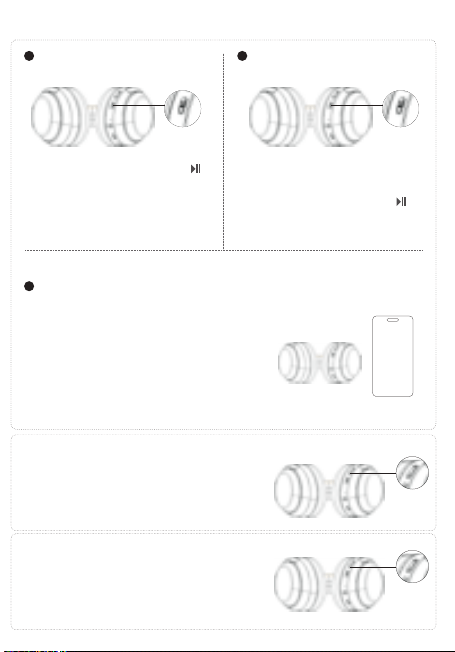
中文
英文
德语
日语
西班牙语
法语
俄语
韩语
意大利语
无线降噪耳机头戴式
F1
用户手册
USER
MANUAL
蓝牙耳机基本按键操作
音量调节
关机
蓝牙模式连接
开机
歌曲选择
播放/暂停/打接电话
1
3
2
长按播放/暂停键 3秒,红色灯长亮
3秒后熄灭,耳机关机。
长按播放/暂停键 3秒,蓝色灯长亮3
秒后耳机开机。开机后自动进入配对
状态,蓝牙指示灯红色/蓝色交替闪烁
耳机开机后,进入蓝牙配对模式,蓝牙指示灯红
色/蓝色交替闪烁,打开手机蓝牙功能,并搜索蓝
牙设备名:picun F1,点击设备名进行连接,连
接成功后蓝灯长亮,音乐播放时蓝灯慢闪。
短按加键+可调节音量变大。
短按减键-可调节音量变小。
长按+键,跳到下一曲播放
长按-键,跳到上一曲播放
音乐播放时短按播放/暂停键 键,音乐暂停。
音乐暂停时短按播放/暂停键 键,音乐播放。
有来电时短按开播放/暂停键 键,接听电话。
在通话中短按开播放/暂停键 键,挂断当前通话。
有来电时长按开播放/暂停键 键,拒绝接听。
Basic Operation of BT Earphones
Volume Adjustment
Power On
BT Connection Mode
Power Off
Song Selection
1
3
2
Long press the play/pause button
for 3 seconds. The blue light will stay
on for 3 seconds, and then the
earphones will turn on.
After turning on, it will automatically
enter pairing mode. The BTindicator
will flash red/blue alternately.
Long press the play/pause button
for 3 seconds. The red light will stay on
for 3 seconds and then turn off. The
earphones will shut down.
After turning on, the headphones enter BT pairing
mode, and the BT indicator light flashes red/blue
alternately. Turn on the BT function of your mobile
phone, search for the device name "picun F1," and
click on the device name to connect. Once
connected successfully, the blue light will stay on,
and during music playback, the blue light will flash
slowly.
Short press/Long press the plus button for 1 second
to increase the volume.
Short press/Long press the minus button for 1
second to decrease the volume.
Short press/long press to skip to the previous track.
Short press/long press to skip to the next track.
Grundlegende Bedienung der BT-Ohrhörer
Lautstärkeregelung
Einschalten
BT-Verbindungsmodus
Ausschalten
Musikauswahl
1
3
2
Drücken Sie die
Wiedergabe-/Pause-Taste 3
Sekunden lang. Die blaue Lampe leuchtet
3 Sekunden lang auf, und dann werden
die Ohrhörer eingeschaltet.
Nach dem Einschalten schaltet es
automatisch in den Pairing-Modus. Die
Bluetooth-Anzeige blinkt abwechselnd
rot/blau.
Drücken Sie die
Wiedergabe-/Pause-Taste 3
Sekunden lang. Die rote Lampe
leuchtet 3 Sekunden lang auf und
erlischt dann. Die Ohrhörer werden
ausgeschaltet.
After turning on, the headphones enter BT pairing
mode, and the BT indicator light flashes red/blue
alternately. Turn on the BT function of your mobile
phone, search for the device name "picun F1," and
click on the device name to connect. Once
connected successfully, the blue light will stay on,
and during music playback, the blue light will flash
slowly.
Kurzes Drücken/Langes Drücken der Plus-Taste für 1
Sekunde erhöht die Lautstärke.
Kurzes Drücken/Langes Drücken der Minus-Taste für
1 Sekunde verringert die Lautstärke.
Langes Drücken oder Kurzes Drücken, um zum
vorherigen Lied zu springen.
Langes Drücken oder Kurzes Drücken, um zum nächsten
Lied zu springen.
Wiedergabe/Pause/Anruf annehmen
Während der Musikwiedergabe kurze Wiedergabe-/Pause-Taste
drücken, um die Musik anzuhalten.
Während die Musik pausiert ist, die Wiedergabe-/Pause-Taste
kurz drücken, um die Musikwiedergabe zu starten.
Bei einem eingehenden Anruf kurz auf die Wiedergabe-/Pause-Taste
drücken, um den Anruf anzunehmen.
Während des Telefonats die Wiedergabe-/Pause-Taste kurz
drücken, um das aktuelle Telefonat zu beenden.
Bei einem eingehenden Anruf lange auf die
Wiedergabe-/Pause-Taste drücken, um den Anruf abzulehnen.
BTイヤホンの基本操作
音量調整
電源オン
BTモードの接続
電源オフ
曲選択
1
3
2
再生/一時停止ボタンを3秒間長押
しします。青色のライトが3秒間点灯し
た後、イヤホンの電源が入ります。
電源を入れた後、自動的にペアリングモ
ードに入ります。BTインジケーターは赤
色と青色が交互に点滅します。
再生/一時停止ボタンを3秒間長押
しします。赤色のライトが3秒間点灯し
てから消え、イヤホンの電源が切れます
。
イヤホンの電源が入ると、BTペアリングモードに入り
、BTインジケーターが赤/青交互に点滅します。携帯
電話のBT機能をオンにして、「picun F1」を検索し、
接続します。接続に成功すると、青色のLEDが点灯し
、音楽再生時には青色のLEDがゆっくりと点滅します
。
短押し/長押し1秒で音量が上がります。
短押し/長押し1秒で音量が下がります。
長押しまたは短押しで、前の曲にスキップします。
長押しまたは短押しで、次の曲にスキップします。
再生/一時停止/電話を受ける
音楽再生中に再生/一時停止ボタンを短く押 すと、音楽が一時停
止されます。
音楽が一時停止中に再生/一時停止ボタンを短く押 すと、音楽再
生が再開します。
着信があった場合、再生/一時停止ボタンを短く押 すと電話に応
答します。 通話中に再生/一時停止ボタンを短く押 すと
、現在の通話を切断します。
着信があった場合、再生/一時停止ボタンを長く押 すと、通話を
拒否します。
Operación básica de los auriculares BT
Ajuste de volumen
Encendido
Modo de conexión BT
Apagado
Selección de canciones
1
3
2
Mantén presionado el botón de
reproducir/pausar durante 3
segundos. La luz azul se encenderá
durante 3 segundos y luego los
auriculares se encenderán.
Después de encender, automática-
mente entrará en modo de
emparejamiento. El indicador de
BTparpadeará en rojo/azul
alternativamente.
Mantén presionado el botón de
reproducir/pausar durante 3
segundos. La luz roja se encenderá
durante 3 segundos y luego se apagará.
Los auriculares se apagarán.
Después de encenderlos, los auriculares entran en modo
de emparejamiento BT, y la luz indicadora de BT
parpadea en rojo/azul alternativamente. Active la función
BT de su teléfono móvil, busque el nombre del dispositivo
"picun F1" y haga clic en el nombre del dispositivo para
conectarse. Una vez conectados correctamente, la luz
azul permanecerá encendida, y durante la reproducción
de música, la luz azul parpadeará lentamente..
Presione brevemente / mantenga presionado el botón de más
durante 1 segundo para aumentar el volumen.
Presione brevemente / mantenga presionado el botón de menos
durante 1 segundo para disminuir el volumen.
Presione brevemente / mantenga presionado para
retroceder a la pista anterior.
Presione brevemente / mantenga presionado para
avanzar a la siguiente pista.
Reproducción / Pausa / Responder llamada / Finalizar llamada
Cuando la música está sonando, presiona brevemente el botón de
reproducir/pausar para pausar la música.
Cuando la música está en pausa, presiona brevemente el botón de
reproducir/pausar para reanudar la reproducción de música.
Cuando entra una llamada, presiona brevemente el botón de
reproducir/pausar para responder la llamada.
Durante una llamada, presiona brevemente el botón de
reproducir/pausar para colgar la llamada actual.
Cuando entra una llamada, mantén presionado el botón de
reproducir/pausar para rechazar la llamada.
Opération de base des écouteurs BT
Réglage du volume
Allumer
Mode de connexion BT
Éteindre
Sélection des chansons
1
3
2
Appuyez longuement sur le bouton
de lecture/pause pendant 3 secondes.
La lumière bleue restera allumée
pendant 3 secondes, puis les
écouteurs s'allumeront.
Après l'allumage, ils entreront
automatiquement en mode de
jumelage. L'indicateur BTclignotera en
alternance en rouge/bleu.
Appuyez longuement sur le bouton de
lecture/pause pendant 3 secondes.
La lumière rouge restera allumée pendant
3 secondes et s'éteindra ensuite. Les
écouteurs s'éteindront.
Après l'allumage, les écouteurs passent en mode
d'appariement BT, et le voyant BT clignote en
rouge/bleu de manière alternative. Activez la fonction
BT de votre téléphone portable, recherchez le nom du
périphérique "picun F1" et cliquez sur le nom du
périphérique pour vous connecter. Une fois connecté
avec succès, le voyant bleu restera allumé, et pendant
la lecture de musique, le voyant bleu clignotera
lentement.
Appuyez brièvement/longuement sur le bouton plus
pendant 1 seconde pour augmenter le volume.
Appuyez brièvement/longuement sur le bouton moins
pendant 1 seconde pour diminuer le volume.
Appuyez brièvement/longuement pour passer à la piste
précédente.
Appuyez brièvement/longuement pour passer à la piste
suivante.
Lecture/pause/répondre à un appel/terminer un appel
Lors de la lecture de musique, appuyez brièvement sur le
bouton Lecture/Pause pour mettre la musique en
pause.
Lorsque la musique est en pause, appuyez brièvement sur
le bouton Lecture/Pause pour reprendre la lecture de
la musique.
Lorsqu'un appel entre, appuyez brièvement sur le bouton
Lecture/Pause pour répondre à l'appel.
Pendant un appel, appuyez brièvement sur le bouton
Lecture/Pause pour raccrocher l'appel en cours.
Lorsqu'un appel entre, appuyez longuement sur le bouton
Lecture/Pause pour rejeter l'appel.
Основная операция BT-наушников
Регулировка громкости
Включение
Режим BT-подключения
Выключение
Выбор песен
1
3
2
Нажмите и удерживайте кнопку
воспроизведения/паузу в течение 3
секунд. Синий свет будет гореть 3
секунды, и наушники включатся.
После включения наушники
автоматически войдут в режим
сопряжения. Индикатор BTбудет
поочередно мигать красным/синим
цветом.
Нажмите и удерживайте кнопку
воспроизведения/паузу в течение 3
секунд. Красный свет будет гореть 3
секунды, а затем погаснет. Наушники
выключатся.
После включения наушники входят в режим
сопряжения BT, и индикатор BT мигает
красным/синим поочередно. Включите функцию BT
на вашем мобильном телефоне, найдите имя
устройства "picun F1" и нажмите на имя устройства,
чтобы подключиться.После успешного
подключения синий индикатор останется
включенным, а во время воспроизведения музыки
синий свет будет медленно мигать.
Нажмите коротко/удерживайте кнопку "+" в течение 1
секунды, чтобы увеличить громкость.
Нажмите коротко/удерживайте кнопку "-" в течение 1
секунды, чтобы уменьшить громкость.
Длительное нажатие кнопка - для перехода к
предыдущей песне.
Длительное нажатие кнопка + для перехода к
следующей песне.
Воспроизведение/пауза/ответ на звонок/завершение звонка
При воспроизведении музыки короткое нажатие
кнопки Воспроизведение/Пауза останавливает музыку.
Когда музыка на паузе, короткое нажатие кнопки
Воспроизведение/Пауза возобновляет воспроизведение
музыки.
При поступающем звонке короткое нажатие кнопки
Воспроизведение/Пауза принимает звонок.
Во время разговора короткое нажатие кнопки
Воспроизведение/Пауза завершает текущий звонок.
При поступающем звонке длительное нажатие кнопки
Воспроизведение/Пауза отклоняет звонок.
BT 이어폰 기본 작동
볼륨 조절
전원 켜기
블루투스 연결 모드
전원 끄기
곡 선택
1
3
2
재생/일시정지 버튼을 3초간 길게
누릅니다. 파란색 불빛이 3초간 켜진 후
이어폰이 켜집니다.
켜면 자동으로 페어링 모드로
전환됩니다. 블루투스 표시등은
빨간색/파란색이 번갈아 깜박입니다.
재생/일시정지 버튼을 3초간 길게
누릅니다. 빨간색 불빛이 3초간 켜졌다가
꺼집니다. 이어폰이 꺼집니다.
헤드폰을 켠 후에는 블루투스 페어링 모드로 들어가며,
블루투스 표시등이 빨강/파랑으로 번갈아 깜빡입니다.
휴대전화의 블루투스 기능을 켜고, "picun F1" 장치
이름을 찾아서 장치 이름을 클릭하여 연결합니다.
연결에 성공하면 파란 불빛이 켜지고, 음악 재생 중에는
파란 불빛이 천천히 깜빡입니다.
1초 동안 플러스 버튼을 짧게 누르거나 길게 누르면 볼륨이
증가합니다.
1초 동안 마이너스 버튼을 짧게 누르거나 길게 누르면 볼륨이
감소합니다.
긴 누름 - 버튼을 누르면 이전 곡으로 건너뜁니다.
긴 누름 + 버튼을 누르면 다음 곡으로 건너뜁니다.
재생/일시 정지/전화 받기/전화 끊기
음악 재생 중에 재생/일시 정지 버튼을 짧게 누르면
음악이 일시 정지됩니다.
음악이 일시 정지 상태일 때 재생/일시 정지 버튼을 짧게
누르면 음악 재생이 재개됩니다.
전화가 걸려오면 재생/일시 정지 버튼을 짧게 누르면
전화를 응답합니다.
통화 중에 재생/일시 정지 버튼을 짧게 누르면 현재
통화를 끊습니다.
전화가 걸려오면 재생/일시 정지 버튼을 길게 누르면
전화를 거절합니다.
Operazioni di base delle cuffie BT
Regolazione del volume
Accensione
Modalità di connessione BT
Spegnimento
Selezione delle tracce
1
3
2
Premi e tieni premuto il pulsante di
riproduzione/pausa per 3 secondi. La
luce blu rimarrà accesa per 3 secondi e
poi le cuffie si accenderanno.
Dopo l'accensione, entrerà
automaticamente in modalità di
abbinamento. L'indicatore
BTlampeggerà alternativamente in
rosso/blu.
Premi e tieni premuto il pulsante di
riproduzione/pausa per 3 secondi. La
luce rossa rimarrà accesa per 3 secondi e
poi si spegnerà. Le cuffie si spegneranno.
Dopo l'accensione, le cuffie entreranno in modalità di
accoppiamento BT e il segnalatore BT lampeggerà
alternativamente in rosso/blu. Attivare la funzione BT del
telefono cellulare, cercare il nome del dispositivo "picun
F1" e fare clic sul nome del dispositivo per connettersi.
Una volta connessi con successo, la luce blu rimarrà
accesa e durante la riproduzione musicale, la luce blu
lampeggerà lentamente.
Premere brevemente / tenere premuto il pulsante più per
1 secondo per aumentare il volume.
Premere brevemente / tenere premuto il pulsante meno
per 1 secondo per diminuire il volume.
Premere brevemente/lungo per passare alla traccia precedente.
Premere brevemente/lungo per passare alla traccia successiva.
Riproduzione/Pausa/Risposta alla chiamata/Terminazione
della chiamata
Durante la riproduzione della musica, premi brevemente il
pulsante Riproduci/Pausa per mettere in pausa la musica.
Quando la musica è in pausa, premi brevemente il pulsante
Riproduci/Pausa per riprendere la riproduzione della musica.
Quando arriva una chiamata, premi brevemente il pulsante
Riproduci/Pausa per rispondere alla chiamata.
Durante una chiamata, premi brevemente il pulsante
Riproduci/Pausa per riagganciare la chiamata in corso.
Quando arriva una chiamata, tieni premuto a lungo il pulsante
Riproduci/Pausa per rifiutare la chiamata.
Play/Pause/Answer Call
When music is playing, short press the Play/Pause button
to pause the music.
When music is paused, short press the Play/Pause button
to resume playing music.
When a call comes in, short press the Play/Pause button
to answer the call.
During a call, short press the Play/Pause button to
hang up the current call.
When a call comes in, long press the Play/Pause button
to decline the call.
一拖二连接方式
1.在开机状态下长按开机键3秒,让耳机进入配对状态,然后连接第一台手机。
2.关闭第一台已连接手机的蓝牙功能,让耳机进入配对状态,然后连接第二台手
机。
3.第一台手机打开蓝牙功能,手动操作来连接耳机。
自动关机及超距离回连
当耳机超出有效距离范围耳机会断开连接。在5分钟内回到蓝牙范围内耳机会自
动重新连接,如未在5分钟内回到有效蓝牙连接范围耳机自动关机。
降噪模式
在蓝牙开启状态下,短按ANC按键开启主动降噪,再次短按关闭降噪功能。
备注
在蓝牙关闭状态下长按ANC按键开启主动降噪,再次长按关闭降噪功能。
在蓝牙关闭状态下短按ANC按键开启主动降噪,再次短按关闭降噪功能。
低延时功能
在开机任意模式下,三击ANC键进入低延时功能,耳机提示“叮叮”两声。再次三击退
出低延时模式,耳机提示“叮”一声。(配对状态和通话状态下不支持)
语音助手功能
在非通话状态下,三击开关机键启动语音助手功能。
电池容量状态
当耳机连接IOS设备时,在IOS设备屏幕右上角显示目前耳机电池状态。
耳机充电
当电池电量低时,请使用USB充电线充电3小时左右,在充电过程中耳机会自动关
机。
充电时红色指示灯长亮,充满红灯灭。
清空配对信息
在非通话状态下,同时长按音量加 + 与音量减 - 3秒。
Line in模式
插入音频线,耳机会自动关机。
备注
1.Line in模式下不能使用蓝牙和降噪功能。
2.如果要使用蓝牙需要拔下音频线后再次开机使用。
耳机参数配件
蓝牙协议
接收距离
喇叭尺寸
频响范围
喇叭灵敏度
喇叭阻抗
麦克风灵敏度
工作电流
充电电压
A2DP/AVRCP/HFP/HSP
10m
40mm
20HZ-20kHZ
122±3dB
32Ω±15%
—42dB±3dB
10-30mA
5V
包装配件
1.蓝牙耳机
2.充电线
3.音频线
4.用户手册
Two-Device Connection Method
1.While the headphones are on, press and hold the power button for 3 seconds to put them into
pairing mode, then connect to the first mobile phone.
2.Turn off the BT function of the first connected mobile phone to put the headphones into pairing
mode, then connect to the second mobile phone.
3.Turn on the BT function of the first mobile phone and manually connect to the headphones.
Automatic Power Off and Reconnection at a Distance
If the headphones are out of range, they will disconnect. If you return within BT range
within 5 minutes, the headphones will automatically reconnect. If you don't return within 5
minutes, the headphones will automatically power off.
Noise Cancelling Mode
With BT enabled, short press the ANC button to activate active noise cancelling, and
short press again to deactivate noise cancelling function.
Note
With BT disabled, long press the ANC button to activate active noise cancelling, and
long press again to deactivate noise cancelling function.
In Bluetooth-off mode, short press the ANC button to activate active noise cancelling,
and short press again to deactivate the noise cancelling function.
Low Latency Function
In any powered-on mode, triple press the ANC button to enter low latency mode. The
headphones will emit two "ding-ding" sounds. Triple press again to exit low latency
mode, and the headphones will emit a single "ding" sound. (Pairing status and call status
not supported)
Voice Assistant Function
In non-call status, triple press the power button to activate the voice assistant function.
Battery Capacity Status
When headphones are connected to an iOS device, the current headphone battery
status will be displayed on the iOS device's screen in the top right corner.
Headphone Charging
When battery level is low, please charge the headphones for about 3 hours using the
USB charging cable. The headphones will automatically power off during charging.
During charging, the red indicator light will stay on, and when fully charged, the red
light will turn off.
Clear Pairing Information
In non-call status, simultaneously long press the volume up+and volume down-buttons
for 3 seconds.
Line-in Mode
Inserting the audio cable will automatically power off the headphones.
Note
1.In Line-in mode, BT and noise cancelling functions cannot be used.
2.To use BT, power on the headphones again after removing the audio cable.
Headphone Specifications and Accessories
BT Protocol
Reception Distance
Speaker Size
Frequency Response
Speaker Sensitivity
Speaker Impedance
Microphone Sensitivity
Working Current
Charging Voltage
A2DP/AVRCP/HFP/HSP
10m
40mm
20HZ-20kHZ
122±3dB
32Ω±15%
—42dB±3dB
10-30mA
5V
Packaging Accessories
1.BT Headphones
2.Charging Cable
3.Audio Cable
4.User Manual
Verbindung von zwei Geräten gleichzeitig
1.Halten Sie den Ein-/Aus-Schalter im eingeschalteten Zustand 3 Sekunden lang gedrückt,
um die Kopfhörer in den Pairing-Modus zu versetzen, und verbinden Sie dann das erste
Mobiltelefon.
2.Deaktivieren Sie die BT-Funktion des ersten verbundenen Mobiltelefons, um die
Kopfhörer in den Pairing-Modus zu versetzen, und verbinden Sie dann das zweite
Mobiltelefon.
3.Aktivieren Sie die BT-Funktion des ersten Mobiltelefons und stellen Sie manuell eine
Verbindung zu den Kopfhörern her.
Automatische Abschaltung und automatische erneute
Verbindung bei Überreichweite
Wenn die Kopfhörer außerhalb der Reichweite sind, wird die Verbindung getrennt. Wenn
Sie innerhalb von 5 Minuten wieder in den BT-Bereich zurückkehren, werden die
Kopfhörer automatisch neu verbunden. Wenn Sie innerhalb von 5 Minuten nicht in den
gültigen BT-Verbindungsbereich zurückkehren, schalten sich die Kopfhörer automatisch
aus.
Geräuschunterdrückungsmodus
Im aktivierten BT-Modus drücken Sie kurz die ANC-Taste, um die aktive Geräuschunter-
drückung zu aktivieren, und drücken Sie erneut kurz, um die Geräuschunterdrückungs-
funktion zu deaktivieren.
Anmerkung
Im deaktivierten BT-Modus lange die ANC-Taste drücken, um die aktive
Geräuschunterdrückung zu aktivieren, und erneut lange drücken, um die
Geräuschunterdrückungsfunktion zu deaktivieren.
Niedrige Latenzfunktion
In jedem eingeschalteten Modus drücken Sie dreimal die ANC-Taste, um in den
niedrigen Latenzmodus zu wechseln. Die Kopfhörer geben zwei "Ping-Pong"-Töne aus.
Drücken Sie erneut dreimal, um den niedrigen Latenzmodus zu verlassen, und die
Kopfhörer geben einen "Ping"-Ton aus. (Pairing-Status und Anrufstatus werden nicht
unterstützt)
Drücken Sie bei ausgeschaltetem BTkurz die ANC-Taste, um die aktive Geräuschunter-
drückung zu aktivieren. Drücken Sie erneut kurz, um die Geräuschunterdrückung zu
deaktivieren.
Sprachassistentenfunktion
Drücken Sie im Nicht-Anrufstatus dreimal die Ein-/Aus-Taste, um die Sprachassistenten-
funktion zu aktivieren.
Akku-Kapazitätsstatus
Wenn die Kopfhörer mit einem iOS-Gerät verbunden sind, wird der aktuelle Akkustatus
der Kopfhörer oben rechts auf dem iOS-Gerät angezeigt.
Kopfhörer aufladen
Wenn der Akkustand niedrig ist, laden Sie den Kopfhörer bitte etwa 3 Stunden lang
über das USB-Ladekabel auf. Während des Ladevorgangs schalten sich die Kopfhörer
automatisch aus.
Während des Ladevorgangs leuchtet die rote Anzeige durchgehend, und wenn der
Ladevorgang abgeschlossen ist, erlischt die rote Anzeige.
Kopplungsinformationen löschen
Im Nicht-Anrufstatus halten Sie gleichzeitig die + Lautstärketaste und die -
Lautstärke-nach-unten-Taste 3 Sekunden lang gedrückt.
Line-in-Modus
Stecken Sie das Audiokabel ein, um die Kopfhörer automatisch auszuschalten.
1.Im Line-in-Modus können BT- und Geräuschunterdrückungsfunktionen nicht verwendet werden.
2.Um BT zu verwenden, schalten Sie die Kopfhörer nach dem Entfernen des Audiokabels erneut ein.
Anmerkung
Kopfhörer-Spezifikationen und Zubehör
BT-Protokoll
Empfangsreichweite
Lautsprechergröße
Frequenzbereich
Lautsprecherempfindlichkeit
Lautsprecherimpedanz
Mikrofonempfindlichkeit
Betriebsstrom
Ladevoltage
A2DP/AVRCP/HFP/HSP
10m
40mm
20HZ-20kHZ
122±3dB
32Ω±15%
—42dB±3dB
10-30mA
5V
2台同時接続方法
1.電源がオンの状態で電源ボタンを3秒長押しし、イヤホンをペアリングモードにし、最初の携
帯電話に接続します。
2.最初に接続した携帯電話のBT機能をオフにし、イヤホンをペアリングモードにし、次の携帯
電話に接続します。
3.最初の携帯電話のBT機能をオンにし、手動でイヤホンに接続します。
自動電源オフおよび超距離再接続
イヤホンが有効範囲外に移動すると、イヤホンは切断されます。 5分以内にBT範囲内に戻ると
、イヤホンは自動的に再接続されます。 5分以内にBT範囲内に戻らない場合、イヤホンは自動
的に電源が切れます。
ノイズキャンセルモード
BTがオンの状態で、ANCボタンを短く押すとアクティブノイズキャンセルがオンになり、再度
押すとノイズキャンセル機能がオフになります。
BTがオフの状態でANCボタンを短く押すと、アクティブノイズキャンセリングがオンになりま
す。再度短く押すと、ノイズキャンセリング機能がオフになります。
備考
BTがオフの状態でANCボタンを長押しするとアクティブノイズキャンセルがオンになり、再度
長押しするとノイズキャンセル機能がオフになります。
低遅延機能
電源が入っている状態で、ANCボタンを3回押すと低遅延モードに入り、ヘッドフォンが「ビ
ービー」と2回音を出します。再度3回押すと低遅延モードが終了し、ヘッドフォンが「ビー」
と音を出します。(ペアリング状態および通話中はサポートされていません)
音声アシスタント機能
通話中ではない状態で、電源ボタンを3回押すと音声アシスタント機能が起動します。
バッテリー容量状態
ヘッドフォンがiOSデバイスに接続されている場合、iOSデバイスの画面右上に現在のヘッドフ
ォンのバッテリー状態が表示されます。
ヘッドフォンの充電
バッテリー残量が低い場合は、USB充電ケーブルで約3時間充電してください。充電中はヘッ
ドフォンが自動的に電源がオフになります。
充電中は赤色のインジケータが点灯し、充電が完了すると赤色の灯が消えます。
ペアリング情報を削除する
通話中ではない状態で、音量を上 + げるボタンと音量を下 - げるボタンを同時に3秒間押し
てください。
Line inモード
オーディオケーブルを挿入すると、ヘッドフォンが自動的に電源がオフになります。
備考
1.Line inモードではBTおよびノイズキャンセル機能を使用できません。
2.BTを使用する場合は、オーディオケーブルを抜いてから再度電源を入れてください。
イヤホンの仕様と付属品
BTプロトコル
受信距離
スピーカーサイズ
周波数応答
スピーカー感度
スピーカーインピーダンス
マイク感度
A2DP/AVRCP/HFP/HSP
10m
40mm
20HZ-20kHZ
122±3dB
32Ω±15%
—42dB±3dB
パッケージの付属品
動作電流
充電電圧
10-30mA
5V
1.BTイヤホン
2.充電ケーブル
3.オーディオケーブル
4.ユーザーマニュアル
Método de conexión de dos dispositivos
Si los auriculares están fuera del alcance, se desconectarán. Si regresa dentro del
alcance de BT dentro de los 5 minutos, los auriculares se reconectarán automática-
mente. Si no regresa dentro de los 5 minutos, los auriculares se apagarán
automáticamente.
Modo de cancelación de ruido
Con BT activado, presione brevemente el botón ANC para activar la cancelación de ruido
activa, y presione brevemente nuevamente para desactivar la función de cancelación de ruido.
En modo BTapagado, presiona brevemente el botón de ANC para activar la cancelación activa
de ruido, y presiona brevemente de nuevo para desactivar la cancelación de ruido.
Nota
Con BT desactivado, mantenga presionado el botón ANC para activar la cancelación de ruido
activa, y mantenga presionado nuevamente para desactivar la función de cancelación de
ruido.
Función de baja latencia
En cualquier modo encendido, presione tres veces el botón ANC para ingresar al modo de
baja latencia. Los auriculares emitirán dos tonos "ding-ding". Presione tres veces nuevamente
para salir del modo de baja latencia, y los auriculares emitirán un solo tono "ding". (El estado
de emparejamiento y el estado de la llamada no son compatibles)
Función de asistente de voz
En estado de no llamada, presione tres veces el botón de encendido para
activar la función de asistente de voz.
Estado de la capacidad de la batería
Cuando los auriculares están conectados a un dispositivo iOS, el estado actual de la
batería de los auriculares se mostrará en la pantalla del dispositivo iOS en la esquina
superior derecha.
Carga de auriculares
Cuando el nivel de la batería es bajo, cargue los auriculares durante aproximadamente 3
horas con el cable de carga USB. Los auriculares se apagarán automáticamente durante
la carga.
Durante la carga, la luz indicadora roja permanecerá encendida, y cuando esté
completamente cargada, la luz roja se apagará.
Borrar información de emparejamiento
En estado de no llamada, presione simultáneamente los + botones de volumen - hacia arriba
y hacia abajo durante 3 segundos.
Modo de entrada de línea
Insertar el cable de audio apagará automáticamente los auriculares.
Nota
En el modo de entrada de línea, no se pueden utilizar las funciones de BT y cancelación
de ruido.
Para usar BT, encienda los auriculares nuevamente después de quitar el cable de audio.
Especificaciones y accesorios de auriculares
Protocolo BT
Distancia de recepción
Tamaño del altavoz
Respuesta de frecuencia
Sensibilidad del altavoz
A2DP/AVRCP/HFP/HSP
10m
40mm
20HZ-20kHZ
122±3dB
Impedancia del altavoz
Sensibilidad del micrófono
Corriente de trabajo
Voltaje de carga
32Ω±15%
—42dB±3dB
10-30mA
5V
Accesorios de embalaje
1.Auriculares BT
2.Cable de carga
3.Cable de audio
4.Manual del usuario
Méthode de connexion pour deux appareils
1.Pendant que les écouteurs sont allumés, maintenez le bouton d'alimentation enfoncé
pendant 3 secondes pour les mettre en mode d'appariement, puis connectez-les au
premier téléphone portable.
2.Désactivez la fonction BT du premier téléphone portable connecté pour mettre les
écouteurs en mode d'appariement, puis connectez-les au deuxième téléphone portable.
3.Activez la fonction BT du premier téléphone portable et connectez-les manuellement
aux écouteurs.
Arrêt automatique et reconnexion à distance
Si les écouteurs sont hors de portée, ils se déconnecteront. Si vous revenez dans la
portée BT dans les 5 minutes, les écouteurs se reconnecteront automatiquement. Si
vous ne revenez pas dans les 5 minutes, les écouteurs s'éteindront automatiquement.
Mode de réduction de bruit
Avec le BT activé, appuyez brièvement sur le bouton ANC pour activer la réduction active
du bruit, et appuyez brièvement à nouveau pour désactiver la fonction de réduction du
bruit.
Remarque
Avec le BT désactivé, maintenez enfoncé le bouton ANC pour activer la réduction active
du bruit, et maintenez enfoncé à nouveau pour désactiver la fonction de réduction du
bruit.
En mode BTdésactivé, appuyez brièvement sur le bouton ANC pour activer l'annulation
active du bruit, puis appuyez brièvement de nouveau pour désactiver la fonction
d'annulation du bruit.
Fonction de faible latence
Dans n'importe quel mode sous tension, appuyez trois fois sur le bouton ANC pour entrer
en mode de faible latence. Le casque émettra deux sons "ding-ding". Appuyez à nouveau
trois fois pour quitter le mode de faible latence, et le casque émettra un seul son "ding".
Fonction d'assistant vocal
Dans l'état non appel, appuyez trois fois sur le bouton d'alimentation pour activer la
fonction d'assistant vocal.
État de capacité de batterie
Lorsque les écouteurs sont connectés à un appareil iOS, l'état actuel de la batterie des
écouteurs sera affiché sur l'écran de l'appareil iOS dans le coin supérieur droit.
Chargement des écouteurs
Lorsque le niveau de batterie est faible, veuillez charger les écouteurs pendant environ 3
heures à l'aide du câble de chargement USB. Les écouteurs s'éteindront automatiquement
pendant le chargement.
Pendant le chargement, le voyant rouge restera allumé, et lorsqu'il sera complètement
chargé, le voyant rouge s'éteindra.
Supprimer les informations d'appairage
Dans l'état non appel, maintenez simultanément enfoncés + es - boutons de volume et de
réduction du volume pendant 3 secondes.
Mode d'entrée de ligne
Insérer le câble audio éteindra automatiquement les écouteurs.
Remarque
1.En mode d'entrée de ligne, les fonctions BT et de réduction de bruit ne peuvent pas
être utilisées.
2.Pour utiliser le BT, allumez à nouveau les écouteurs après avoir retiré le câble audio.
Spécifications des écouteurs et accessoires
Protocole BT
Distance de réception
Taille du haut-parleur
Réponse en fréquence
Sensibilité du haut-parleur
Impédance du haut-parleur
A2DP/AVRCP/HFP/HSP
10m
40mm
20HZ-20kHZ
122±3dB
32Ω±15%
Sensibilité du microphone
Courant de fonctionnement
Tension de charge
—42dB±3dB
10-30mA
5V
Accessoires d'emballage
1.Écouteurs BT
2.Câble de charge
3.Câble audio
4.Manuel de l'utilisateur
Метод подключения для двух устройств
1.Пока наушники включены, удерживайте кнопку включения в течение 3 секунд,
чтобы перевести их в режим сопряжения, затем подключите к первому
мобильному телефону.
2.Выключите функцию BT первого подключенного мобильного телефона, чтобы
перевести наушники в режим сопряжения, затем подключите к второму
мобильному телефону.
3.Включите функцию BT первого мобильного телефона и вручную подключитесь к
наушникам.
Автоматическое выключение и повторное подключение
на расстоянии
Если наушники находятся вне зоны действия, они отключатся. Если вы вернетесь
в пределы действия BT в течение 5 минут, наушники автоматически подключатся
повторно. Если вы не вернетесь в течение 5 минут, наушники автоматически
выключатся.
Режим шумоподавления
С включенным BT коротко нажмите кнопку ANC, чтобы активировать активное
шумоподавление, и еще раз коротко нажмите, чтобы отключить функцию
шумоподавления.
Примечание
С выключенным BT долго нажмите кнопку ANC, чтобы активировать активное
шумоподавление, и снова долго нажмите, чтобы отключить функцию
шумоподавления.В режиме отключенного BTкороткое нажатие кнопки ANC
включает активное шумоподавление, и короткое нажатие снова выключает
функцию шумоподавления.
Функция низкой задержки
В любом включенном режиме трижды нажмите кнопку ANC, чтобы войти в режим
низкой задержки. Наушники издадут два звука "динь-динь". Еще раз трижды
нажмите, чтобы выйти из режима низкой задержки, и наушники издадут один звук
"динь". (Статус парения и статус вызова не поддерживаются)
Функция голосового помощника
В состоянии без вызова трижды нажмите кнопку включения, чтобы активировать
функцию голосового помощника.
Статус емкости аккумулятора
Когда наушники подключены к устройству iOS, текущий статус батареи наушников
будет отображаться на экране устройства iOS в правом верхнем углу.
Зарядка наушников
Если уровень заряда аккумулятора низкий, подключите наушники кабелем USB
на примерно 3 часа для зарядки. Наушники автоматически выключатся во время
зарядки.
Очистить информацию о паре
В состоянии без + вызова - одновременно удерживайте кнопки увеличения и
уменьшения громкости в течение 3 секунд.
Режим линейного ввода
Вставка аудиокабеля автоматически выключит наушники.
Примечание
2.Для использования BT снова включите наушники после удаления аудиокабеля.
Характеристики наушников и комплектация
Протокол BT
Дальность приема
Размер динамика
Частотный диапазон
Чувствительность динамика
Импеданс динамика
A2DP/AVRCP/HFP/HSP
10m
40mm
20HZ-20kHZ
122±3dB
32Ω±15%
Чувствительность микрофона
Рабочий ток
Напряжение зарядки
—42dB±3dB
10-30mA
5V
Комплектация упаковки
1.BT-наушники
2.Кабель для зарядки
3.Аудиокабель
4.Руководство пользователя
두 기기 연결 방법
1.헤드폰이 켜진 상태에서 전원 버튼을 3초 동안 길게 누르고, 첫 번째 휴대전화에
연결합니다.
2.첫 번째로 연결된 휴대전화의 블루투스 기능을 끄고, 헤드폰을 페어링 모드로 전환한 다음,
두 번째 휴대전화에 연결합니다.
3.첫 번째 휴대전화의 블루투스 기능을 켜고, 헤드폰에 수동으로 연결합니다.
자동 전원 꺼짐 및 거리에서 다시 연결
헤드폰이 유효 거리를 벗어나면 연결이 끊깁니다. 5분 이내에 블루투스 범위 내로 돌아오면
헤드폰이 자동으로 다시 연결됩니다. 5분 이내에 유효한 블루투스 연결 범위 내로 돌아오지
않으면 헤드폰이 자동으로 꺼집니다.
소음 제거 모드
블루투스가 활성화된 상태에서 ANC 버튼을 짧게 눌러 활성 소음 제거를 활성화하고, 다시
한 번 눌러 소음 제거 기능을 비활성화합니다.
참고
블루투스가 비활성화된 상태에서 ANC 버튼을 길게 눌러 활성 소음 제거를 활성화하고,
다시 한 번 길게 눌러 소음 제거 기능을 비활성화합니다.블루투스가 꺼진 상태에서 ANC
버튼을 짧게 눌러 능동 소음 제거 기능을 켭니다. 다시 짧게 누르면 소음 제거 기능을
끕니다.
낮은 지연 기능
전원이 켜진 상태에서 어떤 모드에서든 ANC 버튼을 세 번 눌러 낮은 지연 모드로
진입합니다. 이어폰은 "딩-딩" 소리를 두 번 발생시킵니다. 낮은 지연 모드를 종료하려면
다시 세 번 누르고, 이어폰은 "딩" 소리를 한 번 발생시킵니다. (페어링 상태 및 통화
상태는 지원되지 않습니다)
음성 보조 기능
통화 상태가 아닌 상태에서 전원 버튼을 세 번 눌러 음성 보조 기능을 활성화합니다.
배터리 용량 상태
이어폰이 iOS 장치에 연결된 경우 현재 이어폰 배터리 상태가 iOS 장치의 화면 오른쪽
상단에 표시됩니다.
이어폰 충전
배터리 잔량이 낮은 경우 USB 충전 케이블을 사용하여 약 3시간 충전하십시오. 충전 중에
이어폰은 자동으로 꺼집니다.
충전 중에는 빨간색 표시등이 켜져 있고, 충전이 완료되면 빨간색 불이 꺼집니다.
페어링 정보 지우기
통화 상태가 아닌 상태에서 볼륨 증가 버튼과 볼륨 감소 버튼을 동시에 3초간 누릅니다.
라인 인 모드
오디오 케이블을 연결하면 이어폰이 자동으로 꺼집니다.
참고
1.라인 인 모드에서는 BT 및 소음 제거 기능을 사용할 수 없습니다.
2.BT를 사용하려면 오디오 케이블을 제거한 후 이어폰을 다시 켜세요.
헤드폰 사양 및 액세서리
블루투스 프로토콜
수신 거리
스피커 크기
주파수 응답
스피커 감도
스피커 임피던스
마이크 감도
작동 전류
충전 전압
A2DP/AVRCP/HFP/HSP
10m
40mm
20HZ-20kHZ
122±3dB
32Ω±15%
—42dB±3dB
10-38mA
5V
포장 액세서리
1.블루투스 헤드폰
2.충전 케이블
3.오디오 케이블
4.사용자 매뉴얼
Metodo di connessione per due dispositivi
1.Mentre le cuffie sono accese, premere e tenere premuto il pulsante di accensione per 3
secondi per metterle in modalità di accoppiamento, quindi connetterle al primo telefono
cellulare.
2.Disattivare la funzione BT del primo telefono cellulare connesso per mettere le cuffie in
modalità di accoppiamento, quindi connetterle al secondo telefono cellulare.
3.Attivare la funzione BT del primo telefono cellulare e connettersi manualmente alle cuffie.
Spegnimento automatico e riconnessione a distanza
Se le cuffie sono fuori portata, si scollegano. Se si rientra nel raggio BT entro 5 minuti, le
cuffie si ricollegheranno automaticamente. Se non si rientra entro 5 minuti, le cuffie si
spegneranno automaticamente.
Modalità di cancellazione del rumore
Con il BT attivato, premere brevemente il pulsante ANC per attivare la cancellazione attiva
del rumore, e premere nuovamente brevemente per disattivare la funzione di cancellazione
del rumore.
Nota
Con il BT disattivato, tenere premuto a lungo il pulsante ANC per attivare la cancellazione
attiva del rumore, e premere nuovamente a lungo per disattivare la funzione di
cancellazione del rumore.In modalità BTdisattivata, premi brevemente il pulsante ANC per
attivare la cancellazione attiva del rumore e premi brevemente di nuovo per disattivare la
funzione di cancellazione del rumore.
Funzione di bassa latenza
In qualsiasi modalità accesa, premere tre volte il pulsante ANC per entrare in modalità a
bassa latenza. Le cuffie emetteranno due suoni "ding-ding". Premere nuovamente tre volte
per uscire dalla modalità a bassa latenza, e le cuffie emetteranno un solo suono "ding". (Lo
stato di accoppiamento e lo stato della chiamata non sono supportati)
Funzione dell'assistente vocale
Nello stato non in chiamata, premere tre volte il pulsante di accensione per attivare la
funzione dell'assistente vocale.
Stato della capacità della batteria
Quando le cuffie sono collegate a un dispositivo iOS, lo stato attuale della batteria delle
cuffie verrà visualizzato sullo schermo del dispositivo iOS nell'angolo in alto a destra.
Ricarica delle cuffie
Quando il livello della batteria è basso, caricare le cuffie per circa 3 ore utilizzando il cavo
di ricarica USB. Le cuffie si spegneranno automaticamente durante la ricarica.
Cancellare le informazioni di accoppiamento
Nello stato non in chiamata, premere + contemporaneamente - i pulsanti del volume su e
del volume giù per 3 secondi.
Modalità di ingresso linea
Inserendo il cavo audio, le cuffie si spegneranno automaticamente.
Nota
1.In modalità ingresso linea, le funzioni BT e di cancellazione del rumore non possono
essere utilizzate.
2.Per utilizzare il BT, accendere nuovamente le cuffie dopo aver rimosso il cavo audio.
Specifiche e accessori delle cuffie
Protocollo BT
Distanza di ricezione
Dimensione dell'altoparlante
Risposta in frequenza
Sensibilità dell'altoparlante
Impedenza dell'altoparlante
Sensibilità del microfono
Corrente operativa
Tensione di ricarica
A2DP/AVRCP/HFP/HSP
10m
40mm
20HZ-20kHZ
122±3dB
32Ω±15%
—42dB±3dB
10-30mA
5V
Accessori di imballaggio
1.Cuffie BT
2.Cavo di ricarica
3.Cavo audio
4.Manuale utente
耳机LED指示灯说明
电源开启
配对状态
蓝色灯长亮后进入配对状态
开降噪:绿色灯亮,关降噪:绿色灯熄灭
待机模式
蓝色灯长亮
降噪模式
红色灯5秒闪烁3次
红色/蓝色灯交替闪烁
低电状态
充电亮红色灯,充满电红色灯熄灭充电模式
Headphone LED Indicator
Power On
Blue LED stays on continuously
and enters pairing mode
Red/blue LEDs flash alternately
Pairing Mode
Blue LED stays on continuouslyStandby Mode
Red LED flashes 3 times every 5 seconds
Charging - red LED lights up
fully charged - red LED goes off
Low Battery Status
Charging Mode
Noise cancelling on (green LED lights up)
noise cancelling off (green LED goes off)
Noise Cancelling Mode
Kopfhörer-LED-Anzeige
Blaue LED leuchtet dauerhaft und wechselt
in den Pairing-Modus
Geräuschunterdrückung ein (grüne LED leuchtet)
Geräuschunterdrückung aus (grüne LED erlischt)
Blaue LED leuchtet dauerhaft
Stromversorgung
eingeschaltet
Geräuschunterdrückungsmodus
Standby-Modus
Rote LED blinkt 3 Mal alle 5 Sekunden
Rote LED leuchtet beim Laden, erlischt wenn
vollständig aufgeladen
Niedriger
Batteriestatus
Ladezustand
Pairing-Modus Rote/blaue LEDs blinken abwechselnd
イヤホンLEDインジケーター
電源オン
ペアリングモード
スタンバイモード
低電力モード
青色のLEDが点灯し、ペアリングモードに入る
青色のLEDが点灯する
赤色のLEDが5秒間隔で3回点滅する
充電モード 充電中は赤色のLEDが点灯し、充電完了後は消灯する
赤/青色のLEDが交互に点滅する
ノイズキャンセリングモード
ノイズキャンセリングオン(緑色のLED点灯)
ノイズキャンセリングオフ(緑色のLEDが消灯)
Indicador LED de auriculares
Encendido
Modo de emparejamiento
Modo de espera
Estado de batería baja
LED azul permanece encendido continuamente
y entra en modo de emparejamiento
LED azul permanece encendido continuamente
LED rojo parpadea 3 veces cada 5 segundos
Modo de carga
Cargando - LED rojo encendido, completamente
cargado - LED rojo apagado
LED rojo/azul parpadean alternativamente
Modo de cancelación
de ruido
cancelación de ruido activada (LED verde encendido)
cancelación de ruido desactivada (LED verde apagado)
Indicateur LED du casque
Allumage
Mode d'appariement
Mode veille
Niveau de
batterie faible
LED bleue reste allumée en continu et entre
en mode d'appariement
LED bleue reste allumée en continu
LED rouge clignote 3 fois toutes les 5 secondes
LED rouge/bleue clignotent alternativement
Mode de réduction
de bruit
réduction de bruit activée (LED verte allumée)
réduction de bruit désactivée (LED verte éteinte)
Mode de charge
En charge - LED rouge allumée, complètement
chargé - LED rouge éteinte
Индикатор LED наушников
Включение
Режим сопряжения
Режим ожидания
Низкий уровень
заряда батареи
синий светодиод остается включенным постоянно
и переходит в режим сопряжения
синий светодиод остается включенным постоянно
красный светодиод мигает 3 раза каждые 5 секунд
Режим зарядки
Зарядка - красный светодиод горит, полностью
заряженный - красный светодиод выключен
красный/синий светодиоды мигают попеременно
Режим
подавления шума
подавление шума включено (зеленый светодиод горит)
подавление шума выключено (зеленый светодиод не горит)
헤드폰 LED 표시등
전원 켜기
페어링 모드
대기 모드
배터리 부족 상태
충전 모드
파란 LED가 계속 켜진 채로 페어링 모드로 전환됩니다
파란 LED가 계속 켜집니다
빨간 LED가 5초마다 3번 깜박입니다
충전 중 - 빨간 LED가 켜집니다, 완전히 충전되면
빨간 LED가 꺼집니다
빨간/파란 LED가 번갈아가며 깜박입니다
소음 제거 모드
소음 제거 켜기(녹색 LED가 켜집니다)
소음 제거 끄기(녹색 LED가 꺼집니다)
Indicatore LED cuffie
Accensione
Modalità di
accoppiamento
Modalità standby
Stato batteria bassa
Modalità di ricarica
LED blu rimane acceso continuamente ed entra in
modalità di accoppiamento
LED blu rimane acceso continuamente
LED rosso lampeggia 3 volte ogni 5 secondi
In carica - LED rosso acceso, completamente carico
- LED rosso spento
LED rosso/blu lampeggiano alternativamente
Modalità di
cancellazione del rumore
cancellazione del rumore attivata (LED verde acceso)
cancellazione del rumore disattivata (LED verde spento)
Wireless noise-canceling headphones
over-ear
F1
User Manual
Kabellose Geräuschunterdrückungskopfhörer
Over-Ear
F1
Benutzerhandbuch
ワイヤレスノイズキャンセリングヘッドフォン
オーバーイヤー
F1
ユーザーマニュアル
Auriculares inalámbricos con cancelación de ruido
de diadema
F1
Manual de usuario
Casque sans fil avec réduction de bruit
circum-aural
F1
Manuel de l'utilisateur
Casque sans fil avec réduction de bruit
circum-aural
F1
Manuel de l'utilisateur
무선 노이즈 캔슬링 헤드폰
오버 이어
F1
사용자 매뉴얼
Cuffie wireless con cancellazione del rumore
over-ear
F1
Manuale utente
降噪开关
通话麦克风
USB-C充电接口
3.5音频口
音量加/下一曲
音量减/上一曲
播放/暂停键
蓝牙指示灯/降噪指示灯
1
2
3
4
5
6
7
8
Noise Cancellation Switch
Call Microphone
USB-C Charging Port
3.5mm Audio Port
Volume Up / Next Track
Volume Down / Previous Track
Play / Pause Button
BTIndicator / Noise Cancellation Indicator
1
2
3
4
5
6
7
8
9
Geräuschunterdrückungsschalter
Gesprächsmikrofon
USB-C-Ladeanschluss
3,5-mm-Audiobuchse
Lautstärke erhöhen / Nächstes Lied
Lautstärke verringern / Vorheriges Lied
Wiedergabe / Pause-Taste
BT-Anzeige / Geräuschunterdr
ückungsanzeige
1
2
3
4
5
6
7
8
ノイズキャンセリングスイッチ
通話用マイク
USB-C充電ポート
3.5mmオーディオポート
音量アップ/次の曲
音量ダウン/前の曲
再生/一時停止ボタン
BTインジケーター/ノイズキャ
ンセリングインジケーター
1
2
3
4
5
6
7
8
9
Interruptor de cancelación de ruido
Micrófono de llamada
Puerto de carga USB-C
Puerto de audio de 3.5 mm
Subir volumen / Siguiente pista
Bajar volumen / Pista anterior
Botón de reproducir/pausar
Indicador de BT/ Indicador de
cancelación de ruido
1
2
3
4
5
6
7
8
Interrupteur de réduction de bruit
Microphone d'appel
Port de chargement USB-C
Port audio de 3,5 mm
Augmentation du volume / Piste suivante
Diminution du volume / Piste précédente
Bouton lecture/pause
Indicateur BT/ Indicateur de réduction
de bruit
1
2
3
4
5
6
7
8
Переключатель шумоподавления
Микрофон для разговоров
Порт зарядки USB-C
Разъем для наушников 3.5 мм
Увеличение громкости / Следующий трек
Уменьшение громкости / Предыдущий трек
Кнопка воспроизведения / паузы
Индикатор BT/ Индикатор
шумоподавления
1
2
3
4
5
6
7
8
노이즈 캔슬링 스위치
통화용 마이크
USB-C 충전 포트
3.5mm 오디오 포트
볼륨 증가 / 다음 트랙
볼륨 감소 / 이전 트랙
재생 / 일시 정지 버튼
블루투스 표시등 / 노이즈 캔슬링 표시등
1
2
3
4
5
6
7
8
Interruttore per la cancellazione del rumore
Microfono per le chiamate
Porta di ricarica USB-C
Porta audio da 3,5 mm
Aumento del volume / Traccia successiva
Riduzione del volume / Traccia precedente
Pulsante di riproduzione / pausa
Indicatore BT/ Indicatore di cancellazione
del rumore
1
2
3
4
5
6
7
8
Schizzo e funzioni del design delle cuffie
헤드폰 외형 스케치 및 기능 개요
Краткое описание внешнего вида и функций наушников
Schéma et fonctions du design du casque
Esquema y funciones del diseño de auriculares
イヤホンの外観線図と機能の概要
Skizze und Funktionen des Kopfhörer-Designs
Outline and Functions of Headphone Appearance
耳机外观线框图与功能简介
用户手册
材质:70g书写纸,双面单黑印刷尺寸:73X105mm
Verpackungsinhalt
1、BT-Kopfhörer
2、Ladekabel
4、Benutzerhandbuch
3、Audiokabel
1
4
2
3
5
6
7
8
1
4
2
3
5
6
7
8
1
4
2
3
5
6
7
8
1
4
2
3
5
6
7
8
1
4
2
3
5
6
7
8
1
4
2
3
5
6
7
8
1
4
2
3
5
6
7
8
1
4
2
3
5
6
7
8
1
4
2
3
5
6
7
8
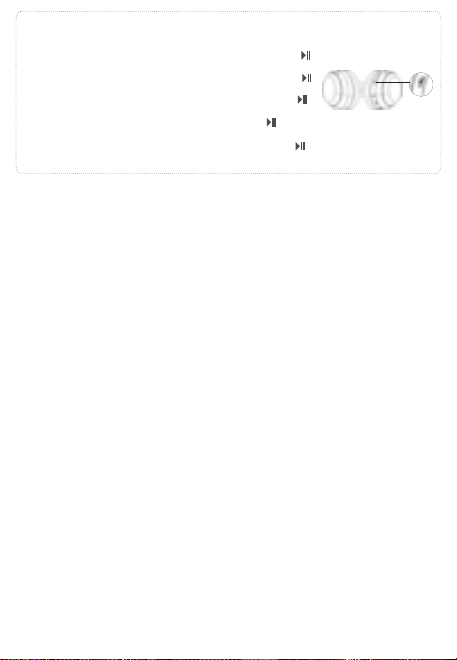
中文
英文
德语
日语
西班牙语
法语
俄语
韩语
意大利语
无线降噪耳机头戴式
F1
用户手册
USER
MANUAL
蓝牙耳机基本按键操作
音量调节
关机
蓝牙模式连接
开机
歌曲选择
播放/暂停/打接电话
1
3
2
长按播放/暂停键 3秒,红色灯长亮
3秒后熄灭,耳机关机。
长按播放/暂停键 3秒,蓝色灯长亮3
秒后耳机开机。开机后自动进入配对
状态,蓝牙指示灯红色/蓝色交替闪烁
耳机开机后,进入蓝牙配对模式,蓝牙指示灯红
色/蓝色交替闪烁,打开手机蓝牙功能,并搜索蓝
牙设备名:picun F1,点击设备名进行连接,连
接成功后蓝灯长亮,音乐播放时蓝灯慢闪。
短按加键+可调节音量变大。
短按减键-可调节音量变小。
长按+键,跳到下一曲播放
长按-键,跳到上一曲播放
音乐播放时短按播放/暂停键 键,音乐暂停。
音乐暂停时短按播放/暂停键 键,音乐播放。
有来电时短按开播放/暂停键 键,接听电话。
在通话中短按开播放/暂停键 键,挂断当前通话。
有来电时长按开播放/暂停键 键,拒绝接听。
Basic Operation of BT Earphones
Volume Adjustment
Power On
BT Connection Mode
Power Off
Song Selection
1
3
2
Long press the play/pause button
for 3 seconds. The blue light will stay
on for 3 seconds, and then the
earphones will turn on.
After turning on, it will automatically
enter pairing mode. The BTindicator
will flash red/blue alternately.
Long press the play/pause button
for 3 seconds. The red light will stay on
for 3 seconds and then turn off. The
earphones will shut down.
After turning on, the headphones enter BT pairing
mode, and the BT indicator light flashes red/blue
alternately. Turn on the BT function of your mobile
phone, search for the device name "picun F1," and
click on the device name to connect. Once
connected successfully, the blue light will stay on,
and during music playback, the blue light will flash
slowly.
Short press/Long press the plus button for 1 second
to increase the volume.
Short press/Long press the minus button for 1
second to decrease the volume.
Short press/long press to skip to the previous track.
Short press/long press to skip to the next track.
Grundlegende Bedienung der BT-Ohrhörer
Lautstärkeregelung
Einschalten
BT-Verbindungsmodus
Ausschalten
Musikauswahl
1
3
2
Drücken Sie die
Wiedergabe-/Pause-Taste 3
Sekunden lang. Die blaue Lampe leuchtet
3 Sekunden lang auf, und dann werden
die Ohrhörer eingeschaltet.
Nach dem Einschalten schaltet es
automatisch in den Pairing-Modus. Die
Bluetooth-Anzeige blinkt abwechselnd
rot/blau.
Drücken Sie die
Wiedergabe-/Pause-Taste 3
Sekunden lang. Die rote Lampe
leuchtet 3 Sekunden lang auf und
erlischt dann. Die Ohrhörer werden
ausgeschaltet.
After turning on, the headphones enter BT pairing
mode, and the BT indicator light flashes red/blue
alternately. Turn on the BT function of your mobile
phone, search for the device name "picun F1," and
click on the device name to connect. Once
connected successfully, the blue light will stay on,
and during music playback, the blue light will flash
slowly.
Kurzes Drücken/Langes Drücken der Plus-Taste für 1
Sekunde erhöht die Lautstärke.
Kurzes Drücken/Langes Drücken der Minus-Taste für
1 Sekunde verringert die Lautstärke.
Langes Drücken oder Kurzes Drücken, um zum
vorherigen Lied zu springen.
Langes Drücken oder Kurzes Drücken, um zum nächsten
Lied zu springen.
Wiedergabe/Pause/Anruf annehmen
Während der Musikwiedergabe kurze Wiedergabe-/Pause-Taste
drücken, um die Musik anzuhalten.
Während die Musik pausiert ist, die Wiedergabe-/Pause-Taste
kurz drücken, um die Musikwiedergabe zu starten.
Bei einem eingehenden Anruf kurz auf die Wiedergabe-/Pause-Taste
drücken, um den Anruf anzunehmen.
Während des Telefonats die Wiedergabe-/Pause-Taste kurz
drücken, um das aktuelle Telefonat zu beenden.
Bei einem eingehenden Anruf lange auf die
Wiedergabe-/Pause-Taste drücken, um den Anruf abzulehnen.
BTイヤホンの基本操作
音量調整
電源オン
BTモードの接続
電源オフ
曲選択
1
3
2
再生/一時停止ボタンを3秒間長押
しします。青色のライトが3秒間点灯し
た後、イヤホンの電源が入ります。
電源を入れた後、自動的にペアリングモ
ードに入ります。BTインジケーターは赤
色と青色が交互に点滅します。
再生/一時停止ボタンを3秒間長押
しします。赤色のライトが3秒間点灯し
てから消え、イヤホンの電源が切れます
。
イヤホンの電源が入ると、BTペアリングモードに入り
、BTインジケーターが赤/青交互に点滅します。携帯
電話のBT機能をオンにして、「picun F1」を検索し、
接続します。接続に成功すると、青色のLEDが点灯し
、音楽再生時には青色のLEDがゆっくりと点滅します
。
短押し/長押し1秒で音量が上がります。
短押し/長押し1秒で音量が下がります。
長押しまたは短押しで、前の曲にスキップします。
長押しまたは短押しで、次の曲にスキップします。
再生/一時停止/電話を受ける
音楽再生中に再生/一時停止ボタンを短く押 すと、音楽が一時停
止されます。
音楽が一時停止中に再生/一時停止ボタンを短く押 すと、音楽再
生が再開します。
着信があった場合、再生/一時停止ボタンを短く押 すと電話に応
答します。 通話中に再生/一時停止ボタンを短く押 すと
、現在の通話を切断します。
着信があった場合、再生/一時停止ボタンを長く押 すと、通話を
拒否します。
Operación básica de los auriculares BT
Ajuste de volumen
Encendido
Modo de conexión BT
Apagado
Selección de canciones
1
3
2
Mantén presionado el botón de
reproducir/pausar durante 3
segundos. La luz azul se encenderá
durante 3 segundos y luego los
auriculares se encenderán.
Después de encender, automática-
mente entrará en modo de
emparejamiento. El indicador de
BTparpadeará en rojo/azul
alternativamente.
Mantén presionado el botón de
reproducir/pausar durante 3
segundos. La luz roja se encenderá
durante 3 segundos y luego se apagará.
Los auriculares se apagarán.
Después de encenderlos, los auriculares entran en modo
de emparejamiento BT, y la luz indicadora de BT
parpadea en rojo/azul alternativamente. Active la función
BT de su teléfono móvil, busque el nombre del dispositivo
"picun F1" y haga clic en el nombre del dispositivo para
conectarse. Una vez conectados correctamente, la luz
azul permanecerá encendida, y durante la reproducción
de música, la luz azul parpadeará lentamente..
Presione brevemente / mantenga presionado el botón de más
durante 1 segundo para aumentar el volumen.
Presione brevemente / mantenga presionado el botón de menos
durante 1 segundo para disminuir el volumen.
Presione brevemente / mantenga presionado para
retroceder a la pista anterior.
Presione brevemente / mantenga presionado para
avanzar a la siguiente pista.
Reproducción / Pausa / Responder llamada / Finalizar llamada
Cuando la música está sonando, presiona brevemente el botón de
reproducir/pausar para pausar la música.
Cuando la música está en pausa, presiona brevemente el botón de
reproducir/pausar para reanudar la reproducción de música.
Cuando entra una llamada, presiona brevemente el botón de
reproducir/pausar para responder la llamada.
Durante una llamada, presiona brevemente el botón de
reproducir/pausar para colgar la llamada actual.
Cuando entra una llamada, mantén presionado el botón de
reproducir/pausar para rechazar la llamada.
Opération de base des écouteurs BT
Réglage du volume
Allumer
Mode de connexion BT
Éteindre
Sélection des chansons
1
3
2
Appuyez longuement sur le bouton
de lecture/pause pendant 3 secondes.
La lumière bleue restera allumée
pendant 3 secondes, puis les
écouteurs s'allumeront.
Après l'allumage, ils entreront
automatiquement en mode de
jumelage. L'indicateur BTclignotera en
alternance en rouge/bleu.
Appuyez longuement sur le bouton de
lecture/pause pendant 3 secondes.
La lumière rouge restera allumée pendant
3 secondes et s'éteindra ensuite. Les
écouteurs s'éteindront.
Après l'allumage, les écouteurs passent en mode
d'appariement BT, et le voyant BT clignote en
rouge/bleu de manière alternative. Activez la fonction
BT de votre téléphone portable, recherchez le nom du
périphérique "picun F1" et cliquez sur le nom du
périphérique pour vous connecter. Une fois connecté
avec succès, le voyant bleu restera allumé, et pendant
la lecture de musique, le voyant bleu clignotera
lentement.
Appuyez brièvement/longuement sur le bouton plus
pendant 1 seconde pour augmenter le volume.
Appuyez brièvement/longuement sur le bouton moins
pendant 1 seconde pour diminuer le volume.
Appuyez brièvement/longuement pour passer à la piste
précédente.
Appuyez brièvement/longuement pour passer à la piste
suivante.
Lecture/pause/répondre à un appel/terminer un appel
Lors de la lecture de musique, appuyez brièvement sur le
bouton Lecture/Pause pour mettre la musique en
pause.
Lorsque la musique est en pause, appuyez brièvement sur
le bouton Lecture/Pause pour reprendre la lecture de
la musique.
Lorsqu'un appel entre, appuyez brièvement sur le bouton
Lecture/Pause pour répondre à l'appel.
Pendant un appel, appuyez brièvement sur le bouton
Lecture/Pause pour raccrocher l'appel en cours.
Lorsqu'un appel entre, appuyez longuement sur le bouton
Lecture/Pause pour rejeter l'appel.
Основная операция BT-наушников
Регулировка громкости
Включение
Режим BT-подключения
Выключение
Выбор песен
1
3
2
Нажмите и удерживайте кнопку
воспроизведения/паузу в течение 3
секунд. Синий свет будет гореть 3
секунды, и наушники включатся.
После включения наушники
автоматически войдут в режим
сопряжения. Индикатор BTбудет
поочередно мигать красным/синим
цветом.
Нажмите и удерживайте кнопку
воспроизведения/паузу в течение 3
секунд. Красный свет будет гореть 3
секунды, а затем погаснет. Наушники
выключатся.
После включения наушники входят в режим
сопряжения BT, и индикатор BT мигает
красным/синим поочередно. Включите функцию BT
на вашем мобильном телефоне, найдите имя
устройства "picun F1" и нажмите на имя устройства,
чтобы подключиться.После успешного
подключения синий индикатор останется
включенным, а во время воспроизведения музыки
синий свет будет медленно мигать.
Нажмите коротко/удерживайте кнопку "+" в течение 1
секунды, чтобы увеличить громкость.
Нажмите коротко/удерживайте кнопку "-" в течение 1
секунды, чтобы уменьшить громкость.
Длительное нажатие кнопка - для перехода к
предыдущей песне.
Длительное нажатие кнопка + для перехода к
следующей песне.
Воспроизведение/пауза/ответ на звонок/завершение звонка
При воспроизведении музыки короткое нажатие
кнопки Воспроизведение/Пауза останавливает музыку.
Когда музыка на паузе, короткое нажатие кнопки
Воспроизведение/Пауза возобновляет воспроизведение
музыки.
При поступающем звонке короткое нажатие кнопки
Воспроизведение/Пауза принимает звонок.
Во время разговора короткое нажатие кнопки
Воспроизведение/Пауза завершает текущий звонок.
При поступающем звонке длительное нажатие кнопки
Воспроизведение/Пауза отклоняет звонок.
BT 이어폰 기본 작동
볼륨 조절
전원 켜기
블루투스 연결 모드
전원 끄기
곡 선택
1
3
2
재생/일시정지 버튼을 3초간 길게
누릅니다. 파란색 불빛이 3초간 켜진 후
이어폰이 켜집니다.
켜면 자동으로 페어링 모드로
전환됩니다. 블루투스 표시등은
빨간색/파란색이 번갈아 깜박입니다.
재생/일시정지 버튼을 3초간 길게
누릅니다. 빨간색 불빛이 3초간 켜졌다가
꺼집니다. 이어폰이 꺼집니다.
헤드폰을 켠 후에는 블루투스 페어링 모드로 들어가며,
블루투스 표시등이 빨강/파랑으로 번갈아 깜빡입니다.
휴대전화의 블루투스 기능을 켜고, "picun F1" 장치
이름을 찾아서 장치 이름을 클릭하여 연결합니다.
연결에 성공하면 파란 불빛이 켜지고, 음악 재생 중에는
파란 불빛이 천천히 깜빡입니다.
1초 동안 플러스 버튼을 짧게 누르거나 길게 누르면 볼륨이
증가합니다.
1초 동안 마이너스 버튼을 짧게 누르거나 길게 누르면 볼륨이
감소합니다.
긴 누름 - 버튼을 누르면 이전 곡으로 건너뜁니다.
긴 누름 + 버튼을 누르면 다음 곡으로 건너뜁니다.
재생/일시 정지/전화 받기/전화 끊기
음악 재생 중에 재생/일시 정지 버튼을 짧게 누르면
음악이 일시 정지됩니다.
음악이 일시 정지 상태일 때 재생/일시 정지 버튼을 짧게
누르면 음악 재생이 재개됩니다.
전화가 걸려오면 재생/일시 정지 버튼을 짧게 누르면
전화를 응답합니다.
통화 중에 재생/일시 정지 버튼을 짧게 누르면 현재
통화를 끊습니다.
전화가 걸려오면 재생/일시 정지 버튼을 길게 누르면
전화를 거절합니다.
Operazioni di base delle cuffie BT
Regolazione del volume
Accensione
Modalità di connessione BT
Spegnimento
Selezione delle tracce
1
3
2
Premi e tieni premuto il pulsante di
riproduzione/pausa per 3 secondi. La
luce blu rimarrà accesa per 3 secondi e
poi le cuffie si accenderanno.
Dopo l'accensione, entrerà
automaticamente in modalità di
abbinamento. L'indicatore
BTlampeggerà alternativamente in
rosso/blu.
Premi e tieni premuto il pulsante di
riproduzione/pausa per 3 secondi. La
luce rossa rimarrà accesa per 3 secondi e
poi si spegnerà. Le cuffie si spegneranno.
Dopo l'accensione, le cuffie entreranno in modalità di
accoppiamento BT e il segnalatore BT lampeggerà
alternativamente in rosso/blu. Attivare la funzione BT del
telefono cellulare, cercare il nome del dispositivo "picun
F1" e fare clic sul nome del dispositivo per connettersi.
Una volta connessi con successo, la luce blu rimarrà
accesa e durante la riproduzione musicale, la luce blu
lampeggerà lentamente.
Premere brevemente / tenere premuto il pulsante più per
1 secondo per aumentare il volume.
Premere brevemente / tenere premuto il pulsante meno
per 1 secondo per diminuire il volume.
Premere brevemente/lungo per passare alla traccia precedente.
Premere brevemente/lungo per passare alla traccia successiva.
Riproduzione/Pausa/Risposta alla chiamata/Terminazione
della chiamata
Durante la riproduzione della musica, premi brevemente il
pulsante Riproduci/Pausa per mettere in pausa la musica.
Quando la musica è in pausa, premi brevemente il pulsante
Riproduci/Pausa per riprendere la riproduzione della musica.
Quando arriva una chiamata, premi brevemente il pulsante
Riproduci/Pausa per rispondere alla chiamata.
Durante una chiamata, premi brevemente il pulsante
Riproduci/Pausa per riagganciare la chiamata in corso.
Quando arriva una chiamata, tieni premuto a lungo il pulsante
Riproduci/Pausa per rifiutare la chiamata.
Play/Pause/Answer Call
When music is playing, short press the Play/Pause button
to pause the music.
When music is paused, short press the Play/Pause button
to resume playing music.
When a call comes in, short press the Play/Pause button
to answer the call.
During a call, short press the Play/Pause button to
hang up the current call.
When a call comes in, long press the Play/Pause button
to decline the call.
一拖二连接方式
1.在开机状态下长按开机键3秒,让耳机进入配对状态,然后连接第一台手机。
2.关闭第一台已连接手机的蓝牙功能,让耳机进入配对状态,然后连接第二台手
机。
3.第一台手机打开蓝牙功能,手动操作来连接耳机。
自动关机及超距离回连
当耳机超出有效距离范围耳机会断开连接。在5分钟内回到蓝牙范围内耳机会自
动重新连接,如未在5分钟内回到有效蓝牙连接范围耳机自动关机。
降噪模式
在蓝牙开启状态下,短按ANC按键开启主动降噪,再次短按关闭降噪功能。
备注
在蓝牙关闭状态下长按ANC按键开启主动降噪,再次长按关闭降噪功能。
在蓝牙关闭状态下短按ANC按键开启主动降噪,再次短按关闭降噪功能。
低延时功能
在开机任意模式下,三击ANC键进入低延时功能,耳机提示“叮叮”两声。再次三击退
出低延时模式,耳机提示“叮”一声。(配对状态和通话状态下不支持)
语音助手功能
在非通话状态下,三击开关机键启动语音助手功能。
电池容量状态
当耳机连接IOS设备时,在IOS设备屏幕右上角显示目前耳机电池状态。
耳机充电
当电池电量低时,请使用USB充电线充电3小时左右,在充电过程中耳机会自动关
机。
充电时红色指示灯长亮,充满红灯灭。
清空配对信息
在非通话状态下,同时长按音量加 + 与音量减 - 3秒。
Line in模式
插入音频线,耳机会自动关机。
备注
1.Line in模式下不能使用蓝牙和降噪功能。
2.如果要使用蓝牙需要拔下音频线后再次开机使用。
耳机参数配件
蓝牙协议
接收距离
喇叭尺寸
频响范围
喇叭灵敏度
喇叭阻抗
麦克风灵敏度
工作电流
充电电压
A2DP/AVRCP/HFP/HSP
10m
40mm
20HZ-20kHZ
122±3dB
32Ω±15%
—42dB±3dB
10-30mA
5V
包装配件
1.蓝牙耳机
2.充电线
3.音频线
4.用户手册
Two-Device Connection Method
1.While the headphones are on, press and hold the power button for 3 seconds to put them into
pairing mode, then connect to the first mobile phone.
2.Turn off the BT function of the first connected mobile phone to put the headphones into pairing
mode, then connect to the second mobile phone.
3.Turn on the BT function of the first mobile phone and manually connect to the headphones.
Automatic Power Off and Reconnection at a Distance
If the headphones are out of range, they will disconnect. If you return within BT range
within 5 minutes, the headphones will automatically reconnect. If you don't return within 5
minutes, the headphones will automatically power off.
Noise Cancelling Mode
With BT enabled, short press the ANC button to activate active noise cancelling, and
short press again to deactivate noise cancelling function.
Note
With BT disabled, long press the ANC button to activate active noise cancelling, and
long press again to deactivate noise cancelling function.
In Bluetooth-off mode, short press the ANC button to activate active noise cancelling,
and short press again to deactivate the noise cancelling function.
Low Latency Function
In any powered-on mode, triple press the ANC button to enter low latency mode. The
headphones will emit two "ding-ding" sounds. Triple press again to exit low latency
mode, and the headphones will emit a single "ding" sound. (Pairing status and call status
not supported)
Voice Assistant Function
In non-call status, triple press the power button to activate the voice assistant function.
Battery Capacity Status
When headphones are connected to an iOS device, the current headphone battery
status will be displayed on the iOS device's screen in the top right corner.
Headphone Charging
When battery level is low, please charge the headphones for about 3 hours using the
USB charging cable. The headphones will automatically power off during charging.
During charging, the red indicator light will stay on, and when fully charged, the red
light will turn off.
Clear Pairing Information
In non-call status, simultaneously long press the volume up+and volume down-buttons
for 3 seconds.
Line-in Mode
Inserting the audio cable will automatically power off the headphones.
Note
1.In Line-in mode, BT and noise cancelling functions cannot be used.
2.To use BT, power on the headphones again after removing the audio cable.
Headphone Specifications and Accessories
BT Protocol
Reception Distance
Speaker Size
Frequency Response
Speaker Sensitivity
Speaker Impedance
Microphone Sensitivity
Working Current
Charging Voltage
A2DP/AVRCP/HFP/HSP
10m
40mm
20HZ-20kHZ
122±3dB
32Ω±15%
—42dB±3dB
10-30mA
5V
Packaging Accessories
1.BT Headphones
2.Charging Cable
3.Audio Cable
4.User Manual
Verbindung von zwei Geräten gleichzeitig
1.Halten Sie den Ein-/Aus-Schalter im eingeschalteten Zustand 3 Sekunden lang gedrückt,
um die Kopfhörer in den Pairing-Modus zu versetzen, und verbinden Sie dann das erste
Mobiltelefon.
2.Deaktivieren Sie die BT-Funktion des ersten verbundenen Mobiltelefons, um die
Kopfhörer in den Pairing-Modus zu versetzen, und verbinden Sie dann das zweite
Mobiltelefon.
3.Aktivieren Sie die BT-Funktion des ersten Mobiltelefons und stellen Sie manuell eine
Verbindung zu den Kopfhörern her.
Automatische Abschaltung und automatische erneute
Verbindung bei Überreichweite
Wenn die Kopfhörer außerhalb der Reichweite sind, wird die Verbindung getrennt. Wenn
Sie innerhalb von 5 Minuten wieder in den BT-Bereich zurückkehren, werden die
Kopfhörer automatisch neu verbunden. Wenn Sie innerhalb von 5 Minuten nicht in den
gültigen BT-Verbindungsbereich zurückkehren, schalten sich die Kopfhörer automatisch
aus.
Geräuschunterdrückungsmodus
Im aktivierten BT-Modus drücken Sie kurz die ANC-Taste, um die aktive Geräuschunter-
drückung zu aktivieren, und drücken Sie erneut kurz, um die Geräuschunterdrückungs-
funktion zu deaktivieren.
Anmerkung
Im deaktivierten BT-Modus lange die ANC-Taste drücken, um die aktive
Geräuschunterdrückung zu aktivieren, und erneut lange drücken, um die
Geräuschunterdrückungsfunktion zu deaktivieren.
Niedrige Latenzfunktion
In jedem eingeschalteten Modus drücken Sie dreimal die ANC-Taste, um in den
niedrigen Latenzmodus zu wechseln. Die Kopfhörer geben zwei "Ping-Pong"-Töne aus.
Drücken Sie erneut dreimal, um den niedrigen Latenzmodus zu verlassen, und die
Kopfhörer geben einen "Ping"-Ton aus. (Pairing-Status und Anrufstatus werden nicht
unterstützt)
Drücken Sie bei ausgeschaltetem BTkurz die ANC-Taste, um die aktive Geräuschunter-
drückung zu aktivieren. Drücken Sie erneut kurz, um die Geräuschunterdrückung zu
deaktivieren.
Sprachassistentenfunktion
Drücken Sie im Nicht-Anrufstatus dreimal die Ein-/Aus-Taste, um die Sprachassistenten-
funktion zu aktivieren.
Akku-Kapazitätsstatus
Wenn die Kopfhörer mit einem iOS-Gerät verbunden sind, wird der aktuelle Akkustatus
der Kopfhörer oben rechts auf dem iOS-Gerät angezeigt.
Kopfhörer aufladen
Wenn der Akkustand niedrig ist, laden Sie den Kopfhörer bitte etwa 3 Stunden lang
über das USB-Ladekabel auf. Während des Ladevorgangs schalten sich die Kopfhörer
automatisch aus.
Während des Ladevorgangs leuchtet die rote Anzeige durchgehend, und wenn der
Ladevorgang abgeschlossen ist, erlischt die rote Anzeige.
Kopplungsinformationen löschen
Im Nicht-Anrufstatus halten Sie gleichzeitig die + Lautstärketaste und die -
Lautstärke-nach-unten-Taste 3 Sekunden lang gedrückt.
Line-in-Modus
Stecken Sie das Audiokabel ein, um die Kopfhörer automatisch auszuschalten.
1.Im Line-in-Modus können BT- und Geräuschunterdrückungsfunktionen nicht verwendet werden.
2.Um BT zu verwenden, schalten Sie die Kopfhörer nach dem Entfernen des Audiokabels erneut ein.
Anmerkung
Kopfhörer-Spezifikationen und Zubehör
BT-Protokoll
Empfangsreichweite
Lautsprechergröße
Frequenzbereich
Lautsprecherempfindlichkeit
Lautsprecherimpedanz
Mikrofonempfindlichkeit
Betriebsstrom
Ladevoltage
A2DP/AVRCP/HFP/HSP
10m
40mm
20HZ-20kHZ
122±3dB
32Ω±15%
—42dB±3dB
10-30mA
5V
2台同時接続方法
1.電源がオンの状態で電源ボタンを3秒長押しし、イヤホンをペアリングモードにし、最初の携
帯電話に接続します。
2.最初に接続した携帯電話のBT機能をオフにし、イヤホンをペアリングモードにし、次の携帯
電話に接続します。
3.最初の携帯電話のBT機能をオンにし、手動でイヤホンに接続します。
自動電源オフおよび超距離再接続
イヤホンが有効範囲外に移動すると、イヤホンは切断されます。 5分以内にBT範囲内に戻ると
、イヤホンは自動的に再接続されます。 5分以内にBT範囲内に戻らない場合、イヤホンは自動
的に電源が切れます。
ノイズキャンセルモード
BTがオンの状態で、ANCボタンを短く押すとアクティブノイズキャンセルがオンになり、再度
押すとノイズキャンセル機能がオフになります。
BTがオフの状態でANCボタンを短く押すと、アクティブノイズキャンセリングがオンになりま
す。再度短く押すと、ノイズキャンセリング機能がオフになります。
備考
BTがオフの状態でANCボタンを長押しするとアクティブノイズキャンセルがオンになり、再度
長押しするとノイズキャンセル機能がオフになります。
低遅延機能
電源が入っている状態で、ANCボタンを3回押すと低遅延モードに入り、ヘッドフォンが「ビ
ービー」と2回音を出します。再度3回押すと低遅延モードが終了し、ヘッドフォンが「ビー」
と音を出します。(ペアリング状態および通話中はサポートされていません)
音声アシスタント機能
通話中ではない状態で、電源ボタンを3回押すと音声アシスタント機能が起動します。
バッテリー容量状態
ヘッドフォンがiOSデバイスに接続されている場合、iOSデバイスの画面右上に現在のヘッドフ
ォンのバッテリー状態が表示されます。
ヘッドフォンの充電
バッテリー残量が低い場合は、USB充電ケーブルで約3時間充電してください。充電中はヘッ
ドフォンが自動的に電源がオフになります。
充電中は赤色のインジケータが点灯し、充電が完了すると赤色の灯が消えます。
ペアリング情報を削除する
通話中ではない状態で、音量を上 + げるボタンと音量を下 - げるボタンを同時に3秒間押し
てください。
Line inモード
オーディオケーブルを挿入すると、ヘッドフォンが自動的に電源がオフになります。
備考
1.Line inモードではBTおよびノイズキャンセル機能を使用できません。
2.BTを使用する場合は、オーディオケーブルを抜いてから再度電源を入れてください。
イヤホンの仕様と付属品
BTプロトコル
受信距離
スピーカーサイズ
周波数応答
スピーカー感度
スピーカーインピーダンス
マイク感度
A2DP/AVRCP/HFP/HSP
10m
40mm
20HZ-20kHZ
122±3dB
32Ω±15%
—42dB±3dB
パッケージの付属品
動作電流
充電電圧
10-30mA
5V
1.BTイヤホン
2.充電ケーブル
3.オーディオケーブル
4.ユーザーマニュアル
Método de conexión de dos dispositivos
Si los auriculares están fuera del alcance, se desconectarán. Si regresa dentro del
alcance de BT dentro de los 5 minutos, los auriculares se reconectarán automática-
mente. Si no regresa dentro de los 5 minutos, los auriculares se apagarán
automáticamente.
Modo de cancelación de ruido
Con BT activado, presione brevemente el botón ANC para activar la cancelación de ruido
activa, y presione brevemente nuevamente para desactivar la función de cancelación de ruido.
En modo BTapagado, presiona brevemente el botón de ANC para activar la cancelación activa
de ruido, y presiona brevemente de nuevo para desactivar la cancelación de ruido.
Nota
Con BT desactivado, mantenga presionado el botón ANC para activar la cancelación de ruido
activa, y mantenga presionado nuevamente para desactivar la función de cancelación de
ruido.
Función de baja latencia
En cualquier modo encendido, presione tres veces el botón ANC para ingresar al modo de
baja latencia. Los auriculares emitirán dos tonos "ding-ding". Presione tres veces nuevamente
para salir del modo de baja latencia, y los auriculares emitirán un solo tono "ding". (El estado
de emparejamiento y el estado de la llamada no son compatibles)
Función de asistente de voz
En estado de no llamada, presione tres veces el botón de encendido para
activar la función de asistente de voz.
Estado de la capacidad de la batería
Cuando los auriculares están conectados a un dispositivo iOS, el estado actual de la
batería de los auriculares se mostrará en la pantalla del dispositivo iOS en la esquina
superior derecha.
Carga de auriculares
Cuando el nivel de la batería es bajo, cargue los auriculares durante aproximadamente 3
horas con el cable de carga USB. Los auriculares se apagarán automáticamente durante
la carga.
Durante la carga, la luz indicadora roja permanecerá encendida, y cuando esté
completamente cargada, la luz roja se apagará.
Borrar información de emparejamiento
En estado de no llamada, presione simultáneamente los + botones de volumen - hacia arriba
y hacia abajo durante 3 segundos.
Modo de entrada de línea
Insertar el cable de audio apagará automáticamente los auriculares.
Nota
En el modo de entrada de línea, no se pueden utilizar las funciones de BT y cancelación
de ruido.
Para usar BT, encienda los auriculares nuevamente después de quitar el cable de audio.
Especificaciones y accesorios de auriculares
Protocolo BT
Distancia de recepción
Tamaño del altavoz
Respuesta de frecuencia
Sensibilidad del altavoz
A2DP/AVRCP/HFP/HSP
10m
40mm
20HZ-20kHZ
122±3dB
Impedancia del altavoz
Sensibilidad del micrófono
Corriente de trabajo
Voltaje de carga
32Ω±15%
—42dB±3dB
10-30mA
5V
Accesorios de embalaje
1.Auriculares BT
2.Cable de carga
3.Cable de audio
4.Manual del usuario
Méthode de connexion pour deux appareils
1.Pendant que les écouteurs sont allumés, maintenez le bouton d'alimentation enfoncé
pendant 3 secondes pour les mettre en mode d'appariement, puis connectez-les au
premier téléphone portable.
2.Désactivez la fonction BT du premier téléphone portable connecté pour mettre les
écouteurs en mode d'appariement, puis connectez-les au deuxième téléphone portable.
3.Activez la fonction BT du premier téléphone portable et connectez-les manuellement
aux écouteurs.
Arrêt automatique et reconnexion à distance
Si les écouteurs sont hors de portée, ils se déconnecteront. Si vous revenez dans la
portée BT dans les 5 minutes, les écouteurs se reconnecteront automatiquement. Si
vous ne revenez pas dans les 5 minutes, les écouteurs s'éteindront automatiquement.
Mode de réduction de bruit
Avec le BT activé, appuyez brièvement sur le bouton ANC pour activer la réduction active
du bruit, et appuyez brièvement à nouveau pour désactiver la fonction de réduction du
bruit.
Remarque
Avec le BT désactivé, maintenez enfoncé le bouton ANC pour activer la réduction active
du bruit, et maintenez enfoncé à nouveau pour désactiver la fonction de réduction du
bruit.
En mode BTdésactivé, appuyez brièvement sur le bouton ANC pour activer l'annulation
active du bruit, puis appuyez brièvement de nouveau pour désactiver la fonction
d'annulation du bruit.
Fonction de faible latence
Dans n'importe quel mode sous tension, appuyez trois fois sur le bouton ANC pour entrer
en mode de faible latence. Le casque émettra deux sons "ding-ding". Appuyez à nouveau
trois fois pour quitter le mode de faible latence, et le casque émettra un seul son "ding".
Fonction d'assistant vocal
Dans l'état non appel, appuyez trois fois sur le bouton d'alimentation pour activer la
fonction d'assistant vocal.
État de capacité de batterie
Lorsque les écouteurs sont connectés à un appareil iOS, l'état actuel de la batterie des
écouteurs sera affiché sur l'écran de l'appareil iOS dans le coin supérieur droit.
Chargement des écouteurs
Lorsque le niveau de batterie est faible, veuillez charger les écouteurs pendant environ 3
heures à l'aide du câble de chargement USB. Les écouteurs s'éteindront automatiquement
pendant le chargement.
Pendant le chargement, le voyant rouge restera allumé, et lorsqu'il sera complètement
chargé, le voyant rouge s'éteindra.
Supprimer les informations d'appairage
Dans l'état non appel, maintenez simultanément enfoncés + es - boutons de volume et de
réduction du volume pendant 3 secondes.
Mode d'entrée de ligne
Insérer le câble audio éteindra automatiquement les écouteurs.
Remarque
1.En mode d'entrée de ligne, les fonctions BT et de réduction de bruit ne peuvent pas
être utilisées.
2.Pour utiliser le BT, allumez à nouveau les écouteurs après avoir retiré le câble audio.
Spécifications des écouteurs et accessoires
Protocole BT
Distance de réception
Taille du haut-parleur
Réponse en fréquence
Sensibilité du haut-parleur
Impédance du haut-parleur
A2DP/AVRCP/HFP/HSP
10m
40mm
20HZ-20kHZ
122±3dB
32Ω±15%
Sensibilité du microphone
Courant de fonctionnement
Tension de charge
—42dB±3dB
10-30mA
5V
Accessoires d'emballage
1.Écouteurs BT
2.Câble de charge
3.Câble audio
4.Manuel de l'utilisateur
Метод подключения для двух устройств
1.Пока наушники включены, удерживайте кнопку включения в течение 3 секунд,
чтобы перевести их в режим сопряжения, затем подключите к первому
мобильному телефону.
2.Выключите функцию BT первого подключенного мобильного телефона, чтобы
перевести наушники в режим сопряжения, затем подключите к второму
мобильному телефону.
3.Включите функцию BT первого мобильного телефона и вручную подключитесь к
наушникам.
Автоматическое выключение и повторное подключение
на расстоянии
Если наушники находятся вне зоны действия, они отключатся. Если вы вернетесь
в пределы действия BT в течение 5 минут, наушники автоматически подключатся
повторно. Если вы не вернетесь в течение 5 минут, наушники автоматически
выключатся.
Режим шумоподавления
С включенным BT коротко нажмите кнопку ANC, чтобы активировать активное
шумоподавление, и еще раз коротко нажмите, чтобы отключить функцию
шумоподавления.
Примечание
С выключенным BT долго нажмите кнопку ANC, чтобы активировать активное
шумоподавление, и снова долго нажмите, чтобы отключить функцию
шумоподавления.В режиме отключенного BTкороткое нажатие кнопки ANC
включает активное шумоподавление, и короткое нажатие снова выключает
функцию шумоподавления.
Функция низкой задержки
В любом включенном режиме трижды нажмите кнопку ANC, чтобы войти в режим
низкой задержки. Наушники издадут два звука "динь-динь". Еще раз трижды
нажмите, чтобы выйти из режима низкой задержки, и наушники издадут один звук
"динь". (Статус парения и статус вызова не поддерживаются)
Функция голосового помощника
В состоянии без вызова трижды нажмите кнопку включения, чтобы активировать
функцию голосового помощника.
Статус емкости аккумулятора
Когда наушники подключены к устройству iOS, текущий статус батареи наушников
будет отображаться на экране устройства iOS в правом верхнем углу.
Зарядка наушников
Если уровень заряда аккумулятора низкий, подключите наушники кабелем USB
на примерно 3 часа для зарядки. Наушники автоматически выключатся во время
зарядки.
Очистить информацию о паре
В состоянии без + вызова - одновременно удерживайте кнопки увеличения и
уменьшения громкости в течение 3 секунд.
Режим линейного ввода
Вставка аудиокабеля автоматически выключит наушники.
Примечание
2.Для использования BT снова включите наушники после удаления аудиокабеля.
Характеристики наушников и комплектация
Протокол BT
Дальность приема
Размер динамика
Частотный диапазон
Чувствительность динамика
Импеданс динамика
A2DP/AVRCP/HFP/HSP
10m
40mm
20HZ-20kHZ
122±3dB
32Ω±15%
Чувствительность микрофона
Рабочий ток
Напряжение зарядки
—42dB±3dB
10-30mA
5V
Комплектация упаковки
1.BT-наушники
2.Кабель для зарядки
3.Аудиокабель
4.Руководство пользователя
두 기기 연결 방법
1.헤드폰이 켜진 상태에서 전원 버튼을 3초 동안 길게 누르고, 첫 번째 휴대전화에
연결합니다.
2.첫 번째로 연결된 휴대전화의 블루투스 기능을 끄고, 헤드폰을 페어링 모드로 전환한 다음,
두 번째 휴대전화에 연결합니다.
3.첫 번째 휴대전화의 블루투스 기능을 켜고, 헤드폰에 수동으로 연결합니다.
자동 전원 꺼짐 및 거리에서 다시 연결
헤드폰이 유효 거리를 벗어나면 연결이 끊깁니다. 5분 이내에 블루투스 범위 내로 돌아오면
헤드폰이 자동으로 다시 연결됩니다. 5분 이내에 유효한 블루투스 연결 범위 내로 돌아오지
않으면 헤드폰이 자동으로 꺼집니다.
소음 제거 모드
블루투스가 활성화된 상태에서 ANC 버튼을 짧게 눌러 활성 소음 제거를 활성화하고, 다시
한 번 눌러 소음 제거 기능을 비활성화합니다.
참고
블루투스가 비활성화된 상태에서 ANC 버튼을 길게 눌러 활성 소음 제거를 활성화하고,
다시 한 번 길게 눌러 소음 제거 기능을 비활성화합니다.블루투스가 꺼진 상태에서 ANC
버튼을 짧게 눌러 능동 소음 제거 기능을 켭니다. 다시 짧게 누르면 소음 제거 기능을
끕니다.
낮은 지연 기능
전원이 켜진 상태에서 어떤 모드에서든 ANC 버튼을 세 번 눌러 낮은 지연 모드로
진입합니다. 이어폰은 "딩-딩" 소리를 두 번 발생시킵니다. 낮은 지연 모드를 종료하려면
다시 세 번 누르고, 이어폰은 "딩" 소리를 한 번 발생시킵니다. (페어링 상태 및 통화
상태는 지원되지 않습니다)
음성 보조 기능
통화 상태가 아닌 상태에서 전원 버튼을 세 번 눌러 음성 보조 기능을 활성화합니다.
배터리 용량 상태
이어폰이 iOS 장치에 연결된 경우 현재 이어폰 배터리 상태가 iOS 장치의 화면 오른쪽
상단에 표시됩니다.
이어폰 충전
배터리 잔량이 낮은 경우 USB 충전 케이블을 사용하여 약 3시간 충전하십시오. 충전 중에
이어폰은 자동으로 꺼집니다.
충전 중에는 빨간색 표시등이 켜져 있고, 충전이 완료되면 빨간색 불이 꺼집니다.
페어링 정보 지우기
통화 상태가 아닌 상태에서 볼륨 증가 버튼과 볼륨 감소 버튼을 동시에 3초간 누릅니다.
라인 인 모드
오디오 케이블을 연결하면 이어폰이 자동으로 꺼집니다.
참고
1.라인 인 모드에서는 BT 및 소음 제거 기능을 사용할 수 없습니다.
2.BT를 사용하려면 오디오 케이블을 제거한 후 이어폰을 다시 켜세요.
헤드폰 사양 및 액세서리
블루투스 프로토콜
수신 거리
스피커 크기
주파수 응답
스피커 감도
스피커 임피던스
마이크 감도
작동 전류
충전 전압
A2DP/AVRCP/HFP/HSP
10m
40mm
20HZ-20kHZ
122±3dB
32Ω±15%
—42dB±3dB
10-38mA
5V
포장 액세서리
1.블루투스 헤드폰
2.충전 케이블
3.오디오 케이블
4.사용자 매뉴얼
Metodo di connessione per due dispositivi
1.Mentre le cuffie sono accese, premere e tenere premuto il pulsante di accensione per 3
secondi per metterle in modalità di accoppiamento, quindi connetterle al primo telefono
cellulare.
2.Disattivare la funzione BT del primo telefono cellulare connesso per mettere le cuffie in
modalità di accoppiamento, quindi connetterle al secondo telefono cellulare.
3.Attivare la funzione BT del primo telefono cellulare e connettersi manualmente alle cuffie.
Spegnimento automatico e riconnessione a distanza
Se le cuffie sono fuori portata, si scollegano. Se si rientra nel raggio BT entro 5 minuti, le
cuffie si ricollegheranno automaticamente. Se non si rientra entro 5 minuti, le cuffie si
spegneranno automaticamente.
Modalità di cancellazione del rumore
Con il BT attivato, premere brevemente il pulsante ANC per attivare la cancellazione attiva
del rumore, e premere nuovamente brevemente per disattivare la funzione di cancellazione
del rumore.
Nota
Con il BT disattivato, tenere premuto a lungo il pulsante ANC per attivare la cancellazione
attiva del rumore, e premere nuovamente a lungo per disattivare la funzione di
cancellazione del rumore.In modalità BTdisattivata, premi brevemente il pulsante ANC per
attivare la cancellazione attiva del rumore e premi brevemente di nuovo per disattivare la
funzione di cancellazione del rumore.
Funzione di bassa latenza
In qualsiasi modalità accesa, premere tre volte il pulsante ANC per entrare in modalità a
bassa latenza. Le cuffie emetteranno due suoni "ding-ding". Premere nuovamente tre volte
per uscire dalla modalità a bassa latenza, e le cuffie emetteranno un solo suono "ding". (Lo
stato di accoppiamento e lo stato della chiamata non sono supportati)
Funzione dell'assistente vocale
Nello stato non in chiamata, premere tre volte il pulsante di accensione per attivare la
funzione dell'assistente vocale.
Stato della capacità della batteria
Quando le cuffie sono collegate a un dispositivo iOS, lo stato attuale della batteria delle
cuffie verrà visualizzato sullo schermo del dispositivo iOS nell'angolo in alto a destra.
Ricarica delle cuffie
Quando il livello della batteria è basso, caricare le cuffie per circa 3 ore utilizzando il cavo
di ricarica USB. Le cuffie si spegneranno automaticamente durante la ricarica.
Cancellare le informazioni di accoppiamento
Nello stato non in chiamata, premere + contemporaneamente - i pulsanti del volume su e
del volume giù per 3 secondi.
Modalità di ingresso linea
Inserendo il cavo audio, le cuffie si spegneranno automaticamente.
Nota
1.In modalità ingresso linea, le funzioni BT e di cancellazione del rumore non possono
essere utilizzate.
2.Per utilizzare il BT, accendere nuovamente le cuffie dopo aver rimosso il cavo audio.
Specifiche e accessori delle cuffie
Protocollo BT
Distanza di ricezione
Dimensione dell'altoparlante
Risposta in frequenza
Sensibilità dell'altoparlante
Impedenza dell'altoparlante
Sensibilità del microfono
Corrente operativa
Tensione di ricarica
A2DP/AVRCP/HFP/HSP
10m
40mm
20HZ-20kHZ
122±3dB
32Ω±15%
—42dB±3dB
10-30mA
5V
Accessori di imballaggio
1.Cuffie BT
2.Cavo di ricarica
3.Cavo audio
4.Manuale utente
耳机LED指示灯说明
电源开启
配对状态
蓝色灯长亮后进入配对状态
开降噪:绿色灯亮,关降噪:绿色灯熄灭
待机模式
蓝色灯长亮
降噪模式
红色灯5秒闪烁3次
红色/蓝色灯交替闪烁
低电状态
充电亮红色灯,充满电红色灯熄灭充电模式
Headphone LED Indicator
Power On
Blue LED stays on continuously
and enters pairing mode
Red/blue LEDs flash alternately
Pairing Mode
Blue LED stays on continuouslyStandby Mode
Red LED flashes 3 times every 5 seconds
Charging - red LED lights up
fully charged - red LED goes off
Low Battery Status
Charging Mode
Noise cancelling on (green LED lights up)
noise cancelling off (green LED goes off)
Noise Cancelling Mode
Kopfhörer-LED-Anzeige
Blaue LED leuchtet dauerhaft und wechselt
in den Pairing-Modus
Geräuschunterdrückung ein (grüne LED leuchtet)
Geräuschunterdrückung aus (grüne LED erlischt)
Blaue LED leuchtet dauerhaft
Stromversorgung
eingeschaltet
Geräuschunterdrückungsmodus
Standby-Modus
Rote LED blinkt 3 Mal alle 5 Sekunden
Rote LED leuchtet beim Laden, erlischt wenn
vollständig aufgeladen
Niedriger
Batteriestatus
Ladezustand
Pairing-Modus Rote/blaue LEDs blinken abwechselnd
イヤホンLEDインジケーター
電源オン
ペアリングモード
スタンバイモード
低電力モード
青色のLEDが点灯し、ペアリングモードに入る
青色のLEDが点灯する
赤色のLEDが5秒間隔で3回点滅する
充電モード 充電中は赤色のLEDが点灯し、充電完了後は消灯する
赤/青色のLEDが交互に点滅する
ノイズキャンセリングモード
ノイズキャンセリングオン(緑色のLED点灯)
ノイズキャンセリングオフ(緑色のLEDが消灯)
Indicador LED de auriculares
Encendido
Modo de emparejamiento
Modo de espera
Estado de batería baja
LED azul permanece encendido continuamente
y entra en modo de emparejamiento
LED azul permanece encendido continuamente
LED rojo parpadea 3 veces cada 5 segundos
Modo de carga
Cargando - LED rojo encendido, completamente
cargado - LED rojo apagado
LED rojo/azul parpadean alternativamente
Modo de cancelación
de ruido
cancelación de ruido activada (LED verde encendido)
cancelación de ruido desactivada (LED verde apagado)
Indicateur LED du casque
Allumage
Mode d'appariement
Mode veille
Niveau de
batterie faible
LED bleue reste allumée en continu et entre
en mode d'appariement
LED bleue reste allumée en continu
LED rouge clignote 3 fois toutes les 5 secondes
LED rouge/bleue clignotent alternativement
Mode de réduction
de bruit
réduction de bruit activée (LED verte allumée)
réduction de bruit désactivée (LED verte éteinte)
Mode de charge
En charge - LED rouge allumée, complètement
chargé - LED rouge éteinte
Индикатор LED наушников
Включение
Режим сопряжения
Режим ожидания
Низкий уровень
заряда батареи
синий светодиод остается включенным постоянно
и переходит в режим сопряжения
синий светодиод остается включенным постоянно
красный светодиод мигает 3 раза каждые 5 секунд
Режим зарядки
Зарядка - красный светодиод горит, полностью
заряженный - красный светодиод выключен
красный/синий светодиоды мигают попеременно
Режим
подавления шума
подавление шума включено (зеленый светодиод горит)
подавление шума выключено (зеленый светодиод не горит)
헤드폰 LED 표시등
전원 켜기
페어링 모드
대기 모드
배터리 부족 상태
충전 모드
파란 LED가 계속 켜진 채로 페어링 모드로 전환됩니다
파란 LED가 계속 켜집니다
빨간 LED가 5초마다 3번 깜박입니다
충전 중 - 빨간 LED가 켜집니다, 완전히 충전되면
빨간 LED가 꺼집니다
빨간/파란 LED가 번갈아가며 깜박입니다
소음 제거 모드
소음 제거 켜기(녹색 LED가 켜집니다)
소음 제거 끄기(녹색 LED가 꺼집니다)
Indicatore LED cuffie
Accensione
Modalità di
accoppiamento
Modalità standby
Stato batteria bassa
Modalità di ricarica
LED blu rimane acceso continuamente ed entra in
modalità di accoppiamento
LED blu rimane acceso continuamente
LED rosso lampeggia 3 volte ogni 5 secondi
In carica - LED rosso acceso, completamente carico
- LED rosso spento
LED rosso/blu lampeggiano alternativamente
Modalità di
cancellazione del rumore
cancellazione del rumore attivata (LED verde acceso)
cancellazione del rumore disattivata (LED verde spento)
Wireless noise-canceling headphones
over-ear
F1
User Manual
Kabellose Geräuschunterdrückungskopfhörer
Over-Ear
F1
Benutzerhandbuch
ワイヤレスノイズキャンセリングヘッドフォン
オーバーイヤー
F1
ユーザーマニュアル
Auriculares inalámbricos con cancelación de ruido
de diadema
F1
Manual de usuario
Casque sans fil avec réduction de bruit
circum-aural
F1
Manuel de l'utilisateur
Casque sans fil avec réduction de bruit
circum-aural
F1
Manuel de l'utilisateur
무선 노이즈 캔슬링 헤드폰
오버 이어
F1
사용자 매뉴얼
Cuffie wireless con cancellazione del rumore
over-ear
F1
Manuale utente
降噪开关
通话麦克风
USB-C充电接口
3.5音频口
音量加/下一曲
音量减/上一曲
播放/暂停键
蓝牙指示灯/降噪指示灯
1
2
3
4
5
6
7
8
Noise Cancellation Switch
Call Microphone
USB-C Charging Port
3.5mm Audio Port
Volume Up / Next Track
Volume Down / Previous Track
Play / Pause Button
BTIndicator / Noise Cancellation Indicator
1
2
3
4
5
6
7
8
9
Geräuschunterdrückungsschalter
Gesprächsmikrofon
USB-C-Ladeanschluss
3,5-mm-Audiobuchse
Lautstärke erhöhen / Nächstes Lied
Lautstärke verringern / Vorheriges Lied
Wiedergabe / Pause-Taste
BT-Anzeige / Geräuschunterdr
ückungsanzeige
1
2
3
4
5
6
7
8
ノイズキャンセリングスイッチ
通話用マイク
USB-C充電ポート
3.5mmオーディオポート
音量アップ/次の曲
音量ダウン/前の曲
再生/一時停止ボタン
BTインジケーター/ノイズキャ
ンセリングインジケーター
1
2
3
4
5
6
7
8
9
Interruptor de cancelación de ruido
Micrófono de llamada
Puerto de carga USB-C
Puerto de audio de 3.5 mm
Subir volumen / Siguiente pista
Bajar volumen / Pista anterior
Botón de reproducir/pausar
Indicador de BT/ Indicador de
cancelación de ruido
1
2
3
4
5
6
7
8
Interrupteur de réduction de bruit
Microphone d'appel
Port de chargement USB-C
Port audio de 3,5 mm
Augmentation du volume / Piste suivante
Diminution du volume / Piste précédente
Bouton lecture/pause
Indicateur BT/ Indicateur de réduction
de bruit
1
2
3
4
5
6
7
8
Переключатель шумоподавления
Микрофон для разговоров
Порт зарядки USB-C
Разъем для наушников 3.5 мм
Увеличение громкости / Следующий трек
Уменьшение громкости / Предыдущий трек
Кнопка воспроизведения / паузы
Индикатор BT/ Индикатор
шумоподавления
1
2
3
4
5
6
7
8
노이즈 캔슬링 스위치
통화용 마이크
USB-C 충전 포트
3.5mm 오디오 포트
볼륨 증가 / 다음 트랙
볼륨 감소 / 이전 트랙
재생 / 일시 정지 버튼
블루투스 표시등 / 노이즈 캔슬링 표시등
1
2
3
4
5
6
7
8
Interruttore per la cancellazione del rumore
Microfono per le chiamate
Porta di ricarica USB-C
Porta audio da 3,5 mm
Aumento del volume / Traccia successiva
Riduzione del volume / Traccia precedente
Pulsante di riproduzione / pausa
Indicatore BT/ Indicatore di cancellazione
del rumore
1
2
3
4
5
6
7
8
Schizzo e funzioni del design delle cuffie
헤드폰 외형 스케치 및 기능 개요
Краткое описание внешнего вида и функций наушников
Schéma et fonctions du design du casque
Esquema y funciones del diseño de auriculares
イヤホンの外観線図と機能の概要
Skizze und Funktionen des Kopfhörer-Designs
Outline and Functions of Headphone Appearance
耳机外观线框图与功能简介
用户手册
材质:70g书写纸,双面单黑印刷尺寸:73X105mm
Verpackungsinhalt
1、BT-Kopfhörer
2、Ladekabel
4、Benutzerhandbuch
3、Audiokabel
1
4
2
3
5
6
7
8
1
4
2
3
5
6
7
8
1
4
2
3
5
6
7
8
1
4
2
3
5
6
7
8
1
4
2
3
5
6
7
8
1
4
2
3
5
6
7
8
1
4
2
3
5
6
7
8
1
4
2
3
5
6
7
8
1
4
2
3
5
6
7
8
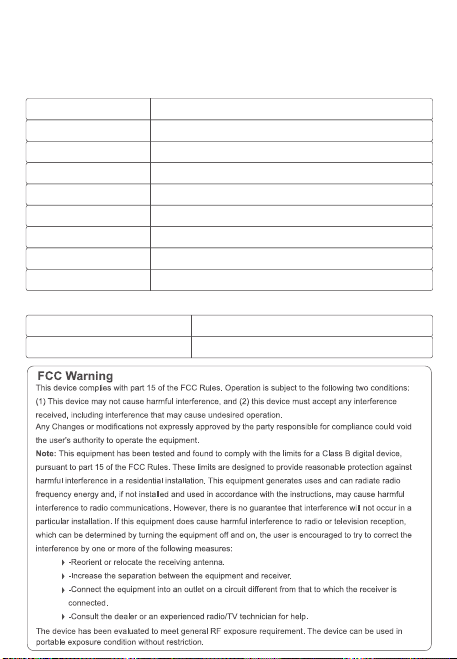
中文
英文
德语
日语
西班牙语
法语
俄语
韩语
意大利语
无线降噪耳机头戴式
F1
用户手册
USER
MANUAL
蓝牙耳机基本按键操作
音量调节
关机
蓝牙模式连接
开机
歌曲选择
播放/暂停/打接电话
1
3
2
长按播放/暂停键 3秒,红色灯长亮
3秒后熄灭,耳机关机。
长按播放/暂停键 3秒,蓝色灯长亮3
秒后耳机开机。开机后自动进入配对
状态,蓝牙指示灯红色/蓝色交替闪烁
耳机开机后,进入蓝牙配对模式,蓝牙指示灯红
色/蓝色交替闪烁,打开手机蓝牙功能,并搜索蓝
牙设备名:picun F1,点击设备名进行连接,连
接成功后蓝灯长亮,音乐播放时蓝灯慢闪。
短按加键+可调节音量变大。
短按减键-可调节音量变小。
长按+键,跳到下一曲播放
长按-键,跳到上一曲播放
音乐播放时短按播放/暂停键 键,音乐暂停。
音乐暂停时短按播放/暂停键 键,音乐播放。
有来电时短按开播放/暂停键 键,接听电话。
在通话中短按开播放/暂停键 键,挂断当前通话。
有来电时长按开播放/暂停键 键,拒绝接听。
Basic Operation of BT Earphones
Volume Adjustment
Power On
BT Connection Mode
Power Off
Song Selection
1
3
2
Long press the play/pause button
for 3 seconds. The blue light will stay
on for 3 seconds, and then the
earphones will turn on.
After turning on, it will automatically
enter pairing mode. The BTindicator
will flash red/blue alternately.
Long press the play/pause button
for 3 seconds. The red light will stay on
for 3 seconds and then turn off. The
earphones will shut down.
After turning on, the headphones enter BT pairing
mode, and the BT indicator light flashes red/blue
alternately. Turn on the BT function of your mobile
phone, search for the device name "picun F1," and
click on the device name to connect. Once
connected successfully, the blue light will stay on,
and during music playback, the blue light will flash
slowly.
Short press/Long press the plus button for 1 second
to increase the volume.
Short press/Long press the minus button for 1
second to decrease the volume.
Short press/long press to skip to the previous track.
Short press/long press to skip to the next track.
Grundlegende Bedienung der BT-Ohrhörer
Lautstärkeregelung
Einschalten
BT-Verbindungsmodus
Ausschalten
Musikauswahl
1
3
2
Drücken Sie die
Wiedergabe-/Pause-Taste 3
Sekunden lang. Die blaue Lampe leuchtet
3 Sekunden lang auf, und dann werden
die Ohrhörer eingeschaltet.
Nach dem Einschalten schaltet es
automatisch in den Pairing-Modus. Die
Bluetooth-Anzeige blinkt abwechselnd
rot/blau.
Drücken Sie die
Wiedergabe-/Pause-Taste 3
Sekunden lang. Die rote Lampe
leuchtet 3 Sekunden lang auf und
erlischt dann. Die Ohrhörer werden
ausgeschaltet.
After turning on, the headphones enter BT pairing
mode, and the BT indicator light flashes red/blue
alternately. Turn on the BT function of your mobile
phone, search for the device name "picun F1," and
click on the device name to connect. Once
connected successfully, the blue light will stay on,
and during music playback, the blue light will flash
slowly.
Kurzes Drücken/Langes Drücken der Plus-Taste für 1
Sekunde erhöht die Lautstärke.
Kurzes Drücken/Langes Drücken der Minus-Taste für
1 Sekunde verringert die Lautstärke.
Langes Drücken oder Kurzes Drücken, um zum
vorherigen Lied zu springen.
Langes Drücken oder Kurzes Drücken, um zum nächsten
Lied zu springen.
Wiedergabe/Pause/Anruf annehmen
Während der Musikwiedergabe kurze Wiedergabe-/Pause-Taste
drücken, um die Musik anzuhalten.
Während die Musik pausiert ist, die Wiedergabe-/Pause-Taste
kurz drücken, um die Musikwiedergabe zu starten.
Bei einem eingehenden Anruf kurz auf die Wiedergabe-/Pause-Taste
drücken, um den Anruf anzunehmen.
Während des Telefonats die Wiedergabe-/Pause-Taste kurz
drücken, um das aktuelle Telefonat zu beenden.
Bei einem eingehenden Anruf lange auf die
Wiedergabe-/Pause-Taste drücken, um den Anruf abzulehnen.
BTイヤホンの基本操作
音量調整
電源オン
BTモードの接続
電源オフ
曲選択
1
3
2
再生/一時停止ボタンを3秒間長押
しします。青色のライトが3秒間点灯し
た後、イヤホンの電源が入ります。
電源を入れた後、自動的にペアリングモ
ードに入ります。BTインジケーターは赤
色と青色が交互に点滅します。
再生/一時停止ボタンを3秒間長押
しします。赤色のライトが3秒間点灯し
てから消え、イヤホンの電源が切れます
。
イヤホンの電源が入ると、BTペアリングモードに入り
、BTインジケーターが赤/青交互に点滅します。携帯
電話のBT機能をオンにして、「picun F1」を検索し、
接続します。接続に成功すると、青色のLEDが点灯し
、音楽再生時には青色のLEDがゆっくりと点滅します
。
短押し/長押し1秒で音量が上がります。
短押し/長押し1秒で音量が下がります。
長押しまたは短押しで、前の曲にスキップします。
長押しまたは短押しで、次の曲にスキップします。
再生/一時停止/電話を受ける
音楽再生中に再生/一時停止ボタンを短く押 すと、音楽が一時停
止されます。
音楽が一時停止中に再生/一時停止ボタンを短く押 すと、音楽再
生が再開します。
着信があった場合、再生/一時停止ボタンを短く押 すと電話に応
答します。 通話中に再生/一時停止ボタンを短く押 すと
、現在の通話を切断します。
着信があった場合、再生/一時停止ボタンを長く押 すと、通話を
拒否します。
Operación básica de los auriculares BT
Ajuste de volumen
Encendido
Modo de conexión BT
Apagado
Selección de canciones
1
3
2
Mantén presionado el botón de
reproducir/pausar durante 3
segundos. La luz azul se encenderá
durante 3 segundos y luego los
auriculares se encenderán.
Después de encender, automática-
mente entrará en modo de
emparejamiento. El indicador de
BTparpadeará en rojo/azul
alternativamente.
Mantén presionado el botón de
reproducir/pausar durante 3
segundos. La luz roja se encenderá
durante 3 segundos y luego se apagará.
Los auriculares se apagarán.
Después de encenderlos, los auriculares entran en modo
de emparejamiento BT, y la luz indicadora de BT
parpadea en rojo/azul alternativamente. Active la función
BT de su teléfono móvil, busque el nombre del dispositivo
"picun F1" y haga clic en el nombre del dispositivo para
conectarse. Una vez conectados correctamente, la luz
azul permanecerá encendida, y durante la reproducción
de música, la luz azul parpadeará lentamente..
Presione brevemente / mantenga presionado el botón de más
durante 1 segundo para aumentar el volumen.
Presione brevemente / mantenga presionado el botón de menos
durante 1 segundo para disminuir el volumen.
Presione brevemente / mantenga presionado para
retroceder a la pista anterior.
Presione brevemente / mantenga presionado para
avanzar a la siguiente pista.
Reproducción / Pausa / Responder llamada / Finalizar llamada
Cuando la música está sonando, presiona brevemente el botón de
reproducir/pausar para pausar la música.
Cuando la música está en pausa, presiona brevemente el botón de
reproducir/pausar para reanudar la reproducción de música.
Cuando entra una llamada, presiona brevemente el botón de
reproducir/pausar para responder la llamada.
Durante una llamada, presiona brevemente el botón de
reproducir/pausar para colgar la llamada actual.
Cuando entra una llamada, mantén presionado el botón de
reproducir/pausar para rechazar la llamada.
Opération de base des écouteurs BT
Réglage du volume
Allumer
Mode de connexion BT
Éteindre
Sélection des chansons
1
3
2
Appuyez longuement sur le bouton
de lecture/pause pendant 3 secondes.
La lumière bleue restera allumée
pendant 3 secondes, puis les
écouteurs s'allumeront.
Après l'allumage, ils entreront
automatiquement en mode de
jumelage. L'indicateur BTclignotera en
alternance en rouge/bleu.
Appuyez longuement sur le bouton de
lecture/pause pendant 3 secondes.
La lumière rouge restera allumée pendant
3 secondes et s'éteindra ensuite. Les
écouteurs s'éteindront.
Après l'allumage, les écouteurs passent en mode
d'appariement BT, et le voyant BT clignote en
rouge/bleu de manière alternative. Activez la fonction
BT de votre téléphone portable, recherchez le nom du
périphérique "picun F1" et cliquez sur le nom du
périphérique pour vous connecter. Une fois connecté
avec succès, le voyant bleu restera allumé, et pendant
la lecture de musique, le voyant bleu clignotera
lentement.
Appuyez brièvement/longuement sur le bouton plus
pendant 1 seconde pour augmenter le volume.
Appuyez brièvement/longuement sur le bouton moins
pendant 1 seconde pour diminuer le volume.
Appuyez brièvement/longuement pour passer à la piste
précédente.
Appuyez brièvement/longuement pour passer à la piste
suivante.
Lecture/pause/répondre à un appel/terminer un appel
Lors de la lecture de musique, appuyez brièvement sur le
bouton Lecture/Pause pour mettre la musique en
pause.
Lorsque la musique est en pause, appuyez brièvement sur
le bouton Lecture/Pause pour reprendre la lecture de
la musique.
Lorsqu'un appel entre, appuyez brièvement sur le bouton
Lecture/Pause pour répondre à l'appel.
Pendant un appel, appuyez brièvement sur le bouton
Lecture/Pause pour raccrocher l'appel en cours.
Lorsqu'un appel entre, appuyez longuement sur le bouton
Lecture/Pause pour rejeter l'appel.
Основная операция BT-наушников
Регулировка громкости
Включение
Режим BT-подключения
Выключение
Выбор песен
1
3
2
Нажмите и удерживайте кнопку
воспроизведения/паузу в течение 3
секунд. Синий свет будет гореть 3
секунды, и наушники включатся.
После включения наушники
автоматически войдут в режим
сопряжения. Индикатор BTбудет
поочередно мигать красным/синим
цветом.
Нажмите и удерживайте кнопку
воспроизведения/паузу в течение 3
секунд. Красный свет будет гореть 3
секунды, а затем погаснет. Наушники
выключатся.
После включения наушники входят в режим
сопряжения BT, и индикатор BT мигает
красным/синим поочередно. Включите функцию BT
на вашем мобильном телефоне, найдите имя
устройства "picun F1" и нажмите на имя устройства,
чтобы подключиться.После успешного
подключения синий индикатор останется
включенным, а во время воспроизведения музыки
синий свет будет медленно мигать.
Нажмите коротко/удерживайте кнопку "+" в течение 1
секунды, чтобы увеличить громкость.
Нажмите коротко/удерживайте кнопку "-" в течение 1
секунды, чтобы уменьшить громкость.
Длительное нажатие кнопка - для перехода к
предыдущей песне.
Длительное нажатие кнопка + для перехода к
следующей песне.
Воспроизведение/пауза/ответ на звонок/завершение звонка
При воспроизведении музыки короткое нажатие
кнопки Воспроизведение/Пауза останавливает музыку.
Когда музыка на паузе, короткое нажатие кнопки
Воспроизведение/Пауза возобновляет воспроизведение
музыки.
При поступающем звонке короткое нажатие кнопки
Воспроизведение/Пауза принимает звонок.
Во время разговора короткое нажатие кнопки
Воспроизведение/Пауза завершает текущий звонок.
При поступающем звонке длительное нажатие кнопки
Воспроизведение/Пауза отклоняет звонок.
BT 이어폰 기본 작동
볼륨 조절
전원 켜기
블루투스 연결 모드
전원 끄기
곡 선택
1
3
2
재생/일시정지 버튼을 3초간 길게
누릅니다. 파란색 불빛이 3초간 켜진 후
이어폰이 켜집니다.
켜면 자동으로 페어링 모드로
전환됩니다. 블루투스 표시등은
빨간색/파란색이 번갈아 깜박입니다.
재생/일시정지 버튼을 3초간 길게
누릅니다. 빨간색 불빛이 3초간 켜졌다가
꺼집니다. 이어폰이 꺼집니다.
헤드폰을 켠 후에는 블루투스 페어링 모드로 들어가며,
블루투스 표시등이 빨강/파랑으로 번갈아 깜빡입니다.
휴대전화의 블루투스 기능을 켜고, "picun F1" 장치
이름을 찾아서 장치 이름을 클릭하여 연결합니다.
연결에 성공하면 파란 불빛이 켜지고, 음악 재생 중에는
파란 불빛이 천천히 깜빡입니다.
1초 동안 플러스 버튼을 짧게 누르거나 길게 누르면 볼륨이
증가합니다.
1초 동안 마이너스 버튼을 짧게 누르거나 길게 누르면 볼륨이
감소합니다.
긴 누름 - 버튼을 누르면 이전 곡으로 건너뜁니다.
긴 누름 + 버튼을 누르면 다음 곡으로 건너뜁니다.
재생/일시 정지/전화 받기/전화 끊기
음악 재생 중에 재생/일시 정지 버튼을 짧게 누르면
음악이 일시 정지됩니다.
음악이 일시 정지 상태일 때 재생/일시 정지 버튼을 짧게
누르면 음악 재생이 재개됩니다.
전화가 걸려오면 재생/일시 정지 버튼을 짧게 누르면
전화를 응답합니다.
통화 중에 재생/일시 정지 버튼을 짧게 누르면 현재
통화를 끊습니다.
전화가 걸려오면 재생/일시 정지 버튼을 길게 누르면
전화를 거절합니다.
Operazioni di base delle cuffie BT
Regolazione del volume
Accensione
Modalità di connessione BT
Spegnimento
Selezione delle tracce
1
3
2
Premi e tieni premuto il pulsante di
riproduzione/pausa per 3 secondi. La
luce blu rimarrà accesa per 3 secondi e
poi le cuffie si accenderanno.
Dopo l'accensione, entrerà
automaticamente in modalità di
abbinamento. L'indicatore
BTlampeggerà alternativamente in
rosso/blu.
Premi e tieni premuto il pulsante di
riproduzione/pausa per 3 secondi. La
luce rossa rimarrà accesa per 3 secondi e
poi si spegnerà. Le cuffie si spegneranno.
Dopo l'accensione, le cuffie entreranno in modalità di
accoppiamento BT e il segnalatore BT lampeggerà
alternativamente in rosso/blu. Attivare la funzione BT del
telefono cellulare, cercare il nome del dispositivo "picun
F1" e fare clic sul nome del dispositivo per connettersi.
Una volta connessi con successo, la luce blu rimarrà
accesa e durante la riproduzione musicale, la luce blu
lampeggerà lentamente.
Premere brevemente / tenere premuto il pulsante più per
1 secondo per aumentare il volume.
Premere brevemente / tenere premuto il pulsante meno
per 1 secondo per diminuire il volume.
Premere brevemente/lungo per passare alla traccia precedente.
Premere brevemente/lungo per passare alla traccia successiva.
Riproduzione/Pausa/Risposta alla chiamata/Terminazione
della chiamata
Durante la riproduzione della musica, premi brevemente il
pulsante Riproduci/Pausa per mettere in pausa la musica.
Quando la musica è in pausa, premi brevemente il pulsante
Riproduci/Pausa per riprendere la riproduzione della musica.
Quando arriva una chiamata, premi brevemente il pulsante
Riproduci/Pausa per rispondere alla chiamata.
Durante una chiamata, premi brevemente il pulsante
Riproduci/Pausa per riagganciare la chiamata in corso.
Quando arriva una chiamata, tieni premuto a lungo il pulsante
Riproduci/Pausa per rifiutare la chiamata.
Play/Pause/Answer Call
When music is playing, short press the Play/Pause button
to pause the music.
When music is paused, short press the Play/Pause button
to resume playing music.
When a call comes in, short press the Play/Pause button
to answer the call.
During a call, short press the Play/Pause button to
hang up the current call.
When a call comes in, long press the Play/Pause button
to decline the call.
一拖二连接方式
1.在开机状态下长按开机键3秒,让耳机进入配对状态,然后连接第一台手机。
2.关闭第一台已连接手机的蓝牙功能,让耳机进入配对状态,然后连接第二台手
机。
3.第一台手机打开蓝牙功能,手动操作来连接耳机。
自动关机及超距离回连
当耳机超出有效距离范围耳机会断开连接。在5分钟内回到蓝牙范围内耳机会自
动重新连接,如未在5分钟内回到有效蓝牙连接范围耳机自动关机。
降噪模式
在蓝牙开启状态下,短按ANC按键开启主动降噪,再次短按关闭降噪功能。
备注
在蓝牙关闭状态下长按ANC按键开启主动降噪,再次长按关闭降噪功能。
在蓝牙关闭状态下短按ANC按键开启主动降噪,再次短按关闭降噪功能。
低延时功能
在开机任意模式下,三击ANC键进入低延时功能,耳机提示“叮叮”两声。再次三击退
出低延时模式,耳机提示“叮”一声。(配对状态和通话状态下不支持)
语音助手功能
在非通话状态下,三击开关机键启动语音助手功能。
电池容量状态
当耳机连接IOS设备时,在IOS设备屏幕右上角显示目前耳机电池状态。
耳机充电
当电池电量低时,请使用USB充电线充电3小时左右,在充电过程中耳机会自动关
机。
充电时红色指示灯长亮,充满红灯灭。
清空配对信息
在非通话状态下,同时长按音量加 + 与音量减 - 3秒。
Line in模式
插入音频线,耳机会自动关机。
备注
1.Line in模式下不能使用蓝牙和降噪功能。
2.如果要使用蓝牙需要拔下音频线后再次开机使用。
耳机参数配件
蓝牙协议
接收距离
喇叭尺寸
频响范围
喇叭灵敏度
喇叭阻抗
麦克风灵敏度
工作电流
充电电压
A2DP/AVRCP/HFP/HSP
10m
40mm
20HZ-20kHZ
122±3dB
32Ω±15%
—42dB±3dB
10-30mA
5V
包装配件
1.蓝牙耳机
2.充电线
3.音频线
4.用户手册
Two-Device Connection Method
1.While the headphones are on, press and hold the power button for 3 seconds to put them into
pairing mode, then connect to the first mobile phone.
2.Turn off the BT function of the first connected mobile phone to put the headphones into pairing
mode, then connect to the second mobile phone.
3.Turn on the BT function of the first mobile phone and manually connect to the headphones.
Automatic Power Off and Reconnection at a Distance
If the headphones are out of range, they will disconnect. If you return within BT range
within 5 minutes, the headphones will automatically reconnect. If you don't return within 5
minutes, the headphones will automatically power off.
Noise Cancelling Mode
With BT enabled, short press the ANC button to activate active noise cancelling, and
short press again to deactivate noise cancelling function.
Note
With BT disabled, long press the ANC button to activate active noise cancelling, and
long press again to deactivate noise cancelling function.
In Bluetooth-off mode, short press the ANC button to activate active noise cancelling,
and short press again to deactivate the noise cancelling function.
Low Latency Function
In any powered-on mode, triple press the ANC button to enter low latency mode. The
headphones will emit two "ding-ding" sounds. Triple press again to exit low latency
mode, and the headphones will emit a single "ding" sound. (Pairing status and call status
not supported)
Voice Assistant Function
In non-call status, triple press the power button to activate the voice assistant function.
Battery Capacity Status
When headphones are connected to an iOS device, the current headphone battery
status will be displayed on the iOS device's screen in the top right corner.
Headphone Charging
When battery level is low, please charge the headphones for about 3 hours using the
USB charging cable. The headphones will automatically power off during charging.
During charging, the red indicator light will stay on, and when fully charged, the red
light will turn off.
Clear Pairing Information
In non-call status, simultaneously long press the volume up+and volume down-buttons
for 3 seconds.
Line-in Mode
Inserting the audio cable will automatically power off the headphones.
Note
1.In Line-in mode, BT and noise cancelling functions cannot be used.
2.To use BT, power on the headphones again after removing the audio cable.
Headphone Specifications and Accessories
BT Protocol
Reception Distance
Speaker Size
Frequency Response
Speaker Sensitivity
Speaker Impedance
Microphone Sensitivity
Working Current
Charging Voltage
A2DP/AVRCP/HFP/HSP
10m
40mm
20HZ-20kHZ
122±3dB
32Ω±15%
—42dB±3dB
10-30mA
5V
Packaging Accessories
1.BT Headphones
2.Charging Cable
3.Audio Cable
4.User Manual
Verbindung von zwei Geräten gleichzeitig
1.Halten Sie den Ein-/Aus-Schalter im eingeschalteten Zustand 3 Sekunden lang gedrückt,
um die Kopfhörer in den Pairing-Modus zu versetzen, und verbinden Sie dann das erste
Mobiltelefon.
2.Deaktivieren Sie die BT-Funktion des ersten verbundenen Mobiltelefons, um die
Kopfhörer in den Pairing-Modus zu versetzen, und verbinden Sie dann das zweite
Mobiltelefon.
3.Aktivieren Sie die BT-Funktion des ersten Mobiltelefons und stellen Sie manuell eine
Verbindung zu den Kopfhörern her.
Automatische Abschaltung und automatische erneute
Verbindung bei Überreichweite
Wenn die Kopfhörer außerhalb der Reichweite sind, wird die Verbindung getrennt. Wenn
Sie innerhalb von 5 Minuten wieder in den BT-Bereich zurückkehren, werden die
Kopfhörer automatisch neu verbunden. Wenn Sie innerhalb von 5 Minuten nicht in den
gültigen BT-Verbindungsbereich zurückkehren, schalten sich die Kopfhörer automatisch
aus.
Geräuschunterdrückungsmodus
Im aktivierten BT-Modus drücken Sie kurz die ANC-Taste, um die aktive Geräuschunter-
drückung zu aktivieren, und drücken Sie erneut kurz, um die Geräuschunterdrückungs-
funktion zu deaktivieren.
Anmerkung
Im deaktivierten BT-Modus lange die ANC-Taste drücken, um die aktive
Geräuschunterdrückung zu aktivieren, und erneut lange drücken, um die
Geräuschunterdrückungsfunktion zu deaktivieren.
Niedrige Latenzfunktion
In jedem eingeschalteten Modus drücken Sie dreimal die ANC-Taste, um in den
niedrigen Latenzmodus zu wechseln. Die Kopfhörer geben zwei "Ping-Pong"-Töne aus.
Drücken Sie erneut dreimal, um den niedrigen Latenzmodus zu verlassen, und die
Kopfhörer geben einen "Ping"-Ton aus. (Pairing-Status und Anrufstatus werden nicht
unterstützt)
Drücken Sie bei ausgeschaltetem BTkurz die ANC-Taste, um die aktive Geräuschunter-
drückung zu aktivieren. Drücken Sie erneut kurz, um die Geräuschunterdrückung zu
deaktivieren.
Sprachassistentenfunktion
Drücken Sie im Nicht-Anrufstatus dreimal die Ein-/Aus-Taste, um die Sprachassistenten-
funktion zu aktivieren.
Akku-Kapazitätsstatus
Wenn die Kopfhörer mit einem iOS-Gerät verbunden sind, wird der aktuelle Akkustatus
der Kopfhörer oben rechts auf dem iOS-Gerät angezeigt.
Kopfhörer aufladen
Wenn der Akkustand niedrig ist, laden Sie den Kopfhörer bitte etwa 3 Stunden lang
über das USB-Ladekabel auf. Während des Ladevorgangs schalten sich die Kopfhörer
automatisch aus.
Während des Ladevorgangs leuchtet die rote Anzeige durchgehend, und wenn der
Ladevorgang abgeschlossen ist, erlischt die rote Anzeige.
Kopplungsinformationen löschen
Im Nicht-Anrufstatus halten Sie gleichzeitig die + Lautstärketaste und die -
Lautstärke-nach-unten-Taste 3 Sekunden lang gedrückt.
Line-in-Modus
Stecken Sie das Audiokabel ein, um die Kopfhörer automatisch auszuschalten.
1.Im Line-in-Modus können BT- und Geräuschunterdrückungsfunktionen nicht verwendet werden.
2.Um BT zu verwenden, schalten Sie die Kopfhörer nach dem Entfernen des Audiokabels erneut ein.
Anmerkung
Kopfhörer-Spezifikationen und Zubehör
BT-Protokoll
Empfangsreichweite
Lautsprechergröße
Frequenzbereich
Lautsprecherempfindlichkeit
Lautsprecherimpedanz
Mikrofonempfindlichkeit
Betriebsstrom
Ladevoltage
A2DP/AVRCP/HFP/HSP
10m
40mm
20HZ-20kHZ
122±3dB
32Ω±15%
—42dB±3dB
10-30mA
5V
2台同時接続方法
1.電源がオンの状態で電源ボタンを3秒長押しし、イヤホンをペアリングモードにし、最初の携
帯電話に接続します。
2.最初に接続した携帯電話のBT機能をオフにし、イヤホンをペアリングモードにし、次の携帯
電話に接続します。
3.最初の携帯電話のBT機能をオンにし、手動でイヤホンに接続します。
自動電源オフおよび超距離再接続
イヤホンが有効範囲外に移動すると、イヤホンは切断されます。 5分以内にBT範囲内に戻ると
、イヤホンは自動的に再接続されます。 5分以内にBT範囲内に戻らない場合、イヤホンは自動
的に電源が切れます。
ノイズキャンセルモード
BTがオンの状態で、ANCボタンを短く押すとアクティブノイズキャンセルがオンになり、再度
押すとノイズキャンセル機能がオフになります。
BTがオフの状態でANCボタンを短く押すと、アクティブノイズキャンセリングがオンになりま
す。再度短く押すと、ノイズキャンセリング機能がオフになります。
備考
BTがオフの状態でANCボタンを長押しするとアクティブノイズキャンセルがオンになり、再度
長押しするとノイズキャンセル機能がオフになります。
低遅延機能
電源が入っている状態で、ANCボタンを3回押すと低遅延モードに入り、ヘッドフォンが「ビ
ービー」と2回音を出します。再度3回押すと低遅延モードが終了し、ヘッドフォンが「ビー」
と音を出します。(ペアリング状態および通話中はサポートされていません)
音声アシスタント機能
通話中ではない状態で、電源ボタンを3回押すと音声アシスタント機能が起動します。
バッテリー容量状態
ヘッドフォンがiOSデバイスに接続されている場合、iOSデバイスの画面右上に現在のヘッドフ
ォンのバッテリー状態が表示されます。
ヘッドフォンの充電
バッテリー残量が低い場合は、USB充電ケーブルで約3時間充電してください。充電中はヘッ
ドフォンが自動的に電源がオフになります。
充電中は赤色のインジケータが点灯し、充電が完了すると赤色の灯が消えます。
ペアリング情報を削除する
通話中ではない状態で、音量を上 + げるボタンと音量を下 - げるボタンを同時に3秒間押し
てください。
Line inモード
オーディオケーブルを挿入すると、ヘッドフォンが自動的に電源がオフになります。
備考
1.Line inモードではBTおよびノイズキャンセル機能を使用できません。
2.BTを使用する場合は、オーディオケーブルを抜いてから再度電源を入れてください。
イヤホンの仕様と付属品
BTプロトコル
受信距離
スピーカーサイズ
周波数応答
スピーカー感度
スピーカーインピーダンス
マイク感度
A2DP/AVRCP/HFP/HSP
10m
40mm
20HZ-20kHZ
122±3dB
32Ω±15%
—42dB±3dB
パッケージの付属品
動作電流
充電電圧
10-30mA
5V
1.BTイヤホン
2.充電ケーブル
3.オーディオケーブル
4.ユーザーマニュアル
Método de conexión de dos dispositivos
Si los auriculares están fuera del alcance, se desconectarán. Si regresa dentro del
alcance de BT dentro de los 5 minutos, los auriculares se reconectarán automática-
mente. Si no regresa dentro de los 5 minutos, los auriculares se apagarán
automáticamente.
Modo de cancelación de ruido
Con BT activado, presione brevemente el botón ANC para activar la cancelación de ruido
activa, y presione brevemente nuevamente para desactivar la función de cancelación de ruido.
En modo BTapagado, presiona brevemente el botón de ANC para activar la cancelación activa
de ruido, y presiona brevemente de nuevo para desactivar la cancelación de ruido.
Nota
Con BT desactivado, mantenga presionado el botón ANC para activar la cancelación de ruido
activa, y mantenga presionado nuevamente para desactivar la función de cancelación de
ruido.
Función de baja latencia
En cualquier modo encendido, presione tres veces el botón ANC para ingresar al modo de
baja latencia. Los auriculares emitirán dos tonos "ding-ding". Presione tres veces nuevamente
para salir del modo de baja latencia, y los auriculares emitirán un solo tono "ding". (El estado
de emparejamiento y el estado de la llamada no son compatibles)
Función de asistente de voz
En estado de no llamada, presione tres veces el botón de encendido para
activar la función de asistente de voz.
Estado de la capacidad de la batería
Cuando los auriculares están conectados a un dispositivo iOS, el estado actual de la
batería de los auriculares se mostrará en la pantalla del dispositivo iOS en la esquina
superior derecha.
Carga de auriculares
Cuando el nivel de la batería es bajo, cargue los auriculares durante aproximadamente 3
horas con el cable de carga USB. Los auriculares se apagarán automáticamente durante
la carga.
Durante la carga, la luz indicadora roja permanecerá encendida, y cuando esté
completamente cargada, la luz roja se apagará.
Borrar información de emparejamiento
En estado de no llamada, presione simultáneamente los + botones de volumen - hacia arriba
y hacia abajo durante 3 segundos.
Modo de entrada de línea
Insertar el cable de audio apagará automáticamente los auriculares.
Nota
En el modo de entrada de línea, no se pueden utilizar las funciones de BT y cancelación
de ruido.
Para usar BT, encienda los auriculares nuevamente después de quitar el cable de audio.
Especificaciones y accesorios de auriculares
Protocolo BT
Distancia de recepción
Tamaño del altavoz
Respuesta de frecuencia
Sensibilidad del altavoz
A2DP/AVRCP/HFP/HSP
10m
40mm
20HZ-20kHZ
122±3dB
Impedancia del altavoz
Sensibilidad del micrófono
Corriente de trabajo
Voltaje de carga
32Ω±15%
—42dB±3dB
10-30mA
5V
Accesorios de embalaje
1.Auriculares BT
2.Cable de carga
3.Cable de audio
4.Manual del usuario
Méthode de connexion pour deux appareils
1.Pendant que les écouteurs sont allumés, maintenez le bouton d'alimentation enfoncé
pendant 3 secondes pour les mettre en mode d'appariement, puis connectez-les au
premier téléphone portable.
2.Désactivez la fonction BT du premier téléphone portable connecté pour mettre les
écouteurs en mode d'appariement, puis connectez-les au deuxième téléphone portable.
3.Activez la fonction BT du premier téléphone portable et connectez-les manuellement
aux écouteurs.
Arrêt automatique et reconnexion à distance
Si les écouteurs sont hors de portée, ils se déconnecteront. Si vous revenez dans la
portée BT dans les 5 minutes, les écouteurs se reconnecteront automatiquement. Si
vous ne revenez pas dans les 5 minutes, les écouteurs s'éteindront automatiquement.
Mode de réduction de bruit
Avec le BT activé, appuyez brièvement sur le bouton ANC pour activer la réduction active
du bruit, et appuyez brièvement à nouveau pour désactiver la fonction de réduction du
bruit.
Remarque
Avec le BT désactivé, maintenez enfoncé le bouton ANC pour activer la réduction active
du bruit, et maintenez enfoncé à nouveau pour désactiver la fonction de réduction du
bruit.
En mode BTdésactivé, appuyez brièvement sur le bouton ANC pour activer l'annulation
active du bruit, puis appuyez brièvement de nouveau pour désactiver la fonction
d'annulation du bruit.
Fonction de faible latence
Dans n'importe quel mode sous tension, appuyez trois fois sur le bouton ANC pour entrer
en mode de faible latence. Le casque émettra deux sons "ding-ding". Appuyez à nouveau
trois fois pour quitter le mode de faible latence, et le casque émettra un seul son "ding".
Fonction d'assistant vocal
Dans l'état non appel, appuyez trois fois sur le bouton d'alimentation pour activer la
fonction d'assistant vocal.
État de capacité de batterie
Lorsque les écouteurs sont connectés à un appareil iOS, l'état actuel de la batterie des
écouteurs sera affiché sur l'écran de l'appareil iOS dans le coin supérieur droit.
Chargement des écouteurs
Lorsque le niveau de batterie est faible, veuillez charger les écouteurs pendant environ 3
heures à l'aide du câble de chargement USB. Les écouteurs s'éteindront automatiquement
pendant le chargement.
Pendant le chargement, le voyant rouge restera allumé, et lorsqu'il sera complètement
chargé, le voyant rouge s'éteindra.
Supprimer les informations d'appairage
Dans l'état non appel, maintenez simultanément enfoncés + es - boutons de volume et de
réduction du volume pendant 3 secondes.
Mode d'entrée de ligne
Insérer le câble audio éteindra automatiquement les écouteurs.
Remarque
1.En mode d'entrée de ligne, les fonctions BT et de réduction de bruit ne peuvent pas
être utilisées.
2.Pour utiliser le BT, allumez à nouveau les écouteurs après avoir retiré le câble audio.
Spécifications des écouteurs et accessoires
Protocole BT
Distance de réception
Taille du haut-parleur
Réponse en fréquence
Sensibilité du haut-parleur
Impédance du haut-parleur
A2DP/AVRCP/HFP/HSP
10m
40mm
20HZ-20kHZ
122±3dB
32Ω±15%
Sensibilité du microphone
Courant de fonctionnement
Tension de charge
—42dB±3dB
10-30mA
5V
Accessoires d'emballage
1.Écouteurs BT
2.Câble de charge
3.Câble audio
4.Manuel de l'utilisateur
Метод подключения для двух устройств
1.Пока наушники включены, удерживайте кнопку включения в течение 3 секунд,
чтобы перевести их в режим сопряжения, затем подключите к первому
мобильному телефону.
2.Выключите функцию BT первого подключенного мобильного телефона, чтобы
перевести наушники в режим сопряжения, затем подключите к второму
мобильному телефону.
3.Включите функцию BT первого мобильного телефона и вручную подключитесь к
наушникам.
Автоматическое выключение и повторное подключение
на расстоянии
Если наушники находятся вне зоны действия, они отключатся. Если вы вернетесь
в пределы действия BT в течение 5 минут, наушники автоматически подключатся
повторно. Если вы не вернетесь в течение 5 минут, наушники автоматически
выключатся.
Режим шумоподавления
С включенным BT коротко нажмите кнопку ANC, чтобы активировать активное
шумоподавление, и еще раз коротко нажмите, чтобы отключить функцию
шумоподавления.
Примечание
С выключенным BT долго нажмите кнопку ANC, чтобы активировать активное
шумоподавление, и снова долго нажмите, чтобы отключить функцию
шумоподавления.В режиме отключенного BTкороткое нажатие кнопки ANC
включает активное шумоподавление, и короткое нажатие снова выключает
функцию шумоподавления.
Функция низкой задержки
В любом включенном режиме трижды нажмите кнопку ANC, чтобы войти в режим
низкой задержки. Наушники издадут два звука "динь-динь". Еще раз трижды
нажмите, чтобы выйти из режима низкой задержки, и наушники издадут один звук
"динь". (Статус парения и статус вызова не поддерживаются)
Функция голосового помощника
В состоянии без вызова трижды нажмите кнопку включения, чтобы активировать
функцию голосового помощника.
Статус емкости аккумулятора
Когда наушники подключены к устройству iOS, текущий статус батареи наушников
будет отображаться на экране устройства iOS в правом верхнем углу.
Зарядка наушников
Если уровень заряда аккумулятора низкий, подключите наушники кабелем USB
на примерно 3 часа для зарядки. Наушники автоматически выключатся во время
зарядки.
Очистить информацию о паре
В состоянии без + вызова - одновременно удерживайте кнопки увеличения и
уменьшения громкости в течение 3 секунд.
Режим линейного ввода
Вставка аудиокабеля автоматически выключит наушники.
Примечание
2.Для использования BT снова включите наушники после удаления аудиокабеля.
Характеристики наушников и комплектация
Протокол BT
Дальность приема
Размер динамика
Частотный диапазон
Чувствительность динамика
Импеданс динамика
A2DP/AVRCP/HFP/HSP
10m
40mm
20HZ-20kHZ
122±3dB
32Ω±15%
Чувствительность микрофона
Рабочий ток
Напряжение зарядки
—42dB±3dB
10-30mA
5V
Комплектация упаковки
1.BT-наушники
2.Кабель для зарядки
3.Аудиокабель
4.Руководство пользователя
두 기기 연결 방법
1.헤드폰이 켜진 상태에서 전원 버튼을 3초 동안 길게 누르고, 첫 번째 휴대전화에
연결합니다.
2.첫 번째로 연결된 휴대전화의 블루투스 기능을 끄고, 헤드폰을 페어링 모드로 전환한 다음,
두 번째 휴대전화에 연결합니다.
3.첫 번째 휴대전화의 블루투스 기능을 켜고, 헤드폰에 수동으로 연결합니다.
자동 전원 꺼짐 및 거리에서 다시 연결
헤드폰이 유효 거리를 벗어나면 연결이 끊깁니다. 5분 이내에 블루투스 범위 내로 돌아오면
헤드폰이 자동으로 다시 연결됩니다. 5분 이내에 유효한 블루투스 연결 범위 내로 돌아오지
않으면 헤드폰이 자동으로 꺼집니다.
소음 제거 모드
블루투스가 활성화된 상태에서 ANC 버튼을 짧게 눌러 활성 소음 제거를 활성화하고, 다시
한 번 눌러 소음 제거 기능을 비활성화합니다.
참고
블루투스가 비활성화된 상태에서 ANC 버튼을 길게 눌러 활성 소음 제거를 활성화하고,
다시 한 번 길게 눌러 소음 제거 기능을 비활성화합니다.블루투스가 꺼진 상태에서 ANC
버튼을 짧게 눌러 능동 소음 제거 기능을 켭니다. 다시 짧게 누르면 소음 제거 기능을
끕니다.
낮은 지연 기능
전원이 켜진 상태에서 어떤 모드에서든 ANC 버튼을 세 번 눌러 낮은 지연 모드로
진입합니다. 이어폰은 "딩-딩" 소리를 두 번 발생시킵니다. 낮은 지연 모드를 종료하려면
다시 세 번 누르고, 이어폰은 "딩" 소리를 한 번 발생시킵니다. (페어링 상태 및 통화
상태는 지원되지 않습니다)
음성 보조 기능
통화 상태가 아닌 상태에서 전원 버튼을 세 번 눌러 음성 보조 기능을 활성화합니다.
배터리 용량 상태
이어폰이 iOS 장치에 연결된 경우 현재 이어폰 배터리 상태가 iOS 장치의 화면 오른쪽
상단에 표시됩니다.
이어폰 충전
배터리 잔량이 낮은 경우 USB 충전 케이블을 사용하여 약 3시간 충전하십시오. 충전 중에
이어폰은 자동으로 꺼집니다.
충전 중에는 빨간색 표시등이 켜져 있고, 충전이 완료되면 빨간색 불이 꺼집니다.
페어링 정보 지우기
통화 상태가 아닌 상태에서 볼륨 증가 버튼과 볼륨 감소 버튼을 동시에 3초간 누릅니다.
라인 인 모드
오디오 케이블을 연결하면 이어폰이 자동으로 꺼집니다.
참고
1.라인 인 모드에서는 BT 및 소음 제거 기능을 사용할 수 없습니다.
2.BT를 사용하려면 오디오 케이블을 제거한 후 이어폰을 다시 켜세요.
헤드폰 사양 및 액세서리
블루투스 프로토콜
수신 거리
스피커 크기
주파수 응답
스피커 감도
스피커 임피던스
마이크 감도
작동 전류
충전 전압
A2DP/AVRCP/HFP/HSP
10m
40mm
20HZ-20kHZ
122±3dB
32Ω±15%
—42dB±3dB
10-38mA
5V
포장 액세서리
1.블루투스 헤드폰
2.충전 케이블
3.오디오 케이블
4.사용자 매뉴얼
Metodo di connessione per due dispositivi
1.Mentre le cuffie sono accese, premere e tenere premuto il pulsante di accensione per 3
secondi per metterle in modalità di accoppiamento, quindi connetterle al primo telefono
cellulare.
2.Disattivare la funzione BT del primo telefono cellulare connesso per mettere le cuffie in
modalità di accoppiamento, quindi connetterle al secondo telefono cellulare.
3.Attivare la funzione BT del primo telefono cellulare e connettersi manualmente alle cuffie.
Spegnimento automatico e riconnessione a distanza
Se le cuffie sono fuori portata, si scollegano. Se si rientra nel raggio BT entro 5 minuti, le
cuffie si ricollegheranno automaticamente. Se non si rientra entro 5 minuti, le cuffie si
spegneranno automaticamente.
Modalità di cancellazione del rumore
Con il BT attivato, premere brevemente il pulsante ANC per attivare la cancellazione attiva
del rumore, e premere nuovamente brevemente per disattivare la funzione di cancellazione
del rumore.
Nota
Con il BT disattivato, tenere premuto a lungo il pulsante ANC per attivare la cancellazione
attiva del rumore, e premere nuovamente a lungo per disattivare la funzione di
cancellazione del rumore.In modalità BTdisattivata, premi brevemente il pulsante ANC per
attivare la cancellazione attiva del rumore e premi brevemente di nuovo per disattivare la
funzione di cancellazione del rumore.
Funzione di bassa latenza
In qualsiasi modalità accesa, premere tre volte il pulsante ANC per entrare in modalità a
bassa latenza. Le cuffie emetteranno due suoni "ding-ding". Premere nuovamente tre volte
per uscire dalla modalità a bassa latenza, e le cuffie emetteranno un solo suono "ding". (Lo
stato di accoppiamento e lo stato della chiamata non sono supportati)
Funzione dell'assistente vocale
Nello stato non in chiamata, premere tre volte il pulsante di accensione per attivare la
funzione dell'assistente vocale.
Stato della capacità della batteria
Quando le cuffie sono collegate a un dispositivo iOS, lo stato attuale della batteria delle
cuffie verrà visualizzato sullo schermo del dispositivo iOS nell'angolo in alto a destra.
Ricarica delle cuffie
Quando il livello della batteria è basso, caricare le cuffie per circa 3 ore utilizzando il cavo
di ricarica USB. Le cuffie si spegneranno automaticamente durante la ricarica.
Cancellare le informazioni di accoppiamento
Nello stato non in chiamata, premere + contemporaneamente - i pulsanti del volume su e
del volume giù per 3 secondi.
Modalità di ingresso linea
Inserendo il cavo audio, le cuffie si spegneranno automaticamente.
Nota
1.In modalità ingresso linea, le funzioni BT e di cancellazione del rumore non possono
essere utilizzate.
2.Per utilizzare il BT, accendere nuovamente le cuffie dopo aver rimosso il cavo audio.
Specifiche e accessori delle cuffie
Protocollo BT
Distanza di ricezione
Dimensione dell'altoparlante
Risposta in frequenza
Sensibilità dell'altoparlante
Impedenza dell'altoparlante
Sensibilità del microfono
Corrente operativa
Tensione di ricarica
A2DP/AVRCP/HFP/HSP
10m
40mm
20HZ-20kHZ
122±3dB
32Ω±15%
—42dB±3dB
10-30mA
5V
Accessori di imballaggio
1.Cuffie BT
2.Cavo di ricarica
3.Cavo audio
4.Manuale utente
耳机LED指示灯说明
电源开启
配对状态
蓝色灯长亮后进入配对状态
开降噪:绿色灯亮,关降噪:绿色灯熄灭
待机模式
蓝色灯长亮
降噪模式
红色灯5秒闪烁3次
红色/蓝色灯交替闪烁
低电状态
充电亮红色灯,充满电红色灯熄灭充电模式
Headphone LED Indicator
Power On
Blue LED stays on continuously
and enters pairing mode
Red/blue LEDs flash alternately
Pairing Mode
Blue LED stays on continuouslyStandby Mode
Red LED flashes 3 times every 5 seconds
Charging - red LED lights up
fully charged - red LED goes off
Low Battery Status
Charging Mode
Noise cancelling on (green LED lights up)
noise cancelling off (green LED goes off)
Noise Cancelling Mode
Kopfhörer-LED-Anzeige
Blaue LED leuchtet dauerhaft und wechselt
in den Pairing-Modus
Geräuschunterdrückung ein (grüne LED leuchtet)
Geräuschunterdrückung aus (grüne LED erlischt)
Blaue LED leuchtet dauerhaft
Stromversorgung
eingeschaltet
Geräuschunterdrückungsmodus
Standby-Modus
Rote LED blinkt 3 Mal alle 5 Sekunden
Rote LED leuchtet beim Laden, erlischt wenn
vollständig aufgeladen
Niedriger
Batteriestatus
Ladezustand
Pairing-Modus Rote/blaue LEDs blinken abwechselnd
イヤホンLEDインジケーター
電源オン
ペアリングモード
スタンバイモード
低電力モード
青色のLEDが点灯し、ペアリングモードに入る
青色のLEDが点灯する
赤色のLEDが5秒間隔で3回点滅する
充電モード 充電中は赤色のLEDが点灯し、充電完了後は消灯する
赤/青色のLEDが交互に点滅する
ノイズキャンセリングモード
ノイズキャンセリングオン(緑色のLED点灯)
ノイズキャンセリングオフ(緑色のLEDが消灯)
Indicador LED de auriculares
Encendido
Modo de emparejamiento
Modo de espera
Estado de batería baja
LED azul permanece encendido continuamente
y entra en modo de emparejamiento
LED azul permanece encendido continuamente
LED rojo parpadea 3 veces cada 5 segundos
Modo de carga
Cargando - LED rojo encendido, completamente
cargado - LED rojo apagado
LED rojo/azul parpadean alternativamente
Modo de cancelación
de ruido
cancelación de ruido activada (LED verde encendido)
cancelación de ruido desactivada (LED verde apagado)
Indicateur LED du casque
Allumage
Mode d'appariement
Mode veille
Niveau de
batterie faible
LED bleue reste allumée en continu et entre
en mode d'appariement
LED bleue reste allumée en continu
LED rouge clignote 3 fois toutes les 5 secondes
LED rouge/bleue clignotent alternativement
Mode de réduction
de bruit
réduction de bruit activée (LED verte allumée)
réduction de bruit désactivée (LED verte éteinte)
Mode de charge
En charge - LED rouge allumée, complètement
chargé - LED rouge éteinte
Индикатор LED наушников
Включение
Режим сопряжения
Режим ожидания
Низкий уровень
заряда батареи
синий светодиод остается включенным постоянно
и переходит в режим сопряжения
синий светодиод остается включенным постоянно
красный светодиод мигает 3 раза каждые 5 секунд
Режим зарядки
Зарядка - красный светодиод горит, полностью
заряженный - красный светодиод выключен
красный/синий светодиоды мигают попеременно
Режим
подавления шума
подавление шума включено (зеленый светодиод горит)
подавление шума выключено (зеленый светодиод не горит)
헤드폰 LED 표시등
전원 켜기
페어링 모드
대기 모드
배터리 부족 상태
충전 모드
파란 LED가 계속 켜진 채로 페어링 모드로 전환됩니다
파란 LED가 계속 켜집니다
빨간 LED가 5초마다 3번 깜박입니다
충전 중 - 빨간 LED가 켜집니다, 완전히 충전되면
빨간 LED가 꺼집니다
빨간/파란 LED가 번갈아가며 깜박입니다
소음 제거 모드
소음 제거 켜기(녹색 LED가 켜집니다)
소음 제거 끄기(녹색 LED가 꺼집니다)
Indicatore LED cuffie
Accensione
Modalità di
accoppiamento
Modalità standby
Stato batteria bassa
Modalità di ricarica
LED blu rimane acceso continuamente ed entra in
modalità di accoppiamento
LED blu rimane acceso continuamente
LED rosso lampeggia 3 volte ogni 5 secondi
In carica - LED rosso acceso, completamente carico
- LED rosso spento
LED rosso/blu lampeggiano alternativamente
Modalità di
cancellazione del rumore
cancellazione del rumore attivata (LED verde acceso)
cancellazione del rumore disattivata (LED verde spento)
Wireless noise-canceling headphones
over-ear
F1
User Manual
Kabellose Geräuschunterdrückungskopfhörer
Over-Ear
F1
Benutzerhandbuch
ワイヤレスノイズキャンセリングヘッドフォン
オーバーイヤー
F1
ユーザーマニュアル
Auriculares inalámbricos con cancelación de ruido
de diadema
F1
Manual de usuario
Casque sans fil avec réduction de bruit
circum-aural
F1
Manuel de l'utilisateur
Casque sans fil avec réduction de bruit
circum-aural
F1
Manuel de l'utilisateur
무선 노이즈 캔슬링 헤드폰
오버 이어
F1
사용자 매뉴얼
Cuffie wireless con cancellazione del rumore
over-ear
F1
Manuale utente
降噪开关
通话麦克风
USB-C充电接口
3.5音频口
音量加/下一曲
音量减/上一曲
播放/暂停键
蓝牙指示灯/降噪指示灯
1
2
3
4
5
6
7
8
Noise Cancellation Switch
Call Microphone
USB-C Charging Port
3.5mm Audio Port
Volume Up / Next Track
Volume Down / Previous Track
Play / Pause Button
BTIndicator / Noise Cancellation Indicator
1
2
3
4
5
6
7
8
9
Geräuschunterdrückungsschalter
Gesprächsmikrofon
USB-C-Ladeanschluss
3,5-mm-Audiobuchse
Lautstärke erhöhen / Nächstes Lied
Lautstärke verringern / Vorheriges Lied
Wiedergabe / Pause-Taste
BT-Anzeige / Geräuschunterdr
ückungsanzeige
1
2
3
4
5
6
7
8
ノイズキャンセリングスイッチ
通話用マイク
USB-C充電ポート
3.5mmオーディオポート
音量アップ/次の曲
音量ダウン/前の曲
再生/一時停止ボタン
BTインジケーター/ノイズキャ
ンセリングインジケーター
1
2
3
4
5
6
7
8
9
Interruptor de cancelación de ruido
Micrófono de llamada
Puerto de carga USB-C
Puerto de audio de 3.5 mm
Subir volumen / Siguiente pista
Bajar volumen / Pista anterior
Botón de reproducir/pausar
Indicador de BT/ Indicador de
cancelación de ruido
1
2
3
4
5
6
7
8
Interrupteur de réduction de bruit
Microphone d'appel
Port de chargement USB-C
Port audio de 3,5 mm
Augmentation du volume / Piste suivante
Diminution du volume / Piste précédente
Bouton lecture/pause
Indicateur BT/ Indicateur de réduction
de bruit
1
2
3
4
5
6
7
8
Переключатель шумоподавления
Микрофон для разговоров
Порт зарядки USB-C
Разъем для наушников 3.5 мм
Увеличение громкости / Следующий трек
Уменьшение громкости / Предыдущий трек
Кнопка воспроизведения / паузы
Индикатор BT/ Индикатор
шумоподавления
1
2
3
4
5
6
7
8
노이즈 캔슬링 스위치
통화용 마이크
USB-C 충전 포트
3.5mm 오디오 포트
볼륨 증가 / 다음 트랙
볼륨 감소 / 이전 트랙
재생 / 일시 정지 버튼
블루투스 표시등 / 노이즈 캔슬링 표시등
1
2
3
4
5
6
7
8
Interruttore per la cancellazione del rumore
Microfono per le chiamate
Porta di ricarica USB-C
Porta audio da 3,5 mm
Aumento del volume / Traccia successiva
Riduzione del volume / Traccia precedente
Pulsante di riproduzione / pausa
Indicatore BT/ Indicatore di cancellazione
del rumore
1
2
3
4
5
6
7
8
Schizzo e funzioni del design delle cuffie
헤드폰 외형 스케치 및 기능 개요
Краткое описание внешнего вида и функций наушников
Schéma et fonctions du design du casque
Esquema y funciones del diseño de auriculares
イヤホンの外観線図と機能の概要
Skizze und Funktionen des Kopfhörer-Designs
Outline and Functions of Headphone Appearance
耳机外观线框图与功能简介
用户手册
材质:70g书写纸,双面单黑印刷尺寸:73X105mm
Verpackungsinhalt
1、BT-Kopfhörer
2、Ladekabel
4、Benutzerhandbuch
3、Audiokabel
1
4
2
3
5
6
7
8
1
4
2
3
5
6
7
8
1
4
2
3
5
6
7
8
1
4
2
3
5
6
7
8
1
4
2
3
5
6
7
8
1
4
2
3
5
6
7
8
1
4
2
3
5
6
7
8
1
4
2
3
5
6
7
8
1
4
2
3
5
6
7
8