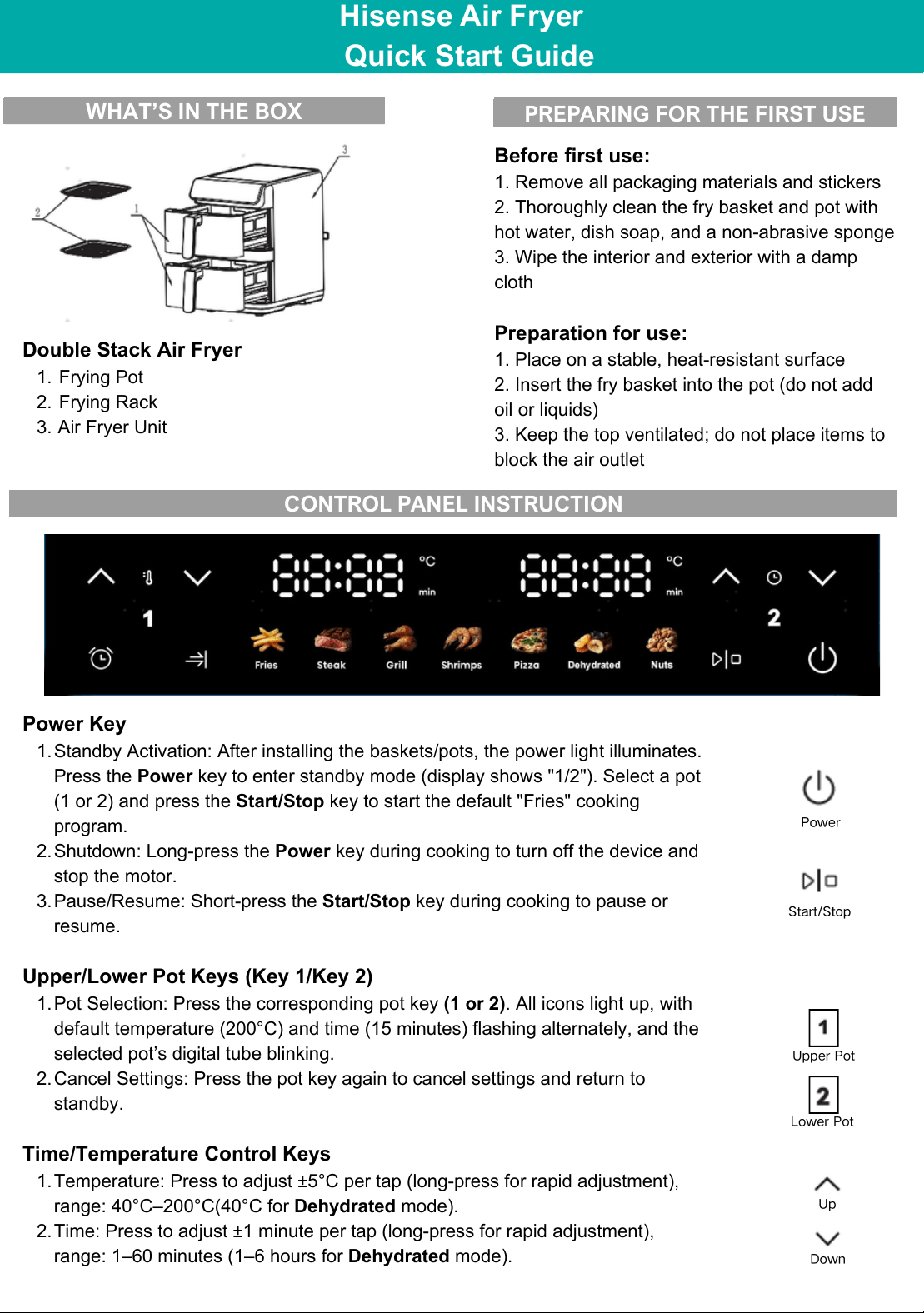
WHAT’S IN THE BOX
PREPARING FOR THE FIRST USE
Power
Start/Stop
Up
Down
Upper Pot
Lower Pot
CONTROL PANEL INSTRUCTION
Hisense Air Fryer
Quick Start Guide
Double Stack Air Fryer
1. Frying Pot
2. Frying Rack
3. Air Fryer Unit
Before first use:
1. Remove all packaging materials and stickers
2. Thoroughly clean the fry basket and pot with
hot water, dish soap, and a non-abrasive sponge
3. Wipe the interior and exterior with a damp
cloth
Preparation for use:
1. Place on a stable, heat-resistant surface
2. Insert the fry basket into the pot (do not add
oil or liquids)
3. Keep the top ventilated; do not place items to
block the air outlet
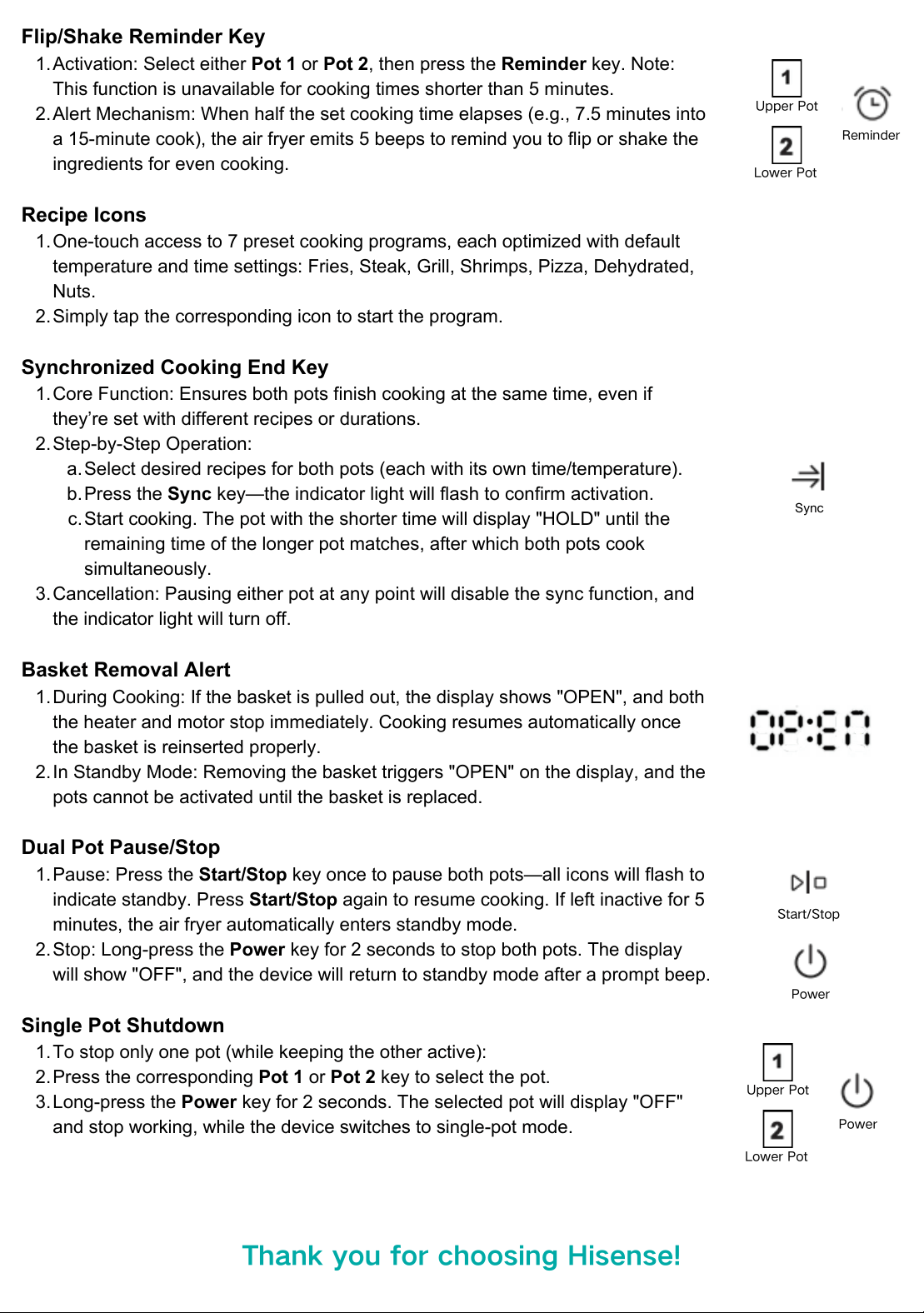
Power Key
1.Standby Activation: After installing the baskets/pots, the power light illuminates.
Press the Power key to enter standby mode (display shows "1/2"). Select a pot
(1 or 2) and press the Start/Stop key to start the default "Fries" cooking
program.
2.Shutdown: Long-press the Power key during cooking to turn off the device and
stop the motor.
3.Pause/Resume: Short-press the Start/Stop key during cooking to pause or
resume.
Upper/Lower Pot Keys (Key 1/Key 2)
1.Pot Selection: Press the corresponding pot key (1 or 2). All icons light up, with
default temperature (200°C) and time (15 minutes) flashing alternately, and the
selected pot’s digital tube blinking.
2.Cancel Settings: Press the pot key again to cancel settings and return to
standby.
Time/Temperature Control Keys
1.Temperature: Press to adjust ±5°C per tap (long-press for rapid adjustment),
range: 40°C–200°C(40°C for Dehydrated mode).
2.Time: Press to adjust ±1 minute per tap (long-press for rapid adjustment),
range: 1–60 minutes (1–6 hours for Dehydrated mode).
Flip/Shake Reminder Key
1.Activation: Select either Pot 1 or Pot 2, then press the Reminder key. Note:
This function is unavailable for cooking times shorter than 5 minutes.
2.Alert Mechanism: When half the set cooking time elapses (e.g., 7.5 minutes into
a 15-minute cook), the air fryer emits 5 beeps to remind you to flip or shake the
ingredients for even cooking.
Recipe Icons
1.One-touch access to 7 preset cooking programs, each optimized with default
temperature and time settings: Fries, Steak, Grill, Shrimps, Pizza, Dehydrated,
Nuts.
2.Simply tap the corresponding icon to start the program.
Synchronized Cooking End Key
1.Core Function: Ensures both pots finish cooking at the same time, even if
they’re set with different recipes or durations.
2.Step-by-Step Operation:
a.Select desired recipes for both pots (each with its own time/temperature).
b.Press the Sync key—the indicator light will flash to confirm activation.
c.Start cooking. The pot with the shorter time will display "HOLD" until the
remaining time of the longer pot matches, after which both pots cook
simultaneously.
3.Cancellation: Pausing either pot at any point will disable the sync function, and
the indicator light will turn off.
Basket Removal Alert
1.During Cooking: If the basket is pulled out, the display shows "OPEN", and both
the heater and motor stop immediately. Cooking resumes automatically once
the basket is reinserted properly.
2.In Standby Mode: Removing the basket triggers "OPEN" on the display, and the
pots cannot be activated until the basket is replaced.
Dual Pot Pause/Stop
1.Pause: Press the Start/Stop key once to pause both pots—all icons will flash to
indicate standby. Press Start/Stop again to resume cooking. If left inactive for 5
minutes, the air fryer automatically enters standby mode.
2.Stop: Long-press the Power key for 2 seconds to stop both pots. The display
will show "OFF", and the device will return to standby mode after a prompt beep.
Single Pot Shutdown
1.To stop only one pot (while keeping the other active):
2.Press the corresponding Pot 1 or Pot 2 key to select the pot.
3.Long-press the Power key for 2 seconds. The selected pot will display "OFF"
and stop working, while the device switches to single-pot mode.
Sync
Start/Stop
Power
Reminder
Power
Thank you for choosing Hisense!
Upper Pot
Lower Pot
Upper Pot
Lower Pot