*Note
If you are using an iPhone 16 series device
or newer, you need to update your device to
iOS 26 or later. Once updated, you can use a
Qi 2.2 charger for 25W fast charging.
To check for updates, follow these steps:
"Settings" > "General" > "Software Update"
Charging Protocol
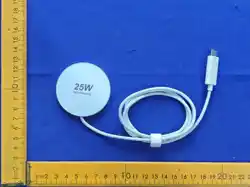
Wireless charger
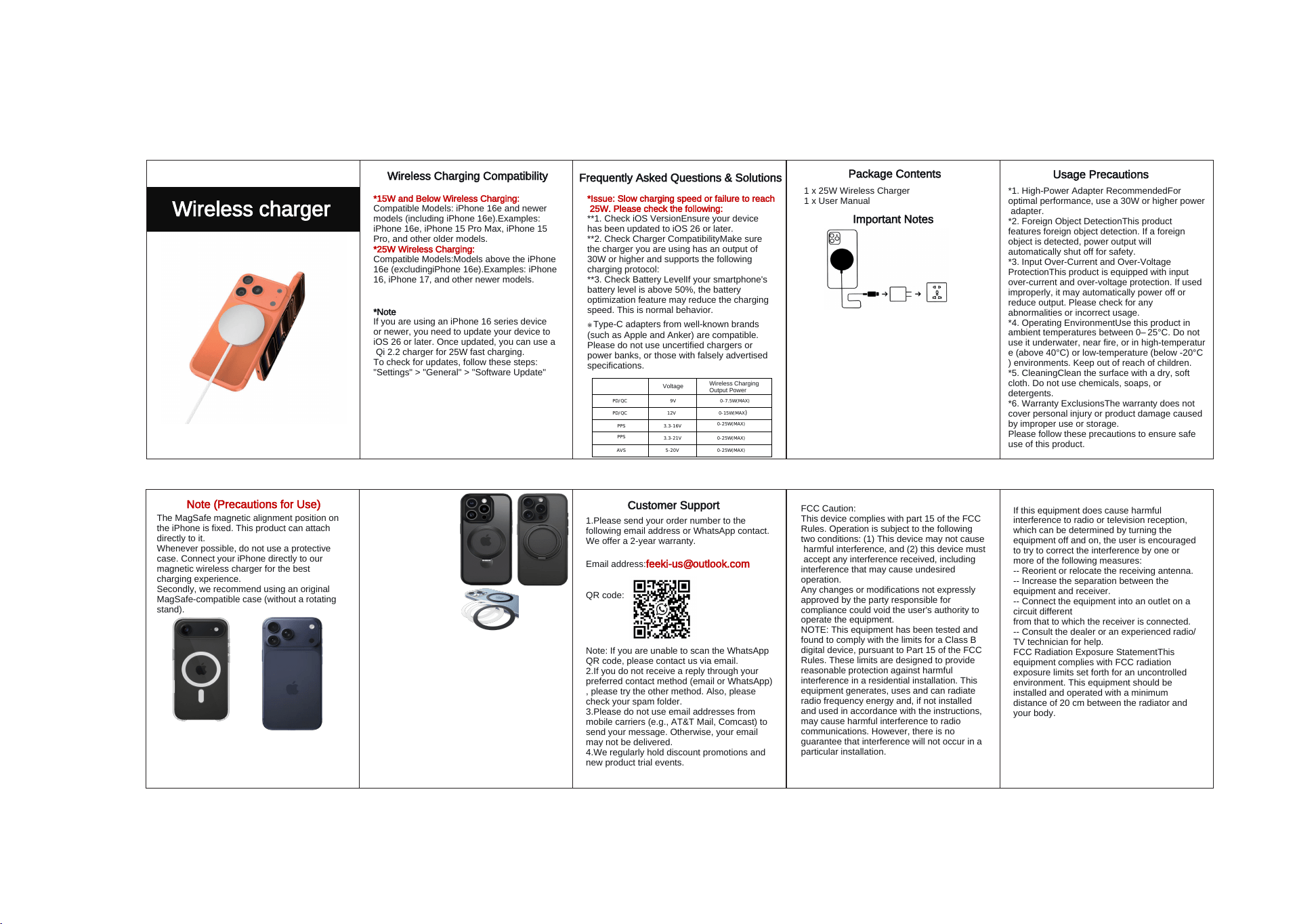
Wireless Charging Compatibility
*15W and Below Wireless Charging:
Compatible Models: iPhone 16e and newer
models (including iPhone 16e).Examples:
iPhone 16e, iPhone 15 Pro Max, iPhone 15
Pro, and other older models.
*25W Wireless Charging:
Compatible Models:Models above the iPhone
16e (excludingiPhone 16e).Examples: iPhone
16, iPhone 17, and other newer models.
MagSafe compatible, compatible with cases up to 6mm thick
PD/QC 9V 0-7.5W(MAX)
PD/QC 12V
0-15W(MAX)
0-25W(MAX)
0-25W(MAX)
0-25W(MAX)5-20V
3.3-21V
3.3-16V
PPS
PPS
AVS
Frequently Asked Questions & Solutions
*Issue: Slow charging speed or failure to reach
25W. Please check the following:
**1. Check iOS VersionEnsure your device
has been updated to iOS 26 or later.
**2. Check Charger CompatibilityMake sure
the charger you are using has an output of
30W or higher and supports the following
charging protocol:
**3. Check Battery LevelIf your smartphone's
battery level is above 50%, the battery
optimization feature may reduce the charging
speed. This is normal behavior.
Voltage
Wireless Charging
Output Power
※
Type-C adapters from well-known brands
(such as Apple and Anker) are compatible.
Please do not use uncertified chargers or
power banks, or those with falsely advertised
specifications.
*1. Power AdapterA power adapter is not
included with this product. Please prepare one
separately. For optimal charging performance,
we recommend using a 30W or higher Type-C
power adapter.
*2. Phone Case CompatibilityThis product is
compatible with MagSafe phone cases.
However, thicker cases may reduce charging
speed. For the best experience, we
recommend using an official MagSafe phone
case. Please note that non-MagSafe cases
from other manufacturers may weaken the
1 x 25W Wireless Charger
Package Contents
1 x User Manual
magnetic attraction.
Important Notes
Customer Support
1.Please send your order number to the
following email address or WhatsApp contact.
We offer a 2-year warranty.
Email address:[email protected]
QR code:
Note: If you are unable to scan the WhatsApp
QR code, please contact us via email.
2.If you do not receive a reply through your
preferred contact method (email or WhatsApp)
, please try the other method. Also, please
check your spam folder.
3.Please do not use email addresses from
mobile carriers (e.g., AT&T Mail, Comcast) to
send your message. Otherwise, your email
may not be delivered.
4.We regularly hold discount promotions and
new product trial events.
Usage Precautions
*1. High-Power Adapter RecommendedFor
optimal performance, use a 30W or higher power
adapter.
*2. Foreign Object DetectionThis product
features foreign object detection. If a foreign
object is detected, power output will
automatically shut off for safety.
*3. Input Over-Current and Over-Voltage
ProtectionThis product is equipped with input
over-current and over-voltage protection. If used
improperly, it may automatically power off or
reduce output. Please check for any
abnormalities or incorrect usage.
*4. Operating EnvironmentUse this product in
ambient temperatures between 0–25°C. Do not
use it underwater, near fire, or in high-temperatur
e (above 40°C) or low-temperature (below -20°C
) environments. Keep out of reach of children.
*5. CleaningClean the surface with a dry, soft
cloth. Do not use chemicals, soaps, or
detergents.
*6. Warranty ExclusionsThe warranty does not
cover personal injury or product damage caused
by improper use or storage.
Please follow these precautions to ensure safe
use of this product.
Note (Precautions for Use)
The MagSafe magnetic alignment position on
the iPhone is fixed. This product can attach
directly to it.
Whenever possible, do not use a protective
case. Connect your iPhone directly to our
magnetic wireless charger for the best
charging experience.
Secondly, we recommend using an original
MagSafe-compatible case (without a rotating
stand).
Please avoid using
the following types
of phone cases and
accessories:
360° rotating stand
cases with built-in
phone stands.
MagSafe magnetic
rings that you have
installed yourself.
Using these accessories may result in slower
charging speeds or overheating. Please be
assured that this phenomenon is not directly
caused by quality issues with our charger.
The stand on the above-mentioned phone
case is too thick and too wide, which may
interfere with the current of the charging coil. If
you encounter such a situation, please
replace the phone case immediately or
remove the case before attaching the charger.
Similarly, magnetic rings that are too thick or
improperly installed may also interfere with the
current of the charging coil.
√
×
FCC Caution:
This device complies with part 15 of the FCC
Rules. Operation is subject to the following
two conditions: (1) This device may not cause
harmful interference, and (2) this device must
accept any interference received, including
interference that may cause undesired
operation.
Any changes or modifications not expressly
approved by the party responsible for
compliance could void the user's authority to
operate the equipment.
NOTE: This equipment has been tested and
found to comply with the limits for a Class B
digital device, pursuant to Part 15 of the FCC
Rules. These limits are designed to provide
reasonable protection against harmful
interference in a residential installation. This
equipment generates, uses and can radiate
radio frequency energy and, if not installed
and used in accordance with the instructions,
may cause harmful interference to radio
communications. However, there is no
guarantee that interference will not occur in a
particular installation.
If this equipment does cause harmful
interference to radio or television reception,
which can be determined by turning the
equipment off and on, the user is encouraged
to try to correct the interference by one or
more of the following measures:
-- Reorient or relocate the receiving antenna.
-- Increase the separation between the
equipment and receiver.
-- Connect the equipment into an outlet on a
circuit different
from that to which the receiver is connected.
-- Consult the dealer or an experienced radio/
TV technician for help.
FCC Radiation Exposure StatementThis
equipment complies with FCC radiation
exposure limits set forth for an uncontrolled
environment. This equipment should be
installed and operated with a minimum
distance of 20 cm between the radiator and
your body.

