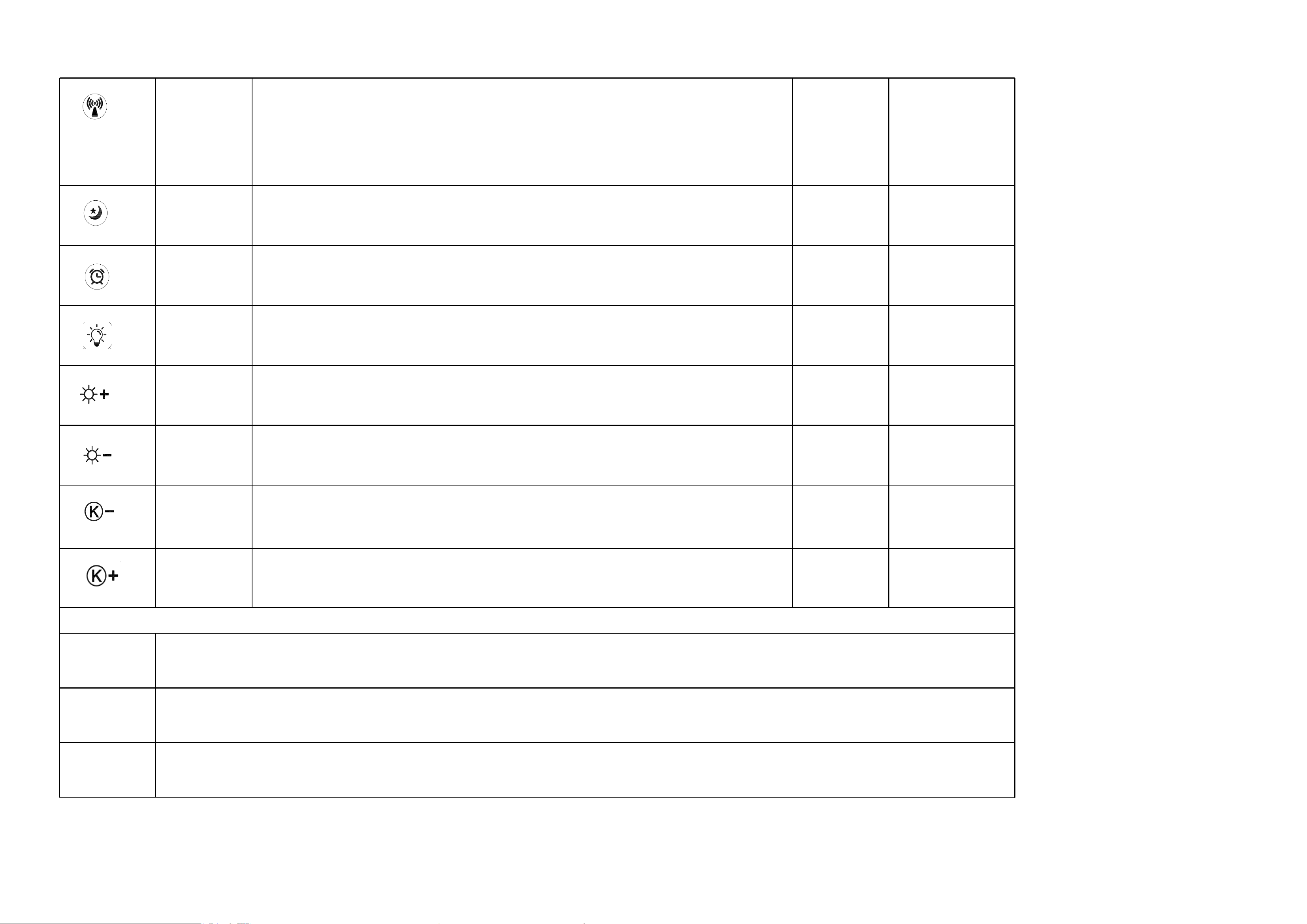
light switch
Adjust brightness
Adjust brightness down
Color temperature reduction
Adjust color temperature
Logic requirements for human-presence temperature control intelligent fan
controller
Briefly describe
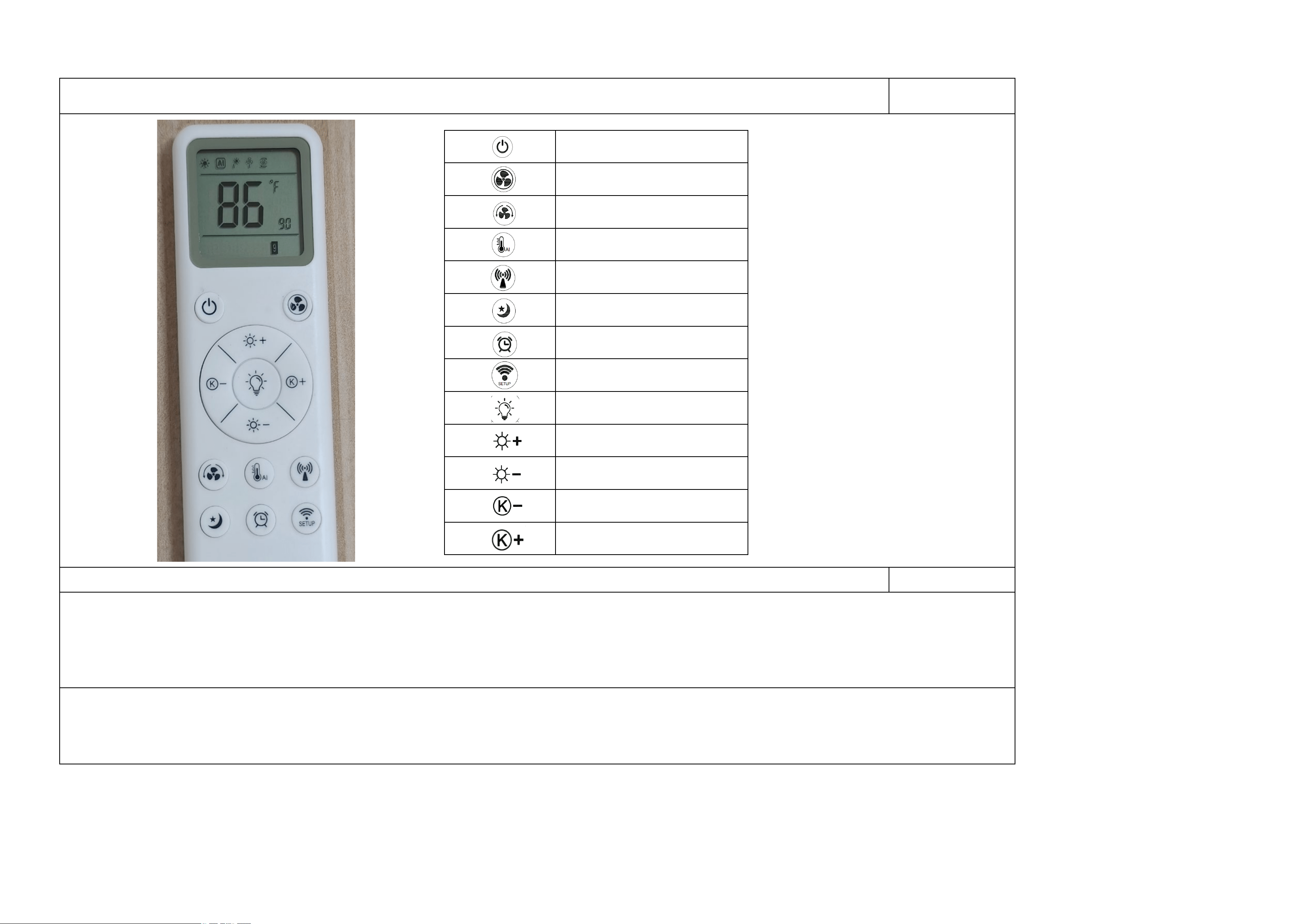
This product is a smart brushless fan light control with human presence detection and temperature control, featuring a liquid crystal display and a 13-button 2.4GHZ remote control
that can display the current ambient temperature. The fan has 9 settings and is equipped with a 24GHz radar sensor module to detect human presence and control the on/off of the fan
and lights. The lighting system offers quick 3-level color temperature adjustment and infinitely adjustable color temperature, while the brightness has quick 10-level adjustment
and infinitely adjustable brightness, along with a one-button night light function. The fan can automatically adjust its operating speed based on the current ambient temperature.
The display allows for free switching between temperature units of Fahrenheit and Celsius, forward and reverse rotation functions, and a timer function. The remote control has an
ultra-low standby power consumption of 13uA;
The battery display on the remote control fully illuminates for 3 seconds, followed by the display of the current ambient temperature. Afterwards, operate the buttons to activate
the corresponding desired function. Once the light body is powered on, the buzzer sounds once, the light is turned on, and the wall switch can be used to switch the color
temperature level of the light. The fan does not turn on when powered on; instead, you need to press the remote control to activate the corresponding desired function;
Fan and light on/off together
Fan on and switch between 1-9 speed
settings and natural breeze mode
Fan forward and reverse selection
AI Thermostatic fan automatic speed
adjustment mode
Radar personnel presence switch,
fan and light selection
One-click night light mode, with
adjustable color temperature
Timing button, 0.5-8 hours
matching key
Other feedback
methods
button symbol
remote control
button
buzzer prompt remark
matching key
The buzzer sounds
3 times and the
light flashes 2
times
Fan and light
on/off together
The buzzer sounds
once
Fan on and switch
between 1-9 speed
settings and
natural breeze
mode
The buzzer sounds
once
Fan forward and
reverse selection
The buzzer sounds
once
AI Thermostatic
fan automatic
speed adjustment
mode
The buzzer sounds
once
Short press to select fan mode in forward or reverse rotation;
Press to activate the intelligent temperature control and speed adjustment function, which
automatically adjusts the speed according to the ambient temperature:
Stop when the wind speed is below 15 degrees
16-18 degrees - Wind speed level 1
18-19 degrees ---- wind speed level 2
19-20 degrees ---- wind speed level 3
20-22 degrees ---- wind speed level 4
22-23 degrees - wind speed level 5
23-24 degrees - wind speed level 6
24-26 degrees - wind speed level 7
26-28 degrees - wind speed at level 8
"Greater than 29 degrees - Wind speed at level 9"
The temperature is detected by the remote control, which sends control commands to the receiving end
to control the fan;
Every time a button is pressed, the buzzer will give feedback, except in the following situations when a driver without a buzzer is used.
Operational logic requirements
Long press this button for 3 seconds. At this time, the pairing symbol on the remote control will
flash for 5 seconds. During the 5-second flashing period, power on the fan on the receiving end.
After powering on, it will automatically pair and the buzzer will sound 3 times, indicating
successful pairing. If you use another remote control for pairing again, the pairing code value of
the first remote control will be automatically cleared
Press the master switch to turn on both the fan and the lights, and press it again to turn them off
Short press to turn on the fan, long press for 1 second to turn off the fan. After turning on, short
press to select a fixed speed gear. Each short press switches gears, with options ranging from 1-9,
plus natural wind and circulation
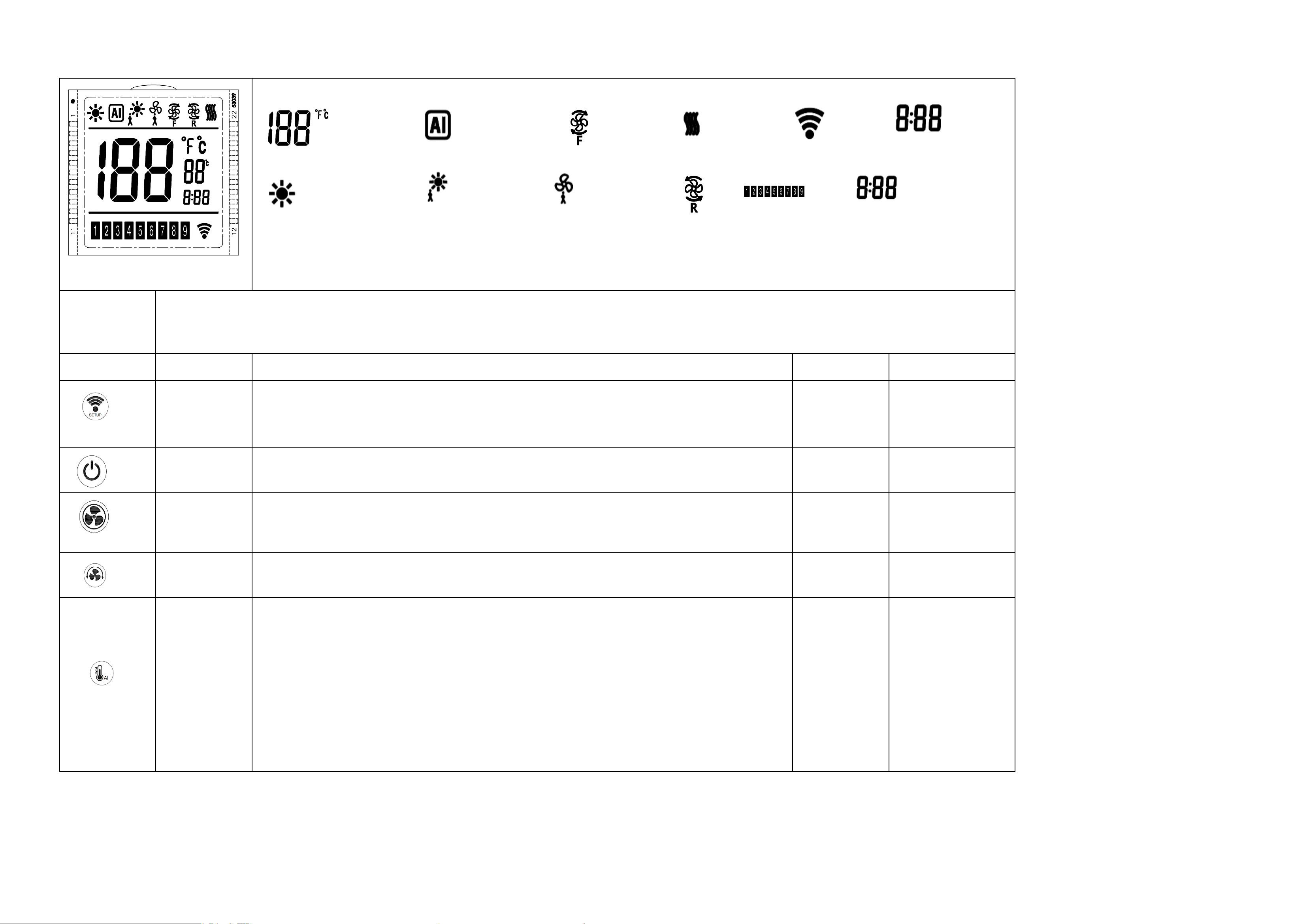
1、The remote control display screen constantly shows the real-time temperature. When no other functions are activated, it only displays the
temperature value. When a corresponding function is activated, it shows the symbol for that function;
Temperature display area AITemperature-controlled The fan is rotating forward. fan natural breeze paired symbols Light brightness
percentage
Turn on the light symbol Human presence sensor light Human-presence sensor fan fan reversal fan speed setting Timing
2、When the display becomes increasingly unclear or disappears, it indicates that the battery is dead and needs to be replaced;
Radar personnel
presence switch,
fan and light
selection
The buzzer sounds
once
One-click night
light mode, with
adjustable color
temperature
The buzzer sounds
once
Timing button,
0.5-8 hours
The buzzer sounds
once
light switch
The buzzer sounds
once
Adjust brightness
down
The buzzer sounds
once
Adjust brightness
down
The buzzer sounds
once
Color temperature
reduction
The buzzer sounds
once
Adjust color
temperature
The buzzer sounds
once
Other unfulfilled logical display requirements
When the human presence priority is higher than the A temperature sensing function and the unmanned fan is automatically turned off due to the influence of the
human presence radar, the AI temperature control takes precedence over other logic, such as the overall shutdown and fan shutdown. When the AI is turned on, the
fan cannot be turned off
Press once to turn on the light, press again to turn off the light;
Short press to adjust brightness in 10 stages, long press to infinitely dim to the brightest;10%-20%-
30%-40%-50%-60%-70%-80%-90%-100%
Short press to adjust brightness in 10 stages, long press to infinitely dim to the darkest level;
100%-90%-80%-70%-60%-50%-40%-30%-20%-10%
Short press to adjust color temperature in 10 stages, long press to infinitely adjust to warm light;
Short press to adjust color temperature in 10 stages, long press to infinitely dim to white light;
Short press to select sensing mode: sensing fan - sensing light - sensing fan and light - off mode
1. The fan function is detected to be automatically activated by someone, and it will automatically
shut down 1 minute after the person leaves;
2. It is detected that someone automatically turns on the lights, and they will automatically turn
off 1 minute after the person leaves;;
3. It has been detected that someone has automatically turned on the fan and lights, which will
automatically turn off 1 minute after the person leaves;;
After pressing, it automatically adjusts the light to the dimmest level of 10%. Short press to switch
color temperature, warm light - neutral light - white light - off - cycle
Press to enter timing settings, each press increments by 0.5 hours, with a cycle of 0-8 hours to
choose from; long press to continuously toggle the value; after selection, the timing time flashes
three times to automatically confirm the start of timing;
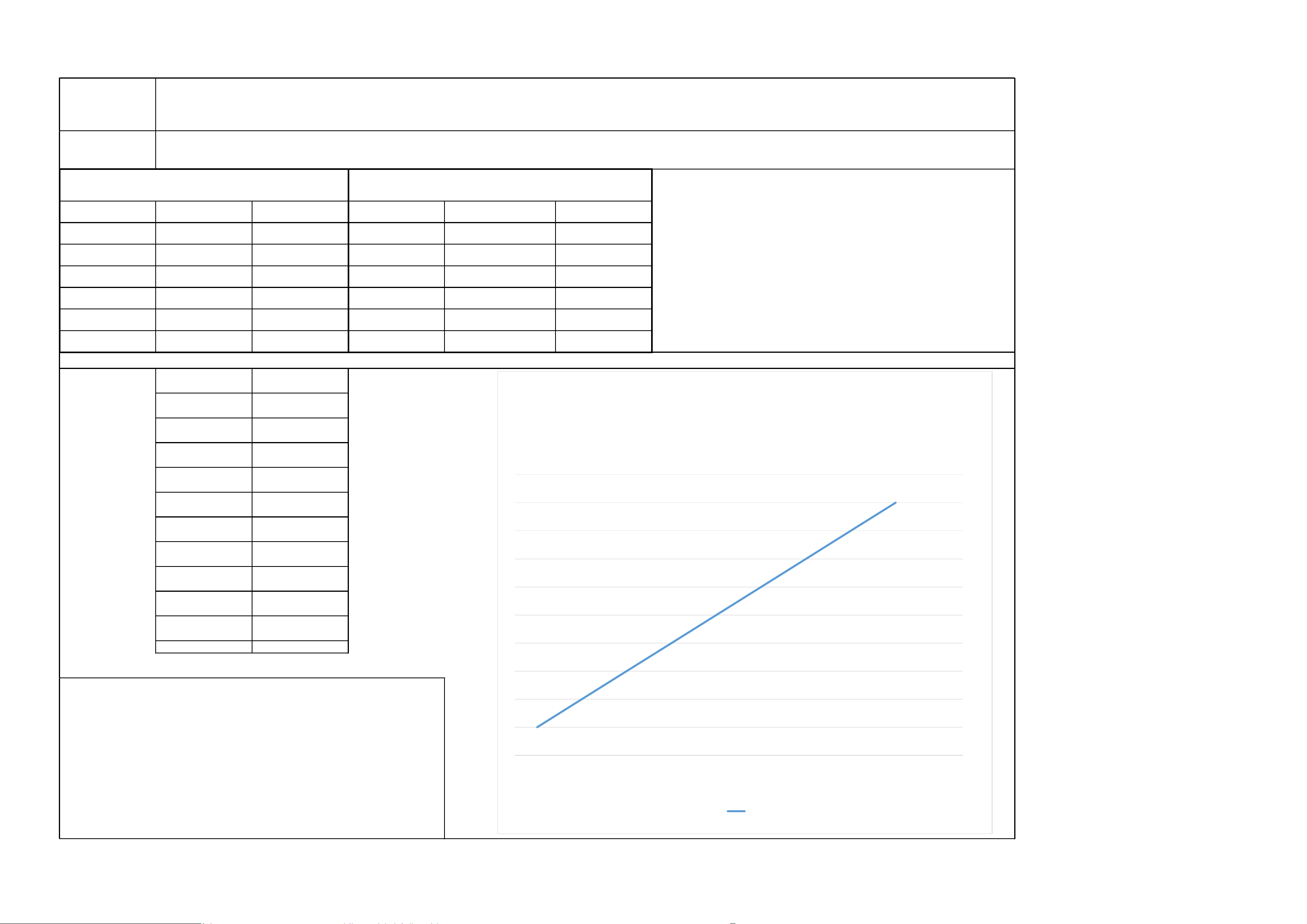
speed PWM rotation speed
P1 20% customer settings
P2 36% auto setting
P3 52% auto setting
P4 68% auto setting
P5 84% auto setting
P6 99% customer settings night light A-AB-B-OFF 10%
Temperature
setting
gear setting
Below 15 degrees
Celsius
Turn off the fan
Above 16 degrees
Celsius
1
Above 18 degrees
Celsius
2
Above 19 degrees
Celsius
3
Above 20 degrees
Celsius
4
Above 22 degrees
Celsius
5
Above 24 degrees
Celsius
6
Above 26 degrees
Celsius
7
Above 28 degrees
Celsius
8
Above 29 degrees
Celsius
9
When the AI temperature control and speed adjustment mode is activated,
the remote control detects the current ambient temperature in real time
and displays it. It then sends a gear operation command corresponding to
the current ambient temperature to the receiving end to control the fan
gear speed,
Comparison of duty cycle of PWM signal for different
fan operating levels
Comparison of duty cycles of PWM signals for lighting
fixtures and color change sequence
The following is a graph depicting the ambient temperature and PWM output duty cycle in intelligent mode
0
1
2
3
4
5
6
7
8
9
10
Above 16
degrees
Celsius
Above 18
degrees
Celsius
Above 19
degrees
Celsius
Above 20
degrees
Celsius
Above 22
degrees
Celsius
Above 24
degrees
Celsius
Above 26
degrees
Celsius
Above 28
degrees
Celsius
Above 29
degrees
Celsius
系列1

FCC Warnning:
This equipment has been tested and found to comply with the limits for a Class B digital device,
pursuant to part 15 of the FCC Rules. These limits are designed to provide
reasonable
protection against harmful interference in a residential installation. This equipment generates,
uses and can radiate radio
frequency
energy
and,
if
not
installed
and
used
in
accordance
with
the
instructions,
may cause
harmful
interference
to
radio
communications.
However,
there
is
no
guarantee
that interference
will
not
occur
in
a
particular
installation.
If
this
equipment
does
cause
harmful interference to radio or television reception, which can be
determined by turning the equipment off
and
on,
the
user
is
encouraged
to
try
to
correct
the interference
by
one
or
more
of
the following measures:
•
Reorient or relocate the receiving antenna.
•
Increase the separation between the equipment and receiver.
•
Connect the equipment into an outlet on a circuit different from that to which the receiver is
connected.
• Consult the dealer or an experienced radio/TV technician for help.
Caution:
Any
changes
or
modifications
to
this
device
not
explicitly
approved
by
manufacturer
could void your authority to operate this equipment.
This
device
complies
with
part
15
of
the
FCC
Rules.
Operation
is
subject
to
the
following
two
conditions:
(1)This
device
may
not
cause
harmful
interference,
and
(2)
this
device
must
accept
any
interference received, including interference that may cause undesired operation.
This
equipment
complies
with
FCC
radiation
exposure
limits
set
forth
for
an
uncontrolled
environment.
This
equipment
should
be
installed
and
operated
with
minimum
distance
0cm
between the radiator and your body.