
GMRS Two Way Radio
GM-32 Series
USER’S MANUAL
PREFACE
Thank you for purchasing GM-32 Series GMRS Two Way Radio, which is a Dual band/Dual display/Dual watch. This easy-to-use radio will deliver you secure,
instant and reliable communications at peak efficiency. Please read this manual carefully before use. The information presented herein will help you to derive
maximum performance from your radio.
This manual is applicable to the following product: GM-32,BF-32GM,UV-32, AR-32 Series GMRS Two Way Radios.
WARNING: MODIFICATION OF THIS DEVICE TO RECEIVE CELLULAR RADIOTELEPHONE
SERVICE SIGNALS IS PROHIBIITED UNDER FCC RULES AND FEDERRAL LAW.
FRS, GMRS, MURS, PMR446
You may be tempted to use FRS, GMRS, MURS (in the USA) or PMR446 (in Europe) frequencies. Do note however that there are restrictions on these bands
that make this transceiver illegal for use.
Notice to Users (ISED)
The operation of your Baofeng radio is subject to the Radiocommunications Act and must comply with rules and regulations of the Federal
Government’s department of Innovation, Science, and Economic.
Development Canada (ISED). ISED requires that all operators using Private Land Mobile frequencies obtain a radio license before operating their equipment.
Important Safety Information
RF Energy Exposure and Product Safety Guide for Portable Two-Way Radios
CAUTION:
This radio is restricted to Occupational use only. Before using the radio, read the RF Energy Exposure and Product Safety Guide that comes with the
radio. This guide contains operating instructions for safe usage, RF energy awareness, and control for compliance with applicable standards and regulations.
Any modification to this device, not expressly authorized by Baofeng, may void the user's authority to operate this device.
Under Innovation, Science, and Economic Development Canada (ISED) regulations, this radio transmitter may only operate using an antenna of a
type and maximum (or lesser) gain approved for the transmitter by ISED. To reduce potential radio interference to other users, the antenna type
and its gain should be so chosen that the equivalent isotropically radiated power (e.i.r.p.) is not more than that necessary for successful
communication.
This radio transmitter has been approved by Innovation, Science, and Economic Development Canada (ISED) to operate with Baofeng-approved
antenna with the maximum permissible gain and required antenna impedance for each antenna type indicated. Antenna types not included in this
list, having a gain greater than the maximum gain indicated for that type, are strictly prohibited for use with this device.

Table of Contents
1. GETTING STARTED
1.1 Regulations and Safety Warnings
1.2 Content of the packaging
1.3 Features and Functions
2. BATTERY INFORMATION
2.1 Charging the Battery Pack
2.2 Charger Supplied
2.3 Use Caution with the Li-ion Battery
2.4 Using the Type-C Charger
2.5 Battery Maintenance
3. PREPARATION
3.1 Installing / Removing the Battery
3.2 Installing / Removing the Antenna
4. RADIO OVERVIEW
4.1 Status Indications
4.2 LCD icon summary
4.3 Main keypad controls
5.BASIC OPERATIONS
5.1 Power on the radio
5.2 Adjusting the volume
5.3 Main Band/Sub Band Switch
5.4 VFO/Channel Switch
5.5 Frequency (VFO) mode
5.6 Channel (MR) mode and Channel selection
5.7 Select a Bank
5.8 Making a call
5.9 Emergency Alert
5.10 FM Radio (FM)
5.11 Monitor
5.12 Keypad lock
5.13 Frequency reversal and talkaround
5.14 TX Repeaters tone
5.15 One touch frequency Search
6. ADVANCED FEATURES
6.1 Scanner
6.2 Dual Watch
6.3 Manual Programming (Channels Memory)
6.4 Repeaters Programming
6.5 GPS function
7. MAIN MENU FUNCTIONS
7.1 Basic use
7.2 Using short-cuts
8. Bluetooth Write Frequency
Appendix A. – Trouble shooting guide
Appendix B. - Technical Specifications
Appendix C. - Shortcut Menu operations

1. GETTING STARTED
1.1 Regulations and Safety Warnings
EU Regulatory Conformance
As certified by the qualified laboratory, the product is in compliance with the essential requirements and other relevant provisions of the Directive 2014/53/EU.
All applicable EU regulations are regarded (2006/66/EC, 2011/65/EU, (EU)2015/863, 2012/19/EU).
NOTE: It can be operating under 2000m.
WARNING
!European Users should note that operation of this unit in Transmit mode requires the operator to have a valid Amateur Radio License from their
respective Countries Amateur Radio Licensing Authority for the Frequencies and Transmitter Power levels that this Radio transmits on. Failure to comply may
be unlawful and liable for prosecution. At this subject, refer to the “EU” specification guide 2014/53/EU.
Please note that the above information is applicable to EU countries only.
Compliance with RF Exposure Standards
The radio complies with the following RF energy exposure standards and guidelines:
• United States Federal Communications Commission, Code of Federal Regulations; 47 CFR § 1.1307, 1.1310 and 2.1093
• American National Standards Institute (ANSI) / Institute of Electrical and Electronic Engineers (IEEE) C95.1:2005; Canada RSS102 Issue 5 March 2015
• Institute of Electrical and Electronic Engineers (IEEE) C95.1:2005 Edition
RF Exposure Compliance and Control
Guidelines and Operating Instructions
To control your exposure and ensure compliance with the occupational/ controlled environmental exposure limits, always adhere to the following procedures.
Guidelines:
• Do not remove the RF Exposure Label from the device.
• User awareness instructions should accompany device when transferred to other users.
• Do not use this device if the operational requirements described herein are not met.
Operating Instructions:
• Transmit no more than the rated duty factor of 50% of the time. To transmit (talk), press the Push-to-Talk (PTT) key. To receive calls, release the [PTT] key.
Transmitting 50% of the time, or less, is important because the radio generates measurable RF energy only when transmitting (in terms of measuring for
standards compliance).
• Keep the radio unit at least 2.5cm away from the face. Keeping the radio at the proper distance is important as RF exposure decreases with distance from
the antenna. The antenna should be kept away from the face and eyes.
• When worn on the body, always place the radio in an approved holder, holster, case, or body harness or by use of the correct clip for this product. Use of
non-approved accessories may result in exposure levels which exceed the FCC's occupational/ controlled environmental RF exposure limits.
• Use of non-approved antennas, batteries, and accessories causes the radio to exceed the FCC RF exposure guidelines.
• Contact your local dealer for the product's optional accessories.

■Precautions for Portable Terminals
Operating Prohibitions
To protect you against any property loss, bodily injury or even death, be sure to observe the following safety instructions:
1. Do not operate the product in a location containing fuels, chemicals, explosive atmospheres and other flammable or explosive materials. In such location,
only an approved Ex-protection model is allowed for use, but any attempt to assemble or disassemble it is strictly prohibited.
2. Do not operate the product near or in any blasting area.
3. Do not operate the product near any medical or electronic equipment that is vulnerable to RF signals.
4. Do not hold the product while driving.
5. Do not operate the product in any area where use of wireless communication equipment is completely prohibited.
Important Tips
To help you make better use of the product, be sure to observe the following instructions:
1. Do not use any unauthorized or damaged accessory.
2. Keep the product at least 2.5 centimeters away from your body during transmission.
3. Do not keep the product receiving at high volume for a long time.
4. For vehicles with an air bag, do not place the product in the area over the air bag or in the air bag deployment area.
5. Keep the product and its accessories out of reach of children and pets.
6. Please operate the product within the specified temperature range.
7. Continuous transmission for a long time may lead to heat accumulation within the product. In this case, please keep it at a proper location for cooling.
8. Handle the product with care.
9. Do not disassemble, modify or repair the product and its accessories without authorization.
■Precautions for Batteries
Charging Prohibitions
To protect you against any property loss, bodily injury or even death, be sure to observe the following safety instructions:
1. Do not charge or replace your battery in a location containing fuels, chemicals, explosive atmospheres and other flammable or explosive materials.
2. Do not charge your battery that is wet. Please dry it with a soft and clean cloth prior to charge.
3. Do not charge your battery suffering deformation, leakage and overheat.
4. Do not charge your battery with an unauthorized charger.
5. Do not charge your battery in a location where strong radiation is present.
6. Overcharge shall always be prohibited for it may shorten the life of your battery.
Maintenance Instructions
To help your battery work normally or prolong its life, be sure to observe the following instructions:
1. Accumulated dust on charging connector may affect normal charging. Please use a clean and dry cloth to wipe it on a regular basis.
2. It is recommended to charge the battery under 5℃~40℃. Violation of the said limit may cause battery life reduction or even battery leakage.

3. To charge a battery attached to the product, turn it off to ensure a full charge.
4. Do not remove the battery or unplug the power cord during charging to ensure a smooth charging process.
5. Do not dispose of the battery in fire.
6. Do not expose the battery to direct sunlight for a long time nor place it close to other heating sources.
7. Do not squeeze and penetrate the battery, nor remove its housing.
Transportation Instructions
1. Damaged batteries must not be transported.
2. To avoid short circuit, separate the battery from metal pars or from each other if two or more batteries are transported in one packaging.
3. The radio must be switched off and secured against switch-on, if the battery is attached.
The content of the shipment must be declared in the shipping documents and by a Battery Shipping Label on the packaging. Contact your hauler for the local
regulations and further information.
1.2 Content of the packaging
This transceiver comes shipped with the following items in the box:
• 1 Radio body • 1 Antenna • 1 Desktop Charger
• 1 Li-Ion battery pack • 1 Power Adapter • 1 Charging Cables
• 1 Instruction Manual • 1 Radio Case
1.3 Features and Functions
• 2.0" TFT large screen, full keyboard, fully open menu operation
• GPS positioning function, location sharing and requesting location information from others
• Bluetooth APP application, Reade or write radio data
• 10 zones storage, Up to 1000 named memory channels. • High/Middle/Low power selectable.
• Scanner function: VFO scan range setting, three scan recovery methods, channel scan, CTC/DCS scan, scan channel addition and removal
• Built-in input method, allows this device to edit channel name
• NOAA Weather Radio Channel Reception in the United States and Canada(*North American countries and territories only)
• Frequency step, selectable between 2.5K | 5.0K | 6.25K | 10.0K | 12.5K | 20.0K | 25.0K | 50.0K
• Type-C direct charging and charging stand, more convenient battery life
• Dual-band handheld transceiver. • VOX (voice activated transmit).
• High Capacity Lithium-Ion battery. • Broadcast FM radio receiver 78-108 MHz
• Alarm function. • Display illumination programmable via keypad.
• Function beep on the keyboard. • Dual watch / Dual reception.
• One touch search frequency • Two (2) pins for Kenwood accessory port
• Scanning receiver frequency range: FM 76-108 MHz; AM 108-136MHz, VHF 136-174MHz, 220-260MHz,

UHF350-390MHz, 400-520MHz
Transmission Frequency 144-148 & 420-450MHz (America version)
462.55-467.7250Mhz (America GMRS version)
144-148 & 430-450MHz (Canadian version)
144-146 & 430-440MHz (European Union version)*
2. BATTERY INFORMATION
2.1 Charging the Battery Pack
The Li-ion battery pack is not charged at the factory; please charge it before use.
Charging the battery pack for the first time after purchase or extended storage (more than 2 months) may not bring the battery pack to its normal maximum operating
capacity. Best operation will require fully charging/discharging the battery two or three times before the operating capacity will reach its best performance. The battery
pack life may be depleted when its operating time decreases even though it has been fully and correctly charged. If this is the case, replace the battery pack.
2.2 Charger Supplied
Please use the specified charger provided by Baofeng. Other models may cause explosion and personal injury. After installing the battery pack, and if the radio displays
low battery with a red flashing lamp or voice prompt, please charge the battery.
2.3 Use Caution with the Li-ion Battery
(1) Do not short the battery terminals or throw the battery into a fire. Never attempt to remove the casing from the battery pack, as Baofeng cannot be held responsible
for any accident caused by modifying the battery.
(2) The ambient temperature should be between 5℃-40℃ (40˚F - 105˚F) while charging the battery. Charging outside this range may not fully charge the battery.
(3) Please turn off the radio before inserting it into the charger. It may otherwise interfere with correct charging.
(4) To avoid interfering with the charging cycle, please do not cut off the power or remove the battery during charging until the green light is on.
(5) Do not recharge the battery pack if it is fully charged. This may shorten the life of the battery pack or damage the battery pack.
(6) Do not charge the battery or the radio if it is damp. Dry it before charging to avoid damage.
NOTICE
When keys, ornamental chain or other electric metals contact the battery terminal, the battery may become damage or injure a human. If the battery terminals are
short circuited it will generate a lot of heat. Take care when carrying and using the battery. Remember to put the battery or radio into an insulated container. Do not
put it into a metal container.
2.4 Using the Type-C Charger
The Type-C charger is a handy port that allows you to conveniently charge your Li-on battery pack.
(1) Make sure your radio is turned OFF.
(2) Plug the Type-C cable into the Type-C charging port on your battery. Connect the other end of the Type-C charger to wall power outlet.
(3) An empty battery will be fully charged in 6 hours.
(4) The battery indicator light illuminates to indicate that the battery is charging.
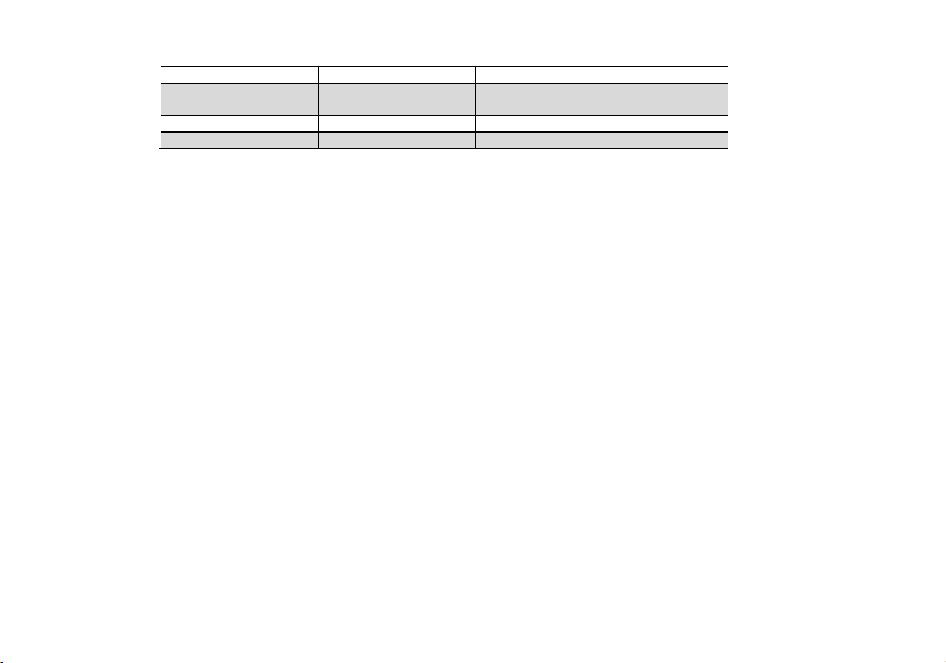
LED Indicator
Red LED
Green LED
Status
Flashing
Steady
Standby (charger empty)
Error (charger with radio)
Steady
Off
Charging
Off
Steady
Charge complete.
Practical if you have two batteries. That way you can charge one battery while still using your radio.
Radio should be turned OFF during charge cycle.
2.5 Battery Maintenance
The battery for your radio comes uncharged from the factory; please let it charge for at least four to five hours before you start using your radio.
• Use only batteries approved by the original manufacturer.
• Never attempt to disassemble your battery pack.
• Do not expose your batteries to fire or intense heat
• Dispose of batteries in accordance with local recycling regulations. Batteries do not belong in your trashcan!
2.6 Prolonging the life of your battery
• Only charge batteries in normal room temperatures.
• When charging a battery attached to the radio, turn the radio off for a faster charge.
• Do not unplug the power to the charger or remove the battery and/or radio before it's finished charging.
• Never charge a wet battery.
• Batteries wear out over time. If you notice a considerably shorter operating time with your radio, please consider purchasing a new battery.
• Battery performance will be reduced in temperatures below freezing. When working in cold environments, keep a spare battery on you. Preferably inside your jacket or
in a similar location in order to keep the battery warm.
• Dust can interfere with the contacts on the battery. If necessary wipe the contacts with a clean cloth to ensure proper contact with radio and charger.
If your battery has become wet, remove it from the radio, wipe it dry with a towel and put it in a plastic bag with a handful of dry rice. Tie the bag up and let it sit over
night.
The rice will absorb any remaining moisture in the battery.
This method is only effective against minor splashes (light rain for instance). A soaked radio may very well be beyond repair.
2.7 How to Store the Battery
(1) If the battery needs to be stored, keep it in status of 80% discharged.
(2) It should be kept in low temperature and dry environment.
(3) Keep it away from hot places and direct sunlight.
(4) To avoid severe capacity degradation of your battery while in long-term storage, please cycle the battery at least every six (6) months.
NOTICE
• Do not short circuit the battery terminals.

• Never attempt to remove the casing from the battery pack.
• Never store the battery in unsafe surroundings, as a short may cause an explosion.
• Do not put the battery in a hot environment or throw it into a fire, as it may cause an explosion.
3. PREPARATION
3.1 Installing / Removing the Battery
Installing the Battery Pack
(1) Position the battery pack over the back of the radio.
(2) Engage the battery pack into the radio until battery pack is fully seated into the radio housing.
(3) Tighten the screws using a coin or at object to secure the battery pack to the radio. Do not overtighten.
To Remove Battery Pack from Radio
(1) Loosen the screws on the back of the battery pack.
(2) Lift the bottom of the battery pack slightly to remove it from the radio housing.
(3) Pull the battery pack out of the radio housing.
3.2 Installing / Removing the Antenna
(1) Installing the Antenna: Screw the antenna into the connector on the top of the transceiver by holding the antenna at its base and turning it clockwise until secure.
(2) Removing the Antenna: Turn the antenna counter-clockwise to remove it.
3.3 Installing Additional Speaker/Microphone (Optional)
Pry open the rubber MIC-Headset jack cover and then insert the Speaker / Microphone plug into the double jack.
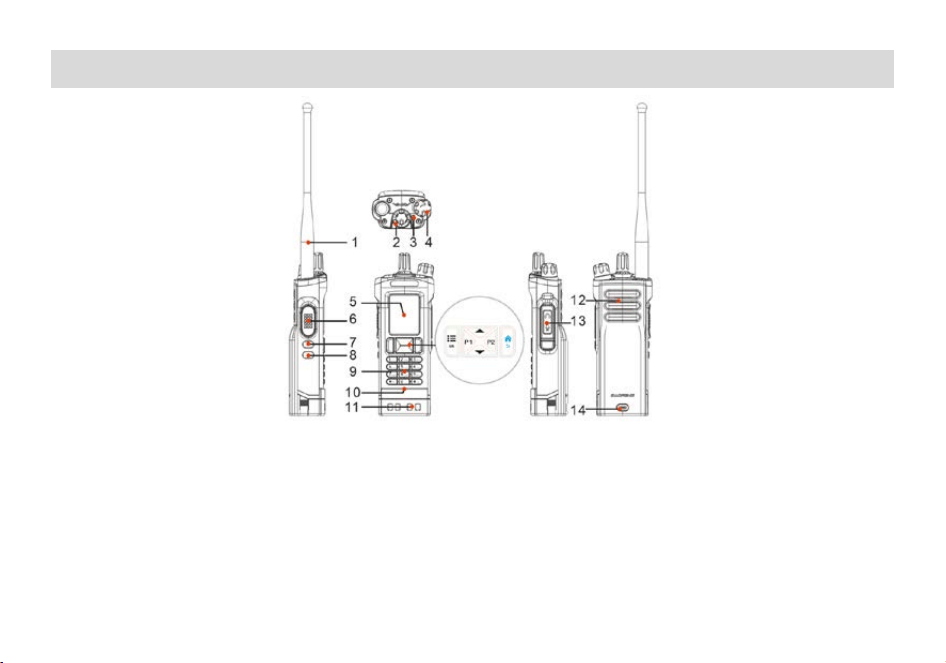
4. RADIO OVERVIEW
1. Antenna
2. Encoder/channel selector switch
3. TX_RX status indication
4. Power/Volume knob
5. 2” color LCD screen
6. PTT key
7. Side key (SK1) - short press to customize function,
long press to emergency alarm
8. Side Key (SK2)-Sweep/Monitor
9. Numeric keypad
10.Built-in Microphone
11.Charge contact
12.Speaker
13.Accessory port
14.Type-C charging port
"SK1" customization function
SK1 allows you to set shortcut functions through the CPS programming software or the radios menu.
• FM RADIO: Quickly turn on or off the FM radio function.
• SEARCH: Quickly turn on or off the one-touch frequency search function.
• SCAN: Quickly turn on or off the scan function. You can also turn on or off the scan function by hold down the # key.
• VOX: Quickly turn on or off the VOX function.
4.1 Status Indications
The top LED will help you to identify the current radio status.
LED Indication
What it Indicates
Constant Green
Receiving Signal
Constant Red
Transmitting signal
Flashes Green
Monitor mode/Scanning Receiving
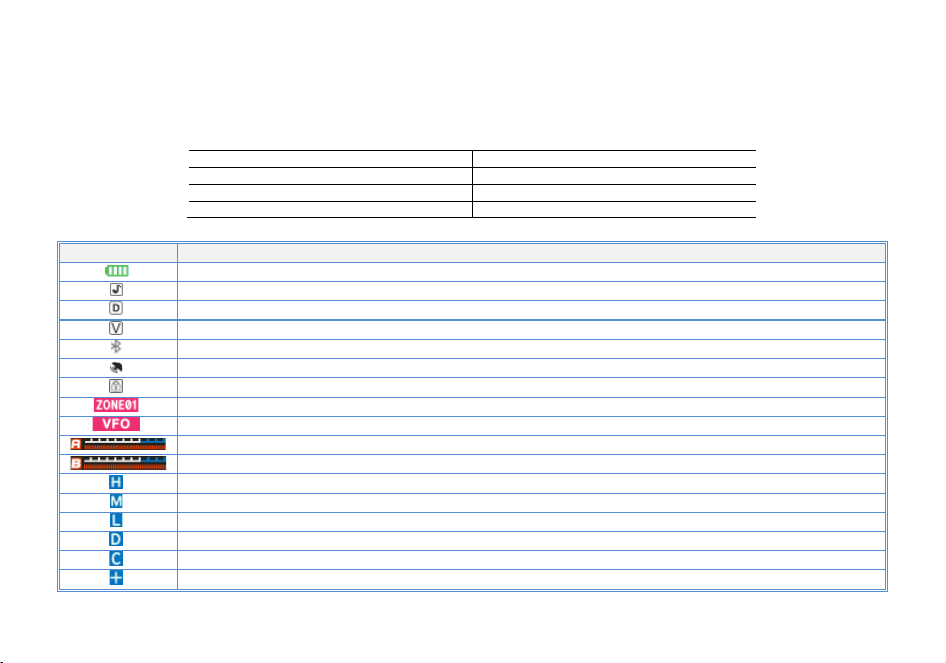
4.2 LCD icon summary
Icon
Description
Battery level indicator
Make sure you can hear the DTMF side tone from the radio speaker, set to DT-ST, ANI-ST, DT+ANI.
Dual watch enabled
VOX enabled
Bluetooth frequency writing function activated
GNSS function enabled
Keypad lock enabled
Indication of the current channel's region. Working in storage mode
In the current working VFO mode. Allow manual frequency input
A displays (upper section) and emission level indication
B displays (lower section) and emission level indication
Transmit power level indicator, According to Power High
The current transmission power is medium power (used in normal environments).
Transmit power level indicator, According to Power Low
DCS enabled
CTCSS enabled
Enables access of repeaters in VFO/Frequency Mode. TX will be shifted higher in frequency than RX
。
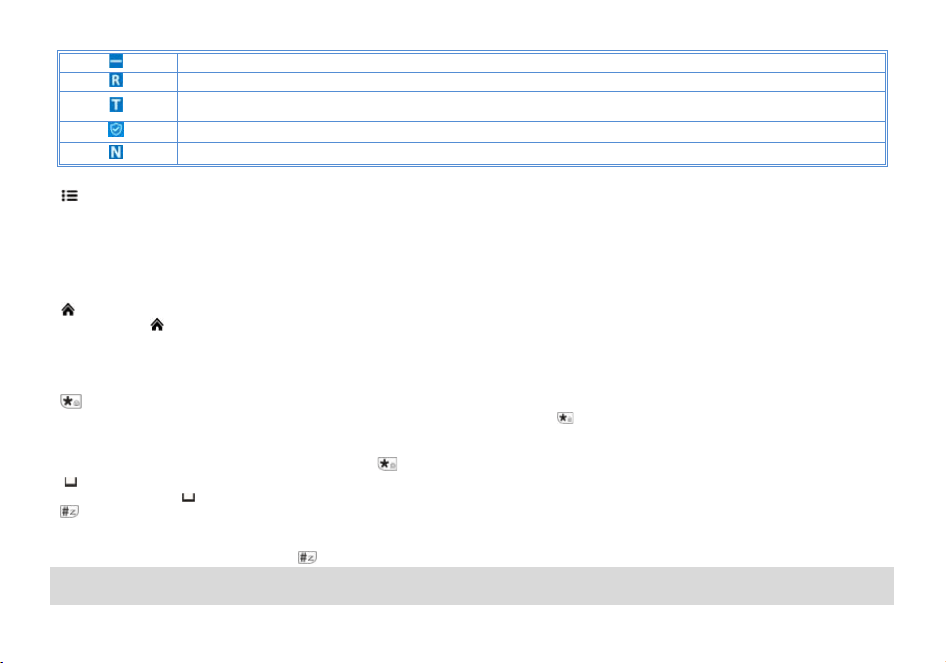
Enables access of repeaters in VFO/Frequency Mode. TX will be shifted lower in frequency than RX
Reverse function enabled
Talkaround has been activated, off grid at the central turntable. The transmission frequency is equal to the receive frequency
The confidential calling feature is activated
Narrowband enabled
4.3 Main keypad controls
• key: MENU key, It is used for activating the MENU, choose each MENU selection and confirm the parameter.
In standby mode, press and hold the key to switch between frequency (VFO) mode and channel (MR) mode.
When listening to broadcast FM, the key switches between 65-75 MHz and 76-108 MHz bands.
•▲ key: Press it for more than 2 seconds, the channel and frequency will move upwards rapidly; in SCAN mode, press this control to move the scanning
upwards.
•▼ key: Keep it pressed it for more than 2 seconds, the channel and frequency will move downwards rapidly; in SCAN mode, press this control to move the
scanning downwards.
•
Key: EXIT key, press to exit the Menu and functions.
Press and hold
key to activate the frequency sweep function. Realize fast group.
• P1 key: enter position mode, display position text information.
• P2 key: enter the coordinate mode of position.
• Numeric keypad
With these keys you can input the information or your selections on the radio.
•
Key
When there is a frequency difference between reception and transmission, press the
key can activate the frequency reversal and talkaround
functions.
The radios features a keypad lock that locks out all keys except for the three side keys.
To enable or disable the keypad lock, press and hold the
key for about two seconds.
• 0
key
Press and hold the [0
] key to activate the NoAA weather forecast reception function
•
key
When listening to broadcast FM a momentary press will start the scanning. Scanning in broadcast FM will stop as soon as an active station is found,
regardless of scanner resume method.
To enable the scanner, press and hold the
key for about two seconds.
5.BASIC OPERATIONS
5.1 Power on the radio
• Turning the unit on
To turn the unit on, simply rotate the Volume/Power knob clockwise until you hear a "click". If your radio powers on correctly there should be an audible double
beep after about one second and the display will show a message or flash the LCD depending on settings for about one second. Then it will display a
frequency or channel. If the Voice prompt is enabled, the voice will announce "frequency mode" or "channel mode".
• Turning the unit off
Turn the Volume/Power knob counter-clock wise all the way until you hear a "click". The unit is now off.
5.2 Adjusting the volume
To turn up the volume, turn the volume/power knob clock-wise. To turn the volume down, turn the Volume/Power knob counter-clock-wise. Be careful not to
turn it too far, as you may inadvertently turn your radio off.
By using the monitor function, enabled from the [VOX/ Monitor] key below the PTT, you can more easily adjust your volume by adjusting it to the
un-squelched static.
5.3 Main Band/Sub Band Switch
In standby mode, press the key to switch between the main frequency band or sub frequency bands.
The band with the larger display font is the primary band and the band with the smaller font is the secondary band.
5.4 VFO/Channel Switch
Press and hold the key to switch between VFO and channel display.
• In channel mode (MR), the channel number will be displayed.
• In frequency mode (VFO), the
will be displayed.
5.5 Frequency (VFO) mode
In Frequency (VFO) mode you can navigate up and down the band by using the or keys. Each press will increment or decrement your frequency
according to the frequency step you've set your transceiver to.
You can also input frequencies directly on your numeric keypad with kilohertz accuracy.
The following example assumes the use of a 12.5 kHz frequency step.
Example. Entering the frequency 436.61250 MHz on display A
(1) In standby mode, press and hold the
key to switch to the frequency (VFO) mode.
(2) Enter [4][3][6][6][1][2][5] [0] on the numeric keypad.
WARNING!
Just because you can program in a channel does not mean you're automatically authorized to use that frequency. Transmitting on frequencies
you're not authorized to operate on is illegal, and in most jurisdictions a serious offence. However, it is legal in most jurisdictions to listen.
Contact your local regulatory body for further information on what laws, rules and regulations apply to your area.
5.6 Channel (MR) mode and Channel selection
There are two modes of operation: Frequency (VFO) mode, and Channel or Memory (MR) mode.

For everyday use, Channel (MR) mode is going to be a whole lot more practical than Frequency (VFO) mode. However, Frequency (VFO) mode is very
handy for experimentation out in the field. Frequency (VFO) mode is also used for programming channels into memory.
In Channel (MR) mode you can navigate up and down the channel by using the or keys or the encoder.
Ultimately which mode you end up using will depend entirely on your use case.
Press and hold
key to switch the radio between VFO and Channel mode, select Channel mode.
• Operation 1: Press the or navigation key to select the channel.
• Operation 2: Input the channel numbers by the keyboard. For example, if you want switch to channel 12, input [0][1][2] a total of 3 digits, and it will switch to
channel 12.
When the voice prompt function is enabled, the corresponding channel will be broadcast by voice.
5.7 Select a Bank
A bank is a group of channels with the same property. The radio supports up to 10 banks, with a maximum of 100 channels per bank. To select a bank, do one
of the following:
Press
key go to Menu > Bank, press or navigation key to select a bank, and then press key to switch to the selected bank.
The corresponding regional alias will be displayed at the bottom of the screen.
5.8 Making a call
NOTE: Press the A/B key to switch the main channel to the other channel if there are 2 channels shown on the display. In standby mode, press the
[V/M] key to switch between frequency (VFO) mode and channel (MR) mode.
• Channel mode call: After selecting a channel, hold down the [PTT] key to initiate a call to the current channel. Speak into the microphone with normal tone.
Making a call, the red LED is on.
• Frequency mode call: Press and hold
key to switch to the frequency mode, input the working frequency within the allowable frequency range, and
press and hold the [PTT] key to transmit on the current frequency. Speak into the microphone with normal tone. Making a call, the red LED is on.
• Receive a call: When you release the [PTT] key, you can answer it without any action.
When receiving a call, the green LED is on.
NOTE: To ensure the best reception volume, keep the distance between the microphone and the mouth at the time of transmission from 2.5 cm to
5 cm.
5.9 Emergency Alert
The Emergency Alert feature can be used to signal members in your group for help.
To activate the emergency alert function, press and hold the [SK1] key for 3 seconds. The radio will send out a loud siren sound and the flashlight will flash.
Press the SK1 (FM radios/Emergency) key to exit the emergency alert function.
WARNING: The Emergency Alert feature should only be used in the even of an actual emergency.
5.10 FM Radio (FM)
The frequency ranges to listen to the radio is 65-108MHz. When listening to broadcast FM, press key switches between 65-75 MHz and 76-108 MHz
band.
(1) In frequency or channel mode, Press [SK1] key to turn on the radio.
(2) Select the desired radio frequency with the or keys or input the frequency. Or
• Press
to automatically search a radio station.
(3) Press [SK1] key to exit FM radio.
Note: while you are listening to the radio, the frequency or channel of A / B receiving signal will automatically switch to the frequency or channel
mode for normal transmitting and receiving.
When the signal disappears the radio will automatically switch again to FM radio mode.
5.11 Monitor
In standby, press and hold the [SK2] key to enter Monitor. When receiving matched carrier but the signaling or the signal is too weak, this function allows
monitor the weak signal.
Stop pressing the [SK2] key to turn off the speakers and return to standby mode.
» If no signal, it will emit noise when press the [SK2] Key.
5.12 Keypad lock
The radio features a keypad lock that locks out all keys except for the three side keys.
To enable or disable the keypad lock, press and hold the
key for about two seconds.
You can also enable so that the radio automatically locks the keypad after ten seconds from the menu.
5.13 Frequency reversal and talkaround
When there is a frequency difference between the receiving frequency and the transmitting frequency, the radios operates in relay mode.
A short momentary press of the key enables the reverse function
If you for some reason want to listen to the repeater's input frequency instead, press
key momentarily and you'll reverse your transmit and receive
frequencies. The channel attribute bar will display
Press the
key again to switch the radio to talkaround mode, and the receiving frequency is equal to the transmitting frequency. The channel attribute bar
will display
.
5.14 TX Repeaters tone
Press [PTT] + [SK1] key to send 1750Hz repeaters tone. This function is useful for communications through repeaters.
If you have the keypad lock enabled on your radio, you can still send a 1750Hz tone the regular way without having to unlock your radio.
5.15 One touch frequency Search
(1) Through the CPS program software or the radio menu >> Radio Setting >> Press the [SK1] key to define the
[SK1] side key as a Search function.
(2) The radio will act as a receiver. Briefly press the preset ‘Search’ key, and the screen will display “SEARCH
SEEK..."
(3) If the transmitter continues to transmit and the unit receives an effective frequency (the strongest and stable
signal), the received frequency will be displayed. If there is a CTCSS or DCS, the CTCSS or DCS value is
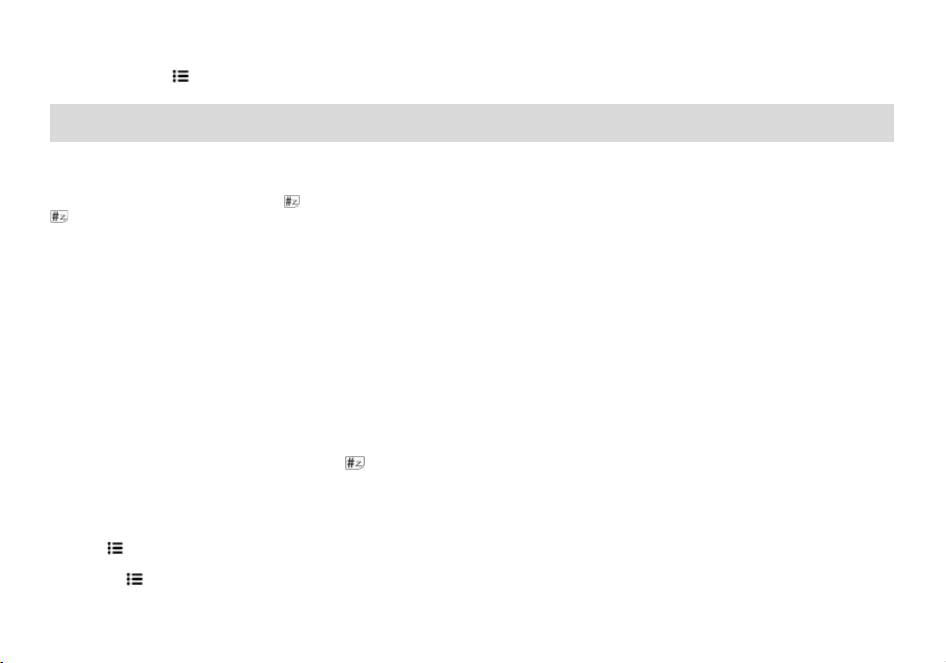
displayed, and if there is no CTCSS or DCS, NONE is displayed
(4) You can press the
key to save the Search frequency and CTCSS or DCS to the channel.
Note: During frequency Search, press the # key on the radio to switch between UHF or VHF bands.
6. ADVANCED FEATURES
6.1 Scanner
The radios features a built in scanner for the VHF and UHF bands. When in Frequency (VFO) mode it will scan in steps according to your set frequency step.
In Channel (MR) mode it will scan your channels.
To enable the scanner, press and hold the
key for about two seconds. You can change the scanning direction with the or keys. Press and hold the
key to exit scanning mode.
6.1.1 Frequency Ranger
In frequency mode, the frequency sweep range can be precisely set. Input the start value and end value of the sweep frequency through the keyboard.
EX: Enter 144146, in frequency mode, scan in the range of 144.000-146.000MHZ. Enter 430440, in frequency mode, scan in the range of
430.000-440.000MHZ.
Note: for VFO frequency Ranger, see Menu>SCAN>Freq Ranger.
6.1.2 Scan modes
The scanner is configurable to one of three ways of operation: Time, carrier or search, each of which is explained in further details in their respective section
below.
Time operation
In Time Operation (TO) mode, the scanner stops when it detects a signal, and after a factory preset time out, it resumes scanning.
Carrier operation
In Carrier Operation (CO) mode, the scanner stops when it detects a signal, and after a factory preset time with no signal it resumes scanning.
Search operation
In Search Operation (SE) mode, the scanner stops when it detects a signal.
To resume scanning you must press and hold the
key again.
Note: for Scan mode, see Menu>SCAN>Scan Mode.
6.1.3 Scan Sub-Code
To search for a CTCSS code, do the following:
(1) In VFO mode, enter a known frequency, such as 144.525.
(2) Press
key to enter menu>>Scan>>3 Scan Sub-Code.
(3) Press or to select CTCSS;
(4) Press the
key to enter the CTCSS code, and scan the CTCSS code in sequence. When a valid CTCSS code is scanned, it stays on the CTCSS code
and the speaker is turned on.

(5) Press the key to store the scanned CTCSS code and exit the scan to return to the previous menu. In standby mode, the icon will be displayed on
the top line of the screen. Press and hold the PTT key to make a callback.
To search for a DCS code, do the following:
(1) In VFO mode, enter a known frequency, such as 144.525.
(1) Press
key to enter menu>>Scan>>3 Scan Sub-Code.
(2) Press or to select DCS;
(3) Press the
key to enter the DCS code scanning, and scan the DCS code in turn. When a valid DCS code is scanned, it stays on the DCS code and the
speaker is turned on.
(4) Press the
key to store the scanned DCS code and exit the scan to return to the previous menu. In standby mode, the icon will be displayed on the
top line of the screen. Press and hold the PTT key to make a callback.
6.1.4 Sub-Code scan memory
In MR mode or VFO mode, the scanned CTCSS/DCS code can be stored as only TX CTCSS/DCS code, RX CTCSS/DCS code only, TX and RX
CTCSS/DCS code to replace the CTCSS/DCS code setting of the current channel or frequency mode of the radio.
To save the settings of CTCSS/DCS code scan, the operation is as follows:
(1) Press
key to enter menu >> SCAN >> 4 Scan Memory.
(2) Press the
key to enter the Scan Memory setting, and press the or key to select:
• ALL: The scanned CTCSS/DCS code will be stored as the received and transmitted CTCSS/DCS code of the current channel or frequency mode (at the
same time as the received and transmitted Sub-Code).
• DECODER: The scanned CTCSS/DCS code will be stored as the receiver CTCSS/DCS code of the current channel or frequency mode (only replace its
receiver RX CTC/DCS).
• ENCODER: The scanned CTCSS/DCS code will be stored as the transmitted CTCSS/DCS code of the current channel or frequency mode (only replace
its transmitted TX CTC/DCS).
(3) Press the
key to save the settings and return to the previous menu;
Note: Only when a valid CTCSS/DCS code is scanned and stopped, press the
key to store the CTCSS/DCS code and replace the
corresponding CTCSS/DCS code of the current channel or frequency.
6.2 Dual Watch
In certain situations, the ability to monitor two channels at once can be a valuable asset. This can be achieved in one of two ways. You can either have one
receiver in your radio and flip-flop between two frequencies at a fixed interval (known as Dual Watch), or you can equip a radio with two receivers (known as
Dual Receive or Dual VFO). The former method is cheaper to implement and far more common than the latter.
The radio features Dual Watch functionality (single receiver) with the ability to lock the transmit frequency to one of the two channels it monitors.
Enabling or disabling Dual Watch mode
(1) Press the
key to enter the main menu.
(2) Enter [4] on the numeric keypad to get to Radio Settings.
(3) Press the
key to confirm, enter 16 on the numeric keypad to get to 15 Dual Watch.
(4) Press the
key to select.
(5) Use the or keys to OFF or ON.
(6) Press the
key to confirm.
(7) Press
to return to the previous menu.
The dual watch function is turned on, and the icon
is displayed on the top line of the screen.
·Repeat the above operation, select "OFF", the dual watch function is disabled, and the icon
on the top line of the screen disappears.
6.3 Manual Programming (Channels Memory)
Memory channels are an easy way to store commonly used frequencies so that they can easily be retrieved at a later date.
The radio has 10 zones, with a maximum of 100 channels stored in each zone. Each channel can store: Receive and transmit frequencies, transmit power,
group signaling information, bandwidth, ANI/ PTT-ID settings and a six character alphanumeric identifier or channel name
1
.
Frequency Mode vs. Channel Mode
In standby mode, press and hold
key to switch between frequency (VFO) mode and channel (MR) mode.
These two modes have different functions and are often confused.
Frequency Mode (VFO): Used for a temporary frequency assignment, such as a test frequency or quick field programming if permitted.
Channel Mode (MR): Used for selecting preprogrammed channels.
Ex 1. Programming a Channel Repeater Offset with CTCSS Tone
EXAMPLE New memory in Channel 10:
RX = 432.55000 MHz
TX = 437.55000 MHz (This is a (+ 5) Offset)
TX CTCSS tone 123.0
(1) Press the
key to switch between menus.
(2) Press and hold
key to set the radio to VFO mode, and the VFO icon is displayed.
(3)
[6] [1][3] [1] [0] Deletes Prior Data in channel (Ex. 10)
(4)
[6] [4] 123.0 Selects desired RX encode tone (Ex 123 CTCSS)
(5)
[6] [6] 123.0 Selects desired TX encode tone (Ex 123 CTCSS)
(6)
[6] [1][0] [0] [0] [5] [0] [0] Enter the OFFSET frequency (Ex. 5.00MHz)
(7)
[6] [1][1] [+] Select the offset direction (Ex. plus offset
)
(8) Enter RX frequency (Ex. 43255000) Enter RX frequency (Ex. 43255000)
(9)
[6] [1][2] [1][0] Enter the same channel (Ex 10)
-->>
Channel has been added
(10) Press V/M key to return to the MR mode and the channel number will reappear.
Ex 2. Programming a Simplex Channel with CTCSS tone
EXAMPLE New memory in Channel 10:
RX = 432.6500 MHz
TX CTCSS tone 123.0
(1) Press the
key to switch between menus.

(2) Press V/M key to set the radio to VFO mode, and the VFO icon is displayed.
(3)
[6] [1] [3] [1] [0] Deletes Prior Data in channel (Ex. 10)
(4)
[6] [4] 123.0 Selects desired RX encode tone (Ex 123 CTCSS)
(5)
[6] [6] 123.0 Selects desired TX encode tone (Ex 123 CTCSS)
(6) Enter RX frequency (Ex. 43265000) Enter RX frequency (Ex. 43265000)
(7)
[6] [1][2] [1][0] Enter the same channel (Ex 10)
-->>
Channel has been added
(8) Press and hold
key to return to the MR mode and the channel number will reappear.
6.4 Repeaters Programming
The following instructions assume that you know what transmit and receive frequencies your repeater employs, and that you're authorized to use it.
(1) Press and hold
key, the transceiver is set to VFO mode, and the VFO icon will be displayed on the right.
(2) Use the numeric keypad to enter the repeater's output (your receive) frequency.
(3) Press
[6] [1][0] to get the offset frequency.
(4) Use the numeric keypad to enter the specified frequency offset.
(5) Press
to confirm and save.
(6) Press
[6] [1][1] to get the offset direction.
(7) Use the or keys to select plus (positive) or minus (negative) offset.
(8) Press
to confirm and save.
(9) Optional:
a) Save to memory, see the section called “Manual programming” for details.
b) Set up CTCSS; see the section called “CTCSS” for details.
(10) Press
to exit the menu. If everything went well, you should be able to make a test call through the repeater.
NOTE:
If you're experiencing problems making a connection to the repeater, check your settings and/or go through the procedure again.
Certain Amateur Radio repeaters (especially in Europe) use a 1750Hz tone burst to open up the repeater. To see how this is done with the radios, see the
section called “1750Hz Tone-burst”.
If you're still unable to make a connection, contact the person in charge of the radio system with your employer or your local amateur radio club, as the case
may be.
6.5 GPS function
Optional features that require hardware support.
The position system is a typical DTMF calling application. For the method of setting call codes, call names, and local IDs, please refer to "Signaling Calls".
It is necessary to ensure that the radios that receive and send GPS location information operate on the same frequency or channel, and are set to the main
frequency band.
In GPS mode, you can only view location information and cannot make normal calls. Voice intercom must exit GPS mode in order to proceed.
You can set the system time, GPS on/off, time zone, and GPS mode through the position system menu. Press [P1] key to view, share, and request location

information.
·GPS on/off settings
Set path:
+ 5 + + 1: Press the / key to select whether to turn GPS on/off.
*After turning on the position system, the screen displays the
icon
·Time zone settings:
Set path: + 5 + + 2: Press the / key to select the correct time zone.
·GPS mode settings
This machine is equipped with a multi-mode GPS module, mainly including GPS from the United States and Beidou from China.
Set path:
+ 5 + + 3: Press the / key to select GPS mode (BDS, GPS, or GPS+BDS).
Use of GPS
In standby mode, press [P1] key to enter GPS mode and display "My Place” as an information list. Press [P2] to enter GPS mode and display the coordinate
interface.
Press
key to switch My Place in the information list mode or electronic compass mode. Press the / key to switch the information of the selected
member. The current member sequence will be displayed at the top of the interface.
Find My Place
1. Press [P1] key to enter GPS mode.
2. Use the /key to switch to "My Place".
3. At this point, the GPS is in receive mode and displays "Searching..." The GPS character on the right is red, indicating that the positioning has not been
successful.
Note: If "Searching..." is displayed for a long time, it is recommended that you search for satellites in an open location.
4. Display "Searching Successful" to indicate that the radios position has been successfully obtained, and display the current time, longitude, latitude, and
altitude, Where N is north latitude, E is east longitude, and H is height. The GPS character on the right is green.
5. Press the
key to switch between the GPS position information interface and the GPS distance direction interface.
Share My Place information (send to others)
1. After the GPS position of the radio is successful, press the key to switch to the location information interface.
2. Press the / key to select the pre programmed member sequence (01-20), and display the member sequence and name on the first line. Select the
member sequence labeled as "native".
3. Press the [PTT] key to share the current location information of the device with group members.
Requesting someone else's place
1. After the GPS position of the radios is successful, press the key to switch to the My Place information interface.
2. Press the / key to select the pre programmed member sequence (01-20), and display the sequence and call name on the first line. Select member
sequences that are not marked as "native".
3. Press the [PTT] key to initiate a position request command to the target member.
-Disable transmission during waiting for reception.
-If the other party receives your request, they will reply with your location information.
-The red center point represents your position, the flashing red dot within the circle represents the position of the other side, and the bottom left corner is the
reference distance between two radios.
7. MAIN MENU FUNCTIONS
The menu function allows you to perform operations such as selecting BANKS, SCAN, Bluetooth, GNSS, Radio Settings, Program Channels, Recording and
Radio Information.
7.1 Basic use
Use menus with arrow keys
(1) Press the
key to enter the main menu.
(2) Use the or keys to navigate between menu items.
(3) After finding the desired next menu item, press the
key again to select the menu item.
(4) Use the or keys to navigate between the next menu items.
(5) After finding the desired next menu item, press the
key again to select the menu item.
(6) Use the or keys to select the desired parameter.
(7) When you have selected the parameter to be set for a given menu item;
(8) To confirm your selection, press
and it will save your setting and bring you back to the main menu.
(9) To cancel your changes, press
and it will reset that menu item and bring you out of the menu entirely.
(10) To exit out of the menu at any time, press the PTT key.
7.2 Using short-cuts
As you may have noticed if you looked at Appendix C, Menu definitions, every menu item has a numerical value associated with it. These numbers can be
used for direct access of any given menu item.
Using the menu with short-cuts
(1) Press the
key to enter the menu.
(2) Use the numerical keypad to enter the number of the menu item.
(3) To enter the menu item, press
the key.
(4) For entering the desired parameter you have two options:
a) Use the arrow keys as we did in the previous section; or
b) Use the numerical keypad to enter the numerical short-cut code.
(5) And just as in the previous section;
a) To confirm your selection, press and it will save your setting and bring you back to the main menu.
b) To cancel your changes, press and it will reset that menu item and bring you out of the menu entirely.
(6) To exit out of the menu at any time, press the key.
(7) All further examples and procedures in this manual will use the numerical menu short-cuts.
·
+1: Quickly enter zones selection, with up to 10 zones stored, each zone store 100 channels;
·
+2: Quickly enter the scaner settings, you will be able to set the VFO scan range, scan recovery method, ctcss/DCS scan;
·
+3: Quickly enter Bluetooth frequency write, you will be able to set the Bluetooth frequency write switch;
·
+4: Quickly enter the radio settings (overall radio settings);
·
+5: Quickly enter the GPS system, and you will be able to set the system time, position on/off, time zone, and position mode.
·
+6: Quickly enter channel configuration (current channel alias, frequency, power, bandwidth, display mode, channel memory and channel delete);
·
+7: Quickly query radio information (Radio ID, Firmware version, Hardware version);
8. Bluetooth Write Frequency
You can read and write frequency through Bluetooth. Before Bluetooth read/write frequency, you need to download and install BAOFENG radio APP. intercom
operation is as follows:
1. Press
+ [3] to enter Bluetooth frequency writing.
2. Press
+ or to select “On”;
The icon
will be displayed on the first line of the screen.
Download BAOFENG radios APP
You can read and write frequency to the terminal through BAOFENG radios APP. Use your Android phone to download and install BAOFENG radios APP.
After the APP is opened, allow the Bluetooth of the cell phone and open the positioning function, select the brand Baofeng in the APP, select the model of
radios UV32 Pro Series, connect the radios, click radios, prompt the connection success and return to the homepage, then you can read and write the
frequency.
Read Frequency: After completing the frequency reading, click the program to enter the program details. In the program details interface you can program
channel information, frequency mode, optional functions.
Save Profile: The programmed scheme allows you to save it as a new profile and name the new profile.
If you choose to replace the program, tap to replace the program and save it.
Write Frequency: Tap Home, select Program, tap Write Frequency to enter Write Frequency, the radio will restart automatically after finishing Write
Frequency.
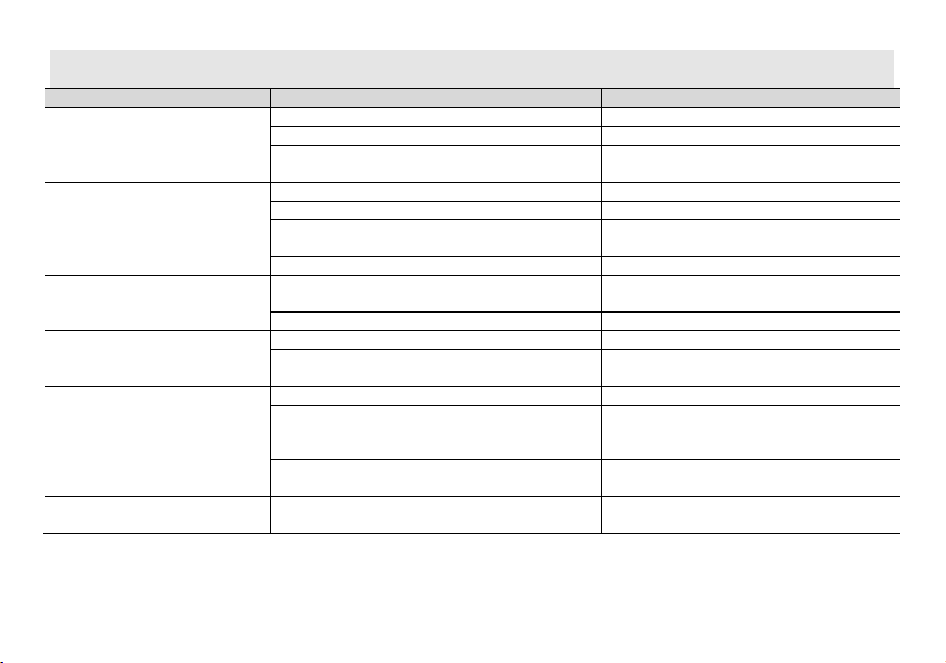
Appendix A. – Trouble shooting guide
Phenomena
Analysis
Solution
You cannot turn on the radio.
The battery may be installed improperly.
Remove and reattach the battery.
The battery power may run out.
Recharge or replace the battery.
The battery may suffer from poor contact caused by dirty or
damaged battery contacts.
Clean the battery contacts or replace the battery.
During receiving, the voice is weak or
intermittent.
The battery voltage maybe low.
Recharge or replace the battery.
The volume level may be low.
Increase the volume.
The antenna maybe loose or maybe installed incorrectly. Turnoff the radio, and then remove and reattach the
antenna.
The speaker maybe blocked.
Clean the surface of the speaker.
You cannot communicate with other group
members.
The frequency or signaling type maybe inconsistent with that of
other members.
Verify that your TX/RX frequency and signaling type are
correct.
You may be too far away from other members.
Move towards other members.
You hear unknown voices or noise.
You may be interrupted by radios using the same frequency.
Change the frequency, or adjust the squelch level.
The radio in analog mode maybe set with no signaling. Request your dealer to set signaling for the current channel
to avoid interference
You are unable to hear anyone because of
too much noise and hiss.
You may be too far away from other members.
Move towards other members.
You may be in an unfavorable position. For example, your
communication may be blocked by high buildings or blocked in an
underground area.
Move to an open and flat area, restart the radio, and try
again.
It may be the result of external disturbance (such as electromagnetic
interference).
Stay away from equipment that may cause interference.
The radio keeps transmitting.
VOX may be turned on or the headset is not installed in place
Turn off the VOX function. Check that the headphones are in
place.
NOTE: If the above solutions cannot fix your problems, or you may have some other queries, please contact your dealer for more technical support.
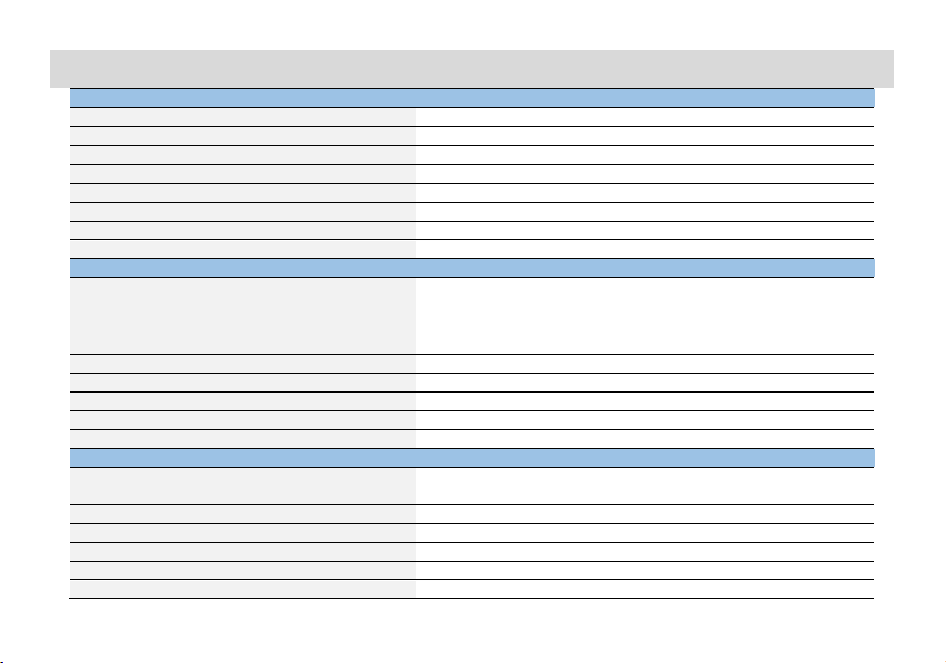
Appendix B. - Technical Specifications
GENERAL
Channel Capacity
1000/10 Bank
Channel Spacing
25.0 KHz/12.5 KHz
Input Voltage
7.4 VDC
Battery Life: 5% TX, 5% RX, 90% Standby
Li-on: 18 hours @ 5 watts
Operating temperature
-10˚C to 60˚C
Antenna Impedance
50Ω
Radio Dimensions
182×67×41mm (not including antenna)
Radio Weight
350 g (with Li-ON battery)
TRANSMITTER
Frequency Range (TX)
144 to 148 MHz, 420 to 450 MHz (America version)
462.55 to 467.7250MHz (America GMRS version)
144 to 148 MHz, 430 to 450MHz (Canadian version)
144 to 146 MHz, 430 to 440MHz (European Union version)*
Modulation
16K0F3E/11K0F3E
Spurious Emission
-16 dBm<1GHz, -16 dBm>1GHz
Frequency Stability
±2.5 ppm
Audio Distortion
≤5%
FM Hum & Noise
40 dB
RECEIVER
Frequency Range
FM76-108MHz; AM108-136MHz;
VHF: 136-174 MHz; 220-260MHz; UHF:350-390MHz; 400- 520 MHz;
Sensitivity: 12 dB SINAD
-120 dBm
Adjacent Channel Selectivity
-60 dBm
Intermodulation and Rejection
-70 dBm
Rated Audio Power Output
0.75 Watts @ 16 Ω
Rated Audio Distortion
≤5%
NOTE: All specifications may be modified without prior notice or liability. Thank you.
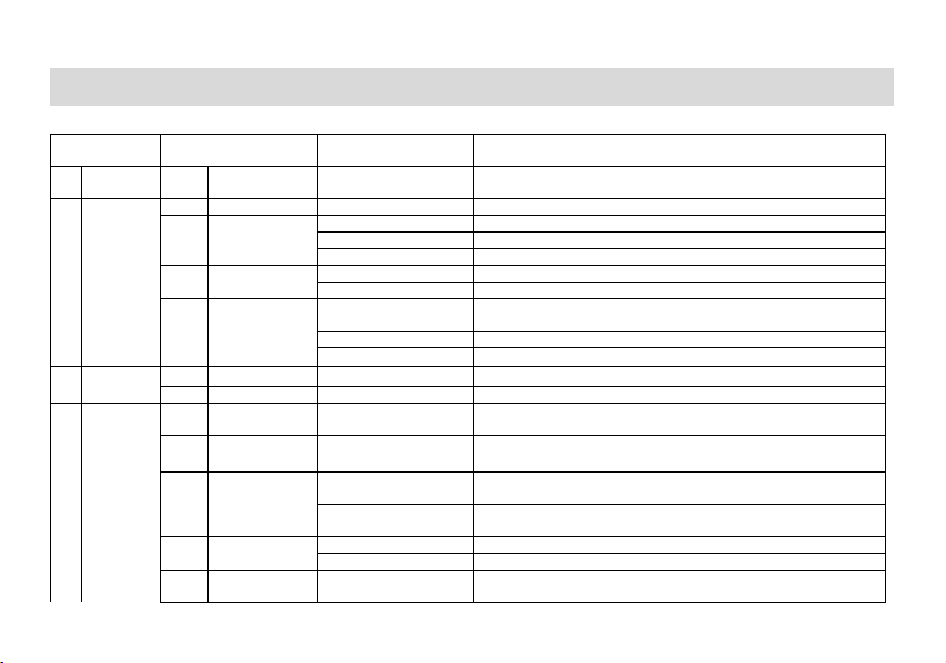
Appendix C. - Shortcut Menu operations
Menu
Name
Setting
Description
1 BANK 1 BANK 1 Channel1-Channel100
A Bank is a group of channels grouped together. The radio has 10 Banks. A Bank
can have the maximum of 100 channels.
2 SCAN
1
Freq Ranger
NNNNnnn
Input VFO range lower and upper frequency
2 Scan Mode
Time
Time Operation - scanning will resume after a fixed time has passed
Carrier
Carrier Operation -scanning will resume after the signal disappears
Search
Search Operation -scanning will not resume
3 Scan SubCode
CTCSS
Search within CTCSS Tone (Rang 67-254.1, A total of 50 groups)
DCS
Search within DCS Code (Rang 023N-754I, A total of 210 groups)
4 Scan Memory
ALL
RX_TX are saved
(default is all, encoding and decoding are the same)
DECODER
Save only in Transmitter CTCSS/DCS
ENCODER
Save only in Receiver CTCSS/DCS
3 Bluetooth
OFF Turn off Bluetooth frequency write function
ON
Enable Bluetooth frequency write function
4
Radio
Setting
1 Step 2.5-100K
Selects the amount of frequency change in VFO/Frequency mode when
scanning or pressing the
or
keys.
2 Squelch OFF,LEVEL1-LEVEL5
Squelch silences the receiver when there is no signal. Setting the squelch to 0
will open up the squelch entirely.
3 Power Save
OFF
Turn off radio sleep. The battery consumption is large, and the standby time
may be shortened
ON
Turn on radio sleep. Turning on is more power efficient, but you might miss the
first few syllables before the RX turns on.
4 VOX Switch
OFF
Turn off the radio VOX.
ON
Turn on the radio VOX.
5 VOX Level LEVEL1-LEVEL9
When enabled it is not necessary to push the [PTT] button on the transceiver.
Adjust the gain level to an appropriate sensitivity to allow smooth transmission.
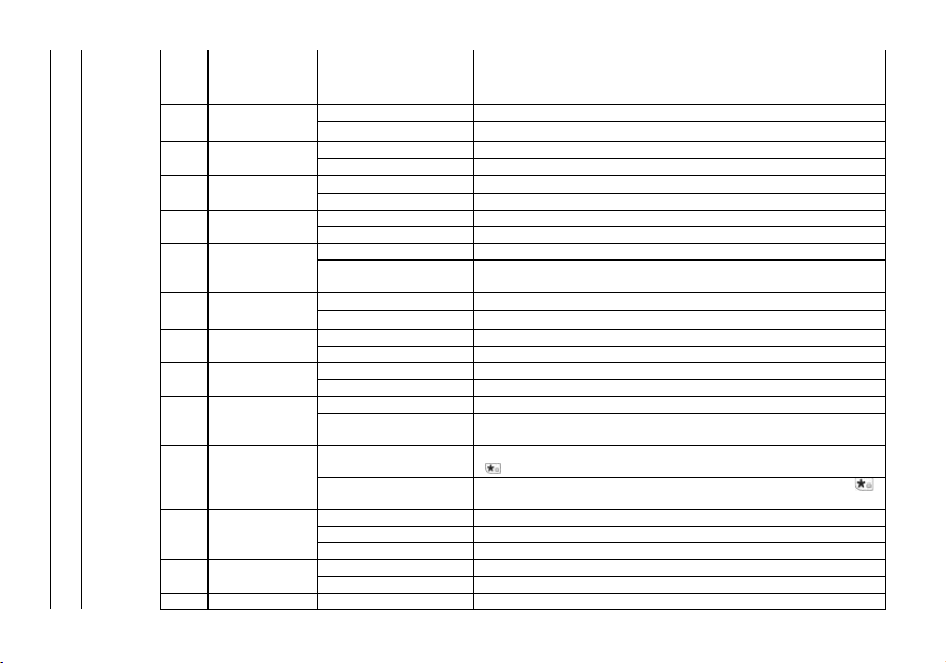
6 VOX Delay 0.5……2.0s
When the VOX is enabled, set up the VOX delay to help to extend the
transmission time to avoid stopping a transmission too early. 0.5s-2s, Step 0.1
second. a total of 16 times offered.
7 TOT
OFF
Allow continuous launch, launch time is not limited
15;30;45…180
Maximum allowed time for transmission while holding down the PTT key.
8 TOA
OFF
Disable TOA function
1……10
Activate TOA function. Range 0 – 10 seconds, Step 1 second.
9 Voice
OFF
Disable voice prompts
ON
Activate voice prompts
10 Language
Chinese
Display menus and voice prompts in Chinese language
English
Display menus and voice prompts in English language
11 ROGER
OFF
Disable ROGER function. Release PTT key without ROGER audio.
ON
Activate the ROGER function. Sends an end-of-transmission tone to indicate to
other stations that the transmission has ended.
12 Beep
OFF
Disable key confirmation tone.
ON
Activation key to confirm tone. Allows audible confirmation of a key press
13 BackLight
ALWAYS ON
The backlight is always on.
5……20
Set the backlight off time in no-operation delay time. 5-20, step value is 5.
14 Power on Display
PICTURE
Show preset picture when radio is on
VOLTAGE
Display battery voltage when radio is on
15 Dual Watch
OFF
Disable dual table, dual receive.
ON
Monitor [A] and [B] at the same time. The display with the most recent activity
([A] or [B]) becomes the selected display.
16 AutoLock
OFF
Disable automatic keypad lock. Allow manual keypad lock (press and hold the
key to lock/unlock the keyboard)
ON
When ON, the keypad will be locked if not used in 8 seconds. Pressing the
key for 2 seconds will unlock the keypad.
17 Alarm Mode
On Site
Sounds alarm through your radio speaker only
Send Sound
Transmits a cycling tone over-the-air
Send Code
Transmits '119' (911 in reverse) followed by the ANI code over-the-air
18 Alarm Tone
OFF
The radio speaker blocks the alarm sound.
ON
The radio speaker sounds an alarm
19
ANI-Edit
100
View the ANI ID, and if necessary, will allow to change the ANI ID
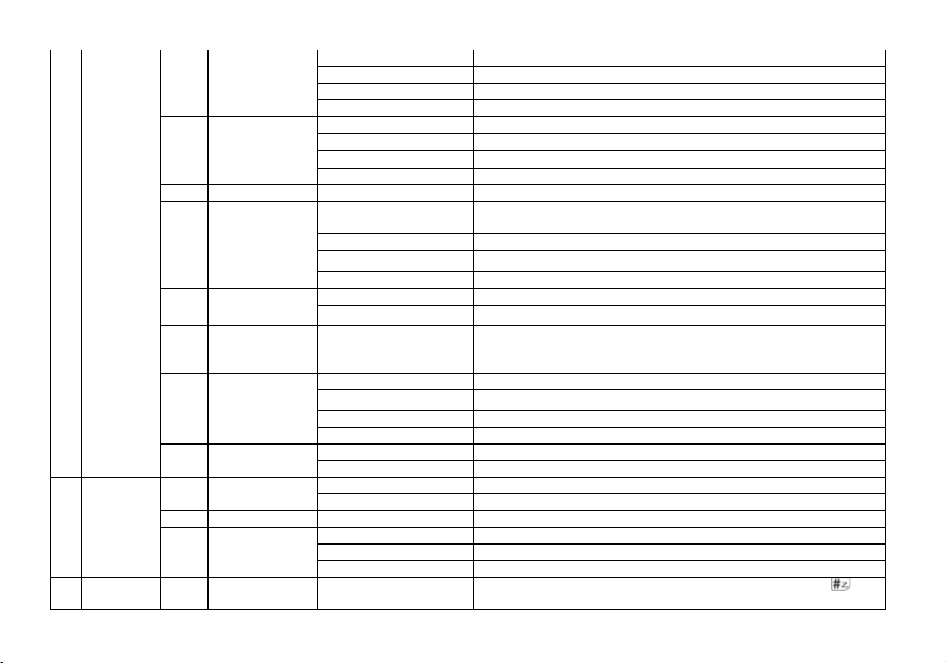
20 DTMF-ST
OFF
No DTMF Side Tones are heard
DT-ST
Side Tones are heard only from manually keyed DTMF codes
ANI-ST
Side Tones are heard only from automatically keyed DTMF codes
DT+ANI
All DTMF Side Tones are heard
21 PTT-ID
OFF
No ID is sent.
BOT
The selected S-CODE is sent at the beginning
EOT
The selected S-CODE is sent at the ending
BOTH
The selected S-CODE is sent at the beginning and ending
22
PTT-DLY
100-3000ms
Signal code sending delay. PTT-ID Delay (milliseconds)
23 ALERT
1000Hz
The following configurations will transmit accordingly:
PTT + SK1= Transmits 1000Hz Tone Burst
1450Hz
PTT + SK1= Transmits 1450Hz Tone Burst
1750Hz PTT + SK1= Transmits 1750Hz Tone Burst
2100Hz
PTT + SK1= Transmits 2100Hz Tone Burst
24 TAIL
OFF
Disable Squelch Tail Elimination.
ON
Enable Squelch tail elimination. to prevent any squelch tails from being heard.
25 Menu Exit time 5-60S
After entering the menu, start the menu reset timer. If there are no panel
keys, PTT keys, or menu related programmable key operations before
the timer overflows, exit the menu.
26 Press SK1
FM Radio
FM radio on/off
Scan
Scan on/off
Search
Search on/off
VOX
VOX on/off
27 Reset
VFO
Reset the radio's VFO menu to factory defaults (no reset for bank, scan settings)
ALL
Resets the radio to factory defaults, with some exceptions.
5 GPS
1 GPS On/Off
OFF
Turn off the position system, long press the MENU key is ineffective
ON
Turn on the position system, press and hold the MENU key to enter GPS mode
2
Time Zone
-12 to 0 to + 12
Set the time zone of the region
3 GPS Mode
GPS
BDS
GPS+BDS
6
Program
Channel
1 CH.NAME Channel 1
View channel name, allows to rename the current channel. Press the key
to switch the input method, allowing the input of letters, numbers and
symbols.
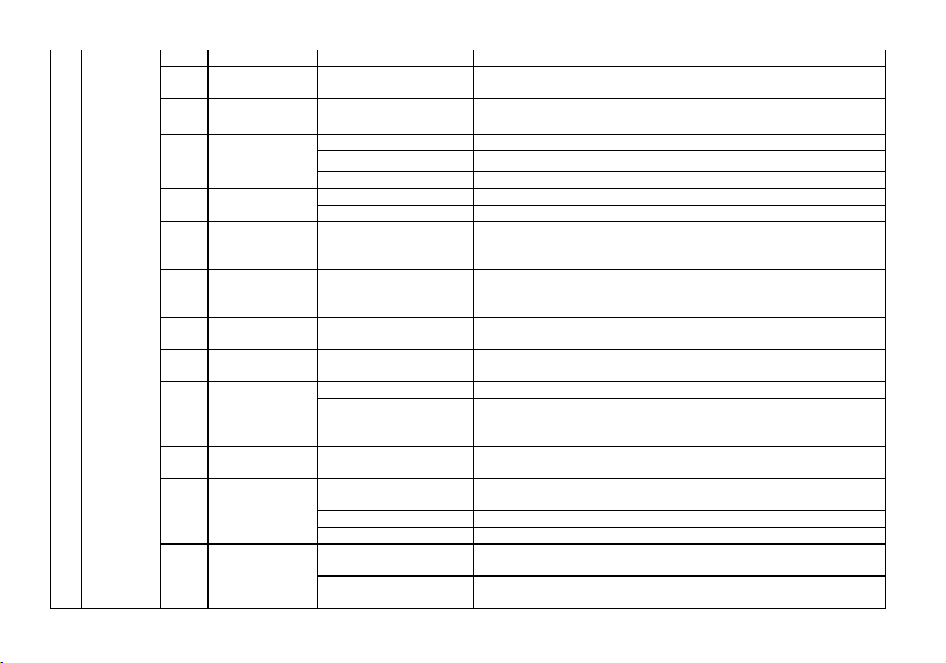
2 RX Frequency
View the current channel Receiver frequency, allow to change the current
frequency. Input the RX frequency by keypad, click the Menu key to save
3 TX Frequency
View the current channel Transmitter frequency, allow to change the current
frequency. Input the TX frequency by keypad, click the Menu key to save
4 Trans Power
High
Selects between HIGH transmitter power when in VFO/Frequency mode.
Middle Selects between Middle transmitter power when in VFO/Frequency mode.
Low
Selects between LOW transmitter power when in VFO/Frequency mode.
5 Bandwidth
Wide
Wideband (25 kHz bandwidth)
Narrow
narrowband (12.5 kHz bandwidth)
6 RX CTCSS OFF;67-254.1
Mutes the speaker of the transceiver in the absence of a specific and
continuous sub-audible signal. If the station you are listening to does not
transmit this specific and continuous signal, you will not hear anything.
7 RX DCS OFF;023N-754I
Mutes the speaker of the transceiver in the absence of a specific low-level
digital signal. If the station you are listening to does not transmit this specific
signal, you will not hear anything.
8 TX CTCSS OFF;67-254
Transmits a specific and continuous sub audible signal to unlock the squelch of
a distant receiver (usually a repeater).
9 TX DCS OFF;023N-754I
Transmits a specific low-level digital signal to unlock the squelch of a distant
receiver (usually a repeater).
10 Encryption
OFF
Disable encrypted mode, your conversations are not private.
ON
Activating encryption mode ensures the privacy of your conversations.
To use the Encryption function, the other part of the radio must also have
Encryption activated and must be tuned on the same DCS code.
11 Signaling 1-20
Selects 1 of 20 DTMF codes. The DTMF codes are programmed with software
and are up to 3 digits each.
12 CH-MDF
NAME
MR/Channel mode is displayed in NAME format. Note: NAME allows CPS
program or edit in the channel name(Munu 1).
FREQ
MR/Channel mode is displayed in frequency format.
CH
MR/Channel mode is displayed in CH format.
13 SP-Mute
QT
when radios is set in this mode, the monitor feature is activated only when the
radio receives the correct CTCSS/DCS.
QT+DTMF
with this option, the monitor is activated when the radio receives the correct
CTCSS/DCS and the correct DTMF code.
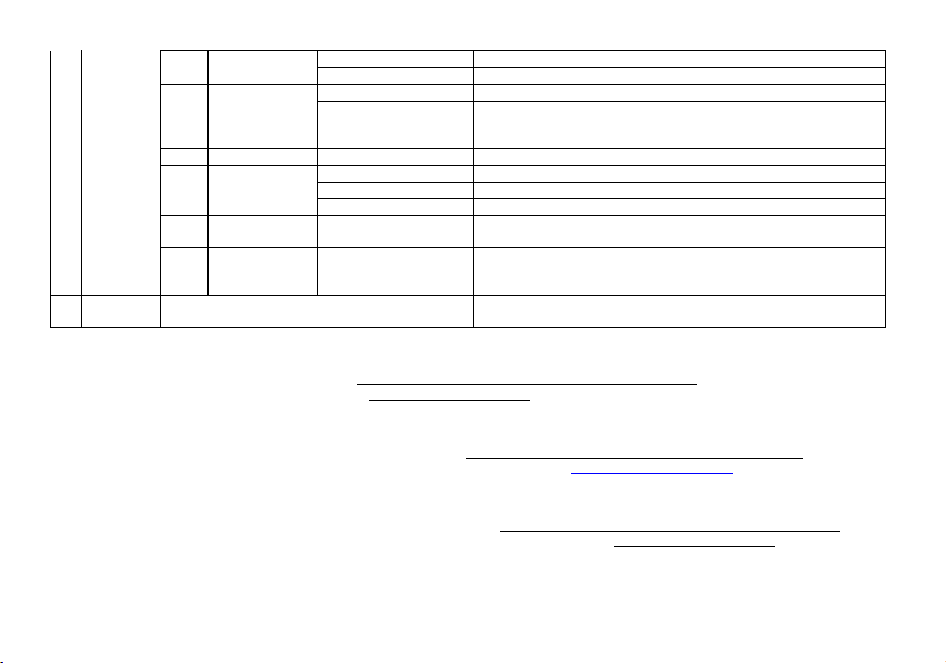
14 SCAN ADD
OFF
Forbid the current channel to join the scan group.
ON
Add the current channel to the scan group.
15 Busy Lockout
OFF
The [PTT] button on the channel is always allowed.
ON
Disables the [PTT] button on a channel that is already in use.
The transceiver will sound a beep tone and will not transmit if the [PTT] button
is pressed when a channel is already in use.
*13
OffSet
000
Specifies the difference between the TX and RX frequencies
*14 Direction
None
TX = RX (simplex). Disable access to repeaters in VFO/Frequency mode
Plus
Plus frequency shift direction. TX will be shifted higher in frequency than RX
Minus
Minus frequency shift direction. TX will be shifted lower in frequency than RX
16 CH_Memory CH001-CH100
This menu is used to either create new or modify existing channels (1 through
100) so that they can be accessed from MR/Channel Mode.
17 CH_Delete CH001-CH100
This menu is used to delete the programmed information from the specified
channel (1 through 100) so that it can either be programmed again or be left
empty.
7 Radio Info Radio ID\Firmware\Hardware
Displays radio ID, firmware version, hardware version. to check the radio
information.
EU Declaration of Conformity
Baofeng and Pofung hereby declares that the radio equipment type listed in Technical Specifications is in compliance with Directive 2014/53/EU. The full text of the EU
Declaration of Conformity is available at the following link: http://www.pofung.cn/download.asp?EnBigClassName=EU%20DOC. Via your local Baofeng helpdesk, your
dealer from where you purchased this radio or send an email to wangji[email protected].
Déclaration de conformité
Baofeng et Pofung déclarent par la présente que le type d'équipement radio répertorié dans les spécifications techniques est conforme à la directive 2014/53/EU. Le texte
intégral de la déclaration de conformité de l'UE est disponible sur le lien suivant: http://www.pofung.cn/download.asp?EnBigClassName=EU%20DOC. Via votre service
d'assistance Baofeng local, votre revendeur chez qui vous avez acheté cette radio ou envoyez un e-mail à wangjianhui@baofengradio.com.
Declaración de conformidad
Baofeng y Pofung declaran por la presente que el tipo de equipo de radio que figura en las Especificaciones técnicas cumple con la Directiva 2014/53 / EU. El texto
completo de la Declaración de conformidad de la UE está disponible en el siguiente enlace: http://www.pofung.cn/download.asp?EnBigClassName=EU%20DOC. A través
de su servicio de ayuda local de Baofeng, su distribuidor donde compró esta radio o envíe un correo electrónico a wangji[email protected].
Konformitätserklärung
Hiermit erklärt Baofeng und Pofung, dass der in den Technischen Spezifikationen aufgeführte Funkanlagentyp der Richtlinie 2014/53/EU entspricht. Den vollständigen Text
der EU-Konformitätserklärung finden Sie unter folgendem Link: http://www.pofung.cn/download.asp?EnBigClassName=EU%20DOC. Über Ihren örtlichen
Baofeng-Helpdesk, Ihren Händler, bei dem Sie dieses Radio gekauft haben, oder senden Sie eine E-Mail an wangji[email protected].
Dichiarazione di conformità
Baofeng e Pofung dichiarano con la presente che il tipo di apparecchiatura radio elencato nelle Specifiche Tecniche è conforme alla Direttiva 2014/53/EU. Il testo completo
della Dichiarazione di Conformità UE è disponibile al seguente link: http://www.pofung.cn/download.asp?EnBigClassName=EU%20DOC. Tramite il tuo helpdesk Baofeng
locale, il tuo rivenditore da cui hai acquistato questa radio o invia un'e-mail a wangjianhui@baofengradio.com.
ATTENTION: conditions of use!
The band of frequencies on which this device operates is administrated by limitations and/or permissions for their usage.
Consequently, in the EU Countries mentioned in the sheet, operators must consult the entrusted authorities. In particular, they must
possess a license or a frequency assigned to them by their respective competent authority.
ACHTUNG: Nutzungsbedingungen!
Das Frequenzband, auf dem dieses Gerät betrieben wird, wird durch Beschränkungen und/oder Genehmigungen für deren Nutzung
verwaltet. Folglich müssen die Betreiber in den im Blatt genannten EU-Ländern die betrauten Behörden konsultieren. Sie müssen
insbesondere im Besitz einer ihnen von ihrer jeweils zuständigen Behörde zugeteilten Konzession oder Frequenz sein.
ATTENTION: conditions d’utilisation!
La bande de fréquences sur laquelle cet appareil fonctionne est gérée par des limitations et/ou des autorisations pour leur utilisation.
Par conséquent, dans les pays de l'UE mentionnés dans la fiche, les opérateurs doivent consulter les autorités compétentes. En
particulier, ils doivent être en possession d'une licence ou d'une fréquence qui leur est attribuée par leur autorité compétente respective.
ATENCIÓN: condiciones de uso!
La banda de frecuencias en la que opera este dispositivo está administrada por limitaciones y / o permisos para su uso. En consecuencia, en los países de la UE
mencionados en la ficha, los operadores deben consultar a las autoridades encargadas. En particular, deben poseer una licencia o una frecuencia que les asigne su
respectiva autoridad competente.
ATTENZIONE: condizioni d'uso!
La banda di frequenze su cui opera questo dispositivo è amministrata da limitazioni e/o permessi per il loro utilizzo. Di conseguenza, nei Paesi UE citati nella scheda, gli
operatori devono consultare le autorità preposte. In particolare, devono possedere una licenza o una frequenza assegnata loro dalla rispettiva autorità competente.
FR
DE
IT
NL
BE
LU
DK
IE
HR
GR
ES
PT
FI
AT
SE
PL
HU
CZ
CY
SI
SK
LV
LT
EE
BG
RO
MT
INFORMAZIONE AGLI UTENTI: Ai sensi dell’art. 13 del decreto legislativo 25 luglio 2005, n.151 “Attuazione delle Direttive 2002/95/CE,
2002/96/CE e 2003/108/CE, relative alla riduzione dell’uso di sostanze pericolose nelle apparecchiature elettriche ed elettroniche, nonché
allo smaltimento dei rifiuti”. Il simbolo del cassonetto barrato riportato sull’apparecchiatura indica che il prodotto alla fine della propria vita
utile deve essere raccolto separatamente dagli altri rifiuti. L’utente dovrà, pertanto, conferire l’apparecchiatura giunta a fine vita agli idonei
centri di raccolta differenziata dei rifiuti elettronici ed elettrotecnici, oppure riconsegnarla al rivenditore al momento dell’acquisto di una
nuova apparecchiatura di tipo equivalente, in ragione di uno a uno. L’adeguata raccolta differenziata per l’avvio successivo
dell’apparecchiatura dismessa al riciclaggio, al trattamento e allo smaltimento ambientalmente compatibile contribuisce ad evitare possibili effetti negativi
sull’ambiente e sulla salute e favorisce il riciclo dei materiali di cui è composta l’apparecchiatura. Lo smaltimento abusivo del prodotto da parte dell’utente
comporta l’applicazione delle sanzioni amministrative di cui al dlgs. n.22/1997 (articolo 50 e seguenti del dlgs. n.22/1997).
All articles displaying this symbol on the body, packaging or instruction manual of same, must not be thrown away into normal disposal bins but brought to
specialised waste disposal centres. Here, the various materials will be divided by characteristics and recycles, thus making an important contribution to
environmental protection.
Alle Artikel, die auf der Verpackung oder der Gebrauchanweisung dieses Symbol tragen, dürfen nicht in den normalen Mülltonnen entsorgt werden, sondern
müssen an gesonderten Sammelstellen abgegeben werden. Dort werden die Materialien entsprechend ihrer Eigenschaften getrennt und, um einen Beitrag
zum Umweltschutz zu liefern, wiederverwertet.
Todos los artículos que exhiban este símbolo en el cuerpo del producto, en el embalaje o en el manual de instrucciones del mismo, no deben ser
desechados junto a los residuos urbanos normales sino que deben ser depositados en los centros de recogida especializados. En estos centros, los
materiales se dividirán en base a sus características y serán reciclados, para así poder contribuir de manera importante a la protección y conservación del
medio ambiente.
Tous les articles présentant ce symbole sur le corps, l'emballage ou le manuel d'utilisation de celui-ci ne doivent pas être jetés dans des poubelles normales
mais être amenés dans des centres de traitement spécialisés. Là, les différents matériaux seront séparés par caractéristiques et recyclés, permettant ainsi
de contribuer à la protection de l'environnement.
Όλα τα προϊόντα στα οποία εμφανίζεται το ακόλουθο σύμβολο στο σώμα, τη συσκευασία ή το εγχειρίδιο χρήσης τους, δεν πρέπει να εναποθέτονται στους
κοινούς κάδους απορριμάτων αλλά να προσκομίζονται στα ειδικά κέντρα αποκομιδής. Εκεί, τα διάφορα υλικά θα πρέπει να διαχωρίζονται ανάλογα με τα
χαρακτηριστικά και τα ανακυκλούμενα υκλικά, συμμετέχοντας έτσι ουσιαστικά στην προστασία του

WARNING:
Changes or modifications to this unit not expressly approved by the party responsible for compliance could void the user’s authority to operate the equipment. This
device complies with Part 15 of the FCC Rules. Operation is subject to the following two conditions: 1) This device may not cause harmful interference, and 2) this device
must accept any interference received, including interference that may cause undesired operation.
NOTE: This equipment has been tested and found to comply with the limits for a Class B digital device, pursuant to Part 15 of the FCC Rules.
These limits are designed to provide reasonable protection against harmful interference in a residential installation. This equipment generates, uses and can radiate radio
frequency energy and, if not installed and used in accordance with the instructions, may cause harmful interference to radio communications. However, there is no
guarantee that interference will not occur in a particular installation.
If this equipment does cause harmful interference to radio or television reception, which can be determined by turning the equipment off and on, the user is encouraged
to try to correct the interference by one or more of the following measures:
• Reorient or relocate the receiving antenna.
• Increase the separation between the equipment and receiver.
• Connect the equipment into an outlet on a circuit different from that to which the receiver is connected.
• Consult the dealer or an experienced radio/TV technician for help.
Safety Information for Radios
Your wireless handheld portable transceiver contains a low power transmitter. When the talk key is pushed, it sends out radio frequency (RF) signals. The device is
authorized to operate at a duty factor not to exceed 50%. In August 1996, the Federal Communications Commissions(FCC) adopted RF exposure guidelines with safety
levels for handheld wireless devices. a minimum distance of 2.5 cm must be maintained when held-to-face, and body-worn operations are restricted to the approved
original accessories (belt clip), a minimum distance of 0 cm. Do not use this device when antenna shows obvious damages.
Important
FCC RF Exposure Requirements: For body-worn operation, this radio has been tested and meets the FCC RF exposure guidelines when used with Pofung accessories
supplied or designated for this product. Use of other accessories may not ensure compliance with FCC RF exposure guidelines. Use only the supplied antenna.
Unauthorized antennas, modifications or attachments could damage the transmitter and may violate FCC regulations.
FCC Part 15.21 Warning Statement-
NOTE: THE GRANTEE IS NOT RESPONSIBLE FOR ANY CHANGES OR MODIFICATIONS NOT EXPRESSLY APPROVED BY THE PARTY RESPONSIBLE FOR COMPLIANCE. SUCH
MODIFICATIONS COULD VOID THE USER’S AUTHORITY TO OPERATE THE EQUIPMENT.
Disclaimer
The accuracy and completeness of the contents are sought in the process of compilation, but we do not bear any responsibility for the possible errors or omissions. With
the continuous development of technology, we reserve the right to change the design and specification of the product without notice. No copy, modification, translation
and dissemination of this handbook may be made in any form without the prior written authorization of our department.
EU Contact: APEX CE SPECIALISTS LIMITED
Unit 3D North Point House, north Point Business Park,
New Mallow Road, Cork, T23 AT2P, Ireland
PO FUNG ELECTRONIC (HK) INTERNATONAL GROUP COMPANY LIMITED
ADD: Room 1508, 15/F, Office Tower II, Grand Plaza, 625 Nathan Road, Kowloon, Hong Kong
E-mail: wangjianhui@baofengradio.com
Http://www.baofengradio.com
Print version: UV32_CE_V1.0