140mm
100mm
Safety
For your own safety, this product should only be used with
CE and RoHS approved equipment.
Using this headset with non approved equipment can void
this product warranty.
This device complies with Part 15 of the FCC Rules. Operation is subject to the following
two conditions:
(1) This device may not cause harmful interference, and (2) this device must accept any
interference received, including interference that may cause undesired operation.
NOTE 1: This equipment has been tested and found to comply with the limits for a Class
B digital device, pursuant to part 15 of the FCC Rules. These limits are designed to
provide reasonable protection against harmful interference in a residential installation.
This equipment generates uses and can radiate radio frequency energy and, if not
installed and used in accordance with the instructions, may cause harmful interference
to radio communications. However, there is no guarantee that interference will not occur
in a particular installation. If this equipment does cause harmful interference to radio or
television reception, which can be determined by turning the equipment off and on, the
user is encouraged to try to correct the interference by one or more of the following
measures:
- Reorient or relocate the receiving antenna.
- Increase the separation between the equipment and receiver.
- Connect the equipment into an outlet on a circuit different from that to which the
receiver is connected.
- Consult the dealer or an experienced radio/TV technician for help.
NOTE 2: Any changes or modifications to this unit not expressly approved by the party
responsible for compliance could void the user's authority to operate the equipment.
VT NEXUS 34 Duo User Manual
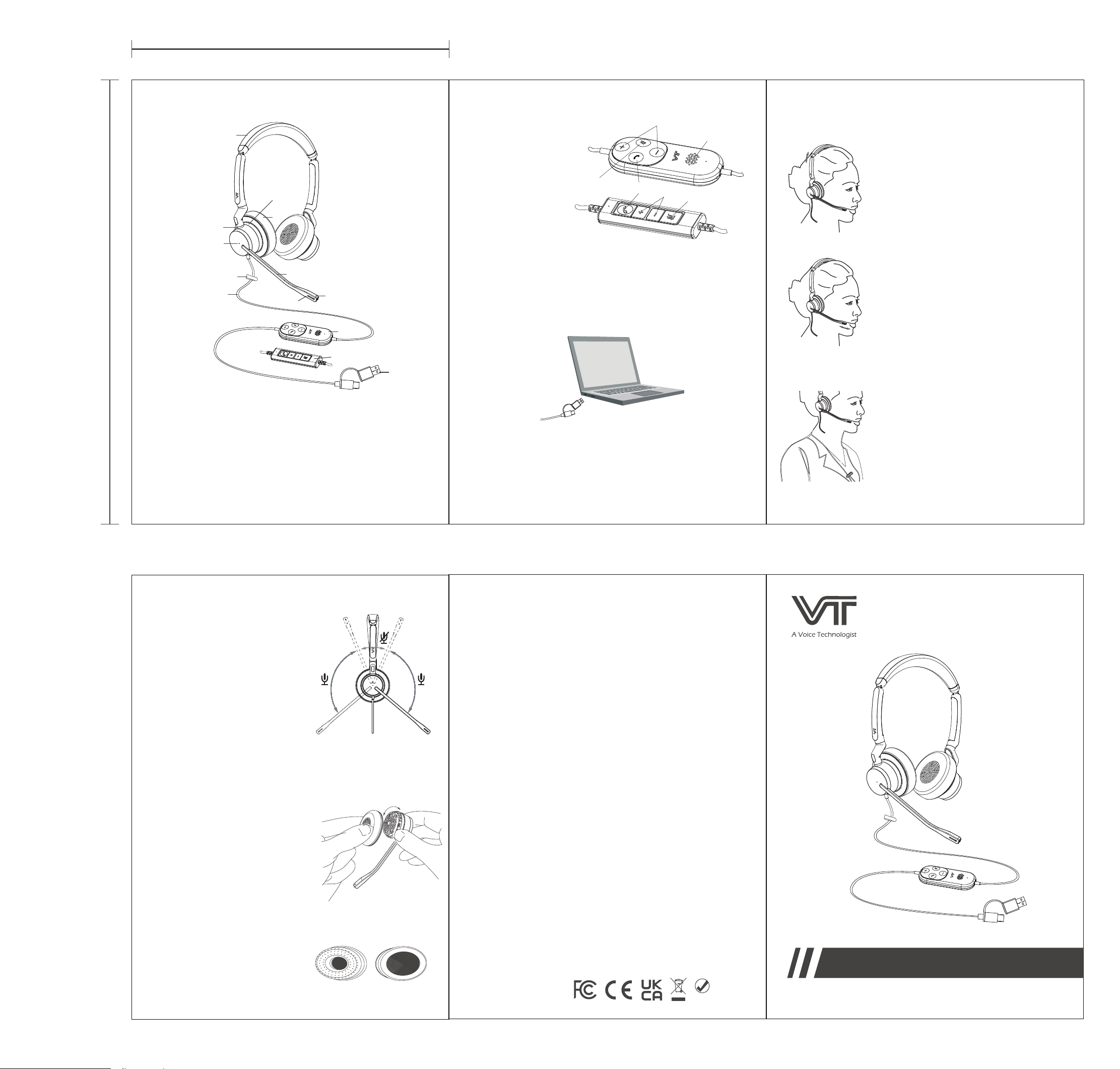
Ear Cushion Removal
To remove the earmuff, rotate it
counterclockwise and pull it off.
After cleaning or replacement,
align it with the designated
position on the earcup and
rotate it clockwise until you hear
a "click," which confirms it is
properly seated
Maintenance
The ear cushions can be removed
for cleaning or replacement.
How to Wear the Headset
Expand or contract the headband until it
feels comfortable and secure. The ideal fit
should exert little to no pressure on your
ears.
For clear, crisp audio and to prevent low
or distorted sound, position the microphone
20-30 mm from the corner of your mouth.
The flexible boom arm can be adjusted in
multiple directions to achieve the perfect
position.
Use the included clothing clip to secure the
cable. Fasten it at a comfortable height,
ensuring there is enough slack in the cable
to allow natural head movement without
pulling on or displacing the headset.
To switch sides, rotate the
microphone boom over the
headband to wear the headset
on your left or right ear.
The headset is compatible with leading UC Platforms,
including Microsoft Teams, Cisco Jabber, Avaya Workplace,
Linkus, MicroSIP,etc.
Dual-microphone ENC technology filters out background
noise for crystal-clear calls.
Compatibility & Feature
Wearing Your Headset
VT NEXUS 34 Duo Headset
1
Headset Components
1.Connect your Headset to an available USB A or USB C
port on your PC.
2. Make sure the headset is set as the default audio device
in your system's sound settings.
3. Refer to your softphone application's user guide to check
if additional audio settings are required for headset use.
Connection
1
3
2
4
Xiamen VBeT Electronics Co.,Ltd
Add: Unit 701-702, Building #1,No.4 Xingqi Road , Tongxiang
High-tech City, Xiamen Torch Hi-tech Industrial Development Zone.
Xiamen, Fujian, China P.C 36110
Tel : +86-592-5778728
Fax: +86-592-5778708
E-mail: [email protected]
Web: www.vbetglobal.com
FCC Warning
3
4
8
10
9
7
6
1. Mute-microphone
2. Volume control button
3. Hook On/Off Key
4. Ringtone speaker
(with on/off switch)
Auto Mute: The microphone is
automatically muted when you
flip the boom arm up to the
stowed position against the
headband.
11
13
5
USB06
USB04
2
1
2
12
Headset Components
8 Secondary microphone 1
9 Clothing clip
10 Cable
11 USB 06 Controller
(VT NEXUS 34/36)
12 USB 04 Controller
(VT NEXUS 34 Lite)
13 Type A and Type C
1 Primary microphone
2 Secondary microphone 2
(Only for VT NEXUS 36)
3 Flex boom
4 Ear cushion
5 Wideband Speaker
6 Headband
7 Busylight