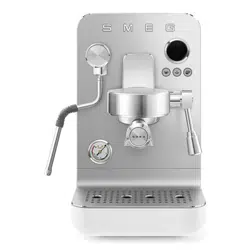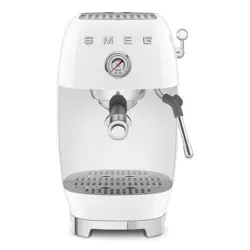

MANUEL DE L’UTILISATEUR
MACHINE À CAFÉ
MANUAL DE USO
CAFETERA
USER MANUAL
COFFEE MACHINE
ENFRES

We advise you to read this manual carefully, as it contains all the instructions for managing the appliance’s aesthetic
and functional qualities.
For further information on the product: www.smeg.com
Nous conseillons de lire attentivement ce manuel, qui comprend toutes les indications pour maintenir inaltérées les
qualités esthétiques et fonctionnelles de l’appareil acheté.
Pour obtenir des informations supplémentaires sur le produit: www.smeg.com
Aconsejamos leer atentamente este manual que contienen todas las indicaciones para mantener inalterada la calidad
estética y funcional del aparato adquirido.
Más información sobre el producto en: www.smeg.com
“C”
9
24
24A
9A
“A”
1
2
3
4
5
6
27
28
29
26
7
7
8
25
10
11
12
13
14
15
16
17
18
19
20
21
22
23
24
9
“D”
“B”
15
12
21
1 2 3
“E”
8 8 8
“G”
“I”
“J”
“K”
3
20
9
19
27
28
29
11
“H”
29
9
10
11
5
7
11
11
11
22
7
“F”
7
3
26
27
28
Important information for the user
Informations importantes pour l’utilisateur / Información importante para el usuario
Instructions / Avertissements / Advertencias
General information on this user manual, on safety and nal disposal / Informations générales sur ce manuel d’utilisation,
sur la sécurité et sur l’élimination dénitive de l’appareil / Información general del manual relativa al uso, la seguridad y la
eliminación nal
Description / Description / Descripción
Appliance description / Description de l’appareil / Descripción del aparato
Use / Utilisation / Uso
Information on using your appliance / Informations sur l’utilisation de l’appareil / Información sobre el uso del aparato
Cleaning and care / Nettoyage et entretien /
Limpieza y mantenimiento
Information for proper cleaning and maintenance of the appliance/ Informations pour un nettoyage et un entretien corrects
de l’appareil / Información sobre la limpieza y el mantenimiento correctos del aparato
Safety instructions / Consignes de sécurité /
Advertencia de seguridad
Information / Information / Información
Advice / Conseil / Sugerencia
NOTES
Scan the QR code for a quick access to the portal My Smeg Assistant
Scannez le code QR pour accéder rapidement au portail My Smeg Assistant
Escanee el código QR para acceder rápidamente al portal My Smeg Assistant

Il costruttore si riserva di apportare senza preavviso tutte le modifiche che riterrà utili al miglioramento dei propri
prodotti. Le illustrazioni e le descrizioni contenute in questo manuale non sono quindi impegnative ed hanno solo
valore indicativo.
The manufacturer reserves the right to make any changes deemed useful for improvement of its products without prior
notice. The illustrations and descriptions contained in this manual are therefore not binding and are merely indicative.
Le fabricant se réserve la faculté d’apporter, sans préavis, toutes les modifications qu’il jugera utiles pour
l’amélioration de ses produits. Les illustrations et les descriptions figurant dans ce manuel ne sont pas contraignantes et
n’ont qu’une valeur indicative.
Der Hersteller behält sich vor, ohne vorherige Benachrichtigung alle Änderungen vorzunehmen, die er zur
Verbesserung seiner Produkte für nützlich erachtet. Die in diesem Handbuch enthaltenen Illustrationen und
Beschreibungen sind daher unverbindlich und dienen nur zur Veranschaulichung.
De fabrikant behoudt zich het recht voor zonder waarschuwing alle wijzigingen aan te brengen die hij nodig acht om
zijn producten te verbeteren. De afbeeldingen en de beschrijvingen die aanwezig zijn in deze handleiding zijn niet
bindend, en hebben enkel een aanduidende waarde.
El fabricante se reserva el derecho a aportar sin aviso previo todas las modificaciones que considere útiles para la
mejora de sus propios productos. Las ilustraciones y las descripciones contenidas en este manual no comprometen,
por tanto, al fabricante y tienen un valor meramente indicativo.
O fabricante reserva-se o direito de efetuar, sem aviso prévio, qualquer modificação que vise o melhoramento dos
respetivos produtos. As ilustrações e descrições contidas neste manual, não são, por isso, vinculativas e possuem
apenas valor indicativo.
Tillverkaren förbehåller sig rätten att genomföra alla de ändringar som anses nödvändiga för att förbättra de egna
produkterna utan att meddela detta i förväg. De illustrationer och beskrivningar som finns i denna bruksanvisning är
vägledande och därmed inte bindande.
Производитель оставляет за собой право вносить без предупреждения все изменения, которые посчитает
полезными для улучшения собственной продукции. Рисунки и описания, содержащиеся в данном Руководстве
по эксплуатации, не имеют обязательств и имеют ознакомительный характер.
Producenten forbeholder sig retten til at foretage eventuelle ændringer, der anses for at være en forbedring af det
oprindelige produkt, uden forudgående varsel. Illustrationer og beskrivelser i denne betjeningsvejledning er derfor ikke
bindende og kun vejledende.
Producent zastrzega sobie prawo do nanoszenia, bez uprzedniego powiadomienia, wszelkich zmian, które uzna za
przydatne w celu ulepszania swoich produktów. Rysunki i opisy zawarte w niniejszej instrukcji nie są zobowiązujące i
mają charakter poglądowy.
Valmistaja pidättää itsellään oikeuden tehdä ohjeisiin mielestään tarpeellisia muutoksia ilman ennakkoilmoitusta. Tässä
oppaassa olevat kuvat ja piirrokset eivät näin ollen ole sitovia, vaan ne annetaan vain viitteellisessä mielessä.
Produsenten forbeholder seg rett til endringer på sine produkter grunnet tekniske fremskritt, uten forutgående varsel.
Illustrasjonene og beskrivelsene i denne bruksanvisningen er derfor ikke bindende og skal kun betraktes som
retningsgivende.
Il costruttore si riserva di apportare senza preavviso tutte le modifiche che riterrà utili al miglioramento dei propri
prodotti. Le illustrazioni e le descrizioni contenute in questo manuale non sono quindi impegnative ed hanno solo
valore indicativo.
The manufacturer reserves the right to make any changes deemed useful for improvement of its products without prior
notice. The illustrations and descriptions contained in this manual are therefore not binding and are merely indicative.
Le fabricant se réserve la faculté d’apporter, sans préavis, toutes les modifications qu’il jugera utiles pour
l’amélioration de ses produits. Les illustrations et les descriptions figurant dans ce manuel ne sont pas contraignantes et
n’ont qu’une valeur indicative.
Der Hersteller behält sich vor, ohne vorherige Benachrichtigung alle Änderungen vorzunehmen, die er zur
Verbesserung seiner Produkte für nützlich erachtet. Die in diesem Handbuch enthaltenen Illustrationen und
Beschreibungen sind daher unverbindlich und dienen nur zur Veranschaulichung.
De fabrikant behoudt zich het recht voor zonder waarschuwing alle wijzigingen aan te brengen die hij nodig acht om
zijn producten te verbeteren. De afbeeldingen en de beschrijvingen die aanwezig zijn in deze handleiding zijn niet
bindend, en hebben enkel een aanduidende waarde.
El fabricante se reserva el derecho a aportar sin aviso previo todas las modificaciones que considere útiles para la
mejora de sus propios productos. Las ilustraciones y las descripciones contenidas en este manual no comprometen,
por tanto, al fabricante y tienen un valor meramente indicativo.
O fabricante reserva-se o direito de efetuar, sem aviso prévio, qualquer modificação que vise o melhoramento dos
respetivos produtos. As ilustrações e descrições contidas neste manual, não são, por isso, vinculativas e possuem
apenas valor indicativo.
Tillverkaren förbehåller sig rätten att genomföra alla de ändringar som anses nödvändiga för att förbättra de egna
produkterna utan att meddela detta i förväg. De illustrationer och beskrivningar som finns i denna bruksanvisning är
vägledande och därmed inte bindande.
Производитель оставляет за собой право вносить без предупреждения все изменения, которые посчитает
полезными для улучшения собственной продукции. Рисунки и описания, содержащиеся в данном Руководстве
по эксплуатации, не имеют обязательств и имеют ознакомительный характер.
Producenten forbeholder sig retten til at foretage eventuelle ændringer, der anses for at være en forbedring af det
oprindelige produkt, uden forudgående varsel. Illustrationer og beskrivelser i denne betjeningsvejledning er derfor ikke
bindende og kun vejledende.
Producent zastrzega sobie prawo do nanoszenia, bez uprzedniego powiadomienia, wszelkich zmian, które uzna za
przydatne w celu ulepszania swoich produktów. Rysunki i opisy zawarte w niniejszej instrukcji nie są zobowiązujące i
mają charakter poglądowy.
Valmistaja pidättää itsellään oikeuden tehdä ohjeisiin mielestään tarpeellisia muutoksia ilman ennakkoilmoitusta. Tässä
oppaassa olevat kuvat ja piirrokset eivät näin ollen ole sitovia, vaan ne annetaan vain viitteellisessä mielessä.
Produsenten forbeholder seg rett til endringer på sine produkter grunnet tekniske fremskritt, uten forutgående varsel.
Illustrasjonene og beskrivelsene i denne bruksanvisningen er derfor ikke bindende og skal kun betraktes som
retningsgivende.
The manufacturer reserves the right to make any changes deemed useful for the improvement of its products
without priornotice. The illustrations and descriptions contained in this manual are therefore not binding and
are merely indicative.
EN - 1
EN
IMPORTANT INSTRUCTIONS
Important instructions
WARNING:
If the instructions contained in this manual are not
followed precisely, re or explosion may result causing property
damage, personal injury or death.
READ AND SAVE THESE INSTRUCTIONS
Your safety and the safety of others are very important.
We have provided many important safety messages throughout this manual and on
the appliance.
Read all the instructions before using the appliance and always obey all safety mes-
sages.
RECOGNIZE SAFETY INFORMATION
This is a safety alert symbol. This symbol alerts you to potential hazards that
can result in severe personal injury or death.
UNDERSTAND SIGNAL WORDS
A signal word - DANGER, WARNING or CAUTION - is used with the safety
alert symbol. DANGER denotes the most serious hazards. It means you could
be killed or seriously injured if you do not immediately follow the instructions.
WARNING means you could be killed or seriously injured if the instructions are
not followed. CAUTION indicates a potentially hazardous situation, which, if
not avoided, could result in minor to moderate injury.
• To reduce the risk of re or electric shock, do not remove
the cover (or back).
• No user-serviceable parts inside!
• Repair should be done by authorized service personnel
only.
WARNING
ECF03_UL_91477B930A_06-2025.indd 1ECF03_UL_91477B930A_06-2025.indd 1 02/12/2025 12:09:0202/12/2025 12:09:02
EN - 2
ATTENTION
• This appliance is intended for use in the home only.
• Use this appliance only for its intended purpose. The manufacturer
cannot be held liable for damage caused by improper use of this ap-
pliance.
• This appliance complies with current safety regulations.
Improper use of this appliance can result in personal injury and ma-
terial damage.
• Read all the instructions before installing or using the appliance for
the rst time.
• Keep these operating instructions in a safe place and pass them on
to any future user.
The safety messages will inform you of potential hazards, on how to avoid the risk
of injury
and what can occur if the instructions are not followed.
IMPORTANT: Observe all codes and ordinances in force.
WARNING: For your safety, the instructions contained in this manual
must be followed to minimize the risk of re or explosion and to prevent
property damage, personal injury or death.
Do not store or use gasoline or other ammable vapors, liquids or materials near
this or any other appliance.
NOTE: This appliance is NOT designed for installation in manufactured
(mobile) homes or in recreational vehicles (RVs).
NOTE:
GROUNDED PLUG (for product manufactured with a grounded plug)
As a safety feature, this product is equipped with grounded plug, which
will only t into a three-prong outlet. Do not attempt to bypass this safety
feature. Improper connection of the grounding conductor may result in the
risk of electric shock. Consult a qualied electrician if you have any doubts
on whether the outlet is properly grounded.
IMPORTANT INSTRUCTIONS
ECF03_UL_91477B930A_06-2025.indd 2ECF03_UL_91477B930A_06-2025.indd 2 02/12/2025 12:09:0202/12/2025 12:09:02
EN - 3
EN
1 Warnings
Follow all safety precautions to ensure
safe use of the appliance.
• Before using the appliance, read this
user manual carefully.
• Do not use the appliance outdoors.
• This appliance is for household use only.
• Do not use the appliance for other than
its intended use.
• Do not allow children to use the
appliance.
• Children should not play with the
appliance. Keep the appliance out of
the reach of children.
• Keep the packaging material (plastic
bags, expanded polystyrene) out of the
reach of children.
• Close supervision is necessary when
any appliance is used by or near
children.
• Turn off the appliance immediately after
use.
• Do not leave the appliance unattended
while it is running.
• Disconnect the appliance from the wall
outlet before assembly, disassembly,
cleaning and after each use.
• To disconnect, turn any control to “off,”
then remove plug from wall outlet.
IMPORTANT SAFEGUARDS
SAVE THESE INSTRUCTIONS
• Turn the appliance OFF, then unplug
from the outlet when not in use, before
assembling or disassembling parts and
before cleaning. To unplug, grasp the
plug and pull from the outlet. Never pull
from the power cord.
• To protect against re, electrical shock
and personal injury, do not immerse
the appliance, the power cord or plug
in water or any other liquid.
• Do not touch the appliance or the plug
with wet hands.
• Never try to extinguish a ame/re with
water: turn off the appliance, unplug it
from the outlet and cover the ame with
a lid or a re blanket.
• Do not use the appliance if the power
cord or plug is damaged or if the
appliance has been dropped or
damaged in any way.
• Do not let cord hang over edge of table
or counter, or touch hot surfaces.
• Do not operate any appliance with
a damaged cord or plug or after the
appliance malfunctions, or has been
damaged in any manner. Return
appliance to an authorized service
facility for examination, repair or
adjustment.
• Make sure the power cord does not
come in contact with sharp edges.
• Do not pull on the cord to remove the
plug from the socket.
When using electrical appliances, basic safety precautions
should always be followed to reduce the risk of re, electric
shock, and / or injury to person including the following:
WARNING
ECF03_UL_91477B930A_06-2025.indd 3ECF03_UL_91477B930A_06-2025.indd 3 02/12/2025 12:09:0202/12/2025 12:09:02
EN - 4
• Do not place the appliance on or near
switched-on gas or electric burners,
inside an oven, or near heat sources.
• Do not touch hot surfaces. Use handles
and knobs.
• Do not place the appliance near faucets
or sinks.
• Never attempt to repair the appliance
yourself or without the help of a qualied
technician. Failing to do this will void the
warranty.
• In case of malfunction, have the
appliance repaired by a qualified
technician.
• Do not make any changes to the
appliance.
• Make sure that the power outlet used is
always freely accessible, because only
in this way can it be unplugged when
necessary.
• To remove the plug from the power
outlet, operate directly on the plug. Never
pull the cable, it could be damaged.
• If the appliance should break down, do
not attempt to repair it.
• Do not allow the power supply cable
to dangle over the edge of the table or
other surface or to touch hot surfaces.
• If the plug or power supply cable
are damaged, have them replaced
exclusively by the Technical After-sales
centre, so as to prevent all risks.
To avoid the risk of injury, do not
open the brew chamber during the
brew process.
• Check hopper for presence of foreign
objects before using.
For this appliance
• Only insert water into the appropriate
tank. Use fresh, clean water.
• The appliance shall not be placed in a
cabinet when in use.
• Allow to cool before putting on or
taking off parts, and before cleaning
the appliance.
• The appliance generates heat and
produces hot water and steam during
operation. Avoid contact with boiling
steam or water.
• Do not ll the water container beyond
the maximum limit indicated.
• Do not use without water in the tank or
without a tank.
• Only use the appliance indoors and at
a maximum altitude of 2000 meters.
• Use only coffee beans to obtain the
powder, do not put already ground
coffee in the coffee bean hopper.
• Use the device only to prepare coffee-
based drinks from grinding coffee beans
or to dispense hot water. Other uses are
improper.
• Use only original spare parts from the
manufacturer. The use of spare parts
not recommended by the manufacturer
may cause re, electric shock or injury
to persons.
• Place the appliance on a flat, dry
surface.
• Avoid wetting or spraying liquid on
the
appliance. In case of contact with liquid,
immediately unplug the cord from the
electrical outlet and dry thoroughly: Risk
of electric shock!
IMPORTANT SAFEGUARDS
SAVE THESE INSTRUCTIONS
ECF03_UL_91477B930A_06-2025.indd 4ECF03_UL_91477B930A_06-2025.indd 4 02/12/2025 12:09:0202/12/2025 12:09:02
EN - 5
EN
IMPORTANT SAFEGUARDS
SAVE THESE INSTRUCTIONS
• Scalding may occur if the lid is removed
during the brewing cycles.
• Do not use abrasive cleaners or sharp
objects to clean the appliance.
• The use of accessory attachments
not recommended by the appliance
manufacturer may result in re, electric
shock or injury to persons.
• Do not install the appliance in an
environment that is not suitable.
• Do not place the appliance on or in
proximity of electric or gas cookers, or in
a heated oven.
• This appliance is not intended for use by
persons (including children) with reduced
physical, sensory, or mental capabilities,
or lack of experience and knowledge,
unless they are closely supervised and
instructed concerning use of the appliance
by a person responsible for their safety.
Children should be supervised to ensure
that they do not play with the appliance.
• Avoid contacting moving parts. Do not
attempt to defeat any safety interlock
mechanisms.
• This appliance has important markings
on the plug blade. Contact a qualied
technician to replace the plug with a
suitable one if damaged.
• Connect the appliance only to a power
outlet installed perfectly.
Electrical Cord:
a) A short power-supply cord (or
detachable power-supply cord) is
provided to reduce risks resulting from
becoming entangled in or tripping over
a longer cord.
b) Longer detachable power-supply cords
or extension cords are available and
may be used if care is exercised in their
use.
c) If a long detachable power-supply cord
or extension cord is used:
1. The marked electrical rating of the
detachable power-supply cord or
extension cord should be at least as
great as the electrical rating of the
appliance;
2. If the appliance is of the grounded
type, the extension cord should be
a grounding-type 3-wire cord; and
3. The longer cord should be arranged
so that it will not drape over the
counter top or table top where it can
be pulled on by children or tripped
over.
Connect the appliance
Make sure that the mains voltage
corresponds with that indicated on the
data plate on the bottom of the appliance.
Connect the appliance only to a power
outlet installed perfectly.
If the plug and power outlet are
incompatible, have the power outlet
replaced with a suitable type by qualied
staff.
ECF03_UL_91477B930A_06-2025.indd 5ECF03_UL_91477B930A_06-2025.indd 5 02/12/2025 12:09:0202/12/2025 12:09:02
EN - 6
IMPORTANT INSTRUCTIONS
SAVE THESE INSTRUCTIONS
This user’s manual
This user’s manual is an integral part of
the appliance and must be kept intact
and available to the user throughout its
life cycle.
Manufacturer’s liability
The manufacturer declines all liability
for damage undergone by persons and
objects due to:
• use of the appliance different from that
envisioned;
• user manual has not been read;
• tampering of individual parts of the
appliance;
• use of non-original spare parts;
• failure to comply with safety
recommendations.
Identication plate
The identication plate lists the technical
data, serial number and brand name.
The identification plate must never be
removed.
Disposal
Power voltage
Risk of electric shock
• Unplug the appliance.
• Unplug the cord from the wall outlet.
• Old electrical equipment must not be
disposed of with household waste!
In accordance with the law in force,
electrical appliances at the end of
their life should be taken to separate
collection facilities for electrical and
electronic waste. This is so that valuable
materials from old appliances can be
recycled and the environment can
be protected. For more information,
please contact your local authorities or
recycling center employees.
Note that non-polluting and recyclable
materials are used for packaging the
appliance.
• Dispose of the packaging materials
at appropriate differentiated waste
collection centers.
Plastic packaging
Risk of suffocation
• Do not leave the packaging or any part
of it unattended.
• Do not allow children to play with the
plastic packaging bags.
ECF03_UL_91477B930A_06-2025.indd 6ECF03_UL_91477B930A_06-2025.indd 6 02/12/2025 12:09:0202/12/2025 12:09:02
EN
EN - 7
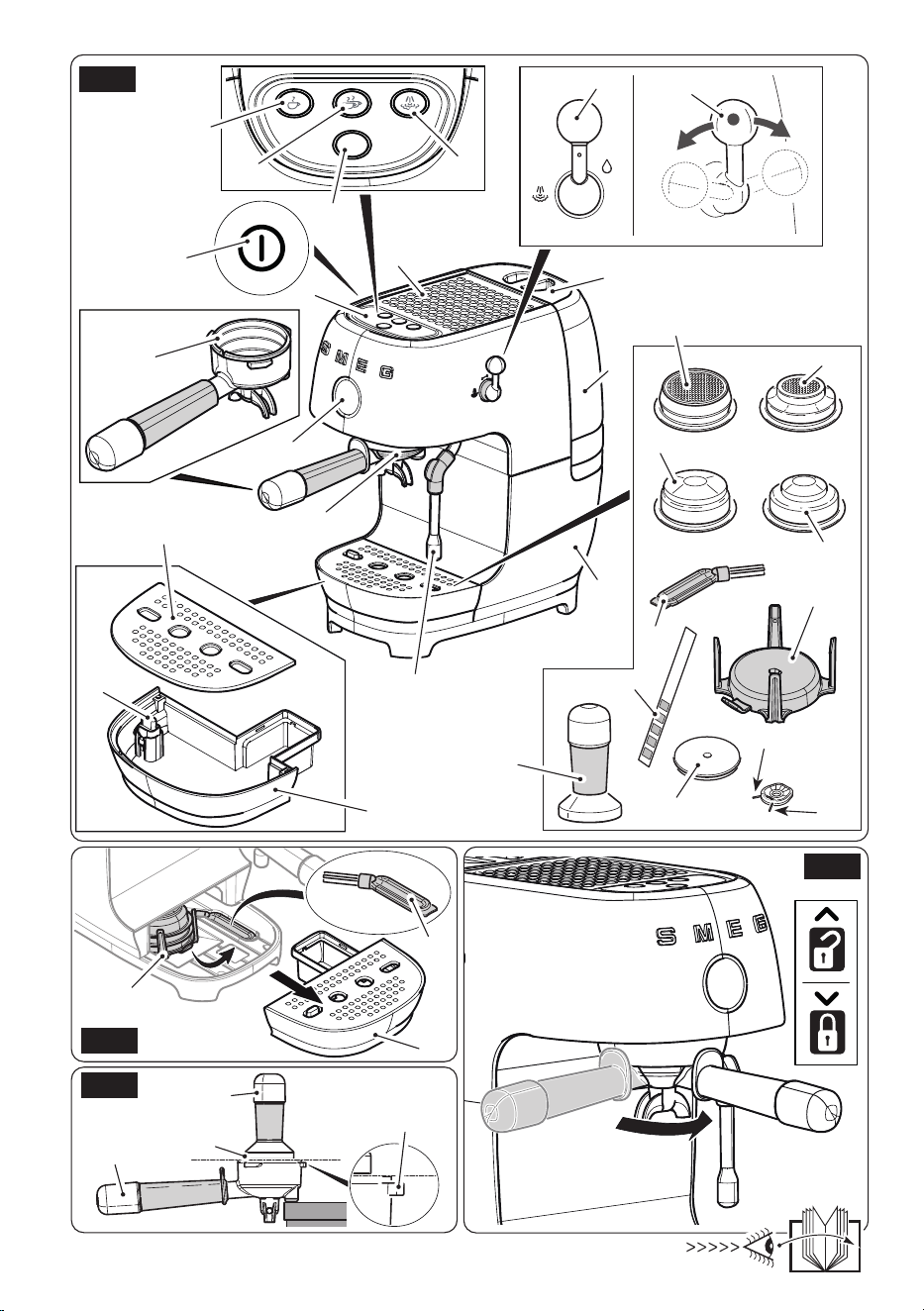
2 Description of the
appliance (Fig. A)
1 Machine body
2 Water tank lid
3 Water tank (1.6 l)
4 Cup shelf
5 ON/OFF key
6 Control panel
7 Steam/water lever
8 Pressure gauge
9 Filter holder
10 Dispensing unit
11 Steam/hot water wand
12 Drip tray
13 Cup grille
14 Water level indicator
15 Accessory compartment
16 Single non-pressurised lter
17 Double non-pressurised lter
18 Single pressurized lter
19 Double pressurized lter
20 Dispensing unit cleaning disc
21 Cleaning brush
22 Steam wand cleaning needle
23 Filter hole cleaning needle
24 Tamper
25 Water hardness test strip
3
Description of the parts/
accessories (Fig. A, B)
Accessory compartment (15)
The machine has a housing for unused
accessories, so that they are always
available to the user.
• To access the accessory compartment,
remove the drip tray (12), and then
remove the accessory compartment
(15) from inside the machine as shown
in Fig. B.
Filters
This machine has four lters; two non-
pressurised and two pressurized.
Non-pressurised lters (16, 17)
These filters allow various degrees
of grinding, dosing and tamping to
be tried, in order to create a perfectly
balanced espresso.
When dispensing with the espresso
functions, use the Single Espresso lter
(16) or Double Espresso lter (17).
When dispensing using the single and
double dose Cold brew functions, we
recommend using the non-pressurised
lter (17).
Pressurized lters (18, 19)
These lters facilitate and regulate the
pressure even with imperfect grinding
and dispensing or when using pre-
ground coffee.
When dispensing with the espresso
functions, use the Single Espresso lter
(18) or Double Espresso lter (19).
Select the lter for one or two cups, as
required.
Description
ECF03_UL_91477B930A_06-2025.indd 7ECF03_UL_91477B930A_06-2025.indd 7 02/12/2025 12:09:0202/12/2025 12:09:02
EN - 8
Dispensing unit cleaning disc (20)
Silicone disc to be used for cleaning the
dispensing unit.
Cleaning brush (21)
To be used for cleaning the dispensing unit
(10) and lter holder (9).
Needles for cleaning the steam wand
(22)/lter holes (23)
This accessory consists of two needles
with different thicknesses: one for cleaning
the hole in the steam wand (22) and the
other for cleaning the holes in the coffee
lters (23).
The accessory is located at
the base of the accessory
compartment (15).
Tamper (24)
Tamper with a stainless steel disc, 58
mm in diameter, to be used for tamping
ground coffee.
Water hardness test strip (25)
Use the strip provided (25) to measure
the mains water hardness as described in
the “Machine settings - Water hardness”
paragraph.
3.1 Description of the controls
(Fig. A)
ON/OFF key (5)
Press this key to turn the machine on or off.
Dispensing program change key (26)
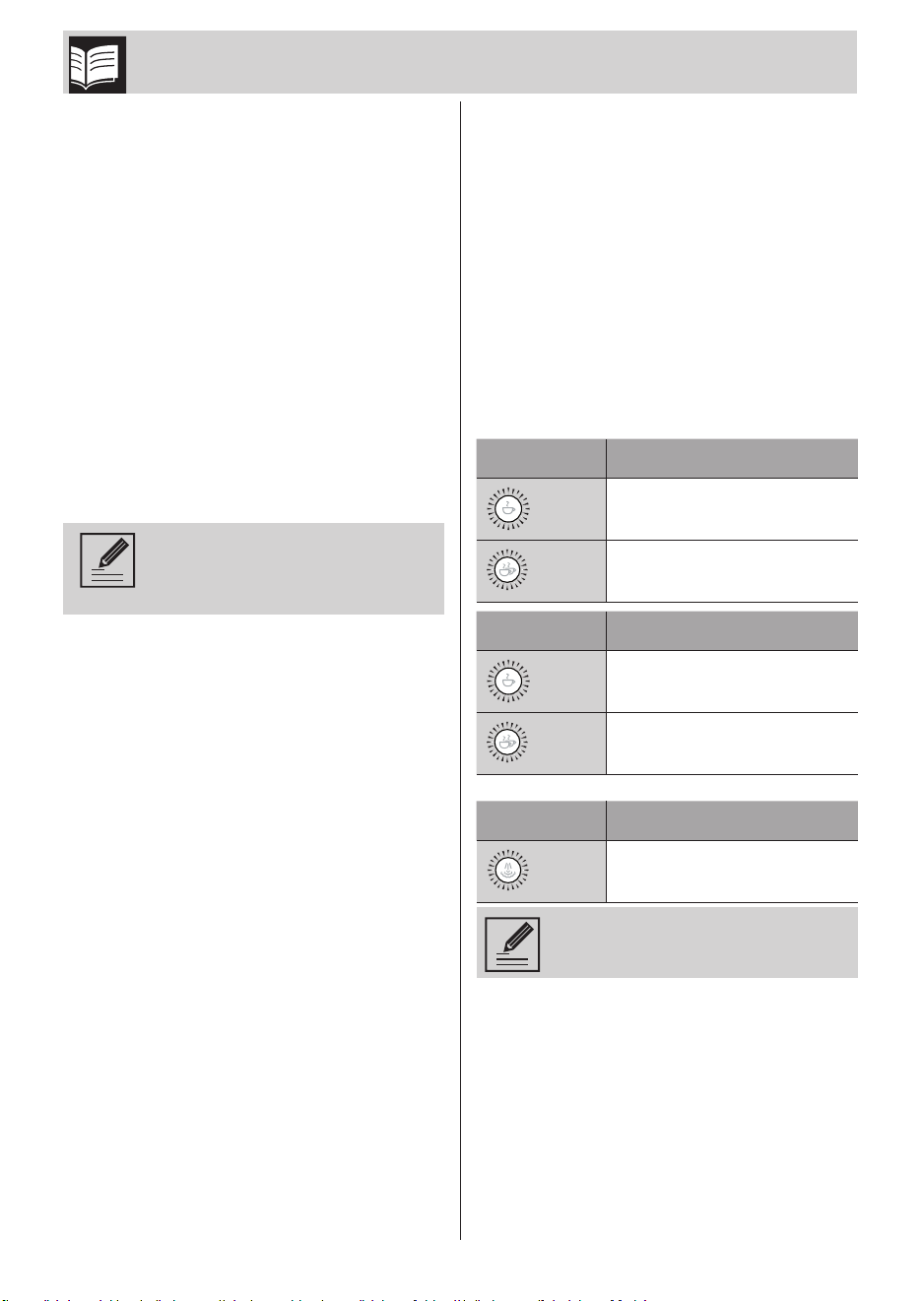
The product has 4 coffee functions and a
steam function.
With the machine on and ready for use,
press this key to change the dispensing
function menu from White to Blue and
vice versa.
Key White Menu Function
(27)
Single espresso
(28)
Double espresso
Key Blue Menu Function
(27)
Cold Brew - single dose
(28)
Cold Brew - double dose
Key Function
(29)
Dispensing steam
Key (29) remains lit in white at
all times.
Description
ECF03_UL_91477B930A_06-2025.indd 8ECF03_UL_91477B930A_06-2025.indd 8 02/12/2025 12:09:0202/12/2025 12:09:02
EN
EN - 9
3.2 Alarms
The keys ash differently to indicate the
current alarm or procedure.
The keys (27), (28) and (29) ash in
sequence:
The machine is reaching the correct
temperature for dispensing coffee. Wait
for the keys (27), (28) and (29) to light
continuously, and then select the desired
beverage.
The keys (27), (28) and (29) flash
simultaneously:
This alarm may indicate:
• water tank alarm: no water tank (3),
tank not inserted properly or not enough
water to dispense coffee.
Check that it is inserted properly or add
water if necessary;
• overpressure alarm: wait for the
machine to perform the automatic cycle
to discharge the residual pressure;
• in steam operation, the steam lever (7) is
operated before pressing the steam key
(29) or before the machine has reached
the preset steam temperature;
• the wand (11) is used to dispense
steam or hot water for longer than
120 seconds. Return the steam lever
(7) to the vertical position to end the
operation.
The key (29) is lit orange, (27) and (28)
off:
Indicates that a descaling cycle is required.
To proceed, refer to paragraph “6.4
Descaling” in section “6 Cleaning and
maintenance”.
To bypass the procedure, just press the key
(27) or (28); all keys light continuously and
the machine will be ready for use.
To avoid changing the avour
of the coffee and to ensure the
machine operates correctly,
we recommend performing
the descaling cycle when the
machine indicates.
If the descaling cycle is not
performed, the key (29) will light
orange at every switch-on until
the descaling cycle has been
completed.
The key (29) ashes orange fast:
The water in the tank (3) has finished
before the end of the descaling/cleaning
procedure.
Add water to the tank (3) and complete the
descaling/cleaning procedure as described
in the corresponding paragraphs.
3.3 Before using for the rst time
(Fig. A)
• Remove any labels and stickers from
the coffee machine.
• Use a damp cloth to clean all removable
components, such as: water tank (3), lid
(2), accessory compartment (15), cup
grille (13), lter holder (9), lters (16),
(17), (18), (19), tamper (24) and other
accessories.
• Remove the red protective cap located
on the back of the machine, between
the tank (3) and the rear machine body
(1).
• Make sure that all components are
thoroughly dry before retting them.
Do not use the coffee machine
without water in the tank or
without the water tank inserted.
FAULT HAZARD!
The parts that may come into
contact with foodstuffs are
made using materials that
comply with the provisions of
the legislation in force.
Description
ECF03_UL_91477B930A_06-2025.indd 9ECF03_UL_91477B930A_06-2025.indd 9 02/12/2025 12:09:0202/12/2025 12:09:02
EN - 10
4 Use
Before starting the coffee
machine, carefully read chapter
“1 Warnings” and paragraph
“3.3 Before using for the rst
time”.
4.1 Switching the machine on
• Make sure that the drip tray (12)
complete with cup grille (13) is tted
correctly at switch-on and before any
dispensing.
• Lift the tank lid (2) and pour fresh water
into the tank (3), taking care not to
exceed the indicated MAX level, and
then ret the lid (2).
• Switch the coffee machine on by
pressing the ON/OFF key (5); the keys
(27), (28) and (29) ash in sequence to
indicate that it is reaching the correct
temperature. The coffee machine is
ready for use as soon as all the keys
light continuously.
4.2 First use (Fig. A)
When using it for the rst time,
we recommend setting the
water hardness as described
in the “Setting the water
hardness” paragraph.
Rinse the internal circuits
before using it for the rst time.
Proceed as described below.
• Switch the machine on as described in
paragraph “4.1 Switching the machine
on”.
• Attach the lter holder (9) with non-
pressurised double cup lter (19) to the
dispensing unit (10).
• Place a container under the coffee
dispensing spouts and press the key
(28).
• Repeat this procedure 5 times.
• Place a container under the hot water/
steam wand (11).
• Turn the steam lever (7) clockwise and
dispense 100 ml of water; this takes
about 20 seconds.
• Turn the steam lever (7) counter-
clockwise back to the vertical position
to end the operation.
We also recommend rinsing the
internal circuits when the coffee
machine has not been used for
a long time.
4.3 Changing the dispensing
program (Fig. A)
• The machine has two dispensing
menus in memory: White Menu and
Blue Menu.
To switch between programs, press the
key (26).
• In the White Menu, all the keys are lit
white, while in the Blue Menu, the coffee
dispensing keys are lit blue.
Use
ECF03_UL_91477B930A_06-2025.indd 10ECF03_UL_91477B930A_06-2025.indd 10 02/12/2025 12:09:0202/12/2025 12:09:02
EN
EN - 11
• For the specic functions of each menu,
refer to section “3.1 Description of the
controls”.
4.4 Preparing an espresso coffee
(Fig. A, C, D, E)
To enjoy the coffee at its best,
we recommend pre-heating the
cup by rinsing it with hot water
or dispensing hot water into the
cup via the wand (11).
At every switch-on, we
recommend rinsing the
dispensing unit (10) and lter-
holder (9) circuits by dispensing
a double coffee without any
coffee in the lter.
When using SMEG CGF03 coffee
machines, we recommend
selecting the “SUPERFINE”
setting for non-pressurised
lters (16), (17) and “FINE” for
pressurised lters (18), (19).
• Check the water level in the tank (3) and
add water if necessary, taking care not
to exceed the MAX level.
• Select the right lter (16), (17), (18) or
(19) for the type of dispensing required
and insert it into the lter holder (9). For
more details about the different lters
provided, see paragraph “3 Description
of the parts/accessories”.
• Distribute the ground coffee evenly
inside the lter holder (9) and place the
latter on a surface as shown in Fig. C.
Press the coffee using the tamper (24)
provided. To dose the coffee correctly in
the lter and tamp it properly, the top
edge (24A) of the tamper should be
aligned with the top edge (9A) of the
lter holder.
The two raised reference mark-
ers on the inside of the coffee
lters are designed to indicate
the ideal quantity of coffee.
After tamping, check that the
quantity of coffee is at the cor-
rect level.
• Attach the filter holder (9) to the
dispensing unit (10) by turning it
counter-clockwise to the clamped
position.
• Place the cup or cups under the lter
holder spout(s) (9).
• Select the desired beverage from
the White Menu and press the
corresponding key, (27) or (28). For more
details on the White Menu functions,
see paragraph “4.3 Changing the
dispensing program”.
• When the set quantity is reached,
dispensing will stop automatically.
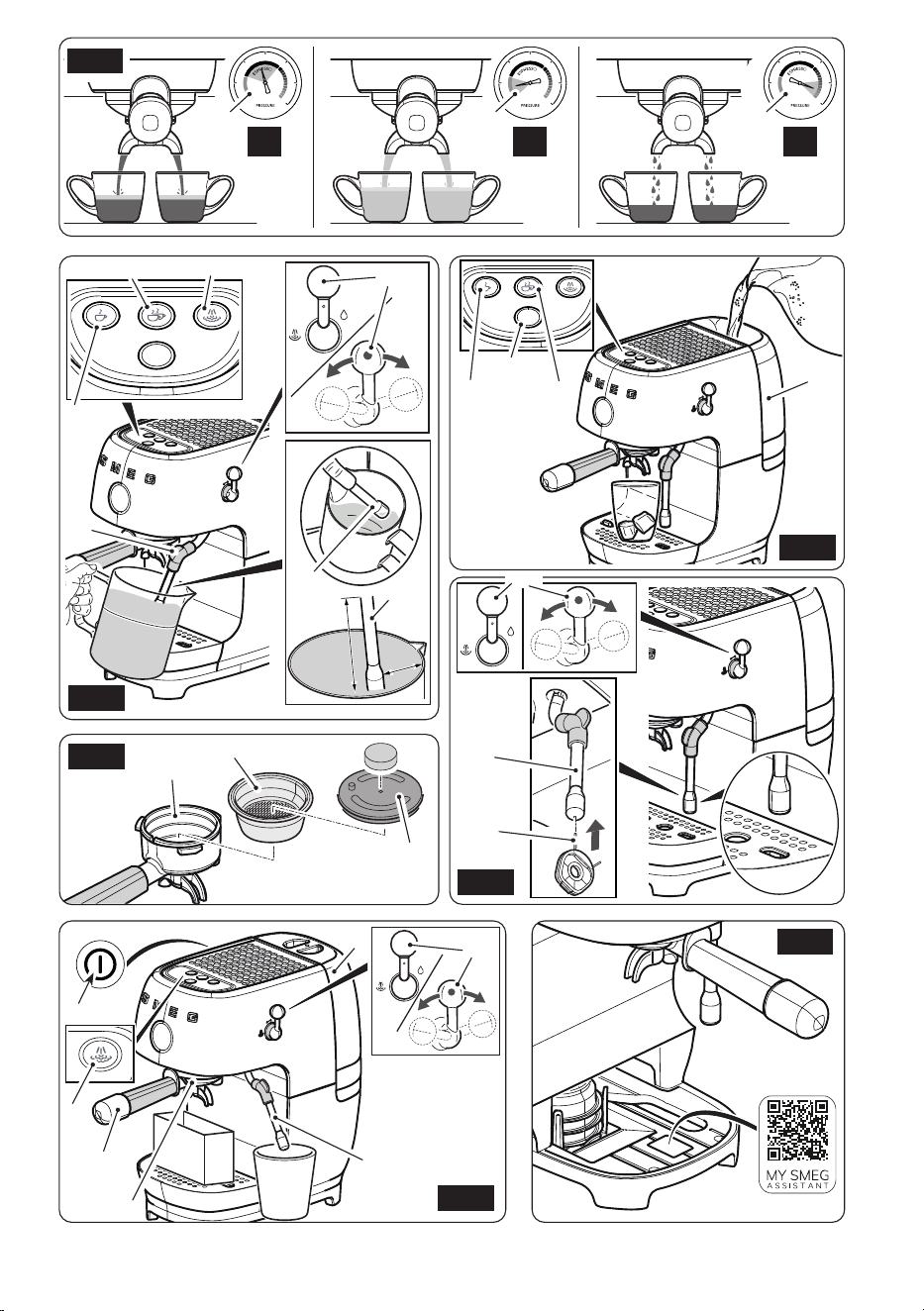
The pressure gauge (8) lets you check
whether the coffee is dispensed
perfectly as shown in Fig. E:
E1. Correct Extraction
The indicator is on the ‘Espresso’
segment: the coffee was extracted
correctly.
The coffee ows slowly but continuously,
and extraction takes about 25–35 sec.
E2. Under-extraction
The indicator is below the ‘Espresso’
segment. The coffee is under-extracted.
Possible causes:
The coffee used is ground too coarsely,
there is not enough ground coffee, or
the tamping was not done with the right
pressure.
Solutions:
Adjust the coffee grinding to be ner if
using a coffee grinder, add more coffee
or adjust the manual coffee tamping
step.
E3. Over-extraction
The indicator is above the ‘Espresso’
segment. The coffee is over-extracted.
Possible causes:
The coffee used is ground too nely, there
is too much ground coffee, or the tamping
was not done with the right pressure.
Use
ECF03_UL_91477B930A_06-2025.indd 11ECF03_UL_91477B930A_06-2025.indd 11 02/12/2025 12:09:0202/12/2025 12:09:02
EN - 12
Solutions:
Adjust the coffee grinding to be courser
if using a coffee grinder, add less coffee
or adjust the manual coffee tamping
step.
To avoid spraying, do not
remove the lter holder during
dispensing, but wait a few
seconds after dispensing has
stopped.
BURNS HAZARD!
It is completely normal that the
rst coffees do not reach the
right temperature if the machine
has not been used for a long
time (breaks of more than 30
minutes). Repeat the procedure
described to obtain a hotter
coffee.
• After dispensing, remove the filter
holder by turning it clockwise and clean
it.
Caution! If you want to
remove the drip tray (12) after
dispensing, wait about 30
seconds before doing so.
After about 10 minutes of
inactivity, the machine enters
the Energy Saving function. The
standby time can be changed
as described in the “Setting the
auto-off time” paragraph.
4.5 Preparing a Cold Brew (Fig. F)
• Check the water level in the tank (3) and
add water if necessary, taking care not
to exceed the MAX level.
To get the best avour from Cold
Brew dispensing, ll the tank (3)
with fresh water.
When using SMEG CGF03
coffee machines, we
recommend setting the machine
to “MEDIUM”, between level 10
and 12.
• Insert the non-pressurised lter (17) into
the lter holder (9).
• Distribute the ground coffee evenly
inside the lter holder (9) and place the
latter on a surface as shown in Fig. C.
Press the coffee using the tamper (24)
provided. To dose the coffee correctly in
the lter and tamp it properly, the top
edge (24A) of the tamper should be
aligned with the top edge (9A) of the
lter holder.
• Attach the filter holder (9) to the
dispensing unit (10) by turning it
counter-clockwise to the clamped
position.
• Pour 1 or 2 ice cubes into the glass (Fig.
F).
• Press the key (26) to switch to the Blue
Menu.
• Select the desired beverage from the
Blue Menu and press the key, (27) or
(28), as you prefer. For more details on
the Blue Menu functions, see paragraph
“4.3 Changing the dispensing program”.
During this preparation, if
correctly ground coffee is used,
the pressure gauge (8) remains
stationary.
Use
ECF03_UL_91477B930A_06-2025.indd 12ECF03_UL_91477B930A_06-2025.indd 12 02/12/2025 12:09:0202/12/2025 12:09:02
EN
EN - 13
When making a Cold Brew
immediately after dispensing a
standard Espresso, always cool
the dispensing unit (10). To do
so, attach the empty lter holder
(9) to the unit and press the key
(28) from the Blue Menu before
dispensing.
4.6 Dispensing steam and
preparing a cappuccino
(Fig. G)
• Make sure that the drip tray (12) is tted
correctly.
• Fill a milk jug with 100 ml of cold milk for
each cappuccino you want to prepare.
• Press the key (29); the key starts
ashing to indicate that the machine
is reaching the correct temperature for
dispensing steam. Wait for the key (29)
to light continuously, which indicates
that the correct steam dispensing
temperature has been reached.
• Place the milk jug containing the milk
under the steam wand (11) with the tip
of the wand touching the milk.
• Turn the steam lever (7) counter-
clockwise to the
“ “
icon to dispense
steam.
• Once the optimum foam level and
temperature have been reached, stop
dispensing by turning the steam lever
(7) back to the vertical position.
• Pour the frothy milk into the cups
containing the espresso prepared
previously.
The milk froth quality may be
affected by the type of milk used
and the dexterity of the user.
To obtain a good cappuccino,
we recommend using semi-
skimmed or full-fat milk at fridge
temperature (about 5°C/41°F).
• To make several cappuccinos,
rst prepare all the coffees
and then froth the milk for all
of them together.
• After heating the milk,
dispense steam for a few
seconds.
• Clean the steam wand (11)
whenever it is used to avoid
depositing milk residues or
clogging it. For information
on cleaning the steam wand,
see paragraph “6 Cleaning
and maintenance”.
•
After dispensing steam, the
key (29) will remain on. You
can then dispense more steam
or, if you want to finish the
steam dispensing procedure,
press the key (29); the machine
will automatically drain water
into the drip tray (12) to cool
the heating element so that
you can prepare a coffee
immediately after frothing the
milk. Make sure that the drip
tray (12) is tted correctly.
Caution! The machine will
automatically drain the water
to cool the heating element after
the steam function has not been
used for 120 seconds.
Caution! If you want to remove
the drip tray (12) after dispensing,
wait about 30 seconds before
doing so.
Caution! Do not activate the hot
water “ ” function once the
machine has nished dispensing
the steam, or during the cooling
phase, as this could cause steam
to be emitted by the steam wand
(11).
Use
ECF03_UL_91477B930A_06-2025.indd 13ECF03_UL_91477B930A_06-2025.indd 13 02/12/2025 12:09:0302/12/2025 12:09:03
EN - 14
4.7 Dispensing hot water (Fig.
H)
• Place a container under the steam
wand (11).
• Turn the steam lever (7) clockwise to the
“ ” icon to dispense hot water.
• Stop dispensing by returning the lever
(7) to the vertical position.
4.8 Setting the amount of coffee
The amount of coffee dispensed can be
customised for each function type.
To change the amount of coffee dispensed
by the machine:
• Place a small or large cup under the
dispenser (10).
• Press key (27) or (28) for at least 3
seconds, depending on the desired
type of drink. If the beeps are activated,
a double beep indicates that the
customisation procedure has been
initiated. The selected key starts to
ash.
• When the desired amount has been
reached, press the key again to stop
dispensing.
• The length has been set and is stored
permanently.
To reset to the factory settings,
press and hold the keys (28)
and (26) simultaneously for at
least 10 seconds. All the keys
ash simultaneously and the
machine beeps once to indicate
that the factory settings have
been restored, if the beeps are
activated.
5 Machine settings
• The programming menu can be used to
set:
- Coffee temperature.
- Water hardness.
- Auto-off time (Standby).
• To access the programming menu,
press the key (26) for 5 seconds. All the
keys ash simultaneously.
• To set the coffee temperature, press the
key (27).
• To set the water hardness, press the key
(28).
• To set the auto-off time, press the key
(29).
• Set the machine according to your
needs.
• If no keys are pressed for 60 seconds,
the machine reverts to the main menu.
Setting the coffee temperature
• Access the programming menu.
• Press the key (27) to set the coffee
temperature.
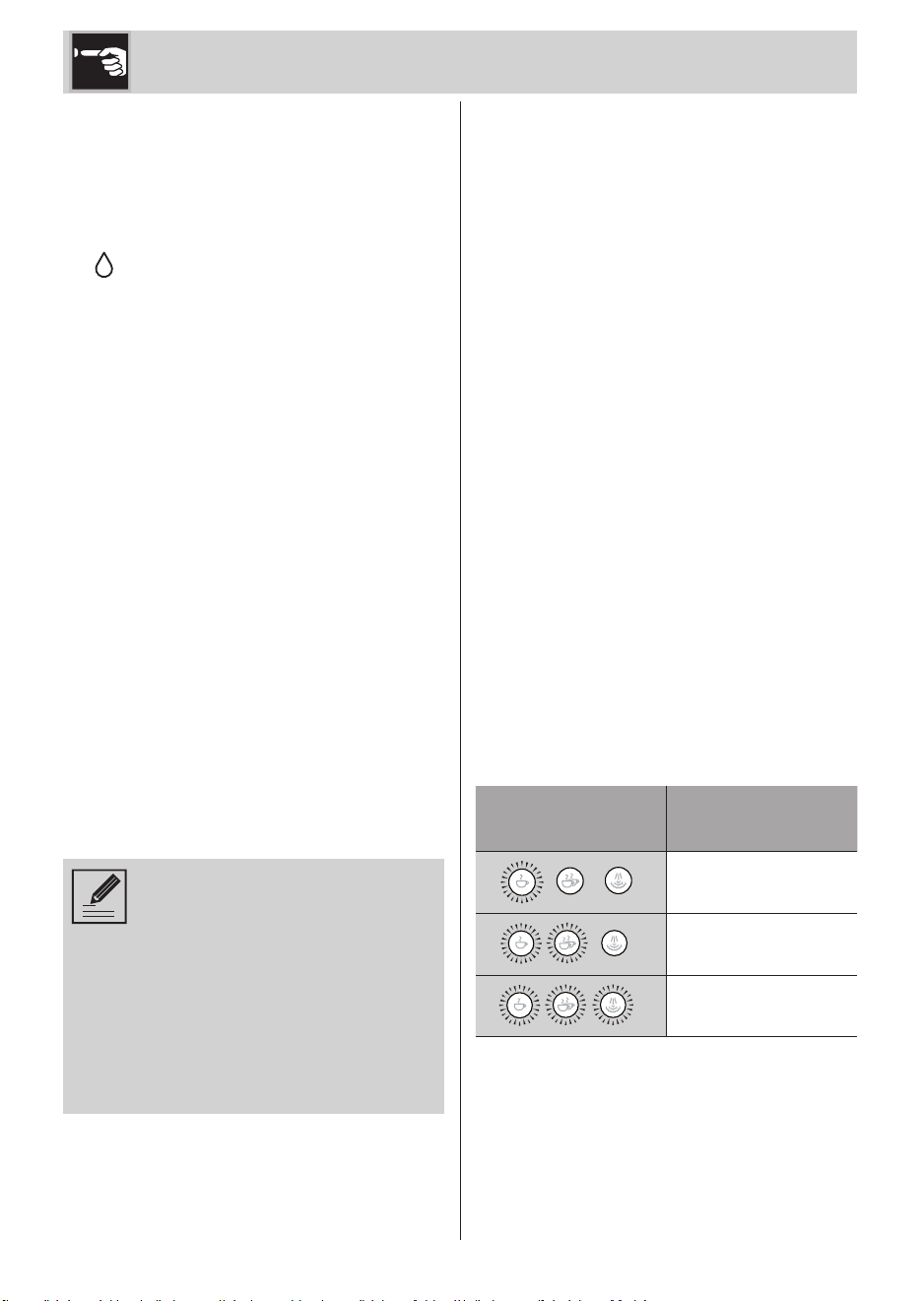
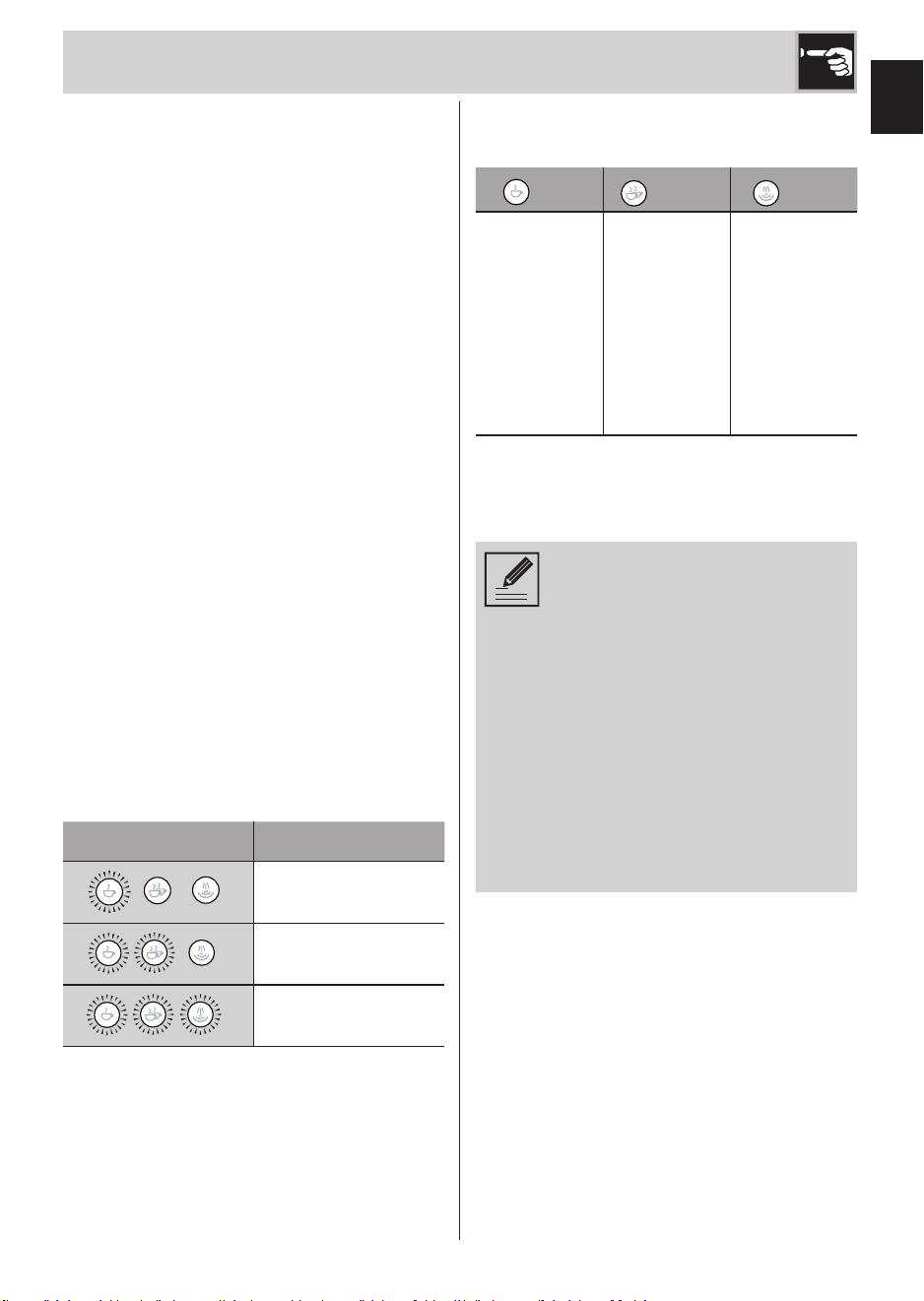
• The key (27) ashes 3 times, after which
the indicator lights show the current
setting:
Indicator lights
Setting the
temperature
Low
Optimal
High
• Press the key corresponding to the
desired temperature: low (27), optimal
(28) or high (29).
• The selected key flashes to indicate
that the selection has been stored, and
a single beep sounds, if the beeps are
activated.
Use
ECF03_UL_91477B930A_06-2025.indd 14ECF03_UL_91477B930A_06-2025.indd 14 02/12/2025 12:09:0302/12/2025 12:09:03
EN
EN - 15
Setting the water hardness
• The machine is pre-set to “Hard Water
Level” at the factory. The machine can
be programmed to the actual mains
water hardness so that descaling is
performed less frequently.
•
If you do not know the water hardness,
use the test strip provided (25) and follow
the instructions below.
• Remove the reactive strip supplied (25)
from its packaging.
• Fully immerse the strip (25) in a glass of
water for about one second.
• Remove the strip from the water and
shake it slightly. Read the results after
about one minute.
If 5 blue stripes appear on the strip,
select the “soft water” setting.
If 1 or 2 pink stripes appear on the strip,
select the “medium water” setting.
If 3, 4 or 5 pink stripes appear on the
strip, select the “hard water” setting.
• Access the programming menu.
• Press the key (28) to set the water
hardness.
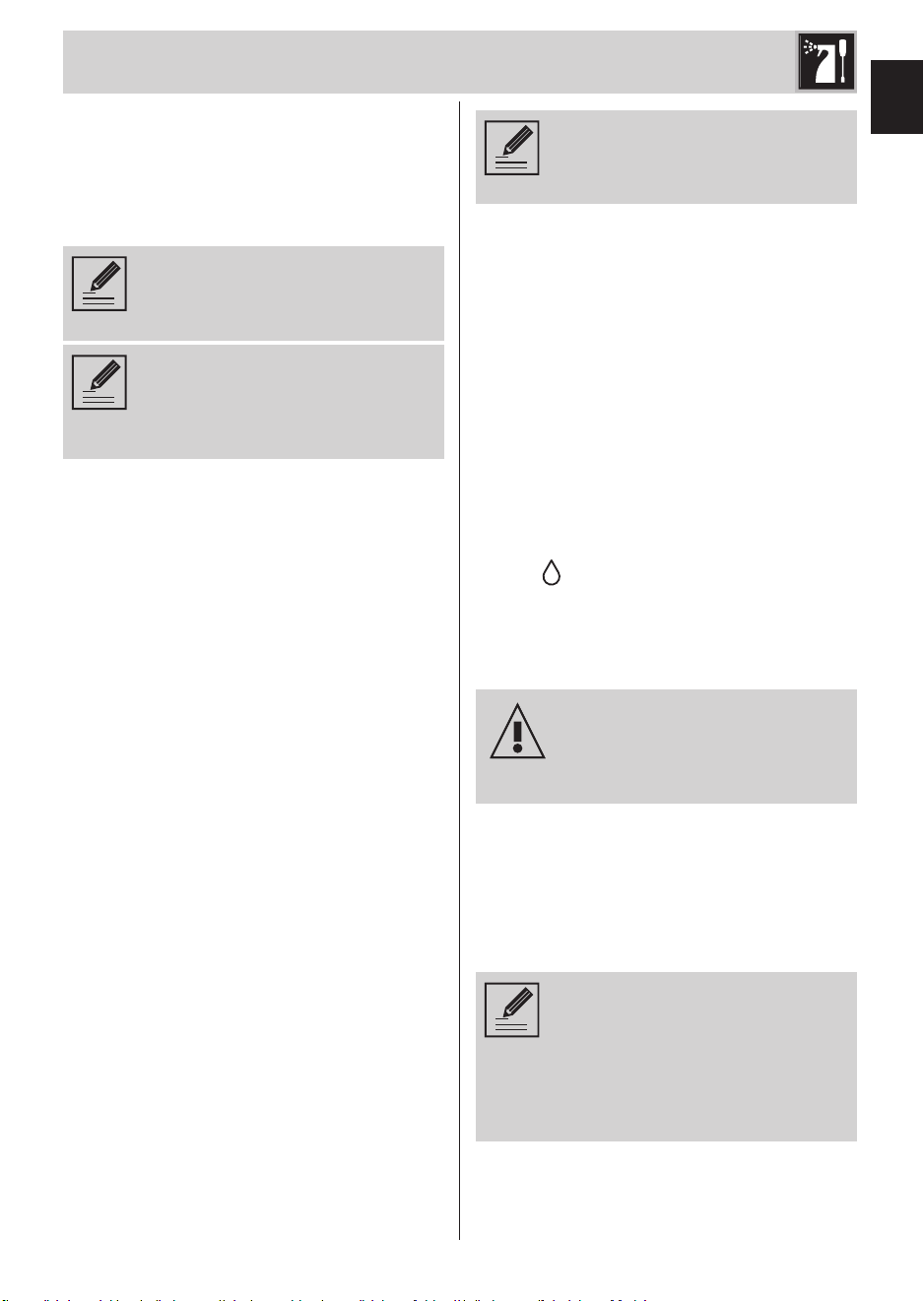
• The key (28) ashes 3 times, after which
the indicator lights show the current
setting:
Indicator lights Water setting
Soft
Medium
Hard
• Press the key that corresponds to the
water hardness:
Soft
Medium
Hard
<10°dH
10°dH –
20°dH
>20°dH
<18°fH
18°fH –
36°fH
>36°fH
<180 mg/l
CaCo3
180–300
mg/l
CaCo3
360 mg/l
CaCo3
• The selected key flashes to indicate
that the selection has been stored,
and a single beep sounds if beeps are
enabled.
To prolong machine operation
and preserve the aroma
and avour of the coffee, we
recommend using the Smeg
Softener Filter (optional, not
supplied). For information on
installation and operation,
follow the instructions that
accompany the accessory.
Once installed, set the water
hardness to ‘Soft’, following
the instructions in the previous
paragraph.
Use
ECF03_UL_91477B930A_06-2025.indd 15ECF03_UL_91477B930A_06-2025.indd 15 02/12/2025 12:09:0302/12/2025 12:09:03
EN - 16
Setting the auto-off time
To save energy, the coffee machine has an
auto-off function that intervenes when it
is not used for a long time.
To turn the appliance back on, press any
key on the control panel.
To set the auto-off time:
• Access the programming menu.
• Press the key (29) to set the auto-off
time.
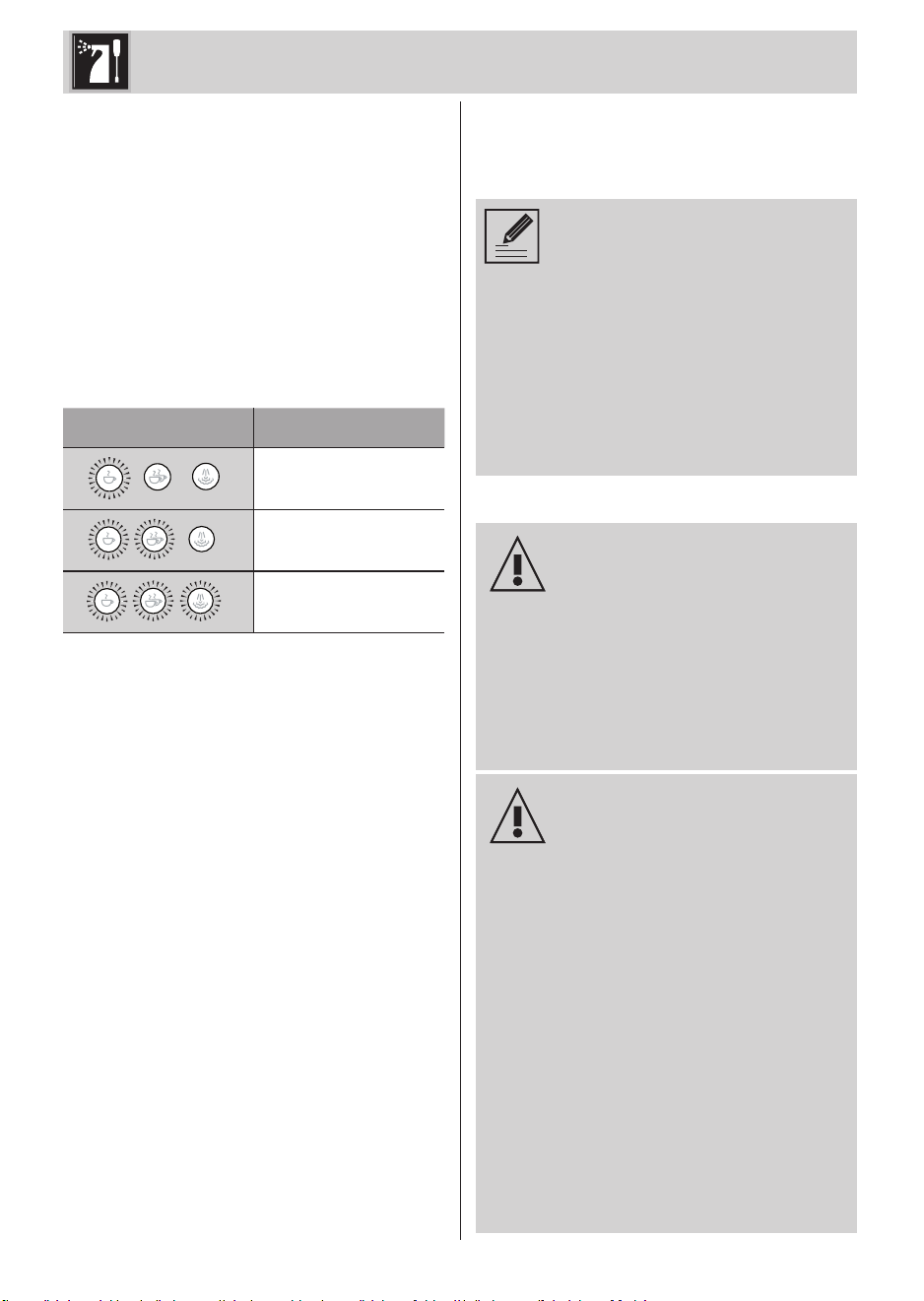
• The key (29) ashes 3 times, after which
the indicator lights show the current
setting:
Indicator lights Time setting
10 minutes
20 minutes
30 minutes
• Press the key that corresponds to the
time you want to set, choosing from
10 minutes (27), 20 minutes (28) or 30
minutes (29).
• The selected key flashes to indicate
that the selection has been stored,
and a single beep sounds if beeps are
enabled.
Enabling/disabling beeps
• Beeps are disabled on the machine by
default.
• Beeps can be disabled/enabled by
pressing and holding the keys (26) and
(27) for 5 seconds;
• The key (27) flashes three times to
indicate that the setting has been
stored.
Resetting to the factory settings
To reset to the factory settings:
• Press and hold the keys (28) and (26)
simultaneously for at least 10 seconds.
• All the keys flash together once to
indicate that the original settings have
been restored.
6 Cleaning and
maintenance (Fig. K)
To make all cleaning and
maintenance procedures easier,
as well as the simple operating
procedures described so far,
you can access the My Smeg
Assistant portal: for quick
access, remove the drip tray
(12) and scan the QR code
on the base of the product as
shown in “Fig. K”.
6.1 Warnings
Electrocution hazard.
• Remove the plug from the
power socket before cleaning
the coffee machine.
• Do not immerse the coffee
machine in water or other
liquids.
• Allow the coffee machine to
cool down before cleaning.
Risk of damage to the surfaces.
• Do not use steam jets to clean
the coffee machine.
• Do not use cleaning products
containing chlorine, ammonia
or bleach on parts with
metal surface nishes (e.g.
anodized nickel-plated or
chrome plating).
• Do not use abrasive or
corrosive detergents (e.g.
powder products, stain
removers and metal
scourers).
• Do not use rough or abrasive
materials or sharp metal
scrapers.
Use / Cleaning and maintenance
ECF03_UL_91477B930A_06-2025.indd 16ECF03_UL_91477B930A_06-2025.indd 16 02/12/2025 12:09:0302/12/2025 12:09:03
EN
EN - 17
6.2 Cleaning the machine body
To keep the external surfaces in good
condition, clean them regularly after use,
when they have cooled down. Clean with
a soft, damp cloth.
Do not use cleaning products
containing chlorine, ammonia,
bleach or alcohol.
Do not use abrasive or corrosive
detergents (e.g. powder
products, stain removers and
metal scourers).
6.3 General cleaning (Fig. A)
To ensure the machine operates well and
provides good quality beverages, we
recommend a few simple daily cleaning
procedures, such as: cleaning the lter
holder (9) and lter inside it (16), (17),
(18) or (19), the drip tray (12) and water
tank (3).
Cleaning the lter holder (9) and lters
(16, 17, 18, 19)
• Remove the lter (16), (17), (18) or (19)
from the lter holder (9) and rinse it
under running water. If the holes are
clogged, clean them with the needle
(23) provided.
• Dry the components thoroughly and
ret them.
Cleaning the drip tray (12)
The drip tray (12) has a red oat (14),
which protrudes from the cup grille (13)
when the liquid exceeds the maximum
level.
• Remove the cup grille (13) followed by
the tray (12) to empty it.
• Empty it and rinse it under running
water, use mild washing up liquid if
necessary.
• Dry the components and ret them in
the machine.
We recommend cleaning the
drip tray (12) after each use of
the machine.
Cleaning the water tank (3)
• Remove the tank lid (2) and remove the
tank (3) from the machine. Clean the
water tank (3) about once a month with
a damp cloth and mild detergent, dry
the outside and then ret it.
Cleaning the steam wand (11)
(Fig. H)
Clean the steam wand (11) immediately
after use.
• Point the tip of the steam wand at the
hole in the cup grille, turn the lever (7) to
the “ ” icon for a few seconds to expel
any milk left inside, and then return it to
the vertical position.
• Dry the steam wand (11) using a damp
cloth.
Use the appropriate silicone
grip to make cleaning the wand
easier.
BURNS HAZARD!
• Check that the steam outlet hole is not
blocked. If there are any deposits, clean
the steam outlet hole with the needle
(22) provided.
Cleaning the dispensing unit (10) (Fig. I)
Stay close to the machine
for the entire duration of the
dispensing unit (10) cleaning
cycle as user intervention may
be required. The procedure
takes 10 minutes in total.
• Insert the non-pressurised filter for
double coffee (19) into the lter holder
(9).
Cleaning and maintenance
ECF03_UL_91477B930A_06-2025.indd 17ECF03_UL_91477B930A_06-2025.indd 17 02/12/2025 12:09:0302/12/2025 12:09:03
EN - 18
• Insert the cleaning disk (20) provided
and a detergent capsule into the lter
(19).
Use detergent capsules for
household coffee machines,
which are commonly available
on the market.
• Attach the filter holder (9) to the
dispensing unit (10) and empty the drip
tray (12).
• Fill the tank (3) up to the MAX level with
fresh water.
• Press and hold the keys (27) and (28)
for 5 seconds.
• The machine will perform pulsed
dispensing to clean the dispensing
unit (10). The procedure takes a total
of about 10 minutes, divided into two
cleaning cycles.
• At the end of the rst cycle, the keys
(27) and (28) will ash to indicate that
the drip tray (12) must be emptied and
then retted.
• After emptying and retting the drip tray
(12), press the keys (27) and (28) again
for 5 seconds to start the second cycle.
• At the end of the procedure, all the keys
will light continuously, and the machine
will beep twice, if beeps are enabled.
• Remove the lter-holder (9) and check
that the detergent has dissolved
completely. If not, repeat the procedure.
• Afterwards, remove the lter holder (9)
and the cleaning disk (20) inside it.
• Before dispensing a coffee, attach the
lter holder (9) again to the dispensing
unit (10), complete with the lter (19),
and press the key (28) to rinse the
circuit.
6.4 Descaling (Fig. J)
Before performing the descaling
cycle, remove any water
softener lters from the tank (3).
Stay close to the machine for the
entire duration of the descaling
cycle as user intervention may
be required, e.g. to rell the tank.
The descaling and rinsing cycle
lasts 20 minutes in total.
The coffee machine indicates when a
descaling cycle is required based on
the set water hardness (for information
on setting the water hardness, see the
“Setting the water hardness” paragraph).
The coffee machine must be descaled
when the key (29) ashes orange.
The warning will be displayed whenever
the machine exits the standby state, until
the descaling procedure is performed.
However, coffee, steam/hot water can still
be dispensed.
To perform a descaling cycle, proceed as
follows:
• Empty the water tank (3) completely
and remove the softening lter (if any).
• Fill the water tank (3) up to the MAX level
with a solution of water and descaling
agent in the doses recommended by the
manufacturer.
• Remove the lter holder (9) and place a
container under the dispenser (10) and
another under the steam wand (11).
• As soon as the machine is ready, press
and hold the key (29) for 10 seconds.
• Turn the steam lever (7) counter-
clockwise to the “ ” steam strength
position.
• Press the key (29) to start descaling; the
key (29) starts ashing.
• The descaling cycle automatically
Cleaning and maintenance
ECF03_UL_91477B930A_06-2025.indd 18ECF03_UL_91477B930A_06-2025.indd 18 02/12/2025 12:09:0302/12/2025 12:09:03
EN
EN - 19
performs a series of rinses at intervals
to remove the limescale from inside
the coffee machine, until the tank (3) is
empty.
• The descaling cycle stops and the white
indicator light (29) turns on.
• Remove the water tank (3), empty it and
rinse it thoroughly under running water
to remove any traces of descaler.
• Fill the tank (3) up to the maximum level
and insert it into its housing.
• Place an empty container under the
steam wand (11), another empty
container under the dispensing unit
(10), and check that the steam lever (7)
is set to the “ ” icon.
• Press the steam key (29) again to start
the rinsing cycle.
• When the tank (3) is empty, it means
that the rinsing cycle has nished and
the machine returns to the ready state.
• Turn the steam lever (7) back to the
vertical position.
Personal injury hazard.
• The descaler contains acids
that can irritate the skin and
eyes.
• Scrupulously follow the
manufacturer's instructions
and safety warnings on the
packet in the event of contact
with skin or eyes.
• Use descalers recommended
by Smeg to prevent damage
to the coffee machine.
Cleaning and maintenance
ECF03_UL_91477B930A_06-2025.indd 19ECF03_UL_91477B930A_06-2025.indd 19 02/12/2025 12:09:0302/12/2025 12:09:03
EN - 20
Problem Possible causes Solution
The appliance does not
work.
Plug not inserted. Insert the plug.
Possible fault. Unplug the coffee machine
and contact an authorised
after-sales centre.
No coffee is dispensed
from the spouts.
No water in the tank (3).
The keys (27), (28) and
(29) ash fast.
Fill the tank (3).
The holes in the lter
(16), (17), (18) or (19) are
blocked.
Clean the lter (16), (17), (18)
or (19) with a brush or the
cleaning pin (23) provided.
The tank (3) is not inserted
correctly or is empty.
Insert the tank (3) correctly
and make sure it contains
water.
Lime scale build-up.
Perform a descaling cycle.
The pressure gauge (8)
indicates overpressure.
Make the coffee again with
less or coarser powder.
The ground coffee is too
ne.
Adjust the grinding to a
coarser level.
Excessive tamping. Tamp the coffee less.
There is too much coffee. Reduce the amount of cof-
fee.
The dispensing unit (10) is
clogged or dirty.
Perform the dispensing unit
(10) cleaning cycle as de-
scribed in “Cleaning the
dispensing unit” under par-
agraph “6 General cleaning”.
The coffee is light in
colour and ows out of
the spout quickly.
The ground coffee has not
been tamped enough.
Tamp the coffee more.
There is insufcient ground
coffee.
Increase the amount.
The ground coffee is too
coarse.
Use only ground coffee for
espresso coffee machines.
The ground coffee quality
is wrong.
Change the ground coffee
type.
Troubleshooting
ECF03_UL_91477B930A_06-2025.indd 20ECF03_UL_91477B930A_06-2025.indd 20 02/12/2025 12:09:0302/12/2025 12:09:03
EN
EN - 21
Troubleshooting
Problem Possible causes Solution
The coffee is dark in
colour and ows out of
the spout slowly.
The ground coffee has
been tamped too much.
Tamp the coffee less.
There is too much ground
coffee.
Reduce the amount.
The dispensing unit (10) or
lter (16), (17), (18) or (19)
are blocked.
Clean the dispensing unit
(10) or lter (16), (17), (18) or
(19).
The ground coffee is too
ne.
Use only ground coffee for es-
presso coffee machines.
Lime scale build-up. Perform a descaling cycle.
The coffee only ows
from one of the two
spouts.
The coffee is not tamped
properly.
Take care to tamp horizon-
tally.
The lter holder (9) is dirty.
Clean the lter holder (9) and
the lter (16), (17), (18) or (19)
in it.
The spouts are clogged.
The spouts were not
cleaned after dispensing.
Clean the nozzles thorough-
ly.
The coffee is not hot.
The machine was not used
for a long time.
Increase the coffee temper-
ature from the programming
menu following the instruc-
tions in the “Setting the cof-
fee temperature” paragraph.
Dispense hot water into the
same cup in which the coffee
will be prepared in order to
heat it.
The temperature is set too
low.
Access the programming
menu and change the ex-
traction temperature as de-
scribed in “Setting the coffee
temperature” under para-
graph “5 Machine settings”.
The cups were not pre-
heated.
Heat the cups by rinsing
them with hot water (Note:
the hot water function can
be used).
ECF03_UL_91477B930A_06-2025.indd 21ECF03_UL_91477B930A_06-2025.indd 21 02/12/2025 12:09:0302/12/2025 12:09:03
EN - 22
Problem Possible causes Solution
The milk does not have
good foam or is not
frothy enough.
The steam wand (11) is
dirty.
Clean the steam wand (11)
thoroughly by removing the
steel nozzle and following
the instructions in the man-
ual. Note: the froth quality
depends on the type of milk
used, its temperature and the
technique used/manual dex-
terity.
The steam function was
not activated correctly.
Follow the instructions in
the “Dispensing steam”
paragraph.
The machine does not
dispense steam.
The key (29) ashes. The
machine has not reached
the steam dispensing
temperature.
Wait for the temperature to
be reached.
Lime scale build-up. Perform a descaling cycle.
No water in the tank (3). Fill the tank (3).
The steam lever (7) is not
correctly set to the steam
icon “ ”.
Set the steam lever (7) to
the steam icon “ ”.
Possible fault. Contact an authorised after-
sales centre.
The machine leaks
water from the base.
The drip tray (12) is not
inserted properly.
Check and insert it properly.
The drip tray (12) is full. Empty the drip tray (12).
The water tank (3) is not
inserted properly.
Insert the tank (3) properly
into its housing.
The steam wand (7)
drips during dispensing.
Lime scale build-up. Perform a descaling cycle.
Troubleshooting
ECF03_UL_91477B930A_06-2025.indd 22ECF03_UL_91477B930A_06-2025.indd 22 02/12/2025 12:09:0302/12/2025 12:09:03
EN
EN - 23
Problem Possible causes Solution
Coffee starts
dispensing during pre-
brewing.
There is not enough coffee
in the lter holder (9) or it is
too ne.
Adjust the amount and
grinding.
The coffee has not been
tamped enough.
Tamp the coffee more.
The coffee drips from
the lter holder (9) and
not from the spouts.
The lter holder (9) is not
attached properly or is
dirty.
Attach the lter holder (9)
and turn it fully. Clean the l-
ter holder (9).
The dispensing unit (10)
gasket is worn.
Have it replaced at an au-
thorised after-sales centre.
The spout holes are
blocked.
Clean the spout holes.
The lter has been
overlled.
Put the correct amount in the
lter using the measuring
cup provided.
The lter holder (9) will
not attach to the coffee
machine.
The lter has been
overlled.
Check the amount of coffee
dosed.
A descaling cycle was
performed, but the ma-
chine does not work.
The cycle was not com-
pleted.
Make sure the descaling cy-
cle completes and then rinse
as described in paragraph
“6.4 Descaling”.
The water was not topped
up to the MAX level indi-
cated on the back of the
tank (3) during the desca-
ling cycle.
Add water to the tank (3) to
complete the cycle.
The coffee machine
does not work and
all the indicator lights
ash.
Possible fault. Unplug the coffee machine
and contact an authorised
after-sales centre.
The keys (27), (28) and
(29) ash in sequence.
The machine is reaching
the correct temperature
for dispensing coffee.
Wait for the keys (27), (28)
and (29) to light continuous-
ly, and then select the de-
sired beverage.
Troubleshooting
ECF03_UL_91477B930A_06-2025.indd 23ECF03_UL_91477B930A_06-2025.indd 23 02/12/2025 12:09:0302/12/2025 12:09:03
EN - 24
Problem Possible causes Solution
The keys (27), (28) and
(29) ash fast.
There is no water in the
tank or no tank (3).
Make sure the tank (3) is t-
ted correctly and that it con-
tains enough water.
Overpressure alarm. Wait for the machine to
empty automatically into the
drip tray (12).
During steam operation,
the steam lever (7) is
operated before pressing
the steam key (29).
Press the steam key (29).
During steam operation,
the steam lever (7) is
operated before the
machine has reached the
preset steam temperature.
Wait for the machine to
reach the temperature, as
indicated by the keys (27),
(28) and (29) remaining lit
continuously.
The wand (11) is used
to dispense steam or hot
water for longer than 120
seconds.
Return the steam lever (7) to
the vertical position to end
the operation.
The key (29) is lit
orange.
A descaling cycle is
required.
Perform descaling as
described in paragraph “6.4
Descaling”.
The key (29) ashes
orange quickly.
The water in the tank (3)
has nished before the end
of the descaling/cleaning
procedure.
Add water to the tank (3)
and complete the descaling/
cleaning procedure
as described in the
corresponding paragraphs.
Contact your local technical after-sales service if the problem is not solved or
if there are other types of faults.
Troubleshooting
ECF03_UL_91477B930A_06-2025.indd 24ECF03_UL_91477B930A_06-2025.indd 24 02/12/2025 12:09:0302/12/2025 12:09:03