1422528 ES-A251234-1
Read the manual carefully and ensure you have fully understood
its contents before operating this device for the first time.
English
Deutsch
Español
Italiano
Português
Français
Nederlands
Česky
Slovenčina
Latviešu
Lietuvių k.
Eesti
Русский
Slovenščina
Ελληνικά
Hrvatski
Română
Български
Magyar
Polski
Dansk
Norsk
Svenska
Suomi
Íslenska
Accessories List
The following accessories are included with your device:
User Manual × 1 Remote Control × 1 AAA Battery × 2
Warranty Card × 1
NOTE
The accessories may be dierent from the list above due to dierent models, countries
/
regions. Please refer to the actual accessory bag.
Contents
Front and Rear .......................................................................................................................1
Connection .............................................................................................................................2
Remote Control ......................................................................................................................4
Specifications .........................................................................................................................6
Other Information....................................................................................................................7
Figures and illustrations in this manual are provided for reference only and may dier
from actual product appearance.
Parts of the software function changes with the system upgrade.
This device is equipped with a user manual and embedded E-Manual (
Settings > Support
> E-Manual
).
E-Manual support functions
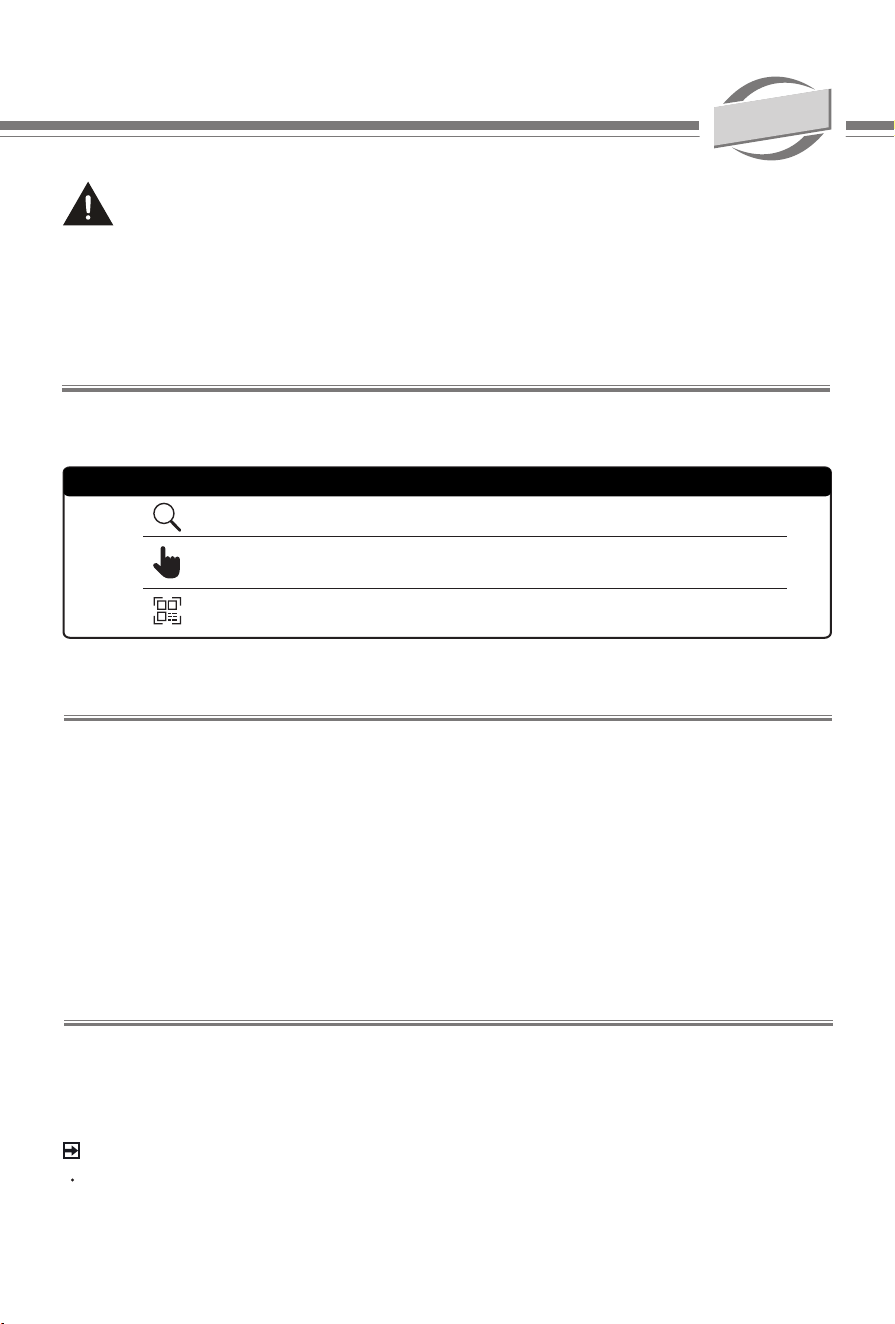
Search
Try Now
QR Code
Find the help you are looking for.
Go directly to the function page and try it.
Scan to open the E-Manual on your mobile device.
Find what you want
English
Apparatus with CLASS I construction shall be connected to a MAINS socket outlet
with a protective earthing connection.
A
Important Notice
Safety Instructions
The lightning flash with arrowhead
symbol, within an equilateral triangle is
intended to alert the user to the presence
of uninsulated dangerous voltage within
the product's enclosure that may be of
sufficient magnitude to constitute a risk of
electric shock.
The exclamation point within an equilateral
triangle is intended to alert the user to
the presence of important operating and
maintenance (servicing) instructions in the
literature accompanying the appliance.
To ensure safe and correct use of this product, always comply with the following precautions
to avoid dangerous situations and damage to your unit:
AC voltage: This symbol indicates that the rated voltage marked with the symbol is
AC voltage.
Class I product: This symbol indicates that it requires a safety connection of
protective earthing (ground).
Paragraphs beginning with the symbol indicate important instructions, tips or
conditions for the following settings.
For your own safety and the optimal performance of your device, ensure to
read the safety instructions before performing any installation.
Compatibility with 3rd party products, software and services are not guaranteed. We cannot
be held liable for any damage or loss suffered whilst operating, using or connecting to
incompatible devices or apps.
The recording and playback of content on this or any other device may require permission
from the owner of the copyright or other such rights in that content. It is your responsibility
to ensure that your use of this or any other device complies with applicable copyright
legislation in your country. Please refer to that legislation for more information on the
relevant laws and regulations involved or contact the owner of the rights of the content you
wish to record or playback.
Read these instructions
Follow all instructions
Heed all warnings
Keep these instructions
All rights reserved.
Hereby, Hisense Visual Technology Co., Ltd. declares
that the radio equipment type is in compliance
with Directive 2014/53/EU and Radio Equipment
Regulations 2017 of UK. Please enter the model name
at the following internet address to read the full text of
the declaration of conformity: https://global.hisense.
com/support/certicate-download/.
Authorized EU Representative
Name: Gorenje gospodinjski aparati, d.o.o.
Address: Partizanska cesta 12, 3320
Velenje, Slovenija
Email: [email protected]
Please refer to the rating label for model name and nd Bluetooth remote control model name on
the remote control or inside the remote control cover.
B
The intended use and ambient conditions for this device
This device is intended for the rendering of video and audio signals, wall-mounted, in a home
or oce environment. It must not be used in rooms with a high level of humidity or dust
concentration. The warranty is only valid if used as intended by the manufacturer.
WARNING
High humidity and dust concentration may lead to current leaks in the device. To reduce
the risk of re or electrical shock:
- Do not expose this unit to rain, moisture, dripping or splashing water, and do not place
objects lled with liquids, such as vases, cups, etc. on or over the unit.
- Do not touch the device with wet hands.
- Do not expose to direct air-conditioning and keep candles or other naked ames away
from the device at all times.
If you notice anything unusual, immediately remove the power plug.
In case of re, use preferably a CO
2
gas or powder re extinguisher. If such extinguishers are not
accessible, try to isolate the electrical supply before using a water re extinguisher.
WARNING
Stability Hazard
A device may fall, causing serious personal injury or death. To prevent injury, this device must
be securely attached to the wall in accordance with the installation instructions, other unsafe
installation is not available.
Many injuries, particularly to children, can be avoided by taking simple precautions such as:
- ALWAYS use mounting methods recommended by the manufacturer of the device.
- ALWAYS educate children about the dangers of climbing on furniture to reach the device or
its controls.
- ALWAYS route cords and cables connected to your device so they cannot be tripped over,
pulled or grabbed.
- NEVER place the device in an unstable location.
- NEVER place items that might tempt children to climb, such as toys and remote controls, on
the top of the device.
If your existing device is being retained and relocated, the same considerations as above should be
applied.
Moving/Transportation
Before moving this device, disconnect all cables
and move in the vertical position only.
- Do not press or put stress on the front panel
of the device.
Power Supply
Incorrect voltages can damage the device. Only
connect this unit to a power supply with the
correct voltage and frequency noted on the type
plate, using the supplied power cable.
The power plug must be easily accessible so
that the device can be disconnected at all time.
The unit is live, even if in standby mode, as
long as the unit is connected to a power outlet.
It is recommended that this unit is placed on a
dedicated circuit.
- Do not overload the power outlets by
connect too many appliances to the same
outlet. Overloaded wall outlets, extension
cords, etc. are dangerous and can result in
electric shock and re.
-
Switch o the device after use and unplug
it if it is not going to be used for (Leave it on
standby before unplugging it).
After power o, don't turn it on again in 5 seconds.
Frequent switching power supply in a short period

C
of time can cause abnormal device. Power and
grounding requirements consult compliance
professionals or your appliance dealer.
Power plug and power cable
-
Do not touch the power plug with wet hands.
- Do not place heavy objects on the power
cable. Route the cable so that it is not
kinked or laid over sharp edges, walked on
or exposed to chemicals. A power cable
with damaged insulation can cause electric
shock and re.
- Pull the power plug, NOT on the cable
when disconnecting. The cable can become
damaged and cause a short circuit if pulled
on.
- Do not place the power cable near a high
temperature object.
- Do not move the device with the power
cable plugged into a socket.
- Do not use a damaged or loose power
cable, or a damaged socket outlet.
- Do not use any power cords other than the
one supplied with this unit.
- MAIN plug on the power cord is used as the
disconnect device, the disconnect device
and socket-outlet shall be easily accessible.
- Power-supply cords should be routed so
that they are not likely to be walked on or
pinched by items placed upon or against
them, paying particular attention to cords at
plug, wall outlets, and the point where they
exit from the device.
Set-up
Check that the location is suitable to bear the
load of the device.
- Choose a good location for the device, in a
clean place, away from sources of heat (sun,
radiators, replaces), plants (pollen, dust,
water) and the ground (risk of knocks, dust).
- Place the unit in a normal upright horizontal
position. It must never be operated
vertically, lying at or hanging overhead
from the ceiling.
When mounting the device on a wall, follow the
instructions supplied with the wall-mount, make
sure not to install the device by hanging the
power and signal cables on the device.
Air ventilation and high
temperatures
Install your device only where there is proper
ventilation, and ensure that there is at least 10
cm free space on the sides and 20 cm above
the unit for air circulation. Excessive heat and
obstruction of ventilation could lead to re or
early failure of some electric components.
- Slots and openings in the cabinet are
provided for ventilation, to ensure reliable
operation of the device and to protect it
from overheating. Do not place cloth, paper
or other materials over the openings on the
top, sides or bottom of the appliance.
- Take care not to touch the ventilation
openings since they may become hot.
- Do not insert foreign objects into the device
through the vents.
Prevent small items from getting into the interior
of the device through the ventilation slots. Such
objects may cause short circuits, which may
cause re.
If something should get inside the unit,
immediately unplug the power plug of the
device and contact service support.
Never place the device in a confined space
such as built-in cabinet unless proper ventilation
is provided.
The screen
Despite thorough care when manufacturing
this display, it cannot be 100% guaranteed that
no sub-pixel defects will occur due to technical
reasons. These cannot be considered as a
device defect in terms of the guarantee. They
will not aect the performance and reliability of
the device.
To prevent “image burn”, avoid displaying
still images for long periods of time, there is
a possibility that a copy of the image may
remain. If the aspect ratio is set to 4:3 for a long
period of time, image burn may occur on the
black areas. Image burn is not covered by the
warranty.
- Do not apply strong force or impact on the
display panel.
Avoid touching the screen or touching it for long

D
periods of time. Doing so may produce some
temporary distortion eects on the screen.
Radio waves
- Do not use the device in any medical
institutions or locations with medical
equipment. Radio waves may interfere with
medical equipment and cause malfunction.
- Do not use the device near any automatic
control equipment such as automatic doors
or re alarms. Radio waves may interfere
with automatic control equipment and cause
malfunction.
If you have a cardiac pacemaker, keep a
distance of at least 22 cm from the device.
Radio waves may interfere with the operation of
a pacemaker.
Built-in wireless LAN
- Do not connect to wireless networks that
you do not have the usage rights for. Data
transmitted and received over radio waves
may be intercepted and monitored.
The built-in wireless LAN uses 2.4 GHz, 5
GHz and 6 GHz frequency band. To avoid
malfunctions or slow response caused by radio
wave interference, keep the device away from
devices such as other wireless LAN devices,
microwaves, mobile phones, and other devices
that use 2.4 GHz, 5 GHz and 6 GHz signal.
Warning about o-gassing
New furniture, carpet, paint, building materials
and electronics can release chemicals into
the air through evaporation. After you set your
device up and turn it on for the rst time, you
may notice a slight smell within a couple of
hours. This is because some components
of device are heating up for the rst time.
The materials that we use fully meet the
environmental requirements and regulations.
Your device is working just ne and the fumes
from the o-gassing will diminish eventually.
Supervision
- Do not let children play unsupervised close
to the device. It could tip over, be pushed
o or pulled down and injure someone.
- Do not allow a switched-on device to run
unattended.
Volume
Loud music and noises can lead to irreversible
damage to your ears. Avoid extreme volume,
especially over long periods.
If you hear a drumming noise in your ears, turn
down the volume.
Thunder Storms
Pull out the power plug and all connected cables
from the device during a thunderstorm. This will
prevent damage to the device due to lightning
or power-line surge. Overvoltage caused by
lightning strikes can damage the device via the
wall socket.
Long periods of absence
As long as the power plug is connected to a live
socket outlet, the device will consume power
even in standby mode. The power plug and all
connected cables should be disconnected out
during long periods of absence.
Cleaning and care
CAUTION:
Unplug the power cord prior to cleaning the
device.
Clean the screen with a soft, dry cloth after
switching o and unplugging the device.
And avoid glass sprays and other household
cleaning agents. Do not use any chemicals.
- Do not subject the surfaces to insect
repellent, solvent, thinner or other volatile
substances. This may degrade the surface
quality.
- Do not spray water or other liquids directly
on the device. Liquid inside the device
could lead to product failure.
-
The surface of the display panel is treated
and may be easily damaged. Take care not to
scratch it with ngernails or other hard objects.
- Also wipe the power plug with a dry cloth at
regular intervals.
- Do not use liquid, abrasive, or aerosol
cleaners. Cleaners can permanently
damage the cabinet and screen.

E
Service/Repair
Never remove the cover/back of the device;
there are no user serviceable parts inside. Refer
all service to qualied service personnel as
opening or removing covers may expose you to
dangerous voltage or other hazards.
Packaging
Keep the anti-moisture materials and plastic bags
out of reach of children.
Plastic bags can cause suocation and the anti-
moisture material is harmful if swallowed. If
swallowed by mistake, force the patient to vomit
and visit the nearest hospital.
Modication
Do not attempt to modify this product in any way.
Unauthorised modication could void the warranty
of this unit, cause electric shock and res.
Remote Control batteries
- Store the remote control carefully, do not
expose it to liquids and check the condition
of the remote control batteries regularly to
prevent corrosion of the contacts.
- Incorrect installation may cause battery
leakage, corrosion and explosion.
- Replace only with the same or equivalent
type.
- Do not mix old and new batteries.
- Do not mix dierent battery types.
- Do not use rechargeable batteries.
- Do not burn or break up batteries.
- Be sure to dispose of batteries correctly.
- Do not expose batteries to excessive heat
such as sunshine, re or the like.
Damage Requiring Service
Unplug the device from the wall outlet and refer
servicing to qualified service personnel under
the following conditions:
-
When the power - supply cord or plug is
damaged.
-
If liquid has been spilled, or objects have
fallen into the device.
-
If the device has been exposed to rain or
water.
-
If the device does not operate normally by
following the operating instructions. Adjust
only those controls that are covered by
the operating instructions as an improper
adjustment of other controls may result in
damage and will often require extensive
work by a qualied technician to restore the
device to its normal operation.
-
If the device has been dropped or the
cabinet has been damaged.
-
When the device exhibits a distinct change
in performance - this indicates a need for
service.
Replacement Parts
When replacement parts are required, be sure
the service technician has used replacement
parts specified by the manufacturer or have
the same characteristics as the original part.
Unauthorized substitutions may result in fire,
electric shock or other hazards.
Safety Check
Upon completion of any service or repair to the
device, ask the service technician to perform
safety checks to determine that the device is in
safe operating condition.
Installation
- Professionals carry out installation and
removal, and execute safety inspection
after installation.
- The installed power cord should be hidden
or protected to avoid tripping, crushing
cause damage.
-
The LED screen should be xed reliably
onto the bracket.
-
Upon the completion of installation, make
sure the front LED light board is xed
reliably and cannot be removed directly by
hand. The openings in the metal housing
should be blocked eectively (but never by
plastic parts without ame-resistant eect
or other ammable materials).
Use environment requirements
-
Indoor.
-
The operation ambient temperature should
F
WARNING - DO NOT INSTALL BY YOURSELF
Please note that this device must be installed by professionals.
Do not attempt installation yourself, as it may lead to serious hazards or accidents.
Be sure to disconnect the AC power cord before installation.
The display on your device is fragile. Make sure the screen is not scratched or
damaged by hard objects or from pressure.
After the installation is completed, make sure the device is firmly attached to a wall
mount, before removing all protective film, if any.
be kept between 0˚C and 40˚C.
-
The operation ambient humidity should be
kept between 20% and 80%RH (no frost).
- Waterproof.
Daily use
-
Check the screen whether missing or not
before powering on.
-
Turn o the power when the LED display is
not in use.
-
When the AC power is turned o, wait at
least 1 minute before turning it on again in
order to prevent problems of the device.
Disposal
Refer to the recycling section of this manual.
Maintenance
Small pitch LED display screens are high-
precision, high-density electronic products,
which belongs to precision protection products
category. It needs special protections in daily
use.
- Static electricity: LED is an
electroluminescence device, which is very
sensitive to current. Human body carries
static electricity which can break down the
internal PN junction. Do not touch the LED
display screen without wearing gloves.
- Dust: it contains high-density electronic
circuit inside. So it is very important that the
LED display screen is dust proof and clean
it regularly, clean with a soft, lint-free cloth.
- Water vapor and oil fume: LED beads
surface can not be treated with water
proong due to its density and sizing,
Moisture environment and water vapor
can cause short circuit easily which may
resulting product failure or even resulting
re that may burnt the LED display screen
in the worst case. Therefore, LED display
screen needs protection from water vapor
and moisture.
- Physical impact: The LED display screen is
a very delicate device. It needs protection
from any kind of physical impact, as it may
resulting damage to LED beads or circuit
board.
- Do not place any container which
containing uid on the screen, to prevent
water damage to the product.
- Turn o the power supply of the
corresponding equipment before unplug the
cables to prevent damage to the interface
components.
- Avoid the interference of electromagnetic
eld (such as non magnetic speaker,
loudspeaker, etc.).
- Do not randomly connect/disconnect
communication plugs to avoid equipment
damage.
- Using Frequency of LED: At least twice a
week power-on and more(no less than 2
hours each time).
1
Front and Rear
NOTE
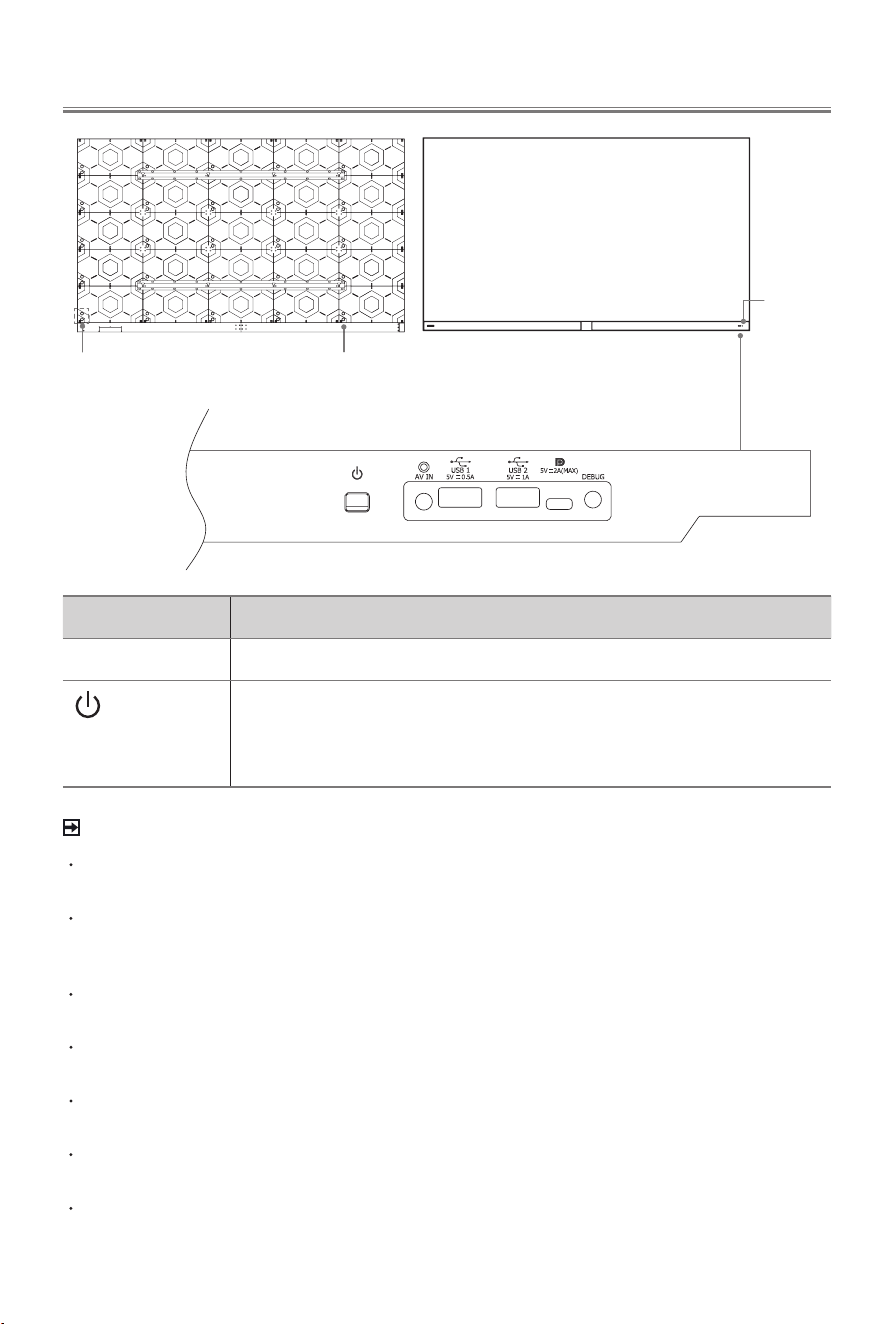
HDMI, LAN and digital audio out ports are internally concealed; extension cables must
be installed by qualified technicians.
Check the jacks for position and type before making any connections. Loose
connections can result in image or colour problems. Make sure that all connections are
tight and secure.
Not all A/V devices have the ability to connect to a display device, please refer to the
user’s manual of your A/V device for compatibility and connections procedure.
Before connecting external equipment, remove the mains plug from the wall socket.
Otherwise, it may cause electric shock.
Powering on the device requires several seconds to load programmes. Do not rapidly
turn the device off as it may cause the device work abnormally.
Debug is not available for you to connect an external device. It can only be used by our
factory for testing purposes.
The Picture is Only for Reference.
Item Description
Power indicator
The light is white in standby mode.
Power button
(Standby/Source)
Press the button to turn the device on. Press it again to bring up the
control menu and move the focus between different inputs. Long press
the button to make a selection.
AC Input
Power
indicator
Internal ports: HDMI, LAN
and digital audio out
2
Connection
Terminals
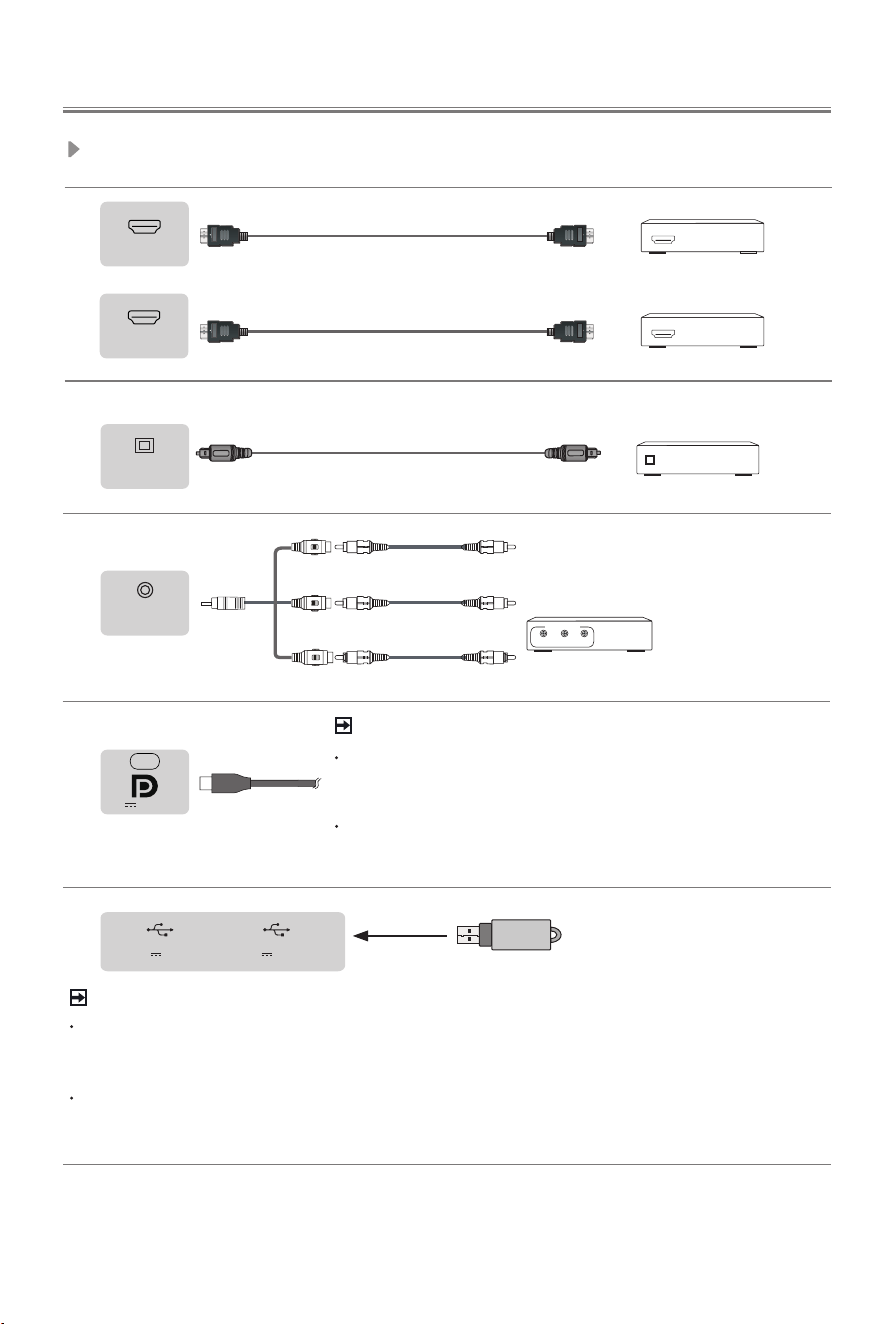
HDMI
DVD/Blu-Ray/AV receiver/
Set-top Box
HDMI
Audio Amplier/Speaker
HDMI (eARC)
HDMI
Audio Amplier/Speaker
DIGITAL
AUDIO OUT
NOTE
Exceeding a total current consumption may result in damage. The USB 1.1 and USB
2.0 devices maximum current consumption are 500mA. The USB 3.0 device maximum
current consumption is 1A (only for some models).
For individual non-standard high-capacity mobile hard disk, if its impulse current is
greater than or equal 1A, it may cause rebooting or self-locking. So the device does not
support it.
AV IN
White(L)
Red(R)
Yellow(Video)
Cables are not included.
VCR/DVD Player/
Recorder/Set-top box/
Satellite Receiver/
Video Camera
Video
L
A/V OUT
R
USB
DC 5V 1A(MAX) DC 5V 0.5A(MAX)
USB
NOTE
DP (DisplayPort
TM
) is a display input interface.
Connect a
Full-Featured Type-C standard cable to PC or smart device to
use your device as a monitor.
In case you connect DP port with a Type-C cable or converter
adaptor that is not fully compatible with DP standard, DP
function may not work.
5V 2A(MAX)
3
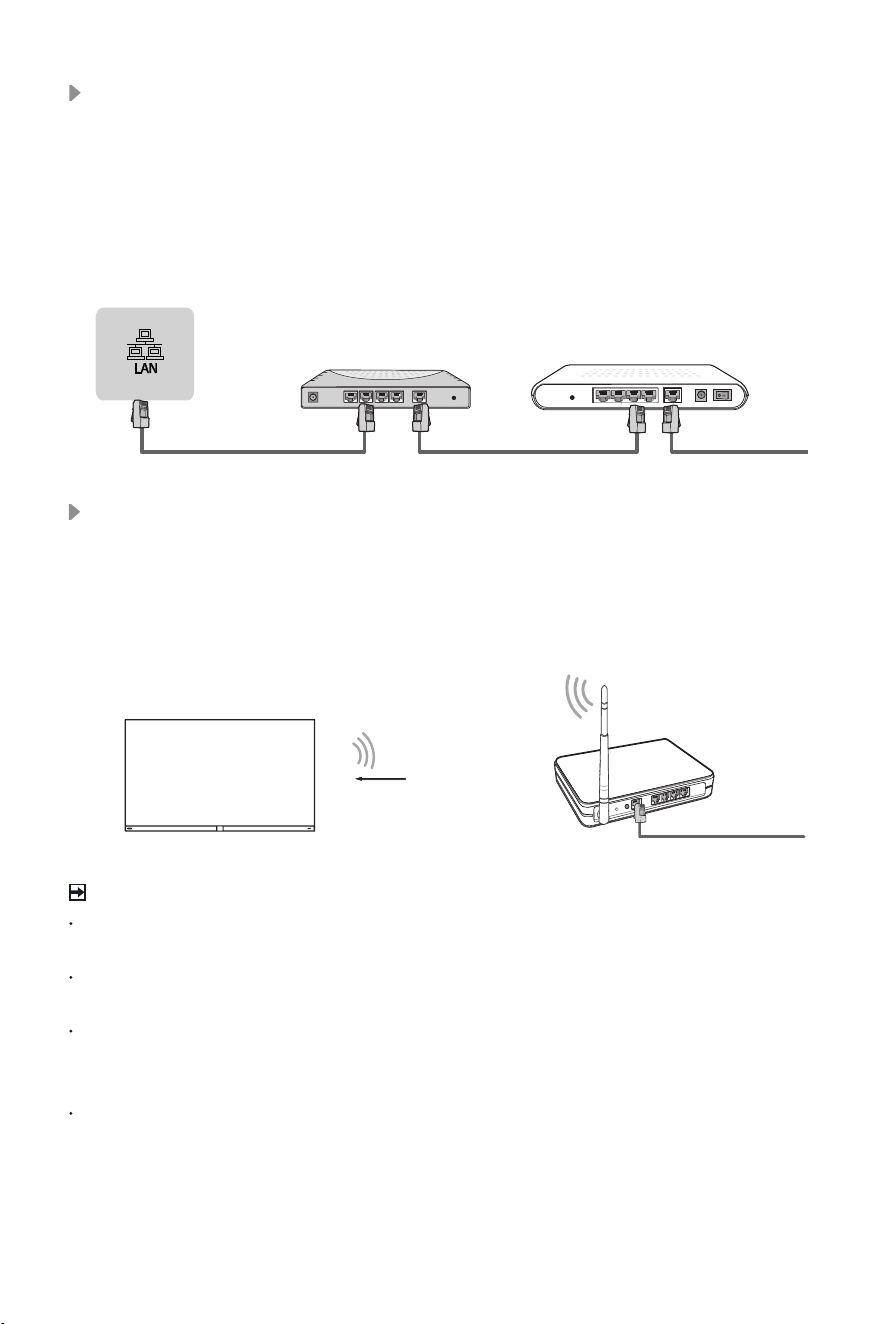
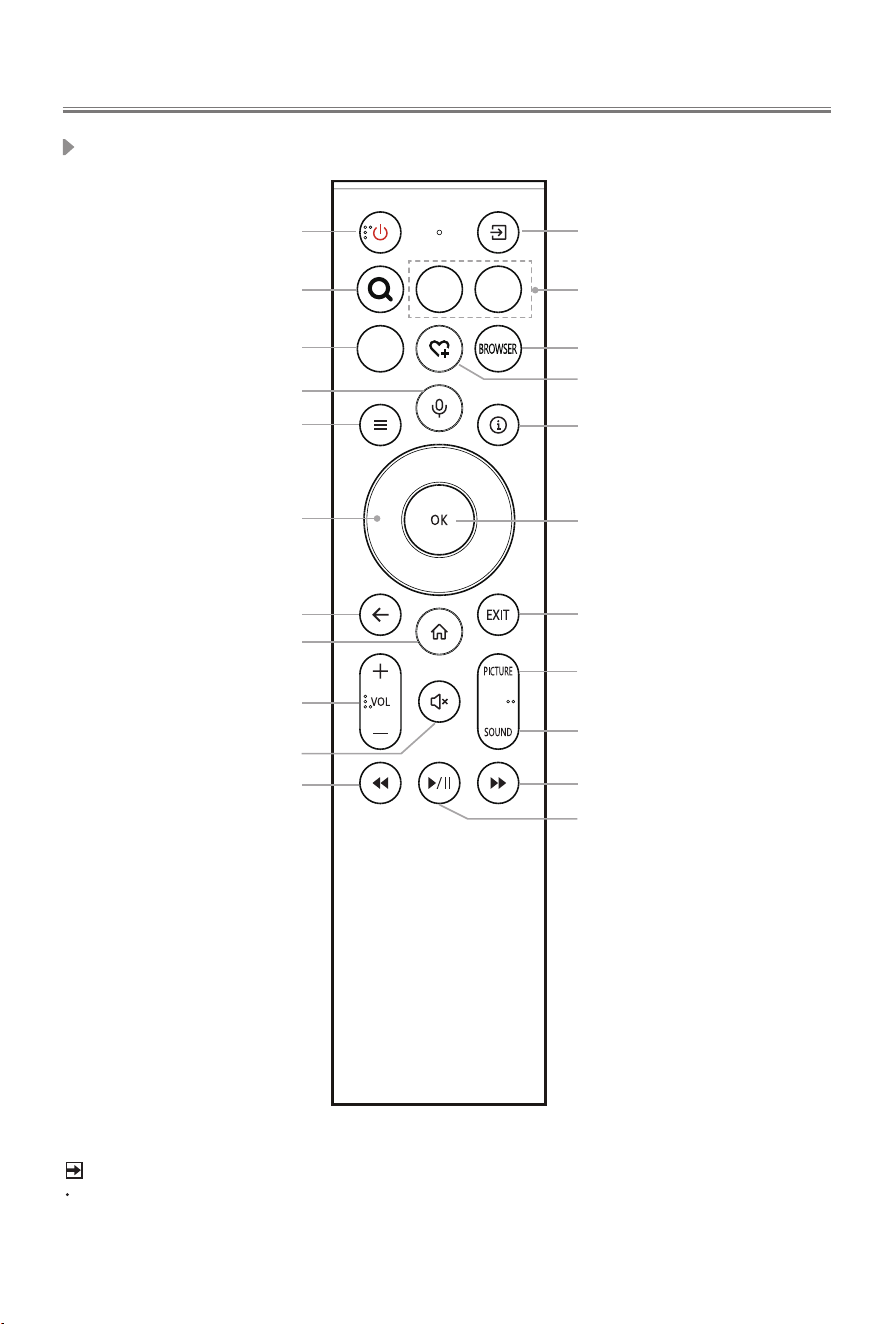
Wireless router with DHCP
LAN Cable
Wireless LAN Adapter
built-in
NOTES
You must use the built-in Wireless LAN Adapter to use a wireless network because the
set doesn’t support external USB network adapters.
If the wireless router supports DHCP, your device can connect more easily to the
wireless network.
If you apply a security system other than the systems listed below, it will not work with
the device.
Security system: WPA, WEP, WPA2, WPA3.
In order to guarantee smooth network, the distance between router and device should
be less than 10 metres.
Wireless setup
To connect your device to your network wirelessly, you need a wireless router or
modem. See the illustration below.
·
The built-in Wireless LAN Adapter supports the IEEE 802.11a/b/g/n/ac/ax
communication protocols. It is recommended to use IEEE 802.11ax router. Low
transfer rates for b/g may have the influence on the quality of streamed videos and
other media.
LAN (Wired setup)
Connect your device to your network by connecting the LAN port on the back of your
device to an external modem or router using a LAN (Ethernet/Cat 5) cable. See the
illustration below.
·
It is recommended to use a modem or router that supports Dynamic Host
Configuration Protocol (DHCP). Modems and routers that support DHCP
automatically provide the IP address, subnet mask, gateway, and DNS, so you don’t
have to enter them manually. Most home networks already have DHCP.
JACK
Modem Cable
LAN CableLAN Cable
External Modem
(ADSL / VDSL / Cable TV)
IP Sharer (Router)
(with DHCP server)
4
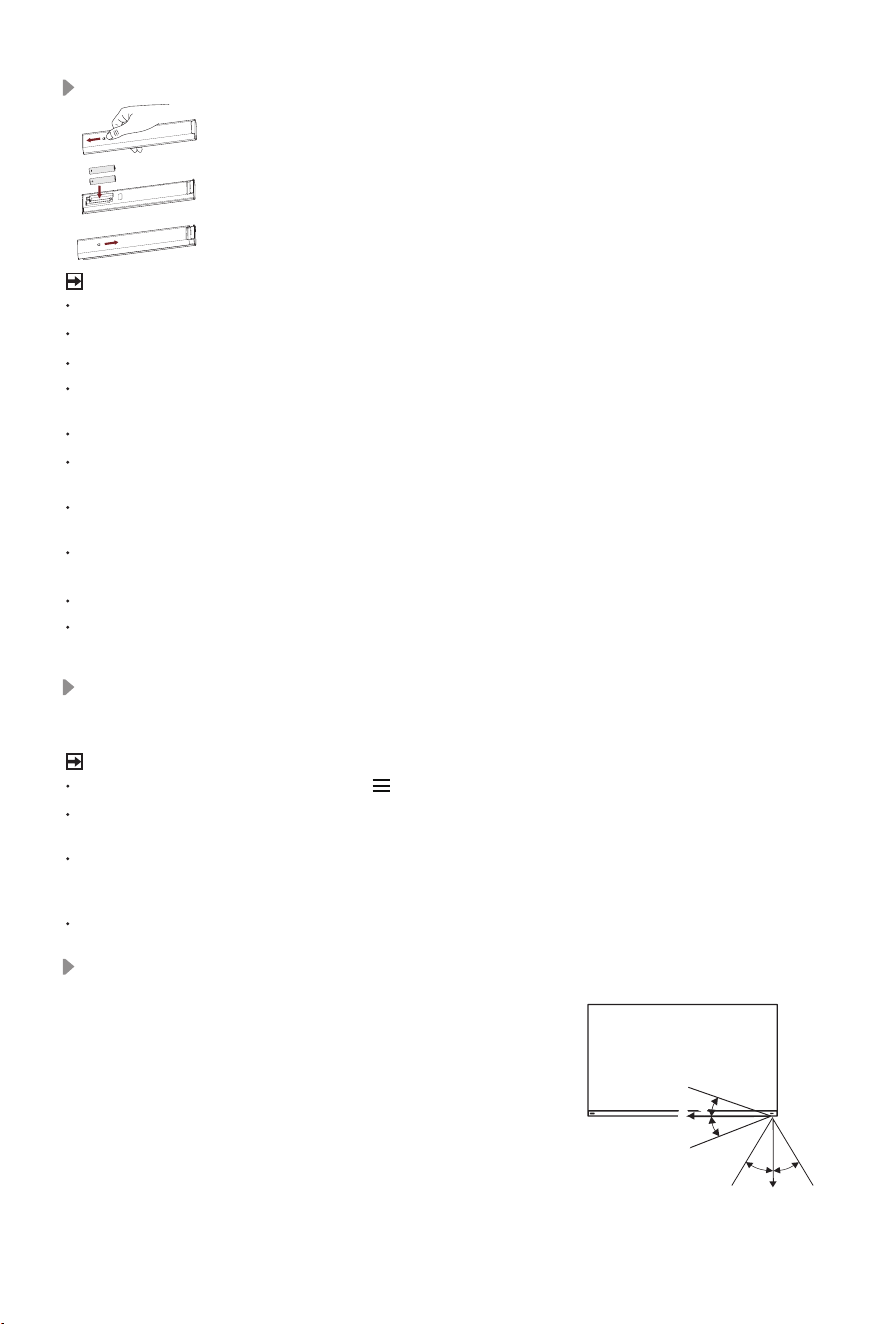
Remote ControlRemote Control
NOTE
The included remote control will vary depending on model, country/region. Check
information according to the actual remote control in the accessory bag.
Power on/Standby
Select input sources
APP APP
APP
Quick access buttons
to the app
Fast access to search
Enter the browser
Quick access buttons to
the app
Custom button, provides quick
access to its user-dened function
Press to enter Menu
Activate the microphone
Display the info bar
Navigation buttons
(Up/Down/Left/Right)
Conrmation button
Under the Menu or App,
return to the previous place
Exit the menu or exit the
application
Display the Home screen
Volume (up/down)
Quick access to Picture
Mode
Quick access to Sound
Mode
Mute and restore sound
Fast rewind
Fast forward
Play/Pause
Buttons of remote control
5
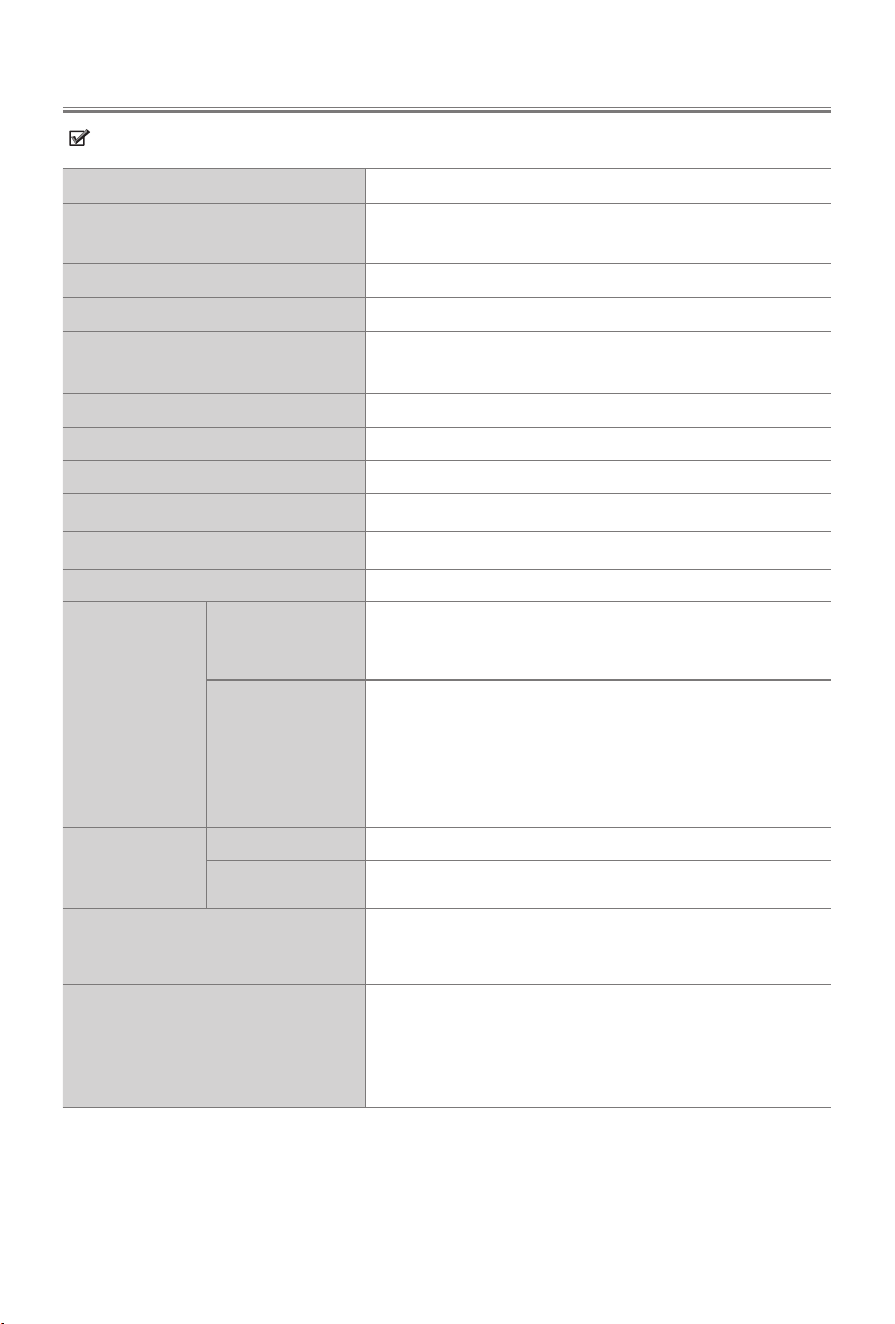
Remote Control Operation Range
Disposal of this unit
Product should not be damaged, dismantled or thrown in municipal waste.
It should be packed and handed over to authorised re-cycler.
1. The remote control can work at a distance of up
to 8 metres in
front of the device.
2. The remote control angle: taking the remote
sensor as an apex, 6 metres away, its controlled
horizontal angle is within ±30°, while the vertical
angle is within ±15°.
3. The operating distance may vary depending on
the brightness of the room.
Installing Batteries in the Remote Control
NOTE
Product image is only for reference, actual product may vary in appearance.
Dispose of your batteries in a designated disposal area.
Do not mix battery types or combine used batteries with new ones.
Remove depleted batteries immediately to prevent battery acid from leaking into the
battery compartment.
If you do not intend to use the remote control for a long time, remove the batteries.
Leaving a battery in an extremely high temperature surrounding environment that can
result in an explosion or the leakage of flammable liquid or gas.
Battery chemicals can cause a rash. If the batteries leak, clean the battery compartment
with a cloth. If chemicals touch your skin, wash immediately.
Risk of fire or explosion if the battery is replaced by an incorrect type.
Disposal of a battery into fire or a hot oven, or mechanically crushing or cutting of a
battery, that can result in an explosion.
A battery subjected to extremely low air pressure that may result in an explosion or the
leakage of flammable liquid or gas.
Pairing the Remote Control (only for Bluetooth remote control)
Pair the remote to the device after you power it on. Keep the remote control within 3 metres
from the device. Press any button (except power and mic button) to pair.
NOTE
In special cases, press and hold [ ] button to pair.
If an unknown error occurred with the remote, then it could have been caused by
interference. Try to remove what's causing the interference and pair it again.
If an unknown error occurred in the remote control while the battery power is normal,
you can take out the batteries, press any key for 1~2 seconds, and insert them back.
Then the remote control will work normally.
The remote cannot be paired to the device while it is in standby mode.
1. Slide the back cover to open the battery compartment of the remote control.
2. Insert two AAA size batteries. Make sure to match the (+) and ( - )
ends of the batteries with the (+) and ( - ) ends indicated in the battery
compartment.
3. Close the battery compartment with the cover.
6m
8m
6m
6m
8m
6m
30° 30°
15°
15°
6
Features, appearance and specifications are subject to change without notice.
Specications
Item
136"
Dimension
(W × H × D)
118.3 × 69.9 × 1.0 inches
(3005 × 1775 × 25 mm)
Weight
319.7 lbs (145.0 kg)
Active Screen Size (Diagonal)
135.5 inches (344.2 cm)
Audio power
Main Channel 2×20W + 2×10W
Center Channel 2×20W + 2×10W
Operating mode power density
0.050 Watts/cm²
Network standby power consumption
≤ 2.0 W
Power consumption in standby mode
0.5 W
Screen resolution
3840 × 2160
Power consumption
Please refer to the rating label.
Power supply
Please refer to the rating label.
Wireless
LAN Module
specifications
Frequency Range
2.4-2.4835GHz
5.15-5.85GHz
5.9-6.425GHz
Output Power
(Max.)
2.4-2.4835GHz 17dBm
5.15-5.25GHz 14dBm
5.25-5.35GHz(DFS Band) 14dBm
5.49-5.71GHz(DFS/TPC Band) 14dBm
5.725-5.85GHz(for Non EU) 14dBm
5.9-6.425GHz 14dBm
Bluetooth
Module
specifications
Frequency Range
2.4-2.4835GHz
Output Power (Max.)
2.4-2.4835GHz,Class1,6dBm
Environmental conditions
Temperature: 32°F - 104°F (0°C - 40°C)
Humidity: 20% - 80% RH
Atmospheric pressure: 86 kPa - 106 kPa
HDMI Input
60Hz (640×480, 800×600, 1024×768)
60Hz (480i, 480p, 720p, 1080i, 1080p)
50Hz (576i, 576p, 720p, 1080i, 1080p)
24Hz 25Hz 30Hz 50Hz 60Hz (3840×2160)
120Hz (1920×1080, 2560×1440, 3840×2160)
7
Recycling/Licenses
WEEE (Waste Electronic Electric Equipment)
European Directive 2012/19/EU
This symbol on the product or on its packaging indicates that this
product must not be disposed of with your household waste. Instead, it
is your responsibility to dispose of your waste equipment by handing it
over to a designated collection point for the recycling of waste electrical
and electronic equipment. The separate collection and recycling of your
waste equipment at the time of disposal will help to conserve natural
resources and ensure that it is recycled in a manner that protects
human health and the environment. For more information about where
you can drop o your waste equipment for recycling, please contact
your local city oce, your household waste disposal service or the shop
where you purchased the product.
Batteries
In accordance with the Battery Directive, used batteries should not
be disposed of in the domestic waste. Dispose your batteries in the
collection containers specic for this purpose in retail stores.
ROHS (Restriction of Hazardous Substance)
European Directive 2011/65/EU
This European directive limits the use of dangerous and hazardous
substances which are dicult to recycle.
This allows recycling easily the EEE and contributes to the
safeguard of the environment.
Substances included in this product match to the RoHS directive.
Other Information
The terms HDMI, HDMI High-Denition Multimedia Interface, HDMI
Trade dress and the HDMI Logos are trademarks or registered
trademarks of HDMI Licensing Administrator, Inc.
Dolby, Dolby Vision, Dolby Atmos, and the double-D symbol are
registered trademarks of Dolby Laboratories Licensing Corporation.
Dolby Vision IQ is a trademark of Dolby Laboratories Licensing
Corporation. Manufactured under license from Dolby Laboratories.
Confidential unpublished works. Copyright © 2012-2024 Dolby
Laboratories. All rights reserved.
FOR DTS PATENTS, SEE HTTP://XPERI.COM/DTS-PATENTS/.
MANUFACTURED UNDER LICENSE FROM DTS, INC. AND ITS
AFFILIATES. DTS, DTS:X, THE DTS:X LOGO, VIRTUAL:X, AND
THE DTS VIRTUAL:X LOGO ARE REGISTERED TRADEMARKS
OR TRADEMARKS OF DTS, INC. AND ITS AFFILIATES IN THE
UNITED STATES AND/OR OTHER COUNTRIES. © DTS, INC.
AND ITS AFFILIATES. ALL RIGHTS RESERVED.

8
Manufactured under license from IMAX Corporation. IMAX
®
is a
registered trademark of IMAX Corporation in the United States and/
or other countries. For DTS patents, see http://patents.dts.com.
Manufactured under license from DTS Licensing Limited. DTS and
the DTS logo are registered trademarks or trademarks of DTS, Inc.
in the United States and other countries. © 2020 DTS, Inc. ALL
RIGHTS RESERVED.