

Newton E-Paper 32” Datasheet
v0.2.1-PRE
Proprietary and Confidential
1 / 33
Newton E-Paper 32”
Datasheet
PMN (Product Marking Name) : Newton E-Paper 32”
FVIN (Firmware Version Identify Number) : V008
16/03/2026
Summary
This datasheet presents the general performance and specifications of Newton E-Paper 32” for
SOLUM Electronic Shelf Label (ESL) System.
© SOLUM. All rights reserved
The names of actual companies and products mentioned
herein may be the trademarks of their respective owners.
No part of this document may be reproduced, stored in a
retrieval system, or transmitted in any form or by any
means without the express written consent of SOLUM.
This document is subject to change without notice.

Newton E-Paper 32” Datasheet
v0.2.1-PRE
Proprietary and Confidential
2 / 33

Newton E-Paper 32” Datasheet
v0.2.1-PRE
Proprietary and Confidential
3 / 33
THE SPECIFICATIONS AND INFORMATION REGARDING THE PRODUCTS IN THIS MANUAL ARE SUBJECT
TO CHANGE WITHOUT NOTICE. ALL STATEMENTS, INFORMATION, AND RECOMMENDATIONS IN THIS
MANUAL ARE BELIEVED TO BE ACCURATE BUT ARE PRESENTED WITHOUT WARRANTY OF ANY KIND,
EXPRESS OR IMPLIED. USERS MUST TAKE FULL RESPONSIBILITY FOR THEIR APPLICATION OF ANY
PRODUCTS.
THE SOFTWARE LICENSE AND LIMITED WARRANTY FOR THE ACCOMPANYING PRODUCT ARE SET FORTH IN
THE INFORMATION PACKET THAT SHIPPED WITH THE PRODUCT AND ARE INCORPORATED HEREIN BY THIS
REFERENCE. IF YOU ARE UNABLE TO LOCATE THE SOFTWARE LICENSE OR LIMITED WARRANTY, CONTACT
YOUR SOLUM REPRESENTATIVE FOR A COPY.
NOTWITHSTANDING ANY OTHER WARRANTY HEREIN, ALL DOCUMENT FILES AND SOFTWARE OF THESE
SUPPLIERS ARE PROVIDED “AS IS" WITH ALL FAULTS. SOLUM AND THE ABOVE-NAMED SUPPLIERS DISCLAIM
ALL WARRANTIES, EXPRESSED OR IMPLIED, INCLUDING, WITHOUT LIMITATION, THOSE OF
MERCHANTABILITY, FITNESS FOR A PARTICULAR PURPOSE AND NONINFRINGEMENT OR ARISING FROM A
COURSE OF DEALING, USAGE, OR TRADE PRACTICE.
IN NO EVENT SHALL SOLUM OR ITS SUPPLIERS BE LIABLE FOR ANY INDIRECT, SPECIAL, CONSEQUENTIAL,
OR INCIDENTAL DAMAGES, INCLUDING, WITHOUT LIMITATION, LOST PROFITS OR LOSS OR DAMAGE TO
DATA ARISING OUT OF THE USE OR INABILITY TO USE THIS MANUAL, EVEN IF SOLUM OR ITS SUPPLIERS
HAVE BEEN ADVISED OF THE POSSIBILITY OF SUCH DAMAGES
Any Internet Protocol (IP) addresses and phone numbers used in this document are not intended to be actual
addresses and phone numbers. Any examples, command display output, network topology diagrams, and
other figures included in the document are shown for illustrative purposes only. Any use of actual IP
addresses or phone numbers in illustrative content is unintentional and coincidental.
SOLUM and the SOLUM logo are trademarks or registered trademarks of SOLUM and/or its affiliates in
KOREA and other countries. Third-party trademarks mentioned are the property of their respective owners.
The use of the word partner does not imply a partnership relationship between SOLUM and any other
company.
©
2016-2026 SOLUM Co. Ltd, Inc. All rights reserved.

Newton E-Paper 32” Datasheet
v0.2.1-PRE
Proprietary and Confidential
4 / 33
Table of Contents
1. Preface ............................................................................................................................................ 7
1.1. About This Guide .................................................................................................................. 7
1.2. Audience................................................................................................................................ 7
1.3. Abbreviations and Acronyms ............................................................................................... 7
2. Overview ......................................................................................................................................... 8
3. Specification ................................................................................................................................... 9
3.1. Product Specification ............................................................................................................ 9
3.2. Radio (RF) Specification ....................................................................................................... 11
3.2.1. 2.4GHz SRD RF Characteristics .............................................................................. 11
3.2.2. Wi-Fi RF Characteristics ......................................................................................... 11
3.3. Mechanical Drawing ........................................................................................................... 13
3.4. Label Marking ..................................................................................................................... 14
3.5. Certifications (TBD) ............................................................................................................. 17
3.5.1. FCC ......................................................................................................................... 17
3.5.2. IC ............................................................................................................................ 18
3.5.3. CE ........................................................................................................................... 19
3.5.4. KC ........................................................................................................................... 19
4. Packaging ...................................................................................................................................... 20
5. Reliability Test .............................................................................................................................. 22
6. Product Handling Precautions ................................................................................................... 23
6.1. Usage Environment ............................................................................................................. 23
6.2. Storage and Use ................................................................................................................. 23

Newton E-Paper 32” Datasheet
v0.2.1-PRE
Proprietary and Confidential
5 / 33
6.3. Product Cleaning ................................................................................................................ 24
6.3.1. For Wet Tissue Cleaning: ...................................................................................... 24
7. Battery Handling Guide .............................................................................................................. 25
7.1. Avoiding hazards in lithium battery handling ................................................................... 25
7.2. Rechargeable Battery Handling .......................................................................................... 27
Newton E-Paper 32” Datasheet
v0.2.1-PRE
Proprietary and Confidential
6 / 33
Document History
Rev.
Date
Revision History
Page
v0.1
28/07/2025
Draft
-
v0.1-PRE
01/08/2025
Preliminary Release
-
v0.1.1-PRE
18/09/2025
Revised Product Specification
8, 9
v0.2.0-PRE
18/11/2025
Updated sections on Rechargeable Battery
Handling and Packaging
-
v0.2.1-PRE
16/03/2026
Updated Battery Charging Guide
25
Newton E-Paper 32” Datasheet
v0.2.1-PRE
Proprietary and Confidential
7 / 33
1. Preface
1.1. About This Guide
This datasheet presents the specifications and general performance of SOLUM’s Newton E-Paper
32”.
1.2. Audience
This manual is intended for any user (IT, operations, store managers, installers, etc.) authorized to
operate and install SOLUM ESLs.
1.3. Abbreviations and Acronyms
Terminology/Abbreviation
Description
GW
Gateway
ESL
Electronic Shelf Label
RF
Radio Frequency
IT
Information Technology
PoE
Power over Ethernet
TBD
To Be Decided
Newton E-Paper 32” Datasheet
v0.2.1-PRE
Proprietary and Confidential
8 / 33
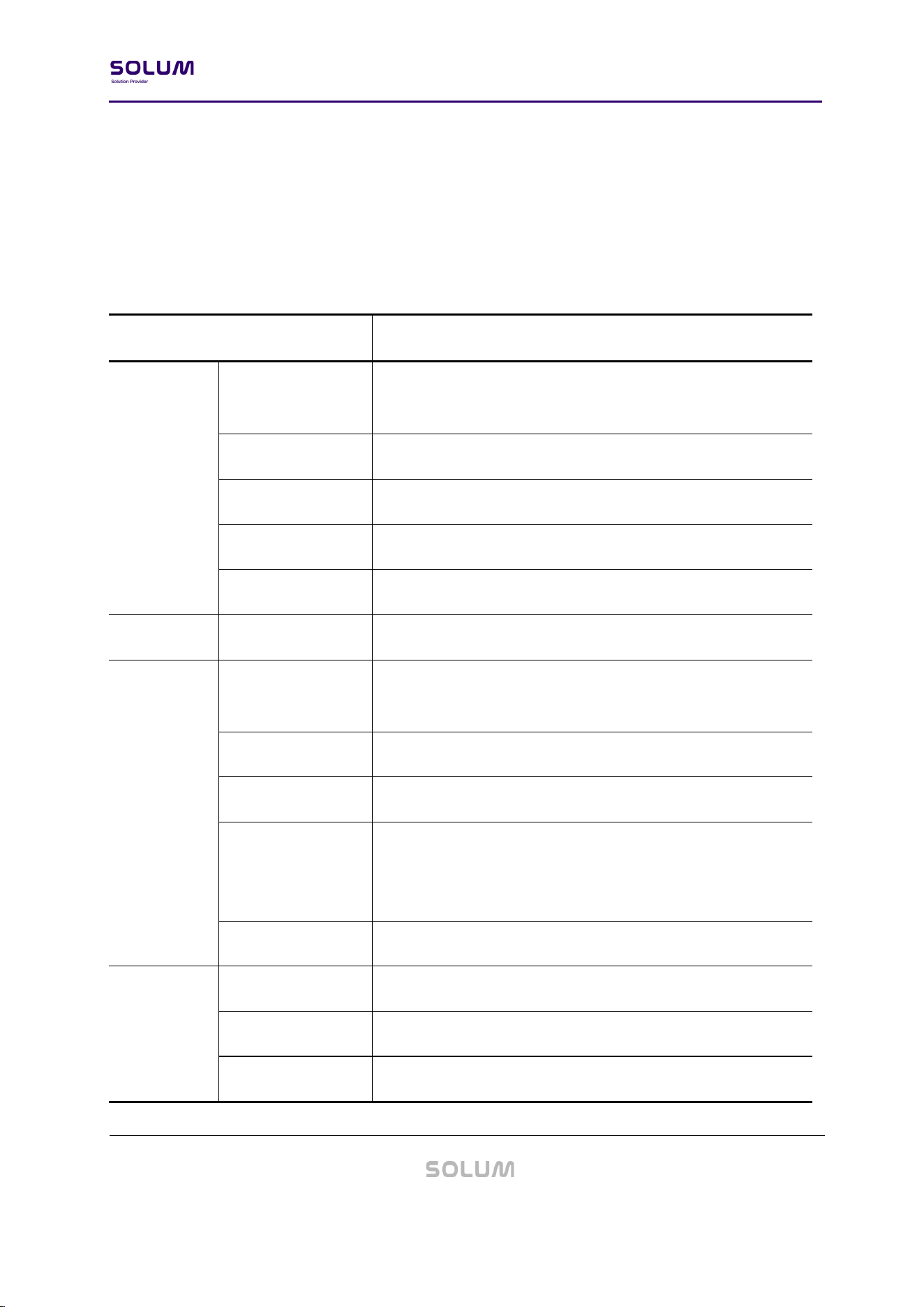
2. Overview
Newton E-Paper 32” that can create a full color image based on 6 colors. When installed in large
stores and indoor spaces, it has the effect of attracting people’s attention from a far. This signage
can be hung on the ceiling in addition to wall-mounting or using a stand, so when applied to
large supermarkets, customers can check discount events and promotional images from afar as
they move around the store.
Figure 1. PRODUCT
Newton E-Paper 32” Datasheet
v0.2.1-PRE
Proprietary and Confidential
9 / 33
3. Specification
This section details the specifications of Newton E-Paper 32”.
3.1. Product Specification
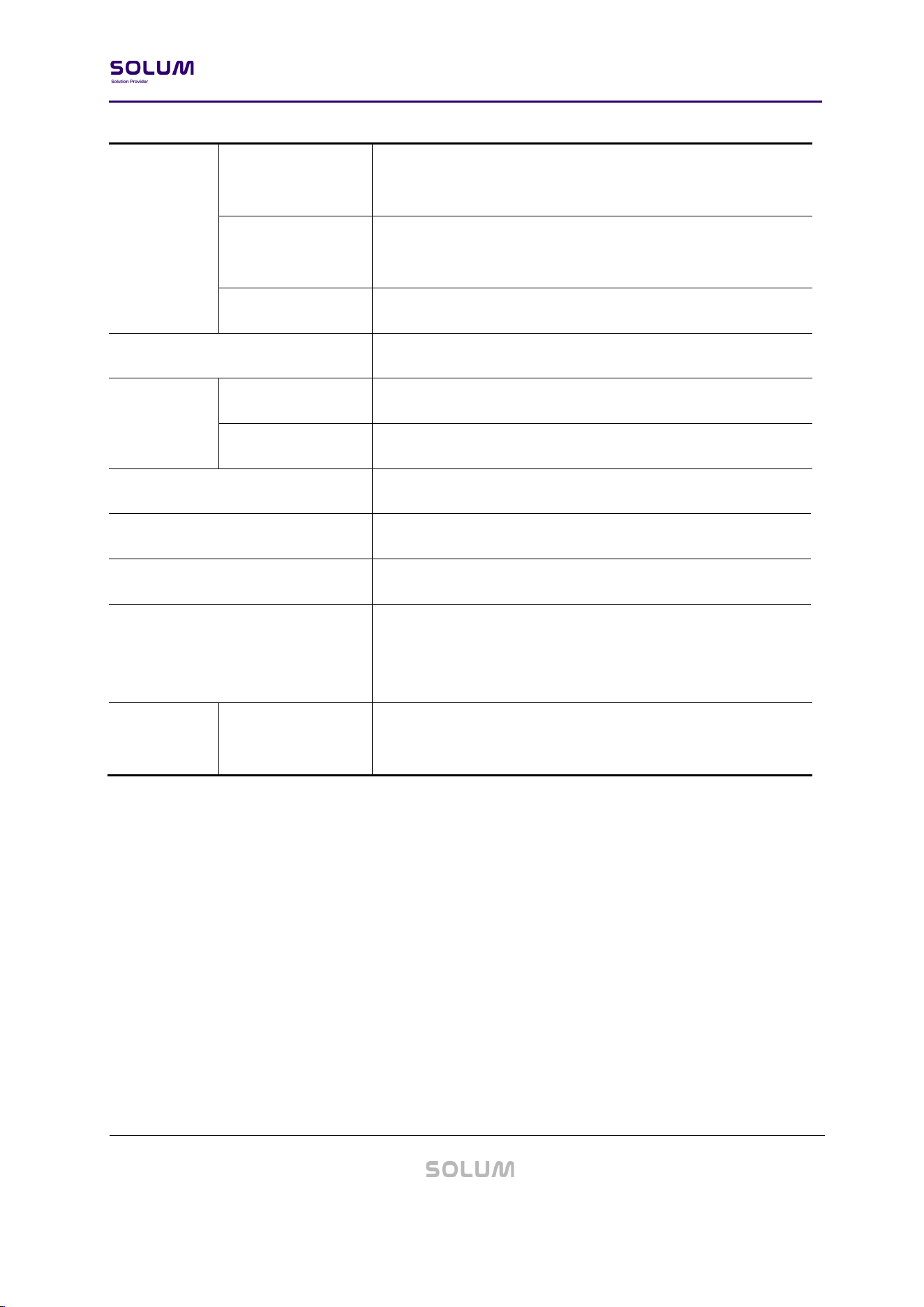
Item
Description
Mechanical
Dimension
(W x H x D)
420.0 x 722.2 x 16.4 mm / 16.53 x 28.43 x 0.65 in
Weight
2.3 kg / 82.54 oz (incl, Battery)
VESA Mount
200 x 200 mm
VESA Mount Screw
M4 / 8 ~ 10 mm
Bezel Width
12.4 / 12.4 / 13.6 / 13.6 mm (U / B / L / R)
Design
Bezel Color
White
Display
Dimension
(W x H)
392.7 x 697.3 mm / 15.46 x 27.45 in
Orientation
Portrait / Landscape
Resolution
1,440 x 2,560 pixels (94 dpi / 9:16)
Colors
●○●●●● KWRYGB (Black, White, Red, Yellow, Green,
Blue)
Dithering for additional color support
Viewing Angle
Nearly 180°
Connectivity
Power Input
USB-C x 1 (Power Only, 5V)
Wi-Fi
WLAN (802.11 a/b/g/n) 2.4Ghz & 5Ghz
2.4GHz BLE
2.4GHz BLE
Newton E-Paper 32” Datasheet
v0.2.1-PRE
Proprietary and Confidential
10 / 33
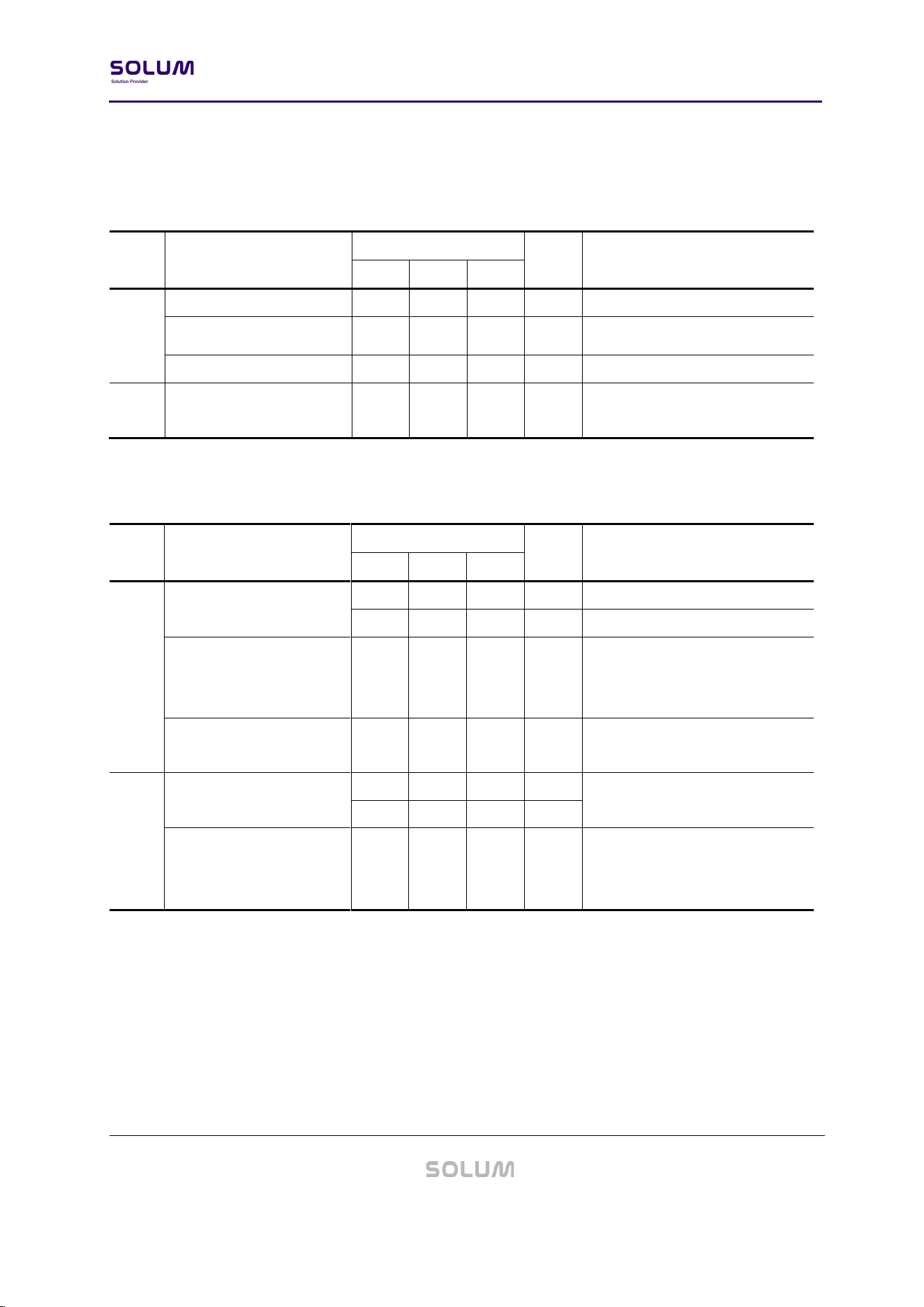
Features
Hardware
3 Button (Power / Pairing / Action)
2 LED Indicator (Power / Operation)
Software
SOLUM E-Paper App (Android / iOS)
Web-based CMS
Usable Pages
10 pages
Battery
Battery Pack (Lithium Rechargeable, 10,000mAh)
Security
Wi-Fi
SHA2-256
2.4GHz BLE
128-bit AES Encryption
Communication Distance
98 feet (30m) radius Line of Sight
Compliance (TBD)
FCC, IC, CE, UKCA, TELEC, KC, RoHS, WEEE
Operating Temperature
0℃ ~ 50℃ (32℉ ~ 122℉) @40~70% RH
Storage Temperature
-25℃ ~ 60℃ (-13℉ ~ 140℉) @40~70% RH
Recommended Long-Term Storage Temperature: 10°C to
30°C
Accessories
Included
USB-C Power Cable (1m)
Mounting Clip x 2
Newton E-Paper 32” Datasheet
v0.2.1-PRE
Proprietary and Confidential
11 / 33
3.2. Radio (RF) Specification
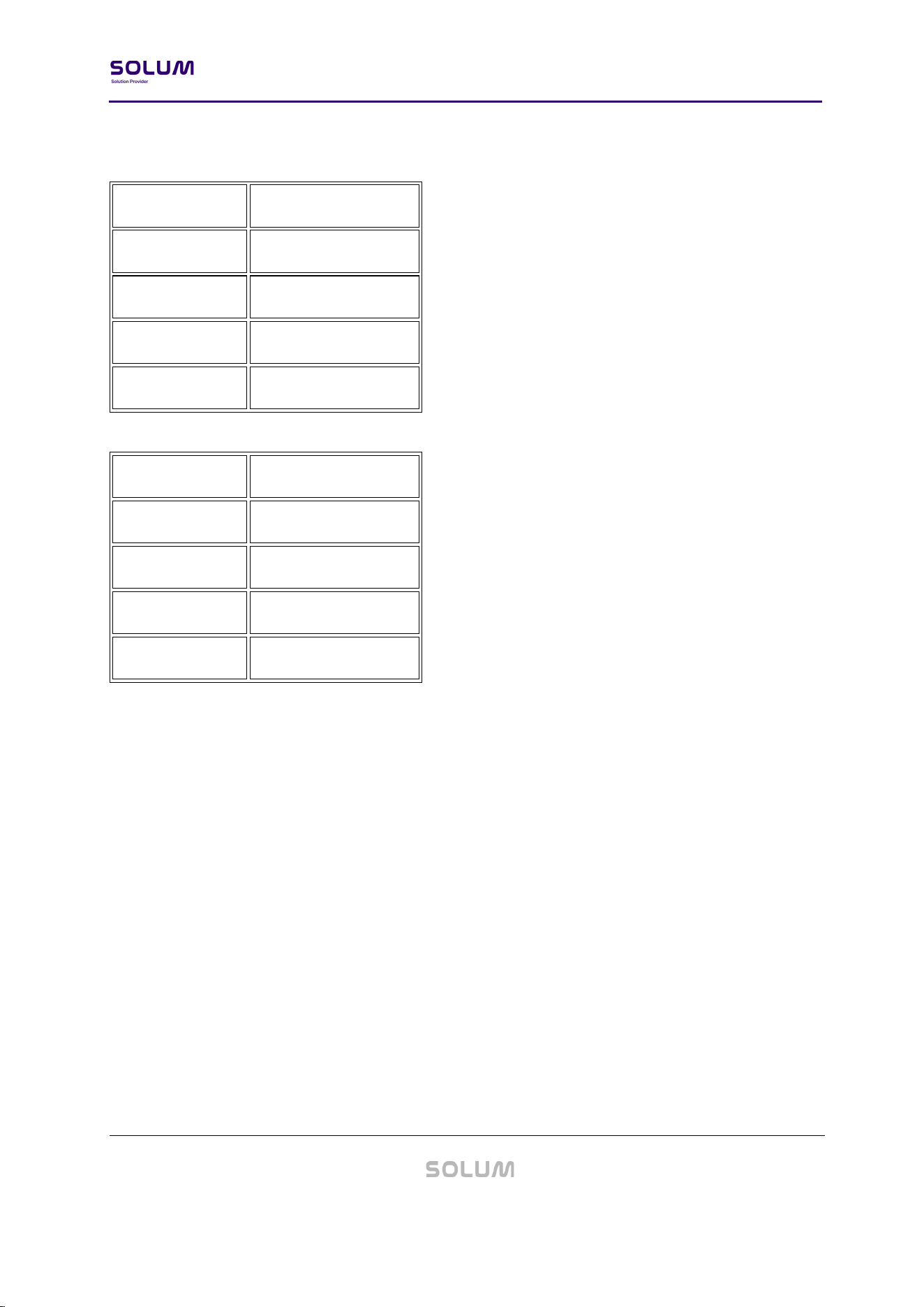
3.2.1. 2.4GHz BLE RF Characteristics
Item
Parameter
Specification
Unit
Condition
Min
Typ
Max
Tx
Tx Power
-
4
dBm
[Carrier Frequency Offset and
Drift]
-75
0
75
kHz
Tx Current
-
-
10.6
mA
Total current at max Tx Power
Rx
Receiver Sensitivity
-
-
-93
dBm
PER < 30.8%
1 Mbps Bluetooth
3.2.2. Wi-Fi RF Characteristics
Item
Parameter
Specification
Unit
Condition
Min
Typ
Max
Tx
Frequency Range
2,412
-
2,472
MHz
Center Channel Frequency
5,180
-
5825
MHz
Transmit Output Power
-
16
14
13
18.5
16.5
15.5
dBm
802.11b, 11Mbps
802.11g, 54Mbps
802.11n HT20, MCS7
Center Frequency
Tolerance
-25
-
+25
ppm
25°C
5Rx
Frequency Range
2,412
-
2,472
MHz
Center Channel Frequency
5,180
-
5825
MHz
Receiver Sensitivity
-
-
-76
-65
-64
dBm
802.11b, 11Mbps
802.11g, 54Mbps
802.11n HT20, MCS7
Newton E-Paper 32” Datasheet
v0.2.1-PRE
Proprietary and Confidential
12 / 33
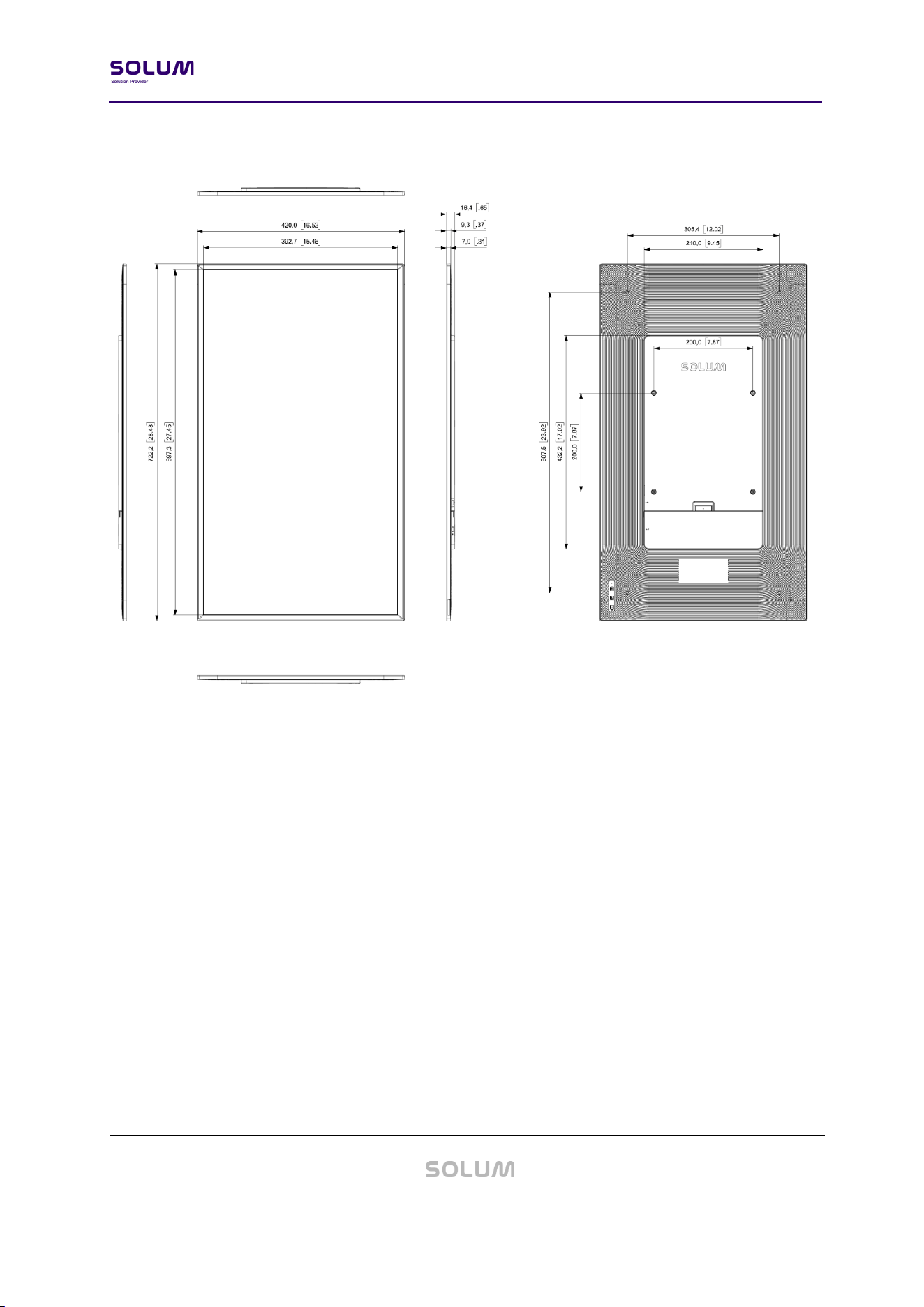
WLAN 2.4 GHz Band
Region / Authority
Frequency Range
FCC (USA)
2412 MHz ~ 2462 MHz
ISED (Canada)
2412 MHz ~ 2462 MHz
CE (Europe)
2412 MHz ~ 2472 MHz
MIC (Japan)
2412 MHz ~ 2472 MHz
WLAN 5 GHz Band
Region / Authority
Frequency Range
FCC (USA)
5180 MHz ~ 5825 MHz
ISED (Canada)
5180 MHz ~ 5825 MHz
CE (Europe)
5180 MHz ~ 5700 MHz
MIC (Japan)
5180 MHz ~ 5700 MHz
Newton E-Paper 32” Datasheet
v0.2.1-PRE
Proprietary and Confidential
13 / 33
3.3. Mechanical Drawing
(Unit: mm)
Figure 2. MECHANICAL DIMENSION
Newton E-Paper 32” Datasheet
v0.2.1-PRE
Proprietary and Confidential
14 / 33
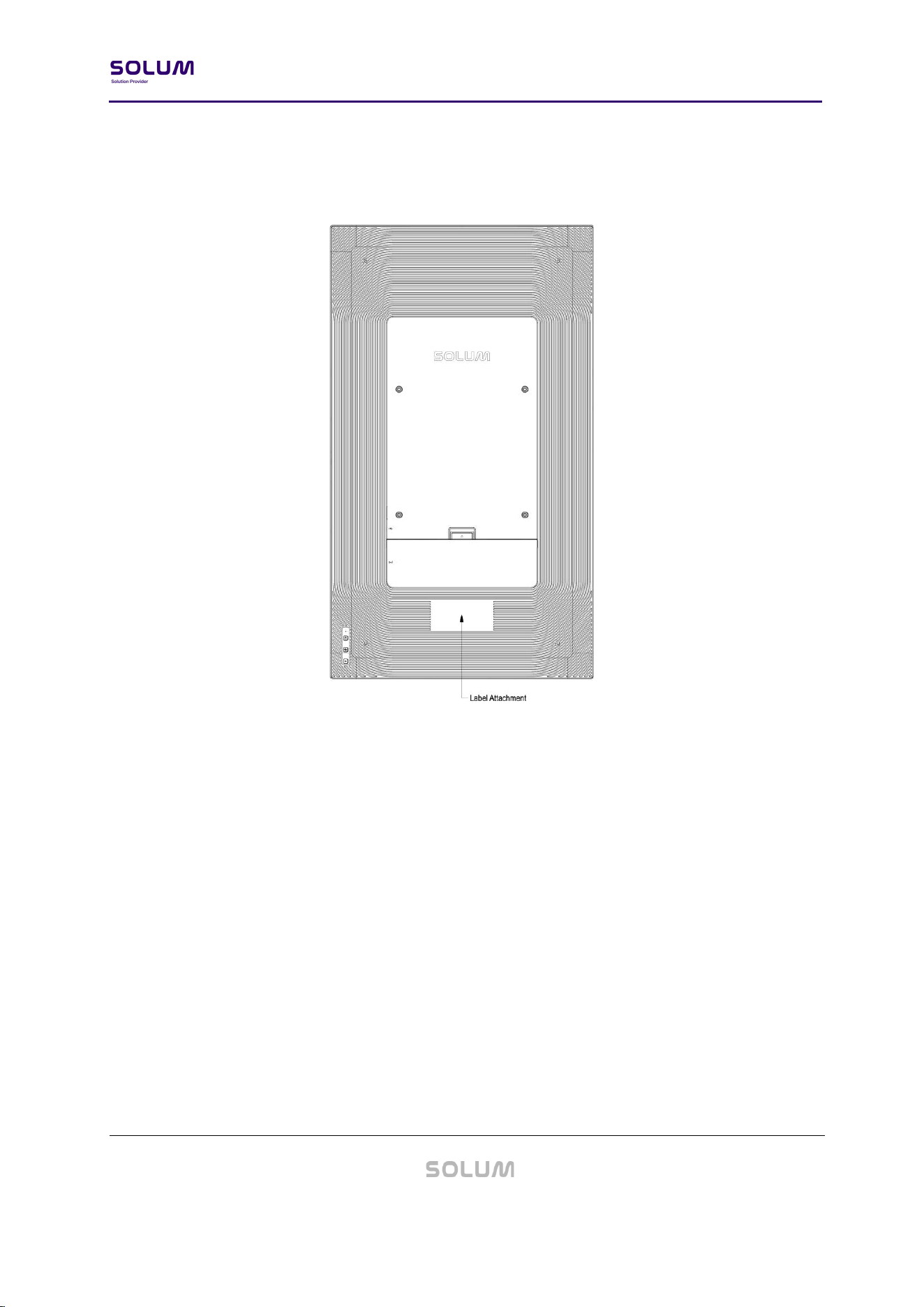
3.4. Label Marking
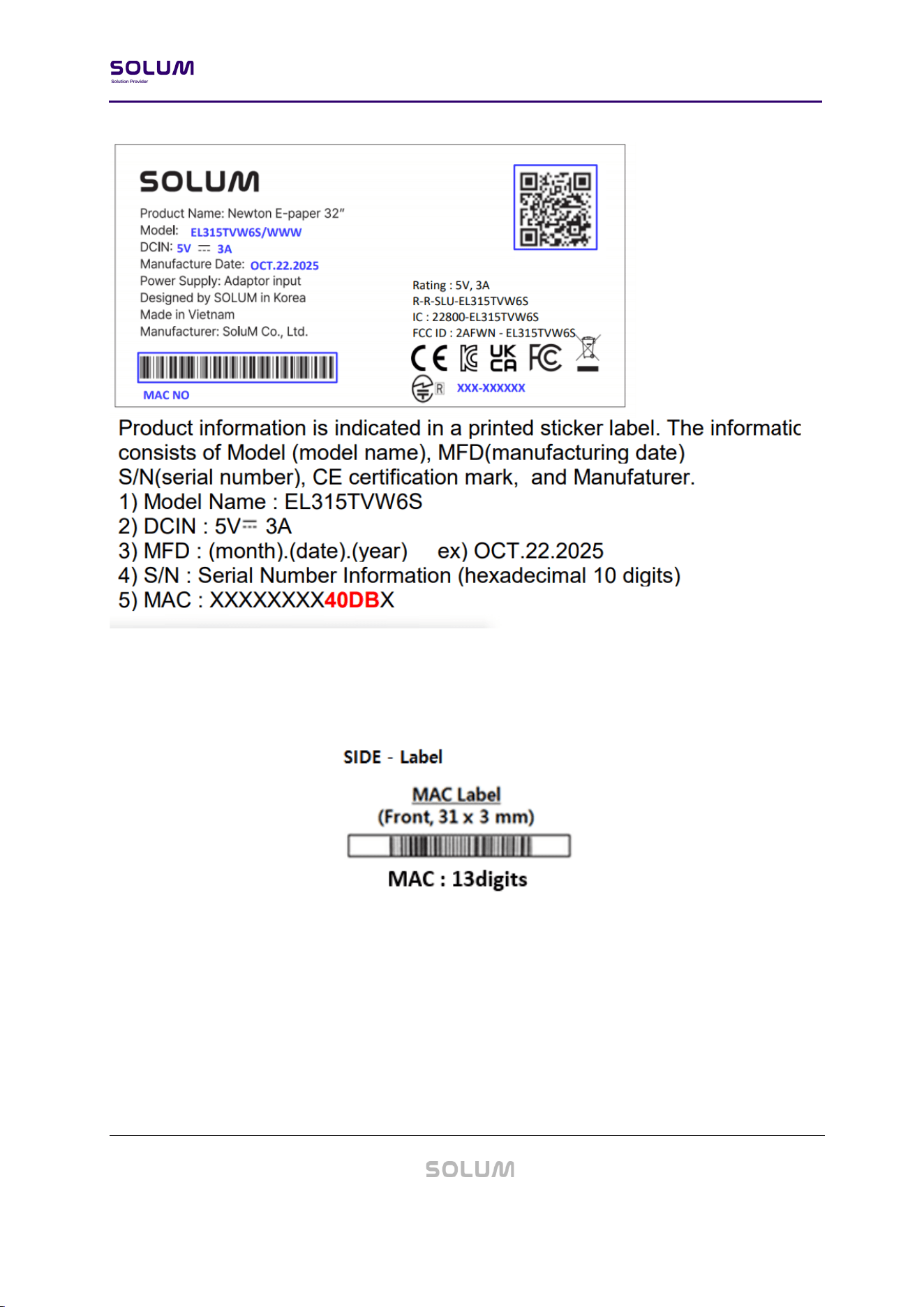
Figure 3. ESL LABELS (PRODUCT)
ESL-specific information can be found on the sticker label located on the back of the ESL.
Information displayed includes, but is not limited to: Model, Certifications, Manufacturing
Information
- Model: EL315TVW6S/WWW
- MFD (Manufacturing Date): [MON.DD.YYYY]
- S/N: Serial Number Information
Newton E-Paper 32” Datasheet
v0.2.1-PRE
Proprietary and Confidential
15 / 33
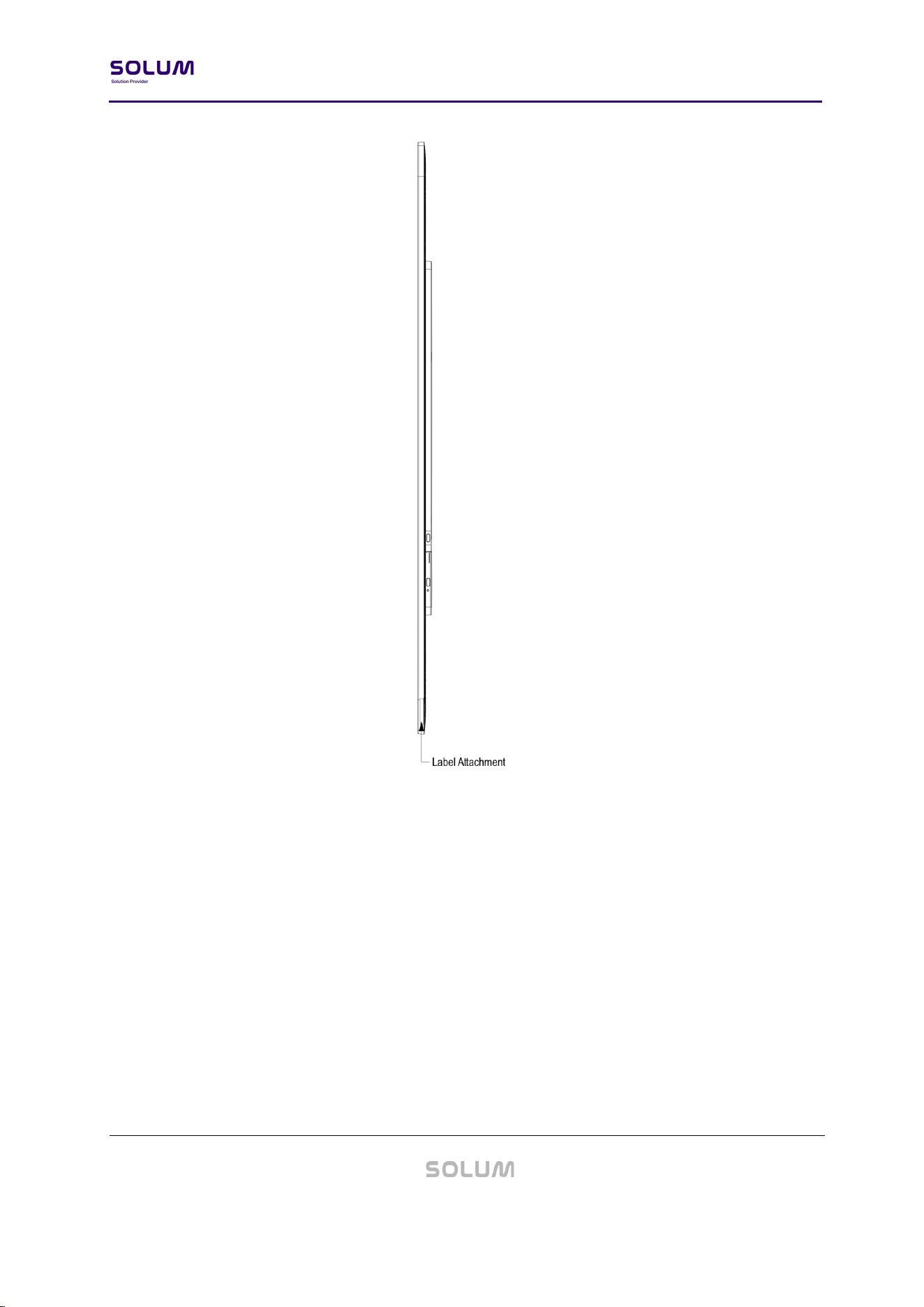
MAC Label stickers can be found in multiple areas of the ESL. They are to be scanned for
operation. If the ESL is not assigned to a product, the MAC barcode and 13-digit code will be
shown on the display. Dimensions can be found in the image below.
Newton E-Paper 32” Datasheet
v0.2.1-PRE
Proprietary and Confidential
16 / 33
Figure 4. ESL LABELS (MAC)
Newton E-Paper 32” Datasheet
v0.2.1-PRE
Proprietary and Confidential
17 / 33
3.5. Certifications (TBD)
Newton E-Paper 32” has the following certifications and should be noted for your region.
Size
Model
FCC
IC
CE*
KC
TELEC
UKCA
RoHS
WEEE
32”
EL315TVW6S
O
O
O
O
O
O
O
O
IEC 62471 standard (Photobiological Safety of Lamps and Lamp Systems) compliant
*CE: RF/EMC/LVD/RoHS2
3.5.1. FCC
This equipment has been tested and found to comply with the limits for a Class A digital device,
pursuant to part 15 of the FCC Rules. These limits are designed to provide reasonable protection
against harmful interference when the equipment is operated in a commercial environment. This
equipment generates, uses, and can radiate radio frequency energy and, if not installed and used
in accordance with the instruction manual, may cause harmful interference to radio
communications. Operation of this equipment in a residential area is likely to cause harmful
interference in which case the user will be required to correct the interference at his own expense.
Caution
THE GRANTEE IS NOT RESPONSIBLE FOR ANY CHANGES OR MODIFICATIONS NOT EXPRESSLY
APPROVED BY THE PARTY RESPONSIBLE FOR COMPLIANCE.
SUCH MODIFICATIONS COULD VOID THE USER’S AUTHORITY TO OPERATE THE EQUIPMENT.
IMPORTANT NOTE : FCC RF Radiation Exposure Statement
This equipment complies with FCC RF radiation exposure limits set forth for an uncontrolled
environment.
This equipment should be installed and operated with a minimum distance of 20 centimeters
between the radiator and your body. This transmitter must not be co-located or operating in
conjunction with any other antenna or transmitter.

Newton E-Paper 32” Datasheet
v0.2.1-PRE
Proprietary and Confidential
18 / 33
This device complies with part 15 of the FCC Rules. Operation is subject to the following two
conditions:
(1) This device may not cause harmful interference, and (2) this device must accept any
interference received, including interference that may cause undesired operation of the device.
3.5.2. IC
Le présent appareil est conforme aux CNR d’Industrie Canada applicables aux appareils radio
exempts de licence. L’exploitation est autorisée aux deux conditions suivantes :(1) l’appareil ne doit
pas produire de brouillage, et (2) l’utilisateur de l’appareil doit accepter tout brouillage
radioélectrique subi, meme si le brouillage est susceptible d’en compromettre le fonctionnement.
Attention: Tout changement ou modification non expressément approuvé par le fabricant peut
annuler le droit de l'utilisateur à utiliser l'équipement.
exposition aux rayonnements radiofréquences. Pour se conformer aux exigences de conformité de
l'exposition IC RF, une distance de séparation d'au moins 20 cm doit être maintenue entre
l'antenne de cet appareil et toutes les personnes.
This device complies with Industry Canada NRCs applicable to licence-exempt radio devices. The
operation is authorized under the following two conditions: (1) the device shall not cause
interference, and (2) the user of the device shall accept any radio interference suffered, even if the
interference is likely to compromise its operation.
Caution: Any change or modification not expressly approved by the manufacturer may void the
user's right to use the equipment.
exposure to radiofrequency radiation. To comply with the ICRF exposure compliance requirements,
a separation distance of at least 20 cm must be maintained between the antenna of this device
and all persons.
Newton E-Paper 32” Datasheet
v0.2.1-PRE
Proprietary and Confidential
19 / 33
3.5.3. CE
Model Name: Newton E-Paper 32
Manufacturer: SOLUM CO., LTD.
Address: 7F, 2354, Yonggu-daero, Giheung-gu, Yongin-si, Gyeonggi-do, Republic of Korea
Contact: www.solum-group.com / +82-1588-0502
Trademark:
EU Representative: SOLUM Europe GmbH / Frankfurter Str. 10-14, 65760 Eschborn Germany
3.5.4. KC
상호: 주식회사 솔루엠
제품명칭: 특정소출력 무선기기(무선데이터통신시스템용 무선기기)
기본모델명: EL315TVW6S/WWW
제조자/제조국가: 주식회사 솔루엠 / 한국, 베트남
등록연월일: 2026.07.24
Newton E-Paper 32” Datasheet
v0.2.1-PRE
Proprietary and Confidential
20 / 33
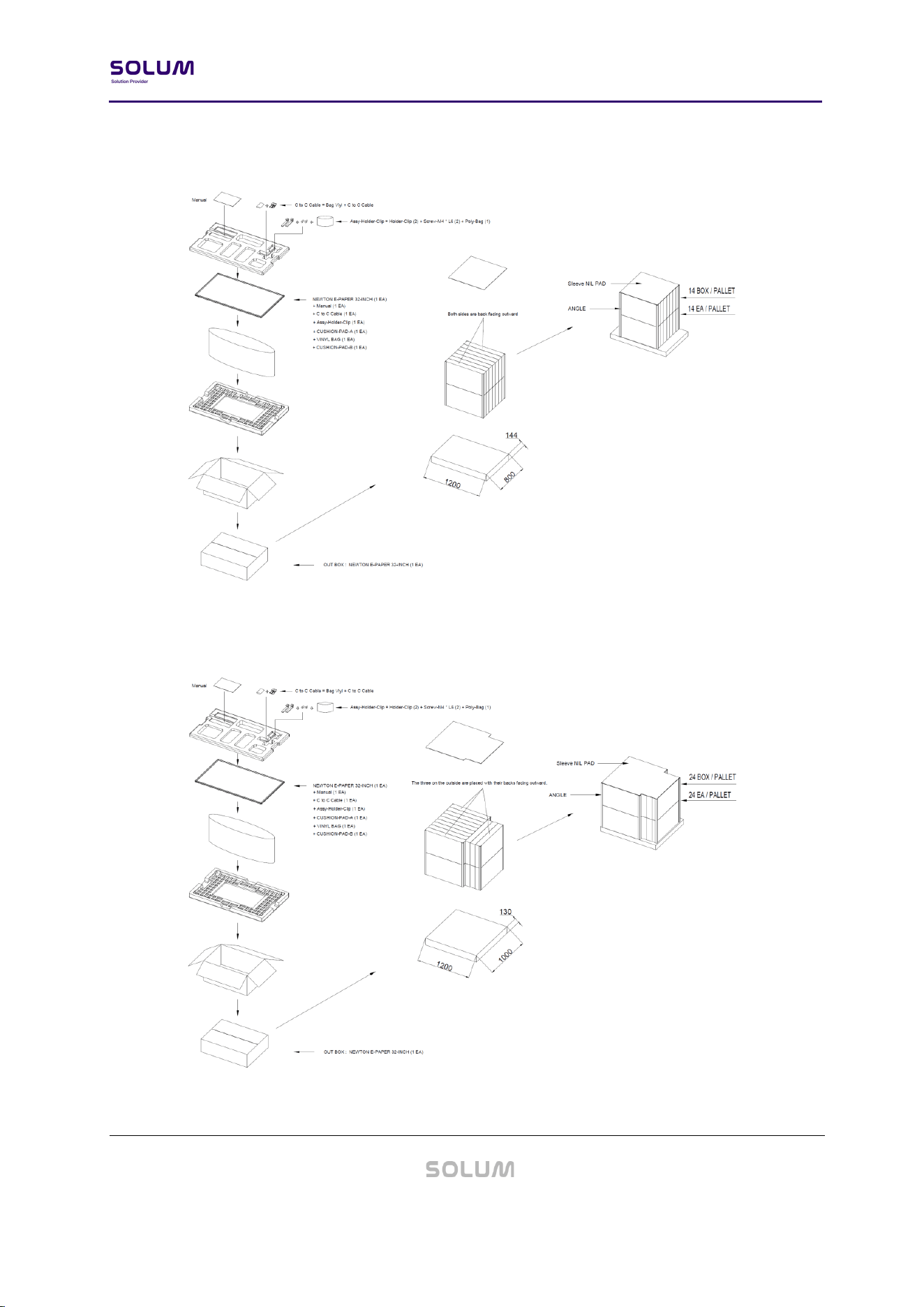
4. Packaging
Figure 5. PACKING-DIAGRAM (1,200 X 800)
Figure 6. PACKING-DIAGRAM (1,200 X 1,000)

Newton E-Paper 32” Datasheet
v0.2.1-PRE
Proprietary and Confidential
21 / 33
Newton E-Paper 32” Datasheet
v0.2.1-PRE
Proprietary and Confidential
22 / 33
5. Reliability Test
- High Temperature Operation
- Low Temperature Operation
- High Temperature/Humidity Operation
- High Temperature Storage
- Temperature Shock (Storage)
- ESD
- Package Drop Test
- Package Random Vibration Test
Test Item
Test Condition
Pass Criteria
High Temp Resistance
60℃ / 35%, 240hrs
Normal
operation after
test
High Temp Operation
50℃ / 35%, 240hrs
Thermal Shock
-25℃ (for 30mins) ~ 60℃ (for 30mins) for 240
cycles
High Temp &
Humidity Operation
50℃ / 70%, 240hrs
Low Temp Operation
0℃ (240hrs)
ESD Test
TYP. Air ±10KV, 150pF, 330Ω, 10 times/Point

Newton E-Paper 32” Datasheet
v0.2.1-PRE
Proprietary and Confidential
23 / 33
6. Product Handling Precautions
Provisions should be made to protect against any damage to the product caused by improper
handling. The purchaser assumes any responsibility for damage to the product caused by
improper handling.
Product should be stored in 0℃ ~ 45℃ (32℉ ~ 113℉) @45~70% RH environment and should be
installed within 90 days of receipt.
6.1. Usage Environment
Take extra caution when using this RF device in the vicinity of other electronic devices and
appliances. Most electronic devices and appliances use electromagnetic waves. Electromagnetic
waves emitted by this RF device can affect other electronic devices and appliances.
If using the device in an explosion hazard area, follow all safety regulations, instructions, and
signals.
6.2. Storage and Use
- The product is shipped in sleep mode (displaying a white screen) and can be activated by
pressing the button, using an NFC remote control, or via the mobile app.
- Moisture and liquids can damage internal parts and circuit boards if allowed to enter into the
device itself.
- Do not place or store the product on a sloped surface. The product may slide and fall off the
surface and become damaged.
- Use the product in temperatures ranges of 0℃ ~ 45℃ / 32℉ ~ 113℉ (KWRYGB). Parts and
circuits may be damaged if operated or stored in extreme temperature.
- The display panel needs extra care during handling.
• Do not apply any impacts on the e-Paper display as it is fragile.
• Continuous exposure to excessive moisture (over 70% RH) or UV shortens display lifetime.
• Ghosting image may appear in temperature conditions of less than 15℃ / 59℉ for
normal tags. (If ΔL* >2, we call it ghosting phenomenon)

Newton E-Paper 32” Datasheet
v0.2.1-PRE
Proprietary and Confidential
24 / 33
- Avoid areas with strong magnetism or subject to magnetism. Contact between the device and
a magnetic object can lead to malfunctions.
- Do not place the product near heat-producing kitchen appliances like a stove or a microwave
or in the vicinity of highly pressurized containers.
- External impact to the product, such as from being dropped, can damage the product.
- Twisting and bending the product can damage the exterior casing and the internal
components.
- If this product operates abnormally while removing battery or replacing battery, it needs to be
discharged by contacting the battery terminals (+) and (-) in the product.
- This product uses the 2.4GHz frequency band for the wireless communication network. Radio
communications can be limited or affected by other applications that share the same
frequency band, such as Wi-Fi, Bluetooth, Zigbee, etc.
- A prior investigation into the radio environment is strongly required for efficient and smooth
installation.
- Frequent communications, updates and screen renewals may reduce battery life time.
- Low temperature environments may reduce battery life.
- FIFO (First In First Out)
6.3. Product Cleaning
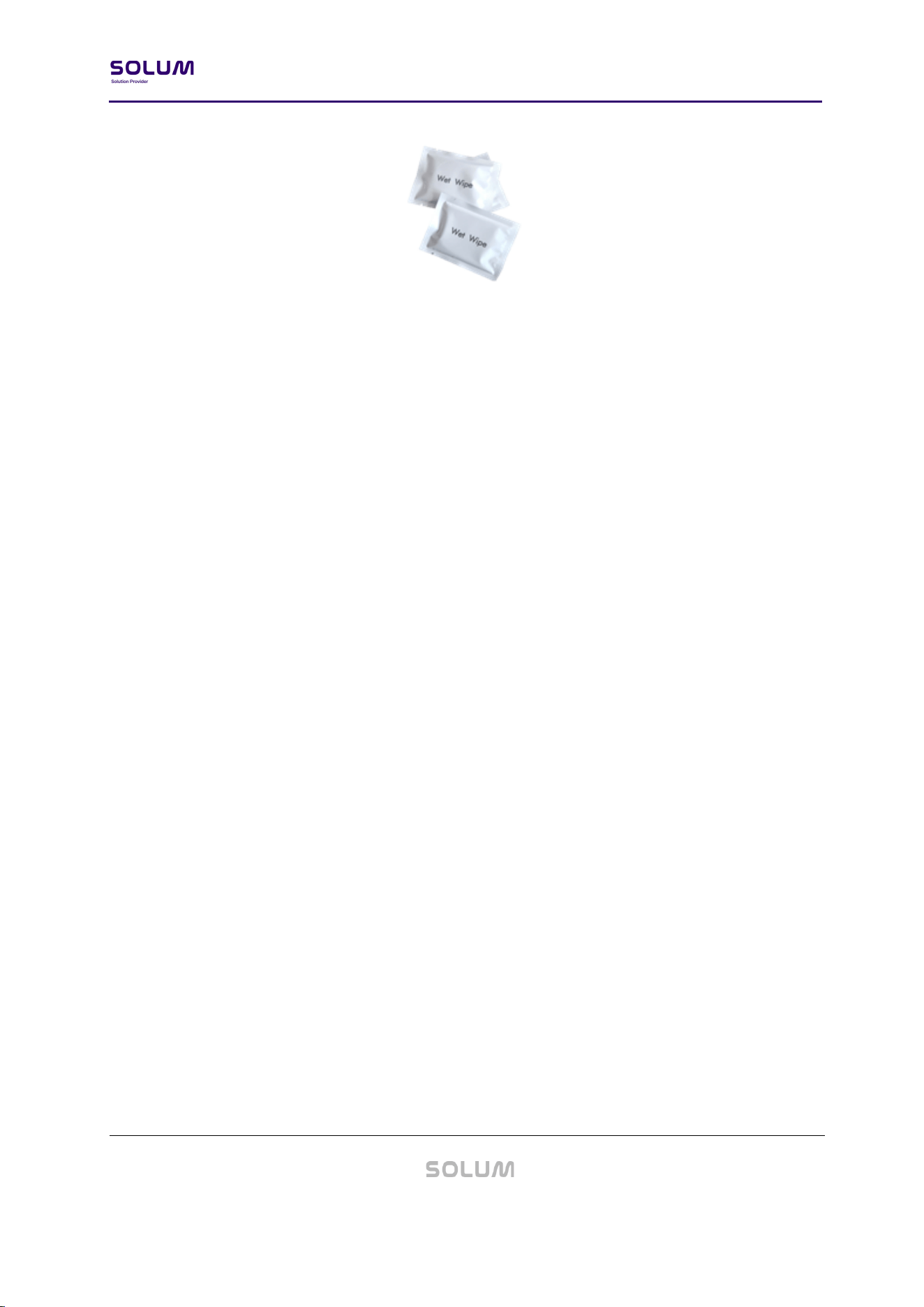
6.3.1. For Wet Tissue Cleaning:
Steps
(1) Stand or lay down the labels.
(2) Wipe using wet tissues.
(3) Let the labels dry.
Newton E-Paper 32” Datasheet
v0.2.1-PRE
Proprietary and Confidential
25 / 33
7. Battery Handling Guide
7.1. Avoiding hazards in lithium battery handling
1. Do not short circuit (Fig. 1)
• Direct connection of plus (+) and minus (-) poles may result in leakage, heat generation,
explosion and/or fire.
• Do not store and/or carry batteries with metallic items, such as a necklace.
2. Do not stack and/or jumble batteries (Fig. 2)
• Stacked and/or jumbled batteries may cause a short circuit and/or forced discharge from
contact with other batteries.
• This may result in leakage, heat generation, explosion and/or fire.
3. Do not make forced discharge batteries (Fig. 3)
• On a forced discharge by an external power source, the battery voltage goes to negative
and this causes gas generation in inside of the battery.
• This may result in leakage, heat generation, explosion and/or fire.
4. Do not dispose of batteries in fire
• Disposal of batteries in fire is extremely dangerous with a risk of explosion and violent
flaring.
5. Do not heat batteries
• Heating batteries above 100℃/212°F may damage the resin in crimping, separator and

Newton E-Paper 32” Datasheet
v0.2.1-PRE
Proprietary and Confidential
26 / 33
other parts, potentially causing an electrolyte leak, internal short circuit, fire and/or
explosion.
6. Do not solder directly onto batteries
• Direct soldering onto batteries may damage the resin in crimping, separator and other
parts, potentially causing an electrolyte leak, internal short circuit, fire and/or explosion.
7. Do not recharge batteries
• Recharging of batteries may result in internal gas generation, causing electrolyte leak,
battery swelling, fire and explosion.
8. Do not disassemble batteries
• Disassembly of batteries may generate gas that may irritate your throat.
• Lithium may also react with moisture to generate heat and fire.
9. Do not deform batteries
• Applying extreme pressure to batteries may cause deformation of the crimping and
internal short circuit, causing electrolyte leak, battery swelling, fire and explosion.
10. Do not mix different type batteries
• For some applications, mixing different types of batteries or new and old batteries, can
cause an over discharge due to differences in voltage and discharge capacities.
• This may lead to the risk of swelling and/or explosion.
11. Do not insert batteries with opposite polarity
• For some applications, battery insertion with opposite polarity (reverse insertion of plus
and minus) may result in leakage, heat generation, explosion and/or fire.
※ Please ensure the above precautions are strictly observed by related divisions including
Production, warehouse, Product technology, sales, quality, customer stores, S/I companies,
part-time workers, and external service companies.
Newton E-Paper 32” Datasheet
v0.2.1-PRE
Proprietary and Confidential
27 / 33
- Follow local regulations for proper battery disposal guideline.
7.2. Rechargeable Battery Handling
1. Storage Warning: Battery should store and used away from static electricity.
• If battery is stored for a long time (more than 3 months), it should be stored in an
environment with a temperature of 10℃ to 25℃ and a humidity of 45% to 85%.
• If battery is stored for a long time (more than 3 months), it should be charged every
three months.
• Battery should be stored away from source of heat and avoid direct sunlight.
2. Safety Warning: It is strictly forbidden to directly short circuit the positive and negative
poles of this product. It is strictly forbidden to connect the positive and negative poles.
• Do not crush, puncture, decompose and burn the battery and shall not be heated more
than 100℃, do not put the battery into water.
• Charging beyond the overcharge voltage may result in an explosion or relief from the
opening of the safety valve.
• Do not force the battery to discharge, which may cause performance degradation or
internal resistance increase.
• Keep away from the battery immediately when it is found that the battery leaks or emits
an unpleasant smell. If the electrolyte penetrates into the skin or clothes, wash
immediately with clean water. If the electrolyte seeps out and enters your eyes, do not
rub your eyes, immediately wash them with clean water and go to the hospital for
examination.
3. When charging the battery pack, make sure to strictly use a USB-C Type charger that
provides a 5V output and has a minimum power rating of 10W.
USB Charger
Input
AC 100 – 240V, 50/60Hz, 120W
Output
5V / 10W ↑
• WARNING: Do not use chargers that deliver a fixed output voltage exceeding 5V, as this
may cause severe damage to the product or even lead to fire hazards.
• Do not charge the product via an external power bank (or portable battery).

Newton E-Paper 32” Datasheet
v0.2.1-PRE
Proprietary and Confidential
28 / 33
• Simultaneous operation and charging of the product is not recommended.
• Using low-cost or fake brand chargers available on the market may cause damage to the
product or even lead to fire hazards.