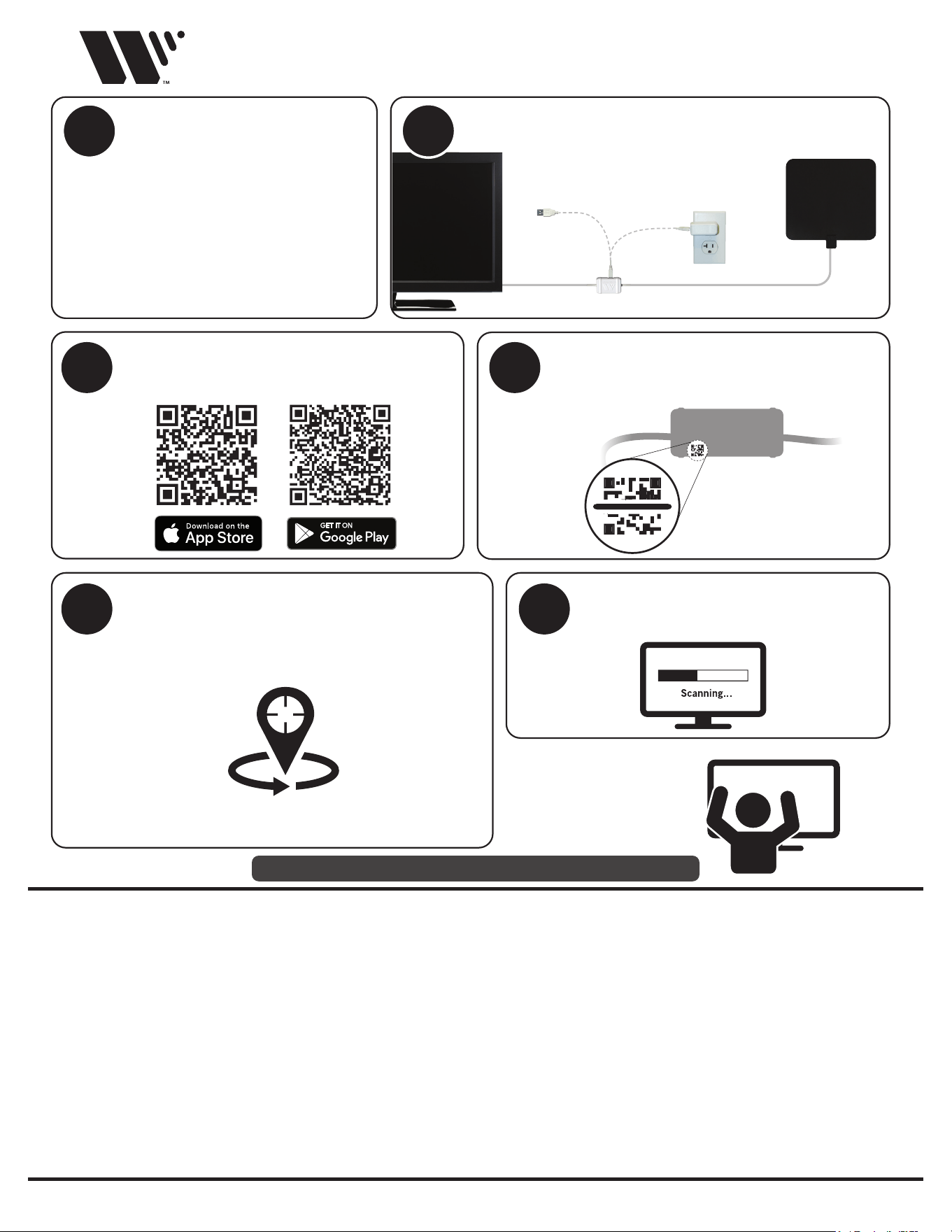
“ANTENNA IN”
through TV
Register your product at: winegard.com/myantenna
HDTV not
included.
outlet with 110V adapter
(included)
POWER ANTENNA
-OR -
Winegard is a registered trademark of Winegard Company. 3M and Command are trademarks of 3M Company. Patented Design (U.S. Patent D656,131)
Download the app by scanning the QR code for
your device. Or, search for Winegard Connected
in the App Store or Google Play.
Smart Indoor Antenna Quick Start Guide
Watch free TV!
3
WINEGARD COMPANY ONE YEAR LIMITED WARRANTY
Winegard Company provides a warranty to the original purchaser of new Winegard
Products against any defects in materials or workmanship for a period of one
(1) year from date of purchase, subject to the terms herein. This warranty is
non transferrable. If a Product covered under this warranty is determined to be
defective within the warranty period, Winegard will, unless otherwise required by
applicable law, either repair or exchange the Product at its sole discretion.
How to Obtain Warranty Service (Pre-authorization is required)
To obtain warranty service, contact Winegard Company Technical Support via
email: [email protected] or via phone at 800-788-4417 from 7:30 AM to 5:30
PM Monday through Friday and 8:00 AM to 3:30 PM Saturday, Central Standard
Time, or visit www.winegard.com. PRE-AUTHORIZATION MUST BE OBTAINED
BEFORE SENDING ANY PRODUCT TO WINEGARD. Proof of purchase in the form
of a purchase receipt or copy thereof is required to show that a Product is within
the warranty period.
Winegard Company will (at its option) repair or replace the defective product at
no charge to you. This warranty does not cover any costs incurred in removal or
reinstallation of the product. This limited warranty does not apply if the product is
damaged, deteriorates, malfunctions or fails from: misuse, improper installation,
abuse, neglect, accident, tampering, modification of the product as originally
manufactured by Winegard, usage not in accordance with product instructions
or acts of nature such as damage caused by wind, lightning, ice or corrosive
environments.
WINEGARD COMPANY WILL NOT ASSUME ANY LIABILITIES FOR ANY OTHER
WARRANTIES, EXPRESS OR IMPLIED, MADE BY ANY OTHER PERSON.
THE FOREGOING WARRANTY SHALL BE THE SOLE AND EXCLUSIVE REMEDY OF
ANY PERSON, WHETHER IN CONTRACT, TORT OR OTHERWISE, AND WINEGARD
COMPANY SHALL NOT BE LIABLE FOR INCIDENTAL OR CONSEQUENTIAL
DAMAGE OR COMMERCIAL LOSS, OR FROM ANY OTHER LOSS OR DAMAGE
EXCEPT AS SET FORTH ABOVE.
Some states do not allow limitations on how long an implied warranty lasts, or
the exclusion of limitation of incidental or consequential damages, so the above
limitations or exclusions may not apply to you.
This warranty gives you specific legal rights and you may also have other rights
which vary from state to state.
4
5 6
Open the app, sign in to your Winegard account.
Scan the QR code on your antenna, as shown below.
Follow the on-screen instructions to properly place
your antenna to get the maximum free channels.
Hint: Dierent views are available: a top-down view of
broadcast towers in your area, a full list of actual channels
your antenna detects, and also a signal strength view to
help fine-tune a specific channel if necessary.
NOTE:
Allow six to twelve seconds between each re-positioning
so that the app can pick up the full range of channels available
in that direction.
After finding the best place for your antenna,
use the included 3M Command™ adhesive
strips to mount it. Then, run a channel scan on
the TV.
1
Log onto www.winegard.com.
Select Accounts.
Select Register New User.
Fill out information and confirm email.
Close out of Winegard.com and
download Winegard Connected APP.
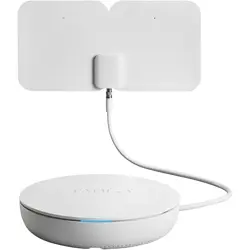
Connect the antenna to TV and power source.
Power on TV.
2
Apple and the Apple logo are trademarks of Apple Inc., registered in the U.S. and other countries.
App Store is a service mark of Apple Inc., registered in the U.S. and other countries. Google Play and the Google
Play logo are trademarks of Google LLC. The Bluetooth word mark and logos are registered trademarks owned
by Bluetooth SIG, Inc. and any use of such marks by Winegard is under license.
Winegard Company • 3000 Kirkwood Street • Burlington, IA 52601 Printed in U.S.A. • ©2020 Winegard Company
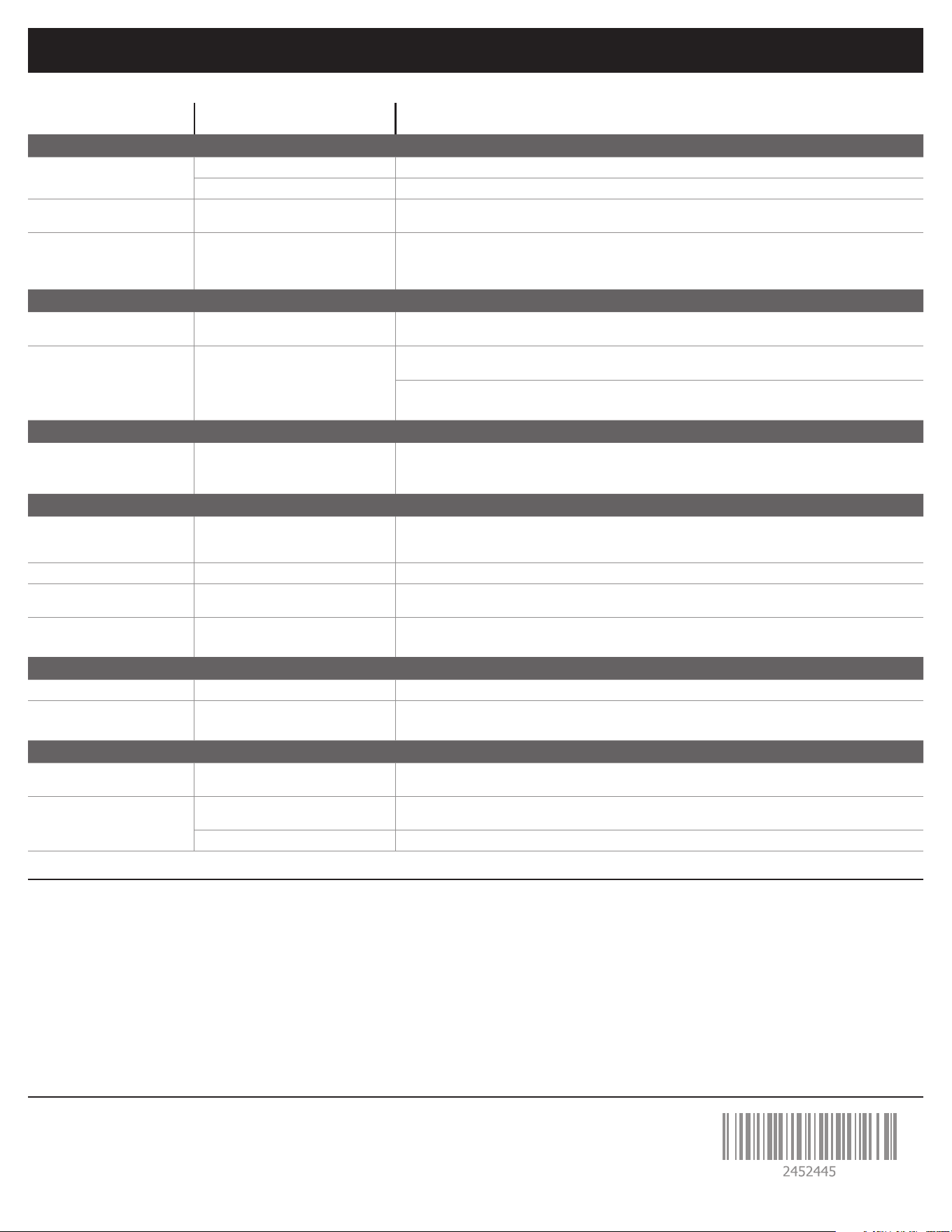
Problem Possible Cause Possible Solution
SUMMARY SCREEN
Total Channels shows all zeros. App connection to database lost. Close app and reopen.
Antenna placed in wrong location. Allow the timer to cycle twice while repositioning the antenna.
Total Channels shows all
dashes.
Antenna has encountered a problem. Reboot by unplugging the antenna, waiting 3 seconds, and restoring power.
Not all channels are GREEN. Antenna position, distance, terrain,
weather, network power, or band may
aect signal strength.
Reposition the antenna to get as many channels possible in GREEN and YELLOW (channels with these
colors should be viewable).
MAP SCREEN
Network does not appear. Networks may be on the same tower, or
very close and hidden.
Zoom in on the map to see if the network tower appears.
The network that I want
remains RED.
Antenna position, distance, terrain,
weather, network power, or band may
aect signal strength.
Click/hover over the network and verify the network distance is within antenna range.
Click/hover over the network you are looking for and verify the antenna covers the required band (UHF,
VHF High; VHF Low).
LIST VIEW
Channel data refreshes before
I find the channel.
Channel data refreshes every 6 to 12
seconds and moves to the top of the
screen.
Press the Pause button at the bottom of the screen so that you can see the channels you have. Restart
whenever you are ready.
DEVICE CONNECTION
I can’t scan the barcode. The camera won’t focus, or you’re not
signed into your account.
Ensure you are signed in to your Winegard account. Adjust the distance from your camera to the QR code.
If this doesn’t help, tap the Continue without scanning button, then tap Scan for Bluetooth Devices to
manually find and connect to your antenna.
Cannot connect to the device. The antenna is not powered on. Ensure the antenna is powered on and try again.
Scan code is not recognized. Scanned wrong QR code, or there is a
decoding error.
Check that QR code is not damaged, then center camera on only the Winegard scan code.
A message appears that the
device is disconnected.
Out of range of antenna, or power
to the antenna was lost.
Make sure your antenna is powered on; stay within a few feet of your antenna to ensure the Bluetooth
connection is not lost.
ACCOUNT SIGN IN
My account needs to be verified. Email verification needed. Check for an account verification email message from Winegard and follow the instructions.
Invalid password. Incorrect password. Re-enter your password or reset your password and follow the instructions.
BLUE LED
LED is no longer solid or
flashing.
Sleeps after 15 minutes of inactivity. This is normal operation when the unit goes to sleep. A connection to the antenna may still be made when
the blue LED is o.
LED light is no longer on. Bluetooth connection is in sleep
mode.
Antenna/Amplifier is still working with LED o, the Bluetooth connection is in sleep mode.
Antenna is not powered on. Ensure antenna is powered on and try again.
For help, send an email to [email protected] or call 1-800-788-4417
Rev5 12/20
FCC STATEMENT
This device complies with Part 15 of the FCC Rules. Operation is subject to the following two conditions: (1) This device
may not cause harmful interference, and (2) this device must accept any interference received, including interference
that may cause undesired operation.
This equipment has been tested and found to comply with the limits for a Class B digital device, pursuant to Part 15 of
the FCC Rules. These limits are designed to provide reasonable protection against harmful interference in a residential
installation. This equipment uses and can radiate radio frequency energy and, if not installed and used in accordance
with the instructions, may cause harmful interference to radio communications. However, there is no guarantee that
interference will not occur in a particular installation. If this equipment does cause harmful interference to radio or
television reception, which can be determined by turning the equipment o and on, the user is encouraged to try to
correct the interference by one or more of the following methods:
• Reorient or relocate the receiving antenna.
• Increase the separation between the equipment and devices.
• Connect the equipment into an electrical outlet on a circuit dierent from that which the radio receiver is connected.
• Consult the dealer or an experienced radio/TV technician for help.
FCC Caution
Any changes or modifications not expressly approved by the party responsible for compliance could void the user’s
authority to operate this equipment.
Only channels 1–11 can be operated. Selection of other channels is not possible.
This device and its antenna(s) must not be co-located or operating in conjunction with any other antenna or transmitter.
FCC Radiation Exposure Statement
This equipment complies with FCC radiation exposure limits set forth for an uncontrolled environment. This equipment
should be installed and operated with a minimum distance of 25 cm between the radiator and your body.
This device and its antenna(s) must not be co-located or operating in conjunction with any other antenna or transmitter
except in accordance with FCC multi-transmitter product procedures.
This device complies with FCC and Industry Canada license-exempt RSS standard(s). Operation is subject to
the following two conditions: (1) this device may not cause interference, and (2) this device must accept any
interference, including interference that may cause undesired operation of the device.