Caution
Before using our power station, please read this
manual carefully to understand the proper use of your
unit. Keep this manual handy.
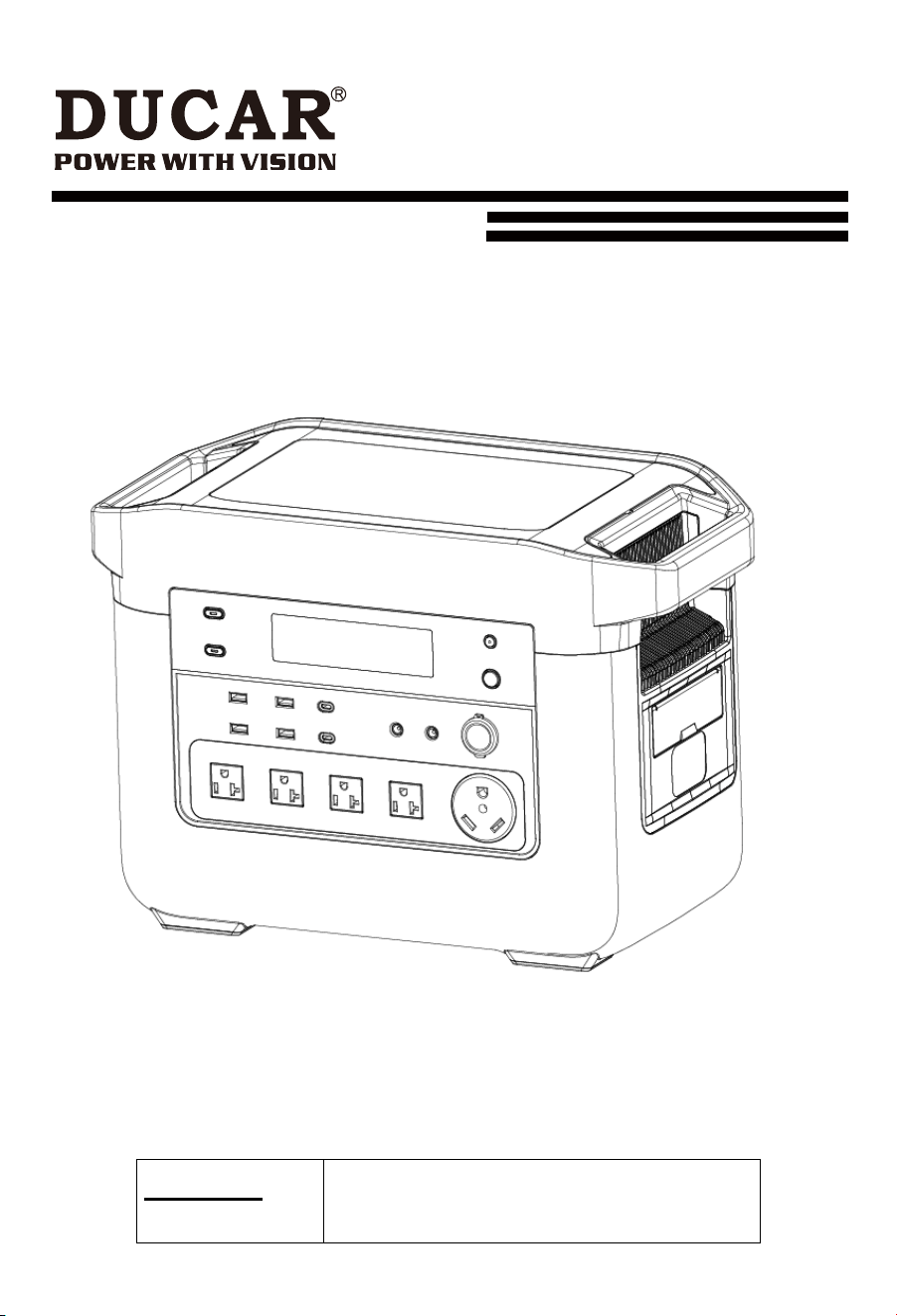
POWER STATION
Model:DPS2400L-C

TABLEOF CONTENTS
2
Explanation of the symbols on the product
............................................................................ 03
Introduction ............................................................................................................................. 04
Product description ................................................................................................................. 06
Proper use .............................................................................................................................. 08
Safety instructions .................................................................................................................. 08
Technical data ......................................................................................................................... 11
Unpacking ............................................................................................................................... 12
Charging ................................................................................................................................. 12
Description of the various connections and the display......................................................... 14
Start up ................................................................................................................................... 19
Electrical connection .............................................................................................................. 20
Cleaning .................................................................................................................................. 21
Transport ................................................................................................................................. 21
Storage ................................................................................................................................... 21
Maintenance ........................................................................................................................... 21
Disposal and recycling ............................................................................................................ 21
Troubleshooting ...................................................................................................................... 24
3
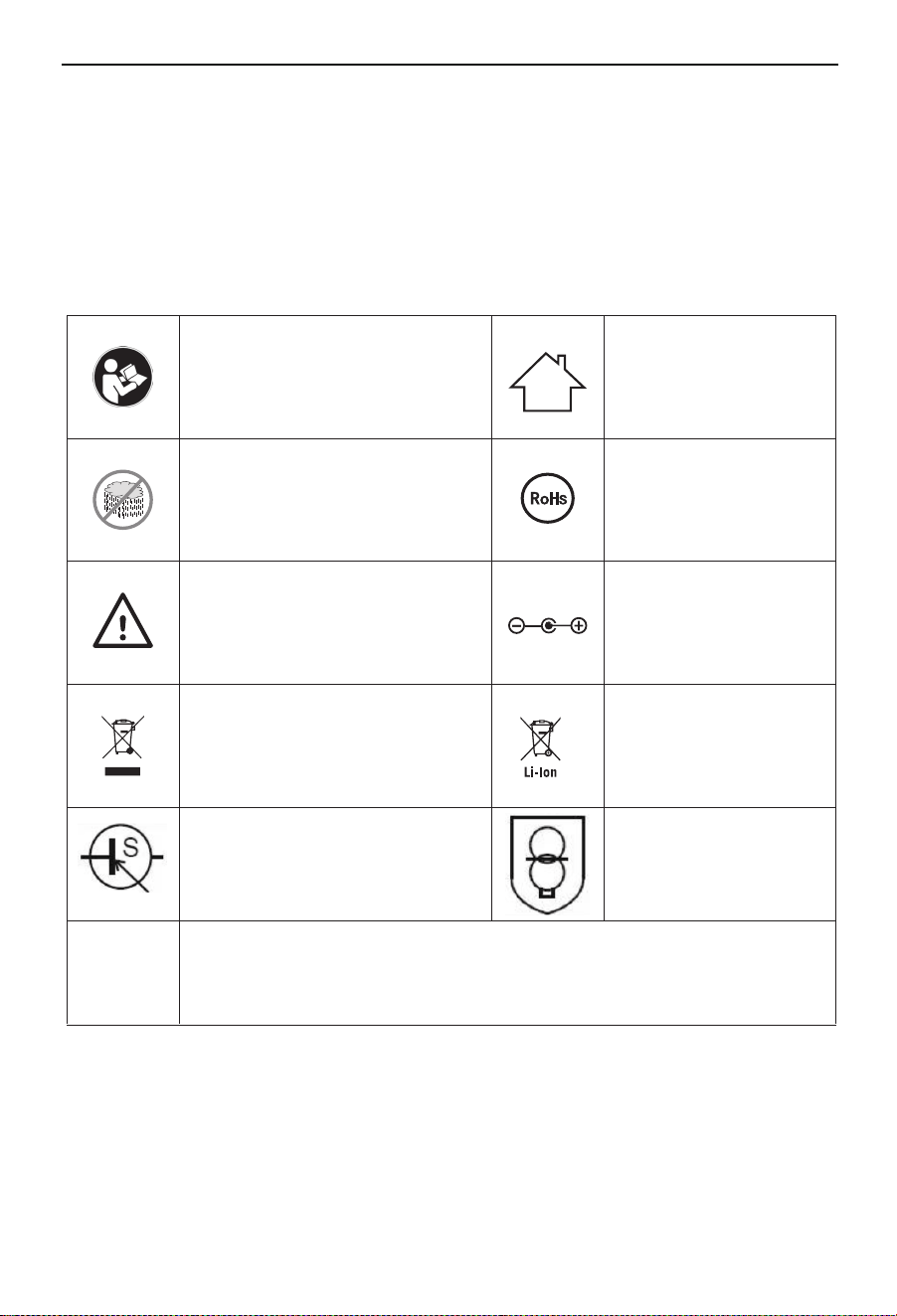
Explanation of the symbols on the product
Symbols are used in this manual to draw your attention to potential hazards.
The safety symbols and the accompanying explanations must be fully understood.
The warnings themselves will not rectify a hazard and cannot replace proper
accident prevention measures.
m
Before commissioning, read
and observe the operating
manual and safety instruc-
tions!
Do not use the product in
wet conditions! Protect from
moisture!
Observe warnings and safety
instructions!
The battery charger
is only suitable for
use indoors.
Do not throw old equipment
away with household waste
Mains power unit
corresponds to the
RoH guideline.
Do not throw Li-ion
rechargeable batteries
away with household
waste
Connection
identification
We have marked points in this operating manual that
impact your safety with this symbol
Attention!
SMPS(Switch mode power supply
unit)
SMPS incorporating a
short-cir cuit-proof safety
isolating transformer
(inherently or non-inherently)

4
Introduction
Dear Customer,
We hope your new product brings you much enjoyment and succ
ess.
Note:
In
accordance
with
the
applicable
product
liability
laws,
the manufacturer of this product
assumes no liability for damage to the product or caused by the product arising
from:
• Improper handling
• Failure to comply with the operating instructions
• Repairs carried out by third parties, unauthorised specialists.
• Installing and replacing nonoriginal spare parts
• Application other than specified
• Failure of the electrical system in the event of the electrical regulations and VDE provisions
0100, DIN 57113 / VDE0113 not being observed
Note:
Read through the complete text in the operating manu-al before installing and commissioning the
device. This operating manual should help you to familiarise yourself with your product and
to use it for its intended purpose.
The operating manual includes important instructions for the safe, proper and economic
operation of the product, for avoiding danger, for minimising repair costs and downtimes and
for increasing the reliability and extending the service life of the product.
In addition to the safety instructions in this operating manual, you must also observe the
regulations appli-cable to the operation of the product in your country. Keep the operating
manual package with the power tool at all times and store it in a plastic cover to protect it
from dirt and moisture. They must be read and carefully observed by all operating personnel
before starting the work.
The product may only be used by personnel who have been trained to use it and who have
been instructed with respect to the associated hazards. The required minimum age must be
observed.
In addition to the safety instructions in this operating manual and the separate regulations of your
country, the generally recognised technical rules relating to the operation of such machines must
also be observed. We accept no liability for accidents or damage that occur due to a failure to
observe this manual and the safety instructions.

5
Introduction FCC
his device complies with Part 15 of the FCC Rules / Industry Canada licence-exempt
RSS standard(s
).
Operation is subject to the following two conditions:
(1) this device may not cause harmfulinterference.
(2) this device must accept any interference received, including interference thatmay
cause undesired operation.
Changes or modifications not expressly approved by the party responsible for
compliance could void
the user's authority to operate the equipment.
This equipment has been tested and found to comply with the limits for a Class B
digital device,
pursuant to part 15 of the FCC Rules. These limits are designed to provide reasonable
protection
against harmful interference in a residential installation. This equipment generates
uses and can
radiate radio frequency energy and, if not installed and used in accordance with the
instructions, may
cause harmful interference to radio communications. However, there is no guarantee
that
interference will not occur in a particular installation. If this equipment does cause
harmful
interference to radio or television reception, which can be determined by turning the
equipment off
and on, the user is encouraged to try to correct the interference by one or more of the
following
measures:
—Reorient or relocate the receiving antenna.
—Increase the separation between the equipment and receiver.
—Connect the equipment into an outlet on a circuit different from that to which the
receiver is
connected.
—Consult the dealer or an experienced radio/TV technician for help.
MPE caution (if a FCC certified RF module is inserted in & the separation distance is
indicated
FCC ID: 2BQTM-DPS2400L
Contion FCC ID:2ANDL-CBU
in the FCC grant of RF module)
To satisfy FCC / IC RF exposure requirements, a separation distance of 20 cm or more
should
be maintained between the antenna of this device and persons during device operation.
To ensure compliance, operations at closer than this distance is not recommended.
6
Product description
1
1
1
2
3
4
5
6
7
8
9
10
11
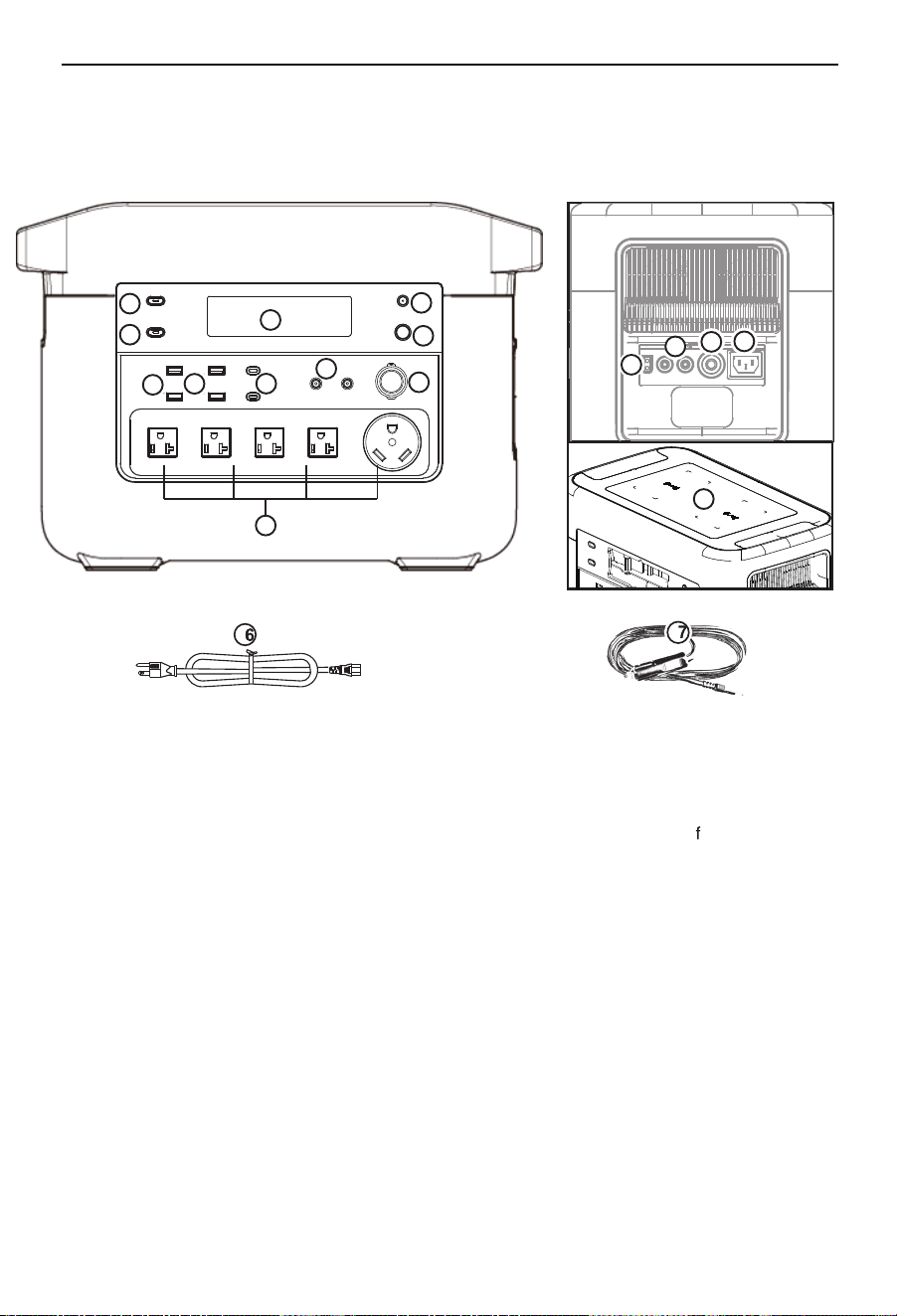
1. LCD display 2. AC switch 3. DC switch
4.WIFI/Bluetooth switch
5..P ower switch
6. USB 5V 2.4A output
7. USB 12V 2A
ast Charge output
8.USB-C output
9. DC output
10.Vehicle output
11. 120V AC output
12.DC charging interface
13.Parallel interface
14.Safety switch
15.AC charging interface
16.AC power cable
17.Vehicle charge cable
18. Wireless charging
12
13
14
15
18
E318166
7
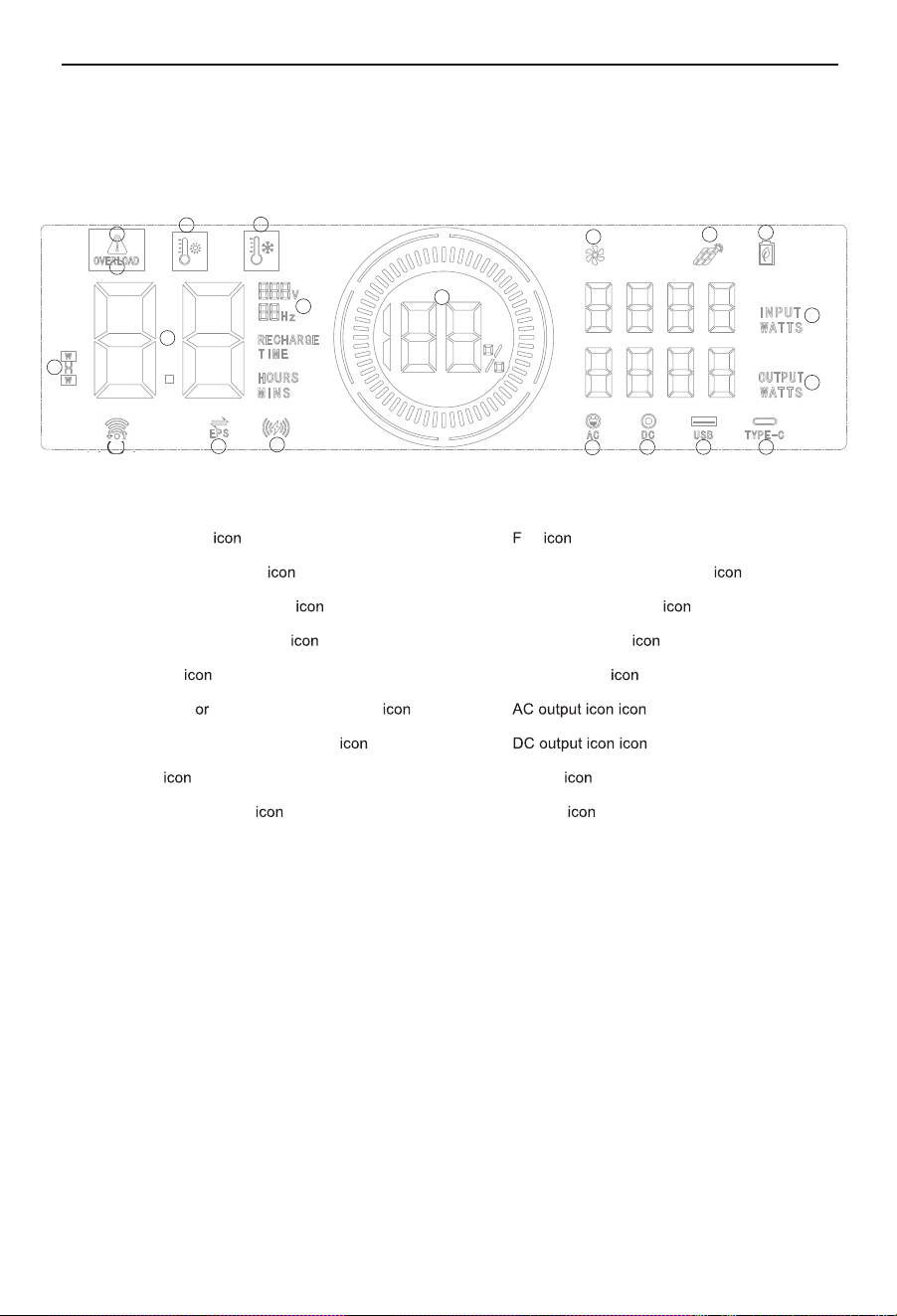
LCD display
19.WIFI/Bluetooth icon
20.Warning icon
3
4
20
10
11
12
2
1
7
13
6
5
14
8
9
15
16 17 18
15.
16.
1. Battery level
2. Overload protection
3. Heat protection warning
4. Cold protection warning
5. Parallel
6. Charging discharging time display
7. Voltage and frequency display
8. EPS
9. Wireless charging
10. an
11. Solar or DC charging display
12. Energy-saving mode
13. Charging Power
14. Output power
17. USB-A
18. Type-C
19

8
Proper use
The Powerstation is designed to charge rechargeable batteries or operate electronic
products that do not exceed a max. power of 2400 W.
The product may only be used in the intended manner. A
ny use beyond this is improper. The user/
operator,
not the manufacturer, is responsible for damages or injuries of any type resulting
from this.
An element of the intended use is also the observance of the safety instructions, as well as the
assembly instructions and operating information in the operating manual. Persons who
operate and maintain the machine must be familiar with it and must be informed about
potential dangers.
In addition, the applicable accident prevention regula-tions must be strictly observed. Other
general occupational health and safetyrelated rules and regulations must be observed.
The liability of the manufacturer and resulting damages are excluded in the event of modifications of
the product.
The product may only be operated with original parts and original accessories from the
manufacturer. The safety, operating and maintenance specifications of the manufacturer, as
well as the dimensions specified in the technical data, must be observed.
Please note that our products were not designed with the intention of use for commercial or
industrial purposes. We assume no guarantee if the product is used in commercial or
industrial applications, or for equivalent work.
Safety instructions
m DANGER
A failure to observe these instructions poses an extreme danger of death or the risk of life-
threatening injuries.
m NOTE
Personal injury or property damage can result from incorrect operation.
General safety instructions
m DANGER
• Please do not disassemble, repair or transform,
which may cause electric shock,
heat, fire
and other dangers.
• Do not place the product near the source of fire or expose it to fire or heat as this could
result in fire, burns, and other hazards.

9
• This product cannot be charged and used in dew, bathhouse, rain and other places; do not
use water to clean the product, it will cause electric shock, heat, fire and other dangers.
• Do not touch this product or connector plug when your hands are wet. It may cause electric
shock hazard.
• Do not use metal to contact AC output interface. It may cause electric shock, fever, fire and
other dangers.
• Please do not dispose of the product in general waste disposal. Electricity shock, heat and
fire may occur in the garbage collection truck or in the garbage collec-tion truck.
• Do not use AC connections other than those specified. It may cause electric shock, fever,
fire and so on.
• Please check the rated specifications of the connection interface or the connection product
and do not exceed the specifications. It may cause electric shock, fever, fire and so on.
• Please do not have a strong impact on the product such as a drop or a hammer strike. This
can result in an electric shock, heating up, fire or damage to the product.
• Do not place, store and use the product at locations where it can fall down or drop (e.g. on
high shelves). This can result in an electric shock, heating up, fire or damage to the product.
• Do not move the product, while it is charging or in use. Heating up, fire, electric shock or
damage can be caused to the product due to vibrations or impacts while moving.
• When in use, ensure that the connected product is reliably grounded.Improperly grounded
devices may pose a serious threat to your life and property.
m Warning!
• Please keep the place clean for use and storage.Powder or small metal contact terminal
may cause short circuit, accidents such as smoke or fire.
• Make sure to check the product before use. In the case of anomalies such as breakages,
cracks, leaks, heating up or breakage of the AC power line, please stop using the product
immediately.
• Do not let children use this product or it may cause accidents or injuries.
• Do not use if a connector cannot be fully inserted due to a loose or deformed interface.
Otherwise, electric shocks, heating up and fire can be caused.
• Please do not use it on the beach or in dusty places. Or it may cause smoke, fire.
• Please do not use and keep in the car, trunk, loading table or high temperature place
under direct sunlight. Otherwise, it may cause product failure obstacles or deterioration or
cause fever.
• If the liquid within the product adheres to the skin or clothing, please wash with water
immediately. Otherwise may cause the skin injury and so on. Wash the liquid out of the
eyes. After washing with clean water, please see a doctor immediately. It may cause the
risk of blindness.
• In the event of a thunderstorm or lightning strike, pull the power cord out of the socket
while charging. Overload can lead to overheating, fire, and other accidents.
• Please charge the product within the specified volt-age range (240 V alternating current).
Otherwise, heat, fire, and other accidents may result.
• Please do not place the product upside down or on its side when using and storing it,
otherwise it may cause leakage, heat, fire and other hazards.

10
Note
• Stop using the product immediately if any abnormalities such as rust, unusual smell,
heating, etc. appear.
• When transporting the product by a car, etc., please fix it so that it cannot be moved.
Otherwise, the product may be damaged, resulting in electric shock, heat, fire, etc.
• Do not allow this product or the power cord to come into contact with water or other liquids.
This may lead to short circuits, heat, fire, etc.
• Charge, use and store this product at temperatures between 0 and 40°C, otherwise loss of
power or heating up may occur.
• In the event of an accidental drop or impact, the housing could be damaged by electric shock,
heat, fire, etc. Please stop using the product immediately. To avoid accidents, immediately
contact the installation and maintenance personnel responsible on site.
• Read through the operating instructions completely before connecting the electrical products.
Operating errors can lead to accidents or injuries.
• Before connecting electrical products, ensure that electrical products are switched off. A
sudden start of electrical products can result in accidents or injuries.
• Make sure to turn off the main switch during storage to avoid unnecessarily discharging the
battery and avoiding electric shock.
m ATTENTION!
This power tool generates an electromagnetic field during operation. This field can impair active or
passive medical implants under certain circumstances. In order to prevent the risk of serious
or deadly injuries, we recommend that persons with medical implants consult with their physician
and the manufacturer of the medical implant prior to operating the machine.
Residual risks
The product has been built according to state-of-the-art and the recognised technical safety rules.
However, individual residual risks can arise during operation.
• Health hazard due to electrical power, with the use of improper electrical connection cables.
•
Furthermore, despite all precautions having been met, some unobvious residual risks may still remain.
•
Residual risks can be minimised if the “Safety Instructions” and the “Intended Use” together with the
operating manual as a whole are observed.
•
Avoid accidental start-up of the machine: The operating button may not be pressed when inserting the plug in
a socket. Use the tool that is recommended in this operating manual. This is how to ensure that your
machine provides optimum performance.
11
Technical data
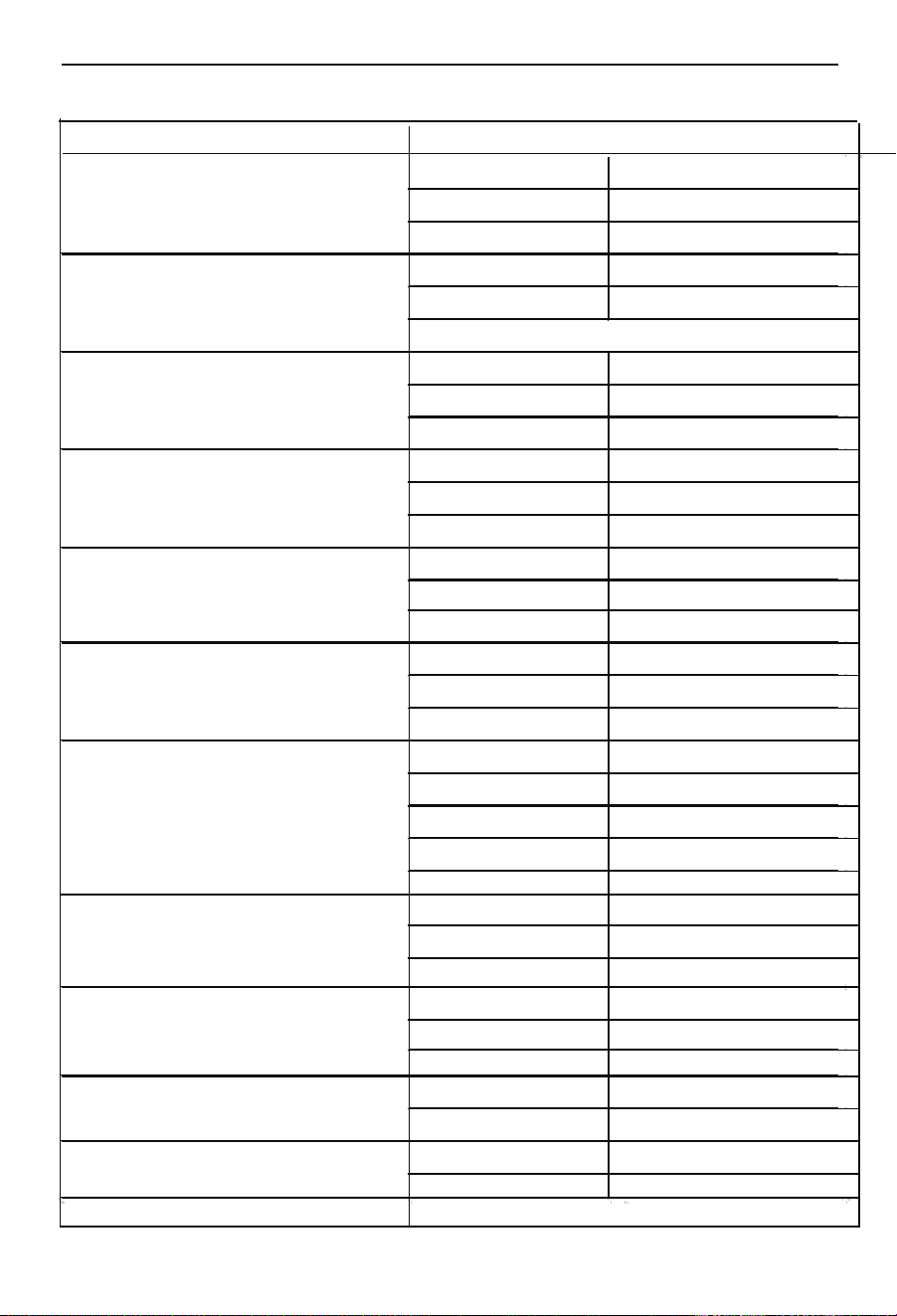
Rated voltage
120 V
Power output for AC output
Nominal pow 2400 W
Frequency
60 Hz
Rated voltage 12V
Power output for DC
output
Rated current
Max. 5 A
Required connector Coaxial pow er connector
Rated voltage 5 V
Power output for USB-A output
Rated current 2.4 A
Nominal power 12 W
Rated voltage 5V/9V/12V
Power output for USB-A quick
charge
Rated current 3A/2.2A/2A
Nominal pow er 24 W
Quick charge PD3.0
Rated voltage
5V/3A,9V/3A,12V/3A,15V/3A,20V/5A
Power output for USB-C output
Max. pow er 100 W
Rated voltage
12 V
Power output for Vehicle output
Rated current 10 A
Nominal power 120 W
Rated voltage
120 V / AC
Rated current
15 A Max
Nominal power
1750 W
Power supply
Input voltage
96-138 V
Frequency
60 Hz
Input voltage 12-60V
Rated current 25 A
DC Power supply
Max. power 1200 W
Rated voltage 51.2 V
Li-ion battery
Battery capacity
2150 Wh
Voltage 40 - 57.6 V
Air hum idity 10% - 65%
Working conditions
Operating temperature -10°C to 40°C
General
Protection category IP 20
Protection class I
Wireless charging output
Max. 15W
Model
DPS2400L-C

12
Unpacking
• Open the packaging and carefully remove the product.
• Remove the packaging material, as well as the packaging and transport safety devices (if present).
• Check whether the scope of delivery is complete.
• Check the product and accessory parts for transport damage. In the event of complaints the
carrier must be informed immediately. Later claims will not be recognised.
• If possible, keep the packaging until the expiry of the warranty period.
• Familiarise yourself with the product by means of the operating manual before using for the first
time.
• With accessories as well as wearing parts and replacement parts use only original parts. Spare
parts can be obtained from your specialist dealer.
• When ordering please provide our article number as well as type and year of manufacture for
the product.
m ATTENTION!
The product and the packaging material are not children‘s toys! Do not let children
play with plastic bags, films or small parts! There is a danger of choking or suffocating!
Charging
m NOTE: The product is not fully charged when delivered. We recommend fully charging the
product before initial use.
While charging, the ring symbol on the LCD display is in a dynamic state. After fully charging
the battery, the display symbol is in the static state.
m Note: Please make sure that the connected electri-cal products can work properly before
using this product.
m Note: It is normal for the product to warm up while charging.
Regular discharging and charging increases the service life.
m Note: Ensure that the cabling is properly inserted otherwise the contact terminals could
melt or catch fire at high temperatures.
m Note: Charge the product at an ambient tempera-ture of 0 to 40°C.
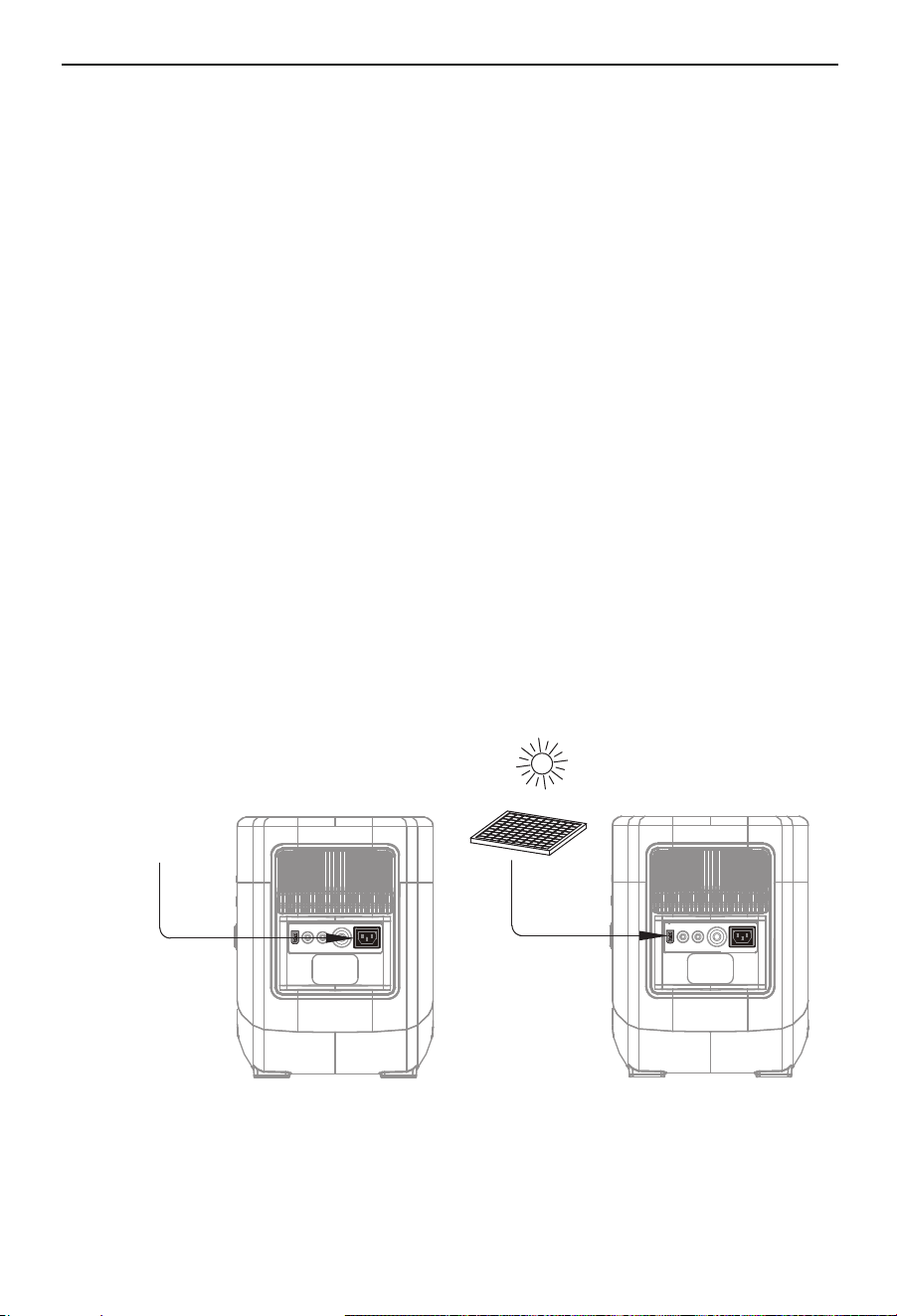
Charging with the mains power unit
Always use the mains power unit supplied with the product.
• Press the ON/OFF switch with operating indicator ntil it lights up green. The LCD display is
visible.
• Connect the input plug of the AC power cable to a wall outlet,and the other end is
connected to the AC charging input port of the product .
13
• You can read the charge status on the LCD display.
• When the Power station is fully charged, the charging process is ended automatically.
• As soon as the Power station is fully charged, switch the product off and disconnect the
mains power unit from the power connection.
Charging with a solar panel (not included in the scope of delivery)
• Press the ON/OFF switch with operating indicator ntil it lights up green. The LCD display is
visible.
• Place your solar panel where it can get as much direct sunlight as possible.
• Connect the solar panel to the charging socket.
• You can read the charge status on the LCD display.
• When the Powerstation is fully charged by the solar panel, the charging process is ended auto-
matically.
• Disconnect the solar panel from the Powerstation and switch it off.
m Note: You can link several solar panels to each other in order to shorten the
charging time. The Powers tation is able to absorb 1200W of charging power. The off-
load voltage of the solar panel should be between 12V and 60V. Otherwise, the
overvoltage protection of the charging process can be triggered or cause damage.
m Note: The charging time is different when light intensity is different.

14
m Note: The direct current output (DC is suitable for most products on the market.
Some products with high current can trigger the overload protection .
m Note: Devices with a power rating of more than 2400 W must not be operated with this
Power station.
Description of the various connections and the display
Connections
This product is equipped with 3 function outputs, namely the AC area, DC area and USB
area.
•
•
USB-C output : smart phones, tablets, etc.
USB 5V 2.4A output : smartphone, MP3 player, digital camera, electronic reader, tablet, etc.
• USB 12V 2A Fast Charge output : Smartphone, MP3 player, digital camera, electronic
reader, tablet, etc. (provided these devices support fast charging)
• DC output : mainly used for LED light bulb lighting.
• 120V AC output : Notebook, camera, display devices and other working devices for the
alternating current supply with a max. power of 2400 W.
• Vehicle output : Camping equipment with connection such as kettles, camping
refrigerators, travel coffee machines, camping cool boxes.
Charging via the Vehicle output (cigarette lighter) in a vehicle
Ensure that the vehicle engine is running.
• Connect the Power station and the socket (cigarette lighter) of your vehicle using the car
charger cable.
• Charge the Power station after starting the vehicle. You can read the charge status on the LCD
display.
• When the Power station is fully charged, the charging process is ended automatically.
• Disconnect the car charger cable from the Power station when fully charged.
15
Display
Displays the battery charge status in segments (0-10%, 11-20%, 21-30%,
31-40%, 41-50%, 51-60%, 61-70%, 71-80%, 81-90%, 91-100%). In addition,
the charge status is displayed as an exact percentage. When the
Powerstation is charging, the segments rotate by the percentage.
Battery level(1)
In AC mode, once the rated power is exceeded for too long or the peak power
is exceeded, a warning sign with "overload" will appear.
Overload protection(2)
Heat protection warning(3)
A thermometer with a sun is displayed if the Powerstation becomes too
hotdue to external or technica influences
A thermometer with a snowflake is displayed if the Powerstation becomes
too cold due to external influences
Cold protection warning(4)
When the device has charging current, the RECHARGE TIME icon is steady
on and displays the corresponding remaining charging time. When the device
is discharging, the RECHARGE TIME icon is not displayed, only the remaining
discharge time displayed
Charging and discharging time display(6)
When AC is turned on, the screen displays the corresponding output voltage
level and frequency
Voltage and frequency display(7)
After power on, if the module has distribution network information and can
connect to the cloud, this icon will be steady on. If there is no connection, this
icon will not be displayed.
If you press the network distribution button for more than 5 seconds, the icon
blinks, indicating that the device can be reconfigured
EPS(8)
When the mains is connected and the AC output is on, the icon is always on
If the device has this function, the icon is steady on. If the device does not
have this function, the icon is not displayed
Wireless charging(9)
Fan(10)
When the inverter is loaded, the temperature of the inverter is ≥45±5℃, and
the fan starts to work, the inverter temperature is ≤40±5 ° C, the fan stops.
When the inverter is unloaded, the inverter temperature is ≥70±5℃, and the
fan starts to work. The inverter temperature ≤65±5 ° C, the fan stops.
The DC output power is higher than 100W then need to start the fan.
Solar or DC charging display(11)
When a solar device or DC is charging the device, the icon is on
Hold down the DC over 5 seconds start the ECO,the hold down it 5
seconds again, cancel the ECO.
When the energy saving mode is on, the DC automatically shuts down
after 12 hours (power less than 2W), and the AC automatically shuts down
after 12 hours (power less than 5W).
Energy-saving mode(12)
charging power icon(13)
The input charging power is indicated by “INPUT”.
Output power icon(14)
The total output power is indicated by “OUTPUT”.
A socket symbol and the DC inscription indicate that the DC outputs and the
Vehicle output are active.
AC output (15)
A type-C symbol and the type-C inscription indicate that the type-C output is
active.
Type-C(18)
A USB-A symbol and the USB inscription indicate that the USB-A outputs are
active.
USB-A(17)
The AC inscription and a plug symbol indicate that the 240V output is active.
Wifi/Bluetooth(19)
Parallel icon(5)
Only when there is no city power access and the AC button triggers the
parallel mode can be displayed, the rest of the time is not displayed (the
default is turned off when starting)
DC output (16)
Warning icon (20)
when the device fails , the icon light, meanwhile the screen show the failed
code.

16
Switching off:
1. Keep the on/off switch with operating display pressed for a few seconds.
2. The operating display and the LCD display go out.
m Note: The LCD display goes out automatically after a certain amount of time without
operation. Press the ON/OFF switch with operating indicator briefly to switch the LCD
display on again.
m Note: If the DC / AC buttons are switched off and no consumer is connected to the USB-C
connection, the product is shut down automatically after 120 minutes to save power.
m Note: You can switch the display lighting on or off with a short press of the ON/OFF
switch with operating indicator.
m Note: Always remember to turn off the product when not in use.
Supplying the consumer with direct current
Press the DC button with operating indicator to supply the products with direct current.
1. Insert a consumer into the corresponding output.
2. With the product switched on, press the DC button with operating indicator to switch on
the DC output , the Vehicle accessory power output and the USB connections.
3. The corresponding operating indicator lights up and the display symbols for DC and
USB are displayed on the LCD display .
4. The corresponding output can now be used.
5. Press the DC button with operating indicator again to switch off the DC , the Vehicle
accessory power output and the USB connections .
6. The corresponding operating indicator goes out and the display symbols for DC and
USB are no longer displayed on the LCD display .
1. Press the ON/OFF switch with operating indicator until the operating indicator lights up
green.
2. The LCD display is visible.
Switching the product on and off
Switching on:
Start up
m Note: If certain connections are not used, switch them off to save power. To do this,
press the DC button with operating indicator or AC button with operating indicator.
ATTENTION: When using the respective
consumer, select the appropriate
output depending on the required type of current for the consumer to be operated.

17
m Note: You can read the total consumption of your consumers on the LCD display. The
value indicates how much power your products draw from the P
ower station.
Overload protection
The power station is equipped with overload protection.
1. Disconnect the consumer from the product which triggers the overload protection.
2. Switch the product off and on again to acknowledge the error.
3. Then the product can be used as usual.
m Note: If possible, keep your portable power station fully charged before long-term non-
use. Otherwise it can negatively affect the service life of the battery.
Electrical connection
The connection complies with the applicable VDE and DIN provisions. The
customer‘s mains con-nection as well as the extension cable used must also
comply with these regulations.
Important information
In the event of overloading, the product switches itself off. After a cool-down period (time
varies), the product can be switched back on again.
Damaged electrical connection cable.
The insulation on
electrical connection cables is often damaged.
This may have the following causes:
• Pressure points, where connection cables are passed through windows or doors.
• Kinks where the connection cable has been improperly fastened or routed.
• Places where the connection cables have been cut due to being driven over.
• Insulation damage due to being ripped out of the wall outlet.
5. The output can now be used.
6. Press the AC button with operating indicator again to switch off the AC outputs.
7. The operating indicator goes out and the display symbol for AC is no longer displayed on the
LCD display. The display symbol of the fan disappears as soon as the device has cooled
down again.
Supplying the consumer with alternating current
Press the AC button with operating display to supply the products with alternating current.
1. Insert a consumer into the corresponding output.
2. With the product switched on, press the AC button with operating indicator to switch on
the AC outputs.
3. The corresponding operating indicator lights up green and the display symbol for AC is
displayed on the LCD display .
4. The fan also switches on when the temperature rises and the corresponding display symbol
is displayed on the LCD display.

18
Cleaning
Attention!
Switch the product off before performing any cleaning work.
We recommend that you clean the product directly after every use.
Wipe dust off the product from time to time with a dry cloth. Do not use any cleaning products
or solvents; they could attack the plastic parts of the product. Make sure that no water can
penetrate the interior of the product.
Transport
m Note: When transporting, make sure that the product is switched off and no consumers are
connected. For a short transport distance, carry the product by the transport handle . If
transporting the product with a car or similar, please ensure that the product does not move
during transport. Otherwise, the product can be damaged. This can lead to electric shock,
heating up, fire etc.
Storage
Store the product and its accessories in a dark, dry and frostfree place that is inaccessible to
children. The optimum storage temperature lies between 25℃±2℃. Store the product in its
original packaging. Cover the product to protect it from dust or moisture. Store the poerating
manual with the product.
Do not store the product in the car, boot, loading platform or in other hot locations in direct
sunlight. It may cause the product failure, degradation or thermal problem.
Please fully charge the product before storage. To prevent a deep discharge, the product must
be charged every 3 months even if not in use.
Maintenance
There are no parts on the product that require mainte-nance. Have tasks that are not
described in these operating instructions carried out by our service centre.
Repairs
Repair work on the electrical equipment may only be carried out by electricians.
• Cracks due to the insulation ageing.
Such damaged electrical connection cables must not be used and are life-threatening due to
the insulation damage.
Check the electrical connection cables for damage regularly. Ensure that the connection
cables are disconnected from electrical power when checking for damage. Electrical
connection cables must comply with the applicable VDE and DIN provisions. The printing of the
type designation on the connection cable is mandatory.

19
Disposal and recycling
Notes f
or packaging
The packaging materials are recyclable. Please dispose of packaging in an
environmentally friendly manner.
Notes on the electrical and electronic equipment act [ElektroG]
Electrical and electronic appliances do not belong in household waste, but
should be collected and disposed of separately.
• Used batteries or rechargeable batteries that are not installed permanently in the old
appliance must be removed nondestructively before disposal. Their disposal is regulated
by the battery act.
• Owners or users of electrical and electronic devices are legally obliged to return them after
use.
• The end user is responsible for deleting their personal data from the old device being
disposed of!
• The symbol of the crossed-out dustbin means that waste electrical and electronic
equipment must not be disposed of with household waste.
• Waste electrical and electronic equipment can be handed in free of charge at the following
places:
- Public disposal or collection points (e.g. municipal works yards)
- Points of sale of electrical appliances (stationary and online), provided that dealers are
obliged to take them back or offer to do so voluntarily.
- Up to three waste electrical devices per type of device, with an edge length of no more
than 25 centimetres, can be returned free of charge to the manufacturer without prior
purchase of a new device from the manufacturer or taken to another authorised collection
point in your vicinity.
- For additional takeback conditions of the manufacturers and distributors, please contact
the respective customer service.
• In the case of delivery of a new electrical device by the manufacturer to a private
household, the latter may arrange for the free collection of the old electrical device upon
request from the enduser. Get in contact with the manufacturer’s customer service.
• These statements only apply to devices installed and sold in the countries of the
European Union and which are subject to the European Directive 2012/19/EU. Different
provisions may apply to the disposal of electrical and electronic appliances in countries
outside the European Union.

20
Information on the battery act [BattG]
Used batteries and rechargeable batteries do not belong in household
waste, but should be collected and disposed of separately.
• For safe removal of batteries or rechargeable batteries from the electrical device and for information on
their type or chemical system, please refer to the additional information in the operating or assembly
instructions.
• Owners or users of batteries and rechargeable batteries are legally obliged to return them after use. The
return is limited to household quantities.
• Used batteries may contain pollutants or heavy metals that can harm the environment or human health.
Recycling used batteries and using the resources they contain helps to protect these two important issues.
• The symbol of the crossed-out dustbin means that batteries and rechargeable batteries must not be
disposed of with household waste.
• If the signs Hg, Cd or Pb are also located below the dustbin symbol, this stands for the following:
- Hg: Battery contains more than 0.0005 % mer-cury
- Cd: Battery contains more than 0.002 % cadmium
- Pb: Battery contains more than 0.004 % lead
• Rechargeable batteries and batteries can be returned free of charge to the following places:
- Public disposal or collection points (e.g. municipal works yards)
- Sales points for batteries and rechargeable bat-teries
- Takeback points of the common takeback system for old device batteries
- Takeback point of the manufacturer (if not a member of the common takeback system)
• These statements are only valid for rechargeable batteries and batteries sold in the countries of the
European Union and subject to the European Directive 2006/66/EC. Different provisions can apply to the
disposal of rechargeable batteries and batteries in countries outside the European Union.
Removing the battery before disposing of the device
• The integrated battery must be removed and disposed of separately in an environmentally
friendly manner before disposing of the device.
• Mask off the contacts and package the battery such that it cannot move in the packaging.
Please also observe any further national regulations.
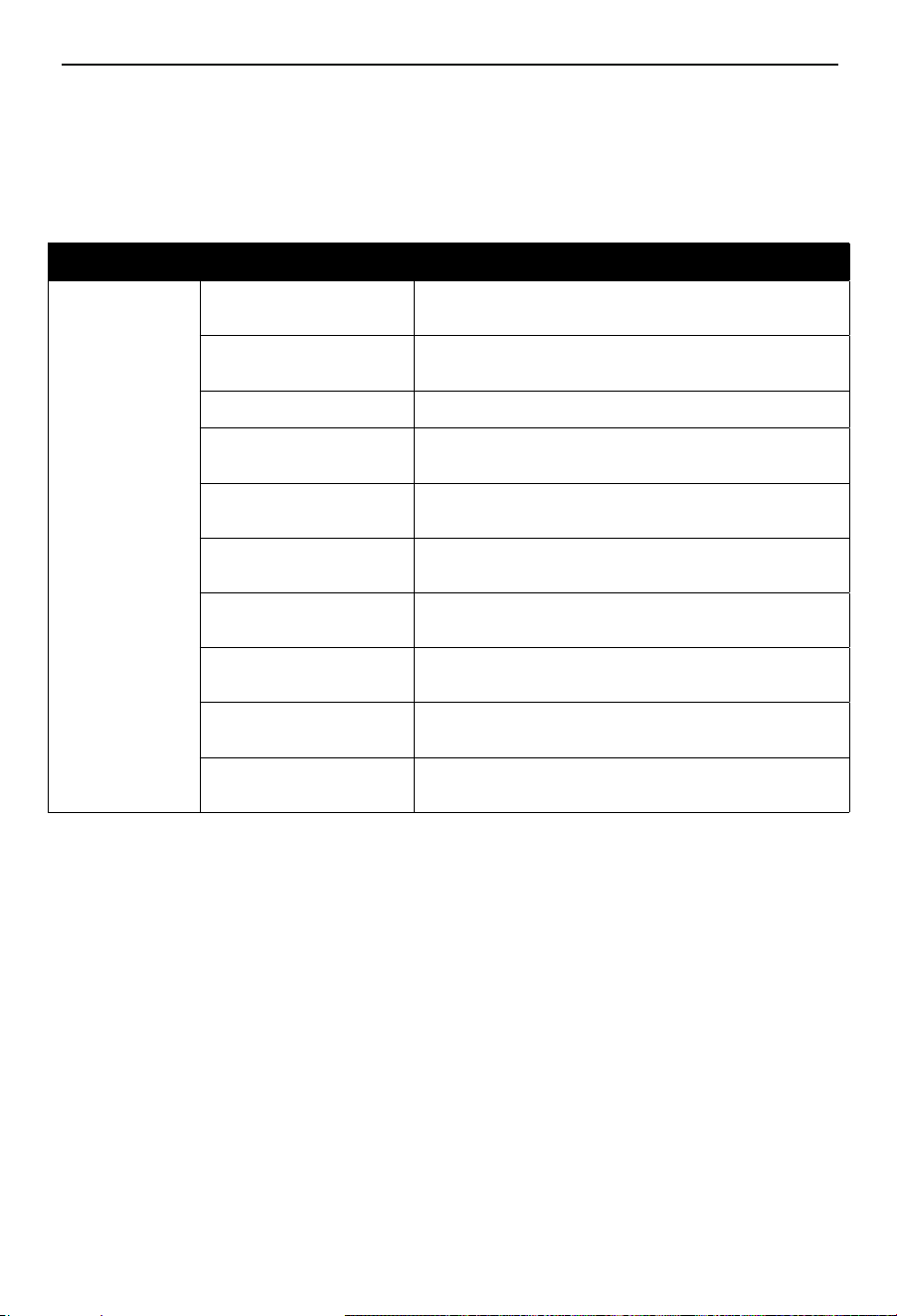
Troubleshooting
The following table shows fault symptoms and describesremedial measures in the event of your
product failing to work properly. If you cannot localise and rectify the problem with this, please contact
your service workshop.
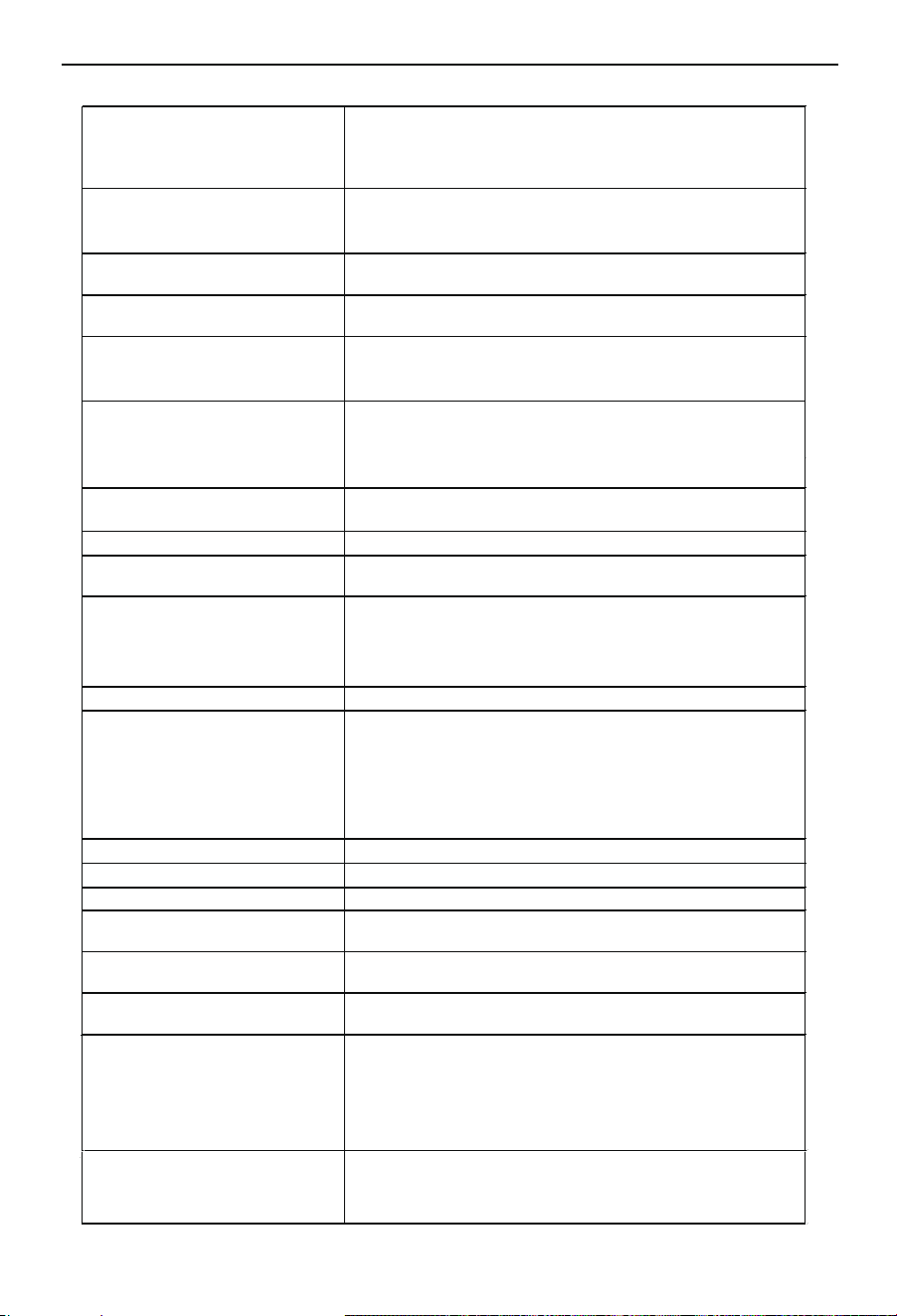
Fault Possible cause Remedy
Device does not
work or not as
expected
Overheating protection
Check the ambient temperature. Output is restarted when
the generator cools down.
Battery over-current pro-
tection
Disconnect the product from the power connection and carry
out commissioning again.
Battery charging protection Contact the customer service department.
Protection at low discharge
temperatures
Check the ambient temperature to see if it is lower than
-10°C.
Battery low voltage pro-
tection
Charge the product in good time, restart after it has fully
charged.
Power inverter overcurrent
protection
Check if the AC output is overloaded or short-circuited.
Power inverter overload
protection
Check if the AC output is overloaded.
Power inverter short-circuit
protection
Check if the AC output is overloaded or short-circuited.
Protection against overvolt-
age while charging
Check whether the input voltage exceeds the maximum input
voltage.
Battery overheat protection
Check if the ambient temperature is higher than 40°C.
Allow the product to cool down.
21
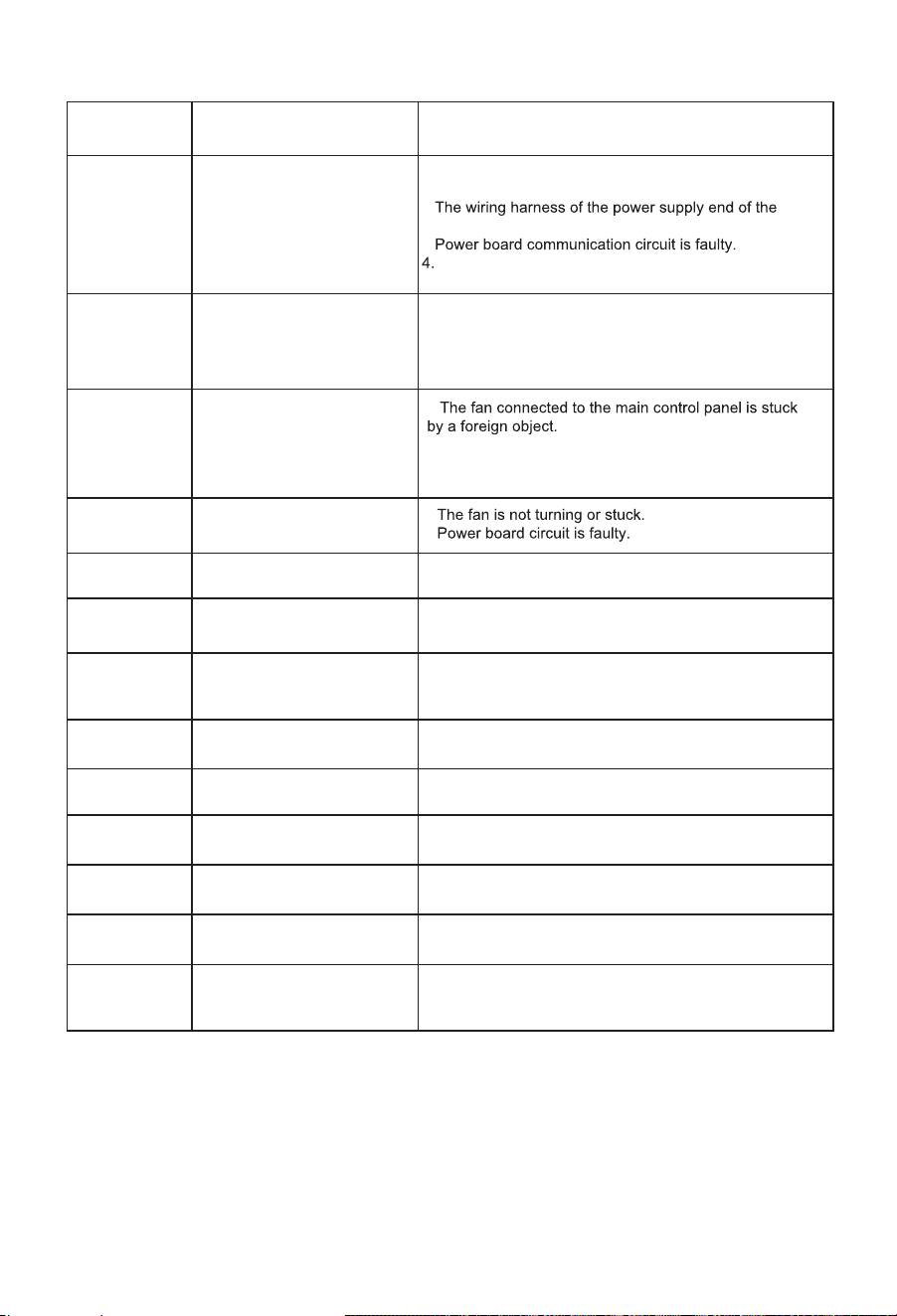
22
Fault code
Fault code description
Failure reasons (All possible reasons)
F001
Abnormal communication
between the main control
panel and power board
1.The communication harness between the main
control panel and the power board falls off.
2.
power board falls off.
3.
main control panel communication circuit is faulty.
F002
Abnormal communication
between the main control
panel and BMS
F003 main control panel detects
fan stalling
1.
F004 Power board detects
overheating
1.
2.
F006 Power board is faulty
(hardware over current)
1. The circuit of the power board is faulty.
F008
Power board recognition
input unde rvoltage
1. The circuit of the power board is faulty.
F009 Power board detects
abnormal voltage in the
power grid
1. Check whether the grid voltage is normal, or restart the
device.
F010 Power board detects
abnormal grid frequency
1. Power board failure or grid abnormality.
F011 Power board detects output
overload
1. Output device overload or power board failure
F012
Inverter detects
battery over voltage
1. If restarting the device doesn't resolve the issue, it
could be a hardware malfunction.
F013
Inverter detects photovoltaic
over voltage
1. Check whether the DC input voltage is abnormal.
F014
Inverter detects DC
charging over-current
1. Check whether the DC input current exceeds the rated
value.
F015 main control panel detects
cigarette lighter output
overload
1. Unplug the load device and verify whether the power
consumption exceeds the rated power.
1.The communication harness between the main
control panel and BMS board falls off.
2.BMS board communication circuit is faulty.
3.main control panel communication circuit is faulty.
2.The fan harness connected to the main control panel
has fallen off or is faulty.
3.main control panel circuit is faulty.
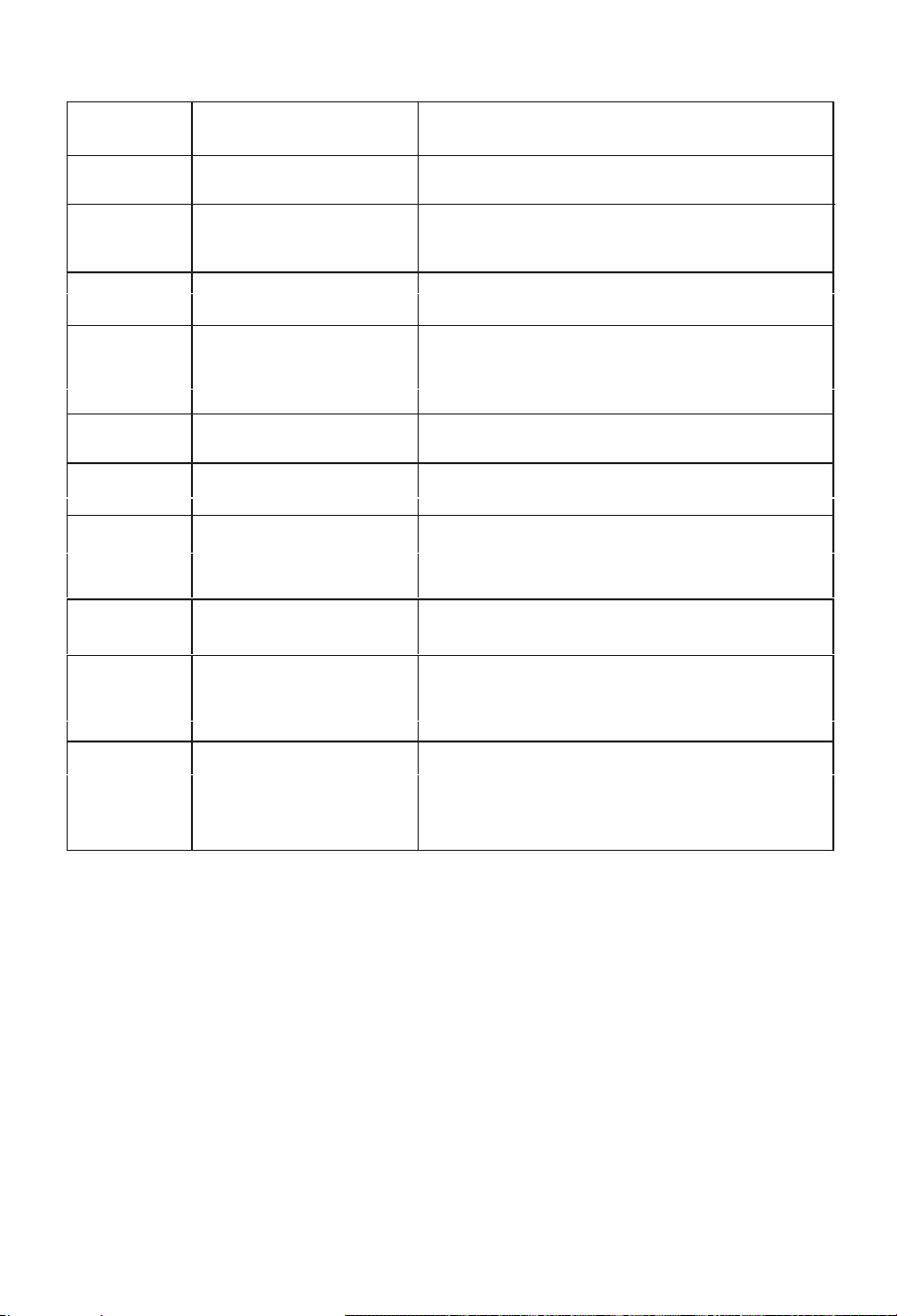
23
Fault code
Fault code description
Failure reasons (All possible reasons)
F016
Warning icon: BMS charging
high-temperature fault
1.Recharge the device after it has cooled down.
F017
Warning icon: BMS charging
undertemperature fault;
F018
Warning icon: BMS discharging
overtemperature fault;
1.Turn off the load and, after the battery temperature
has dropped, resume discharging.
F019
Warning icon: BMS MOS
temperature high;
F020
Warning icon: BMS
temperature abnormality;
1.Temperature detection failure—please contact
customer service.
F021
Warning icon: BMS MOS
temperature high;
1.1.Resume operation after the device has cooled dow
F024
Warning icon: BMS differential
pressure abnormality;
F026 Warning icon: BMS charging
overcurrent;
1.Charging board failure—please contact customer
service.
F030
The master controller, when in
EPS mode, will continuously
display F030 if it detects a
GFCI leakage fault;
1.Remove the AC input cable and simultaneously
check the cable, outlet, and other components for any
potential leakage.
The master controller, when in
EPS mode, will continuously
display F031 if it detects an
abnormality during the GFCI
self-test.
1.GFCI module failure—restart the device. If the problem
persists, please contact customer service.
F031
1. Move the device to an environment at room
temperature.
2. Recharge once the battery temperature has risen.
1. Move the device to an environment at room
temperature.
2. Once the battery temperature has risen, resume
discharging.
1.1. Turn off the loa
2. Perform a full discharge and recharge cycle again
in sequence.
3.3. If the issue persists, please contact customer servic