F800004000300 V1.0
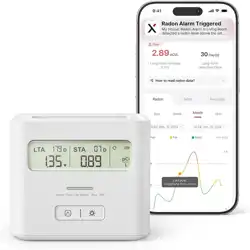
Smart Radon Alarm
User Manual
XR0A-iR
Make Invisible Risks Visible

1 Introduction
2 Get to Know Your Device
3 Technical Specifications
4 Troubleshooting
5 Daily Maintenance
6 Statement
7 Manufacturer and Service Information
01
01
12
14
18
19
20
Contents
Note: Scan the QR code on the left to view
the digital manual.
01 02
1 Introduction
⚠
WARNING
4
3
1
2
6
5
View peak
Switch pCi/L ↔ Bq/m³
Clear peak only (when the peak level is displayed)
LCD after the first power-on or data reset.
Date Sticker
(5 pieces; manually filled
with the start time of detection)
Guide Sticker
(Apply to the back only; avoid side air intake area)
User ManualRadon Alarm
(Pre-installed removable AA battery × 3)
Refer to this value and compare it with the table below.
The device is self-testing.
Pull
Remove the insulating film.
英
Keep batteries away from children.
Insert with correct polarity.
Never mix types, brands, or old + new.
Do not use rechargeable batteries.
Avoid leaking battery contact. Rinse and seek medical help if exposed.
Use only the specified battery in the marking.
Wi-Fi name + password ready
2.4 GHz only (not 5 GHz)
The phone's Bluetooth turned on.
Basement
KitchenLiving RoomBedroom
Attic
Laundry Room
Because radon uctuates, short-term radon data
(less than 7 days) is not suitable for deciding the
next steps.
Minimal — minimum reliable reading
Recommended — more accurate average
Best — covers all seasons
x2
3s
Light backlight
Upload data now
Enter pairing mode
x2
3s
5s
Factory reset (clears all data)
3s
1.5 V
Read Carefully
Read this manual before use.
Indoor Use Only
For family living units.
Do Not Disassemble
Contains calibrated components.
3s
/
/
Long-term average:
Updated every 24h.
Short-term average:
1/7/30/90-day intervals.
Trend: rising,
falling, or stable.
Peak value mode.
Monitoring
in progress.
Exceeds
setting threshold.
Battery level.
pCi/L or Bq/m³
(double-tap to switch).
1 2 3
pCi/L
Humidity ≥ 85% Outdoors Stone surfaces
Closets Heat sources Vents & fans
No detergents. No aerosols. Do not paint.
Vacuum once
every 3 months.
2 Get to Know Your Device
2.1 What’s Inside the Box
4
3
1
2
6
5
View peak
Switch pCi/L ↔ Bq/m³
Clear peak only (when the peak level is displayed)
LCD after the first power-on or data reset.
Date Sticker
(5 pieces; manually filled
with the start time of detection)
Guide Sticker
(Apply to the back only; avoid side air intake area)
User ManualRadon Alarm
(Pre-installed removable AA battery × 3)
Refer to this value and compare it with the table below.
The device is self-testing.
Pull
Remove the insulating film.
英
Keep batteries away from children.
Insert with correct polarity.
Never mix types, brands, or old + new.
Do not use rechargeable batteries.
Avoid leaking battery contact. Rinse and seek medical help if exposed.
Use only the specified battery in the marking.
Wi-Fi name + password ready
2.4 GHz only (not 5 GHz)
The phone's Bluetooth turned on.
Basement
KitchenLiving RoomBedroom
Attic
Laundry Room
Because radon uctuates, short-term radon data
(less than 7 days) is not suitable for deciding the
next steps.
Minimal — minimum reliable reading
Recommended — more accurate average
Best — covers all seasons
x2
3s
Light backlight
Upload data now
Enter pairing mode
x2
3s
5s
Factory reset (clears all data)
3s
1.5 V
Read Carefully
Read this manual before use.
Indoor Use Only
For family living units.
Do Not Disassemble
Contains calibrated components.
3s
/
/
Long-term average:
Updated every 24h.
Short-term average:
1/7/30/90-day intervals.
Trend: rising,
falling, or stable.
Peak value mode.
Monitoring
in progress.
Exceeds
setting threshold.
Battery level.
pCi/L or Bq/m³
(double-tap to switch).
1 2 3
pCi/L
Humidity ≥ 85% Outdoors Stone surfaces
Closets Heat sources Vents & fans
No detergents. No aerosols. Do not paint.
Vacuum once
every 3 months.
2.2 How to Power On
4
3
1
2
6
5
View peak
Switch pCi/L ↔ Bq/m³
Clear peak only (when the peak level is displayed)
LCD after the first power-on or data reset.
Date Sticker
(5 pieces; manually filled
with the start time of detection)
Guide Sticker
(Apply to the back only; avoid side air intake area)
User ManualRadon Alarm
(Pre-installed removable AA battery × 3)
Refer to this value and compare it with the table below.
The device is self-testing.
Pull
Remove the insulating film.
英
Keep batteries away from children.
Insert with correct polarity.
Never mix types, brands, or old + new.
Do not use rechargeable batteries.
Avoid leaking battery contact. Rinse and seek medical help if exposed.
Use only the specified battery in the marking.
Wi-Fi name + password ready
2.4 GHz only (not 5 GHz)
The phone's Bluetooth turned on.
Basement
KitchenLiving RoomBedroom
Attic
Laundry Room
Because radon uctuates, short-term radon data
(less than 7 days) is not suitable for deciding the
next steps.
Minimal — minimum reliable reading
Recommended — more accurate average
Best — covers all seasons
x2
3s
Light backlight
Upload data now
Enter pairing mode
x2
3s
5s
Factory reset (clears all data)
3s
1.5 V
Read Carefully
Read this manual before use.
Indoor Use Only
For family living units.
Do Not Disassemble
Contains calibrated components.
3s
/
/
Long-term average:
Updated every 24h.
Short-term average:
1/7/30/90-day intervals.
Trend: rising,
falling, or stable.
Peak value mode.
Monitoring
in progress.
Exceeds
setting threshold.
Battery level.
pCi/L or Bq/m³
(double-tap to switch).
1 2 3
pCi/L
Humidity ≥ 85% Outdoors Stone surfaces
Closets Heat sources Vents & fans
No detergents. No aerosols. Do not paint.
Vacuum once
every 3 months.
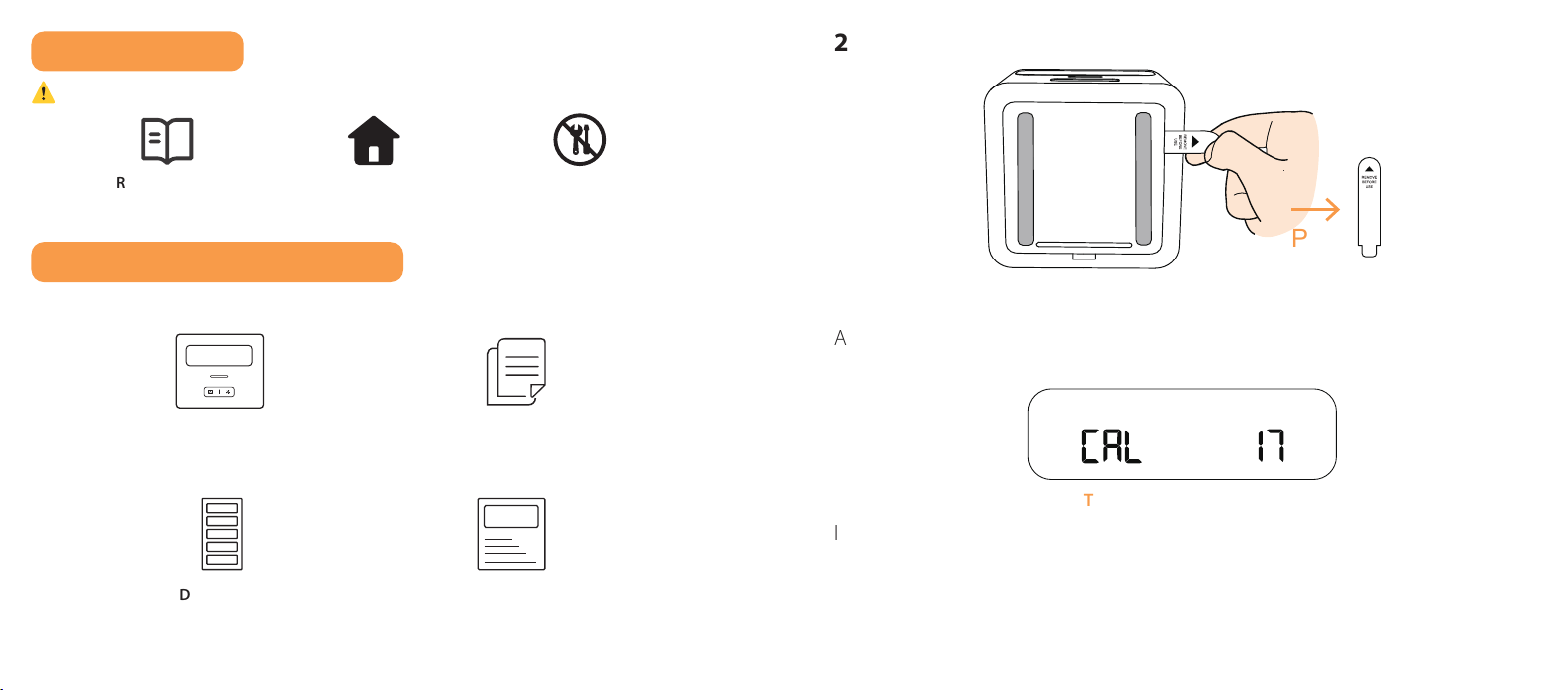
Automatically powers on and performs a self-test; no manual setup needed.
4
3
1
2
6
5
View peak
Switch pCi/L ↔ Bq/m³
Clear peak only (when the peak level is displayed)
LCD after the first power-on or data reset.
Date Sticker
(5 pieces; manually filled
with the start time of detection)
Guide Sticker
(Apply to the back only; avoid side air intake area)
User ManualRadon Alarm
(Pre-installed removable AA battery × 3)
Refer to this value and compare it with the table below.
The device is self-testing.
Pull
Remove the insulating film.
英
Keep batteries away from children.
Insert with correct polarity.
Never mix types, brands, or old + new.
Do not use rechargeable batteries.
Avoid leaking battery contact. Rinse and seek medical help if exposed.
Use only the specified battery in the marking.
Wi-Fi name + password ready
2.4 GHz only (not 5 GHz)
The phone's Bluetooth turned on.
Basement
KitchenLiving RoomBedroom
Attic
Laundry Room
Because radon uctuates, short-term radon data
(less than 7 days) is not suitable for deciding the
next steps.
Minimal — minimum reliable reading
Recommended — more accurate average
Best — covers all seasons
x2
3s
Light backlight
Upload data now
Enter pairing mode
x2
3s
5s
Factory reset (clears all data)
3s
1.5 V
Read Carefully
Read this manual before use.
Indoor Use Only
For family living units.
Do Not Disassemble
Contains calibrated components.
3s
/
/
Long-term average:
Updated every 24h.
Short-term average:
1/7/30/90-day intervals.
Trend: rising,
falling, or stable.
Peak value mode.
Monitoring
in progress.
Exceeds
setting threshold.
Battery level.
pCi/L or Bq/m³
(double-tap to switch).
1 2 3
pCi/L
Humidity ≥ 85% Outdoors Stone surfaces
Closets Heat sources Vents & fans
No detergents. No aerosols. Do not paint.
Vacuum once
every 3 months.
If an error code appears during this process, please refer to the
“Troubleshooting” section.
03 04
4
3
1
2
6
5
View peak
Switch pCi/L ↔ Bq/m³
Clear peak only (when the peak level is displayed)
LCD after the first power-on or data reset.
Date Sticker
(5 pieces; manually filled
with the start time of detection)
Guide Sticker
(Apply to the back only; avoid side air intake area)
User ManualRadon Alarm
(Pre-installed removable AA battery × 3)
Refer to this value and compare it with the table below.
The device is self-testing.
Pull
Remove the insulating film.
英
Keep batteries away from children.
Insert with correct polarity.
Never mix types, brands, or old + new.
Do not use rechargeable batteries.
Avoid leaking battery contact. Rinse and seek medical help if exposed.
Use only the specified battery in the marking.
Wi-Fi name + password ready
2.4 GHz only (not 5 GHz)
The phone's Bluetooth turned on.
Basement
KitchenLiving RoomBedroom
Attic
Laundry Room
Because radon uctuates, short-term radon data
(less than 7 days) is not suitable for deciding the
next steps.
Minimal — minimum reliable reading
Recommended — more accurate average
Best — covers all seasons
x2
3s
Light backlight
Upload data now
Enter pairing mode
x2
3s
5s
Factory reset (clears all data)
3s
1.5 V
Read Carefully
Read this manual before use.
Indoor Use Only
For family living units.
Do Not Disassemble
Contains calibrated components.
3s
/
/
Long-term average:
Updated every 24h.
Short-term average:
1/7/30/90-day intervals.
Trend: rising,
falling, or stable.
Peak value mode.
Monitoring
in progress.
Exceeds
setting threshold.
Battery level.
pCi/L or Bq/m³
(double-tap to switch).
1 2 3
pCi/L
Humidity ≥ 85% Outdoors Stone surfaces
Closets Heat sources Vents & fans
No detergents. No aerosols. Do not paint.
Vacuum once
every 3 months.
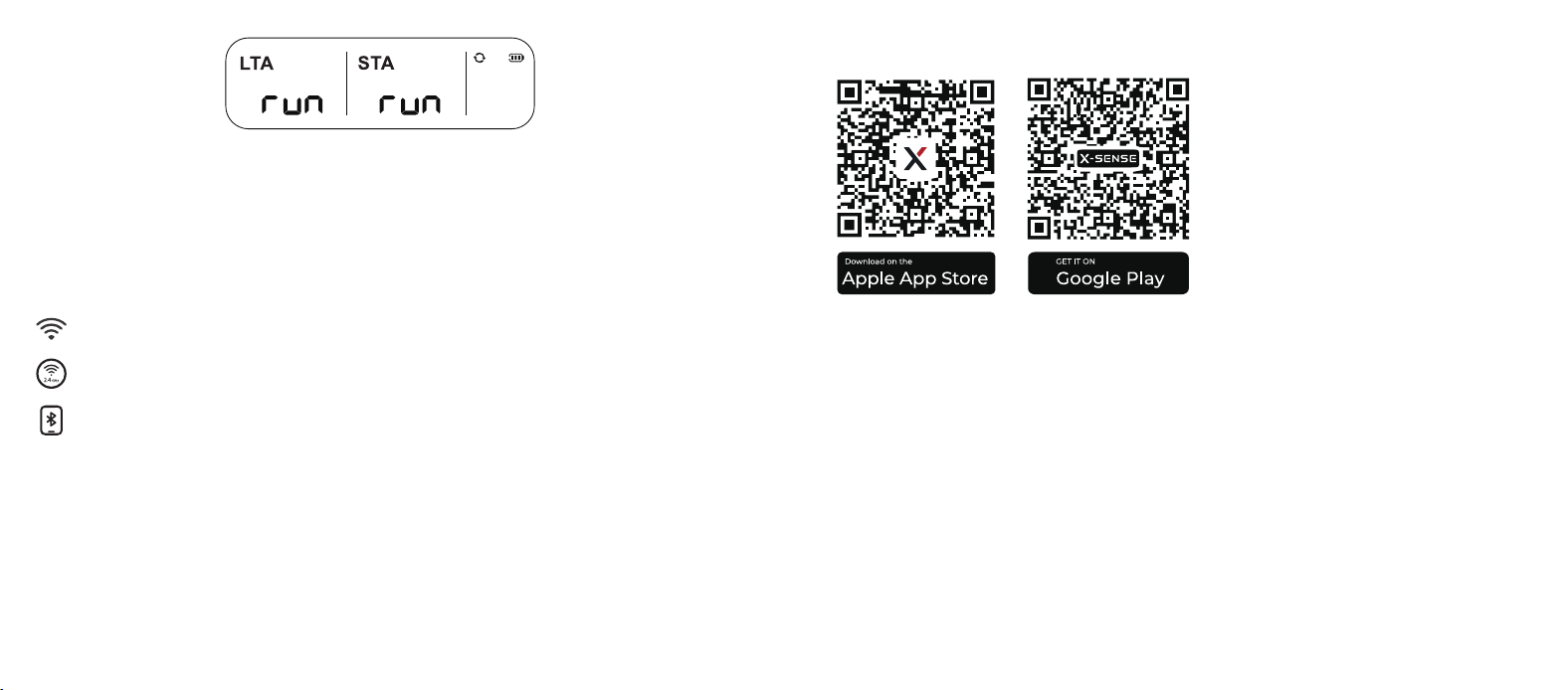
The figure indicates that the first set of data is being generated and is expected
to be available within 24 hours. Please be patient.
2.3 How to Connect to the App
Before connecting devices, make sure that:
4
3
1
2
6
5
View peak
Switch pCi/L ↔ Bq/m³
Clear peak only (when the peak level is displayed)
LCD after the first power-on or data reset.
Date Sticker
(5 pieces; manually filled
with the start time of detection)
Guide Sticker
(Apply to the back only; avoid side air intake area)
User ManualRadon Alarm
(Pre-installed removable AA battery × 3)
Refer to this value and compare it with the table below.
The device is self-testing.
Pull
Remove the insulating film.
英
Keep batteries away from children.
Insert with correct polarity.
Never mix types, brands, or old + new.
Do not use rechargeable batteries.
Avoid leaking battery contact. Rinse and seek medical help if exposed.
Use only the specified battery in the marking.
Wi-Fi name + password ready
2.4 GHz only (not 5 GHz)
The phone's Bluetooth turned on.
Basement
KitchenLiving RoomBedroom
Attic
Laundry Room
Because radon uctuates, short-term radon data
(less than 7 days) is not suitable for deciding the
next steps.
Minimal — minimum reliable reading
Recommended — more accurate average
Best — covers all seasons
x2
3s
Light backlight
Upload data now
Enter pairing mode
x2
3s
5s
Factory reset (clears all data)
3s
1.5 V
Read Carefully
Read this manual before use.
Indoor Use Only
For family living units.
Do Not Disassemble
Contains calibrated components.
3s
/
/
Long-term average:
Updated every 24h.
Short-term average:
1/7/30/90-day intervals.
Trend: rising,
falling, or stable.
Peak value mode.
Monitoring
in progress.
Exceeds
setting threshold.
Battery level.
pCi/L or Bq/m³
(double-tap to switch).
1 2 3
pCi/L
Humidity ≥ 85% Outdoors Stone surfaces
Closets Heat sources Vents & fans
No detergents. No aerosols. Do not paint.
Vacuum once
every 3 months.
NOTE: Keep the phone near the router for faster setup. The app is continuously
being updated, and the interface may vary slightly. Please refer to the latest
version.
Download the X-SENSE Home Security App
To download the app, search for “X-SENSE Home Security” in the Apple App
Store or Google Play, or simply scan the QR code. Create an account using a
valid email address. If you already have an account, make sure it is updated to
the latest version.
NOTE: Make sure your smartphone supports iOS 11 and higher, or Android 8.0
and higher.
05 06
Following the Steps Below to Select the Device
4
3
1
2
6
5
View peak
Switch pCi/L ↔ Bq/m³
Clear peak only (when the peak level is displayed)
LCD after the first power-on or data reset.
Date Sticker
(5 pieces; manually filled
with the start time of detection)
Guide Sticker
(Apply to the back only; avoid side air intake area)
User ManualRadon Alarm
(Pre-installed removable AA battery × 3)
Refer to this value and compare it with the table below.
The device is self-testing.
Pull
Remove the insulating film.
英
Keep batteries away from children.
Insert with correct polarity.
Never mix types, brands, or old + new.
Do not use rechargeable batteries.
Avoid leaking battery contact. Rinse and seek medical help if exposed.
Use only the specified battery in the marking.
Wi-Fi name + password ready
2.4 GHz only (not 5 GHz)
The phone's Bluetooth turned on.
Basement
KitchenLiving RoomBedroom
Attic
Laundry Room
Because radon uctuates, short-term radon data
(less than 7 days) is not suitable for deciding the
next steps.
Minimal — minimum reliable reading
Recommended — more accurate average
Best — covers all seasons
x2
3s
Light backlight
Upload data now
Enter pairing mode
x2
3s
5s
Factory reset (clears all data)
3s
1.5 V
Read Carefully
Read this manual before use.
Indoor Use Only
For family living units.
Do Not Disassemble
Contains calibrated components.
3s
/
/
Long-term average:
Updated every 24h.
Short-term average:
1/7/30/90-day intervals.
Trend: rising,
falling, or stable.
Peak value mode.
Monitoring
in progress.
Exceeds
setting threshold.
Battery level.
pCi/L or Bq/m³
(double-tap to switch).
1 2 3
pCi/L
Humidity ≥ 85% Outdoors Stone surfaces
Closets Heat sources Vents & fans
No detergents. No aerosols. Do not paint.
Vacuum once
every 3 months.
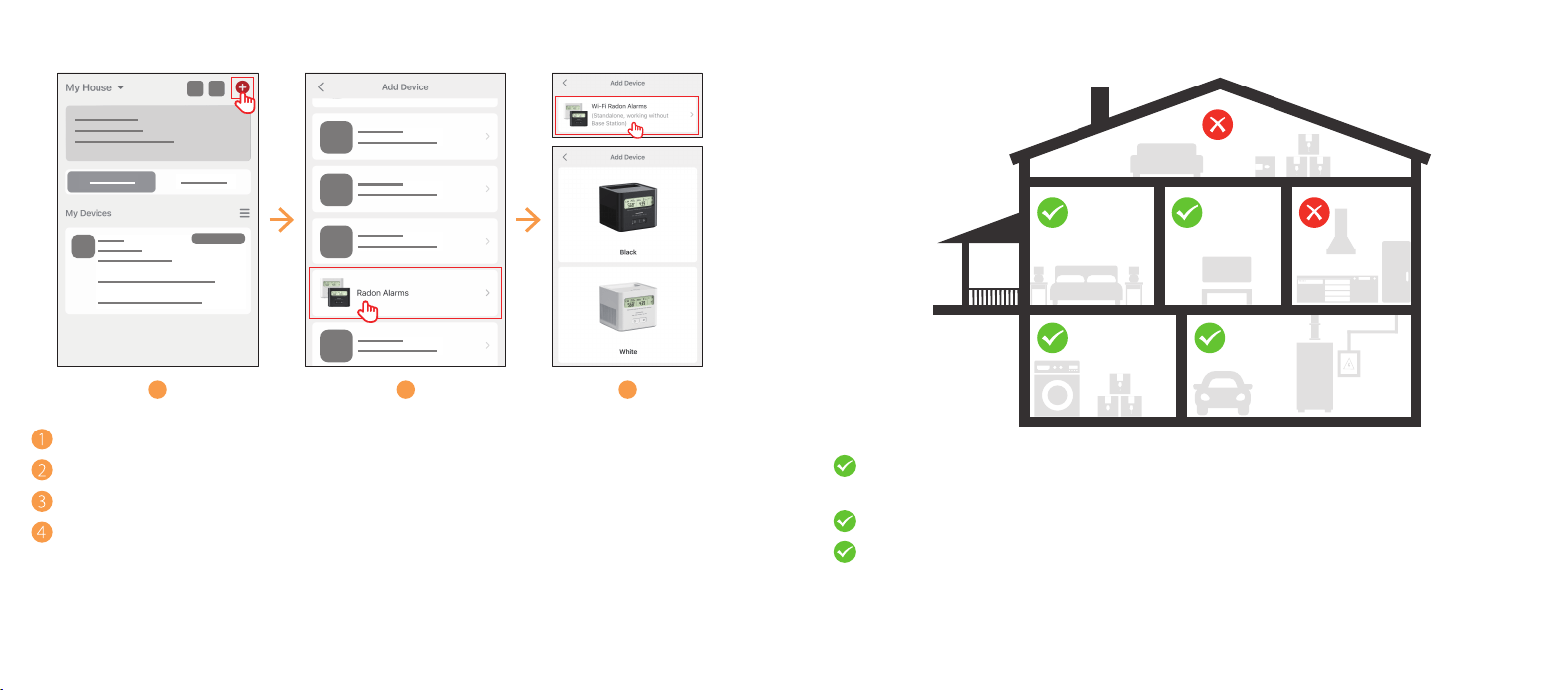
Tap “
⊕
” on the top right.
Select “Radon Alarms”.
Choose “Wi-Fi Radon Alarms” and pick the color.
Follow the instructions in the app to complete the device setup process.
2.4 Where to Place
4
3
1
2
6
5
View peak
Switch pCi/L ↔ Bq/m³
Clear peak only (when the peak level is displayed)
LCD after the first power-on or data reset.
Date Sticker
(5 pieces; manually filled
with the start time of detection)
Guide Sticker
(Apply to the back only; avoid side air intake area)
User ManualRadon Alarm
(Pre-installed removable AA battery × 3)
Refer to this value and compare it with the table below.
The device is self-testing.
Pull
Remove the insulating film.
英
Keep batteries away from children.
Insert with correct polarity.
Never mix types, brands, or old + new.
Do not use rechargeable batteries.
Avoid leaking battery contact. Rinse and seek medical help if exposed.
Use only the specified battery in the marking.
Wi-Fi name + password ready
2.4 GHz only (not 5 GHz)
The phone's Bluetooth turned on.
Basement
KitchenLiving RoomBedroom
Attic
Laundry Room
Because radon uctuates, short-term radon data
(less than 7 days) is not suitable for deciding the
next steps.
Minimal — minimum reliable reading
Recommended — more accurate average
Best — covers all seasons
x2
3s
Light backlight
Upload data now
Enter pairing mode
x2
3s
5s
Factory reset (clears all data)
3s
1.5 V
Read Carefully
Read this manual before use.
Indoor Use Only
For family living units.
Do Not Disassemble
Contains calibrated components.
3s
/
/
Long-term average:
Updated every 24h.
Short-term average:
1/7/30/90-day intervals.
Trend: rising,
falling, or stable.
Peak value mode.
Monitoring
in progress.
Exceeds
setting threshold.
Battery level.
pCi/L or Bq/m³
(double-tap to switch).
1 2 3
pCi/L
Humidity ≥ 85% Outdoors Stone surfaces
Closets Heat sources Vents & fans
No detergents. No aerosols. Do not paint.
Vacuum once
every 3 months.
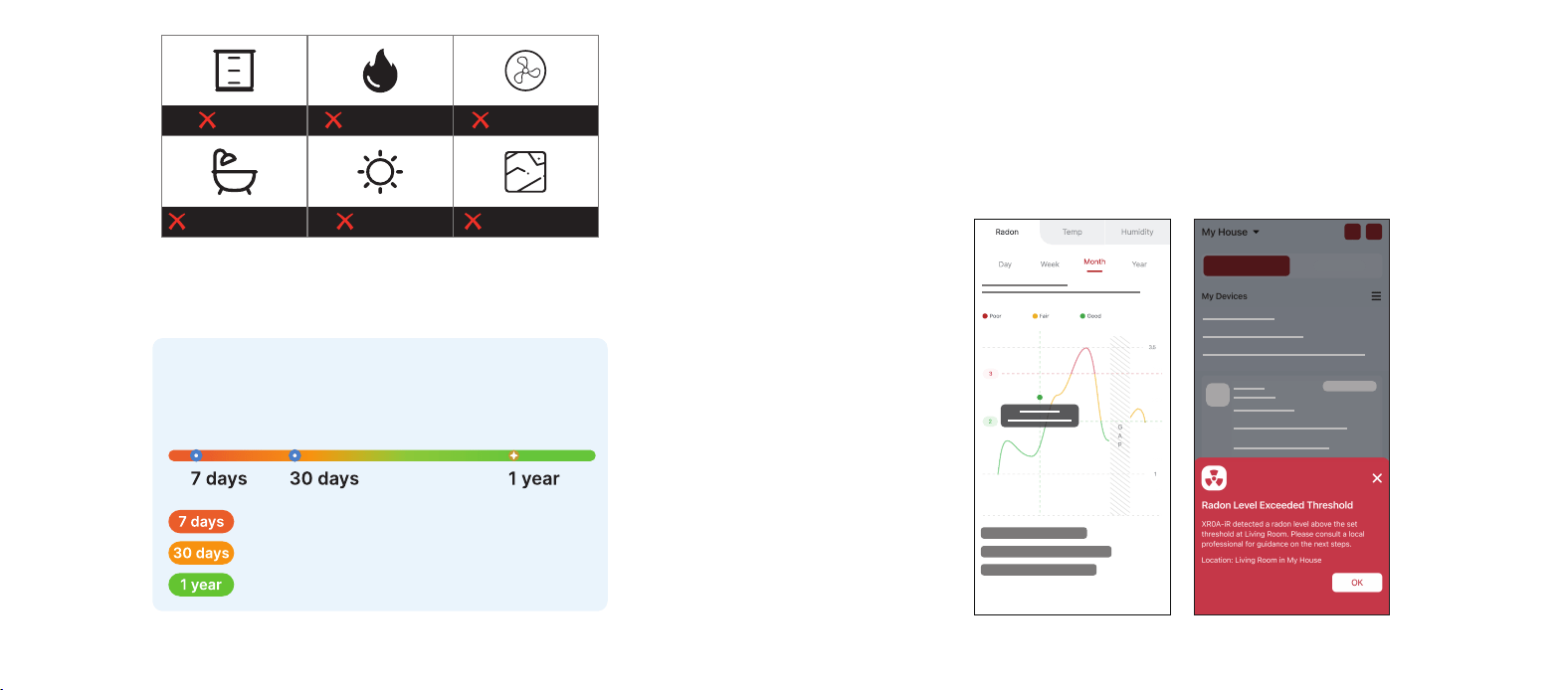
Basement or lowest livable floor preferred, or any area where people are
present.
At least 3 ft (90 cm) from windows, doors, or vents.
Most accurate when heating/cooling is running.
07 08
4
3
1
2
6
5
View peak
Switch pCi/L ↔ Bq/m³
Clear peak only (when the peak level is displayed)
LCD after the first power-on or data reset.
Date Sticker
(5 pieces; manually filled
with the start time of detection)
Guide Sticker
(Apply to the back only; avoid side air intake area)
User ManualRadon Alarm
(Pre-installed removable AA battery × 3)
Refer to this value and compare it with the table below.
The device is self-testing.
Pull
Remove the insulating film.
英
Keep batteries away from children.
Insert with correct polarity.
Never mix types, brands, or old + new.
Do not use rechargeable batteries.
Avoid leaking battery contact. Rinse and seek medical help if exposed.
Use only the specified battery in the marking.
Wi-Fi name + password ready
2.4 GHz only (not 5 GHz)
The phone's Bluetooth turned on.
Basement
KitchenLiving RoomBedroom
Attic
Laundry Room
Because radon uctuates, short-term radon data
(less than 7 days) is not suitable for deciding the
next steps.
Minimal — minimum reliable reading
Recommended — more accurate average
Best — covers all seasons
x2
3s
Light backlight
Upload data now
Enter pairing mode
x2
3s
5s
Factory reset (clears all data)
3s
1.5 V
Read Carefully
Read this manual before use.
Indoor Use Only
For family living units.
Do Not Disassemble
Contains calibrated components.
3s
/
/
Long-term average:
Updated every 24h.
Short-term average:
1/7/30/90-day intervals.
Trend: rising,
falling, or stable.
Peak value mode.
Monitoring
in progress.
Exceeds
setting threshold.
Battery level.
pCi/L or Bq/m³
(double-tap to switch).
1 2 3
pCi/L
Humidity ≥ 85% Outdoors Stone surfaces
Closets Heat sources Vents & fans
No detergents. No aerosols. Do not paint.
Vacuum once
every 3 months.
NOTE: Do not block the side air intake during testing.
Recommended Monitoring Duration
4
3
1
2
6
5
View peak
Switch pCi/L ↔ Bq/m³
Clear peak only (when the peak level is displayed)
LCD after the first power-on or data reset.
Date Sticker
(5 pieces; manually filled
with the start time of detection)
Guide Sticker
(Apply to the back only; avoid side air intake area)
User ManualRadon Alarm
(Pre-installed removable AA battery × 3)
Refer to this value and compare it with the table below.
The device is self-testing.
Pull
Remove the insulating film.
英
Keep batteries away from children.
Insert with correct polarity.
Never mix types, brands, or old + new.
Do not use rechargeable batteries.
Avoid leaking battery contact. Rinse and seek medical help if exposed.
Use only the specified battery in the marking.
Wi-Fi name + password ready
2.4 GHz only (not 5 GHz)
The phone's Bluetooth turned on.
Basement
KitchenLiving RoomBedroom
Attic
Laundry Room
Because radon uctuates, short-term radon data
(less than 7 days) is not suitable for deciding the
next steps.
Minimal — minimum reliable reading
Recommended — more accurate average
Best — covers all seasons
x2
3s
Light backlight
Upload data now
Enter pairing mode
x2
3s
5s
Factory reset (clears all data)
3s
1.5 V
Read Carefully
Read this manual before use.
Indoor Use Only
For family living units.
Do Not Disassemble
Contains calibrated components.
3s
/
/
Long-term average:
Updated every 24h.
Short-term average:
1/7/30/90-day intervals.
Trend: rising,
falling, or stable.
Peak value mode.
Monitoring
in progress.
Exceeds
setting threshold.
Battery level.
pCi/L or Bq/m³
(double-tap to switch).
1 2 3
pCi/L
Humidity ≥ 85% Outdoors Stone surfaces
Closets Heat sources Vents & fans
No detergents. No aerosols. Do not paint.
Vacuum once
every 3 months.
Don’t worry, the health threat posed by radon comes from long-term (several
years) exposure to high concentrations of radon. High concentrations of radon
do not pose an immediate health threat. Please be patient.
2.5 How to Interpret Data
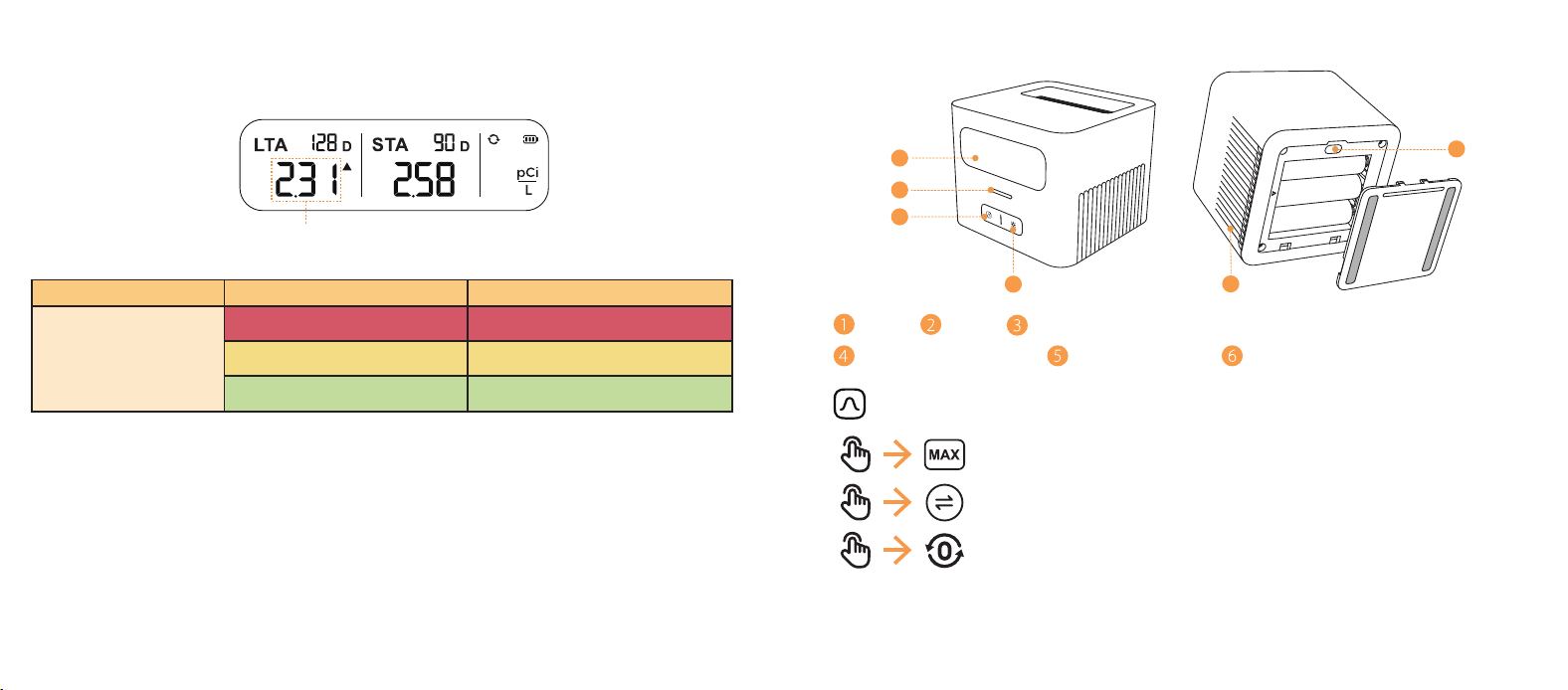
1. View radon levels and history in the app. The app sends a notification if levels
exceed the set threshold and uses different colors to show concentration.
Check the app for more details.
4
3
1
2
6
5
View peak
Switch pCi/L ↔ Bq/m³
Clear peak only (when the peak level is displayed)
LCD after the first power-on or data reset.
Date Sticker
(5 pieces; manually filled
with the start time of detection)
Guide Sticker
(Apply to the back only; avoid side air intake area)
User ManualRadon Alarm
(Pre-installed removable AA battery × 3)
Refer to this value and compare it with the table below.
The device is self-testing.
Pull
Remove the insulating film.
英
Keep batteries away from children.
Insert with correct polarity.
Never mix types, brands, or old + new.
Do not use rechargeable batteries.
Avoid leaking battery contact. Rinse and seek medical help if exposed.
Use only the specified battery in the marking.
Wi-Fi name + password ready
2.4 GHz only (not 5 GHz)
The phone's Bluetooth turned on.
Basement
KitchenLiving RoomBedroom
Attic
Laundry Room
Because radon uctuates, short-term radon data
(less than 7 days) is not suitable for deciding the
next steps.
Minimal — minimum reliable reading
Recommended — more accurate average
Best — covers all seasons
x2
3s
Light backlight
Upload data now
Enter pairing mode
x2
3s
5s
Factory reset (clears all data)
3s
1.5 V
Read Carefully
Read this manual before use.
Indoor Use Only
For family living units.
Do Not Disassemble
Contains calibrated components.
3s
/
/
Long-term average:
Updated every 24h.
Short-term average:
1/7/30/90-day intervals.
Trend: rising,
falling, or stable.
Peak value mode.
Monitoring
in progress.
Exceeds
setting threshold.
Battery level.
pCi/L or Bq/m³
(double-tap to switch).
1 2 3
pCi/L
Humidity ≥ 85% Outdoors Stone surfaces
Closets Heat sources Vents & fans
No detergents. No aerosols. Do not paint.
Vacuum once
every 3 months.
09 10
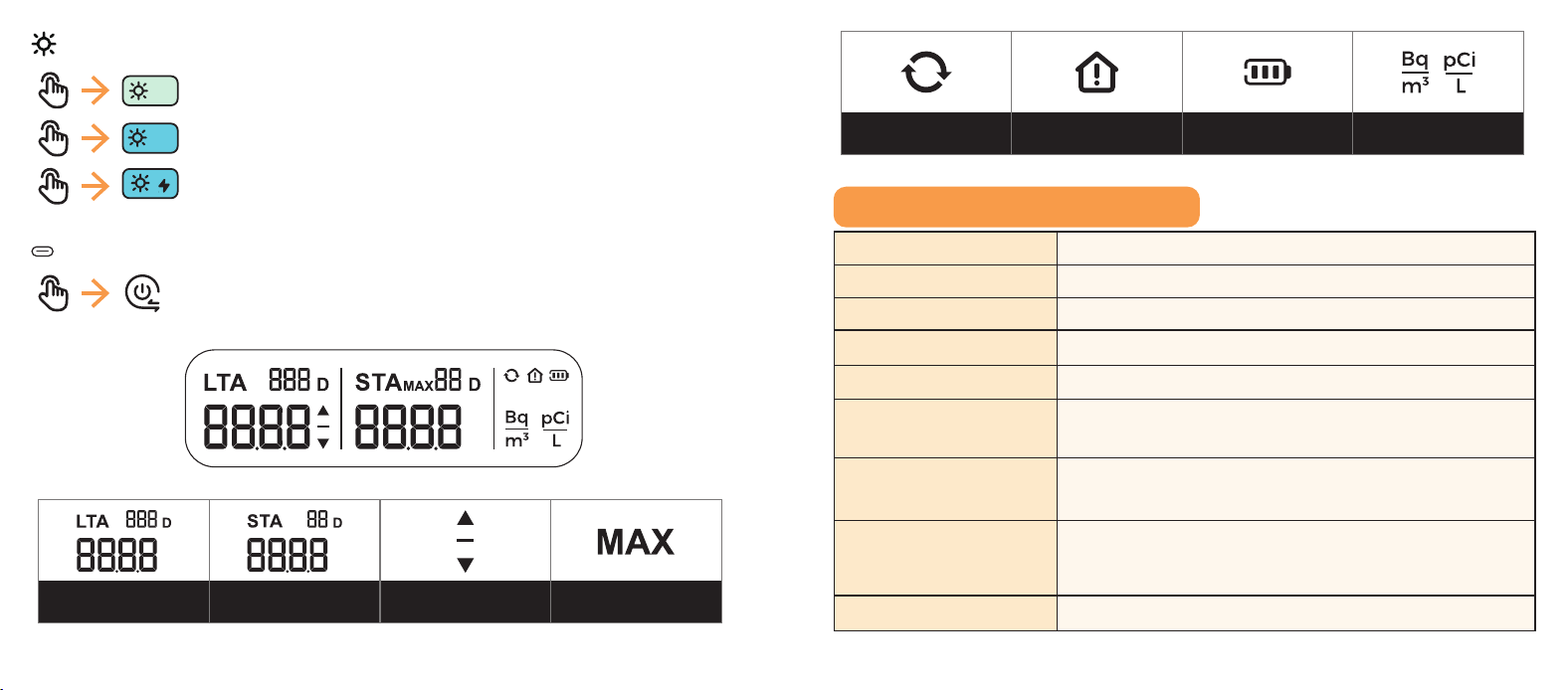
2. If check data from the LCD, please look at the “Long-Term Average” shown
below and compare it with the following table for recommended actions at
different radon levels.
4
3
1
2
6
5
View peak
Switch pCi/L ↔ Bq/m³
Clear peak only (when the peak level is displayed)
LCD after the first power-on or data reset.
Date Sticker
(5 pieces; manually filled
with the start time of detection)
Guide Sticker
(Apply to the back only; avoid side air intake area)
User ManualRadon Alarm
(Pre-installed removable AA battery × 3)
Refer to this value and compare it with the table below.
The device is self-testing.
Pull
Remove the insulating film.
英
Keep batteries away from children.
Insert with correct polarity.
Never mix types, brands, or old + new.
Do not use rechargeable batteries.
Avoid leaking battery contact. Rinse and seek medical help if exposed.
Use only the specified battery in the marking.
Wi-Fi name + password ready
2.4 GHz only (not 5 GHz)
The phone's Bluetooth turned on.
Basement
KitchenLiving RoomBedroom
Attic
Laundry Room
Because radon uctuates, short-term radon data
(less than 7 days) is not suitable for deciding the
next steps.
Minimal — minimum reliable reading
Recommended — more accurate average
Best — covers all seasons
x2
3s
Light backlight
Upload data now
Enter pairing mode
x2
3s
5s
Factory reset (clears all data)
3s
1.5 V
Read Carefully
Read this manual before use.
Indoor Use Only
For family living units.
Do Not Disassemble
Contains calibrated components.
3s
/
/
Long-term average:
Updated every 24h.
Short-term average:
1/7/30/90-day intervals.
Trend: rising,
falling, or stable.
Peak value mode.
Monitoring
in progress.
Exceeds
setting threshold.
Battery level.
pCi/L or Bq/m³
(double-tap to switch).
1 2 3
pCi/L
Humidity ≥ 85% Outdoors Stone surfaces
Closets Heat sources Vents & fans
No detergents. No aerosols. Do not paint.
Vacuum once
every 3 months.
Monitoring Period Concentration Recommended Actions
Long-Term Average
≥4 pCi/L (148 Bq/m
3
) Seek professional advice.
2-4 pCi/L (74-148 Bq/m
3
) Ventilation and monitoring.
≤2 pCi/L (74 Bq/m
3
) No obvious problems found.
NOTE: Any exposure to radon carries some level of risk. There is no completely
safe level of radon, and health risks still exist even when radon levels are below
4 pCi/L (148 Bq/m
3
).
2.6 Understanding the Buttons and Screen Interface
4
3
1
2
6
5
View peak
Switch pCi/L ↔ Bq/m³
Clear peak only (when the peak level is displayed)
LCD after the first power-on or data reset.
Date Sticker
(5 pieces; manually filled
with the start time of detection)
Guide Sticker
(Apply to the back only; avoid side air intake area)
User ManualRadon Alarm
(Pre-installed removable AA battery × 3)
Refer to this value and compare it with the table below.
The device is self-testing.
Pull
Remove the insulating film.
英
Keep batteries away from children.
Insert with correct polarity.
Never mix types, brands, or old + new.
Do not use rechargeable batteries.
Avoid leaking battery contact. Rinse and seek medical help if exposed.
Use only the specified battery in the marking.
Wi-Fi name + password ready
2.4 GHz only (not 5 GHz)
The phone's Bluetooth turned on.
Basement
KitchenLiving RoomBedroom
Attic
Laundry Room
Because radon uctuates, short-term radon data
(less than 7 days) is not suitable for deciding the
next steps.
Minimal — minimum reliable reading
Recommended — more accurate average
Best — covers all seasons
x2
3s
Light backlight
Upload data now
Enter pairing mode
x2
3s
5s
Factory reset (clears all data)
3s
1.5 V
Read Carefully
Read this manual before use.
Indoor Use Only
For family living units.
Do Not Disassemble
Contains calibrated components.
3s
/
/
Long-term average:
Updated every 24h.
Short-term average:
1/7/30/90-day intervals.
Trend: rising,
falling, or stable.
Peak value mode.
Monitoring
in progress.
Exceeds
setting threshold.
Battery level.
pCi/L or Bq/m³
(double-tap to switch).
1 2 3
pCi/L
Humidity ≥ 85% Outdoors Stone surfaces
Closets Heat sources Vents & fans
No detergents. No aerosols. Do not paint.
Vacuum once
every 3 months.
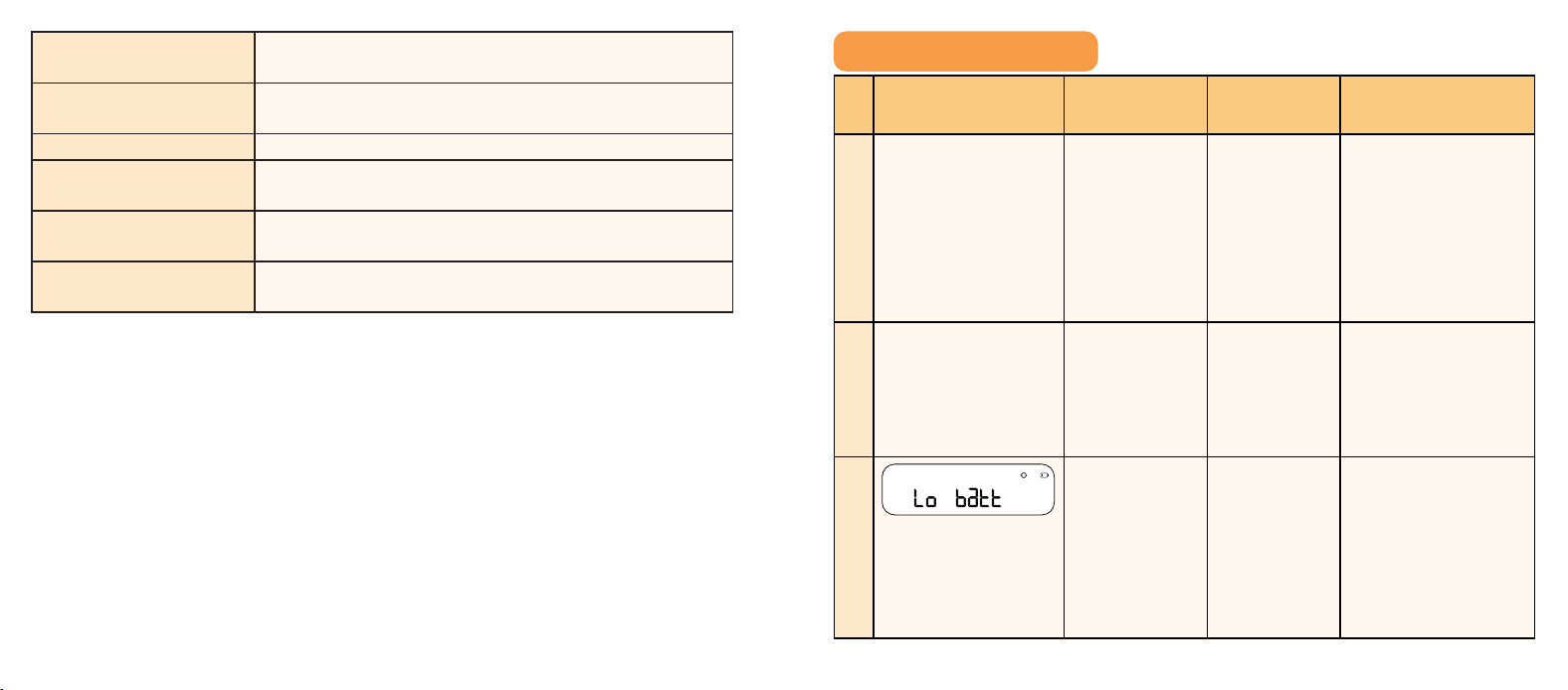
LCD LED Peak Level Button
Backlight Button Reset Button Air Intake Area
Peak Level Button
4
3
1
2
6
5
View peak
Switch pCi/L ↔ Bq/m³
Clear peak only (when the peak level is displayed)
LCD after the first power-on or data reset.
Date Sticker
(5 pieces; manually filled
with the start time of detection)
Guide Sticker
(Apply to the back only; avoid side air intake area)
User ManualRadon Alarm
(Pre-installed removable AA battery × 3)
Refer to this value and compare it with the table below.
The device is self-testing.
Pull
Remove the insulating film.
英
Keep batteries away from children.
Insert with correct polarity.
Never mix types, brands, or old + new.
Do not use rechargeable batteries.
Avoid leaking battery contact. Rinse and seek medical help if exposed.
Use only the specified battery in the marking.
Wi-Fi name + password ready
2.4 GHz only (not 5 GHz)
The phone's Bluetooth turned on.
Basement
KitchenLiving RoomBedroom
Attic
Laundry Room
Because radon uctuates, short-term radon data
(less than 7 days) is not suitable for deciding the
next steps.
Minimal — minimum reliable reading
Recommended — more accurate average
Best — covers all seasons
x2
3s
Light backlight
Upload data now
Enter pairing mode
x2
3s
5s
Factory reset (clears all data)
3s
1.5 V
Read Carefully
Read this manual before use.
Indoor Use Only
For family living units.
Do Not Disassemble
Contains calibrated components.
3s
/
/
Long-term average:
Updated every 24h.
Short-term average:
1/7/30/90-day intervals.
Trend: rising,
falling, or stable.
Peak value mode.
Monitoring
in progress.
Exceeds
setting threshold.
Battery level.
pCi/L or Bq/m³
(double-tap to switch).
1 2 3
pCi/L
Humidity ≥ 85% Outdoors Stone surfaces
Closets Heat sources Vents & fans
No detergents. No aerosols. Do not paint.
Vacuum once
every 3 months.
In the United States, recommend to use the unit “pCi/L” while in Europe or
Canada, the unit “Bq/m
3
” is recommended.
11 12
Backlight Button
4
3
1
2
6
5
View peak
Switch pCi/L ↔ Bq/m³
Clear peak only (when the peak level is displayed)
LCD after the first power-on or data reset.
Date Sticker
(5 pieces; manually filled
with the start time of detection)
Guide Sticker
(Apply to the back only; avoid side air intake area)
User ManualRadon Alarm
(Pre-installed removable AA battery × 3)
Refer to this value and compare it with the table below.
The device is self-testing.
Pull
Remove the insulating film.
英
Keep batteries away from children.
Insert with correct polarity.
Never mix types, brands, or old + new.
Do not use rechargeable batteries.
Avoid leaking battery contact. Rinse and seek medical help if exposed.
Use only the specified battery in the marking.
Wi-Fi name + password ready
2.4 GHz only (not 5 GHz)
The phone's Bluetooth turned on.
Basement
KitchenLiving RoomBedroom
Attic
Laundry Room
Because radon uctuates, short-term radon data
(less than 7 days) is not suitable for deciding the
next steps.
Minimal — minimum reliable reading
Recommended — more accurate average
Best — covers all seasons
x2
3s
Light backlight
Upload data now
Enter pairing mode
x2
3s
5s
Factory reset (clears all data)
3s
1.5 V
Read Carefully
Read this manual before use.
Indoor Use Only
For family living units.
Do Not Disassemble
Contains calibrated components.
3s
/
/
Long-term average:
Updated every 24h.
Short-term average:
1/7/30/90-day intervals.
Trend: rising,
falling, or stable.
Peak value mode.
Monitoring
in progress.
Exceeds
setting threshold.
Battery level.
pCi/L or Bq/m³
(double-tap to switch).
1 2 3
pCi/L
Humidity ≥ 85% Outdoors Stone surfaces
Closets Heat sources Vents & fans
No detergents. No aerosols. Do not paint.
Vacuum once
every 3 months.
Reset Button (inside battery compartment)
4
3
1
2
6
5
View peak
Switch pCi/L ↔ Bq/m³
Clear peak only (when the peak level is displayed)
LCD after the first power-on or data reset.
Date Sticker
(5 pieces; manually filled
with the start time of detection)
Guide Sticker
(Apply to the back only; avoid side air intake area)
User ManualRadon Alarm
(Pre-installed removable AA battery × 3)
Refer to this value and compare it with the table below.
The device is self-testing.
Pull
Remove the insulating film.
英
Keep batteries away from children.
Insert with correct polarity.
Never mix types, brands, or old + new.
Do not use rechargeable batteries.
Avoid leaking battery contact. Rinse and seek medical help if exposed.
Use only the specified battery in the marking.
Wi-Fi name + password ready
2.4 GHz only (not 5 GHz)
The phone's Bluetooth turned on.
Basement
KitchenLiving RoomBedroom
Attic
Laundry Room
Because radon uctuates, short-term radon data
(less than 7 days) is not suitable for deciding the
next steps.
Minimal — minimum reliable reading
Recommended — more accurate average
Best — covers all seasons
x2
3s
Light backlight
Upload data now
Enter pairing mode
x2
3s
5s
Factory reset (clears all data)
3s
1.5 V
Read Carefully
Read this manual before use.
Indoor Use Only
For family living units.
Do Not Disassemble
Contains calibrated components.
3s
/
/
Long-term average:
Updated every 24h.
Short-term average:
1/7/30/90-day intervals.
Trend: rising,
falling, or stable.
Peak value mode.
Monitoring
in progress.
Exceeds
setting threshold.
Battery level.
pCi/L or Bq/m³
(double-tap to switch).
1 2 3
pCi/L
Humidity ≥ 85% Outdoors Stone surfaces
Closets Heat sources Vents & fans
No detergents. No aerosols. Do not paint.
Vacuum once
every 3 months.
4
3
1
2
6
5
View peak
Switch pCi/L ↔ Bq/m³
Clear peak only (when the peak level is displayed)
LCD after the first power-on or data reset.
Date Sticker
(5 pieces; manually filled
with the start time of detection)
Guide Sticker
(Apply to the back only; avoid side air intake area)
User ManualRadon Alarm
(Pre-installed removable AA battery × 3)
Refer to this value and compare it with the table below.
The device is self-testing.
Pull
Remove the insulating film.
英
Keep batteries away from children.
Insert with correct polarity.
Never mix types, brands, or old + new.
Do not use rechargeable batteries.
Avoid leaking battery contact. Rinse and seek medical help if exposed.
Use only the specified battery in the marking.
Wi-Fi name + password ready
2.4 GHz only (not 5 GHz)
The phone's Bluetooth turned on.
Basement
KitchenLiving RoomBedroom
Attic
Laundry Room
Because radon uctuates, short-term radon data
(less than 7 days) is not suitable for deciding the
next steps.
Minimal — minimum reliable reading
Recommended — more accurate average
Best — covers all seasons
x2
3s
Light backlight
Upload data now
Enter pairing mode
x2
3s
5s
Factory reset (clears all data)
3s
1.5 V
Read Carefully
Read this manual before use.
Indoor Use Only
For family living units.
Do Not Disassemble
Contains calibrated components.
3s
/
/
Long-term average:
Updated every 24h.
Short-term average:
1/7/30/90-day intervals.
Trend: rising,
falling, or stable.
Peak value mode.
Monitoring
in progress.
Exceeds
setting threshold.
Battery level.
pCi/L or Bq/m³
(double-tap to switch).
1 2 3
pCi/L
Humidity ≥ 85% Outdoors Stone surfaces
Closets Heat sources Vents & fans
No detergents. No aerosols. Do not paint.
Vacuum once
every 3 months.
4
3
1
2
6
5
View peak
Switch pCi/L ↔ Bq/m³
Clear peak only (when the peak level is displayed)
LCD after the first power-on or data reset.
Date Sticker
(5 pieces; manually filled
with the start time of detection)
Guide Sticker
(Apply to the back only; avoid side air intake area)
User ManualRadon Alarm
(Pre-installed removable AA battery × 3)
Refer to this value and compare it with the table below.
The device is self-testing.
Pull
Remove the insulating film.
英
Keep batteries away from children.
Insert with correct polarity.
Never mix types, brands, or old + new.
Do not use rechargeable batteries.
Avoid leaking battery contact. Rinse and seek medical help if exposed.
Use only the specified battery in the marking.
Wi-Fi name + password ready
2.4 GHz only (not 5 GHz)
The phone's Bluetooth turned on.
Basement
KitchenLiving RoomBedroom
Attic
Laundry Room
Because radon uctuates, short-term radon data
(less than 7 days) is not suitable for deciding the
next steps.
Minimal — minimum reliable reading
Recommended — more accurate average
Best — covers all seasons
x2
3s
Light backlight
Upload data now
Enter pairing mode
x2
3s
5s
Factory reset (clears all data)
3s
1.5 V
Read Carefully
Read this manual before use.
Indoor Use Only
For family living units.
Do Not Disassemble
Contains calibrated components.
3s
/
/
Long-term average:
Updated every 24h.
Short-term average:
1/7/30/90-day intervals.
Trend: rising,
falling, or stable.
Peak value mode.
Monitoring
in progress.
Exceeds
setting threshold.
Battery level.
pCi/L or Bq/m³
(double-tap to switch).
1 2 3
pCi/L
Humidity ≥ 85% Outdoors Stone surfaces
Closets Heat sources Vents & fans
No detergents. No aerosols. Do not paint.
Vacuum once
every 3 months.
4
3
1
2
6
5
View peak
Switch pCi/L ↔ Bq/m³
Clear peak only (when the peak level is displayed)
LCD after the first power-on or data reset.
Date Sticker
(5 pieces; manually filled
with the start time of detection)
Guide Sticker
(Apply to the back only; avoid side air intake area)
User ManualRadon Alarm
(Pre-installed removable AA battery × 3)
Refer to this value and compare it with the table below.
The device is self-testing.
Pull
Remove the insulating film.
英
Keep batteries away from children.
Insert with correct polarity.
Never mix types, brands, or old + new.
Do not use rechargeable batteries.
Avoid leaking battery contact. Rinse and seek medical help if exposed.
Use only the specified battery in the marking.
Wi-Fi name + password ready
2.4 GHz only (not 5 GHz)
The phone's Bluetooth turned on.
Basement
KitchenLiving RoomBedroom
Attic
Laundry Room
Because radon uctuates, short-term radon data
(less than 7 days) is not suitable for deciding the
next steps.
Minimal — minimum reliable reading
Recommended — more accurate average
Best — covers all seasons
x2
3s
Light backlight
Upload data now
Enter pairing mode
x2
3s
5s
Factory reset (clears all data)
3s
1.5 V
Read Carefully
Read this manual before use.
Indoor Use Only
For family living units.
Do Not Disassemble
Contains calibrated components.
3s
/
/
Long-term average:
Updated every 24h.
Short-term average:
1/7/30/90-day intervals.
Trend: rising,
falling, or stable.
Peak value mode.
Monitoring
in progress.
Exceeds
setting threshold.
Battery level.
pCi/L or Bq/m³
(double-tap to switch).
1 2 3
pCi/L
Humidity ≥ 85% Outdoors Stone surfaces
Closets Heat sources Vents & fans
No detergents. No aerosols. Do not paint.
Vacuum once
every 3 months.
3 Technical Specifications
Power Supply
1.5 V (
⎓
) AA alkaline battery × 3 (replaceable)
Battery Life 2 years
Warranty Period 5 years
Sampling Method Passive diffusion chamber
Measurement Method Continuous alpha spectrometry
Detection Range
Radon: 0-500 pCi/L (0-9999 Bq/m
3
);
Temperature: 14-122°F(-10-50°C); Humidity: 0-100%
Accuracy/Precision
(95% Confidence)
< ± 10% @5.4 pCi/L (200 Bq/m
3
) after 7 days
Temperature and
Humidity Sensor
Accuracy
Temperature: ± 0.9°F (0.5°C); Humidity: ± 5% RH
Sensor Sensitivity 1.25 cph (counts per hour) per 1 pCi/L (37 Bq/m
3
)
13 14
Data Update Cycle
1 hour/24 hours (Short-term average and long-term
average have different update cycles).
App Data Update
Interval
24 hours (reports data once every 24 hours)
Operating Temperature 14-122°F(-10-50°C)
Operating Relative
Humidity
≤ 85% RH (non-condensing)
Dimensions (unit
excluding package)
3.23 × 3.15 × 2.79 inches (82 × 80 × 70.8 mm)
Weight (unit excluding
packaging)
10.3 oz. (292 g)
4 Troubleshooting
No. LCD Indicator Problem
Possible
Causes
Solution
1 None. The device
cannot be
powered on,
and the LCD
shows nothing.
The device
isn’t powering
on properly.
Open the battery
compartment and
remove the battery
insulating film; if the
batteries run out,
please replace them.
2 None. The LED flashes
blue rapidly.
Wi-Fi pairing
mode is
active.
Complete pairing in
the app, or tap the
backlight button to
exit.
3
The LCD
displays “Lo
batt,” and the
LED flashes
yellow once
every 60
seconds.
The device
has entered
the low-
battery mode.
Replace the batteries.
15 16
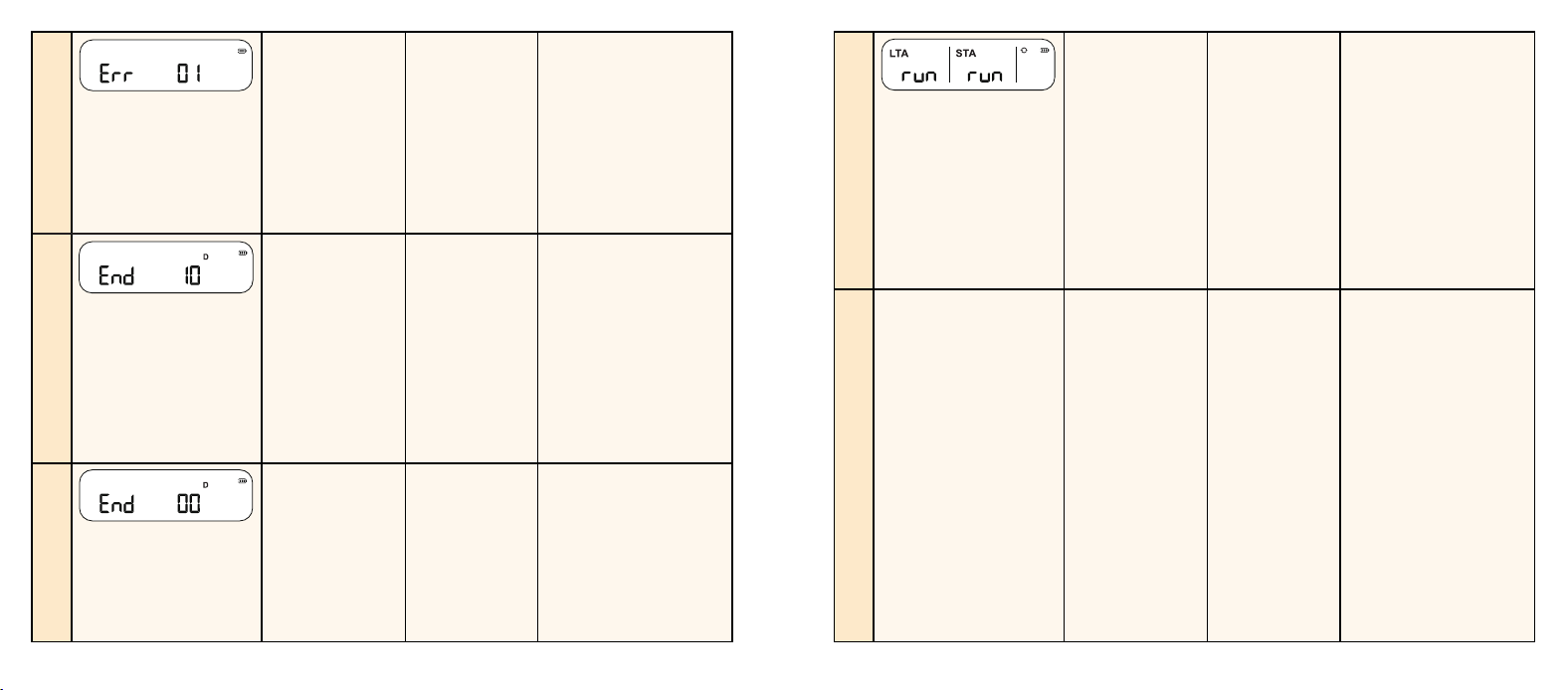
4 The LCD
displays “Err
01”, “Err 02”, “Err
03”, or “Err 05”,
and the LED
flashes yellow
twice every 60
seconds.
The device
has entered
the fault
mode.
Restart the device.
If the issue persists,
please replace the
device.
5
The LCD
displays “End”
along with a
countdown in
days, and the
LED flashes
yellow 3 times
every 60
seconds.
The device
has started
a lifetime
countdown.
Promptly record and
save the detection
data and replace
the device once it
reaches the end of its
service life.
6
The LCD
displays “End
00”, no longer
scrolls data,
and does not
respond to any
operations.
The device
has reached
the end of its
service life.
Replace the device.
7 The LCD
displays “run”
rather than the
specific data.
The device
has just
powered on
and is waiting
to output the
first stable
data.
According to the
different radon
levels, the device will
output the first stable
data within 4-24
hours. Please wait
patiently.
8 None. After replacing
the batteries,
the device
retains the
previous data.
The data
retention
feature
ensures that
removing
batteries will
not erase the
data.
If you need to erase
the data, please press
the Reset Button on
the device.
17 18
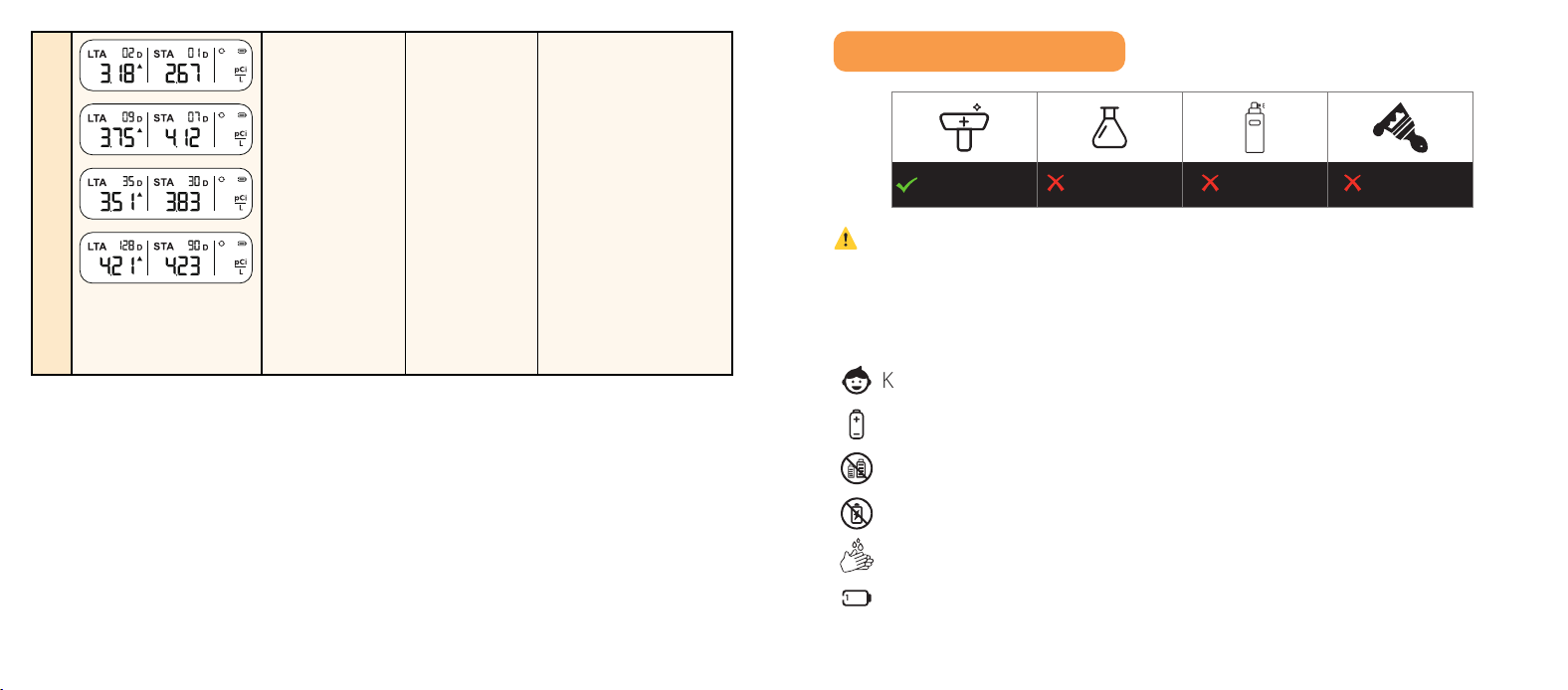
9 The short-
term average
does not fully
display all 4
measurement
intervals.
The testing
duration
has not yet
reached the
required time
for the next
measurement
interval level.
Continue to test:
For example, when
the device is first
powered on, only the
“01D” measurement
interval is displayed.
Once the testing
time exceeds 7 days,
both the “01D” and
“07D” measurement
intervals will be
shown and scroll on
the display, and so
on.
5 Daily Maintenance
4
3
1
2
6
5
View peak
Switch pCi/L ↔ Bq/m³
Clear peak only (when the peak level is displayed)
LCD after the first power-on or data reset.
Date Sticker
(5 pieces; manually filled
with the start time of detection)
Guide Sticker
(Apply to the back only; avoid side air intake area)
User ManualRadon Alarm
(Pre-installed removable AA battery × 3)
Refer to this value and compare it with the table below.
The device is self-testing.
Pull
Remove the insulating film.
英
Keep batteries away from children.
Insert with correct polarity.
Never mix types, brands, or old + new.
Do not use rechargeable batteries.
Avoid leaking battery contact. Rinse and seek medical help if exposed.
Use only the specified battery in the marking.
Wi-Fi name + password ready
2.4 GHz only (not 5 GHz)
The phone's Bluetooth turned on.
Basement
KitchenLiving RoomBedroom
Attic
Laundry Room
Because radon uctuates, short-term radon data
(less than 7 days) is not suitable for deciding the
next steps.
Minimal — minimum reliable reading
Recommended — more accurate average
Best — covers all seasons
x2
3s
Light backlight
Upload data now
Enter pairing mode
x2
3s
5s
Factory reset (clears all data)
3s
1.5 V
Read Carefully
Read this manual before use.
Indoor Use Only
For family living units.
Do Not Disassemble
Contains calibrated components.
3s
/
/
Long-term average:
Updated every 24h.
Short-term average:
1/7/30/90-day intervals.
Trend: rising,
falling, or stable.
Peak value mode.
Monitoring
in progress.
Exceeds
setting threshold.
Battery level.
pCi/L or Bq/m³
(double-tap to switch).
1 2 3
pCi/L
Humidity ≥ 85% Outdoors Stone surfaces
Closets Heat sources Vents & fans
No detergents. No aerosols. Do not paint.
Vacuum once
every 3 months.
⚠
WARNING
1. Do not tamper — risk of malfunction.
2. Do not use in humid environments (> 85% RH).
Battery Operation
4
3
1
2
6
5
View peak
Switch pCi/L ↔ Bq/m³
Clear peak only (when the peak level is displayed)
LCD after the first power-on or data reset.
Date Sticker
(5 pieces; manually filled
with the start time of detection)
Guide Sticker
(Apply to the back only; avoid side air intake area)
User ManualRadon Alarm
(Pre-installed removable AA battery × 3)
Refer to this value and compare it with the table below.
The device is self-testing.
Pull
Remove the insulating film.
英
Keep batteries away from children.
Insert with correct polarity.
Never mix types, brands, or old + new.
Do not use rechargeable batteries.
Avoid leaking battery contact. Rinse and seek medical help if exposed.
Use only the specified battery in the marking.
Wi-Fi name + password ready
2.4 GHz only (not 5 GHz)
The phone's Bluetooth turned on.
Basement
KitchenLiving RoomBedroom
Attic
Laundry Room
Because radon uctuates, short-term radon data
(less than 7 days) is not suitable for deciding the
next steps.
Minimal — minimum reliable reading
Recommended — more accurate average
Best — covers all seasons
x2
3s
Light backlight
Upload data now
Enter pairing mode
x2
3s
5s
Factory reset (clears all data)
3s
1.5 V
Read Carefully
Read this manual before use.
Indoor Use Only
For family living units.
Do Not Disassemble
Contains calibrated components.
3s
/
/
Long-term average:
Updated every 24h.
Short-term average:
1/7/30/90-day intervals.
Trend: rising,
falling, or stable.
Peak value mode.
Monitoring
in progress.
Exceeds
setting threshold.
Battery level.
pCi/L or Bq/m³
(double-tap to switch).
1 2 3
pCi/L
Humidity ≥ 85% Outdoors Stone surfaces
Closets Heat sources Vents & fans
No detergents. No aerosols. Do not paint.
Vacuum once
every 3 months.

19 20
6 Statement
FCC Statement
1. This device complies with part 15 of the FCC Rules. Operation is subject to the
following two conditions:
(1) This device may not cause harmful interference.
(2) This device must accept any interference received, including interference
that may cause undesired operation.
2. Note: This equipment has been tested and found to comply with the limits
for a Class B digital device. These limits are designed to provide reasonable
protection against harmful interference in a residential installation. This
equipment generates, uses, and can radiate radio frequency energy and, if
not installed and used in accordance with the instructions, may cause harmful
interference to radio communications. However, there is no guarantee that
interference will not occur in a particular installation. If this equipment does
cause harmful interference to radio or television reception, which can be
determined by turning the equipment off and on, the user is encouraged to
try to correct the interference by one or more of the following measures:
—Reorient or relocate the receiving antenna.
—Increase the separation between the equipment and receiver.
—Connect the equipment into an outlet on a circuit different from that to
which the receiver is connected.
—Consult the dealer or an experienced radio/TV technician for help.
3. Changes or modifications not expressly approved by the party responsible for
compliance could void your authority to operate the equipment.
4. The distance between user and products should be no less than 20 cm.
Environmental Protection
Waste electrical products should not be disposed of with household waste.
Please recycle where facilities exist. Check with the Local Authority or retailer for
recycling advice.
7 Manufacturer and Service Information
X-Sense Electronics Co., Ltd.
Address: Room 402, Building 4, No. 9, Jinshagang 1st Road, Shixia Village, Dalang
Town, Dongguan City, 523750 Guangdong, P.R. China
Email: support@x-sense. com
Website: www.x-sense.com
X-Sense Electronics Co., Ltd.
Email
:
suppor[email protected]
Scan with X-SENSE Home Security App to add device.