Operator’s Manual
www.mechmaxx.com
HEAT PRESS MACHINE
WARRANTY

OPERATING INSTRUCTIONS
1
www.mechmaxx.com
the right to make changes to technical specifications and product features at any time.
Reproducing any part of this manual in any form is not permitted without written permission from Mechmaxx. We reserve
machine.
To ensure smooth setup and operation, please read this user manual carefully before starting production with your
Thank you for purchasing a Mechmaxx heat press!
FOR THE HEAT PRESS MACHINE
LARGE FORMAT HEAT PRESS MACHINE USER MANUAL
2
www.mechmaxx.com
please contact our Technical Support Department.
If you cannot observe one or more of the safety precautions above, or if you are not sure whether all points are satisfied,
12.Ensure that the machine is used only in dry rooms.
on.
11.Never operate the heat press within the reach of children and never leave the machine unsupervised when switched
10.Disconnect machine from power outlet when not in use!
9.Ensure that liquids and metal objects do not get into the inside of the heat press.
must be contained in a closed bag.
are wearing respiratory protection and only touch the contained insulation wool with gloves. Any disposal of the wool
8.In case you are requested by the Mechmaxx customer support to open the heating plate cover, please make sure you
7.Never open the housing or attempt to modify the machine yourself
6. Don’t put your hand on the working plate when the machine is working, for prevent your hand from burns
program error and broken.
5. The temperature controller is complicated, except the temperature setting, please do not make other setting to avoid
etc.
4. Before large scale production, you must make some sample test to make sure the best time, temperature, pressure
of the heating sublimation products and the ink and paper also will affect the sublimation effect.
3. To get successful sublimation effect, it should be correct time, temperature and pressure; the thickness and material
2. During heating up and operation, please do not touch the heater to avoid scalding.
press from a power socket protected by a ground fault protection switch.
1.This machine must be protected by safe and reliable ground wire. Note that it is only permissible to operate a heat
SAFETY PRECAUTIONS
support and durability and creates even pressure for vibrant colors!
It’s an eco-friendly bonding foam that’s super durable and strong. When paired with a heated platen, provides good
•
High-Density Foam Pad & Silicon Pad
consistent pressure on your projects.
Say goodbye to uneven heating! With dual pressure adjustment knobs, the oversized heating platen also ensures
•
Dual Pressure Knobs
works perfectly across a variety of substrates!
dozens of small items at once or create full-bleed designs on large format fabrics. It improves your efficiency and
Whether you're in textile printing, gift personalization, or home decoration, our oversized heat press lets you print
•
Large & Multiple Small Items in One Go
SHORT OVERVIEW – MECHMAXX HEAT PRESS MACHINE
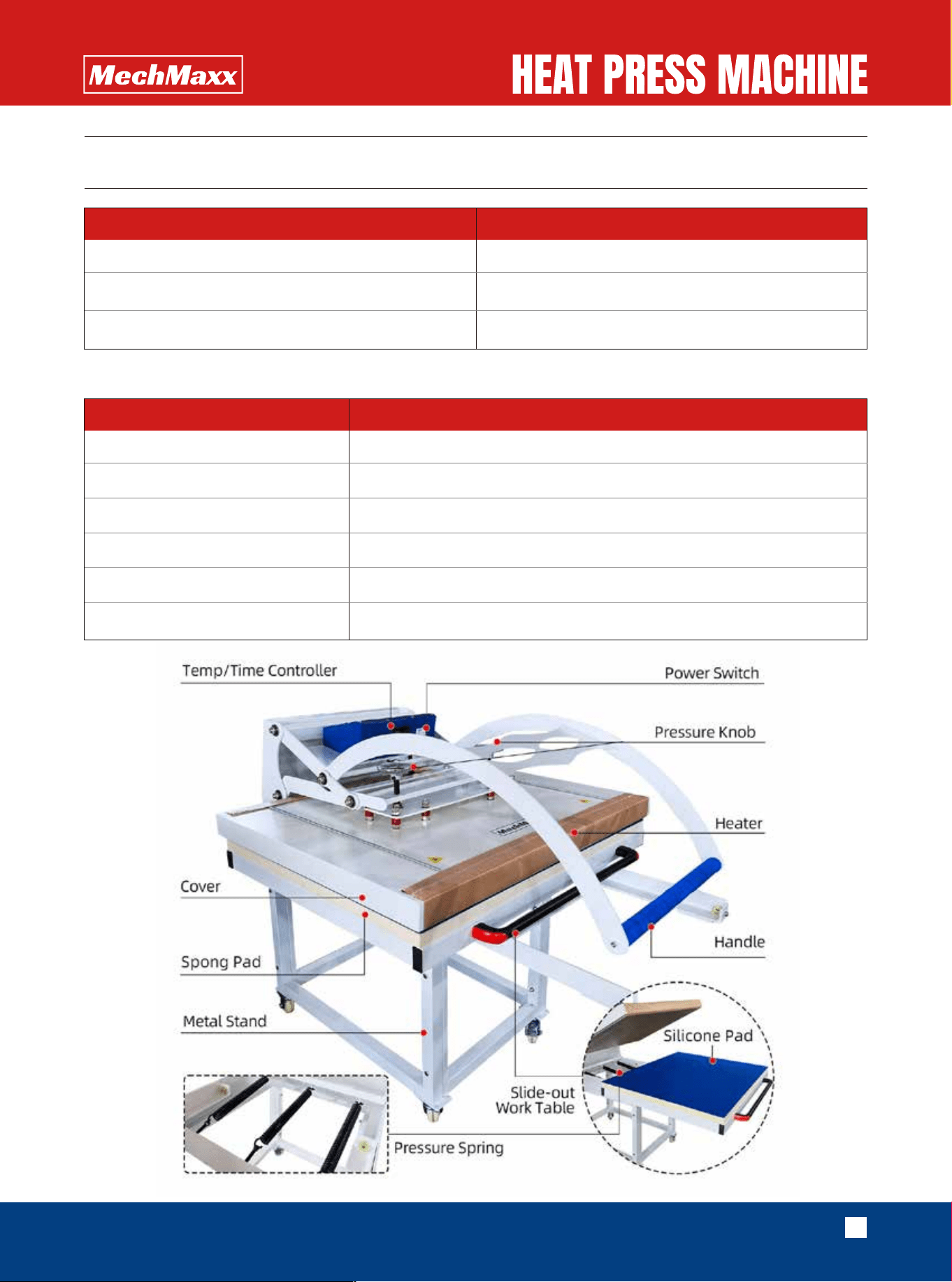
It is manual machine, easy operation, safe and reliable with thickened cast aluminum heating board.
conglutination of kid’s clothes, caps and shoes).
print, and conglutination of clothes with their lining under lower temperature and lower pressure (such as the
chemical fiber, nylon, etc. This machine can also conduct some heat-treatments such as hair-planting print, vesicant
This machine can thermo-transfer (via sublimation) colorful pictures and words onto textiles made of cotton, flax,
SUMMARY
3
www.mechmaxx.com
SCOPE OF DELIVERY
Item Quantity
TECHNICAL PARAMETERS
Heat press machine
Instruction manual
1
1
Voltage
Power
Temperature
Time for heating up
Work Size
Model
22
0V
15-30 minutes
32-750℉(0-399℃)
1
Stand
MS3240
Large format Heat Press Machine
6300W/8.4HP
32x40 inches / 80x100cm
4
www.mechmaxx.com
OPERATION
2.PANEL SETTING
handle up and press it down to see whether the pressure is suitable (before starting the intended operations).
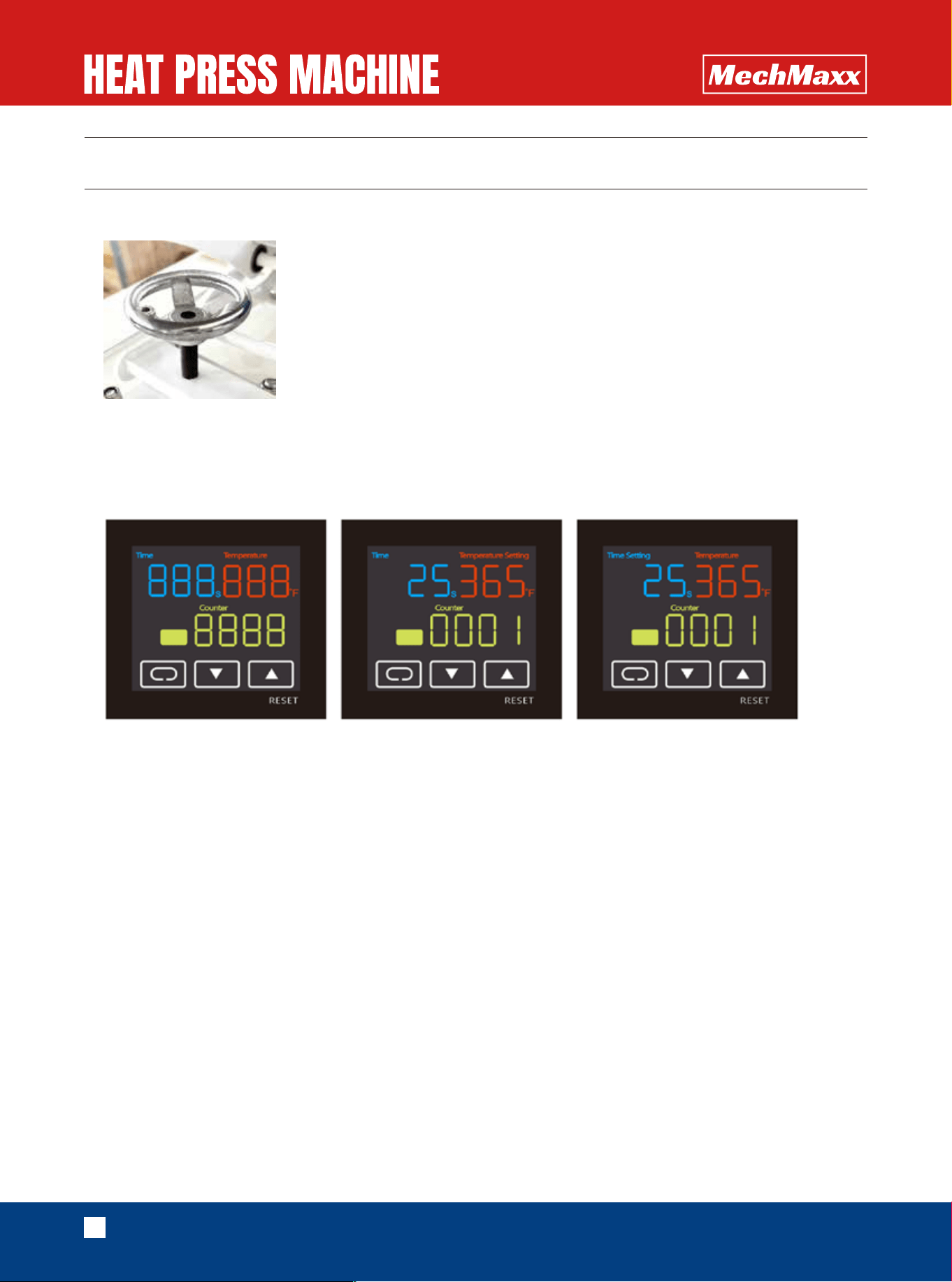
You can use the pressure knob to adjust the pressure, turning it clockwise will increase the pressure. Please pull the
1.P
RESSURE SETTING
the working temperature reaches the target temperature,only then the machine is ready to use.
which is the current temperature of the heat plate, The heat plate will take some time to warm up, please wait until
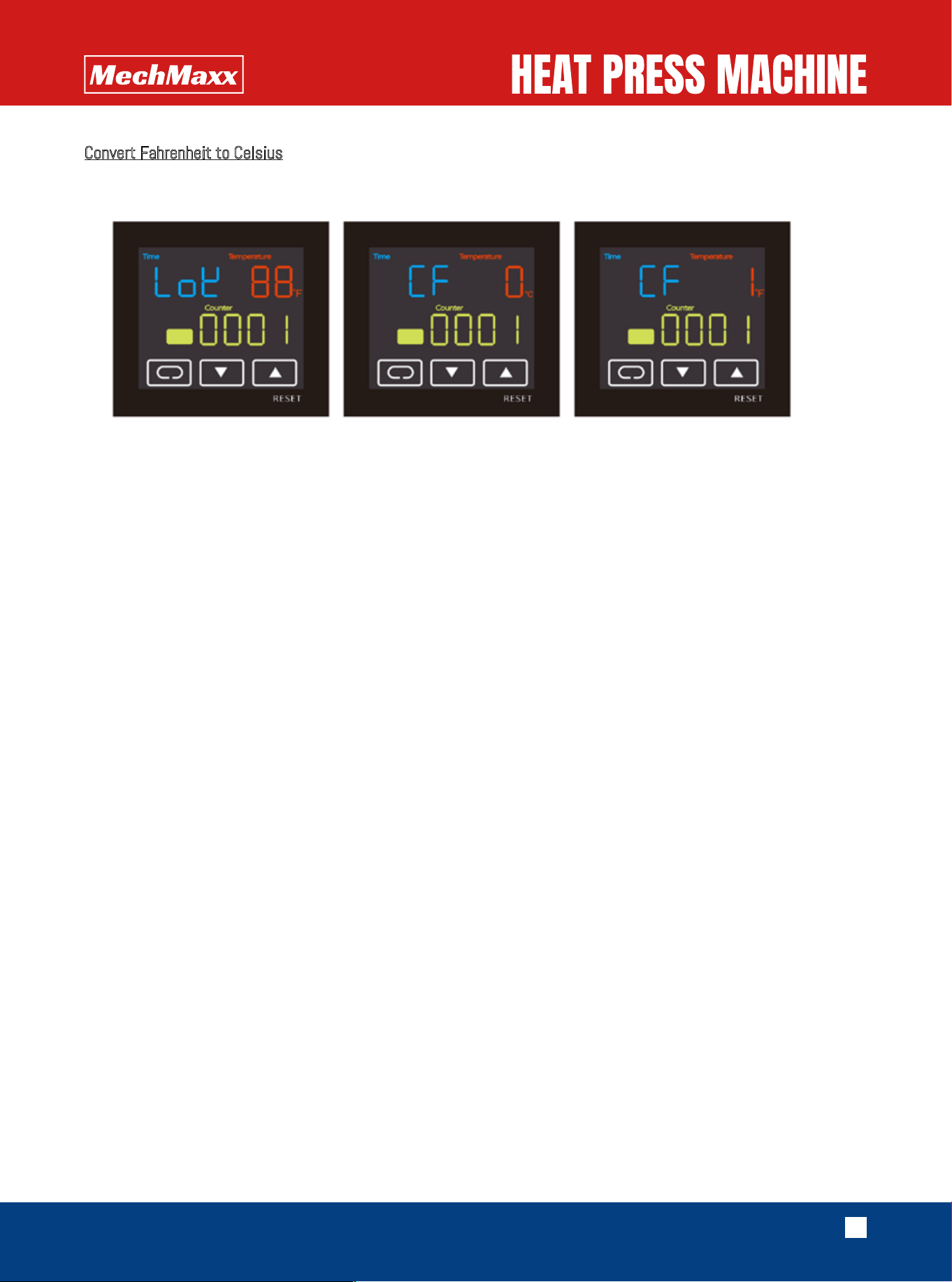
Working Temperature: After you save the target temperature and time,the panel will show the working temperature,
4): Press and hold the "▲" button for about 3 seconds to reset the piece counter to 0.
3):
Finally, press the "⊂⊃" button for about 3 seconds to save the setting. The machine will then begin heating.
2):
Press the "⊂⊃" button again to display "Time Setting." Press the up and down buttons to adjust the desired time.
temperature.
1):
Press the "⊂⊃" button to display "Temperature Setting." Press the up and down buttons to adjust the desired
Turn on the power switch,
5
www.mechmaxx.com
ignore it.
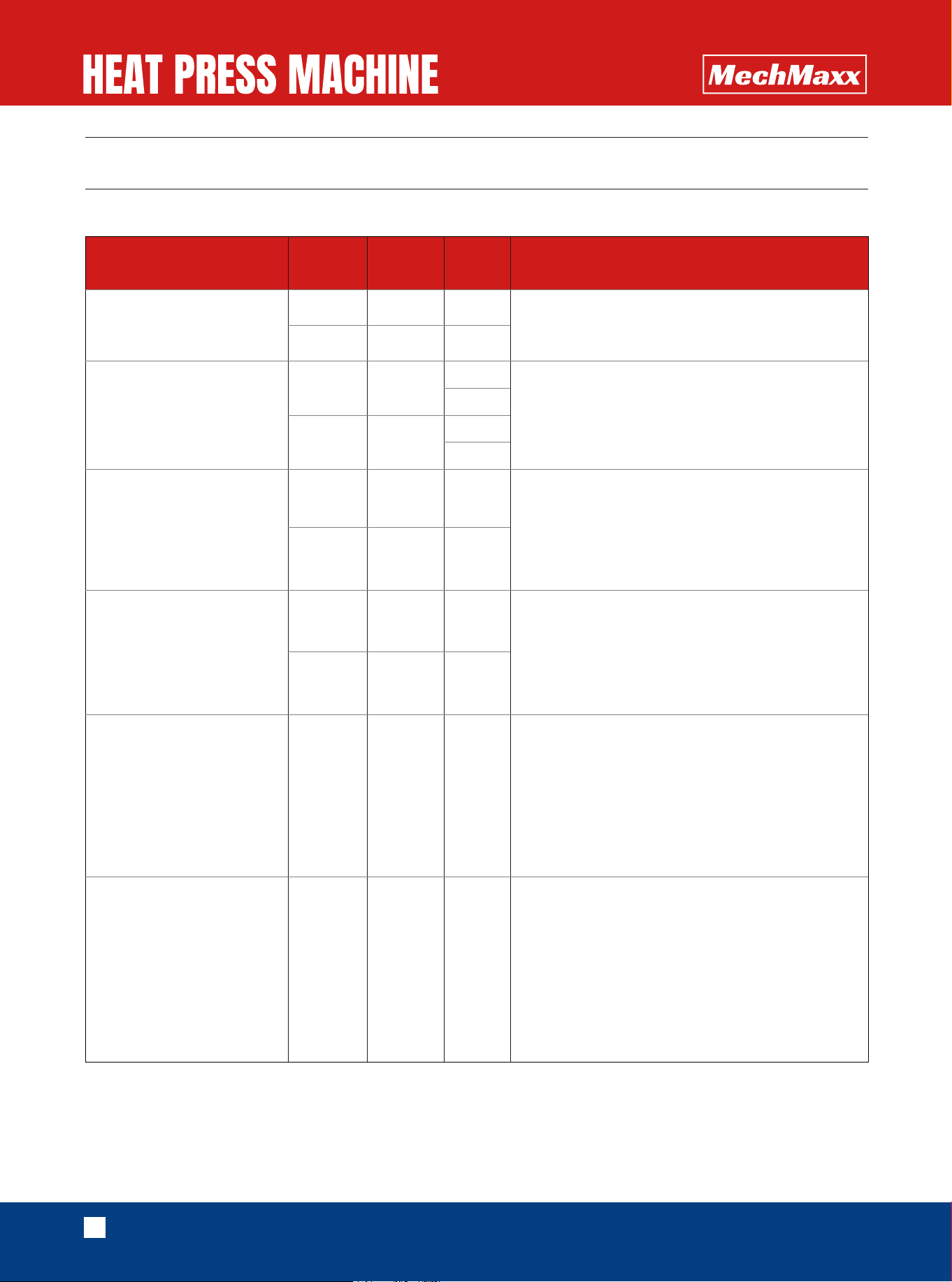
Remark:The default factory setting is Fahrenheit. If you need to change it to Celsius, refer to the following. If not,
C
onvert Fahrenheit to Celsius
6
www.mechmaxx.com
RECOMMENDED TIMES AND TEMPERATURES
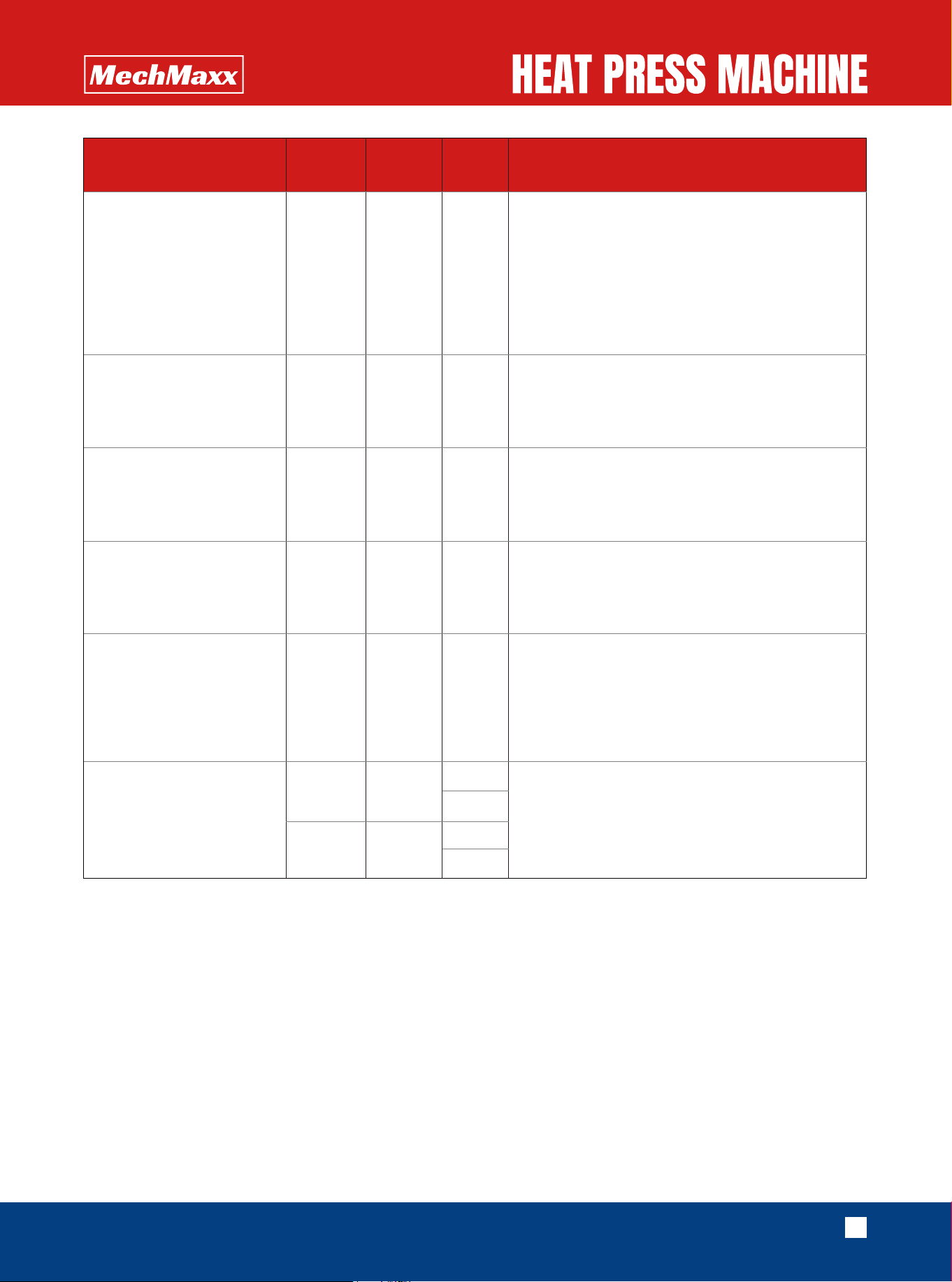
These values are only guidelines;; they can vary from material to material and should always be checked before pressing.
1.Printing On Sublimation Paper , Mirror Image ;
2.Put The Plate Right ;
3.Light Medium .
1.Printing On Sublimation Paper , Mirror Image ;
2.Image And Printing Side Matched Tight Without
Margin ;
3.Printing Side Downward ;
4.Medium Pressure .
1.Printing On Sublimation Paper , Mirror Image ;
2.Tear Off The Protective Film On The Board Before
Printing ;
3.Image And Printing Side Matched Tight Without
Margin ;
4.High Pressure .
1.Printing On Sublimation Paper , Mirror Image ;
2.Tear Off The Protective Film On The Board Before
Printing ;
3.Image And Printing Side Matched Tight Without
Margin ;
4.High Pressure .
1.Printing On Sublimation Paper , Mirror Image ;
2.Keep Temperature Sensitive Parts Away From
Heating Board ;
3.Press Down The Heating Board After It Rises To
The Lowest Temperature ;
4.High Pressure ;
5.Only For Non Cotton Material Like Fabrics And
Polyester .
1.Printing On Light Color Transfer Paper , Mirror
Image ;
2.Keep Temperature Sensitive Parts Away From
Heating Board ;
3.Press Down The Heating Board After It Rises To
The Lowest Temperature ;
4.High Pressure ;
5.Peel Off Base Paper Immediately After Printing ;
5.Only For Light Color Cotton T-Shirts .
Item Name
Lowest
Temp.(F)
Highest
Temp.(F)
Time(S) Remark
Plate
230
320
230
230
330
330
230
310
330
310
330
330
330
330
330
330
345
345
40
100
20
100-120
20
100
120
340
340
30
50
100
300-420
120-240
Ceramic Tile
Metal Board
Key Chain
(Sparking Aluminum Sheet)
T-Shirt
(Non Cotton Material)
T-Shirt
(Light Color Cotton Material)
7
www.mechmaxx.com
1.Printing On Dark Color Transfer Paper , Non Mirror
Image ;
2.Keep Temperature Sensitive Parts Away From
Heating Board ;
3.Press Down The Heating Board After It Rises To
The Lowest Temperature ;
4.High Pressure ;
5.Wait For 3 Minutes And Peel Off Thermal Paper.
1.Printing On Sublimation Paper , Mirror Image ;
2.Image And Printing Side Matched Tight Without
Margin ;
3.Medium Medium .
1.Printing On Sublimation Paper , Mirror Image ;
2.Image And Printing Side Matched Tight Without
Margin ;
3.Medium Medium .
1.Printing On Sublimation Paper , Mirror Image;
2.Printing Side Downward;
3.Both Sides Printable , Printing Side By Side With
The Need For Thermal Paper.
1.Printing On Sublimation Paper , Mirror Image;
2. Keep Temperature Sensitive Parts Away From
Heating Board;
3.Press Down The Heating Board After It Rises To
The Lowest Temperature ;
4.High Pressure.
1.Printing On Sublimation Paper , Mirror Image;
2.Image And Printing Side Matched Tight Without
Margin ;
3.Printing Side Downward;
4.Medium Pressure.
Item Name
Lowest
Temp.(F)
Highest
Temp.(F)
Time(S) Remark
340
340
345345
30
120
320320
330330
120
40
345345
80
230
345
120-180
360-480
345
345
240-300
450-600
T-Shirt
(Dark Color Cotton Material)
Mouse Pad
Puzzle
Metal Name Card
Pillow
Photo Slate
once cooled, it may indicate insufficient pressing temperature or duration.
material. The adhesive in the transfer material activates fully only when cooled. If the adhesive fails to bond properly
After pressing, allow the textile to cool completely before removing any type of carrier or backing from the transfer
TEXTILE APPLICATION NOTE:
characteristics such as washability and transfer behavior must be verified through your own testing.
The user is solely responsible for determining the correct settings suitable for their individual conditions. Performance
manufacturer, should be regarded as general guidelines only.
substrates intended for use. The settings and values provided in this manual, as well as those from the material
Before beginning full production, it is essential to conduct your own tests using the specific transfer materials and
IMPORTANT NOTICE

8
www.mechmaxx.com
MAINTENANCE
scouring sponges, solvents or gasoline!
7).Clean the press regularly with a soft cloth and mild household cleaner to remove adhesive residues etc. Never use
6).The plug must first be disconnected from the power socket.
5).Maintenance work should always be accomplished with the press switched off and cooled down.
4).If you are not able to solve the electrical parts problem, please kindly contact the supplier and get technical support
3).Please keep the machine in dry place.
using it or not.
2).In order to keep the heat platen's good transfer effect, you need to protect the heat platen carefully whenever you are
1).In order to prolong the machine service life, please add the lubrication oil regularly on the joints.
Maintenance and cleaning
8.
The Panel or buzzer is damaged.
The temperature is normal, but the buzzer does not sound when time finished.
7.
The timing sensor or display board is damaged
6.
The temperature is normal, but don’t count the time.
Please reset the temp and time according the operation process manual.
5.
The setting temp and time becomes abnormal after exchange the heat platen
2). Or the digital controller is faulty and it keeps conveying electric to Solid-State Relay, need to change controller
1). lt means the solid-state relay is broken, out of control, need to change the Solid-State Relay.
4.
The temperature is out of control: Set 180℃, but the actual temperature is above 200'℃.
Check whether the thermocouple of the heat platen touches well
Temperature displays incompletely
3.
3)Solid-State Relay is not working
2)Check whether the thermocouple of the heat platen touches well
1)The panel has problem
Heater can not be heating up
2.
2).Check the power switch or digital controller whether it is broken
1). Check the plug whether it connects well or whether it is broken.
1.
No action after turn on the machine

9
www.mechmaxx.com
8.The temperature controller displays three distorted O characters: The thermocouple is loose or damaged.
of the relay is on.
7.Heating plate does not heat up: The temperature controller shows normal readings. Check whether the indicator light
the air valve is open.
6.Heating plate only rises and fails to press down after startup: Check if the emergency stop button is released and if
5.If transfer paper stick to the object after transfer: the temperature is too high/ or poor quality printing ink.
long enough / or poor quality transfer paper.
4.If print color is different/ partial transfer effect is not good enough: the pressure is not enough / or not pressed
3.If the print is blurring: too much transfer time causes proliferation.
2.If the print color is too brown or the transfer paper is almost burnt: reduce the setting temperature
If the print color is pale: the temperature is too low/the pressure is not correct/ or not pressed long enough.
1.
TROUBLE SHOOTING FOR TRANSFER PRINT QUALITY
10
www.mechmaxx.com
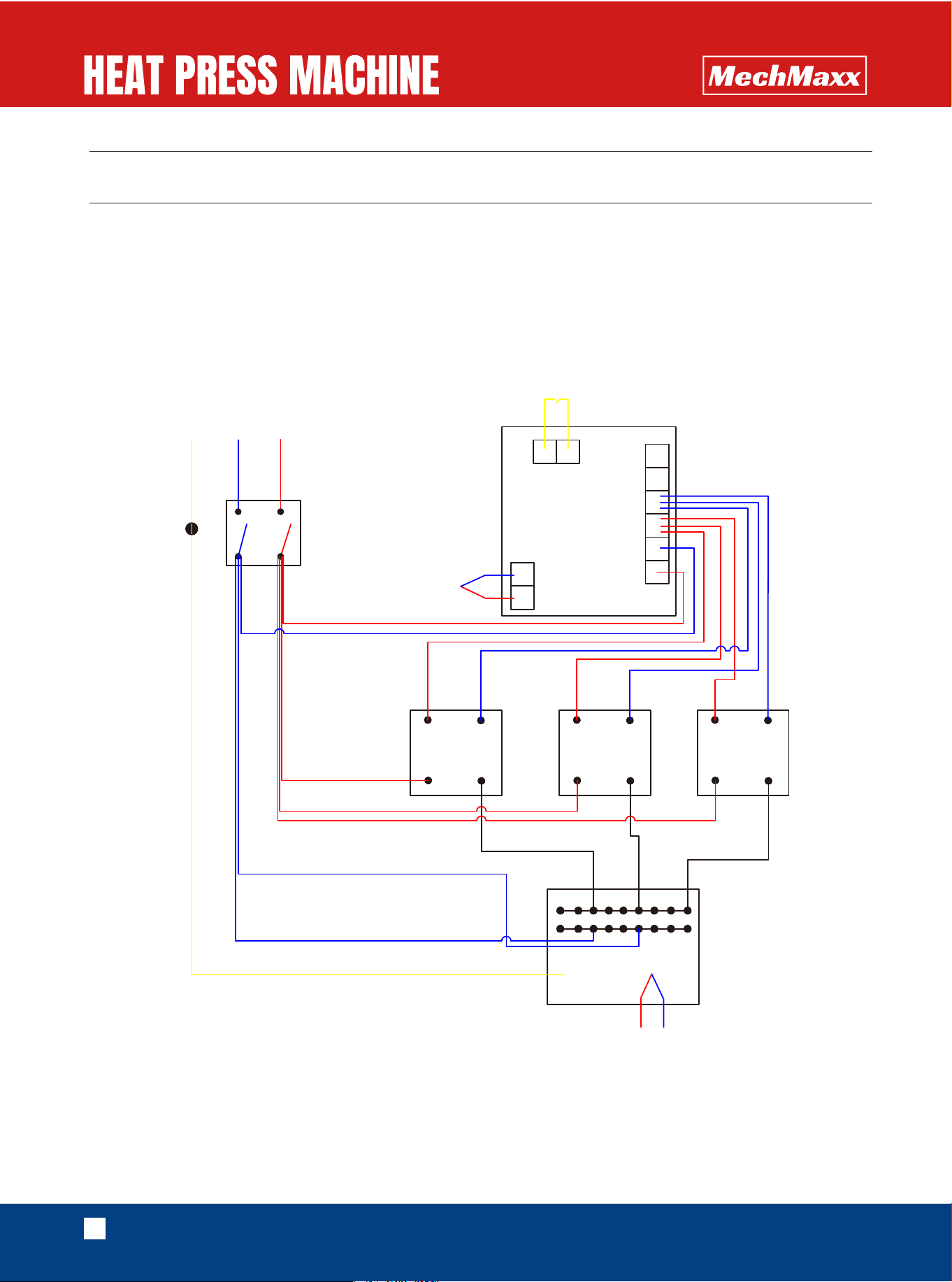
CIRCUIT DIAGRAM
-
+
TK
TK
+
-
PE
N
L
4
3
4
5
6
3
2
1
7
8
7
8
+
-
+
-
3
4
3
4
80100 Large Handle Manual
Heat Press Machine Wiring Diagram 220V
220V Heating Plate
Limit Switch
Power
Switch
Solid-State
Relay
Solid-State
Relay
Solid-State
Relay
LCD Panel
11
www.mechmaxx.com
/ZKS4U 6GXZ4U
*KYIXOVZOUT
7Z_ /ZKS4U 6GXZ4U
*KYIXOVZOUT
7Z_
.GTJRK
,O^OTM9IXK]8UJ
6RGOT=GYNKX
,RGTMK(KGXOTM
9KRLRUIQOTM4[Z
.K^GMUT.KGJ(URZ3
34[Z
.GTJRK
2GZIN
)U[TZKXY[TQ.KGJ9IXK]
ϘϘϘϘ3
.KGZOTM)U\KX6RGZK
.KGZOTM6RGZK
.KGZOTM6RGZK:NXKGJKJ8UJ
.K^4[Z3
9VXOTM
.GTJ]NKKR:NXKGJKJ8UJ
.GTJRK,UGS
.GTJRK:NXKGJKJ8UJ
9UIQKZ.KGJ)GV9IXK]3
6RGOT=GYNKX
.GTMOTM6RGZK
33
89
3
3
3>
3
3>
Z
)3
3
3
Z
3>
'R[SOT[S.GTJ]NKKR
3
:KSVKXGZ[XK)UTZXURRKX
8+9+:
)OXI[OZ(XKGQKX
4>()
)OXI[OZ(XKGQKX,O^OTM(XGIQKZ
.U[YOTM
9UROJ9ZGZK8KRG_
'
39KRLZGVVOTM9IXK]
3
(GIQ6RGZK
3)XUYY.KGJ9IXK]
3>
34[Z
3
12
www.mechmaxx.com
/ZKS4U 6GXZ4U
*KYIXOVZOUT
7Z_ /ZKS4U 6GXZ4U
*KYIXOVZOUT
7Z_
(GYK'YYKSHR_
,RGTMK(KGXOTM
/XUT(GYK6RGZK
.K^.KGJ(URZ3
6RGOT=GYNKX
.K^.KGJ(URZ3
(OM,XGSK(GYK'YYKSHR_
.K^GMUT9UIQKZ.KGJ)GV9IXK]
ϘϘϘϘϘ3
HXGQKIGYZKX
9SGRR,XGSK(GYK'YYKSHR_
RK\KROTMLUUZ
9[VVUXZ9W[GXK:[HK
.K^GMUT9UIQKZ.KGJ)GV9IXK]
ϘϘϘϘϘϘ3
4_RUI4[Z
6UR_[XKZNGTKKRGYZUSKX
.K^GMUT.KGJ(URZ3
.GTJRK
2GXMK(KGXOTM
4_RUI4[Z
89
3^
3
89
3
3
3
3B
3
3
3
^
2
3
9VXOTM
,UGSVGJ
IS
*KTYOZ_Ʉ
9OROIUTKX[HHKX