

QuickGuide
Thisisaquickguide.
Formoredetailedmanual,pleaseenterwww.mooeraudio.comtodownload.
Ifyouneedanyhelpandtechsupport,pleasecontact:support@mooeraudio.com
感谢您选择魔⽿公司的产品,该使⽤指南将帮助您快速了解如何使⽤本产品,如需了解更详细的信息,
请登陆魔⽿官⽹www.mooeraudio.com下载完整版说明书。
EN
VisittheMOOERwebsiteatwww.mooeraudio.comforthecompleteOwner'sManual.
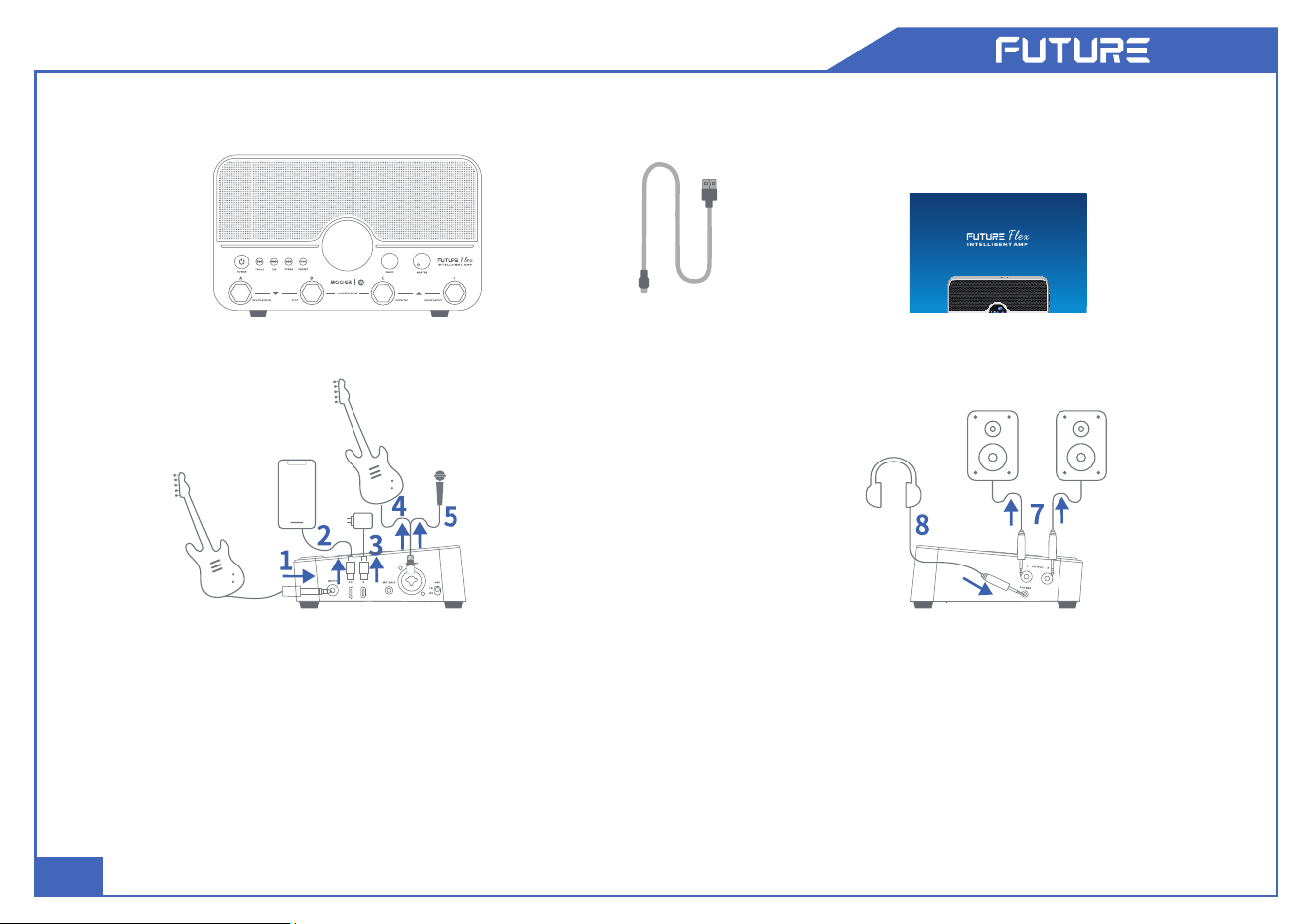
1.INPUT:Connectyourguitar,bass,orotherinstrument.
2.OTG:Connectasmartphonefordirectrecording.
3.POWER:Connecta5V2Apoweradapterforpowersupplyand
charging.
4.MICGAIN:Afterconnectingamicrophone,slowlyincreasethe
gainuntilthesignalisvibrantanddynamic.
5.MIC/INST:Connectamicrophone,guitar,bass,orotherinstrument.
6.48VPHANTOMPOWER:Toggleononlywhenusingcondenser
microphones.
FUTUREFlex*1
PACKAGECONTENTS
USB-CCable*1 QuickGuide*1
7.OUTPUTL/R:Connecttostudiomonitorsoramixingconsole.
8.PHONES:TRRSjackcompatiblewithheadphonesorheadsets
forsilentpractice.
CONNECTIONS
EN
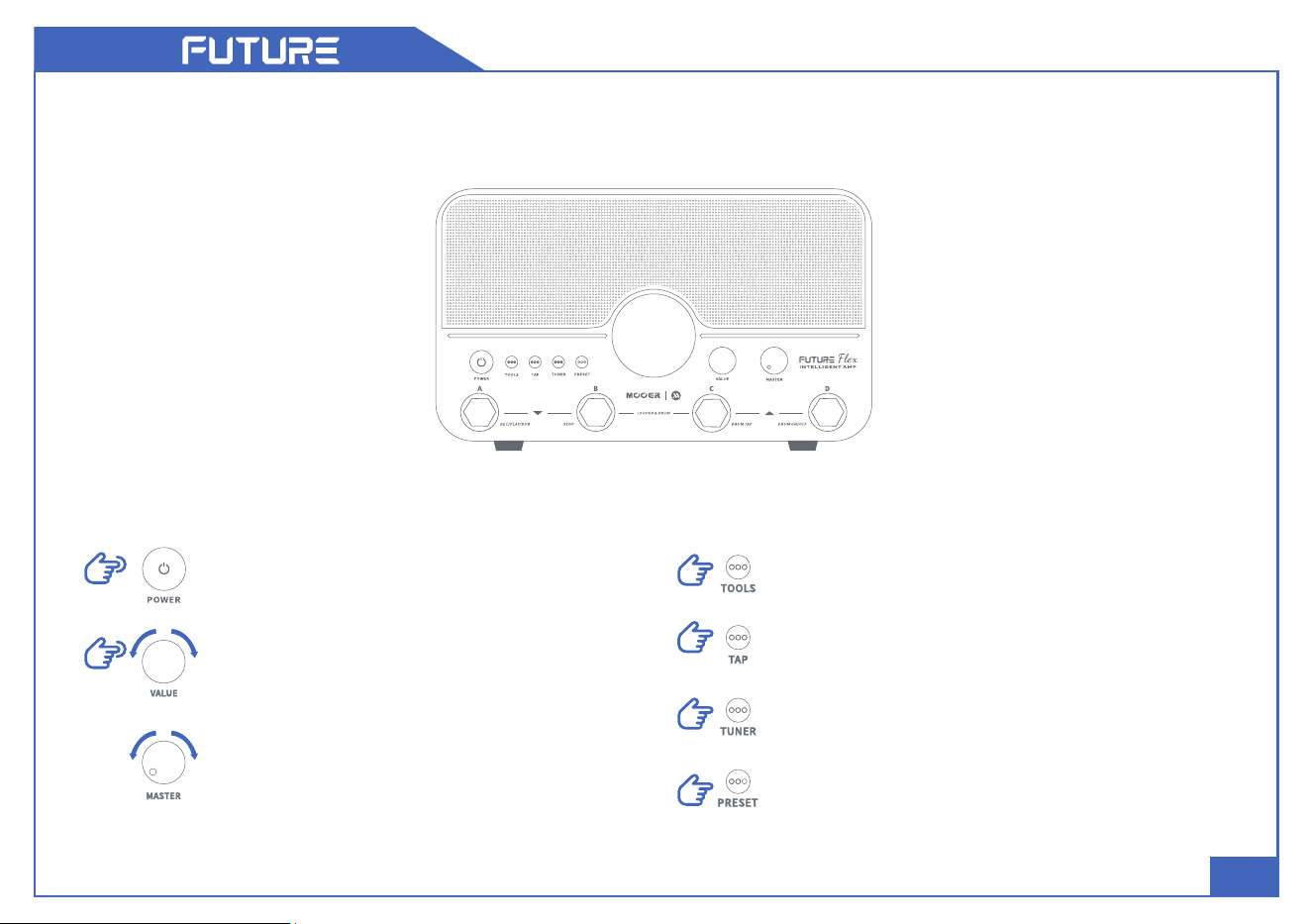
Pressandholdtopoweron/off.
RotatetheVALUEencodertoswitchpresets
oradjustparameters.PresstoentertheAMP
moduleinterface,selectparameters,or
togglespecificfunctions.
RotatetheMASTERknobtoadjusttheoverall
volume.
Presstoenter/exittheTOOLSinterface.
TapthisbuttonatthedesiredtempotosetthePreset
orDrumMachineBPM.
Presstoenter/exittheTunerinterface.
PresstoenterthePresetinterfaceorswitchbetween
thefourpresetswithinthecurrentbank.
QUICKOPERATIONS
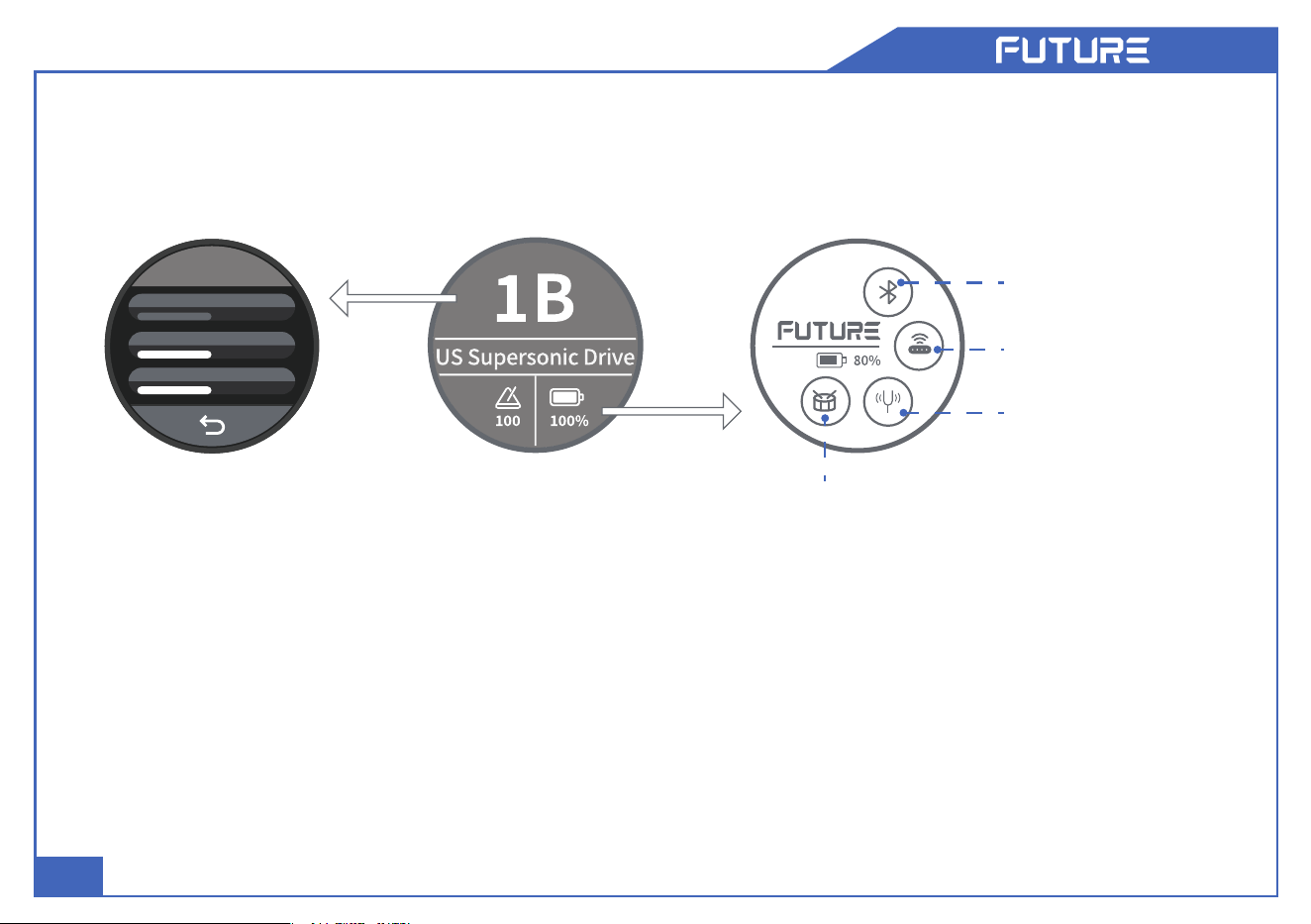
EN
TaptoentertheTOOLS
menu.
TaptotoggleBluetooth
on/off.
TaptoentertheTuner
interface.
TaptoentertheLooperandDrumMachine
interface.
SAVE
Gain 50
Treble 50
AMPMaster 50
TaptoenterAMP
moduleparameter
editing.
AMPModuleRound
ScreenEditing
Providesaccessto6mappedparametersfortheactiveAMPblockinthesignalchain:
●
GAIN,BASS,MID,TREBLE,PRESENCE,andVOLUME.
●
Tapaparameternametoselectit,thenrotatetheVALUEencodertoadjustthevalue.TapSAVEtosave
thepresetortapthebackicontoreturntothemainscreen.
EN
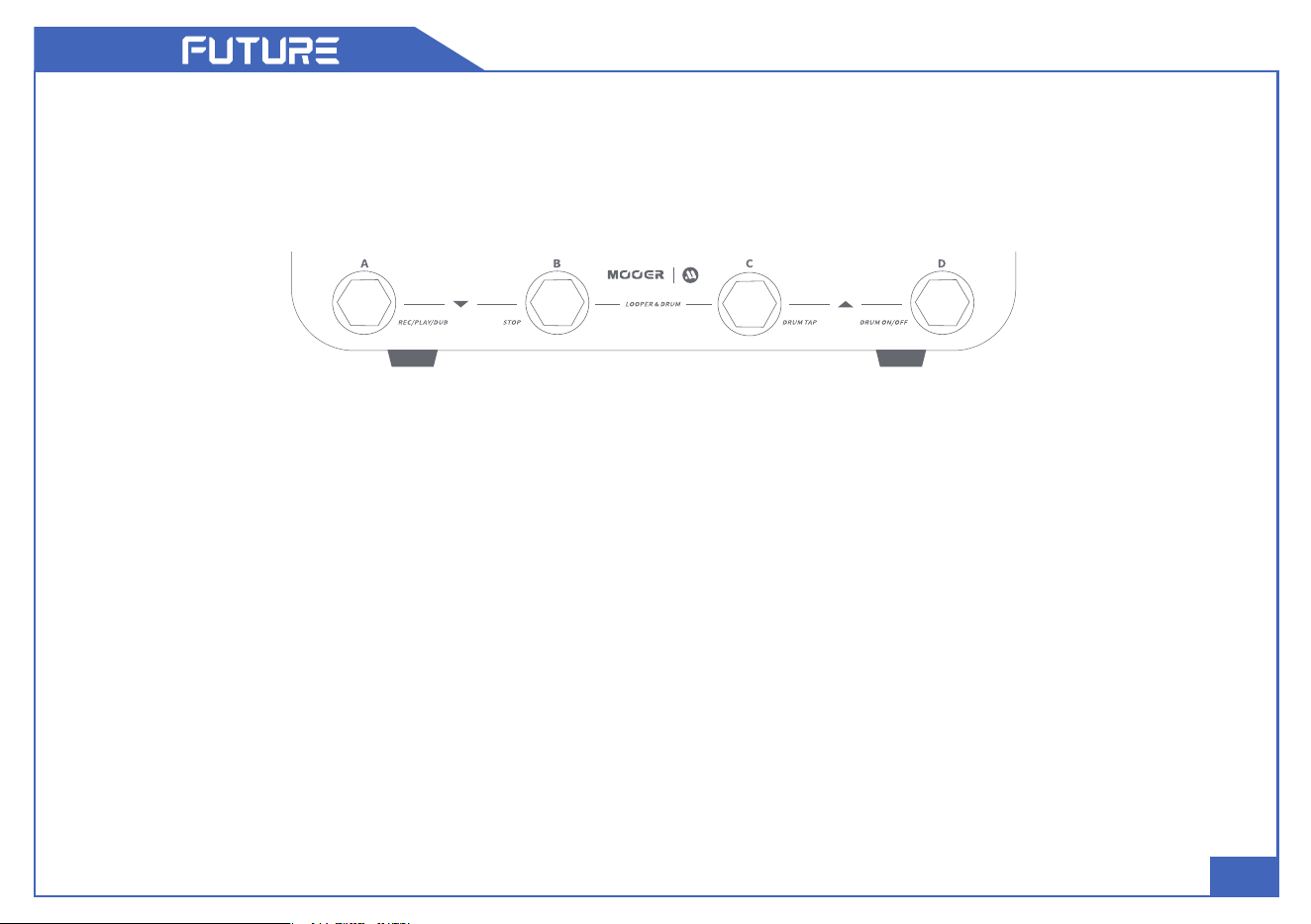
PresetSwitching
Pressanyfootswitch(A,B,C,orD)toswitchbetweenthefour
presetsinthecurrentbank.
BankSwitching
PressAandBfootswitchessimultaneouslytoscrolldown
throughthepresetbanks.
PressCandDfootswitchessimultaneouslytoscrollupthrough
thepresetbanks.
TapTempo
Ifthecurrentpresethasadelayeffectactive,presstheactive
preset'sfootswitchtoengageTapTempoandcontrolthedelay
time.
Repeatedlypressthefootswitchatthedesiredtempotosetthe
delaytime.
QUICKOPERATIONS
Tuner
Long-pressanyfootswitch(A,B,C,orD)toenterTunermode.
PressanyfootswitchtoexitTunermodeandreturntoPreset
Switchingmode.
DrumMachine&LooperMode
Enter/Exit:PressBandCfootswitchessimultaneously.
A:Record/Play/Overdub;Long-pressforUndo/Redo.
B:Stop;Long-presstoClear.
C:TaprepeatedlytosettheDrumMachinetempo.
D:Start/StoptheDrumMachine.
RhythmSelection:Long-pressCtoenterrhythmselection.
PressCorDtocyclethroughrhythms.Automaticallyexits
afterafewsecondsofinactivity.
EN
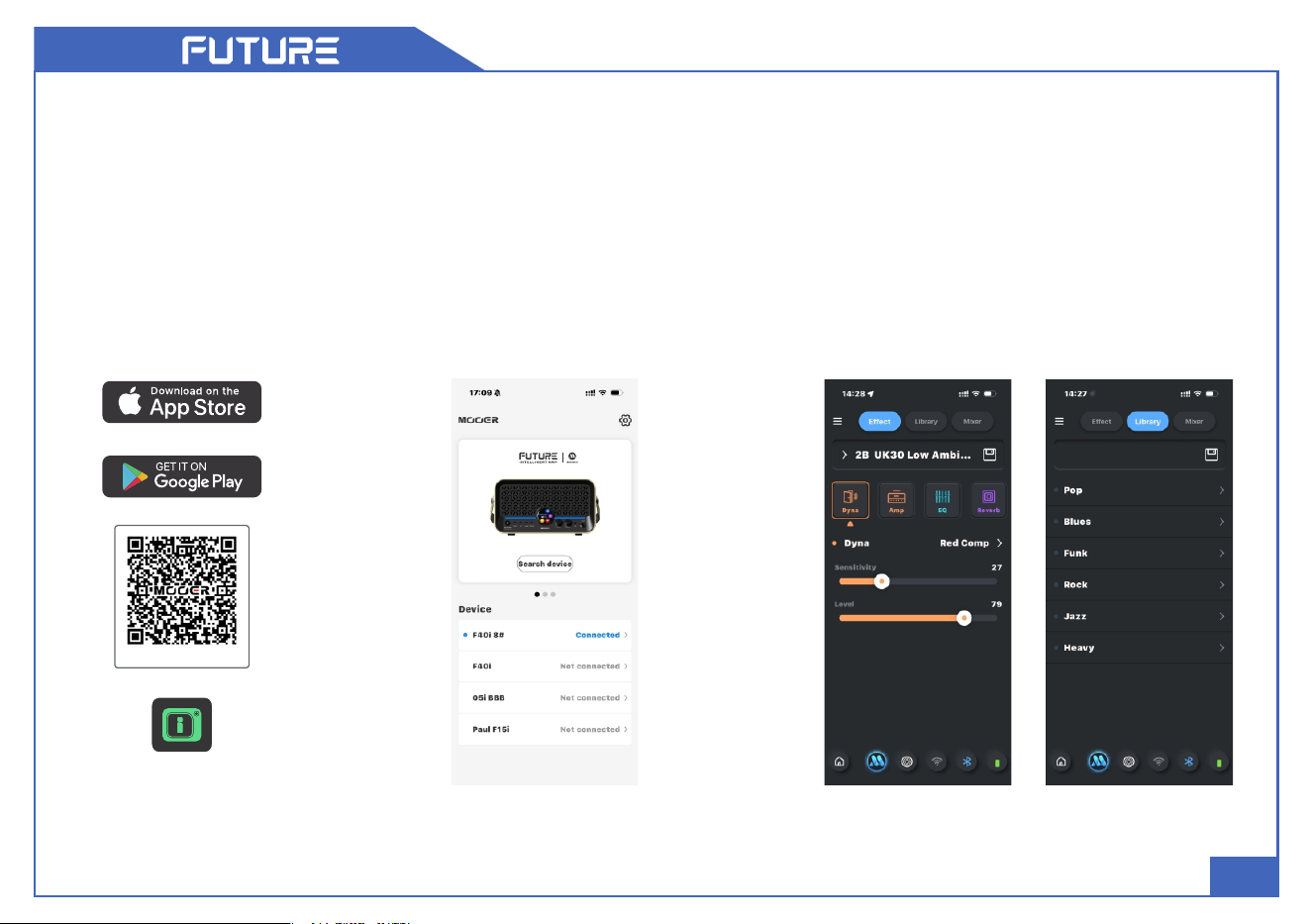
IAMPOPERATIONGUIDE
1.DownloadandInstall
●
Searchfor"iAMP"inyourapp
storetodownloadandinstall.
2.DeviceConnection
●
OpeniAMP,selecttheFutureseries,
andtap"Searchdevice."Once"Flex"
appearsinthelist,tapittoconnect.
3.SignalChain&ToneLibrary
●
TheEffectscreenfeaturesfactorypresets
andallowyoutoadjustvariouseffecttypes
andparameters.
●
IntheLibraryscreen,youcanquicklychoose
presetsbasedonmusicalstyleandsavethem
totheEffectsection.
MOOERiAMP
www.mooeraudio.com
EN
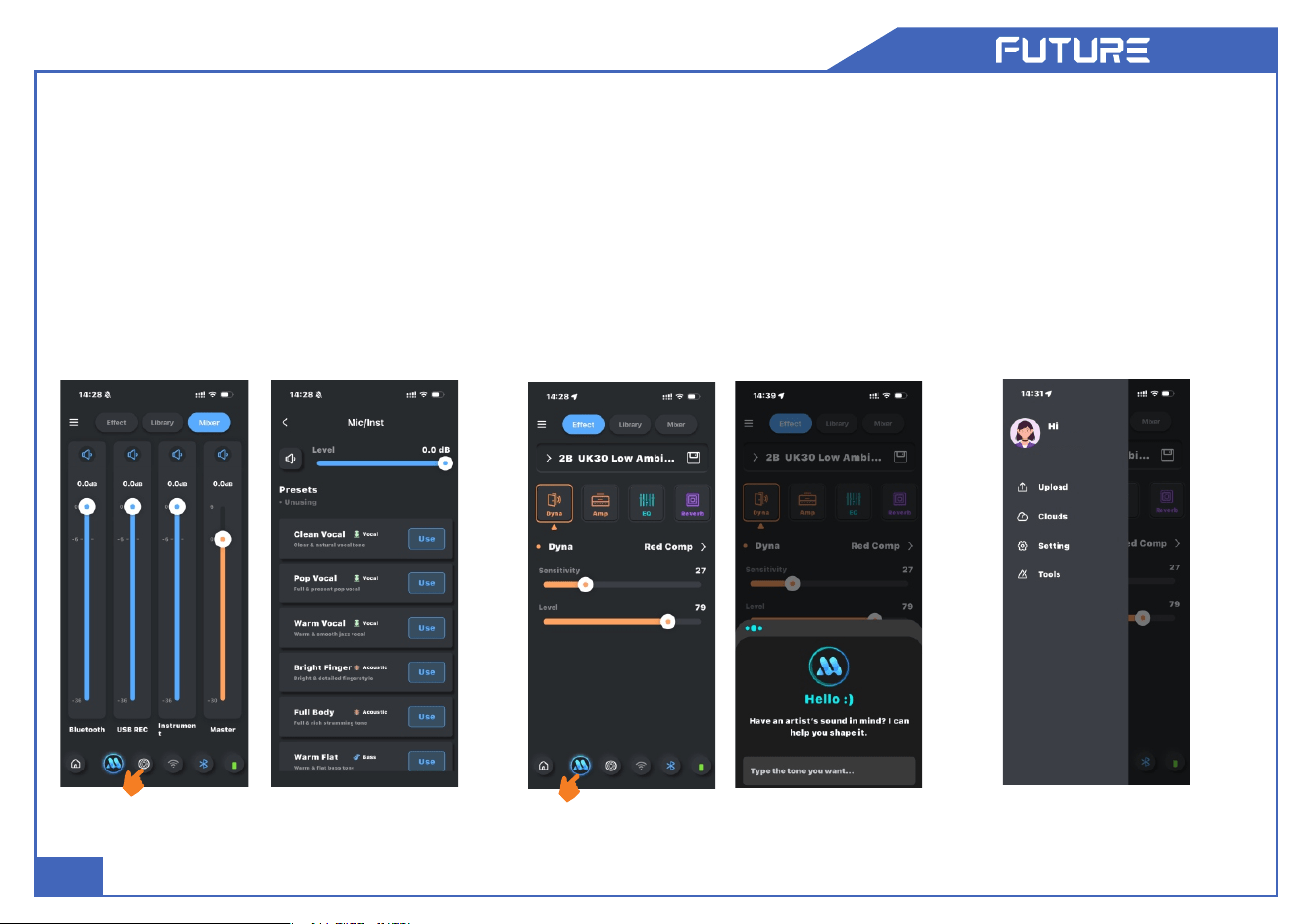
4.Mic/Inst
●
Includespresetsforvocalprocessing,
acousticguitar,bass,andmore.
●
Tap"Use"toengagethepreset.Tapping
thepresetnamewithoutselecting"Use"
willbypasstheeffect.
5.MOOERAI
●
AIPreset:Describeyourdesiredtone
togenerateacustompreset.
●
AIStemLab:Importanaudiofileto
separatetracksinstantly.
6.MOOERCloud
●
Upload:Shareyourcustom
presetswiththecommunity.
●
Cloud:Downloadpresetsand
MNRSsamplessharedbyother
users.
MOOER


This equipment has been tested and found to comply with the limits for a Class
B digital device, pursuant to part 15 of the FCC Rules. These limits are
designed to provide reasonable protection against harmful interference in a
residential installation. This equipment generates, uses and can radiate radio
frequency energy and, if not installed and used in accordance with the
instructions, may cause harmful interference to radio communications.
However, there is no guarantee that interference will not occur in a particular
installation. If this equipment does cause harmful interference to radio or
television reception, which can be determined by turning the equipment off and
on, the user is encouraged to try to correct the interference by one or more of
the following measures:
• Reorient or relocate the receiving antenna.
• Increase the separation between the equipment and receiver.
• Connect the equipment into an outlet on a circuit different from that to which
the receiver is connected.
• Consult the dealer or an experienced radio/TV technician for help.
Caution: Any changes or modifications to this device not explicitly approved
by manufacturer could void your authority to operate this equipment.
This device complies with part 15 of the FCC Rules. Operation is subject to the
following two conditions: (1) This device may not cause harmful interference,
and (2) this device must accept any interference received, including
interference that may cause undesired operation.
The device has been evaluated to meet general RF exposure requirement.
FCC Warning Statement: