Please read the instructions carefully
before using the product.
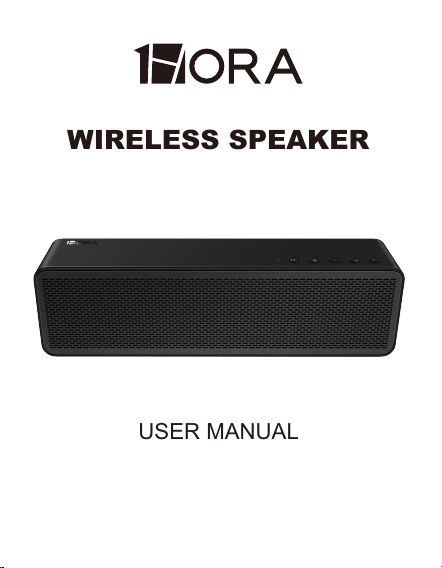
WIRELESS SPEAKER
USER MANUAL
BOC250

PACKING LIST:
Wireless speaker ×1
Type-C charging cable ×1
AUX cable ×1
User manual ×1
PRODUCT SPECIFICATIONS:
Model: BOC250
Bluetooth version: 5.3
Connection distance: 10M approx.
SNR: 85dB
Battery capacity: 2400mAh /7.4V/ 17.76Wh
Playingtime: 5H
(100% volume)
Speaker size: 70mm
Power: 4Ω/10W*2 RMS
Frequency response: 140HZ-18KHZ
Input: 5V
⎓2A
Dimensions: 332.3*70.5*94.8mm
Weight: 1250g

POWER ON/POWER OFF:
BLUETOOTH CONNECTION:
Power On: When the speaker is off, press and hold the
power button to turn it on. The blue light will flash.
Power Off: When the speaker is on, press and hold the
power button to turn it off. The blue light will turn off.
1. Turn on the Bluetooth speaker, and the blue light
flashes for pairing. Search the bluetooth device
"1HORA-BOC250" on your phone, it will connect with
your phone.
2. As the Bluetooth speaker is turned on, it will automat-
ically connect with the previous mobile phone that has
connected before, no more searching Bluetooth device
on your phone any more.
3. No pairing connected for 10 minutes, the speaker will
automatically shut down.

MUSIC PLAYING & PICK UP CALLS:
1. When playing music, press the "Play/Pause" button
to pause the music. Press the button again to resume
playback.
2. When receiving a call, press the "Play/Pause" button
to answer the call. Press the button again to end the
call. To reject an incoming call, press and hold the
button for 2 seconds.
(In other modes, short press the Bluetooth button to
enter Bluetooth mode. When connected via Bluetooth,
press and hold the Bluetooth button for 1 second to
disconnect. Pressing it again will re-establish the
connection.)
3. During music playback, press the "−" button once to
decrease the volume. Press and hold the "−" button to
go to the previous track.
4. Press the "+" button once to increase the volume.
Press and hold the "+" button to skip to the next track.

MODE SWITCH:
The speaker will enter wireless BT mode when power
on. Insert the TF card then it will automatically enter the
TF card playback. Click the "ONF/OFF" button to switch
USB/TF card/AUX/wireless Bluetooth modes.
CHARGING:
1. This product has built in non-removable recharge-
able battery, which can be charged by type C cable.
2. Charging voltage and current is 5V⎓2A.
3. When the speaker is charged, the red light will be on.
As it is fully charged, the lights will be off.
4. Charging the speaker while playing music will speed
up the decline of battery life. We suggest use the
speaker after fully charged. Repeated charging and
discharging will lead to the decline of battery life, which
is a normal phenomenon of rechargeable batteries.

FREQUENTLY ASKED QUESTIONS (FAQS)
Connectivity Problems
1.Make sure the speaker is powered on and in Blue-
tooth mode.
2.Ensure that the phone's Bluetooth is turned on.
3.When pairing with the speaker, the closer the phone
is to the speaker, the better, preferably within a
half-meter range.
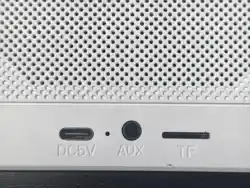
4.Unplug any USB drives, TF cards, or 3.5mm audio
cables from the speaker, turn it off, then turn it back on
before attempting to connect again.
5.Keep away from sources of interference and obsta-
cles while using
Charging Issues
1. Use the original provided cable.
2. Change the charger for charging.
3. Do not charge in high-temperature environments.

FREQUENTLY ASKED QUESTIONS (FAQS)
Not Turning On
1. Confirm whether the speaker has power.
2. Replace the charging cable and charger, and
recharge the speaker.
3. Remove the SD card, USB drive, and audio cable,
then try again.
One Side No Sound
1. Disconnect the 3.5mm cable;
2. Change the song;
3. Turn off the speaker and then turn it back on.

FCC WARNING
This device complies with part 15 of the FCC Rules.
Operation is subject to the following two conditions:(1)
This device may not cause harmful interference, and
(2) this device must accept any interference received,
including interference that may cause undesired opera-
tion.
Any Changes or modifications not expressly approved
by the party responsible for compliance could void the
user's authority to operate the equipment.
This equipment has been tested and found to comply
with the limits for a Class B digital device, pursuant to
part 15 of the FCC Rules. These limits are designed to
provide reasonable protection against harmful interfer-
ence in a residential installation. This equipment gener-
ates uses and can radiate radio frequency energy and,
if not installed and used in accordance with the instruc-
tions, may cause harmful interference to radio commu-
nications. However, there is no guarantee that interfer-
ence will not occur in a particular installation. If this
equipment does cause harmful interference to radio or
television reception, which can be determined by
turning the equipment off and on, the user is encour-
aged to try to correct the interference by one or more of
the following measures:

WARRANTY STATEMENT:
All products are warranted to be free from defective
materials and workmanship. The warranty period for all
equipment provided by our company is 12 months after
purchase. If you have any questions, please contact a
customer service representative for assistance.
FCC WARNING
- Reorient or relocate the receiving antenna.
- Increase the separation between the equipment and
receiver.
- Connect the equipment into an outlet on a circuit
different from that to which the receiver is connected.
- Consult the dealer or an experienced radio/TV tech-
nician for help.
The device has been evaluated to meet general RF
exposure requirement. The device can be used in
portable exposure condition without restriction.