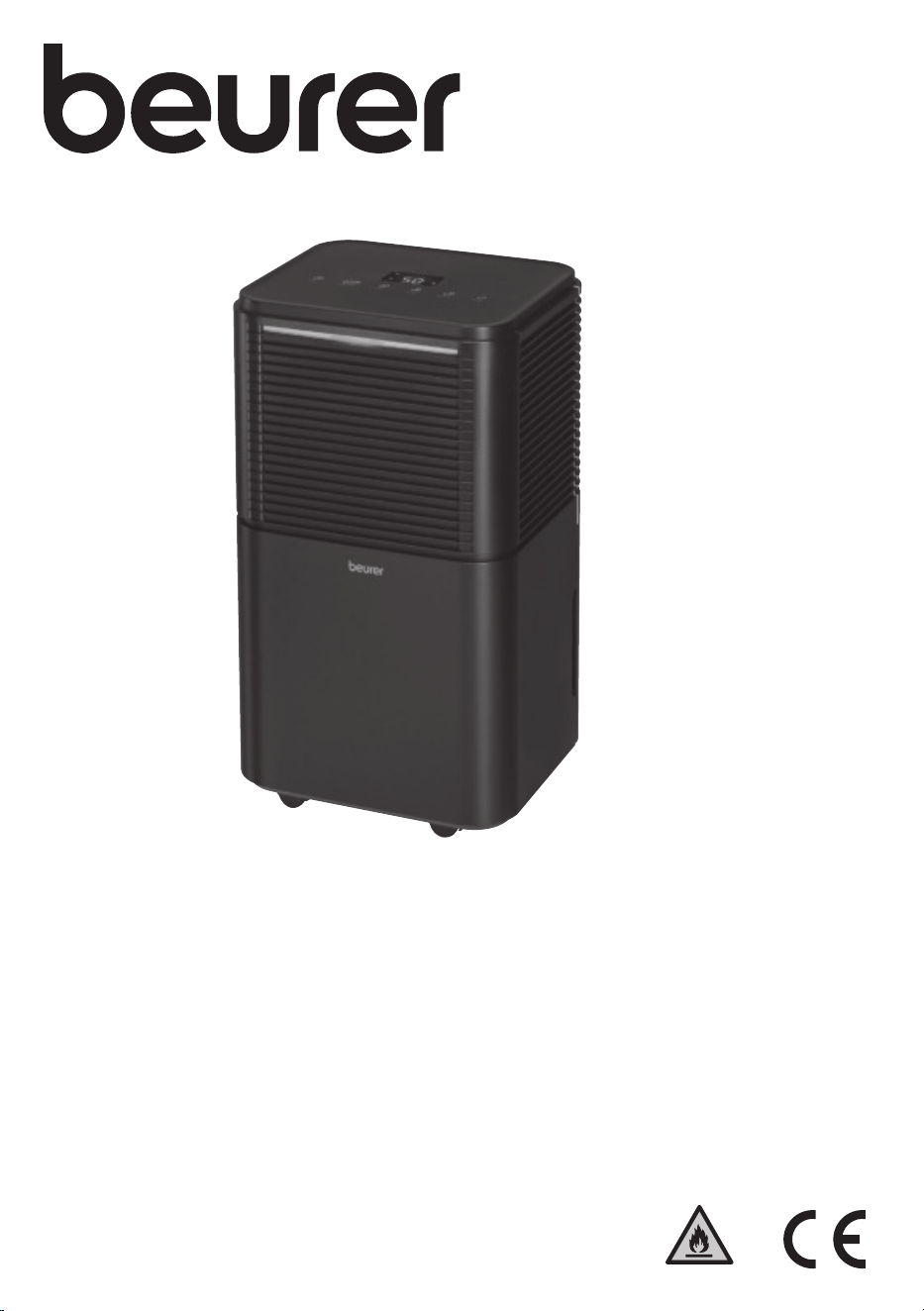
EN Air dehumidifier
Instructions for use
LE 150
R290
2
2
1
10
4
26
25 24 23
22
21
17
18
19
20
13
12
11
161514
9
3
5
6
8
7

3
Read these instructions for use carefully before initial use. Follow the warn-
ings and safety notes. Keep these instructions for use for future reference.
Make the instructions for use accessible to other users. If the device is
passed on, provide the instructions for use to the next user as well.
1. Included in delivery .................................................................4
2. Signs and symbols ..................................................................4
3. Intended use ............................................................................ 4
4. Warnings and safety notes ......................................................4
5. Device description ................................................................... 6
6. Usage ......................................................................................7
6.1 Setting up the air dehumidifier ......................................7
6.2 Switching the air dehumidifier on /o............................7
6.3 Setting the fan speed ....................................................7
6.4 Setting the dehumidification mode ...............................7
6.5 Setting a special mode .................................................8
6.6 Setting the timer ...........................................................8
6.7 Humidity indicator .........................................................8
6.8 Defrost function ............................................................8
6.9 Emptying the water tank ............................................... 8
6.10 Condensate hose ..........................................................9
7. Cleaning, care and maintenance ............................................. 9
7.1 Cleaning the housing ....................................................9
7.2 Cleaning the water tank ................................................9
7.3 Cleaning the air filter .....................................................9
8. Accessories and replacement parts ...................................... 10
9. What if there are problems? ..................................................10
10. Disposal ............................................................................... 10
11. Technical specifications ......................................................10
12. Guarantee ............................................................................ 10
ENGLISH
WARNING
•
This device is only intended for domestic/private use, not for commer-
cial use.
•
This device may be used by children over the age of 8 and by people
with reduced physical, sensory or mental skills or a lack of experience
or knowledge, provided that they are supervised or have been instruct-
ed on how to use the device safely, and are fully aware of the conse-
quent risks of use.
•
Children must not play with the device.
•
Cleaning and user maintenance must not be performed by children
unless supervised.
•
If you are not using the device, unplug the mains plug before transport-
ing and/or cleaning it.
•
Set up the device on a sturdy, level surface in such a way that provides
50 cm clearance on all sides.
•
Clean the device using only the methods specified. Under no circum-
stances must liquid enter the fan unit.
•
Do not use any solvent-based cleaning products.
•
If the mains cable is damaged, it must be replaced by the manufactur-
er, its Customer Service team or similarly qualified individuals to avoid
danger.
CONTENTS
4
1. INCLUDED IN DELIVERY
Check that the exterior of the cardboard delivery packaging is in-
tact and make sure that all contents are included in the delivery.
Before use, ensure that there is no visible damage to the device
or accessories and that all packaging material has been removed.
If you have any doubts, do not use the device and contact your
retailer or the specified Customer Services address.
•
1 air dehumidifier
•
1 condensate hose
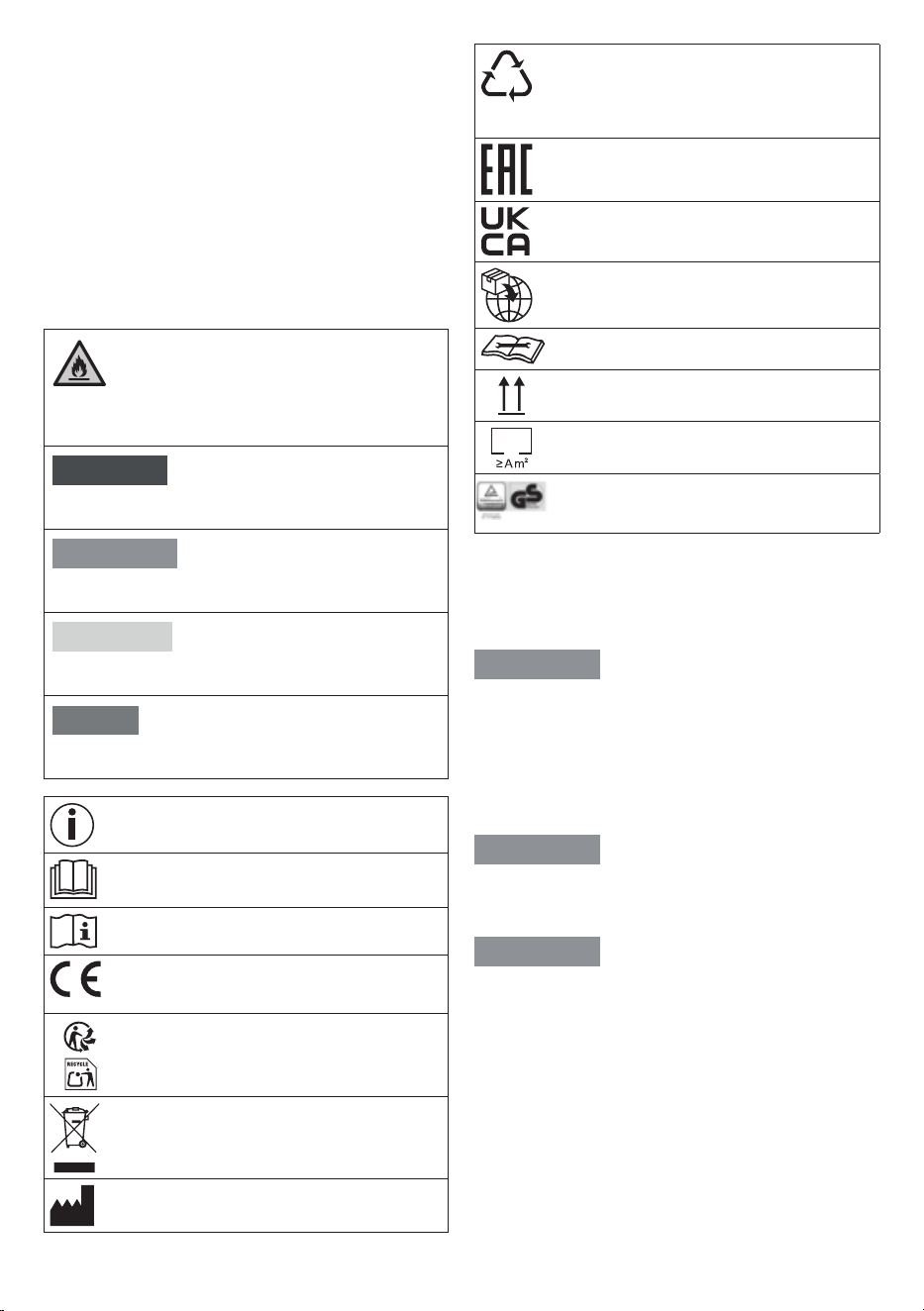
2. SIGNS AND SYMBOLS
The following symbols are used on the device, in these instruc-
tions for use, on the packaging and on the type plate for the de-
vice:
DANGER
This symbol indicates that this device uses flammable coolant.
There is a risk of fire if the coolant leaks and is exposed to an
external ignition source.
DANGER
Indicates an imminent danger. If it is not avoided, death or
serious injury will occur.
WARNING
Indicates a potentially impending danger. If it is not avoided,
there is a risk of death or serious injury.
CAUTION
Indicates a potentially imminent hazard. If it is not avoided,
slight or minor injuries may result.
NOTICE
Indicates a potentially harmful situation. If it is not avoided, the
device or something in its vicinity may be damaged.
Product information
Note on important information
Read the instructions
Consult instructions for use
CE labelling
This product satisfies the requirements of the appli-
cable European and national directives.
Separate the product and packaging elements
and dispose of them in accordance with local
regulations.
The electronic device must not be disposed of with
household waste
Manufacturer
B
A
Marking to identify the packaging material.
A = material code,
B = material number:
1–7 = plastics,
20–22 = paper and cardboard
The products demonstrably meet the requirements
of the Technical Regulations of the EAEU
United Kingdom Conformity Assessed Mark
Importer
Maintenance indicator; read the technical manual
Store in an upright position
Minimum room floor area
Tested for safety in accordance with the require-
ments of the “Produktsicherheitsgesetz” (German
Product Safety Act)
3. INTENDED USE
The air dehumidifier is intended only for dehumidifying the air in-
doors in closed rooms, excluding laundry rooms and unventilated
cellars. The air dehumidifier is intended for private use only. Do not
use the device in the immediate vicinity of bathtubs and showers.
WARNING
If you suer from a severe respiratory or lung disease, consult
your doctor before using the air dehumidifier. The device is only
intended for the purpose described in these instructions for use.
The manufacturer is not liable for damage resulting from improper
or careless use.
4. WARNINGS AND SAFETY NOTES
WARNING
Danger of suocation! Keep packaging material away from chil-
dren.
Electric shock
WARNING
As with every electrical device, use this air dehumidifier carefully
and cautiously in order to avoid danger due to electric shock.
•
Therefore, only operate the device at the mains voltage and
frequency indicated on the device (the type plate can be
found next to the mains connection cable of the device unit).
•
Never operate the device if it or any of its accessories are visi-
bly damaged or have been dropped. If the device is defective,
do not operate it again; contact Beurer Customer Services
instead.
•
The device must only be used on a mains socket with a resid-
ual-current protective device (risk of electric shock).
•
Pull the mains adapter plug out of the socket in the case of
operational faults, before cleaning and when the device is not
in use.
5
•
In the event of defects or operational faults, switch the device
o immediately and disconnect it from the mains socket. Do
not pull on the mains cable or on the device to disconnect the
plug from the socket. Never hold or carry the device by the
mains cable. Keep the cables away from hot surfaces.
•
Always switch o the device before disconnecting the mains
plug.
•
Never disconnect the mains plug with wet or damp hands.
•
Keep the device away from fire and flammable or explosive
objects.
•
Ensure that the openings of the air dehumidifier and the
mains cable do not come into contact with water, steam or
other liquids.
•
Do not use the device in close proximity to flammable or ex-
plosive gas mixtures.
•
Never pick up a device that has fallen into water. Disconnect
the mains plug immediately.
•
Do not drop the device or subject it to any impacts.
•
This device must be installed in accordance with the local
installation regulations.
•
Do not tilt or turn over the device.
•
Do not use an extension cable or adapter plug.
•
Do not climb or sit on the device.
•
Do not insert fingers or other objects into the air outlet
2
.
•
Do not touch the air inlet
7
or the aluminium fins of the de-
vice.
•
Do not operate the device if it has been dropped or damaged,
or if it shows signs of malfunction.
•
Do not clean the device with chemicals.
•
Make sure that the device is far away from fire and flammable
or explosive objects.
•
The device must be stored in a way that prevents mechanical
damage.
•
The device must not be broken up or incinerated, even after
use.
•
Please note that refrigerants are odourless.
•
The pipes must be protected against physical damage and
must not be installed in an unventilated room if it is smaller
than 4 m².
•
The device must be stored in a well-ventilated room of the
same size as that specified for operation.
•
Never immerse the device in water or any other liquid. Water
must not get onto or inside the device.
•
The device must not be connected to the power supply with
other household appliances using a multi-outlet power strip.
•
Do not use cable extensions.
•
The device must not be set up on a wet or flooded surface.
•
Do not hang curtains or wet clothing in front of the air out-
let
2
as this will overload the device.
•
Do not hang wet clothing over the device as water may drip
into the device.
Repairs
WARNING
•
Only specialist personnel may perform repairs on electrical
devices. Improper repairs may put users in significant danger.
For repairs, please contact Customer Services or an author-
ised retailer.
•
The device must not be dismantled or opened using tools.
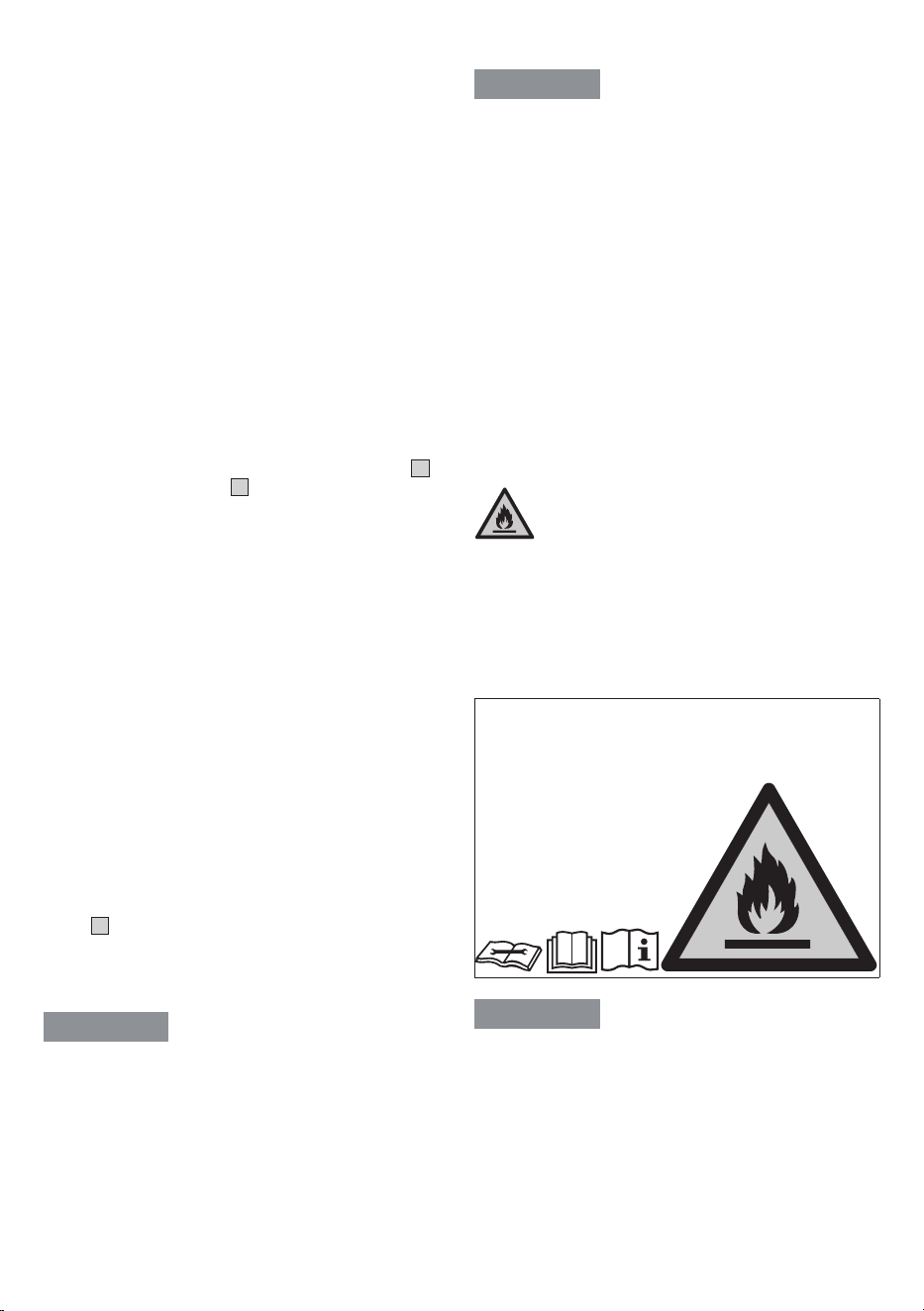
Risk of fire
WARNING
There may be a risk of fire if the device is used improperly or these
instructions for use are ignored!
•
Therefore, never operate the device underneath a cover, such
as a blanket, pillow, etc.
•
Never use the device near petrol or other highly flammable
substances.
•
Never set up the device in a place where it could be exposed
to sources of heat.
•
Never set up the device near sources of heat such as radi-
ators, heating coils, ovens or other products that generate
heat.
•
Never set up the device in an area where oil or water could
splash on it.
•
Never set up the device in a place where it is exposed to
direct sunlight.
•
Never set up the device in a place where it is exposed to
mechanical vibrations, shocks or excessive dust.
•
Never set up the device in a place with insucient ventilation
(e.g. in a cupboard or bookcase).
•
Never place the device on an uneven surface.
•
Avoid direct sunlight when operating and storing the device.
DANGER
Warnings on handling R-290 refrigerant
(propane gas)
The device uses R-290 (propane gas) as the refrigerant. R-290 has
no harmful eect on the ozone layer (ODP), has a low greenhouse
eect (GWP) and is available worldwide. R-290 is an ideal refrig-
erant for this type of application due to its ecient and energetic
properties. Given the high flammability of the refrigerant, the fol-
lowing special precautions must be taken.
WARNING
The device must be set up, operated and stored in a room with
a floor area greater than 4 m
2
.
WARNING
A failure to observe the following refrigerant warnings may result in
explosions, death, injury or material damage.
•
The device is only intended for use with R-290 (propane gas)
as the refrigerant. Do not use any other refrigerant.
•
The refrigerant circuit is sealed. Maintenance work relating to
the refrigerant must only be carried out by a qualified tech-
nician.
•
Do not release the R-290 (propane gas) refrigerant into the
atmosphere.
•
The R-290 (propane gas) refrigerant is flammable and heavier
than air. It first accumulates in low areas, but can be recircu-
lated by the fans.
6
•
If propane gas is present in the room or even just suspected,
do not allow untrained personnel to attempt to identify the
cause.
•
The R-290 (propane gas) refrigerant used in the device is
odourless. The absence of an odour does not mean that no
gas has escaped.
•
If you discover a gas leak on the device, immediately evac-
uate all persons from the room. Ventilate the room. Do not
restart the device; contact Beurer Customer Services instead.
•
Do not use naked flames, cigarettes or other possible sourc-
es of ignition near the device.
Handling
IMPORTANT
•
Always switch o and unplug the device each time after using
it and before cleaning it.
•
Do not place any objects in device openings or in rotating
parts.
•
If the temperature is low, the condensate hose
9
must not
be routed outside.
•
Before transporting the device, empty the water tank
1
to
avoid spilling the water.
•
Do not tilt the device as escaping water could damage the
device.
•
Check the device from time to time when it is in operation.
•
Unplug the device when it is not in use.
NOTICE
•
Do not place any objects on the device.
•
Do not expose the device to high temperatures.
•
Avoid water damage by handling the device carefully (e.g.
water damage from splashing in the vicinity of wooden floors).
•
This device is designed to provide optimum performance be-
tween 5°C and 30°C.
•
Always transport the device in an upright position and not on
its side/horizontally.
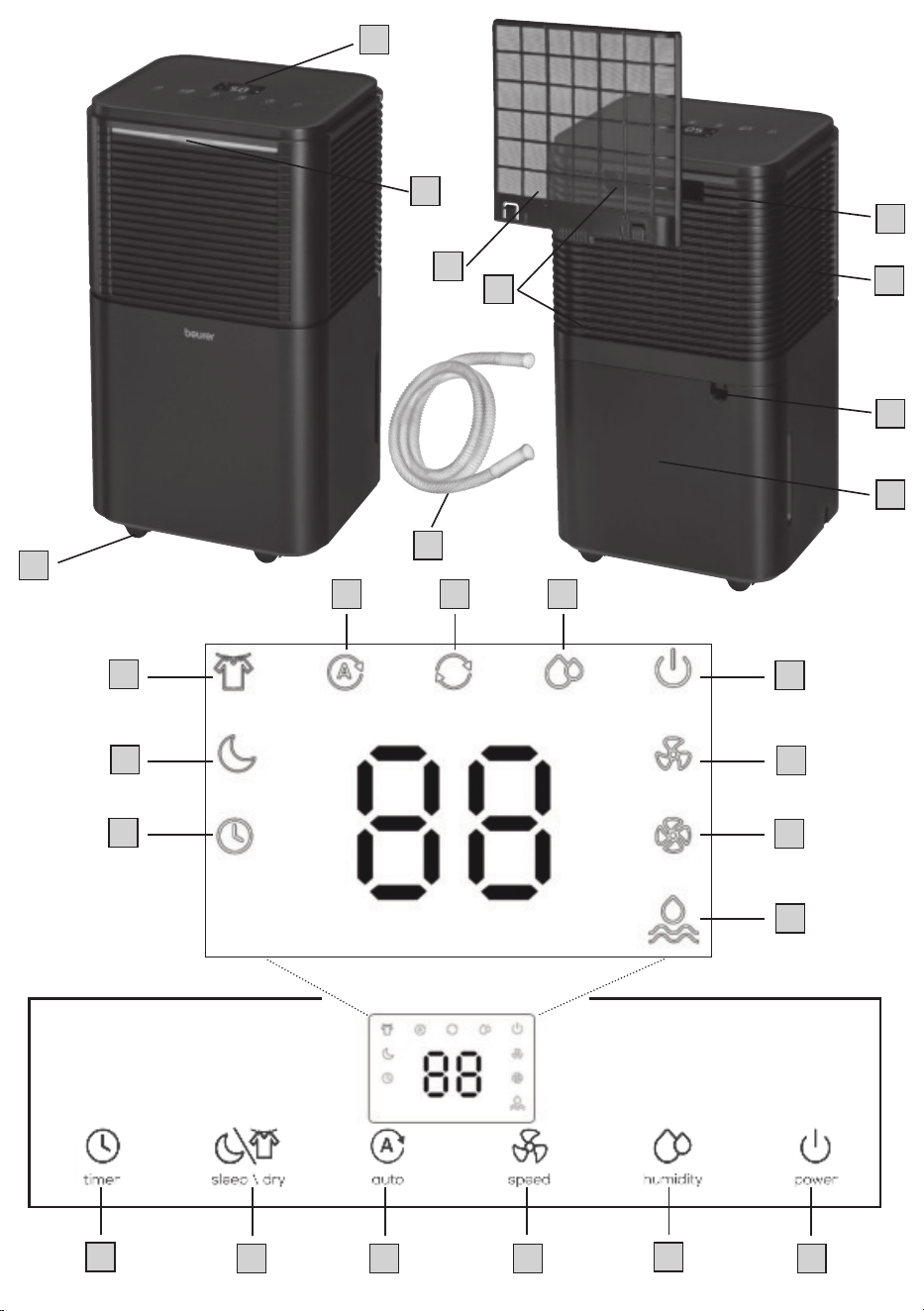
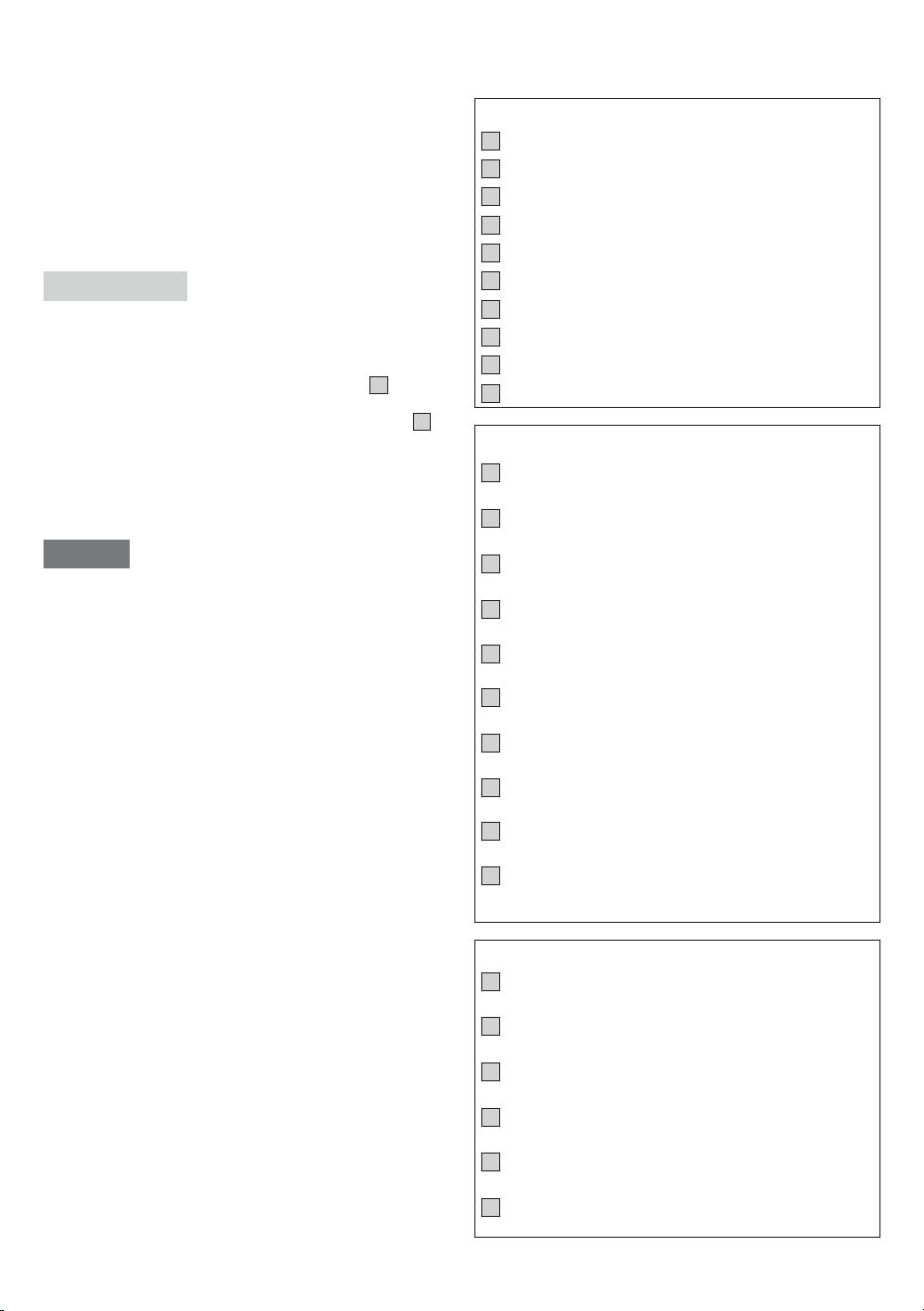
5. DEVICE DESCRIPTION
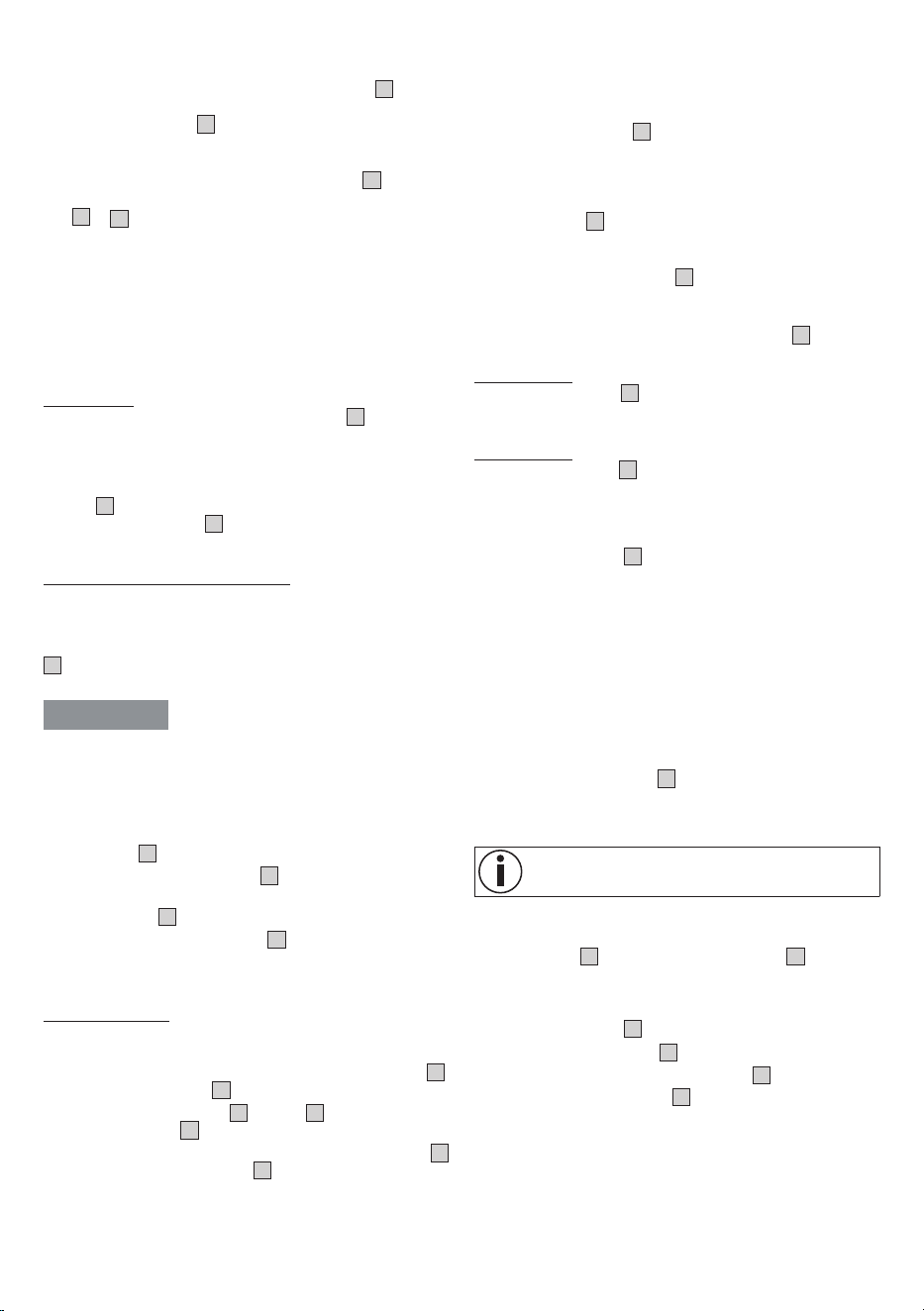
The related illustrations are on page 3.
Device
1
Water tank
2
Air outlet
3
Control unit with LED displays
4
Carrying handle
5
Humidity indicator
6
Air filter
7
Air inlet
8
Opening for condensate hose
9
Condensate hose
10
Castors
Display
11
Timer symbol
(lights up when the timer is on)
12
Sleep symbol
(lights up when sleep mode is on)
13
Laundry drying symbol
(lights up when laundry drying mode is on)
14
Automatic symbol
(lights up when automatic mode is on)
15
Continuous operation symbol
(lights up when continuous dehumidification is on)
16
Target humidity symbol
(lights up when a target humidity can be set)
17
ON/OFF symbol
(lights up as soon as the device is in standby mode)
18
Low fan speed
(lights up when the low fan speed has been set)
19
High fan speed
(lights up when the high fan speed has been set)
20
Water level symbol
(lights up when the water tank is full and needs to be emp-
tied or has not been inserted)
Buttons
21
ON/OFF button
(switches the device on /o)
22
Humidity button
(set a target humidity)
23
Fan speed button
(set the low and high fan speed)
24
Automatic button
(set automatic mode)
25
Sleep/laundry drying button
(set sleep mode/laundry drying mode)
26
Timer button
(set the timer duration)
7
6. USAGE
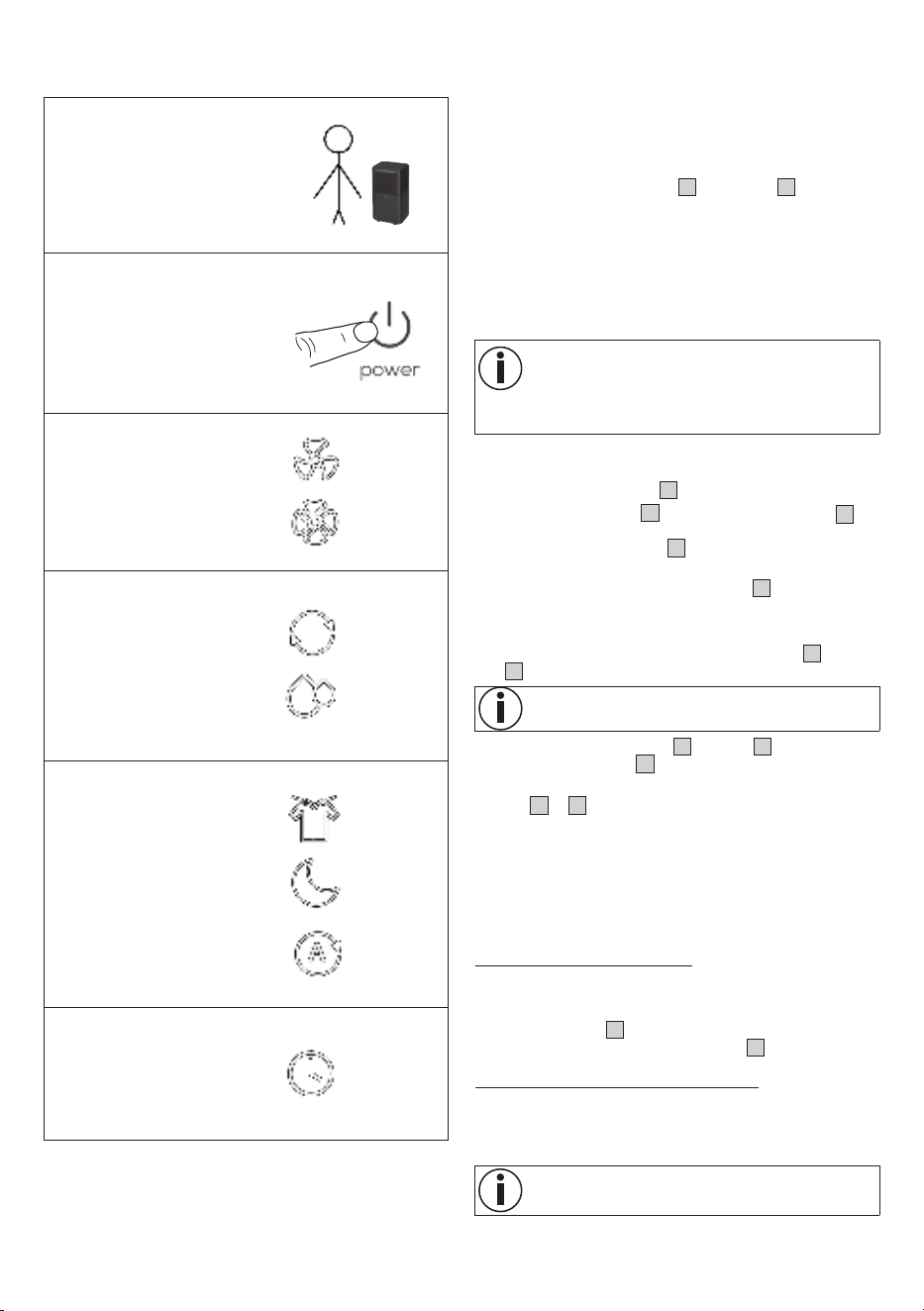
Overview of usage
STEP 1
Set up the air dehumidifier
(Section 6.1)
STEP 2
Switch on the air dehumidifier
(Section 6.2)
STEP 3
Select the fan speed
(Section 6.3)
Low
High
STEP 4
Select the dehumidification
mode
(Section 6.4)
Continuous
dehumidifi-
cation
Dehumidifica-
tion with target
humidity
STEP 5 (optional)
Set a special mode
(Section 6.5)
Laundry
drying mode
Sleep mode
Automatic
mode
STEP 6 (optional)
Set the timer
(Section 6.6)
1 - 24 hours
6.1 Setting up the air dehumidifier
1.
Remove the device from the top of the box without opening
the film bag.
2.
Now remove all plastic films. Unwind the mains cable fully in
order to avoid overheating.
3. Check the device, mains plug and cable for damage each time
before using them.
4. Place the device on a firm, level and water-resistant surface to
prevent vibrations and noise.
5. Set up the air dehumidifier in such a way that provides 50 cm
clearance on all sides. Do not use naked flames, cigarettes or
other possible sources of ignition near the device.
6. Make sure that the air outlet
2
and air inlet
7
of the device
are never blocked.
7.
Insert the mains plug into a suitable socket. Ensure that the
cable does not pose a trip hazard.
8.
Before initial use, leave the device to rest in an upright posi-
tion for at least 24 hours. If the device has been tilted more
than 45°, leave it in an upright position for at least 24 hours
before initial use.
If the device has fallen over or if you have relocated the
device, leave it to rest in an upright position for at least
24 hours. Do not set up the device in a place where
flammable gases can escape. The device must be op-
erated in a room with a floor area greater than 4 m².
6.2 Switching the air dehumidifier on /o
1. Press the ON/OFF button
21
to switch on the air dehumidifier.
The low fan speed
18
and target humidity symbol
16
light up.
2.
Press the ON/OFF button
21
again to switch o the air de-
humidifier.
All LEDs except the ON/OFF symbol
17
go out.
6.3 Setting the fan speed
The air dehumidifier has two fan speeds: One low
18
and one
high
19
fan speed.
Cannot be selected when the air dehumidifier is in sleep
mode or laundry drying mode.
•
To switch between the low
18
and high
19
fan speed, press
the fan speed button
23
when the air dehumidifier is on.
The current fan speed setting lights up on the display
(
18
or
19
).
6.4 Setting the dehumidification mode
The device has two dierent dehumidification modes.
•
Continuous dehumidification
•
Dehumidification with target humidity
Continuous dehumidification
In continuous dehumidification mode, the room is dehumidified
without interruption.
•
To switch on continuous dehumidification mode, press the
humidity button
22
repeatedly until “--” appears on the dis-
play. The continuous operation symbol
15
lights up.
Dehumidification with target humidity
In dehumidification with target humidity mode, the room is dehu-
midified only up to a preset target value (e.g. 50% humidity). The
device stops dehumidifying the air once the preset target value
has been reached.
It is only possible to dehumidify the air with a target hu-
midity in this mode or in sleep mode.
8
1.
If no modes have been selected, you can freely choose the
target humidity and fan speed.
2. Select a target humidity using the humidity button
22
(you can
select a level of between 30-80% in increments of 5%). The tar-
get humidity symbol
16
lights up. If “--” appears on the display
after passing 80% when making your selection, the device will
run in continuous dehumidification mode again.
3.
In addition, you can use the fan speed button
23
to choose
between the low and high fan speed. The fan speed symbol
18
or
19
lights up.
6.5 Setting a special mode
The device has three optional special modes that you can select
if desired.
•
Sleep mode
•
Laundry drying mode for clothes
•
Automatic mode
Sleep mode
Sleep mode automatically sets the low fan speed
18
and switches
o all LEDs and button tones to ensure a restful night’s sleep with
no disturbances. The target humidity can always be set in sleep
mode.
•
To switch on sleep mode, press the sleep/laundry drying but-
ton
25
.
The sleep symbol
12
lights up for 3 seconds and then
dims. All other LEDs and button tones are o.
Laundry drying mode for clothes
The device has a special laundry drying mode for when you want
to dry clothes indoors and counteract the resulting humidity. It
also enables the clothes to dry faster.
This laundry drying mode automatically sets the high fan speed
19
and continuous dehumidification. You cannot set a target hu-
midity here.
WARNING
Risk of electric shock! Do not place any laundry directly on the
device. Do not hang laundry over the device as water may flow
into the device and cause a short circuit.
Position the device so that there is a clearance of at least 50 cm on
all sides. Keep the room closed (incl. doors and windows).
1.
To switch on laundry drying mode, press the sleep/laundry dry-
ing button
25
twice.
The laundry drying symbol
13
lights up on the display.
2.
To switch o laundry drying mode again, press the sleep/laundry
drying button
25
once.
The laundry drying symbol
13
goes out on the display.
The device switches to the “Dehumidification with target
humidity” setting.
Automatic mode
In automatic mode, the air in the room is automatically dehumidi-
fied so that the humidity is always between 45-55%.
1. To switch on automatic mode, press the automatic button
24
.
The automatic symbol
14
lights up.
2.
To switch between the low
18
and high
19
fan speed, press the
fan speed button
23
when the air dehumidifier is on.
3. To switch o automatic mode, press the automatic button
24
again. The automatic symbol
14
goes out.
6.6 Setting the timer
The air dehumidifier features a timer function that you can use to
determine after how many hours the device should switch itself o
(when in operation) or on.
1. Use the timer button
26
to select your desired timer duration
(you can select a duration between 1-24 hours in increments of
1 hour). The timer duration that is currently set is shown on the
display. Once the set timer duration has flashed five times on
the display, this means the timer duration is confirmed and the
timer symbol
11
lights up. After confirming the timer duration,
the display shows the current humidity level again.
2. To view the remaining timer duration whilst the device is run-
ning, press the timer button
26
. The display briefly shows the
remaining timer duration (in hours) after which the air dehumid-
ifier will switch itself o.
3.
To switch o the timer, press the timer button
26
repeatedly
until the display shows “00”.
Switch-o time:
Press the timer button
26
while the device is running to set the
switch-o time. The device will switch o after the selected time
period.
Switch-on time:
Press the timer button
26
while the device is switched o to set
the switch-on time. The device will switch on after the selected
time period.
6.7 Humidity indicator
The humidity indicator
5
shows the current ambient humidity
level on the device.
Low humidity of < 45% = humidity indicator is blue
Optimum humidity of 45-65% = humidity indicator is green
High humidity of > 65% = humidity indicator is red
6.8 Defrost function
If the device is operated in an environment with low temperatures,
frost may form inside the device. To ensure perfect operation, the
air dehumidifier features a defrost function.
If the temperature is between 5°C and 16°C, the device automati-
cally starts with the defrost function for 10 minutes.
The ON/OFF symbol
17
flashes on the display whilst the
defrost function is running.
Once the 10 minutes have elapsed, the device continues running
normally for 60 minutes.
Do not switch o the device whilst the defrost function
is running or attempt to accelerate the defrost process.
6.9 Emptying the water tank
If the water tank
1
is full, the water level symbol
20
will light up
red and the device will automatically stop running. An acoustic
signal will sound (except in sleep mode) and the message “FL” will
appear on the display.
To empty he water tank
1
, proceed as follows:
1. Press the ON/OFF button
21
to switch o the air dehumidifier.
All LEDs except the ON/OFF symbol
17
go out.
2. Carefully pull the water tank
1
backwards using the recessed
handles at the sides.
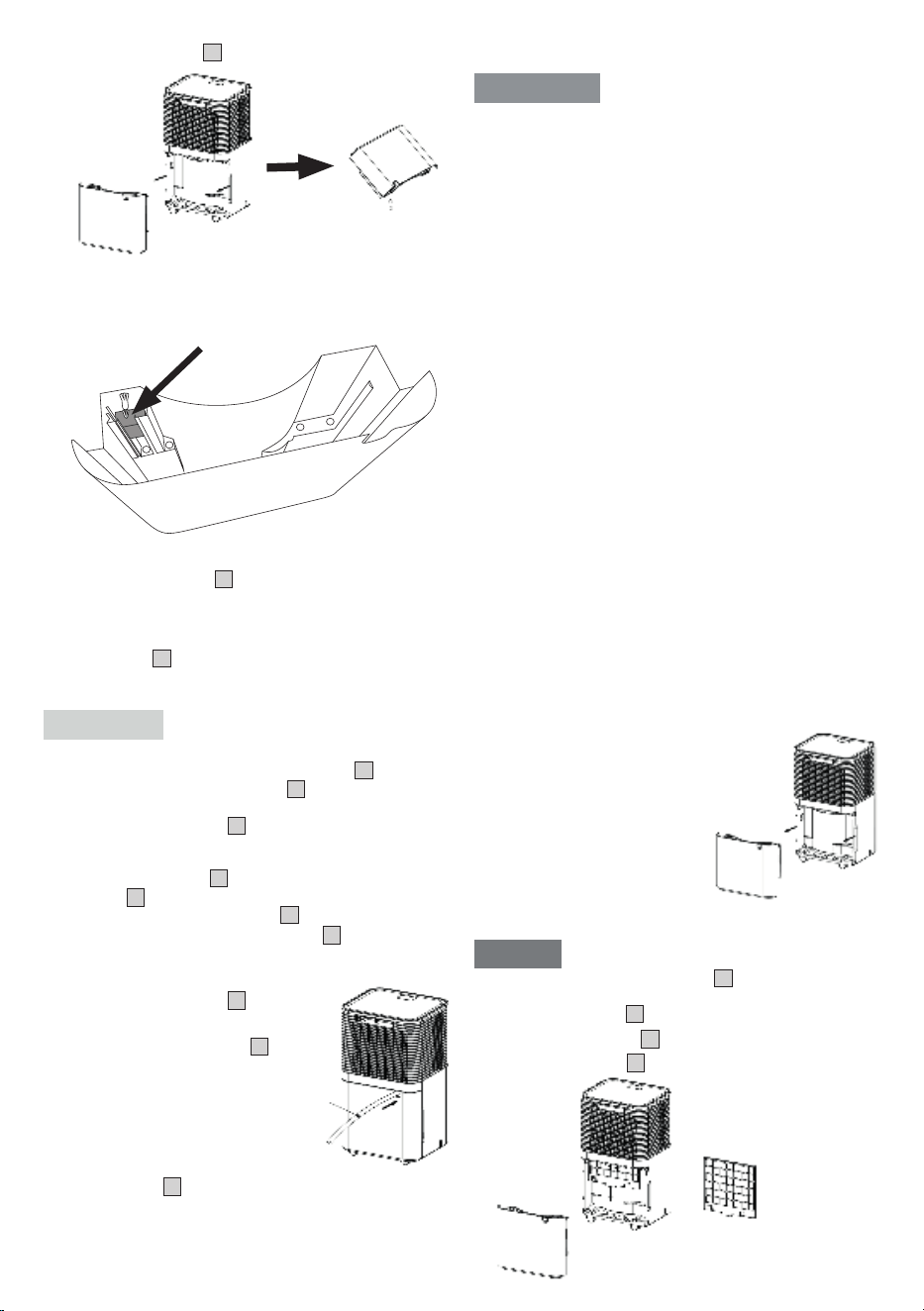
9
3. Empty the water tank
1
via the tank outlet.
4.
Check that the float can move freely before reinserting the tank.
The float must not be blocked. If the float is blocked, this can
cause an incorrect water level to be shown on the display (“FL”
for a full water tank).
5. Reinsert the water tank
1
into the device.
6.10 Condensate hose
If you want the device to run continuously, connect the supplied
condensate hose
9
to the device. The condensate can automati-
cally drain into a suciently sized collection container or a suitable
drain.
CAUTION
•
Never block the outlet of the condensate hose, otherwise
condensate will flow back into the water tank
1
.
•
Do not bend the condensate hose
9
.
•
Ensure that there is a sucient gradient between the opening
for the condensate hose
8
and the drain to allow the accu-
mulating condensate to flow away. Ensure that the end of the
condensate hose is positioned flat against the ground.
•
The condensate hose
9
must be correctly connected to the
opening
8
on the device.
•
Do not kink the condensate hose
9
.
•
The opening for the condensate hose
8
must always be
tightly sealed with the silicone plug when the condensate
hose is not connected.
1. Pull the condensate hose
9
straight.
2.
Insert one end of the condensate hose
through the round opening
8
on the
rear of the device, above the water tank.
3.
Press the tube firmly onto the water
outlet.
4.
Direct the other end of the condensate
hose into a drain.
5. If you want to collect the condensate in
the water tank
1
again, pull out the condensate hose.
7. CLEANING, CARE AND MAINTENANCE
WARNING
•
Before performing any cleaning or maintenance work, always
ensure that the mains plug of the device has been properly
disconnected!
•
Always store the device in its original packaging. Only store
the device in an upright position. Do not place any objects
on the device.
•
Store the device in a well-ventilated room that measures at
least 4 m².
•
Store the device in dry conditions and protected from frost
and heat.
•
Clean the device and allow it to dry fully before putting it into
storage.
•
The device must be stored in a room where there are no per-
manent sources of heat (e.g. naked flames, a running gas
device or a running electric heater).
This device contains R-290 refrigerant. However, the quantity of
refrigerant is less than 1 kg and it is kept in a sealed cooling circuit.
Maintenance may only be carried out by trained technicians or
Beurer service personnel. The device does not need to be refilled
with refrigerant provided that it is used correctly and the coolant
circuit is undamaged.
Regular cleaning is a prerequisite for hygienic and fault-free oper-
ation. Always fully empty and thoroughly clean the water tank of
the air dehumidifier if the device has not been used for more than
3 days. A lack of cleaning and hygiene can cause bacteria, algae
and fungi to form in the water.
7.1 Cleaning the housing
Clean the air dehumidifier with a slightly damp cloth. Do not use
any solvents or other aggressive or abrasive cleaning products, as
the surface may become damaged. Make sure that no moisture
gets inside the device.
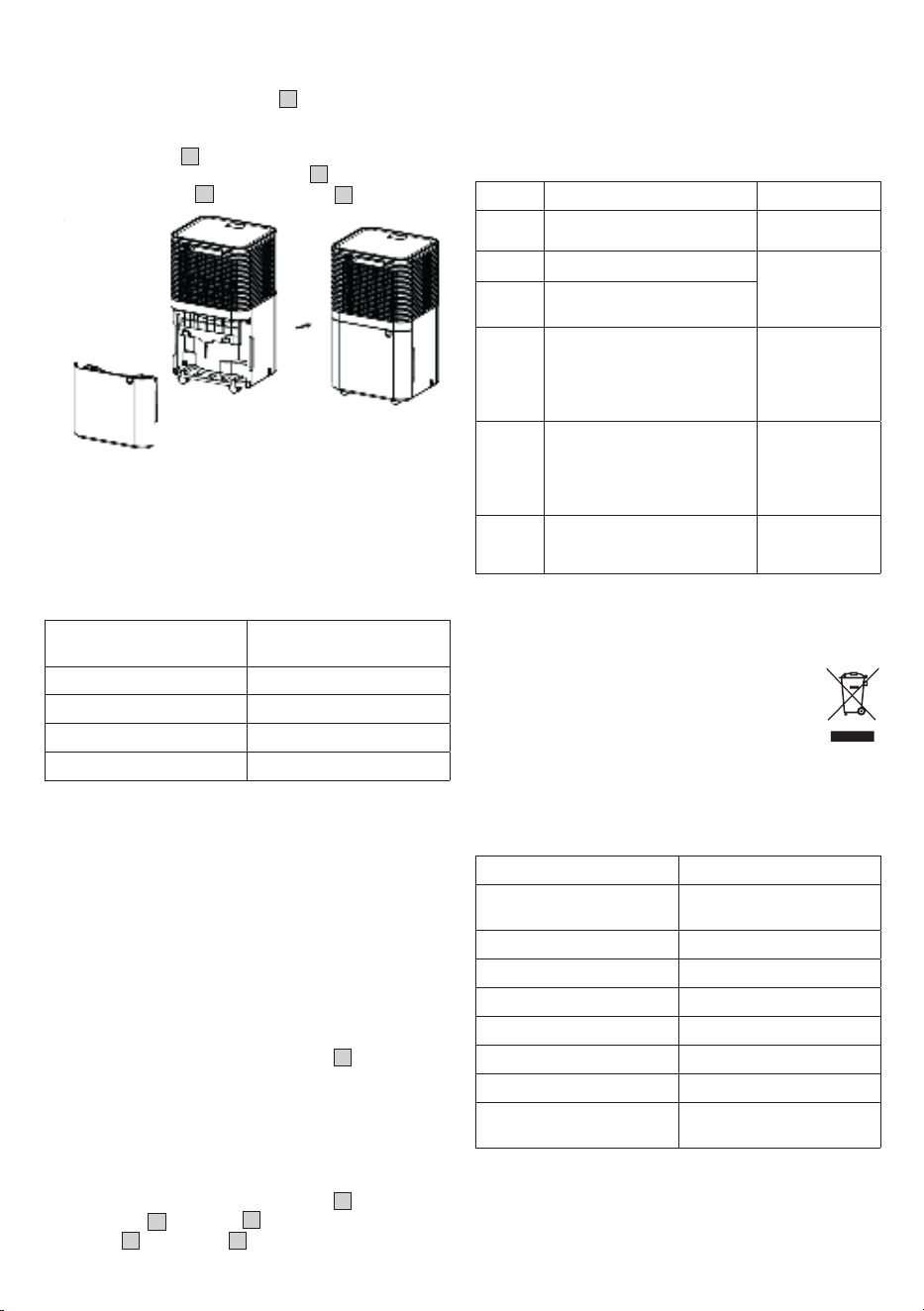
7.2 Cleaning the water tank
1.
Carefully pull the water tank out
backwards as shown.
2.
Rinse out the water tank with clean
water every 2 weeks. If the device
is used very intensively, clean the
water tank more frequently. If
necessary, remove any deposits
in the water tank using a plastic
brush.
7.3 Cleaning the air filter
NOTICE
We recommend cleaning the air filter
6
every 14days as dust
can collect there and restrict the air flow. Do not operate the de-
vice without the air filter
6
installed.
1. Pull out the water tank
1
.
2. Remove the air filter
6
.
10
Subject to errors and changes
3. If it is slightly dirty, use the brush of a vacuum cleaner to care-
fully remove the dust residue from the screen.
4. If it is very dirty, soak the air filter
6
in warm water at a tem-
perature of approx. 40°C. Then rinse it carefully with a neutral
cleaning product.
5. Leave the air filter
6
to dry completely before reinserting it in-
to the device. Never insert the air filter
6
if it is damp or wet.
6. Reinsert the air filter
6
and the water tank
1
into the device.
8. ACCESSORIES AND REPLACEMENT
PARTS
To purchase accessories and replacement parts, please visit
www.beurer.com or contact the corresponding service address
(according to the service address list) in your country. Accessories
and replacement parts are also available from retailers.
Designation Item number and/or order
number
Plastic cover with filter 110.105
Water tank 110.101
Condensate hose 110.106
Water tank lid 110.103
9. WHAT IF THERE ARE PROBLEMS?
The device is not working:
•
The device is not connected to the mains power supply. Con-
nect the mains plug and switch on the device.
•
The device has switched itself o for safety reasons. Clean
and refill the device before next use. Then switch it on again.
The device automatically stops dehumidifying
the air:
•
The water tank is full. Empty the water tank, then start up the
device again.
•
The water tank was not reinserted correctly. Put the water
tank in the correct position.
•
The air filter is clogged. Clean the air filter
6
.
•
The device may perform an automatic defrost. It will not de-
humidify the air whilst the defrost function is running.
The device is not performing as well as it
should:
•
The room is too big. The device is recommended for use in
rooms measuring up to 30 m².
•
The air filter is clogged. Clean the air filter
6
.
•
The air inlet
7
or air outlet
2
is blocked. Make sure that the
air inlet
7
and air outlet
2
are not blocked.
•
Too much air is being exchanged in the room. Close the win-
dows and doors.
•
The device continues to run even though the target humidi-
ty has been reached. To protect the device components, the
device continues to dehumidify the air for approx. 3 minutes
even after the target humidity has been reached.
An error message appears on the display:
Display Problem Solution
E2
Humidity sensor is faulty
Contact Custom-
er Services
LO
Ambient humidity is < 20%
The air dehumidi-
fier switches itself
o as a safety
measure
HI
Ambient humidity is > 90%
CL
Protection against low temper-
atures:
Ambient temperature is < 5°C
Do not operate
the device in
rooms with a
temperature
below 5°C.
CH
Protection against high tem-
peratures:
Ambient temperature is > 38°C
Do not operate
the device in
rooms with a
temperature
above 38°C.
FL
Water tank is full, not inserted or
not inserted correctly
Empty the water
tank or insert it
correctly
10. DISPOSAL
For environmental reasons, do not dispose of the device in house-
hold waste at the end of its service life. Dispose of the device at a
suitable local collection or recycling point in your coun-
try. Observe the local regulations for material disposal.
Dispose of the device in accordance with EC Directive
Waste Electrical and Electronic Equipment (WEEE). If
you have any questions, please contact the local au-
thorities responsible for waste disposal. You can obtain
the location of collection points for old devices from the local or
municipal authorities, local waste disposal companies or your re-
tailer, for example.
11. TECHNICAL SPECIFICATIONS
Model LE 150
Mains voltage/power AC 220-240 V, 50 Hz / 200 W
(30°C, 80% rH)
Dimensions (L x W x H) 22,0 x 25,0 x 45,5 cm
Deadweight 10.0 kg
Recommended room size up to 30 m²
Tank capacity 2.0 l
Dehumidifying capacity 12 l / 24 h (30°C, 80% rH)
Refrigerant
R-290 (propane gas), 50 g
Wiring diagram See last page of these
instructions for use
12. GUARANTEE
More information on the guarantee and guarantee conditions can
be found in the guarantee leaflet supplied.


12
103.16_LE150_2025-08-26_01_IM1_BEU_EN
Beurer GmbH
Söflinger Str. 218 • 89077 Ulm, Germany • www.beurer.com
www.beurer-gesundheitsratgeber.com • www.beurer-healthguide.com
BEURER UK Ltd.
Suite 16, Stonecross Place, Stonecross Lane North,
WA3 2SH
Lowton,
United Kingdom